



ClickUp vs. Notion: Confronto e Recensioni degli Esperti per il 2026



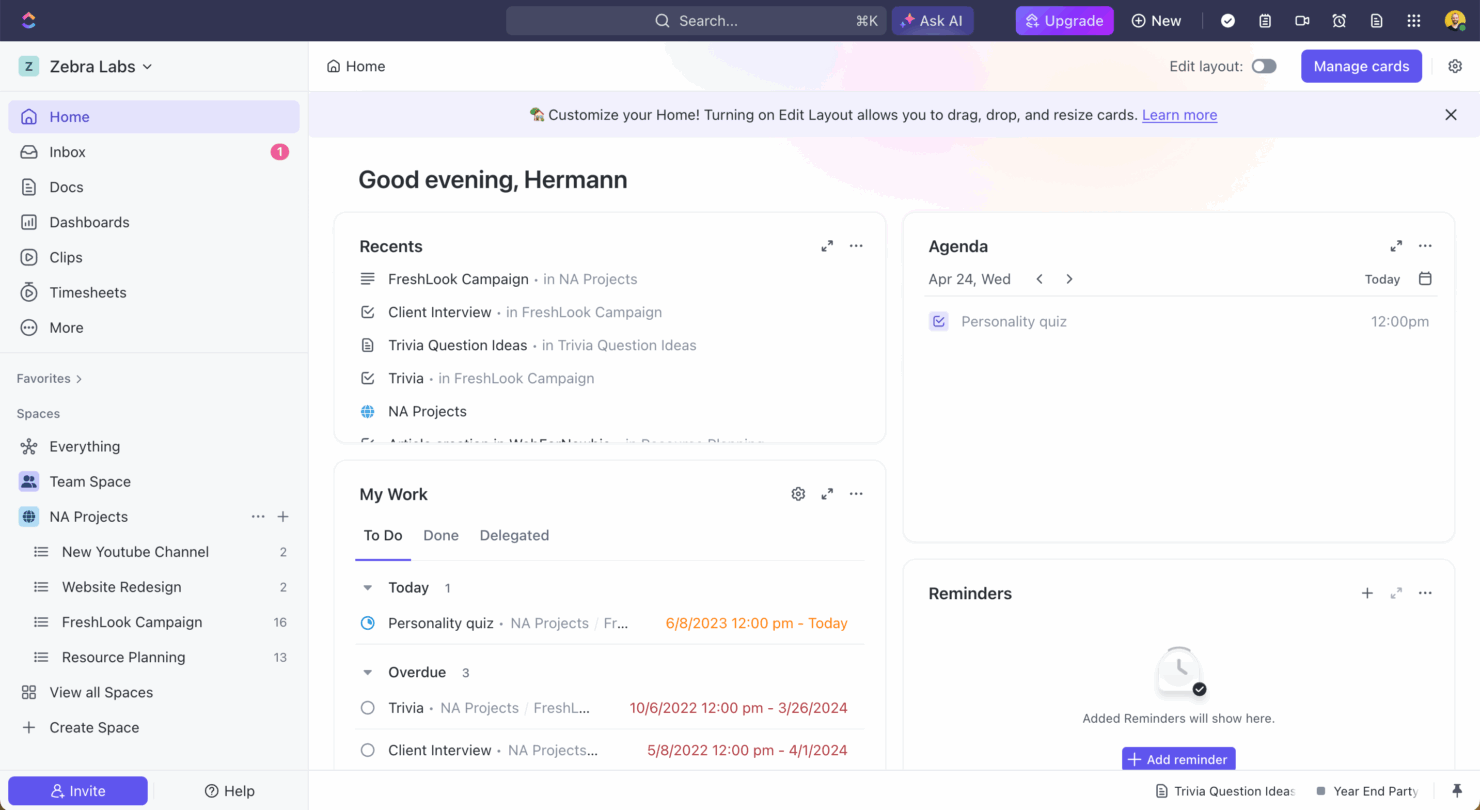
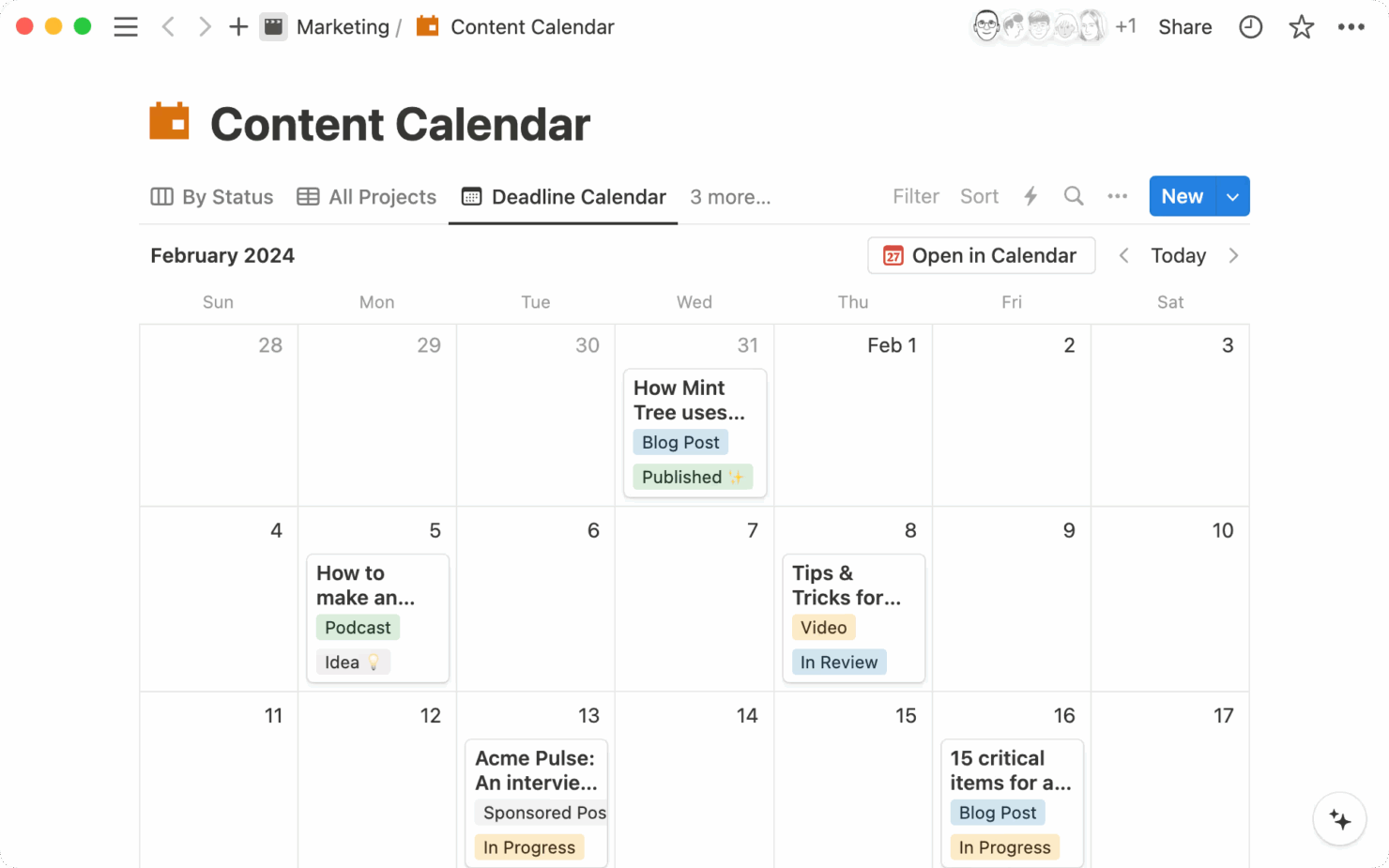
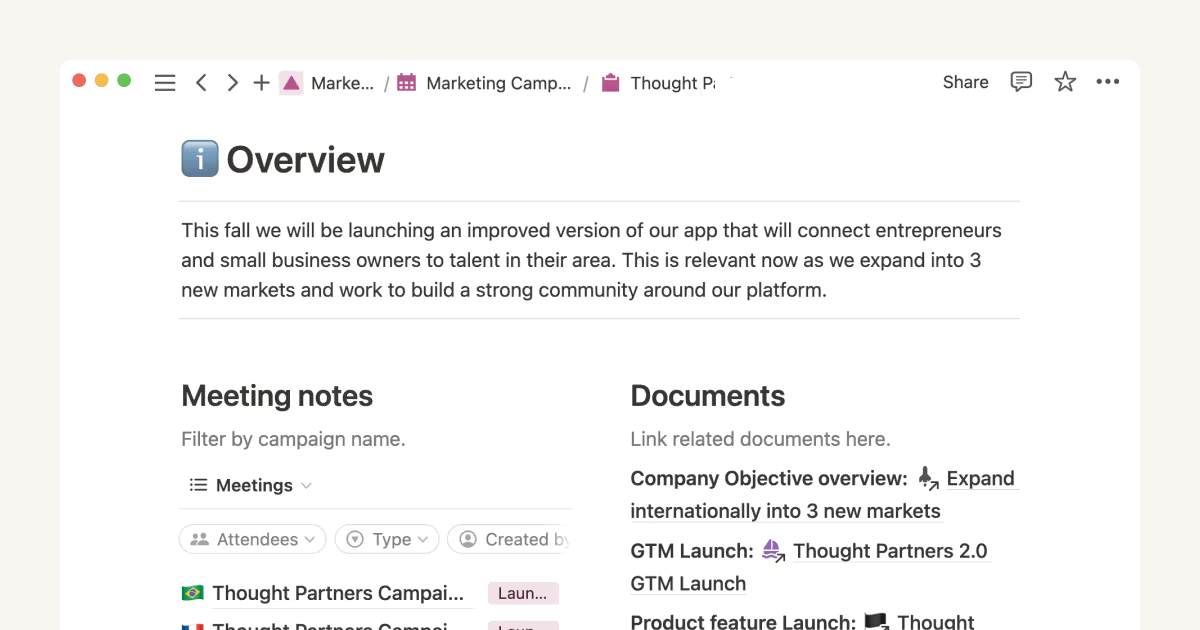
ClickUp è uno strumento versatile di gestione dei progetti progettato per aiutare i team a organizzare e gestire le attività in modo efficiente. Notion offre uno spazio di lavoro flessibile che combina note, attività e database per supportare flussi di lavoro personalizzati.
Sebbene entrambi gli strumenti migliorino la produttività, ClickUp punta sulla gestione strutturata delle attività, mentre Notion si concentra sulla creazione di uno spazio di lavoro digitale personalizzato.
In questo articolo, confronteremo gli strumenti e le loro funzionalità, pro e contro, prezzi e altro ancora, per aiutarti a scegliere il miglior software di gestione progetti per il tuo team.
ClickUp vs. Notion: An Overview
ClickUp


Notion


Perché fidarsi dei nostri consigli sui software
Il nostro team testa e recensisce software dal 2012. In quanto project manager noi stessi, sappiamo quanto sia difficile — e importante — scegliere il software giusto.
Per questa guida, abbiamo valutato gli strumenti attraverso test pratici e ricerche indipendenti, assegnando un punteggio agli strumenti in base ai nostri criteri di selezione. Ci basiamo inoltre sulle competenze di leader di pensiero del settore e di professionisti attivi nella gestione dei progetti.
Le nostre recensioni riflettono il nostro giudizio editoriale umano, non un discorso di vendita.
Revisori esperti:
ClickUp vs. Notion Pricing Comparison
| ClickUp | Notion | |
|---|---|---|
| Free Trial | Free plan + free demo available | Free plan available |
| Pricing | From $7/user/month (billed annually) | From $10/user/month (billed annually) |
Il prezzo di ClickUp offre un modello di abbonamento a livelli con opzioni sia gratuite sia a pagamento, ma potrebbero sorgere costi aggiuntivi per funzionalità premium e integrazioni.
Il prezzo di Notion segue anch’esso una struttura a livelli, con opzioni gratuite e a pagamento, e potenziali costi extra per la collaborazione in team e maggiori necessità di archiviazione.
Per selezionare lo strumento giusto per il budget del tuo progetto, valuta le funzionalità e l’operatività specifiche necessarie al tuo team, confrontale con le offerte di ciascun strumento e considera la scalabilità dei piani tariffari man mano che il tuo progetto cresce.
Entrambi gli strumenti di questo confronto offrono ottimi prezzi per piccoli team, ma scalano in modo molto diverso.
ClickUp vs. Notion Feature Comparison
ClickUp offre funzionalità avanzate per la gestione delle attività che consentono di creare, assegnare e monitorare compiti con facilità, ideale per progetti complessi che richiedono un monitoraggio dettagliato e la gestione dei tempi.
Le basi dati flessibili di Notion permettono di organizzare note, attività e progetti in un unico spazio di lavoro personalizzabile, rendendolo particolarmente adatto ai team che hanno bisogno di un ambiente di pianificazione tutto-in-uno.
ClickUp è ideale per flussi di lavoro incentrati sui task, mentre Notion supporta progetti più adattabili, creativi e collaborativi.
| ClickUp | Notion | |
|---|---|---|
| API | ||
| Calendar Management | ||
| Data Export | ||
| Data Import | ||
| External Integrations | ||
| Multi-User | ||
| Notifications | ||
| Project Management | ||
| Scheduling | ||
| Task Scheduling/Tracking |
ClickUp vs. Notion integrazioni
| Integrazione | ClickUp | Notion |
| Dropbox | ✅ | ✅ |
| Figma | ✅ | ❌ |
| GitHub | ✅ | ❌ |
| Slack | ✅ | ✅ |
| Google Calendar | ✅ | ✅ |
| Discord | ✅ | ❌ |
| HubSpot | ✅ | ❌ |
| Microsoft Teams | ✅ | ❌ |
| API | ✅ | ✅ |
| Zapier | ✅ | ✅ |
ClickUp si integra con Slack per supportare la comunicazione in tempo reale e la gestione delle attività, rendendolo una scelta ideale per i team che si affidano alla messaggistica istantanea per aggiornamenti di progetto. L’integrazione di Notion con Google Calendar aiuta a visualizzare le tempistiche e le scadenze dei progetti, facilitando il monitoraggio di appuntamenti e riunioni.
Mentre ClickUp si concentra sulla gestione delle attività e della comunicazione, Notion offre una visione più ampia della pianificazione e della schedulazione dei progetti.
Sicurezza, conformità e affidabilità di ClickUp vs. Notion
| Fattore | ClickUp | Notion |
| Crittografia dei dati | ClickUp cripta i dati sia a riposo che in transito utilizzando la crittografia AES-256. | Notion utilizza la crittografia AES-256 per proteggere i dati sia a riposo che in transito. |
| Conformità normativa | ClickUp è conforme al GDPR e al CCPA, garantendo il rispetto delle normative sulla privacy dei dati. | Notion si attiene agli standard GDPR per proteggere la privacy dei dati degli utenti. |
| Affidabilità dell'uptime | ClickUp garantisce un uptime del 99,99% grazie a una solida infrastruttura di supporto. | Notion fornisce un servizio affidabile con particolare attenzione al mantenimento di un elevato uptime |
Sia ClickUp che Notion offrono solide funzionalità di sicurezza e conformità, ma ClickUp si distingue per la sua garanzia di uptime, offrendo un'affidabilità leggermente superiore.
Quando si sceglie tra le due piattaforme, è fondamentale verificare le certificazioni di sicurezza e le politiche di uptime di ciascuna per assicurarsi che siano in linea con la tolleranza al rischio del proprio team e con i requisiti di privacy dei dati.
Facilità d'uso: ClickUp vs. Notion
| Fattore | ClickUp | Notion |
| Interfaccia utente | ClickUp offre un'interfaccia personalizzabile con diverse visualizzazioni, come liste e bacheche. | L'interfaccia di Notion è pulita e minimale, permettendo uno spazio di lavoro altamente personalizzato. |
| Onboarding | ClickUp fornisce tour guidati e tutorial per aiutare i nuovi utenti a iniziare rapidamente. | Notion offre modelli e risorse della community per facilitare l'apprendimento. |
| Configurazione | La configurazione di ClickUp è semplice grazie ai modelli preimpostati per diversi flussi di lavoro. | Notion offre modelli e risorse della community per facilitare l'apprendimento. |
| Supporto | ClickUp offre supporto 24/7 tramite chat e una vasta documentazione. | Notion mette a disposizione un centro assistenza e forum comunitari attivi per il supporto. |
ClickUp è più adatto ai principianti, offrendo una guida strutturata attraverso tutorial e assistenza chat 24/7. Notion offre maggiore flessibilità ma può essere più impegnativo da configurare, poiché richiede una configurazione manuale e una guida integrata limitata. Tuttavia, rappresenta una soluzione valida per chi preferisce la personalizzazione e beneficia delle risorse offerte dalla community.
ClickUp vs Notion: Pros & Cons
ClickUp
- Built-in automations reduce manual work and speed up your workflow
- Extensive task management features keep your projects organized and on track
- Real-time collaboration makes team communication more effective
- Users often find the learning curve steep due to its rich feature set
- Some users report occasional performance lags when managing large projects
- Mobile app can be less intuitive than the desktop version
Notion
- You can take notes, manage projects, and maintain your databases in one place.
- The intuitive design makes it easy for users to navigate and organize their projects.
- You can tailor your workspace to fit your needs with flexible layouts and templates.
- The mobile app is less intuitive than the desktop version.
- You might experience slow performance if you have large databases or complex setups.
- It can be challenging for new users to master without spending time on tutorials.
Best Use Cases for ClickUp and Notion
ClickUp
- Freelancers You can track your tasks and deadlines efficiently with ClickUp’s simple task and time management tools.
- Tech startups ClickUp supports agile development with sprints and real-time collaboration features that can help teams iterate quickly.
- Marketing teams You can streamline campaign planning and execution using ClickUp’s task dependencies and timelines.
- Remote teams ClickUp's real-time updates and collaboration tools keep everyone on the same page, no matter where they are.
- Product managers ClickUp’s roadmaps and goal-tracking features help you align development with business objectives.
- Creative agencies ClickUp's customizable dashboards and task automation features can help you manage client projects, track feedback and revisions, and keep creative teams aligned.
Notion
- Creative agencies You can use customizable templates within a flexible workspace to manage creative projects and collaborate with the team.
- Freelancers You can manage multiple projects and clients in a single, organized platform.
- Startups You can tailor your workspace to your needs in order to manage rapid growth and changing project requirements.
- Remote teams Notion supports constant communication and project tracking across different locations.
- Education departments You can use Notion's database capabilities to organize curricula, schedules, and educational materials.
- Content writers You can use the note-taking and organization features to manage research, drafts, and editorial calendars efficiently.
Differences Between ClickUp and Notion
Di seguito troverai i dettagli su ciò che rende questi strumenti diversi tra loro.
| ClickUp | Notion | |
|---|---|---|
| Automation | ClickUp supports automation for repetitive tasks and processes. | |
| Customization | ClickUp allows customization of views and dashboards to suit workflows. | |
| Pricing | ClickUp uses a tiered pricing model with options for advanced features. | |
| Task Management | ClickUp provides detailed task tracking with lists, boards, and timelines. | |
| User Interface | ClickUp has a structured interface with multiple view options. | |
| Visit ClickUpOpens new window | Read Notion ReviewOpens new window |
Similarities Between ClickUp and Notion
Ora che sai cosa li distingue, vediamo quali sono le somiglianze.
| Artificial Intelligence | Both platforms have integrated AI into their products. Clickup has ClickUp Brain, while Notion has Notion AI. |
|---|---|
| Collaboration | Both platforms offer real-time collaboration features, allowing your team to work together seamlessly on projects. |
| Custom Templates | Each offers a variety of templates to help you quickly set up projects tailored to your team’s needs. |
| Integrations | Both ClickUp and Notion support integrations with tools like Google Calendar and Slack, enhancing team collaboration. |
| Visit ClickUpOpens new window Read Notion ReviewOpens new window | |
| Mobile Usability | ClickUp and Notion both provide mobile apps, letting you manage your work on the go from any device. |
| Security | Both ensure data security with strong encryption and compliance with privacy regulations like GDPR. |
| Visit ClickUpOpens new window Read Notion ReviewOpens new window | |