



ClickUp vs. Jira: Confronto e Recensioni degli Esperti per il 2026



ClickUp offre una piattaforma unificata per una gestione efficiente dei progetti in diversi settori, mentre Jira si concentra sugli sviluppatori con strumenti avanzati di tracciamento. Entrambi sono potenti, ma ClickUp offre maggiore versatilità, mentre Jira eccelle nello sviluppo software.
In questo articolo troverai un confronto dettagliato tra gli strumenti e le loro funzionalità, vantaggi e svantaggi, oltre ai prezzi, per aiutarti a scegliere il software di project management più adatto alle tue esigenze.
ClickUp vs. Jira: An Overview
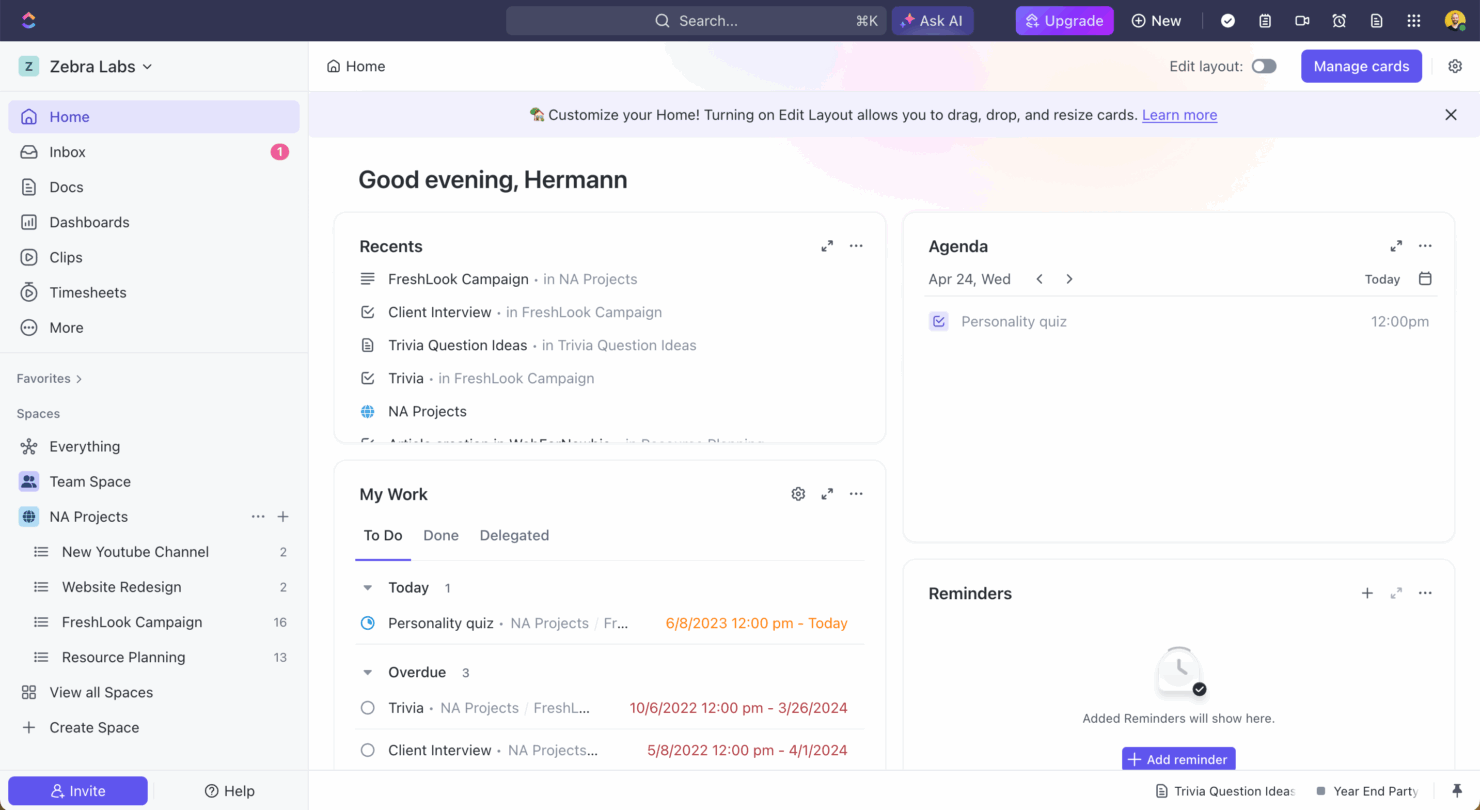
ClickUp
Jira

Perché fidarsi dei nostri consigli sui software
Il nostro team testa e recensisce software dal 2012. In quanto project manager noi stessi, sappiamo quanto sia difficile — e importante — scegliere il software giusto.
Per questa guida, abbiamo valutato gli strumenti attraverso test pratici e ricerche indipendenti, assegnando un punteggio agli strumenti in base ai nostri criteri di selezione. Ci basiamo inoltre sulle competenze di leader di pensiero del settore e di professionisti attivi nella gestione dei progetti.
Le nostre recensioni riflettono il nostro giudizio editoriale umano, non un discorso di vendita.
Revisori esperti:
ClickUp vs. Jira Pricing Comparison
| ClickUp | Jira | |
|---|---|---|
| Free Trial | Free plan + free demo available | Free plan + 14-day free trial available |
| Pricing | From $7/user/month (billed annually) | From $7.91/user/month |
Prezzi di ClickUp vs. Jira e Costi Nascosti
I prezzi di ClickUp propongono una struttura flessibile a livelli, con opzioni gratuite e a pagamento, anche se gli utenti potrebbero incontrare costi per spazio di archiviazione aggiuntivo o funzionalità avanzate. I prezzi di Jira seguono un modello di abbonamento per utente, che può aumentare in base al numero di utenti o con funzionalità premium aggiuntive.
Per scegliere lo strumento giusto, valuta la dimensione del tuo team, le funzionalità necessarie e il potenziale di scalabilità; prendi in considerazione un periodo di prova per capire quale fornitore si adatti meglio al tuo flusso di lavoro e al tuo budget.
ClickUp vs. Jira Feature Comparison
Le viste attività personalizzabili di ClickUp ti permettono di passare dalla visualizzazione a elenco, bacheca e calendario, rendendolo ideale per i team che gestiscono più flussi di lavoro. Jira offre un tracciamento dei problemi robusto e URL unici per ogni attività, aiutando i team di sviluppo a ottimizzare la risoluzione dei bug e la documentazione.
Mentre ClickUp offre flessibilità in vari settori, Jira è pensato per una gestione dettagliata dei problemi nello sviluppo software.
| ClickUp | Jira | |
|---|---|---|
| API | ||
| Calendar Management | ||
| Collaboration Support | ||
| Dashboards | ||
| Data Export | ||
| Data Import | ||
| External Integrations | ||
| File Sharing | ||
| Gantt Charts | ||
| Kanban Boards | ||
| Multi-User | ||
| Notifications | ||
| Project Management | ||
| Task Scheduling/Tracking | ||
| Time Management |
ClickUp vs. Jira Integrazioni
| Integrazione | ClickUp | Jira |
|---|---|---|
| Dropbox | ✅ | ❌ |
| Figma | ✅ | ✅ |
| GitHub | ✅ | ✅ |
| Slack | ✅ | ✅ |
| Google Calendar | ✅ | ❌ |
| Microsoft Teams | ✅ | ✅ |
| Zoom | ✅ | ✅ |
| Jenkins | ❌ | ✅ |
| Lucidchart | ❌ | ✅ |
| Adobe XD | ❌ | ✅ |
| API | ✅ | ✅ |
| Zapier | ✅ | ✅ |
ClickUp si integra con Slack per semplificare la comunicazione e l’aggiornamento delle attività, risultando prezioso per i team che gestiscono collaborazioni da remoto. Jira si integra con Jenkins per automatizzare i processi di build e deployment, supportando i team di sviluppo orientati all’integrazione continua.
Mentre ClickUp migliora la collaborazione grazie agli strumenti di comunicazione, Jira rafforza i flussi di lavoro dello sviluppo software tramite le sue integrazioni tecniche.
ClickUp vs. Jira Sicurezza, Conformità & Affidabilità
| Fattore | ClickUp | Jira |
|---|---|---|
| Crittografia dati | ClickUp utilizza la crittografia AES-256 per proteggere i dati sia a riposo che durante il transito. | Jira impiega la crittografia AES-256, garantendo la sicurezza dei dati su tutte le sue piattaforme. |
| Conformità normativa | ClickUp è conforme al GDPR, assicurando privacy e protezione dei dati degli utenti. | Jira rispetta il GDPR e altri standard internazionali di protezione dei dati. |
| Affidabilità uptime | ClickUp offre un SLA di uptime del 99,9%, assicurando affidabilità continua del servizio. | Jira garantisce un SLA di uptime del 99,9%, supportato da un’infrastruttura globale robusta. |
ClickUp e Jira offrono entrambi solide funzionalità di sicurezza e conformità, ma l’SLA di uptime più elevato di ClickUp potrebbe essere interessante per i team che danno priorità all’affidabilità. Quando valuti questi strumenti, considera i requisiti di conformità specifici, come il GDPR, insieme agli standard di crittografia e alle garanzie di uptime, per assicurarti che soddisfino le esigenze di sicurezza del tuo team.
Facilità d'uso: ClickUp vs. Jira
| Fattore | ClickUp | Jira |
|---|---|---|
| Interfaccia utente | ClickUp offre un'interfaccia pulita e personalizzabile con funzionalità di trascinamento | L'interfaccia di Jira è potente ma può essere complessa, richiedendo tempo per essere padroneggiata. |
| Esperienza di onboarding | ClickUp fornisce tutorial sull'interfaccia e risorse per iniziare facilmente. | Jira offre una documentazione dettagliata, ma può risultare opprimente per i principianti. |
| Configurazione | La configurazione di ClickUp è intuitiva, permettendo una rapida creazione e gestione dei progetti. | La configurazione di Jira può essere intricata, spesso necessita di impostazioni per un utilizzo ottimale. |
ClickUp è più semplice da avviare grazie al suo design intuitivo e al supporto durante l’onboarding, mentre Jira può risultare inizialmente impegnativo a causa della sua configurazione complessa e dell’interfaccia articolata. Tuttavia, la profondità e le opzioni di personalizzazione di Jira sono vantaggiose per chi è disposto a investire tempo nell'apprenderlo completamente.
ClickUp vs Jira: Pros & Cons
ClickUp
- Extensive task management features keep your projects organized and on track
- Real-time collaboration makes team communication more effective
- Built-in automations reduce manual work and speed up your workflow
- Users often find the learning curve steep due to its rich feature set
- Some users report occasional performance lags when managing large projects
- Mobile app can be less intuitive than the desktop version
Jira
- Agile workflow management supports Scrum and Kanban and can improve your teams' productivity.
- Automation rules are easy to set up, which helps your team speed up their work.
- Custom filters can be created and accessed quickly, which improves your team's efficiency.
- Field names can be confusing, which might slow down your team's workflow.
- The interface can be too crowded in Scrum projects, which can make it hard for your team to navigate.
- There's a lack of resource management capabilities, which could limit your team's planning.
Best Use Cases for ClickUp and Jira
ClickUp
- Creative agencies ClickUp's customizable dashboards and task automation features can help you manage client projects, track feedback and revisions, and keep creative teams aligned.
- Tech startups ClickUp supports agile development with sprints and real-time collaboration features that can help teams iterate quickly.
- Marketing teams You can streamline campaign planning and execution using ClickUp’s task dependencies and timelines.
- Remote teams ClickUp's real-time updates and collaboration tools keep everyone on the same page, no matter where they are.
- Product managers ClickUp’s roadmaps and goal-tracking features help you align development with business objectives.
- Freelancers You can track your tasks and deadlines efficiently with ClickUp’s simple task and time management tools.
Jira
- Software development Jira’s agile tools like Scrum and Kanban boards make it perfect for managing software projects.
- IT departments Its issue tracking capabilities help your team efficiently handle technical support and bug fixes.
- Tech startups Jira offers customization capabilities that allow your team to scale and adapt as your projects grow.
- Agile teams Sprint planning and backlog management features keep your agile processes organized and effective.
- Large enterprises Jira’s automation rules can streamline your complex workflows and improve team productivity.
- Project managers Its reporting and analytics provide insights that help you make informed decisions quickly.
Chi dovrebbe usare ClickUp e chi dovrebbe usare Jira?
Secondo la mia opinione, ClickUp è ideale per team che cercano uno strumento versatile, adatto a diversi settori e tipi di progetti, soprattutto per chi apprezza la personalizzazione e la facilità d’uso. Per lo sviluppo software o per i team che hanno bisogno di funzionalità avanzate di tracciamento e integrazione, Jira è la scelta migliore.
Ritengo che ClickUp sia particolarmente adatto per team creativi e di marketing grazie alla sua interfaccia flessibile, mentre Jira è pensato per i team tecnici che necessitano di un tracciamento dettagliato delle problematiche e di workflow strutturati.
Differences Between ClickUp and Jira
| ClickUp | Jira | |
|---|---|---|
| Automation | ClickUp provides built-in automation for task management. | Jira offers advanced automation, especially suited for development workflows. |
| Customization | ClickUp allows various views and custom fields for different projects | Jira provides detailed customization options, ideal for technical teams. |
| Integrations | ClickUp integrates with communication tools like Slack and Zoom. | Jira integrates deeply with development tools like Jenkins and GitHub |
| Pricing | ClickUp offers a flexible tiered pricing structure with free options. | Jira uses a per-user subscription model that scales with user count. |
| User Interface | ClickUp features a customizable interface with drag-and-drop ease | Jira’s interface is powerful but can be complex for new users. |
| Visit ClickUpOpens new window | Read Jira ReviewOpens new window |
Similarities Between ClickUp and Jira
| API Access | Both platforms provide API access, allowing you to build custom integrations and automate workflows. ClickUp's API is user-friendly for general tasks, while Jira's API is robust for more complex development requirements. |
|---|---|
| Collaboration | Both tools support team collaboration with features like comments and file sharing. ClickUp integrates smoothly with Slack for communication, while Jira offers integrations with development tools to enhance team collaboration. |
| Project Tracking | Both ClickUp and Jira offer robust project tracking, allowing you to monitor tasks, deadlines, and progress easily. ClickUp uses customizable views, while Jira excels with detailed issue tracking for development projects. |
| Scalability | ClickUp and Jira both scale well with your team, supporting growing project demands and expanding user bases. ClickUp offers flexibility across various industries, while Jira is tailored for scaling software development teams. |
| Task Management | ClickUp and Jira both provide comprehensive task management, enabling you to assign, prioritize, and track tasks efficiently. ClickUp's task views are customizable, whereas Jira offers detailed workflows particularly suited to technical teams. |
| Visit ClickUpOpens new window Read Jira ReviewOpens new window | |