



Airtable vs. Notion: Confronto e Recensioni degli Esperti per il 2026



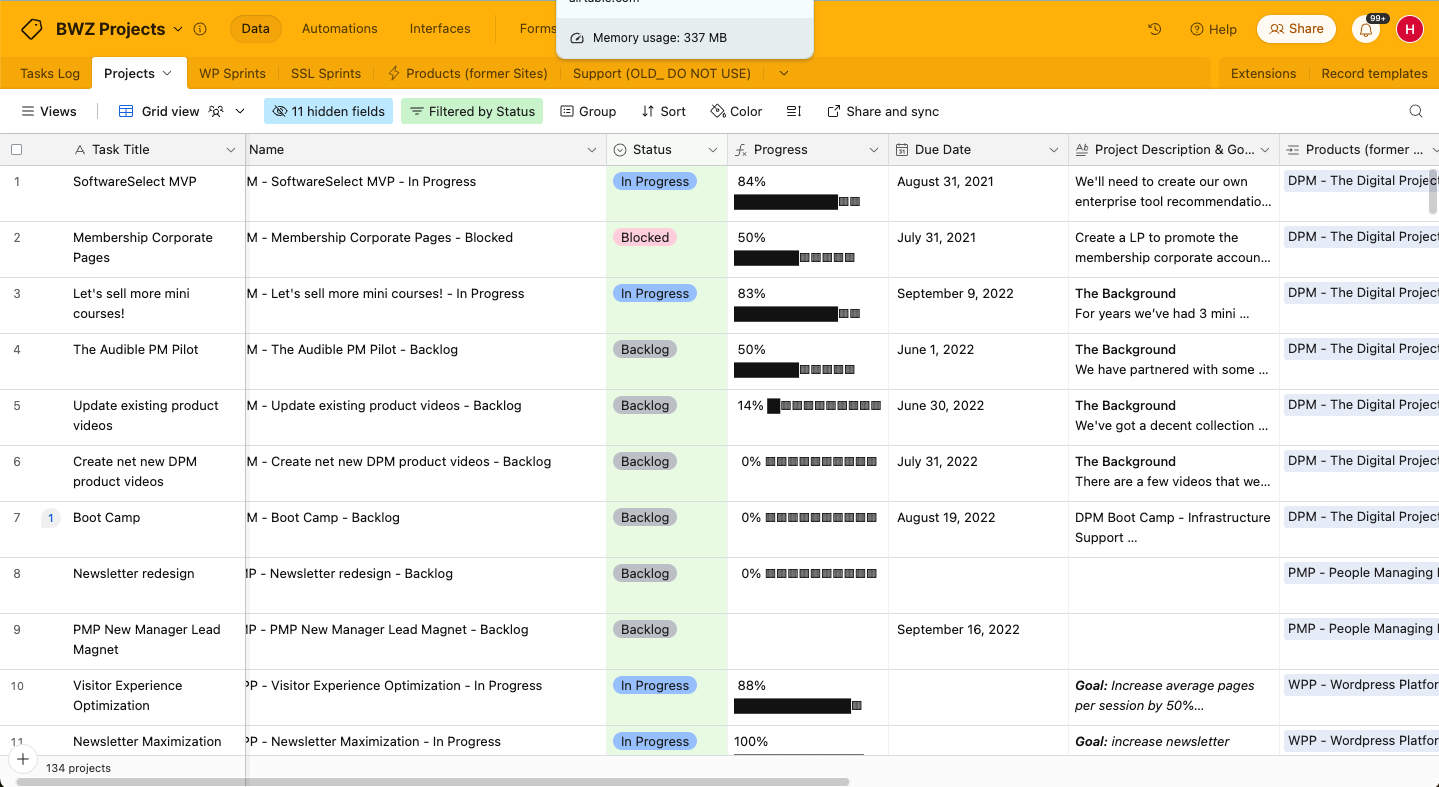
Il sistema flessibile di Airtable combina funzionalità di foglio di calcolo e database per aiutarti a organizzare i tuoi progetti, mentre Notion offre uno spazio di lavoro che unisce appunti, attività, elenchi di cose da fare e database per supportare un flusso di lavoro unificato. Sebbene entrambi gli strumenti possano aiutare la produttività del team, si differenziano per l'approccio all'organizzazione dei dati e alla collaborazione.
Ho testato e valutato ciascuno strumento e le loro funzionalità, vantaggi e svantaggi, nonché i prezzi, utilizzando la mia approfondita esperienza nella gestione di progetti. Scopri quale strumento è il software di project management più adatto alle tue esigenze di seguito.
Airtable vs. Notion: An Overview
Airtable
Notion

Perché fidarsi dei nostri consigli sui software
Il nostro team testa e recensisce software dal 2012. In quanto project manager noi stessi, sappiamo quanto sia difficile — e importante — scegliere il software giusto.
Per questa guida, abbiamo valutato gli strumenti attraverso test pratici e ricerche indipendenti, assegnando un punteggio agli strumenti in base ai nostri criteri di selezione. Ci basiamo inoltre sulle competenze di leader di pensiero del settore e di professionisti attivi nella gestione dei progetti.
Le nostre recensioni riflettono il nostro giudizio editoriale umano, non un discorso di vendita.
Revisori esperti:
Airtable vs. Notion Pricing Comparison
| Airtable | Notion | |
|---|---|---|
| Free Trial | Free plan + free demo + 14-day trial available | Free plan available |
| Pricing | From $20/user/month | From $10/user/month (billed annually) |
Prezzi e Costi Nascosti di Airtable vs. Notion
Il prezzo di Airtable segue un modello di abbonamento a livelli che cresce in base alle esigenze del tuo team, ma potresti incorrere in costi extra se raggiungi i limiti di automazione del flusso di lavoro o di record. Il prezzo di Notion adotta anch’esso un approccio a livelli e offre un piano gratuito. I costi aumentano con l’aggiunta di funzionalità o membri del team.
Per scegliere il piano tariffario più adatto alle tue necessità di gestione progetti, valuta le funzionalità e la scalabilità di ciascuno strumento. Sfrutta le prove gratuite per capire quanto bene ogni strumento si adatti al tuo flusso di lavoro prima di impegnarti.
Airtable vs. Notion Feature Comparison
Le viste personalizzabili di Airtable permettono di gestire progetti complessi tramite interfacce che puoi adattare per diversi stakeholder, particolarmente utili per aggiornare i clienti. Lo spazio di lavoro flessibile di Notion è ideale per combinare attività, note e database in un unico posto. Questo è prezioso quando la collaborazione di squadra e la condivisione di contesto sono essenziali.
| Airtable | Notion | |
|---|---|---|
| API | ||
| Calendar Management | ||
| Data Export | ||
| Data Import | ||
| External Integrations | ||
| Multi-User | ||
| Notifications | ||
| Project Management | ||
| Scheduling | ||
| Task Scheduling/Tracking |
Integrazioni tra Airtable e Notion
| Integrazione | Airtable | Notion |
|---|---|---|
| Slack | ✅ | ✅ |
| Google Drive | ✅ | ✅ |
| Salesforce | ✅ | ❌ |
| Trello | ❌ | ✅ |
| GitHub | ✅ | ✅ |
| Microsoft Teams | ❌ | ✅ |
| Dropbox | ✅ | ✅ |
| Figma | ❌ | ✅ |
| API | ✅ | ✅ |
| Zapier | ✅ | ✅ |
Airtable si integra con Slack cosicché puoi automatizzare aggiornamenti e notifiche e tenere informato il team. Notion si integra con Figma permettendo ai team di design di collaborare su progetti visivi senza uscire dalla piattaforma.
Sicurezza, Conformità e Affidabilità di Airtable e Notion
| Fattore | Airtable | Notion |
|---|---|---|
| Conformità normativa | Airtable è conforme a GDPR e CCPA per soddisfare gli standard internazionali. | Notion si attiene anch’esso agli standard GDPR e CCPA. |
| Crittografia | Airtable offre crittografia dei dati sia in transito che a riposo per la sicurezza. | Notion cripta i dati end-to-end e protegge le informazioni su tutte le piattaforme. |
| Affidabilità del servizio | Airtable offre un accordo sul livello di servizio con uptime garantito al 99,9%. | Notion offre alta affidabilità e una promessa di uptime del 99,9%. |
Sia Airtable che Notion offrono solide funzionalità di sicurezza. Quando valuti questi strumenti, controlla le certificazioni di conformità e gli standard di crittografia e dai priorità a quello che meglio risponde ai requisiti normativi specifici del tuo settore.
Airtable vs. Notion Facilità d'Uso
| Fattore | Airtable | Notion |
|---|---|---|
| Interfaccia utente | Airtable presenta un'interfaccia simile a un foglio di calcolo che è intuitiva per organizzare i dati. | Notion offre un'interfaccia modulare e facile da usare che permette una personalizzazione flessibile dello spazio di lavoro. |
| Esperienza di onboarding | Airtable fornisce modelli guidati per aiutarti a iniziare rapidamente. | Notion offre una varietà di tutorial e modelli per facilitare l'apprendimento. |
| Processo di configurazione | La configurazione di Airtable è semplice, ma le opzioni di personalizzazione possono risultare inizialmente complesse. | La configurazione di Notion consente una personalizzazione dettagliata, che può richiedere tempo. |
| Assistenza clienti | Airtable offre assistenza tramite chat dal vivo ed email per un supporto rapido. | Notion fornisce una documentazione ampia e forum comunitari per il supporto. |
Il layout familiare a foglio di calcolo di Airtable lo rende semplice da utilizzare, ma le sue opzioni di personalizzazione possono essere difficili da gestire inizialmente. La possibilità di Notion di creare spazi di lavoro su misura è potente, ma la sua profondità può risultare travolgente se hai bisogno di una configurazione rapida.
Airtable vs Notion: Pros & Cons
Airtable
- Its automation rules make it easy to notify stakeholders, even if they are outside the platform.
- Airtable's forms feature lets you efficiently gather information from external sources.
- You can connect and perform calculations across multiple bases.
- Customizing the templates requires a big time investment.
- It's not a traditional project management platform.
- The learning curve can be challenging for new users.
Notion
- You can tailor your workspace to fit your needs with flexible layouts and templates.
- The intuitive design makes it easy for users to navigate and organize their projects.
- You can take notes, manage projects, and maintain your databases in one place.
- It can be challenging for new users to master without spending time on tutorials.
- You might experience slow performance if you have large databases or complex setups.
- The mobile app is less intuitive than the desktop version.
Best Use Cases for Airtable and Notion
Airtable
- Creative agencies Airtable lets your team design custom project pipelines to foster creativity and improve task management.
- Marketing teams You can track campaigns with Airtable’s flexible and visual database and make sure every detail is covered.
- Small businesses Airtable adapts to your unique business processes and can scale with you as your team grows.
- Event planners Its visual calendar and task management features help you coordinate every detail efficiently.
- Consulting firms Track client projects and deliverables with Airtable’s customizable views and data organization.
- Product development You can manage product roadmaps and feature backlogs with Airtable’s powerful database tools.
Notion
- Creative Agencies You can use customizable templates within a flexible workspace to manage creative projects and collaborate with the team.
- Freelancers You can manage multiple projects and clients in a single, organized platform.
- Startups You can tailor your workspace to your needs in order to manage rapid growth and changing project requirements.
- Remote Teams Notion supports constant communication and project tracking across different locations.
- Education Departments You can use Notion's database capabilities to organize curricula, schedules, and educational materials.
- Content Writers You can use the note-taking and organization features to manage research, drafts, and editorial calendars efficiently.
Chi dovrebbe usare Airtable e chi dovrebbe usare Notion?
Secondo me, Airtable è ideale per i team che necessitano di uno strumento database potente con un’interfaccia familiare a foglio di calcolo, specialmente nel marketing o nella gestione di progetti, dove è essenziale una chiara organizzazione dei dati.
Notion è perfetto per team creativi o individui il cui utilizzo richiede uno spazio di lavoro flessibile per prendere appunti e gestire attività e progetti. È adatto a startup o freelancer che apprezzano la personalizzazione.
Differences Between Airtable and Notion
| Airtable | Notion | |
|---|---|---|
| Data Organization | Airtable uses a spreadsheet interface that helps with structured data management. | Notion provides a modular workspace that combines tasks, notes, and databases. |
| User Interface | Airtable has a familiar, spreadsheet-like UI that’s easy to get used to. | Notion’s UI is highly customizable and suitable for creating a flexible workspace. |
| Read Airtable ReviewOpens new window | Read Notion ReviewOpens new window |
Similarities Between Airtable and Notion
| Collaboration | Both Airtable and Notion support team collaboration, with Airtable offering real-time updates and Notion providing shared workspaces. |
|---|---|
| Cross-Platform Access | Both platforms are accessible on various devices, so your team can work from anywhere. |
| Customization | Both tools offer a high degree of customization. Airtable lets you customize views to suit your project needs, while Notion lets you create personalized workspaces. |
| Integrations | Each tool offers integrations with popular services like Slack and Google Workspace to improve productivity |
| User Support | Both Airtable and Notion have active user communities with forums and resources to help you maximize their tools. |
| Read Airtable ReviewOpens new window Read Notion ReviewOpens new window | |