



Airtable vs. Asana: Confronto e Recensioni degli Esperti per il 2026



Airtable offre un approccio versatile alla gestione dei progetti, mentre Asana propone una struttura organizzativa che può aiutare il tuo team a rimanere ben coordinato. Entrambi gli strumenti mettono a disposizione una varietà di funzionalità utili per gestire, tracciare e rendicontare i progetti, ma si differenziano per interfaccia utente, flessibilità e capacità d’integrazione.
Ho testato e utilizzato ogni strumento software in modo approfondito—ecco il mio confronto dettagliato e la valutazione di questi strumenti e delle loro funzionalità, vantaggi e svantaggi, prezzi, e come si posizionano come software di project management.
Airtable vs. Asana: An Overview
Airtable
Asana

Perché fidarsi dei nostri consigli sui software
Il nostro team testa e recensisce software dal 2012. In quanto project manager noi stessi, sappiamo quanto sia difficile — e importante — scegliere il software giusto.
Per questa guida, abbiamo valutato gli strumenti attraverso test pratici e ricerche indipendenti, assegnando un punteggio agli strumenti in base ai nostri criteri di selezione. Ci basiamo inoltre sulle competenze di leader di pensiero del settore e di professionisti attivi nella gestione dei progetti.
Le nostre recensioni riflettono il nostro giudizio editoriale umano, non un discorso di vendita.
Revisori esperti:
Airtable vs. Asana Pricing Comparison
| Airtable | Asana | |
|---|---|---|
| Free Trial | Free plan + free demo + 14-day trial available | Free plan available |
| Pricing | From $20/user/month | From $10.99/user/month (billed annually) |
I prezzi di Airtable seguono un modello di abbonamento a livelli che si adatta alle tue esigenze man mano che richiedi più spazio di archiviazione o funzionalità premium di gestione dei progetti.
Il pricing di Asana segue un approccio a livelli simile e potresti incontrare costi aggiuntivi per integrazioni avanzate o per limiti di utenti incrementati.
Per scegliere lo strumento più adatto alle esigenze del tuo team, valuta le funzionalità specifiche e le integrazioni necessarie per i tuoi progetti, oltre a considerare qualsiasi necessità di scalabilità che potrebbe portare a costi aggiuntivi con la crescita del team.
Airtable vs. Asana Feature Comparison
La funzione esclusiva Interfaces di Airtable ti permette di creare viste personalizzate per condividere aggiornamenti di progetto con gli stakeholder senza richiedere licenze aggiuntive. Questo la rende ideale per il lavoro con i clienti.
Asana eccelle nella gestione delle attività e offre funzioni come bacheche Kanban e viste cronologiche per aiutare i team a rimanere allineati con incarichi chiari, date di scadenza e termini ben definiti. Scegli Airtable per una collaborazione flessibile con i clienti oppure Asana per un coordinamento interno strutturato.
| Airtable | Asana | |
|---|---|---|
| API | ||
| Batch Permissions & Access | ||
| Budgeting | ||
| Calendar Management | ||
| Contact Management | ||
| Contact Sharing | ||
| Customer Management | ||
| Dashboard | ||
| Data Export | ||
| Data Import | ||
| Data Visualization | ||
| Expense Tracking | ||
| External Integrations | ||
| Gantt Charts | ||
| Multi-User | ||
| Notifications | ||
| Project Management | ||
| Resource Management | ||
| Scheduling | ||
| Task Scheduling/Tracking | ||
| Third-Party Plugins/Add-Ons | ||
| Travel Management |
Airtable vs. Asana Integrazioni
| Integrazione | Airtable | Asana |
|---|---|---|
| Google Drive | ✅ | ✅ |
| Slack | ✅ | ✅ |
| Salesforce | ✅ | ✅ |
| Trello | ❌ | ✅ |
| Microsoft Teams | ❌ | ✅ |
| HubSpot | ❌ | ✅ |
| Dropbox | ✅ | ✅ |
| Zoom | ❌ | ✅ |
| API | ✅ | ✅ |
| Zapier | ✅ | ✅ |
Airtable si integra con Slack e consente di inviare aggiornamenti automatici direttamente ai canali di team, facilitando la comunicazione istantanea. L’integrazione di Asana con Microsoft Teams offre uno spazio centralizzato per aggiornamenti sulle attività e discussioni.
Entrambi gli strumenti migliorano i flussi di lavoro collegandosi a piattaforme che supportano una comunicazione efficace e la gestione delle attività.
Airtable vs. Asana Sicurezza, Conformità & Affidabilità
| Fattore | Airtable | Asana |
|---|---|---|
| Cifratura dei dati | Airtable cripta i dati a riposo e in transito utilizzando AES-256 e TLS. | Asana usa la cifratura AES-256 per i dati a riposo e TLS durante la trasmissione. |
| Conformità normativa | Airtable è conforme al GDPR e offre strumenti per esportazione ed eliminazione dei dati. | Asana è conforme a GDPR e CCPA e mette a disposizione strumenti per la gestione della conformità dei dati. |
| Affidabilità | Airtable offre un’affidabilità garantita con un uptime SLA del 99,9% e backup ridondanti. | Asana offre un uptime SLA del 99,9% con backup regolari e protocolli di disaster recovery. |
| Log di audit | Airtable fornisce log di audit dettagliati per tracciare modifiche e accessi. | Asana offre log di audit per monitorare le attività degli utenti e le modifiche. |
Airtable e Asana offrono entrambi solide funzionalità in termini di sicurezza e conformità, ma si differenziano per la gestione dei controlli di accesso e dei log di audit. Valuta come le misure di sicurezza di ciascuna piattaforma si allineano con le esigenze normative e la tolleranza al rischio della tua organizzazione.
Asana vs. Airtable Facilità d’Uso
| Fattore | Airtable | Asana |
|---|---|---|
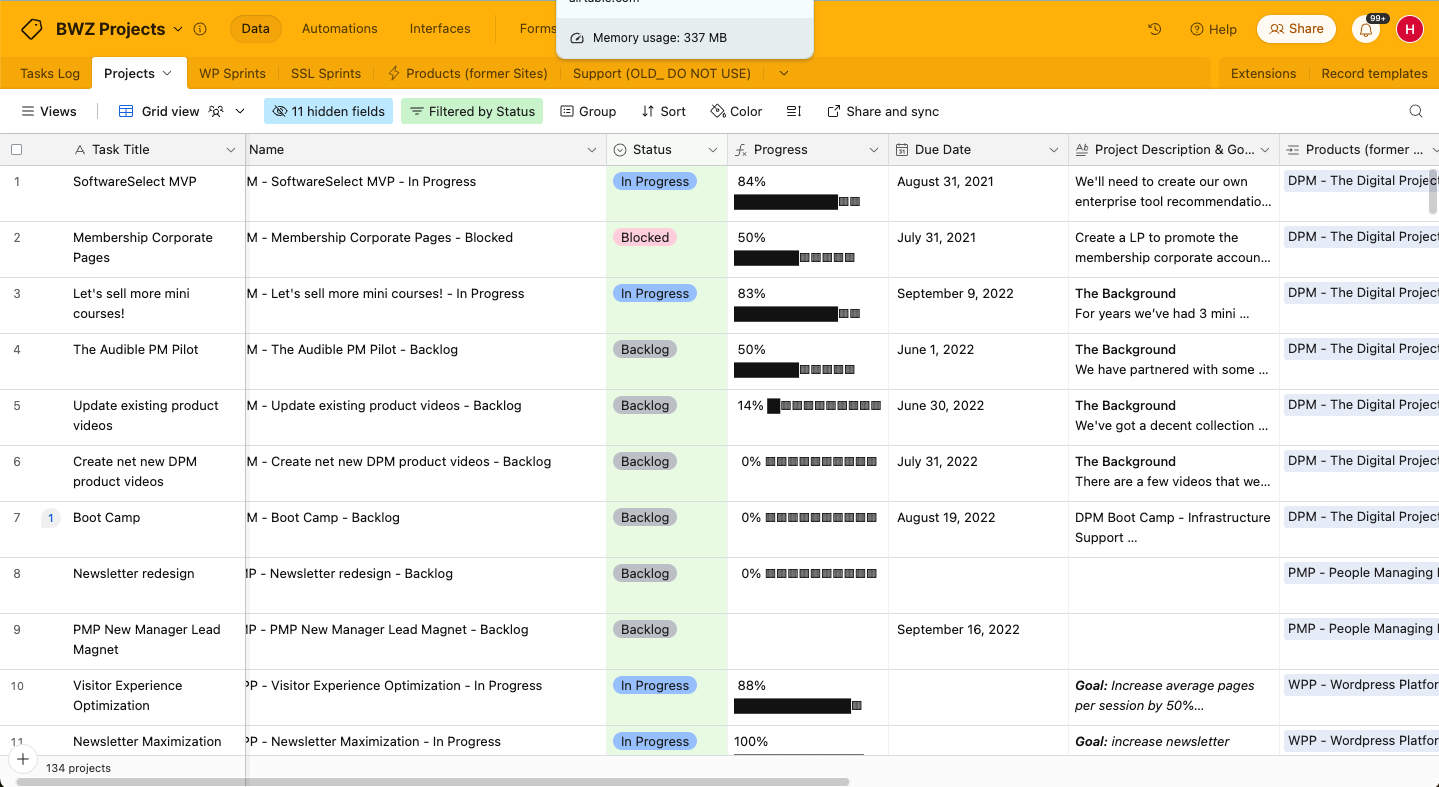
| Interfaccia Utente | L’interfaccia di Airtable è flessibile, basata su griglia e consente di creare layout personalizzati. | L’interfaccia di Asana è pulita con navigazione intuitiva e viste delle attività. |
| Esperienza di onboarding | Airtable offre tutorial guidati e modelli per un’impostazione rapida e una curva di apprendimento breve. | Asana propone un onboarding passo dopo passo con video tutorial e guide di aiuto. |
| Configurazione | La configurazione di Airtable è semplice e include funzionalità di trascinamento della selezione. | Asana richiede una configurazione minima e include modelli di progetto facili da usare. |
| Assistenza | Airtable mette a disposizione forum della community e supporto via email per la risoluzione dei problemi | Asana offre un centro assistenza completo e un servizio clienti reattivo tramite email. |
| Opzioni di personalizzazione | Airtable permette un’ampia personalizzazione di campi e viste di progetto. | Asana offre personalizzazione tramite modelli di attività e layout dei progetti. |
Airtable eccelle nella personalizzazione, il che lo rende ideale se hai bisogno di layout di progetto flessibili, ma la sua interfaccia può sembrare inizialmente complessa. Asana è facile da navigare, anche se la sua personalizzazione limitata potrebbe non adattarsi a flussi di lavoro complessi.
Airtable vs Asana: Pros & Cons
Airtable
- Its automation rules make it easy to notify stakeholders, even if they are outside the platform.
- Airtable's forms feature lets you efficiently gather information from external sources.
- You can connect and perform calculations across multiple bases.
- Customizing the templates requires a big time investment.
- It's not a traditional project management platform.
- The learning curve can be challenging for new users.
Asana
- You can easily track tasks and deadlines using Asana's intuitive interface.
- Asana's collaboration tools help your team communicate effectively in real-time.
- There are extensive customization options so you can tailor workflows and views to your specific needs.
- The reporting capabilities are somewhat basic, which may not satisfy teams needing detailed analytics.
- It can feel overwhelming if your team is small or your projects are simple.
- You might find the notification system a bit excessive or distracting.
Best Use Cases for Airtable and Asana
Airtable
- Creative agencies Airtable lets your team design custom project pipelines to foster creativity and improve task management.
- Marketing teams You can track campaigns with Airtable’s flexible and visual database and make sure every detail is covered.
- Small businesses Airtable adapts to your unique business processes and can scale with you as your team grows.
- Event planners Its visual calendar and task management features help you coordinate every detail efficiently.
- Consulting firms Track client projects and deliverables with Airtable’s customizable views and data organization.
- Product development You can manage product roadmaps and feature backlogs with Airtable’s powerful database tools.
Asana
- Creative agencies You can manage creative workflows and client projects with Asana’s visual boards and timeline features.
- Tech startups You can coordinate product development and team tasks using Asana’s real-time updates and goal-setting tools.
- Marketing teams You can plan campaigns and track progress with Asana’s clear timelines and task comments.
- Nonprofits Asana lets you manage volunteer tasks, events, and fundraising efforts with clear task assignments and timelines.
- Remote teams You can collaborate effectively with Asana’s real-time updates and communication features.
- Event planners You can organize events easily with Asana’s task management and timeline visualization features.
Chi dovrebbe usare Airtable e chi dovrebbe usare Asana?
Airtable è particolarmente adatto a team creativi o settori che richiedono flessibilità e personalizzazione, come agenzie di marketing o studi di design. Funziona meglio per progetti basati sui dati che traggono vantaggio da una struttura altamente adattabile.
Asana, invece, è più adatto ad ambienti strutturati come startup tecnologiche o team aziendali che fanno affidamento su una gestione chiara delle attività e delle scadenze. Se il tuo team predilige compiti lineari e tempistiche definite, Asana è la scelta migliore.
Differences Between Airtable and Asana
| Airtable | Asana | |
|---|---|---|
| Customization | Airtable lets you design custom layouts and custom fields for unique workflows. | Asana offers limited customization with predefined task templates. |
| Flexibility | Airtable is highly adaptable for a wide range of project types and industries. | Asana is structured and best for teams that need clear task and subtask assignments. |
| User Interface | Airtable’s interface is grid-based, which is ideal for data-centric projects. | Asana’s interface is task-focused and perfect for clear task management. |
| Read Airtable ReviewOpens new window | Read Asana ReviewOpens new window |
Similarities Between Airtable and Asana
| Automation | Both offer automation features that can help you reduce manual tasks and repetitive work. |
|---|---|
| Collaboration | Both Airtable and Asana offer real-time team collaboration so everyone can work together seamlessly. Airtable offers shared views and Asana includes task discussion features. |
| Integrations | Both platforms integrate with popular tools like Slack and Google Drive, so your team can connect their existing tools and smooth out their workflows. |
| Pricing | Both offer tiered pricing models that can flex and scale as your team's needs grow, with options for additional features at higher tiers. They both also offer free plans. |
| User-Friendly Design | Both Airtable and Asana boast intuitive interfaces that make it easy for your team members to adopt and use daily, as well as drag-and-drop features and clear navigation. |
| Read Airtable ReviewOpens new window Read Asana ReviewOpens new window | |