



Adobe Workfront vs Jira: Confronto Esperto e Recensioni 2026



Adobe Workfront è uno strumento di gestione progetti robusto, pensato per ottimizzare i flussi di lavoro e la collaborazione del tuo team. Jira, invece, eccelle nell’aiutarti a gestire e monitorare progetti agili con precisione. Sebbene entrambi mirino ad aumentare la produttività, differiscono sensibilmente nell’approccio e nel pubblico di riferimento: Adobe Workfront si rivolge in particolare a team creativi e di marketing, mentre Jira è la scelta preferita da sviluppatori software e team agili. In questo articolo troverai un confronto dettagliato tra i due, con un’analisi delle funzionalità, vantaggi e svantaggi, e prezzi, per aiutarti a scegliere il miglior software di gestione progetti in base alle tue esigenze.
Adobe Workfront vs. Jira: An Overview
Adobe Workfront


Jira



Perché fidarsi dei nostri consigli sui software
Il nostro team testa e recensisce software dal 2012. In quanto project manager noi stessi, sappiamo quanto sia difficile — e importante — scegliere il software giusto.
Per questa guida, abbiamo valutato gli strumenti attraverso test pratici e ricerche indipendenti, assegnando un punteggio agli strumenti in base ai nostri criteri di selezione. Ci basiamo inoltre sulle competenze di leader di pensiero del settore e di professionisti attivi nella gestione dei progetti.
Le nostre recensioni riflettono il nostro giudizio editoriale umano, non un discorso di vendita.
Revisori esperti:
Adobe Workfront vs. Jira Pricing Comparison
| Adobe Workfront | Jira | |
|---|---|---|
| Free Trial | Free demo available | Free plan + 14-day free trial available |
| Pricing | Pricing upon request | From $7.91/user/month |
Adobe Workfront vs. Jira: prezzi e costi nascosti
I prezzi di Adobe Workfront sono strutturati secondo un modello a livelli, con costi che variano in base alle funzionalità e al numero di utenti e con potenziali costi aggiuntivi per l’assistenza clienti premium o le integrazioni. I prezzi di Jira offrono un modello di abbonamento con diversi piani e potrebbero esserci costi extra per componenti aggiuntivi o funzionalità avanzate. Per scegliere il prezzo giusto per le esigenze della tua azienda, valuta i tuoi bisogni di progetto, considera le funzionalità essenziali richieste e calcola il costo totale di proprietà, incluse eventuali spese nascoste, per garantire l’allineamento con i tuoi obiettivi a lungo termine e le risorse disponibili.
Adobe Workfront vs. Jira Feature Comparison
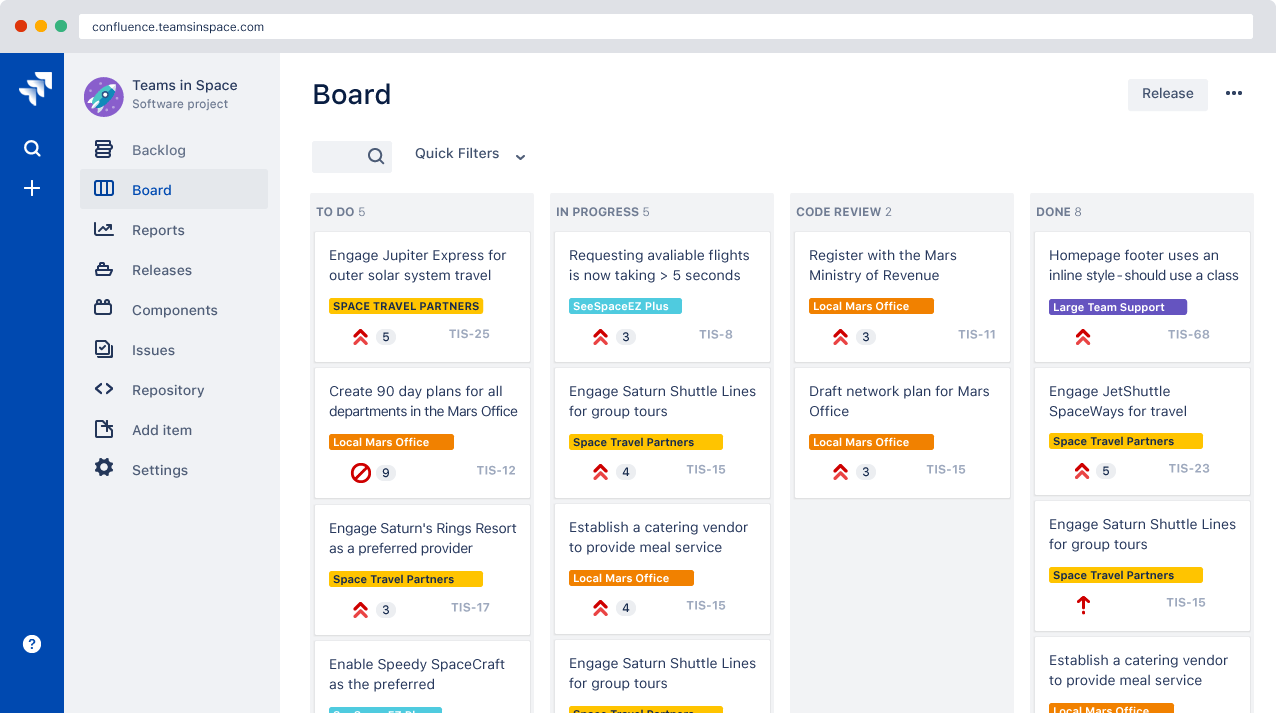
Con la funzione di revisione avanzata di Adobe Workfront puoi snellire le revisioni creative, rendendolo ideale per i team di marketing che gestiscono diversi asset grafici quotidianamente. I flussi di lavoro personalizzabili di Jira sono ottimi per i team di sviluppo software che vogliono tracciare le segnalazioni e gestire progetti agili su un kanban o scrum board. Entrambi gli strumenti offrono soluzioni uniche pensate per diverse tipologie di gestione progetti, assicurando le giuste funzionalità a supporto del tuo lavoro.
| Adobe Workfront | Jira | |
|---|---|---|
| API | ||
| Calendar Management | ||
| Collaboration Support | ||
| Dashboards | ||
| Data Export | ||
| Data Import | ||
| External Integrations | ||
| File Sharing | ||
| Gantt Charts | ||
| Kanban Boards | ||
| Multi-User | ||
| Notifications | ||
| Project Management | ||
| Task Scheduling/Tracking | ||
| Time Management |
Adobe Workfront vs. Jira: integrazioni
| Integrazione | Adobe Workfront | Jira |
| Slack | ✅ | ✅ |
| Microsoft Teams | ✅ | ✅ |
| Salesforce | ✅ | ✅ |
| Google Drive | ✅ | ✅ |
| Trello | ❌ | ✅ |
| Adobe Creative Cloud | ✅ | ❌ |
| ServiceNow | ✅ | ✅ |
| Confluence | ❌ | ✅ |
| API | ✅ | ✅ |
| Zapier | ✅ | ✅ |
L’integrazione di Adobe Workfront con Adobe Creative Cloud ti consente di gestire senza intoppi i progetti creativi, garantendo che asset grafici e tempistiche siano sempre allineati. L’integrazione di Jira con Confluence è perfetta per i team che necessitano di uno spazio centralizzato dove documentare e tracciare aggiornamenti di progetto, migliorando collaborazione e trasparenza. Entrambi gli strumenti offrono integrazioni a supporto di specifici flussi di lavoro, consentendoti di scegliere in base alle necessità uniche del tuo team.
Adobe Workfront vs. Jira Sicurezza, Conformità & Affidabilità
| Fattore | Adobe Workfront | Jira |
| Privacy dei dati | Adobe Workfront garantisce la privacy dei dati con la conformità al GDPR e i controlli di accesso utente. | Jira offre la privacy dei dati tramite la conformità al GDPR e permessi personalizzabili. |
| Crittografia | Adobe Workfront utilizza la crittografia AES-256 per proteggere i dati sia in transito che a riposo. | Jira adotta la crittografia AES-256 per proteggere i dati durante il trasferimento e l'archiviazione. |
| Conformità normativa | Adobe Workfront rispetta gli standard di settore come ISO 27001 per una sicurezza avanzata. | Jira rispetta gli standard di settore, inclusi le certificazioni SOC2 Type II e ISO 27001. |
| Affidabilità operativa | Adobe Workfront garantisce alta disponibilità con un SLA di uptime del 99,9%. | Jira offre affidabilità con un SLA di uptime del 99,9% e un'infrastruttura robusta. |
Adobe Workfront e Jira offrono entrambi solide funzionalità di sicurezza e conformità, ma il focus di Adobe Workfront sulle industrie creative può rappresentare un vantaggio per quei settori. Valuta le necessità specifiche del tuo team considerando i requisiti di conformità normativa, gli standard di crittografia e gli SLA di uptime, assicurandoti che la soluzione sia allineata alla strategia di gestione del rischio della tua organizzazione.
Adobe Workfront vs. Jira Facilità d'Uso
| Fattore | Adobe Workfront | Jira |
| Interfaccia utente | Adobe Workfront offre un'interfaccia visivamente intuitiva con dashboard personalizzabili adatte ai flussi di lavoro creativi. | L'interfaccia di Jira è funzionale, con un focus sulle Kanban board, che possono risultare complesse per utenti inesperti nella gestione delle attività tramite board. |
| Esperienza di onboarding | Adobe Workfront fornisce tutorial guidati e un team dedicato al successo del cliente per un onboarding senza difficoltà. | Jira offre una knowledge base completa, ma la configurazione può risultare impegnativa per i principianti. |
| Configurazione | La configurazione di Adobe Workfront è semplice grazie a modelli predefiniti per vari tipi di progetto. | Jira richiede più configurazione manuale, soprattutto per i flussi di lavoro personalizzati. |
Adobe Workfront si distingue per il suo design intuitivo e la facilità di onboarding, rendendolo ideale per i team creativi che desiderano una configurazione semplice. Il punto di forza di Jira sono le sue potenti funzionalità per la gestione di progetti agili, ma la sua complessità può rappresentare un ostacolo per chi non ha esperienza con le metodologie agili.
Adobe Workfront vs Jira: Pros & Cons
Adobe Workfront
- You can customize workflows to fit your team's unique processes.
- It offers strong reporting tools to help you track project progress.
- Your team can collaborate effectively with its integrated communication features.
- The interface can feel complex, especially for new users.
- Initial setup and customization may require a steep learning curve.
- Users report occasional lag when managing large projects.
Jira
- Agile workflow management supports Scrum and Kanban and can improve your teams' productivity.
- Automation rules are easy to set up, which helps your team speed up their work.
- Custom filters can be created and accessed quickly, which improves your team's efficiency.
- Field names can be confusing, which might slow down your team's workflow.
- The interface can be too crowded in Scrum projects, which can make it hard for your team to navigate.
- There's a lack of resource management capabilities, which could limit your team's planning.
Best Use Cases for Adobe Workfront and Jira
Adobe Workfront
- Creative Agencies Your agency can manage multiple client projects efficiently with Adobe Workfront’s workflow customization and integrated communication tools.
- Marketing Teams Your team can track campaign progress and collaborate effectively using Adobe Workfront’s reporting and task management features.
- IT Departments If you’re handling complex IT projects, Adobe Workfront’s detailed tracking and resource management capabilities will keep your projects on track.
- Product Development Your product team can benefit from Adobe Workfront’s ability to manage timelines and resources across various stages of development.
- Large Enterprises For your large organization, Adobe Workfront can handle diverse project needs with its customizable workflows and strong reporting tools.
- Project Managers If you’re overseeing complex projects, Adobe Workfront’s comprehensive feature set will support your project planning and execution efforts.
Jira
- Software development Jira’s agile tools like Scrum and Kanban boards make it perfect for managing software projects.
- IT departments Its issue tracking capabilities help your team efficiently handle technical support and bug fixes.
- Tech startups Jira offers customization capabilities that allow your team to scale and adapt as your projects grow.
- Agile teams Sprint planning and backlog management features keep your agile processes organized and effective.
- Large enterprises Jira’s automation rules can streamline your complex workflows and improve team productivity.
- Project managers Its reporting and analytics provide insights that help you make informed decisions quickly.
Chi dovrebbe usare Adobe Workfront e chi dovrebbe usare Jira?
Secondo la mia opinione, Adobe Workfront è più indicato per team creativi e di marketing che hanno bisogno di uno strumento visivamente intuitivo per gestire i progetti in modo fluido. Se lavori in un settore creativo dove collaborazione e gestione delle risorse sono fondamentali, Workfront offre le funzionalità giuste per te. D'altra parte, credo che Jira sia ideale per i team di sviluppo software che lavorano secondo metodologie agili e necessitano di strumenti robusti per tracciare e gestire progetti complessi. Se il tuo lavoro coinvolge flussi di lavoro intricati e un monitoraggio dettagliato dei progetti, Jira è la scelta giusta.
Differences Between Adobe Workfront and Jira
| Adobe Workfront | Jira | |
|---|---|---|
| Automation | Adobe Workfront provides automation tools for creative workflows. | Jira offers robust automation for agile methodologies and development processes. |
| Integrations | Adobe Workfront integrates seamlessly with Adobe Creative Cloud. | Jira excels with integrations like Confluence for centralized documentation. |
| Pricing | Adobe Workfront employs a tiered pricing model based on features and users. | Jira uses a subscription model with different plans and potential add-on costs. |
| Target Audience | Adobe Workfront is tailored for creative and marketing teams needing streamlined collaboration. | Jira is designed for software development teams focusing on agile project management. |
| User Interface | Adobe Workfront offers a visually intuitive and customizable dashboard. | Jira's interface is functional with an emphasis on agile boards, which can be complex. |
| Read Adobe Workfront ReviewOpens new window | Read Jira ReviewOpens new window |
Similarities Between Adobe Workfront and Jira
| Collaboration | Both Adobe Workfront and Jira enhance team collaboration with communication tools. Adobe Workfront integrates with Adobe Creative Cloud for seamless asset sharing, while Jira integrates with Slack for real-time discussions. |
|---|---|
| Customization | Both tools provide customizable workflows to fit your team's needs. Adobe Workfront offers templates for creative projects, while Jira allows detailed customization for software development processes. |
| Project Tracking | Both Adobe Workfront and Jira offer comprehensive project tracking, allowing you to monitor progress and deadlines effectively. Adobe Workfront focuses on creative project timelines, while Jira excels in tracking agile sprints and backlogs. |
| Reporting | Both solutions offer robust reporting capabilities to analyze project performance. Adobe Workfront provides visual reports for creative insights, while Jira offers detailed analytics for agile metrics. |
| Security | Both Adobe Workfront and Jira prioritize security with strong encryption and compliance standards. Adobe Workfront adheres to ISO 27001, while Jira meets SOC2 Type II requirements. |
| Read Adobe Workfront ReviewOpens new window Read Jira ReviewOpens new window | |