

10 meilleures alternatives à Adobe Acrobat pour modifier des PDF en 2026

Sélection des meilleures alternatives à Adobe Acrobat


La gestion des documents numériques peut être un véritable casse-tête, surtout lorsque vous jonglez avec plusieurs projets. Vous trouvez peut-être Adobe Acrobat trop cher ou trop complexe pour répondre aux besoins de votre équipe. Vous n'êtes pas seul dans ce cas.
D'après mon expérience, les alternatives à Adobe Acrobat proposent souvent des interfaces conviviales et des solutions économiques. Elles peuvent aider votre équipe à gérer les fichiers PDF et les signatures électroniques en toute simplicité, sans les fonctionnalités superflues dont vous n'avez peut-être pas besoin.
Dans cet article, je vais vous présenter mes meilleures alternatives à Adobe Acrobat. Je proposerai des avis impartiaux fondés sur des tests approfondis. Vous découvrirez leurs fonctionnalités, leurs avantages et leurs inconvénients, ainsi que leurs tarifs, afin de trouver le meilleur éditeur PDF pour vos projets.
Qu'est-ce qu'Adobe Acrobat ?
Adobe Acrobat est un logiciel de gestion des fichiers PDF et des signatures électroniques qui vous aide à gérer, modifier et créer des PDF. Il est couramment utilisé par des professionnels tels que les chefs de projet, les équipes juridiques et les enseignants qui ont besoin d'une gestion fiable des documents. Il va au-delà d'un simple lecteur PDF grâce à des fonctionnalités telles que la modification des PDF, les signatures électroniques et le partage de documents, qui contribuent à simplifier les flux de travail et à améliorer la collaboration. En définitive, Adobe Acrobat apporte une réelle valeur ajoutée en offrant un outil polyvalent pour gérer efficacement les documents numériques.
Tableau comparatif des alternatives à Adobe Acrobat
Ce tableau comparatif récapitule les tarifs de mes meilleures alternatives à Adobe Acrobat :
| Tool | Best For | Trial Info | Price | ||
|---|---|---|---|---|---|
| 1 | Idéal pour des outils PDF conviviaux | Essai gratuit de 7 jours + forfait gratuit disponible | À partir de $10/mois (facturé annuellement) | Website | |
| 2 | Idéal pour la productivité assistée par l'IA | Formule gratuite + essai gratuit disponible | À partir de 20.62/licence/utilisateur/mois | Website | |
| 3 | Idéal pour les fonctionnalités PDF intégrant l’IA | Formule gratuite disponible | À partir de $49.99/an | Website | |
| 4 | Idéal pour les solutions de signature électronique sécurisées | Essai gratuit de 14 jours + démo gratuite disponible | À partir de $15/utilisateur/mois (facturé annuellement) | Website | |
| 5 | Idéal pour la modification de PDF avec une application mobile | Essai gratuit + démonstration gratuite disponibles | Tarification sur demande | Website | |
| 6 | Idéal pour les professionnels de la construction | Essai gratuit de 14 jours disponible | À partir de $260/utilisateur/an | Website | |
| 7 | Idéal pour la modification de PDF optimisée par l’IA | Formule gratuite disponible | À partir de $79.99/an | Website | |
| 8 | Idéal pour les tâches PDF en ligne | Forfait gratuit disponible | À partir de $7/7 jours (paiement unique) | Website | |
| 9 | Idéal pour la gestion de documents sur plusieurs appareils | Essai gratuit + démonstration gratuite disponibles | À partir de $4.99/licence/mois (facturé annuellement) | Website | |
| 10 | Idéal pour les solutions PDF destinées aux entreprises | Essai gratuit disponible | À partir de $149/unité (paiement unique) | Website |
Pourquoi faire confiance à nos recommandations de logiciels
Notre équipe teste et évalue des logiciels depuis 2012. En tant que chefs de projet nous-mêmes, nous savons à quel point il est difficile — et important — de choisir le bon logiciel.
Pour ce guide, nous avons évalué les outils grâce à des tests pratiques et une recherche indépendante, en notant les outils selon nos critères de sélection. Nous nous appuyons également sur les enseignements de leaders d’opinion du secteur et de professionnels de la gestion de projet en activité.
Nos avis reflètent notre jugement éditorial humain, et non un argumentaire de vente.
Réviseurs experts:
Avis sur les meilleures alternatives à Adobe Acrobat
Ci-dessous, j’ai rédigé des présentations détaillées des meilleures alternatives à Adobe Acrobat qui figurent dans ma sélection. Mes avis proposent une analyse approfondie des principales fonctionnalités, des avantages et des inconvénients, des intégrations et des cas d’utilisation idéaux de chaque outil, afin de vous aider à trouver celui qui vous convient le mieux.

Smallpdf
Idéal pour des outils PDF conviviaux

Smallpdf est un outil de gestion des PDF conçu pour les particuliers et les entreprises à la recherche d’une solution simple pour gérer leurs documents. Il est apprécié des utilisateurs qui ont besoin d’un accès rapide et direct à des fonctionnalités PDF telles que la conversion, la compression et la modification.
Pourquoi c’est une bonne alternative à Adobe Acrobat : Smallpdf propose des outils PDF conviviaux qui simplifient vos tâches documentaires, ce qui en fait un choix pratique pour ceux qui recherchent une gestion directe des PDF. Son interface intuitive offre un moyen simple et efficace de convertir, compresser et modifier des PDF. L’outil est accessible depuis n’importe quel appareil, ce qui le rend pratique pour les équipes en déplacement.
Fonctionnalités et intégrations remarquables :
Les fonctionnalités comprennent la modification, la compression et la conversion de PDF, ce qui vous permet de réduire la taille des fichiers et de les partager sans perte de qualité. Les outils de conversion vous permettent de passer rapidement d’un format de fichier à un autre.
Les intégrations comprennent Google Workspace, Dropbox, Microsoft OneDrive et bien plus encore.
Pros and Cons
Pros:
- Accessible depuis n’importe quel appareil
- Outils de compression fiables
- Large éventail de fonctions PDF
Cons:
- Limitations de la version gratuite
- Aucune mise en forme avancée

Idéal pour la productivité assistée par l'IA

Foxit PDF Editor est conçu pour les entreprises et les particuliers qui ont besoin de solutions fiables de gestion documentaire. Il est populaire auprès des professionnels qui recherchent des outils efficaces pour modifier, partager et sécuriser les fichiers PDF.
Pourquoi c'est une bonne alternative à Adobe Acrobat : Foxit PDF Editor propose des fonctionnalités de productivité optimisées par l'IA qui rendent la gestion des documents plus intuitive. Grâce à ses capacités optimisées par l'IA, vous pouvez automatiser les tâches répétitives et rendre le flux de travail de votre équipe plus efficace. Le logiciel comprend des options de sécurité avancées pour protéger vos documents et propose des modules complémentaires pour les applications Microsoft Office, notamment PowerPoint. Ces fonctionnalités font de Foxit PDF Editor un choix pratique pour ceux qui recherchent une alternative plus simple et plus efficace à Adobe Acrobat.
Fonctionnalités et intégrations remarquables :
Les fonctionnalités comprennent des mesures de sécurité avancées et un accès mobile. Vous pouvez gérer vos documents en toute sécurité grâce au chiffrement et aux paramètres d'autorisation. Le logiciel prend également en charge la collaboration en temps réel.
Les intégrations comprennent Google Workspace, Dropbox, Microsoft OneDrive, Box, SharePoint, et bien plus encore.
Pros and Cons
Pros:
- Outils de productivité pilotés par l'IA
- Fonctionnalités de sécurité avancées
- Options de collaboration en temps réel
Cons:
- Outils de modification PDF avancés limités
- Forte consommation de ressources

UPDF
Idéal pour les fonctionnalités PDF intégrant l’IA
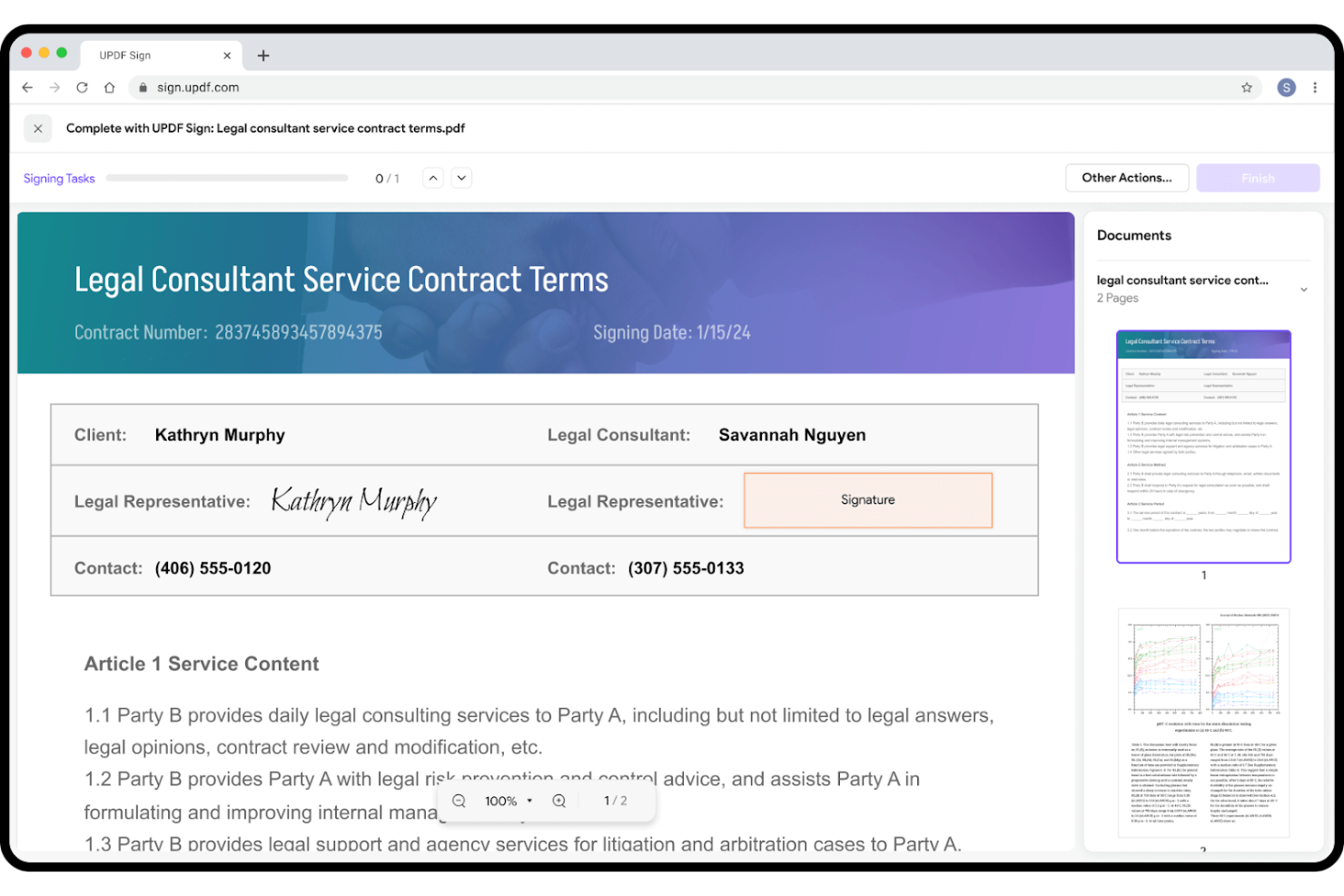
UPDF est un logiciel d’édition de PDF conçu pour les utilisateurs qui recherchent une gestion documentaire efficace et simple. Il est populaire auprès des particuliers et des petites équipes qui ont besoin d’outils simples pour modifier, annoter et convertir des PDF.
Pourquoi c’est une bonne alternative à Adobe Acrobat : UPDF propose des fonctionnalités PDF intégrant l’IA qui simplifient vos tâches documentaires, ce qui en fait un choix intéressant pour ceux qui recherchent une alternative efficace à Adobe Acrobat. Le logiciel offre des options simples de modification et de conversion, le rendant accessible aux utilisateurs de tous niveaux, ainsi que des outils alimentés par l’IA qui vous permettent d’automatiser les tâches répétitives et d’améliorer votre productivité.
Fonctionnalités et intégrations remarquables :
Les fonctionnalités comprennent l’annotation de PDF (avec surlignages et commentaires), la conversion et la modification.
Les intégrations comprennent Google Workspace, Dropbox et bien plus encore.
Pros and Cons
Pros:
- Automatisation documentaire alimentée par l’IA
- Conversion efficace des formats
- Adapté aux petites équipes
Cons:
- Manque d’outils avancés pour les entreprises
- Notifications insistantes d’incitation à l’achat

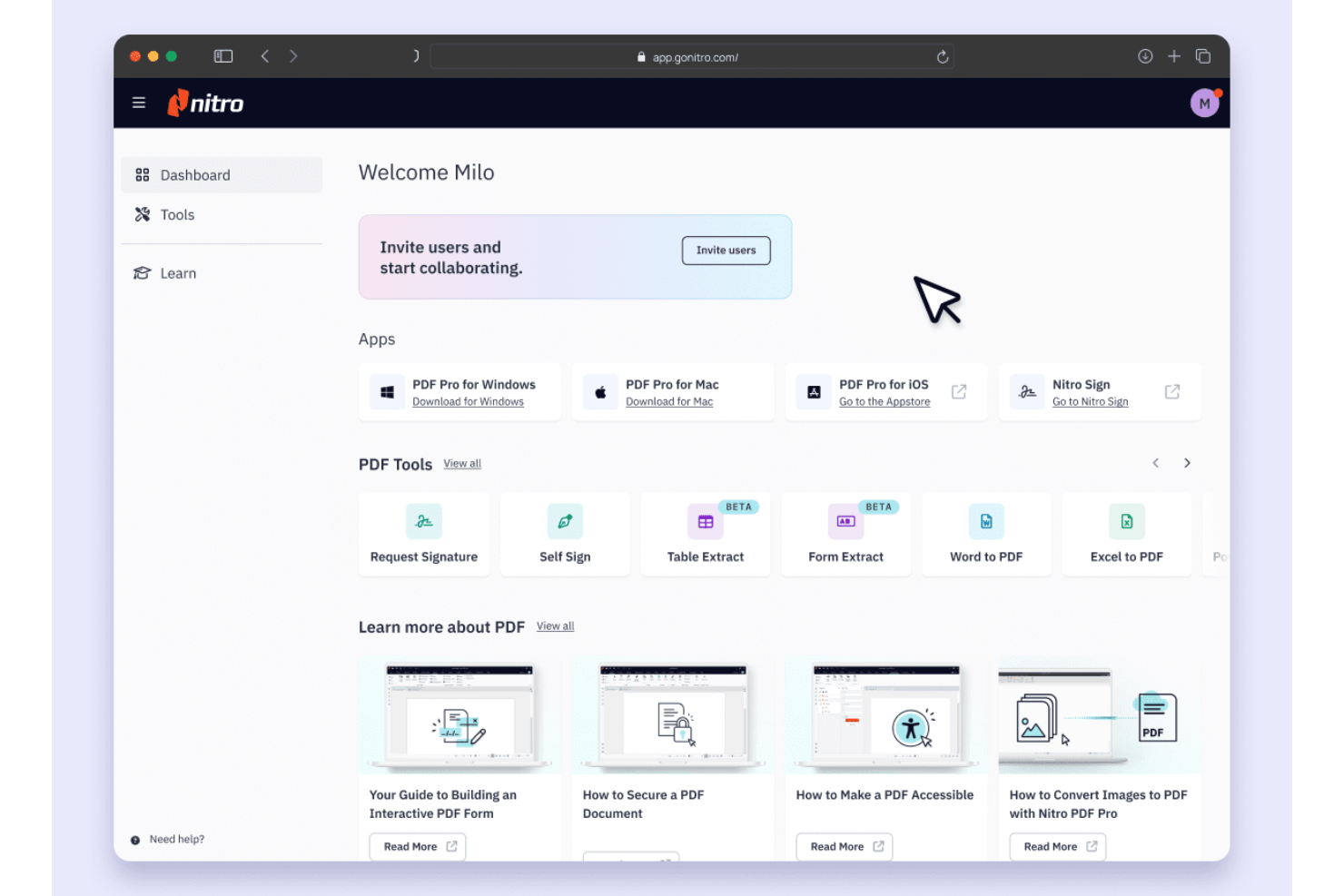
Nitro PDF est un logiciel de gestion de PDF et de signature électronique conçu pour les entreprises et les professionnels qui ont besoin de capacités efficaces de gestion et de signature de documents. Il est largement utilisé par les équipes qui nécessitent des solutions sécurisées et fiables pour gérer les PDF et les signatures électroniques.
Pourquoi c'est une bonne alternative à Adobe Acrobat : Nitro PDF propose des solutions de signature électronique sécurisées qui donnent la priorité à la sécurité de vos documents. Vous pouvez envoyer, signer et gérer des documents grâce à des fonctionnalités avancées de chiffrement et de sécurité. Le logiciel fournit également des outils de collaboration et de productivité, ce qui en fait un excellent choix pour les équipes axées sur l'efficacité. Pour davantage de fonctionnalités, Nitro PDF Pro est une option pour ceux qui recherchent une alternative à Adobe Acrobat Pro.
Fonctionnalités et intégrations remarquables :
Les fonctionnalités comprennent des outils de collaboration, l'analyse des documents et l'accessibilité sur iPhone. Vous pouvez travailler avec votre équipe en temps réel et suivre les flux de travail des documents de manière simple et efficace. Grâce à l'accessibilité sur iPhone et iPad, vous pouvez accéder à vos documents où que vous soyez.
Les intégrations comprennent Google Drive, Dropbox, Microsoft OneDrive, SharePoint, Salesforce, iManage, Microsoft 365 et bien plus encore.
Pros and Cons
Pros:
- Fonctionnalités de signature électronique sécurisées
- Outils de collaboration en temps réel
- Suivi des flux de travail des documents
Cons:
- Centré sur Windows
- Outils d'édition mobile limités

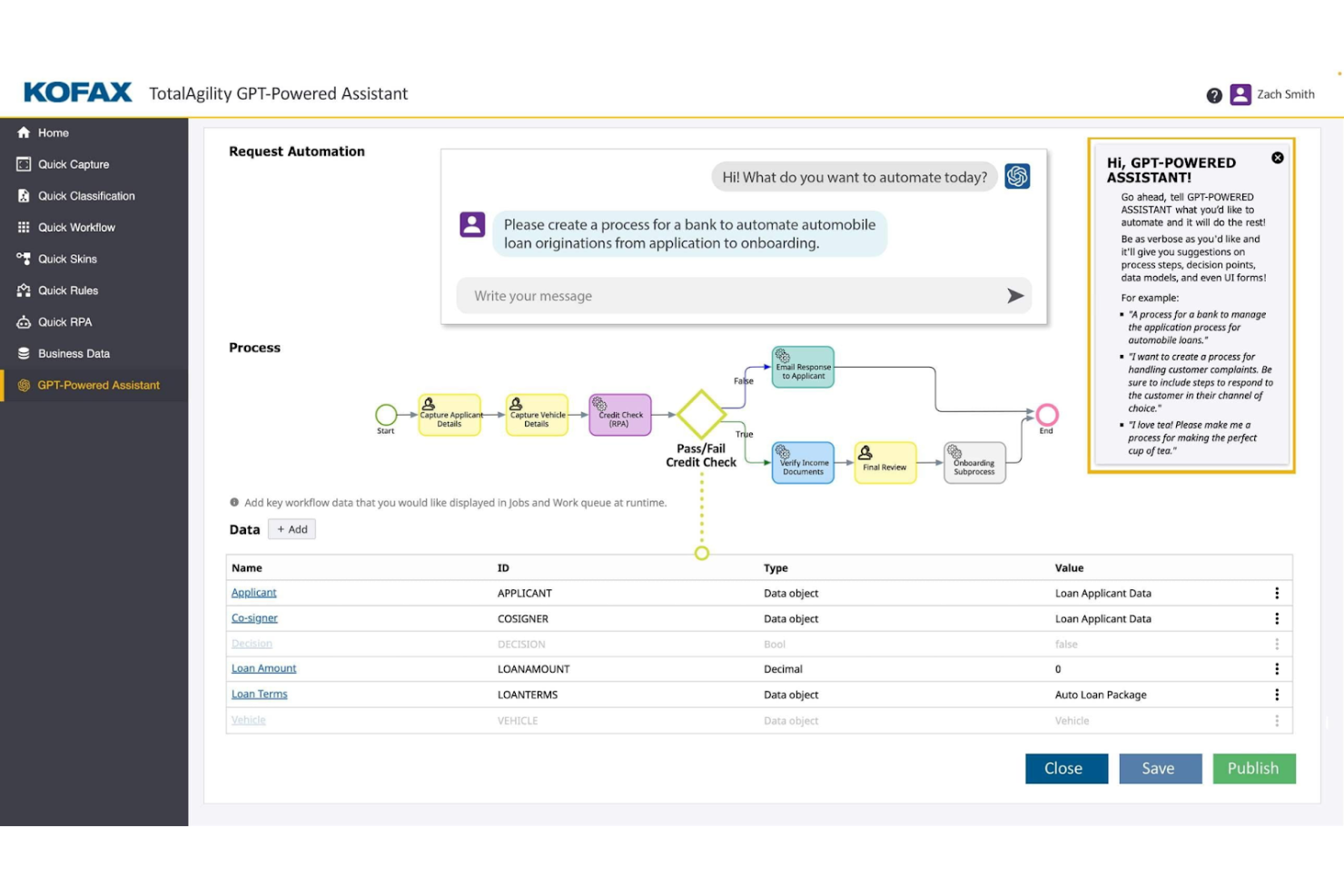
Tungsten Automation Power PDF fournit des solutions PDF et de signature électronique pour les professionnels souhaitant développer leurs flux de travail documentaires numériques. Il est conçu pour les utilisateurs ayant besoin de fonctionnalités efficaces de modification et de signature de documents, optimisées par l'IA.
Pourquoi c'est une bonne alternative à Adobe Acrobat : Tungsten Automation Power PDF offre des fonctionnalités avancées et une solide prise en charge de la sécurité, adaptées aux particuliers comme aux entreprises. Il comprend des interfaces conviviales et des options de déploiement flexibles qui permettent à votre équipe d'intégrer facilement le logiciel aux flux de travail existants, tandis que sa conformité aux normes ISO aide vos documents à répondre aux exigences du secteur.
Fonctionnalités et intégrations remarquables :
Les fonctionnalités comprennent la modification de PDF, les signatures numériques sécurisées, ainsi que des outils conviviaux de conversion et de caviardage. Vous pouvez gérer vos documents grâce à l'interface intuitive, ce qui simplifie votre flux de travail.
Les intégrations comprennent Google Drive, Dropbox, Microsoft OneDrive, Box, SharePoint, Evernote, Salesforce, NetDocuments, iManage, Microsoft Office 365, et bien plus encore.
Pros and Cons
Pros:
- Conformité aux normes ISO
- Options de déploiement flexibles
- Fonctionnalités solides de l'application mobile
Cons:
- Les zones de texte peuvent présenter des dysfonctionnements
- Synchronisation limitée entre l'ordinateur et le mobile

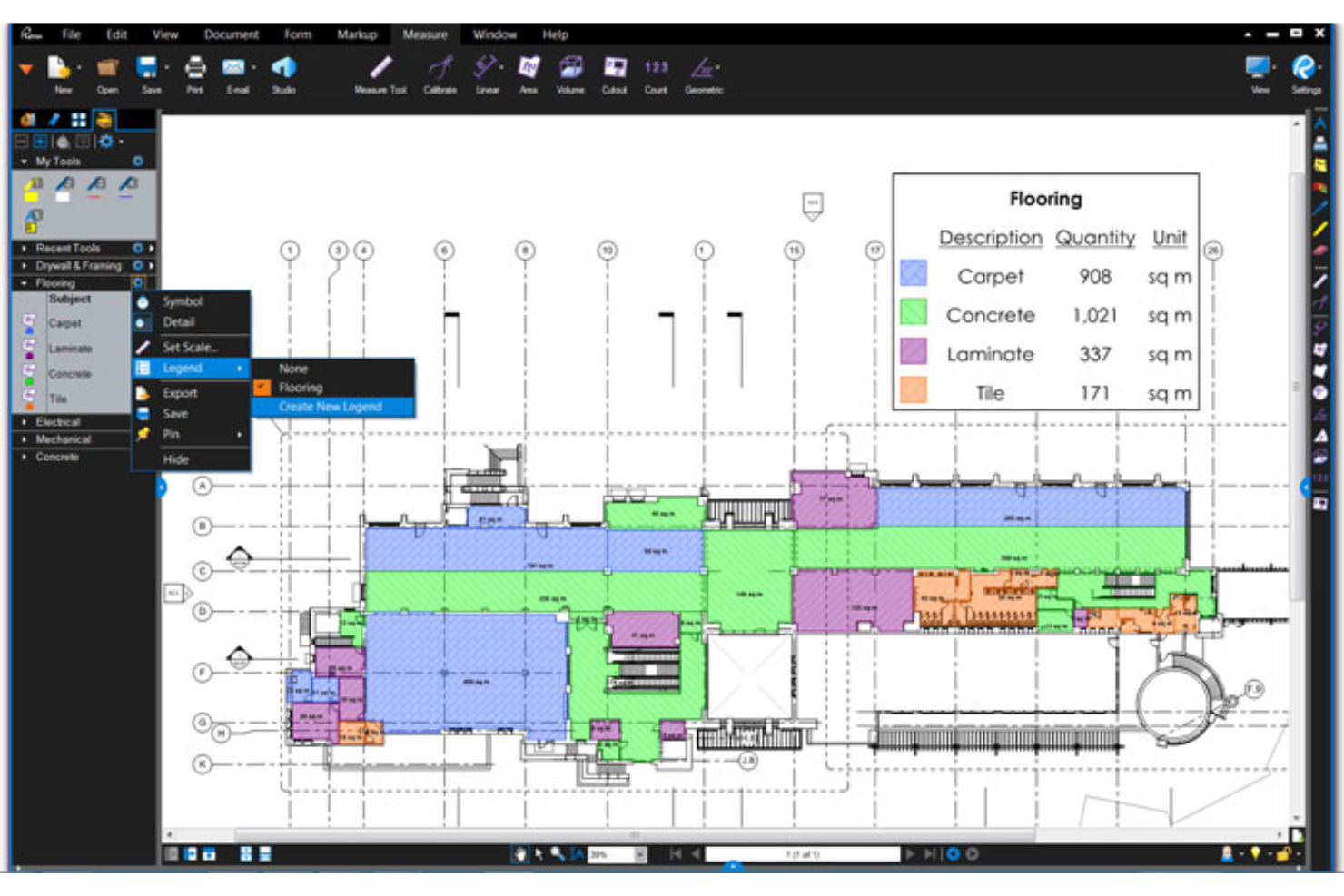
Bluebeam est un logiciel PDF conçu pour les professionnels de la construction ayant besoin d'outils efficaces de gestion et d'annotation de documents. Il est largement utilisé par les architectes, les ingénieurs et les entrepreneurs pour optimiser les flux de travail des projets et améliorer la collaboration.
Pourquoi constitue-t-il une bonne alternative à Adobe Acrobat : Bluebeam propose des outils spécialisés pour les professionnels de la construction qui favorisent l'efficacité des projets, notamment des fonctionnalités avancées d'annotation et de collaboration en temps réel. Ces fonctionnalités en font une excellente alternative à Adobe Acrobat pour ceux qui recherchent des solutions adaptées au secteur de la construction.
Fonctionnalités et intégrations remarquables :
Les fonctionnalités comprennent des outils d'annotation avancés, la collaboration en temps réel et des capacités de gestion de projets. Vous pouvez utiliser les outils d'annotation pour ajouter des commentaires et des annotations directement sur vos documents. La fonctionnalité de collaboration en temps réel permet à votre équipe de travailler efficacement ensemble sur les projets.
Les intégrations comprennent Autodesk Construction Cloud, SharePoint, ProjectWise, Box, Egnyte, Microsoft OneDrive, Dropbox, et bien plus encore.
Pros and Cons
Pros:
- Adapté aux projets de construction
- Fonctionnalités d'annotation avancées
- Fonctionnalités de collaboration en temps réel
Cons:
- Aucune version complète pour les utilisateurs de Mac
- Nécessite un ordinateur doté d'un matériel haut de gamme

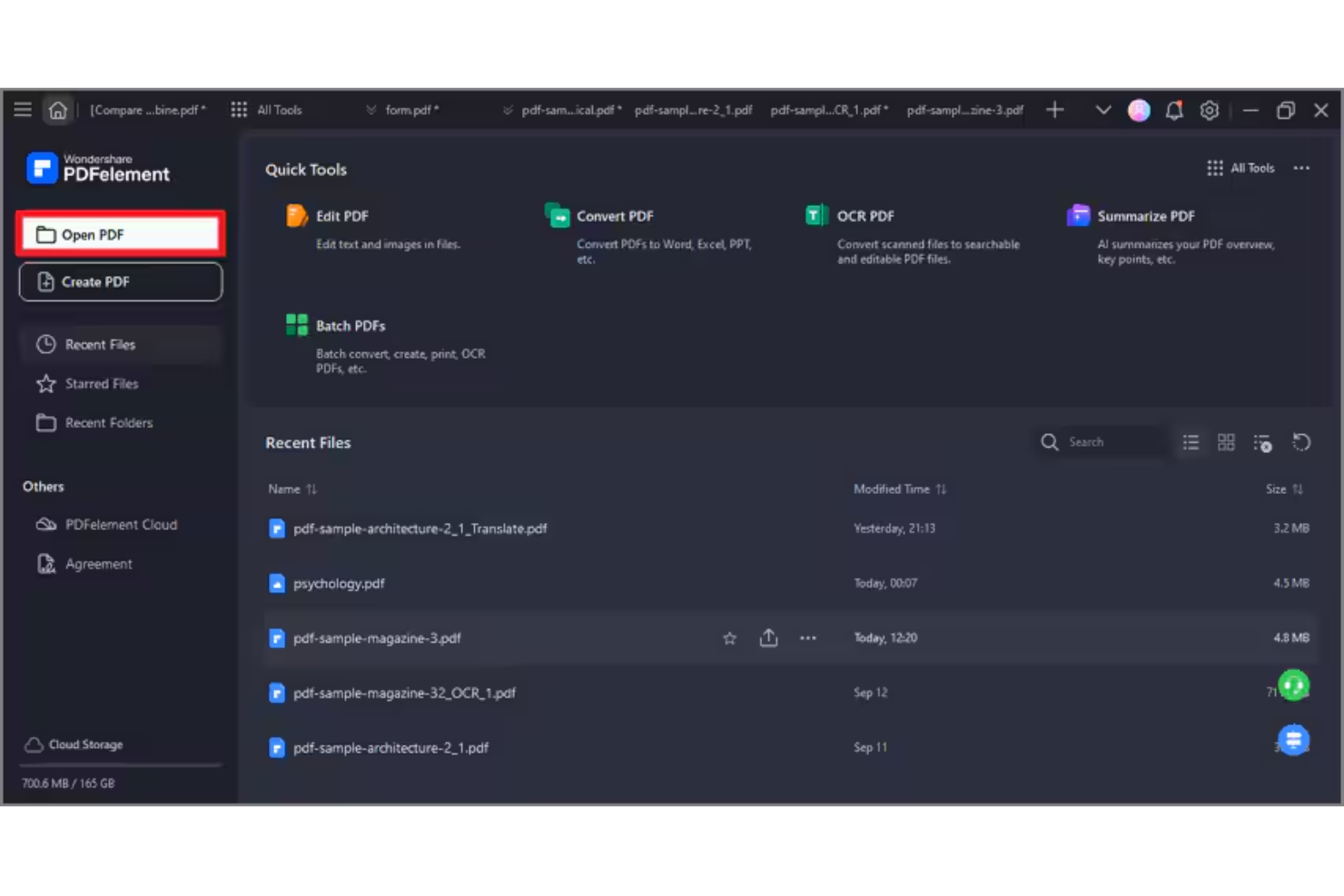
Wondershare PDFelement est un logiciel de gestion et de signature électronique de fichiers PDF conçu pour les professionnels qui ont besoin de fonctionnalités efficaces de gestion et de modification de documents PDF. Il s’adresse à un large éventail d’utilisateurs, notamment aux équipes de petites entreprises et aux professionnels indépendants, en proposant des moyens simples de créer, modifier, gérer et signer des PDF sur les systèmes d’exploitation Windows et Apple.
Pourquoi c’est une bonne alternative à Adobe Acrobat : PDFelement offre une modification des fichiers PDF optimisée par l’IA, ce qui améliore votre expérience de gestion documentaire. Ses fonctionnalités d’IA simplifient des tâches telles que la reconnaissance de texte et la création de formulaires PDF. Le logiciel propose également le traitement par lots, qui vous aide à gérer efficacement plusieurs fichiers, et une licence perpétuelle est disponible pour les équipes. Dans l’ensemble, PDFelement constitue une solution économique pour ceux qui souhaitent développer leurs capacités en matière de PDF sans la complexité d’Adobe Acrobat.
Fonctionnalités et intégrations remarquables :
Fonctionnalités : modification de texte optimisée par l’IA, traitement par lots et création de formulaires. Le logiciel vous permet de modifier des PDF avec précision et simplicité. Vous disposez également d’outils pour convertir des PDF dans différents formats de fichiers, ce qui rend vos flux de travail documentaires plus flexibles.
Intégrations : Google Drive, Dropbox, Microsoft OneDrive, Apple iCloud, Microsoft Office 365 et bien plus encore.
Pros and Cons
Pros:
- Outils de modification optimisés par l’IA
- Traitement par lots pour gagner en efficacité
- Conversions flexibles entre formats de fichiers
Cons:
- Certaines restrictions liées à la taille des documents
- Limites concernant les crédits d’IA

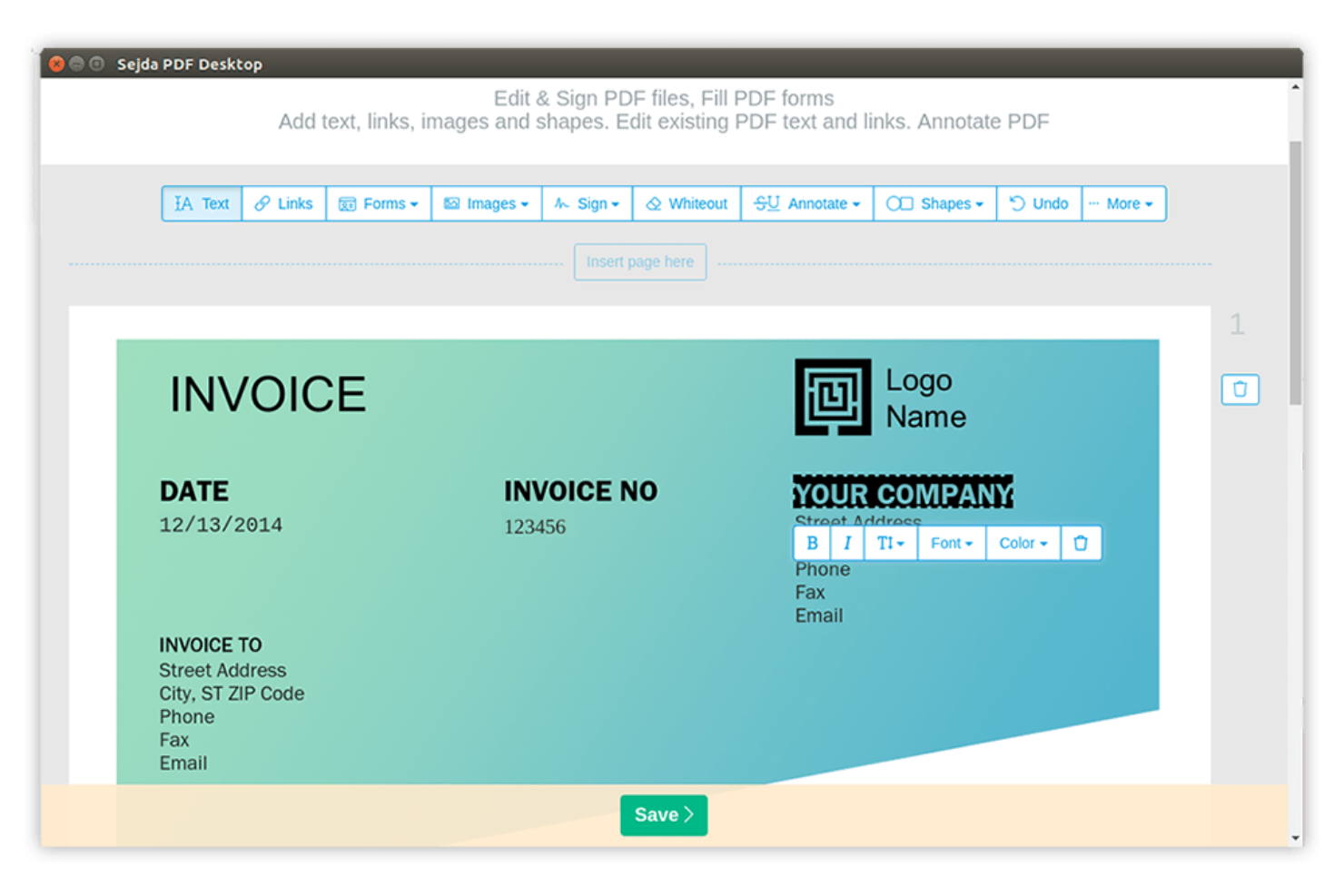
Sejda est un outil PDF en ligne conçu pour les utilisateurs qui ont besoin d’un accès rapide et simple aux fonctionnalités PDF. Il est populaire auprès des particuliers et des petites entreprises grâce à sa capacité à effectuer des tâches telles que la modification, la fusion et la division de fichiers PDF.
Pourquoi c’est une bonne alternative à Adobe Acrobat : Sejda excelle dans la gestion efficace des tâches PDF en ligne. Vous pouvez modifier et manipuler des fichiers PDF directement dans votre navigateur, ce qui le rend très accessible, tandis que la simplicité de l’outil permet de modifier rapidement des documents sans avoir besoin d’un logiciel complexe. Ces fonctionnalités font de Sejda un choix pratique pour ceux qui recherchent des solutions PDF en ligne simples.
Fonctionnalités et intégrations remarquables :
Les fonctionnalités comprennent la modification, la fusion et la division de fichiers PDF, ainsi que la prise en charge des polices personnalisées. Vous pouvez combiner plusieurs fichiers PDF en un seul document, tandis que la fonction de division permet de réduire les fichiers PDF volumineux en fichiers plus petits et plus faciles à gérer.
Les intégrations comprennent Google Drive, Dropbox et bien d’autres.
Pros and Cons
Pros:
- Modification efficace de fichiers PDF en ligne
- Aucune installation de logiciel requise
- Manipulation simple des documents
Cons:
- Limites strictes concernant la taille des fichiers et le nombre de pages
- Manque d’outils de traitement par lots


Xodo est un outil de gestion des PDF conçu pour les utilisateurs qui ont besoin d’un accès efficace à leurs documents sur différents appareils. Il est populaire auprès des particuliers et des équipes qui ont besoin d’outils fiables pour consulter, annoter et partager des PDF.
Pourquoi c’est une bonne alternative à Adobe Acrobat : Xodo excelle dans la gestion de documents sur plusieurs appareils, en offrant une expérience cohérente que vous soyez sur mobile, ordinateur ou le Web. Vous pouvez annoter et collaborer sur des PDF en temps réel grâce aux notes autocollantes et aux outils de balisage du texte. Ce logiciel intuitif permet à votre équipe de s’adapter rapidement. Ces fonctionnalités font de Xodo un choix pratique pour ceux qui recherchent flexibilité et accessibilité dans leurs solutions PDF.
Fonctionnalités et intégrations remarquables :
Les fonctionnalités comprennent des outils d’annotation, la collaboration en temps réel et l’accès au stockage dans le cloud, ce qui vous permet de surligner, souligner et ajouter des commentaires aux PDF tout en aidant votre équipe à rester connectée et productive.
Les intégrations comprennent Google Drive, Dropbox, Microsoft OneDrive, Evernote, et bien plus encore.
Pros and Cons
Pros:
- Expérience cohérente sur plusieurs appareils
- Accès au stockage dans le cloud
- Adaptation rapide pour les équipes
Cons:
- Synchronisation lente dans le cloud pour les fichiers volumineux
- Modification avec redistribution du texte limitée

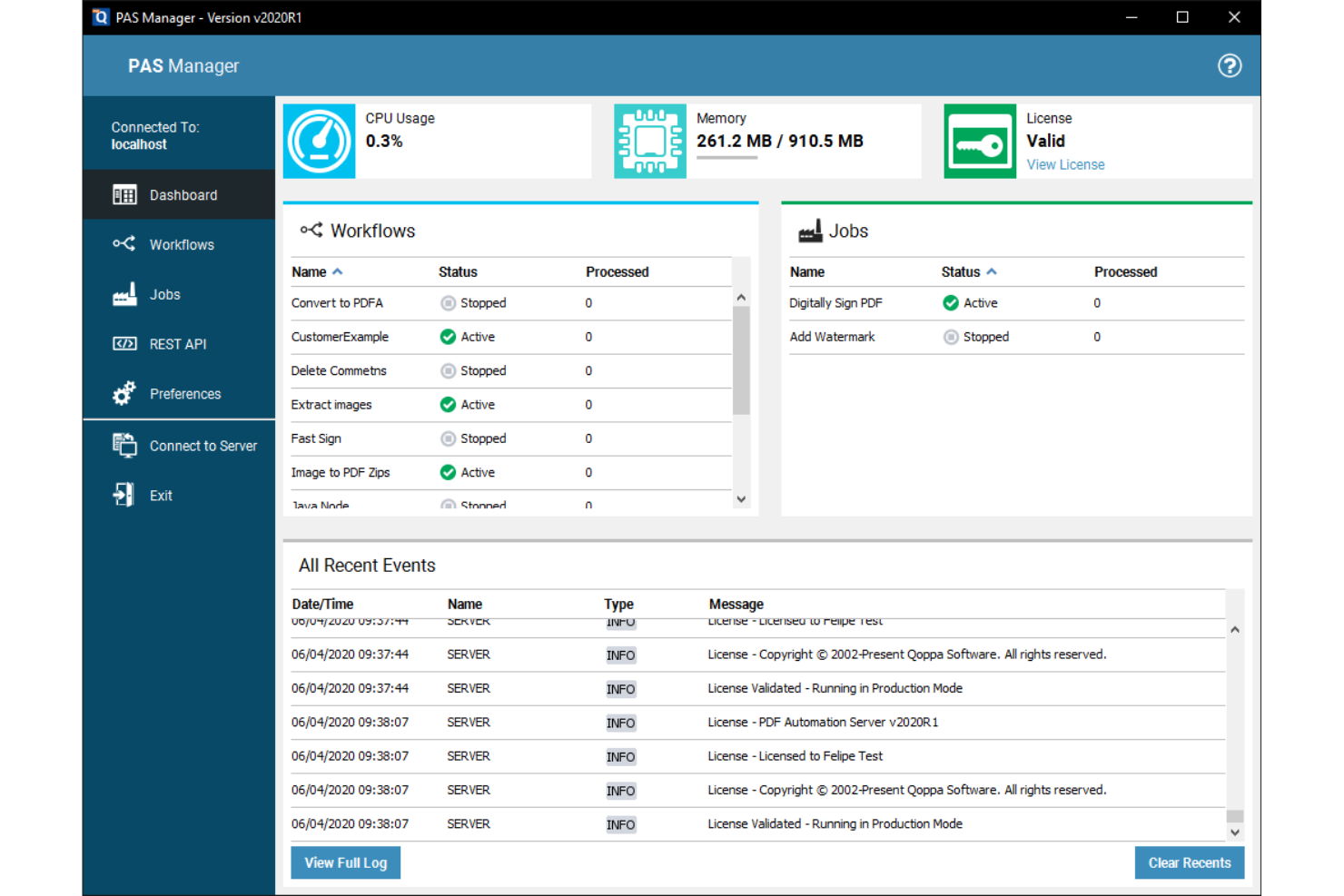
Qoppa PDF Studio fournit des solutions PDF de niveau entreprise aux sociétés qui ont besoin de fonctionnalités avancées de traitement des documents. Il est idéal pour les équipes qui ont besoin d'outils complets pour gérer, modifier et sécuriser les fichiers PDF.
Pourquoi c'est une bonne alternative à Adobe Acrobat : Qoppa PDF Studio propose des solutions PDF pour les entreprises qui répondent à des besoins professionnels complexes. Grâce à des fonctionnalités telles que la modification de PDF, la création de formulaires et la signature numérique, il permet à votre équipe de gérer efficacement les documents, tandis que ses options de sécurité contribuent à protéger vos fichiers. Ces fonctionnalités font de Qoppa PDF Studio un choix judicieux pour les entreprises à la recherche d'une alternative à Adobe Acrobat.
Fonctionnalités remarquables et intégrations :
Les fonctionnalités comprennent une sécurité avancée des documents, le traitement par lots, la création de formulaires, ainsi que le chiffrement et la gestion des autorisations des fichiers PDF. Divers outils de manipulation de fichiers vous permettent de diviser, fusionner et réorganiser les documents.
Les intégrations comprennent Google Drive, Dropbox, Microsoft OneDrive, Box, et bien plus encore.
Pros and Cons
Pros:
- Traitement par lots efficace
- Outils avancés de création de formulaires
- Adapté aux grandes équipes
Cons:
- Ne dispose pas de fonctionnalités modernes de conversation avec l'IA
- Problèmes de mise à l'échelle sur les moniteurs 4K
Autres alternatives à Adobe Acrobat
Voici quelques alternatives supplémentaires à Adobe Acrobat qui ne figurent pas dans ma sélection, mais qui méritent tout de même votre attention :
- PDF Expert
Idéal pour les utilisateurs d’appareils Apple
- PDF-XChange Editor
Idéal pour l’édition de PDF économique
- PDF24
Idéal pour les utilitaires PDF accessibles depuis un navigateur


Comment j’évalue les alternatives à Adobe Acrobat
Je divise mon évaluation en critères de base que chaque outil doit respecter, comme la véritable modification des PDF, la gestion des pages et les signatures électroniques, ainsi qu’en critères différenciateurs qui permettent de distinguer la solution la mieux adaptée à votre équipe des autres.
Fonctionnalités essentielles (critères incontournables pour cette liste)
Lorsque je sélectionne les outils de ma liste, j’évalue chacun d’entre eux sur une échelle de 0 (la fonctionnalité n’est pas proposée) à 5 (l’outil excelle dans ce domaine) pour chaque fonctionnalité essentielle répertoriée ci-dessous. Je convertis ensuite le score total de l’outil en pourcentage. Chaque outil doit obtenir un score total minimum de 65 % pour être pris en compte.
- Modification des PDF : Je vérifie si je peux modifier du texte existant, remplacer des images et ajuster la mise en forme directement dans le document, par exemple pour mettre à jour une date de livraison enfouie dans un énoncé des travaux de 40 pages.
- Création et conversion de PDF : La conversion d’une charte de projet créée dans Word ou d’un registre des risques créé dans Excel en un PDF soigné (et inversement) doit préserver les tableaux, les polices et la mise en page.
- Annotation et marquage : J’évalue la richesse des outils de révision — commentaires, encadrés et formes de dessin — ainsi que la possibilité pour plusieurs réviseurs d’annoter le même document dans le cadre d’un processus partagé.
- Prise en charge des signatures électroniques : Je recherche des processus de signature électronique intégrés ou étroitement associés qui permettent d’acheminer un contrat ou un ordre de modification pour une signature par plusieurs parties, avec une piste d’audit.
- Gestion des pages : La fusion de documents distincts sur le périmètre dans un seul dossier livrable, la division des annexes ou la réorganisation des sections doit être rapide et intuitive, même pour les tâches impliquant plusieurs fichiers.
- Sécurité et caviardage : J’évalue la protection par mot de passe, les autorisations détaillées et le véritable caviardage du contenu, notamment pour supprimer des données sensibles relatives aux coûts ou des informations personnelles identifiables avant de partager des fichiers à l’extérieur.
Une fois que j’ai établi une liste d’outils répondant à ces critères, j’examine ce qui distingue chaque plateforme.
Critères différenciateurs (ce qui distingue les fournisseurs)
Voici comment je compare les différents fournisseurs :
Fonctionnalités remarquables
L’intelligence documentaire alimentée par l’IA est un facteur de différenciation important : je recherche des outils capables de résumer une spécification de 100 pages ou d’extraire les clauses essentielles d’un contrat fournisseur sans analyse manuelle. La collaboration dans le nuage est tout aussi importante, en particulier lorsque des équipes réparties doivent examiner ensemble un livrable en temps réel au lieu de s’échanger par e-mail des copies annotées. J’évalue également les fonctionnalités de création de formulaires, car créer directement dans l’éditeur PDF des demandes d’informations (RFI) ou des modèles d’ordres de modification à remplir permet d’économiser une quantité étonnante d’allers-retours.
Au-delà des fonctionnalités
Les intégrations à l’écosystème jouent ici un rôle majeur : je vérifie si un outil se connecte nativement à des plateformes comme Jira, Smartsheet ou SharePoint, puisque c’est là que se trouvent réellement la plupart des documents de projet. La structure tarifaire constitue un autre facteur clé ; certains fournisseurs proposent des abonnements par utilisateur, tandis que d’autres offrent des licences en volume ou de site, mieux adaptées à un bureau de gestion de projets dont les sous-traitants se relaient. J’évalue également la couverture multiplateforme, car les équipes mixtes utilisant Windows, macOS et des appareils mobiles ont besoin d’un accès cohérent, sans lacunes fonctionnelles.
Pourquoi chercher une alternative à Adobe Acrobat ?
Bien qu'Adobe Acrobat soit un bon choix de logiciel de gestion des PDF et des signatures électroniques, plusieurs raisons peuvent pousser certains utilisateurs à rechercher d'autres solutions. Vous cherchez peut-être une alternative à Adobe Acrobat parce que…
- Vous avez besoin de tarifs plus abordables.
- Votre équipe souhaite une interface utilisateur plus simple.
- Vous avez besoin de fonctionnalités mobiles plus performantes.
- Vous avez besoin de fonctionnalités adaptées à des secteurs d'activité spécifiques.
- Votre équipe souhaite obtenir une réponse plus rapide du service client.
- Vous avez besoin d'accéder à vos documents hors ligne.
Si vous vous reconnaissez dans l'une de ces situations, vous êtes au bon endroit. Ma liste comprend plusieurs logiciels de gestion des PDF et des signatures électroniques mieux adaptés aux équipes qui rencontrent ces difficultés avec Adobe Acrobat et recherchent d'autres solutions.
Principales fonctionnalités d'Adobe Acrobat
Voici quelques-unes des principales fonctionnalités d’Adobe Acrobat, pour vous aider à le comparer à d’autres solutions :
- Modification de PDF : vous permet de créer des PDF et de modifier directement le texte et les images de vos fichiers.
- Conversion de fichiers : vous permet de convertir des documents au format PDF et inversement, afin de faciliter l’utilisation de différents formats de fichiers.
- Signatures électroniques : fournit des outils pour ajouter et recueillir des signatures numériques, simplifiant ainsi le processus.
- Organisation des pages : vous aide à réorganiser, supprimer ou faire pivoter les pages de votre PDF, afin de garder vos documents organisés.
- Protection des documents : offre une protection par mot de passe et des paramètres d’autorisation pour sécuriser vos PDF.
- Collaboration et partage : vous permet de partager des documents et de recueillir des commentaires, favorisant ainsi la collaboration au sein de l’équipe.
- Productivité grâce à l’IA : utilise l’IA pour automatiser et faciliter les tâches liées aux documents, améliorant ainsi l’efficacité.
- Création de formulaires : vous permet de créer et de remplir des formulaires, afin d’organiser la collecte de données.
- Comparaison de documents : vous permet de comparer deux versions d’un document afin d’identifier les différences.
- Accès mobile : permet d’accéder aux outils sur des appareils mobiles, afin que vous puissiez travailler où que vous soyez.