

10 meilleurs logiciels de gestion de projet sélectionnés pour 2026

10 Sélection des meilleurs logiciels de gestion de projet


Les meilleurs logiciels de gestion de projet vous aident à planifier les projets, à suivre leur avancement, à gérer les budgets et à collaborer avec votre équipe au même endroit. Sans eux, vous êtes contraint de vous appuyer sur des outils déconnectés, comme des feuilles de calcul, des e-mails ou des fils de discussion Slack, ce qui complique la gestion des délais, la prévention de l’élargissement du périmètre et la coordination de votre équipe.
Après 20 ans d’expérience dans la gestion de projets d’envergure au sein de différentes agences et plus de dix ans consacrés à la rédaction d’évaluations de logiciels, je sais ce qu’il faut privilégier pour évaluer les outils de gestion de projet en matière de performances, d’ergonomie et d’évolutivité. J’ai testé et comparé plus de 40 outils afin d’identifier ceux qui simplifient réellement la réalisation des projets.
Dans ce guide, vous trouverez des logiciels fiables et conçus pour répondre à des besoins précis, qui prennent en charge la planification, le suivi et la communication pendant tout le cycle de vie du projet. Chaque évaluation présente les fonctionnalités clés, les avantages et les inconvénients, ainsi que les éléments qui distinguent l’outil, afin que vous puissiez choisir le logiciel le mieux adapté à vos flux de travail et à votre style de gestion.
Pourquoi faire confiance à nos recommandations de logiciels
Notre équipe teste et évalue des logiciels depuis 2012. En tant que chefs de projet nous-mêmes, nous savons à quel point il est difficile — et important — de choisir le bon logiciel.
Pour ce guide, nous avons évalué les outils grâce à des tests pratiques et une recherche indépendante, en notant les outils selon nos critères de sélection. Nous nous appuyons également sur les enseignements de leaders d’opinion du secteur et de professionnels de la gestion de projet en activité.
Nos avis reflètent notre jugement éditorial humain, et non un argumentaire de vente.
Réviseurs experts:
Tableau comparatif des outils de gestion de projet
Le tableau ci-dessous compare les tarifs des principaux outils de gestion de projet que j’ai sélectionnés.
| Tool | Best For | Trial Info | Price | ||
|---|---|---|---|---|---|
| 1 | Idéal pour la réalisation de projets d’entreprise transversaux | Essai gratuit de 14 jours | À partir de $9.80/utilisateur/mois | Website | |
| 2 | Idéal pour des tableaux de bord personnalisables | Essai gratuit de 30 jours | À partir de 9 $/utilisateur/mois | Website | |
| 3 | Idéal pour la gestion de projets d’agence et le suivi de budgets | Essai gratuit de 14 jours + démo gratuite disponible | À partir de $10/utilisateur/mois | Website | |
| 4 | Idéal pour la prévision de projets | Essai gratuit disponible | À partir de $7/utilisateur/mois (facturé annuellement) | Website | |
| 5 | Idéal pour la planification et les workflows simplifiés | Essai gratuit de 30 jours | À partir de 25$/utilisateur/mois | Website | |
| 6 | Idéal pour l’optimisation des ressources grâce à l’IA | Essai gratuit de 14 jours | À partir de 10 $/utilisateur/mois | Website | |
| 7 | Idéal pour la gestion de projet collaborative | Essai gratuit de 14 jours | À partir de 16$/utilisateur/mois | Website | |
| 8 | Idéal pour les agences souhaitant fluidifier le passage de la vente à la production | Essai gratuit de 14 jours + démo gratuite disponible | À partir de 9 dollar/siège/mois (facturé annuellement) | Website | |
| 9 | Idéal pour l’intégration avec la suite Zoho | Essai gratuit de 10 jours | À partir de 5 $/utilisateur/mois facturé annuellement. Version gratuite disponible. | Website | |
| 10 | Idéal pour l’intégration d’un portail client | Essai gratuit de 14 jours | À partir de $3.90/projet actif/mois | Website |


Évaluations des meilleurs logiciels de gestion de projet
Voici mon évaluation et mon analyse approfondies des meilleurs logiciels de gestion de projet. Je vous présenterai leurs avantages et leurs inconvénients, ainsi que leurs fonctionnalités, afin de vous aider à mieux comprendre les capacités de chaque outil et son adéquation à vos projets.

Wrike
Idéal pour la réalisation de projets d’entreprise transversaux
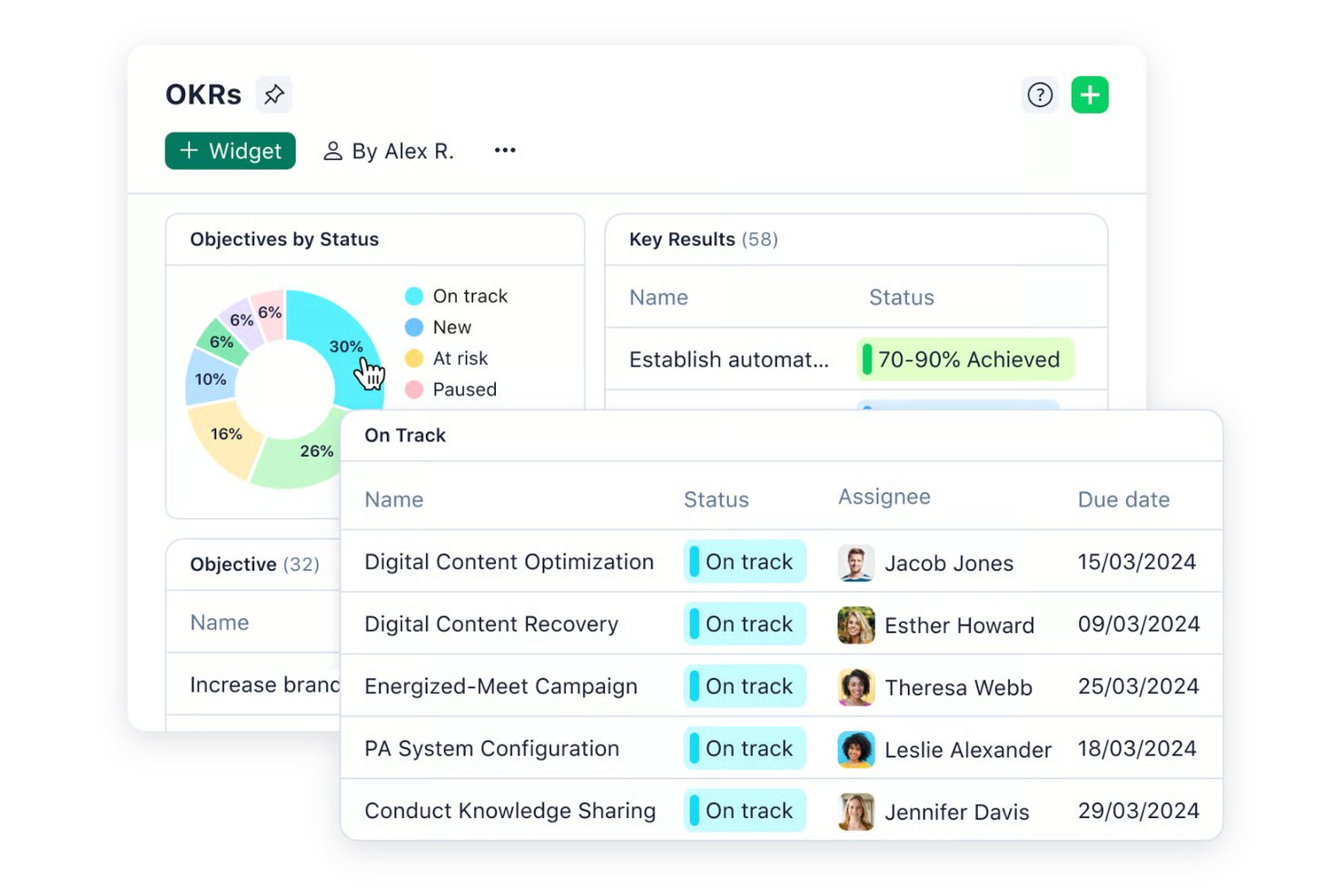
Wrike est une plateforme de gestion de projets conçue pour les équipes des secteurs aux rythmes soutenus qui ont besoin de workflows personnalisables, d’une planification avancée des ressources et d’une collaboration en temps réel pour maintenir les projets complexes sur la bonne voie.
À qui Wrike convient-il le mieux ?
Wrike convient particulièrement aux équipes de taille moyenne et aux grandes entreprises qui gèrent plusieurs projets simultanément dans des services transversaux comme le marketing, les produits et les services professionnels.
Pourquoi j’ai choisi Wrike
Wrike figure sur ma liste restreinte, car il gère le type de complexité des projets qui commence à faire plier la plupart des outils. J’apprécie particulièrement la vue de gestion de portefeuille interprojets, qui permet à mon équipe de suivre les dépendances et les charges de travail de plusieurs grandes initiatives à la fois, sans devoir passer d’un outil à l’autre. Les réservations de ressources me permettent de réserver des capacités par membre de l’équipe ou par rôle professionnel et d’estimer les heures par rapport aux disponibilités réelles, afin de détecter les surallocations avant qu’elles ne deviennent problématiques. La fonctionnalité de gestion de l’effort est également utile lors du cadrage des tâches, car je peux signaler le niveau d’exigence d’un travail avant de l’attribuer, ce qui rend les prévisions de délais de livraison beaucoup plus précises à grande échelle.
Fonctionnalités clés de Wrike
- Vues de projet personnalisées : Basculez entre les vues Gantt, Kanban, Tableau, Calendrier et Graphique pour visualiser l’avancement du projet dans le format qui convient le mieux à votre équipe.
- Tableaux Scrum : Gérez les sprints agiles avec des tableaux Scrum partagés, la priorisation du backlog et le suivi de l’avancement en temps réel.
- Formulaires de demande personnalisés : Créez des formulaires de collecte dynamiques qui génèrent automatiquement des tâches, des projets et des workflows lors de leur envoi.
- Révision et approbations : Annotez et approuvez plus de 30 types de fichiers, notamment des vidéos et des fichiers HTML, directement dans les tâches.
Intégrations de Wrike
Les intégrations incluent Microsoft Teams, Salesforce, Google Drive, Adobe Creative Cloud, Zoom, Power BI, Tableau, QuickBooks, Miro et Microsoft SharePoint.
Pros and Cons
Pros:
- Intégration de premier ordre grâce à des présentations vidéo guidées
- Les fonctionnalités d’IA sont disponibles dans tous les forfaits sans frais supplémentaires
- Les menus contextuels accessibles par clic droit vous permettent d’en faire davantage en réalisant moins de clics
Cons:
- Certaines intégrations nécessitent des forfaits de niveau supérieur ou un module complémentaire payant
- L’authentification à deux facteurs est réservée au forfait entreprise
New Product Updates from Wrike
Wrike Adds Klaxoon MCP Integration
Wrike’s Klaxoon MCP integration is now generally available, enabling AI agents to navigate between Wrike tasks and attached whiteboards, read task context, and manage whiteboard attachments via API. For more information, visit Wrike's official site.

Idéal pour des tableaux de bord personnalisables

Smartsheet est une plateforme de gestion de projet conçue pour les équipes ayant besoin d'une planification flexible, d'une collaboration en temps réel et d'une visibilité sur des projets complexes, ce qui la rend populaire auprès des organisations dans les domaines de la technologie, du marketing et des opérations cherchant à gérer leur travail à grande échelle.
Pour qui Smartsheet est-il le mieux adapté ?
Smartsheet convient particulièrement aux équipes de taille moyenne à grande dans la gestion de projet, les opérations et l'informatique qui doivent coordonner le travail entre plusieurs départements ou flux de travail.
Pourquoi j'ai choisi Smartsheet
J'ai choisi Smartsheet parmi les meilleurs en raison du degré de contrôle qu'il offre sur la conception des tableaux de bord et la présentation des données. Vous pouvez créer des tableaux de bord sur mesure à l'aide d'un système de widgets glisser-déposer—en intégrant des widgets de métriques, de graphiques, de rapports et de contenu web, puis en les redimensionnant et en les repositionnant sur une grille. J'apprécie le fait que vous puissiez appliquer des codes couleur hexa personnalisés à chaque widget, définir des thèmes pour l'ensemble du tableau de bord, et même créer et exporter des thèmes personnalisés à partager dans toute votre organisation. Ce niveau de cohérence visuelle est important lorsque vous présentez l'état d'un projet à des dirigeants ou parties prenantes qui doivent pouvoir lire un tableau de bord en un coup d'œil. Le rafraîchissement automatique toutes les 10 minutes sur les tableaux de bord publiés permet de garder les données à jour pour les parties prenantes sans mise à jour manuelle.
Fonctionnalités clés de Smartsheet
- Vue diagramme de Gantt : Visualisez les échéances des projets, définissez des dépendances entre les tâches, et ajustez les plannings en faisant glisser les barres directement sur le diagramme.
- Flux de travail automatisés : Configurez des règles d'automatisation sans code pour déclencher des alertes, des demandes d'approbation ou la mise à jour de lignes en fonction des conditions que vous définissez dans vos feuilles.
- Gestion des ressources : Visualisez la capacité de l'équipe sur plusieurs projets, attribuez le travail par rôle ou par personne, et suivez le temps renseigné par rapport aux heures planifiées.
- Suivi de la référence initiale : Capturez un instantané de votre plan initial de projet et comparez-le à l'avancement actuel pour mesurer les écarts de planning et de budget.
Intégrations de Smartsheet
Les intégrations incluent Adobe, AWS, Box, DocuSign, Dropbox, Google, Power BI, SAP, Jira et Microsoft.
Pros and Cons
Pros:
- Peut être adapté à des besoins spécifiques de gestion de projet
- Permet l'automatisation des tâches
- Facilite la gestion collaborative des projets
Cons:
- Ne dispose pas de suivi du temps intégré
- Peu adapté aux besoins de gestion de projet plus simples
New Product Updates from Smartsheet

Smartsheet Adds Non-Plan User Management in Admin Center
Smartsheet adds a Non plan users tab to the Seat types and true-up page in Admin Center. This lets system admins review non-plan users and add them to the plan or remove them from the organization in one place. For more information, visit Smartsheet’s official site.

Idéal pour la gestion de projets d’agence et le suivi de budgets

Productive est une plateforme de gestion de projet conçue pour les agences et les entreprises de services qui doivent gérer projets, budgets, ressources et rentabilité au même endroit.
Pour qui Productive est-il le mieux adapté ?
Productive convient particulièrement aux agences digitales, studios créatifs et cabinets de conseil qui souhaitent suivre la réalisation des projets et la performance financière conjointement.
Pourquoi j'ai choisi Productive
Productive mérite sa place sur ma liste car il relie la gestion de projet à la performance financière d'une manière que la plupart des outils de gestion de projet ne font tout simplement pas. J'apprécie que chaque heure enregistrée par mon équipe sur un projet actualise le budget en temps réel – je peux ainsi suivre la rentabilité sans attendre le rapport financier mensuel. Les alertes de dépassement de budget sont utiles : je peux définir des seuils personnalisés pour informer l'équipe avant que le projet ne dépasse son budget, et non après. Pour les agences, la possibilité de diviser de grands projets en différentes phases budgétaires aide à gérer les contrats clients à long terme.
Principales fonctionnalités de Productive
- Vues multiples des projets : Passez du Gantt au tableau Kanban, à la chronologie, au calendrier, à la liste ou au tableau selon les préférences de votre équipe.
- Planification des ressources : Visualisez la capacité des équipes, équilibrez les charges de travail et gérez les demandes de congés directement dans le planificateur de ressources.
- Modèles de projets : Dupliquez l'ensemble des configurations d’un projet – tâches, sous-tâches, descriptions et assignés – pour lancer de nouveaux projets clients plus rapidement.
- Workflows automatisés : Déclenchez des actions comme la création de factures ou l'envoi de messages Slack en fonction de l'activité du projet, sans suivi manuel.
Intégrations de Productive
Les intégrations incluent Jira, HubSpot, Xero, Google Agenda, Sage, Gmail, Microsoft Outlook, Slack, BugHerd et QuickBooks.
Pros and Cons
Pros:
- Planification et suivi des ressources performants
- Interface conviviale qui simplifie la gestion des tâches
- Gestion et reporting financier intégrés
Cons:
- Plus d'intégrations souhaitées
- La configuration initiale peut prendre du temps
New Product Updates from Productive
Productive Adds Voice Dictation, Slack Connector, Proposals, and Overtime
Productive adds voice dictation, a Slack Connector, proposal controls, and overtime tracking. These updates support faster AI interactions, client proposals, and time management. For more information, visit Productive’s official site.

Runn
Idéal pour la prévision de projets
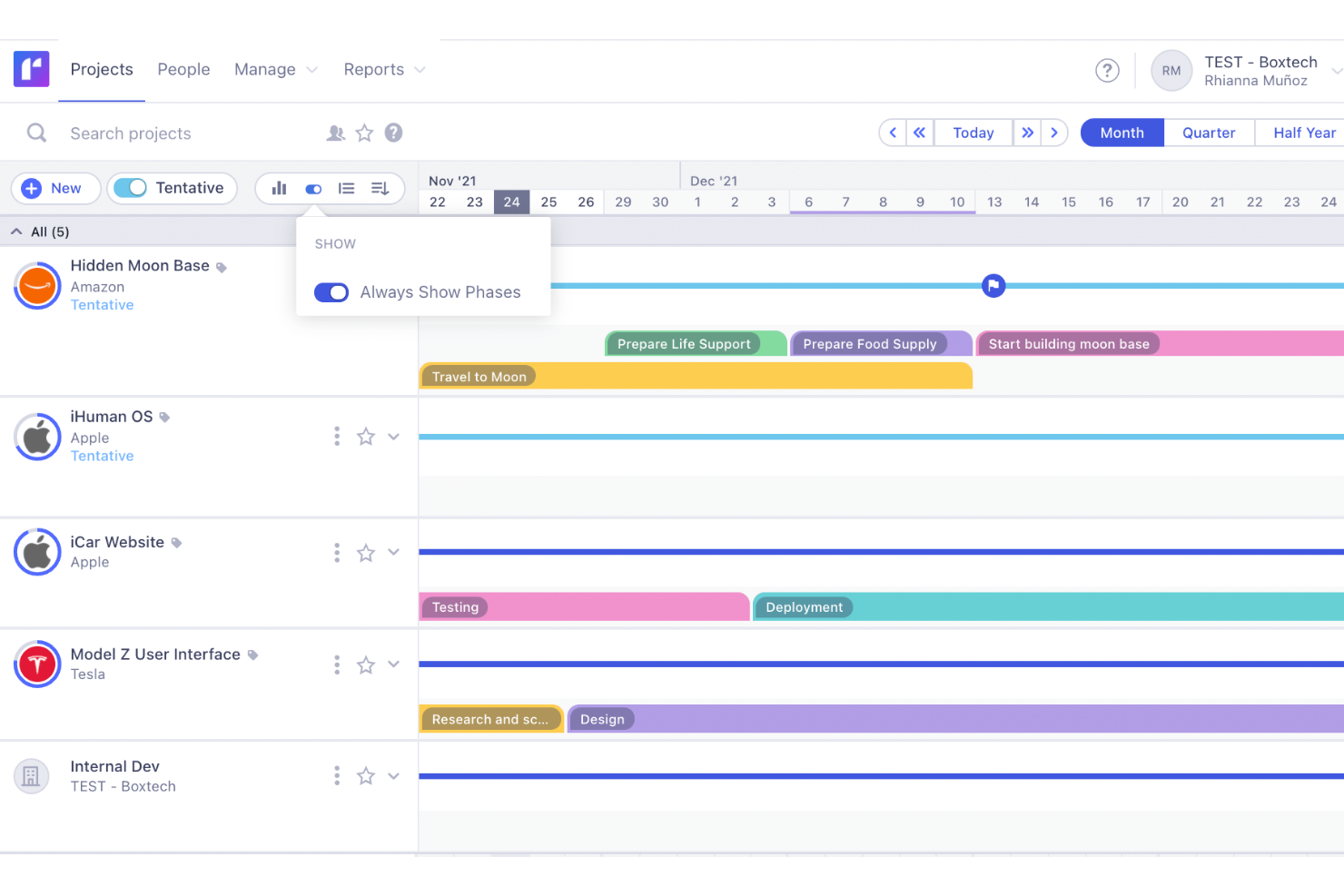
Runn est un outil de gestion des ressources et des projets en temps réel, conçu pour aider les équipes à planifier, suivre et prévoir leurs projets de manière efficace.
Pourquoi j'ai choisi Runn : J'apprécie ses capacités de prévision de projet en temps réel. Vous pouvez anticiper la capacité future de toute votre entreprise, de certaines équipes ou de membres individuels, ce qui vous permet de planifier en toute confiance. Cette prévoyance aide à identifier les goulets d'étranglement potentiels et garantit que votre équipe n'est pas surchargée, conduisant à une répartition plus équilibrée des charges de travail et à des livraisons de projets dans les délais.
La capacité de Runn à gérer des projets hypothétiques m'a également marqué. Cette fonctionnalité permet de planifier des projets potentiels et d'évaluer leur impact sur votre charge de travail et vos finances. En comparant différents scénarios, vous pouvez prendre des décisions éclairées sur les projets à poursuivre, afin d'assurer une utilisation optimale de vos ressources sans vous surengager.
Fonctionnalités et intégrations phares de Runn
Fonctionnalités : possibilité de définir des horaires de travail personnalisés pour chaque membre de l'équipe, ce qui permet d'intégrer des horaires flexibles et des rôles à temps partiel. Runn permet également de gérer les absences et les jours fériés, évitant ainsi les conflits de planning. De plus, vous pouvez attribuer des étiquettes à votre équipe selon des compétences, des localisations ou d'autres attributs, facilitant la recherche de la bonne personne pour chaque tâche.
Intégrations : ADP Workforce Now, AlexisHR, BambooHR, CharlieHR, HiBob, Workday, Clockify, Harvest et Jira.
Pros and Cons
Pros:
- Fournit une vue d'ensemble des plannings et des phases de projet
- Bonnes capacités de prévision de projets
- Les utilisateurs peuvent personnaliser les tableaux de bord
Cons:
- Pourrait proposer des fonctionnalités de gestion des tâches plus robustes
- Manque de fonctionnalités d'automatisation avancées

Celoxis
Idéal pour la planification et les workflows simplifiés
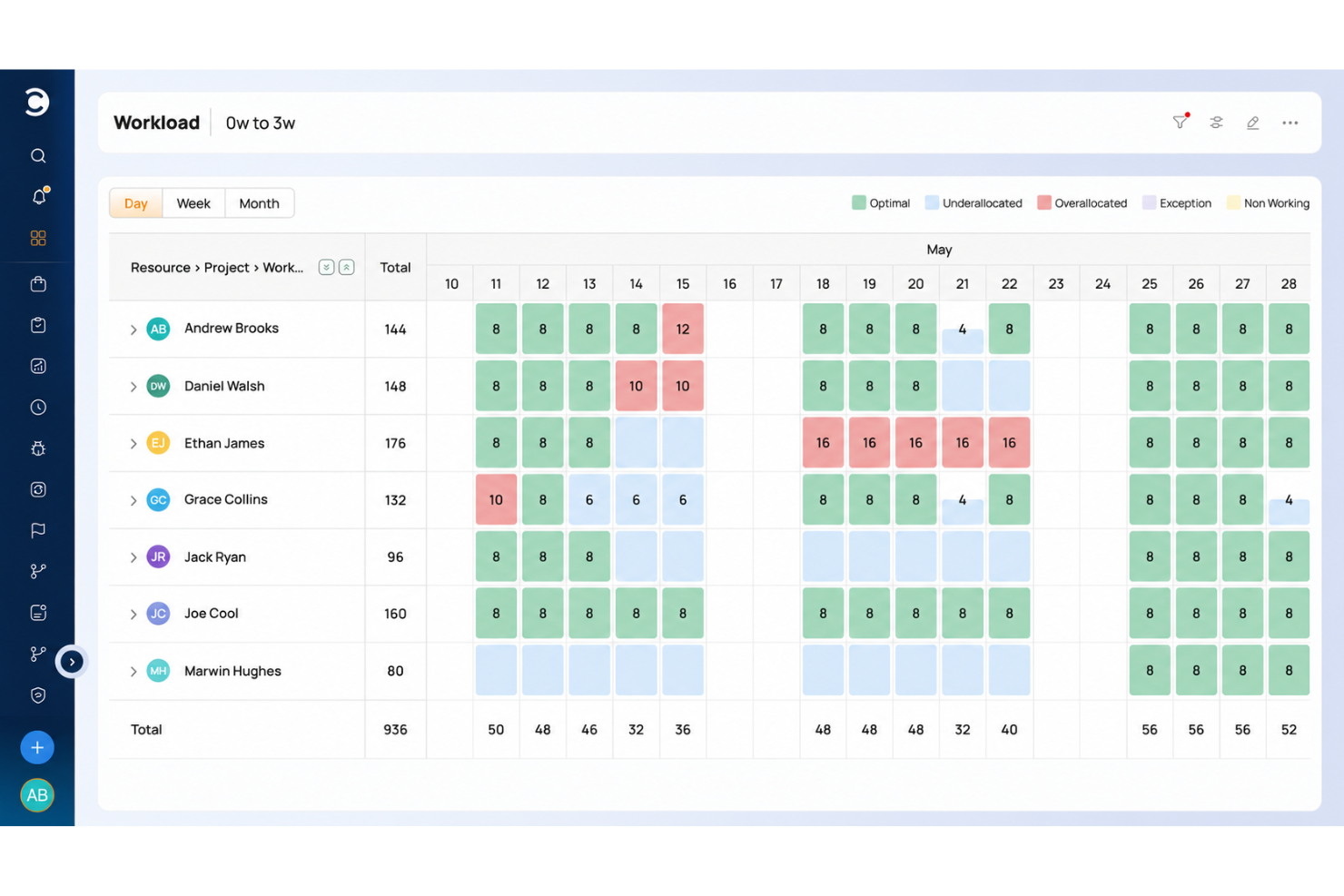
Celoxis est une plateforme de gestion de projets conçue pour les équipes et organisations qui doivent gérer des projets complexes, suivre les ressources et automatiser les flux de travail à travers plusieurs départements ou projets clients.
Pour qui Celoxis est-il le mieux adapté ?
Celoxis convient bien aux équipes de taille moyenne à grande qui ont besoin d’une plateforme centralisée pour gérer simultanément plusieurs projets, ressources et parties prenantes.
Pourquoi j’ai choisi Celoxis
J’ai choisi Celoxis comme l’un des meilleurs car il gère très bien la complexité de la planification sans alourdir le processus. Le diagramme de Gantt interactif s’ajuste automatiquement en temps réel en cas de modifications—donc lorsqu’une dépendance change, le planning se met à jour sans que j’aie à tout réorganiser manuellement. J’apprécie aussi les applications de workflow intégrées pour suivre les risques, incidents, demandes de changement et bugs, parallèlement au projet, ce qui évite à mon équipe de jongler avec différents fichiers Excel. Les règles de routage personnalisées et politiques d’escalade dans ces workflows permettent aux bonnes personnes d’être informées au bon moment, sans configuration supplémentaire.
Fonctionnalités clés de Celoxis
- Comptabilité de projet : Suivez les dépenses budgétaires, la prévision de revenus et les marges bénéficiaires sur vos projets et portefeuilles en temps réel.
- Planification de la capacité des ressources : Consultez la disponibilité des équipes, assignez le travail selon les compétences et recevez des alertes immédiates lorsqu’un membre est surchargé.
- Tableau de bord de gestion de portefeuille : Surveillez l’avancement, les budgets et les risques sur plusieurs projets dans une seule vue personnalisable.
- Portail client : Partagez des mises à jour projet, fichiers et discussions avec les clients via un portail gratuit et personnalisable intégré à la plateforme.
Intégrations Celoxis
Les intégrations incluent Microsoft Project, Microsoft Excel, Google Drive, Outlook, Salesforce, Jira, QuickBooks Online, Slack, Trello et Okta.
Pros and Cons
Pros:
- Rapports et analyses avancés, incluant la prévision par IA
- Extrêmement personnalisable et flexible pour les organisations en croissance
- Vue au niveau du portefeuille avec des tableaux de bord en temps réel
Cons:
- Peut ne pas convenir aux petites équipes ou aux structures de moins de 5 employés
- Pas d’application mobile disponible

Idéal pour l’optimisation des ressources grâce à l’IA
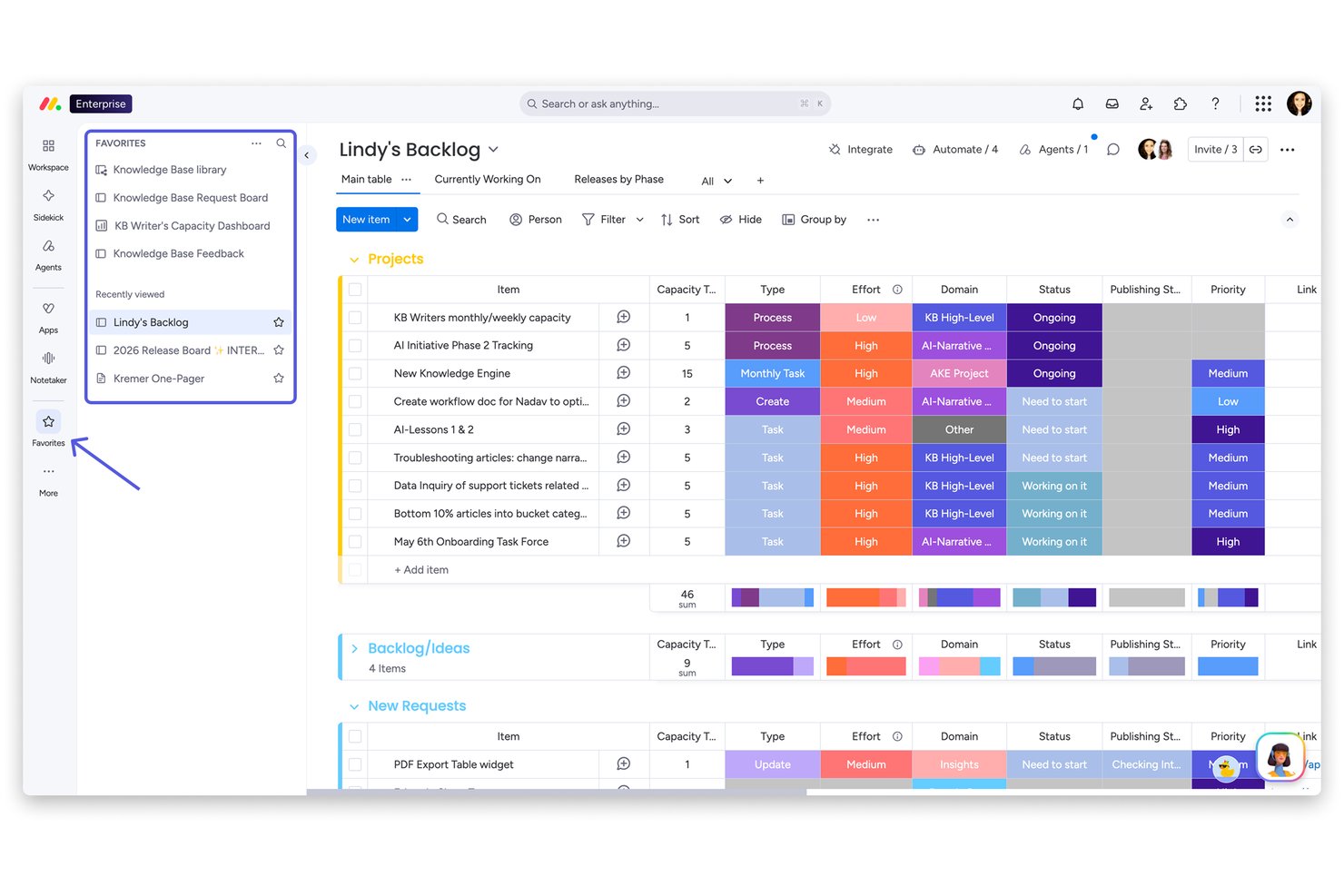
La plateforme monday AI Work est une plateforme de gestion du travail configurable et native à l'IA, couvrant la planification de projets, le suivi des tâches, l'allocation des ressources et l'automatisation des workflows grâce à une large bibliothèque de tableaux, vues et modèles personnalisables.
Pour qui la plateforme monday AI Work est-elle la mieux adaptée ?
La plateforme monday AI Work convient aux équipes transverses des entreprises de taille moyenne à grande qui gèrent plusieurs projets simultanés dans des services tels que le marketing, le produit, l’informatique et les opérations.
Pourquoi j’ai choisi la plateforme monday AI Work
La plateforme monday AI Work gagne sa place dans ma sélection grâce à la manière dont elle gère l’allocation des ressources, au niveau de l’IA. J’utilise la vue de charge de travail pour voir la capacité de mon équipe en temps réel, et l’IA monday propose des recommandations d’affectation adaptées au contexte du projet, et non simplement basées sur les créneaux disponibles. Je compte également sur sa détection de risques basée sur l’IA pour repérer les conflits de dépendances avant qu’ils ne deviennent des retards.
Fonctionnalités clés de la plateforme monday AI Work
- Modèles de tableaux personnalisés : Choisissez parmi plus de 200 modèles pour des workflows spécialisés en gestion de projet, CRM, marketing et opérations.
- Tableaux de bord à l’échelle du portefeuille : Concevez des tableaux de bord transversaux en temps réel avec plus de 80 widgets personnalisables pour suivre l’avancement et les indicateurs clés.
- Documents de travail intégrés : Créez et partagez des documents collaboratifs directement reliés aux tableaux de projets et aux tâches pour une documentation continue.
- Tableaux de projets multi-vues : Passez du Kanban au Gantt, à la chronologie, au calendrier ou à la vue tableau pour visualiser le travail comme votre équipe le souhaite.
Intégrations de la plateforme monday AI Work
La plateforme monday AI Work offre des centaines d’intégrations natives via ses intégrations intégrées et sa marketplace, dont Slack, Salesforce, HubSpot, Google Drive, Zoom, Microsoft Teams, Jira, GitHub, Trello et Dropbox. Elle est également compatible avec Zapier et propose une API pour des intégrations personnalisées.
Pros and Cons
Pros:
- L’IA identifie automatiquement les risques projets en temps réel
- La vue de charge de travail visualise la capacité de l’équipe par projet
- Les modèles de tableaux conviennent aux workflows spécialisés de chaque service
Cons:
- Les sous-tâches sont limitées à un seul niveau
- Les tableaux de bord du portefeuille nécessitent des abonnements haut de gamme
New Product Updates from monday AI Workspace
monday AI Workspace Adds Human Approval Routing
monday AI Workspace adds a human-in-the-loop approval block to AI Workflows, sending approval requests and routing workflow paths based on responses. For more information, visit monday AI Workspace's official site.
Hive
Idéal pour la gestion de projet collaborative
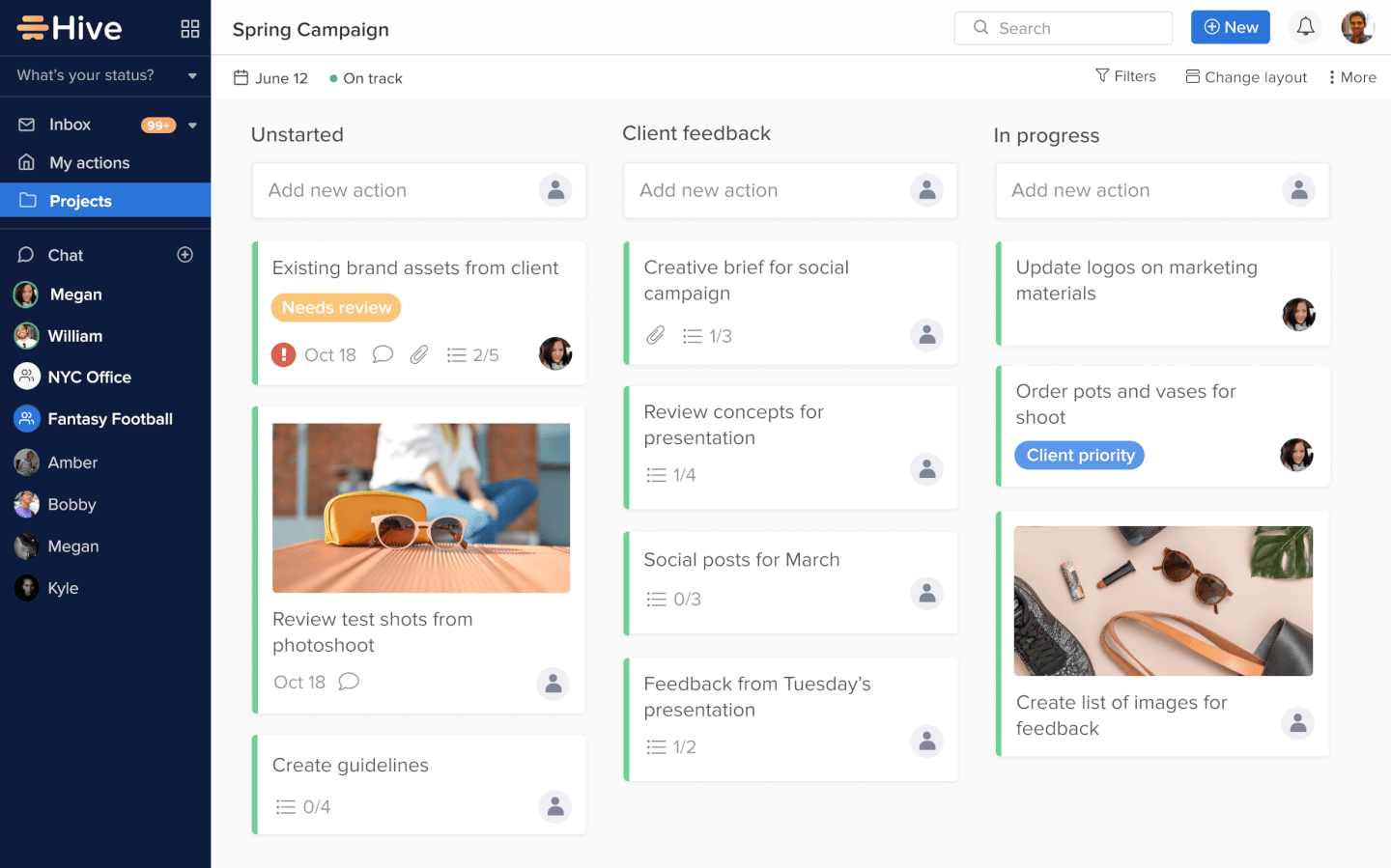
Hive est une plateforme de gestion de projet conçue pour les équipes travaillant dans des secteurs dynamiques, qui ont besoin d'un suivi des tâches flexible, d'une collaboration en temps réel et de flux de travail personnalisables pour faire avancer les projets et garder tout le monde aligné.
Pour qui Hive est-il le mieux adapté ?
Hive convient parfaitement aux équipes de taille moyenne dans les domaines du marketing, des opérations et des industries créatives qui ont besoin d'un espace de travail centralisé pour gérer les projets et collaborer en temps réel.
Pourquoi j'ai choisi Hive
Hive fait partie de mes premiers choix car j'apprécie le fait que la collaboration soit intégrée au travail lui-même, et non ajoutée après coup. Mon équipe utilise Hive Notes pour coéditer les documents de réunion en temps réel, puis convertir les points d'action en tâches suivies sans changer de contexte. Je compte également beaucoup sur la fonction de relecture et d'approbation : annoter des fichiers et les faire valider directement à l'intérieur d'une carte projet élimine de nombreux échanges d'e-mails. Le chat natif intégré et lié à des cartes d'action spécifiques permet aux conversations de rester attachées aux tâches concernées, de sorte que rien ne se perd.
Principales fonctionnalités de Hive
- Vues multiples de projet : Passez d'une vue Kanban, Gantt, chronologique, calendrier ou portefeuille afin d'adapter l'affichage à la façon dont votre équipe suit son travail.
- Gestion des ressources : Attribuez des membres de l'équipe aux projets et visualisez leur disponibilité sur l'ensemble du cycle de vie du projet.
- Automatisation des flux de travail : Créez des processus automatisés sur mesure pour gérer les tâches répétitives comme les mises à jour de statut, les transmissions et les rappels.
- Collecte via formulaire : Recueillez les demandes de travail via des formulaires partagés qui s'intègrent directement à vos projets Hive.
Intégrations Hive
Les intégrations incluent Google Drive, Google Calendar, Dropbox, QuickBooks, Zoom, Microsoft OneDrive, Microsoft Teams, Outlook Calendar, Jira et Slack.
Pros and Cons
Pros:
- Intégration facile avec d'autres outils
- Excellente solution tout-en-un pour les PME
- Excellentes fonctionnalités de communication intégrées
Cons:
- La version mobile est limitée en fonctionnalités
- Les fonctions de reporting pourraient être étoffées
Copper
Idéal pour les agences souhaitant fluidifier le passage de la vente à la production
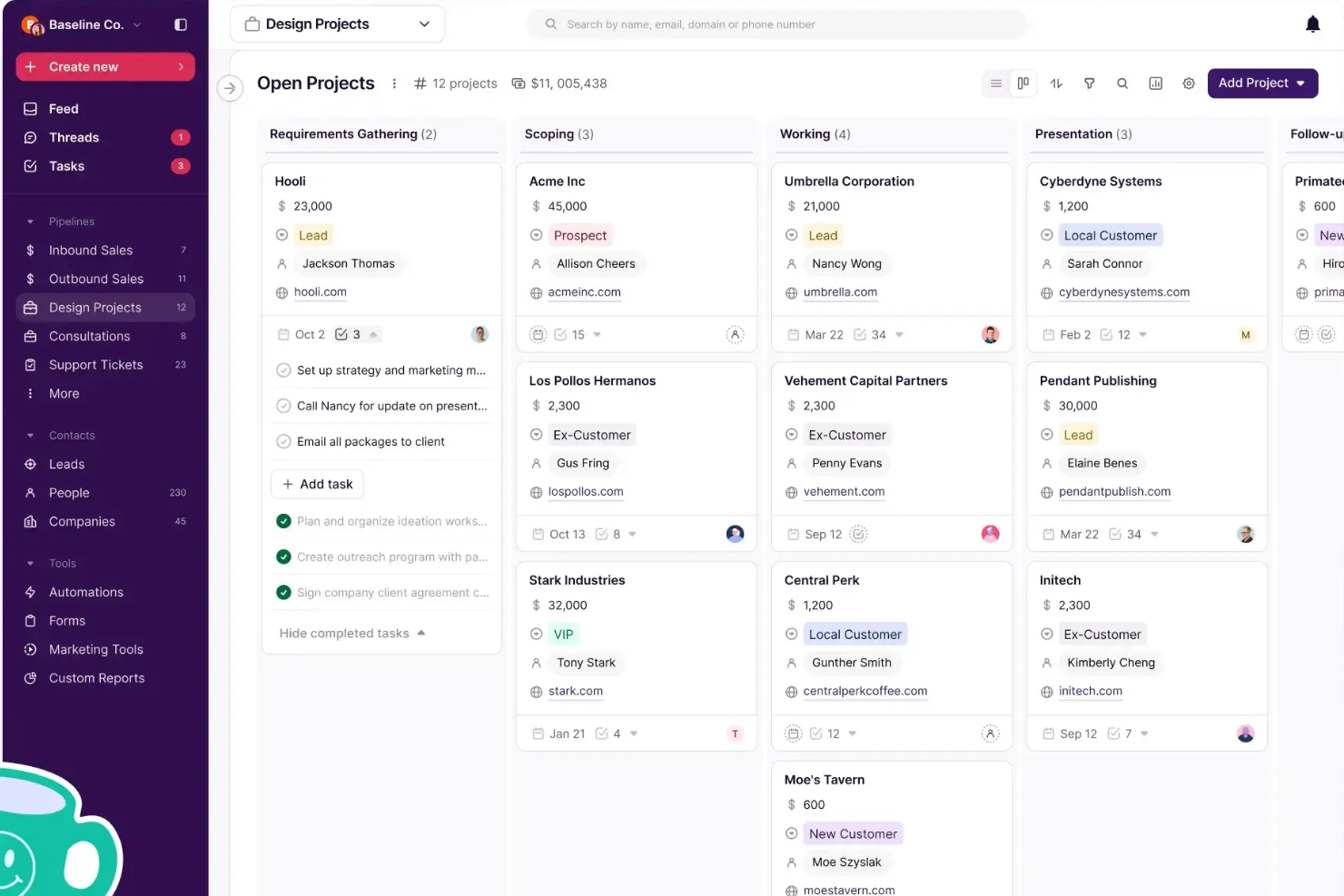
Copper est une plateforme CRM conçue pour les petites et moyennes entreprises qui souhaitent gérer les relations clients et les activités commerciales parallèlement aux tâches de projet, permettant ainsi aux équipes de garder les données clients et l'avancement des projets connectés en un seul endroit.
Pour qui Copper est le meilleur ?
Copper est particulièrement adapté aux agences et entreprises de services qui doivent gérer à la fois les relations clients et la livraison de projets sur une seule et même plateforme.
Pourquoi j'ai choisi Copper
J'ai sélectionné Copper parmi les meilleurs pour la gestion de la transition entre la vente et la livraison, un point souvent problématique pour de nombreuses agences. Lorsqu'un contrat est conclu, vous pouvez le dupliquer directement dans un pipeline de projet : pas de document de transfert, pas de ressaisie des informations client, pas de briefing dans un autre outil. Le contexte client construit par votre équipe commerciale est automatiquement transmis. J'apprécie également les automatisations du pipeline, qui permettent de déclencher la création de tâches ou l'envoi d'emails automatiquement au fur et à mesure que le projet progresse, afin que rien ne soit oublié entre le lancement et la livraison. Pour les agences qui gèrent à la fois le développement commercial et les missions en cours, avoir ces deux flux de travail réunis avec un fil d'activité partagé visible par toute l'équipe fait une vraie différence opérationnelle.
Fonctionnalités clés de Copper
- Suivi des contacts et des relations : Enregistrez et organisez toutes les coordonnées, l'historique des communications et le contexte relationnel de chaque client dans une fiche unique.
- Rapports personnalisés : Créez des rapports personnalisés pour suivre l'activité de vos équipes, les prévisions de revenus et les tendances clients sur l'ensemble de votre pipeline.
- Séries d'emails et automatisation : Mettez en place des séquences d'emails automatisés qui se déclenchent en fonction des changements de phase du pipeline ou selon les formulaires soumis.
- Application mobile : Enregistrez automatiquement les appels et SMS depuis votre téléphone pour que toutes les interactions clients soient capturées sans saisie manuelle.
Intégrations de Copper
Les intégrations incluent Gmail, Google Calendar, Google Drive, Mailchimp, Google Sheets, LinkedIn, RingCentral, DocuSign, QuickBooks et Dropbox.
Pros and Cons
Pros:
- Idéal pour les équipes clients travaillant avec Google Workspace
- L'extension Chrome apporte les outils dans Gmail, Calendar, LinkedIn et plus encore
- Intègre CRM et gestion de projets
Cons:
- Les fonctionnalités de gestion de projets pourraient être plus avancées, notamment sur l'allocation des ressources
- Pas de connexion à Microsoft 365, Outlook ou d'autres messageries

Idéal pour l’intégration avec la suite Zoho
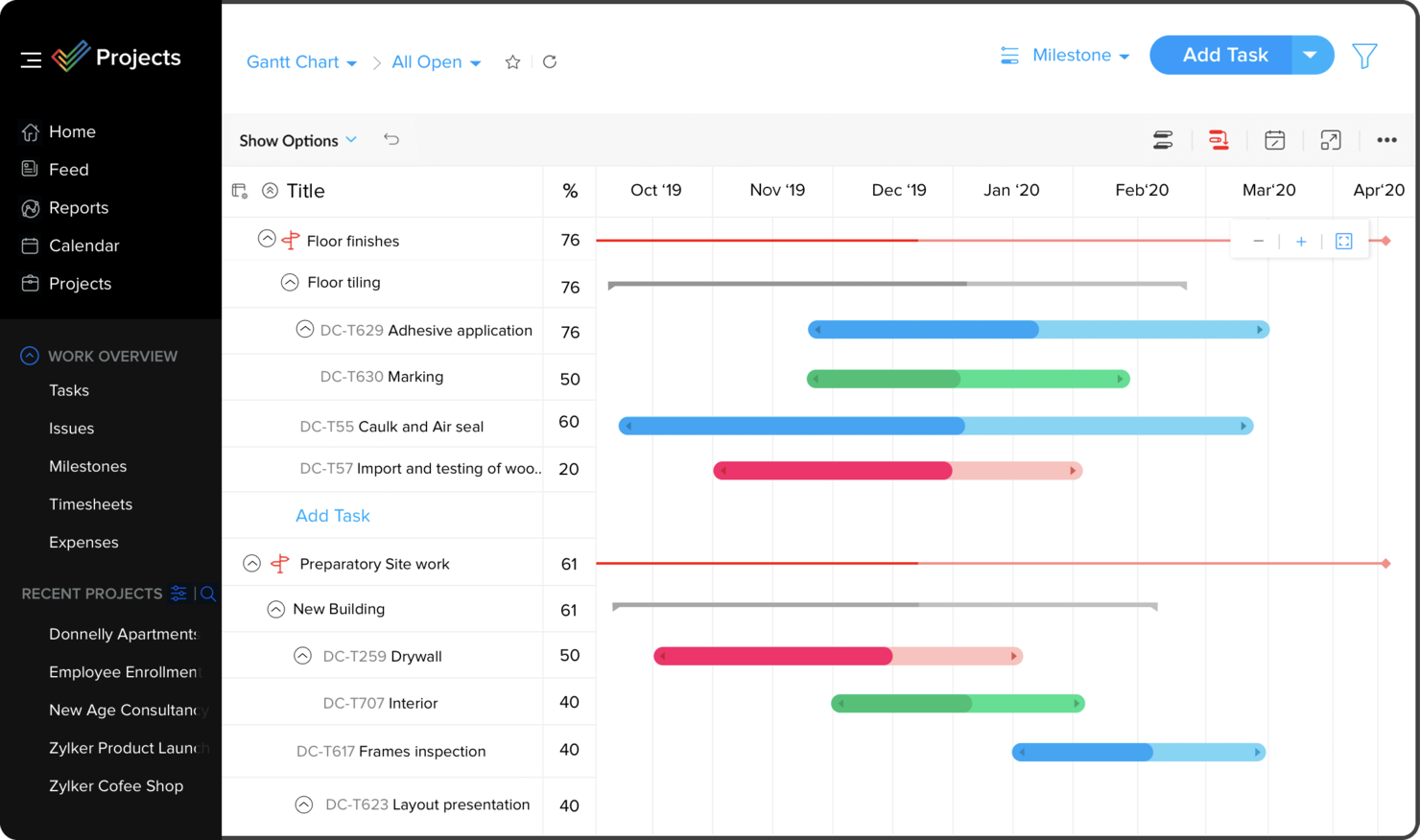
Zoho Projects est une plateforme de gestion de projets basée sur le cloud, conçue pour les équipes et entreprises ayant besoin d’organiser des tâches, de suivre la progression et de collaborer sur des projets complexes.
Pour qui Zoho Projects est-il le mieux adapté ?
Zoho Projects convient parfaitement aux petites et moyennes entreprises qui utilisent déjà les outils Zoho et souhaitent intégrer la gestion de projet à leurs flux de travail existants.
Pourquoi j’ai choisi Zoho Projects
J’ai choisi Zoho Projects comme l’un des meilleurs grâce à son intégration naturelle dans un écosystème Zoho plus large. Mon équipe utilise Zoho CRM en parallèle avec Projects, et la synchronisation bidirectionnelle permet, dès qu’une affaire se conclut dans le CRM, de lancer immédiatement un nouveau projet sans ressaisir de données. J’apprécie également l’intégration avec Zoho Books et Invoice — les feuilles de temps saisies dans Projects remontent directement dans les factures, ce qui rend la facturation des clients sur la base des heures réelles suivies possible en un clic. L’intégration avec Zoho People est une autre fonctionnalité sur laquelle je compte, car elle importe automatiquement les congés approuvés et m’empêche d’assigner des tâches à une personne absente du bureau.
Principales fonctionnalités de Zoho Projects
- Diagramme de Gantt : Visualisez les calendriers des projets, définissez des dépendances entre tâches et replanifiez facilement depuis la vue du graphique.
- Automatisation des flux de travail Blueprint : Concevez des workflows pour les tâches étape par étape afin de mettre à jour automatiquement des champs, d’assigner des utilisateurs et de déclencher des alertes à mesure que les statuts évoluent.
- Gestion des ressources : Visualisez en temps réel la charge de travail de chaque membre de l’équipe et réattribuez des tâches en cas de surcharge ou de sous-occupation.
- Suivi des bases de référence : Capturez à tout moment un instantané du plan de votre projet et comparez-le à l’avancement réel pour détecter rapidement les écarts de planning.
Intégrations Zoho Projects
Les intégrations incluent Zoho CRM, Zoho Desk, Zoho People, Zoho Books, Zoho Analytics, Google Calendar, Microsoft Teams, Dropbox, GitHub et Slack.
Pros and Cons
Pros:
- Suivi du temps sur plusieurs tâches à la fois
- Automatisations des flux de travail faciles
- Nombre illimité de projets
Cons:
- Peu d’options pour exporter les types de fichiers
- Aucune intégration avec Quickbooks
New Product Updates from Zoho Projects
Zoho Projects Adds CodeX Scripts for Custom Modules
Zoho Projects now supports CodeX Scripts for custom modules, enabling conditional logic and rules for creating, updating, and deleting records. For more information, visit Zoho Projects' official site.
 .
.
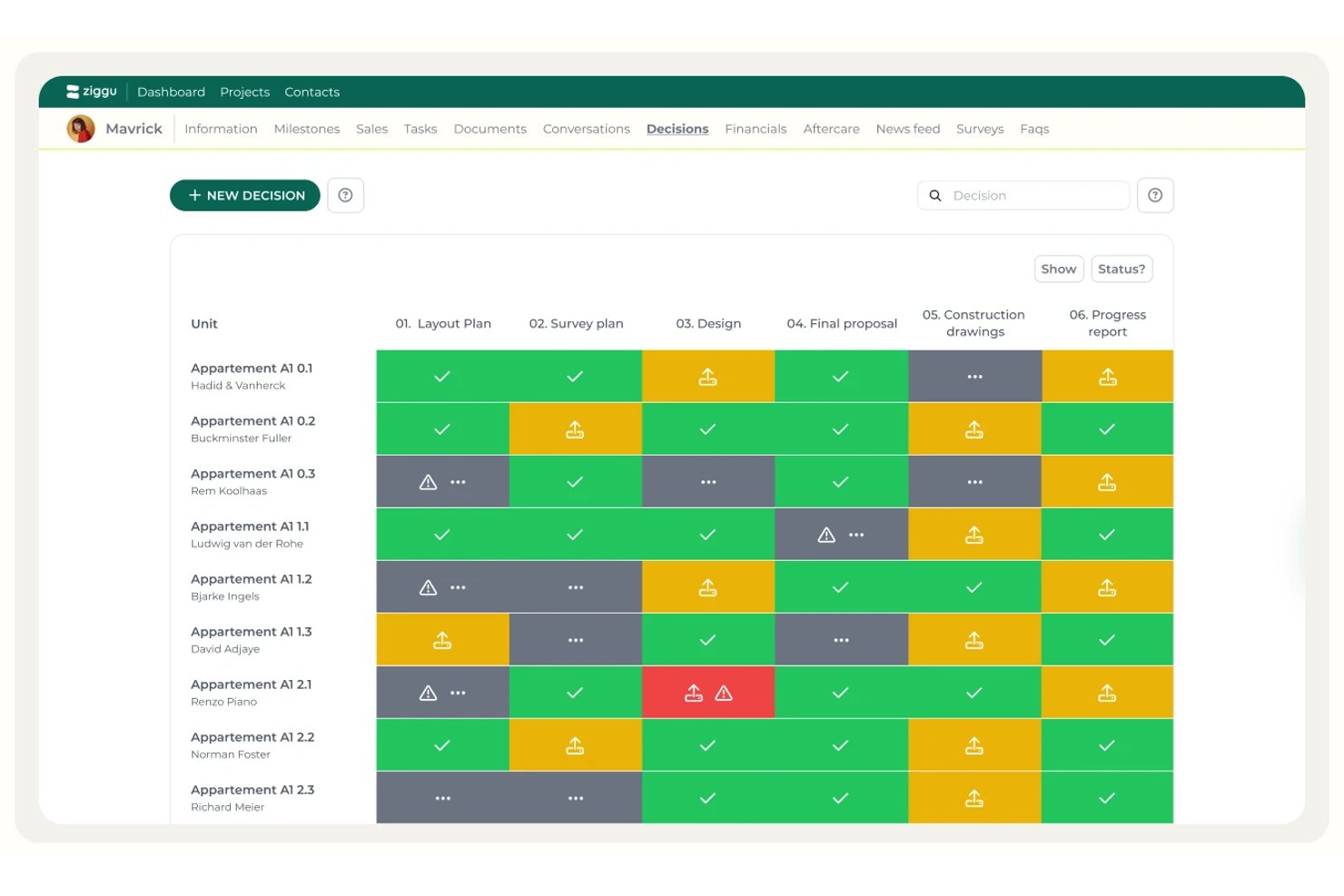
Ziggu est un portail client et une plateforme de coordination de projets conçus pour les équipes de construction et de développement immobilier, qui combinent planification fondée sur les jalons, gestion des tâches, partage de documents et approbations des clients en un seul endroit.
À qui Ziggu convient-il le mieux ?
Ziggu est conçu pour les équipes de construction et de développement immobilier qui ont besoin d’un portail client structuré pour gérer les approbations, les documents et les décisions sur plusieurs projets actifs.
Pourquoi j’ai choisi Ziggu
J’ai choisi Ziggu comme l’un des meilleurs outils en raison de sa gestion de l’intégration d’un portail client dans les projets de construction et de développement immobilier. J’apprécie particulièrement le module Décisions & Approbations : vous téléchargez plusieurs propositions, les clients les comparent et les approuvent numériquement, et chaque approbation reçoit automatiquement une piste d’audit horodatée. Les modèles de flux de travail fondés sur les jalons sont tout aussi impressionnants : ils publient automatiquement les tâches et les documents auprès des bonnes parties dès qu’une phase du projet est activée.
Principales fonctionnalités de Ziggu
- Portail client personnalisé : Les clients disposent d’un portail sécurisé et personnalisé pour suivre l’avancement du projet, consulter les documents et communiquer avec votre équipe sans passer par les e-mails.
- Boîte de réception des conversations : Les fils de communication par projet, avec accusés de lecture, notes privées internes et indicateurs d’état, organisent les échanges entre les clients et l’équipe.
- Modèles de flux de travail déclenchés par les jalons : Les modèles de projet réutilisables publient automatiquement les tâches, les messages et les documents auprès des bonnes parties lorsqu’un jalon est activé.
- Listes d’options : Les clients sélectionnent directement dans leur portail des finitions ou des options supplémentaires tarifées, et l’impact financier est mis à jour en temps réel.
Intégrations de Ziggu
Ziggu propose plus de 13 intégrations, notamment avec Microsoft SharePoint, Google Drive, Dropbox, Salesforce, Power BI, Archisnapper et LetsBuild. Son API REST publique prend en charge les intégrations personnalisées.
Pros and Cons
Pros:
- Le portail client personnalisé centralise la communication avec les clients
- Les décisions et les approbations fournissent des pistes d’audit horodatées
- Les modèles de jalons automatisent les flux de travail répétitifs des projets
Cons:
- Ne propose pas de vues de projet sous forme de diagramme de Gantt, de tableau Kanban ou de calendrier
- Ne propose pas de fonctionnalités de gestion des ressources et de la charge de travail
Autres logiciels de gestion de projet
Voici quelques autres options de logiciels de gestion de projet qui ne figurent pas dans ma sélection, mais qui méritent tout de même votre attention :
- Quire
Idéal pour la décomposition des tâches
- Quickbase
Idéal pour la polyvalence de la plateforme
- Bubble PPM
Idéal pour la gestion de portefeuille
- Microsoft Project
Idéal pour les équipes utilisant Microsoft 365
- FigJam
Idéal pour la collaboration créative
- Rocketlane
Meilleurs portails clients pour partager des informations
- Dock
Idéal pour la gestion de la collaboration client
- Plaky
Idéal pour une gestion de projets économique
- MeisterTask
Idéal pour la gestion de projet simple
- ClickUp
Idéal pour remplacer plusieurs outils distincts
- Nifty
Idéal pour le suivi des jalons
- Kintone
Idéal pour des applications personnalisées
- Forecast
Idéal pour la détection précoce des risques de dépassement de budget
- Backlog
Idéal pour les développeurs de logiciels
- Workzone
Idéal pour une visibilité complète sur les projets
- ProofHub
Idéal pour organiser les tâches à l’aide de vues en tableaux et en tables
- Shortcut
Idéal pour unir la planification et le développement
- Teamwork.com
Idéal pour les équipes à distance
- awork
Meilleure interface utilisateur pour l’utilisabilité et l’intuitivité
- Jira
Idéal pour le suivi de projets inter-équipes
- Adobe Workfront
Idéal pour les modèles de projet personnalisables
- Bonsai Agency Software
Idéal pour les projets d'agence de bout en bout
- Nutcache
Idéal pour le suivi avancé du temps
- Basecamp
Idéal pour la centralisation des documents de projet
- FunctionFox
Idéal pour les créatifs
- Planview AdaptiveWork
Idéal pour la planification des ressources d’entreprise
- Polaris PSA By Replicon
Idéal pour des informations de projet en temps réel
- Deltek Replicon Time
Idéal pour une saisie intelligente du temps de projet
- PSOhub
Idéal pour intégrer la gestion de projet au CRM
- ProjectManager
Idéal pour le suivi de projet en temps réel et les analyses approfondies


Autres types de logiciels de gestion de projet
Découvrez notre liste d’outils de gestion de projet que nous avons identifiés et testés pour leurs fonctionnalités particulières ou pour des cas d’utilisation propres à certains secteurs.
Logiciels de gestion de projet pour :
- Agile
- Architectes
- Construction
- Consultants
- Créatif
- Conception
- Entreprise
- Gratuit
- Freelances
- Santé
- Particuliers
- Utilisateurs de MacOS
- Marketing
- Industrie
- Équipes à distance
- Petites entreprises
- Start-ups
Logiciels de gestion de projet avec :
- Portails clients
- Suivi agile
- Intégrations avec Google Agenda
- Facturation
- Déploiement sur site
- Planification visuelle
Présentation vidéo des outils de gestion de projet
Découvrez notre vidéo sur les meilleurs outils de gestion de projet :


Comment j’évalue les logiciels de gestion de projet
Je divise mon évaluation en trois parties, en accordant le plus de poids aux fonctionnalités essentielles : attribuer des tâches, suivre les échéances et afficher le travail bloqué. Ensuite, je recherche des fonctionnalités remarquables, telles que les calendriers tenant compte des dépendances. Enfin, je prends en compte la valeur au-delà des fonctionnalités, notamment l’intégration, l’assistance, les autorisations, les intégrations et la tarification.
Fonctionnalités essentielles (le minimum requis pour cette liste)
Lorsque je sélectionne des outils pour ma liste, j’attribue à chacun une note sur une échelle allant de 0 (la fonctionnalité n’est pas proposée) à 5 (l’outil excelle dans ce domaine) pour chaque fonctionnalité essentielle répertoriée ci-dessous. Je convertis ensuite le total en pourcentage afin de mieux évaluer l’adéquation globale de chaque outil, en accordant un poids supplémentaire à toute fonctionnalité que j’ai jugée indispensable.
- Suivi des tâches & des projets (indispensable) : Je recherche les attributions, les statuts, les dates d’échéance, les sous-tâches, les dépendances et les vues qui permettent de faire avancer le travail sur plusieurs projets menés en parallèle.
- Vues de planification & chronologiques (indispensable) : J’évalue les calendriers liés, les diagrammes de Gantt ou les calendriers chronologiques qui facilitent la planification des jalons et la reprogrammation lorsque les dépendances évoluent.
- Collaboration d’équipe : Je vérifie la présence de discussions sur les tâches, de mentions, de notifications, du partage de fichiers et de mises à jour qui permettent aux contributeurs répartis géographiquement de rester coordonnés.
- Gestion des ressources & de la charge de travail : Les vues de capacité doivent révéler les personnes surchargées, les attributions concurrentes et le temps disponible sur l’ensemble des flux de travail actifs.
- Rapports & suivi de l’avancement : Je recherche des tableaux de bord couvrant le statut, les jalons, le travail en retard, l’achèvement et les rapports interprojets pour les mises à jour destinées aux parties prenantes.
- Intégrations tierces : J’évalue les connexions avec les calendriers, les applications de communication, le stockage de fichiers et les autres outils utilisés dans les flux de travail quotidiens de livraison.
Une fois que j’ai établi une liste d’outils répondant aux critères, j’examine ce qui distingue chaque plateforme.
Facteurs différenciants (ce qui distingue les fournisseurs)
Voici comment je compare et différencie les fournisseurs :
Fonctionnalités remarquables
Je recherche un suivi natif du temps directement associé aux tâches, car c’est ce lien qui transforme les heures consignées en rapports précis comparant le budget aux dépenses réelles, sans avoir à manipuler des feuilles de calcul. Les tableaux de bord au niveau du portefeuille sont tout aussi importants : j’évalue si un outil permet aux responsables de comparer l’avancement, les risques et l’affectation des ressources de plusieurs projets dans une seule vue. Je vérifie également les contrôles d’accès pour les clients ou les invités, car le partage de la partie appropriée d’un projet avec une partie prenante externe ne devrait pas nécessiter de solution de contournement.
Au-delà des fonctionnalités
J’évalue la capacité d’un outil à s’adapter à des méthodologies mixtes : les équipes qui exécutent des sprints tout en gérant des livrables en cascade ne devraient pas avoir besoin de plateformes distinctes. La connectivité de l’écosystème technologique est également importante : je vérifie la synchronisation bidirectionnelle avec des outils comme Slack, Jira et Google Workspace, car les transferts à sens unique produisent rapidement des données obsolètes. Enfin, j’examine l’assistance à l’intégration, en particulier l’aide à la migration et les modèles qui accélèrent la prise en main lorsqu’une équipe de 50 personnes quitte un ancien outil en cours de projet.
Comment choisir un logiciel de gestion de projet
Il est facile de se perdre dans de longues listes de fonctionnalités et des structures tarifaires complexes. Pour vous aider à rester concentré tout au long de votre processus de sélection de logiciel, voici une liste de critères à garder à l’esprit :
| Facteur | Éléments à prendre en compte |
| Évolutivité | Assurez-vous que le logiciel peut évoluer avec votre équipe en prenant en charge davantage de projets, d’utilisateurs et de données sans baisse de performance. |
| Intégrations | Recherchez des outils qui se connectent facilement aux applications que votre équipe utilise déjà, comme Slack, Zoom ou Salesforce. |
| Personnalisation | Vérifiez si vous pouvez adapter les flux de travail, les tableaux de bord et les rapports aux processus propres à votre équipe. |
| Facilité d’utilisation | Choisissez une plateforme intuitive, qui réduit le temps de formation et favorise l’adoption par toute votre équipe. |
| Budget | Prenez en compte les coûts initiaux, les frais récurrents et les frais cachés. Choisissez un logiciel offrant un excellent rapport qualité-prix. |
| Garanties de sécurité | Privilégiez les outils dotés d’un chiffrement robuste, de permissions utilisateur et conformes aux normes du secteur afin de protéger vos données. |
| Outils de collaboration | Recherchez des fonctionnalités telles que la modification en temps réel, les commentaires et les tableaux de bord partagés afin de fluidifier la communication au sein de l’équipe. |
| Options d’assistance | Vérifiez la disponibilité d’un chat en direct, d’une assistance téléphonique ou de centres d’aide pour résoudre rapidement les problèmes. |
Il y a beaucoup d’éléments à assimiler — et beaucoup de pression pour faire le bon choix — c’est pourquoi je vous suggère d’utiliser notre service de conseil en logiciels de gestion de projet pour vous aider à présélectionner les outils adaptés aux besoins de votre organisation.
Tendances des logiciels de gestion de projet
Dans le cadre de mes recherches, j’ai consulté d’innombrables mises à jour de produits, communiqués de presse et journaux de versions provenant de différents éditeurs de logiciels de gestion de projet. Voici quelques-unes des tendances émergentes que je surveille :
- Prévision des ressources assistée par l’IA : De plus en plus d’outils utilisent désormais l’IA pour prévoir les besoins en ressources, ce qui aide les équipes à affecter le personnel et les budgets avec davantage de précision. L’équilibrage de la charge de travail et la prévision de la demande deviennent des pratiques courantes pour accroître l’efficacité et prévenir l’épuisement professionnel.
- Adaptabilité au travail hybride : Les plateformes prennent en charge à la fois la gestion de projet à distance et la gestion de projet au bureau, notamment grâce à la communication asynchrone, aux espaces de travail virtuels et aux flux de travail adaptables.
- Planification de scénarios pour la gestion des risques : Les outils avancés permettent désormais aux utilisateurs de modéliser les résultats en fonction de variables telles que les modifications budgétaires ou les retards. Cela aide les équipes à repérer les risques et à ajuster leurs plans suffisamment tôt, ce qui est idéal pour les calendriers complexes ou les problèmes liés à la chaîne d’approvisionnement.
- Suivi financier intégré : De plus en plus de plateformes intègrent désormais le suivi financier aux flux de travail des projets. Les équipes peuvent ainsi gérer les budgets, les dépenses et les bénéfices dans les entreprises menant plusieurs projets et sensibles aux coûts, sans dépendre d’outils comptables distincts.
- Indicateurs de durabilité : Certains outils proposent désormais des tableaux de bord incluant le suivi du carbone et des analyses de durabilité. Ils aident les équipes à mesurer la consommation d’énergie, les déchets et les émissions afin d’atteindre leurs objectifs en matière de responsabilité sociale des entreprises et d’environnement.
Qu’est-ce qu’un logiciel de gestion de projet ?
Un logiciel de gestion de projet est un outil numérique qui aide les utilisateurs à planifier, organiser, attribuer et suivre le travail afin de mener à bien les projets plus efficacement.
Il permet aux utilisateurs de planifier les tâches, de fixer des échéances, d’allouer des ressources, de gérer les budgets et de communiquer efficacement. Du simple suivi des tâches aux projets complexes en plusieurs phases. Les logiciels de gestion de projet en ligne centralisent les informations et automatisent les tâches récurrentes afin d’améliorer la coordination, la responsabilisation et l’exécution dans tous les secteurs.
Fonctionnalités
Lorsque vous sélectionnez un logiciel de gestion de projet, soyez attentif aux fonctionnalités clés suivantes :
- Gestion des tâches : Créez, attribuez et suivez les tâches pour vous-même et votre équipe. Les logiciels de gestion de projet vous permettent de diviser les grands projets en petites étapes, afin qu’aucun détail ne passe à la trappe. Vous pouvez définir des échéances, ajouter des descriptions et cocher les tâches terminées pour que tout reste organisé et avance comme prévu.
- Outils de collaboration : Communiquez et partagez des mises à jour directement dans votre espace de travail de projet. Grâce à la messagerie intégrée, aux fils de commentaires ou au partage de fichiers, vous pouvez collaborer avec vos coéquipiers en temps réel, éviter les interminables échanges d’e-mails et faire en sorte que tout le monde reste sur la même longueur d’onde.
- Suivi du temps : Enregistrez le nombre d’heures consacrées à des tâches spécifiques ou à des projets entiers. Cela vous aide à voir où passe votre temps, à établir des estimations de projet plus précises et à vérifier que les échéances correspondent à l’effort réellement fourni. Cette fonctionnalité est particulièrement utile pour les freelances ou les équipes facturant à l’heure.
- Gestion des ressources : Répartissez efficacement les personnes, les outils et les budgets. Les fonctionnalités de gestion des ressources vous aident à éviter la surcharge, à repérer les points de blocage avant qu’ils ne causent des problèmes et à vous assurer que chacun dispose de ce dont il a besoin pour travailler sans épuisement ni goulets d’étranglement.
- Gestion des documents : Stockez, organisez et consultez les documents de projet depuis un emplacement centralisé. Au lieu de chercher des fichiers dans des fils d’e-mails éparpillés, vous pouvez conserver tout ce dont votre équipe a besoin, des propositions aux notes de réunion, au même endroit, avec un contrôle des versions et des autorisations pour renforcer la sécurité.
- Diagrammes de Gantt et échéanciers : Visualisez le calendrier et les dépendances de votre projet grâce à des graphiques faciles à lire. Les diagrammes de Gantt vous permettent de voir le chevauchement des tâches, de repérer les risques et de modifier les échéanciers selon les besoins, le tout par simple glisser-déposer.
- Rapports et analyses : Générez des rapports sur l’avancement du projet, l’utilisation des ressources, les échéances et bien plus encore. Ces informations vous aident à repérer les tendances, à mesurer la réussite et à prendre des décisions fondées sur les données afin d’améliorer vos futurs projets.
- Fonctionnalités d’intégration : Connectez votre logiciel de gestion de projet aux autres applications que vous utilisez, comme les services de messagerie électronique, de calendrier ou de stockage de fichiers. Vous réduisez ainsi le temps passé à passer d’un outil à l’autre et préservez la fluidité de votre flux de travail.
Fonctionnalités d’IA courantes des logiciels de gestion de projet
Au-delà des fonctionnalités standard des logiciels de gestion de projet présentées ci-dessus, bon nombre de ces solutions intègrent l’IA avec des fonctionnalités telles que :
- Planification automatisée : L’IA analyse les charges de travail et les priorités afin de suggérer les meilleurs horaires de réunion ou les échéances de projet les plus adaptées. Elle tient compte des disponibilités de chacun et des dépendances entre les tâches, ce qui vous évite les interminables allers-retours pour organiser les calendriers.
- Analyse prédictive des projets : En examinant les données historiques, l’IA prévoit les risques ou les retards potentiels avant qu’ils ne deviennent des problèmes majeurs. Vous recevez des alertes et des recommandations en amont, ce qui vous permet de résoudre les problèmes de manière proactive, plutôt qu’une fois qu’ils ont pris de l’ampleur.
- Traitement du langage naturel pour la création de tâches : Il vous suffit de saisir ou de formuler vos besoins liés au projet pour que l’IA crée, catégorise et attribue automatiquement les tâches. Cela accélère la planification lorsque vous devez gérer de nombreux détails.
- Optimisation des ressources : L’IA surveille la charge de travail et les compétences de votre équipe, puis recommande la meilleure façon de répartir les tâches. Vous tirez ainsi le meilleur parti des points forts de chacun tout en évitant l’épuisement et l’ennui.
- Rapports pertinents : L’IA parcourt toutes les données de votre projet pour faire ressortir les informations, les tendances et les goulets d’étranglement les plus importants. Vous obtenez des synthèses claires et exploitables sans avoir à parcourir des piles de chiffres.
- Gestion intelligente des documents : L’IA organise et étiquette vos documents de projet, ce qui facilite la recherche instantanée de ce dont vous avez besoin, même si vous avez oublié le nom exact du fichier. Tout le monde peut ainsi éviter le « purgatoire du téléversement/téléchargement ».
Avantages
La mise en œuvre d’outils logiciels de gestion de projet peut offrir plusieurs avantages à votre équipe et à votre entreprise. Voici quelques-uns de ceux auxquels vous pouvez vous attendre :
- Collaboration renforcée : Les outils de gestion de projet favorisent le travail d’équipe en proposant une plateforme centralisée pour la communication, le partage de fichiers et les mises à jour. Cela fluidifie la communication et permet à tout le monde de rester aligné.
- Planification de projet améliorée : De solides fonctionnalités de planification, telles que la programmation, l’allocation des ressources et le suivi des jalons, aident les utilisateurs à élaborer des plans de projet réalistes et réalisables.
- Meilleure gestion des ressources : Les utilisateurs peuvent surveiller les disponibilités, gérer les charges de travail et éviter la surallocation afin de garantir une utilisation efficace des personnes et des ressources matérielles.
- Gestion des risques renforcée : Les outils intégrés d’évaluation des risques, de suivi et de planification des réponses aident les équipes à réduire au minimum les perturbations potentielles des projets.
- Prise de décision fondée sur les données : Les données et analyses en temps réel favorisent des décisions éclairées en suivant les indicateurs, en repérant les tendances et en procédant aux ajustements nécessaires au moment opportun.
Coûts et tarifs
La sélection d’un logiciel de gestion de projet nécessite de comprendre les différents modèles tarifaires et forfaits disponibles. Les coûts varient en fonction des fonctionnalités, de la taille de l’équipe, des modules complémentaires et de nombreux autres facteurs. Le tableau ci-dessous résume les forfaits courants, leurs prix moyens et les fonctionnalités généralement incluses dans les solutions logicielles de gestion de projet :
Tableau comparatif des forfaits pour les logiciels de gestion de projet
| Type de forfait | Prix moyen | Fonctionnalités courantes |
|---|---|---|
| Gratuit | $0 | Gestion des tâches, rapports de base, accès limité pour les utilisateurs, stockage limité |
| Basique | $7 - $15 par utilisateur/mois | Gestion améliorée des tâches, modèles de projets, partage de fichiers, intégrations de base, toutes les fonctionnalités du forfait gratuit |
| Intermédiaire | $20 - $30 par utilisateur/mois | Rapports avancés, tableaux de bord personnalisables, davantage d’utilisateurs et de stockage, intégrations supplémentaires, toutes les fonctionnalités du forfait basique |
| Avancé | $30+ par utilisateur/mois | Gestion des ressources, sécurité avancée, assistance prioritaire, accès à l’API, fonctionnalités personnalisables, toutes les fonctionnalités du forfait intermédiaire |
En règle générale, les petites équipes ou celles qui débutent dans la gestion de projet devraient commencer par un forfait basique ou gratuit afin de bénéficier des fonctionnalités essentielles sans ajouter de complexité. À mesure que votre équipe grandit ou que ses besoins évoluent, le passage à un forfait intermédiaire ou avancé permet d’accéder à davantage d’outils et à des possibilités de personnalisation avancées.
Voici les étapes courantes auxquelles votre entreprise peut envisager de changer de forfait :
- Expansion de l’équipe : Le recrutement de nouveaux collaborateurs ou la création de nouvelles équipes peut dépasser les limites d’utilisateurs du forfait actuel.
- Davantage de projets : La gestion simultanée de plusieurs projets nécessite souvent des fonctionnalités avancées et une capacité de stockage accrue.
- Fonctionnalités avancées : Le besoin d’outils tels que des rapports améliorés ou une sécurité renforcée peut justifier le passage à un niveau tarifaire supérieur.
- Besoins en matière de stockage : Un plus grand nombre de fichiers de projet peut nécessiter davantage d’espace de stockage et une meilleure gestion des fichiers.
- Gestion des clients : Une clientèle grandissante exige souvent des outils de gestion client avancés disponibles dans les forfaits de niveau supérieur.
FAQ sur les logiciels de gestion de projet
Voici quelques-unes des questions fréquemment posées que je reçois au sujet des logiciels de gestion de projet.
Comment faire adopter un nouveau logiciel de gestion de projet à mon équipe ?
Impliquez votre équipe dès le début du processus de sélection et expliquez clairement les avantages. Proposez une formation pratique et désignez un « référent » pour répondre aux questions. Commencez avec un groupe restreint, recueillez les retours et affinez votre approche avant le déploiement complet. La mise en avant de résultats rapides — comme le temps gagné ou l’amélioration de la collaboration — encourage une utilisation continue.
Quelles erreurs dois-je éviter lors du choix d’un logiciel de gestion de projet ?
Ne choisissez pas un outil simplement parce qu’il est populaire : concentrez-vous sur les besoins et les flux de travail de votre équipe. Évitez de sous-estimer le temps nécessaire à la configuration et à la formation, et ne négligez pas l’avis de votre équipe pendant l’évaluation. Omettre de vérifier les intégrations ou négliger l’examen des fonctionnalités de sécurité peut entraîner des problèmes d’adoption ou des risques pour les données à long terme.
Dois-je choisir un logiciel de gestion de projet en fonction de ma méthodologie ?
Oui, il est préférable de choisir un logiciel compatible avec votre méthodologie de prédilection, comme Agile, Scrum ou en cascade. Certains outils sont conçus pour des approches spécifiques, tandis que d’autres sont plus flexibles. Assurez-vous que la plateforme peut prendre en charge les processus, la terminologie et les besoins en matière de rapports de votre équipe.
Comment déployer un nouveau logiciel de gestion de projet pour mon équipe ?
Commencez par définir des objectifs clairs et par déterminer les besoins de votre équipe en matière de flux de travail. Choisissez un logiciel correspondant à ces exigences. Importez ensuite les données ou configurez de nouveaux projets, puis formez votre équipe à l’aide des guides ou tutoriels intégrés. Attribuez les rôles, définissez les autorisations et configurez les intégrations avec les autres outils utilisés par votre équipe. Suivez l’adoption et recueillez les retours afin d’ajuster les paramètres et les flux de travail pour faciliter le déploiement.
Comment connecter un logiciel de gestion de projet à mes autres outils ?
La plupart des logiciels de gestion de projet se connectent à des applications populaires comme Slack, Google Drive et Microsoft Teams grâce à des intégrations intégrées ou à des connecteurs tiers comme Zapier. Il suffit généralement de lier vos comptes dans les paramètres, puis de définir des règles indiquant comment les tâches ou les fichiers doivent être synchronisés entre les systèmes. Cela contribue à automatiser les flux de travail et permet à votre équipe de travailler au même endroit.
Puis-je migrer des données d’un outil de gestion de projet vers un autre ?
Oui, la plupart des principaux logiciels de gestion de projet proposent des fonctionnalités d’importation de données, vous permettant de transférer les tâches, les utilisateurs, les pièces jointes et l’historique des projets. Vérifiez la présence d’options d’importation CSV, d’intégrations directes ou d’outils de migration dédiés fournis par l’éditeur. Certaines entreprises proposent également une assistance ou des services d’intégration pour vous aider à transférer les données sans perdre d’informations importantes.
Comment faire évoluer un logiciel de gestion de projet avec la croissance de mon équipe ?
Recherchez des plateformes proposant des autorisations personnalisables, des rôles utilisateur avancés et la possibilité de gérer plusieurs projets ou portefeuilles. Assurez-vous que le logiciel prend en charge l’augmentation du stockage, des rapports performants et les intégrations dont votre équipe aura besoin à mesure qu’elle se développe. Examinez les paliers tarifaires et les modules complémentaires, car les coûts augmentent souvent avec le nombre d’utilisateurs ou l’ajout de fonctionnalités avancées.
Sécurité et confidentialité des données dans les logiciels de gestion de projet
La sécurité et la confidentialité des données sont essentielles dans les outils de gestion des tâches en ligne afin de protéger les informations sensibles, de respecter les réglementations et d’instaurer la confiance. Elles contribuent également à empêcher les accès non autorisés, à préserver l’intégrité des données, à assurer la continuité des activités et à réduire les menaces internes et externes.
Par conséquent, des mesures de sécurité inadéquates rendent les données vulnérables aux accès non autorisés, au vol ou aux violations, ce qui peut entraîner d’importants préjudices financiers et nuire considérablement à la réputation.

Voici quelques-unes des fonctionnalités de sécurité auxquelles vous pouvez vous attendre :
- Conformité aux normes européennes : Le RGPD a révolutionné la manière dont les entreprises SaaS gèrent la confidentialité des données de leurs clients. La plupart s’appuient désormais sur de grands fournisseurs d’hébergement comme Amazon et utilisent des serveurs répartis dans le monde entier afin de respecter les exigences régionales en matière de conformité.

- Chiffrement des données : Le chiffrement des données protège vos informations des tiers, aussi bien pendant leur transfert qu’au repos. Cela signifie que vos informations sont protégées lorsqu’elles sont envoyées ou stockées.
- Certifications de sécurité : L’éditeur devrait être certifié ISO 27001, SOC2 Type I, Type II, CSA STAR ou disposer de certifications équivalentes.
Certains éditeurs sont plus transparents que d’autres concernant leurs pratiques en matière de sécurité et de confidentialité, mais tous devraient les avoir mises en place. Si les détails ne sont pas clairs, n’hésitez pas à poser la question lors de votre appel de démonstration.