
10 meilleurs logiciels de suivi et gestion du temps

10 10 des meilleurs logiciels de suivi du temps
Here's my pick of the 10 best software from the 20 tools reviewed.


Utiliser un logiciel de suivi du temps n’a pas besoin d’être pénible! En tant que chef de projet au sein de diverses équipes d’agences, j’ai utilisé ma juste part du logiciel de suivi du temps – à la fois pour suivre simplement le temps et aussi pour suivre les budgets et estimer les projets futurs. Chaque équipe est différente, c’est pourquoi j’ai choisi une poignée des meilleurs outils de gestion du temps que je recommande, ainsi que des résumés de leurs caractéristiques, leurs prix et leurs principaux avantages et inconvénients pour vous aider à choisir le bon outil de suivi du temps pour vos projets.
Comparez rapidement le meilleur logiciel de suivi du temps
Accédez directement aux meilleurs outils logiciels de suivi du temps.
En tant que chefs de projet essayant de gérer les budgets des projets et d’obtenir de nos équipes un suivi précis de leur temps, nous utilisons des outils de suivi du temps à de nombreuses fins autres que le remplissage des feuilles de temps.
Les outils de gestion du temps peuvent être coûteux, alors j’ai cherché un bon nombre des meilleurs logiciels gratuits ou presque gratuits de suivi du temps. Plus important encore, cependant, nous recherchons les meilleurs outils de leur catégorie qui sont si faciles à utiliser que les gens veulent vraiment soumettre leurs feuilles de temps. Imaginez un peu ça!
Logiciel de suivi du temps – pourquoi est-ce important?
Les logiciels de suivi du temps et des dépenses ne sont pas l’idée que tout le monde se fait d’une fête, mais c’est un mal nécessaire dans le monde de l’agence numérique, pour les services professionnels et la consultation lorsque vous facturez le temps et le matériel ou la facturation à l’heure et que vous avez besoin de suivre la consommation budgétaire. De même, la facturation n’est pas amusante, mais elle est nécessaire et nécessite une feuille de temps précise pour fonctionner.
Fondamentalement, il y a de l’information sur le budget et le suivi financier qui est nécessaire pour maintenir une entreprise en vie; nous avons besoin de connaître les éléments essentiels du budget du projet:
- Sommes-nous au-dessus / au-dessous du budget du projet?
- Sommes-nous sur la bonne voie pour atteindre le budget?
- Quel est le montant à facturer au client?
- Dans quelle mesure le projet, le travail ou le client est-il rentable?
En tant que gestionnaires de projet, nous attachons également de l’importance à l’exactitude des rapports sur les feuilles de temps afin de pouvoir fournir des estimations analogues fondées sur le rendement antérieur des projets. Afin d’estimer correctement, nous devons être en mesure d’examiner les données des feuilles de temps, dans le logiciel de suivi du temps et d’évaluer le montant qui devrait être facturé pour le prochain projet. Nous avons besoin de données fiables et précises sur les rapports de temps et de personnes pour utiliser correctement le logiciel de suivi du temps.
À moins que vous n’ayez aucun intérêt dans l’effort que nécessite la livraison de votre projet et la rentabilité de vos projets, il n’y a aucun moyen d’éviter la pénibilité des feuilles de temps, des logiciels de suivi du temps et des rapports d’heures.
Le problème, c’est que si le logiciel de suivi du temps que vous utilisez est vraiment horrible et pénible à utiliser, alors personne ne veut l’utiliser, et les données que vous en obtenez peuvent être presque inutiles.
Le suivi du temps et les rapports doivent-ils être vraiment douloureux? Il doit sûrement y avoir de supers logiciels de suivi du temps, non?
Le meilleur logiciel de suivi du temps?

Il est évident que le meilleur logiciel de suivi des temps doit être capable de gérer simultanément de grandes équipes, de nombreux clients et de nombreux projets. Mais au-delà d’un produit qui fonctionne bien pour saisir le temps, nous devons réfléchir à ce qui se passe avec l’information sur le suivi du temps; comment est-elle utilisée pour une estimation, comment est-elle suivie et, une fois suivie, comment est-elle facturée?
En choisissant le meilleur outil de suivi du temps, il vaut la peine de réfléchir à l’ensemble du flux de travail de votre agence ou de votre studio, et de penser à l’expérience de bout en bout – de la personne qui établit le devis à celle qui effectue le travail, en passant par celle qui le facture ; comment tout cela s’intègre-t-il?
Que faut-il donc pour bien suivre le temps? Nous avons identifié cinq aspects clés des logiciels de suivi du temps qui, à notre avis, facilitent la gestion des projets numériques.
- Les gens l’utiliseront-il vraiment? Le logiciel doit être beau et facile à utiliser.
- Il intègre facilement le suivi du temps aux projets et aux tâches? Il doit être relié à une source de vérité sur les clients, les projets et les tâches.
- Il s’intègre avec les devis et le suivi? Il devrait facilement créer une estimation ou un devis de projet, puis être en mesure de faire le suivi des estimations par rapport aux chiffres réels à l’aide de rapports visuels et d’analyses.
- Il s’intègre bien à la facturation? Il doit être facile de transformer les rapports de projet et les chiffres réels en estimations à envoyer aux clients.
- Il s’intègre bien avec des applications tierces? La possibilité d’intégration avec des logiciels de comptabilité comme Quickbooks ou Xero est particulièrement utile.
The Digital Project Manager est sponsorisé par le lecteur. Lorsque vous cliquez sur les liens de notre site, nous pouvons gagner une commission. En Savoir Plus.
-

Insightful
Visit WebsiteThis is an aggregated rating for this tool including ratings from Crozdesk users and ratings from other sites.4.8 -
Accelo
Visit WebsiteThis is an aggregated rating for this tool including ratings from Crozdesk users and ratings from other sites.4.4 -
Forecast
Visit WebsiteThis is an aggregated rating for this tool including ratings from Crozdesk users and ratings from other sites.4.6




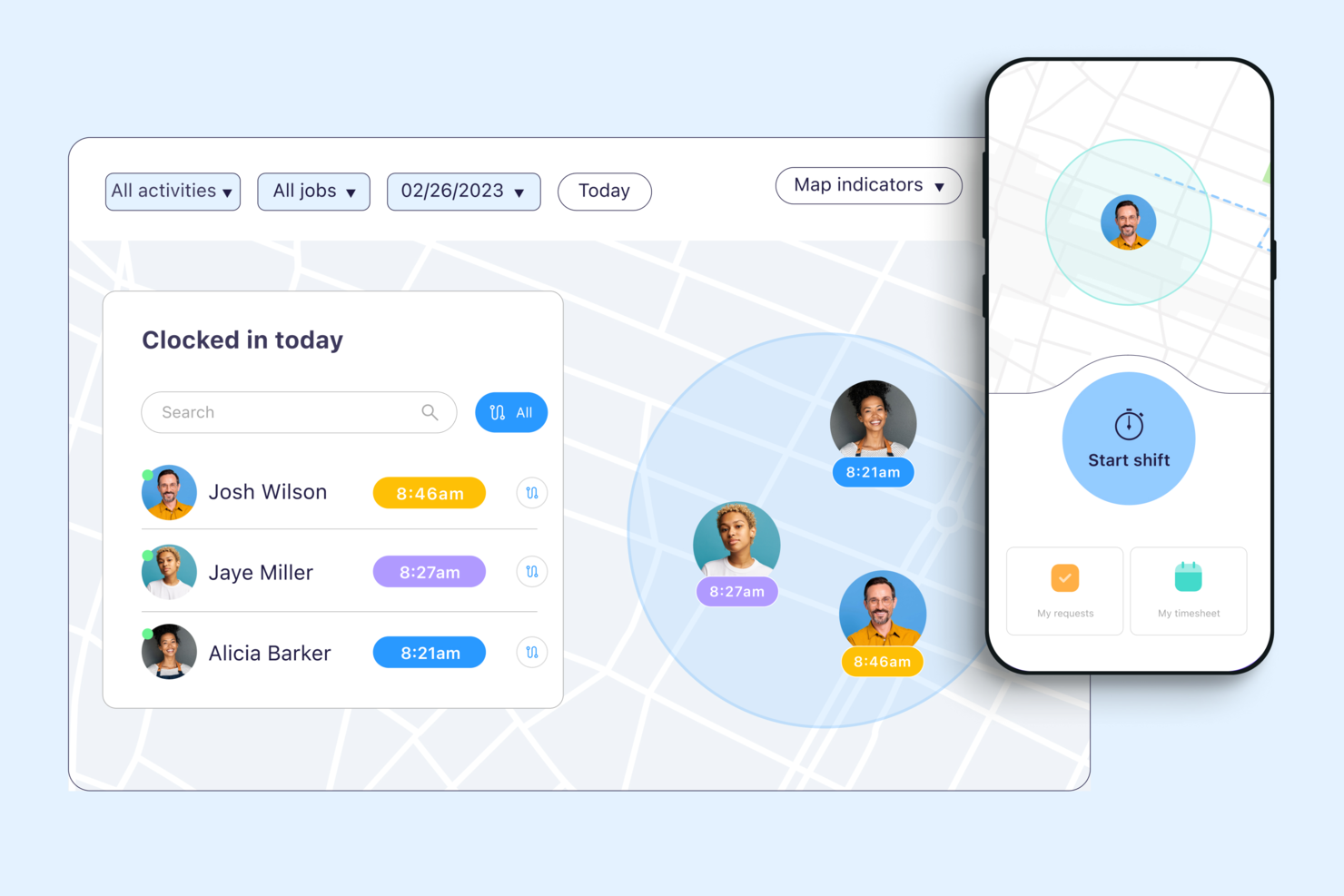
Connecteam is designed for mobile teams that need accurate GPS-based time tracking in the field. It’s especially useful for businesses with distributed staff, like construction, logistics, or home services, where verifying employee locations is essential. The app helps managers monitor clock-ins, track job sites, and reduce time theft with real-time location data.
Who is Connecteam Best For?
Field supervisors and operations managers at small to mid-size companies with mobile workforces, especially those overseeing location-based staff across job sites or routes.
Why I Picked Connecteam
When GPS accuracy is a top priority for mobile teams, Connecteam delivers features that directly address this need. The app’s GPS time clock lets managers see exactly where employees clock in and out, which is essential for verifying attendance at specific job sites. I picked Connecteam because it also offers geofencing, so you can set location boundaries and receive alerts if someone clocks in outside an approved area. These features make it a strong choice for businesses that need reliable, location-based time tracking for distributed or field-based staff.
Connecteam Key Features
Some other features in Connecteam that are helpful for time tracking teams include:
- Automated Break Management: Set rules for paid and unpaid breaks and track them automatically within timesheets.
- Shift Scheduling: Build, assign, and manage employee shifts directly in the app.
- Timesheet Export: Export timesheets in multiple formats for payroll or reporting.
- Mobile Notifications: Send push notifications to remind employees to clock in, clock out, or approve timesheets.
Connecteam Integrations
Integrations include Gusto, QuickBooks, Paychex, Xero, Wix Bookings, Lightspeed, PrismHR, Square, BambooHR, and Accu-Time Systems.
Pros and Cons
Pros:
- Can set specific rules for breaks, overtime, and pay rates
- Ability to track employee locations and set geofenced areas
- Variety of clock-in methods, including mobile app, kiosk, and NFC badges
Cons:
- Setting user roles and permissions can be unintuitive
- Push notifications are sometimes delayed

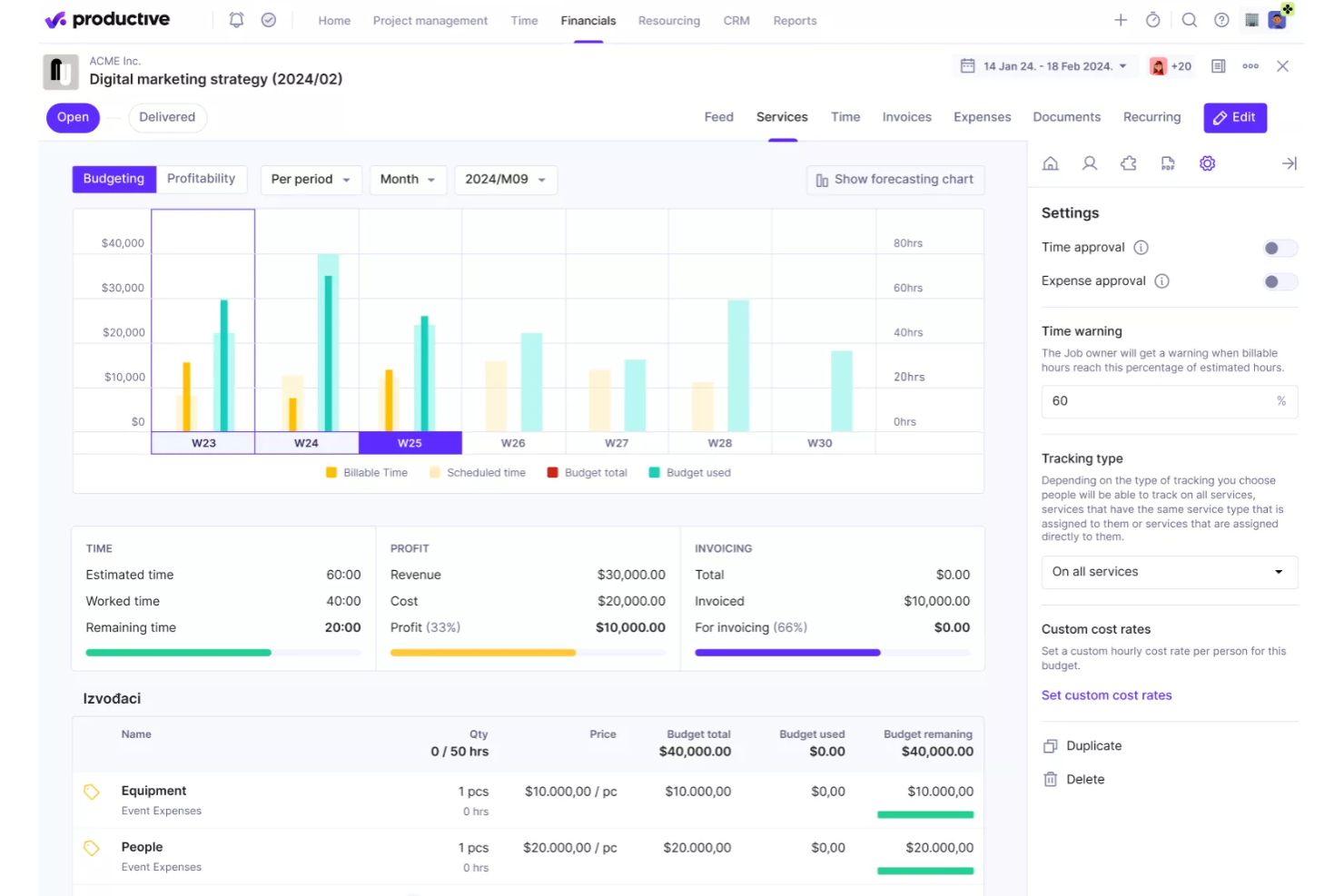
Productive offers a versatile time tracking solution tailored for a variety of industries, including IT services, consultancy, and architecture, helping you and your team monitor both billable and non-billable hours with ease. The platform’s ability to integrate time tracking directly with project budgets and profitability insights makes it particularly appealing to professionals aiming to streamline operations and enhance business performance. By providing real-time insights into project costs and revenue, Productive addresses the challenge of maintaining profitability without the need for separate financial reports.
Who is Productive Best For?
Finance and operations leaders at mid-size agencies and service firms that manage billable work across projects, particularly those that need visibility into time-driven profitability across client portfolios.
Why I Picked Productive
I picked Productive for its exceptional ability to provide time-based profitability insights, a crucial feature for businesses seeking to align time tracking with financial outcomes. Productive’s integration of time tracking with project budgets allows you to see the direct impact of logged hours on your financials, offering a clear view of project profitability. Additionally, the automation tools for task management ensure that your team spends more time on billable work and less on administrative tasks. These features collectively make Productive a standout choice for those focused on maximizing both productivity and profitability.
Productive Key Features
In addition to its profitability insights, Productive offers several other useful features for your team:
- Resource Planning: Plan and allocate resources efficiently across multiple projects, ensuring optimal use of your team’s time.
- Project Management Tools: Coordinate tasks and schedules to keep your projects on track and within budget.
- Financial Management: Manage budgets, invoicing, and forecasting to gain a comprehensive view of your financial health.
- Advanced Reporting: Access detailed reports that provide insights into project performance and business operations.
Productive Integrations
Integrations include Jira, HubSpot, Xero, Google Calendar, Slack, QuickBooks, and more. An API is available for custom integrations, allowing you to tailor the platform to your specific needs.
Pros and Cons
Pros:
- Comprehensive features for financial management and reporting
- Robust resource planning features
- Customizable dashboard and reporting
Cons:
- Limited number of integrations
- Initial setup and onboarding can be time-consuming
New Product Updates from Productive

Productive Introduces Resource Request Feature
Productive introduces a resource request feature that helps teams request and allocate resources more efficiently. For more information, visit Productive's official site.
 .
.
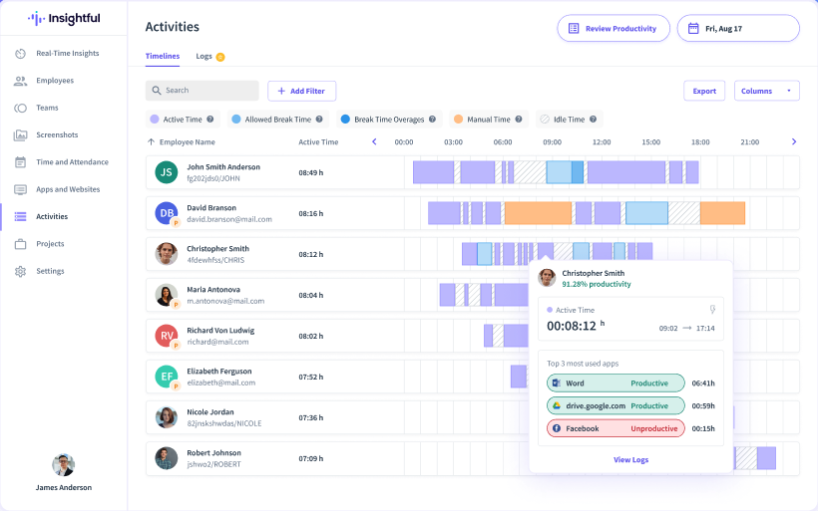
Insightful is built for managers who need to monitor remote teams and track productivity in distributed work environments. It combines time tracking with activity monitoring, making it useful for IT firms, agencies, and any business with hybrid or remote staff. With features like automated time capture and app usage tracking, it helps leaders understand how work hours are spent across locations.
Who is Insightful Best For?
IT, compliance, and operations leaders at distributed companies that supervise remote staff and require oversight into activity patterns for productivity and policy adherence.
Why I Picked Insightful
When you need to monitor remote teams and track their work hours, Insightful offers a focused set of features for visibility and accountability. I picked Insightful because it automatically tracks time and captures activity levels, so you get a clear picture of how remote employees spend their day. The platform also records app and website usage, which helps managers identify productivity patterns and potential distractions. For distributed teams, these monitoring tools make it easier to manage performance and ensure accurate time tracking without manual input.
Insightful Key Features
Some other features that make Insightful useful for time tracking include:
- Automated Screenshots: Captures periodic screenshots to provide visual records of work sessions.
- Project and Task Tracking: Lets you assign tracked time to specific projects and tasks for detailed reporting.
- Employee Attendance Monitoring: Tracks clock-in and clock-out times for remote and in-office staff.
- Role-Based Access Controls: Allows you to set different permissions for managers, admins, and employees.
Insightful Integrations
Native integrations are not currently listed.
Pros and Cons
Pros:
- Tracks time spent on tasks and projects without manual input
- Enables continuous oversight of employee activities
- Provides in-depth workforce data analysis
Cons:
- Detailed productivity tracking may raise concerns about privacy
- No mobile app for on-the-go or field-based employees


Scoro's time tracking software is tailored for professional services, offering features that enhance productivity and project management. It caters to a diverse user base, including businesses seeking efficient time management solutions. Unique selling points include comprehensive integration capabilities, user-friendly interface, and advanced analytics that help organizations optimize workflows and improve overall efficiency. The software is designed to provide insights into time usage, helping organizations optimize their workflows.
Who is Scoro Best For?
Professional services leaders at growing firms that run complex client engagements and need detailed time data linked to projects, billing, and performance oversight.
Why I Picked Scoro
I picked Scoro because it excels in providing detailed time tracking, a crucial feature for businesses aiming to enhance productivity and efficiency. With Scoro, you can track both billable and non-billable hours, offering a clear distinction that aids in accurate billing and project profitability analysis. Another standout feature is its ability to provide advanced analytics, giving you insights into team productivity and helping optimize resource allocation. These functionalities make Scoro an ideal choice for businesses that want to manage time effectively and ensure every minute is accounted for.
Scoro Key Features
In addition to its detailed time tracking capabilities, Scoro offers several other features that can be invaluable for your team:
- Project Management: Allows you to manage projects from start to finish, ensuring all tasks are completed on time and within budget.
- Resource Planning: Helps you allocate resources effectively, preventing overbooking and ensuring optimal use of your team's skills.
- Financial Tracking: Provides real-time insights into project costs and revenues, helping you maintain financial control.
- Invoicing: Automates billing processes, reducing manual work and ensuring timely payments.
Scoro Integrations
Integrations include Google Sheets, Salesforce, Asana, Mailchimp, Slack, Gravity Forms, Pipedrive, monday.com, PandaDoc, and QuickBooks.
Pros and Cons
Pros:
- Robust reporting and analytics
- Effective time tracking capabilities
- Comprehensive project management features
Cons:
- Mobile app has limited features
- Certain time tracking features limited to higher-tier plans
New Product Updates from Scoro

Scoro Introduces Subtasks for More Granular Work Planning
Scoro introduces subtasks and improved price list deletion warnings, enabling teams to break down work into smaller units for detailed planning while protecting pricing data from accidental changes. For more information, visit Scoro’s official site.
 .
.
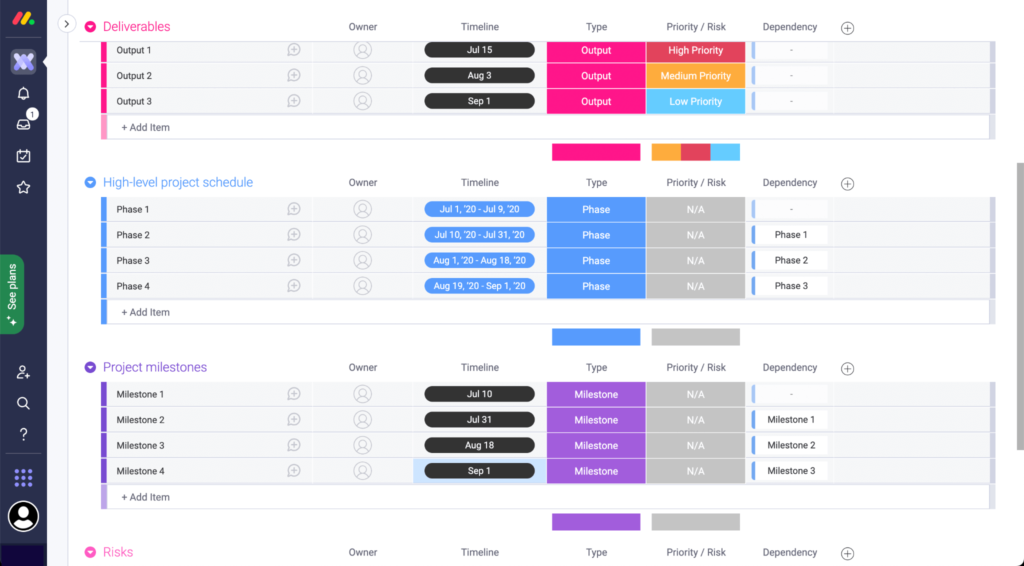
If you’re looking for a way to track project hours alongside tasks and workflows, monday.com brings time tracking directly into its flexible work management platform. It’s especially useful for project managers and cross-functional teams who need to monitor time spent on specific deliverables or phases. The tool helps you connect tracked time to project boards, automations, and reporting for a clear view of team capacity and project progress.
Who is monday.com Best For?
Team leads and PMO functions at scaling organizations that manage cross-functional initiatives and want time tracking embedded within collaborative project workflows.
Why I Picked monday.com
What sets monday.com apart for project time tracking is how it embeds time tracking directly into project boards and workflows. You can add a time tracking column to any board, letting team members log hours against specific tasks or phases as work progresses. I picked monday.com because it also lets you automate reminders for time entry and generate reports that break down tracked time by project, team member, or status. This approach gives project managers a clear, real-time view of where effort is going across multiple projects.
monday.com Key Features
Some other features in monday.com that support project time tracking include:
- Workload View: Visualizes team members’ assigned hours and capacity across projects.
- Custom Dashboards: Lets you build dashboards to display tracked time, budgets, and project status in one place.
- Mobile Time Tracking: Allows users to start and stop timers or log hours from the mobile app.
- Permissions Management: Controls who can view or edit time tracking data at the board or workspace level.
monday.com Integrations
Integrations include Slack, Gmail, Microsoft Teams, GitLab, Mailchimp, Excel, Outlook, DocuSign, Google Drive, and Trello.
Pros and Cons
Pros:
- Gives you the option to export time tracking data
- Integrates time tracking with workload visibility
- Customizable dashboards for better project visibility
Cons:
- Platform may be too simple for more complex time management needs
- Lacks advanced time tracking, like automated timesheets
New Product Updates from monday.com

monday.com Adds Microsoft Teams Messaging In Workflows
monday.com introduces Microsoft Teams messaging within workflows. This update allows users to send messages to specific individuals directly from workflows, improving collaboration and communication. For more information, visit monday.com’s official site.
 .
.
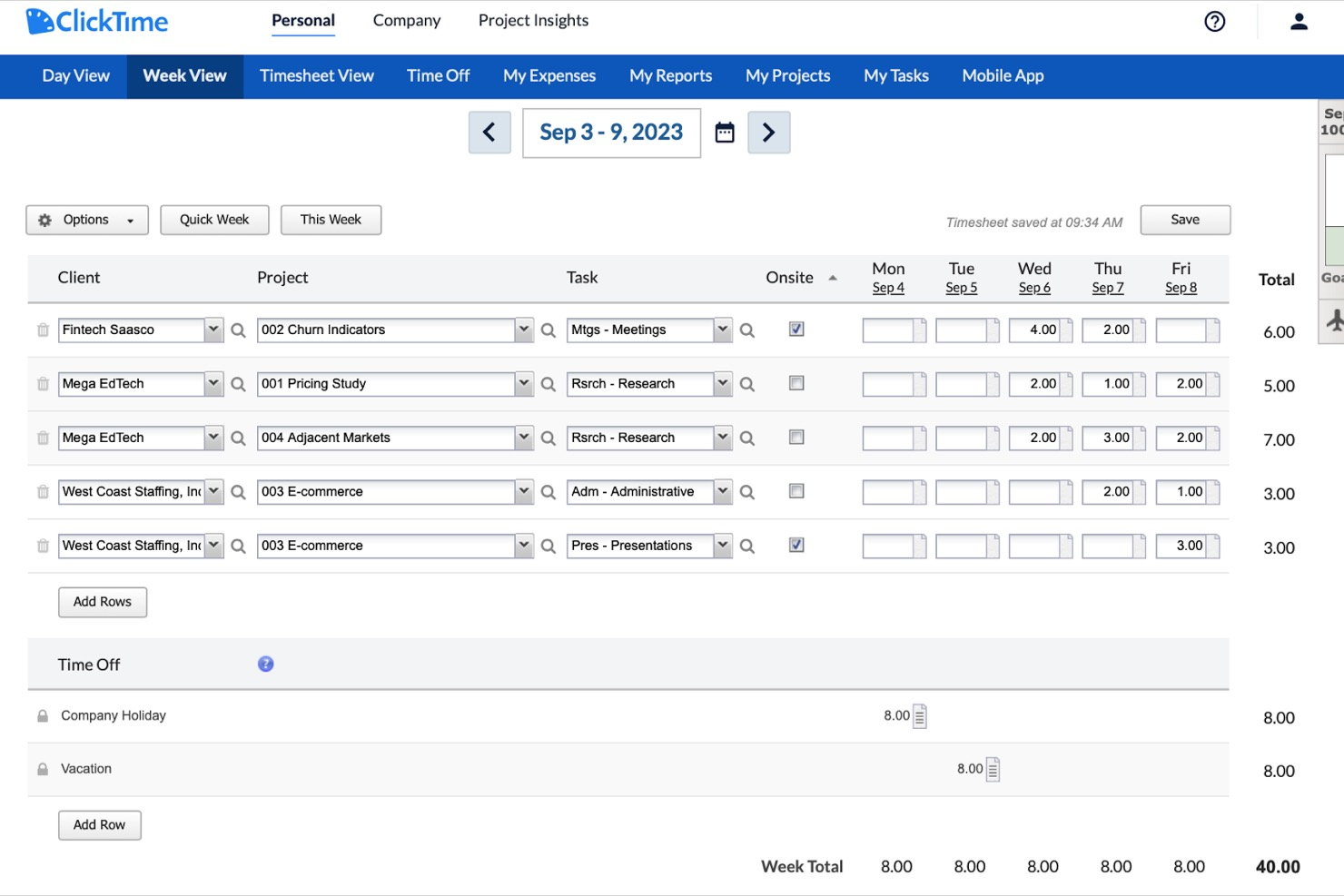
ClickTime stands out for teams that need highly customizable timesheets and granular control over time entry. It’s a strong choice for professional services firms, nonprofits, and project-based organizations that manage diverse billing structures or reporting needs. The platform helps address challenges like tracking billable hours, managing project budgets, and adapting timesheets to unique workflows.
Who is ClickTime Best For?
Finance, HR, or operations administrators at mid-size organizations that require configurable timesheet formats suited to internal policies or reporting standards.
Why I Picked ClickTime
Customizable timesheets are the main reason I picked ClickTime for this list. The platform lets you tailor timesheet fields, approval workflows, and time entry formats to match your organization’s unique requirements. I like that you can set up custom billing rates and project codes, which is especially useful for teams with complex client or grant reporting needs. This flexibility makes ClickTime a strong fit for organizations that can’t rely on one-size-fits-all time tracking.
ClickTime Key Features
Some other features that make ClickTime useful for time tracking include:
- Mobile Time Entry: Enter and submit hours from iOS or Android devices for on-the-go tracking.
- Time Off Management: Request, approve, and track employee leave directly within the platform.
- Project Budget Tracking: Monitor project budgets and receive alerts when you approach set limits.
- Advanced Reporting Tools: Generate detailed reports on time usage, costs, and resource allocation.
ClickTime Integrations
Integrations include Salesforce, Slack, Jira, Google Calendar, Microsoft Outlook, Sage Intacct, QuickBooks, Bamboo HR, Rippling, and Xero.
Pros and Cons
Pros:
- Mobile app for on-the-go time entry
- Built-in project budget tracking and alerts
- Customizable timesheet fields for unique workflows
Cons:
- Approval workflows can be slow to update
- No built-in GPS or location tracking

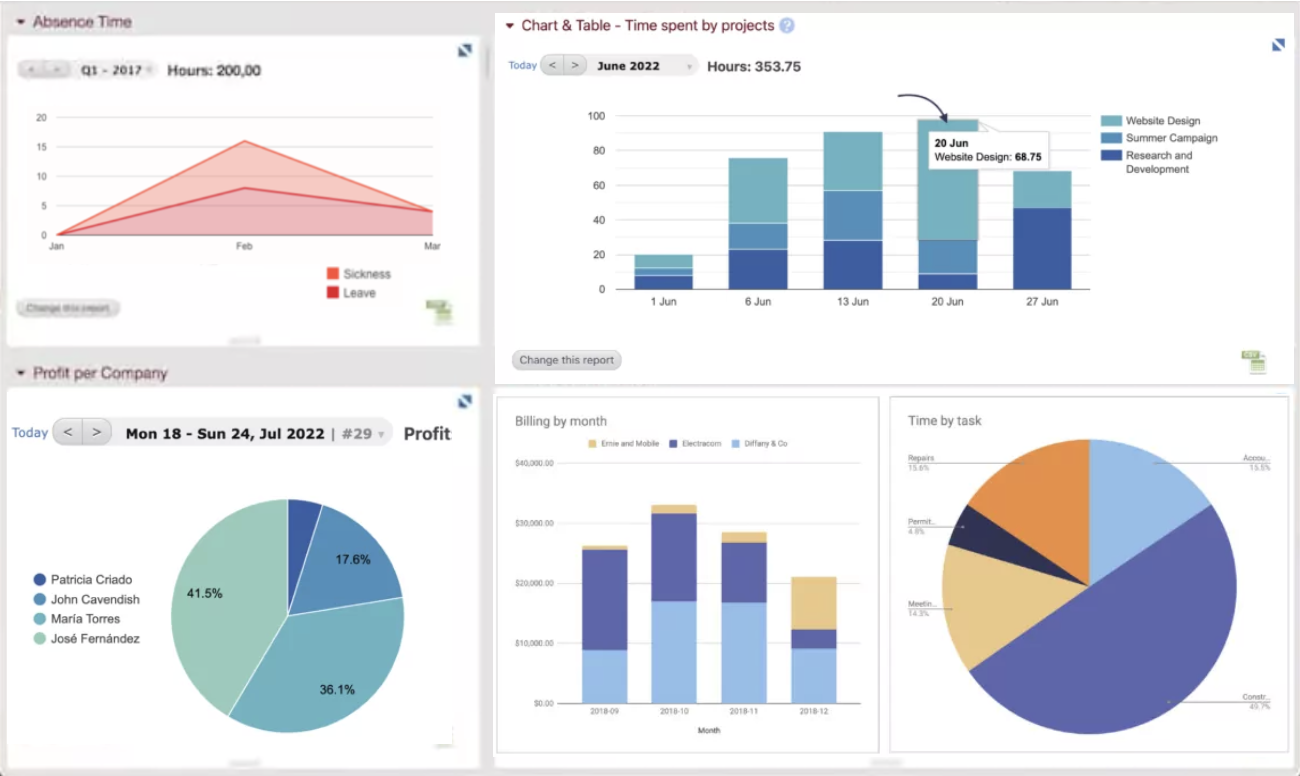
Beebole is designed for teams that want to build their own dashboards and reports around time tracking data. It’s a strong fit for project managers, finance leads, and consultancies that need to track time by client, project, or activity and visualize it in custom ways. The platform’s flexible widgets and reporting tools help you surface exactly the metrics and insights your business needs.
Who is Beebole Best For?
Operations and finance teams at mid-size companies that require configurable reporting environments and flexible dashboards for internal or client-facing time analysis.
Why I Picked Beebole
What drew me to Beebole is how it lets you build fully customizable dashboards for tracking time across projects, clients, and teams. You can create widgets to display exactly the data you want, from billable hours to project budgets, and arrange them to match your workflow. I picked Beebole because it gives you control over how you visualize and report on time tracking, which is especially useful for teams with unique reporting needs. This flexibility makes it easy to surface the insights that matter most to your business.
Beebole Key Features
In addition to its customizable dashboards, Beebole offers several other features for time tracking:
- Multi-Level Project Tracking: Lets you track time at the project, subproject, and task level for detailed reporting.
- Bulk Time Entry: Allows users to enter time for multiple days or projects in a single action.
- Automated Reminders: Sends notifications to remind team members to submit or approve timesheets.
- Role-Based Permissions: Controls access to time tracking data and administrative functions based on user roles.
Beebole Integrations
Integrations include ADP, Google Sheets, Microsoft Power BI, QuickBooks Online, Xero, Trello, Monday.com, Slack, BambooHR, and Salesforce. Beebole also offers an API for custom integrations.
Pros and Cons
Pros:
- Integrated PTO tracking feature
- You can set different billing rates for clients, projects, and team members
- Ability to track time across various projects and tasks
Cons:
- Approval reminders can’t be customized by time zone
- Custom reports require formula knowledge

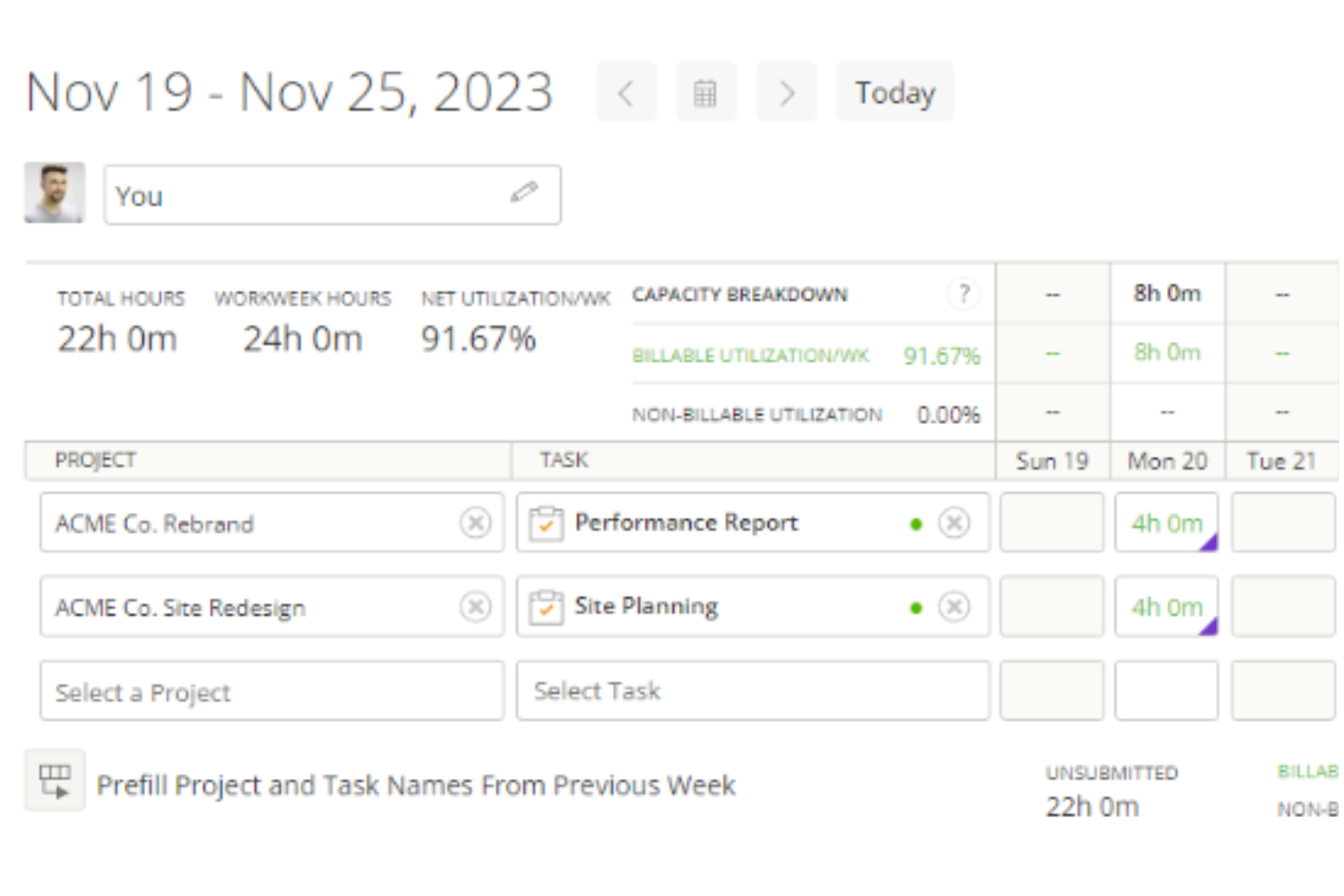
Kantata brings together time tracking, resource management, and project accounting in one platform. It’s built for professional services teams that need to manage the entire project lifecycle, from planning and staffing to invoicing and reporting. This approach helps project managers and operations leads keep time, budgets, and utilization aligned across every phase of delivery.
Who is Kantata Best For?
Resource managers and delivery executives at enterprise professional services organizations that oversee engagements from planning through billing and need unified lifecycle visibility.
Why I Picked Kantata
What stands out about Kantata is how it connects time tracking with every stage of the project lifecycle, not just timesheets. You can track time directly against project tasks, manage resource allocation, and link tracked hours to project budgets and billing. I picked Kantata because it gives project managers and operations leads a single place to monitor time, costs, and utilization from project kickoff through to invoicing. This level of integration helps teams keep delivery, financials, and staffing in sync as projects evolve.
Kantata Key Features
Some other features that make Kantata useful for time tracking include:
- Mobile Time and Expense App: Lets users log time and expenses from their phones or tablets.
- Custom Approval Workflows: Allows you to set up multi-step approval processes for timesheets and expenses.
- Resource Forecasting: Provides tools to predict future resource needs based on current project data.
- Audit Trail Reporting: Tracks all changes to time entries and approvals for compliance and transparency.
Kantata Integrations
Integrations include Salesforce, Avalara, NetSuite, Slack, Sage, Microsoft 365, QuickBooks, Xero, HubSpot, and Expensify.
Pros and Cons
Pros:
- Admins can enforce rules like required notes or task associations
- Time entries can be reviewed and approved before invoicing
- Users can log time via timers, timesheets, or directly on tasks
Cons:
- Certain time tracking fields may not be fully customizable
- Configuring who can track and approve time may be intricate
New Product Updates from Kantata
Kantata Integrates E-Invoicing With Avalara
Kantata introduces integrated e-invoicing through its partnership with Avalara, enabling compliant, automated invoicing across regions. For more information, visit Kantata's official site.
 .
.

Resource Guru combines time tracking with resource scheduling in a single platform. It’s designed for teams that need to balance project work with staff availability, making it a fit for agencies, consultancies, and IT departments. By linking time entries directly to scheduled tasks and bookings, it helps project managers avoid overbooking and keep workloads visible.
Who is Resource Guru Best For?
Resource planners and project coordinators at agencies or consultancies that schedule shared staff across multiple assignments and track time alongside allocation.
Why I Picked Resource Guru
Resource Guru stands out for teams that need to track time while managing resource schedules in detail. The platform links time entries directly to scheduled bookings, so you always see who’s working on what and when. I picked Resource Guru because it helps project managers avoid double-booking and gives a clear view of team capacity alongside tracked hours. Its leave management and clash detection features make it especially useful for organizations juggling multiple projects and shifting priorities.
Resource Guru Key Features
Some other features that make Resource Guru useful for time tracking include:
- Personal Dashboards: Each user gets a dashboard showing their upcoming bookings and logged hours.
- Drag-and-Drop Scheduling: Lets you quickly adjust assignments and time slots with a simple interface.
- Reporting Suite: Offers built-in reports for utilization, time tracked, and project allocation.
- API Access: Allows you to connect Resource Guru data to other tools or custom workflows.
Resource Guru Integrations
Native integrations are not publicly listed.
Pros and Cons
Pros:
- Straightforward timesheet approval process
- Ability to log an entire week's work with a single click
- Timesheets are automatically populated from schedules
Cons:
- Time entries are not dynamically linked to schedule changes
- Lacks a real-time time tracker
New Product Updates from Resource Guru

Resource Guru Launches Asana Integration
Resource Guru now integrates with Asana to enhance task scheduling by providing insights into availability and skills. For more information, visit Resource Guru's official site.
 .
.

Buddy Punch is designed for teams that need location and identity verification with every clock-in and clock-out. It’s especially useful for businesses with mobile or field staff, like construction, landscaping, or home services. With GPS tracking and photo capture features, managers can confirm attendance and location in real time.
Who is Buddy Punch Best For?
HR and payroll administrators at small to mid-size employers with hourly teams that need location-verified clock-ins and basic identity confirmation for attendance records.
Why I Picked Buddy Punch
For teams that need to verify both location and identity with every punch, Buddy Punch stands out for its GPS and image tracking capabilities. I picked Buddy Punch because it lets managers require employees to take a photo when clocking in or out, which helps prevent buddy punching and time theft. The GPS tracking feature records the exact location of each punch, making it easy to confirm that staff are where they’re supposed to be. These features are especially valuable for businesses with mobile or field-based teams who need reliable, real-time attendance verification.
Buddy Punch Key Features
Some other features that make Buddy Punch useful for time tracking include:
- Customizable Overtime Rules: Set specific overtime policies to match your business requirements.
- Automatic Break Tracking: Automatically deducts breaks based on your configured rules.
- Time Off Requests and Approvals: Lets employees submit time-off requests and managers approve or deny them within the platform.
- Payroll Export Options: Exports time data directly to payroll providers like QuickBooks, ADP, and Paychex.
Buddy Punch Integrations
Integrations include QuickBooks Online, QuickBooks Desktop, ADP Workforce Now, Deltek, Deluxe Payroll, Gusto, iSolved, Justworks, Paychex, and Paycor.
Pros and Cons
Pros:
- Offers various exportable reports
- Managers receive notifications for late arrivals or missed shifts
- Versatile clock-in options
Cons:
- Limited language support other than English
- Advanced GPS tracking features are paid add-ons
| Tool | Best For | Trial Info | Price | ||
|---|---|---|---|---|---|
| 1 | Best GPS time tracking for mobile teams | Free 14-day trial + free plan + free demo available | From $29/month (billed annually) | Website | |
| 2 | Best for time-based profitability insights | 14-day free trial available | From $10/user/month (billed annually) | Website | |
| 3 | Best for remote team monitoring | Free 7-day trial | From $6.40/seat/month (billed annually) | Website | |
| 4 | Best for detailed time tracking | Free 14-day trial available + free demo available | From $19.90/user/month (billed annually) | Website | |
| 5 | Best for project time tracking | Free plan available | From $9/user/month (billed annually) | Website | |
| 6 | Best for customizable timesheets | Free demo available | From $12/user/month (billed annually) | Website | |
| 7 | Best for customizable dashboards | Free 30-day trial | From $9.99/user/month | Website | |
| 8 | Best for full lifecycle time tracking | Free demo available | Pricing upon request | Website | |
| 9 | Best for tracking time with resource scheduling | Free 30-day trial available | From $4.16/user/month | Website | |
| 10 | Best time clock for GPS and image tracking | Free demo + free 14-day trial available | From $4.49/user/month | Website |


D’autres outils logiciels de suivi du temps valent la peine d’être pris en considération :
Rien de ce qui précède ne fonctionne pour vous? Consultez la liste ci-dessous pour 15 outils logiciels de suivi du temps supplémentaires:
D’autres outils logiciels de suivi du temps valent la peine d’être pris en considération :
Rien de ce qui précède ne fonctionne pour vous? Consultez la liste ci-dessous pour 15 outils logiciels de suivi du temps supplémentaires:
- Bonsai Agency Software
Integrated time and resource management
- actiTIME
For small teams and businesses
- Homebase
For reducing time theft
- Agendrix
For versatile clock-in methods
- Monitask
For distributed teams
- TimeCamp
For automatic time tracking
- Toggl Track
For its workload balancing
- Traqq
For a feature-rich free version
- TMetric
For 7-day activity tracking storage
- My Hours
For small teams and freelancers


Vous voulez de l’aide pour diminuer les options?
Cet outil est très utile. Nous nous sommes associés à Crozdesk pour vous donner accès à leur “Software Finder”.
Si vous saisissez certains détails sur votre projet et les fonctionnalités que vous recherchez dans un outil de gestion de projet, une liste d’outils correspondant à vos préférences sera générée. Vous fournissez votre email, et ils vous envoient un beau guide PDF avec un résumé de vos meilleures options.
Qu’en pensez-vous?
Que croyez-vous que nous ayons oublié? Quels autres outils logiciels de suivi du temps ou logiciels d’emploi de temps avez-vous trouvés que nous ne connaissons pas? Nous aimerions savoir si vous avez des suggestions, des conseils ou des idées sur l’utilisation de ce type de logiciel – pourquoi ne pas les partager en utilisant les commentaires ci-dessous?