

10 alternativas a Zoho Assist para la asistencia remota en 2026

10 Lista de las mejores alternativas a Zoho Assist


Gestionar un proyecto puede ser complicado, especialmente cuando tu herramienta de escritorio remoto no satisface las necesidades de tu equipo. Es posible que Zoho Assist se quede corto en ciertos aspectos, lo que te lleve a buscar la mejor alternativa para los desafíos de tu empresa.
Según mi experiencia, el software de escritorio remoto adecuado puede mejorar significativamente la colaboración y la productividad. Necesitas herramientas fiables, fáciles de usar y adaptadas a tus requisitos específicos.
En este artículo, compartiré mis principales opciones como alternativas a Zoho Assist. He probado y analizado cada opción de forma independiente para ofrecerte información imparcial que te ayude a tomar una decisión fundamentada. Tanto si buscas funciones, precios o experiencia de usuario, aquí encontrarás lo que necesitas.
¿Qué es Zoho Assist?
Zoho Assist es un software de escritorio remoto que te ayuda a proporcionar sesiones de asistencia remota y acceder a ordenadores remotos. Los profesionales de TI y los equipos de asistencia lo utilizan habitualmente para solucionar problemas y gestionar sistemas de forma eficaz. Funciones como el control remoto, la transferencia de archivos y la compatibilidad multiplataforma ayudan a resolver problemas rápidamente y mantener la productividad. En general, Zoho Assist ofrece una opción práctica para las soluciones de asistencia remota.
Tabla comparativa de alternativas a Zoho Assist
Esta tabla comparativa resume los detalles de precios de mis principales alternativas seleccionadas a Zoho Assist:
| Tool | Best For | Trial Info | Price | ||
|---|---|---|---|---|---|
| 1 | Ideal para asistencia remota gratuita | Plan gratuito disponible | Precios bajo solicitud | Website | |
| 2 | Ideal para asistencia remota instantánea | Prueba gratuita de 14 días | Desde $30/usuario/mes (facturado anualmente) | Website | |
| 3 | Ideal para el acceso remoto gratuito | Prueba gratuita de 30 días | Desde $24.9/mes (facturado anualmente) | Website | |
| 4 | Ideal para asistencia remota todo en uno | Prueba gratuita de 14 días | Desde $30/usuario/mes (facturado anualmente) | Website | |
| 5 | Ideal para sesiones rápidas y con poca latencia | Prueba gratuita + demostración gratuita disponibles | Desde $28.90/mes (facturado anualmente) | Website | |
| 6 | La mejor opción para un acceso remoto sencillo | Not available | Gratis | Website | |
| 7 | Ideal para necesidades de seguridad estrictas | Prueba gratuita disponible | Precios disponibles previa solicitud | Website | |
| 8 | Ideal para acceso ilimitado | Prueba gratuita de 15 días disponible | Desde $16.90/usuario/mes (facturado anualmente) | Website | |
| 9 | Ideal para la gestión unificada | Prueba gratuita + demostración gratuita | Precios bajo solicitud | Website | |
| 10 | Ideal para el acceso remoto seguro | Prueba gratuita de 7 días | Desde $1.84/usuario/mes (facturado anualmente) | Website |
Por qué confiar en nuestras recomendaciones de software
Nuestro equipo lleva probando y evaluando software desde 2012. Como gestores de proyectos, sabemos lo difícil —y lo importante— que es elegir el software adecuado.
Para esta guía, evaluamos las herramientas mediante pruebas prácticas e investigación independiente, puntuando las herramientas según nuestros criterios de selección. También nos basamos en la experiencia de líderes de opinión del sector y de profesionales en activo de la gestión de proyectos.
Nuestras reseñas reflejan nuestro criterio editorial humano, no un discurso de ventas.
Revisores expertos:
Análisis de las mejores alternativas a Zoho Assist
A continuación encontrarás mis resúmenes detallados de las mejores alternativas a Zoho Assist que han entrado en mi lista. Mis análisis ofrecen una visión detallada de las funciones principales, las ventajas y desventajas, las integraciones y los casos de uso ideales de cada herramienta para ayudarte a encontrar la mejor opción para ti.

HelpWire
Ideal para asistencia remota gratuita
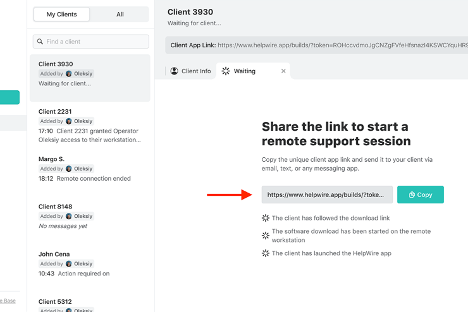
HelpWire es un software de asistencia remota que permite conectarse con los clientes y ayudarles de forma remota. Los equipos de atención al cliente y los profesionales de TI lo utilizan para solucionar y resolver problemas técnicos.
Por qué es una buena alternativa a Zoho Assist: HelpWire ofrece asistencia remota gratuita, lo que lo convierte en una opción asequible para las empresas con presupuestos limitados. Sus funciones incluyen acceso remoto seguro, compatibilidad multiplataforma y diagnósticos en tiempo real. Estas capacidades garantizan que tu equipo pueda solucionar rápidamente los problemas de los clientes. La configuración sencilla del software y su interfaz fácil de usar aumentan su atractivo para las operaciones de asistencia.
Funciones e integraciones destacadas:
Las funciones incluyen diagnósticos en tiempo real, uso compartido seguro de archivos y compatibilidad multiplataforma. Estas funciones permiten que tu equipo proporcione una asistencia eficiente sin poner en riesgo la seguridad. La interfaz intuitiva de HelpWire también facilita la navegación y reduce la curva de aprendizaje para los nuevos usuarios.
Las integraciones no aparecen publicadas.
Pros and Cons
Pros:
- Opción de asistencia gratuita disponible
- Acceso remoto seguro
- Diagnósticos en tiempo real
Cons:
- Funciones avanzadas limitadas
- Opciones de personalización básicas

Ideal para asistencia remota instantánea
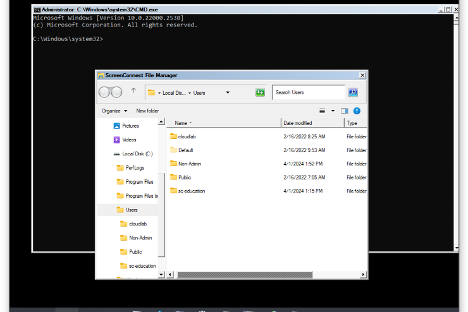
ConnectWise ScreenConnect es un software de escritorio remoto diseñado para ofrecer asistencia remota rápida y segura a profesionales de TI de diversos sectores, como la educación, las finanzas y la atención médica. Ofrece funciones clave, como acceso remoto 24/7, gestión de acceso privilegiado y compatibilidad con el acceso sin supervisión y los dispositivos móviles.
Por qué es una buena alternativa a Zoho Assist: ConnectWise ScreenConnect proporciona asistencia remota instantánea, por lo que es ideal para equipos que necesitan acceder rápidamente a los dispositivos. Sus funciones, como las conexiones remotas seguras, la gestión de acceso privilegiado y la compatibilidad con dispositivos móviles, ayudan a tu equipo a gestionar las operaciones de TI de manera eficiente. El enfoque del software en minimizar el tiempo de inactividad garantiza que la productividad de tu equipo se mantenga. Además, sus completas medidas de seguridad, como el cifrado AES y la autenticación multifactor, ofrecen tranquilidad.
Características destacadas e integraciones:
Características incluyen acceso remoto 24/7, compatibilidad con el acceso sin supervisión y compatibilidad con dispositivos móviles. Estas funciones permiten que tu equipo se conecte fácilmente a los dispositivos y gestione las operaciones de TI sin problemas. Según mi experiencia, las avanzadas medidas de seguridad del software son una ventaja significativa para proteger los datos confidenciales.
Integraciones incluyen Servicios de asistencia técnica de ConnectWise, ConnectWise Automate, Microsoft Intune y otras.
Pros and Cons
Pros:
- Funciones de asistencia remota instantánea
- Conexiones remotas seguras
- Compatibilidad con dispositivos móviles
Cons:
- Posibles problemas de calidad de vídeo y audio
- Requiere una gestión adecuada para garantizar la seguridad

Ideal para el acceso remoto gratuito
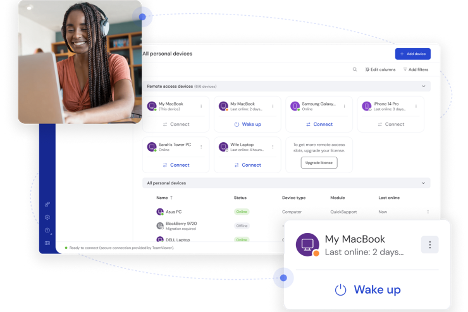
TeamViewer es un software de escritorio remoto que te permite conectarte a dispositivos y gestionarlos de forma remota. Los equipos de soporte informático y las empresas lo utilizan para facilitar la resolución de problemas y la gestión remotas.
Por qué es una buena alternativa a Zoho Assist: TeamViewer es una solución gratuita de acceso remoto ideal si necesitas opciones económicas. Sus funciones, como la transferencia sencilla de archivos, la compatibilidad con varias plataformas y la impresión remota, mejoran tus capacidades de soporte. Puedes conectarte rápidamente a cualquier dispositivo sin complicaciones. Estos elementos lo convierten en una opción viable al considerar alternativas a Zoho Assist.
Funciones e integraciones destacadas:
Las funciones incluyen el control y la impresión remotos, así como el acceso remoto desatendido. Estas funciones te permiten gestionar dispositivos fácilmente y garantizan que tu equipo pueda proporcionar soporte sin estar físicamente presente. Además, el acceso multiplataforma de TeamViewer es compatible con varios sistemas operativos, algo esencial en entornos informáticos diversos.
Las integraciones incluyen Microsoft Teams, ServiceNow, Salesforce, Jira, Zendesk, Freshworks, Microsoft Intune, Zoho, Microsoft Entra ID y más.
Pros and Cons
Pros:
- Precio asequible
- Compatibilidad con varias plataformas
- Transferencia sencilla de archivos
Cons:
- Se han informado problemas de conexión
- Retrasos ocasionales en las conexiones

LogMeIn
Ideal para asistencia remota todo en uno
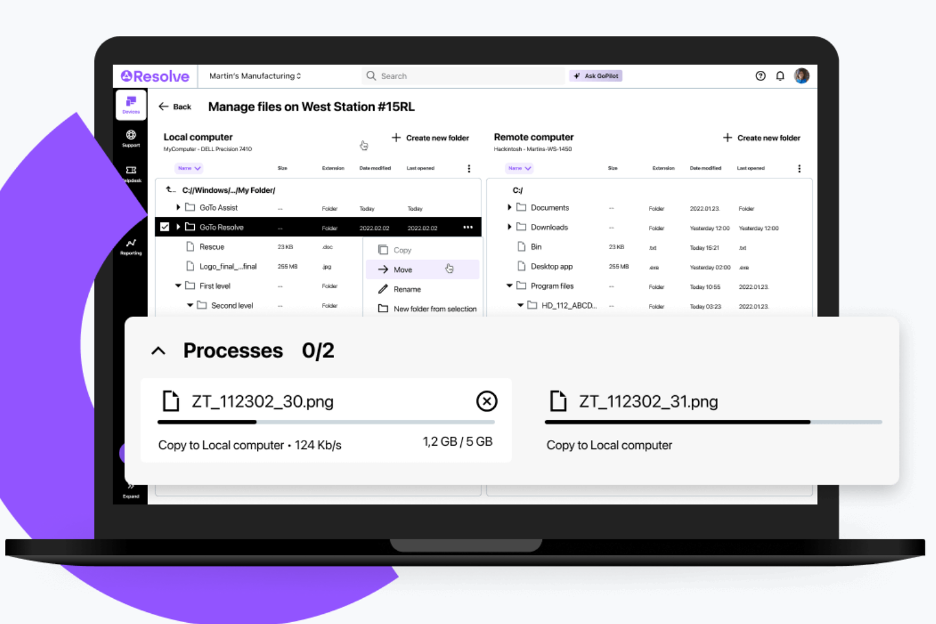
LogMeIn es una solución de acceso remoto y asistencia diseñada para profesionales de TI y proveedores de servicios administrados (MSPs) con el fin de optimizar la gestión de TI. Realiza funciones clave, como asistencia remota, gestión de dispositivos finales y acceso seguro a archivos.
Por qué es una buena alternativa a Zoho Assist: LogMeIn ofrece asistencia remota completa mediante funciones como gestión impulsada por IA, administración automatizada de dispositivos y medidas de seguridad avanzadas. Su interfaz fácil de usar y su supervisión remota fluida la convierten en una opción ideal para los equipos de TI. El aumento de la productividad y la simplificación de la gestión de TI son aspectos centrales de la oferta de LogMeIn, lo que resulta atractivo para las organizaciones que buscan una solución de asistencia completa.
Funciones e integraciones destacadas:
Las funciones incluyen herramientas impulsadas por IA para mejorar la eficiencia, gestión automatizada de dispositivos y medidas de seguridad avanzadas. Estas funciones simplifican las tareas de TI complejas para aumentar la productividad de su equipo. La gestión de dispositivos móviles de LogMeIn garantiza que pueda administrar dispositivos sobre la marcha sin complicaciones.
Las integraciones incluyen ServiceNow, Salesforce, Jira Service Desk y más.
Pros and Cons
Pros:
- Herramientas de gestión impulsadas por IA
- Gestión automatizada de dispositivos
- Medidas de seguridad avanzadas
Cons:
- Alto consumo de recursos en los dispositivos
- Curva de aprendizaje pronunciada

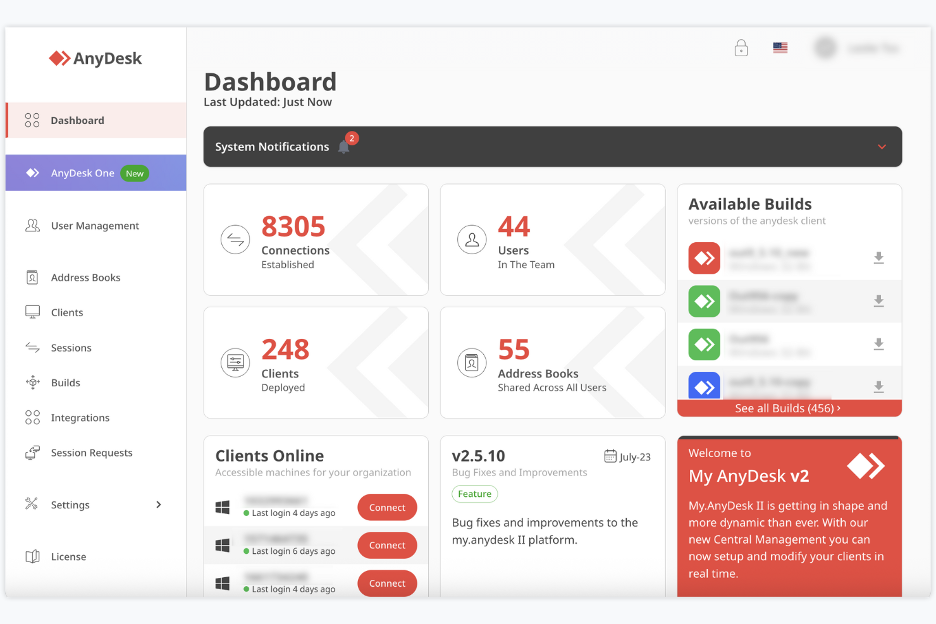
AnyDesk es una herramienta de escritorio remoto y asistencia que te permite acceder y controlar ordenadores o dispositivos desde cualquier lugar. La utilizan autónomos, equipos pequeños, personal de TI y otras personas que necesitan acceso y asistencia remotos.
Por qué AnyDesk es una buena alternativa a Zoho Assist: AnyDesk te ofrece uso compartido del escritorio sin latencia y un control remoto estable, para que tú y tu equipo podáis trabajar en dispositivos remotos como si estuvierais allí mismo. Te permite controlar el teclado y el ratón mientras otras personas interactúan con tu pantalla, además de compartir archivos y datos rápidamente. Gracias a sus sesiones remotas con poco retraso y a la rápida transmisión de datos con cifrado mediante el Estándar de cifrado avanzado (AES), resulta especialmente útil si necesitas acceder o prestar asistencia remota con frecuencia y rapidez.
Funciones e integraciones destacadas:
Las funciones incluyen el control remoto de ordenadores de escritorio y servidores, el uso compartido de pantalla desde cualquier dispositivo (PC, móvil o tableta) y la transferencia de archivos entre dispositivos durante las sesiones. También admite el acceso interactivo, por lo que puedes ver y controlar pantallas remotas.
Las integraciones incluyen compatibilidad con Windows, macOS, Linux, Android, iOS y más.
Pros and Cons
Pros:
- Acceso remoto con baja latencia
- Compatible con muchas plataformas
- Admite la transferencia de archivos y el control remoto
Cons:
- La versión gratuita es limitada para uso empresarial
- Carece de herramientas avanzadas de gestión de equipos

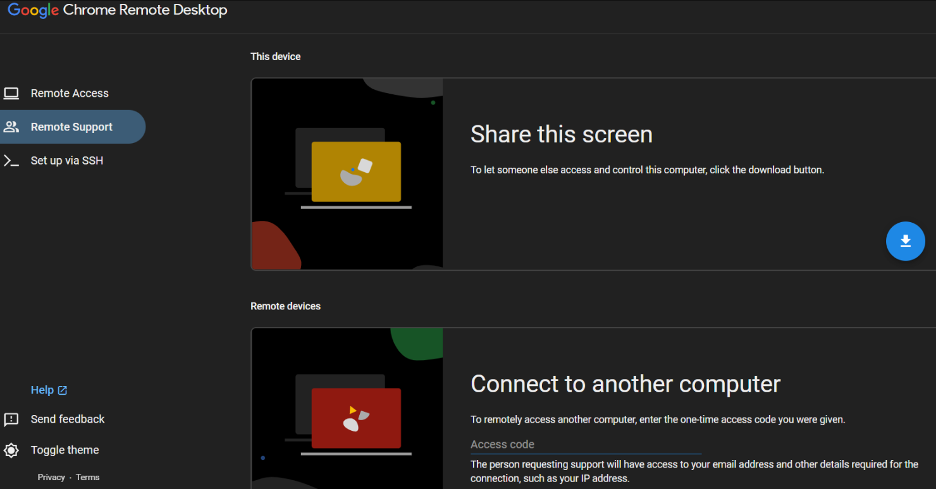
Chrome Remote Desktop es una herramienta de acceso remoto que permite a los usuarios conectarse de forma segura a otros ordenadores mediante el navegador Chrome o un Chromebook. Las personas y las pequeñas empresas la eligen para uso personal y soporte informático básico.
Por qué es una buena alternativa a Zoho Assist: Chrome Remote Desktop ofrece un acceso remoto sencillo con una configuración mínima, lo que lo hace accesible para los usuarios que necesitan conexiones rápidas. Su integración con el navegador Chrome elimina la necesidad de instalar software adicional. Puedes acceder a tus dispositivos desde cualquier lugar, lo que mejora la flexibilidad. La interfaz sencilla de la herramienta es fácil de usar, lo que reduce la curva de aprendizaje para los nuevos usuarios.
Funciones destacadas e integraciones:
Funciones incluyen el acceso remoto mediante el navegador Chrome, compatibilidad con varios sistemas operativos y la posibilidad de compartir tu pantalla con otras personas. Estas funciones te permiten conectarte a tus dispositivos sin esfuerzo. Según mi experiencia, la sencillez de la herramienta es una ventaja significativa para los usuarios que necesitan un acceso remoto sencillo.
Integraciones no se enumeran públicamente.
Pros and Cons
Pros:
- Fácil de configurar
- No se necesita software adicional
- Acceso desde cualquier lugar
Cons:
- No permite transferir archivos
- No permite imprimir de forma remota

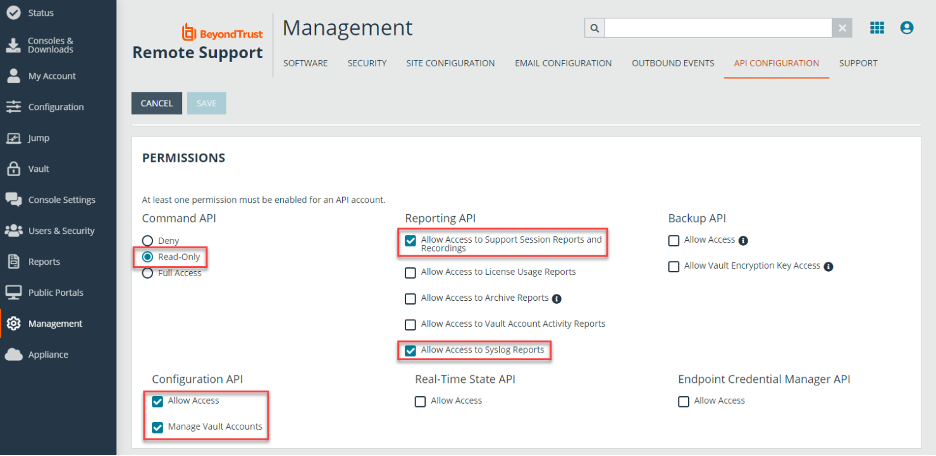
BeyondTrust Remote Support es una herramienta de acceso y asistencia remotos basada en la nube que los equipos de TI utilizan para solucionar problemas de dispositivos de forma segura. Ayuda a tu equipo a asistir a los usuarios, gestionar sistemas remotos y encargarse de tareas de asistencia desde cualquier lugar.
Por qué BeyondTrust Remote Support es una buena alternativa a Zoho Assist: Proporciona controles integrales que te ayudan a satisfacer estrictas necesidades de seguridad. Puedes establecer reglas de acceso estrictas para que tu equipo solo acceda a los sistemas en los que está autorizado a trabajar. La supervisión de sesiones y los registros de auditoría detallados te ofrecen registros claros de lo que ocurre durante las tareas de asistencia. Estos controles te ayudan a mantener más seguros los entornos sensibles durante el acceso remoto.
Características e integraciones destacadas:
Las características incluyen grabaciones de sesiones que te ayudan a revisar las tareas de asistencia, compartir la cámara de forma remota para que los usuarios puedan mostrarte lo que ven y herramientas de chat que te permiten ayudar a los clientes. Estas características facilitan que tu equipo resuelva problemas incluso cuando no es fácil acceder a los sistemas. También puedes utilizar el uso compartido de pantalla para guiar a los usuarios durante las soluciones sin confusiones.
Las integraciones incluyen ServiceNow, BMC, Salesforce, Okta y más.
Pros and Cons
Pros:
- Amplias opciones de control de acceso
- Amplias opciones de control de acceso
- Uso compartido de pantalla bajo demanda
Cons:
- Muchas configuraciones que gestionar
- Complejo para equipos pequeños

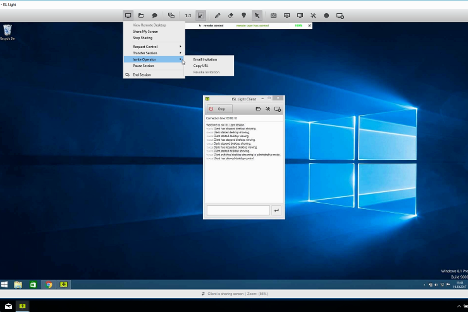
ISL Online es una herramienta de acceso y asistencia remotos que permite a tu equipo conectarse a dispositivos Windows, Mac, Linux y móviles desde cualquier lugar. Los equipos de TI, el personal de soporte técnico y los proveedores de asistencia la utilizan para ofrecer soporte remoto y acceso desatendido.
Por qué ISL Online es una buena alternativa a Zoho Assist: ISL Online te proporciona una licencia que te permite ofrecer soporte a usuarios y dispositivos ilimitados, ideal si tu equipo trabaja con muchos puntos finales. Puedes acceder a máquinas remotas sin límites por dispositivo y configurar el acceso desatendido para que tu equipo pueda brindar asistencia remota cuando sea necesario. La herramienta ofrece seguridad avanzada con cifrado AES-256, autenticación de dos factores y permisos basados en roles, para que mantengas el control de varios dispositivos. Obtienes acceso completo y funciones de asistencia remota sin tener que preocuparte constantemente por los límites de la licencia.
Funciones e integraciones destacadas:
Las funciones incluyen la transferencia de archivos entre máquinas locales y remotas, la grabación de sesiones para auditorías y revisiones, y la asistencia para el acceso remoto, incluidos los dispositivos móviles. También te permite conectarte mediante el Protocolo de escritorio remoto/Shell seguro (RDP/SSH) cuando sea necesario y gestionar los permisos de los usuarios de forma centralizada. El sistema admite varios monitores y el reinicio o arranque remoto con reconexión.
Las integraciones incluyen ServiceNow, Freshworks, HaloITSM y más.
Pros and Cons
Pros:
- Dispositivos ilimitados con una sola licencia
- Cifrado AES y controles de acceso
- Funciona en dispositivos Windows, Mac, Linux y móviles
Cons:
- La licencia para usuarios simultáneos puede limitar a los equipos
- La interfaz es menos moderna que la de algunas herramientas

NinjaOne
Ideal para la gestión unificada
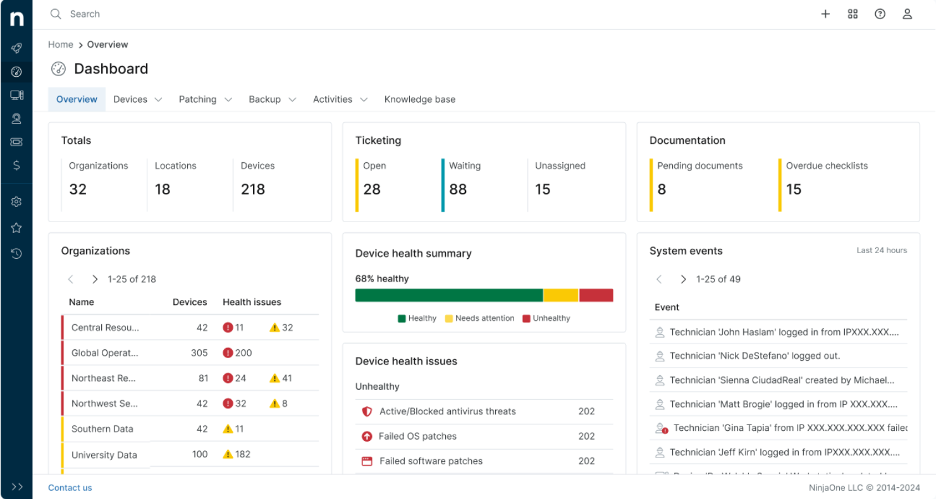
NinjaOne es un software de gestión de dispositivos finales diseñado para que los profesionales de TI y los proveedores de servicios gestionados (MSP) administren y supervisen dispositivos de manera eficiente. Realiza funciones clave como la supervisión remota, la gestión de parches y la gestión de activos de TI.
Por qué es una buena alternativa a Zoho Assist: NinjaOne ofrece una gestión unificada, lo que lo hace ideal para equipos que necesitan una supervisión completa de sus entornos de TI. Funciones como la aplicación automatizada de parches, la supervisión en tiempo real y los informes detallados ayudan a tu equipo a mantener la seguridad y el rendimiento. Su panel intuitivo proporciona una vista centralizada de todos los dispositivos, lo que facilita la toma rápida de decisiones. La escalabilidad del software permite adaptarse a infraestructuras de TI en crecimiento.
Funciones e integraciones destacadas:
Las funciones incluyen la gestión automatizada de parches, alertas en tiempo real e informes exhaustivos. Estas funciones garantizan que tu equipo pueda gestionar de forma proactiva los problemas de TI sin intervención manual. El panel centralizado de NinjaOne te ayuda a realizar un seguimiento de todos tus dispositivos desde un solo lugar, mejorando la eficiencia.
Las integraciones incluyen ConnectWise Screen Connect, Autotask, Zendesk, ServiceNow, Microsoft Entra y más.
Pros and Cons
Pros:
- Gestión automatizada de parches
- Supervisión en tiempo real
- Gestión centralizada de dispositivos
Cons:
- Los detalles de precios no son transparentes
- Complejo para usuarios sin conocimientos técnicos


RemotePC es un software seguro de acceso remoto diseñado para una amplia variedad de usuarios, incluidos particulares, pequeñas oficinas, equipos y empresas. Realiza funciones clave, como el acceso remoto a varios ordenadores, la transferencia de archivos y la impresión remota.
Por qué es una buena alternativa a Zoho Assist: RemotePC ofrece acceso ilimitado a los usuarios, lo que resulta ideal si tu equipo necesita amplias capacidades remotas. Sus funciones incluyen transferencias seguras de archivos, herramientas de colaboración y acceso atendido para la atención al cliente. La escalabilidad y facilidad de uso del software lo convierten en una opción práctica tanto para aplicaciones personales como empresariales. Las medidas de seguridad, como TLS v 1.2 con cifrado AES-256, aumentan su atractivo para las necesidades de soporte informático.
Características e integraciones destacadas:
Entre las características se incluyen la impresión remota, una pizarra para la colaboración y el acceso desde dispositivos móviles. Estas funciones ayudan a tu equipo a trabajar de manera eficiente desde cualquier lugar. Las herramientas de gestión y supervisión de usuarios de RemotePC también son útiles para las empresas que requieren control.
Las integraciones incluyen Zendesk, Freshdesk, Jira, Okta, G Suite, OneLogin y más.
Pros and Cons
Pros:
- Licencias de usuario ilimitadas
- Transferencias seguras de archivos
- Acceso móvil disponible
Cons:
- No hay demostración disponible
- No hay un plan gratuito disponible
Otras alternativas a Zoho Assist
Estas son algunas alternativas adicionales a Zoho Assist que no han entrado en mi lista, pero que merece la pena conocer:
- Parallels Access
Ideal para la integración de Windows en Mac
- TSplus Remote Support
Ideal para soluciones adaptadas a cada sector
- Dameware Remote Support
Ideal para soporte local


Cómo evalúo las alternativas a Zoho Assist
Evalúo en dos niveles: requisitos básicos imprescindibles, como el acceso desatendido y el control multiplataforma, y después factores diferenciadores, como las integraciones con herramientas de gestión de proyectos y el registro de auditoría, que separan las mejores herramientas del resto.
Funcionalidad principal (requisitos básicos imprescindibles para esta lista)
Al seleccionar las herramientas para mi lista, califico cada una en una escala de 0 (no ofrece la funcionalidad) a 5 (sobresale en esta área) para cada una de las funcionalidades principales que se indican a continuación. Después, convierto la puntuación total de la herramienta en un porcentaje. Cada herramienta debe alcanzar una puntuación total mínima del 65% para ser considerada para su inclusión.
- Control remoto de la pantalla: Evalúo qué tan receptiva es la experiencia de control en tiempo real, especialmente cuando un técnico necesita reiniciar servicios, editar configuraciones o guiar a una parte interesada por un entregable durante una llamada.
- Acceso desatendido: Busco conexiones fiables y siempre activas a máquinas sin interfaz, incluidos la agrupación de dispositivos y los métodos de implementación masiva que hacen práctico gestionar decenas de servidores de proyectos.
- Compatibilidad multiplataforma: Los equipos de proyectos trabajan en entornos mixtos, por lo que compruebo si cada herramienta es compatible con Windows, macOS, Linux, iOS y Android, incluidas las conexiones de dispositivos móviles a equipos de escritorio para solucionar problemas sobre la marcha.
- Transferencia de archivos durante la sesión: Mover archivos de proyectos durante una sesión activa es importante, así que evalúo si la herramienta permite transferencias mediante arrastrar y soltar en ambas direcciones sin límites restrictivos de tamaño de archivo.
- Compatibilidad con varias sesiones y varios monitores: Compruebo si los técnicos pueden ejecutar sesiones en paralelo y alternar entre monitores, algo muy habitual al dar soporte a configuraciones de desarrollo o diseño con varias pantallas.
- Seguridad y cifrado de las sesiones: En este apartado compruebo el cifrado de extremo a extremo, la autenticación multifactor y los registros de auditoría de las sesiones, especialmente en equipos que gestionan datos confidenciales de clientes o trabajan conforme a requisitos de cumplimiento como SOC 2 o GDPR.
Una vez que tengo una lista de herramientas que cumplen estos criterios, analizo qué diferencia a cada plataforma.
Factores diferenciadores (qué distingue a los proveedores)
Así es como comparo y contrasto los distintos proveedores:
Funciones destacadas
Busco integraciones nativas con herramientas de gestión de proyectos y emisión de tickets como Jira, ServiceNow o Slack, ya que iniciar una sesión remota directamente desde un ticket ahorra tiempo real durante la respuesta a incidentes. La grabación de sesiones es otro factor diferenciador que evalúo: resulta útil para los análisis posteriores a incidentes, las auditorías de clientes y la documentación de incorporación. Las funciones de colaboración integradas, como el chat, la VoIP y las anotaciones en pantalla, también son importantes cuando se guía a una parte interesada por una demostración en directo en lugar de limitarse a reparar una máquina.
Más allá de las funciones
La estructura de precios es muy importante en este caso. Compruebo si un proveedor cobra por técnico o por dispositivo, ya que esta diferencia puede modificar drásticamente los costes según el tamaño del equipo y el número de terminales. El cumplimiento normativo es otro factor que evalúo detenidamente: los equipos que prestan soporte a clientes de sectores regulados necesitan cobertura de SOC 2, GDPR o HIPAA, y no todas las herramientas la ofrecen. También considero la facilidad de implementación, especialmente si una herramienta admite instalaciones silenciosas o implementaciones basadas en MDM para equipos distribuidos que gestionan cientos de terminales.
¿Por qué buscar una alternativa a Zoho Assist?
Aunque Zoho Assist es una buena opción de software de escritorio remoto, hay varios motivos por los que algunos usuarios buscan soluciones alternativas. Es posible que estés buscando una alternativa a Zoho Assist porque:
- Necesitas funciones de seguridad más avanzadas
- Tu equipo necesita un mejor acceso desde dispositivos móviles
- Buscas más opciones de personalización
- Necesitas una solución con mayor capacidad de escalabilidad
- Tu equipo trabaja fuera de la disponibilidad geográfica de Zoho Assist
Si alguno de estos puntos te resulta familiar, estás en el lugar adecuado. Mi lista contiene varias opciones de software de escritorio remoto más adecuadas para equipos que afrontan estos desafíos con Zoho Assist y buscan soluciones alternativas.
Funciones principales de Zoho Assist
Estas son algunas de las funciones principales de Zoho Assist, que te ayudarán a contrastar y comparar lo que ofrecen las soluciones alternativas:
- Soporte remoto: Asistencia instantánea para los usuarios, lo que permite solucionar problemas rápidamente.
- Acceso desatendido: Gestiona dispositivos sin la presencia del usuario, proporcionando flexibilidad a tu equipo.
- Transferencia de archivos: Comparte archivos fácilmente entre dispositivos para facilitar la colaboración.
- Grabación de sesiones: Graba sesiones para consultarlas en el futuro y utilizarlas con fines de formación.
- Herramientas de anotación: Resalta y marca elementos durante las sesiones para mejorar la comunicación.
- Informes avanzados: Genera informes detallados de uso para realizar mejores análisis y obtener información útil.
- Compatibilidad con dispositivos móviles: Accede a dispositivos móviles de forma remota para garantizar asistencia sobre la marcha.
- Integración con API/SDK: Personaliza e intégrate con otras aplicaciones para crear soluciones adaptadas.
- Gestión de la cola de servicio: Organiza y prioriza las solicitudes de asistencia de forma eficiente.
- Personalización: Opciones para la interfaz y la imagen de marca que se adaptan a la identidad de tu empresa.