

Anmeldelse af Taskades AI-projektstyringssoftware for 2026



Taskade is a project management software that combines task management, docs, mind maps, and real-time collaboration in a single AI-native workspace. I'd consider it if your team needs a flexible, all-in-one tool without the configuration overhead of something like ClickUp, particularly if you want AI woven into how you plan and organize work from the start, rather than added on top of an existing workflow.
Taskade Evaluation Summary
- From $20/month
- Free plan available
Why Trust Our Software Recommendations
Our team has been testing and reviewing software since 2012. As project managers ourselves, we know how difficult—and important—it is to choose the right software.
For this guide, we evaluated tools using hands-on testing and independent research, scoring tools using our selection criteria. We also draw on insights from industry thought leaders and practicing project management experts.
Our reviews reflect our human editorial judgment, not a sales pitch.
Expert reviewers:
Taskade Overview
In my opinion, Taskade is a solid pick if you want a lightweight, AI-based project management platform that combines task tracking, real-time collaboration, and AI assistance in one place. It’s quicker to get into than heavier tools like ClickUp or Asana, especially if your projects lean more creative or loosely structured. The AI features—like smart task generation and writing help—add a useful layer, but they’re not essential for everyone and still feel a bit early-stage compared to more focused AI tools.
Compared to the competition, Taskade stands out with its speed and simplicity but falls short in reporting, permissions control, and deep project customization. I’d recommend it for small to mid-sized teams who value flexibility and fast collaboration over traditional Gantt charts or complex workflows.
pros
-
Real-time collaboration keeps your team in sync effortlessly
-
Intuitive design makes task organization straightforward for everyone
-
Flexible project views adapt to your team's workflow needs
cons
-
Some users find the customization options limited for complex projects
-
The learning curve for mastering all features can be steep for new users
-
Occasional technical glitches might disrupt your team's workflow
-

Smartsheet
Visit WebsiteThis rating combines scores from multiple user review sites to reflect overall customer sentiment about the product.4.5 -
Celoxis
Visit WebsiteThis rating combines scores from multiple user review sites to reflect overall customer sentiment about the product.4.5 -
Accelo
Visit WebsiteThis rating combines scores from multiple user review sites to reflect overall customer sentiment about the product.4.4





Our Review Methodology
How We Test & Score Tools
We’ve spent years building, refining, and improving our software testing and scoring system. The rubric is designed to capture the nuances of software selection and what makes a tool effective, focusing on critical aspects of the decision-making process.
Below, you can see exactly how our testing and scoring works across seven criteria. It allows us to provide an unbiased evaluation of the software based on core functionality, standout features, ease of use, onboarding, customer support, integrations, customer reviews, and value for money.
Core Functionality (25% of final scoring)
The starting point of our evaluation is always the core functionality of the tool. Does it have the basic features and functions that a user would expect to see? Are any of those core features locked to higher-tiered pricing plans? At its core, we expect a tool to stand up against the baseline capabilities of its competitors.
Standout Features (25% of final scoring)
Next, we evaluate uncommon standout features that go above and beyond the core functionality typically found in tools of its kind. A high score reflects specialized or unique features that make the product faster, more efficient, or offer additional value to the user.
We also evaluate how easy it is to integrate with other tools typically found in the tech stack to expand the functionality and utility of the software. Tools offering plentiful native integrations, 3rd party connections, and API access to build custom integrations score best.
Ease of Use (10% of final scoring)
We consider how quick and easy it is to execute the tasks defined in the core functionality using the tool. High scoring software is well designed, intuitive to use, offers mobile apps, provides templates, and makes relatively complex tasks seem simple.
Onboarding (10% of final scoring)
We know how important rapid team adoption is for a new platform, so we evaluate how easy it is to learn and use a tool with minimal training. We evaluate how quickly a team member can get set up and start using the tool with no experience. High scoring solutions indicate little or no support is required.
Customer Support (10% of final scoring)
We review how quick and easy it is to get unstuck and find help by phone, live chat, or knowledge base. Tools and companies that provide real-time support score best, while chatbots score worst.
Customer Reviews (10% of final scoring)
Beyond our own testing and evaluation, we consider the net promoter score from current and past customers. We review their likelihood, given the option, to choose the tool again for the core functionality. A high scoring software reflects a high net promoter score from current or past customers.
Value for Money (10% of final scoring)
Lastly, in consideration of all the other criteria, we review the average price of entry level plans against the core features and consider the value of the other evaluation criteria. Software that delivers more, for less, will score higher.
Core Features
Task management: Taskade provides a platform to create, assign, and monitor tasks and subtasks efficiently. Its intuitive interface allows users to prioritize and categorize tasks into task lists, making it easy to keep track of project progress.
Collaboration tools: Taskade excels in facilitating real-time communication and collaboration among team members. The platform supports video calls, chat, real-time notifications, and document sharing to ensure efficient teamwork.
Automation: Taskade leverages AI automation for repetitive tasks, freeing up time for more strategic planning. This feature allows teams to set up automated workflows that trigger based on specific conditions.
Project tracking: Taskade offers strong project-tracking tools that help monitor timelines and deliverables. Users can visualize project progress through Gantt charts and Kanban boards that make it easier to manage deadlines.
Resource management: Taskade provides AI agents to help you allocate and manage resources across various projects. This functionality helps ensure that team members are optimally utilized and project needs are met efficiently.
Sync with Google Calendar: Taskade integrates with Google Calendar to automatically sync project due dates and task schedules. Users can easily view and manage their project timelines alongside personal or team calendars to ensure alignment and reduce scheduling conflicts.
Ease of Use
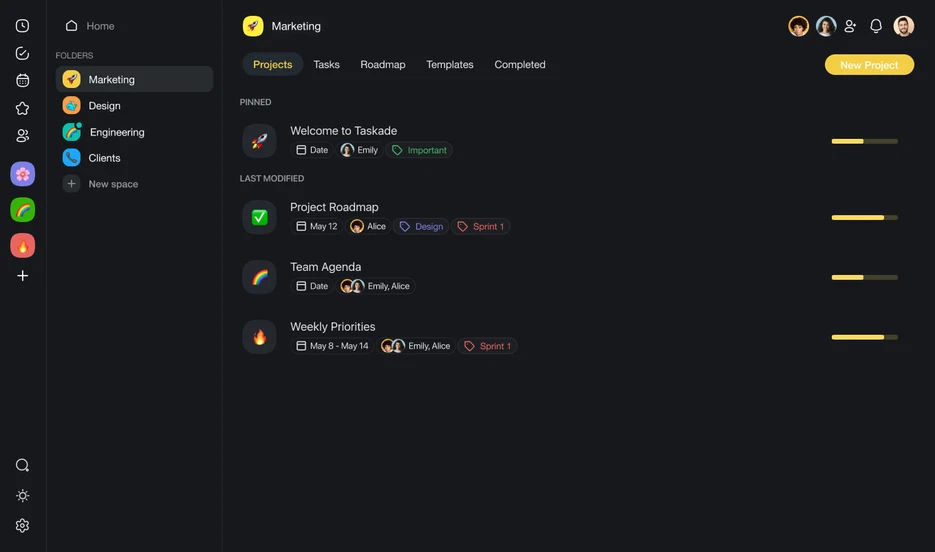
Taskade is generally easy to use compared to other project management software with artificial intelligence. Its intuitive design and user-friendly interface make navigation straightforward, allowing teams to quickly adapt and begin managing projects. Users also praise Taskade's clean and uncluttered layout, which simplifies task creation and organization.
Taskade’s mobile app and available templates further enhance its accessibility, making it a suitable choice for teams seeking a simple yet effective tool.

Taskade Specs
- API
- Calendar Management
- Collaboration Support
- Dashboards
- Data Export
- Data Import
- External Integrations
- File Sharing
- Gantt Charts
- Kanban Boards
- Mobile App
- Multi-User
- Notifications
- Prioritization
- Project Management
- Status Notifications
- Task Scheduling/Tracking
- Time Management

Ofte stillede spørgsmål om Taskade
Hvordan håndterer Taskade datasikkerhed?
Taskade tager datasikkerhed alvorligt og følger branchestandarder for sikkerhedspraksis for at beskytte dit teams oplysninger. Taskade tilbyder også overholdelse af reglerne om databeskyttelse for at sikre, at dine data behandles omhyggeligt. Platformen anvender desuden kryptering både under overførsel og ved lagring. Regelmæssige sikkerhedsrevisioner og opdateringer bidrager til at opretholde et sikkert miljø for dine projekter.
Kan Taskade understøtte samarbejde i fjernteams?
Ja, Taskade er designet til at lette samarbejdet for fjernteams. Dets funktioner i realtid lader dig og dit team arbejde sammen samtidigt, uanset hvor I befinder jer. I kan chatte, dele filer og administrere opgaver på én platform, så alle er afstemt og produktive. Taskades tilgængelighed på forskellige enheder sikrer også, at dit team kan holde forbindelsen, selv når I ikke er på kontoret.
Hvilke brancher har størst fordel af at bruge Taskade?
Kreative bureauer, startups og fjernteams har særlig stor fordel af Taskade på grund af platformens fleksibilitet og funktioner til samarbejde i realtid. Platformens visuelle brugerflade er ideel til teams, der har brug for at brainstorme og organisere idéer effektivt, f.eks. i forbindelse med indholdsproduktion. Brancher, der er afhængige af kommunikation og hurtig opgavestyring, vil også sætte pris på Taskades strømlinede arbejdsgange.
Hvor tilpasningsbare er arbejdsgangene i Taskade?
Taskade tilbyder flere tilpasningsmuligheder, så du kan skræddersy arbejdsgangene til dit teams behov. Du kan oprette brugerdefinerede skabeloner og justere projektvisninger, så de passer til din foretrukne arbejdsstil. Taskades fleksibilitet dækker dog muligvis ikke de meget komplekse tilpasninger, som nogle brancher har brug for. For de fleste teams er Taskades muligheder dog tilstrækkelige til at skabe effektive arbejdsgange.
Er der understøttelse af mobilenheder?
Ja, Taskade tilbyder mobilapps til både iOS- og Android-enheder. Det sikrer, at du kan administrere opgaver og samarbejde med dit team på farten. Disse mobilapps indeholder vigtige funktioner, som gør det muligt for dig at være produktiv, selv når du er væk fra din computer. Taskades mobile brugerflade er brugervenlig og nem at navigere i.
Understøtter Taskade arbejde offline?
Taskade fungerer primært online og kræver en internetforbindelse for at få adgang til samarbejdsfunktioner i realtid. Du kan dog se tidligere indlæste opgaver og projekter offline. Ændringer, der foretages offline, synkroniseres, når du er online igen. Selvom Taskade ikke har fuld offlinefunktionalitet, sikrer platformen, at du stadig kan få adgang til vigtige oplysninger, når du har brug for dem.
Hvordan letter Taskade kommunikationen i teamet?
Taskade indeholder indbygget chat og kommentarer, så kommunikationen forbliver relevant og fokuseret på opgaverne. Du kan diskutere specifikke opgaver direkte på platformen, hvilket mindsker behovet for eksterne kommunikationsværktøjer. Det holder alle projektrelaterede samtaler samlet ét sted og sikrer, at alle er informerede og afstemt i forhold til projektets mål.
Taskade virksomhedsoverblik & historik
Taskade, Inc. er en privat softwarevirksomhed, der blev grundlagt i 2017 af John Xie, Dionis Liore og Stan Chang. Taskade har hovedsæde i San Francisco og fokuserer på AI-drevet opgave- og projektstyring, hvilket giver brugerne en platform til at samarbejde, organisere og effektivisere arbejdsgange. Taskade er kendt for sin enkle og intuitive grænseflade, der integrerer opgavestyring, mindmapping og værktøjer til samarbejde i realtid i én samlet løsning.
Virksomheden opererer globalt med et distribueret team og betjener enkeltpersoner, teams og organisationer inden for en lang række brancher. Taskade tilbyder skræddersyede AI-værktøjer til opgavestyring samt projektstyring på virksomhedsniveau.
Taskades vigtigste milepæle
- 2017: Grundlagt af John Xie (administrerende direktør), Dionis Loire (produktchef) og Stan Chang (teknologidirektør) i San Francisco, Californien.
- 2021: Introducerede et nydesignet Taskade V4 og lancerede tovejssynkronisering med Google Kalender.
- 2022: Lancerede en Zapier-integration og introducerede nye projektvisninger, herunder en nydesignet handlingsvisning og en helt ny kalenderarbejdsgang.
- 2023: Lancerede Taskade AI til mobilenheder og bragte ChatGPT-drevne produktivitetsfunktioner til iOS- og Android-enheder.
- 2024: Opnåede betydelige milepæle, herunder oprettelsen af 500.000 AI-agenter, 1,5 millioner automatiseringskørsler, behandling af 112 milliarder AI-tokens og gennemførelsen af 17 millioner opgaver.
Hvad sker der nu?
Vil du komme i kontakt med andre digitale projektledere for at dele ressourcer og bedste praksis? Bliv medlem af vores fællesskab og få adgang til mere end 100 skabeloner, eksempler og cases, og kom i kontakt med hundredvis af andre digitale projektledere på Slack.