


Anmeldelse af Microsoft To Do som opgavestyringssoftware for 2026



Microsoft To Do is a task management software for individuals and small teams who need a simple way to manage tasks, to-do lists, and daily priorities. I'd consider it over Todoist if your team already runs on Microsoft 365, as the native connections to Outlook, Teams, and Planner give you an integrated workflow that Todoist and other task management tools can't replicate without workarounds.
Microsoft To Do Evaluation Summary
- Free to use
- Free-forever plan available
Why Trust Our Software Recommendations
Our team has been testing and reviewing software since 2012. As project managers ourselves, we know how difficult—and important—it is to choose the right software.
For this guide, we evaluated tools using hands-on testing and independent research, scoring tools using our selection criteria. We also draw on insights from industry thought leaders and practicing project management experts.
Our reviews reflect our human editorial judgment, not a sales pitch.
Expert reviewers:
Microsoft To Do Overview
In my opinion, Microsoft To Do is a task management tool that works especially well for teams already using Microsoft 365. Its strength lies in its simplicity and smooth integration with other Microsoft apps—such as Outlook, Teams, and Planner—that offers a unified experience across tools.
That said, the platform may not meet the needs of users seeking advanced project management features like Gantt charts, Kanban boards, or complex automations. It’s best suited for small to mid-sized teams looking for a simple, cost-effective option that fits into the Microsoft ecosystem.

pros
-
Intuitive interface for easy task organization
-
Seamless Microsoft 365 integration
-
Cross-device synchronization
cons
-
Limited advanced project management features
-
Basic customization options
-
Not ideal for large teams or detailed tracking
-

Smartsheet
Visit WebsiteThis rating combines scores from multiple user review sites to reflect overall customer sentiment about the product.4.5 -
Celoxis
Visit WebsiteThis rating combines scores from multiple user review sites to reflect overall customer sentiment about the product.4.5 -
Accelo
Visit WebsiteThis rating combines scores from multiple user review sites to reflect overall customer sentiment about the product.4.4





Our Review Methodology
How We Test & Score Tools
We’ve spent years building, refining, and improving our software testing and scoring system. The rubric is designed to capture the nuances of software selection and what makes a tool effective, focusing on critical aspects of the decision-making process.
Below, you can see exactly how our testing and scoring works across seven criteria. It allows us to provide an unbiased evaluation of the software based on core functionality, standout features, ease of use, onboarding, customer support, integrations, customer reviews, and value for money.
Core Functionality (25% of final scoring)
The starting point of our evaluation is always the core functionality of the tool. Does it have the basic features and functions that a user would expect to see? Are any of those core features locked to higher-tiered pricing plans? At its core, we expect a tool to stand up against the baseline capabilities of its competitors.
Standout Features (25% of final scoring)
Next, we evaluate uncommon standout features that go above and beyond the core functionality typically found in tools of its kind. A high score reflects specialized or unique features that make the product faster, more efficient, or offer additional value to the user.
We also evaluate how easy it is to integrate with other tools typically found in the tech stack to expand the functionality and utility of the software. Tools offering plentiful native integrations, 3rd party connections, and API access to build custom integrations score best.
Ease of Use (10% of final scoring)
We consider how quick and easy it is to execute the tasks defined in the core functionality using the tool. High scoring software is well designed, intuitive to use, offers mobile apps, provides templates, and makes relatively complex tasks seem simple.
Onboarding (10% of final scoring)
We know how important rapid team adoption is for a new platform, so we evaluate how easy it is to learn and use a tool with minimal training. We evaluate how quickly a team member can get set up and start using the tool with no experience. High scoring solutions indicate little or no support is required.
Customer Support (10% of final scoring)
We review how quick and easy it is to get unstuck and find help by phone, live chat, or knowledge base. Tools and companies that provide real-time support score best, while chatbots score worst.
Customer Reviews (10% of final scoring)
Beyond our own testing and evaluation, we consider the net promoter score from current and past customers. We review their likelihood, given the option, to choose the tool again for the core functionality. A high scoring software reflects a high net promoter score from current or past customers.
Value for Money (10% of final scoring)
Lastly, in consideration of all the other criteria, we review the average price of entry level plans against the core features and consider the value of the other evaluation criteria. Software that delivers more, for less, will score higher.
Core Features
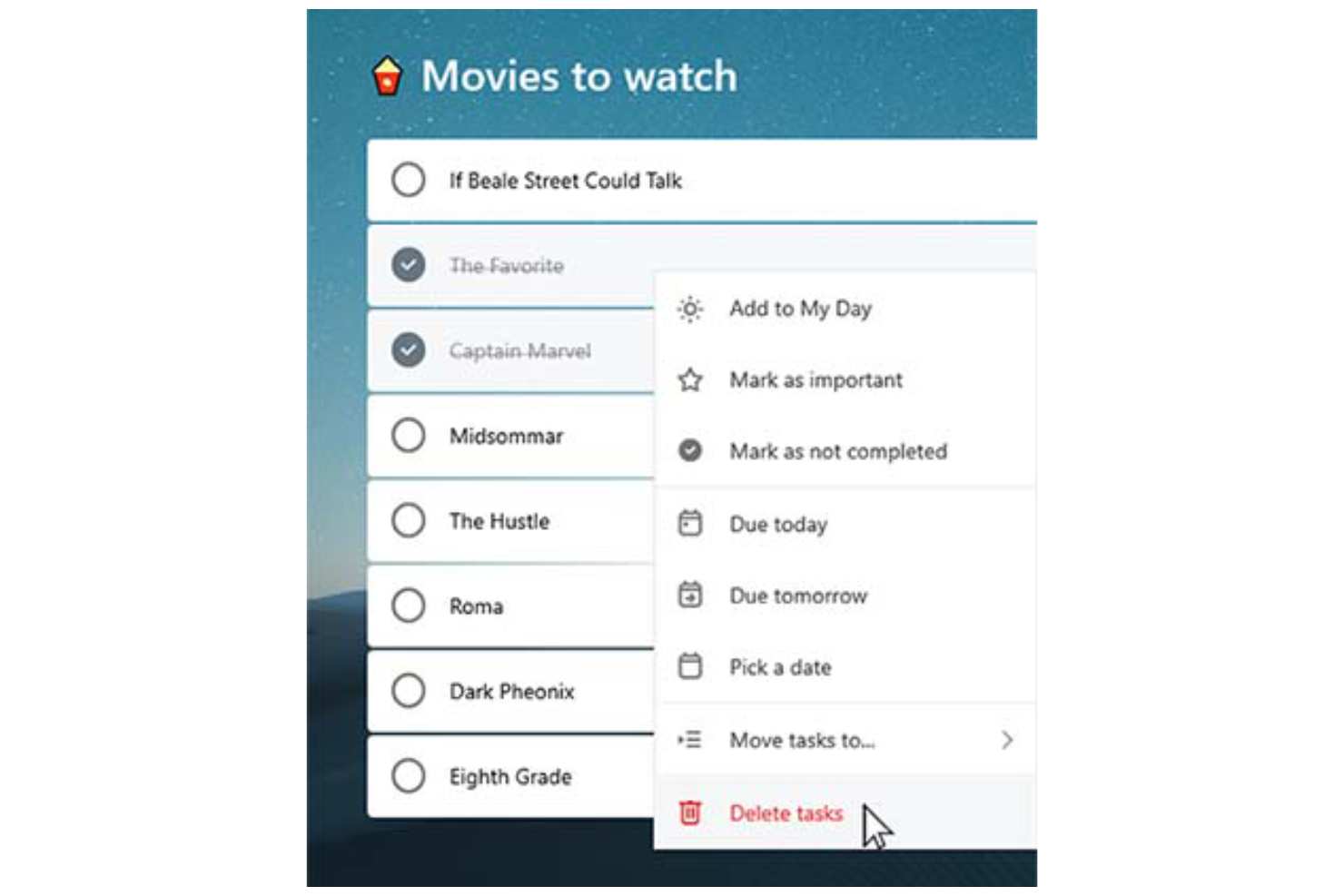
Task lists: You can create tasks, break them into smaller subtasks (called “steps”) and arrange them into organized to-do lists, making it easy to categorize, prioritize, and track various aspects of your professional or personal tasks.
Due dates: Set deadlines for each task to ensure timely completion. Due dates appear across your devices and sync with Outlook, which can help you manage schedules and meet project timelines consistently.
Reminders: You can set time-based reminders for tasks, so you never miss an important deadline. These notifications are designed to keep your team on-track and avoid last-minute rushes.
Recurring tasks: Schedule tasks to repeat at customizable intervals (daily, weekly, monthly, etc.). This is perfect for repetitive work like weekly reports, follow-ups, or administrative tasks.
Custom themes: You can personalize your task lists by applying different background themes and colors, making your workspace more visually appealing and easier to organize.
Priority levels: Assign priority tags (Important or Normal) to tasks. The “Important” tag adds the task to the "Important" smart list, helping you focus on high-priority work and better manage your workload.
Ease of Use
Microsoft To Do stands out with its clean, user-friendly interface that simplifies task management for you and your team. Features like drag-and-drop organization make it easy to rearrange tasks and update priorities on the fly.
The system’s integration with Microsoft 365 also enhances accessibility, allowing you to manage tasks across desktop (Mac or Windows), web, and mobile devices (including Android, iPhone, iPad, and Apple Watch). The mobile to-do list app, available on iOS and Android, ensures you can stay organized and productive wherever you are.
For simple and efficient task management, Microsoft To Do is a reliable choice.

Microsoft To Do Specs
- API
- Batch Permissions & Access
- Budgeting
- Calendar Management
- Collaboration Support
- Contact Management
- Contact Sharing
- Customer Management
- Dashboard
- Dashboards
- Data Export
- Data Import
- Data Visualization
- Dependency Tracking
- Document Sharing
- Expense Tracking
- External Integrations
- File Sharing
- Gantt Charts
- Kanban Boards
- Multi-User
- Notifications
- Project Management
- Resource Management
- Scheduling
- Task Scheduling/Tracking
- Third-Party Plugins/Add-Ons
- Time Management
- Travel Management
- Workflow Management
Alternatives to Microsoft To Do



Ofte stillede spørgsmål om Microsoft To Do
Hvordan håndterer Microsoft To Do datasikkerhed?
Microsoft To Do er bygget på Microsoft 365's sikkerhedsinfrastruktur, hvilket betyder, at det drager fordel af beskyttelse i virksomhedsklasse. Dine data sikres ved hjælp af branchestandardiserede krypteringsprotokoller, herunder kryptering i hvile og under overførsel. Opgaver og andre brugeroplysninger gemmes i Microsofts globalt distribuerede datacentre, som er certificeret til at opfylde internationale overholdelsesstandarder som ISO/IEC 27001, SOC 1, 2 og 3 samt GDPR.
Derudover understøtter Microsoft To Do multifaktorgodkendelse (MFA) og rollebaseret adgangskontrol som en del af det overordnede Microsoft-kontomiljø.
Kan jeg bruge Microsoft To Do offline?
Du kan bruge Microsoft To Do offline til at se og redigere dine opgaver. Alle ændringer, du foretager, synkroniseres automatisk på tværs af dine enheder, når du igen er online, så alt holdes opdateret.
Understøtter Microsoft To Do teamsamarbejde?
Microsoft To Do understøtter grundlæggende teamsamarbejde via delte opgavelister. Du kan invitere andre til at deltage i en liste, så teammedlemmer kan se, tilføje, fuldføre og redigere opgaver. Det gør værktøjet nyttigt til enkel koordinering blandt små teams eller inden for afdelinger, når fælles ansvarsområder eller tjeklister skal følges.
Microsoft To Do indeholder dog ikke avancerede samarbejdsfunktioner som opgavekommentarer, aktivitetssporing, samtidig redigering i realtid eller rollebaserede tilladelser. Til mere omfattende projektsamarbejde – såsom sprintplanlægning, dokumentdeling eller teamchat – foretrækker teams muligvis integrerede produktivitetsværktøjer som Microsoft Planner, Trello eller Asana.
Hvordan integreres Microsoft To Do med andre Microsoft-apps?
Microsoft To Do integreres med andre Microsoft-apps som Outlook og Teams. Du kan synkronisere opgaver fra Outlook-mails og kalenderbegivenheder, så du kan holde alt organiseret ét sted og forbedre den overordnede produktivitet.
Kan jeg tilpasse opgavevisninger i Microsoft To Do?
Microsoft To Do tilbyder begrænsede muligheder for at tilpasse opgavevisninger. Du kan sortere opgaver efter forfaldsdato, vigtighed eller tilføjelsesdato, men mulighederne for yderligere tilpasning er minimale. Det er designet til at holde tingene enkle, så du kan fokusere på at administrere opgaver effektivt.
Findes der en mobilapp til Microsoft To Do?
Ja, Microsoft To Do tilbyder en mobilapp til både iOS- og Android-enheder. Appen synkroniseres automatisk med web- og desktopversionerne via din Microsoft-konto, så dine opgavelister og opdateringer er tilgængelige på alle platforme i realtid.
Med mobilappen kan du oprette, redigere og organisere nye opgaver, indstille påmindelser og markere punkter som fuldført, mens du er på farten, så du kan holde dig organiseret og produktiv, uanset hvor du befinder dig.
Kan jeg importere opgaver fra andre apps til Microsoft To Do?
Ja, du kan importere opgaver til Microsoft To Do, især fra Outlook og andre værktøjer i Microsofts økosystem. Opgaver i Outlook Opgaver synkroniseres automatisk med Microsoft To Do, hvis du bruger den samme Microsoft-konto. Import af opgaver fra tredjepartsapps som Todoist eller TickTick kræver normalt manuel indtastning eller brug af tredjepartsværktøjer som Zapier eller Microsoft Power Automate til at automatisere migreringen.
Hvis du skifter fra en app med eksportfunktion, kan du muligvis eksportere dine opgaver til en CSV-fil og manuelt indtaste dem igen eller skrive et script, der overfører dem til To Do, men der findes ingen indbygget masseimportfunktion til CSV- eller JSON-filer.
Microsoft To Do virksomhedsoversigt & historik
Microsoft To Do er en cloudbaseret app til opgavestyring, der er udviklet af Microsoft, som har hovedkvarter i Redmond, Washington. Appen blev officielt lanceret i april 2017 som efterfølgeren til Wunderlist, som Microsoft opkøbte i juni 2015 fra den Berlin-baserede startupvirksomhed 6Wunderkinder.
Som en del af Microsoft 365-pakken integreres den med tjenester som Outlook for at understøtte produktiviteten. Appen giver brugerne mulighed for at administrere opgaver på tværs af enheder, hvilket sikrer en ensartet og sammenhængende oplevelse.
Vigtige milepæle for Microsoft To Do
- 2015: Microsoft opkøber Wunderlist.
- 2017: Microsoft To Do lanceres som efterfølgeren til Wunderlist.
- 2019: Et større redesign bringer Microsoft To Do tættere på Wunderlists brugerflade.
- 2020: Microsoft udfaser officielt Wunderlist for at fokusere på Microsoft To Do.
Hvad sker der nu?
Vil du komme i kontakt med andre digitale projektledere for at dele ressourcer og bedste praksis? Bliv medlem af vores fællesskab og få adgang til over 100 skabeloner, eksempler og modelbesvarelser, og kom i kontakt med hundredvis af andre digitale projektledere på Slack.