

2026’nın En İyi 10 Toplantı Yönetimi Yazılımı

En İyi Toplantı Yönetimi Yazılımları Kısa Listesi


Toplantı yönetimi yazılımı, ekibinizin uyumlu ve odaklanmış kalabilmesi için toplantıları düzenlemenize, planlamanıza ve belgelemenize yardımcı olur. En iyi toplantı yönetimi çözümlerini arıyorsanız muhtemelen yoğun takvimler, dağınık gündemler ve arada kaybolan çok sayıda takip işiyle uğraşıyorsunuz.
Doğru araç, karmaşayı azaltabilir, iş birliğini geliştirebilir, tekrarlayan görevleri yerine getirmek için otomatik iş akışlarını kullanabilir ve toplantıların eyleme dönüştürülebilir olmasını sağlayabilir.
Why Trust Our Software Recommendations
Our team has been testing and reviewing software since 2012. As project managers ourselves, we know how difficult—and important—it is to choose the right software.
For this guide, we evaluated tools using hands-on testing and independent research, scoring tools using our selection criteria. We also draw on insights from industry thought leaders and practicing project management experts.
Our reviews reflect our human editorial judgment, not a sales pitch.
Expert reviewers:
Toplantı Yönetimi Yazılımları Karşılaştırma Tablosu
Bu karşılaştırma tablosu, en iyi toplantı yönetimi yazılımı seçimlerimin fiyatlandırma ayrıntılarını özetlemektedir:
| Tool | Starting Price | Website | |
|---|---|---|---|
| Best for collaborative agenda creation | 4.7 out of 5 | $7/user/month Free plan available | Website |
| Best for agile team retrospective meetings | 4.7 out of 5 | $8/active user/month Free version available | Website |
| Best for instant call highlights and summaries | 4.6 out of 5 | $15/month 7-day free trial + free demo available | Website |
| Best for AI-powered conversation insights | 4.6 out of 5 | $19/user/month 14-day free trial + free demo available | Website |
| Best for live meeting note capture | 4.4 out of 5 | $16.99/user/month Free plan available | Website |
| Best for automatic voice transcription | 4.3 out of 5 | $10/user/month Free plan + free demo available | Website |
| Best for sharing searchable meeting transcripts | — | $8.17/month Free plan available | Website |
| Best for structured meeting workflows | — | Pricing upon request Free trial available | Website |
| Best for timestamped video meeting notes | — | $18/user/month Free plan + free trial + free demo available | Website |
| Best for integrating notes with project tools | — | $19/user/month Free plan available | Website |
En İyi Toplantı Yönetimi Yazılımları İncelemeleri
Kısa listemde yer alan en iyi toplantı yönetimi yazılımlarına ilişkin ayrıntılı özetlerimi aşağıda bulabilirsiniz. İncelemelerim, size en uygun seçeneği bulmanıza yardımcı olmak için her platformun özelliklerine, entegrasyonlarına ve en uygun kullanım alanlarına ayrıntılı bir bakış sunmaktadır.

Fellow
Best for collaborative agenda creation
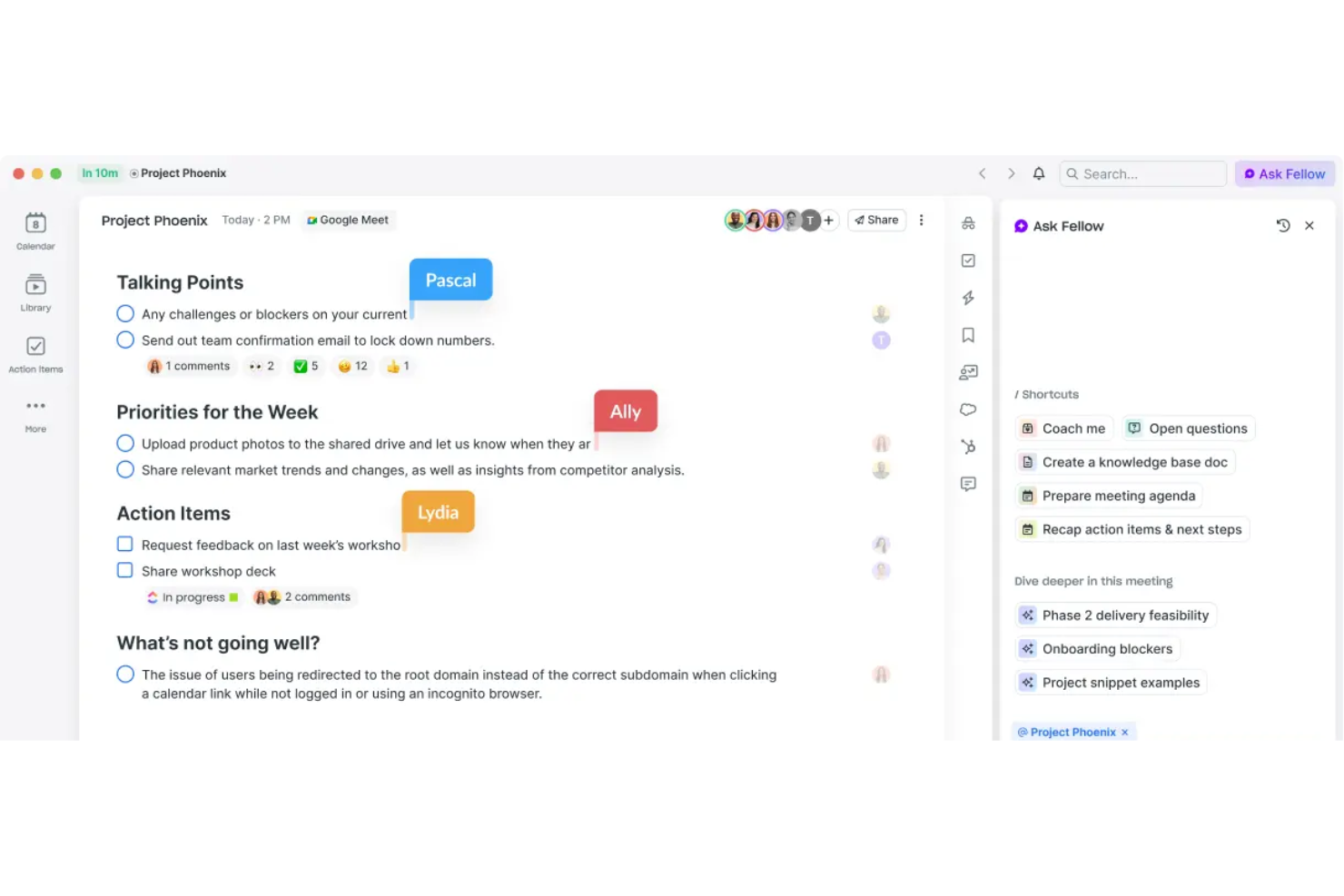
Fellow is an AI meeting assistant that records, transcribes, and summarizes meetings across Zoom, Google Meet, Microsoft Teams, and Slack, while also supporting collaborative agenda creation and action item tracking.
Who Is Fellow Best For?
Fellow is a good fit for managers and team leads at mid-sized tech companies who need to schedule meetings, run frequent one-on-ones, and manage cross-functional syncs.
Why I Picked Fellow
I picked Fellow as one of the best because its collaborative agenda feature genuinely changes how meetings start. Before a meeting, every attendee can contribute talking points directly to a shared agenda, so no one shows up empty-handed.
I also like the pre-meeting briefs, which pull context together automatically, so you walk in prepared. Pair that with action item tracking that syncs to tools like Asana and Jira, and follow-ups actually get done.
Fellow Key Features
- Meeting automations: Automatically record selected meetings, prompt attendees to add agenda items, and send pre-meeting reminders without any manual setup.
- 500+ meeting templates: Access a library of agenda templates for any meeting type, and customize your own to match your team's recurring formats.
- AI recording library: Store all recorded meetings in a centralized, searchable library with role-based access controls so the right people can find the right content.
- Cross-meeting intelligence: Use Fellow's Ask Fellow AI agent to search across all past transcripts and summaries and pull up decisions or context from any previous meeting.
Fellow Integrations
Fellow offers 50+ native integrations, including Slack, Zoom, Google Meet, Microsoft Teams, Asana, Jira, Linear, Salesforce, HubSpot, and Confluence. It connects with Zapier and has an API for custom integrations.
Pros and Cons
Pros:
- Strong one-on-one meeting tracking tools
- Action items auto-distribute after meetings end
- Shared agendas keep every attendee prepared
Cons:
- Templates can be unintuitive to customize
- Searching past meeting notes feels clunky
Parabol
Best for agile team retrospective meetings
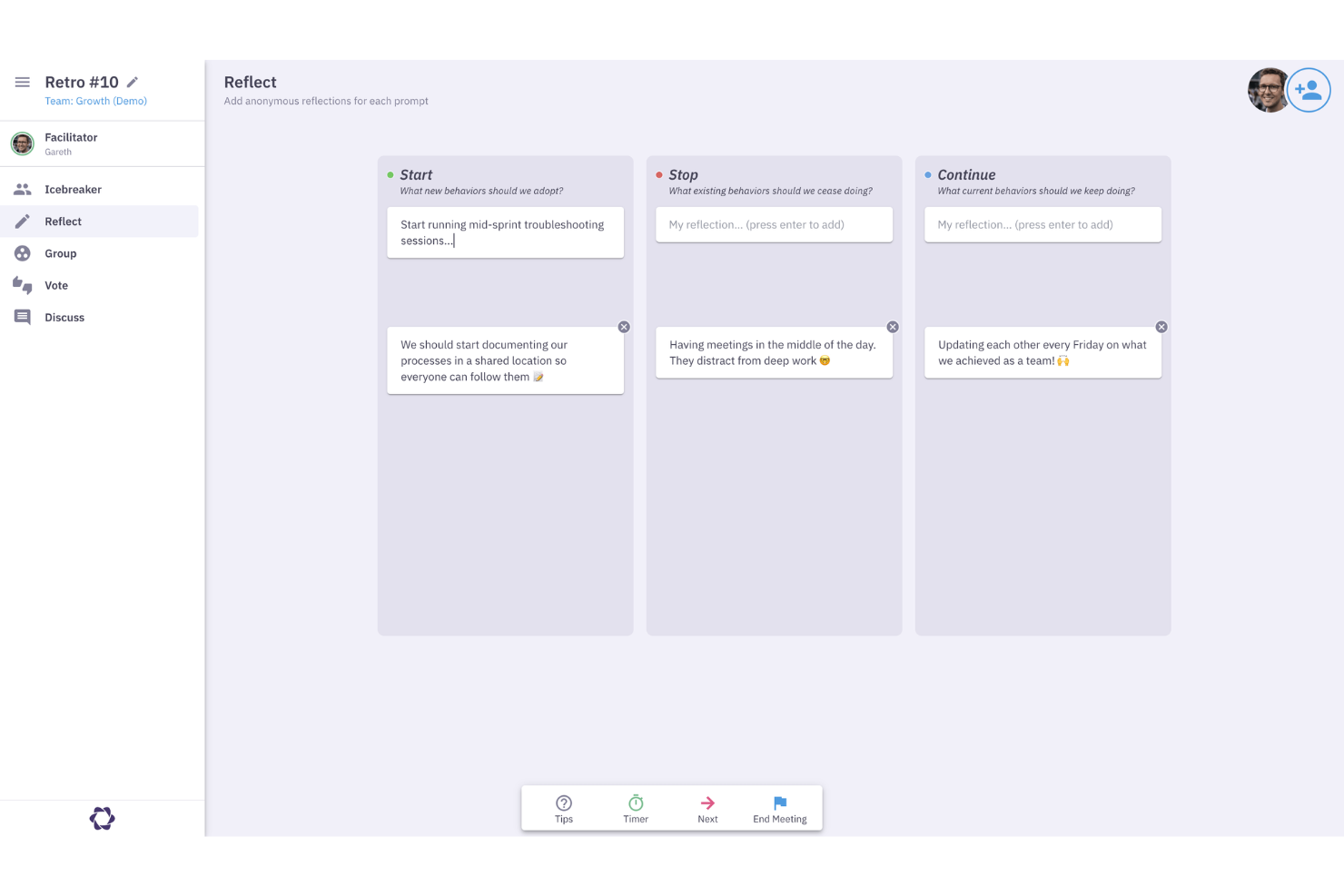
Parabol is an agile meeting tool that structures retrospectives, sprint poker sessions, standups, and team check-ins, with built-in templates, anonymous input, and task capture directly in your backlog management tool.
Who Is Parabol Best For?
Parabol is a natural fit for scrum teams and agile coaches who run regular retrospectives, sprint reviews, and planning sessions across distributed or hybrid environments.
Why I Picked Parabol
I've included Parabol in my top picks because it's the only meeting tool I know that was built specifically around agile ceremonies rather than bolted onto them. I like how the retrospective format enforces structured phases: anonymous input collection, grouping similar reflections, discussion, and task capture, all in one flow.
What gets me is the sprint poker feature, which syncs directly with your backlog tool and updates story points in real time as your team estimates, so you're not duplicating work after the session ends.
Parabol Key Features
- 40+ meeting templates: Choose from pre-built formats for retrospectives and estimation meetings, or build your own from scratch.
- Automated meeting summaries: Parabol generates a summary at the end of every meeting automatically, without manual note-taking.
- Built-in discussion timers: Set time limits on agenda topics to keep conversations focused during live sessions.
- Team health check: Run an anonymous pulse poll at the start of a meeting to capture team sentiment before the discussion begins.
Parabol Integrations
Parabol offers a small set of native integrations focused on backlog management and team communication, including Jira, GitHub, GitLab, Linear, Azure DevOps, Slack, Microsoft Teams, Mattermost, Zoom, and Google Calendar. Jira Server integration is available on the Enterprise tier.
Pros and Cons
Pros:
- Open-source with a self-hosting option available
- Full meeting history stored per team
- Anonymous reflections prevent groupthink during retros
Cons:
- Email summaries are sent regardless of attendance
- Interface only available in English
Fathom
Best for instant call highlights and summaries
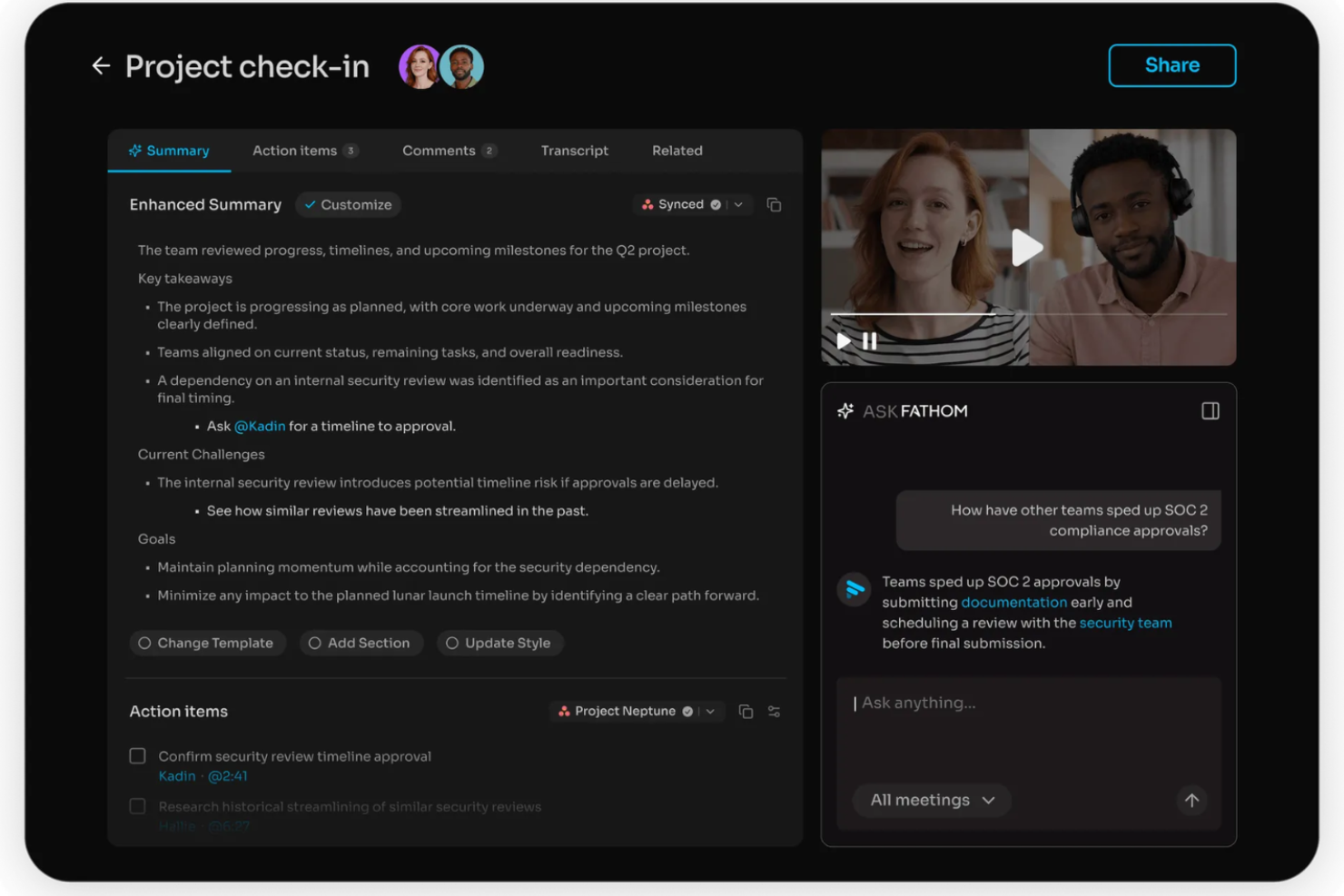
Fathom is an AI notetaker that automatically records, transcribes, and summarizes video calls and extracts action items from every meeting.
Who Is Fathom Best For?
Fathom is a natural fit for sales and customer success teams who run high volumes of video calls or webinars and need a fast, accurate record of each conversation.
Why I Picked Fathom
I picked Fathom as one of the best because it delivers meeting summaries the moment a call ends, with no waiting around. What I really like is the "Ask Fathom" feature, which lets you query past meetings in plain language to pull context fast.
I also find the bot-free recording option genuinely useful: Fathom can capture calls without dropping a visible bot into the meeting.
Fathom Key Features
- In-call highlight marking: Flag key moments during a live call so they're instantly clipped and retrievable after the meeting ends.
- CRM auto-sync: Push meeting notes and summaries directly to connected CRMs like Salesforce and HubSpot without manual data entry.
- Speaker-labeled transcripts: Transcripts identify each speaker by name, making it easy to track who said what across a full conversation.
- Team call library: Store and organize all recorded calls in a shared workspace so your whole team can search and review past meetings.
Fathom Integrations
Fathom offers native integrations with HubSpot, Salesforce, Close CRM, Slack, Asana, Google Meet, Zoom, and Microsoft Teams, along with partner integrations from tools like Pylon, Twine, and GetAccept. It also connects with Zapier and provides an API for custom integrations.
Pros and Cons
Pros:
- HIPAA, SOC 2 Type II, and GDPR compliant
- Shareable clips from any recorded meeting
- Generous free plan with unlimited recordings
Cons:
- Cannot process uploaded audio or video files
- The mobile app is iOS only

Avoma
Best for AI-powered conversation insights
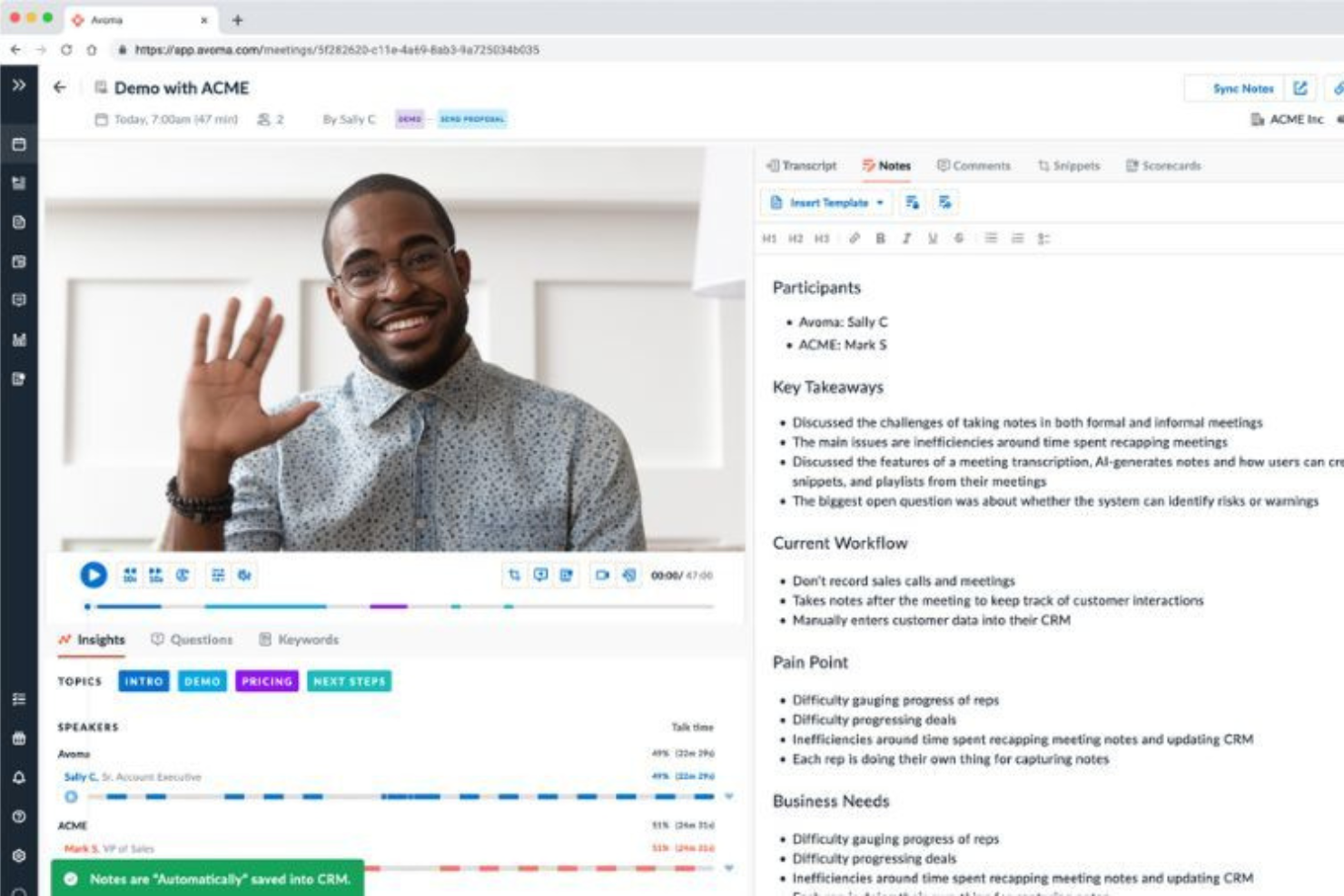
Avoma is an AI meeting assistant that combines call recording, agenda management, automated note-taking, and talk-pattern analysis into one connected workspace.
Who Is Avoma Best For?
Avoma is a strong fit for B2B sales and customer success teams who need structured conversation intelligence across the full deal cycle.
Why I Picked Avoma
I've included Avoma in my top picks because its conversation intelligence goes deeper than most meeting tools. The AI call scoring runs across 100% of recorded calls automatically, which means sales managers get consistent, unbiased coaching data without manually reviewing recordings.
I also really like the custom Smart Trackers, which use semantic matching to track keywords and topics accurately across calls. That kind of nuance makes it much more useful than tools that rely on exact keyword matching.
Avoma Key Features
- AI-generated follow-up emails: Automatically drafts follow-up emails after each recorded meeting, pulling from the transcript and meeting notes.
- Live answer assistant: Surfaces real-time suggested responses during active calls to help reps handle objections on the spot.
- AI sales methodology scoring: Automatically scores calls against frameworks like MEDDIC and SPICED without manual rep input.
- Talk-pattern insights: Breaks down metrics like talk-to-listen ratios and topic trends across your team's recorded calls.
Avoma Integrations
Avoma offers native integrations with Zoom, Google Meet, Microsoft Teams, Salesforce, HubSpot, Pipedrive, Slack, Aircall, RingCentral, and Salesloft. It also connects with Zapier and provides an API for custom integrations.
Pros and Cons
Pros:
- Modular pricing so you buy only what's needed
- Transcription available in 75+ languages
- Automatic CRM field updates after calls
Cons:
- Speaker attribution in transcripts needs improvement
- Primarily built for customer-facing teams

Otter.ai
Best for live meeting note capture
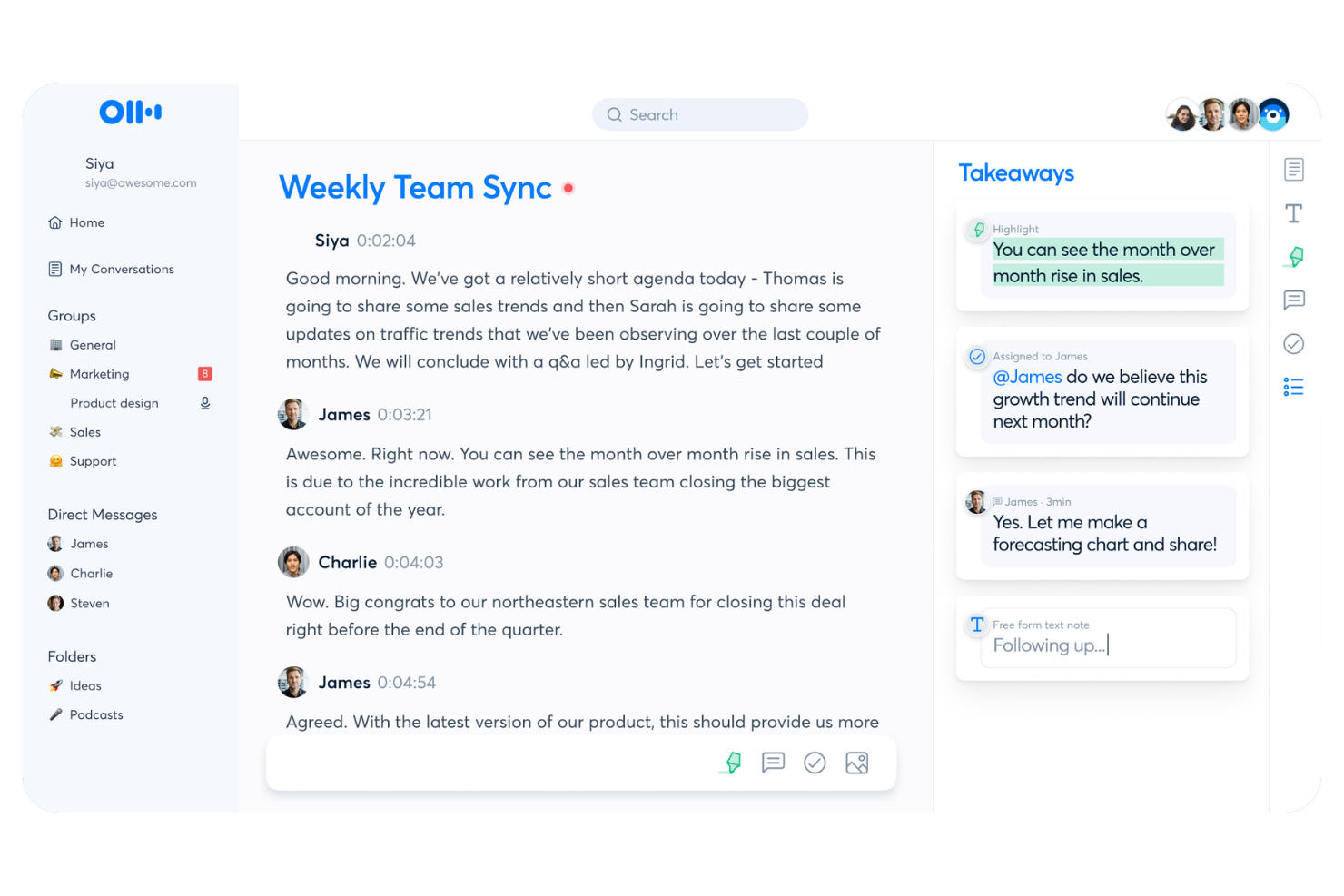
Otter.ai is a meeting notes platform that captures live transcriptions, generates real-time summaries, and lets attendees collaborate on notes directly during the call.
Who Is Otter.ai Best For?
Otter.ai is a strong fit for teams in fast-moving meetings who need to accelerate decision making with a live, shared record of decisions and action items.
Why I Picked Otter.ai
Otter.ai earns its spot on my shortlist because live transcription is where it genuinely shines. While most tools transcribe after the fact, Otter renders words on screen as they're spoken, with speaker labels attached in real time.
I also like the OtterPilot feature, which joins calls automatically and lets attendees read, highlight, and comment on the live transcript mid-meeting. That makes it especially useful for distributed teams where not everyone can follow audio closely.
Otter.ai Key Features
- Automated action item detection: Otter identifies and extracts action items from the transcript so nothing gets lost after the call.
- AI meeting summaries: Generates a condensed summary of the full conversation after each meeting ends.
- Otter AI Chat: Lets you ask questions about past meeting content and pull answers directly from stored transcripts.
- Shared workspace: Organizes all meeting notes into a team workspace where members can search and access past meetings.
Otter.ai Integrations
Otter.ai offers 30+ native integrations, including Zoom, Google Meet, Microsoft Teams, Slack, HubSpot, Salesforce, Notion, Jira, Google Docs, and Asana. It also connects with Zapier and provides an API for custom integrations.
Pros and Cons
Pros:
- Custom vocabulary improves transcription accuracy
- Searchable transcript archive across all meetings
- Mobile app captures in-person meetings
Cons:
- OtterPilot bot visibly joins calls
- Limited post-meeting task automation options

Best for automatic voice transcription
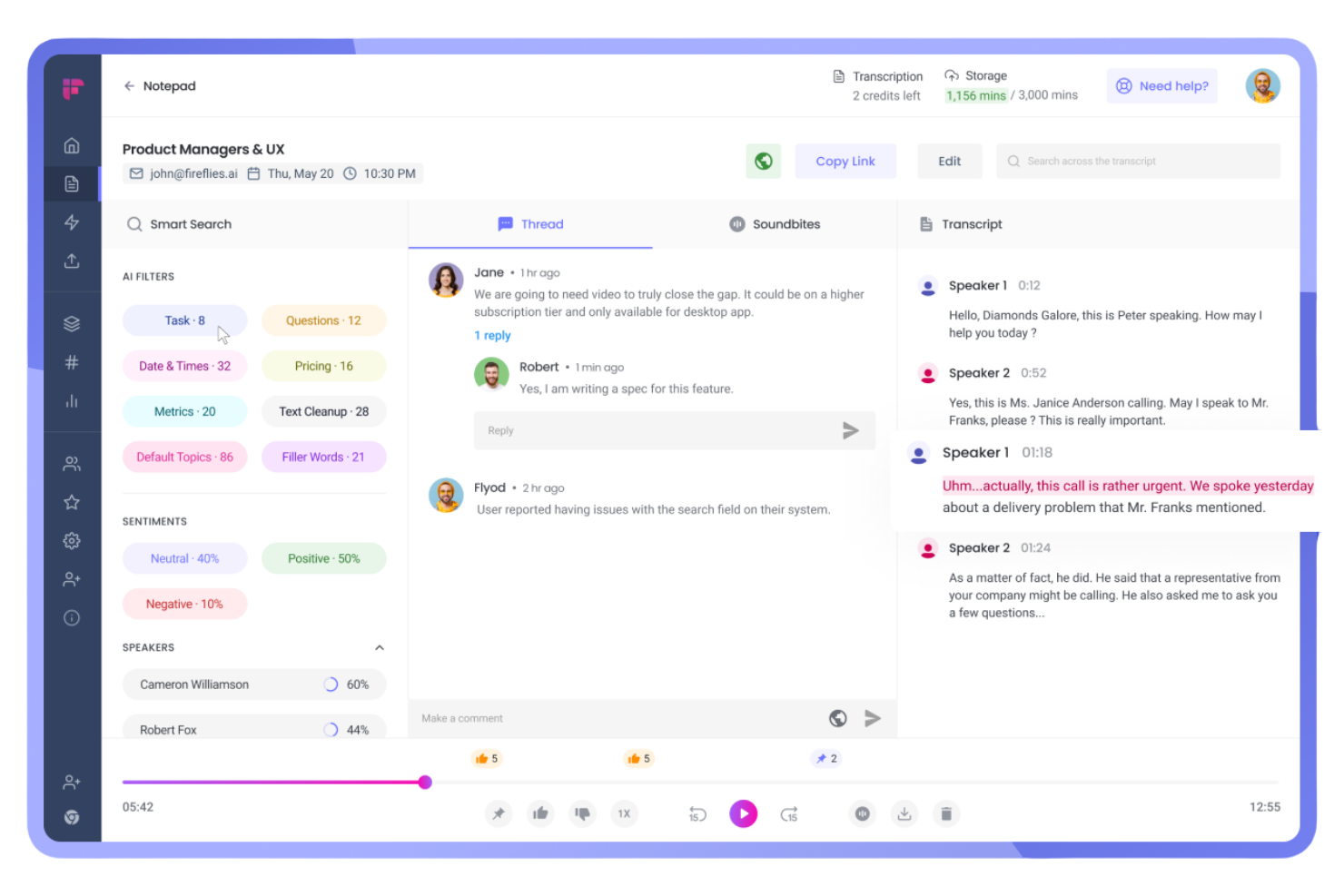
Fireflies.ai is a voice intelligence platform that automatically joins your meetings to record, transcribe, and analyze conversations, with searchable transcripts, topic detection, and AI-generated summaries built in.
Who Is Fireflies.ai Best For?
Fireflies.ai is a strong fit for distributed sales, customer support, and customer success teams who need accurate, searchable records of every client conversation.
Why I Picked Fireflies.ai
I picked Fireflies.ai as one of the best because its transcription accuracy is genuinely hard to beat. It claims 95% accuracy across 100+ languages, with automatic speaker recognition that labels who said what throughout the transcript.
I also like the auto-language detection, which switches languages between meetings without any manual configuration. For teams running back-to-back calls, the AskFred feature lets you query past transcripts by asking plain-language questions instead of scrolling through raw notes.
Fireflies.ai Key Features
- AI meeting summaries: Automatically generate condensed meeting summaries with key discussion points after each call ends.
- Topic tracker: Flags and categorizes specific words or phrases across transcripts so you can filter meetings by subject.
- Soundbites: Lets you clip short audio or video segments from any recorded meeting to share standalone moments.
- Inline collaboration: Add comments and reactions directly on transcript lines so teammates can annotate without leaving the platform.
Fireflies.ai Integrations
Fireflies.ai offers native integrations with 100+ apps, including Zoom, Google Meet, Microsoft Teams, Slack, HubSpot, Salesforce, Notion, Confluence, Asana, and Linear. It also connects with Zapier and provides an API for custom integrations.
Pros and Cons
Pros:
- Sentiment analysis flags meeting tone shifts
- Clips shareable audio soundbites from recordings
- Transcription supports 100+ languages natively
Cons:
- Accuracy drops with overlapping speakers
- Feature density can feel overwhelming

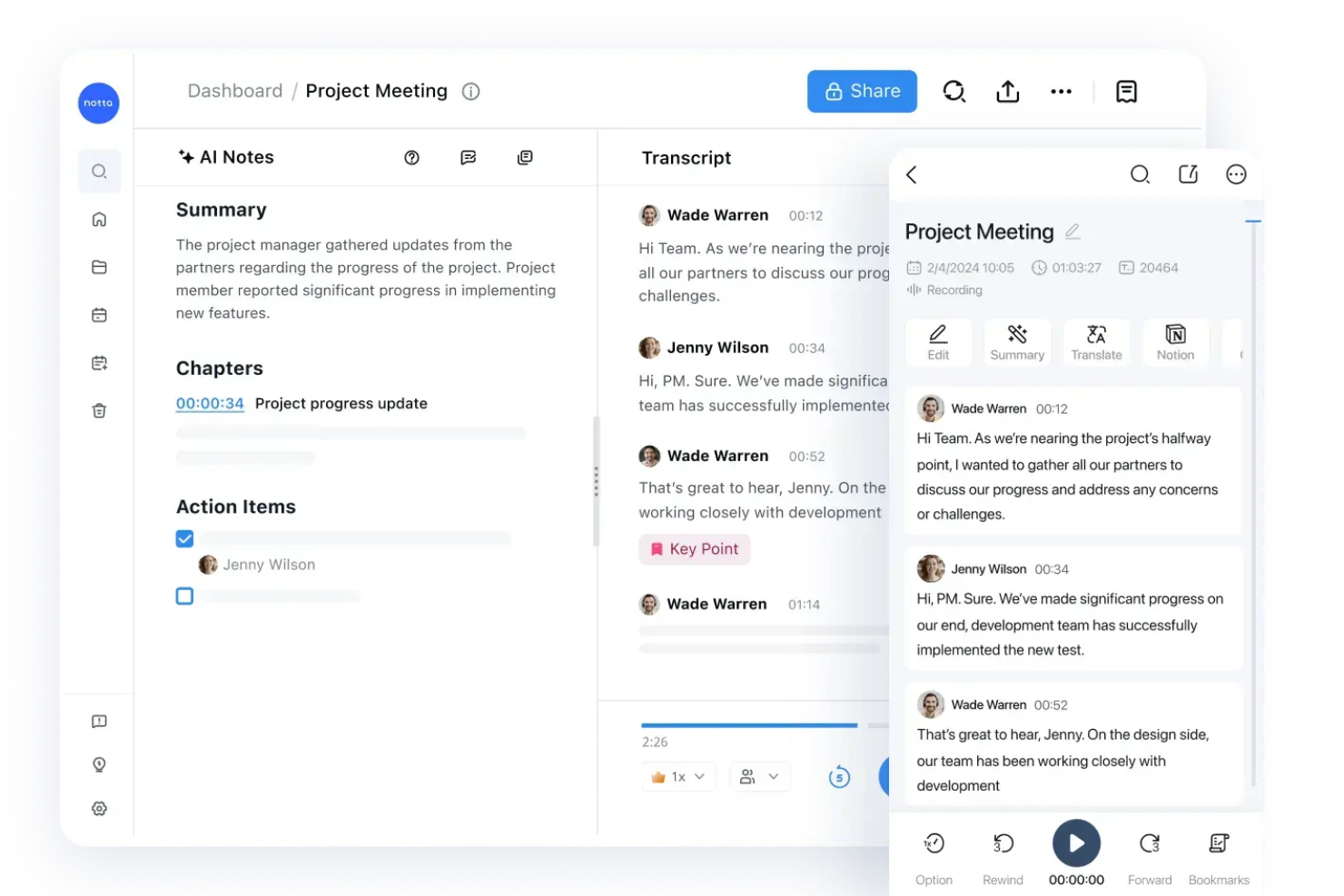
Notta is an AI meeting assistant that records and transcribes live meetings and audio files, then organizes the output into shareable, searchable transcripts with AI-generated summaries and action items.
Who Is Notta Best For?
Notta is a strong fit for async-first teams that need non-attendees to quickly search and reference what was discussed or decided in meetings they missed.
Why I Picked Notta
I've included Notta in my top picks because of how well it handles the entire transcript lifecycle, from capture to sharing. Transcripts are keyword-searchable and timestamped, so anyone who missed a meeting can jump directly to the exact moment something was said.
I also like that you can bookmark specific lines as key points, to-dos, or project notes, and share the transcript with those highlights already visible to recipients.
Notta Key Features
- AI-generated meeting summaries: Notta automatically produces condensed summaries after each meeting, so you don't have to read the full transcript.
- Action item extraction: The AI identifies and pulls action items directly from the transcript into a separate list.
- Multi-language transcription: Notta supports transcription in 58+ languages, including real-time switching between languages mid-meeting.
- Auto-join meeting bot: Notta's bot joins scheduled calls on your behalf and begins recording automatically via calendar sync.
Notta Integrations
Notta offers 20+ native integrations, including Zoom, Google Meet, Microsoft Teams, Webex, Slack, Notion, Google Docs, Salesforce, HubSpot, and ClickUp. It also connects with Zapier and supports calendar syncing with Google Calendar and Outlook Calendar for automated meeting recording.
Pros and Cons
Pros:
- Bilingual transcription for multilingual meetings
- Converts notes into infographics and tables
- Mind map feature aids brainstorming sessions
Cons:
- Free plan limits recordings to three minutes
- Accuracy drops with overlapping speech
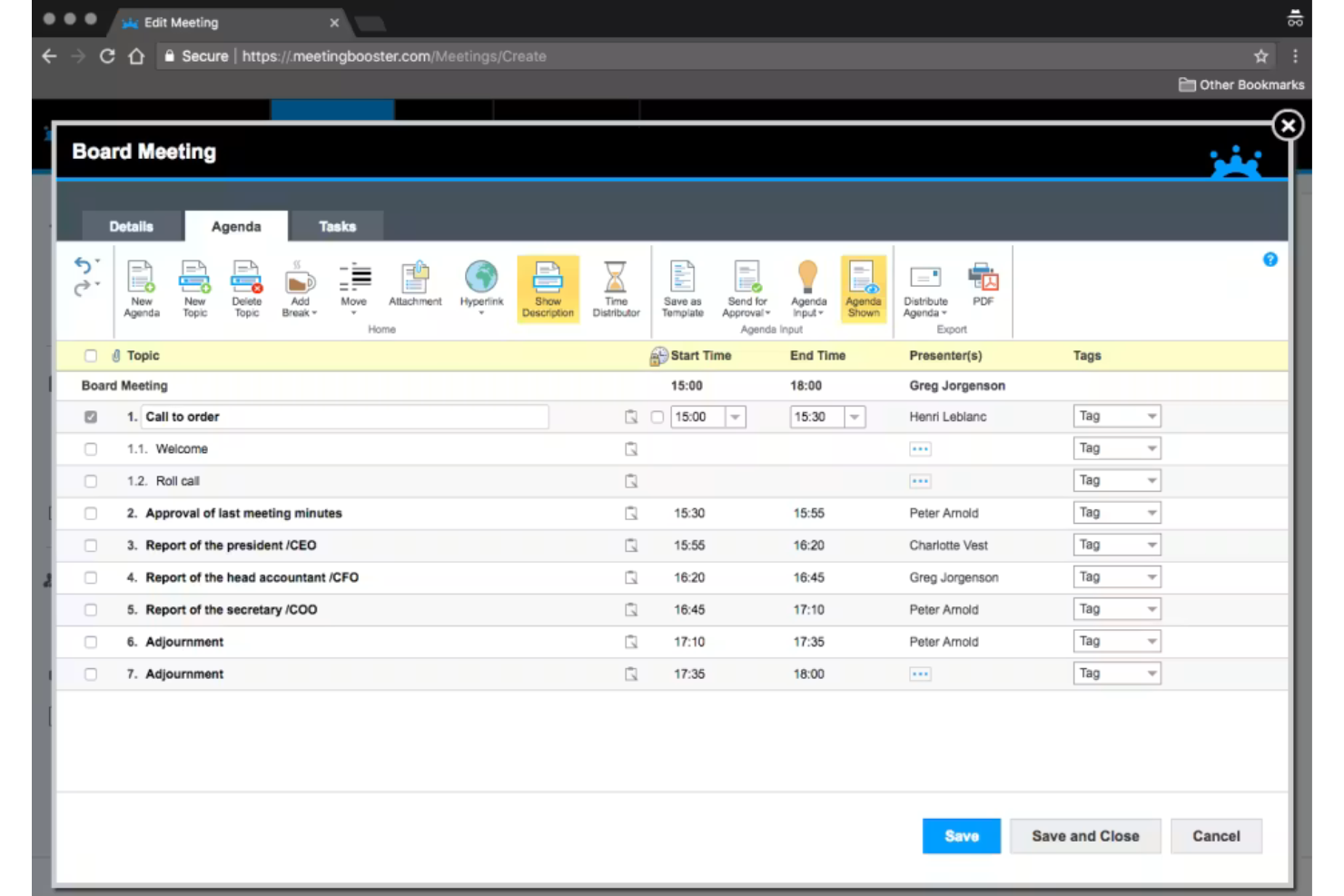
MeetingBooster is a meeting management platform built around agenda creation, structured note-taking, and formal minutes generation, with built-in task tracking and meeting series management for recurring meetings.
Who Is MeetingBooster Best For?
MeetingBooster is a strong fit for organizations in governance-heavy environments, like municipal governments, boards, and committees, where formal minutes, documented decisions, and structured agendas are a standard requirement.
Why I Picked MeetingBooster
I picked MeetingBooster as one of the best because no other tool I've used enforces meeting structure quite this deliberately. I love the Notecard feature, which guides you through a live meeting step by step, capturing notes, decisions, and action items directly against each agenda item in real time.
When the meeting ends, I can select a minutes style, review the draft, and distribute finalized minutes in minutes, without any reformatting. It's the only tool I've used where the agenda, notes, and minutes are truly one connected workflow.
MeetingBooster Key Features
- Agenda approval process: Run agendas through a version-controlled approval workflow before meetings start, so all stakeholders sign off on the structure in advance.
- Meeting analytics: Track attendance, meeting costs, task completion rates, and status reports across meetings to surface patterns over time.
- Attendee-specific note-taking: Assign note-taking responsibilities to specific attendees, with each person capturing notes tied directly to their role in the meeting.
- Decision tools: Use built-in voting, pro/con analysis, and rating tools during a meeting to reach and formally record group decisions.
MeetingBooster Integrations
MeetingBooster integrates natively with Microsoft Outlook, Microsoft Teams, SharePoint, Google Calendar, and Active Directory. It also supports integrations with Jira, Microsoft Planner, Trello, and Slack through its API, and connects with Zapier and Microsoft Power Automate. An API is available for custom integrations.
Pros and Cons
Pros:
- Cross-meeting task tracking with due dates
- Formal minutes auto-generated from notes
- Built-in voting and decision-tracking tools
Cons:
- Sharing roles between the presenter and the note-taker is difficult
- Limited flexibility for posting action items

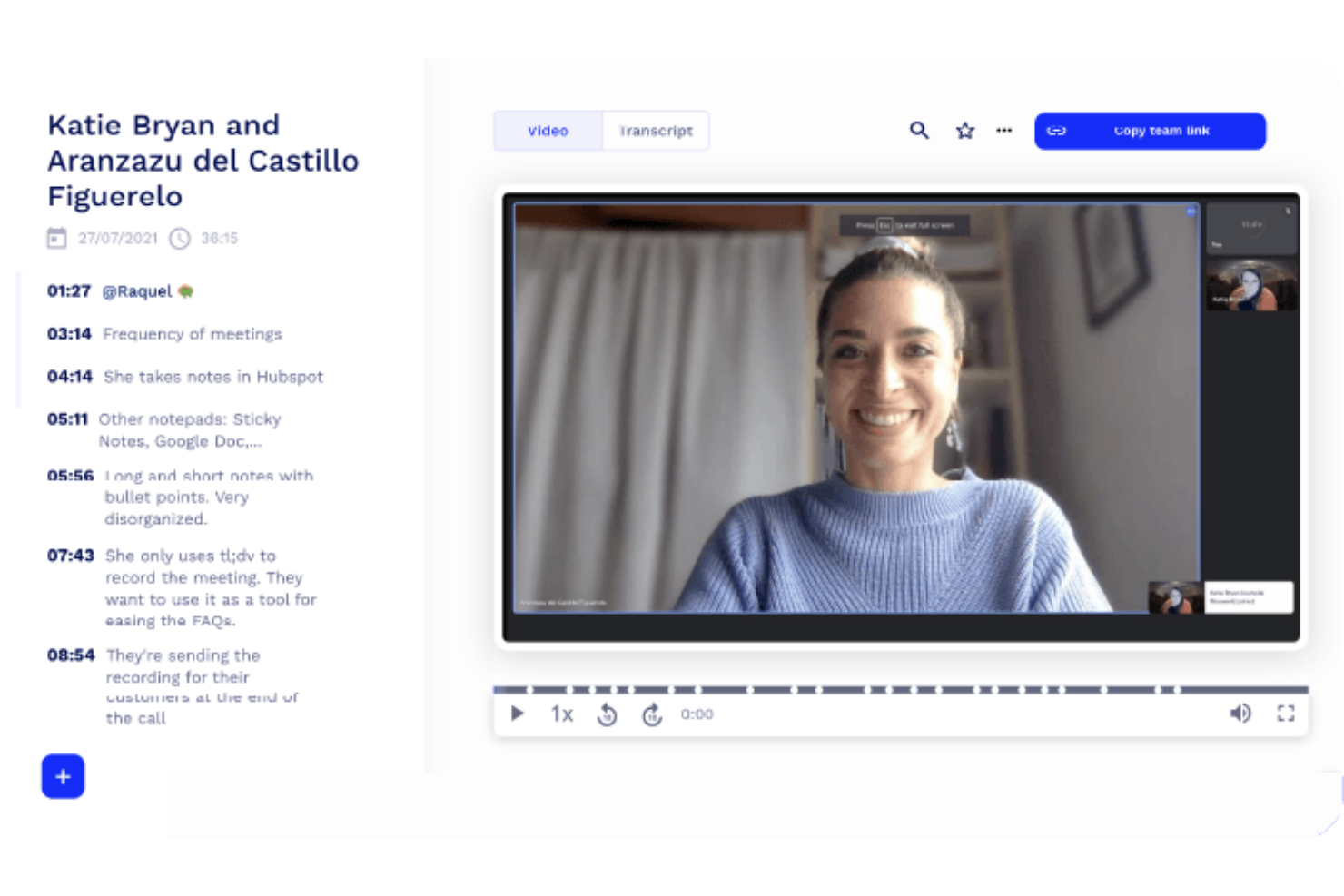
tl;dv is a meeting recorder and note-taking tool that lets you capture video meetings with timestamped highlights, AI-generated summaries, and shareable clips from Zoom, Google Meet, and Microsoft Teams calls.
Who Is tl;dv Best For?
tl;dv is a natural fit for product and research teams who need to clip, timestamp, and share key meeting moments without sitting through full recordings.
Why I Picked tl;dv
tl;dv earns its spot on my shortlist because its timestamped notes are genuinely more usable than what most meeting recorders produce. I like that every AI-generated note links directly to the exact moment in the video, so anyone reviewing the recording can jump straight to context instead of scrubbing through footage.
The clip and reel features let my team cut specific moments and share them async, which I find especially useful when surfacing user research insights for stakeholders who weren't in the room.
tl;dv Key Features
- Multi-meeting AI reports: Query and summarize insights across multiple recorded meetings at once, spotting trends without reviewing individual recordings.
- Customizable note templates: Set up structured summary formats, including sales methodologies like MEDDIC, in your team's preferred language.
- Automatic CRM logging: Pushes call notes and deal outcomes directly to your CRM after each meeting without manual data entry.
- Multilingual transcription: Transcribes and translates meetings in 30+ languages, with full localization available in 7 of them.
tl;dv Integrations
tl;dv offers native integrations with Zoom, Google Meet, Microsoft Teams, Salesforce, HubSpot, Pipedrive, Zoho, Slack, Google Docs, and Notion, with 6,000+ additional apps available through Zapier. An API is also available for custom integrations.
Pros and Cons
Pros:
- Multi-meeting search across all recordings
- Clips and reels from recorded meetings
- One-click timestamps during live calls
Cons:
- Limited quantitative analytics on call data
- Free plan deletes recordings after 3 months

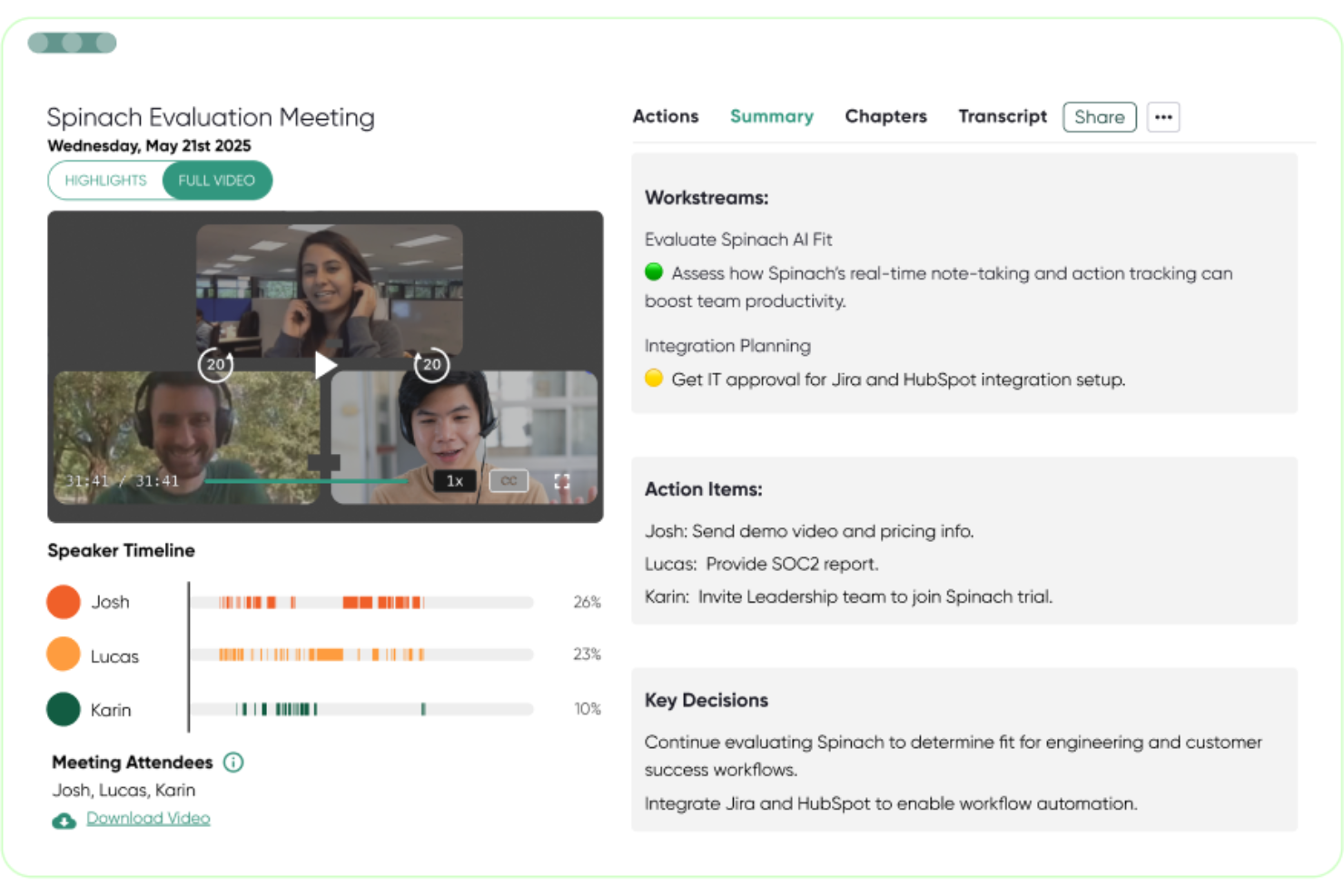
Spinach AI is an AI meeting assistant that automatically records, transcribes, and summarizes meetings, then pushes action items, decisions, and follow-ups directly into your project management tools.
Who Is Spinach AI Best For?
Spinach AI is a strong fit for product and engineering teams who run frequent standups, sprint reviews, and cross-functional syncs inside tools like Jira or Linear.
Why I Picked Spinach AI
Spinach AI earns its spot on my shortlist because of how it closes the gap between what gets discussed in a meeting and what actually gets done. I love that when Spinach AI detects an action item, it can create a ticket in Jira, Linear, or Asana automatically, without anyone copying notes after the call ends.
I also really like the CRM auto-update feature: sales and customer success calls push follow-ups directly into HubSpot or Salesforce the moment the meeting wraps.
Spinach AI Key Features
- Multi-language transcription: Spinach AI transcribes meetings in 100 languages, making it usable across globally distributed teams.
- Recap email generation: At the end of each meeting, Spinach AI drafts and sends a summary email to all participants automatically.
- AI meeting coach: Spinach AI analyzes meeting patterns and surfaces insights to help managers run more effective one-on-ones and team syncs.
- Shared agenda builder: Teams can collaboratively build and contribute to a meeting agenda before the call starts.
Spinach AI Integrations
Spinach AI offers native integrations with Jira, Asana, Trello, Linear, ClickUp, monday.com, Notion, Confluence, Slack, HubSpot, Salesforce, Zoho, and Attio. It also works with Google Meet, Microsoft Teams, and Zoom as meeting sources. Spinach AI connects with Zapier and provides an API for custom integrations.
Pros and Cons
Pros:
- No custom AI agent creation needed
- Tailored specifically for agile meeting types
- Summaries organized by decisions and action items
Cons:
- No option to build AI agents from scratch
- Summary output format can be inconsistent
Diğer Toplantı Yönetimi Yazılımları
Kısa listeme giremeyen ancak yine de göz atmaya değer bazı ek toplantı yönetimi yazılımı seçeneklerini aşağıda bulabilirsiniz:


How I Evaluate Meeting Management Software
My evaluation runs two layers deep: the baseline every tool must clear—agenda building, action tracking, PM tool sync—and the differentiators that set the best apart for cross-functional teams.
Core Functionality (Table Stakes For This List)
When I'm selecting tools for my list, I rank each one on a scale from 0 (does not offer the functionality) to 5 (excels in this area) for each core functionality listed below. Then, I calculate the tool's total score into a percentage. Each tool needs to achieve a minimum total score of 65% to be considered for inclusion.
- Agenda Building & Sharing: I look for tools that let teams collaboratively build and distribute agendas before the meeting—like adding timed discussion items to a weekly sprint planning session so everyone shows up prepared.
- Real-Time Collaborative Notes: The tool should support multiple participants capturing notes simultaneously, similar to how a Scrum Master and product owner might tag-team documenting decisions during a backlog grooming session.
- Action Item Tracking: I evaluate how well each platform handles assigning tasks with owners and due dates during a meeting, then surfaces incomplete items in follow-up meetings so nothing falls through the cracks.
- Calendar Integration: Two-way sync with Google Calendar and Outlook is what I check for, ensuring meetings auto-populate with agendas and context without requiring manual setup each time.
- Project Tool Integrations: Each tool's ability to push action items directly into platforms like Jira, Asana, or Monday matters here—I look at whether the sync is bidirectional and whether it pulls in relevant project context.
- Meeting Recording & Transcription: I evaluate whether the tool captures recordings and generates searchable transcripts, making it easy to revisit what was discussed during a stakeholder review or sprint retrospective weeks later.
Once I have a list of tools that meet this criteria, I consider what sets each platform apart.
Differentiating Factors (What Sets Vendors Apart)
Here's how I compare and contrast different vendors:
Standout Features
AI-generated summaries matter because they spare project managers from writing recap emails after every standup or stakeholder sync—I look for tools that automatically extract decisions and next steps. Recurring meeting continuity is another factor I evaluate closely. When unresolved items carry forward from last week's sprint review into this week's agenda, accountability stays visible without manual effort. Meeting analytics also help PMO leaders spot patterns like meeting overload or low action item completion rates across teams.
Beyond Features
Pricing structure is one of the first things I check—specifically whether external stakeholders like clients or vendors can join meetings without eating into paid seats. Integration ecosystem depth also weighs heavily, since a tool that syncs with Jira but not Asana limits its fit for mixed-methodology teams. I evaluate scalability too, looking at whether a platform supports role-based permissions and workspace hierarchies that grow from a single agile squad to a full PMO with multiple programs running in parallel.
Toplantı Yönetimi Yazılımı Nasıl Seçilir?
Uzun özellik listeleri ve karmaşık fiyatlandırma yapıları arasında kaybolmak kolaydır. Kendinize özgü yazılım seçimi süreciniz üzerinde çalışırken odağınızı korumanıza yardımcı olmak için göz önünde bulundurmanız gereken faktörlerin bir kontrol listesini aşağıda bulabilirsiniz:
| Faktör | Nelere Dikkat Edilmeli? |
|---|---|
| Ölçeklenebilirlik | Araç, ekibiniz büyüdükçe onu destekleyecek mi ve departmanlar arasındaki birden fazla projeyi ya da yinelenen toplantıları yönetebilecek mi? |
| Entegrasyonlar | İş akışınıza manuel geçici çözümler olmadan uyum sağlamak için takviminize, video, sohbet ve proje yönetimi araçlarınıza güvenilir şekilde bağlanıyor mu? |
| Özelleştirilebilirlik | Toplantı şablonlarını, izinleri ve raporlamayı ekibinizin süreçlerine veya uyumluluk gereksinimlerine uyacak şekilde şekillendirebilir misiniz? |
| Kullanım kolaylığı | Arayüz, farklı teknik beceri düzeylerine sahip kullanıcılar için yeterince sezgisel mi? Paydaşlar bunu günlük rutinlerinde gerçekten benimseyecek mi? |
| Uygulama ve işe alıştırma | Tüm ekibinizi kullanıma geçirmek ve işe alıştırmak için ne kadar zamana ve desteğe ihtiyacınız olacak? Eğitim kaynaklarına tüm kullanıcılar erişebiliyor mu? |
| Maliyet | Fiyatlandırma kademeleri kullanıcı sayınıza, öngörülen büyümenize ve özellik gereksinimlerinize nasıl uyuyor? Depolama, uyumluluk veya analizlerle ilgili gizli ücretlere dikkat edin. |
| Güvenlik önlemleri | Platform, özellikle gizli veya düzenlemeye tabi içerikler için veri koruma, erişim kontrolü ve gizlilik gereksinimlerinizi karşılıyor mu? |
| Destek erişilebilirliği | Sorunlar ortaya çıktığında, birincil çalışma saatlerinizde ve tercih ettiğiniz kanallardan zamanında yardım alabiliyor musunuz? |
Toplantı Yönetimi Yazılımı Nedir?
Toplantı yönetimi yazılımı, gündemleri, notları, eylem maddelerini ve takip işlerini merkezileştirerek ekiplerin toplantıları düzenlemesine, yürütmesine ve belgelemesine yardımcı olur. Bu araçlar planlamayı kolaylaştırır, iş birliğini teşvik eder ve önemli kararları ve görevleri projeler genelinde görünür tutarak hesap verebilirliği sağlar.
Toplantı yönetimi yazılımı genellikle takvimler, video platformları ve proje yönetimi sistemleriyle entegre olur; böylece toplantılar eyleme dönüştürülebilir kalır ve sonuçlar kaybolmaz.
Özellikler
Toplantı yönetimi yazılımı seçerken aşağıdaki temel özelliklere dikkat edin:
- Gündem oluşturma: Toplantılardan önce gündemleri oluşturun, paylaşın ve birlikte düzenleyin; böylece herkes konular, hedefler ve sorumluluklar konusunda net olsun.
- Ortaklaşa not alma: Birden fazla katılımcıyla toplantı tutanaklarını ve tartışma noktalarını gerçek zamanlı olarak kaydedin; böylece kritik hiçbir şeyin gözden kaçmamasını sağlayın.
- Eylem maddesi takibi: Toplantı sırasında takip görevlerini sorumlulara ve son teslim tarihlerine atayın ve tamamlanma durumlarını sonraki oturumlar boyunca izleyin.
- Karar kaydı: Anlaşmaları ve önemli kararları kolayca başvurulabilen, düzenli bir kayıtta saklayarak erişilebilirliği ve hesap verebilirliği sağlayın.
- Takvim entegrasyonu: Planlamayı kolaylaştırmak ve toplantıları ilgili tüm katılımcılara görünür kılmak için Google, Outlook veya diğer takvimlerle senkronize olun.
- Video konferans entegrasyonu: Uygulamadan doğrudan görüntülü görüşmelere katılın ve Zoom, Teams veya Meet gibi platformlardaki ayrıntıları içeri aktarın.
- Yinelenen toplantı şablonları: Zaman kazanmak ve tutarlılığı artırmak için günlük ayakta toplantıları, proje incelemelerini veya geriye dönük değerlendirmeleri önceden hazırlanmış şablonlarla standartlaştırın.
- Belge ekleri: Toplantılardan önce, toplantı sırasında ve toplantı sonrasında kolayca erişilebilmesi için ilgili dosyaları, sunumları veya destekleyici belgeleri gündemlere ya da toplantı notlarına ekleyin.
- İzinler ve erişim denetimi: Gerektiğinde gizliliği koruyarak gündemleri ve notları kimlerin görüntüleyebileceğini, düzenleyebileceğini veya paylaşabileceğini denetleyin.
- Aranabilir arşivler: Ekip üyelerinin geçmiş bağlama başvurabilmesi ve aynı konuşmaları tekrarlamaktan kaçınabilmesi için geçmiş tartışmaları, kararları veya notları hızla bulun.
Yaygın Toplantı Yönetimi Yazılımı Yapay Zekâ Özellikleri
Yukarıda sıralanan standart toplantı yönetimi yazılımı özelliklerinin yanı sıra, bu çözümlerin çoğu aşağıdaki gibi özelliklerle yapay zekâyı da kullanmaya başlıyor:
- Otomatik toplantı dökümü: Yapay zekâ toplantılarınızı dinler ve doğru, aranabilir dökümler oluşturur; böylece tartışmaları gözden geçirebilir veya notları toplantıya katılamayan ekip üyeleriyle paylaşabilirsiniz.
- Yapay zekâ tarafından oluşturulan özetler: Manuel not alma ve takip belgeleri hazırlama süresinden tasarruf ederek önemli noktaların, kararların ve eylem maddelerinin kısa özetlerini anında alın.
- Akıllı eylem maddesi çıkarma: Yapay zekâ konuşmalardaki eylem maddelerini belirler ve atar; böylece görevlerin gözden kaçma riskini azaltır ve ek idari çalışma gerektirmeden hesap verebilirliği sağlar.
- Akıllı gündem önerileri: Yapay zekâ, önceki toplantılara ve proje bağlamına dayanarak toplantıların odaklı ve verimli kalması için ilgili konuları veya gündem maddelerini önerir.
- Konuşmacı tanımlama: Yapay zekâ dökümlerdeki katılımcıları birbirinden ayırarak yorumları ve kararları doğru kişilere atfeder; böylece netliği ve hesap verebilirliği artırır.
- Duygu analizi: Yapay zekâ tartışmaların tonunu ve katılım düzeyini değerlendirerek yöneticilerin olası sorunları veya ekip moralindeki zaman içindeki eğilimleri fark etmesine yardımcı olur.
Faydalar
Toplantı yönetimi yazılımını uygulamak ekibiniz ve işletmeniz için çeşitli faydalar sağlar. Yararlanabileceğiniz bazı faydalar şunlardır:
- Geliştirilmiş organizasyon: Gündemleri, notları ve eylem maddelerini merkezi bir yerde toplayarak ekiplerin tüm toplantılar ve projeler genelindeki kararları ve görevleri izlemesini sağlar.
- Daha fazla hesap verebilirlik: Takip görevlerini atar ve sonuçları kaydeder; böylece her görevden veya karardan kimin sorumlu olduğu netleşir ve yerine getirilmeyen taahhütler azalır.
- Zaman tasarrufu: Tekrarlanan hazırlık ve takip işlerini otomatikleştirmek için şablonları, entegrasyonları ve bazen yapay zekâ özelliklerini kullanarak gerçek proje teslimi için zaman kazandırır.
- Tutarlı toplantı sonuçları: Toplantı biçimlerini ve süreçlerini standartlaştırarak ekiplerin atlanan gündemlerden kaçınmasına ve önemli konuların ele alınmasını sağlamaya yardımcı olur.
- Geliştirilmiş proje uyumu: Toplantı sonuçlarını proje yönetimi araçlarıyla senkronize eder; böylece eylem maddeleri ve kararlar sorunsuz uygulama için doğrudan ekip iş akışlarına aktarılır.
- Basitleştirilmiş uyumluluk: İzin denetimleri ve aranabilir arşivler sunarak gerektiğinde şeffaflık, kayıt tutma veya yönetişim gerekliliklerini destekler.
- Daha iyi toplantı içgörüleri: Yöneticilerin toplantı sıklığını uygun düzeye getirmesine, katılımı yönetmesine ve toplantı yükünü azaltmasına yardımcı olmak için analizler ve gösterge panelleri sunar.
Maliyetler ve Fiyatlandırma
Toplantı yönetimi yazılımı seçmek, mevcut çeşitli fiyatlandırma modellerinin ve planların anlaşılmasını gerektirir. Maliyetler özelliklere, ekip büyüklüğüne, eklentilere ve daha fazlasına göre değişir. Aşağıdaki tablo, toplantı yönetimi yazılımı çözümlerindeki yaygın planları, ortalama fiyatlarını ve genellikle sunulan özellikleri özetlemektedir:
Toplantı Yönetimi Yazılımı için Plan Karşılaştırma Tablosu
| Plan Türü | Ortalama Fiyat | Yaygın Özellikler |
|---|---|---|
| Ücretsiz Plan | $0 | Temel gündemler, sınırlı ortak not alma, tek kullanıcı erişimi, sınırlı toplantı şablonları ve temel entegrasyon. |
| Kişisel Plan | $5-$15/kullanıcı/ay | Sınırsız toplantılar, kişisel gündem kitaplığı, gelişmiş arama, takvim senkronizasyonu ve basit eylem maddesi takibi. |
| İşletme Planı | $15-$30/kullanıcı/ay | Ekip çalışma alanları, yinelenen toplantı otomasyonu, proje yönetimi entegrasyonları, raporlama panoları ve izin denetimi. |
| Kurumsal Plan | $30-$50/kullanıcı/ay | Gelişmiş güvenlik, uyumluluk desteği, ayrıntılı yönetici denetimleri, özel destek, özel roller ve denetim günlükleri. |
Toplantı Yönetimi Yazılımı SSS'leri
Toplantı yönetimi yazılımı hakkında sık sorulan bazı soruların yanıtları aşağıdadır:
Toplantı yönetimi yazılımı gereksiz toplantıların azaltılmasına yardımcı olabilir mi?
Evet, birçok platform düşük değerli oturumları belirleyebilmeniz, katılımı takip edebilmeniz ve toplantı sıklığını daha verimli hâle getirebilmeniz için analiz ve yinelenen toplantı araçları sunar. Bu, ekiplerin zaman kazanmasına ve sonuç sağlayan görüşmelere odaklanmasına yardımcı olur.
Toplantı yönetimi yazılımı dağıtık ekipleri nasıl destekler?
Bulut tabanlı çözümler, uzaktan veya hibrit ekiplerin gündemler, notlar ve eylem maddeleri üzerinde gerçek zamanlı olarak iş birliği yapmasına olanak tanır. Görüntülü konferans ve sohbet uygulamalarıyla yapılan entegrasyonlar, toplantılardan önce, toplantılar sırasında ve sonrasında herkesin bağlantıda kalmasını sağlar.
Güvenlik ve uyumluluk açısından nelere dikkat etmeliyim?
Ayrıntılı izinler, veri şifreleme, denetim izleri ve SOC 2 ile GDPR gibi standartlara uyumluluk gibi özellikleri kontrol edin. Bu, gizli İK, hukuk veya yönetim kurulu toplantıları için özellikle önemlidir.
Bu araçlar mevcut proje yönetimi sistemimizle çalışabilir mi?
Evet, önde gelen seçeneklerin çoğu Asana, Jira veya monday.com gibi popüler platformlarla yerel entegrasyonlar sunar. Bu, eylem maddelerinin toplantılardan ekibinizin görev yönetimi sürecine aktarılmasını ve tutarlı bir şekilde takip edilmesini sağlar.
Daha küçük ekipler veya girişimler için ücretsiz ya da daha düşük maliyetli seçenekler var mı?
Evet, çoğu sağlayıcı temel işlevlere sahip ücretsiz planlar veya uygun fiyatlı kişisel katmanlar sunar. Kuruluşunuz büyüdükçe daha büyük ekipler için gereken gelişmiş özellikleri, güvenliği ve yönetici denetimlerini eklemek üzere genellikle üst pakete geçebilirsiniz.