

2026’nın En İyi 10 Toplantı Odası Rezervasyon Yazılımı

En İyi Toplantı Odası Rezervasyon Yazılımları Kısa Listesi


Toplantı odası rezervasyon yazılımı, ekibinizin yüz yüze veya hibrit toplantılar için odaları ve kaynakları rezerve etmesine, yönetmesine ve takip etmesine olanak tanır. Çifte rezervasyonlar, son dakikada yer bulma telaşı veya manuel takvim karmaşası içinde boğuluyorsanız bu araçlar düzen ve görünürlük sağlamak için tasarlanmıştır. Bu rehberde, güvenilir planlamanın ve gerçek zamanlı oda verilerinin gerçekten önemli olduğu teknoloji odaklı iş yerleri için tasarlanmış en iyi seçenekleri bulacaksınız. Ekibinizin çalışma alanına ve iş akışına en uygun seçeneği belirleyebilmeniz için her seçeneğin en iyi yaptığı işleri net biçimde görebileceksiniz.
Why Trust Our Software Recommendations
Our team has been testing and reviewing software since 2012. As project managers ourselves, we know how difficult—and important—it is to choose the right software.
For this guide, we evaluated tools using hands-on testing and independent research, scoring tools using our selection criteria. We also draw on insights from industry thought leaders and practicing project management experts.
Our reviews reflect our human editorial judgment, not a sales pitch.
Expert reviewers:
Toplantı Odası Rezervasyon Yazılımları Karşılaştırma Tablosu
Bu karşılaştırma tablosu, en iyi toplantı odası rezervasyon yazılımı seçimlerim için fiyatlandırma ayrıntılarını özetlemektedir:
| Tool | Starting Price | Website | |
|---|---|---|---|
|
Best for all-in-one desk, parking, and room booking |
4.7
out of 5
|
€1.7/user/month Free plan available; 14-day free trial; free demo available |
Website |
|
Best for visual workspace management |
4.6
out of 5
|
$3000/year Not available |
Website |
|
Best for floor plan-based interactive scheduling |
4.7
out of 5
|
$500/month Free demo available |
Book Demo |
|
Best for on-the-go mobile booking |
4.6
out of 5
|
$5/user/month Free trial + free demo available |
Book Demo |
|
Best for single sign-on support |
4.7
out of 5
|
$13.50/month 30-day free trial + free demo available |
Website |
|
Best for workplace security integrations |
4.8
out of 5
|
$5/bookable resource/month Free demo available |
Website |
|
Best for interactive floor plan visualization |
4.5
out of 5
|
Pricing upon request Free demo available |
Website |
|
Best for carbon footprint reporting |
4.5
out of 5
|
$99/month Free demo available |
Website |
|
Best for wireless room display integration |
4.5
out of 5
|
$51/month 30-day free trial available |
Website |
|
Best for Microsoft Outlook integration |
—
|
$5,149/year Free demo available |
Website |
En İyi Toplantı Odası Rezervasyon Yazılımı İncelemeleri
Aşağıda, kısa listeme giren en iyi toplantı odası rezervasyon yazılımlarına ilişkin ayrıntılı özetlerimi bulabilirsiniz. İncelemelerim, sizin için en iyi seçeneği bulmanıza yardımcı olmak amacıyla her platformun özelliklerine, entegrasyonlarına ve en uygun kullanım alanlarına ayrıntılı bir bakış sunmaktadır.

Dibsido
Best for all-in-one desk, parking, and room booking
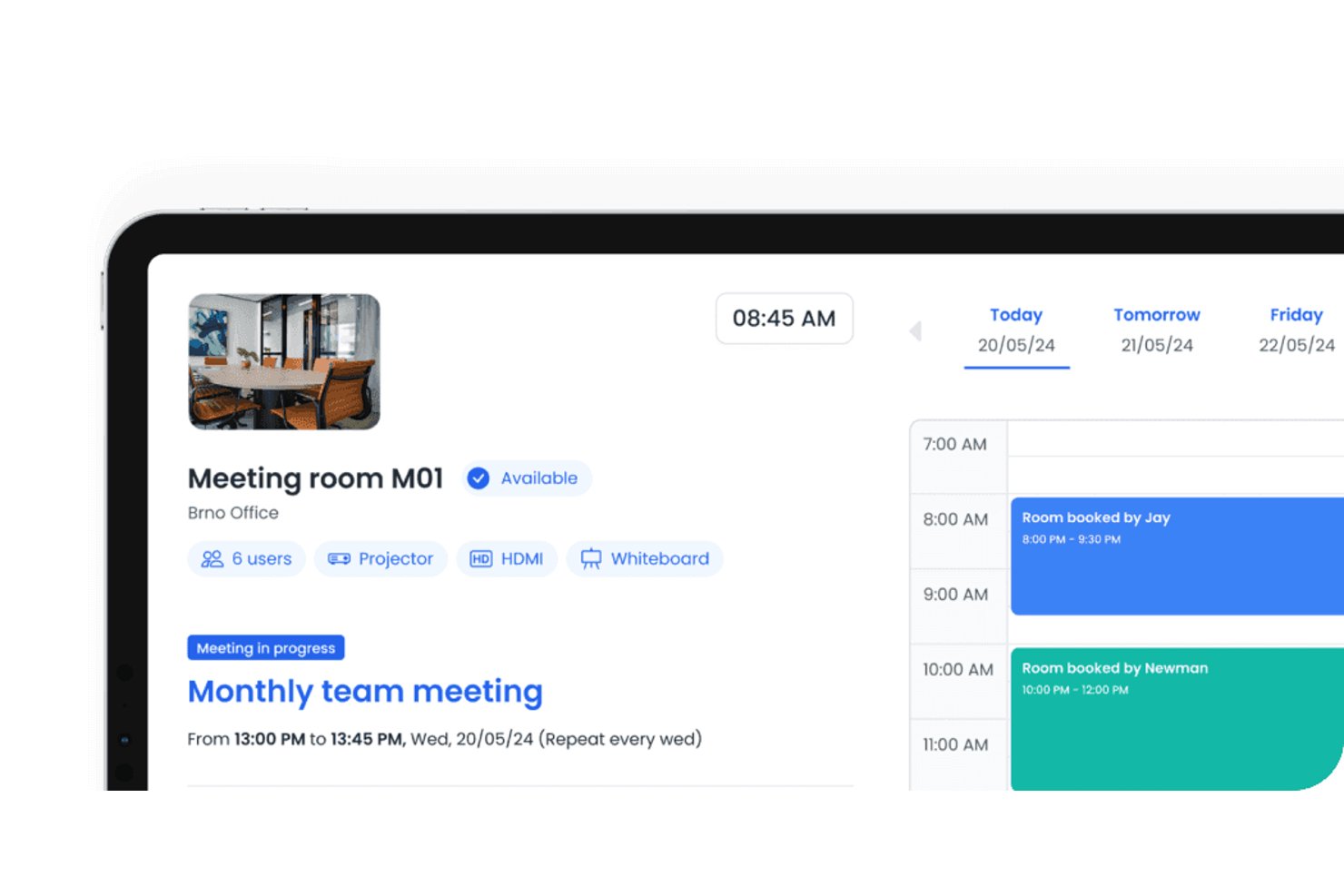
Dibsido is a hybrid workplace booking platform that combines meeting room reservations, desk booking, and parking management in a single app with interactive floor plans, calendar sync, and utilization analytics.
Who Is Dibsido Best For?
Dibsido is a strong fit for office and facilities managers at small to mid-size companies who need desk, parking, and meeting room booking in one place.
Why I Picked Dibsido
I've included Dibsido in my top picks because it's the only tool on this list that manages desks, parking, and meeting rooms from a single interactive floor plan. I particularly like how recurring room reservations work: you set a weekly standup once, and the series extends automatically as your booking window rolls forward, which removes a real administrative headache. Analytics 2.0 adds heatmaps and plain-language recommendations, so you can see which rooms go unused and act on it without digging through raw data.
Dibsido Key Features
- Two-way calendar sync: Dibsido connects with Google Calendar and Microsoft Outlook so bookings made in either platform reflect instantly in both.
- SSO and SCIM provisioning: Supports Microsoft Entra ID, Okta, and SAML 2.0 login, with automatic user setup and removal through SCIM.
- Service requests on bookings: Attach catering or IT support requests directly to a room reservation, with automatic notifications sent to the assigned team.
- QR code check-in and booking: Place a QR code outside any room so people can check in or book on the spot without opening the app.
Dibsido Integrations
Dibsido offers native integrations with Google Calendar, Microsoft Outlook/365, Microsoft Teams, and Slack. It also supports a public API for custom integrations and Zapier.
Pros and Cons
Pros:
- Heatmaps reveal underused meeting spaces
- QR check-in supports room-side booking
- Recurring series suit weekly stand-ups
Cons:
- Room search lacks capacity and amenity filters
- No sensor-based occupancy verification

Tactic
Best for visual workspace management
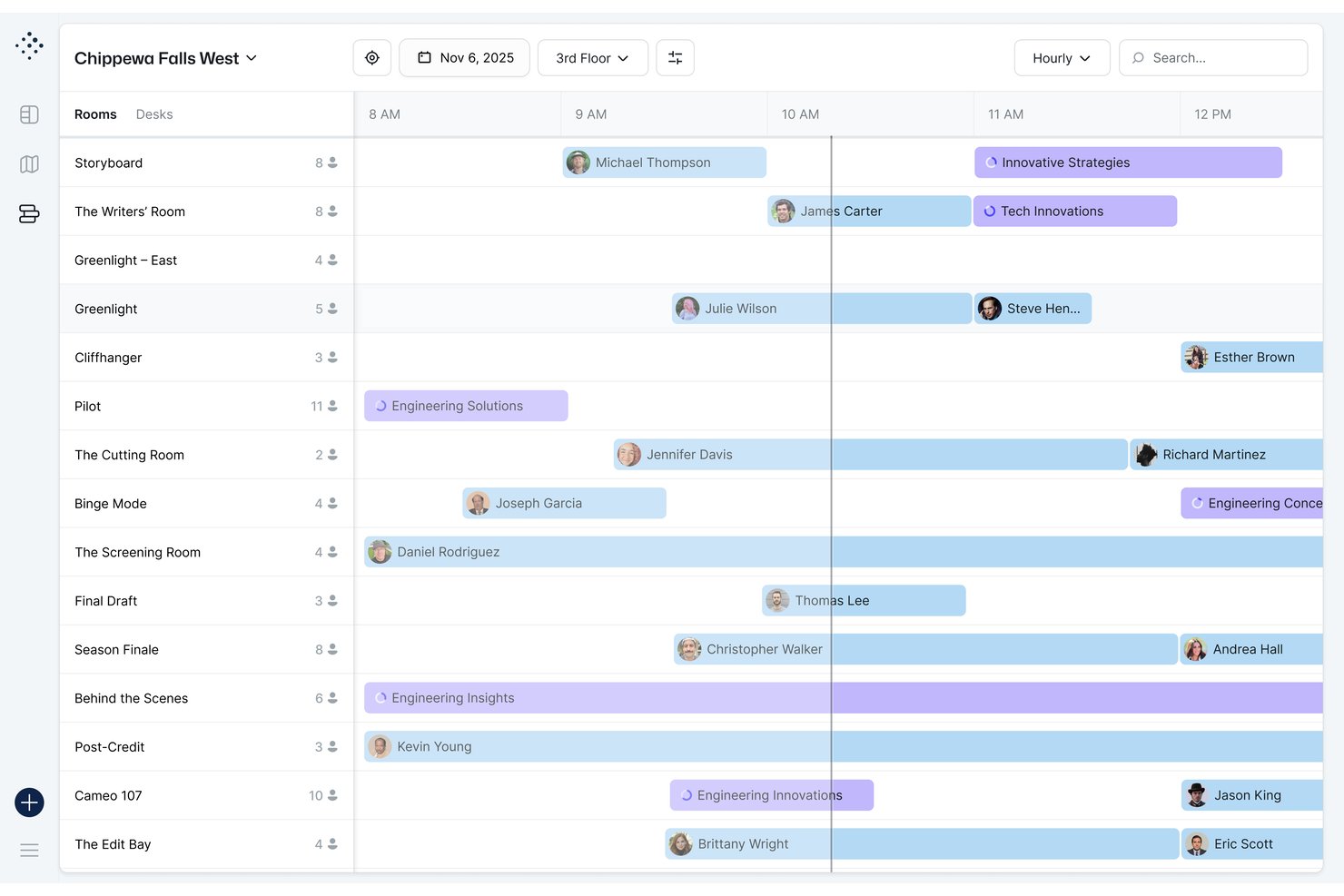
Tactic is a modular workplace management platform that covers meeting room booking, desk reservations, visitor management, and space analytics through interactive floor maps and calendar-connected booking workflows.
Who Is Tactic Best For?
Tactic is a strong fit for midsize companies managing hybrid workforces, particularly facilities and IT operations teams coordinating shared spaces across multiple office locations.
Why I Picked Tactic
Tactic earns its spot on my shortlist because the interactive floor maps show live room status directly on the floor plan, so my team can instantly spot open rooms, check capacity, and see exactly where they're located. I also like the Tessa AI assistant, which lets you book a room by describing what you need in plain language, skipping the manual filter search entirely. The Managed Rooms feature rounds it out, letting you bundle AV or catering into one booking request rather than coordinating that separately.
Tactic Key Features
- Two-way calendar sync: Integrates with Google Calendar and Outlook so reservations update automatically across platforms.
- Role-based permissions: Lets you assign different access levels and booking rights by team, department, or location.
- Office insights dashboard: Reports on room usage patterns, occupancy rates, and peak booking times.
- Visitor management: Handles guest check-in, badge printing, and host notifications from one interface.
Tactic Integrations
Tactic provides native integrations with Google Workspace, Microsoft 365, Outlook, Slack, Microsoft Teams, and Zoom. An API is available for custom integrations.
Pros and Cons
Pros:
- Combines desk and room booking natively
- AI assistant handles natural language booking requests
- Interactive floor maps show live room status
Cons:
- Setup requires manual floor plan digitization
- Analytics reporting less advanced than competitors

elia
Best for floor plan-based interactive scheduling
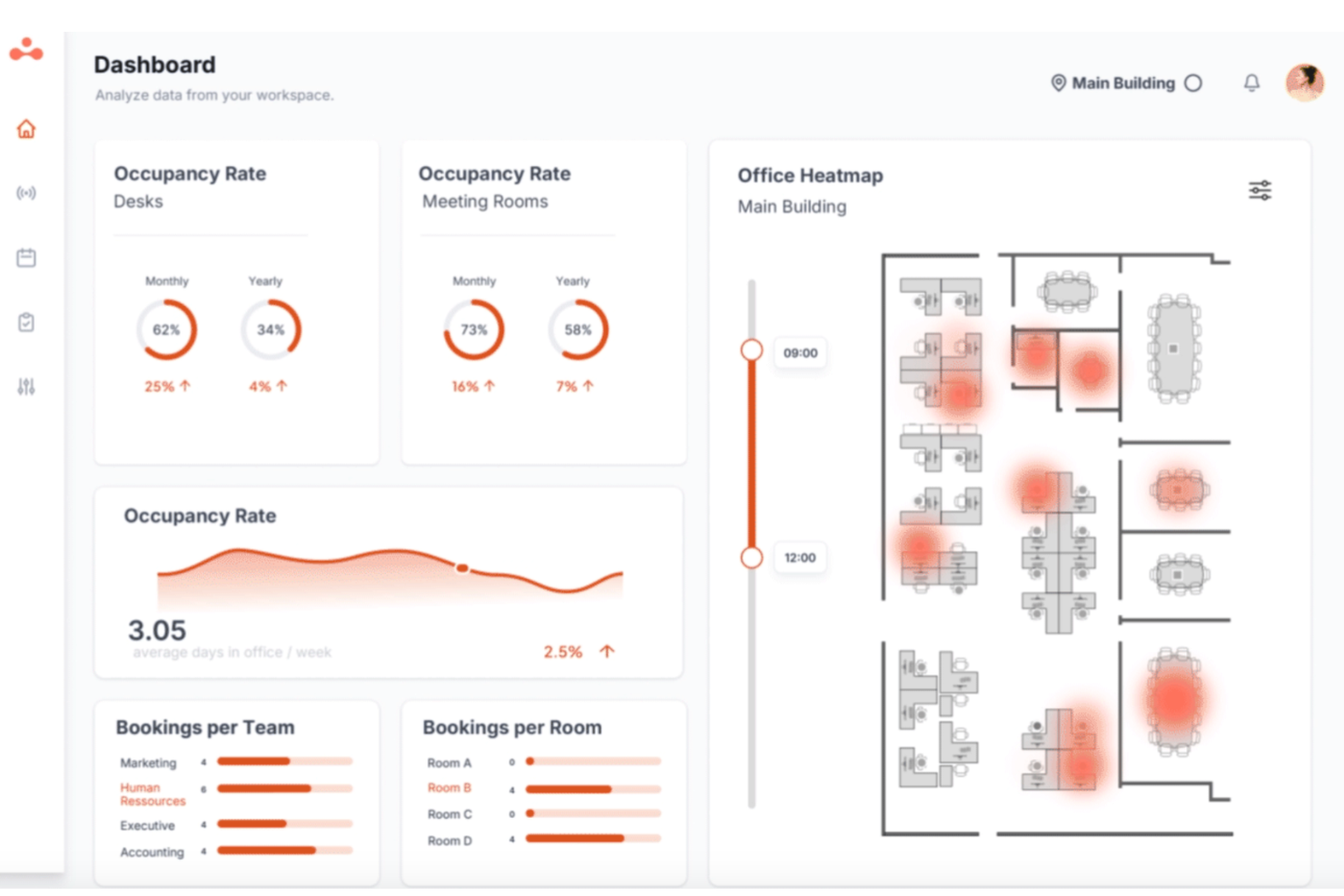
elia is a modular workplace management platform that combines meeting room booking, desk reservations, visitor management, occupancy sensing, and service requests into one system built around interactive floor plans.
Who Is elia Best For?
elia is a strong fit for facilities and office managers who need a single platform to handle room booking, desk reservations, visitor tracking, and space analytics across a physical office.
Why I Picked elia
I picked elia as one of the best because its floor plan-based booking experience is genuinely different from the typical list-and-calendar interfaces most tools offer. I love that admins build drag-and-drop floor plans without any coding, and employees book by clicking directly on a visual map filtered by capacity, equipment, and location. The system also auto-releases rooms when nobody shows up, using occupancy sensors that count entries and exits anonymously, which I find far more reliable than relying on people to cancel.
elia Key Features
- Two-way calendar sync: elia connects with Microsoft 365/Outlook and Google Workspace to keep room bookings updated across both platforms in real time.
- Check-in via multiple methods: Users can confirm a booking through email, Slack, Teams, or by tapping the door display, with badge-linked reservations available to reduce anonymous no-shows.
- Service request linking: Catering, AV setup, and room configuration requests can be attached directly to a booking from within the platform.
- Tiered utilization reporting: Reporting scales by plan, from basic usage summaries on Basic to custom dashboards on Business and AI-driven analytics on Enterprise.
elia Integrations
elia offers native integrations with Microsoft 365/Outlook and Google Workspace/Google Calendar, plus Slack notifications. Its Microsoft Teams app is available through Microsoft Marketplace, while Enterprise customers get API access for custom integrations.
Pros and Cons
Pros:
- Users report quick support responses
- No-show auto-release reduces wasted room time
- Interactive floor plans simplify room finding
Cons:
- Hardware requirements raise implementation complexity
- Recurring booking controls remain unclear

deskbird
Best for on-the-go mobile booking
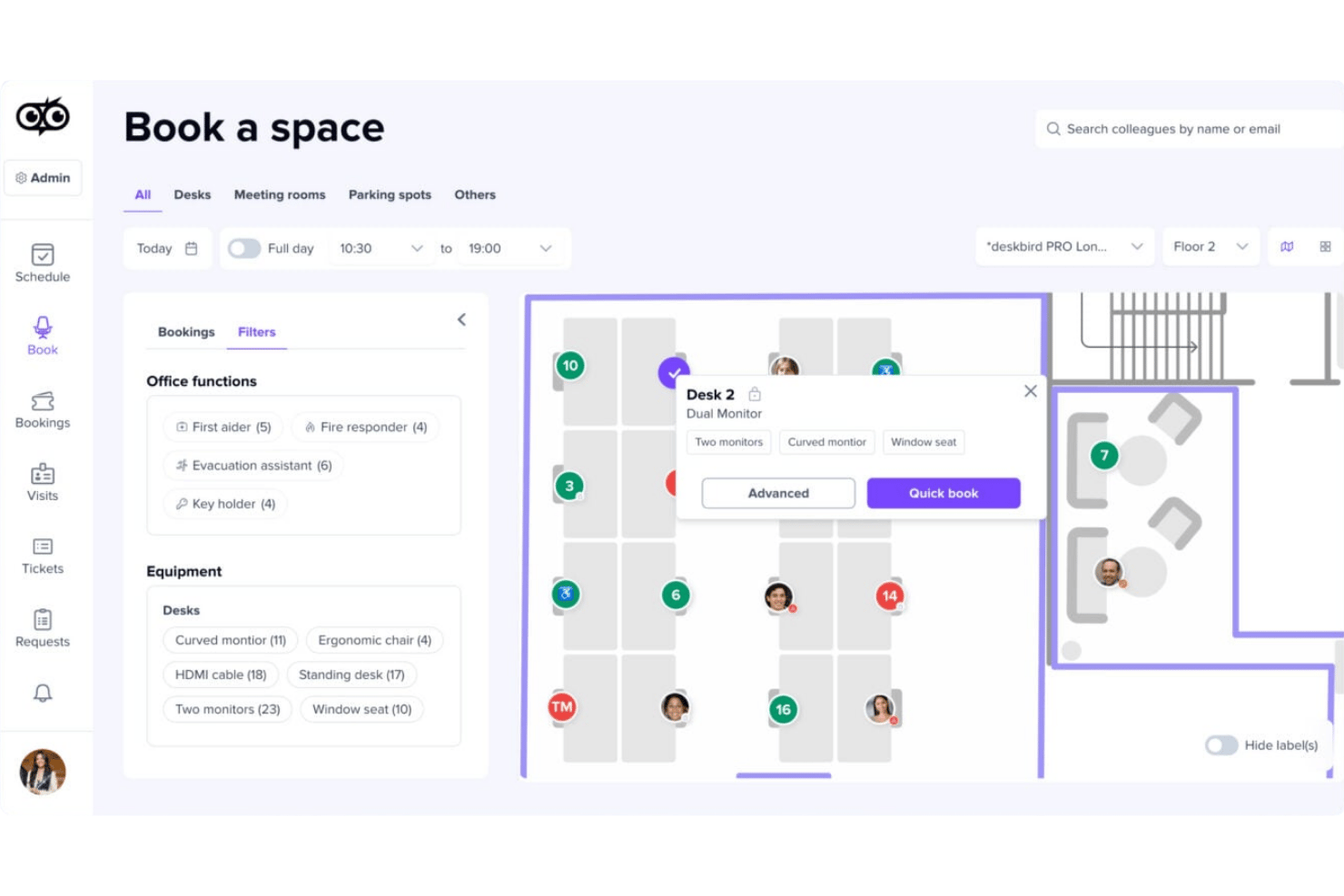
deskbird is a hybrid workplace management platform that combines meeting room booking, desk and parking reservations, interactive floor plans, calendar sync, and room utilization analytics.
Who Is deskbird Best For?
deskbird suits facilities and IT teams at mid-size to enterprise organizations managing hybrid workforces across multiple office locations.
Why I Picked deskbird
deskbird earns its spot on my shortlist because of how many ways it lets me book a room without sitting at a desk. I can grab a room through the native iOS or Android app, check in via QR code at the door, or book directly inside Teams or Outlook on my phone. What I especially like is Kiosk Mode, which runs on any commercial tablet and lets me walk up to a room entrance and book on the spot.
deskbird Key Features
- Recurring meeting room reservations: Schedule and manage repeating bookings for ongoing project meetings directly in the platform.
- Interactive floor plans: View and select available rooms on visual maps with details like capacity and amenities.
- No-show prevention with auto-release: Rooms are released if attendees don’t check in, reducing unused reservations.
- Room utilization analytics: Access dashboards tracking occupancy, booking frequency, and usage data to support workspace planning.
deskbird Integrations
deskbird offers native integrations with Microsoft Outlook, Microsoft Teams, Google Calendar, Slack, BambooHR, HiBob, Personio, and SAP SuccessFactors HCM. An API is available for custom integrations.
Pros and Cons
Pros:
- Tracks parking space data
- Supports instant QR check-in
- Mobile app supports full room booking workflow
Cons:
- Some users report occasional double bookings
- Recurring bookings have limited customization options

Best for single sign-on support
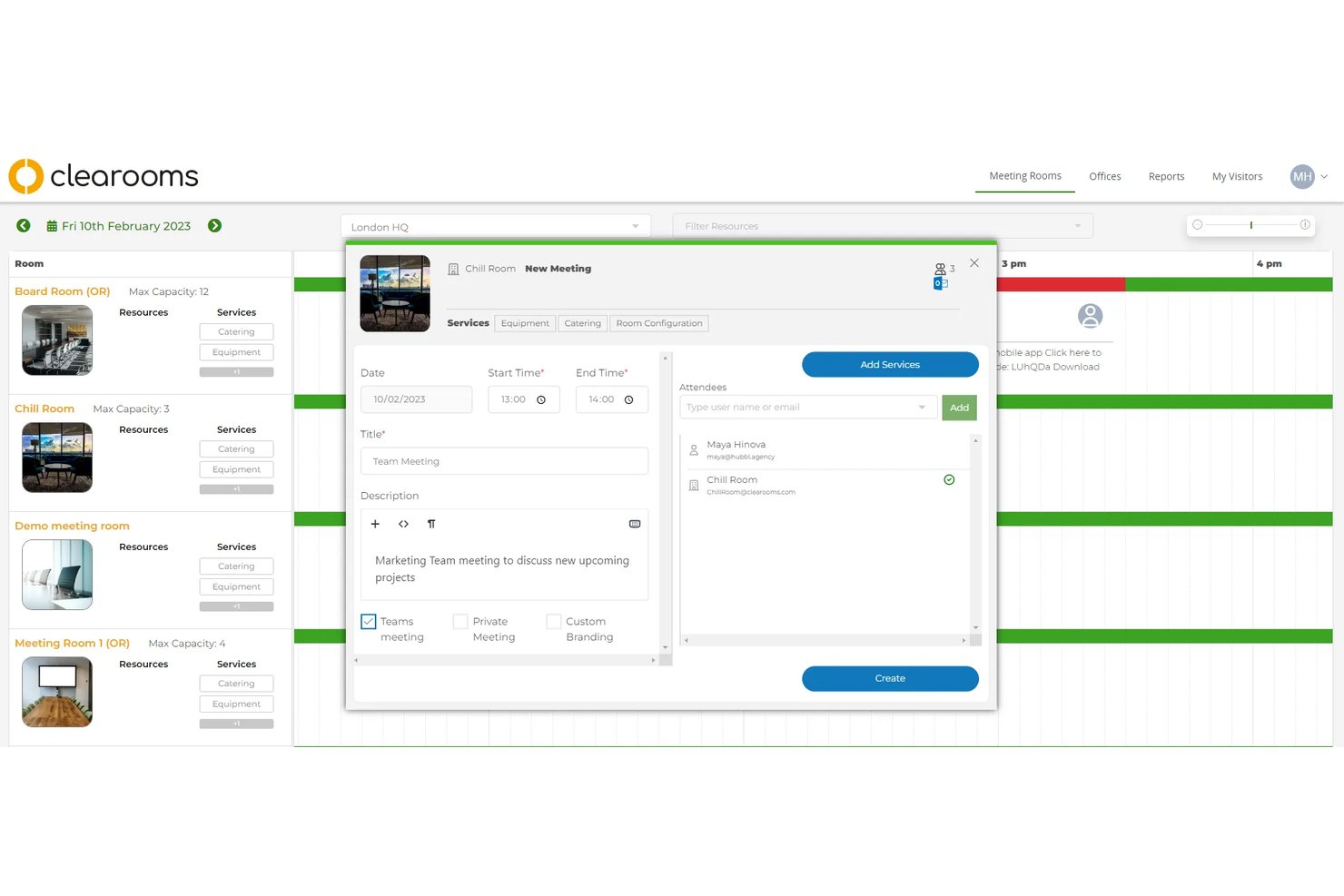
Clearooms is a hybrid workspace booking platform that covers meeting room reservations, hot desk management, visitor check-in, and parking allocation from a single interface with interactive floor plans and calendar sync.
Who Is Clearooms Best For?
Clearooms is a strong fit for IT operations managers and facilities teams at mid-sized companies that need SSO-integrated workspace booking without enterprise-level complexity or pricing.
Why I Picked Clearooms
I've included Clearooms in my top picks because its SSO support covers all the major identity providers (Azure, Okta, JumpCloud, and OneLogin) without gating that access behind a premium tier. In practice, that means my team can roll out room booking across the whole organization without managing a separate login layer. The SCIM provisioning support also makes user lifecycle management automatic, so new hires get access, and departures are removed without any manual updates inside Clearooms.
Clearooms Key Features
- Linked Rooms booking: Book multiple meeting rooms at once for larger or connected events.
- Customizable approval workflows: Designate approvers for specific meeting rooms to review or provide feedback on booking requests.
- Interactive floor plans: Visual floor plans with traffic-light indicators show live room and desk availability.
- Room services module: Add and track catering or refreshment orders for meetings directly in the platform.
Clearooms Integrations
Clearooms offers native integrations with Microsoft 365, Google Workspace, Microsoft Teams, Okta, JumpCloud, OneLogin, Salto, Paxton Net2, and Slack. An API is available for custom integrations.
Pros and Cons
Pros:
- Interactive floor plans support multiple locations
- Automatic user provisioning and deprovisioning via SCIM
- SSO included with no premium tier required
Cons:
- Room sensor integrations not currently supported
- No 3D navigation or wayfinding features

Envoy
Best for workplace security integrations
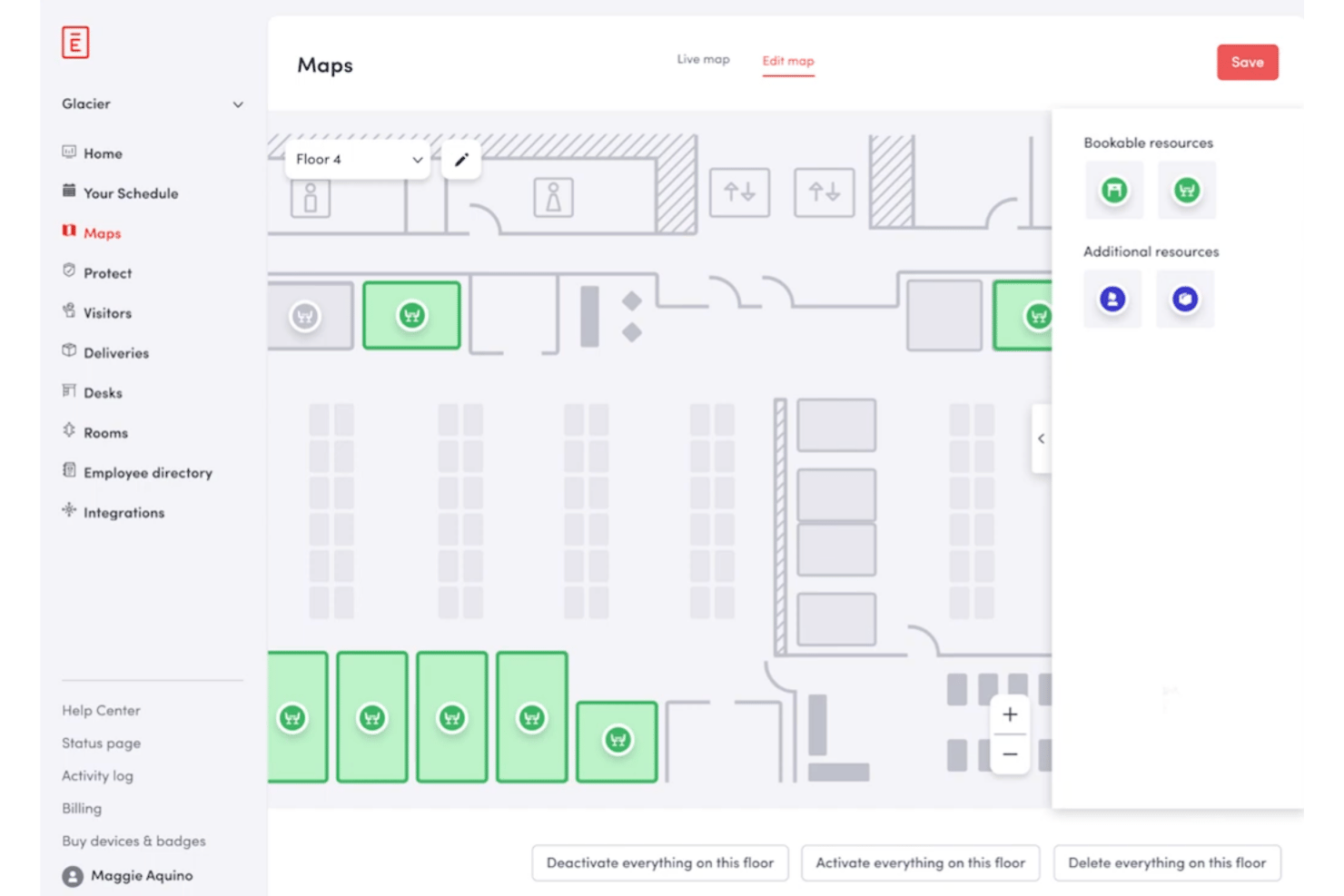
Envoy is a workplace management platform that combines conference room scheduling, desk booking, and visitor management with deep integrations into access control systems, identity providers, and calendar tools like Google Workspace and Microsoft 365.
Who Is Envoy Best For?
Envoy is a strong fit for IT operations and facilities teams at mid-to-large organizations that need room booking connected to access control, SSO, and security infrastructure.
Why I Picked Envoy
I picked Envoy as one of the best because no other room booking tool connects the calendar layer to the physical security layer as tightly. When my team books a conference room, Envoy can trigger door access permissions through systems like Kisi, Brivo, or Verkada, so only listed attendees can physically enter. On the identity side, SSO via Okta or Microsoft Entra ID means room access rights stay in sync with directory provisioning automatically.
Envoy Key Features
- Real-time room availability indicators: Status lights outside each room show if spaces are free, reserved, or occupied.
- Interactive workplace floor maps: Visual maps let users locate and book available rooms by capacity and amenities.
- Automated check-in and end meeting workflows: Check in or end meetings from tablets, Slack, Teams, or the Envoy mobile app.
- Detailed utilization analytics dashboards: Built-in dashboards report on booking frequency, occupancy, and overall room usage data.
Envoy Integrations
Envoy offers native integrations with Google Workspace, Microsoft 365, Slack, Teams, Okta, Kisi, Brivo, Genetec, LenelS2, and Cisco Meraki. An API is available for custom integrations.
Pros and Cons
Pros:
- Auto-release of unclaimed room reservations
- Interactive maps for locating available rooms
- Connects bookings to physical access control
Cons:
- Reporting features locked behind higher plans
- Room panels require iPad hardware

Robin
Best for interactive floor plan visualization
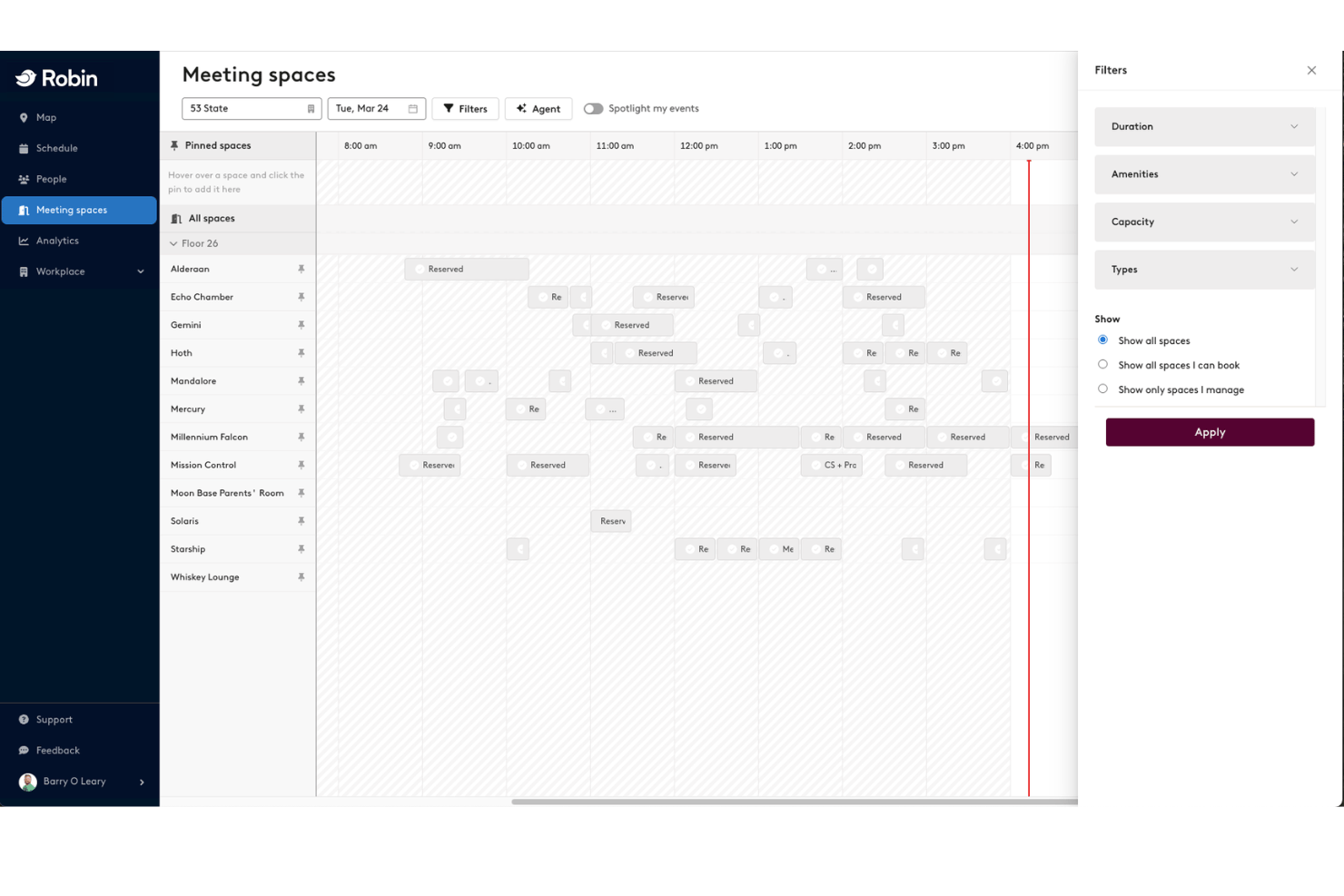
Robin is a workplace scheduling platform that combines meeting room booking, desk reservations, interactive floor maps, visitor management, and space utilization analytics across multi-floor and multi-location office environments.
Who Is Robin Best For?
Robin is a strong fit for facilities and IT teams at mid-market to enterprise organizations managing hybrid workforces across multiple office floors or locations.
Why I Picked Robin
Robin earns its spot on my shortlist because the interactive floor map visualization is genuinely the best I've seen in this category. In practice, my team can view live room availability directly on a visual floor plan, filter by capacity or amenity, and book the right room without leaving the map view. Robin also pushes real-time availability to hallway displays and in-room tablets, so wayfinding is handled at the physical level, not just digitally.
Robin Key Features
- Bidirectional calendar integration: Syncs meetings automatically with Google Workspace, Microsoft 365, and Outlook calendars.
- Automated room release: Frees up reserved rooms when users do not check in via mobile, panel, or badge.
- Custom booking policies: Allow admins to set rules for booking windows, meeting durations, and advance reservations.
- Space utilization analytics: Provides dashboards with occupancy trends, booking data, and exportable reports.
Robin Integrations
Robin offers native integrations with Google Workspace, Microsoft 365, Outlook, Microsoft Teams, Slack, Okta, Crestron, Logitech, and Kisi. An API is available for custom integrations.
Pros and Cons
Pros:
- Abandoned meetings auto-release booked spaces
- Visual room selection directly from map view
- Connects with badge readers
Cons:
- No built-in shift management
- Recurring reservations can create orphaned bookings

YAROOMS
Best for carbon footprint reporting
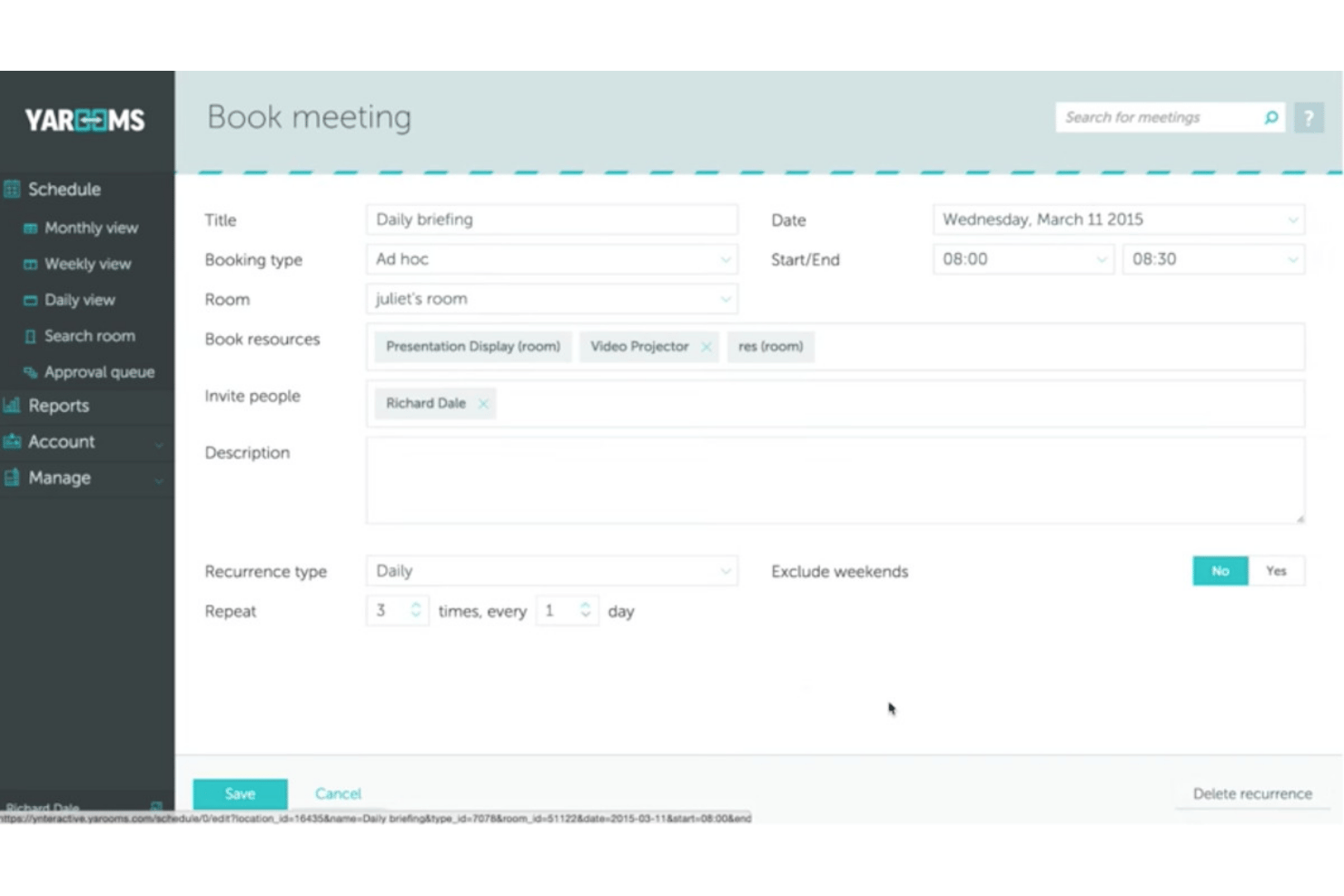
YAROOMS is a meeting room booking platform that combines interactive floor maps, AI-assisted scheduling through Microsoft Teams and Slack, digital door displays, and built-in workplace sustainability tracking.
Who Is YAROOMS Best For?
YAROOMS is a strong fit for facilities and IT operations teams managing hybrid workplaces across multiple office locations.
Why I Picked YAROOMS
I picked YAROOMS as one of the best because it's the only meeting room booking tool I've found that tracks Scope 2 and Scope 3 CO2 emissions directly from room and workspace usage. I can monitor my office's carbon footprint over time and track progress toward net-zero targets, all within the same platform I use to book rooms. The no-show auto-release feature also keeps that data accurate, since unclaimed rooms are freed automatically rather than sitting empty and skewing utilization reports.
YAROOMS Key Features
- Interactive floor maps: Browse, filter, and select rooms by location, amenities, or size using live office maps.
- YARVIS AI assistant: Reserve rooms, find colleagues, or adjust meetings directly from Microsoft Teams or Slack chat.
- Digital room signage: Display real-time room status and manage bookings with hardware-agnostic digital displays.
- Approval workflows: Set custom booking approval rules for rooms based on user, time, or location.
YAROOMS Integrations
YAROOMS offers native integrations with Microsoft 365, Google Workspace, Microsoft Teams, Zoom, Slack, and Google Meet. An API is available for custom integrations.
Pros and Cons
Pros:
- Generates automated sustainability metrics
- Auto-release for unused room reservations
- Tracks Scope 2 and 3 emissions data
Cons:
- Occasional syncing delays with some calendars
- Limited floor plans on base plans

Joan
Best for wireless room display integration
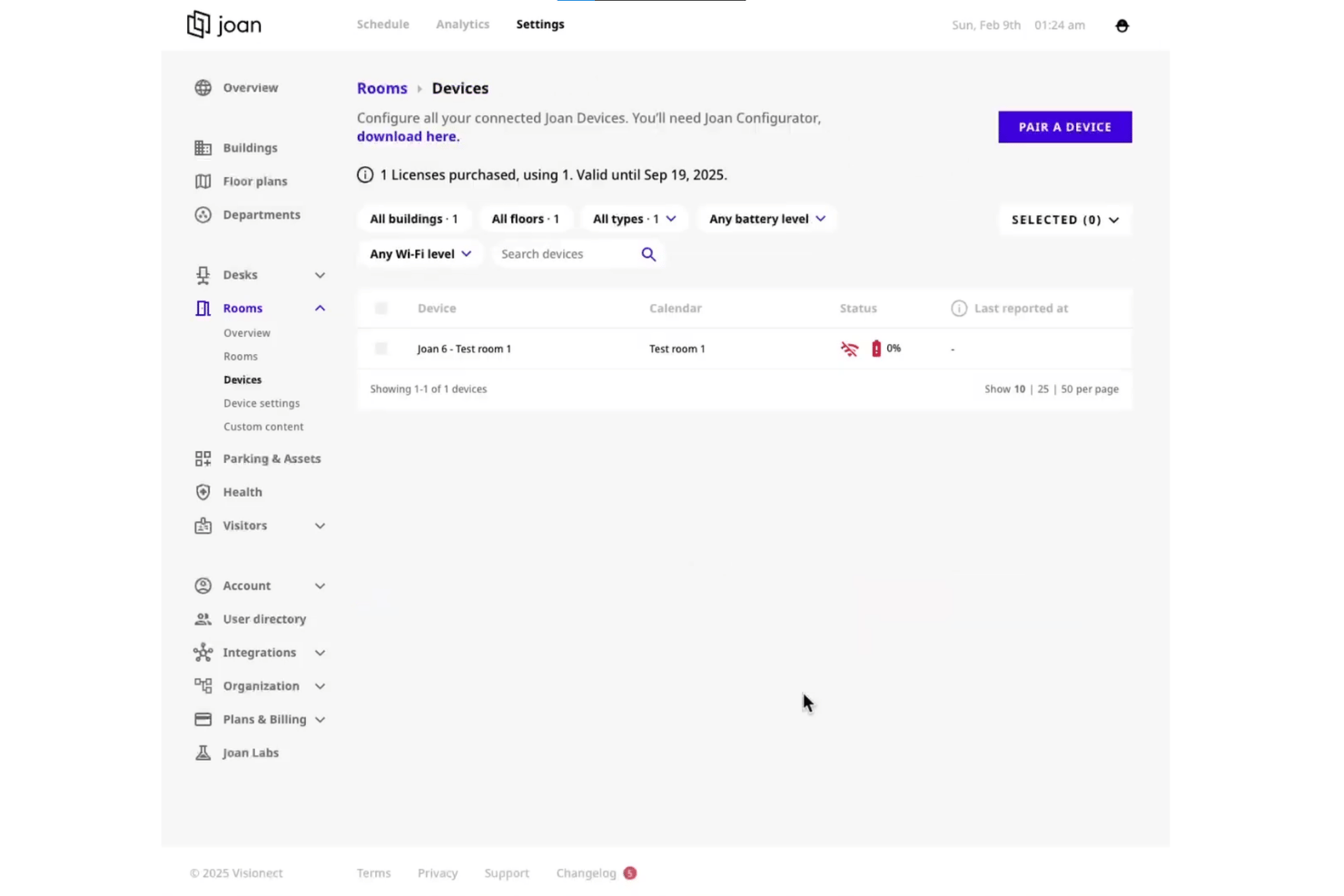
Joan is a meeting room booking platform that pairs scheduling software with wireless e-paper door displays to support room reservations, desk booking, visitor management, and utilization analytics.
Who Is Joan Best For?
Joan is a strong fit for office and facilities managers in mid-sized to enterprise organizations running hybrid work environments across multiple locations.
Why I Picked Joan
Joan earns its spot on my shortlist because its cable-free ePaper displays are genuinely unlike anything else in this category. I love that the Joan 6 Pro mounts anywhere with a self-adhesive magnet (no drilling, no power outlets), and its LED traffic-light ring signals room status from across a hallway without anyone needing to check a screen. The auto-release feature clears unclaimed rooms automatically, so the door display stays accurate without manual intervention.
Joan Key Features
- Calendar sync with Outlook and Google: Instantly updates bookings across all major calendar systems so schedules stay unified.
- Multi-location and multi-floor support: Lets admins manage bookings for several sites and buildings from a central dashboard.
- Mobile app for booking and check-in: Users can reserve rooms or check in using the iOS or Android app, from anywhere.
- Meeting room analytics dashboard: Tracks usage patterns, room occupancy, and booking trends for workspace optimization.
Joan Integrations
Joan offers native integrations with Google Workspace, Microsoft 365, Outlook, Exchange, Microsoft Teams, Slack, Cisco Webex, Okta, Azure Active Directory, and Zapier. An API is available for custom integrations.
Pros and Cons
Pros:
- Hybrid desk and room booking in one platform
- Automatic release of no-show bookings
- Wireless e-paper door displays for rooms
Cons:
- Room analytics customization is limited
- Requires hardware for full functionality

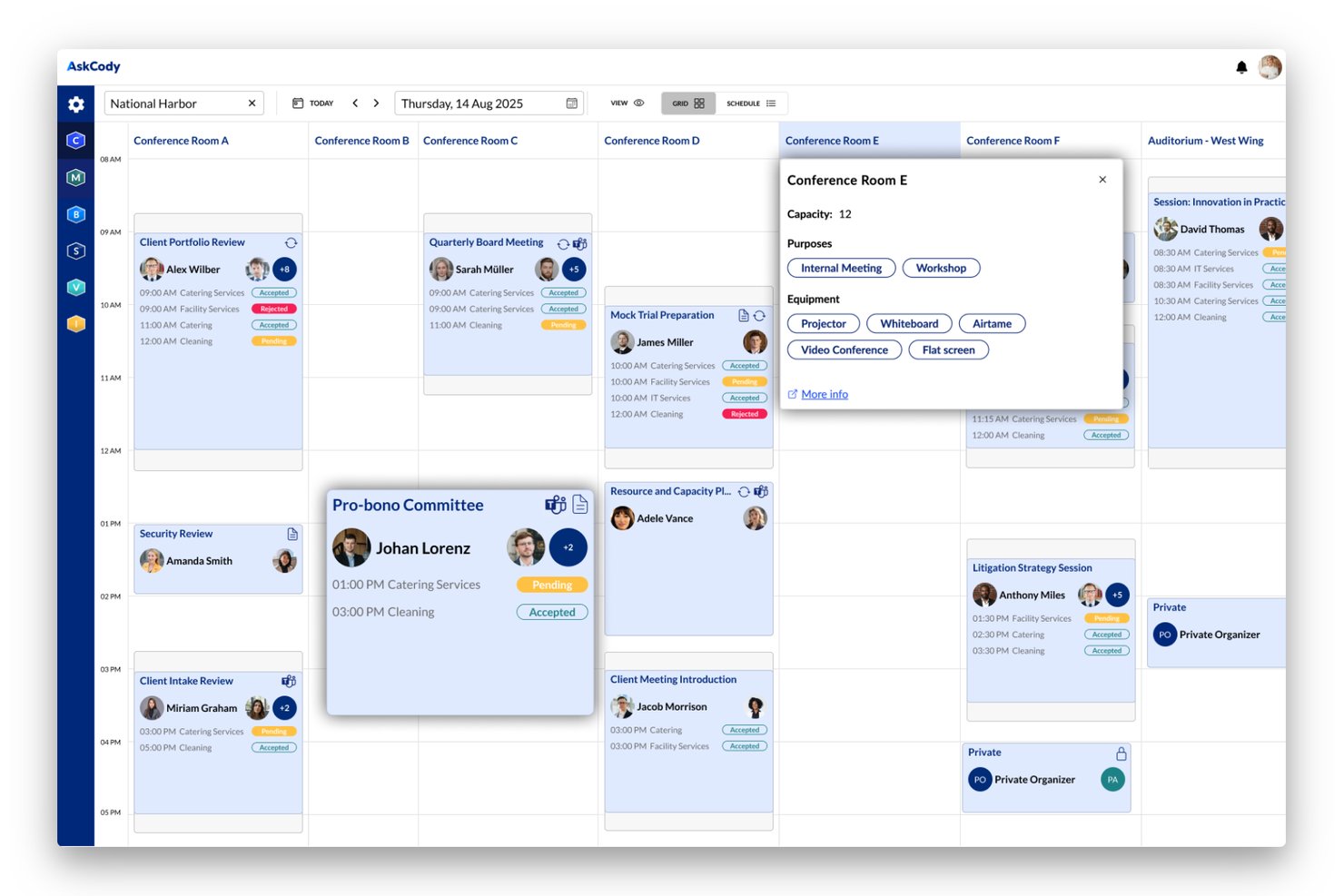
AskCody is a meeting room booking and workspace scheduling platform built natively for Microsoft 365, combining room and desk reservations, visitor management, service coordination, and utilization analytics.
Who Is AskCody Best For?
AskCody is a strong fit for IT and facilities managers at mid-to-large enterprises already standardized on Microsoft 365 and Exchange.
Why I Picked AskCody
AskCody earns its spot on my shortlist because of how deeply it lives inside Microsoft Outlook. You can book rooms, request catering, and manage visitor arrivals without ever leaving the Outlook interface. What I find particularly useful is follow-the-meeting intelligence: when you reschedule a meeting, all attached service requests (catering, AV equipment) update automatically to match the new time.
AskCody Key Features
- Interactive floor maps: Visual maps let users find and reserve rooms or desks with filters for location, capacity, and amenities.
- Room displays: Digital panels outside meeting spaces show current bookings, availability, and support room check-in workflows.
- Utilization analytics: Detailed dashboards provide reporting on space occupancy, booking patterns, and workplace usage trends.
- Visitor management: The system handles guest pre-registration, host notifications, and visitor badge printing for secure access.
AskCody Integrations
AskCody has native integrations across the Microsoft ecosystem, including Microsoft 365, Outlook, Exchange, Teams, Power BI, and Azure Active Directory. An API is available for custom integrations.
Pros and Cons
Pros:
- Powerful analytics for space utilization tracking
- Built-in visitor and facilities management tools
- Deep Microsoft Outlook and Exchange integration
Cons:
- Recurring meeting booking can be inflexible
- Limited support for non-Microsoft environments
Diğer Toplantı Odası Rezervasyon Yazılımları
Kısa listeme giremeyen ancak yine de göz atmaya değer bazı ek toplantı odası rezervasyon yazılımı seçenekleri şunlardır:
-
Eptura Engage
For advanced analytics and reporting
-
Accruent EMS
For large enterprise implementations
-
Tidaro
For comprehensive visitor management
-
Skedda
For customizable booking policies
-
Kadence
For hybrid work coordination
-
Spacewell
For IoT sensor-driven availability
-
Archie
For coworking space management
-
Officely
For Slack-based room reservations
-
OfficeSpace
For interactive booking kiosks
-
DeskFlex
For custom recurring bookings


How I Evaluate Meeting Room Booking Software
I evaluate meeting room booking tools in two layers: the core workflows every platform must handle—like real-time availability and auto-release—and the differentiators that set the best apart.
Core Functionality (Table Stakes For This List)
When I'm selecting tools for my list, I rank each one on a scale from 0 (does not offer the functionality) to 5 (excels in this area) for each core functionality listed below. Then, I calculate the tool's total score as a percentage. Each tool needs to achieve a minimum total score of 65% to be considered for inclusion.
- Real-Time Availability: I look for live room status that updates instantly, so someone booking a sprint planning room doesn't collide with another team's standup.
- Calendar Integration: Two-way sync with Outlook and Google Calendar matters most—teams should book rooms without leaving their existing calendar workflow.
- Recurring Reservations: I check whether the tool handles repeating bookings with flexibility, like editing a single instance of a weekly sprint ceremony without breaking the series.
- Interactive Floor Maps: Visual floor plans that show room location, capacity, and amenities help teams in multi-floor offices pick the right space without guesswork.
- Check-In & Auto-Release: I evaluate how the platform handles no-shows—tools that auto-release unclaimed rooms after a set window keep ghost bookings from wasting space.
- Utilization Analytics: Reporting on occupancy rates and booking patterns tells you which rooms sit empty and which need to be split or expanded for better use.
Once I have a list of tools that meet the criteria, I consider what sets each platform apart.
Differentiating Factors (What Sets Vendors Apart)
Here's how I compare and contrast different vendors:
Standout Features
Digital room displays mounted outside conference rooms let teams see at a glance whether a space is open and book it on the spot without pulling out a phone. Hybrid meeting support matters too—I look for auto-provisioning of video links for Zoom or Teams the moment a booking is created, so organizers don't scramble for URLs. Smart check-in through sensors or badge taps also separates vendors, since it releases no-show rooms faster than manual confirmation alone.
Beyond Features
Hardware compatibility is a big one—I check whether a platform supports third-party room panels like Crestron or Logitech Tap instead of locking you into proprietary devices. Scalability also matters for teams managing rooms across multiple offices and time zones from one admin console. I look at security posture too, including SSO support via SAML or Azure AD and clear data governance policies around occupancy sensor data.
Toplantı Odası Rezervasyon Yazılımı Nasıl Seçilir?
Uzun özellik listeleri ve karmaşık fiyatlandırma yapıları içinde kaybolmak kolaydır. Kendinize özgü yazılım seçim sürecinizde ilerlerken odağınızı korumanıza yardımcı olmak için göz önünde bulundurmanız gereken faktörlerin bir kontrol listesini burada bulabilirsiniz:
| Faktör | Dikkat Edilmesi Gerekenler |
|---|---|
| Ölçeklenebilirlik | Büyüdükçe yeni konumlar, kullanıcılar veya odalar eklemek gibi ihtiyaçlarınızı araç karşılayabilir mi? Gelecekteki genişleme için esnek yönetici kontrolleri ve çoklu site desteği sunan seçenekleri arayın. |
| Entegrasyonlar | Yazılım mevcut takvimlerinize, iletişim platformlarınıza veya erişim kontrol sistemlerinize bağlanabiliyor mu? İş akışlarınıza sorunsuz biçimde uyum sağlayan seçeneklere öncelik verin. |
| Özelleştirilebilirlik | Rezervasyon politikalarını, onay akışlarını ve kullanıcı rollerini ayarlayabiliyor musunuz? Kuruluşunuzun kendine özgü toplantı kültürünü ve hiyerarşisini destekleyen araçları değerlendirin. |
| Kullanım kolaylığı | Arayüz hem rezervasyon uzmanları hem de ara sıra kullanan kişiler için sezgisel mi? Karmaşıklık benimsenmeyi engelleyebilir; kullanıma sunmadan önce birkaç tipik kullanıcıyla test edin. |
| Uygulama ve başlangıç süreci | Başlamak için hangi kaynaklar gerekiyor? Özellikle birden fazla ofis veya bölgeye dağıtım yapacaksanız eğitim, geçiş desteği ve zaman çizelgesi hakkında bilgi alın. |
| Maliyet | Ücretler kullanıcı, oda, konum veya özelliklere göre mi belirleniyor? Hem kısa vadeli bütçe uyumunu hem de ihtiyaçlarınız geliştikçe maliyetlerin nasıl değişebileceğini hesaba katın. |
| Güvenlik önlemleri | Çözüm, SSO, veri şifreleme ve açık gizlilik politikalarını destekliyor mu? Sağlayıcının kuruluşunuzun güvenlik ve uyumluluk standartlarını karşıladığından emin olun. |
| Destek bulunabilirliği | Sağlayıcının yanıt süresi ve destek kanalı kapsamı nedir? Ofisler farklı saat dilimlerinde çalışıyorsa hizmet düzeyi anlaşmalarını, küresel destek saatlerini ve sorunların üst seviyeye aktarılma yollarını değerlendirin. |
Toplantı Odası Rezervasyon Yazılımı Nedir?
Toplantı odası rezervasyon yazılımı, iş yerinizdeki toplantı alanlarını ve kaynaklarını rezerve etmenize, yönetmenize ve takip etmenize olanak tanıyan dijital bir platformdur. Bu sistemler ekibinize odaların uygunluğu hakkında gerçek zamanlı bir görünüm sunar, çifte rezervasyonları önler ve yinelenen veya hibrit toplantıların kurulumunu kolaylaştırır; aynı zamanda tesis ekiplerinin kullanım eğilimlerini takip etmesine ve alan tahsisini optimize etmesine yardımcı olur.
Toplantı Odası Rezervasyon Yazılımının Özellikleri
Toplantı odası rezervasyon yazılımı seçerken aşağıdaki temel özelliklere dikkat edin:
- Gerçek zamanlı uygunluk: Her toplantı odasının güncel durumunu görün; böylece çakışan rezervasyonlar olmadan açık alanları anında bulup rezerve edebilirsiniz.
- Takvim entegrasyonu: Planlamayı birleştirmek ve platformlar arasında çift rezervasyonu önlemek için rezervasyonları Outlook, Google Takvim veya Microsoft 365 ile senkronize edin.
- Yinelenen rezervasyon desteği: Her rezervasyonu yeniden girmeden proje durum toplantıları veya sprint değerlendirmeleri gibi tekrarlanan toplantılar oluşturun.
- Etkileşimli kat planları: Odaların tam olarak nerede olduğunu, hangi olanakları sunduğunu ve hangilerinin uygun olduğunu gösteren görsel yerleşimleri görüntüleyin.
- Giriş yapma ve otomatik serbest bırakma: Katılımcıların giriş yapmasını zorunlu kılın; alan israfını azaltmak için belirlenen süre içinde kullanılmayan odaları otomatik olarak serbest bırakın.
- Kullanım analizleri: Alan tahsisini optimize etmeye ve gayrimenkul planlamasına yön vermeye yardımcı olmak için oda doluluk oranlarını, rezervasyon modellerini ve en yoğun talep dönemlerini takip edin.
- Mobil erişim: Hareket hâlindeyken rezervasyon yapın, değişiklik yapın veya rezervasyonları iptal edin; böylece farklı konumlar arasında hareket eden ya da uzaktan çalışan ekipler esneklik kazanır.
- Role dayalı izinler: Kuruluşunuzun politikalarına ve güvenlik gereksinimlerine uygun şekilde alanları kimlerin rezerve edebileceğini, onaylayabileceğini veya yönetebileceğini kontrol edin.
- Ziyaretçi yönetimi: Konukları kaydedin ve resepsiyonda sorunsuz bir giriş süreci için onları toplantı odası rezervasyonlarıyla ilişkilendirin.
- Oda ekranlarıyla entegrasyon: Odaların dışındaki dijital ekranlara bağlanarak gerçek zamanlı durumu gösterin ve yerinde rezervasyon veya giriş yapılmasını sağlayın.
Toplantı Odası Rezervasyon Yazılımında Yaygın Yapay Zekâ Özellikleri
Yukarıda listelenen standart toplantı odası rezervasyon yazılımı özelliklerinin ötesinde, bu çözümlerin birçoğu aşağıdaki gibi özelliklerle yapay zekâyı kullanmaya başlıyor:
- Akıllı oda önerileri: Yapay zekâ, her toplantı için en uygun müsait odaları önermek amacıyla toplantı büyüklüğünü, katılımcı tercihlerini ve geçmiş rezervasyon modellerini analiz eder.
- Tahmine dayalı katılmama tespiti: Makine öğrenimi modelleri, geçmiş katılım verilerine dayanarak toplantıya muhtemelen katılmayacak kişileri belirler; böylece odanın proaktif olarak serbest bırakılmasını veya hatırlatıcılar gönderilmesini sağlar.
- Otomatik çakışma çözümü: Yapay zekâ, alternatif zamanlar veya alanlar önererek rezervasyon çakışmalarını belirler ve çözer; böylece yöneticilerin manuel müdahalesi azalır.
- Dinamik kapasite optimizasyonu: Algoritmalar kullanım eğilimlerini izler ve doluluk oranını en üst düzeye çıkarmak için oda uygunluğunu otomatik olarak ayarlar veya alanın yeniden yapılandırılmasını önerir.
- Doğal dilde rezervasyon asistanları: Yapay zekâ destekli sohbet robotları veya sesli asistanlar, kullanıcıların sohbet ya da takvim uygulamalarında konuşma dilini kullanarak oda rezerve etmesine veya odalarda değişiklik yapmasına olanak tanır.
Toplantı Odası Rezervasyon Yazılımının Faydaları
Toplantı odası rezervasyon yazılımını uygulamak, ekibiniz ve işletmeniz için çeşitli faydalar sağlar. Yararlanabileceğiniz bazı avantajlar şunlardır:
- Daha az planlama çakışması: Gerçek zamanlı uygunluk ve çift yönlü takvim entegrasyonları, çift rezervasyonu önler ve oda durumu konusundaki karışıklığı ortadan kaldırır.
- Alan kullanımının iyileştirilmesi: Kullanım analizleri ve otomatik serbest bırakma özellikleri, hayalet toplantılar veya verimsiz tahsis nedeniyle odaların boş kalmasını önler.
- Çalışanlar için zaman tasarrufu: Etkileşimli haritalar, akıllı öneriler ve mobil erişim, doğru alanı bulmayı ve rezerve etmeyi hızlı ve zahmetsiz hâle getirir.
- Hibrit çalışma için daha iyi destek: Video konferans araçlarıyla entegrasyon ve görsel-işitsel filtreleme, ekiplerin yüz yüze ve sanal toplantıları koordine etmesine yardımcı olur.
- Sadeleştirilmiş ziyaretçi yönetimi: Yerleşik ziyaretçi kayıt ve giriş araçları, konukların varışını toplantı düzeniyle ilişkilendirerek resepsiyonda daha sorunsuz bir deneyim oluşturur.
- İş yeri içgörülerinin geliştirilmesi: Doluluk, talep yoğunlukları ve kullanıcı modellerine ilişkin veriler, tesis planlamasına ve uzun vadeli gayrimenkul kararlarına yön verir.
- Daha yüksek güvenlik ve uyumluluk: SSO, role dayalı erişim ve açık veri yönetişimi, kullanıcı verilerini güvende tutar ve kurumsal politikalarla uyum sağlar.
Toplantı Odası Rezervasyon Yazılımının Maliyetleri ve Fiyatlandırması
Toplantı odası rezervasyon yazılımı seçmek, mevcut çeşitli fiyatlandırma modellerinin ve planların anlaşılmasını gerektirir. Maliyetler özelliklere, ekip büyüklüğüne, eklentilere ve daha birçok unsura göre değişir. Aşağıdaki tablo, toplantı odası rezervasyon yazılımı çözümlerinde yaygın planları, bunların ortalama fiyatlarını ve genellikle sunulan özellikleri özetlemektedir:
Toplantı Odası Rezervasyon Yazılımı için Plan Karşılaştırma Tablosu
| Plan Türü | Ortalama Fiyat | Yaygın Özellikler |
|---|---|---|
| Ücretsiz Plan | $0 | Temel rezervasyon araçları, sınırlı sayıda oda, basit takvim entegrasyonu ve standart destek. |
| Kişisel Plan | $5-$15/kullanıcı/ay | Tek kullanıcı erişimi, gelişmiş yinelenen rezervasyonlar, mobil erişim ve kişisel takvimlerle entegrasyon. |
| İşletme Planı | $10-$25/kullanıcı/ay | Çok kullanıcılı yönetim, etkileşimli kat planları, oda ekranı entegrasyonu, analizler ve entegrasyon desteği. |
| Kurumsal Plan | $20-$50/kullanıcı/ay | Özel roller, birden çok konum desteği, SSO ve güvenlik denetimleri, API erişimi, özel başlangıç süreci ve üstün destek. |
Toplantı Odası Rezervasyon Yazılımı Hakkında SSS
Toplantı odası rezervasyon yazılımı hakkında sık sorulan bazı soruların yanıtları:
Toplantı odası rezervasyon yazılımı mevcut takvim sistemleriyle senkronize olabilir mi?
Evet, modern bir toplantı odası rezervasyon sistemi Outlook takviminiz, Google Takvim veya Microsoft 365 ile entegrasyon sunar. Bu, çakışan rezervasyonları önlemenize, kullanıcıların rezervasyonları alışık oldukları planlama araçlarından yönetmesine ve programların kuruluşunuz genelinde uyumlu kalmasına yardımcı olur.
Kullanım analizleri ofis alanının optimize edilmesine nasıl yardımcı olur?
Oda kullanımını izleyen analizler, hangi odaların en çok kullanıldığını gösterir, gelmeyen kullanıcıları belirginleştirir ve alan kullanımını takip eder. Tesis ekipleri bu verileri, az kullanılan mevcut alanları belirlemek, yerleşimleri düzenlemek ve uzun vadeli alan yönetimiyle ilgili bilinçli kararlar almak için kullanabilir.
Dijital oda ekranlarını uygulamak için neler gerekir?
Oda durumunu görüntülemeyi planladığınız yerlerde tablet, montaj aparatı ve güvenilir Wi-Fi gibi uyumlu donanımlara ihtiyacınız olacaktır. Birçok platform üçüncü taraf ekranlarını destekler, ancak geniş ölçekte uygulamaya geçmeden önce uyumluluğu kontrol etmek önemlidir.
Giriş yapma ve otomatik serbest bırakma özellikleri nasıl çalışır?
Giriş yapma özellikleri, kullanıcıların bir uygulama, QR kodu veya kart okutma yoluyla orada bulunduklarını doğrulamasını gerektirir. Katılımcılar belirlenen süre içinde giriş yapmazsa sistem odayı otomatik olarak boşta kullanılabilir duruma getirir, böylece diğer kişiler odayı rezerve edebilir.
Birden çok ofisteki rezervasyonları yönetmek mümkün mü?
Evet, birçok platform merkezi yönetici denetimleri, konuma dayalı izinler ve kullanıcı rolleri sunar; böylece şehirler veya ülkeler genelindeki alanları tek bir gösterge panelinden yönetebilirsiniz. Bu özellik özellikle küresel veya hibrit ekipler için yararlıdır.
Güvenlik ve gizlilik açısından nelere dikkat etmeliyim?
SSO desteği, veri şifreleme ve SOC 2 veya GDPR gibi standartlara açık uyumluluk sunan çözümleri önceliklendirin. Çalışan gizliliğini korumak için sensör verilerinin toplanmasına ilişkin şeffaf politikalar ve role dayalı denetimler bulunduğundan emin olun.