

2026’nın En İyi 10 Kurumsal Toplantı Yönetimi Yazılımı

10 En İyi Kurumsal Toplantı Yönetimi Yazılımları Kısa Listesi


Kurumsal toplantı yönetimi yazılımı, büyük kuruluşların birden fazla ekip ve paydaş arasındaki toplantıları planlamasına, koordine etmesine ve belgelemesine yardımcı olur. Karmaşık planlamayı, güvenli belgelemeyi, aksiyon maddesi takibini ve teknoloji yığınınızla entegrasyonu yönetebilecek araçlar arıyorsanız, söz konusu olan şeyin ne olduğunu bilirsiniz: net kararlar, denetim izleri ve şirket genelinde uyum.
Bu kılavuz, 2026 yılındaki en iyi yazılımları karşılaştırarak kuruluşunuzun güvenlik, uyumluluk ve iş birliği ihtiyaçlarına en uygun seçeneği bulmanıza yardımcı olur.
Why Trust Our Software Recommendations
Our team has been testing and reviewing software since 2012. As project managers ourselves, we know how difficult—and important—it is to choose the right software.
For this guide, we evaluated tools using hands-on testing and independent research, scoring tools using our selection criteria. We also draw on insights from industry thought leaders and practicing project management experts.
Our reviews reflect our human editorial judgment, not a sales pitch.
Expert reviewers:
Kurumsal Toplantı Yönetimi Yazılımları Karşılaştırma Tablosu
Bu karşılaştırma tablosu, en iyi kurumsal toplantı yönetimi yazılımı seçimlerim için fiyatlandırma ayrıntılarını özetlemektedir:
| Tool | Starting Price | Website | |
|---|---|---|---|
| Best real-time voting for decision making | 4.7 out of 5 | Pricing upon request Free trial + free demo available | Website |
| Best offline access for remote participation | 4.6 out of 5 | Pricing upon request Free demo available | Website |
| Best deep integration with Microsoft 365 | 4.3 out of 5 | $4/user/month Free plan + 1-month free trial available | Website |
| Best enterprise-level compliance features | — | Pricing upon request Free demo available | Website |
| Best secure document distribution for directors | — | Pricing upon request Free demo available | Website |
| Best collaborative note sharing for teams | 4.7 out of 5 | $7/user/month Free plan available | Website |
| Best action item tracking for follow-ups | 4.6 out of 5 | Pricing upon request Free demo available | Website |
| Best advanced meeting minutes templating | 4.2 out of 5 | $4.60/user/month 30-day free trial + free demo available | Website |
| Best agenda planning for recurring sessions | — | $14/user/month 14-day free trial + free plan + free demo available | Website |
| Best centralized documentation management | — | Pricing upon request Free trial available | Website |
En İyi Kurumsal Toplantı Yönetimi Yazılımları İncelemeleri
Aşağıda, kısa listeme giren en iyi kurumsal toplantı yönetimi yazılımlarına ilişkin ayrıntılı özetlerimi bulabilirsiniz. İncelemelerim, size en uygun seçeneği bulmanıza yardımcı olmak için her platformun özelliklerine, entegrasyonlarına ve en iyi kullanım alanlarına ayrıntılı bir bakış sunar.
OnBoard
Best real-time voting for decision making
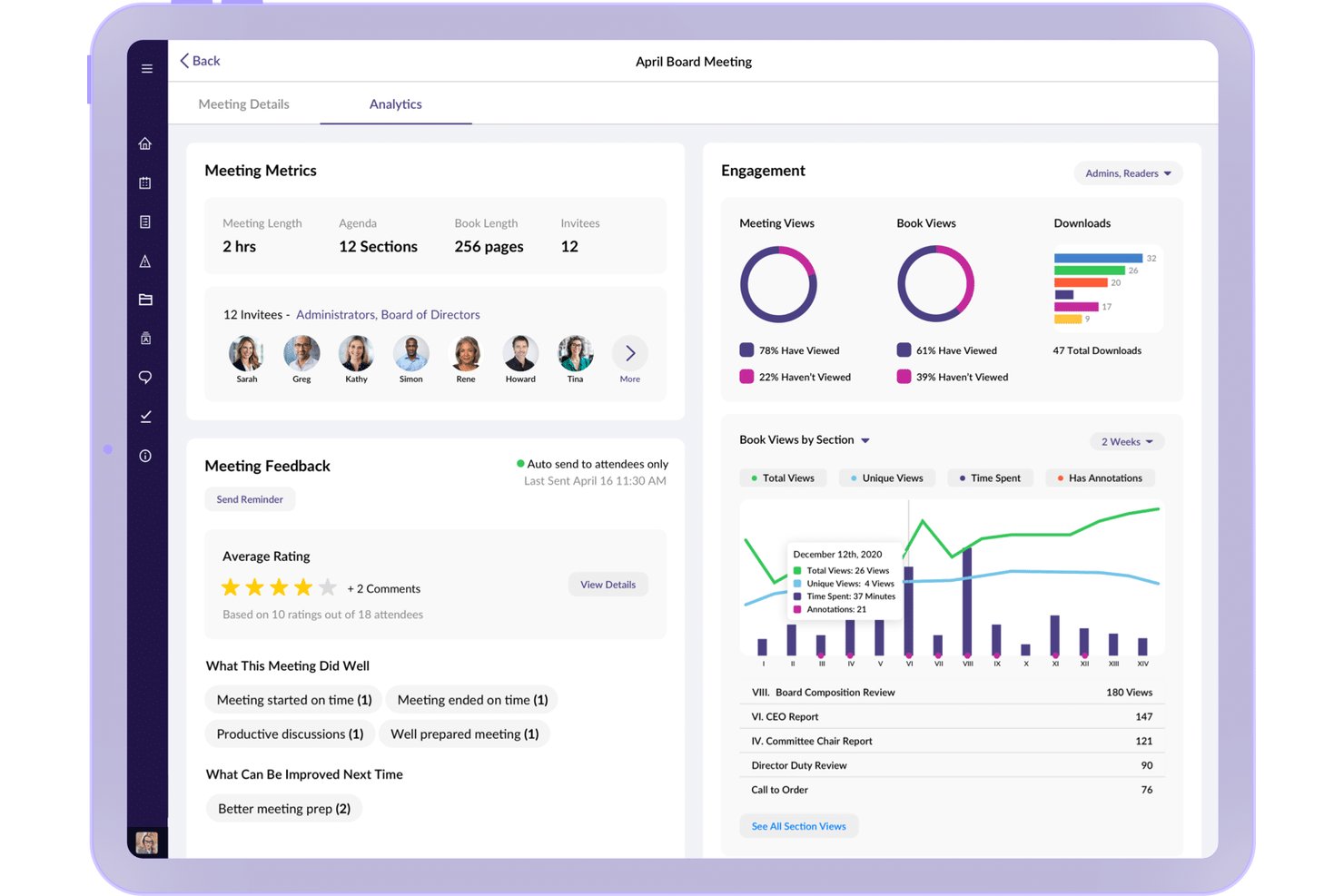
OnBoard is a board portal and governance platform that brings together agenda building, minutes capture, document management, voting and approvals, and board assessments into a single secure environment for boards and steering committees.
Who Is OnBoard Best For?
OnBoard is a strong fit for governance leads, corporate secretaries, and executives managing board or steering committee meetings in regulated industries.
Why I Picked OnBoard
I picked OnBoard as one of the best because its real-time Voting & Approvals module genuinely changes how boards make decisions between scheduled meetings. Rather than waiting for the next quarterly session, I can push a motion to board members for a live vote directly inside the platform, with outcomes automatically captured and tied to the meeting record. The Minutes Builder then pulls those decisions into a formal document, so there's no manual reconciliation after the fact.
OnBoard Key Features
- Agenda builder: Create structured, time-bound agendas with templates and collaborative editing.
- Task management: Assign, track, and manage action items across meetings within the platform.
- Microsoft 365 integration: Edit Word, Excel, and PowerPoint files natively inside OnBoard.
- Secure document library: Organize board materials in a centralized, permission-controlled repository.
OnBoard Integrations
OnBoard offers native integrations with Zoom, Microsoft Teams, DocuSign, Microsoft 365, Okta, and OneLogin. An API is available for custom integrations.
Pros and Cons
Pros:
- Centralized document access and annotation
- Detailed agenda and minutes builder
- Real-time board voting and approvals
Cons:
- Primarily focused on formal board processes
- Limited customization of meeting templates
iBabs
Best offline access for remote participation
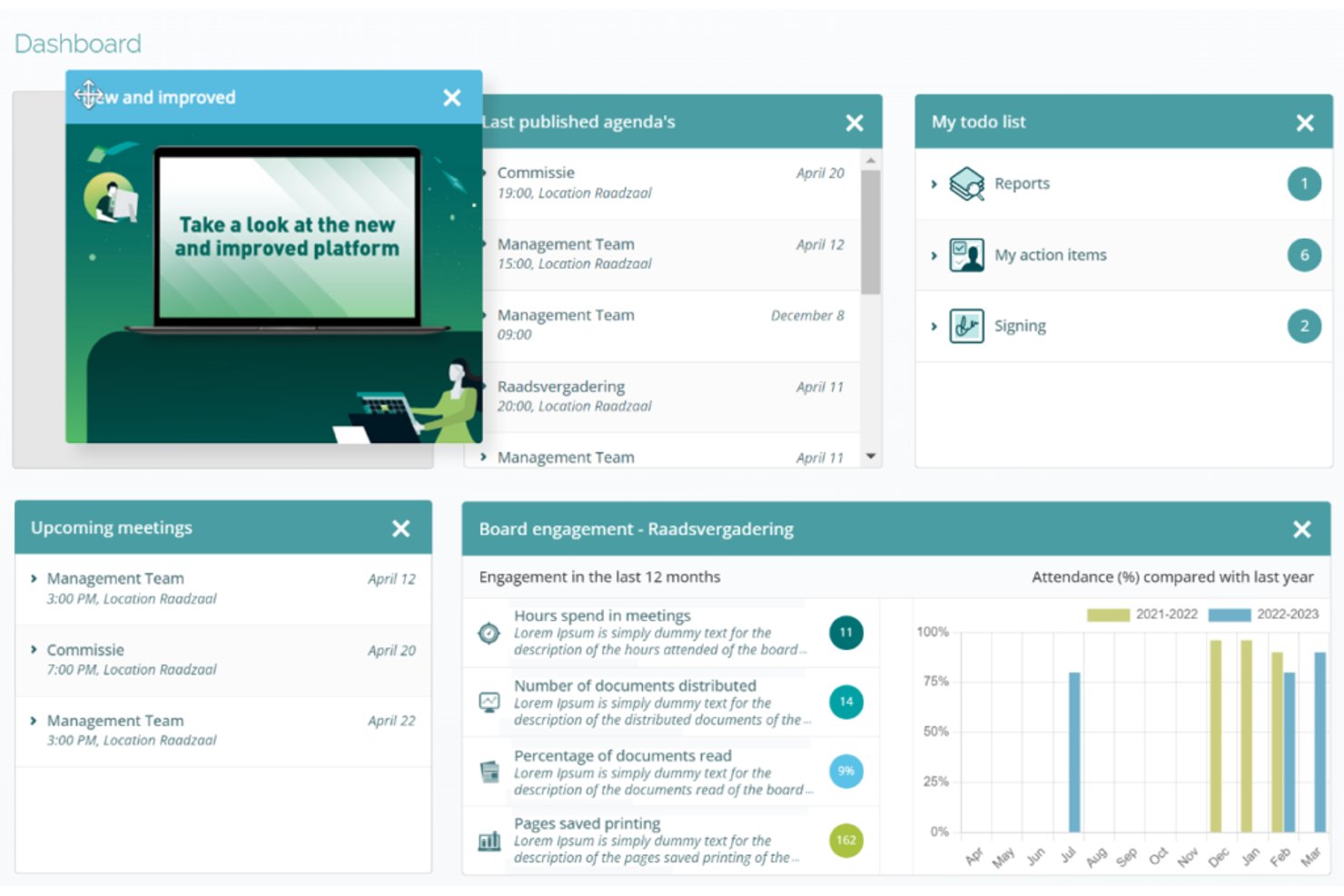
iBabs is a board portal and meeting management platform built for governance-heavy meetings, combining structured agenda creation, document distribution, minutes, voting, digital signatures, and AI-assisted transcription.
Who Is iBabs Best For?
iBabs is a strong fit for public-sector organizations, councils, healthcare bodies, and enterprises that run formal board or steering committee meetings with strict governance requirements.
Why I Picked iBabs
iBabs earns its spot as one of the best on my shortlist because of how well it handles offline access for board members who participate remotely. The native iOS, Android, and Windows apps automatically sync meeting dossiers before a session, so participants can read documents, annotate pages, and cast votes without an active internet connection. I particularly like that this extends to anonymous voting and approval routing, not just passive document review.
iBabs Key Features
- Structured agenda builder: Create detailed, time-allocated agendas for formal meetings and distribute them securely to all participants.
- AI-generated minutes and summaries: Use iBabs Debrief to produce AI-powered transcripts and speaker-attributed minutes.
- Voting and decision logging: Enable manual, live, or anonymous voting and automatically log decisions in meeting records.
- Digital signatures and secure document management: Sign documents within the platform and manage sensitive files with granular access controls.
iBabs Integrations
iBabs offers native integrations with Microsoft 365 (including Outlook and SharePoint), Microsoft Entra ID, Google Workspace, Okta, and SURFconext.
Pros and Cons
Pros:
- AI-generated meeting transcripts and minutes
- Secure voting and digital signature workflows
- Offline access for meetings on all devices
Cons:
- Limited project team meeting features
- No two-way task sync with PM platforms

Best deep integration with Microsoft 365
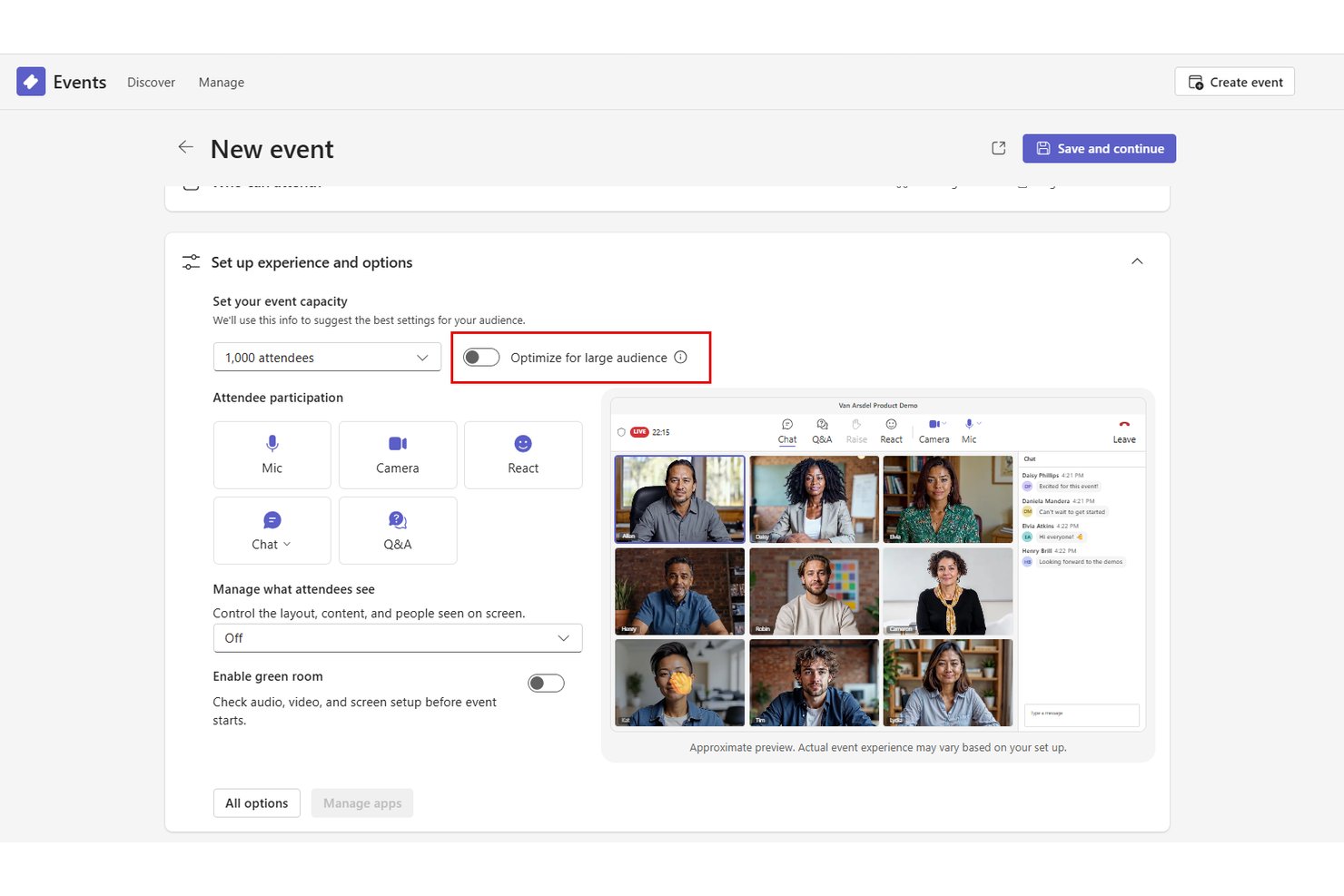
Microsoft Teams is an enterprise collaboration platform that combines video conferencing, AI-powered meeting summaries, action item capture, and scheduling within a channel-based workspace designed to keep meetings connected to ongoing project work.
Who Is Microsoft Teams Best For?
Teams is a strong fit for large enterprises already standardized on Microsoft 365 that want meeting management built into their existing productivity stack.
Why I Picked Microsoft Teams
I picked Microsoft Teams as one of the best because of how tightly its meeting experience is wired into Microsoft 365. Running a steering committee meeting inside a Teams channel means the agenda, shared files, and Planner tasks all live alongside every prior discussion, with no context-switching required. Teams Premium's Intelligent Recap then generates AI-powered summaries and assigned action items automatically after each call.
Microsoft Teams Key Features
- Live translation and interpretation: Participants can access real-time translation for multilingual meetings at scale.
- Room and desk booking: Teams Rooms and Microsoft Places enable workspace and meeting room reservations directly from the app.
- Sensitivity labels and watermarking: Advanced meeting protection options secure confidential content with labels and visible watermarks.
- Microsoft Loop integration: Collaborative pages and task lists can be embedded into meetings for real-time editing and tracking.
Microsoft Teams Integrations
Microsoft Teams has native integrations across the Microsoft ecosystem, including Microsoft 365 and Azure, and also connects with Jira, Trello, Asana, ServiceNow, Zoom, Salesforce, and Slack. An API is available for custom integrations.
Pros and Cons
Pros:
- Real-time collaborative editing with Microsoft Loop
- Advanced enterprise security and compliance controls
- AI-powered meeting transcripts and summaries
Cons:
- Relies heavily on Microsoft 365 adoption
- Agenda templates and approval workflows missing

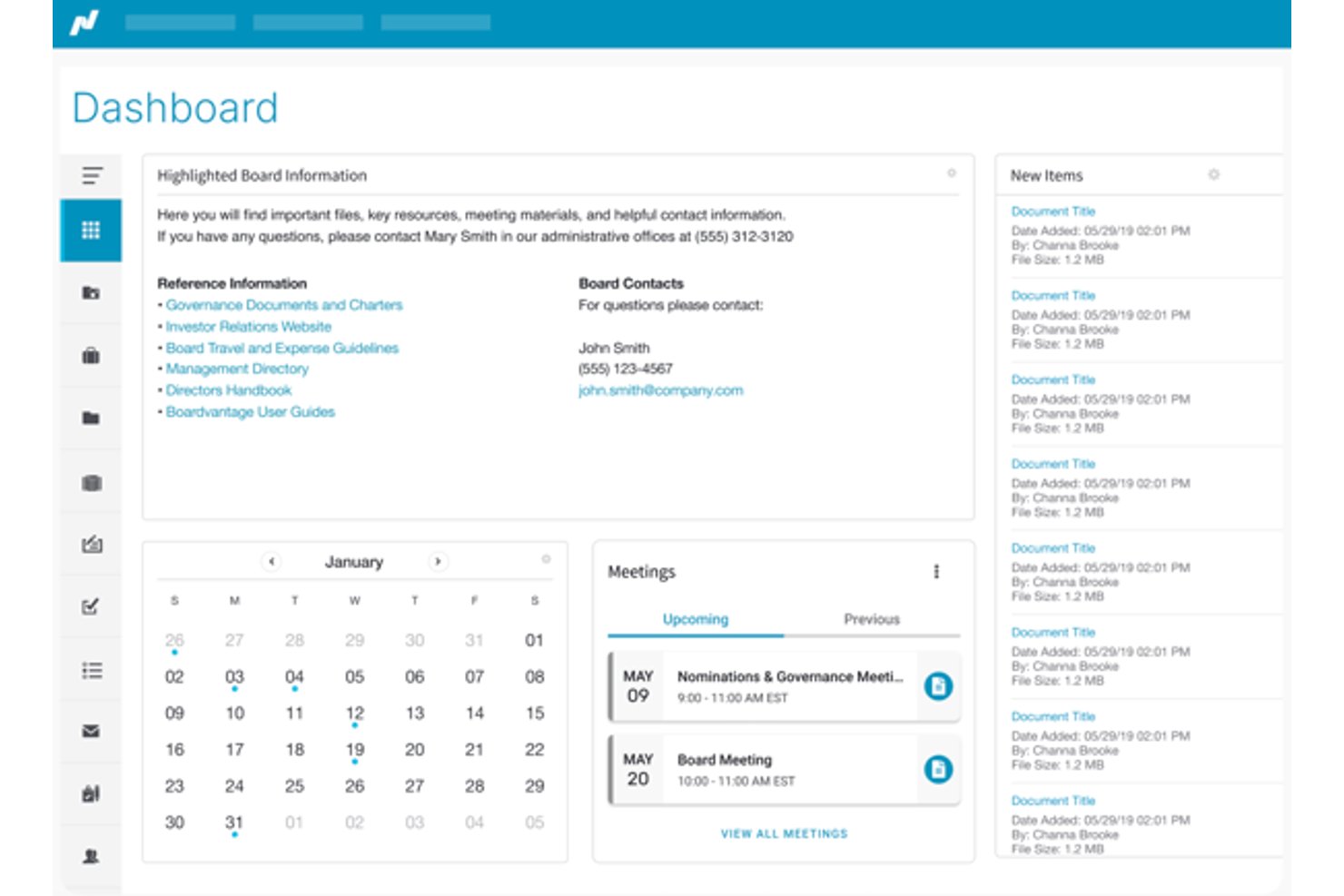
Nasdaq Boardvantage is a board portal built for enterprise governance, combining meeting preparation, secure document distribution, board book assembly, digital approvals, e-signatures, and compliance questionnaires in a single platform.
Who Is Nasdaq Boardvantage Best For?
It's a strong fit for large enterprises and publicly traded companies where corporate secretaries and legal teams manage board and committee meeting governance.
Why I Picked Nasdaq Boardvantage
Nasdaq Boardvantage earns its spot on my shortlist because its compliance infrastructure is genuinely built for high-stakes governance meetings. I'm particularly impressed by the combination of SOC 2 auditing, ISO 27001 certification, granular access controls, and full audit trails, which together cover what most enterprise security teams require before approving a board-level tool. I also find the built-in conflict of interest questionnaires and digital compliance workflows valuable, since those typically require a separate tool or manual process in competing platforms.
Nasdaq Boardvantage Key Features
- Board portal dashboard: Lets users organize meetings, board books, and key documents in a centralized online hub.
- In-app notes and annotations: Directors and admins can annotate board materials and add secure private notes for reference.
- Digital board book assembly: Upload, order, and build complete digital board books for distribution before meetings.
- DocuSign integration: Enables legally binding electronic signatures for board approvals and resolutions directly within the platform.
Nasdaq Boardvantage Integrations
Nasdaq Boardvantage offers native integrations with DocuSign, Microsoft Outlook, and Google Drive.
Pros and Cons
Pros:
- Built-in digital signature and approval flows
- Advanced document permission and access controls
- Board book assembly and distribution workflow
Cons:
- Lacks recurring meeting agenda features
- No real-time meeting collaboration tools

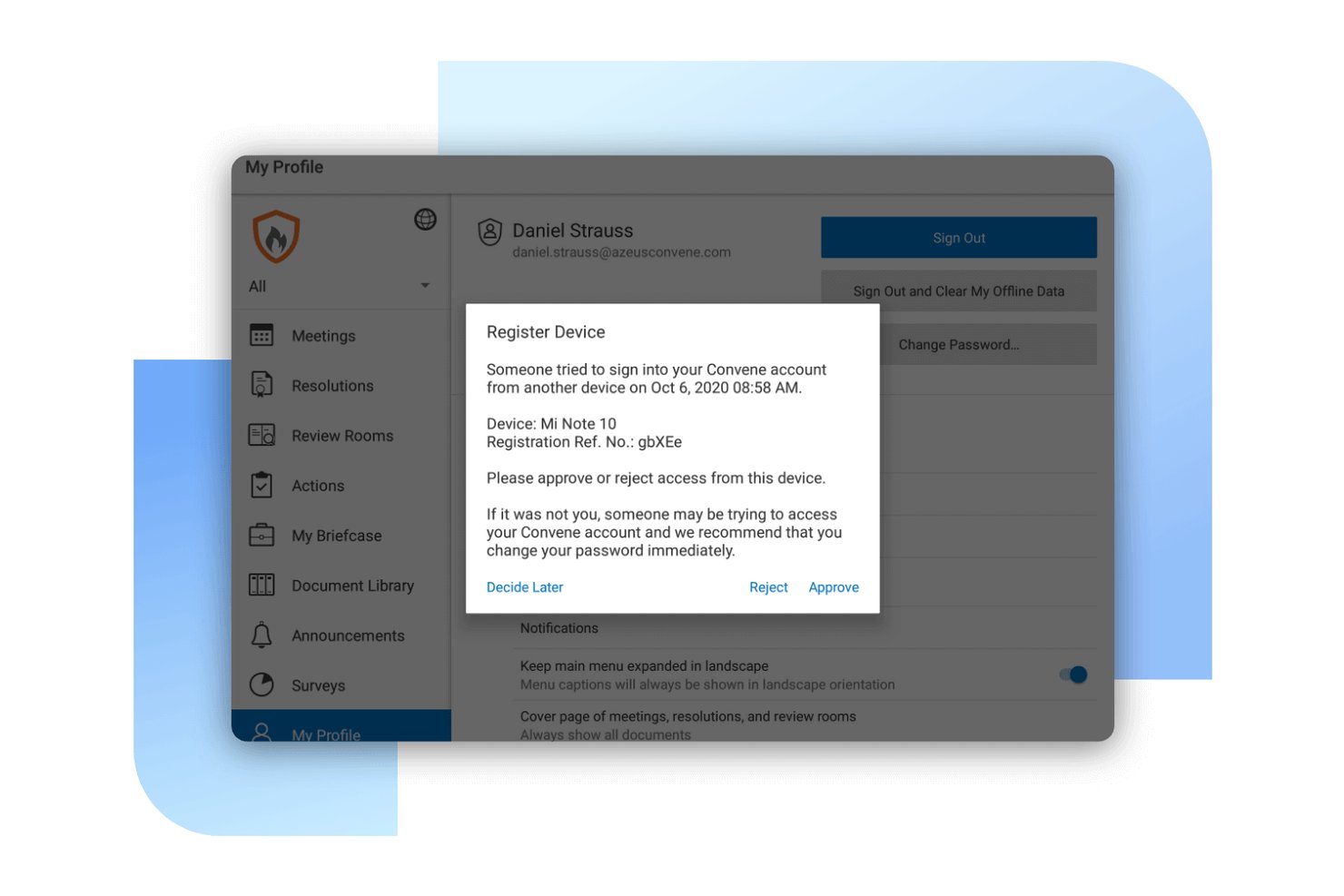
Convene is a board portal and meeting management platform built for governance-focused organizations, combining agenda building, AI-assisted minutes, secure document distribution, voting, and audit-ready compliance tools.
Who Is Convene Best For?
Convene is a strong fit for enterprise organizations running board and steering committee meetings where document security, governance, and compliance are non-negotiable.
Why I Picked Convene
I picked Convene as one of the best because its approach to document security goes well beyond standard access controls. Board packs are decrypted on-the-fly, meaning documents never sit unencrypted on a director's device. Per-document settings let you disable screenshots, restrict downloads, and apply custom watermarks, each tracked in a full audit trail. ISO 27001 certification and SOC 2 Type II compliance back all of this up at the infrastructure level.
Convene Key Features
- Smart agenda builder: Create structured agendas with templates, time allocations, and attachments for each agenda item.
- AI-powered meeting minutes: Automatically capture, summarize, and organize minutes using built-in AI.
- Integrated voting and approvals: Enable directors to vote, sign, and approve documents securely within meetings.
- Cross-platform access: Access meetings and documents from Windows, Mac, iOS, and Android devices.
Convene Integrations
Convene offers native integrations with Outlook, Google Calendar, Zoom, Microsoft Teams, SharePoint, OneDrive, Google Drive, Dropbox, DocuSign, and Adobe Sign. An API is available for custom integrations.
Pros and Cons
Pros:
- Built-in tools for digital meeting minutes
- Role-specific access controls for directors
- AES-256 encrypted document distribution
Cons:
- Occasional delays when syncing offline changes
- Limited flexibility for permission configurations

Fellow
Best collaborative note sharing for teams
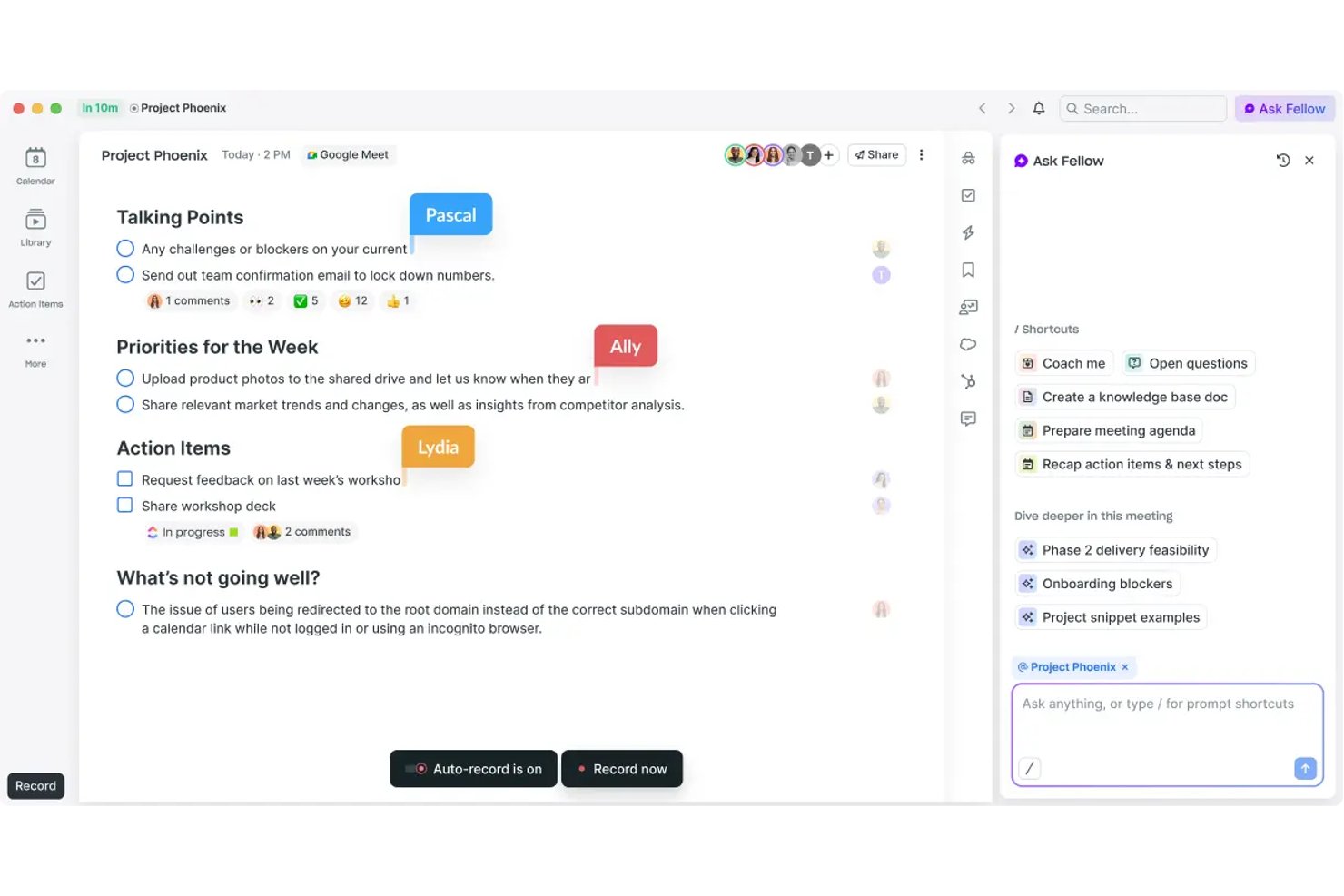
Fellow is an AI meeting management platform that pairs collaborative agenda creation and real-time transcription with action item tracking, 500+ meeting templates, and enterprise-grade security controls across Zoom, Google Meet, and Microsoft Teams.
Who Is Fellow Best For?
Fellow is a strong fit for mid-size to enterprise teams in regulated industries like finance, healthcare, and legal, where meeting compliance and documentation controls are non-negotiable.
Why I Picked Fellow
Fellow earns its spot as one of the best on my shortlist because the collaborative note-taking experience is built for teams, not just individuals. Multiple contributors can edit agendas and notes before, during, and after a meeting. Note locking and version history give you an audit trail of what changed and when. AI-generated summaries and action items pull from the shared transcript, keeping attribution intact across the full meeting record.
Fellow Key Features
- AI meeting assistant: Automatically records, transcribes, and summarizes meetings across Zoom, Teams, and Google Meet.
- Project management integrations: Syncs action items with Asana, Jira, Monday, Linear, and ClickUp.
- Enterprise compliance controls: Provides SOC 2 Type II, HIPAA, GDPR, audit trails, and role-based permissions.
- Recording library: Stores and manages meeting recordings with granular access and retention policies.
Fellow Integrations
Fellow offers 50+ native integrations, including Zoom, Microsoft Teams, Google Meet, Asana, Jira, Monday, Salesforce, HubSpot, Slack, and Notion. API access is available for custom integrations.
Pros and Cons
Pros:
- SOC 2 Type II and HIPAA compliance controls
- AI-generated meeting summaries and action items
- Real-time collaborative agenda and note editing
Cons:
- Limited support for highly structured board meetings
- No built-in meeting scheduling tools

adam.ai
Best action item tracking for follow-ups
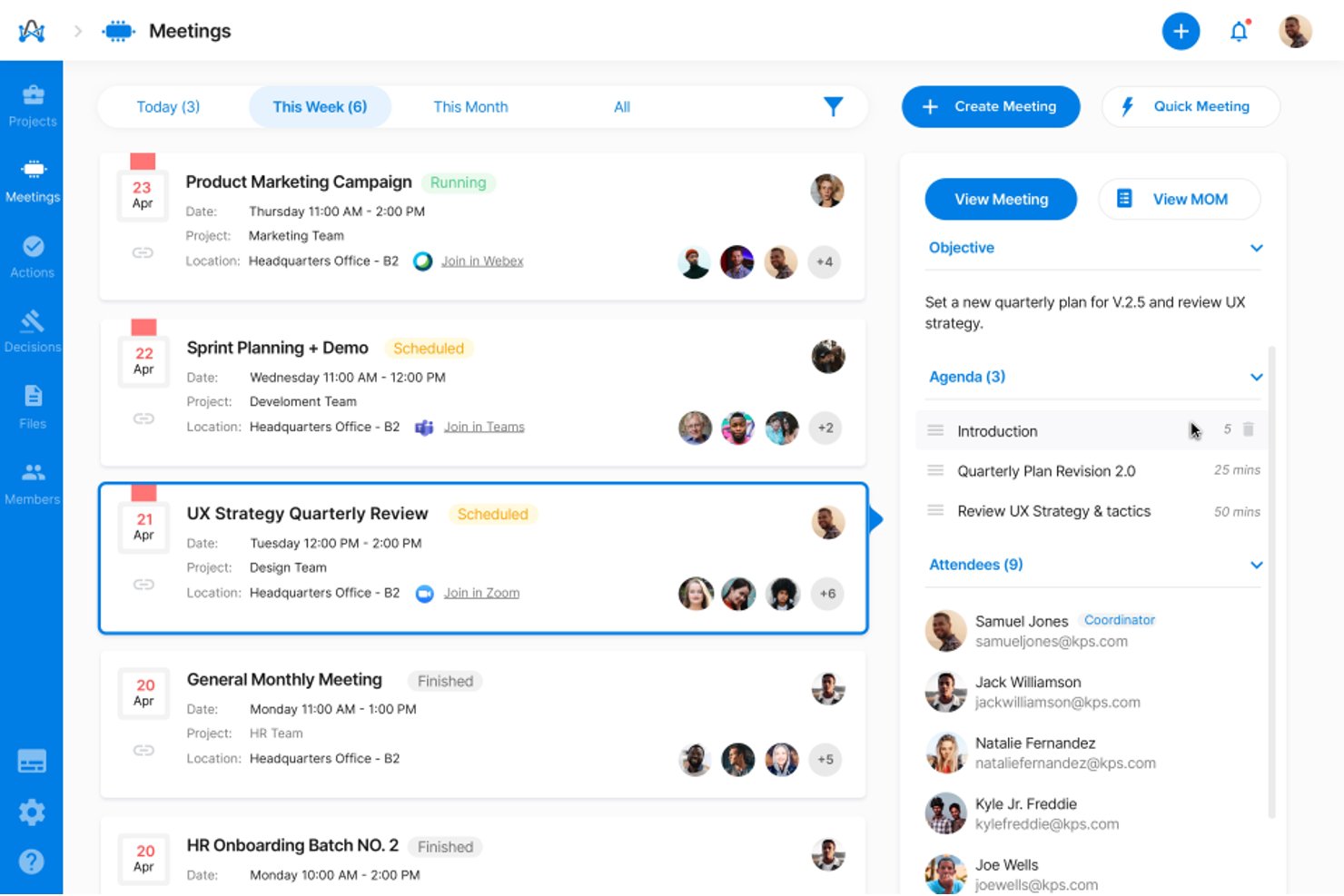
adam.ai is a governance-focused meeting management platform built for enterprise teams, covering agenda building, AI-assisted minutes capture, action item tracking, document management, and board and committee meeting workflows.
Who Is adam.ai Best For?
It's a strong fit for PMO directors and governance leads at mid-to-large enterprises managing board, committee, and steering group meetings with formal oversight requirements.
Why I Picked adam.ai
adam.ai earns its spot on my shortlist because its action tracking goes well beyond a simple task list. I like that you can assign owners and due dates directly inside the meeting, then monitor status across every subsequent session from a dedicated dashboard. iAdam, the built-in AI assistant, automatically surfaces action items from the transcript so nothing gets buried in notes after the call ends.
adam.ai Key Features
- Structured agenda builder: Create, edit, and share detailed agendas with time allocations for recurring meetings.
- Minutes approval workflow: Route meeting minutes for approval and maintain official records with version control.
- Document management: Upload, organize, and reference documents directly within meetings for centralized access.
- Multi-platform integrations: Connect with tools like SharePoint, Confluence, and major video conferencing platforms for unified meeting workflows.
adam.ai Integrations
adam.ai offers native integrations with Microsoft Teams, Zoom, Webex, Google Meet, and more. It connects with Zapier and provides an API for custom integrations.
Pros and Cons
Pros:
- Formal project and board governance support
- Built-in minutes approval and audit workflow
- Tracks action items across recurring meetings
Cons:
- Meeting scheduling less advanced than competitors
- Participant caps on lower tier plans
Beenote
Best advanced meeting minutes templating
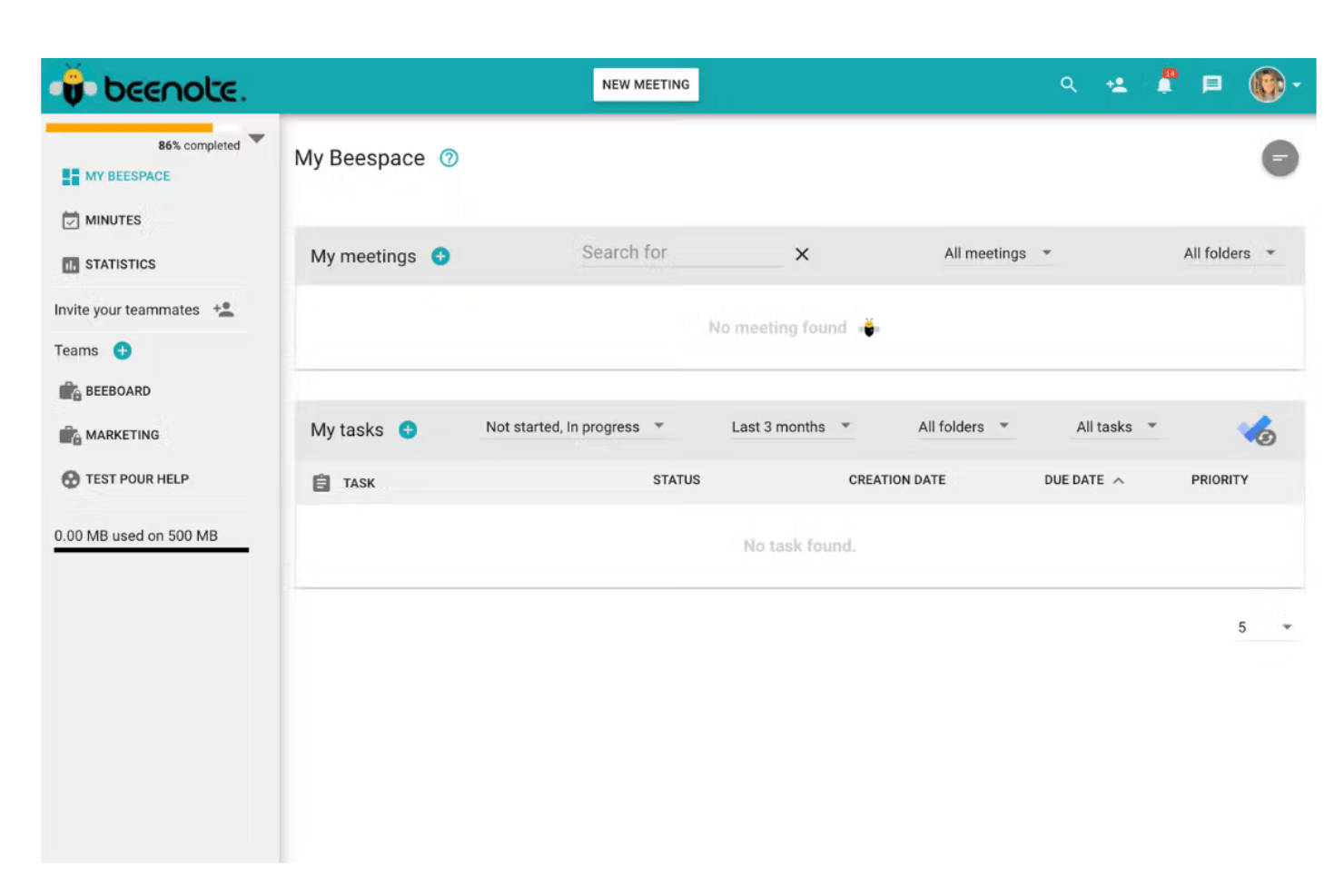
Beenote is a meeting governance platform built around structured agenda creation, real-time collaborative note-taking, automated minutes generation, and decision and action item tracking across teams, committees, and boards of directors.
Who Is Beenote Best For?
Beenote is a natural fit for nonprofits, associations, and mid-market organizations that run formal board meetings, executive committees, or governance-driven project reviews.
Why I Picked Beenote
I picked Beenote as one of the best because its agenda-to-minutes pipeline is genuinely impressive. When you build an agenda in Beenote, that structure becomes the skeleton of your minutes automatically, so by meeting's end, up to 80% of the document is already written. I also like the reusable templates with topic carry-over, which let governance teams run recurring board or committee meetings without rebuilding the agenda from scratch each time.
Beenote Key Features
- Task and decision registers: Track tasks and record decisions across meetings in searchable, persistent registers.
- Electronic voting and advance voting: Enable participants to securely vote on resolutions or decisions within meetings or ahead of time.
- Secretary and private note-taking modes: Allow designated note-takers or board secretaries to keep confidential or internal notes during sensitive sessions.
- Microsoft 365 and Google Workspace integrations: Sync calendars, tasks, and meeting data with leading productivity platforms.
Beenote Integrations
Beenote offers native integrations with Microsoft 365, Microsoft Teams, Outlook, Google Workspace, Google Calendar, Google Tasks, Microsoft To Do, and Antidote.
Pros and Cons
Pros:
- Includes dedicated governance and board modules
- Supports real-time collaborative note editing
- Agenda links automatically to minute-taking
Cons:
- Lacks granular reminder and escalation options
- Does not support bulk document export
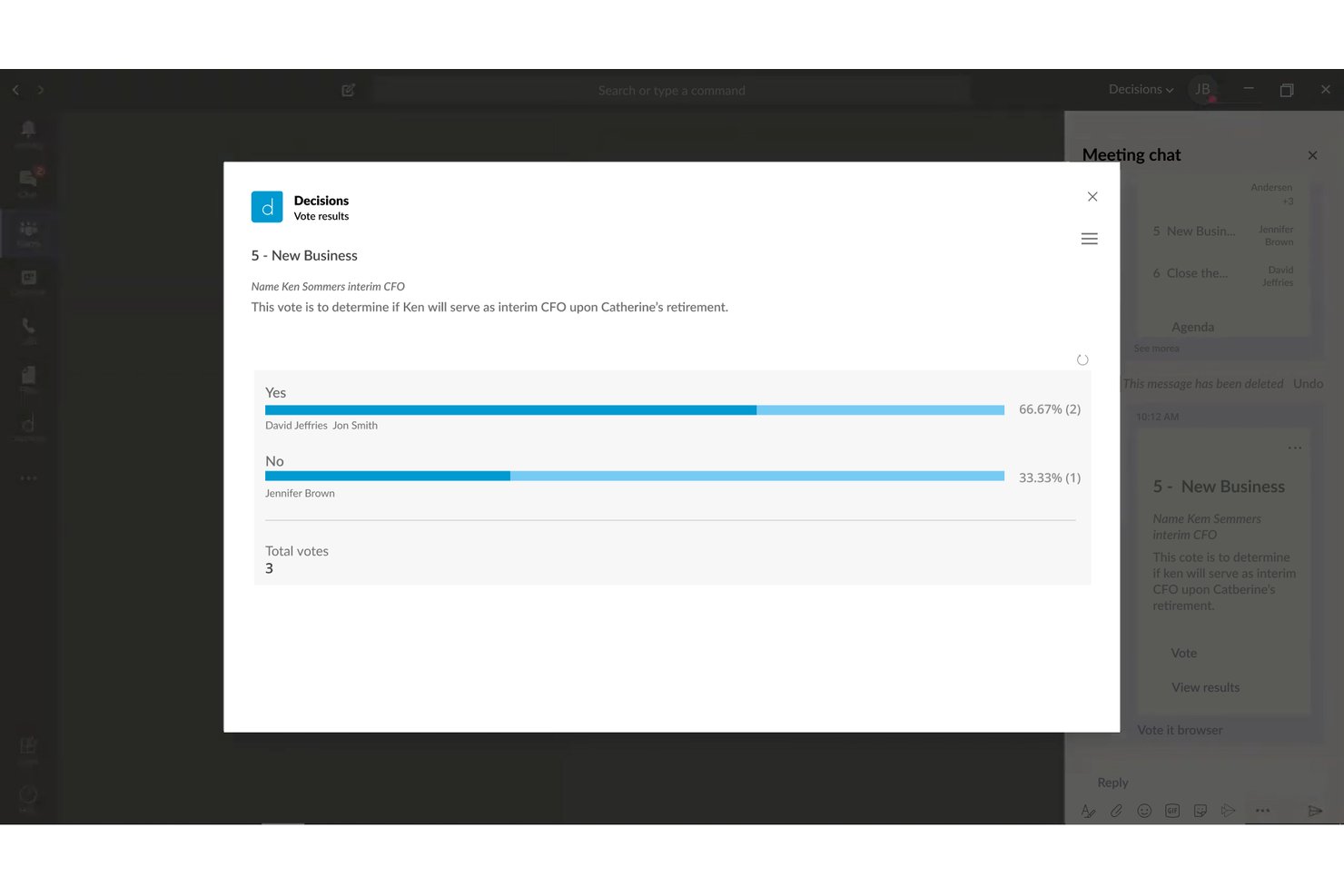
Decisions is a Microsoft 365-native meeting management platform that brings structured agenda building, AI-assisted minutes, decision logging, and action item tracking into Microsoft Teams.
Who Is Decisions Best For?
Decisions is a strong fit for enterprise teams already standardized on Microsoft 365 that need governed, structured meeting processes across PMO and steering committee functions.
Why I Picked Decisions
I've included Decisions in my top picks because of how it handles recurring meeting agendas at the structural level. The AI Agenda Builder generates draft agendas in seconds, and agenda items carry over automatically from session to session, so standing committees or weekly PMO cadences don't start from scratch each week. I also like that attendees can contribute agenda topics before the meeting, which means by the time the call starts, priorities are already aligned.
Decisions Key Features
- AI meeting recap: Summarizes meeting discussions and decisions using intelligent text recognition.
- In-meeting secure voting: Lets participants securely vote on motions or issues during meetings within Teams.
- Microsoft Planner integration: Syncs captured tasks and action items automatically to Microsoft Planner for ongoing tracking.
- SOC 2 and ISO 27001 compliance: Supports enterprise-grade data security, audit trails, and governance standards.
Decisions Integrations
Decisions has native integrations across the Microsoft ecosystem, including Microsoft 365, Teams, Outlook, SharePoint, Planner, OneDrive, Word, Excel, PowerPoint, OneNote, Azure, and more.
Pros and Cons
Pros:
- Secure in-meeting voting and e-signatures
- AI-powered meeting minutes and recaps
- Recurring agendas carry over automatically
Cons:
- No native support for non-Microsoft tools
- Requires license for every attendee
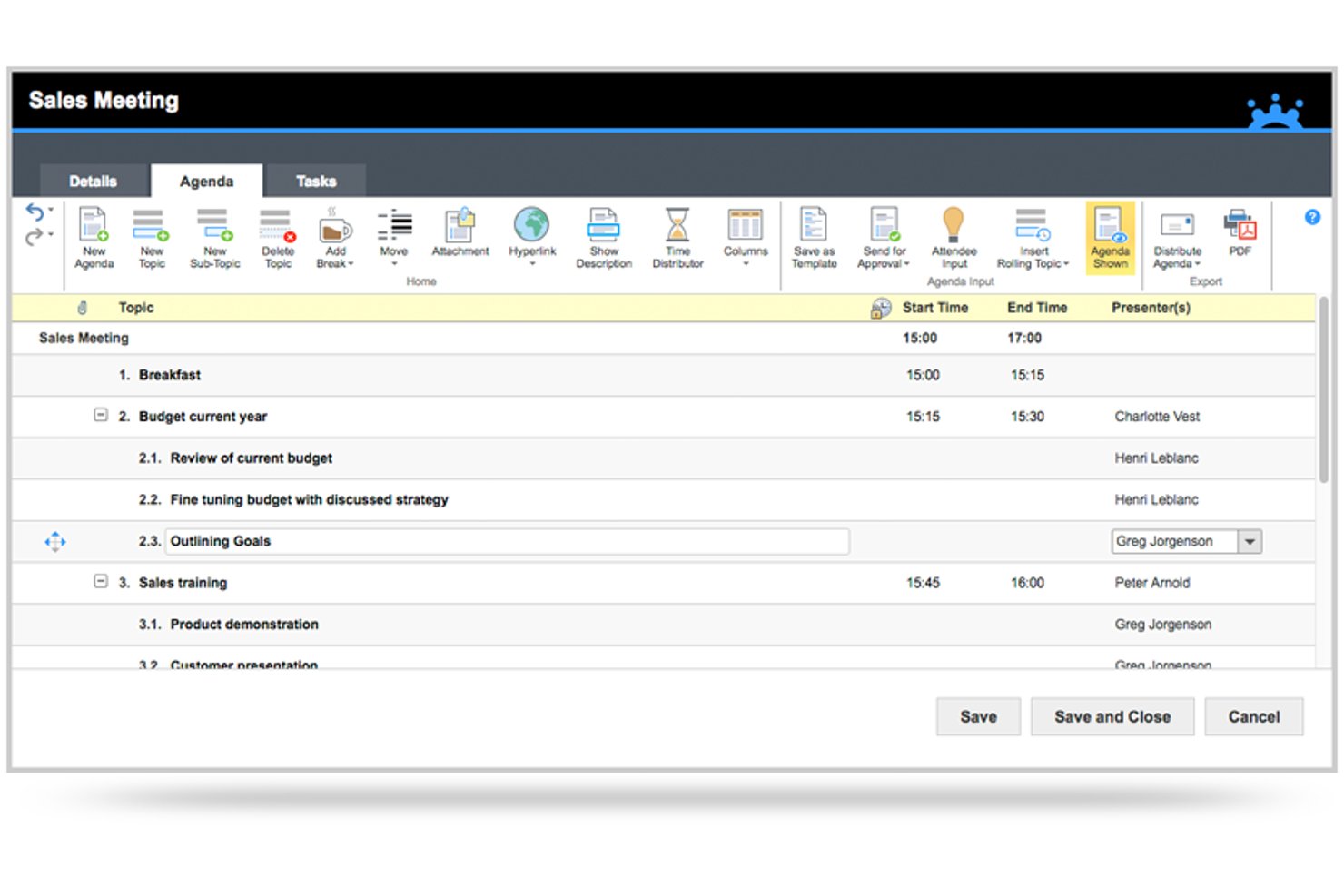
MeetingBooster is an enterprise meeting management platform built around a structured workflow of agenda creation, in-meeting note-taking, auto-generated minutes, task tracking, and meeting series management.
Who Is MeetingBooster Best For?
MeetingBooster is a strong fit for enterprise and mid-market organizations with formal governance requirements, including PMO teams, steering committees, and compliance-driven departments.
Why I Picked MeetingBooster
I picked MeetingBooster as one of the best because no other tool I've used pulls every meeting artifact into a single, structured record the way it does. From the dedicated Agenda Module through to auto-generated, formatted minutes, every decision and action item ends up in one archived document. The Premium approval workflow adds version-controlled sign-off on both agendas and minutes, which is exactly what steering committee records require.
MeetingBooster Key Features
- Meeting analytics dashboard: Track attendance, meeting costs, and task status with built-in reports.
- Meeting series management: Group and organize recurring meetings for boards or committees.
- Microsoft Teams integration: Access agendas and archived minutes directly inside Teams.
- Active Directory synchronization: Manage users and security roles through enterprise directory integration.
MeetingBooster Integrations
MeetingBooster offers native integrations with Outlook, Microsoft Teams, Google Calendar, Office, Lotus Notes, and Yahoo Calendar. Web hooks are available for connecting to external task management systems, and Active Directory synchronization is supported.
Pros and Cons
Pros:
- Outlook and Teams integration for meeting management
- Archiving and approval workflows for minutes
- Dedicated agenda builder with timeboxing
Cons:
- Limited flexibility in task and action item tracking
- No AI-powered transcription or summary tools
Diğer Kurumsal Toplantı Yönetimi Yazılımları
Kısa listeme giremeyen ancak yine de göz atmaya değer bazı ek kurumsal toplantı yönetimi yazılımı seçenekleri şunlardır:
- Board Intelligence
For customizable reporting for executives
- Fireflies.ai
For voice-driven search across meeting records
- Govenda
For director engagement tools for boards
- Otter.ai
For automated live transcription for meetings
- Ideals Board
For secure document sharing for enterprises
- Spinach AI
For AI-powered summaries for team meetings
- BoardPro
For workflow automation for board meeting tasks
- AgreeDo
For agenda-to-action item tracking integration


How I Evaluate Enterprise Meeting Management Software
I split my evaluation into baseline requirements—like structured agenda templates and audit trails for steering committees—and differentiators that separate the best from the rest.
Core Functionality (Table Stakes For This List)
When I'm selecting tools for my list, I rank each one on a scale from 0 (does not offer the functionality) to 5 (excels in this area) for each core functionality listed below. Then, I calculate the tool's total score into a percentage. Each tool needs to achieve a minimum total score of 65% to be considered for inclusion.
- Agenda Management: I check whether a tool supports reusable agenda templates with timeboxing—especially for recurring cadences like weekly standups or monthly steering committees.
- Minutes & Notes Capture: Real-time collaborative notes with attendee attribution and version history matter here, since official meeting records need clear audit trails.
- Action Item Tracking: I evaluate how each tool assigns, tracks, and reports on action items across meetings, including owner visibility, due dates, and status dashboards.
- Enterprise Scheduling: Large stakeholder groups spread across time zones need more than a calendar link. I look for multi-calendar coordination and delegation support.
- Integrations With PM Tools: Connecting meetings to project work is where these tools earn their keep. I look for native sync with platforms like Jira, Asana, or Microsoft Project.
- Governance & Security: For PMO directors and governance leads, I evaluate SSO/SAML support, granular role-based permissions, audit logs, and relevant certifications like SOC 2 or ISO 27001.
Once I have a list of tools that meet the criteria, I consider what sets each platform apart.
Differentiating Factors (What Sets Vendors Apart)
Here's how I compare and contrast different vendors:
Standout Features
AI-powered transcription with speaker identification cuts post-meeting documentation time, especially for program managers running back-to-back sessions. Board and governance workflows also matter. Tools like Diligent Boards and OnBoard include voting modules and secure director portals that governance leads depend on. Analytics dashboards round out the picture, showing meeting time trends by team so you can spot overloaded schedules before they stall delivery.
Beyond Features
Security and compliance posture is where I start. I check for certifications like SOC 2 Type II or ISO 27001 and data residency options, since steering committee records often contain sensitive strategic data. Integration depth matters just as much—open APIs and native connectors to tools like SharePoint, Slack, and Okta determine how well a platform fits your existing stack. I also evaluate licensing flexibility, looking at whether vendors let you mix user types like executives, contributors, and view-only guests to keep costs predictable.
Kurumsal Toplantı Yönetimi Yazılımı Nasıl Seçilir?
Uzun özellik listeleri ve karmaşık fiyatlandırma yapılarına kendinizi kaptırmanız kolaydır. Benzersiz yazılım seçimi sürecinizde ilerlerken odağınızı korumanıza yardımcı olmak için göz önünde bulundurmanız gereken faktörlerin kontrol listesi şöyledir:
| Faktör | Göz önünde bulundurulması gerekenler |
|---|---|
| Ölçeklenebilirlik | Yazılım, büyüdükçe yavaşlama veya ek gizli ücretler olmadan mevcut ve gelecekteki ekipleri, çok sayıda kullanıcıyı ve birden fazla departmanı destekleyebilir mi? |
| Entegrasyonlar | Kuruluşunuzun mevcut proje araçları, takvimleri ve iletişim platformlarıyla minimum kesinti veya maliyetli bağlayıcılar gerektirmeden entegre olabilir mi? |
| Özelleştirilebilirlik | İş akışları, şablonlar, izinler ve marka unsurları, yerleşik toplantı politikalarınıza ve yönetişim gereksinimlerinize uyacak kadar esnek mi? |
| Kullanım kolaylığı | Yoğun çalışan yöneticiler, asistanlar ve dağınık ekipler, aylar süren eğitim veya yoğun BT desteği olmadan aracı hızla benimseyip gündemlerden ve notlardan aksiyon maddelerine kadar toplantının tüm yaşam döngüsünü yönetebilecek mi? |
| Uygulama ve kullanıma alıştırma | Kurulum ne kadar sürecek? Onay alınmasını sağlamak ve proje ritmini aksatmamak için gereken desteği, eğitimi ve kaynakları alabilecek misiniz? |
| Güvenlik önlemleri | Araç, kurum içi politikalarınız ve müşteri verisi gereksinimlerinizle uyumlu mu? Ayrıntılı erişim kontrollerine ve şeffaf denetim izlerine sahip, sertifikalı platformları tercih edin. |
| Maliyet | Ekip büyüklüğünüze ve kullanımınıza göre toplam maliyetleri öngörebilir misiniz? Depolama, entegrasyonlar veya yönetici lisanslarıyla ilgili ek ücretlere dikkat edin. |
| Uyumluluk gereksinimleri | SOC 2, ISO 27001 veya GDPR gibi standartları karşılamanız gerekiyor mu? Veri yerleşimi seçeneklerini ve sağlayıcının denetimleri destekleme veya uyumluluk raporları sunma konusundaki istekliliğini doğrulayın. |
Kurumsal Toplantı Yönetimi Yazılımları Nedir?
Kurumsal toplantı yönetimi yazılımları, büyük kuruluşların farklı konumlarda çalışan ekipler ve paydaşlar arasındaki toplantıları organize etmesine, belgelemesine ve takip etmesine yardımcı olmak üzere tasarlanmış hepsi bir arada platformlardır. Bu araçlar; gündemleri, toplantı tutanaklarını, kararları ve eylem maddelerini merkezileştirirken ekip üyeleri için bildirimler, yönetişim denetimleri ve güvenli erişim sağlayarak toplantı iş akışlarını kolaylaştırır.
Birçok platform, hem uzaktan hem de yüz yüze toplantılarda ekip çalışmasını geliştirmek için görüntülü görüşmeleri, dijital beyaz tahta iş birliğini, katılım kontrolü özelliklerini ve diğer iş birliği özelliklerini destekler. Bu platformlar genellikle bir mobil uygulama içerir, proje yönetimi sistemleriyle entegre olur ve daha iyi bir kullanıcı deneyimi sunarken kuruluşların toplantı sonuçlarını optimize etmesine yardımcı olur. Birçok sağlayıcı, ekiplerin kullanmaya başlamasına yardımcı olmak için web seminerleri gibi eğitim kaynakları da sunar.
Kurumsal Toplantı Yönetimi Yazılımlarının Özellikleri
Kurumsal toplantı yönetimi yazılımı seçerken aşağıdaki temel özelliklere dikkat edin:
- Gündem yönetimi: Ekiplerin zaman tahsisleri, ekleri ve birden fazla katkı sağlayanın girdileriyle yapılandırılmış toplantı gündemleri oluşturmasına, paylaşmasına ve yeniden kullanmasına olanak tanır.
- Tutanak ve not yakalama: Katılımcı bilgileri, zaman damgaları, sürüm geçmişi ve resmi toplantı kayıtlarının güvenli depolanmasıyla birlikte ortaklaşa not alma olanağı sunar.
- Eylem maddesi takibi: Eylem maddelerini veya kararları açık sorumluluk sahipleri ve son teslim tarihleriyle atar, izler ve günceller; ekipler genelinde gerçek zamanlı durum raporlaması sağlar.
- Kurumsal planlama: Büyük ve farklı konumlarda çalışan gruplar için akıllı planlamayı, farklı saat dilimleri arasında takvim oluşturmayı ve Outlook veya Google gibi kurumsal takvimlerle entegrasyonu destekler.
- Erişim denetimleri ve güvenlik: Hassas toplantı içeriklerini korumak için ayrıntılı kullanıcı izinleri, role dayalı erişim, SSO/SAML ve detaylı denetim günlükleri sağlar.
- Uyumluluk ve yönetişim iş akışları: Kuruluşların mevzuata uyumu gözeterek yönetim kurulu düzeyindeki süreçleri, oylamaları, onayları ve e-imza gerekliliklerini yönetmesini sağlar.
- Proje yönetimi araçlarıyla entegrasyon: Toplantı verilerini Jira, Asana veya Microsoft Teams gibi platformlara sorunsuz bir şekilde bağlayarak görevleri ve kararları tam bağlam sağlamak üzere senkronize eder.
- Gelişmiş analiz: Kurumsal üretkenliği ve hesap verebilirliği geliştirmeye yardımcı olmak için toplantı sıklığı, katılım kalıpları ve uygulanabilir sonuçlar hakkında içgörüler sunar.
- Otomatik tutanak dağıtımı: Onaylanmış toplantı tutanaklarının okundu bilgisi ve takip işlemleriyle birlikte paydaşlara gönderilmesini otomatikleştirir.
- Çoklu dil desteği: Arayüzleri, yazıya dökme özelliklerini ve iletişim araçlarını birden fazla dilde sunarak küresel kuruluşların ihtiyaçlarını karşılar.
Kurumsal Toplantı Yönetimi Yazılımlarının Faydaları
Kurumsal toplantı yönetimi yazılımını uygulamak, ekibiniz ve işletmeniz için çeşitli faydalar sağlar. Yararlanabileceğiniz bazı faydalar şunlardır:
- Toplantılarda artan hesap verebilirlik: Eylem maddelerinin atanması ve sorumlulukların takip edilmesi, takip işlemlerinin belgelenmesini ve ekipler genelinde görünür olmasını sağlar.
- Kolaylaştırılmış yönetişim ve uyumluluk: Güvenli kayıt tutma, onaylar ve denetim izleri; yönetim kurulu, mevzuat ve veri gizliliği gerekliliklerini karşılamanıza yardımcı olur.
- Merkezileştirilmiş toplantı belgeleri: Gündemlere, tutanaklara ve kararlara tek bir yerden erişilebilir; böylece karmaşa ve manuel takip azalır.
- Daha verimli planlama: Akıllı takvim entegrasyonları ve saat dilimi desteği, farklı konumlarda bulunan paydaşlar için toplantı düzenlemeyi kolaylaştırır.
- Geliştirilmiş ekipler arası iş birliği: Gerçek zamanlı not alma ve proje araçlarıyla entegrasyonlar, departmanlar arasındaki boşlukları kapatır ve herkesin uyum içinde kalmasını sağlar.
- Uygulanabilir toplantı analizleri: Panolar ve raporlar, daha iyi kaynak planlaması için toplantı yatırım getirisi, harcanan zaman ve katılım hakkında içgörüler sunar.
- Kurumsal büyüme için ölçeklenebilirlik: Çok kiracılı özellikler ve esnek dağıtım, küresel ekipler ve iş birimleri genelinde genişlemeyi destekler.
Kurumsal Toplantı Yönetimi Yazılımlarının Maliyetleri ve Fiyatlandırması
Kurumsal toplantı yönetimi yazılımı seçmek, mevcut çeşitli fiyatlandırma modellerinin ve planların anlaşılmasını gerektirir. Maliyetler özelliklere, ekip büyüklüğüne, eklentilere ve diğer unsurlara göre değişir. Aşağıdaki tablo, kurumsal toplantı yönetimi yazılımı çözümlerinde yaygın olarak sunulan planları, ortalama fiyatlarını ve tipik özelliklerini özetlemektedir:
Kurumsal Toplantı Yönetimi Yazılımları için Plan Karşılaştırma Tablosu
| Plan Türü | Ortalama Fiyat | Yaygın Özellikler |
|---|---|---|
| Ücretsiz Plan | $0 | Temel gündem oluşturma, basit not alma, sınırlı toplantı depolama alanı ve az sayıda kullanıcı için erişim. |
| Bireysel Plan | $5-$15/kullanıcı/ay | Bireysel planlama, yeniden kullanılabilir gündem şablonları, temel entegrasyonlar, dosya ekleri ve tek kullanıcı takibi. |
| İşletme Planı | $15-$40/kullanıcı/ay | Ekip planlaması, ortaklaşa not alma, eylem maddesi atamaları, gelişmiş entegrasyonlar ve gösterge paneli raporlaması. |
| Kurumsal Plan | $40-$90/kullanıcı/ay | SSO/SAML, denetim günlükleri, uyumluluk iş akışları, özel markalama, öncelikli destek, API erişimi ve sınırsız depolama. |
Kurumsal Toplantı Yönetimi Yazılımı Hakkında SSS
Kurumsal toplantı yönetimi yazılımı hakkında sık sorulan bazı soruların yanıtları:
Kurumsal toplantı yönetimi yazılımı, temel toplantı uygulamalarından nasıl farklıdır?
Kurumsal toplantı yönetimi yazılımı; temel toplantı uygulamalarında bulunmayan yönetişim iş akışları, role dayalı izinler, uyumluluk takibi ve proje yönetimi ile güvenlik sistemleriyle derin entegrasyonlar gibi gelişmiş özellikler sunar.
Kurumsal toplantı yönetimi yazılımı mevcut teknoloji yığınımızla entegre olabilir mi?
Evet, çoğu çözüm Google Workspace, Microsoft 365, Slack, Salesforce ve proje yönetimi platformları gibi araçlar için bağlayıcıların yanı sıra özel entegrasyonlar için açık API’ler sunar; böylece bunları mevcut iş akışlarınıza dahil edebilirsiniz.
Bu platformlardan hangi güvenlik önlemlerini beklemeliyim?
SOC 2 veya ISO 27001 sertifikası, SSO/SAML kimlik doğrulaması, veri yerleşimi denetimleri, ayrıntılı izinler, denetim günlükleri ve hassas toplantı içeriği için şifreleme gibi özellikleri arayın.
Bu araçlarla toplantıların etkililiğini veya katılımı takip etmek mümkün mü?
Evet, birçok platform katılımı, eylem maddelerinin tamamlanma durumunu ve toplantı süresi eğilimlerini gösteren analiz panoları içerir; bu sayede toplantı yatırım getirinizi değerlendirip iyileştirebilirsiniz.
Yönetim kurulu toplantılarını ve uyumluluk süreçlerini aynı platformda yönetebilir miyiz?
Evet, önde gelen platformlar gündem onayı, elektronik imzalar, kararlar, oylama ve güvenli yönetici erişimi dahil olmak üzere yönetim kurulu toplantısı iş akışlarını destekler; bu da uyumluluk takibini çok daha kolaylaştırır.