

2026’nın En İyi 10 Açık Kaynaklı Bilgi Tabanı Yazılımı

10 Açık Kaynak Bilgi Bankası Yazılımları Kısa Listesi


Açık kaynak bilgi bankası yazılımı, ekiplerin satıcıya bağımlı kalmadan esnek ve özelleştirilebilir bir bilgi bankası çözümü oluşturmasına yardımcı olan bir bilgi yönetimi yazılımı türüdür. Bu araçlar, belgeler için merkezi bir depo oluşturmanıza olanak tanıyarak kuruluşunuz genelinde bilgileri düzenlemeyi ve paylaşmayı kolaylaştırır.
Bu yazılımlar hem harici self servis kaynaklarını hem de çalışanlar için dahili bir bilgi bankasını destekleyerek destek ekibinizin ve yardım masanızın sorun gidermeyi daha verimli bir şekilde ele almasına yardımcı olur. Birçok platform aynı zamanda kullanıcı dostudur; böylece bilgi merkeziniz büyüdükçe ekiplerin içerik oluşturması, güncellemesi ve bakımını yapması kolaylaşır.
Bu kılavuzda, belgeler oluşturmak, yönetmek ve belgeler üzerinde iş birliği yapmak için en iyi açık kaynak platformlarını bulacaksınız. Böylece ekibinizin iş akışına, teknoloji yığınına ve büyüme planlarına en uygun seçeneği belirleyebilirsiniz.
Why Trust Our Software Recommendations
Our team has been testing and reviewing software since 2012. As project managers ourselves, we know how difficult—and important—it is to choose the right software.
For this guide, we evaluated tools using hands-on testing and independent research, scoring tools using our selection criteria. We also draw on insights from industry thought leaders and practicing project management experts.
Our reviews reflect our human editorial judgment, not a sales pitch.
Expert reviewers:
Açık Kaynak Bilgi Bankası Yazılımları Karşılaştırma Tablosu
Bu karşılaştırma tablosu, en iyi açık kaynak bilgi bankası yazılımı seçimlerimin fiyatlandırma ayrıntılarını özetlemektedir:
| Tool | Starting Price | Website | |
|---|---|---|---|
| Best for structured content collaboration | 4.4 out of 5 | €1/user/month Free plan + up to 30-day trial + free demo available | Website |
| Best for document workflows and storage | — | Pricing upon request Free demo available | Website |
| Best for clean team documentation | — | $4/user/month Free plan + 30-day trial available | Website |
| Best for book-style documentation | — | Free to use Free to use | Website |
| Best for modern wiki interfaces | — | Free to use Free to use | Website |
| Best for highly customizable wikis | — | Free to use Free to use | Website |
| Best for database-free documentation | — | Free to use Free, open-source | Website |
| Best for lightweight markdown docs | — | Pricing upon request Free trial available | Website |
| Best for multilingual FAQ systems | — | Free to use Free to use | Website |
| Best for wiki and document management | — | $9/user/year Free for first five users | Website |
Açık Kaynak Bilgi Bankası Yazılımları İncelemeleri
Aşağıda, kısa listeme giren açık kaynak bilgi bankası yazılımlarının ayrıntılı özetlerini bulabilirsiniz. İncelemelerim, her platformun özelliklerine, en uygun kullanım alanlarına ve entegrasyonlarına ayrıntılı bir bakış sunarak sizin için en iyi seçeneği bulmanıza yardımcı olur.

XWiki
Best for structured content collaboration

XWiki is an open source enterprise wiki platform for building structured knowledge bases, supporting advanced content organization, collaborative editing, and customizable data-driven applications.
Who Is XWiki Best For?
Large organizations or enterprises that need a customizable, structured knowledge base for complex documentation and collaboration.
Why I Picked XWiki
I picked XWiki as one of the best because I like how its structured data support lets my team build custom forms and applications directly inside our wiki. I use its advanced page templates and scripting features to create dynamic documentation that adapts to our workflows. The ability to manage complex hierarchies and metadata makes it a strong fit for large-scale, enterprise knowledge bases.
XWiki Key Features
- Version control: Track and compare changes across all wiki pages.
- Rights management: Set granular permissions for users and groups.
- WYSIWYG editor: Edit content visually without needing to write code.
- Attachment management: Upload, organize, and manage files within the wiki.
XWiki Integrations
Native integrations are not currently listed. XWiki supports integrations via its RESTful API and webhooks for custom connections.
Pros and Cons
Pros:
- Handles large-scale documentation projects well
- Extensive plugin system for added wiki features
- Structured data and scripting for advanced customization
Cons:
- Occasional plugin compatibility and upgrade issues
- Complex setup for advanced features and integrations


OpenDocMan is an open source document management system designed for organizing, storing, and controlling access to files and documentation with workflow and compliance features.
Who Is OpenDocMan Best For?
Compliance-driven teams in regulated industries who need granular document control and approval workflows.
Why I Picked OpenDocMan
I picked OpenDocMan as one of the best because I need a system that enforces document approval workflows and granular access controls—features that are essential for compliance-driven teams. I like that my team can set up custom metadata fields and automate document review cycles. In practice, that means we can track document status and ensure only authorized users can access sensitive files.
OpenDocMan Key Features
- Web-based interface: Access and manage documents through any modern web browser.
- Automated file versioning: Automatically tracks and stores previous versions of uploaded documents.
- Document search: Search for documents using keywords, metadata, or file properties.
- User group management: Assign users to groups for simplified permission and access control.
OpenDocMan Integrations
Native integrations are not currently listed. An API is available for custom integrations.
Pros and Cons
Pros:
- Web-based interface for remote access
- Custom metadata fields for document organization
- Built-in document approval workflow
Cons:
- Folder navigation can get cumbersome at scale
- Search performance dips with large repositories


Outline is an open source knowledge base platform for teams that offers collaborative editing, markdown support, structured document organization, and real-time search.
Who Is Outline Best For?
Teams and startups that want a fast, modern open source knowledge base with collaborative editing.
Why I Picked Outline
I picked Outline as one of the best because I like how quickly my team can spin up a modern, open source knowledge base with real-time collaborative editing. I use its markdown-based editor and nested collections to keep our documentation organized and easy to update. The fast, responsive interface means my team can search and navigate large knowledge bases without lag.
Outline Key Features
- Access permissions: Control who can view, edit, or share documents at a granular level.
- Revision history: Track and restore previous versions of any document.
- Public sharing: Publish selected documents or collections with a public link.
- Slack integration: Connect Outline to Slack for notifications and quick document sharing.
Outline Integrations
Outline offers native integrations with Slack, Google Workspace, Alfred, Figma, Airtable, and Zapier. An API is available for custom integrations.
Pros and Cons
Pros:
- Nested collections for structured documentation
- Markdown-based editor with rich formatting
- Real-time collaborative editing for teams
Cons:
- Fewer rich formatting options than some rivals
- No built-in migration tool for legacy data

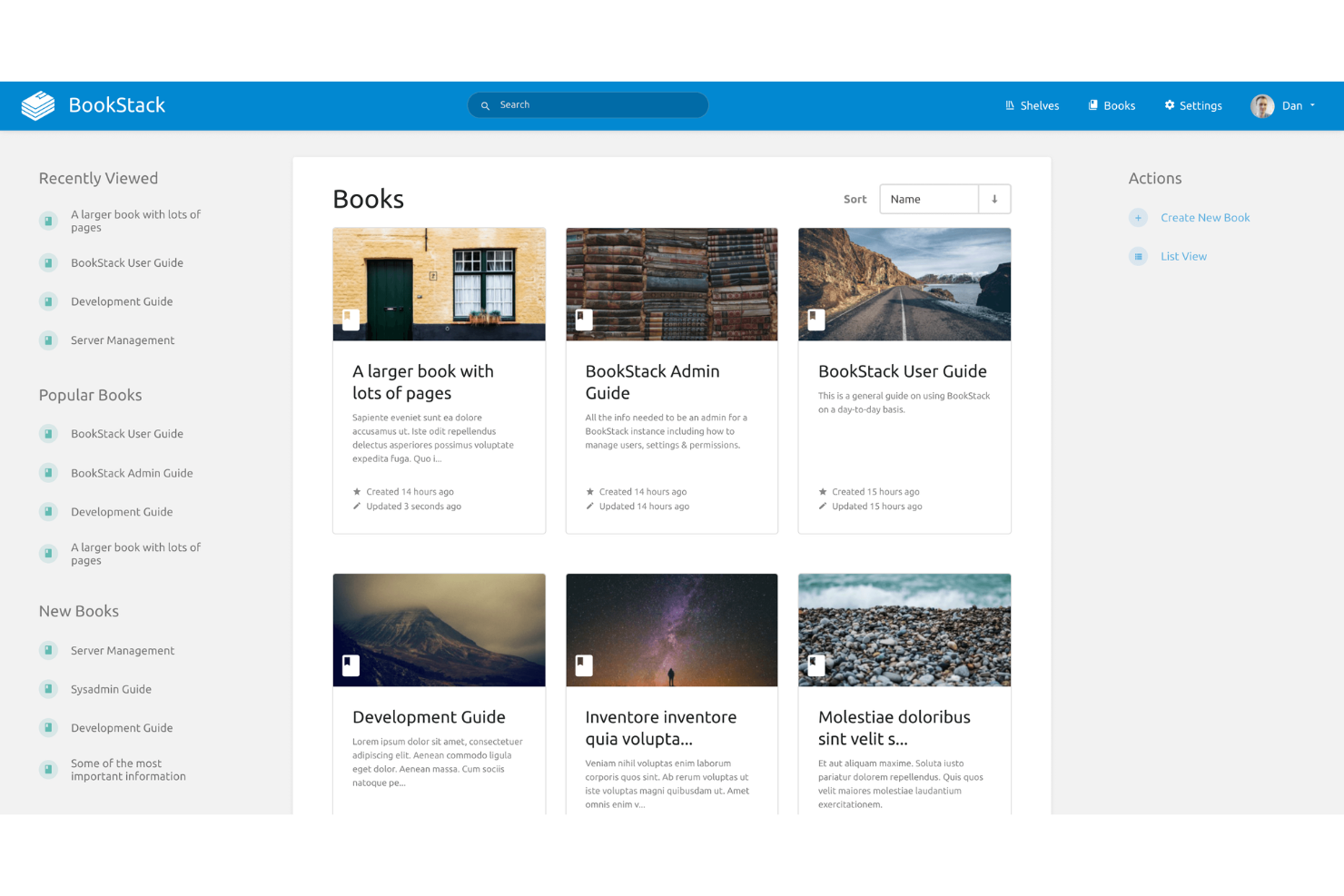
BookStack is an open source knowledge base platform that organizes content into books, chapters, and pages, offering a structured approach to documentation and internal wikis.
Who Is BookStack Best For?
Small to midsize teams who want a straightforward, book-style documentation system for internal knowledge sharing.
Why I Picked BookStack
I picked BookStack as one of the best because its book-style documentation structure lets my team organize content into books, chapters, and pages for clear hierarchy. I like how the WYSIWYG editor makes formatting simple, and the role-based permissions help us manage access across different groups. When we need to link related topics, the cross-book linking feature keeps everything connected.
BookStack Key Features
- Markdown support: Write and edit pages using markdown syntax for quick formatting.
- Revision history: Track and restore previous versions of any page or chapter.
- Customizable themes: Change the look and feel of your knowledge base with theme options.
- Multi-language support: Create and manage content in multiple languages for global teams.
BookStack Integrations
BookStack offers native authentication integrations with LDAP, Active Directory, SAML, and social login providers like Google and GitHub. A REST API is available for custom integrations.
Pros and Cons
Pros:
- Role-based permissions for granular access control
- WYSIWYG and markdown editors both available
- Book-style hierarchy organizes documentation clearly
Cons:
- Lacks advanced analytics or reporting features
- No built-in support for multimedia embedding

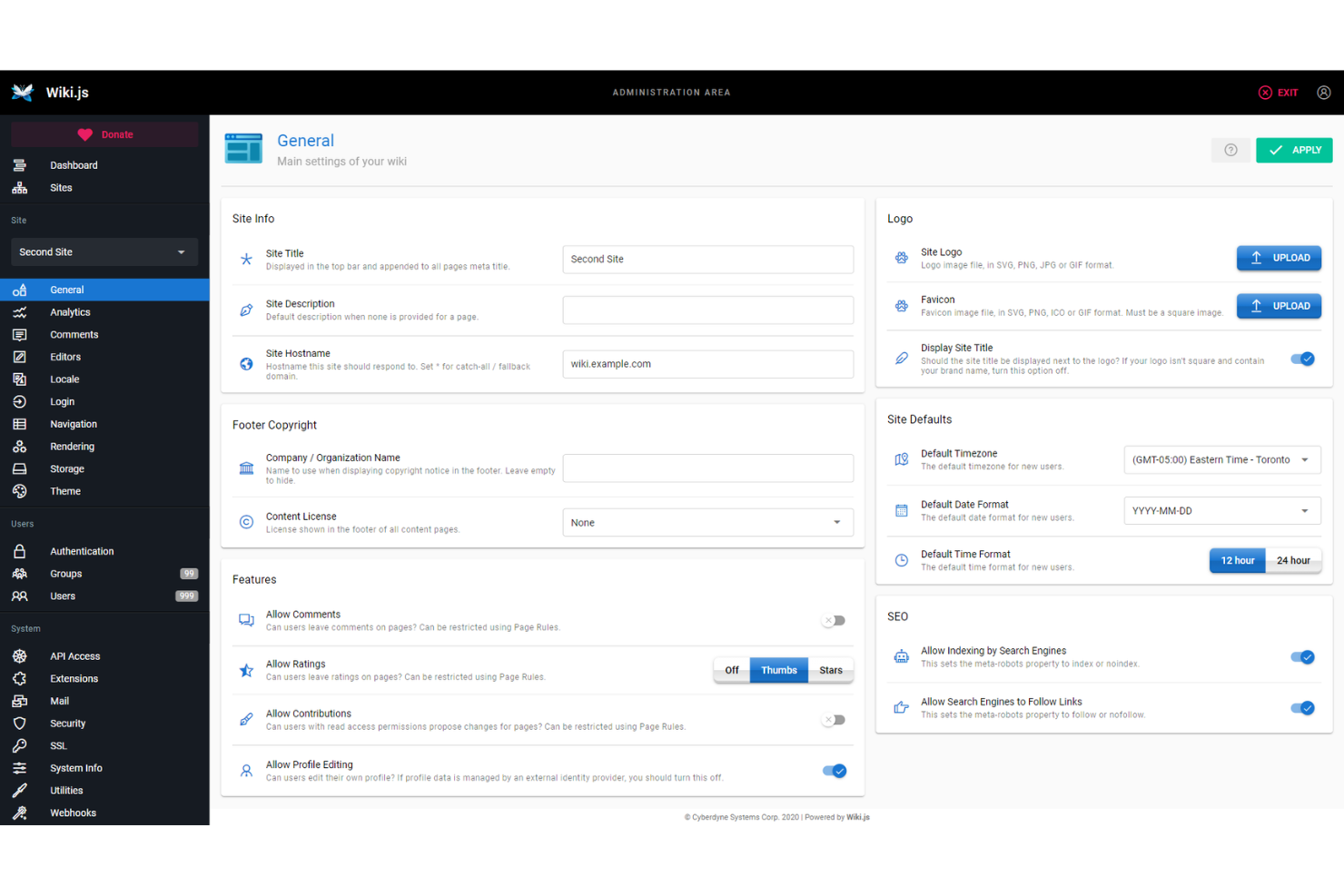
Wiki.js is an open source knowledge base platform that lets you create, manage, and organize documentation with a modular architecture, multiple editor options, and extensive authentication and storage integrations.
Who Is Wiki.js Best For?
Technical teams and organizations that need a customizable, extensible documentation platform with advanced authentication and storage options.
Why I Picked Wiki.js
I picked Wiki.js as one of the best because its modular architecture lets me enable only the features my team needs, keeping our knowledge base lean and focused. I like how it supports multiple editors, including markdown and visual, so contributors can work in their preferred style. The extensibility through integrations and authentication providers means I can tailor Wiki.js to fit complex technical environments.
Wiki.js Key Features
- Granular access control: Set permissions at the page, group, or user level.
- Multi-language support: Manage and display content in multiple languages.
- Built-in search engine: Quickly find pages and files across your knowledge base.
- Content versioning: Track, compare, and restore previous versions of any page.
Wiki.js Integrations
Wiki.js offers native integrations with GitHub, Google Cloud, Azure, Dropbox, Algolia, AWS, and provides an API for custom integrations.
Pros and Cons
Pros:
- Markdown and visual editors both available
- Supports multiple authentication providers out of the box
- Modular system lets you enable only needed features
Cons:
- Lacks built-in multimedia embedding support
- Search can be slow on large wikis

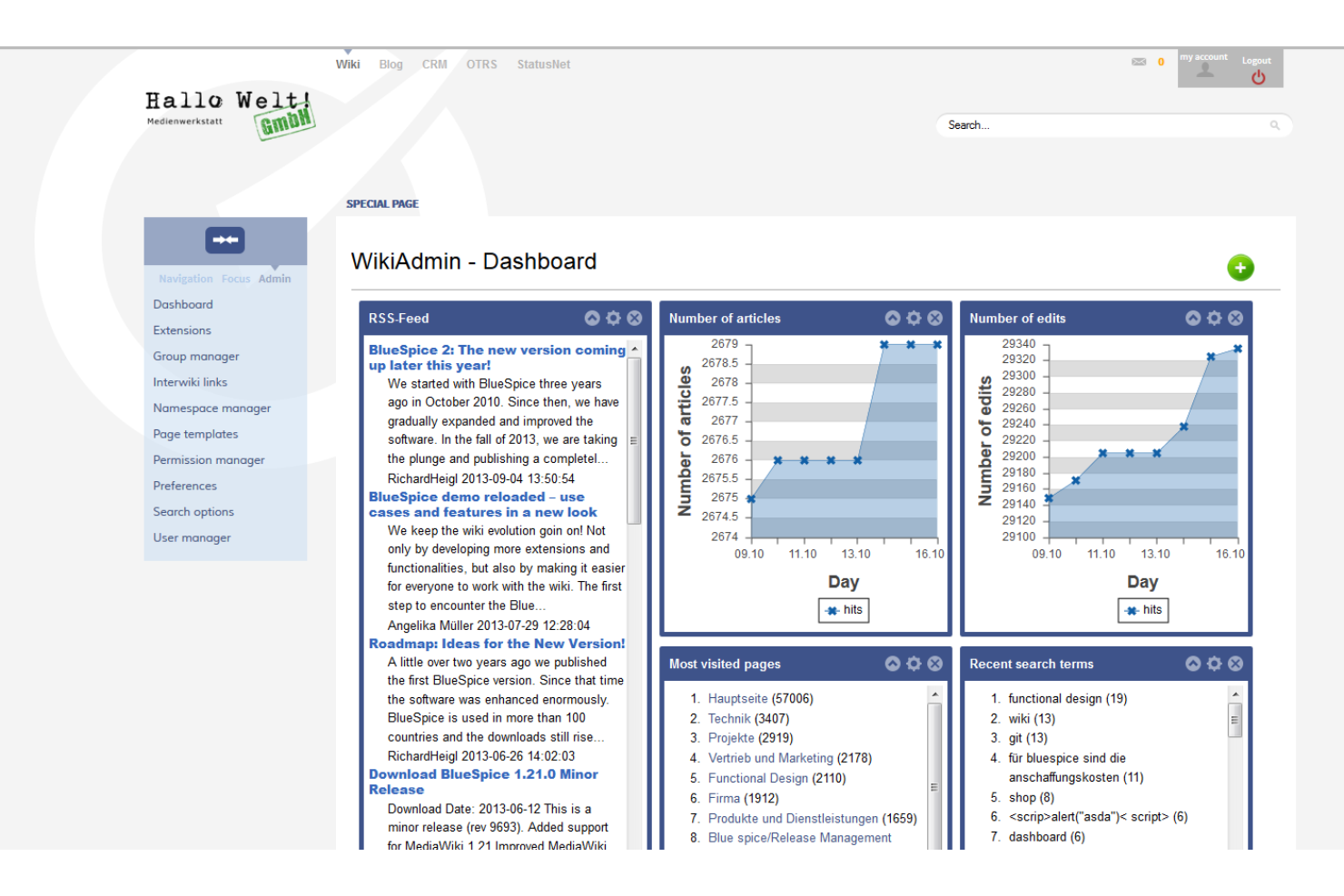
MediaWiki is an open source wiki platform designed for collaborative editing, version control, and content management at scale, with a flexible extension system and support for complex documentation structures.
Who Is MediaWiki Best For?
Large organizations and communities managing extensive, collaborative documentation or knowledge bases.
Why I Picked MediaWiki
I picked MediaWiki as one of the best because it’s the open source engine behind Wikipedia, which means my team can handle massive, multi-user documentation projects with proven scalability. I like how its extension system lets us add features for citations, templates, and advanced content structuring. In practice, that means we’re able to build complex, interlinked knowledge bases that support detailed revision histories and collaborative editing at scale.
MediaWiki Key Features
- Namespaces: Organize content into separate, logical areas for different types of pages.
- User rights management: Assign granular permissions to users and groups for editing and administration.
- Watchlists: Track changes to selected pages for easier monitoring and collaboration.
- API access: Integrate with external tools and automate tasks using a web API.
MediaWiki Integrations
Native integrations are not currently listed. MediaWiki supports integrations via its API and hundreds of community-developed extensions for connecting with tools like LDAP, Google Analytics, and Slack.
Pros and Cons
Pros:
- Strong version control and revision history
- Handles very large documentation projects well
- Highly customizable with extensive extension support
Cons:
- No built-in WYSIWYG editor by default
- Outdated default interface compared to modern tools

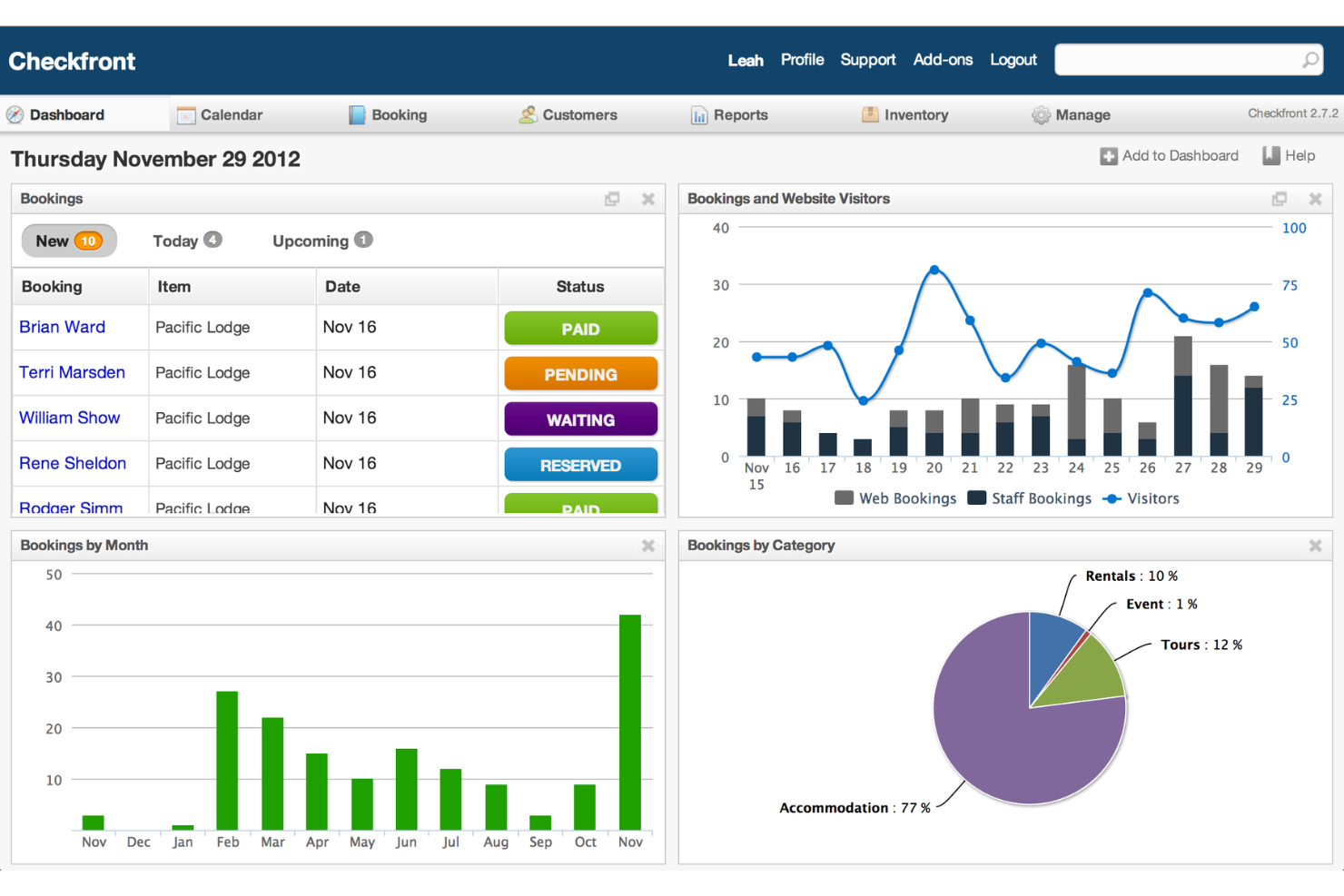
DokuWiki is an open source wiki software designed for creating and managing structured documentation, offering plain text storage, easy syntax, and a plugin system for extending functionality.
Who Is DokuWiki Best For?
Small to mid-sized teams or organizations needing a lightweight, file-based wiki for internal documentation.
Why I Picked DokuWiki
I picked DokuWiki as one of the best because I like how its plain text file storage means I never need a database, which keeps setup and backups simple. My team uses its flexible plugin system to add features like access control and structured data, so we can tailor our wiki to fit specific documentation needs. I also appreciate the built-in page versioning, which lets us track every change without extra configuration.
DokuWiki Key Features
- Access control lists: Set granular permissions for users and groups.
- Media manager: Upload and organize images and files within the wiki.
- Full-text search: Quickly find content across all wiki pages.
- Template system: Customize the look and feel with different themes.
DokuWiki Integrations
Native integrations are not currently listed. DokuWiki supports integrations via its plugin system and provides an API for custom integrations.
Pros and Cons
Pros:
- Handles large documentation projects well
- No database required for installation
- Plugin system adds advanced wiki features
Cons:
- Manual setup needed for multimedia embedding
- Limited native integrations with other tools

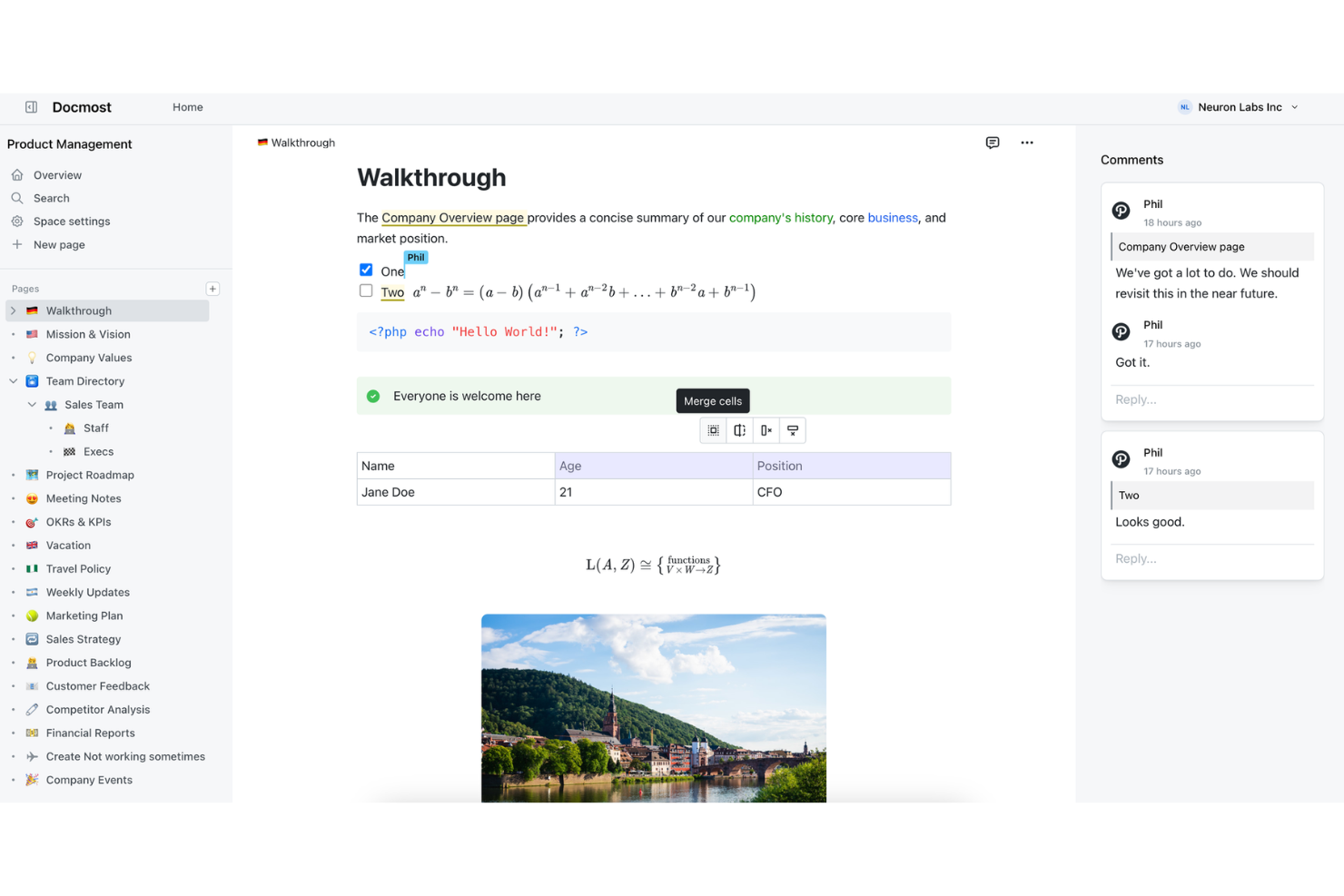
Docmost is an AI-powered knowledge base platform for teams that combines document creation, smart search, and collaborative editing in a single workspace.
Who Is Docmost Best For?
Teams and organizations that want an AI-powered knowledge base to centralize internal documentation and support collaboration.
Why I Picked Docmost
I picked Docmost as one of the best because I like how its AI-powered search and document suggestions help my team surface relevant knowledge instantly. I use its collaborative editor and smart organization features to keep our internal documentation up to date. The AI assistant makes it easy to generate and refine content directly in the workspace.
Docmost Key Features
- Version history: Track and restore previous document versions at any time.
- Role-based permissions: Set granular access controls for users and groups.
- Custom templates: Create and reuse document templates for consistent formatting.
- Bulk import: Import multiple documents at once from supported file types.
Docmost Integrations
Docmost offers native integrations with Loom, Typeform, Miro, Airtable, Figma, plus a REST API and support for AI and external tool connectivity via the Model Context Protocol (MCP).
Pros and Cons
Pros:
- Instant local search across all documents
- Self-hosted with privacy-first architecture
- AI-powered content suggestions for documentation
Cons:
- Interface customization options are very restricted
- Minimal analytics or usage reporting tools


phpMyFAQ is an open source FAQ and knowledge base software that lets you create, organize, and publish structured question-and-answer content with multilingual support, user permissions, and content versioning.
Who Is phpMyFAQ Best For?
Small to mid-sized organizations that need a structured, multilingual FAQ or knowledge base.
Why I Picked phpMyFAQ
I picked phpMyFAQ as one of the best because it’s open source and purpose-built for structured FAQ management. I like that I can organize content into categories, use built-in multilingual support, and manage user permissions for editing and publishing. My team uses its revision history to track changes and maintain accuracy across our knowledge base.
phpMyFAQ Key Features
- Attachment management: Upload and manage files alongside FAQ entries.
- User feedback system: Collect user ratings and comments on articles.
- LDAP and Active Directory support: Integrate authentication with enterprise user directories.
- Backup and restore tools: Export and import the entire knowledge base for disaster recovery.
phpMyFAQ Integrations
phpMyFAQ offers native support for MySQL, MariaDB, PostgreSQL, Microsoft SQL Server, SQLite, Elasticsearch, OpenSearch, and LDAP/Active Directory authentication.
Pros and Cons
Pros:
- LDAP and Active Directory authentication
- Category-based FAQ organization
- Multilingual support for global teams
Cons:
- Admin interface relies on traditional PHP styling
- Lacks collaborative real-time editing capability

Documize is an open source knowledge base platform that lets teams organize, author, and manage internal documentation, technical guides, and collaborative content in a unified workspace.
Who Is Documize Best For?
IT teams and technical departments in mid-sized organizations that need a centralized, open source documentation hub.
Why I Picked Documize
I picked Documize as one of the best because I like how it combines open source flexibility with a structured workspace for technical documentation. My team uses its Spaces and Pages system to organize internal docs and technical guides. I also rely on its granular permissions to manage access for different departments.
Documize Key Features
- Markdown editor: Create and format documentation using markdown syntax.
- Document versioning: Track changes and restore previous document versions.
- REST API: Integrate Documize with other tools and workflows.
- Full-text search: Quickly find content across all spaces and pages.
Documize Integrations
Documize offers native authentication and directory integrations with LDAP, Active Directory, Keycloak, and is compatible with identity providers like Auth0. A REST API is available for custom integrations.
Pros and Cons
Pros:
- Support for both public and private spaces
- Customizable workflow automation and approvals
- Multiple documentation modes in one platform
Cons:
- Steeper resource use on large deployments
- Occasional bugs disrupt document editing flow
Diğer Açık Kaynak Bilgi Bankası Yazılımları
İşte kısa listeme giremeyen ancak yine de göz atmaya değer bazı ek açık kaynak bilgi bankası yazılımı seçenekleri:
- Docusaurus
For developer documentation sites
- Raneto
For simple markdown knowledge bases
- eXo Platform
For digital workplace collaboration
- OpenKM
For document-driven knowledge management
- TiddlyWiki
For personal knowledge management


How I Evaluate Open Source Knowledge Base Software
I evaluate tools on two levels: a baseline they must clear—self-hosting, open licensing, version-controlled docs—and differentiators like PM integrations and deployment flexibility.
Core Functionality (Table Stakes For This List)
When I'm selecting tools for my list, I rank each one on a scale from 0 (does not offer the functionality) to 5 (excels in this area) for each core functionality listed below. Then, I calculate the tool's total score into a percentage. Each tool needs to achieve a minimum total score of 65% to be considered for inclusion.
- Open Source Licensing: I check that the project carries an OSI-approved license and that the source code is publicly available—tools like BookStack (MIT) and Wiki.js (AGPL) make this easy to confirm on their repositories.
- Self-Hosted Deployment Options: Whether it's a Docker image, a Kubernetes Helm chart, or a manual install, I look for official, well-documented paths to get the platform running on your own infrastructure.
- Structured Content Organization: Project teams accumulate a lot of documentation fast, so I evaluate how each tool handles nested pages, spaces, categories, and tagging to keep runbooks and SOPs logically organized.
- Collaborative Editing & Versioning: I look for revision history with rollback and diff views—features that matter when multiple contributors are updating a lessons-learned article or sprint retrospective simultaneously.
- Full-Text Search: Finding that one migration guide buried under months of sprint notes is a real scenario, so I evaluate search quality including filters, relevance ranking, and content previews in results.
- Access Control & Permissions: Granular role-based permissions at the space or page level are what I look for, along with support for group management so you can mirror your project team structure inside the tool.
Once I have a list of tools that meet the criteria, I consider what sets each platform apart.
Differentiating Factors (What Sets Vendors Apart)
Here's how I compare and contrast different vendors:
Standout Features
A well-documented API with webhook support is one of the first things I evaluate, since it determines whether you can automate doc creation from sprint events or pipe updates into Slack. Built-in diagramming is another differentiator—tools like Outline and Wiki.js support Mermaid embeds, which let you map project workflows without leaving the editor. Native integrations with platforms like Jira or GitHub also matter when you want issue references to stay linked to relevant knowledge base pages.
Beyond Features
Community health is a major signal I evaluate—active commit histories, regular releases, and responsive forums tell you whether a project will still be maintained when your team depends on it two years from now. Total cost of ownership also deserves attention, since a "free" tool can get expensive once you factor in server infrastructure and DevOps time for upgrades. Security posture rounds out my evaluation; I look for SSO and LDAP support, encryption at rest, and audit logging, especially for teams managing sensitive delivery data.
Açık Kaynak Bilgi Bankası Yazılımı Nasıl Seçilir?
Uzun özellik listeleri ve karmaşık fiyatlandırma yapıları içinde kaybolmak kolaydır. Benzersiz yazılım seçme sürecinizi yürütürken odaklanmanıza yardımcı olmak için göz önünde bulundurmanız gereken faktörlerin bir kontrol listesini aşağıda bulabilirsiniz:
| Faktör | Göz önünde bulundurulması gerekenler |
| Ölçeklenebilirlik | Yazılım, performans sorunları yaşamadan kullanıcı, belge ve ekip sayısındaki beklenen artışı kaldırabilecek mi? |
| Entegrasyonlar | Kimlik doğrulama sistemleri veya iş birliği platformları gibi mevcut araçlarınıza yerel olarak ya da API aracılığıyla bağlanabiliyor mu? |
| Özelleştirilebilirlik | İş akışlarını, izinleri ve içerik yapısını kuruluşunuzun süreçlerine ve terminolojisine uyacak şekilde düzenleyebilir misiniz? |
| Kullanım kolaylığı | Ekibiniz aracı hızlı bir şekilde benimseyecek mi, yoksa arayüz ve gezinme günlük çalışmaları yavaşlatacak mı? |
| Uygulama ve kullanıma alma | Dağıtım, içerik taşıma ve kullanıcı eğitimi için ne kadar zaman ve teknik beceri gerekecek? Kılavuzlar veya taşıma araçları mevcut mu? |
| Maliyet | Barındırma, destek ve eklentiler de dahil olmak üzere gerçek maliyetler nelerdir? Gizli masraflar veya lisans kısıtlamaları var mı? |
| Güvenlik önlemleri | Yazılım, hassas bilgileri korumak ve uyumluluk gereksinimlerini karşılamak için şifrelemeyi, erişim denetimlerini ve denetim günlüklerini destekliyor mu? |
| Destek bulunabilirliği | Sorunları çözmeye ve ortaya çıktıkça soruları yanıtlamaya yardımcı olacak aktif bir topluluk, belgeler veya ücretli destek mevcut mu? |
Açık Kaynak Bilgi Bankası Yazılımı Nedir?
Açık kaynaklı bilgi tabanı yazılımı, kuruluşların serbestçe kullanılabilen kodları kullanarak belgeler oluşturmasına, yönetmesine ve paylaşmasına olanak tanıyan bir bilgi yönetimi aracıdır. Bu platformlar, kurum içindeki ekipler arasında iş birliğini destekler ve ekip üyelerinin esnek bir sistemde bilgi tabanı makaleleri oluşturup sürdürmesine yardımcı olur.
Genellikle hem küçük işletme ekipleri hem de kurumsal düzeyde özelleştirmeye ihtiyaç duyan büyük kuruluşlar tarafından kullanılırlar. İş akışları, sürüm denetimi ve proje yönetimi araçları gibi entegrasyonları destekleyerek, belirli ihtiyaçlara uyum sağlarken belge süreçlerini kolaylaştırmaya yardımcı olurlar.
Birçok çözüm SaaS veya kendi sunucunuzda barındırma seçenekleriyle sunulur. Bu da ekiplerin kurulumlarına uygun bilgi tabanını seçme konusunda esnek olmasını sağlarken, genellikle yönetilebilir bir öğrenme eğrisiyle kullanıcı deneyimini ve genel müşteri deneyimini iyileştirir.
Özellikler
Açık kaynaklı bilgi tabanı yazılımı seçerken aşağıdaki temel özelliklere dikkat edin:
- Belge sürüm denetimi: Makalelerde veya belgelerde yapılan değişiklikleri izleyerek kullanıcıların gerektiğinde önceki sürümleri görüntülemesine, karşılaştırmasına ve geri yüklemesine olanak tanır.
- Role dayalı izinler: Yöneticilerin kullanıcılara veya gruplara farklı erişim düzeyleri atamasına olanak tanıyarak hassas bilgilerin yalnızca yetkili kişilere sunulmasını sağlar.
- Tam metin araması: Başlıklar, gövde metni ve meta veriler dâhil olmak üzere tüm içerikte arama yaparak kullanıcıların ilgili makaleleri veya belgeleri hızla bulmasını sağlar.
- Özelleştirilebilir şablonlar: Tutarlı makale biçimlendirmesi ve daha hızlı içerik oluşturma için önceden hazırlanmış veya düzenlenebilir şablonlar sunar.
- Ortaklaşa düzenleme: Birden fazla kullanıcının belgeleri aynı anda düzenlemesine ve yorum yapmasına olanak tanıyarak gerçek zamanlı ekip çalışmasını ve geri bildirimi destekler.
- Onay iş akışları: İnceleme ve yayımlama sürecini otomatikleştirerek içeriğin yayımlanmadan önce denetlenmesini sağlar.
- API erişimi: Bilgi tabanını diğer araçlara bağlamak veya içerik yönetimi görevlerini otomatikleştirmek için entegrasyon noktaları sunar.
- Çok dilli destek: Küresel ekipler veya kitleler için birden fazla dilde içerik oluşturulmasını ve yönetilmesini destekler.
- Analiz ve raporlama: Belgelerin kalitesini iyileştirmeye yardımcı olmak için içerik kullanımı, arama eğilimleri ve kullanıcı etkileşimi hakkında içgörüler sunar.
- Özel meta veri alanları: Daha iyi düzenleme ve gelişmiş filtreleme için kullanıcıların belgeleri özel özniteliklerle etiketlemesine ve kategorilere ayırmasına olanak tanır.
Avantajlar
Açık kaynaklı bilgi tabanı yazılımını uygulamak, ekibiniz ve işletmeniz için çeşitli avantajlar sağlar. Yararlanabileceğiniz avantajlardan bazıları şunlardır:
- Veriler üzerinde tam kontrol: Bilgilerinizin nerede ve nasıl depolanacağına karar verir, kendi sunucunuzda barındırma ve güvenlik ayarlarını yönetme olanağına sahip olursunuz.
- Özelleştirilebilir iş akışları: Açık kaynağın esnekliğini kullanarak makale onayından kullanıcı izinlerine kadar platformu ekibinizin süreçlerine uyacak şekilde uyarlayabilirsiniz.
- Maliyet tasarrufu: Ücretsiz veya düşük maliyetli açık kaynaklı çözümlerden yararlanarak pahalı lisans ücretlerinden kaçınabilir ve toplam sahip olma maliyetini azaltabilirsiniz.
- Topluluk odaklı iyileştirmeler: Küresel bir geliştirici topluluğunun katkıda bulunduğu sürekli geliştirmelerden, hata düzeltmelerinden ve yeni özelliklerden yararlanabilirsiniz.
- Entegrasyon esnekliği: API'leri veya özel entegrasyonları kullanarak bilgi tabanınızı diğer araçlara ve sistemlere bağlayabilir, benzersiz işletme ihtiyaçlarını destekleyebilirsiniz.
- Şeffaflık ve denetlenebilirlik: Kaynak koduna erişim, kapsamlı güvenlik incelemeleri yapılmasına ve kurum içi ya da düzenleyici standartlara uyulmasına olanak tanır.
- Büyüme için ölçeklenebilirlik: Kısıtlayıcı fiyatlandırma katmanları veya kullanıcı sınırları konusunda endişelenmeden kuruluşunuz büyüdükçe bilgi tabanınızı kolayca genişletebilirsiniz.
Maliyetler ve Fiyatlandırma
Açık kaynaklı bilgi tabanı yazılımı seçmek, mevcut çeşitli fiyatlandırma modellerinin ve planların anlaşılmasını gerektirir. Maliyetler özelliklere, ekip büyüklüğüne, eklentilere ve daha fazlasına göre değişir. Aşağıdaki tablo, açık kaynaklı bilgi tabanı yazılımı çözümlerinde yaygın planları, bunların ortalama fiyatlarını ve genellikle dâhil edilen özellikleri özetlemektedir:
Plan Karşılaştırma Tablosu
| Plan Türü | Ortalama Fiyat | Yaygın Özellikler |
| Ücretsiz Plan | $0 | Temel özelliklere erişim, temel kullanıcı yönetimi, topluluk desteği ve açık kaynak kodu. |
| Kişisel Plan | $5–$15/kullanıcı/ay | Tüm ücretsiz özellikler, geliştirilmiş özelleştirme, sınırlı entegrasyonlar ve e-posta desteği. |
| İşletme Planı | $15–$30/kullanıcı/ay | Tüm kişisel plan özellikleri, gelişmiş izinler, iş akışı otomasyonu, analizler ve öncelikli destek. |
| Kurumsal Plan | $30–$60/kullanıcı/ay | Tüm işletme planı özellikleri, tek oturum açma, denetim günlükleri, özel işe alıştırma ve premium destek. |
Açık Kaynak Bilgi Bankası Yazılımı SSS
Açık kaynak bilgi bankası yazılımı hakkında sık sorulan soruların bazı yanıtları şunlardır:
Açık kaynak bilgi bankası yazılımını kendi sunucularımda barındırabilir miyim?
Evet, çoğu yazılım kendi sunucularınızda veya bulut altyapınızda barındırılabilir. Bu, veri güvenliği, uyumluluk ve özelleştirme üzerinde tam kontrol sahibi olmanızı sağlar; ancak bakım ve güncellemelerden de sizin sorumlu olduğunuz anlamına gelir.
Mevcut belgeleri açık kaynaklı bir bilgi bankasına aktarmak ne kadar zordur?
Aktarımın zorluğu mevcut sisteminize ve kullanılabilir içe aktarma araçlarına bağlıdır. Birçok açık kaynak platformu CSV, HTML veya API tabanlı içe aktarma seçenekleri sunar; ancak karmaşık biçimlendirme veya büyük veri hacimleri özel betikler ya da manuel düzenlemeler gerektirebilir.
Açık kaynak bilgi bankası yazılımı için ne tür bir destek sunulur?
Destek genellikle topluluk forumlarından, belgelerden ve bazen ücretli destek planlarından sağlanır. Bazı projelerin aktif kullanıcı toplulukları ve ayrıntılı kılavuzları varken, diğerleri daha fazla kendi kendine yeterlilik veya üçüncü taraf danışmanlara başvurmayı gerektirebilir.
Açık kaynak bilgi bankası araçları hassas bilgiler için yeterince güvenli mi?
Evet, açık kaynak araçlar doğru şekilde yapılandırıldığında güvenli olabilir. Rol tabanlı izinler, şifreleme ve denetim günlükleri gibi özellikleri arayın ve güvenlik açıklarını gidermek için kurulumunuzu güncel tuttuğunuzdan emin olun.
Açık kaynak bilgi bankamın görünümünü ve tarzını özelleştirebilir miyim?
Evet, çoğu açık kaynak bilgi bankası yazılımı temaları, düzenleri ve marka öğelerini özelleştirmenize olanak tanır. Kuruluşunuzun tarzına ve gereksinimlerine uyacak şekilde şablonları, CSS’yi ve hatta temel kodu değiştirebilirsiniz.