

2026’da Serbest Çalışanlar İçin En İyi 10 Faturalandırma Yazılımı

10 Serbest Çalışanlar İçin En İyi Faturalama Yazılımı Kısa Listesi


Serbest çalışanlar için en iyi faturalama yazılımı, proje ayrıntılarını yeniden girmeden takip edilen saatlerden, kilometre taşlarından veya sabit ücretli sözleşmelerden ücretli faturalara geçmenize yardımcı olur.
Dijital projelere ve müşteri hizmetlerine liderlik ederek 15 yılı aşkın süre geçirdim; bu nedenle faturalama takibinin teslimat süresini ne kadar hızlı azaltabileceğini biliyorum. Müşteri portalları, ödeme takibi, yinelenen faturalama, sınır ötesi çalışmalar ve tekliften ödemeye iş akışları açısından 20 aracı değerlendirdim. İşte en iyi seçenekler.
Why Trust Our Software Recommendations
Our team has been testing and reviewing software since 2012. As project managers ourselves, we know how difficult—and important—it is to choose the right software.
For this guide, we evaluated tools using hands-on testing and independent research, scoring tools using our selection criteria. We also draw on insights from industry thought leaders and practicing project management experts.
Our reviews reflect our human editorial judgment, not a sales pitch.
Expert reviewers:
Serbest Çalışanlar İçin Faturalama Yazılımı Karşılaştırma Tablosu
Kısa listeme giren en iyi faturalama araçlarının fiyatlarını ve temel özelliklerini karşılaştırın.
Score legend (out of 5)
- Excellent 4.5–5
- Good 4–4.4
- Average 3–3.9
- Below average 2–2.9
- Poor 1–1.9
| Tool | Starting Price | Website | |||||||
|---|---|---|---|---|---|---|---|---|---|
| Best for hourly billing with next-day payouts | 3.7 out of 5 | 5 | 4 | 1 | 4 | 4 | 4 | Pricing upon request 10-day free trial + demo available | Website |
| Best for agencies billing multiple clients | 3.8 out of 5 | 4 | 4 | 3 | 4 | 4 | 4 | $600/year 7-day free trial | Website |
| Best free invoicing with a built-in client portal | 4.0 out of 5 | 4 | 4 | 4 | 4 | 4 | 4 | Free forever plan Not available | Website |
| Best for billing across borders from India | 3.8 out of 5 | 2 | 4 | 4 | 4 | 4 | 5 | $8/month Free plan + free demo available | Website |
| Best for branded client portal | 3.8 out of 5 | 3 | 4 | 3 | 4 | 4 | 5 | $19/month 7-day free trial | Website |
| Best for late fee automation on overdue invoices | 4.2 out of 5 | 4 | 4 | 4 | 5 | 4 | 4 | $11.67/month Free plan available | Website |
| Best for proposal-to-payment workflow | 4.0 out of 5 | 4 | 4 | 3 | 5 | 4 | 4 | $23/month 30-day free trial available | Website |
| Best for retainer-based invoicing | 4.3 out of 5 | 4 | 4 | 4 | 4 | 5 | 5 | $11.95/month Free plan + 14-day free trial available | Website |
| Best for billing with contract bundling | 4.2 out of 5 | 4 | 4 | 4 | 4 | 4 | 5 | $9/user/month 7-day free trial | Website |
| Best for built-in mileage tracking | 4.2 out of 5 | 5 | 4 | 4 | 4 | 4 | 4 | $19/month Free plan + 14-day free trial available | Website |
Serbest Çalışanlar İçin Faturalama Yazılımı İncelemeleri
İşte serbest çalışanlar için en iyi faturalama yazılımı seçimlerim; doğru seçeneği belirlemenize yardımcı olmak için özellikleri, fiyatlandırmayı ve ideal kullanıcıları ele alan incelemelerle birlikte.

TimeSolv
Best for hourly billing with next-day payouts
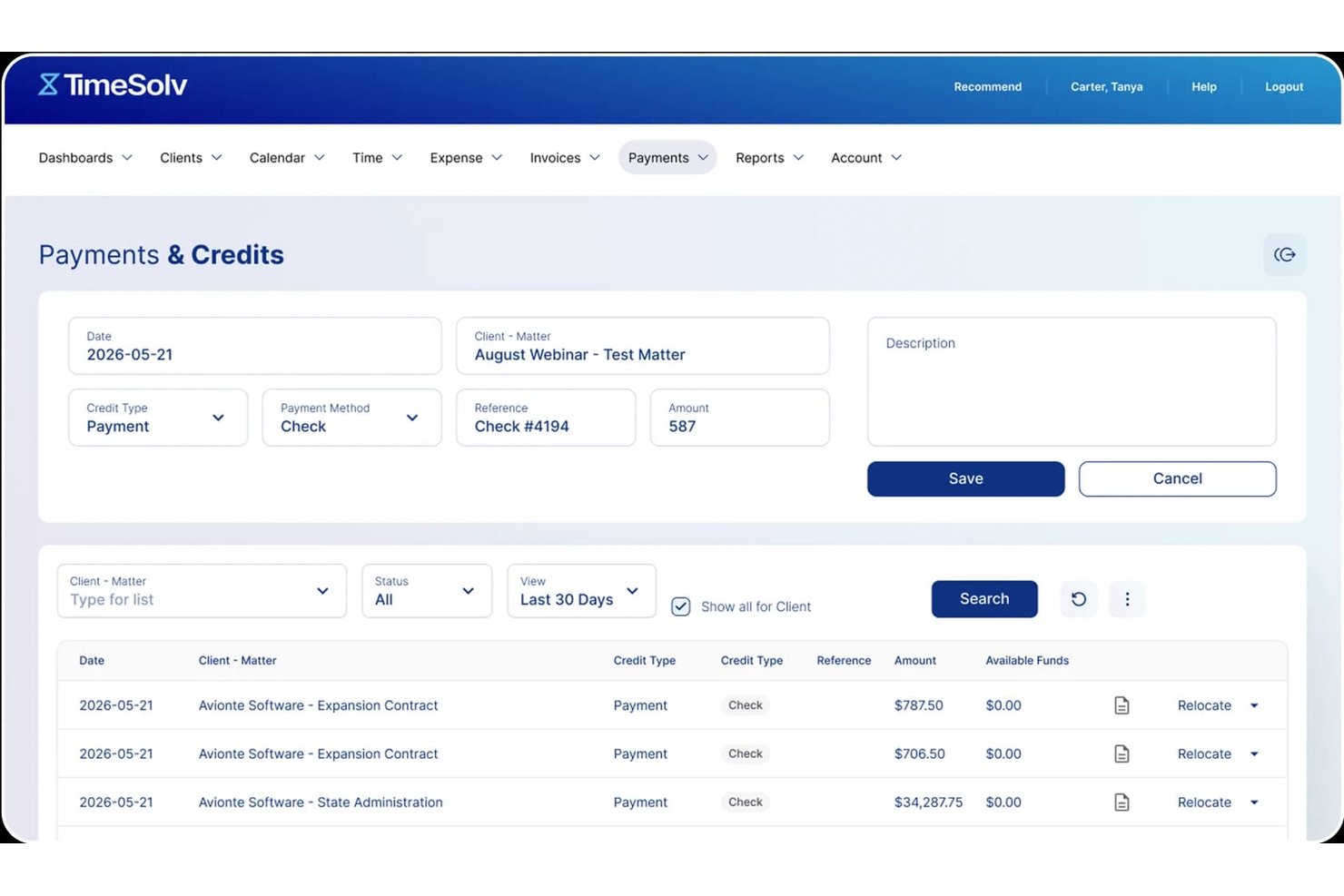
TimeSolv is a billing platform that lets you create customizable invoices, collect payments via card or ACH, manage client portals, and automate recurring billing.
Who Is TimeSolv Best For?
TimeSolv is a strong fit for consultants and professional services freelancers who bill by the hour and need a structured system for time capture, client management, and invoice collection.
Why I Picked TimeSolv
I picked TimeSolv as one of the best because its built-in TimeSolvPay processor funds card and ACH payments the next business day, which is a real advantage when cash flow matters. I also love how it generates invoices directly from time entries, so every billable hour you've logged automatically populates the invoice without manual entry. The automated late-fee calculation on overdue invoices is a feature I rely on heavily, since it applies simple or compound interest without any extra steps.
TimeSolv Key Features
- Client portal: Clients can view invoice history, download receipts, and make payments through a branded self-service portal.
- Split invoicing: Divide a single invoice among multiple parties by percentage or fixed amount, with separate recipient views and per-party payment tracking.
- Batch invoicing: Generate and send multiple invoices at once, with an AutoMail option for physical mailing and export formats including PDF, Word, and Excel.
- Offline time and expense entry: Log time and expenses via the mobile or desktop app, with automatic sync when you're back online.
TimeSolv Integrations
TimeSolv offers native integrations with QuickBooks, Xero, AccountEdge, Microsoft 365, Outlook, OneDrive, Dropbox, 8amLawPay, and PointOne. A public API for custom integrations is also available.
Pros and Cons
Pros:
- Late-fee automation handles overdue invoices
- Offline time entry captures billable work
- Next-day payment funding supports cash flow
Cons:
- Tax and currency handling lacks documentation
- Legal terminology confuses non-legal freelancers

Best for agencies billing multiple clients
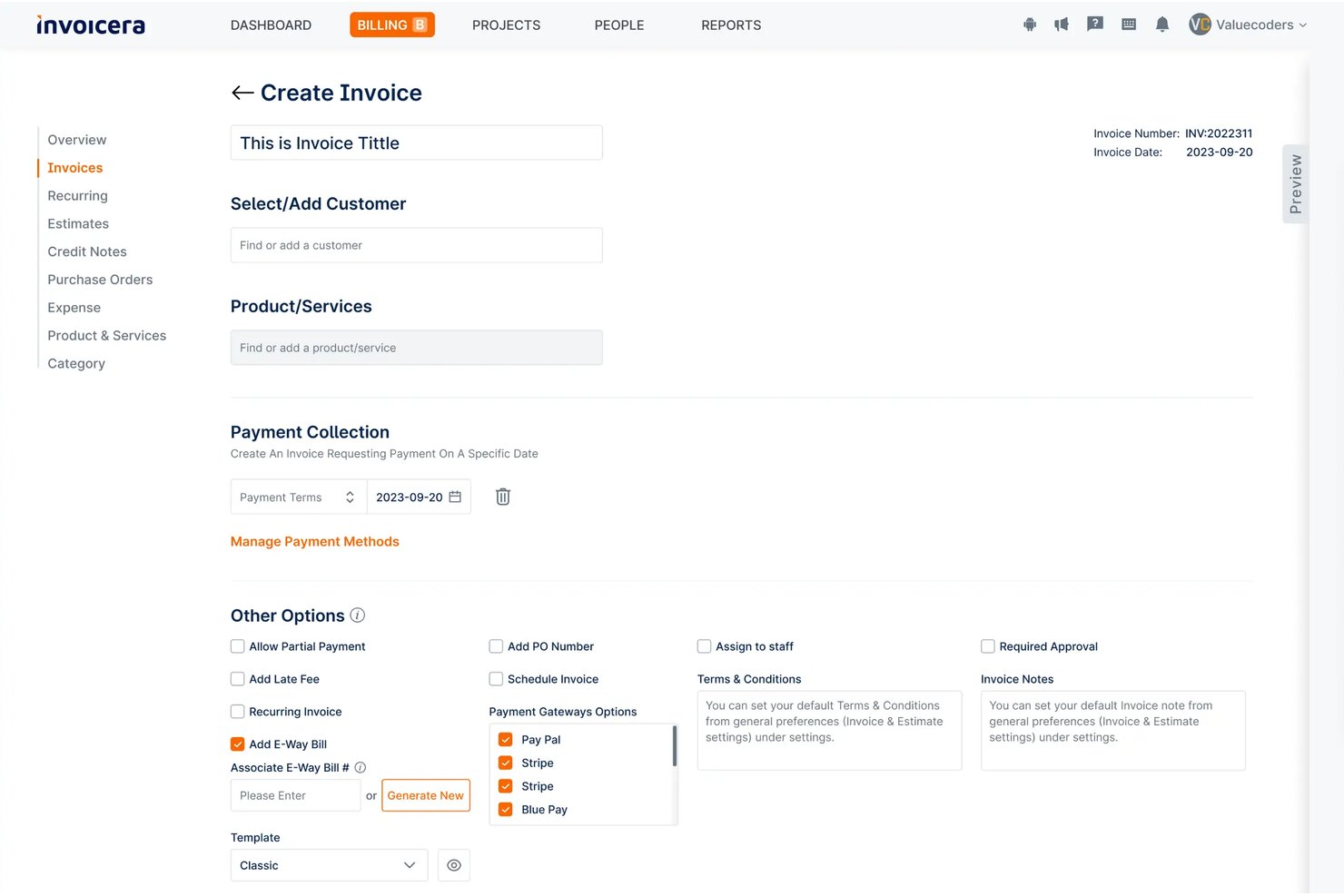
Invoicera is a billing operations platform that handles multi-client invoicing, time-to-invoice workflows, recurring billing, expense tracking, and payment collection across 25+ payment gateways.
Who Is Invoicera Best For?
Invoicera fits freelance agency owners who manage billing across multiple clients, staff, and entities under one organization.
Why I Picked Invoicera
Invoicera earns its spot on my shortlist because of how well it handles billing across multiple clients with very different arrangements. I like that you can run fixed-milestone, time-based, and retainer billing simultaneously, each client on their own terms, without manual workarounds. The branded client portal is a practical touch: each client can view statements, download invoices, and pay directly without needing an Invoicera login. Add per-client late-fee toggling and configurable reminder ladders, and managing a full client roster stops feeling like a spreadsheet exercise.
Invoicera Key Features
- Multi-step approval workflow: Route invoices through single- or multi-step approval chains with role-based assignments, value thresholds, and a timestamped approver trail on each invoice.
- Mixed billing models: Combine fixed-milestone, time-based, and usage-based charges into a single invoice run, with each line sourced from its own billing rule.
- Multi-entity billing: Run separate legal entities from one account, each with its own branding, invoice numbering, tax profile, currency, and approval authority.
- AI-assisted line-item drafting: Generate customer-readable line-item descriptions and reminder copy using AI suggestions, each requiring human review before sending.
Invoicera Integrations
Invoicera offers integrations with QuickBooks, Xero, Stripe, Razorpay, Jira, and 25+ payment gateways, including PayPal. Its XML API supports custom connections for invoices, clients, expenses, projects, tasks, and time entries.
Pros and Cons
Pros:
- Approved hours become invoice lines with reviewer trails
- Clients pay through a branded self-service portal
- Mixed billing models handle varied client arrangements
Cons:
- No built-in 1099 or self-employment tax support
- Organization-focused setup suits teams, not solo freelancers

Best free invoicing with a built-in client portal
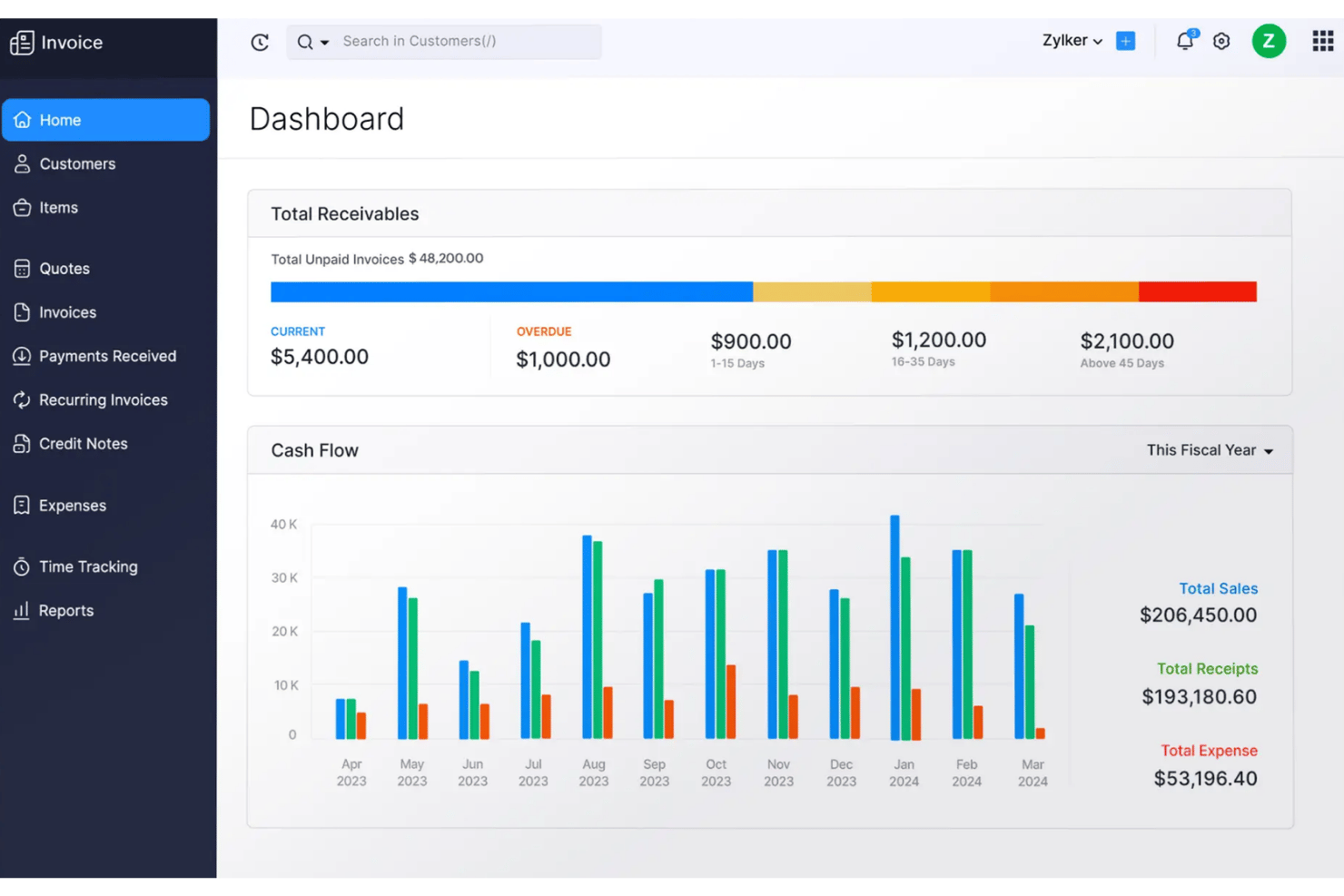
Zoho Invoice is a free invoicing software for freelancers and small businesses that covers invoice creation, client quotes, time and expense tracking, recurring billing, multi-currency support, and a self-service client portal.
Who Is Zoho Invoice Best For?
Zoho Invoice is a strong fit for solo freelancers and independent contractors who need a full-featured invoicing setup at zero cost.
Why I Picked Zoho Invoice
Zoho Invoice earns its spot on my shortlist because it lets you create and send unlimited invoices. I also love that the quote-to-invoice conversion is built directly into that portal workflow, so clients can comment, approve, and trigger the next step without any back-and-forth over email. On top of that, Zia (Zoho's AI assistant) flags invoices likely to be paid late and drafts follow-up messages automatically.
Zoho Invoice Key Features
- Multi-currency invoicing: Assign a currency per client contact and let Zoho pull live exchange rates automatically, so your invoice always reflects the right amount.
- Recurring invoice profiles: Set up automated billing schedules with auto-charge on saved cards, so repeat clients get invoiced without manual intervention.
- 30+ built-in reports: Access sales summaries, accounts receivable aging, top customer breakdowns, and tax reports directly from your dashboard.
- Role-based user permissions: Invite a second user, restrict their access to specific clients or functions, and keep sensitive billing data compartmentalized.
Zoho Invoice Integrations
Zoho Invoice offers 50+ integrations, including PayPal, Stripe, HubSpot, WhatsApp, Slack, Pipedream, Dropbox, Evernote, Skyvia, and the entire Zoho suite.
Pros and Cons
Pros:
- Automated reminders flag likely late payments
- Tracked time becomes invoice line items
- Client portal supports quote approval and payment
Cons:
- Limited layout control frustrates detailed branding
- Invoice and project limits constrain agency growth

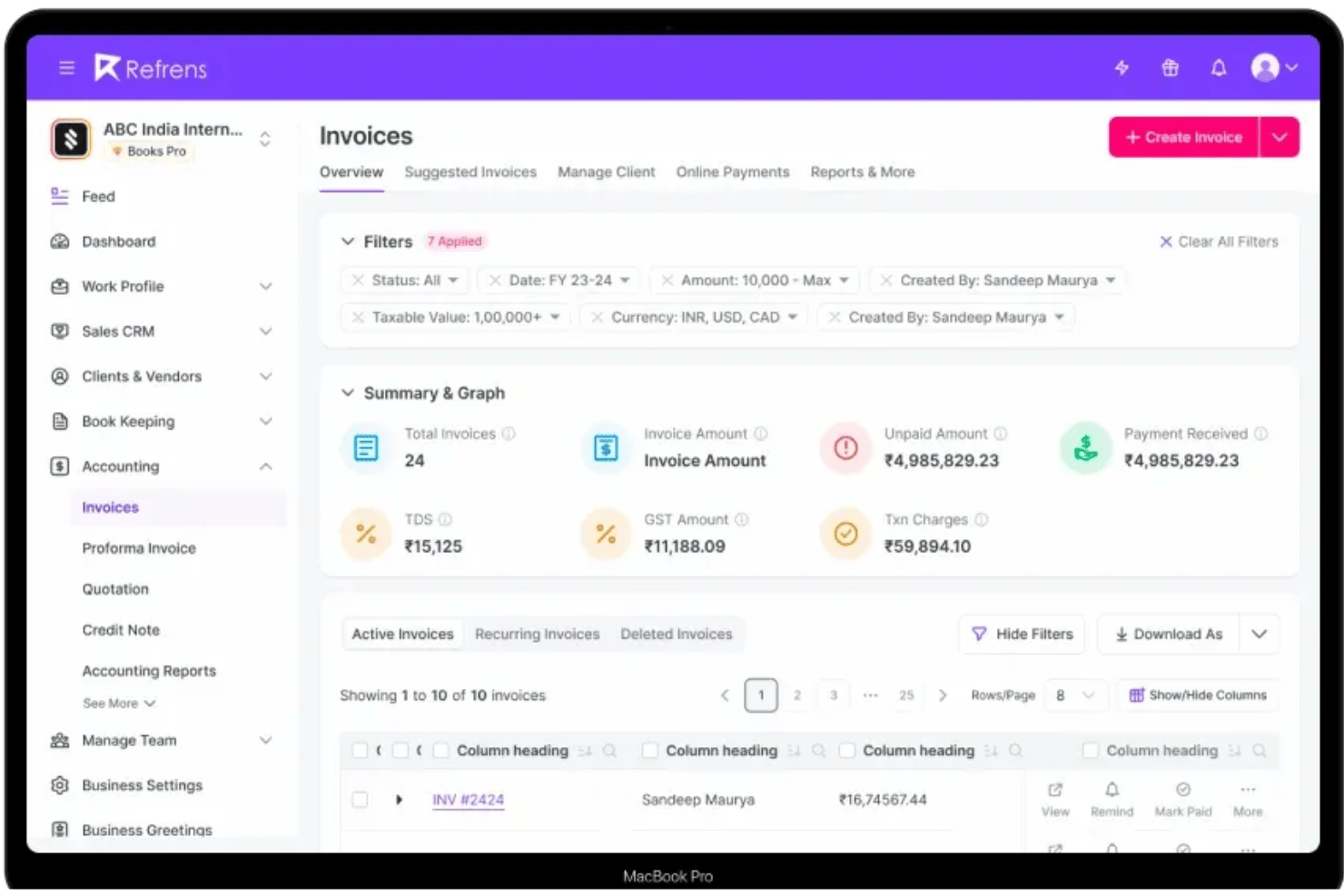
Refrens is an invoicing platform that covers quotation creation, invoice customization, expense tracking, payment collection, double-entry accounting, and a built-in sales CRM.
Who Is Refrens Best For?
Refrens is a strong fit for India-based solo entrepreneurs and small agencies that bill international clients and need invoicing, expense tracking, and accounting in one place.
Why I Picked Refrens
I picked Refrens as one of the best because no other tool on this list is built specifically around collecting international payments from an Indian bank account. The international payment flow accepts card, ACH, and wire transfers from clients in 100+ countries, then settles payouts in INR within one to two business days. I also like that multi-currency invoicing and GST-compliant tax formats are both handled inside the same platform, so there's no need to reconcile documents across separate tools.
Refrens Key Features
- Quotation-to-invoice conversion: Create client-facing quotations and convert them to professional invoices in one click, with real-time tracking of when clients open and approve documents.
- Double-entry accounting: Log manual journals, reconcile bank statements, and generate Balance Sheet, P&L, and cash flow reports directly inside the platform.
- AI OCR expense scanning: Forward bills via WhatsApp or email, and Refrens automatically scans and creates expense entries using OCR.
- Sales CRM with lead pipelines: Manage leads through a built-in pipeline, capture them via lead forms, and convert them into quotations and invoices.
Refrens Integrations
Refrens has documented integrations with Shopify, Pabbly Connect, Google Ads, Google Meet, Airtable, Attentive, and IndiaMART. It also offers an API for customer connections.
Pros and Cons
Pros:
- Expense OCR captures bills for rebilling
- Quotes convert directly into client invoices
- Cross-border payments support Indian freelancers
Cons:
- Free documents retain Refrens branding
- No native timer for billable hours

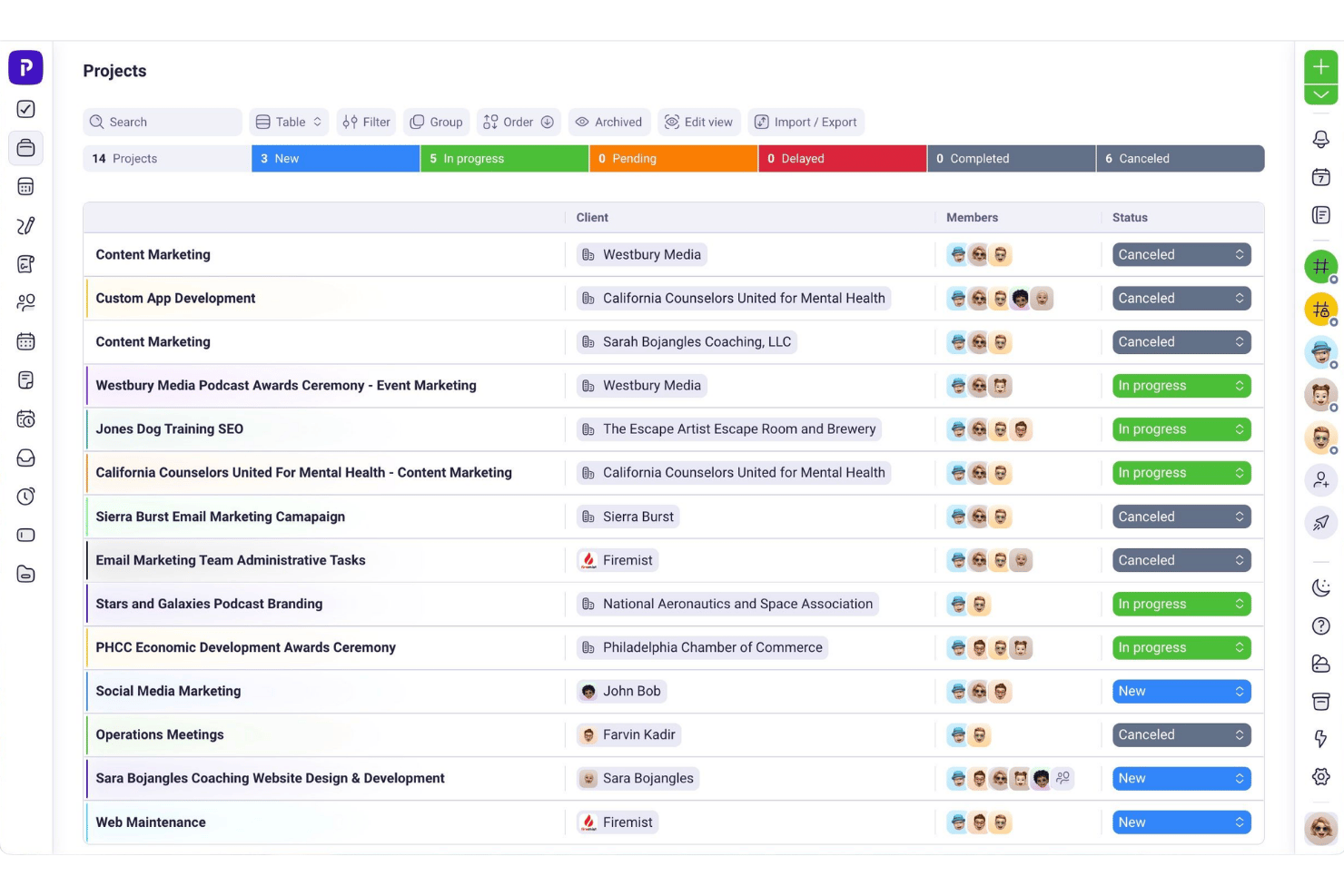
Plutio is an all-in-one invoicing platform that combines invoice creation, time tracking, proposals, contracts, e-signatures, and a branded client portal.
Who Is Plutio Best For?
Plutio is a strong fit for solo creatives and agency owners who want to run proposals, contracts, time tracking, and invoicing from one branded workspace.
Why I Picked Plutio
I've included Plutio in my top picks because the branded client portal genuinely sets it apart from other invoicing tools for freelancers. Clients log in to a custom-branded workspace to view invoices, project files, and messages, so every touchpoint reflects your brand rather than Plutio's. I also love that signed proposals automatically trigger invoice creation, cutting out the manual handoff between closing a deal and billing for it.
Plutio Key Features
- Time-to-invoice conversion: Pull tracked time directly from timesheets into invoice line items with one click, eliminating manual re-entry of billable hours.
- Multi-processor payment support: Accept payments through Stripe, PayPal, and Square simultaneously, with options for credit card, ACH, Apple Pay, and Google Pay.
- Recurring billing: Set invoices to repeat on a custom schedule, with automated workflows handling follow-up reminders between billing cycles.
- Payment schedule splitting: Break a single invoice into deposits or milestone-based partial payments, giving clients a structured payment plan.
Plutio Integrations
Plutio integrates with Slack, Stripe, PayPal, Square, Zoom, QuickBooks, Outlook, Microsoft Teams, Google Meet, and Google Calendar. It provides a REST API and webhooks for custom integrations. Zapier is also available.
Pros and Cons
Pros:
- Timesheets convert directly into billable invoice lines
- Signed proposals automatically create projects and invoices
- Dedicated portal keeps client work organized
Cons:
- Overdue invoices lack automatic late-fee calculations
- Expense receipt capture isn't built in

Best for late fee automation on overdue invoices
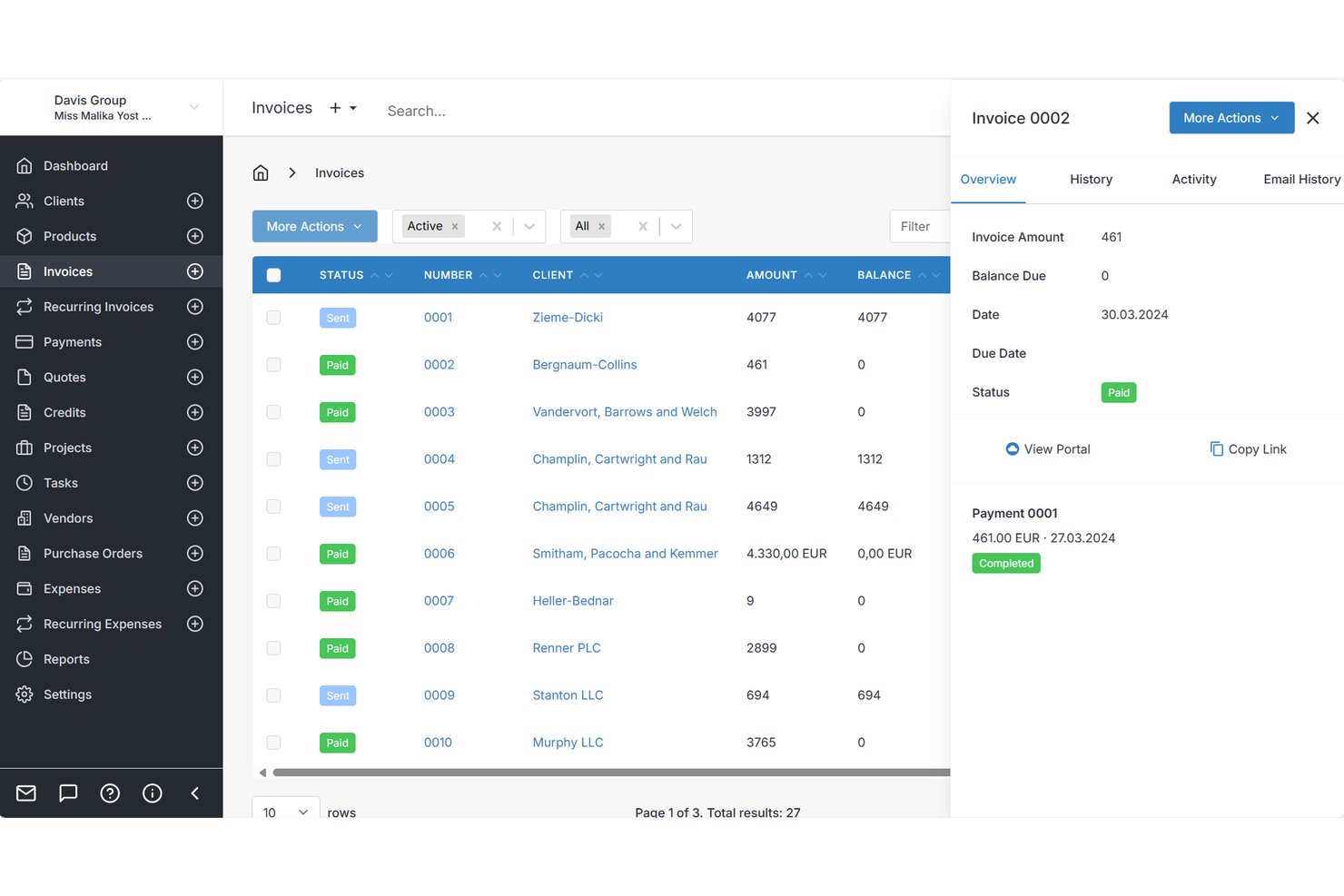
Invoice Ninja is an invoicing platform for freelancers that covers invoice creation, online payment collection, recurring billing, expense tracking, and client-facing self-service portals.
Who Is Invoice Ninja Best For?
Invoice Ninja is a strong fit for independent contractors who need a full billing setup without paying for it right away.
Why I Picked Invoice Ninja
I picked Invoice Ninja as one of the best because of how it handles overdue invoices automatically. You can configure automatic late fees to apply to unpaid invoices once they pass their due date, so you're not manually chasing clients or calculating penalties yourself. Paired with automated reminder emails on the Pro plan, the system handles the entire follow-up cycle without you touching it.
Invoice Ninja Key Features
- Client self-service portal: Clients log in via a magic link to view invoices, approve quotes, make payments, and download statements without creating an account.
- Multi-gateway payment collection: Connect 15+ payment gateways simultaneously, so clients can pay using their preferred method.
- Billable time and expense tracking: Log time against projects, track expenses by vendor and category, and convert both to invoice line items in one click.
- Recurring invoice auto-billing: Set up recurring invoices on any cycle and charge stored client payment profiles automatically, with no manual send required.
Invoice Ninja Integrations
Invoice Ninja integrates with 1000+ tools via Zapier, including Jotform, Trello, Xero, Google Sheets, Gmail, Outlook, Slack, MailChimp, Make, n8n, and Pabbly. A REST API for custom integrations is also available.
Pros and Cons
Pros:
- Billable time converts directly into invoices
- Passwordless client portal supports self-service payments
- Automatic late fees reduce overdue follow-up
Cons:
- Multi-company handling draws reviewer criticism
- Reviewers report occasional bugs and glitches

Best for proposal-to-payment workflow
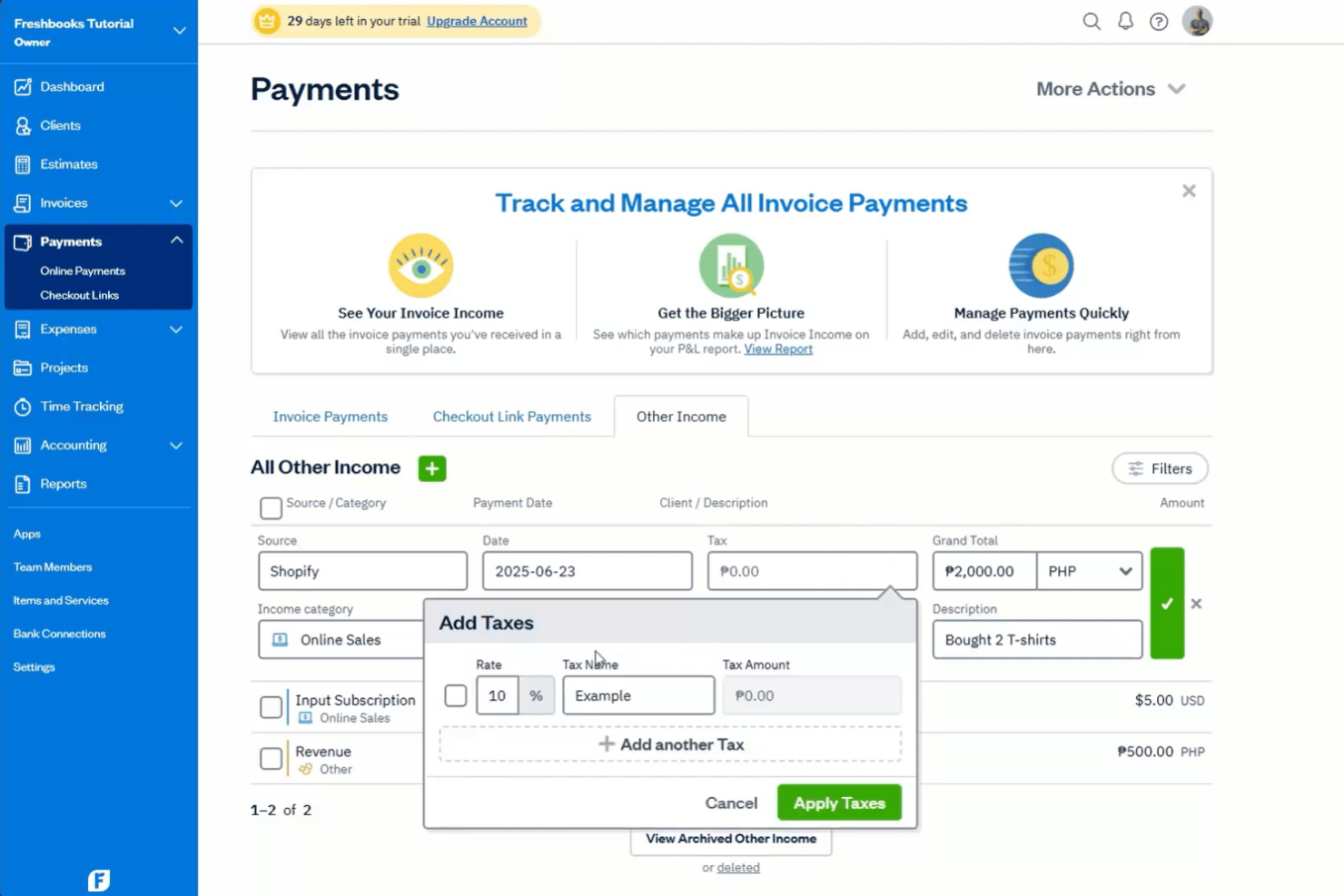
FreshBooks is a freelance invoicing platform that covers proposals, eSignatures, time and expense tracking, recurring billing, and online payment collection in one place.
Who Is FreshBooks Best For?
FreshBooks suits solo creatives who need to take a client from signed proposal to paid invoice without juggling multiple tools.
Why I Picked FreshBooks
FreshBooks earns its spot on my shortlist because it covers the entire client engagement cycle, from sending a proposal to collecting final payment, without requiring a second tool. I particularly like how an accepted proposal converts directly into a project and then an invoice with one click, keeping billable time and expenses attached throughout. On top of that, automated payment reminders and late fee rules mean I'm not manually chasing overdue balances.
FreshBooks Key Features
- Multi-currency invoicing: Bill clients in hundreds of currencies across 16 languages, with per-client currency defaults and currency-filtered reporting.
- Automated late fees: Set late fee rules to apply automatically to overdue invoices without manually following up with clients.
- Receipt scanning: Capture and attach receipts directly from the mobile app, with line-item bill scanning available on Premium and above.
- Retainer billing: Set up client retainers with fixed pricing, scheduled hours, and dedicated retainer reporting on Plus and above.
FreshBooks Integrations
FreshBooks offers 100+ integrations, including Wagepoint, Lendflow, Pipedrive, Todosit, Calendly, Clio, and Freshdesk. A public API for custom integrations is also available.
Pros and Cons
Pros:
- Time and expenses attach to invoices
- Automatic reminders track overdue payments
- Proposals convert directly into invoices
Cons:
- Advanced reporting requires higher-tier plans
- Billable-client caps restrict growing practices
Avaza
Best for retainer-based invoicing
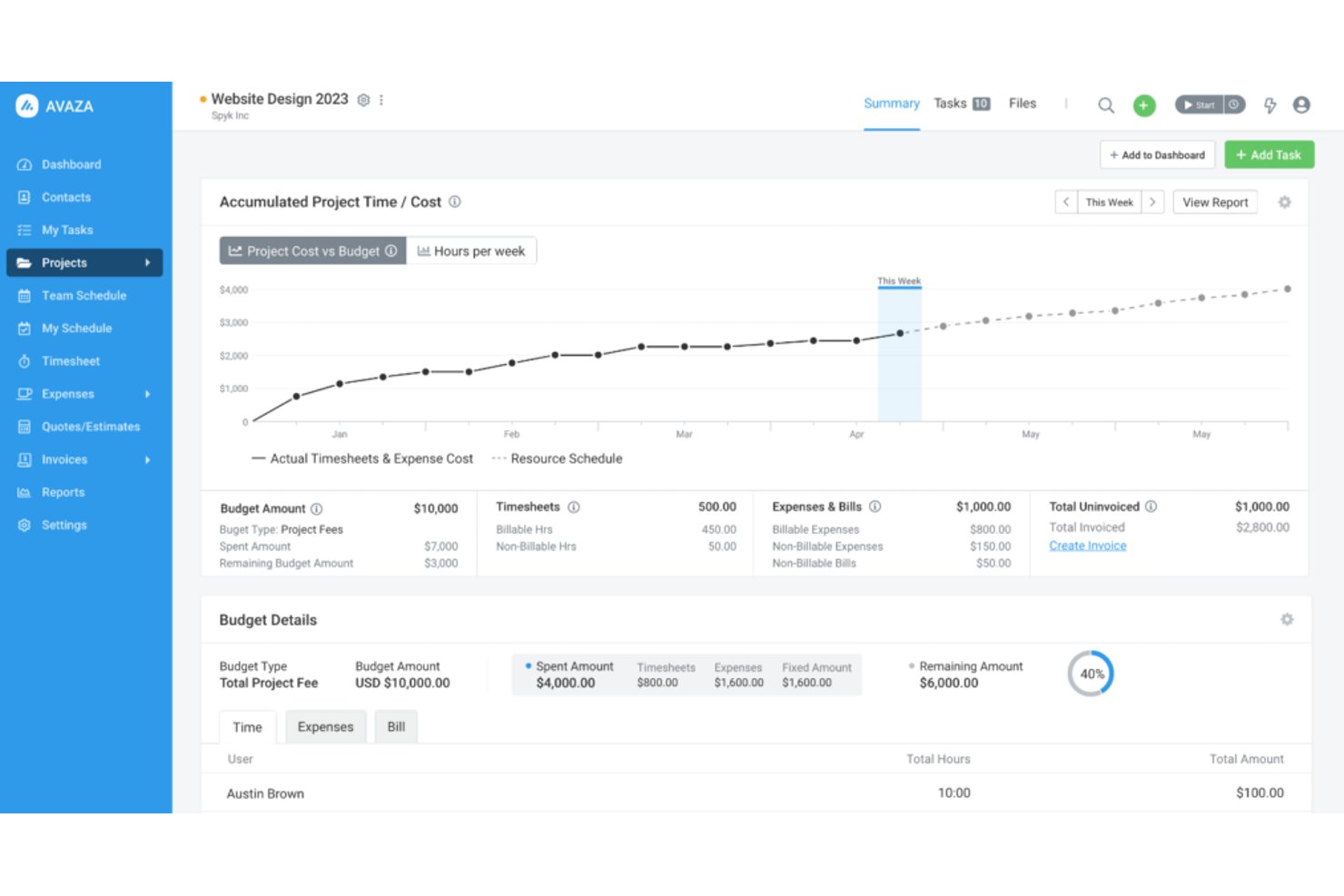
Avaza is an invoicing and project management platform that combines time tracking, expense management, recurring billing, retainer subscriptions, and client portal access in a single tool.
Who Is Avaza Best For?
Avaza suits freelance consultants who bill clients on retainer and need time tracking, expense management, and invoicing in one place.
Why I Picked Avaza
I picked Avaza as one of the best because its retainer subscription system is genuinely hard to replicate at this price point. You can set up a recurring retainer invoice, hold the prepaid amount as client credit, and then draw down against that credit on regular invoices as work is delivered. I also like that recurring invoice profiles can automatically pull in unbilled time and expenses each cycle, so retainer clients who go over their hours get billed accurately without manual reconciliation.
Avaza Key Features
- Invoice template label overrides: Every text label on an invoice can be renamed, letting you match local terminology or client preferences without editing the template from scratch.
- Client portal with estimate approval: Clients log in to view invoices, approve or reject estimates, and pay outstanding balances online without needing to contact you.
- Uninvoiced items report: A dedicated report surfaces all unbilled time, expenses, and fixed amounts across projects so nothing slips through between billing cycles.
- e-Invoicing via Peppol network: Send compliant electronic invoices directly through the Peppol and DBNAlliance networks, available on paid plans for supported regions including AU, NZ, UK, and much of the EU.
Avaza Integrations
Avaza offers integrations with Xero, QuickBooks Online, Stripe, Salesforce, Slack, Google Drive, GitHub, and Dropbox. It also supports an open API and Zapier for custom integrations.
Pros and Cons
Pros:
- Clients approve estimates through portal
- Recurring invoices include unbilled work
- Retainer credit supports prepaid billing
Cons:
- Limited audit trail for invoice changes
- No automatic late-fee calculation

Bonsai
Best for billing with contract bundling
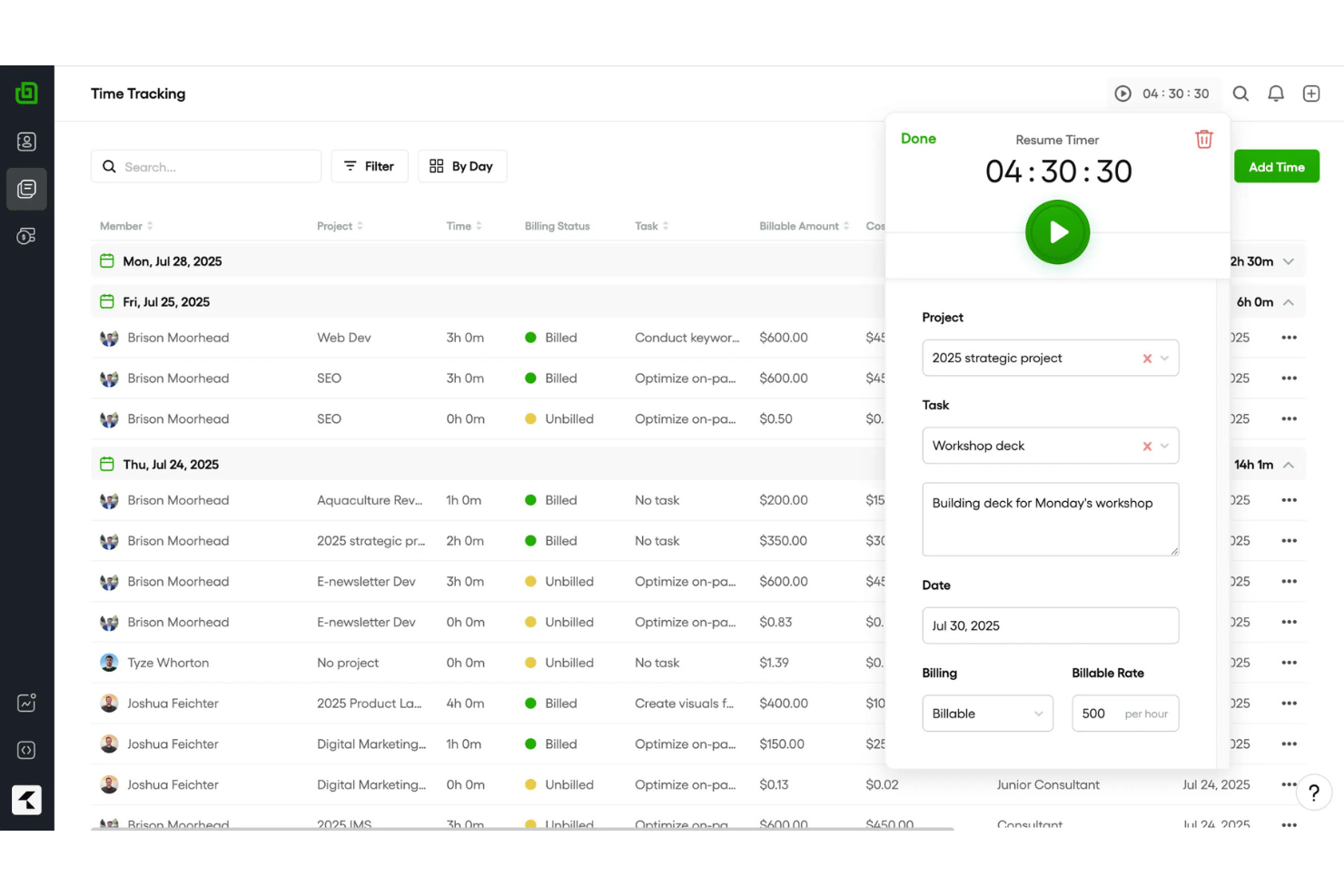
Bonsai by Zoom is a freelance business management platform that covers invoicing, contracts, proposals, time tracking, expense management, and client CRM in one connected workflow.
Who Is Bonsai Best For?
Bonsai suits creative freelancers and independent contractors who need contracts and invoicing under one roof.
Why I Picked Bonsai
I've included Bonsai in my top picks because it's the only tool I've used where contracts, proposals, and invoices live in a single connected workflow. When a client signs a contract, that agreement feeds directly into the invoice, so there's no copying terms or chasing down scope details later. I also like that time entries and expenses attach straight to invoices, which means hourly billers can generate an accurate, itemized bill without manual data entry.
Bonsai Key Features
- Branded client portal: Clients access a custom-branded portal via a secure link to view invoices, files, and contracts, and pay directly in-portal.
- Multi-currency billing: Bonsai supports 100+ currencies with automatic conversion and localized formatting, plus multi-tax rate support for mixed jurisdictions.
- Recurring and retainer invoices: Set up subscription or retainer invoices that auto-bill on a schedule, with editable series you can stop or adjust at any time.
- QuickBooks and Xero sync: Two-way invoice data sync with QuickBooks Online and Xero keeps your books current without manual data entry.
Bonsai Integrations
Bonsai offers native integrations with QuickBooks Online, Xero, Calendly, Zoom, Zapier, and HiBob. It also provides an API and MCP server for custom connections.
Pros and Cons
Pros:
- Time and expenses attach to invoices
- Clients pay through branded portal
- Contract terms flow into invoices
Cons:
- Reminders stop after sixteen days
- Payout delays affect cash flow
Hiveage
Best for built-in mileage tracking
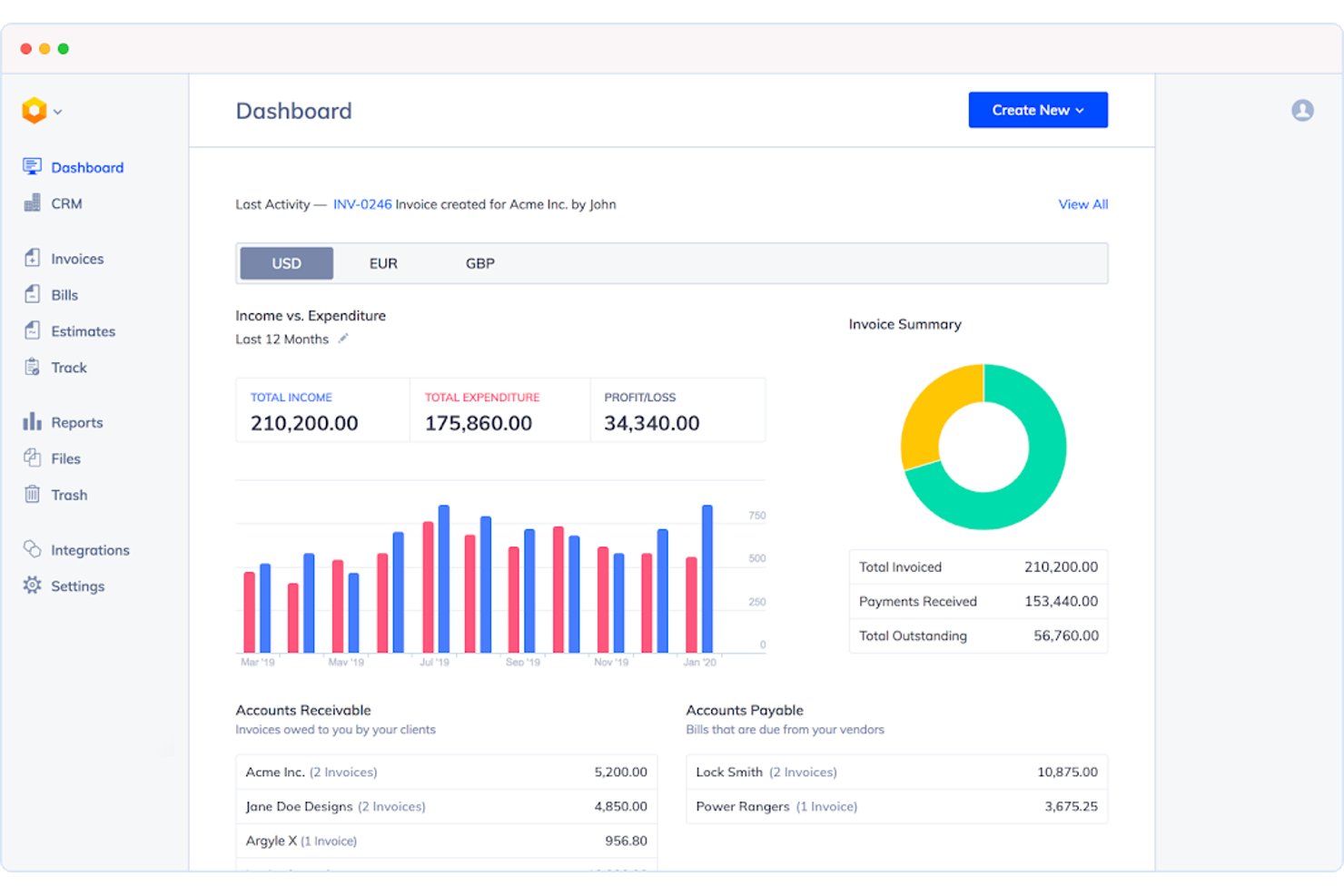
Hiveage is an invoice generator app that covers the full billing cycle—estimates, time and expense tracking, mileage logging, recurring billing, and online payment collection—in a lightweight, non-accounting platform.
Who Is Hiveage Best For?
Hiveage is a strong fit for field-based contractors who bill for both time and travel as part of their standard client work.
Why I Picked Hiveage
Hiveage earns its spot on my shortlist because it's one of the few freelance invoicing tools with built-in mileage tracking alongside time and expense logging. I like that you can log a trip, assign a rate, and convert it directly into an invoice line item without any manual workarounds. The built-in real-time timer works the same way, letting you track hours per task and bill them instantly.
Hiveage Key Features
- Recurring billing modes: Set invoices to save as draft, auto-send, or auto-charge saved client cards at daily, weekly, monthly, or custom intervals.
- Estimate-to-invoice conversion: Build detailed estimates with time and expense line items, collect online client acceptance, then convert to an invoice in one click.
- Multi-currency invoicing: Assign a preferred currency per client with locale-specific formatting and unlimited saved tax entries, including compound taxes.
- Real-time invoice status tracking: Invoices are labeled draft, sent, viewed, partial, paid, or overdue, with a dashboard showing outstanding balances at a glance.
Hiveage Integrations
Hiveage supports 12+ payment gateway integrations, including PayPal, Stripe, Braintree, Square, Authorize.net, 2Checkout, and WePay. It also supports Zapier and REST API for custom connections.
Pros and Cons
Pros:
- Estimates convert directly into accepted invoices
- Free tier includes unlimited time and expenses
- Built-in mileage converts trips into invoice lines
Cons:
- Automatic reminders require a paid tier
- Client limits pressure growing freelancers
Diğer Serbest Çalışan Faturalama Yazılımları
- Moxie
For real-time invoice tracking
- Paymo
For billing hours tracked across projects
- 17hats
For quotes, contracts, and invoices in one flow
- Indy
For flexible payment options
- Harvest
For turning timesheets into invoices
- ZipBooks
For invoicing with a quality score guide
- Xero
For freelancers scaling into an agency
- Dubsado
For automated client payment workflows
- Stripe Invoicing
For invoicing across 100+ payment methods
- Harlow
For billing with no payment markups


How I Evaluate Invoicing Software for Freelancers
I split my evaluation into core functionality every tool must nail—like converting tracked time into a sendable invoice—and the differentiators that determine which tool fits your specific billing workflow.
Core Functionality (Table Stakes for This List)
When I'm selecting invoicing apps for my list, I rank each one on a scale from 0 (does not offer the functionality) to 5 (excels in this area) for each core functionality listed below. I then calculate the tool's total score into a percentage, and use that to help me assess its overall fit for the list.
- Invoice creation and customization: I check whether you can build branded, itemized invoices with saved templates, custom fields, and flexible tax and discount controls.
- Payment collection and tracking: Each tool should accept multiple online payment methods and show real-time invoice status, including partial payments and automated overdue reminders.
- Client and invoice management: I look for organized client profiles with full invoice history and quick rebilling, so you're not recreating details for repeat engagements.
- Time and expense tracking: Logged billable hours and expenses should convert directly into invoice line items without manual re-entry across separate tools.
- Recurring and automated billing: I evaluate how each tool handles scheduled invoices for retainers or ongoing contracts, including mid-cycle edits and auto-send options.
- Multi-currency and tax support: Tools should apply the correct currency and tax rate per client location, which matters as soon as you bill across more than one region.
Once I have a list of tools that meet the criteria, I consider what sets each platform apart.
Differentiating Factors (What Sets Vendors Apart)
Here's how I compare and contrast different vendors:
Standout Features
Late fee automation is a big one for me. I check whether a tool can calculate and apply fees on overdue invoices without manual follow-up. Proposal and contract bundling also matters—tools like Bonsai and FreshBooks let you attach e-signable agreements directly to a quote, so the client moves from scope approval to payment in one flow. I also evaluate client self-service portals, where clients can view, approve, and pay invoices on their own. That alone cuts back-and-forth on every billing cycle.
Beyond Features
Payment processing fees and payout speed matter more than most freelancers expect. A few percentage points per transaction add up fast on high-value project invoices, and some tools charge different rates for card vs. ACH payments. I also check how easily each platform scales from solo use to a small agency—adding a contractor or VA shouldn't force you onto an enterprise tier. Finally, I look at accounting integrations. Direct sync with tools like QuickBooks or Xero prevents duplicate data entry and reconciliation errors when tax season hits.
Serbest Çalışanlar İçin Doğru Faturalama Yazılımı Nasıl Seçilir
Karar vermeden önce yazılımın iş akışınızı ne ölçüde desteklediğini ve özel ihtiyaçlarınızı karşılayıp karşılamadığını değerlendirin.
| Önceliğiniz… | Şunları arayın… |
|---|---|
| Saatlik proje çalışmalarını faturalandırmak | Bir zaman çizelgesini kalem kalem fatura ücretlerine dönüştüren bir deneme sürümü |
| Sabit ücretli sözleşmeleri yönetmek | Açık dönem ortası düzeltme kurallarına sahip planlanmış faturalama |
| Ödeme takibini azaltmak | Fatura durum güncellemeleri, vadesi geçmiş ödeme hatırlatıcıları ve kısmi ödeme kayıtları |
| Uluslararası müşterileri faturalandırmak | Müşteri düzeyinde para birimi, vergi ve döviz kuru kontrolleri |
| Müşterilere self servis erişim sunmak | Faturaların incelenmesini, onaylanmasını ve ödenmesini destekleyen bir portal |
Kısa Listenizi Nasıl Değerlendirmelisiniz
- Tanımlanmış bir deneme görevi yürütün: 30 dakika içinde bir saatlik fatura, bir kilometre taşı faturası ve bir yinelenen fatura oluşturun, ardından her kalemi inceleyin.
- Ödeme mutabakatını test edin: Yedi günlük deneme süresi boyunca kısmi bir ödeme ve gecikmiş bir ödeme kaydedin, ardından kalan bakiyeyi ve durum geçmişini doğrulayın.
- Ücret belgelerini isteyin: Güncel kart, banka havalesi, para birimi dönüştürme ve ödeme aktarım ücreti tarifesini indirilebilir bir belge olarak talep edin.
- Vergi uygulamalarını yazılı olarak alın: Platformun farklı vergi oranlarını, fatura para birimlerini ve müşteri konumlarını nasıl uyguladığını açıklayan bir destek talebi isteyin.
- Önceliğinizi belirleyin: Daha az proje denetimi sunan, odaklanmış bir faturalandırma aracını mı yoksa daha kapsamlı faturalandırma kurulumu olan daha geniş bir iş yönetimi platformunu mu tercih ettiğinize karar verin.
Serbest Çalışanlar İçin Faturalandırma Yazılımı Nedir?
Faturalandırma yazılımı, serbest çalışanların müşteri işleri için fatura oluşturmasına, göndermesine ve takip etmesine yardımcı olur. Kaydedilen saatleri, proje kilometre taşlarını, giderleri veya yinelenen sürekli hizmet sözleşmelerini kalemlere ayrılmış faturalandırma kayıtlarına dönüştürebilir. Birçok araç ayrıca çevrimiçi ödemeleri, vergi ve para birimi ayarlarını, ödeme hatırlatıcılarını, müşteri portallarını ve fatura geçmişini destekler. Bu özellikler, onaylanan işten ödeme mutabakatına kadar faturalandırmayı yönetebileceğiniz tek bir yer sağlar.
Serbest Çalışanlar İçin Faturalandırma Yazılımının Özellikleri
Bir faturalandırma platformu seçerken şu temel özellikleri arayın:
- Fatura oluşturma ve özelleştirme: Hızlı ve tutarlı faturalandırma için kaydedilmiş şablonlarla markalı, kalemlere ayrılmış faturalar tasarlayın.
- Çevrimiçi ödeme alma: Ödemeleri doğrudan fatura üzerinden kredi kartları, banka havaleleri veya dijital cüzdanlar aracılığıyla kabul edin.
- Ödeme takibi ve hatırlatıcılar: Fatura durumunu tek bir kontrol panelinden izleyin ve müşterilere yönelik ödeme takiplerini otomatikleştirin.
- Müşteri yönetimi: Yeni faturaları otomatik olarak doldurmak için iletişim, vergi ve faturalandırma geçmişini müşteri profillerinde saklayın.
- Zaman ve gider takibi: Faturalandırılabilir saatleri, giderleri ve kilometreyi kaydedin, ardından bunları doğrudan fatura kalemlerine dönüştürün.
- Yinelenen faturalandırma: Sürekli hizmet sözleşmeleri veya abonelikler için yinelenen faturaları esnek zamanlama denetimleriyle planlayın ve otomatikleştirin.
- Çoklu para birimi ve vergi desteği: Doğru çoklu para birimi fiyatlandırması ve bölgeye özgü vergi ayarlarıyla uluslararası müşterilere fatura kesin.
- Müşteri portalı erişimi: Müşterilere geçmişi görüntüleyebilecekleri, ücretleri onaylayabilecekleri ve faturaları ödeyebilecekleri güvenli bir kontrol paneli sunun.
- Muhasebe entegrasyonları: Kolay mutabakat için faturalandırma ve ödeme verilerini QuickBooks veya Xero gibi platformlarla senkronize edin.
- Teklif ve sözleşme iş akışları: Onaylanan teklifleri ve sözleşmeleri doğrudan etkin faturalara dönüştürün.
Serbest Çalışanlar İçin Faturalandırma Yazılımının Faydaları
Doğru faturalandırma yazılımı size birçok açıdan yardımcı olabilir. Yararlanmayı bekleyebileceğiniz birkaç avantaj şunlardır:
- Daha hızlı fatura oluşturma: Özelleştirilebilir şablonlar, kaydedilmiş müşteri bilgileri ve kalemlere ayrılmış faturalandırma alanları, aynı bilgileri yeniden girmeden doğru faturalar oluşturmanıza yardımcı olur.
- Daha güvenilir ödeme takibi: Fatura durumu güncellemeleri, kısmi ödeme kayıtları, ödeme bağlantıları ve otomatik hatırlatıcılar müşterilerin ne kadar borcu olduğunu ve ne zaman takip gerektiğini gösterir.
- Daha kolay zaman ve gider faturalandırması: Zaman takibi ve gider kayıtları, onaylanan saatleri ve maliyetleri manuel olarak kopyalamadan fatura kalemlerine dönüştürebilir.
- Daha tutarlı yinelenen faturalandırma: Planlanmış faturalar, otomatik gönderim ve tutarları değiştirme veya faturalandırmayı duraklatma denetimleri, sürekli hizmet sözleşmelerini ve devam eden sözleşmeleri destekler.
- Daha iyi uluslararası faturalandırma: Çoklu para birimi ayarları, müşteri düzeyinde vergi denetimleri ve açık vergi alanları, farklı bölgelerdeki müşteriler için fatura hazırlamanıza yardımcı olur.
- Daha kolay müşteri self-servisi: Müşteri portalları, müşterilerin faturaları incelemesine, ücretleri onaylamasına, kayıtları indirmesine ve tekrarlanan e-posta alışverişleri olmadan ödeme yapmasına olanak tanır.
- Daha düzenli mali yönetim: Muhasebe entegrasyonları; faturaları, ödemeleri, giderleri ve müşteri kayıtlarını QuickBooks veya Xero gibi platformlarla senkronize edebilir.
Serbest Çalışanlar İçin Faturalandırma Yazılımının Maliyetleri ve Fiyatlandırması
Doğru faturalandırma aracını bulmak için fiyatlandırma modellerini ve mevcut planları anlamak çok önemlidir. Maliyetler özelliklere, ekip büyüklüğüne, eklentilere ve ödeme işleme seçeneklerine göre değişir. Aşağıdaki tablo, farklı platformların sunduğu yaygın planları, ortalama fiyatları ve tipik faturalandırma özelliklerini özetlemektedir.
Serbest Çalışanlar İçin Faturalandırma Yazılımı Plan Karşılaştırma Tablosu
| Plan Türü | Ortalama Fiyat | Yaygın Özellikler |
|---|---|---|
| Ücretsiz Plan | $0/ay | Temel fatura oluşturma, sınırlı müşteri kayıtları, ödeme bağlantıları ve basit fatura takibi. |
| Kişisel Plan | $5-$25/ay | Özel fatura şablonları, müşteri yönetimi, ödeme hatırlatıcıları ve temel zaman takibi. |
| İşletme Planı | $20-$60/kullanıcı/ay | Yinelenen faturalandırma, gider takibi, çevrim içi ödemeler, muhasebe entegrasyonları ve çoklu para birimi desteği. |
| Kurumsal Plan | $60-$150/kullanıcı/ay | Gelişmiş raporlama, müşteri portalları, iş akışı otomasyonu, öncelikli destek ve ekip yönetimi. |
Serbest Çalışanlar için Faturalandırma Yazılımı SSS
En iyi faturalandırma platformunu bulma konusunda aklınıza gelebilecek yaygın soruların yanıtları burada:
Faturalandırma yazılımı kısmi ödemeleri yönetebilir mi?
Evet, birçok platform kısmi ödemeleri kaydeder ve kalan bakiyeyi gösterir. Ödenmemiş, kısmen ödenmiş, ödenmiş ve vadesi geçmiş faturaları birbirinden ayıran fatura durumlarını arayın. Platform ayrıca ödeme tarihlerini, tutarlarını ve işlem notlarını saklamalıdır. Bu kayıt, yatırılan tutarları tek tek faturalarla mutabık hale getirmenize yardımcı olur. Bir araç seçmeden önce test ödemesi girin ve bakiyenin doğru şekilde güncellendiğini doğrulayın. Ayrıca otomatik hatırlatıcıların kısmi ödemeden sonra durup durmadığını veya fatura bakiyesi sıfıra ulaşana kadar devam edip etmediğini kontrol edin.
Serbest çalışanlar uluslararası müşteriler için faturalandırma yazılımı kullanabilir mi?
Evet, birçok faturalandırma platformu birden fazla para birimi ve müşteriye özel vergi ayarları aracılığıyla uluslararası faturalandırmayı destekler. Genel hesap ayarını değiştirmek yerine her müşteriye bir para birimi atayıp atayamadığınızı kontrol edin. Ayrıca döviz kuru işlemlerini, para birimi dönüştürme ücretlerini, vergi alanlarını ve müşterinizin bölgesinde kullanılabilen ödeme yöntemlerini incelemelisiniz. Bazı platformlar, vergileri sizin adınıza beyan etmeden veya ödemeden vergi hesaplamalarını gösterir. Aracı sınır ötesi faturalar için kullanmadan önce kayıtlarının muhasebecinizin gereksinimlerini karşıladığını doğrulayın.
Serbest çalışanlar faturalandırma yazılımını mı yoksa muhasebe yazılımını mı seçmeli?
Temel olarak fatura oluşturmanız, ödeme tahsil etmeniz ve bakiyeleri izlemeniz gerekiyorsa faturalandırma yazılımını seçin. Gider sınıflandırması, banka mutabakatı, mali raporlar veya vergi hazırlama kayıtlarına da ihtiyacınız varsa muhasebe yazılımını seçin. Bazı platformlar her iki işlevi birleştirirken diğerleri QuickBooks veya Xero gibi araçlara bağlanır. Karar vermeden önce aylık iş akışınızı gözden geçirin. Zaten muhasebe yazılımınız varsa doğrudan entegrasyona sahip, yalnızca faturalandırmaya odaklanan bir araç; yinelenen müşteri, fatura ve ödeme girişlerini önleyebilir.
Serbest çalışanlar ilk faturalarını göndermeden önce neleri kontrol etmeli?
İlk faturanızı göndermeden önce müşteri bilgilerini, fatura numarasını, hizmet açıklamasını, ödeme koşullarını, vergi uygulamasını, para birimini ve toplam tutarı doğrulayın. Platform bu seçeneği destekliyorsa kendinize bir test faturası gönderin. Biçimlendirmeyi kontrol etmek için belgeyi hem masaüstü hem de mobil cihazlarda açın. Ödeme bağlantısının çalıştığını ve müşterilerin faturayı indirip yazdırabildiğini doğrulayın. Ayrıca hatırlatıcı ayarlarını, gecikme ücreti ifadelerini ve ödemelerin yatırılacağı hesabı da gözden geçirmelisiniz.