

2026’da İncelenen En İyi 10 Üretim Planlama Yazılımı

10 En İyi Üretim Planlama Yazılımları Kısa Listesi


Üretim planlarını yönetmek gerçekten baş ağrıtabiliyor. Son teslim tarihleriyle, kaynaklarla ve tüm planı aksatabilecek beklenmedik sorunlarla aynı anda ilgilenmeniz gerekiyor. Üretim planlama yazılımları bu noktada devreye giriyor. Düzenli kalmanıza, stresi azaltmanıza ve işlerin ilerlemesini sürdürmenize yardımcı oluyor.
Ekibiniz için en uygun seçeneği bulmanıza yardımcı olmak amacıyla önde gelen üretim planlama çözümlerini test edip inceledim. Deneyimlerime göre doğru aracı seçmek önemli bir fark yaratabilir.
Bu makalede özellikler, kullanım kolaylığı ve her seçeneği diğerlerinden ayıran noktalar hakkında tarafsız bir değerlendirme bulacaksınız. Bu araçların planlama sorunlarını çözmenize ve projelerinizin sorunsuz ilerlemesini sağlamanıza nasıl yardımcı olabileceğini görmek için okumaya devam edin.
Why Trust Our Software Recommendations
Our team has been testing and reviewing software since 2012. As project managers ourselves, we know how difficult—and important—it is to choose the right software.
For this guide, we evaluated tools using hands-on testing and independent research, scoring tools using our selection criteria. We also draw on insights from industry thought leaders and practicing project management experts.
Our reviews reflect our human editorial judgment, not a sales pitch.
Expert reviewers:
Üretim Planlama Yazılımları Karşılaştırma Tablosu
Bu karşılaştırma tablosu, en iyi üretim planlama yazılımı seçimlerimdeki fiyatlandırma ayrıntılarını özetlemektedir:
| Tool | Starting Price | Website | |
|---|---|---|---|
| Best for mobile shop-floor data capture | 4.7 out of 5 | Pricing upon request Free demo available | Website |
| Best for e-commerce production synchronization | 4.6 out of 5 | Pricing upon request Free plan + 15-day free trial + free demo available | Website |
| Best for preconfigured industry templates | — | Pricing upon request Free demo available | Website |
| Best for custom workflows | — | $15/user/month Free demo available | Website |
| Best for single-database ERP | — | Pricing upon request Free demo available | Website |
| Best for complex supply chains | — | Pricing upon request Free demo available | Website |
| Best for cloud-native automotive manufacturing | — | Pricing upon request Free demo available | Website |
| Best for multi-plant MES standardization | — | Pricing upon request Free demo available | Website |
| Best for integrated finance and manufacturing | — | Pricing upon request Free demo available | Website |
| Best for global financial consolidation | — | Pricing upon request Free trial + free demo available | Website |
En İyi Üretim Planlama Yazılımları İncelemeleri
Aşağıda en iyi üretim planlama yazılımı seçeneklerine ilişkin ayrıntılı özetlerimi bulabilirsiniz. İncelemelerim, size en uygun seçeneği bulmanıza yardımcı olmak için her aracın temel özelliklerine, avantajlarına ve dezavantajlarına, entegrasyonlarına ve ideal kullanım alanlarına ayrıntılı bir bakış sunuyor.
Fulcrum
Best for mobile shop-floor data capture

Fulcrum is a production scheduling software designed for manufacturers who need real-time data to manage their operations. It helps optimize production schedules, inventory, and workflow management.
Why I picked Fulcrum: It excels in providing real-time data, allowing you to make quick decisions based on the latest information. Live tracking of production activities keeps you continuously informed, while the intuitive dashboard gives you a clear view of operations. You can also adapt to changing demands by efficiently scheduling resources with its flexible scheduling features.
Standout Features and Integrations:
Features include advanced analytics for tracking production efficiency, built-in job costing to monitor production expenses, and a drag-and-drop scheduling tool for quick workflow adjustments.
Integrations include QuickBooks Online, Xero, Shopify, Slack, Microsoft Teams, HubSpot, Zapier, and more.
Pros and Cons
Pros:
- Detailed job costing
- Flexible scheduling options
- Visual schedule management
Cons:
- Limited reporting filters
- No native financials

Katana
Best for e-commerce production synchronization
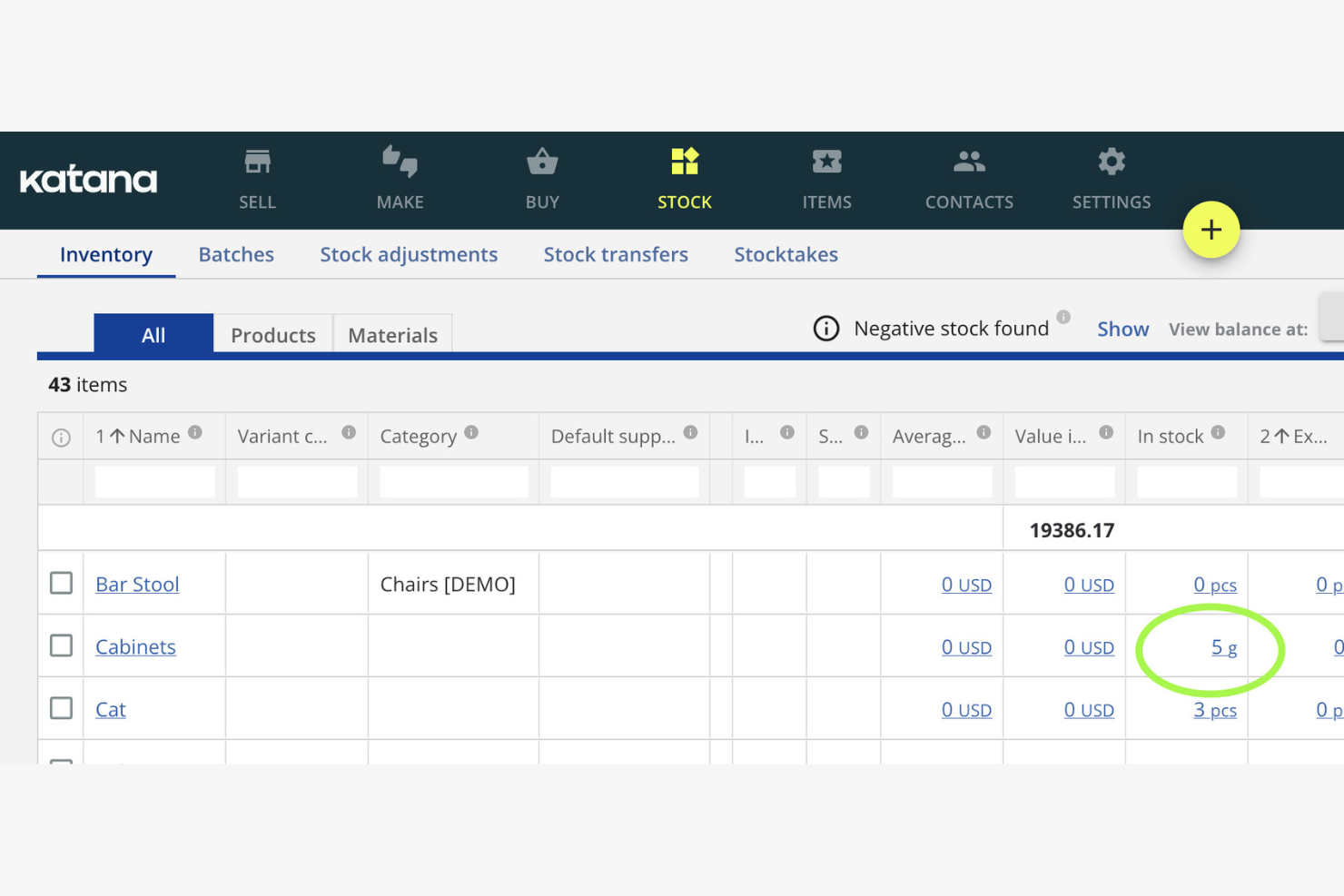
Katana is a production scheduling software tailored for small manufacturers. It helps you manage inventory, orders, and production tasks efficiently.
Why I picked Katana: It's designed for small manufacturers, focusing on ease of use and simplicity as a modern manufacturing software platform. The real-time inventory management keeps you updated on stock levels, helping you avoid production delays and reduce lead times. Its visual dashboard makes it easy to see your production schedule, including active work orders. The integration with e-commerce platforms keeps your sales and production in sync.
Standout Features and Integrations:
Features include batch tracking to trace goods movement, purchasing tools to make sure raw materials are available on time, and sales order management to support efficient fulfillment.
Integrations include Shopify, WooCommerce, QuickBooks Online, Xero, Zapier, BigCommerce, Amazon, Etsy, and more.
Pros and Cons
Pros:
- Syncs with e-commerce platforms
- Visual scheduling board
- Real-time updates
Cons:
- Basic reporting tools
- Not ideal for large operations

Infor is a production scheduling software aimed at various industries, including manufacturing and distribution. It helps manage production schedules, inventory, and supply chain processes efficiently.
Why I picked Infor: It's known for providing industry-specific solutions, offering tailored features for different sectors. The software includes advanced scheduling tools and resource planning capabilities that adapt to your industry's needs and support day-to-day operations. Its analytics provide insights to improve decision-making. The demand planning capabilities help you meet customer needs without overstocking.
Standout Features and Integrations:
Features include capacity planning to optimize resources, inventory management tools to maintain optimal stock levels, and real-time visibility into your production processes.
Integrations include Salesforce, Microsoft Dynamics, AutoCAD, Ariba, and more.
Pros and Cons
Pros:
- Real-time process visibility
- Strong demand planning tools
- Tailored for specific industries
Cons:
- Manual data entry hurdles
- High dependency on technical resources

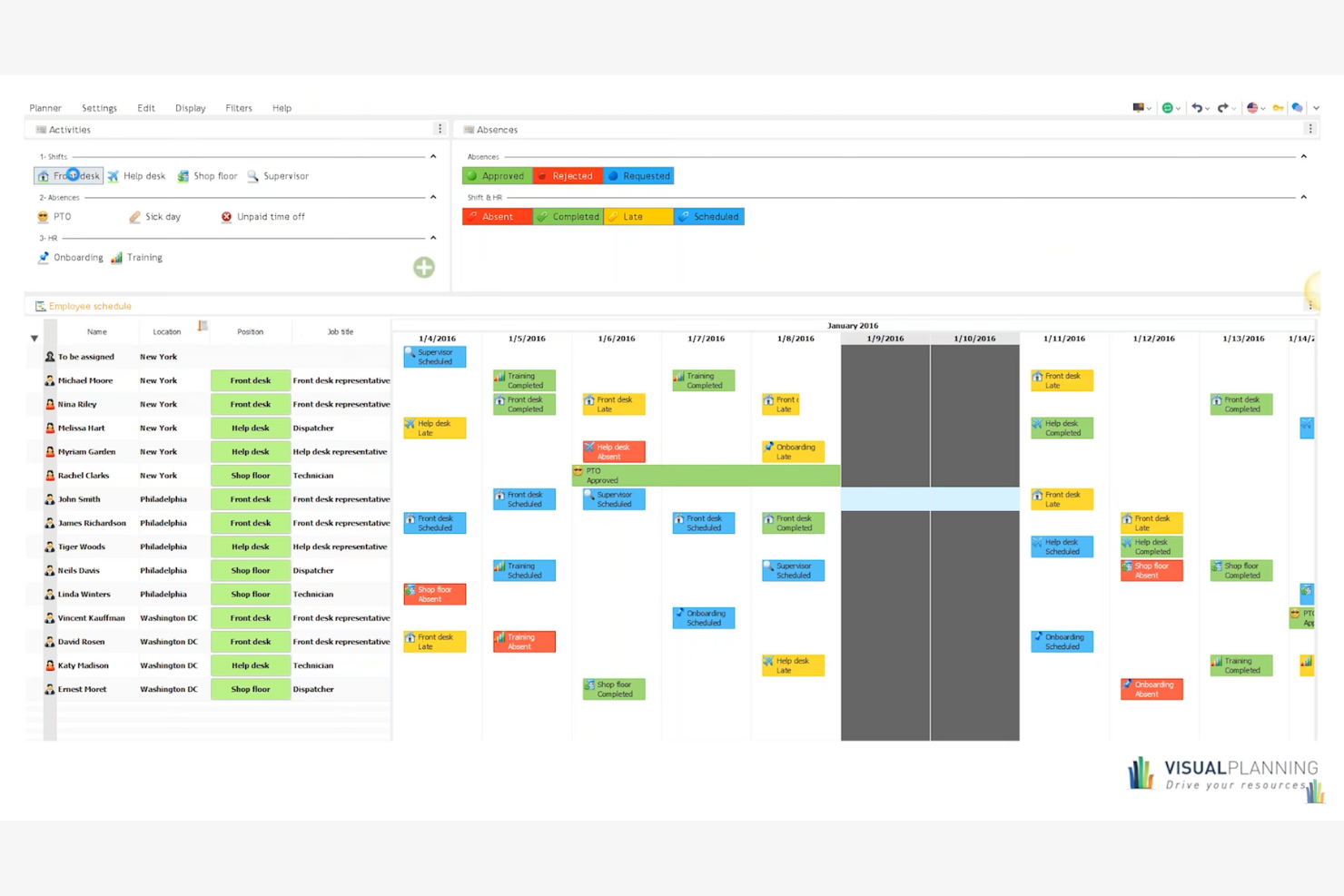
Visual Planning is a versatile production scheduling software designed for various industries, including manufacturing and construction. It helps you manage resources, schedules, and tasks efficiently, providing a tailored experience for different business needs.
Why I picked Visual Planning: It's known for its custom workflows, allowing you to adapt the tool to your specific processes, including manufacturing production and manufacturing scheduling. The drag-and-drop scheduling feature makes it easy to adjust plans and support on-time delivery. Its mobile app lets you access schedules and make updates from anywhere.
Standout Features and Integrations:
Features include customizable dashboards for clear project visibility, resource management tools to allocate tasks effectively, built-in automation to reduce manual scheduling, and real-time collaboration features to keep teams aligned.
Integrations include Microsoft Excel, Google Calendar, Outlook, Salesforce, SAP, Dropbox, and more.
Pros and Cons
Pros:
- Mobile app access
- Multi-resource scheduling
- Highly customizable workflows
Cons:
- Rigid license management
- Slow performance with large datasets

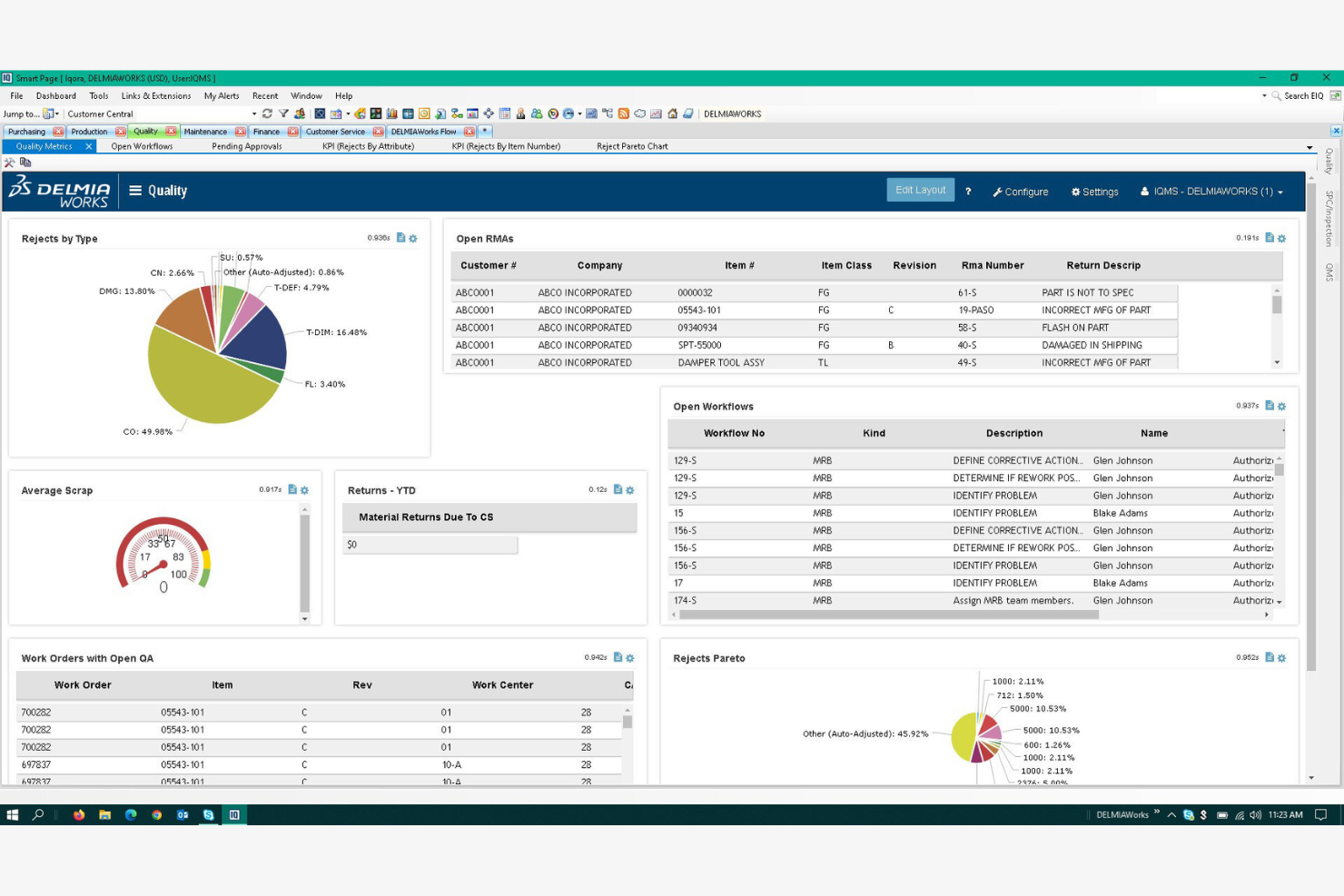
DELMIAWorks is a production scheduling software designed for manufacturers looking to integrate ERP functionalities. It helps manage production schedules, inventory, and operations efficiently.
Why I picked DELMIAWorks: It's ideal for manufacturers needing ERP integration, offering a unified solution for managing production and business processes. The software provides real-time data visibility, helping you make informed decisions quickly and run what-if scenarios to evaluate operational changes. Its scheduling tools are tailored to maximize manufacturing efficiency and balance production capacity. The quality management features are built to maintain high production standards.
Standout Features and Integrations:
Features include adaptive advanced planning and scheduling, real-time shop floor monitoring, and built-in material requirements planning to make sure you have the right materials at the right time.
Integrations include SOLIDWORKS, QuickBooks, Salesforce, AutoCAD, and more.
Pros and Cons
Pros:
- Integrates with major ERP systems
- Real-time data access
- Supports complex manufacturing processes
Cons:
- High implementation barrier
- Lack of a native web interface
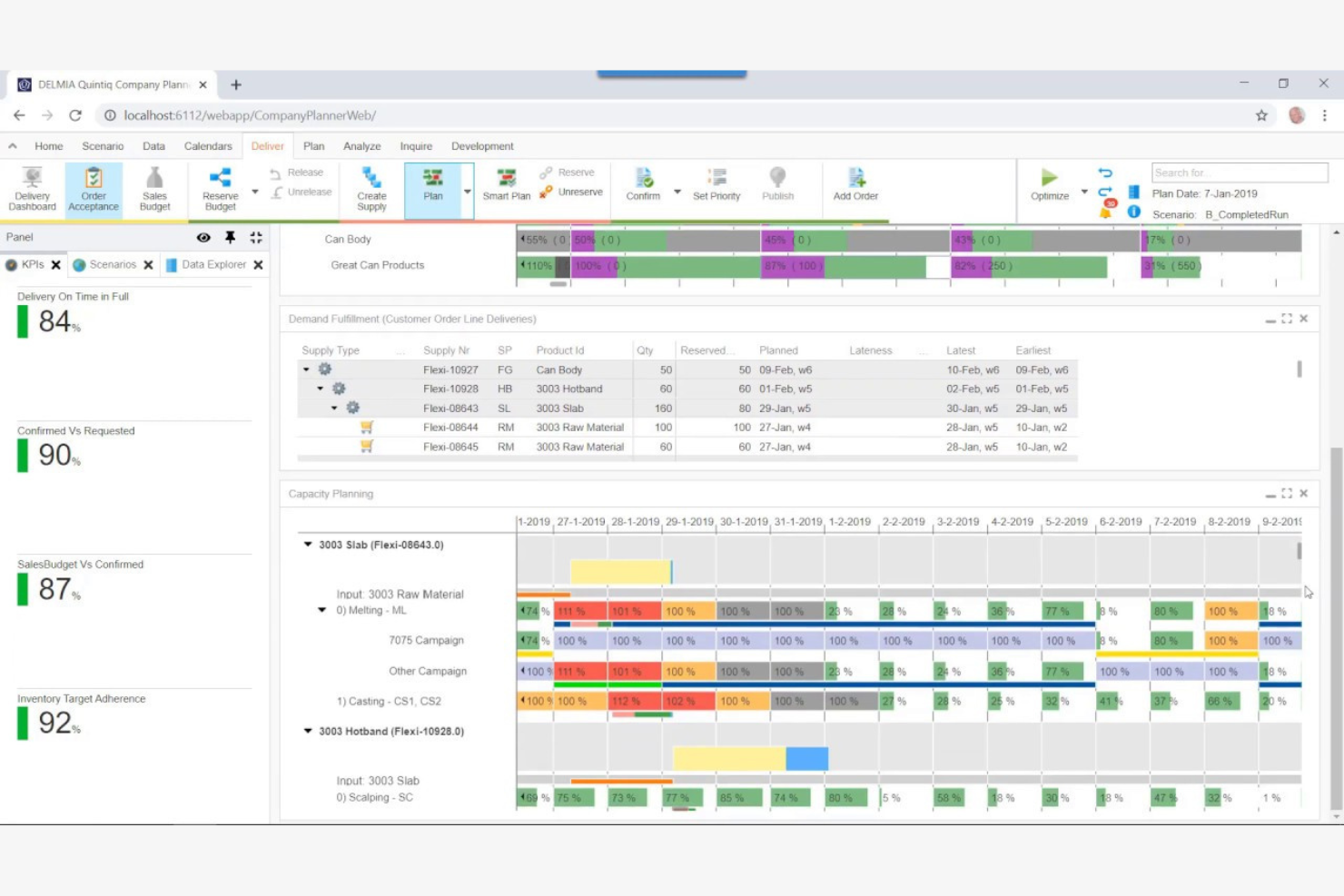
DELMIA Quintiq is a production planning software designed for businesses with complex supply chains. It helps manage planning, scheduling, and optimization of resources across various industries.
Why I picked DELMIA Quintiq: It's tailored for complex supply chains, providing advanced planning capabilities powered by optimization algorithms. The software offers optimization tools that help you improve resource utilization across operations. Its scenario planning feature allows you to test different strategies before implementation. You can also benefit from its real-time data analytics and performance metrics to make informed decisions.
Standout Features and Integrations:
Features include multi-site scheduling for coordinated resource allocation, demand forecasting to anticipate market needs, and capacity planning to meet production goals without overextending resources.
Integrations include SAP, Oracle, Microsoft Dynamics, JD Edwards, IBM Maximo, Salesforce, Infor, Manhattan Associates, Blue Yonder, Ariba, and more.
Pros and Cons
Pros:
- Supports multi-site operations
- Strong optimization capabilities
- Handles complex scheduling scenarios
Cons:
- Limited out-of-the-box solutions
- Requires significant customization
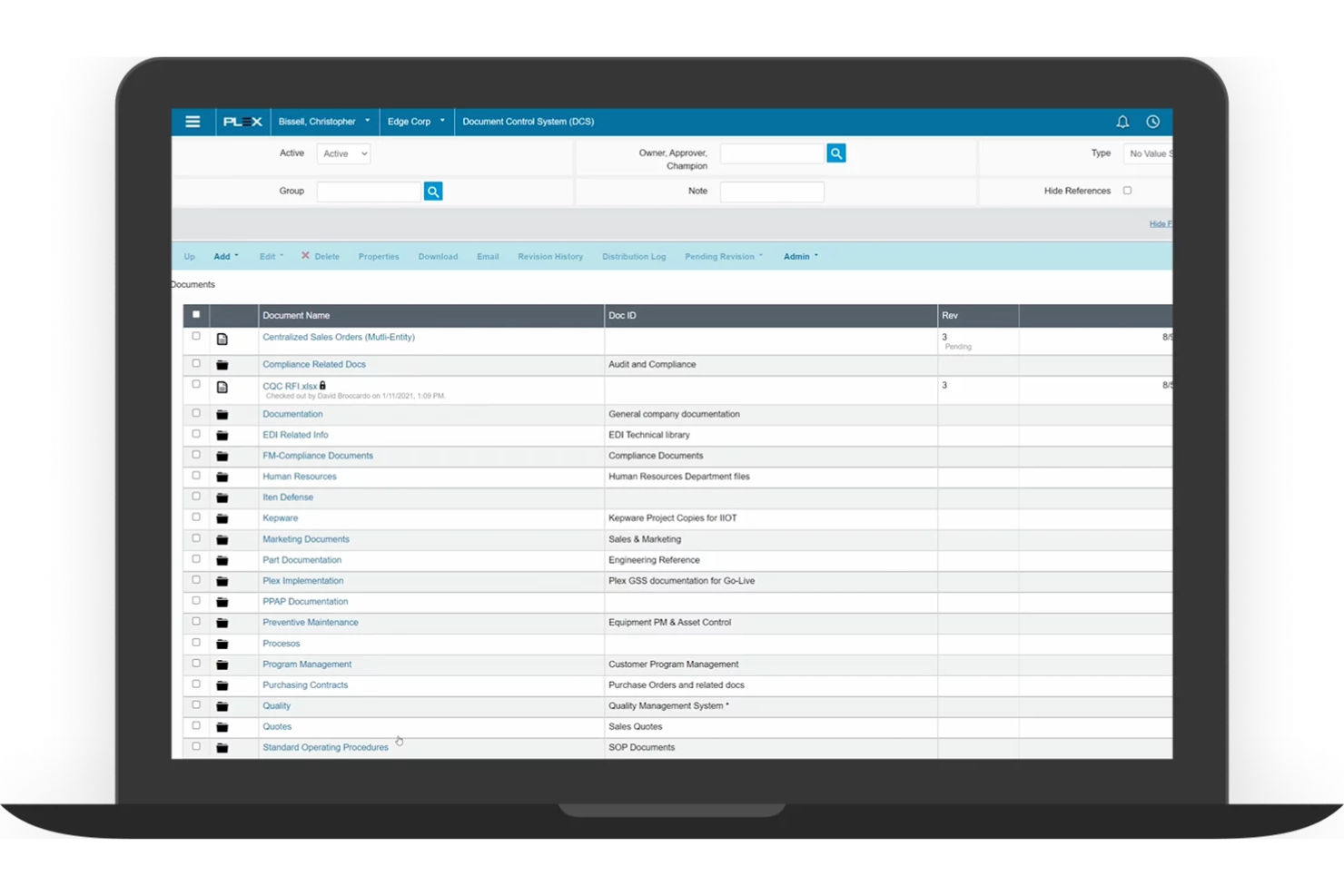
Plex is a cloud-based production scheduling software designed for manufacturers. It helps manage production processes, inventory, and quality control efficiently.
Why I picked Plex: It's known for its cloud-based planning, supporting your production planning process with easy access to real-time data from anywhere. The software's real-time monitoring helps you track production activities as they happen and optimize throughput. Its quality management features help your products meet the necessary standards. You can also leverage its detailed reporting tools to gain insights into your operations.
Standout Features and Integrations:
Features include precise shop floor management, real-time production tracking, and built-in compliance management tools that help you adhere to industry regulations.
Integrations include Salesforce, Microsoft Dynamics, QuickBooks, and more.
Pros and Cons
Pros:
- Cloud-based accessibility
- Strong compliance management
- Real-time production tracking
Cons:
- New interface lacks working versions of key tools
- Designed to replace your entire business software

Siemens Opcenter is a production scheduling software designed for large-scale manufacturers. It helps optimize production processes, manage resources, and improve overall efficiency.
Why I picked Siemens Opcenter: It offers scalability, making it suitable for growing operations. The software provides advanced planning capabilities that adapt to changing production demands and support a flexible scheduling process. Its real-time data access allows you to monitor and adjust schedules as needed. The simulation tools help you test different scenarios to find the best solutions.
Standout Features and Integrations:
Features include detailed production tracking for end-to-end visibility, built-in quality management to meet industry standards, and capacity planning to allocate resources effectively across operations.
Integrations include Teamcenter, MindSphere, TIA Portal, Infor, and more.
Pros and Cons
Pros:
- Flexible capacity planning
- Advanced simulation tools
- Supports large-scale operations
Cons:
- Windows-only limitation
- Poor documentation examples

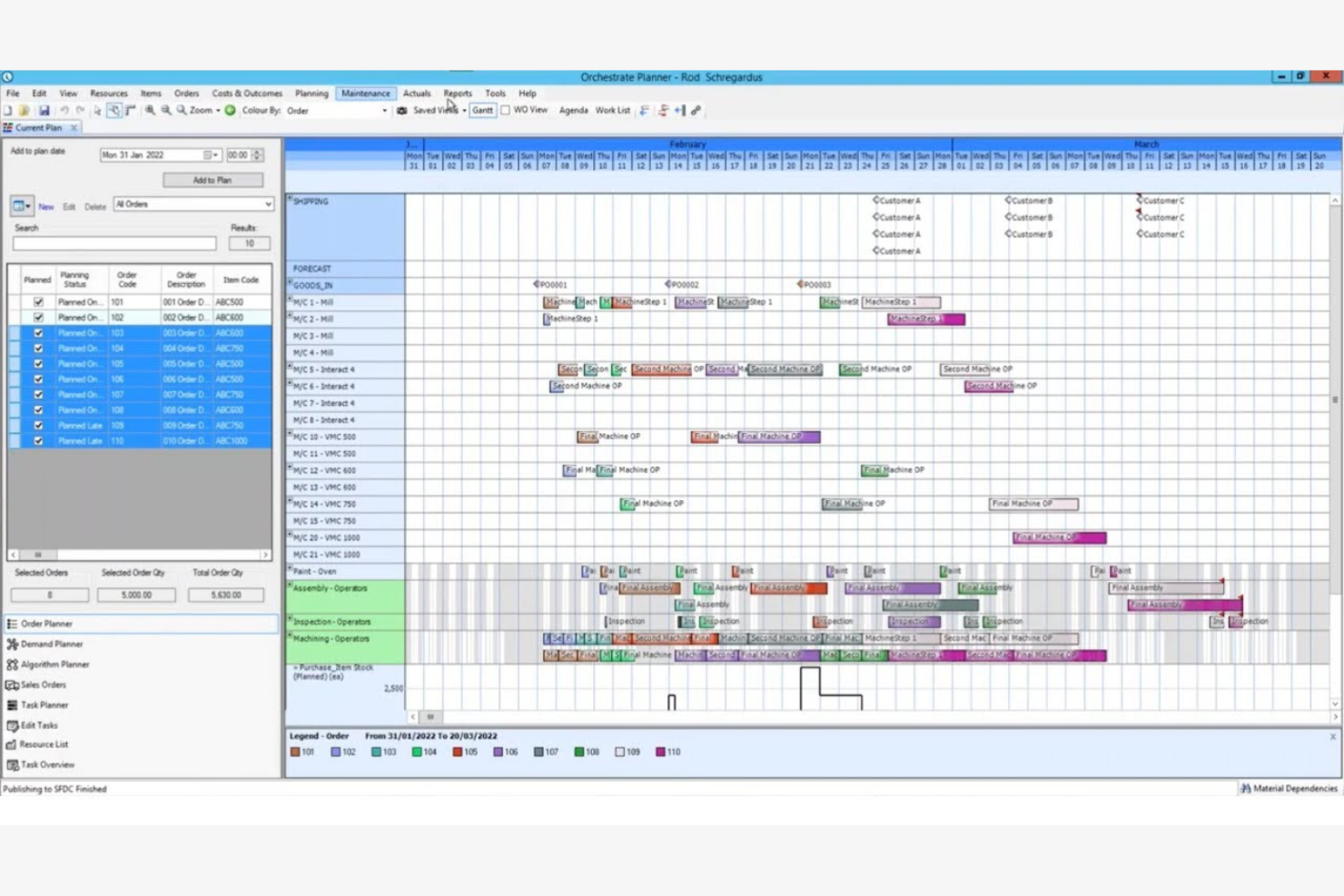
Access Orchestrate offers production scheduling software tailored for midsize businesses. It helps manage production planning, inventory, and workflow processes efficiently.
Why I picked Access Orchestrate: It provides solutions specifically for midsize businesses with tools that can scale with your operation and improve long-term profitability. The software's intuitive interface makes it easy for your team to adopt and utilize. It includes planning features that help optimize your production schedules. You can also track inventory levels to make sure you have the necessary materials on hand.
Standout Features and Integrations:
Features include real-time visibility into production processes to make informed decisions quickly. Built-in reporting highlights performance gaps and cost drivers, helping improve operational efficiency and profitability. Resource management tools to allocate tasks efficiently.
Integrations include Salesforce, QuickBooks, Xero, Sage, HubSpot, and more.
Pros and Cons
Pros:
- Strong reporting tools
- Live production status tracking
- Integrated planning features
Cons:
- No built-in API
- Heavy internet reliance
Best for global financial consolidation
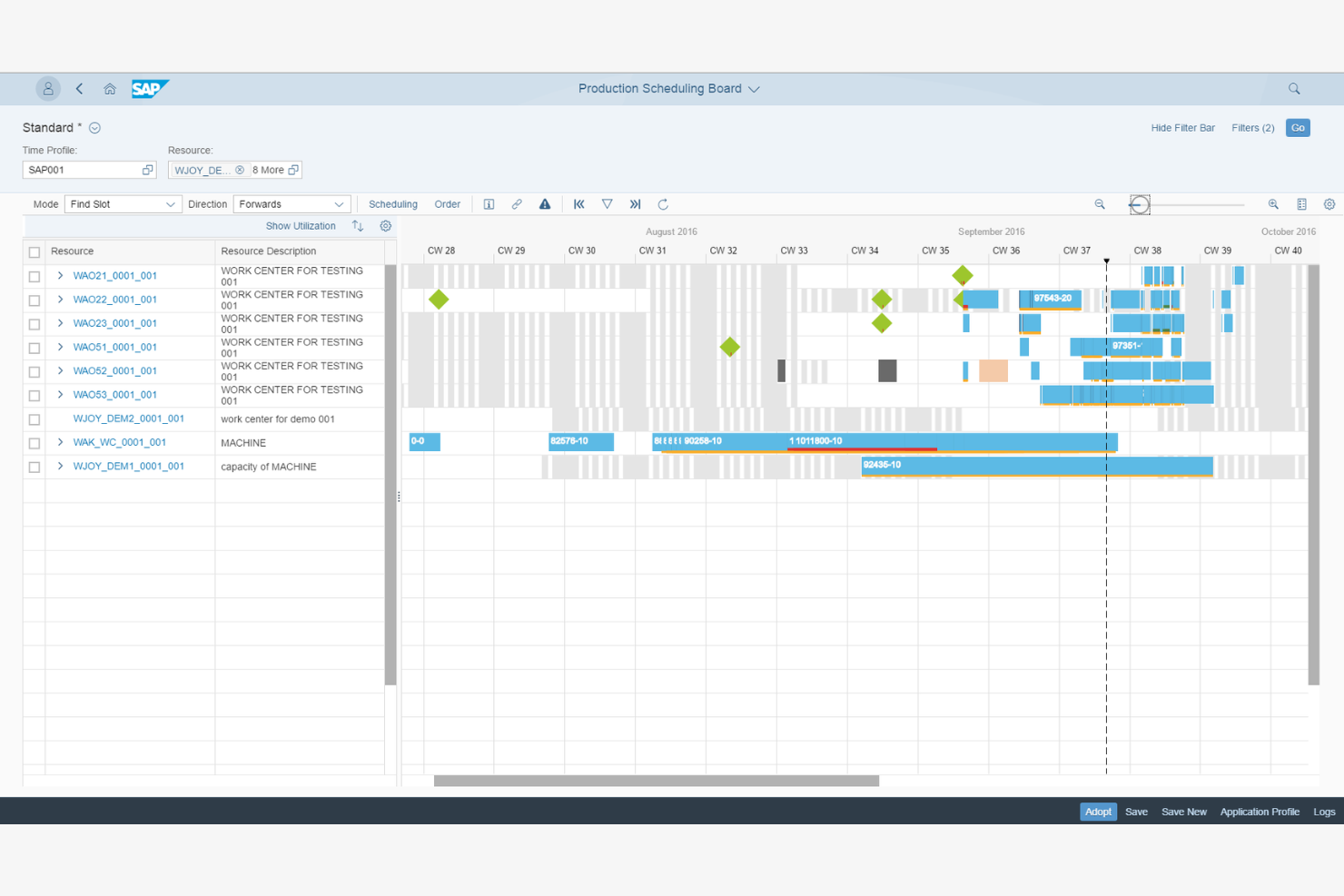
SAP S/4HANA Manufacturing for planning and scheduling offers production scheduling software for large global enterprises. It helps manage complex manufacturing processes, optimize supply chains, and improve efficiency across operations.
Why I picked SAP S/4HANA Manufacturing for planning and scheduling: It's designed for global enterprises, providing extensive features to manage large-scale operations. The software's advanced analytics help you make data-driven decisions. Its integration with supply chain processes keeps operations running smoothly across different regions. The real-time visibility feature keeps you updated on all production activities.
Standout Features and Integrations:
Features include demand-driven replenishment to maintain optimal inventory levels, predictive analytics for forecasting, and production planning with detailed scheduling features to meet output targets.
Integrations include Microsoft Azure, Amazon Web Services, Google Cloud, IBM Cloud, Salesforce, Microsoft Dynamics, SAP HANA, Ariba, and more.
Pros and Cons
Pros:
- Flexible production planning
- Live visibility into orders and capacity
- Built for complex, multi-site production
Cons:
- No built-in supply network planning
- Consultant-dependent implementation
Diğer Üretim Planlama Yazılımları
Kısa listeme dahil olmayan ancak yine de göz atmaya değer bazı ek üretim planlama yazılımı seçenekleri şunlardır:
- Eyelit APS
For compliance needs
- MRPeasy
For fast MRP setup for small factories
- Fishbowl Inventory
For inventory management
- Microsoft Dynamics 365 Business Central
For small to medium businesses


How I Evaluate Production Scheduling Software
When a planner needs to resequence 50 jobs after a machine goes down, I look for two things: baseline scheduling capabilities and the differentiators that separate a good tool from the right one.
Core Functionality (Table Stakes For This List)
When I'm selecting tools for my list, I rank each one on a scale from 0 (does not offer the functionality) to 5 (excels in this area) for each core functionality listed below. Then, I calculate the tool's total score into a percentage. Each tool needs to achieve a minimum total score of 65% to be considered for inclusion.
- Production Gantt Scheduling: I check whether the Gantt view covers multiple resources or lines and lets planners filter by work center, job status, or due date at a glance.
- Finite Capacity Planning: Every schedule is useless if it ignores real constraints, so I evaluate how well a tool models machine capacity, labor shifts, and tooling limits together.
- Drag-and-Drop Rescheduling: When a rush order lands or a machine goes offline, I look for rescheduling that recalculates downstream dependencies automatically after a single drag action.
- Material & Inventory Sync: I evaluate whether the scheduler pulls live inventory and BOM data so planners can spot a resin shortage or missing component before it stalls a production run.
- ERP/MES Integration: Pre-built connectors to systems like SAP, Oracle, Epicor, or Microsoft Dynamics matter here, along with open APIs for linking to MES and shop-floor data sources.
- Schedule Optimization & KPIs: I look for rule-based or algorithmic logic that minimizes changeovers or prioritizes on-time delivery, paired with dashboards tracking utilization and throughput.
Once I have a list of tools that meet this criteria, I consider what sets each platform apart.
Differentiating Factors (What Sets Vendors Apart)
Here's how I compare and contrast different vendors:
Standout Features
What-if scenario simulation is a major differentiator. I want planners to model a machine breakdown or surprise rush order and compare schedule impacts before committing changes. AI-powered optimization builds on this by auto-generating sequences that cut changeovers or prioritize at-risk due dates. For teams managing multiple facilities, I also evaluate multi-plant coordination to confirm a tool can balance workloads across sites from one centralized view.
Beyond Features
Industry fit matters a lot here. A tool built for discrete manufacturing may fall flat for a process or batch-mode environment, so I check whether a vendor supports the buyer's specific production mode. Implementation and time-to-value are other factors I weigh heavily because schedulers often need shop-floor buy-in to succeed. I also evaluate deployment options, since some plants require on-premise or hybrid hosting to meet OT security policies or data residency requirements that cloud-only platforms can't satisfy.
Üretim Planlama Yazılımı Nasıl Seçilir?
Uzun özellik listeleri ve karmaşık fiyatlandırma yapıları arasında kaybolmak kolaydır. Kendinize özgü yazılım seçim sürecinizde ilerlerken odağınızı korumanıza yardımcı olmak için göz önünde bulundurmanız gereken faktörleri içeren bir kontrol listesi hazırladım:
| Faktör | Dikkate Alınması Gerekenler |
| Ölçeklenebilirlik | Yazılım işletmenizle birlikte büyüyebilir mi? Üretim hacmindeki artışı veya ek konumları sorunsuz bir şekilde yönetip yönetemeyeceğini değerlendirin. Tamamen yeniden yapılandırma gerektirmeden gelecekteki büyümeyi desteklediğinden emin olun. |
| Entegrasyonlar | Mevcut araçlarınıza bağlanabiliyor mu? Mevcut ERP, CRM veya muhasebe sistemlerinizle uyumluluğunu kontrol edin. Teknoloji altyapınızla entegre olmak için manuel veri girişi veya karmaşık geçici çözümler gerektiren çözümlerden kaçının. |
| Özelleştirilebilirlik | Yazılımı süreçlerinize göre uyarlayabilir misiniz? İş akışlarını, panoları ve raporları ayarlamanıza olanak tanıyan seçenekleri arayın. Yerleşik süreçlerinizi değiştirmenizi zorunlu kılan katı çözümlerden kaçının. |
| Kullanım kolaylığı | Yazılım ekibiniz için sezgisel mi? Kullanıcı arayüzünü ve gezinmeyi test edin. Dik bir öğrenme eğrisi benimsemeyi yavaşlatabilir ve üretkenliği azaltabilir. Ekibinizin minimum eğitimle hızlıca kullanmaya başlayabileceği bir araç seçin. |
| Uygulama ve işe alıştırma | Çalışmaya başlayabilmeniz ne kadar sürecek? Kurulum için gereken zaman ve kaynakları değerlendirin. Sorunsuz bir geçiş sağlamak için eğitim materyalleri de dâhil olmak üzere işe alıştırma desteği sunan çözümleri arayın. |
| Maliyet | Fiyatlandırma bütçenize uygun mu? Abonelik ücretleri, kurulum maliyetleri ve olası eklentiler dâhil olmak üzere toplam sahip olma maliyetini değerlendirin. Gizli ücretlere dikkat edin ve fiyatın sağladığı değerle uyumlu olduğundan emin olun. |
| Güvenlik önlemleri | Verileriniz ve operasyonlarınız korunuyor mu? Veri şifreleme, düzenli yedeklemeler ve sektör standartlarına uyumluluk özelliklerini kontrol edin. Tedarikçinin veri ihlallerini önlemek ve hassas bilgileri korumak için gerekli önlemlere sahip olduğundan emin olun. |
Üretim Planlama Yazılımı Nedir?
Üretim planlama yazılımı, işletmelerin üretim süreçlerini planlamasına, yönetmesine ve optimize etmesine yardımcı olan bir araçtır. Genellikle üretim yöneticileri, planlamacılar ve operasyon profesyonelleri tarafından kullanılan bu yazılım, verimliliği artırarak ve duruş sürelerini azaltarak değer sağlar. Kaynak tahsisi, envanter yönetimi ve gerçek zamanlı izleme gibi özellikler, üretim faaliyetlerinin koordine edilmesine ve teslim tarihlerine uyulmasına yardımcı olur. Genel olarak bu araçlar, üretim operasyonlarında üretkenliği artırır ve daha iyi karar almayı destekler.
Özellikler
Üretim planlama yazılımı seçerken aşağıdaki temel özelliklere dikkat edin:
- Kaynak tahsisi: Üretim planlarını optimize etmek ve darboğazları azaltmak için görevleri ve kaynakları verimli bir şekilde atamanıza yardımcı olur.
- Envanter yönetimi: Stok seviyelerini takip eder.
- Gerçek zamanlı izleme: Üretim süreçleri hakkında anlık güncellemeler sağlayarak hızlı ayarlamalar yapmanıza ve bilinçli kararlar almanıza olanak tanır.
- Talep tahmini: Geçmiş verilere dayanarak gelecekteki üretim ihtiyaçlarını öngörür.
- Özelleştirilebilir panolar: Görünümleri ve raporları ihtiyaçlarınıza göre uyarlamanıza olanak tanır.
- Kalite yönetimi: Ürünlerin sektör standartlarını karşılamasını sağlar.
- Entegrasyon özellikleri: ERP veya CRM gibi mevcut sistemlere bağlanır.
- Gelişmiş analizler: Üretim performansı ve eğilimleri hakkında içgörüler sunar.
- Uyumluluk takibi: Sektör düzenlemelerine uyumu izler ve belgeler.
Faydalar
Üretim planlama yazılımının uygulanması, ekibiniz ve işletmeniz için çeşitli faydalar sağlar. Yararlanabileceğiniz birkaç fayda şunlardır:
- Artan verimlilik: Kaynak tahsisi ve gerçek zamanlı izleme, iş akışlarını optimize etmeye, duruş sürelerini azaltmaya ve üretkenliği artırmaya yardımcı olur.
- Daha iyi envanter kontrolü: Envanter yönetimi özellikleri, optimum stok seviyelerini korumanıza yardımcı olarak stok yetersizliklerini ve aşırı stoklamayı önler.
- Optimize edilmiş karar alma: Gelişmiş analizler ve talep tahmini, veriye dayalı kararları ve stratejik planlamayı yönlendiren içgörüler sağlar.
- Kalite güvencesi: Kalite yönetimi araçları üretim standartlarını izleyerek tutarlı ve yüksek kaliteli ürünler sunmanıza yardımcı olur.
- Düzenlemelere uyumluluk: Uyumluluk takibi özellikleri, sektör düzenlemelerine uygun hareket etmenizi sağlayarak riskleri en aza indirir ve cezalardan kaçınmanıza yardımcı olur.
- Entegre operasyonlar: Veri akışını sürdürmek ve genel operasyonel verimliliği artırmak için mevcut sistemlere bağlanır.
Maliyetler ve Fiyatlandırma
Üretim planlama yazılımı seçmek, mevcut çeşitli fiyatlandırma modellerinin ve planların anlaşılmasını gerektirir. Maliyetler; özelliklere, ekip büyüklüğüne, eklentilere ve diğer unsurlara göre değişir. Aşağıdaki tabloda yaygın planlar, ortalama fiyatları ve üretim planlama yazılımı çözümlerinde genellikle bulunan özellikler özetlenmiştir:
Üretim Planlama Yazılımı Plan Karşılaştırma Tablosu
| Plan Türü | Ortalama Fiyat | Yaygın Özellikler |
| Ücretsiz Plan | $0 | Temel planlama, sınırlı raporlama ve temel envanter yönetimi. |
| Kişisel Plan | $15-$60/kullanıcı/ay | Gelişmiş planlama, temel analizler ve e-posta desteği. |
| İşletme Planı | $50-$500/kullanıcı/ay | Gerçek zamanlı takip, entegrasyon özellikleri ve ayrıntılı raporlama. |
| Kurumsal Plan | $800+/ay | Özelleştirilebilir panolar, gelişmiş analizler ve özel müşteri desteği. |
Üretim Planlama Yazılımı Hakkında Sıkça Sorulan Sorular
Üretim planlama yazılımı hakkında sık sorulan bazı soruların yanıtları burada yer alıyor:
Üretim planlama yazılımından en çok hangi sektörler yararlanır?
Üretim, otomotiv, havacılık ve gıda üretimi gibi sektörler üretim planlama yazılımından büyük ölçüde yararlanır. Bu araçlar, karmaşık üretim süreçlerinin yönetilmesine, verimliliğin artırılmasına ve kalitenin korunmasına yardımcı olur. Karmaşık planlama ihtiyaçlarınızın veya katı teslim tarihlerinizin olduğu bir sektörde faaliyet gösteriyorsanız operasyonları ve üretkenliği geliştirmek için bu yazılımı uygulamayı değerlendirin.
Üretim planlama yazılımı ekibimin iş akışını geliştirmeye nasıl yardımcı olur?
Üretim planlama yazılımı, görev atamalarını, son tarihleri ve kaynak tahsisini tek bir platformda basitleştirir. Bu, darboğazları fark etmenize, aşırı rezervasyondan kaçınmanıza ve öncelikleri hızla değiştirmenize yardımcı olur.
Üretim planlama yazılımı mevcut sistemlerle entegre olabilir mi?
Evet, çoğu üretim planlama yazılımı ERP, CRM ve muhasebe yazılımları gibi mevcut sistemlerle entegre olabilir. Entegrasyon, verilerin platformlar arasında akmasını sağlayarak manuel veri girişini ve hataları azaltır. Olası entegrasyon sorunlarını önlemek için satın almadan önce yazılımın mevcut araçlarınızla uyumluluğunu kontrol edin.
İşletmemin büyüklüğü için doğru yazılımı nasıl belirlerim?
Ekip büyüklüğünüzü, üretim hacminizi ve özel ihtiyaçlarınızı göz önünde bulundurun. Küçük işletmeler, temel özelliklere sahip daha basit ve uygun fiyatlı seçenekleri tercih edebilir. Daha büyük işletmeler gerçek zamanlı takip ve analiz gibi gelişmiş özelliklere ihtiyaç duyabilir. Ölçeklenebilir bir çözüm seçmek için mevcut ve gelecekteki ihtiyaçlarınızı değerlendirin.
Uygulama sürecinde neler beklemeliyim?
Kurulum, eğitim ve uyum sağlama için bir dönem bekleyin. Uygulama süreci yazılıma göre değişir, ancak genellikle veri aktarımı, sistem yapılandırması ve kullanıcı eğitimini içerir. Ekibinizin sorunsuz bir geçiş yapabilmesi için eğitim materyalleri ve müşteri hizmetleri gibi işe alım desteği sunan bir sağlayıcı seçin.
Üretim planlama yazılımı için teknik destek mevcut mu?
Evet, çoğu sağlayıcı teknik destek sunar, ancak hizmet düzeyi değişiklik gösterir. Telefon, e-posta ve sohbet gibi birden fazla destek kanalı sunan sağlayıcıları arayın. Bazıları 7/24 destek sunarken bazıları sınırlı saatlerde hizmet verir.