

2026’da İncelenen En İyi 10 Satış İş Birliği Yazılımı

En İyi Satış İş Birliği Yazılımları Kısa Listesi


Daha fazla şirket hibrit çalışma ortamlarını benimsedikçe iş birliği araçları her zamankinden daha önemli hale geliyor. Ancak çeşitli satış iş birliği yazılımı çözümleri mevcut olduğundan, ekiplerinizin daha etkili iletişim kurmasına hangisinin yardımcı olacağını bilmek zor olabilir.
Proje yönetimi ve dijital yazılımlar konusundaki kapsamlı deneyimimi kullanarak en iyi satış iş birliği araçlarından birkaçını test edip karşılaştırdım. Ayrıntılı incelemelerim, şirketlerin araştırmalarına başlamasına yardımcı olmak için her seçeneğin artıları ve eksileri, özellikleri ve entegrasyonları hakkında fikir verecek. İster KOBİ ister daha büyük bir işletme olun, bu makale operasyonları kolaylaştırmanıza ve üretkenliği artırmanıza yardımcı olacak bir sonraki satış iş birliği yazılımınıza yön verecek.
Why Trust Our Software Recommendations
Our team has been testing and reviewing software since 2012. As project managers ourselves, we know how difficult—and important—it is to choose the right software.
For this guide, we evaluated tools using hands-on testing and independent research, scoring tools using our selection criteria. We also draw on insights from industry thought leaders and practicing project management experts.
Our reviews reflect our human editorial judgment, not a sales pitch.
Expert reviewers:
Satış İş Birliği Yazılımları Karşılaştırma Tablosu
Bu karşılaştırma tablosu, en iyi satış iş birliği yazılımı seçimlerimin fiyatlandırma ayrıntılarını özetler:
Score legend (out of 5)
- Excellent 4.5–5
- Good 4–4.4
- Average 3–3.9
- Below average 2–2.9
- Poor 1–1.9
| Tool | Starting Price | Website | |||||||
|---|---|---|---|---|---|---|---|---|---|
| Best for integrated CRM and ERP solutions | 3.7 out of 5 | 5 | 2 | 5 | 3 | 3 | 4 | $8/user/month 30-day free trial available | Website |
| Best for conversation analytics | 3.5 out of 5 | 5 | 3 | 5 | 4 | 3 | 1 | Pricing upon request Free demo available | Website |
| Best for buyer engagement scoring and e-sign | 3.8 out of 5 | 5 | 5 | 3 | 4 | 3 | 3 | $25/user/month Free demo + 14-day free trial available | Website |
| Best for sales engagement features | 3.3 out of 5 | 4 | 4 | 5 | 3 | 3 | 1 | Pricing upon request Free demo available | Website |
| Best for AI-driven deal room engagement scoring | 4.0 out of 5 | 4 | 5 | 3 | 5 | 4 | 3 | $45/user/month Free plan available | Website |
| Best for sales-to-project handoff automation | 3.5 out of 5 | 3 | 3 | 4 | 4 | 3 | 4 | $9/user/month Free plan + 14-day trial available | Book Demo |
| Best for data-driven sales and content management | 3.7 out of 5 | 4 | 5 | 4 | 3 | 4 | 2 | Pricing upon request Free demo available | Website |
| Best for customization options | 3.7 out of 5 | 5 | 2 | 5 | 4 | 4 | 2 | $14/user/month Free plan + 15-day free trial+ free demo available | Website |
| Best for all-in-one work management and automation | 3.3 out of 5 | 2 | 2 | 4 | 4 | 4 | 4 | $12/user/month Free plan + trial + demo available | Website |
| Best for guided selling and revenue automation | 4.0 out of 5 | 4 | 5 | 3 | 4 | 4 | 4 | Pricing upon request Free demo available | Website |
En İyi Satış İş Birliği Yazılımları İncelemeleri
Bu bölüm, her bir satış iş birliği yazılımının derinlemesine analizini ve genel görünümünü sunar. Aşağıda her aracın artılarını ve eksilerini, özelliklerini ve en uygun kullanım alanlarını ele alacağım.

Best for integrated CRM and ERP solutions
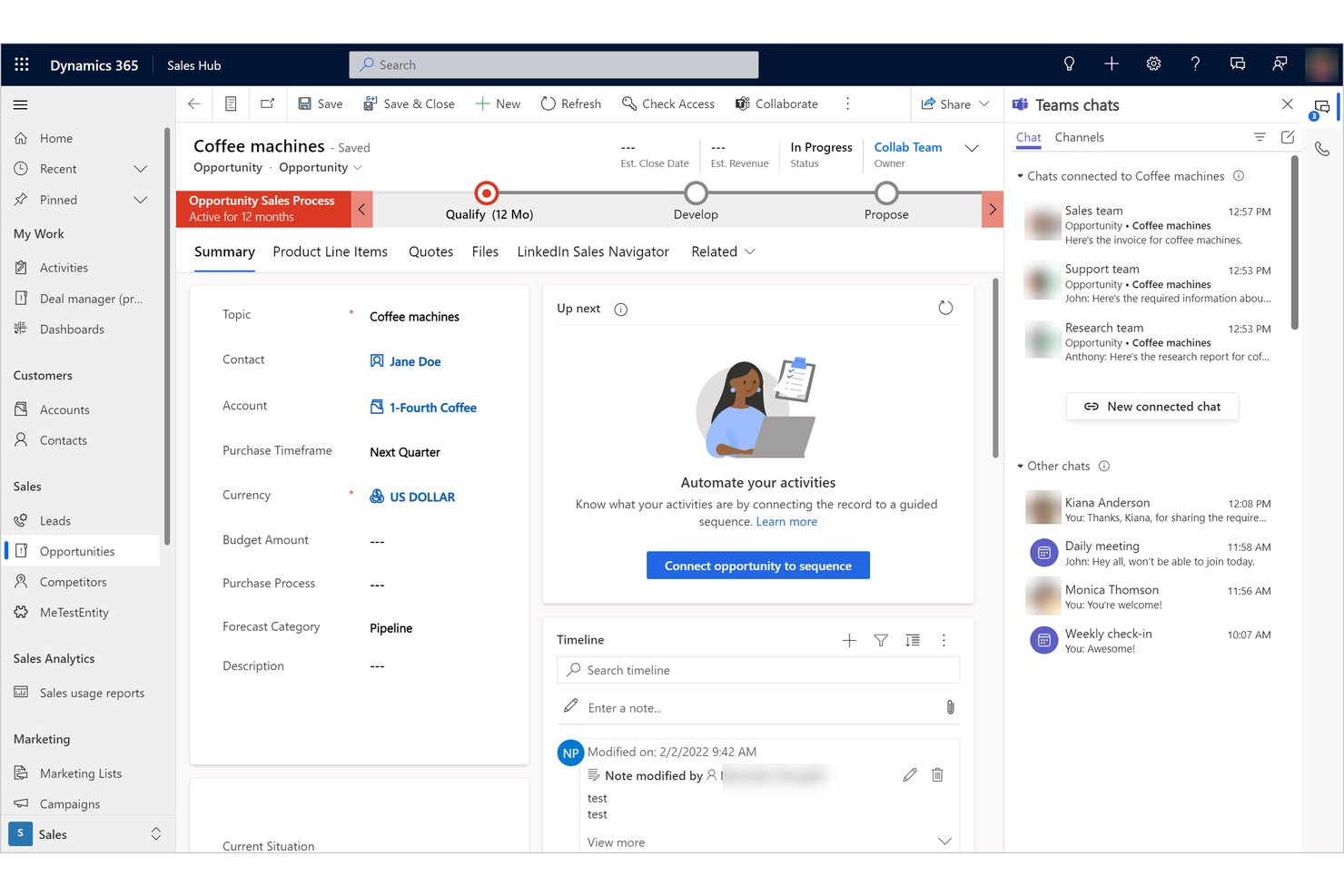
Microsoft Dynamics 365 is a CRM and ERP platform that combines pipeline management, AI-powered sales agents, quote creation, forecasting, and cross-functional collaboration via native Microsoft Teams and SharePoint integration.
Who Is Microsoft Dynamics 365 Best For?
Microsoft Dynamics 365 is a strong fit for mid-to-large sales teams already operating within the Microsoft ecosystem who need their CRM and ERP data unified on a single platform.
Why I Picked Microsoft Dynamics 365
I picked Microsoft Dynamics 365 because it's the only tool on this list where CRM and ERP data share a single record layer, so a closed-won deal in Sales automatically flows into Project Operations or Finance without a separate sync. I like how non-sales colleagues, like legal or finance, can join a deal's Teams channel, view live Dynamics records, and co-edit quotes in SharePoint, all without needing a paid CRM seat. Native quote management lets reps build, discount, and export proposal PDFs directly from an opportunity record, keeping the whole deal in one place.
Microsoft Dynamics 365 Key Features
- Sales accelerator sequences: Build and assign step-by-step outreach sequences that guide reps through each stage of a deal with automated next-action prompts.
- Conversation intelligence: Records and transcribes customer calls, then surfaces coaching insights and deal risks for managers reviewing team performance.
- Predictive lead and opportunity scoring: AI models rank leads and open opportunities by conversion likelihood, helping reps and team leads prioritize their pipeline.
- Power Automate approval workflows: Trigger automated approval routing for discounts, closed-won handoffs, or cross-department notifications without custom code.
Microsoft Dynamics 365 Integrations
Microsoft Dynamics 365 offers native integrations across the Microsoft ecosystem, including Microsoft Teams, SharePoint, Microsoft 365, Power BI, Power Platform, Azure, and other Dynamics 365 apps. Marketplace integrations include Adobe Acrobat Sign and DocuSign.
Pros and Cons
Pros:
- Pipeline and forecast visibility across sales org
- Real-time quote co-editing in Office and SharePoint
- Free Teams-based deal collaboration for all colleagues
Cons:
- No native e-signature or digital sales room
- No native buyer-facing content engagement tracking

Gong
Best for conversation analytics
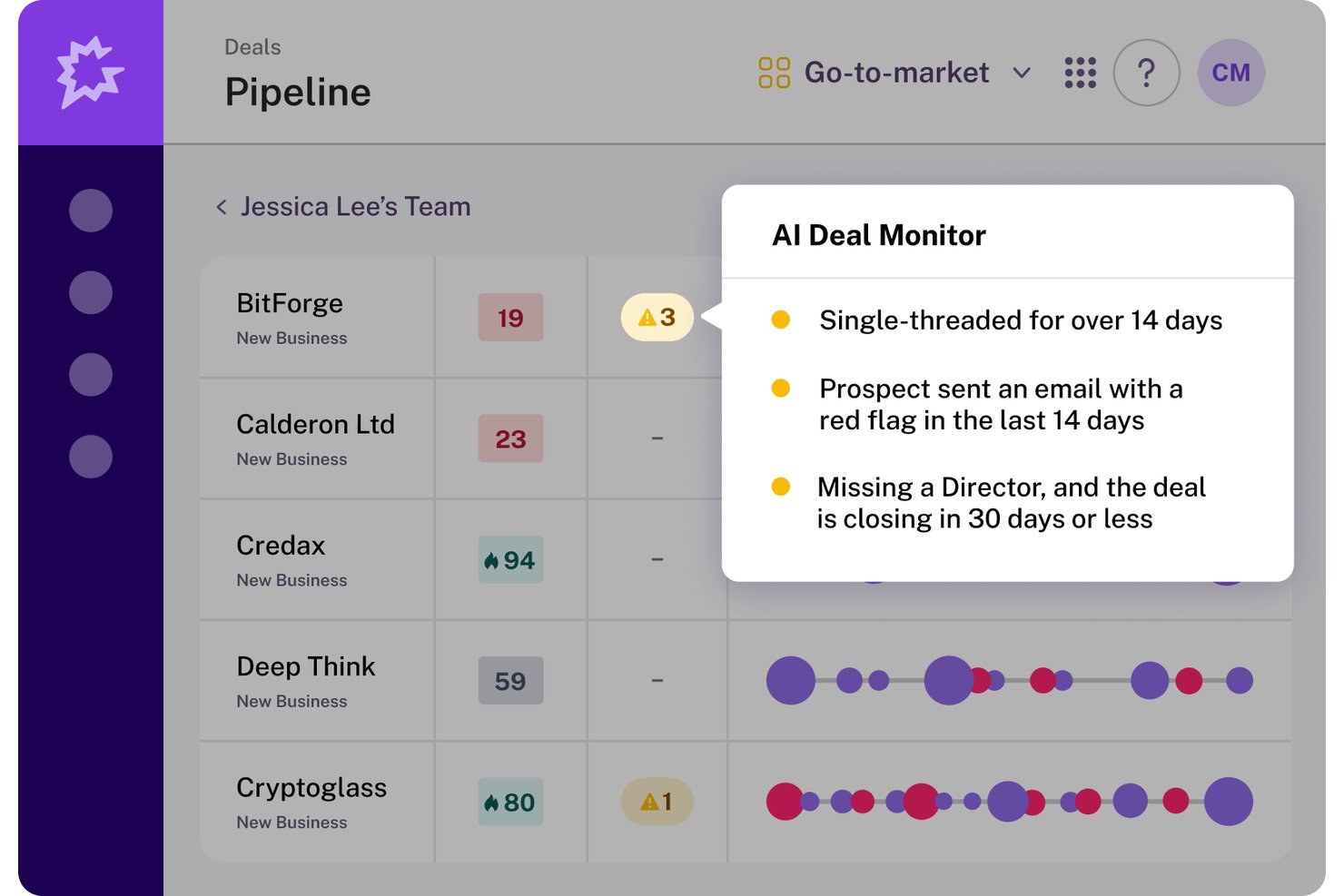
Gong is a revenue intelligence platform that captures and analyzes sales conversations across calls, emails, and meetings, surfacing deal insights, pipeline visibility, and coaching workflows for sales teams.
Who Is Gong Best For?
Gong is a strong fit for revenue operations and sales enablement leaders at mid-market and enterprise companies who need deal visibility and coaching workflows built on real conversation data.
Why I Picked Gong
I picked Gong as one of the best because no other tool on this list turns conversation data into shared deal context the way Gong does. I love how the collaboration panel ties timestamped comments and directly to specific call moments, so my team can flag a concern mid-recording and loop in the right person without leaving the deal record. The AI Deal Reviewer and Deal Boards then surface risk signals across all those interactions, giving managers and reps a single place to act on what the data actually shows.
Gong Key Features
- Gong Enable coaching inbox: A dedicated inbox where managers receive and action coaching requests, scorecards, and feedback tied to real call recordings.
- AI Trainer role-play: Reps practice sales conversations using AI-generated scenarios built from actual call data, with scored feedback on performance.
- External call sharing with expiry controls: Calls and snippets can be shared via links with configurable expiry dates and viewing restrictions for external recipients.
- Gong Anywhere embedding: Gong surfaces deal context, AI summaries, and activity timelines directly inside Salesforce, so reps never have to switch tools mid-workflow.
Gong Integrations
Gong offers 300+ integrations, including native Salesforce and HubSpot connections, plus Microsoft Teams, Zoom, Slack, Snowflake, and Highspot. Its Collective ecosystem adds marketplace integrations, while MCP connectors support external AI systems.
Pros and Cons
Pros:
- AI surfaces actionable deal risks instantly
- Timestamped comments tie feedback to calls
- Conversation data drives team deal reviews
Cons:
- Requires management buy-in for full adoption
- No real-time document co-editing tools

Best for buyer engagement scoring and e-sign
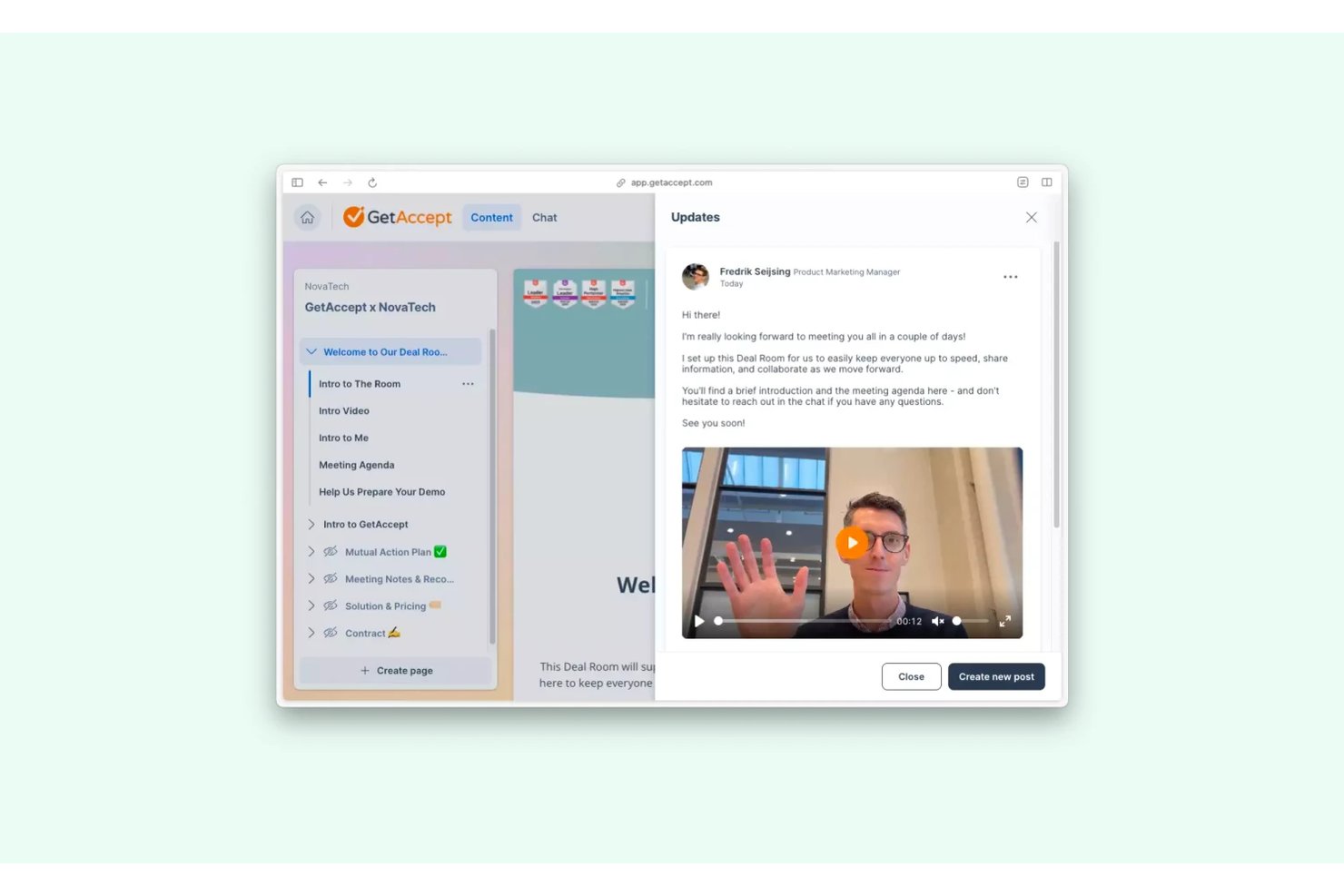
GetAccept is a sales collaboration platform that combines digital sales rooms, proposal creation, mutual action plans, content sharing, and e-signature into a single buyer-facing workspace.
Who Is GetAccept Best For?
GetAccept fits account executives and sales enablement teams who need to manage buyer engagement, content sharing, and contract signing from a single deal workspace.
Why I Picked GetAccept
GetAccept earns its spot on my shortlist because of how well it ties buyer engagement scoring to deal execution. I love that deal score pulls from real tracking data—who viewed a proposal, which stakeholders opened it, and for how long—so I can prioritize follow-up based on actual buying signals rather than gut feel. Pair that with native e-signature in the same workspace, and there's no handoff to a separate tool before a deal closes.
GetAccept Key Features
- Mutual action plans: A shared success plan where both buyers and sellers track milestones, assign task owners, and monitor progress toward close.
- Content library: A centralized repository of approved templates, videos, and documents reps can pull into proposals or Deal Rooms.
- Edit-after-send: Lets reps update a document's content after it's already been shared with the buyer, without breaking the original link.
- CRM sync: Two-way, real-time integration with Salesforce, HubSpot, Pipedrive, Dynamics, and others, surfacing engagement and MAP data directly in CRM records.
GetAccept Integrations
GetAccept has native integrations with Salesforce, HubSpot, Pipedrive, Microsoft Dynamics, SuperOffice, and Google Drive. It also supports Slack, Microsoft Teams, REST API access, and Zapier.
Pros and Cons
Pros:
- Native e-signature builds into deal workspace
- Mutual Action Plans align buyers and sellers
- Digital Sales Room centralizes buyer engagement
Cons:
- Pipeline view limited to document-centric dashboards
- No internal team chat or thread

Outreach
Best for sales engagement features
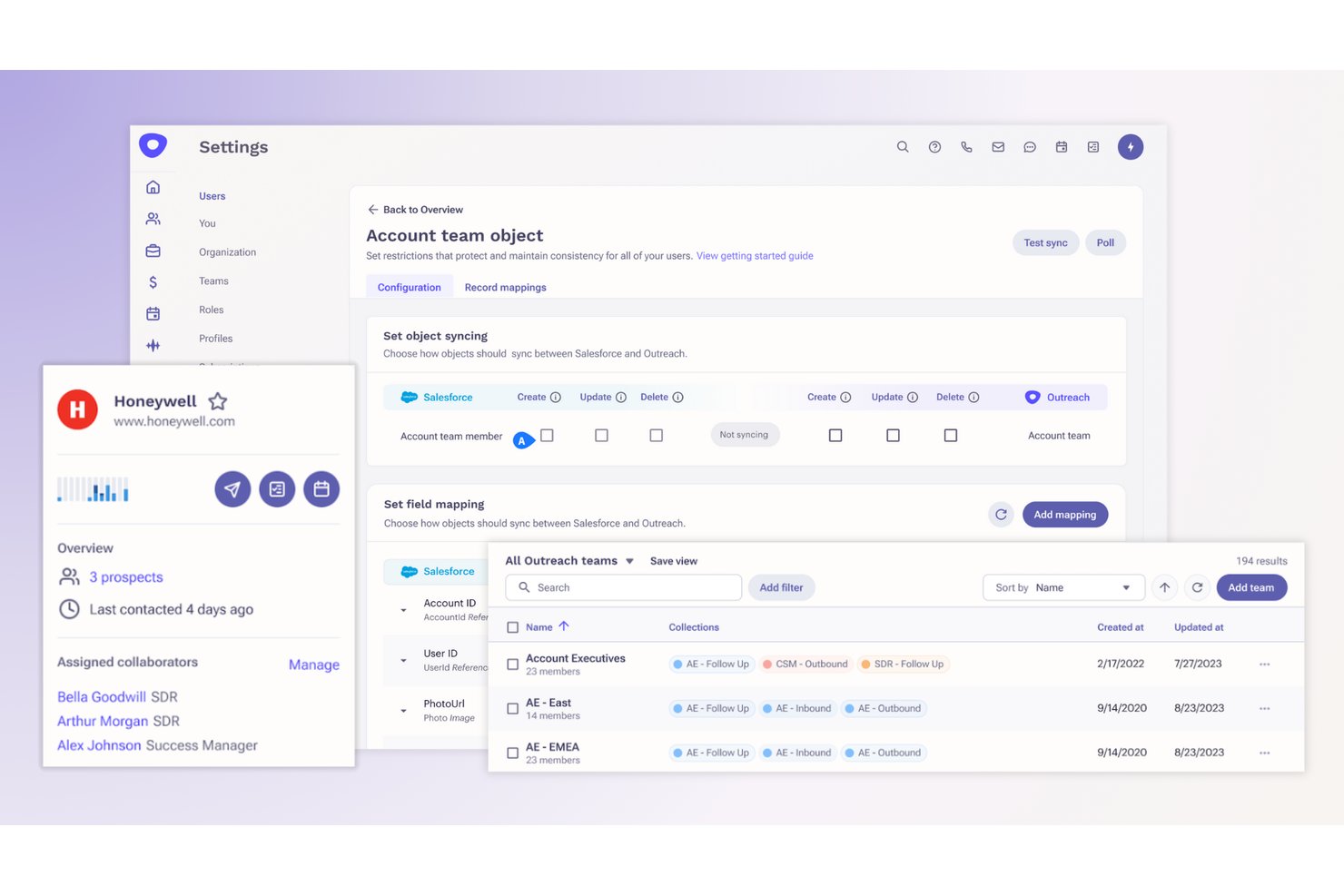
Outreach is a sales engagement platform that combines deal management, pipeline visibility, conversation intelligence, and AI-powered sequencing with buyer-facing collaboration tools like mutual action plans and shared content tracking.
Who Is Outreach Best For?
Outreach is a strong fit for revenue teams that need deep pipeline visibility and deal inspection alongside buyer-facing collaboration tools like mutual action plans.
Why I Picked Outreach
Outreach earns its spot on my shortlist because its sales engagement features go well beyond basic sequencing. I particularly like the Mutual Action Plans, which let me share recorded demos, documents, and next steps directly with the buying committee and track exactly who opens what. Deal Health Scores with seven-day trends and AI-suggested actions give my team a live read on pipeline without digging through CRM fields manually.
Outreach Key Features
- Conversation intelligence: AI automatically captures, transcribes, and analyzes sales calls to surface objection handling cues and live coaching cards during active conversations.
- Pipeline management dashboard: A customizable dashboard tracks weighted pipeline, deal pacing, team scorecards, and win/loss modeling across current and future periods.
- Outreach Omni: A conversational AI agent accessible in-app, on mobile, and in Slack that lets reps and managers query deal data and take actions without switching tools.
- Multi-channel sequencing: Automates outreach across email, phone, and social touchpoints with engagement and revenue attribution reporting tied directly to sequence activity.
Outreach Integrations
Outreach offers 90+ marketplace integrations, including Salesforce, HubSpot, Microsoft Dynamics 365, Slack, Zoom, Microsoft Teams, Google Meet, and Cisco Webex. Its open API and Outreach MCP support custom connectivity across your revenue technology stack.
Pros and Cons
Pros:
- Buyer-facing plans organize shared next steps
- Mutual action plans track stakeholder engagement
- Pipeline dashboards clarify deal health
Cons:
- Deal collaboration lacks persistent internal threads
- No proposal co-editing or contract workflows

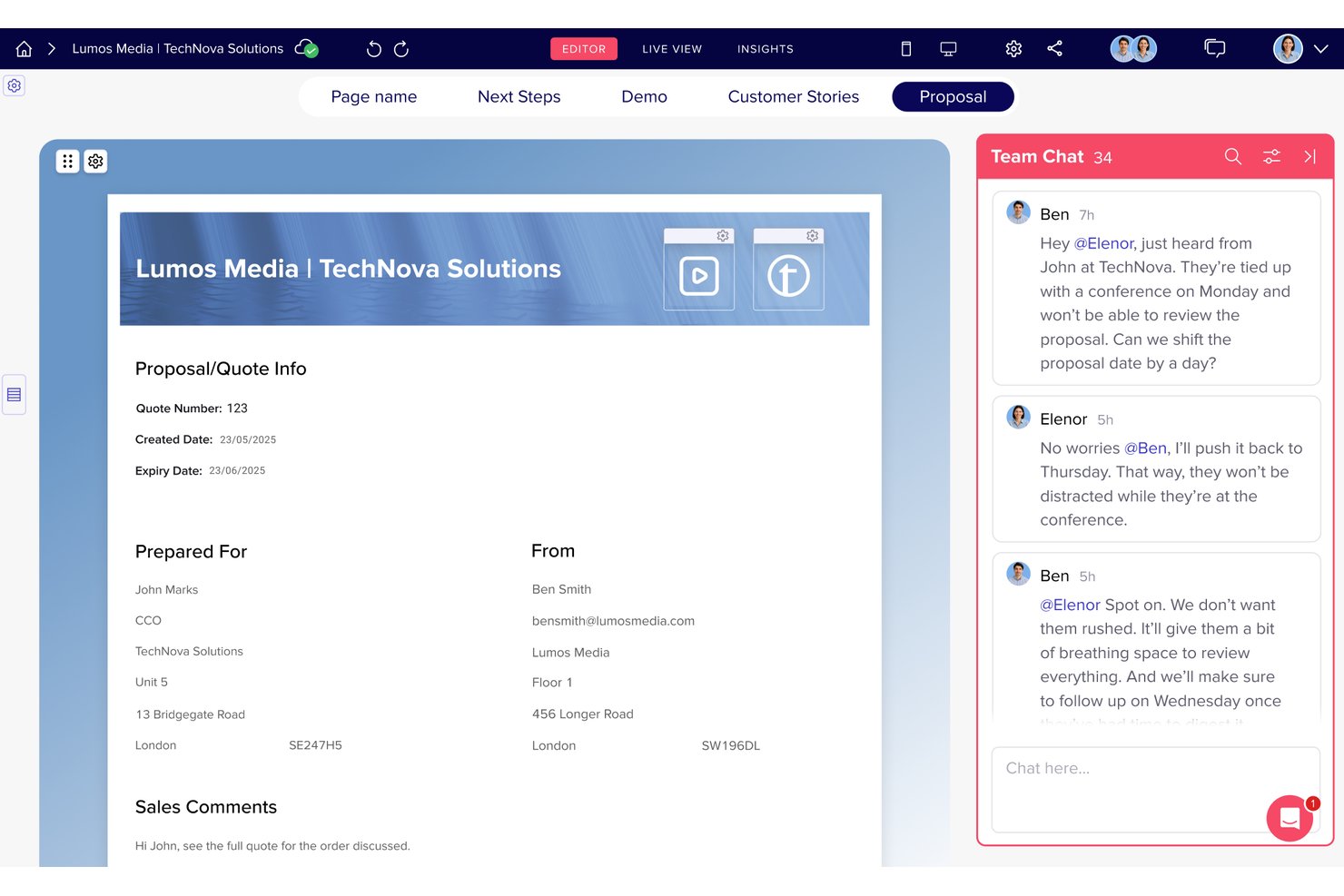
trumpet is a digital sales room platform that combines deal-centered workspaces (called Pods), mutual action plans, content management, buyer engagement analytics, and AI-driven deal intelligence into one collaborative hub for sales teams.
Who Is trumpet Best For?
trumpet is a strong fit for account executives and sales enablement teams that need to track buyer engagement at the deal level and move opportunities forward with less back-and-forth.
Why I Picked trumpet
I picked trumpet as one of the best because its AI Engagement Score gives sales teams a daily, calculated read on deal health based on real buyer behavior inside each Pod—not gut feel. I love that this scoring pulls from granular signals like which content pages buyers viewed and how long they spent there, so reps know exactly where attention is focused. The Nerve Centre then surfaces that intelligence in one place, ranking deals and flagging risks so your team acts on the right opportunities first.
trumpet Key Features
- Mutual action plans: Shared project plans with milestones, owners, due dates, and automated reminders that both reps and buyers can update directly inside a Pod.
- Buyer commenting and huddles: Built-in contextual comment threads, inline chat on proposals, and live video huddles let all deal stakeholders communicate without leaving the workspace.
- Synced content blocks: Pricing tables, case study blocks, and other content widgets update automatically across all live Pods when the source content changes.
- AE-to-CSM handoff: MAP ownership transfers from the account executive to the customer success manager, carrying deal context and milestones into onboarding.
trumpet Integrations
trumpet offers 55+ integrations, including native two-way sync with Salesforce and HubSpot, plus Microsoft Dynamics, Gong, Slack, Microsoft Teams, DocuSign, and PandaDoc.
Pros and Cons
Pros:
- Pods centralize content and conversations per deal
- Mutual action plans drive buyer accountability
- AI Engagement Score shows true deal health
Cons:
- Advanced features limited to higher tiers
- Pod setup can be time consuming

Best for sales-to-project handoff automation
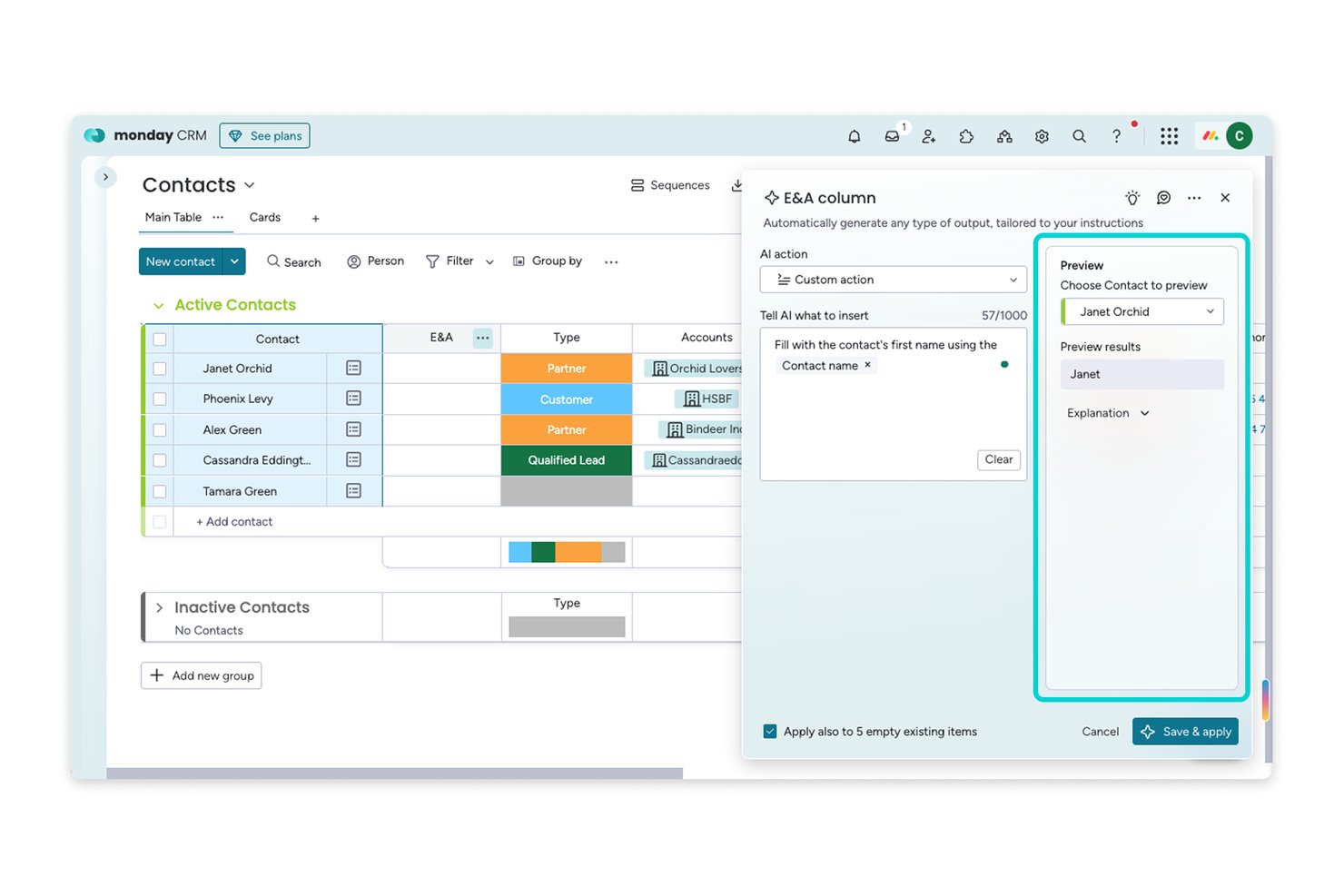
monday AI Workspace is a work operating system that combines CRM deal management, real-time document collaboration, cross-board automations, and AI-powered pipeline monitoring across sales and delivery workflows.
Who Is monday AI Workspace Best For?
monday AI Workspace suits teams that need sales and project delivery to live on the same platform, particularly where deal won triggers immediate onboarding or project kickoff workflows.
Why I Picked monday AI Workspace
monday AI Workspace earns its spot on my shortlist because it's the only tool here that actively bridges the gap between closing a deal and delivering on it. I love that you can configure a cross-board automation to instantly spin up a project board the moment a deal is marked Won, carrying over contacts, scope details, and timelines without manual re-entry. The Pipeline Monitor Agent also flags stalled deals before they fall through the cracks, which keeps both sales and delivery teams aligned on what's actually moving.
monday AI Workspace Key Features
- AI Notetaker: Automatically transcribes and summarizes sales calls, logging the output directly against the relevant deal record.
- Workdocs co-editing: Real-time collaborative documents with live board data embedded, letting reps and stakeholders draft proposals together without switching tools.
- Email open and click tracking: Logs email engagement in real time on the deal timeline, with automations that trigger rep notifications or status changes on activity.
- DocuSign integration: Sends and tracks contract signature status directly from the deal record without leaving the platform.
monday AI Workspace Integrations
monday AI Workspace offers 850+ integrations and apps, including Salesforce, HubSpot, Gmail, Outlook, Slack, Microsoft Teams, Zoom, DocuSign, Google Workspace, and QuickBooks. It also provides an open API, SDKs, an app marketplace, and Zapier and Make support.
Pros and Cons
Pros:
- Co-edits proposals with live deal data
- Keeps deal discussions tied to records
- Automates sales-to-project handoffs
Cons:
- Lacks buyer engagement scoring and sales rooms
- Guest access exposes entire boards
New Product Updates from monday AI Workspace
monday AI Workspace Adds Human Approval Routing
monday AI Workspace adds a human-in-the-loop approval block to AI Workflows, sending approval requests and routing workflow paths based on responses. For more information, visit monday AI Workspace's official site.
 .

Highspot
Best for data-driven sales and content management
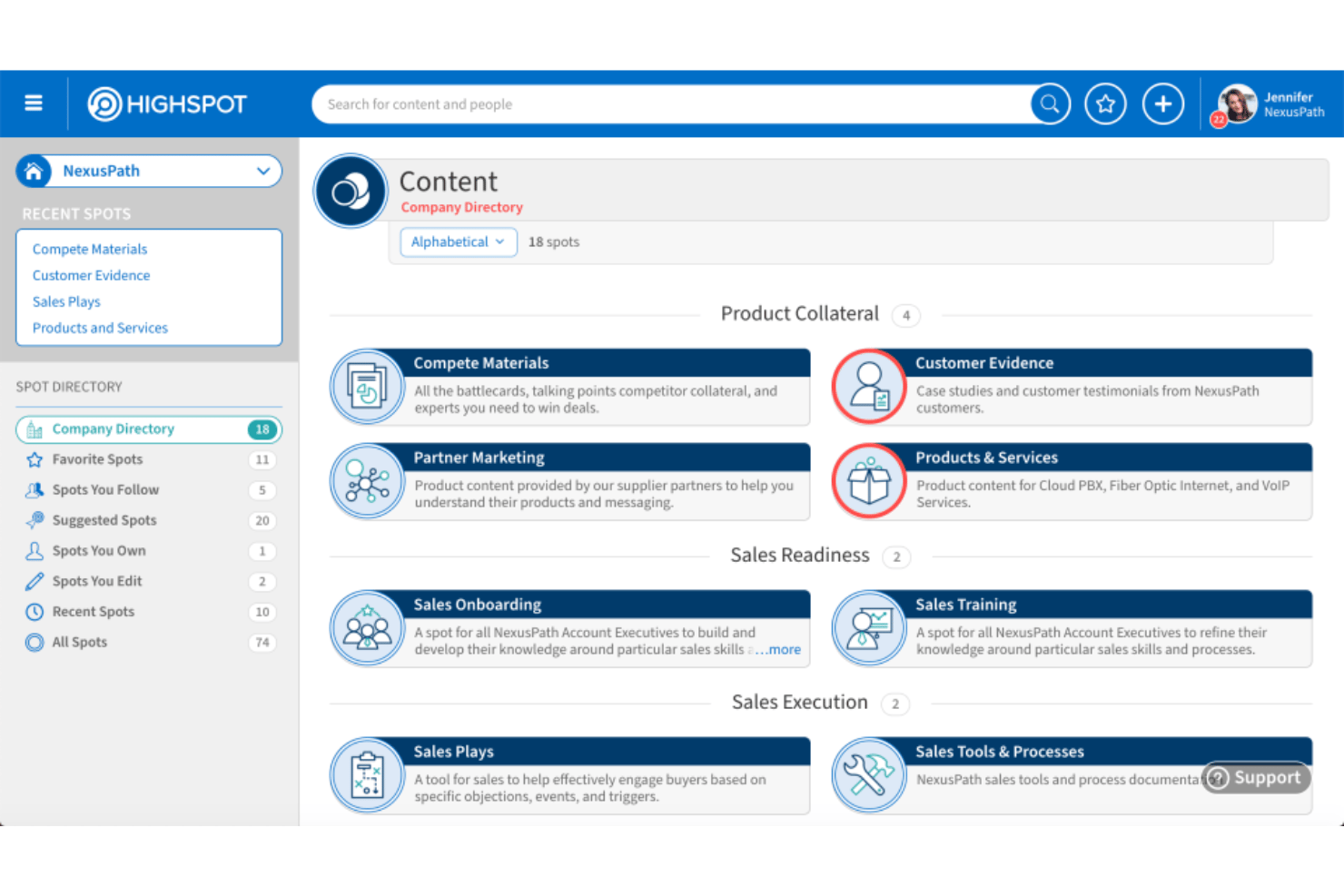
Highspot is a sales enablement and revenue execution platform that combines content management, Digital Sales Rooms, buyer engagement analytics, deal intelligence, and sales coaching into a single system for go-to-market teams.
Who Is Highspot Best For?
Highspot is a strong fit for sales enablement leaders and operations teams at mid-to-large enterprises that need tight control over how content reaches buyers and how deals are tracked.
Why I Picked Highspot
Highspot earns its spot as one of the best on my shortlist because it treats content and deal data as two sides of the same coin. I love how its engagement analytics go well beyond basic view counts, tracking per-stakeholder linger time inside Digital Rooms and syncing that activity directly to your CRM. The Deal Agent takes it further by ranking active opportunities by health and stakeholder coverage, so I can see exactly where a deal is stalling before it slips.
Highspot Key Features
- Mutual Action Plans: Shared milestone plans that define goals and next steps for both buyers and sellers, keeping both sides accountable from first call through close.
- AI Role Play: Simulated buyer personas built from real deal context let reps practice conversations before live calls.
- Partner enablement extensions: Dedicated content, plays, and Digital Rooms for external partner networks, with governance controls and engagement analytics.
- AutoDocs: CRM-connected document generation that auto-populates templates with live deal data to produce personalized sales materials.
Highspot Integrations
Highspot offers 100+ integrations, including Salesforce, Microsoft Dynamics 365, Slack, Microsoft Teams, Microsoft 365, Outlook, SharePoint, Salesloft, OpenAI, and Anthropic. Open APIs support custom integrations.
Pros and Cons
Pros:
- Content analytics track stakeholder engagement deeply
- Deal Agent surfaces pipeline risk in real time
- Digital Rooms provide secure buyer collaboration
Cons:
- Internal deal discussion relies on external tools
- No real-time co-editing of documents
Zoho CRM
Best for customization options
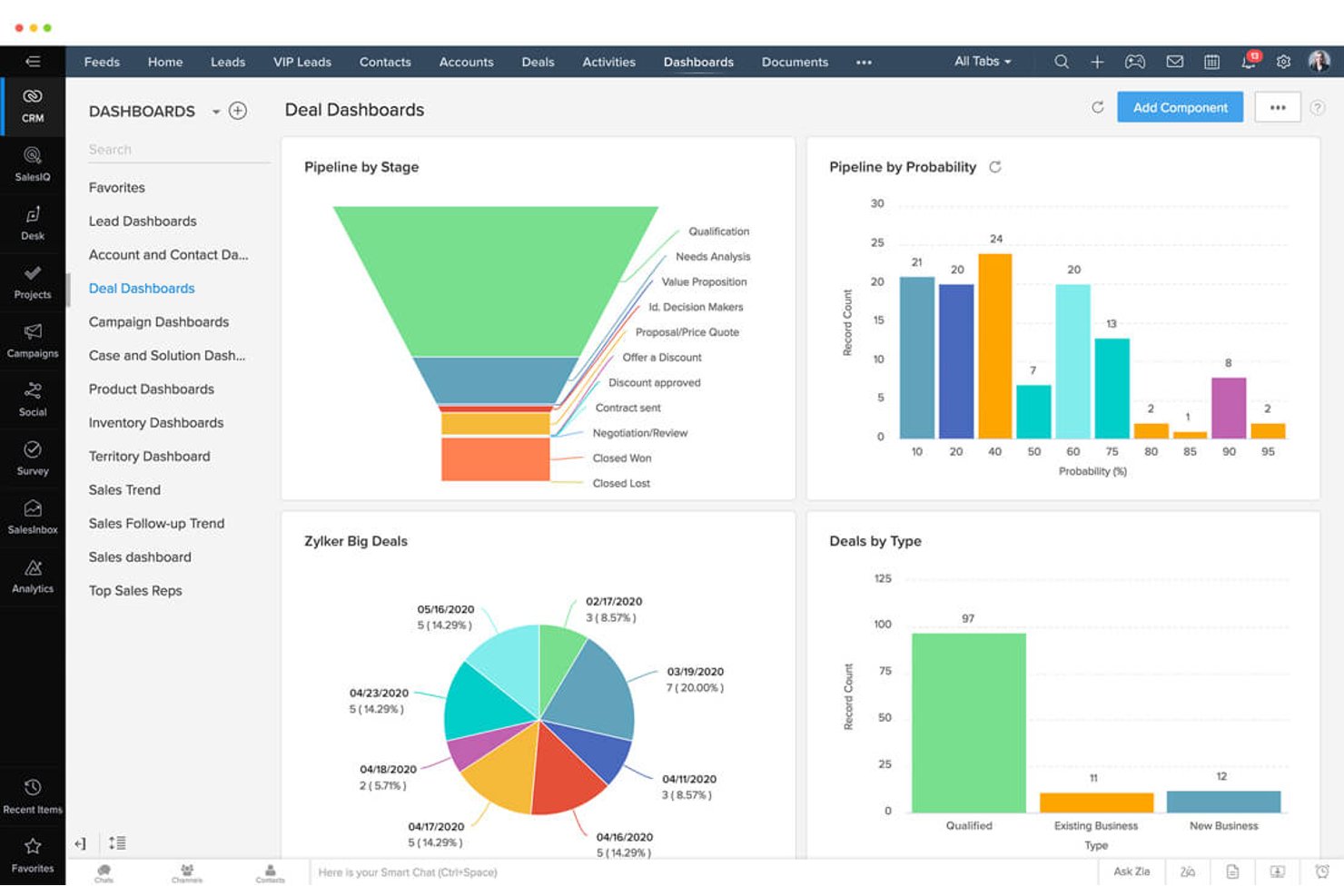
Zoho CRM is a highly customizable CRM platform with built-in sales collaboration features including deal-centered Feeds, Notes with tagging, Teamspaces for cross-functional coordination, CPQ, pipeline visibility tools, and integrations with Slack, Microsoft Teams, and Zoom.
Who Is Zoho CRM Best For?
Zoho CRM is a strong fit for sales teams that need deep configuration flexibility across pipelines, modules, and cross-functional workflows without paying enterprise-tier prices.
Why I Picked Zoho CRM
I picked Zoho CRM as one of the best because the depth of customization it offers is genuinely hard to match in a CRM at this price point. I love how Teamspaces let non-sales teams like legal, marketing, and onboarding operate inside the same CRM org with their own modules and requester workflows, so deal handoffs happen in one place instead of scattered email threads. On top of that, Feeds keeps deal-specific discussion tied directly to the record, with tagging to pull in a manager or specialist the moment a deal needs attention.
Zoho CRM Key Features
- Zia anomaly detection: Zia flags deviations in deal performance directly inside list views, so team leads can spot pipeline risks without digging through reports.
- Sales cadences and blueprints: Structured process workflows that automate stage-based handoff notifications across teams when deals hit key milestones.
- Customer and partner portals: Self-service portals where external stakeholders can view permitted records, place orders, and collaborate on sales activity.
- CPQ with price rules: A built-in configure-price-quote tool that lets reps build accurate, rule-governed quotes and generate invoices without leaving the CRM.
Zoho CRM Integrations
Zoho CRM offers native integrations with Slack, Microsoft Teams, Zoom, Gmail, Outlook, Google Calendar, and Zoho apps including Projects, Desk, Campaigns, Sign, WorkDrive, and Analytics. It also supports 1,100+ Marketplace integrations, REST APIs, webhooks, custom functions, and Zoho Flow.
Pros and Cons
Pros:
- Customizable modules fit complex sales workflows
- Pipeline visibility tools highlight deal risks automatically
- Teamspaces support cross-department sales collaboration
Cons:
- Lacks buyer engagement analytics for shared content
- No real-time document co-editing in CRM
New Product Updates from Zoho CRM

Zoho CRM Adds Workflow Automation for Subform Actions
Zoho CRM now lets you automate subform events with workflow rules, triggering actions when rows are added, edited, or deleted based on conditions. For more information, visit Zoho CRM's official site.
 .

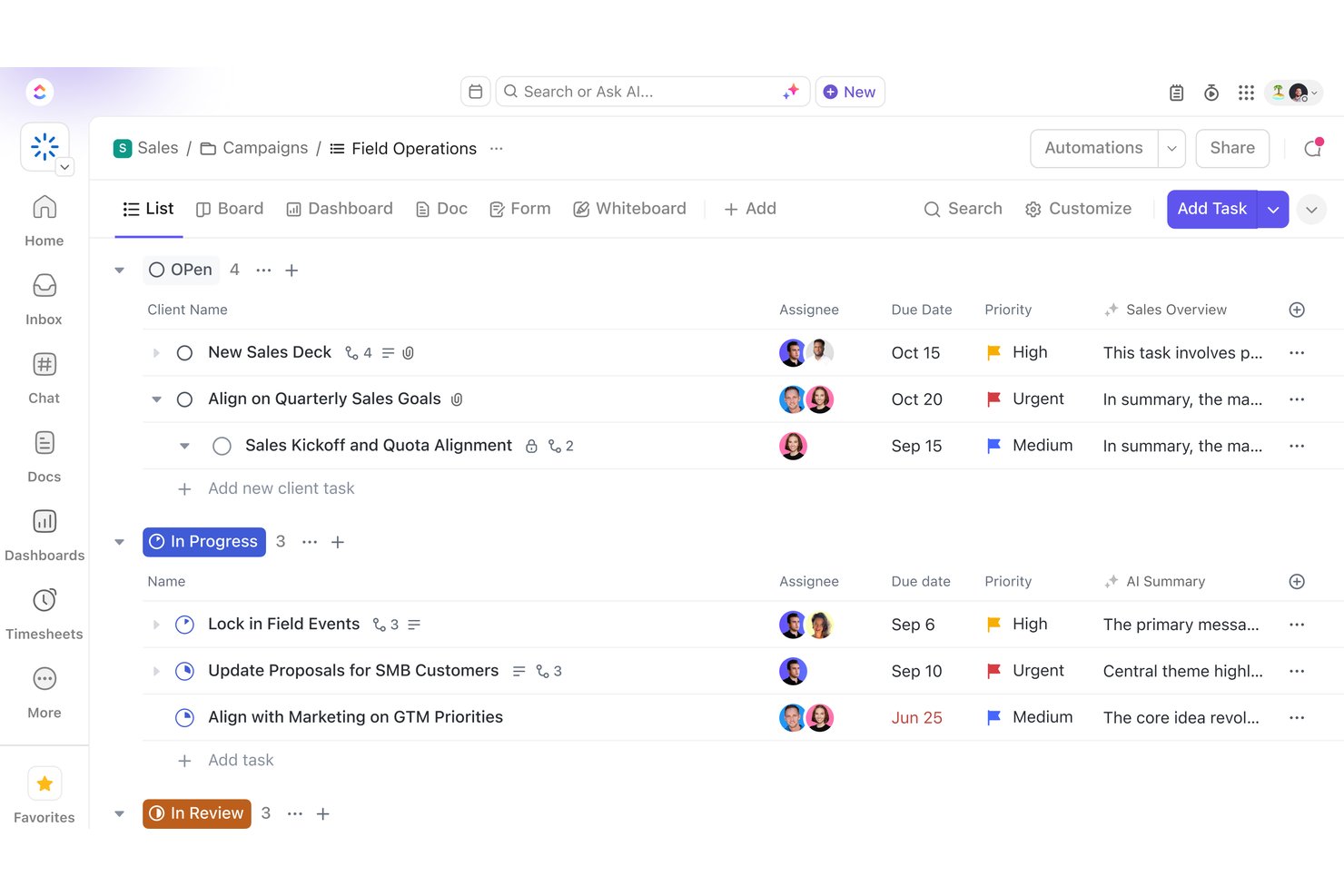
ClickUp is a work management platform that brings together deal communication, document collaboration, pipeline tracking, and workflow automation across sales and delivery teams in one workspace.
Who Is ClickUp Best For?
ClickUp suits teams that handle both sales and project delivery, where keeping deal context connected to post-sale execution in one workspace matters more than having purpose-built sales tools.
Why I Picked ClickUp
ClickUp earns its spot on my shortlist because it's the only tool here where the deal and the delivery project live in the same workspace. I love that when a deal closes, onboarding tasks trigger automatically and carry the full deal context, notes, and requirements straight to the CS team, with no copy-paste or re-discovery. The AI Super Agents layer on top of that, with a Pipeline Agent flagging stalled deals and a Deal Coach monitoring activity and recommending next steps.
ClickUp Key Features
- Deal Docs: Proposals, call notes, and account briefs are stored directly inside each deal record, keeping all deal context in one place.
- ClickUp Chat: Built-in channels, DMs, and threaded conversations link automatically to relevant tasks and Docs, with one-click voice and video calls included.
- Real-time co-editing in Docs: Multiple users can edit simultaneously with live cursors, inline comments, comment-to-task conversion, and full version history with rollback.
- Playbook and battlecard library: An Enablement Agent surfaces relevant battlecards and playbooks during active deals, while a Library Agent flags outdated versions.
ClickUp Integrations
ClickUp documents 1,000+ integrations, including HubSpot, Salesforce, Slack, Microsoft Teams, Google Drive, Google Calendar, Zendesk, Intercom, Figma, and Miro. It also offers a public API and Zapier support.
Pros and Cons
Pros:
- Playbook and battlecard access inside live deals
- AI agents surface stalled deals and next steps
- Centralizes sales and delivery in one workspace
Cons:
- No native e-signature for contracts
- No buyer engagement or content tracking

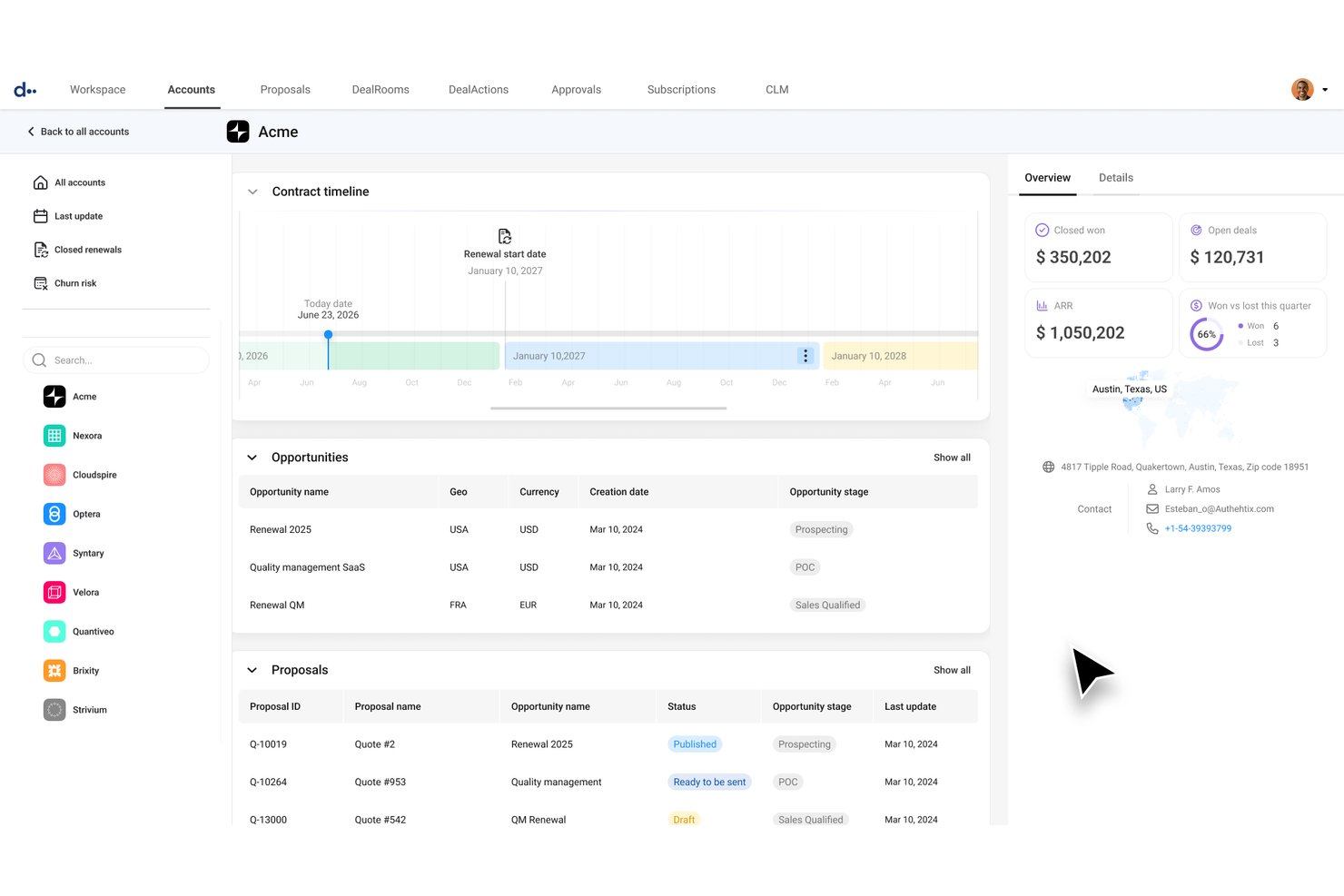
DealHub is a revenue automation platform that combines CPQ, contract lifecycle management, digital sales rooms, and subscription and billing tools into a single buyer-facing workspace.
Who Is DealHub Best For?
DealHub fits sales operations teams at mid-market and enterprise companies that need to manage complex, multi-stakeholder deals across quoting, contracts, and billing in one place.
Why I Picked DealHub
DealHub earns its spot on my shortlist because it folds guided selling directly into the deal execution layer, not just the quoting stage. I love how its DealRoom ties together live interactive quotes, real-time contract redlining, and embedded Mutual Action Plans in a single buyer-facing workspace. Buyer engagement tracking also surfaces exactly which stakeholders viewed which content, so reps know precisely where to focus follow-up.
DealHub Key Features
- Pre-approved clause library: Access a built-in library of standard contract clauses (NDAs, MSAs, SOWs) to insert into contracts without legal review each time.
- Configurable approval workflows: Route deals through parallel or ad-hoc approval chains across legal, finance, and deal desk with automated notifications at each step.
- Buyer engagement analytics: See which stakeholders opened a DealRoom, which content they viewed, and how long they spent on each asset.
- Native e-signature: Collect legally binding signatures directly inside the DealRoom without redirecting buyers to a third-party signing tool.
DealHub Integrations
DealHub offers native integrations with Salesforce, Microsoft Dynamics 365, HubSpot, Slack, DocuSign, Gong, and NetSuite. Its API and Prismatic API support custom integrations.
Pros and Cons
Pros:
- Real-time contract redlining inside DealRoom
- Mutual action plans align next steps
- Buyer engagement tracking at stakeholder level
Cons:
- Internal deal collaboration relies on Slack notifications
- Post-sale handoff tooling is limited
Diğer Satış İş Birliği Yazılımları
Aşağıda kısa listeme aldığım ek satış iş birliği yazılımlarının bir listesi yer alıyor. İlk 10’a girememiş olsalar da hâlâ değerliler ve daha fazla araştırmaya değerler.
- SalesHood
For sales content and enablement in one place
- Aligned
For buyer engagement tracking across deals
- Wrike
For project-to-deal handoff via Salesforce sync
- Allego
For enablement-led deal room collaboration
- HubSpot Sales Hub
For CRM-native deal plans and content tracking
- Arrows
For HubSpot-native sales-to-CS handoff
- Salesforce Sales Cloud
For enterprise-scale pipeline visibility
- Showpad
For field sales teams with complex buying groups


How I Evaluate Sales Collaboration Software
I evaluate these tools in two layers: baseline requirements every tool must meet and differentiating factors that separate platforms built for complex, multi-stakeholder deals.
Core Functionality (Table Stakes For This List)
When I'm selecting tools for my list, I rank each one on a scale from 0 (does not offer the functionality) to 5 (excels in this area) for each core functionality listed below. I then calculate the tool's total score into a percentage, and use that to help me assess its overall fit for the list.
- Deal-Centered Communication: I look for shared workspaces or threads tied to specific deals—not just general chat—where reps, managers, and stakeholders can coordinate in context.
- Content Sharing & Tracking: I evaluate whether teams can share decks or proposals and see who viewed them, how long they spent, and which pages got attention.
- Cross-Functional Collaboration: I check whether non-sales roles—legal, marketing, customer success—can be brought into deal workflows for reviews, approvals, or handoffs without workarounds.
- Real-Time Co-Editing or Feedback: I look for the ability to comment on, annotate, or jointly edit live proposals or quotes, not just share static files after the fact.
- Pipeline & Deal Visibility: Does the tool give the whole team a shared, up-to-date view of deal stages and ownership—without someone manually updating a spreadsheet?
- CRM Integration: I check for two-way sync with major CRMs so collaboration activity stays tied to existing deal and account records automatically.
Once I have a list of tools that meet the criteria, I consider what sets each platform apart.
Differentiating Factors (What Sets Vendors Apart)
Here's how I compare and contrast different vendors:
Standout Features
Digital sales rooms matter most to me when evaluating vendors. I look for branded, persistent microsites that keep content, conversations, and next steps in one place for each buyer. Buyer engagement scoring is equally telling—I evaluate whether a tool's weighted activity models can flag stalled deals before they go cold. I also pay close attention to handoff automation: specifically, whether workflow triggers can automatically notify project teams the moment a deal closes, keeping delivery from waiting on a rep to forward an email.
Beyond Features
Sales-to-delivery continuity is the factor I care most about here. I look for whether deal context, documents, and buyer conversations stay accessible after close—not just for the sales rep, but for the project team picking up the work. I also consider data security closely. When sensitive contracts and pricing are shared in client-facing workspaces, I check for SOC 2 compliance and granular permissions that keep internal notes from surfacing to external stakeholders.
Satış İş Birliği Yazılımı Nasıl Seçilir?
Kendinize özgü yazılım seçim sürecinizi yürütürken aşağıdaki noktaları göz önünde bulundurun:
- Merkezi İletişim: Ekipleriniz birbirinden kopuk şekilde iletişim kuruyor ve verilerini birden fazla platformda saklıyorsa, bunun tutarsızlıklara yol açması kaçınılmazdır. Değerlendirdiğiniz iş birliği araçlarının ortak çalışmaya dayalı bir iletişim özelliği sunduğundan emin olun. Bu özellik, satış ve pazarlama ekiplerinizin yanı sıra kuruluşun geri kalanının da müşteri bilgilerini kolayca saklamasına, dosya paylaşmasına, video konferans toplantıları düzenlemesine ve aynı noktada buluşmasına olanak tanır.
- Verimli İş Akışı Yönetimi: Satışın önemli bir bölümü, doğru işlerin doğru zamanda yapılmasını sağlamaktır. Buna e-posta, hatırlatıcılar, toplantı notları ve daha fazlasını göndermek dahildir. İş akışlarını kolaylaştırmanıza ve otomatikleştirmenize olanak tanıyan araçlara öncelik verin; böylece ekipleriniz düzenli kalabilir ve satış hedeflerine istikrarlı biçimde ulaşabilir.
- Veri Görünürlüğü ve Raporlama: Veriler satışın can damarıdır. Tüm satış departmanının işini kolaylaştırmak için anlaşılır ve özelleştirilebilir satış panoları ile raporlama araçları sunan bir platform arayın. Bu, ekip performansı hakkında değerli bilgiler edinmenizi ve iyileştirme alanlarını belirlemenizi sağlar.
- Entegrasyonlar: Satış iş birliği araçlarınızın kuruluşunuzdaki mevcut CRM'lerle veya diğer platformlarla çalışması gerekir. Bu, verilerin kusursuz ve gerçek zamanlı olarak paylaşılmasını sağlayarak satış ekiplerinin ve diğer paydaşların ilgili bilgilere erişmesine ve verimliliği artırmasına olanak tanır.
- Güvenlik: Bilgi güvenliği her işletme için büyük önem taşıyan bir konudur ve iş birliği araçları, kuruluşların dikkate alması gereken ek riskler barındırır. Bu platformlar kötü amaçlı yazılımlara, fidye yazılımlarına ve hassas verileri tehlikeye atarak verimlilik kayıplarına neden olabilecek diğer tehditlere karşı savunmasız olabilir. Seçtiğiniz yazılımın e-posta şifreleme, otomatik yedeklemeler ve katı parola politikaları gibi güçlü güvenlik özelliklerine sahip olduğundan emin olun.
Satış İş Birliği Yazılımlarındaki Trendler
Satış iş birliği yazılımlarıyla ilgili fark ettiğim bazı trendleri ve bunların gelecek açısından ne anlama gelebileceğini aşağıda bulabilirsiniz. En önemli içgörüleri ortaya çıkarmak için sayısız ürün güncellemesini, basın bültenini ve sürüm günlüğünü inceledim.
- AI Destekli Satış Asistanları: AI destekli satış asistanları giderek daha yaygın hale geliyor. Rutin görevlerin otomatikleştirilmesine yardımcı olarak satış ekiplerinin yüksek değerli faaliyetlere odaklanmasını sağlıyorlar. Bu trend önemlidir çünkü verimliliği ve üretkenliği artırır.
- Gerçek Zamanlı Veri Analitiği: Gerçek zamanlı veri analitiği araçları giderek daha fazla ilgi görüyor. Bu araçlar, satış performansı ve müşteri davranışı hakkında anında içgörüler sunar. Bu trend ilgi çekicidir çünkü daha hızlı karar alınmasını ve stratejilerin daha hızlı uyarlanmasını sağlar.
- Entegre İletişim Platformları: Entegre iletişim platformları yükselişte; ekiplerin e-posta, sohbet ve video konferansı tek bir arayüzde birleştirmesine yardımcı oluyorlar. Bu trend önemlidir çünkü satış ekipleri arasındaki iletişimi ve iş birliğini kolaylaştırır.
- Mobil Öncelikli Çözümler: Mobil öncelikli çözümler, satış ekiplerinin hareket halindeyken bilgilere erişmesine ve bilgileri güncellemesine olanak tanıdığı için öncelik haline geliyor. Bu trend önemlidir çünkü uzaktan çalışmayı destekler ve hızlı yanıt verme kapasitesini artırır.
- Özelleştirilebilir Panolar: Özelleştirilebilir panolar, satış ekiplerinin görünümlerini ve raporlarını özel ihtiyaçlarına göre uyarlamasına olanak tanıdığı için giderek daha popüler hale geliyor. Bu trend dikkat çekicidir çünkü kişiselleştirilmiş içgörüler ve daha iyi veri görselleştirme sunar.
Satış İş Birliği Yazılımı Nedir?
Satış iş birliği yazılımı, iletişim, belge paylaşımı ve görev yönetimi için merkezi bir platform sağlayarak satış ekiplerinin daha etkili bir şekilde birlikte çalışmasını mümkün kılan bir araçtır.
Satış iş birliği yazılımının temel bileşenleri arasında sohbet ve video konferans gibi iletişim araçları, satış materyallerinin paylaşılması ve depolanması için belge yönetim sistemleri ve satış faaliyetlerinin atanıp izlenmesini sağlayan görev yönetimi özellikleri bulunur. Bu unsurlar, satış ekiplerinin düzenli ve uyumlu kalmasına, anlaşmaları sonuçlandırmaya odaklanmasına yardımcı olur.
Satış İş Birliği Yazılımının Özellikleri
Aşağıda, etkili satış iş birliği yazılımlarında yaygın olarak bulunan bazı temel özellikler yer almaktadır.
- Birleşik İletişim: E-postaları, sohbetleri, belgeleri ve takvim etkinliklerini tek bir platformda bir araya getirir. Birden fazla uygulama arasında geçiş yapma ihtiyacını ortadan kaldırarak ilgili tüm bilgilere ve iletişime merkezi bir merkezden erişilmesini sağlar.
- Gerçek Zamanlı İş Birliği: Gerçek zamanlı iş birliği araçları, ekip üyelerinin güncellemeleri paylaşmasına ve anında geri bildirim sağlamasına olanak tanır. Bu, coğrafi sınırları aşan dinamik ve etkileşimli bir ortam oluşturur ve uzaktan ve hibrit çalışma modelleri için vazgeçilmez hâle gelir.
- Takvim Entegrasyonu: Takvim entegrasyonu, takvim etkinliklerini daha geniş iletişim bağlamlarıyla ilişkilendirir. Bu, kullanıcıların ekip etkinliklerinden haberdar olmasına, son tarihleri takip etmesine ve ilgili görüşmeler ile belgeleri kapsamlı bir şekilde değerlendirerek toplantılar planlamasına yardımcı olur.
- Sesli Arama ve Ekran Paylaşımı: Dahili sesli arama ve ekran paylaşımı özellikleri, dağınık ekipler içinde etkili yüz yüze etkileşimler için hayati önem taşır. Bu özellikler, ekip görüşmelerinin ve karar alma süreçlerinin kalitesini artırır.
- Güvenlik ve Gizlilik: Güçlü güvenlik önlemleri hassas verileri korur ve gizliliği güvence altına alır. Veri şifreleme, güvenli erişim denetimleri ve düzenli güvenlik güncellemeleri gibi özellikler, kullanıcı bilgilerinin korunması için gereklidir.
- Üçüncü Taraf Uygulamalarla Entegrasyon: Proje yönetimi araçları, dosya depolama platformları ve üretkenlik uygulamaları gibi popüler uygulamalarla entegrasyon, yazılımın işlevselliğini artırır. Bu, kullanıcıların iş akışlarını kolaylaştırmasına ve iletişim ile iş birliği çabalarını tek bir platformda birleştirmesine olanak tanır.
- Özelleştirme ve Kişiselleştirme: Özelleştirme, kullanıcıların temalar seçerek, tercihleri belirleyerek ve çalışma alanlarını düzenleyerek iş birliği deneyimlerini kendilerine göre uyarlamasına olanak tanır. Bu, üretkenliği artırır ve kişiselleştirilmiş, keyifli bir kullanıcı deneyimi sunar.
- Kullanıcı Dostu Arayüz: Sezgisel ve kullanıcı dostu bir arayüz, genel kullanıcı deneyimini iyileştirir ve kullanım kolaylığı sağlar. Öğrenme eğrisini azaltır ve kullanıcıların karmaşık gezinme veya kafa karıştırıcı düzenlerle uğraşmak yerine işlerine odaklanmasına olanak tanır.
- Uygunluk ve Durum Göstergeleri: Uygunluk ve durum göstergeleri, ekip üyelerinin uygunluğunu ve durumunu göstererek verimli ve zamanında iletişim kurulmasını sağlar. Bu özellik, gereksiz gecikmelerin ortadan kaldırılmasına yardımcı olur ve kullanıcıların iş arkadaşlarının uygunluğuna göre en uygun etkileşim yöntemini seçmesine olanak tanıyarak etkili iletişim kurulmasını güvence altına alır.
- Gelişmiş Raporlama ve Analiz: Gelişmiş raporlama, verilere dayalı karar almayı yönlendiren değerli içgörüler sağlar. Yapay zekâ ve makine öğreniminin entegrasyonu, rutin görevleri otomatikleştirerek ve ekipleri yüksek etkili çalışmalara odaklanma konusunda güçlendirerek kullanıcı deneyimini daha da geliştirir.
Satış İş Birliği Yazılımının Faydaları
Satış iş birliği yazılımını uygulamanın başlıca faydaları şunlardır:
- Gelişmiş İletişim: Yazılım, ekip üyelerinin verimli bir şekilde iletişim kurması için merkezi bir platform sağlar; yanlış anlaşılmaları azaltır ve herkesin aynı bilgiye sahip olmasını güvence altına alır.
- Geliştirilmiş Veri Paylaşımı: Paylaşılan verilere ve belgelere kolay erişim sayesinde ekip üyeleri ihtiyaç duydukları bilgileri hızlıca bulabilir; bu da daha bilinçli kararlar alınmasını ve daha hızlı yanıt sürelerini sağlar.
- Artan Üretkenlik: Rutin görevleri otomatikleştirip iş akışlarını kolaylaştıran satış iş birliği yazılımı, ekip üyelerinin yüksek değerli faaliyetlere odaklanmasını sağlayarak genel üretkenliği artırır.
- Daha İyi Müşteri İçgörüleri: Yazılım genellikle müşteri etkileşimlerini takip etmeye ve verileri analiz etmeye yönelik araçlar içerir. Bu araçlar, satış ekiplerinin müşteri ihtiyaçlarını daha iyi anlamasına ve yaklaşımlarını buna göre uyarlamasına yardımcı olur.
- Gelişmiş Raporlama ve Analiz: Güçlü raporlama ve analiz özellikleriyle satış iş birliği yazılımı, satış performansına ilişkin değerli içgörüler sağlar; kuruluşların eğilimleri belirlemesine, başarıyı ölçmesine ve verilere dayalı kararlar almasına yardımcı olur.
Satış İş Birliği Yazılımının Maliyeti ve Fiyatlandırması
Satış iş birliği yazılımının maliyetini ve fiyatlandırmasını anlamak, bütçelerini etkili bir şekilde yönetirken satış süreçlerini optimize etmeyi amaçlayan işletmeler için büyük önem taşır. Bu bölümde çeşitli fiyatlandırma modelleri, maliyetleri etkileyen temel faktörler ve farklı satış iş birliği araçlarının yatırım getirisinin nasıl değerlendirileceği ele alınmaktadır.
Satış İş Birliği Yazılımı İçin Plan Karşılaştırma Tablosu
| Plan Türü | Ortalama Fiyat | Yaygın Özellikler |
|---|---|---|
| Ücretsiz Plan | $0 | Temel mesajlaşma, sınırlı dosya paylaşımı ve temel görev yönetimi |
| Bireysel Plan | $6 - $15/kullanıcı/ay | Gelişmiş mesajlaşma, dosya paylaşımı, görev yönetimi ve sınırlı entegrasyonlar |
| İşletme Planı | $15 - $30/kullanıcı/ay | Gelişmiş mesajlaşma, kapsamlı dosya paylaşımı, proje yönetimi, birden fazla entegrasyon ve veri analitiği |
| Kurumsal Plan | $30+/kullanıcı/ay | Özelleştirilebilir özellikler, gelişmiş güvenlik, sınırsız entegrasyon, özel destek ve gelişmiş veri analitiği |
Satış İş Birliği Yazılımı SSS
Satış iş birliği yazılımı hakkında sıkça sorulan bazı sorular şunlardır:
Satış iş birliği yazılımını mevcut CRM sistemimle nasıl entegre edebilirim?
Çoğu satış iş birliği yazılımı Salesforce, HubSpot ve Zoho gibi popüler CRM sistemleriyle entegrasyon olanağı sunar. Entegrasyon için genellikle satış iş birliği yazılımınızın ayarlar veya entegrasyon bölümüne erişmeniz ve yazılımı CRM sisteminize bağlamak için yönergeleri izlemeniz gerekir.
Bu işlem çoğunlukla API anahtarlarının girilmesini veya bağlantının OAuth aracılığıyla yetkilendirilmesini içerir. Entegrasyon tamamlandıktan sonra kişiler, anlaşmalar ve iletişim geçmişi gibi veriler iki sistem arasında senkronize edilebilir. Böylece satış ekibiniz güncel bilgilere erişebilir.
Yeni ekip üyelerini satış iş birliği yazılımına dahil etmek için en iyi uygulamalar nelerdir?
Etkili bir işe alıştırma süreci; eğitim, dokümantasyon ve uygulamalı çalışmanın bir bileşimidir. Yazılımın temel işlevlerini kapsayan kapsamlı bir eğitim oturumuyla başlayın. Yeni ekip üyelerine kullanım kılavuzları, video eğitimleri ve SSS’lere erişim sağlayın.
Varsa yazılımı keşfetmelerini ve bir deneme ortamında kullanma pratiği yapmalarını teşvik edin. Yeni kullanıcıları deneyimli ekip üyeleriyle eşleştirerek mentorluk sağlamak da onların daha hızlı şekilde yetkinleşmesine yardımcı olabilir.
Satış iş birliği yazılımında veri güvenliğini ve gizliliğini nasıl sağlayabilirim?
Veri güvenliğini ve gizliliğini sağlamak için GDPR ve CCPA gibi sektör standartlarına ve düzenlemelere uyan bir satış iş birliği yazılımı seçin. Veri erişimini yalnızca yetkili personelle sınırlandırmak için role dayalı erişim kontrolleri uygulayın.
Güvenliği artırmak için parolaları düzenli olarak güncelleyin ve çok faktörlü kimlik doğrulama (MFA) kullanın. Ayrıca yazılım sağlayıcının hem aktarım sırasında hem de depolama sırasında veri şifrelemesi sunduğundan ve sağlam bir veri yedekleme ve kurtarma planına sahip olduğundan emin olun.
Satış iş birliği yazılımını satış sürecime uyacak şekilde nasıl özelleştirebilirim?
Salesforce ile entegre olan çok sayıda proje yönetimi yazılımı vardır. Bunun yanı sıra çoğu satış iş birliği yazılımı, belirli satış sürecinize uyacak şekilde özelleştirmeye olanak tanır. Bu kapsamda satış döngünüzle eşleşen özel alanlar, aşamalar ve iş akışları yapılandırılabilir. Ayrıca kuruluşunuz için önemli olan metrikleri izlemek amacıyla özel raporlar ve gösterge tabloları oluşturabilirsiniz.
Bu özelleştirmeleri yapma konusunda rehberlik almak için yazılımın dokümantasyonuna veya destek ekibine başvurun. Gereksinimlerini karşıladığından emin olmak için özelleştirme sürecine satış ekibinizi de dahil etmeyi değerlendirin.
Satış iş birliği yazılımında izlenmesi gereken temel metrikler nelerdir?
İzlenmesi gereken temel metrikler arasında potansiyel müşteri dönüşüm oranı, ortalama anlaşma büyüklüğü, satış döngüsü süresi, kazanma oranı ve satış hattı hızı yer alır. Ayrıca yapılan arama sayısı, gönderilen e-posta sayısı ve planlanan toplantı sayısı gibi bireysel ve ekip performansı metriklerinin izlenmesi, satış faaliyetleri ve üretkenlik hakkında içgörüler sağlayabilir. Bu metriklerin düzenli olarak incelenmesi trendlerin belirlenmesine, hedeflere yönelik ilerlemenin ölçülmesine ve stratejik kararların alınmasına yardımcı olabilir.
Yeni bir satış iş birliği yazılımına geçerken veri aktarımını nasıl yönetebilirim?
Veri aktarımı, verilerin eski sisteminizden yeni satış iş birliği yazılımına taşınmasını içerir. Öncelikle mevcut sisteminizdeki verileri CSV veya Excel gibi uyumlu bir biçimde dışa aktarın. Yinelenen kayıtları kaldırmak ve doğruluğu sağlamak için verileri temizleyin.
Yazılımın içe aktarma araçlarını veya API’lerini kullanarak verileri yeni yazılıma aktarın. Herhangi bir sorunu belirlemek için önce küçük bir veri kümesiyle deneme amaçlı aktarım gerçekleştirmeniz önerilir. Sorunları çözmek ve sorunsuz bir geçiş sağlamak için yazılım sağlayıcının destek ekibiyle yakın bir şekilde çalışın.