

2026’da İncelenen En İyi 10 Kurumsal Gereksinim Yönetimi Aracı

En İyi Kurumsal Gereksinim Yönetimi Araçları Kısa Listesi


Proje gereksinimlerini yönetmek baş ağrıtıcı olabilir. Her şeyi yolunda tutmaya çalışırken son teslim tarihleri, ekip katkıları ve müşteri talepleriyle aynı anda ilgilenmeniz gerekir. Kurumsal gereksinim yönetimi araçları bu noktada devreye girer. Tüm proje ayrıntılarınızı düzenlemenize, izlemenize ve yönetmenize yardımcı olarak hiçbir şeyin gözden kaçmamasını sağlarlar.
Deneyimlerime göre doğru aracı bulmak, ekibinizin üretkenliğini artırmak ve stresi azaltmak için çok önemlidir. Piyasadaki en iyi araçların tarafsız bir listesini sunmak için birçok seçeneği test edip inceledim.
Bu makalede, işinizi kolaylaştırabilecek özellikleri öne çıkararak en iyi seçimlerimi sizinle paylaşacağım. İster küçük bir ekiple ister büyük bir kuruluşta çalışıyor olun, farklı ihtiyaçlara göre uyarlanmış seçenekler bulacaksınız.
Why Trust Our Software Recommendations
Our team has been testing and reviewing software since 2012. As project managers ourselves, we know how difficult—and important—it is to choose the right software.
For this guide, we evaluated tools using hands-on testing and independent research, scoring tools using our selection criteria. We also draw on insights from industry thought leaders and practicing project management experts.
Our reviews reflect our human editorial judgment, not a sales pitch.
Expert reviewers:
Kurumsal Gereksinim Yönetimi Araçları Karşılaştırma Tablosu
Aşağıdaki tabloda, en iyi kurumsal gereksinim yönetimi aracı seçimlerimin fiyatlandırma ayrıntıları karşılaştırılmaktadır.
| Tool | Starting Price | Website | |
|---|---|---|---|
| Best for medical device regulatory compliance | — | Pricing upon request Free demo available | Website |
| Best for electronics design-linked requirements | 4.6 out of 5 | $995/year 30-day free trial + free demo available | Website |
| Best for open-source projects | 4.5 out of 5 | €5.95/user/month Free plan available; 14-day free trial available for Enterprise Cloud and on-premises | Website |
| Best for product roadmaps | 4.4 out of 5 | $59/user/month 30-day free trial + free demo available | Website |
| Best for test management | 4.5 out of 5 | Pricing upon request Free trial available | Website |
| Best for large teams | — | Pricing upon request Free 30-day trial available + free demo available | Website |
| Best for agile projects | 4.5 out of 5 | $6/month Free demo + 30-day free trial available | Website |
| Best for agile teams | — | $7.91/user/month Free plan + 14-day free trial available | Website |
| Best for compliance needs | — | Pricing upon request Free demo available | Website |
| Best for cross-functional teams | — | $41.20/user/month Free 30-day trial available | Website |
En İyi Kurumsal Gereksinim Yönetimi Araçları İncelemeleri
Aşağıda, kısa listeme giren en iyi kurumsal gereksinim yönetimi araçlarıyla ilgili ayrıntılı özetlerimi bulabilirsiniz. İncelemelerim, size en uygun aracı bulmanıza yardımcı olmak için her aracın temel özelliklerine, artılarına ve eksilerine, entegrasyonlarına ve ideal kullanım alanlarına ayrıntılı bir bakış sunuyor.
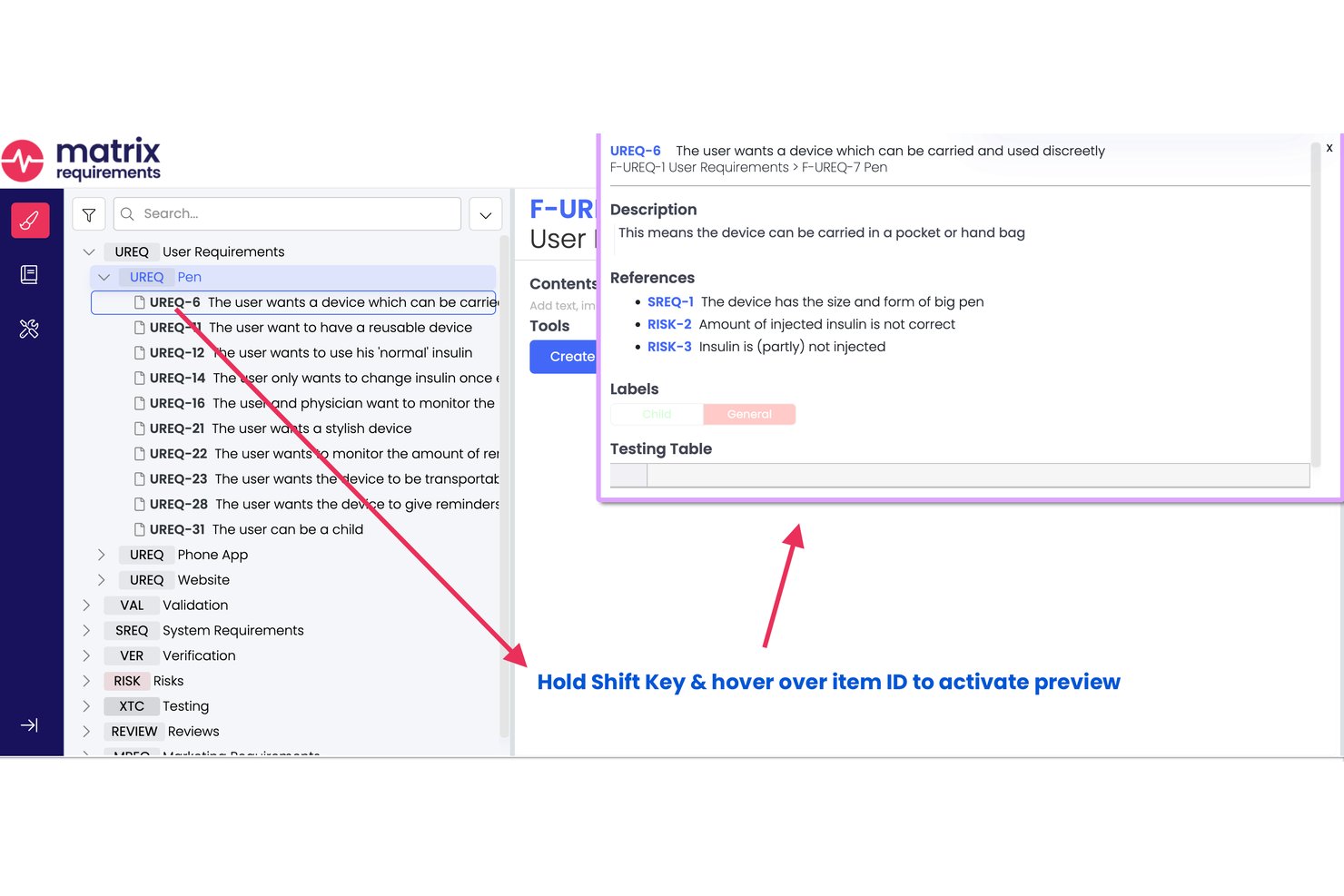
Matrix Req is a requirements management and design control platform built specifically for medical device and life sciences teams, combining requirements authoring, end-to-end traceability, risk management, and V&V tracking in a single compliance-ready environment.
Who Is Matrix Req Best For?
Matrix Req is a strong fit for regulatory affairs and QA leads at medical device companies navigating FDA submissions, CE marking, or ISO 13485 certification.
Why I Picked Matrix Req
Matrix Req earns its spot on my shortlist because its traceability runs at the item level across the full V-model, so I can trace a single requirement through risk analysis, design outputs, and executed tests in one live view. I also like the Compliance Checker, which auto-generates audit checklists from standards like ISO 13485 and FDA 21 CFR 820 rather than forcing my team to build them manually. The vendor's own ISO 13485 certification also matters when validating the tool under a CSV process.
Matrix Req Key Features
- Compose module: Build and manage a shared requirements library for reuse across multiple projects and teams.
- Risk management module: Use dedicated FMEA and hazard analysis tools to track risk matrices within your requirements workflow.
- Automated technical documentation: Generate regulatory-ready PDF and Word files for design history, risk, and test documentation.
- Native Jira and Azure DevOps integration: Sync requirements, traceability, and defects with leading ALM and test management platforms.
Matrix Req Integrations
Matrix Req offers native integrations with Jira, Azure DevOps, GitHub, GitLab, Confluence, Slack, YouTrack, and Rally. An API is available for custom integrations.
Pros and Cons
Pros:
- In-tool risk analysis module included
- FDA and ISO certification support pre-built
- Item-level traceability across requirements and tests
Cons:
- No ReqIF or OSLC standard file support
- Document approval workflow is admin-limited

Best for electronics design-linked requirements
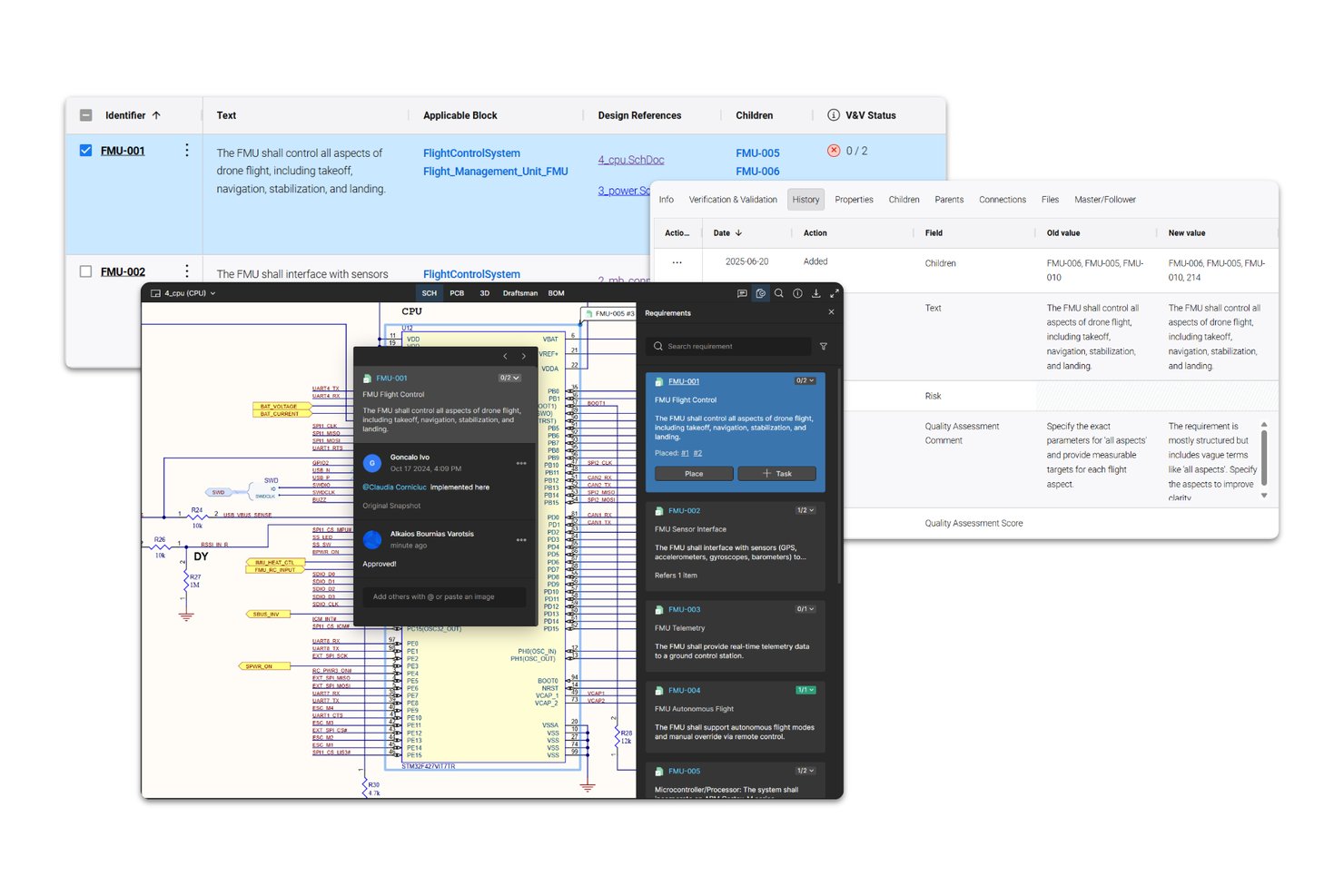
Requirements Portal is Altium's requirements management tool for engineering teams that links requirements directly to electronics designs, schematics, PCB layouts, and BOM components, with built-in traceability, AI-assisted authoring, and collaborative review workflows.
Who Is Requirements Portal Best For?
Requirements Portal fits hardware and systems engineering teams that work in Altium's ECAD ecosystem and need requirements tied directly to schematics, PCB layouts, and BOM components.
Why I Picked Requirements Portal
I picked Requirements Portal because no other tool on this list connects requirements directly to schematics, PCB layouts, and BOM components the way it does. If your team is building electronics and you need a requirement traced to a specific board layout or component, that link exists natively here. I also like the ValiAssistant, which can flag contradictions and gaps in your requirement text using INCOSE quality rules, catching authoring problems before they become design problems.
Requirements Portal Key Features
- Review Center: Assign moderators, reviewers, and approvers to requirements reviews with configurable due dates and per-requirement rating statuses.
- Time Machine: Compare requirements and system-design data across any two points in time or named baselines to surface changed values.
- Requirements reuse wizard: Copy requirements across projects using connected-copy or master-follower options that flag field changes when the source is updated.
- V&V matrix export: Generate a verification-and-validation matrix document that maps requirements to their means of compliance and corresponding evidence references.
Requirements Portal Integrations
Requirements Portal has a native integration with Altium Designer and Altium ECAD projects, linking requirements to schematics, PCB layouts, and BOM components. It also provides REST and Python APIs for custom integrations.
Pros and Cons
Pros:
- Cross-project reuse flags changed master fields
- AI checks requirement quality against INCOSE rules
- Reviewers praise centralized requirements organization
Cons:
- Audit history lacks retention and revert clarity
- No documented standards-specific compliance mappings

Best for open-source projects

OpenProject is a project management tool designed for teams that prefer open-source solutions. It serves a wide range of industries, providing features for planning, tracking, and reporting on projects.
Why I picked OpenProject: Its open-source nature allows your team to customize and extend the tool to fit your specific needs. You can manage tasks, timelines, and resources effectively with its intuitive interface. The tool's Gantt charts help in visualizing project schedules and dependencies. Additionally, its community-driven development ensures that it evolves with user needs.
Standout features and integrations:
Features include Gantt charts that allow you to visualize project timelines and dependencies. The tool offers agile boards for managing workflows and tasks efficiently. You can also utilize time tracking features to monitor project progress and resource allocation.
Integrations include GitHub, GitLab, Bitbucket, Slack, Excel, LDAP, REST API, Jira, Trello, and more.
Pros and Cons
Pros:
- Suitable for agile teams
- Strong community support
- Open-source customization
Cons:
- May need dedicated resources
- Requires technical expertise

Aha!
Best for product roadmaps

Aha! is a product management tool designed for teams looking to create detailed product roadmaps. It's used by product managers to plan, prioritize, and track product development efforts.
Why I picked Aha!: Its focus on product roadmaps makes it a top choice for teams needing to visualize their product strategy. You can use its roadmap features to outline your product requirements and align your team on goals. The tool’s idea management capabilities help you capture and prioritize user feedback. Additionally, its integration with development tools ensures a smooth transition from planning to execution.
Standout features and integrations:
Features include idea management that helps you capture and prioritize user feedback. You can create visual roadmaps to align your team on product strategy. The tool also offers goal-setting features to keep your team focused on achieving key objectives.
Integrations include Jira, Slack, Salesforce, GitHub, Azure DevOps, Trello, Asana, Zendesk, Microsoft Teams, Rally, and more.
Pros and Cons
Pros:
- Goal-setting features
- Visual roadmap creation
- Strong product roadmap capabilities
Cons:
- Resource-intensive for basic needs
- Requires time for customization

Reqtest
Best for test management

ReQtest is a cloud-based test management tool tailored for software engineering and development teams. It aids in managing test cases, tracking bugs, and checking for requirements validation.
Why I picked ReQtest: Its test management capabilities make it an excellent choice for teams focused on software quality assurance. You can track and manage bugs effectively, ensuring your team addresses issues promptly. The tool's requirements management features help in aligning your development efforts with business goals. Its user-friendly interface makes it accessible for teams of all sizes and technical expertise.
Standout features and integrations:
Features include a bug tracking system that allows your team to identify and resolve issues quickly. The tool offers requirement management features to align the development processes with business objectives. You can also standardize your implementations and scale your projects.
Integrations include Jira, Azure DevOps, Microsoft Excel, Microsoft Word, ServiceNow, and more.
Pros and Cons
Pros:
- Supports requirements management
- Effective bug tracking
- Strong test management features
Cons:
- Not ideal for complex projects
- Limited customization options


Jama Connect is a requirements management software designed for large teams working in complex environments like aerospace, automotive, and healthcare. Jama software can help your team manage requirements, risks, and test cases efficiently.
Why I picked Jama Connect: It's tailored for large teams, offering features like real-time collaboration and traceability. The platform's review center facilitates team discussions and decision-making. Risk management capabilities ensure compliance with industry standards. Dashboards and reports help you track project progress and identify potential issues early on.
Standout features and integrations:
Features include real-time requirements gathering and collaboration tools that keep everyone on the same page. The review center allows for structured feedback and approvals, making it easier for your team to align on requirements. Advanced reporting tools provide insights into project health and potential risks.
Integrations include Jira, Azure DevOps, GitHub, MATLAB, LDRA, Parasoft, Capella, Siemens ENCO, Ansys, Excel, and more.
Pros and Cons
Pros:
- Supports large-scale teams
- Strong risk management tools
- Real-time traceability
Cons:
- May be resource-intensive
- Complex setup process

Best for agile projects

Visual Paradigm is a modeling and design tool built for agile teams. It's used across industries like software development and business analysis to create visual models and manage project requirements.
Why I picked Visual Paradigm: It excels in agile project environments with its user story mapping and sprint management features. You can visualize complex workflows and track progress with ease. The tool's support for various diagram types helps your team communicate ideas clearly. It has a wide range of formatting options and includes the ability to reuse requirements to improve efficiency.
Standout features and integrations:
Features include user story mapping that helps your team plan sprints effectively. The tool supports a wide range of diagram types, allowing you to visualize different aspects of your project. You can also manage tasks and track progress through its Kanban board feature.
Integrations include Jira, Confluence, Microsoft Teams, Jenkins, Bitbucket, Visual Studio, and more.
Pros and Cons
Pros:
- User story mapping feature
- Effective for agile workflows
- Supports many diagram types
Cons:
- Resource-intensive for small teams
- Initial setup can be complex


Jira by Atlassian is a project management tool tailored for agile teams across various industries. It helps your team plan, track, and manage software development projects with ease.
Why I picked Jira: Its agile-focused features make it ideal for teams following Scrum or Kanban methodologies. You can create and manage user stories, plan sprints, and distribute tasks across your team. The tool's customizable workflows help your processes align with your team's needs. Additionally, real-time reporting and dashboards provide insights into project progress and team performance.
Standout features and integrations:
Features include customizable workflows that adapt to your team's processes. You can use real-time reporting to track project progress and identify bottlenecks. The tool supports sprint planning, allowing your team to manage tasks and deadlines effectively.
Integrations include Confluence, Bitbucket, Slack, Microsoft Teams, GitHub, Jenkins, Zendesk, Trello, Salesforce, Asana, Visure, and more.
Pros and Cons
Pros:
- Real-time reporting
- Customizable workflows
- Supports agile methodologies
Cons:
- Complex for small projects
- Can be overwhelming for new users


IBM Engineering Requirements Management DOORS solution is a requirements management tool tailored for industries with strict compliance needs, such as aerospace and defense. It helps your team manage complex data and maintain traceability across the project lifecycle.
Why I picked IBM Engineering Requirements Management DOORS: Its focus on compliance makes it invaluable for industries with rigorous standards. You can use its traceability features to ensure every requirement is met. The tool's ability to handle large datasets is perfect for projects with extensive documentation. Its audit capabilities help you maintain compliance with industry regulations.
Standout features and integrations:
Features include advanced traceability to improve efficiency and risk mitigation. You can handle large volumes of data, making it suitable for complex projects and systems engineering. The tool also offers audit trails that support compliance with industry and ISO standards.
Integrations include IBM Engineering Lifecycle Management, IBM Rational Quality Manager, IBM Rational Team Concert, Microsoft Excel, Microsoft Word, MATLAB, Simulink, GitHub, Jira, and more.
Pros and Cons
Pros:
- Extensive traceability features
- Handles large datasets
- Strong compliance support
Cons:
- Requires technical expertise
- Complex setup process


SpiraTeam by Inflectra is a project management and requirements tracking tool designed for cross-functional teams. It supports managing requirements, tasks, bugs, and issues in one platform, making it ideal for teams needing versatile project oversight.
Why I picked SpiraTeam: It excels in supporting cross-functional teams with its customizable workflows and agile project planning features. Your team can benefit from its real-time dashboards that provide instant visibility into project status. The tool's test management capabilities improve quality control throughout the project lifecycle. Additionally, its customizable reporting allows you to tailor insights to your team's specific needs.
Standout features and integrations:
Features include live dashboards that offer insights into project progress. Customizable workflows let your team adapt the tool to fit specific processes. Built-in test management ensures your projects maintain high quality from start to finish.
Integrations include Jira, Microsoft TFS, GitHub, Jenkins, Eclipse, Selenium, Java, ClickUp, Git, and more.
Pros and Cons
Pros:
- Versatile across projects
- Real-time project insights
- Customizable workflows
Cons:
- Initial onboarding can be lengthy
- Complex for small teams
Diğer Kurumsal Gereksinim Yönetimi Araçları
İşte kısa listeme giremeyen ancak yine de incelemeye değer bazı ek kurumsal gereksinim yönetimi aracı seçenekleri:
- ReqView
For ease of use
- Enterprise Architect
For model-driven design
- Modern Requirements4DevOps
For DevOps integration
- Dimensions RM
For end-to-end traceability
- codebeamer
For application lifecycle management
- Polarion Requirements
For auditing
- CaseComplete
For use cases


How I Evaluate Enterprise Requirements Management Tools
I split my evaluation into two layers: baseline criteria every tool must meet—like traceability and baselining—and differentiators that reveal the best fit for your team.
Core Functionality (Table Stakes For This List)
When I'm selecting tools for my list, I rank each one on a scale from 0 (does not offer the functionality) to 5 (excels in this area) for each core functionality listed below. Then, I calculate the tool's total score into a percentage. Each tool needs to achieve a minimum total score of 65% to be considered for inclusion.
- Requirements Authoring & Management: I check whether a tool provides structured authoring with custom attributes, hierarchy, and modules—like managing thousands of requirements across subsystems in a single repository.
- End-to-End Traceability: Bidirectional links from requirements to tests, risks, and design artifacts matter here. I evaluate how well a tool surfaces coverage gaps and downstream impact when a requirement changes.
- Baselining & Version Control: I look for formal baselines, version comparison, and audit-grade history. For regulated programs, teams need to compare baselines across releases and prove exactly what changed and when.
- Compliance & Audit Support: Standards-aligned templates, electronic signatures, and exportable audit trails are what I evaluate. Tools like Polarion and Jama Connect each approach this differently depending on the regulatory domain.
- Collaboration & Review Workflows: I look at how each tool handles formal review cycles, role-based approvals, and change requests—especially for distributed teams coordinating sign-offs across engineering, quality, and product stakeholders.
- Enterprise Toolchain Integration: The tool's connector library and standards support (ReqIF, OSLC, REST APIs) are what I evaluate, since most teams need live sync with ALM, PLM, or test management platforms already in their stack.
Once I have a list of tools that meet this criteria, I consider what sets each platform apart.
Differentiating Factors (What Sets Vendors Apart)
Here's how I compare and contrast different vendors:
Standout Features
AI-assisted quality checks are a real differentiator. I look for tools that flag ambiguous, incomplete, or duplicative requirements before they reach a formal review cycle. Variant and reuse management also matters—teams building product families need to configure requirement sets across variants without duplicating entire projects. I evaluate visual modeling integration too, since MBSE-driven teams benefit when SysML or UML diagrams link directly to requirement artifacts, keeping architecture and specs in sync.
Beyond Features
Deployment flexibility is something I always evaluate. Teams in defense or aerospace often need air-gapped or on-premise installations, while others prefer cloud-native setups. Implementation support also weighs heavily—migrating from a legacy platform like DOORS Classic to a modern tool is a major undertaking, so I check for migration tooling and professional services. I also consider interoperability standards like ReqIF and OSLC, since multi-supplier programs depend on clean requirements exchange between organizations using different toolchains.
Kurumsal Gereksinim Yönetimi Aracı Nasıl Seçilir?
Uzun özellik listeleri ve karmaşık fiyatlandırma yapıları içinde kaybolmak kolaydır. Kendinize özgü yazılım seçim sürecinizi yürütürken odağınızı korumanıza yardımcı olmak için göz önünde bulundurmanız gereken faktörleri içeren bir kontrol listesi hazırladım:
| Faktör | Dikkate Alınması Gerekenler |
|---|---|
| Ölçeklenebilirlik | Araç ekibinizle birlikte büyüyebilir mi? Gelecekteki proje boyutlarını ve kullanıcı sayılarını göz önünde bulundurun. Büyük değişiklikler gerektirmeden ölçeklenebilen çözümleri arayın. |
| Entegrasyonlar | Araç mevcut yazılımlarınızla çalışıyor mu? İş akışında kesintileri önlemek için mevcut araçlarla uyumluluğunu kontrol edin. |
| Özelleştirilebilirlik | Aracı süreçlerinize uyacak şekilde düzenleyebilir misiniz? İş akışlarında ve şablonlarda kolayca ayarlama yapmanıza olanak tanıyan seçenekleri arayın. |
| Kullanım kolaylığı | Araç ekibiniz için kullanıcı dostu mu? Benimsenme sürecini yavaşlatabilecek, öğrenme eğrisi dik araçlardan kaçının. |
| Uygulama ve işe alıştırma | Kurulum ne kadar sürecek? Sorunsuz bir işe alıştırma süreci için sağlayıcının eğitim videoları ve ürün tanıtımları gibi kaynaklar sunduğundan emin olun. |
| Maliyet | Fiyatlandırma bütçenize uygun mu? Planları karşılaştırın ve kurulum ücretleri veya premium destek gibi gizli maliyetleri göz önünde bulundurun. |
| Güvenlik önlemleri | Verileriniz korunuyor mu? Şifreleme, düzenli denetimler ve sektör standartlarına uyumluluk özelliklerini arayın. |
| Uyumluluk gereksinimleri | Araç sektör düzenlemelerine uyuyor mu? Özellikle düzenlemeye tabi sektörlerde gerekli uyumluluk standartlarını desteklediğinden emin olun. |
Kurumsal Gereksinim Yönetimi Araçları Nedir?
Kurumsal gereksinim yönetimi araçları, kuruluşların proje gereksinimlerini yaşam döngüleri boyunca yönetmesine ve izlemesine yardımcı olan yazılım çözümleridir. Bu araçlar genellikle proje yöneticileri, iş analistleri ve geliştirme ekipleri tarafından bir kuruluşa tek bir doğruluk kaynağı sağlamak, hedefler belirlemek ve iş birliğini geliştirmek için kullanılır. İzlenebilirlik, değişiklik yönetimi ve raporlama özellikleri proje netliğinin korunmasına, değişikliklere uyum sağlanmasına ve içgörüler sunulmasına yardımcı olur. Genel olarak bu araçlar proje organizasyonunu geliştirir ve işletmelerin gereksinimleri verimli bir şekilde karşılamasına yardımcı olur.
Özellikler
Kurumsal gereksinim yönetimi araçlarını seçerken aşağıdaki temel özelliklere dikkat edin:
- İzlenebilirlik: Gereksinimleri proje yaşam döngüsü boyunca izleyerek tüm değişikliklerin belgelenmesini ve iş hedefleriyle uyumlu olmasını sağlar.
- Değişiklik yönetimi: Gereksinimlerdeki düzeltmeleri ve güncellemeleri yöneterek ekiplerin proje değişikliklerine verimli bir şekilde uyum sağlamasına yardımcı olur.
- İş birliği araçları: Proje üyeleri arasındaki iletişimi ve ekip çalışmasını kolaylaştırarak uyumu geliştirir ve yanlış anlaşılmaları azaltır.
- Raporlama ve analiz: Proje ilerlemesi ve olası sorunlar hakkında içgörüler sunarak bilinçli karar vermeyi destekler.
- Özelleştirilebilir iş akışları: Ekiplerin süreçleri kendi özel proje gereksinimlerine göre uyarlamasına olanak tanıyarak esnekliği ve verimliliği artırır.
- Entegrasyon özellikleri: Mevcut yazılım araçlarına bağlanarak sorunsuz iş akışları ve veri tutarlılığı sağlar.
- Belge sürümleme: Gereksinim belgelerindeki değişikliklerin net bir geçmişini koruyarak veri kaybını ve karışıklığı önler.
- Güvenlik önlemleri: Hassas proje verilerini şifreleme ve sektör standartlarına uyumluluk yoluyla korur.
- Kullanıcı dostu arayüz: Ekip üyelerinin kolay kullanımını ve hızlı benimsemesini sağlayarak eğitim süresini azaltır.
- Uyumluluk desteği: Özellikle düzenlemeye tabi sektörlerdeki projeler için sektör düzenlemelerinin karşılanmasına yardımcı olur.
Avantajlar
Kurumsal gereksinim yönetimi araçlarının uygulanması ekibiniz ve işletmeniz için çeşitli avantajlar sağlar. Yararlanabileceğiniz avantajlardan bazıları şunlardır:
- Geliştirilmiş izlenebilirlik: Gereksinimleri başlangıçtan sona kadar takip ederek gözden kaçan sorunların azalmasını sağlar ve iş hedefleriyle uyumu destekler.
- Verimli değişiklik yönetimi: Ekibinizin proje değişikliklerine hızla uyum sağlamasına yardımcı olarak gecikmeleri azaltır ve proje ivmesini korur.
- Geliştirilmiş iş birliği: Ekibiniz içindeki iletişimi iyileştirerek daha iyi iş birliğine ve daha başarılı proje sonuçlarına katkıda bulunur.
- Bilinçli karar verme: Raporlama ve analiz yoluyla içgörüler sunarak gerçek zamanlı verilere dayalı daha iyi kararlar almanıza yardımcı olur.
- Özelleştirme esnekliği: İş akışlarını özel proje gereksinimlerinize uyacak şekilde ayarlamanıza olanak tanıyarak verimliliği ve uyarlanabilirliği artırır.
- Düzenlemelere uyumluluk: Özellikle katı uyumluluk gereksinimleri bulunan sektörlerdeki projeler için önemli olan sektör düzenlemelerinin karşılanmasına yardımcı olur.
- Veri güvenliği: Proje bilgilerini güçlü güvenlik önlemleriyle koruyarak verilerinizin güvenliği konusunda içinizin rahat olmasını sağlar.
Maliyetler & Fiyatlandırma
Kurumsal gereksinim yönetimi araçlarını seçmek, mevcut çeşitli fiyatlandırma modellerinin ve planların anlaşılmasını gerektirir. Maliyetler özelliklere, ekip büyüklüğüne, eklentilere ve daha fazlasına göre değişir. Aşağıdaki tablo, kurumsal gereksinim yönetimi aracı çözümlerinde yaygın planları, bunların ortalama fiyatlarını ve genellikle dahil edilen özellikleri özetlemektedir:
Kurumsal Gereksinim Yönetimi Araçları için Plan Karşılaştırma Tablosu
| Plan Türü | Ortalama Fiyat | Yaygın Özellikler |
|---|---|---|
| Ücretsiz Plan | $0 | Temel gereksinim takibi, sınırlı depolama ve topluluk desteği. |
| Kişisel Plan | $5-$25/kullanıcı/ay | Gereksinim yönetimi, temel raporlama, iş birliği araçları ve e-posta desteği. |
| İşletme Planı | $30-$50/kullanıcı/ay | Gelişmiş raporlama, üçüncü taraf araçlarla entegrasyonlar, geliştirilmiş güvenlik ve öncelikli destek. |
| Kurumsal Plan | $60-$100/kullanıcı/ay | Özelleştirilebilir iş akışları, özel hesap yöneticisi, uyumluluk özellikleri ve 7/24 üst düzey destek. |
Kurumsal Gereksinim Yönetimi Araçları SSS
Kurumsal gereksinim yönetimi araçları hakkında sık sorulan bazı soruların yanıtlarını burada bulabilirsiniz:
Farklı gereksinim yönetimi araçlarının toplam sahip olma maliyetini (TCO) nasıl karşılaştırırsınız?
Araçları karşılaştırırken yalnızca lisans maliyetini değil, eğitim, kullanıma alma, özelleştirme, mevcut teknoloji yığınınızla entegrasyon ve devam eden bakım maliyetlerini de hesaba katın. Ekibinizin iş akışlarını uyarlamak ve mevcut sistemlerden veri geçirmek için ne kadar çaba harcayacağını değerlendirin. Yükseltme döngülerini ve olası tedarikçi bağımlılığını da göz ardı etmeyin. Başlangıç maliyeti daha yüksek olan bir araç, yeniden çalışmayı veya idari yükü azaltıyorsa size zaman ve para kazandırabilir.
Bir aracın izlenebilirlik gereksinimlerini ne ölçüde desteklediğini hangi faktörler belirler?
İzlenebilirlik, aracınızın gereksinimleri tasarım çıktıları, test senaryoları, kod değişiklikleri ve hatalarla hem ileriye hem de geriye dönük olarak ne kadar iyi ilişkilendirdiğine bağlıdır. İzleme bağlantılarının ne kadar ayrıntılı olduğunu (örneğin tek tek gereksinimler veya belgelerin tamamı), bağlantılı çıktılar değiştiğinde otomatik güncellemelerin gerçekleşip gerçekleşmediğini ve izlenebilirlik raporlarının denetim veya uyumluluk ihtiyaçlarınızı karşılayıp karşılamadığını kontrol etmelisiniz.
Mevcut geliştirme ve test ortamınızla entegrasyon yeteneğini nasıl değerlendirmelisiniz?
Her şeyi değiştirmenizi zorlamak yerine mevcut araç zincirinize, sürüm kontrolüne, sorun izlemeye, CI/CD’ye ve test yönetimine bağlanan bir araç tercih etmelisiniz. Aracın standart API’lere veya açık hizmetlere (OSLC gibi) sahip olup olmadığını ve tedarikçinin ya da topluluğun ekosisteminiz için kullanıma hazır bağlayıcılar sunup sunmadığını sorun. Entegrasyon çalışmaları, kullanıma alma takviminizi ve ekibin benimsemesini önemli ölçüde etkileyebilir.
Bir aracın kurumsal düzeydeki karmaşıklık için ölçeklenebilir olup olmadığını nasıl değerlendirebilirsiniz?
Ölçeklenebilirlik, binlerce gereksinimi desteklemekten fazlasını ifade eder. Dallanma/sürüm oluşturma, çok projeli portföyler, dağınık ekipler ve düzenlemeye tabi ortamları göz önünde bulundurmalısınız. Aracın depoları, temel sürümleri, denetimleri, birden fazla alanı veya iş birimini destekleyip desteklemediğini ve yüksek hacimlerde performansın kabul edilebilir düzeyde kalıp kalmadığını değerlendirin. Ayrıca değişiklik kontrolü ve yönetişim işlevlerinin birden çok ve çeşitli ekip genelinde nasıl çalıştığına bakın.
Eski gereksinimleri yeni bir araca geçirirken hangi en iyi uygulamaları izlemelisiniz?
Mevcut gereksinimlerinizi temizleyip standartlaştırarak başlayın (yinelenenleri kaldırın, varyantları birleştirin ve belirsiz öğeleri düzeltin). Mevcut çıktılarınızın yeni yapıya (klasörler, öznitelikler, izleme bağlantıları) nasıl aktarılacağını planlayın. Aşamalardan oluşan bir geçiş planı tanımlayın (örneğin pilot grup → genişletilmiş kullanıma alma). Ayrıca paydaşları yeni iş akışları konusunda eğitmeniz ve uygunsa önceki araçları arşivlemeniz gerekir. Geçişin insan boyutunu planlamak, teknoloji kadar önemlidir.
Bir gereksinim yönetimi aracının uzun vadede benimsenmesini ve kullanıcı katılımını nasıl sağlarsınız?
Kullanıcılar benimsemezse en iyi araç bile başarısız olabilir. Kullanıcıları erken aşamada sürece dahil ettiğinizden emin olun — iş analistleri, test uzmanları, geliştiriciler, kalite güvence ekipleri vb. Kullanıcıları genel bir iş akışına zorlamak yerine aracın kurulumunu (şablonlar, alanlar, görünümler) rollerine uyacak şekilde uyarlayın. Role dayalı eğitim sağlayın, aracı mevcut süreçlere ek bir unsur olarak değil, süreçlerin içine yerleştirin ve net sahiplik ile yönetişim tanımlayın (aracın bakımını kim yapar, kullanımı kim denetler, geri bildirim nasıl ele alınır). Kullanım ölçümlerini düzenli olarak inceleyin ve büyüdükçe yeniden ayarlayın.