

2026’da İncelenen En İyi 10 Bulut Kaynak Yönetimi Yazılımı

En İyi Bulut Kaynak Yönetimi Yazılımı Kısa Listesi


Bulut kaynak yönetimi yazılımı, bulut tabanlı kaynaklarınız üzerindeki kontrolü merkezileştirerek yönetim görevlerini kolaylaştırır. Bulut altyapınız üzerinde daha iyi görünürlük ve kontrol sağlaması önemli bir avantajdır.
Ancak işletmeniz için doğru bulut kaynak yönetimi yazılımını bulmak zor olabilir. Düzinelerce proje yönetimi yazılımını inceledikten sonra, sizin ve ekibiniz için en uygun seçeneği keşfetmenize yardımcı olacak en iyi seçeneklere güvenle yönlendirebilirim.
Why Trust Our Software Recommendations
Our team has been testing and reviewing software since 2012. As project managers ourselves, we know how difficult—and important—it is to choose the right software.
For this guide, we evaluated tools using hands-on testing and independent research, scoring tools using our selection criteria. We also draw on insights from industry thought leaders and practicing project management experts.
Our reviews reflect our human editorial judgment, not a sales pitch.
Expert reviewers:
Bulut Kaynak Yönetimi Yazılımı Karşılaştırma Tablosu
Bu karşılaştırma tablosu, en iyi bulut kaynak yönetimi yazılımı seçimlerim için fiyatlandırma ayrıntılarını özetlemektedir:
Score legend (out of 5)
- Excellent 4.5–5
- Good 4–4.4
- Average 3–3.9
- Below average 2–2.9
- Poor 1–1.9
| Tool | Starting Price | Website | |||||||
|---|---|---|---|---|---|---|---|---|---|
| Best for strategic workforce planning | 1.2 out of 5 | 1 | 1 | 2 | 1 | 1 | 1 | Pricing upon request Free demo available | Website |
| Best for sharing GPU capacity across clouds | 3.8 out of 5 | 4 | 5 | 3 | 4 | 3 | 4 | Pricing upon request Not available | Website |
| Best for private and public cloud FinOps | 3.5 out of 5 | 3 | 4 | 3 | 4 | 3 | 4 | Pricing upon request Free demo available | Website |
| Best for cloud cost and workload performance | 3.7 out of 5 | 4 | 4 | 4 | 4 | 4 | 2 | $15/month Free plan available | Website |
| Best for balancing SLOs and cloud costs | 4.3 out of 5 | 3 | 5 | 4 | 5 | 5 | 4 | Pricing upon request 30-day free trial | Website |
| Best for cross-domain IT spend decisions | 4.2 out of 5 | 4 | 5 | 4 | 5 | 4 | 3 | Pricing upon request Free demo available | Website |
| Best for cloud and AI spend attribution | 3.7 out of 5 | 4 | 4 | 4 | 3 | 4 | 3 | Pricing upon request Free trial + free demo available | Website |
| Best for gradual VMware-to-HVM migration | 3.7 out of 5 | 2 | 3 | 5 | 4 | 4 | 4 | $600/CPU socket/year 60-day free trial + demo available | Website |
| Best for cloud and wider tech cost visibility | 3.7 out of 5 | 3 | 4 | 4 | 4 | 4 | 3 | Pricing upon request Not available | Website |
| Best for self-service with expiry controls | 3.8 out of 5 | 3 | 4 | 4 | 4 | 4 | 4 | Pricing upon request Free trial + free demo available | Website |
En İyi Bulut Kaynak Yönetimi Yazılımı İncelemeleri
Aşağıdaki incelemelerin her biri, kurumsal ihtiyaçlarınıza ve hedeflerinize en uygun yazılımı seçmenize yardımcı olmak için artıları ve eksileri, fiyatlandırmayı, özellikleri ve entegrasyonları ele alacaktır.

Retain is a resource planning and workforce management platform built for medium to large organizations, covering capacity planning, skills-based allocation, utilization tracking, and scheduling across teams and projects.
Who Is Retain Best For?
Retain is a strong fit for resource managers and operations leads at mid-to-large professional services firms managing complex, multi-project staffing demands.
Why I Picked Retain
I've included Retain in my top picks because it gives resource managers the forward-looking capacity data you need to plan people strategically, not just reactively. I particularly like the availability heatmap, which shows overallocated, fully booked, and available staff in one view, so you can spot capacity gaps before they become delivery problems. Paired with the Skills+ intelligence layer, which maps over 30,000 data-backed skills and delivers quarterly upskilling recommendations, I think Retain gives ops and resource leads a genuinely proactive planning capability.
Retain Key Features
- Tentative and confirmed bookings: Mark resource assignments as tentative or confirmed, so your schedule reflects actual versus planned commitments.
- Mass roll-forward scheduling: Extend recurring project resource schedules forward in bulk without manually rebuilding each assignment.
- Utilization reporting dashboards: View real-time utilization rates across individuals, teams, or departments to identify under- or over-allocated resources.
- Project financials tracking: Monitor budgeted versus actual costs at the project level using logged hours and resource rates.
Retain Integrations
Retain offers integrations that connect resource planning data across HR, CRM, and finance systems. Documented integrations include BambooHR, Microsoft Dynamics 365, Oracle, Oracle NetSuite OpenAir, Salesforce, SAP, SugarCRM, and Workday, along with native synchronization with Microsoft 365. Retain also supports workflow orchestration through middleware platforms like Microsoft Logic Apps, as well as MuleSoft. An API is available for custom integrations.
Pros and Cons
Pros:
- Strong multi-office and regional filtering
- AI-powered skills matching for assignments
- Visual wallchart for at-a-glance resource scheduling
Cons:
- No self-serve trial or transparent pricing
- Reporting customization falls short of expectations
CAST AI
Best for sharing GPU capacity across clouds
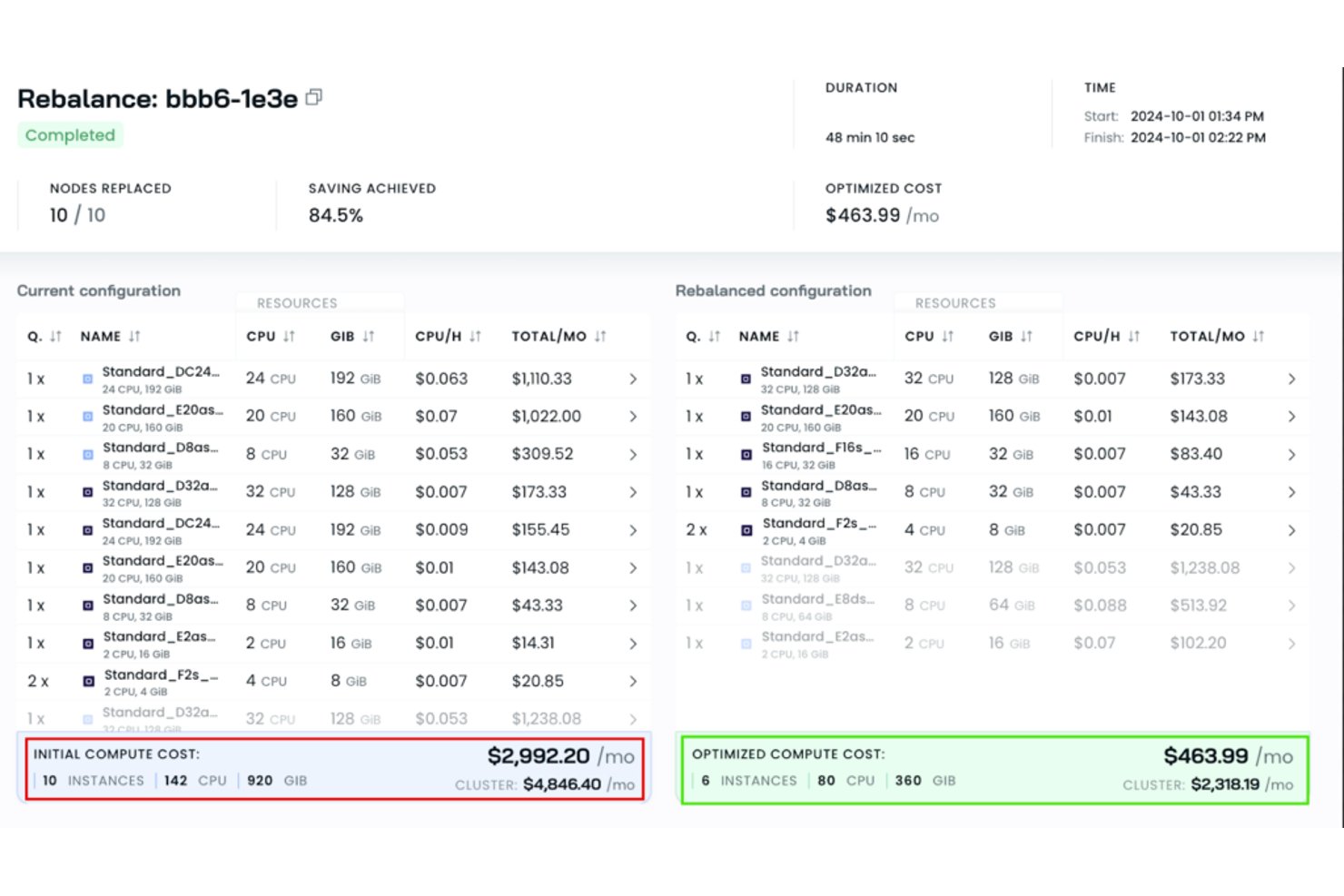
Cast AI is a Kubernetes-focused cloud resource management platform that automates workload rightsizing, node consolidation, autoscaling, and GPU capacity sharing across cloud environments.
Who Is Cast AI Best For?
Cast AI is a strong fit for DevOps and FinOps teams running Kubernetes workloads across multiple cloud providers who need automated cost optimization without constant manual intervention.
Why I Picked Cast AI
Cast AI earns its spot on my shortlist because of how it handles GPU capacity sharing across cloud environments, which is genuinely rare. Through OMNI Compute, I can connect GPU nodes from separate clouds or private infrastructure into a single Kubernetes cluster, then share individual GPUs across workloads using time-slicing or MIG partitioning on A100, H100, and A30 hardware. It also tracks GPU utilization per workload and flags idle capacity, so nothing sits unused.
Cast AI Key Features
- Workload rightsizing: Automatically adjusts CPU and memory requests for each workload based on observed usage data.
- Node consolidation: Bin-packs workloads across nodes and deprovisions underused ones to reduce idle compute spend.
- Allocation groups: Divides cluster costs by labels and namespaces so you can attribute spend to specific teams or applications.
- Cost anomaly notifications: Sends alerts for compute cost spikes, CPU/RAM overprovisioning, and network egress through Slack, webhooks, or the UI.
CAST AI Integrations
CAST AI integrates with Terraform, Prometheus, Grafana, Slack, Jira, Helm, Pulumi, Crossplane, and OpenTelemetry. It also provides a REST API and webhooks for custom integrations.
Pros and Cons
Pros:
- Cross-cloud GPU sharing pools scarce capacity
- Workload cost breakdowns support team allocation
- Reviewers report lower spend after rightsizing
Cons:
- Cost reports sometimes need billing cross-checks
- Aggressive rebalancing can trigger pod churn
Nutanix
Best for private and public cloud FinOps
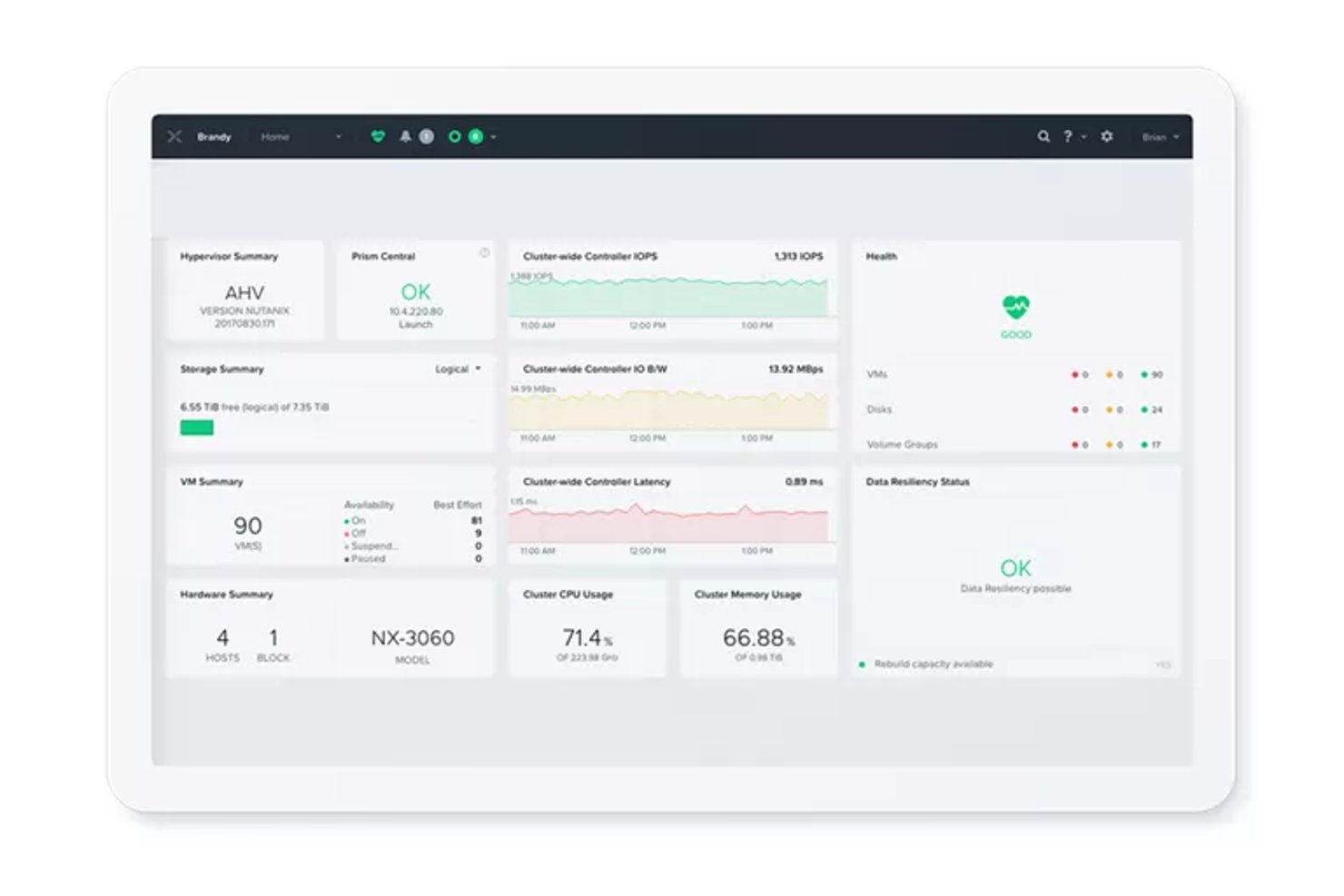
Nutanix Cloud Manager is a hybrid multicloud management platform that spans intelligent operations, self-service provisioning, cost governance, and security monitoring across private, public, and hybrid cloud environments.
Who Is Nutanix Best For?
Nutanix Cloud Manager suits IT and infrastructure teams managing hybrid environments who need unified cost governance, self-service provisioning, and operations monitoring across private and public clouds.
Why I Picked Nutanix
Nutanix Cloud Manager earns its spot on my shortlist because its Cost Governance module gives IT and FinOps teams a single place to track spend across Nutanix, AWS, Azure, and Google Cloud, with AI-powered anomaly detection and rightsizing recommendations that surface waste before it compounds. I also like that private-cloud metering accounts for hardware, software, facilities, and personnel costs, so total cost of ownership modeling reflects what running on-premises infrastructure actually costs. On top of that, tag-based chargeback maps spend directly to business units and cost centers, which makes financial accountability across hybrid environments genuinely actionable.
Nutanix Key Features
- Intelligent Operations monitoring: Tracks health, performance, and capacity across Nutanix and VMware environments with automated anomaly detection and remediation triggers.
- Self-service blueprint marketplace: Lets users provision, scale, and decommission VMs and multi-tier applications through a governed catalog without involving IT directly.
- Security Central compliance auditing: Audits workloads against CIS, NIST CSF, PCI-DSS, and HIPAA frameworks and automates incident response using Nutanix Playbooks.
- Reserved-instance purchase recommendations: Analyzes current usage to surface break-even analysis and buying guidance for reserved instances across supported cloud providers.
Nutanix Cloud Manager Integrations
Nutanix Cloud Manager offers native integrations with AWS, Azure, Google Cloud, VMware, ServiceNow, Jira, Microsoft Teams, and PagerDuty. It supports CI/CD workflows through the marketplace-based Nutanix Jenkins plugin and connects with HYCU for application backup operations.
Pros and Cons
Pros:
- Blueprints automate application provisioning and scaling
- Flags spend anomalies and underused resources
- Centralizes hybrid infrastructure monitoring and alerts
Cons:
- Reviewers want more detailed inventory reporting
- Remote-domain onboarding requires careful preparation
Datadog
Best for cloud cost and workload performance
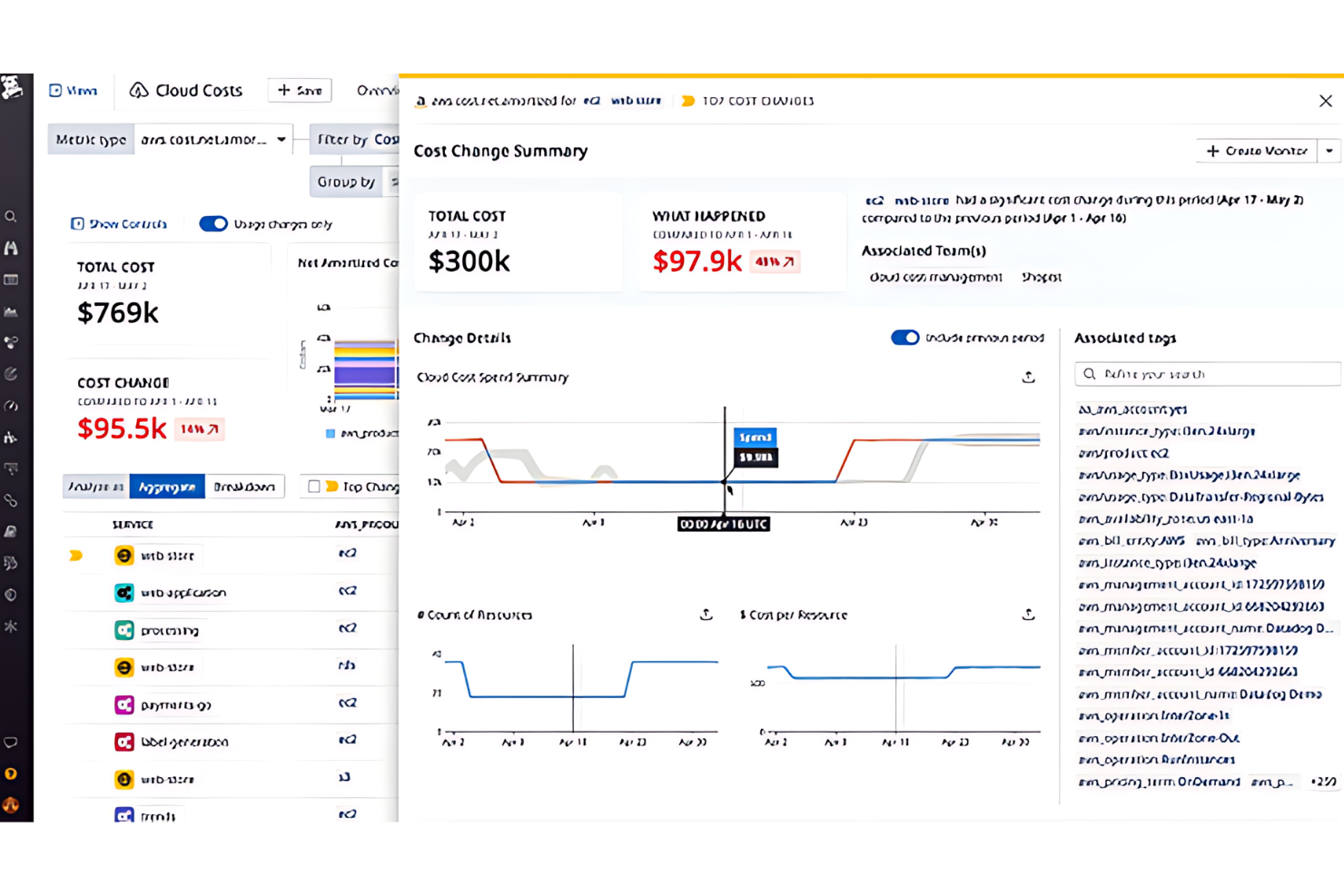
Datadog Cloud Cost Management is a cloud cost and observability platform that unifies spend data from AWS, Azure, Google Cloud, and OCI with performance metrics to support cost tracking, allocation, anomaly detection, and rightsizing recommendations.
Who Is Datadog Best For?
Datadog Cloud Cost Management is a strong fit for engineering and FinOps teams that need cloud cost data alongside real-time performance metrics in a single platform.
Why I Picked Datadog
I picked Datadog as one of the best because it's the only tool on this list that puts cloud cost data and real-time workload performance metrics in the same view. I love how its daily cost recommendations combine observability signals with billing data to flag orphaned, over-provisioned, or idle resources with risk ratings and estimated savings attached. Its Resource Catalog ties resource metadata, ownership, and cost recommendations together, so you can act on a rightsizing signal without jumping between tools.
Datadog Key Features
- Tag Pipelines: Standardizes cost attribution by adding, aliasing, or mapping tags across cloud cost data, dashboards, monitors, and recommendations.
- Cost Optimization Automations: Runs scheduled cost-saving actions on selected recommendations, scoped by account, region, and tags, with optional Slack or Teams approval.
- Hierarchical budgets: Organizes spend limits across parent and child levels, such as departments and teams, with monitors that alert when actual or forecast spending approaches a threshold.
- Audit Trail: Logs API requests and product-specific events with filters for actor, method, and event name, and supports CSV export and dashboard integration.
Datadog Integrations
Datadog has documented native integrations with AWS, Azure, Google Cloud, Oracle Cloud Infrastructure, OpenAI, Anthropic, and Jira. It also offers REST and client-library APIs for custom integrations.
Pros and Cons
Pros:
- Resource catalog connects ownership and metadata
- Team and service spend allocation
- Cost data shares context with workload performance
Cons:
- Automation covers selected recommendations, not general lifecycle tasks
- Recommendations refresh daily, not continuously

Best for balancing SLOs and cloud costs
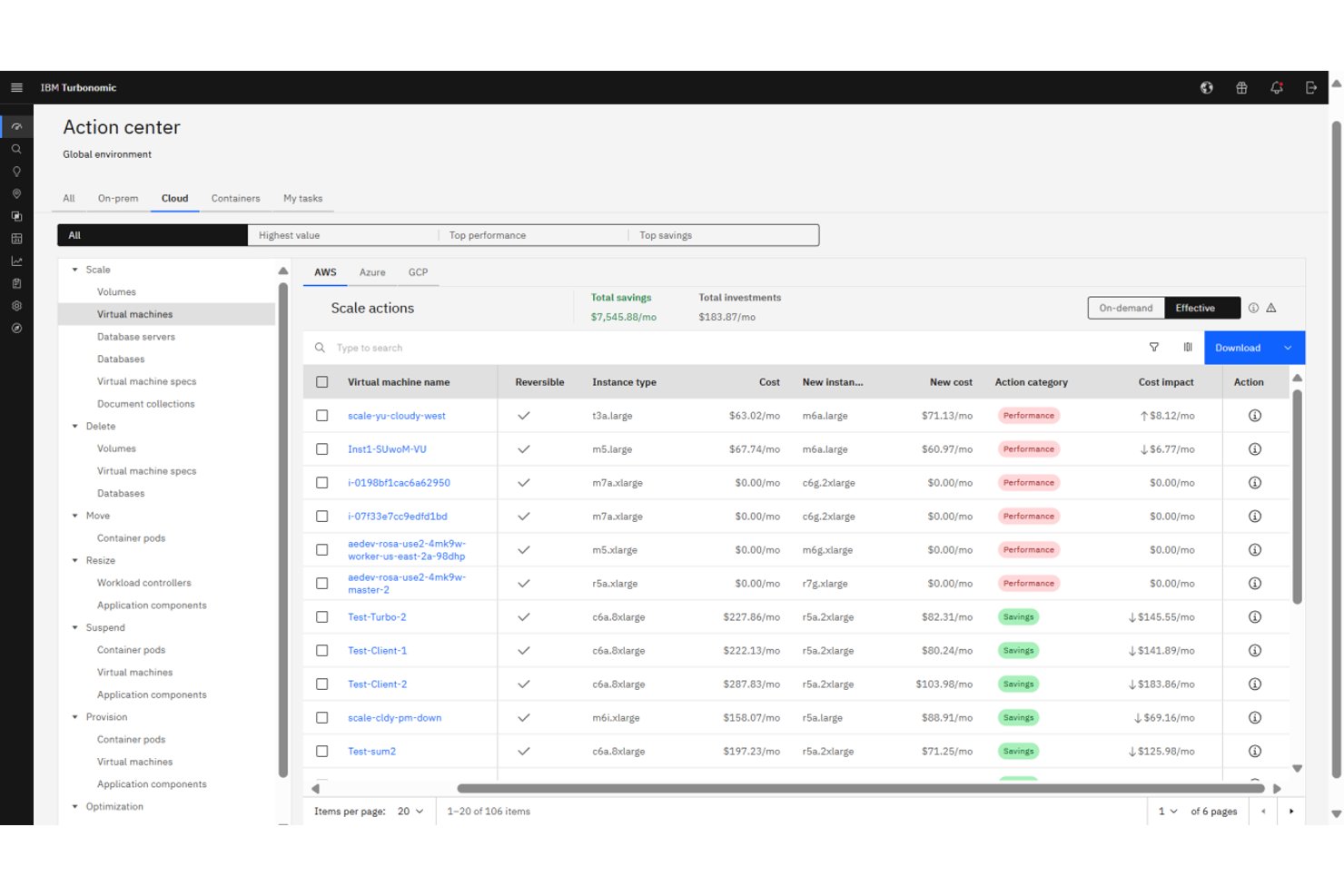
IBM Turbonomic is a cloud resource management platform that continuously analyzes and automates compute, storage, and network resource decisions across hybrid and multicloud environments, including AWS, Azure, Google Cloud, and on-premises infrastructure.
Who Is IBM Turbonomic Best For?
IBM Turbonomic is a strong fit for cloud and IT operations teams in mid-to-large enterprises managing complex hybrid or multicloud environments where keeping application performance within SLOs while controlling costs is a daily challenge.
Why I Picked IBM Turbonomic
IBM Turbonomic earns its spot on my shortlist because it's one of the few tools that treats SLO compliance and cost control as a single, continuous problem rather than two separate workstreams. I love that it ingests real-time demand data and automatically selects VM instance types based on live workload needs, pricing, and discount inventory, so your team isn't manually reconciling performance data against a cost spreadsheet. Its workload parking automation stops and starts idle cloud resources using utilization trends and configurable schedules, which is where I've seen teams recover the most wasted spend without touching SLO targets.
IBM Turbonomic Key Features
- Full-stack dependency mapping: Continuously maps resource flows and dependencies across applications, containers, VMs, and infrastructure to surface performance and efficiency risks.
- Kubernetes rightsizing and placement: Analyzes CPU, memory, and I/O usage at the container, pod, and node levels and generates executable actions to adjust resource requests, scale replicas, and rebalance workloads.
- Policy-based automation controls: Lets you define action, operational, utilization, and scaling constraints with schedules and approval workflows to govern when and how resources are adjusted.
- Cloud migration planning: Runs what-if scenarios for lift-and-shift or optimized migrations, letting you rightsize workloads before and after moving from private datacenters to public cloud.
IBM Turbonomic Integrations
IBM Turbonomic offers documented native integrations with AWS, Microsoft Azure, Google Cloud, Oracle Cloud Infrastructure, Kubernetes, Red Hat OpenShift, VMware vCenter, Prometheus, ServiceNow, and HashiCorp Terraform. It also supports REST APIs, webhooks, and Kubernetes API connectivity for custom automation.
Pros and Cons
Pros:
- Automates scaling and placement to reduce manual work
- Aligns resource decisions with SLOs and costs
- Corrects overprovisioning while protecting application performance
Cons:
- Automated sizing needs careful policy tuning
- Target and policy setup can take time


Flexera One is a SaaS platform for managing IT spend and risk across hybrid environments, combining cloud cost optimization, IT asset management, SaaS discovery, and FinOps capabilities across AWS, Azure, and Google Cloud alongside on-premises infrastructure.
Who Is Flexera One Best For?
Flexera One is a strong fit for enterprise IT and FinOps teams managing spend across a mix of cloud providers, on-premises infrastructure, and SaaS applications.
Why I Picked Flexera One
I picked Flexera One as one of the best because no other tool on this list ties together cloud, on-premises, SaaS, and hardware spend into a single view the way it does. When your team is trying to make a procurement or renewal call that touches AWS costs, on-prem license positions, and SaaS contracts at once, Flexera One's cross-domain visibility is where it earns its place. I also find its 90-plus out-of-the-box optimization policies genuinely useful for surfacing idle or oversized resources across AWS, Azure, and Google Cloud without requiring custom engineering work.
Flexera One Key Features
- Unified hybrid inventory: Discovers and normalizes hardware, software, SaaS, and cloud assets into a single inventory using the Technopedia catalog.
- AI-powered cost anomaly detection: Analyzes cloud spend by provider, account, service, or resource type using Bollinger Bands or an AI-based windowed forecast method.
- Cost allocation rules: Routes cloud spend to billing centers using cloud tags, accounts, tag values, or Azure resource groups.
- SaaS discovery and usage tracking: Identifies managed and shadow SaaS applications and analyzes license usage to surface underused subscriptions and overlap.
Flexera Integrations
Flexera One has documented integrations with AWS, Microsoft Azure, Google Cloud, ServiceNow, SAP Concur, and Coupa. It also offers queryable inventory APIs for custom integrations.
Pros and Cons
Pros:
- Allocates costs across teams and business units
- Surfaces actionable idle-resource savings recommendations
- Unifies cloud, on-premises, and SaaS spend
Cons:
- Resource-level cost detail loses granularity over time
- Scheduled instance actions can require manual intervention

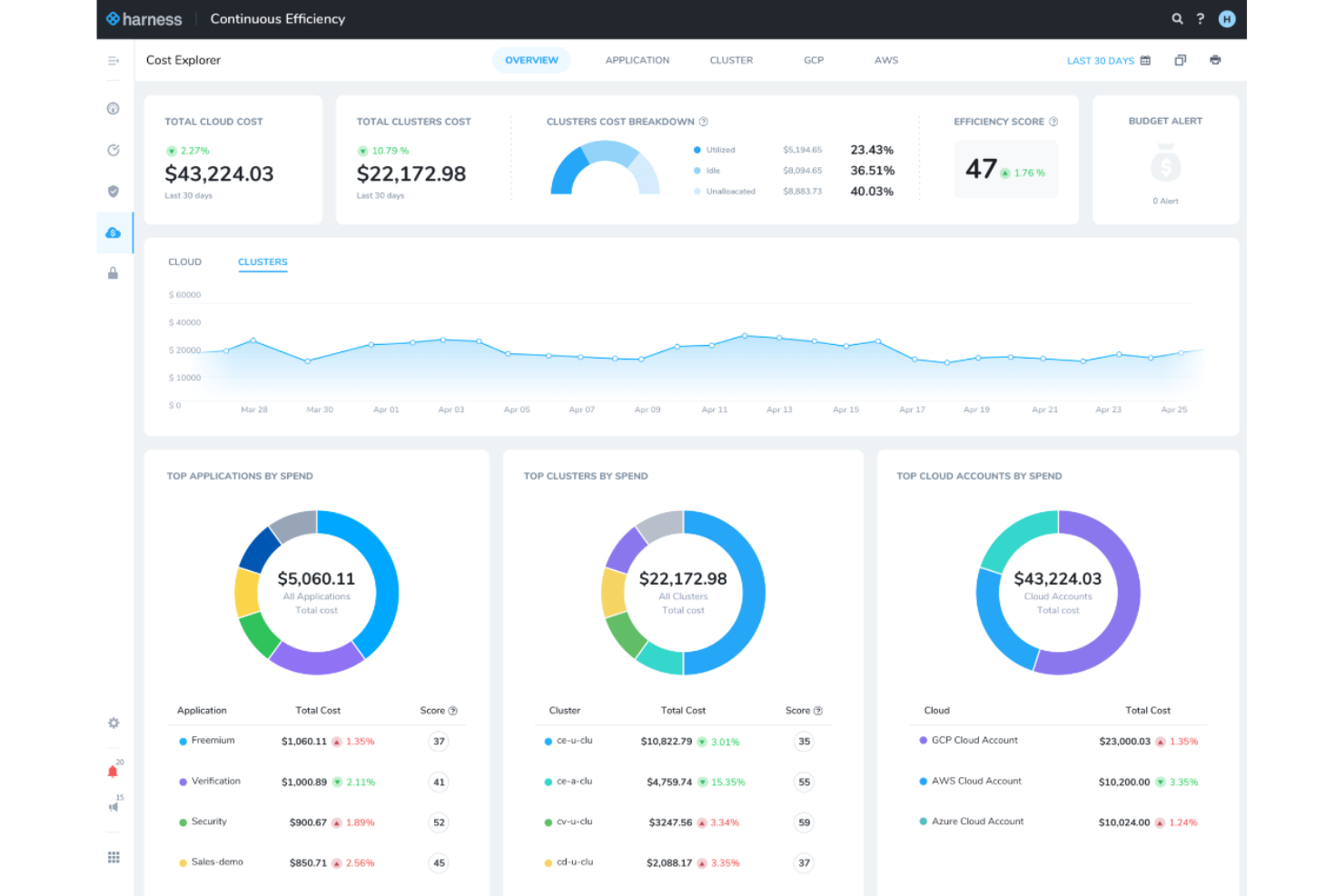
Harness Cloud AI Cost Management is a cloud cost management platform that consolidates spend visibility, attribution, optimization, and governance across AWS, Azure, GCP, Kubernetes, and AI providers like OpenAI and Anthropic.
Who Is Harness Cloud AI Cost Management Best For?
Harness Cloud AI Cost Management is a strong fit for FinOps analysts at mid-to-large organizations managing significant cloud and AI spend across AWS, Azure, GCP, and Kubernetes.
Why I Picked Harness Cloud AI Cost Management
I picked Harness Cloud AI Cost Management because it's one of the few tools that handles spend attribution across both cloud infrastructure and AI providers in a single platform. I find its AI spend attribution especially compelling: it traces costs down to individual tokens, requests, and sessions across OpenAI, Anthropic, AWS Bedrock, and Vertex AI, then rolls those costs up to teams and business units. Its AutoStopping feature also stands out, automatically shutting down idle VMs and containers and restarting them on demand without manual intervention.
Harness Cloud AI Cost Management Key Features
- Commitment Orchestrator: Automates the purchase, renewal, and coverage optimization of Reserved Instances and Savings Plans across cloud providers.
- Chargeback and showback reporting: Generates internal billing reports allocated by team or business unit, with support for the FinOps FOCUS specification.
- Natural-language policy authoring: Converts governance rules written in plain English into enforced cloud cost policies.
- Anomaly detection: Flags unusual spend spikes across cloud and AI providers and sends alerts via email or Slack.
Harness Cloud Cost Management Integrations
Harness documents 100+ Cost Management Agent integrations, including AWS, Microsoft Azure, Google Cloud Platform, Kubernetes, OpenAI, Anthropic, AWS Bedrock, Vertex AI, Jira, and ServiceNow. It also provides REST and SDK integrations for custom AI-trace data.
Pros and Cons
Pros:
- Unifies cloud and Kubernetes cost visibility
- AutoStopping targets idle VMs and containers
- Traces AI spend to tokens and teams
Cons:
- Hybrid and on-prem resource coverage remains limited
- Daily refresh and reporting gaps hinder analysis

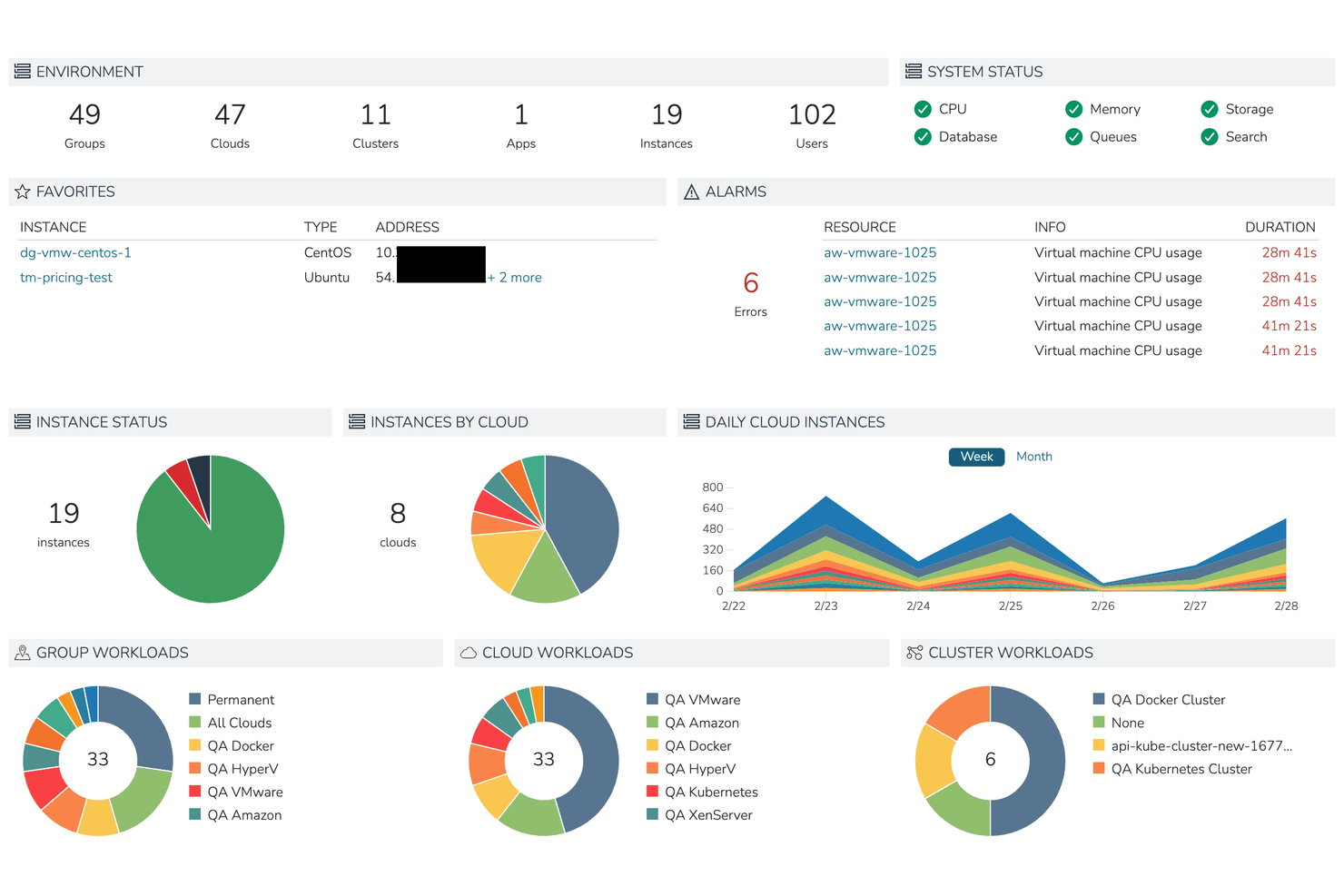
HPE Morpheus Software is a hybrid cloud management platform that unifies VM provisioning, lifecycle automation, multi-cloud governance, and self-service resource catalogs across on-premises and public cloud environments.
Who Is Morpheus Best For?
HPE Morpheus Software is a strong fit for enterprise IT and operations teams managing mixed VMware and KVM environments who need a single control plane for governance, provisioning, and gradual workload migration.
Why I Picked Morpheus
I picked Morpheus as one of the best because it's built specifically for teams that can't afford a hard cutover from VMware—it lets VMware and KVM-based HVM run side by side, so you can migrate workloads incrementally on your own timeline. I like that built-in blueprints and self-service catalogs handle provisioning across both hypervisors from a single control plane, cutting what once took days down to minutes. The policy engine also enforces quotas, approvals, and expiration rules across both environments simultaneously.
Morpheus Key Features
- Multi-tenant governance engine: Configures role-based access, resource quotas, approval workflows, and expiration policies across teams and tenant environments from a single admin interface.
- Hybrid cost reporting dashboard: Aggregates month-to-date spend, projected monthly totals, and per-cloud cost breakdowns filterable by cloud, group, tenant, and tag.
- Audit logging with SIEM export: Records all UI and API actions in Common Event Format with SHA-256 tamper detection and supports forwarding to external SIEM platforms.
- Self-service resource catalog: Lets users provision VMs, containers, and bare-metal resources on demand using pre-approved templates and blueprints without manual IT intervention.
Morpheus Integrations
Morpheus documents 90+ codeless integrations, including AWS, Azure, Google Cloud Platform, VMware vCloud, Kubernetes, Ansible, Jenkins, Jira, and ServiceNow. It also provides API and CLI access for custom provisioning and automation workflows.
Pros and Cons
Pros:
- Tenant policies support quotas and chargeback
- Templates cut provisioning from days to minutes
- Unified visibility across cloud and on-premises
Cons:
- Failed workflow tasks can halt subsequent steps
- FinOps analytics lack deeper optimization
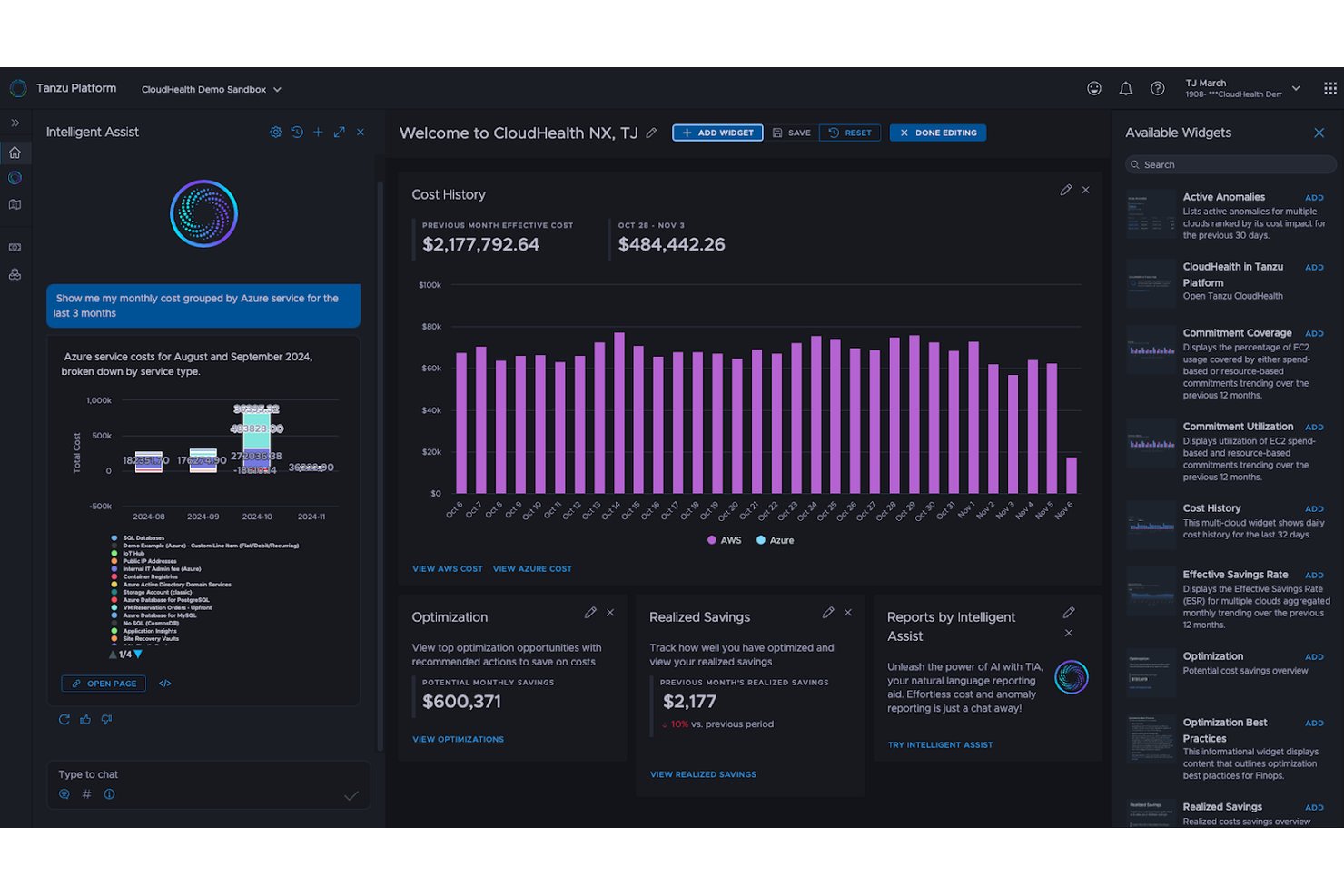
CloudHealth is a multi-cloud FinOps platform by Broadcom that provides cost visibility, spending analysis, resource optimization, and governance across AWS, Azure, Google Cloud, Alibaba Cloud, and VMware vSphere environments.
Who Is CloudHealth Best For?
CloudHealth is a strong fit for FinOps analysts and cloud finance teams managing spend across AWS, Azure, Google Cloud, and on-premises VMware environments.
Why I Picked CloudHealth by VMware
CloudHealth earns its spot on my shortlist because it pulls cost visibility beyond just public cloud, connecting AWS, Azure, Google Cloud, Alibaba Cloud, and VMware vSphere into a single view. I particularly like the Data Connect feature, which ingests SaaS and custom cost data alongside cloud billing so you can see your total technology spend in one place. The FOCUS-aligned reporting then normalizes all of that billing data into a unified schema, making it easy to compare costs across providers without manual reconciliation.
CloudHealth Key Features
- Perspectives: A dynamic grouping tool that segments your cloud resources by team, project, cost center, or any custom logic you define, then applies those groupings across reports and policies.
- FlexOrgs: An organizational hierarchy manager that assigns role-based access across AWS accounts, Azure subscriptions, and GCP projects with granular read, write, update, and delete permissions per user group.
- Policy-based automation: A rule engine that monitors cost, performance, and security conditions and can automatically start, stop, or resize EC2, RDS, GCP compute, and Azure virtual machine resources.
- Intelligent Assist: A GenAI copilot built into the platform that lets you ask questions, generate reports, and surface optimization recommendations in natural language.
CloudHealth Integrations
CloudHealth connects to AWS, Microsoft Azure, Google Cloud, Alibaba Cloud, Kubernetes, and VMware vSphere data sources. GraphQL and REST APIs support custom integrations.
Pros and Cons
Pros:
- Allocates spending by teams and projects
- Highlights idle and underused resources
- Consolidates cloud costs across providers
Cons:
- Policy checks typically run daily
- Billing data can arrive late


Snow Commander is a hybrid cloud management platform from Flexera that combines self-service provisioning, agentless multi-cloud resource discovery, VM lifecycle controls, and cost analytics across public and private cloud environments.
Who Is Snow Commander Best For?
Snow Commander is a good fit for IT and cloud operations teams managing hybrid environments who need governed self-service provisioning without giving end users direct infrastructure access.
Why I Picked Snow Commander
Snow Commander earns its spot on my shortlist because of how well it balances self-service access with genuine lifecycle control. I love that users can request and deploy VMs through a portal without ever touching the underlying infrastructure, and that expiry policies automatically decommission resources before sprawl sets in. Users also get notified before a VM expires and can request extensions, which keeps workloads alive without bypassing governance.
Snow Commander Key Features
- Agentless multi-cloud discovery: Automatically detects and inventories resources across AWS, GCP, Azure, Kubernetes, VMware vSphere, and Microsoft Hyper-V SCVMM without requiring an agent on each host.
- Rightsizing recommendations: Analyzes VM and guest OS performance data to surface resize recommendations that you can apply immediately, schedule, or submit as a change request.
- Organization quotas: Lets administrators cap vCPU, RAM, storage, or daily VM costs at the global, destination, or per-user level and enforce those limits through approval workflows.
- ServiceNow integration: Routes service requests and approvals through ServiceNow before triggering provisioning actions in Snow Commander.
Snow Commander Integrations
Snow Commander integrates with AWS, Google Cloud Platform, Kubernetes, Microsoft Azure, Microsoft Hyper-V SCVMM, and VMware vSphere. ServiceNow can route requests and approvals before deployments, while a REST API supports custom integrations.
Pros and Cons
Pros:
- Rightsizing insights help uncover oversized resources
- Expiry policies curb VM sprawl automatically
- Controlled self-service keeps users away from infrastructure
Cons:
- Initial configuration and reporting can feel complex
- Extending automation can require scripting expertise
Diğer Bulut Kaynak Yönetimi Yazılımları
Aşağıda kısa listeme aldığım ek bulut kaynak yönetimi yazılımlarının bir listesi yer almaktadır. İlk 10’a girememiş olsalar da hâlâ değerlidirler ve daha fazla araştırmaya değerdirler.
- Concierto Cloud
For outsourced infrastructure operations
- Turbonomic
For balancing app performance and spend
- Hyperglance
For self-hosted cloud visibility
- Turbo360
For turning Azure cost findings into tasks
- ServiceNow ITOM
For tracing cloud changes to services
- CloudHealth
For FinOps across cloud, AI, and SaaS spend
- Spectro Cloud Palette
For disconnected edge Kubernetes
- Flexera One
For cloud, SaaS and license costs
- Vantage
For tracing AI costs by team and feature
- IBM Kubecost
For Kubernetes cost allocation by team


How I Evaluate Cloud Resource Management Software
I split my evaluation into three parts, weighting core functionality most: inventory cloud assets and usage, track spend, and flag waste. Next, I look for differentiators like roadmap-based capacity forecasts. Finally, I consider cross-functional onboarding and project-based pricing.
Core Functionality (Table Stakes For This List)
When I'm selecting tools for my list, I score each one on a scale from 0 (does not offer the functionality) to 5 (excels in this area) for each core functionality listed below. I then convert the total into a percentage to help assess each tool's overall fit, with extra weight on any functionalities I’ve deemed essential.
- Resource Visibility (Essential): I look for searchable, current asset inventories across providers, with configuration details that help teams trace project environments.
- Cost Tracking (Essential): I evaluate spend breakdowns, forecasts, and idle-resource or rightsizing recommendations to spot cost changes before they affect delivery plans.
- Provisioning Automation: I check for templates, policies, and schedules that can provision, scale, or retire project and production environments.
- Multi-Cloud Support: I assess how consistently teams can view and manage resources across public clouds and hybrid or on-prem environments.
- Usage Monitoring: I look for utilization metrics and configurable alerts that flag anomalies, thresholds, or policy violations before they disrupt work.
- Governance Controls: I evaluate project-level permissions, budgets, and policy enforcement, including whether teams can review changes through audit trails.
Once I have a list of tools that meet the criteria, I consider what sets each platform apart.
Differentiating Factors (What Sets Vendors Apart)
Here's how I compare and contrast different vendors:
Standout Features
I look for forecasted capacity planning that models future cloud spend against project roadmaps and historical burn rates—without it, quarterly planning is guesswork. Budget variance alerts matter just as much, since real-time notifications let PMO leads catch spend overruns before they force scope trade-offs. I also evaluate automated tagging engines, because inconsistent resource tags are the fastest way to break chargeback accuracy across a multi-project portfolio.
Beyond Features
I evaluate whether licensing scales by tracked projects or cost centers, since per-resource pricing can spike unpredictably when a portfolio grows. Cross-functional onboarding support matters just as much—vendors that offer guided rollouts for mixed DevOps and PMO teams cut weeks off time-to-value. I also check for audit trails that map resource changes to specific projects, which is essential when regulated programs need SOC 2 or HIPAA evidence tied to individual delivery streams.
Bulut Kaynak Yönetimi Yazılımı Nasıl Seçilir?
Uzun özellik listeleri ve karmaşık fiyatlandırma yapıları arasında kaybolmak kolaydır. Kendinize özgü yazılım seçimi sürecinizde ilerlerken odaklanmanızı korumanıza yardımcı olmak için göz önünde bulundurmanız gereken faktörlerin bir kontrol listesini burada bulabilirsiniz:
| Faktör | Dikkat Edilmesi Gerekenler |
|---|---|
| Ölçeklenebilirlik | Yazılım işletmenizle birlikte büyüyecek mi? Performans sorunları yaşamadan artan iş yüklerini ve ek kullanıcıları yönetip yönetemeyeceğini değerlendirin. |
| Entegrasyonlar | Mevcut araçlarınıza bağlanıyor mu? Kesintileri önlemek için mevcut sistemlerinizle uyumluluğunu kontrol edin. |
| Özelleştirilebilirlik | İhtiyaçlarınıza göre uyarlayabilir misiniz? Ayarları ve iş akışlarını ekibinizin süreçlerine uyacak şekilde ne kadar kolay değiştirebileceğinizi değerlendirin. |
| Kullanım kolaylığı | Ekibiniz için kullanımı sezgisel mi? Hızlı benimsenmeyi sağlamak için minimum eğitim gerektiren, anlaşılır bir arayüz arayın. |
| Uygulama ve kullanıma alma | Kurulum ne kadar sürecek? Eğitim ve veri aktarımı da dahil olmak üzere yazılımı çalışır duruma getirmek için gereken kaynakları ve zamanı değerlendirin. |
| Maliyet | Bütçenize uygun mu? Mali kısıtlarınıza uyduğundan emin olmak için fiyatlandırma yapılarını, gizli ücretleri ve fiyat-performans değerini karşılaştırın. |
| Güvenlik önlemleri | Verileriniz ve operasyonlarınız korunuyor mu? Şifreleme, sektör standartlarına uyumluluk ve düzenli güvenlik güncellemelerini kontrol edin. |
| Destek erişilebilirliği | Gerektiğinde yardıma ulaşılabiliyor mu? Mesai dışı ve çok kanallı seçenekler de dahil olmak üzere müşteri desteğinin erişilebilirliğini ve yanıt verme hızını değerlendirin. |
Bulut Kaynak Yönetimi Yazılımındaki Eğilimler
Bulut kaynakları yönetimi yazılımları, bulut ortamlarının artan karmaşıklığı ve ölçeğinin etkisiyle gelişmeye ve değişmeye devam ediyor.
Bulut kaynakları yönetimi yazılımlarını incelerken fark ettiğim bazı trendler şunlardır.
- Maliyet Yönetimine Daha Fazla Önem Verilmesi: Yazılımlar maliyetleri kontrol etme konusunda daha yetkin hale geliyor ve gerçek zamanlı analizler, işletmelerin giderleri yönetmek için kaynakları izlemesine ve ayarlamasına yardımcı olabiliyor. Bu trend, bulut yatırımlarından elde edilen getiriyi en üst düzeye çıkarmaya yardımcı oluyor.
- Yapay Zekâyla Entegrasyon: Yapay zekâ algoritmaları talebi öngördüğü ve kaynak tahsisini otomatikleştirdiği için yapay zekâ, yönetim araçlarına entegre ediliyor. Bu entegrasyon, verimliliği artırmak ve manuel denetimi azaltmak için büyük önem taşıyor.
- Geliştirilmiş Güvenlik Özellikleri: Bulut yönetimi yazılımlarındaki güvenlik güçleniyor. Gelişmiş tehdit algılama ve otomatik uyumluluk kontrolleri standart hale geliyor. Bu trend, giderek daha düşmanca bir dijital ortamda verileri korumak için hayati önem taşıyor.
- Kaynak Optimizasyonu Yoluyla Sürdürülebilirlik: Sürdürülebilirlik giderek daha fazla önem kazanıyor ve çoğu yazılım artık enerji kullanımını ve karbon ayak izini en aza indiren özellikler içeriyor. Bu, çevreye karşı sorumlu olmayı hedefleyen işletmeler için önemlidir.
- Çoklu Bulut Stratejilerine Geçiş: Araçlar artık birden fazla bulut ortamını aynı anda yönetebilecek şekilde uyarlanıyor; bu da daha fazla esneklik ve risk azaltma olanağı sağlıyor. Web tabanlı geçiş, satıcı bağımlılığından kaçınmak isteyen işletmeler için büyük önem taşıyor.
Şirketler bu gelişmeleri benimseyerek önümüzdeki yıllarda operasyonel verimliliklerini artırmayı ve inovasyon ile büyümeyi teşvik etmeyi bekleyebilir.
Bulut Kaynakları Yönetimi Yazılımı Nedir?
Bulut kaynakları yönetimi yazılımı, bulut bilişim kaynaklarını yönetmek, tahsis etmek ve kullanmak için tasarlanmış dijital bir platformdur. BT profesyonelleri ve kuruluşlar, bulut hizmetlerini izlemek ve kontrol etmek için bu yazılımdan yararlanır. Bu, işletmeler ve paydaşlar için işlem gücü, depolama ve ağ özelliklerinin verimli şekilde kullanılmasını sağlar.
Yazılım, kaynak talebi ile kullanılabilirliği dengeler ve bulut ortamlarında sık karşılaşılan zorluklar olan aşırı kaynak tahsisi ile kaynakların yeterince kullanılmamasını önler.
Özellikler
Bulut kaynakları yönetimi yazılımı seçerken aşağıdaki temel özelliklere dikkat edin:
- Maliyet optimizasyonu: Bulut giderlerini izlemenize ve yönetmenize yardımcı olarak kaynakların verimli kullanılmasını ve bütçelerin korunmasını sağlar.
- Güvenlik değerlendirmeleri: Güvenlik açıkları ve sektör standartlarına uyumluluk hakkında içgörüler sağlayarak bulut ortamınızın güvenli kalmasına yardımcı olur.
- Otomatik kaynak sağlama: Kaynakların hızlı şekilde kullanıma sunulmasını sağlayarak manuel müdahaleyi azaltır ve proje takvimlerini hızlandırır.
- Uyumluluk takibi: Düzenleyici gerekliliklere uyulmasını sağlayarak uyumsuzluk cezaları riskini en aza indirir.
- Çoklu bulut desteği: Farklı bulut sağlayıcılarındaki kaynakları yöneterek esneklik sunar ve satıcı bağımlılığını azaltır.
- Özelleştirilebilir gösterge panelleri: Temel ölçümlerin kişiselleştirilmiş görünümlerini sunarak kullanıcıların en kritik bilgilere odaklanmasına yardımcı olur.
- Gerçek zamanlı uyarılar: Bulut ortamındaki değişiklikler veya sorunlar hakkında kullanıcıları bilgilendirerek olası problemlere hızlı yanıt verilmesini sağlar.
- Yaşam döngüsü yönetimi: Güncellemeleri ve yamaları otomatikleştirerek kaynakların her zaman güncel olmasını ve en iyi şekilde çalışmasını sağlar.
Faydalar
Bulut kaynakları yönetimi yazılımını uygulamak, ekibiniz ve işletmeniz için çeşitli faydalar sağlar. Yararlanabileceğiniz birkaç fayda şunlardır:
- Maliyet tasarrufu: Kaynak kullanımını optimize edip giderleri izleyerek gereksiz harcamaları azaltabilir ve bütçe dâhilinde kalabilirsiniz.
- Geliştirilmiş güvenlik: Düzenli güvenlik değerlendirmeleri ve uyumluluk takibi, verilerinizi korumaya ve sektör standartlarına uyulmasını sağlamaya yardımcı olur.
- Artan verimlilik: Otomatik kaynak sağlama ve yaşam döngüsü yönetimi, dağıtım süreçlerini hızlandırarak ekibinizin diğer görevlere odaklanmasına olanak tanır.
- Esneklik: Çoklu bulut desteği, kaynakları çeşitli platformlarda yönetme olanağı sunarak tek bir sağlayıcıya olan bağımlılığı azaltır.
- Daha iyi karar alma: Özelleştirilebilir gösterge panelleri ve gerçek zamanlı uyarılar, içgörüler ve zamanında bilgiler sağlayarak bilinçli kararlar almanıza yardımcı olur.
- Düzenleyici uyumluluk: Uyumluluk takibi, operasyonlarınızın yasal ve sektörel gereklilikleri karşılamasını sağlayarak ceza riskini en aza indirir.
- Kaynak optimizasyonu: Performansı ve kullanımı izleyerek kaynakları etkili şekilde tahsis edebilir ve genel üretkenliği artırabilirsiniz.
Maliyetler ve Fiyatlandırma
Bulut kaynak yönetimi yazılımını seçmek, mevcut çeşitli fiyatlandırma modellerinin ve planların anlaşılmasını gerektirir. Maliyetler özelliklere, ekip büyüklüğüne, eklentilere ve daha fazlasına göre değişir. Aşağıdaki tablo, bulut kaynak yönetimi yazılımı çözümlerinde yaygın olarak sunulan planları, ortalama fiyatlarını ve tipik özellikleri özetlemektedir:
Bulut Kaynak Yönetimi Yazılımı İçin Plan Karşılaştırma Tablosu
| Plan Türü | Ortalama Fiyat | Yaygın Özellikler |
|---|---|---|
| Ücretsiz Plan | $0/kullanıcı/ay | Temel izleme, sınırlı destek ve topluluk erişimi. |
| Kişisel Plan | $5-$25/kullanıcı/ay | Maliyet takibi, temel analizler ve e-posta desteği. |
| İşletme Planı | $30-$50/kullanıcı/ay | Gelişmiş analizler, çoklu bulut desteği ve telefon desteği. |
| Kurumsal Plan | $60-$100/kullanıcı/ay | Özelleştirilebilir panolar, özel müşteri yöneticisi ve 7/24 destek. |
Bulut Kaynak Yönetimi Yazılımı Hakkında Sıkça Sorulan Sorular
Bulut kaynak yönetimi yazılımı hakkında aldığım sıkça sorulan sorulardan bazıları şunlardır.
Bulut kaynak yönetimi yazılımının kullanımı kolay mı?
Bulut kaynak yönetimi yazılımının kullanım kolaylığı önemli bir değerlendirme kriteridir. Aracın içinde görevlerin nasıl gerçekleştirildiğini ve kritik işlemler için kaç adım gerektiğini değerlendirmek önemlidir. Kullanıcı arayüzünün tasarımı, etkileşimli özellikler ve tedarikçinin sunduğu eğitimlerin kullanılabilirlik üzerinde etkisi olabilir. Sezgisel olan ve ekibinizin minimum öğrenme süresiyle benimseyebileceği bir araç seçin.
Bulut kaynak yönetimi yazılımı sezgisel ve iş birliğine dayalı mı?
Bulut kaynak yönetimi yazılımı, öğrenme süresini azaltmak ve ekibinizin hızlı bir şekilde uyum sağlamasını kolaylaştırmak için sezgisel olmalıdır. Ayrıca iş birliği özellikleri, farklı konumlardaki ekip üyelerinin etkili bir şekilde birlikte çalışabilmesi açısından çok önemlidir. Veri paylaşımı ve karar alma için merkezi bir çevrim içi alan sağlayan yazılımları tercih edin.
Bulut kaynak yönetimi yazılımı farklı izin düzeylerine izin veriyor mu?
Çeşitli izin düzeyleri sunan yazılımlar, kuruluş içindeki farklı roller için faydalı olabilir. Farklı izinler belirlenerek proje yöneticileri, ekip üyeleri ve müşteriler kendileriyle ilgili bilgi ve işlevlere erişebilir. Bu, şeffaflığı ve araca katılımı artırabilir.
Bulut kaynak yönetimi yazılımıyla raporlama yapılabilir mi?
Raporlama, kaynak yönetimi yazılımının temel özelliklerinden biridir. Standart raporların mevcut olup olmadığını ve bunları ihtiyaçlarınıza göre özelleştirme olanağını kontrol edin. eResource Scheduler gibi bazı araçlar, izleme ve karar alma açısından önemli olan grafiksel raporlama özellikleri ve kapsamlı panolar sunar.
Bulut kaynak yönetimi yazılımı uçtan uca proje yaşam döngüsünü yönetebilir mi?
Bulut kaynak yönetimi yazılımı, proje planlamasından teslimata kadar tüm proje yaşam döngüsünü desteklemelidir. Risk yönetimini, kaynakların kullanılabilirliğini ve tahsisini, zaman takibini ve diğer temel proje yönetimi işlevlerini mümkün kılmalıdır. Seçtiğiniz aracın projelerinizin tüm yönlerini etkili bir şekilde yönetebildiğinden emin olun.
Bulut kaynak yönetimi yazılımı işletmenizin çalışma biçimini destekleyecek mi?
Yazılım, işletme faaliyetlerinizle uyumlu olmalı ve mevcut yapılarınızı desteklemelidir. Ayrıca gelecekteki iyileştirmelere ve güncellemelere uyum sağlayabilecek esneklikte olmalıdır. Bir araç seçerken iş süreçlerinizle ne kadar iyi bütünleştiğini ve tedarikçinin özelleştirme desteği sunup sunmadığını değerlendirin.
Tedarikçi, bulut kaynak yönetimi yazılımı için uygulama sonrası destek sunuyor mu?
Yeni bir yazılımın uygulanmasının ardından, sorunsuz bir geçiş için uygulama sonrası destek çok önemlidir. Yeni kullanıcılar için eğitim ve sorun giderme yardımı da dâhil olmak üzere tedarikçinin destek hizmetleri hakkında bilgi alın. Destek maliyetlerinin yıllık lisans ücretine dâhil olup olmadığını ve destek ekibinin saat diliminizde hizmet verip vermediğini veya 7/24 yardım sunup sunmadığını kontrol edin.