

2026’da İncelenen En İyi 10 Belge Yakalama Yazılımı

En İyi Belge Yakalama Yazılımı Kısa Listesi


Belgeleri yönetmek, özellikle birden fazla projeyi aynı anda yürütüyorsanız, gerçekten baş ağrıtıcı olabilir. Ekibinizin belgeleri verimli bir şekilde bulmasına, düzenlemesine ve paylaşmasına yardımcı olacak bir çözüme ihtiyacınız vardır. Belge yakalama yazılımı, dağınık dosyaları düzenli dijital varlıklara dönüştürerek bu yükü hafifletebilir.
Piyasadaki en iyi belge yakalama yazılımlarının bir listesini hazırlamak için çeşitli araçları test ederek zaman geçirdim. İncelemelerim bağımsız ve kapsamlı araştırmalara dayanmaktadır; amacım, her çözümün sunduklarını kolayca anlamanızı sağlamaktır.
Bu makalede, bu araçların belgeyle ilgili zorluklarınızın üstesinden nasıl gelebileceğine dair bilgiler bulacaksınız. İster daha iyi uyumluluğa ister daha kolay erişime ihtiyacınız olsun, burada her proje yöneticisi için uygun bir seçenek var.
Why Trust Our Software Recommendations
Our team has been testing and reviewing software since 2012. As project managers ourselves, we know how difficult—and important—it is to choose the right software.
For this guide, we evaluated tools using hands-on testing and independent research, scoring tools using our selection criteria. We also draw on insights from industry thought leaders and practicing project management experts.
Our reviews reflect our human editorial judgment, not a sales pitch.
Expert reviewers:
Belge Yakalama Yazılımı Karşılaştırma Tablosu
Bu karşılaştırma tablosu, en iyi belge yakalama yazılımı seçimlerimin fiyatlandırma ayrıntılarını özetlemektedir:
| Tool | Starting Price | Website | |
|---|---|---|---|
| Best for no-code mobile field data capture | 4.5 out of 5 | $20/user/month Free trial + free demo available | Website |
| Best for intelligent data extraction | 4.8 out of 5 | Pricing upon request Free demo available | Website |
| Best for process automation | 4.6 out of 5 | $73/user/month Free demo available | Website |
| Best for mobile field teams | 4.8 out of 5 | $20/user/month 14-day free trial + free demo available | Website |
| Best for compliance-focused industries | 4.7 out of 5 | Pricing upon request Free trial available | Website |
| Best for remote document access | 4.5 out of 5 | Pricing upon request Free demo available | Website |
| Best for metadata-driven organization | 4.4 out of 5 | $65/user/month Free demo available | Website |
| Best for secure document sharing | 4.4 out of 5 | Pricing upon request 14-day free trial + free demo available | Website |
| Best for enterprise integration | 4.4 out of 5 | $7.30/user/month 30-day free trial available | Website |
| Best for sales document management | 4.5 out of 5 | $19/user/month Free plan + 14-day free trial + free demo available | Website |
En İyi Belge Yakalama Yazılımı İncelemesi
Aşağıda, kısa listeme giren en iyi belge yakalama yazılımlarına ilişkin ayrıntılı özetlerimi bulabilirsiniz. İncelemelerim, size en uygun olanı bulmanıza yardımcı olmak için her aracın temel özelliklerine, avantajlarına ve dezavantajlarına, entegrasyonlarına ve ideal kullanım alanlarına ayrıntılı bir bakış sunmaktadır.
Appenate
Best for no-code mobile field data capture
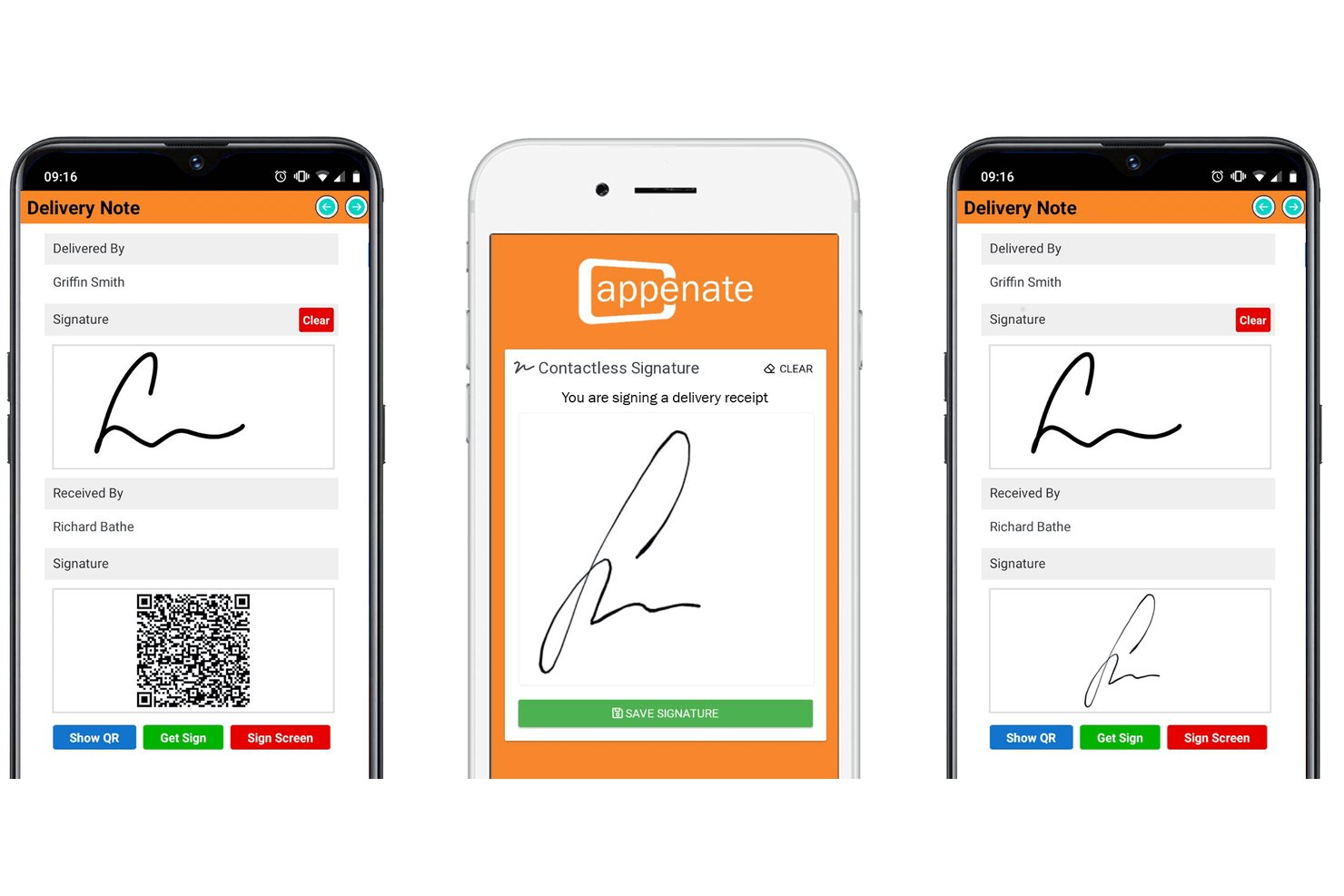
Appenate is a no-code mobile forms platform that lets field teams capture data through photos, OCR, voice input, barcodes, GPS, and signatures on iOS, Android, and Windows devices, with full offline support.
Who Is Appenate Best For?
Appenate is a strong fit for field teams in construction, utilities, and asset-heavy industries that need to capture data on-site without reliable internet access.
Why I Picked Appenate
I picked Appenate as one of the best because it solves a real problem for field teams: capturing structured data from paper documents without a reliable connection. AI Photo Fill lets you snap a photo of any document and have the data extracted and mapped directly into form fields, cutting what used to take 15–20 minutes down to seconds. Add offline-capable mobile capture across iOS, Android, and Windows, and your team can log inspections, signatures, and barcodes on-site whether or not the signal holds.
Appenate Key Features
- AI Voice Fill: Speak your data into form fields—dates, text, and dropdowns—across multiple languages without typing anything.
- Multi-step process forms: Route forms sequentially between team members, with push notifications and accept/reject controls at each step.
- Contactless signature capture: Clients scan a QR code and sign on their own device, with no shared hardware required.
- Cloud storage connectors: Push captured data directly to SharePoint, Google Drive, Box, Dropbox, or Amazon S3 from within the platform.
Appenate Integrations
Appenate offers native integrations with SharePoint, Google Drive, Dropbox, Box, Egnyte, Amazon S3, Salesforce, and Power BI. It also supports custom connections through REST and PUSH APIs, plus data sources such as SQL Server.
Pros and Cons
Pros:
- Supports photos, signatures, barcodes, and GPS
- AI extracts handwritten and printed text
- Captures documents fully offline
Cons:
- Missing version control and retention policies
- No automatic document-type classification
Best for intelligent data extraction

An API-first intelligent document processing platform, Doxis AI.dp. provides OCR, data extraction, document classification, verification, and conversion for more than 50 document types and output formats.
Who is Doxis AI.dp. Best For?
Doxis AI.dp. suits mid-size to enterprise businesses in finance, logistics, retail, and healthcare that process high volumes of documents and need structured data routed into existing systems.
Why I Picked Doxis AI.dp.
I picked Doxis AI.dp. as one of the best because its extraction engine goes well beyond basic OCR. It captures 150+ data fields across 50+ document types, including invoice line items, tax IDs, and employment dates, with results returned in seconds. I also like the human-in-the-loop validation layer, where operators review and correct AI output on complex or low-quality scans, which gets real-world accuracy much closer to 100% than fully automated tools typically achieve.
- Document classification: Sorts and labels incoming documents by type, such as invoices, receipts, contracts, or IDs, before processing begins.
- Data anonymization: Detects and redacts sensitive information, including names, addresses, and ID numbers, within captured documents.
- Fraud detection: Uses pixel-level analysis, EXIF metadata checks, and duplicate detection on captured documents to flag suspicious files.
- Multi-format output: Exports extracted data in JSON, XML, CSV, XLSX, UBL, PDF, or TXT for routing to downstream systems.
Doxis AI.dp. Integrations
Doxis AI.dp. connects to over 200 systems through its plug-and-play integrations, including accounting and ERP systems such as Xero, Oracle NetSuite, SAP, Microsoft Dynamics, and QuickBooks. It also works with Google Drive, Pipedrive, and Make, connects with Zapier via Eden AI, and provides an API and SDK for custom integrations.
Pros and Cons
Pros:
- Provides GDPR-compliant data anonymization
- Includes document fraud detection layers
- Covers over 50 document types
Cons:
- VAT extraction often requires manual correction
- User feedback does not improve models
New Product Updates from Doxis AI.dp.
Doxis AI.dp Adds Zero-Shot Classification and Natural-Language Search
Doxis AI.dp adds zero-shot classification, image classification, natural-language Inbox Search, expanded financial outputs, and Active Learning improvements. These updates help teams classify documents, find information, and process financial data. For more information, visit Doxis AI.dp’s official site.
 .

Best for process automation

Laserfiche is an enterprise content management system that helps organizations automate processes and manage documents efficiently. Its main users are businesses looking to streamline operations and improve workflow management.
Why I picked Laserfiche: Laserfiche excels in process automation, making it a valuable tool for businesses that rely on efficient workflows. It offers features like automated document routing, which reduces manual handling of documents. You can also create custom workflows to suit your team's specific needs. The platform's user-friendly interface helps you set up these automations with minimal hassle.
Standout Features & Integrations
Features include electronic forms to collect and process data efficiently, document versioning that tracks changes over time, and audit trails that ensure compliance and transparency. These features work together to enhance your document management processes.
Integrations include Microsoft Office, Salesforce, DocuSign, QuickBooks, SAP, SharePoint, Google Workspace, Adobe Acrobat, AutoCAD, and Box.
Pros and Cons
Pros:
- Offers detailed audit trails
- Supports large-scale document management
- Custom workflows are easy to create
Cons:
- Customization options can be overwhelming
- Learning curve for new users
- Initial setup can be time-consuming

Fluix
Best for mobile field teams

Fluix is a workflow automation and document management tool designed for mobile field teams who need to manage tasks and documents on the go. It supports industries like construction, energy, and aviation by simplifying document handling and task management.
Why I picked Fluix: Fluix is ideal for mobile field teams, offering features that enhance productivity while on the move. It provides offline access, so your team can work without connectivity issues. The tool's form-filling capabilities allow you to capture data efficiently in the field. Additionally, task management features keep your team organized and on track, even in remote locations.
Standout Features & Integrations
Features include digital signatures for secure document approval, real-time data capture that ensures accurate information collection, and customizable workflows that adapt to your team's processes. These features help your team stay productive and efficient in various environments.
Integrations include Salesforce, Google Workspace, Microsoft Office 365, Box, Dropbox, OneDrive, Adobe Acrobat, SharePoint, QuickBooks, and Zapier.
Pros and Cons
Pros:
- Tailored for remote environments
- Digital signatures for secure approvals
- Customizable workflows for field tasks
Cons:
- Limited integration with non-mainstream tools
- Limited advanced analytics features
- Initial setup can be complex

FileHold
Best for compliance-focused industries

FileHold is a document management software designed for industries that require strict compliance and document control, such as healthcare and finance. It helps organizations manage documents, ensure regulatory compliance, and maintain secure records.
Why I picked FileHold: FileHold is particularly suited for compliance-focused industries, offering features that support regulatory adherence. It provides document version control, ensuring you always have the right version at hand. The software also includes audit trails for tracking document history, which is crucial for compliance audits. Additionally, its secure access controls protect sensitive information from unauthorized access.
Standout Features & Integrations
Features include automated document workflows that streamline approval processes, electronic forms that simplify data capture, and advanced search capabilities to quickly locate documents. These features enhance your team's ability to manage documents efficiently.
Integrations include Microsoft Office, SharePoint, Adobe Acrobat, QuickBooks, Salesforce, DocuSign, Google Workspace, Dropbox, SAP, and Box.
Pros and Cons
Pros:
- Offers electronic forms for data capture
- Secure document access controls
- Strong focus on regulatory compliance
Cons:
- Customization options may be overwhelming
- Requires dedicated server setup
- Higher initial costs for small teams

DocuWare
Best for remote document access

DocuWare is a document management and workflow automation solution designed for industries like healthcare, finance, and manufacturing. It helps businesses automate processes, manage documents, and ensure compliance efficiently.
Why I picked DocuWare: DocuWare excels in providing remote document access, making it a top choice for teams needing flexibility. It features intelligent document processing and automated invoice management, which are vital for reducing manual workload. The platform's secure document archiving ensures that your files are safely stored and easily accessible from anywhere. You’ll find that its integration with tools like Microsoft Teams enhances collaboration and accessibility.
Standout Features & Integrations
Features include intelligent document processing that automates data entry, automated invoice management for efficient financial operations, and secure archiving to keep your documents safe. These features ensure that your team can access and manage documents without being tied to a particular location.
Integrations include Microsoft Teams, Outlook, SAP, QuickBooks, Google Workspace, Salesforce, DocuSign, SharePoint, Dropbox, and OneDrive.
Pros and Cons
Pros:
- Offers secure document archiving
- Supports various industries
- Effective in automating processes
Cons:
- No public API available
- May require training for setup
- Pricing details are not transparent

M-Files
Best for metadata-driven organization

M-Files is a document management solution that caters to businesses of all sizes, focusing on organizing and managing information based on metadata. It helps teams improve document accessibility and control across various departments.
Why I picked M-Files: M-Files is designed to enhance metadata-driven organization, which makes it unique among document management tools. It allows you to tag documents with metadata, making it easier to find and categorize files. You can access documents based on what they are, not where they're stored. This feature is particularly useful for teams that handle large volumes of documents and need efficient retrieval methods.
Standout Features & Integrations
Features include advanced document permissions that ensure only authorized users access certain files, automated workflows that reduce manual tasks, and version control that keeps track of document changes. These features are designed to make document management more efficient for your team.
Integrations include Microsoft Office, Salesforce, Google Workspace, SharePoint, DocuSign, QuickBooks, SAP, HubSpot, Autodesk, and Adobe Acrobat.
Pros and Cons
Pros:
- Includes document version control
- Offers advanced permission settings
- Supports metadata-driven searches
Cons:
- The interface can feel cluttered
- Requires training for effective use
- Metadata setup can be complex
Revver
Best for secure document sharing

Revver is a document management solution aimed at businesses that prioritize secure document sharing and collaboration. It helps teams efficiently manage, store, and share documents while ensuring data security.
Why I picked Revver: Revver emphasizes secure document sharing, which is crucial for organizations handling sensitive information. It provides features like encryption and access controls to protect your data. You can easily share documents with external parties without compromising security. The platform's audit trails give you visibility into document access and modifications, enhancing accountability.
Standout Features & Integrations
Features include document version history that allows you to track changes over time, automated workflows that streamline document approvals, and customizable dashboards to monitor document activities. These features help your team stay organized and informed.
Integrations include Microsoft Office 365, Salesforce, QuickBooks, Google Workspace, Dropbox, Box, Adobe Acrobat, Slack, SharePoint, and DocuSign.
Pros and Cons
Pros:
- Supports external collaboration
- Provides detailed audit trails
- Strong focus on data security
Cons:
- Learning curve for new users
- Complex permissions management
- Limited mobile app functionality

Best for enterprise integration

Microsoft SharePoint is a collaboration and document management platform commonly used by large enterprises to facilitate internal communication and document sharing. It streamlines business processes, supports content management, and enhances team collaboration.
Why I picked Microsoft SharePoint: Microsoft SharePoint is tailored for enterprises that need seamless integration within their existing Microsoft ecosystem. It provides document libraries where your team can store and share files securely. The platform's workflow automation allows you to automate repetitive tasks, saving time and reducing errors. Version control ensures that everyone is working on the most up-to-date documents.
Standout Features & Integrations
Features include advanced search capabilities that help you quickly find documents, customizable team sites for personalized collaboration spaces, and content management features that ensure compliance and security. These features enhance your organization's ability to manage and share content effectively.
Integrations include Microsoft Teams, Office 365, OneDrive, Power BI, Yammer, Dynamics 365, PowerApps, Azure, Outlook, and Planner.
Pros and Cons
Pros:
- Offers customizable team sites
- Supports large-scale document management
- Strong integration with Microsoft products
Cons:
- Complexity in permissions management
- Requires training for effective use
- Complex setup for new users
PandaDoc
Best for sales document management

PandaDoc is a document automation software primarily used by sales teams to create, manage, and distribute sales documents efficiently. It streamlines the proposal and contract process, making it easier for businesses to close deals faster.
Why I picked PandaDoc: PandaDoc excels in managing sales documents, offering features that simplify the creation and distribution of proposals and contracts. It provides customizable templates, which save your team time when generating documents. The eSignature feature ensures that signing is quick and legally binding. Additionally, real-time analytics help you track document interactions, giving you insights into client engagement.
Standout Features & Integrations
Features include document collaboration that allows multiple team members to work on a document simultaneously, payment processing to collect payments directly through documents, and a content library that stores reusable document components. These features enhance your team's productivity and document management capabilities.
Integrations include Salesforce, HubSpot, Microsoft Dynamics 365, Pipedrive, Zoho CRM, Google Workspace, Dropbox, Box, Slack, and QuickBooks.
Pros and Cons
Pros:
- Efficient eSignature process
- Real-time analytics for document tracking
- Customizable templates for quick setup
Cons:
- Complex setup for advanced features
- Steep learning curve for new users
- Limited offline functionality
Diğer Belge Yakalama Yazılımları
Kısa listeme giremeyen ancak yine de göz atmaya değer bazı ek belge yakalama yazılımı seçenekleri şunlardır:
- Dropbox Business
For team collaboration
- Hightail
For creative project management
- DocuPipe
For AI capture of unstructured docs
- Egnyte
For secure file sharing
- DocuPhase
For automated workflow management
- Adobe Scan
For mobile document scanning
- PaperScan
For batch document scanning


How I Evaluate Document Capture Software
I split my evaluation into two layers: baseline criteria every tool must clear—like OCR, field capture, and PM integrations—and the differentiators that separate the best fit from the rest.
Core Functionality (Table Stakes For This List)
When I'm selecting tools for my list, I rank each one on a scale from 0 (does not offer the functionality) to 5 (excels in this area) for each core functionality listed below. Then, I calculate the tool's total score into a percentage. Each tool needs to achieve a minimum total score of 65% to be considered for inclusion.
- Multi-Source Document Capture: I check whether a tool can ingest documents from scanners, mobile devices, email inboxes, and cloud drives so field teams and office staff can submit from wherever they work.
- OCR & Data Extraction: Each tool gets evaluated on how well its OCR handles real-world inputs like photographed receipts, scanned contracts, and handwritten notes—and whether it pulls structured data from them.
- Automated Classification & Indexing: I look for the ability to auto-sort incoming documents into categories like invoices, change orders, or submittals and tag them with searchable metadata.
- Workflow Automation & Routing: Captured documents need to move somewhere useful. I evaluate whether the tool routes files through approval chains tied to project stages or stakeholder roles.
- PM & Storage Integrations: Connecting to project management platforms and cloud storage matters. I look at native connectors to tools like Jira, Procore, SharePoint, and Google Drive, plus API availability.
- Secure Storage & Audit Trail: Every tool gets assessed on version control, role-based permissions, and audit logging—features project teams rely on during compliance reviews or contract disputes.
Once I have a list of tools that meet this criteria, I consider what sets each platform apart.
Differentiating Factors (What Sets Vendors Apart)
Here's how I compare and contrast different vendors:
Standout Features
Mobile field capture is a big differentiator—I look for offline-capable apps that let site crews upload delivery tickets or inspection photos without needing connectivity. AI-powered data validation also matters because it can flag mismatches between extracted invoice amounts and approved purchase orders before anyone reviews them. I evaluate collaborative markup tools too, since project teams often need to redline drawings or annotate scanned contracts directly inside the platform.
Beyond Features
Deployment flexibility is something I always consider—some teams need cloud-hosted tools, while others in regulated sectors require on-premise or hybrid options. Compliance matters here too. I check for certifications like SOC 2 Type II and ISO 27001, along with data residency choices for teams running projects across multiple regions. Implementation speed is another factor I weigh, especially how quickly a team can configure OCR templates and approval workflows without heavy IT involvement during onboarding.
Belge Yakalama Yazılımı Nasıl Seçilir?
Uzun özellik listeleri ve karmaşık fiyatlandırma yapıları arasında kaybolmak kolaydır. Benzersiz yazılım seçimi süreciniz üzerinde çalışırken odağınızı korumanıza yardımcı olmak için göz önünde bulundurmanız gereken faktörlerin bir kontrol listesini burada bulabilirsiniz:
| Faktör | Göz önünde bulundurulması gerekenler |
|---|---|
| Ölçeklenebilirlik | Yazılım işletmenizle birlikte büyüyebilir mi? Gelecekteki ihtiyaçları ve aracın performans sorunları yaşamadan artan belge hacimlerini işleyip işleyemeyeceğini değerlendirin. |
| Entegrasyonlar | Zaten kullandığınız araçlarla çalışıyor mu? İş akışında kesintileri önlemek için CRM veya ERP gibi mevcut sistemlerinizle uyumluluğunu kontrol edin. |
| Özelleştirilebilirlik | İş süreçlerinize uyacak şekilde uyarlayabilir misiniz? İş akışlarını veya şablonları ekibinizin kendine özgü çalışma biçimlerine göre düzenleme seçenekleri arayın. |
| Kullanım kolaylığı | Tüm ekip üyeleri için kullanıcı dostu mu? Öğrenme eğrisini ve ekibinizin hızla çalışmaya başlamasına yardımcı olacak eğitim kaynaklarının bulunup bulunmadığını değerlendirin. |
| Uygulama ve işe alıştırma | Başlamak ne kadar sürecek? Kurulum sürecini ve taşıma ile eğitim konusunda yardımcı olacak desteğin bulunup bulunmadığını değerlendirin. |
| Maliyet | Fiyatlandırma bütçenize uygun mu? Ek kullanıcılar veya ilave depolama gibi gizli ücretlere dikkat edin ve benzer araçlarla karşılaştırma yapın. |
| Güvenlik önlemleri | Verilerinizi koruyor mu? Şifreleme standartlarını, kullanıcı erişim denetimlerini ve veri koruma düzenlemelerine uyumluluğu inceleyin. |
| Destek erişilebilirliği | İhtiyaç duyduğunuzda yardım alabilir misiniz? Desteğin günün her saati, sohbet, e-posta veya telefon gibi birden fazla kanal üzerinden sunulup sunulmadığını kontrol edin. |
Belge Yakalama Yazılımı Nedir?
Belge yakalama yazılımı, fiziksel ve dijital belgeleri düzenli, aranabilir dosyalara dönüştüren bir araçtır. Büyük miktardaki belgeleri verimli bir şekilde yönetmesi gereken proje yöneticileri, muhasebeciler ve yöneticiler gibi profesyoneller tarafından yaygın olarak kullanılır. Tarama, optik karakter tanıma ve dizin oluşturma özellikleri, belgelerin hızlı bir şekilde düzenlenmesine, bunlara erişilmesine ve belgelerin bulunmasına yardımcı olur. Genel olarak bu araçlar zamandan tasarruf sağlar ve belge işlemlerindeki manuel hataları azaltır.
Belge Yakalama Yazılımının Özellikleri
Belge yakalama yazılımı seçerken aşağıdaki temel özelliklere dikkat edin:
- Tarama özellikleri: Bu özellik, fiziksel belgeleri dijitalleştirerek elektronik ortamda saklanmalarını ve bunlara erişilmesini kolaylaştırır.
- Optik karakter tanıma (OCR): OCR, taranan görüntüleri düzenlenebilir ve aranabilir metne dönüştürerek manuel veri girişi için harcanan zamandan tasarruf sağlar.
- Dizin oluşturma: Bu özellik, belgeleri etiketler veya meta verilerle kategorilere ayırmaya yardımcı olarak aranabilirliği ve düzeni iyileştirir.
- İş akışı otomasyonu: Belgelerin onay için yönlendirilmesi gibi tekrarlayan görevleri otomatikleştirerek verimliliği artırır.
- Veri güvenliği: Hassas bilgileri yetkisiz erişime karşı korumak için şifreleme ve erişim denetimleri sağlar.
- Mobil erişim: Belgeleri mobil cihazlar kullanarak yakalamanızı ve yönetmenizi sağlayarak hareket hâlinde çalışmayı destekler.
- Sürüm denetimi: Değişiklikleri izler ve belge geçmişini koruyarak herkesin en güncel sürüm üzerinde çalışmasını sağlar.
- Gerçek zamanlı iş birliği: Birden fazla kullanıcının belgeler üzerinde aynı anda çalışmasına olanak tanıyarak ekip çalışmasını geliştirir.
- Entegrasyon desteği: CRM veya ERP sistemleri gibi mevcut araçlarla uyumluluk sağlayarak iş akışının sürekliliğini korur.
- Özelleştirilebilir şablonlar: Belirli iş ihtiyaçlarına uyacak şekilde uyarlanabilen önceden tasarlanmış şablonlar sunarak kurulum için gereken zamandan tasarruf sağlar.
Belge Yakalama Yazılımının Faydaları
Belge yakalama yazılımını uygulamak, ekibiniz ve işletmeniz için çeşitli faydalar sağlar. Yararlanabileceğiniz bazı avantajlar şunlardır:
- Artan verimlilik: Belge iş akışlarının otomatikleştirilmesi manuel görevleri azaltarak daha önemli işler için zaman kazandırır.
- Geliştirilmiş veri doğruluğu: Optik karakter tanıma, görüntülerdeki metni düzenlenebilir biçimlere dönüştürerek hataları en aza indirir.
- İyileştirilmiş düzen: Dizin oluşturma ve meta veri etiketleme, belgeleri kategorilere ayırmayı ve hızlı bir şekilde bulmayı kolaylaştırır.
- Daha iyi iş birliği: Belgelerin gerçek zamanlı olarak paylaşılması ve düzenlenmesi, ekiplerin daha etkili bir şekilde birlikte çalışmasına yardımcı olur.
- Maliyet tasarrufu: Belgelerin dijitalleştirilmesi, fiziksel depolama alanı ve bununla ilişkili giderlere duyulan ihtiyacı azaltır.
- Güvenli belge işlemleri: Şifreleme gibi veri güvenliği özellikleri, hassas bilgileri yetkisiz erişime karşı korur.
- Uzaktan erişilebilirlik: Mobil erişim, ekiplerin belgelerle her yerden çalışmasına olanak tanıyarak esnek çalışma ortamlarını destekler.
Belge Yakalama Yazılımının Maliyetleri ve Fiyatlandırması
Belge yakalama yazılımı seçmek, mevcut çeşitli fiyatlandırma modellerinin ve planların anlaşılmasını gerektirir. Maliyetler özelliklere, ekip büyüklüğüne, eklentilere ve diğer unsurlara göre değişir. Aşağıdaki tabloda yaygın planlar, bunların ortalama fiyatları ve belge yakalama yazılımı çözümlerinde genellikle sunulan özellikler özetlenmektedir:
Belge Yakalama Yazılımı İçin Plan Karşılaştırma Tablosu
| Plan Türü | Ortalama Fiyat | Yaygın Özellikler |
|---|---|---|
| Ücretsiz Plan | $0 | Temel tarama, sınırlı depolama ve temel paylaşım. |
| Kişisel Plan | $5-$25/kullanıcı/ay | OCR, meta veri etiketleme ve mobil erişim. |
| İşletme Planı | $25-$50/kullanıcı/ay | İş akışı otomasyonu, entegrasyon desteği ve gelişmiş güvenlik özellikleri. |
| Kurumsal Plan | $50-$100/kullanıcı/ay | Gelişmiş analizler, özel iş akışları, özel destek ve uyumluluk özellikleri. |
Belge Yakalama Yazılımı Hakkında SSS
Belge yakalama yazılımı hakkında sık sorulan bazı soruların yanıtları:
Tarama yazılımı ile belge yakalama yazılımı arasındaki fark nedir?
Tarama yazılımı, belgelerin PDF veya TIFF gibi statik görüntülerini oluşturur. Belge yakalama yazılımı ise OCR kullanarak bu dosyaların aranabilir olmasını ve verilerin çıkarılabilmesini sağlayarak bir adım daha ileri gider. Bu ek işlev, belge yönetimi görevlerinin otomatikleştirilmesine ve verilere erişilebilirliğin artırılmasına yardımcı olur.
Belge yakalama yazılımında belge ayırma nasıl çalışır?
Belge yakalama yazılımı aynı anda birden fazla belgeyi tarayabilir ve bunları otomatik olarak ayrı dosyalara ayırabilir. Bu özellik, büyük miktarda evrakın toplu olarak işlenmesi için kullanışlıdır; belgeleri manuel olarak sıralamak için harcayacağınız zaman ve çabadan tasarruf etmenizi sağlar.
Belge yakalama yazılımı mevcut sistemlerle entegre olabilir mi?
Evet, birçok belge yakalama çözümü mevcut belge yönetimi sistemleriyle entegre olabilir. Bu sayede yakalanan belgeleri doğrudan mevcut iş akışlarınıza yönlendirebilir, farklı platformlardaki dosyaları yönetmeyi ve geri almayı kolaylaştırabilirsiniz.
Belge yakalama yazılımıyla hangi tarayıcı türleri uyumludur?
Çoğu belge yakalama yazılımı, Kodak, Canon ve Epson gibi popüler markalar da dahil olmak üzere çok çeşitli tarayıcıları destekler. Tarayıcınızın desteklendiğinden emin olmak için her zaman yazılımın uyumluluk listesini kontrol edin. Bu, olası entegrasyon sorunlarının önlenmesine yardımcı olur.
Belge yakalama yazılımında gelişmiş veri çıkarma (ADE) nedir?
Gelişmiş veri çıkarma, yazılımın belgelerdeki belirli metinleri tanımlayıp çıkarmasını sağlar. Bu özellik, belgelerin daha kolay aranabilmesini mümkün kılar ve adlandırma kurallarını otomatikleştirmek veya iş akışı yazılımıyla entegre olmak için kullanılabilir. Böylece belge yönetiminin verimliliği artırılır.
OCR entegrasyonu belge yakalama yazılımı kullanıcılarına nasıl fayda sağlar?
OCR entegrasyonu, taranan belgeleri aranabilir ve düzenlenebilir dosyalara dönüştürür. Bu özellik, ayrı bir OCR yazılımına duyulan ihtiyacı ortadan kaldırarak belge yönetimi sürecinizi kolaylaştırır ve belgelerinizdeki belirli bilgileri bulmanızı kolaylaştırır.