

2026’da İncelenen En İyi 10 Belge Toplama Yazılımı

En İyi Belge Toplama Yazılımları Kısa Listesi


Belge toplama yazılımı, ekiplerin dosyaları güvenli bir şekilde talep etmesine, takip etmesine ve düzenlemesine yardımcı olarak gidip gelen e-postaların, sürüm karmaşasının ve kaçırılan teslim tarihlerinin yarattığı kaosu ortadan kaldırır. İster müşteri belgeleri, ister işe alım materyalleri veya kurum içi onaylar topluyor olun, doğru araç gönderimleri merkezileştirmeyi, hatırlatıcıları otomatikleştirmeyi ve mevzuata uygunluğu korumayı kolaylaştırır.
Kullanımı kolay, güvenli ve farklı iş akışı türlerini yönetebilecek kadar esnek platformları bulmak için önde gelen belge toplama araçlarını bağımsız olarak test edip inceledim. İster küçük bir ekibin parçası olun ister kurumsal ölçekteki talepleri yönetin, bu rehber ihtiyaçlarınıza uygun bir çözüm seçmenize yardımcı olacaktır.
Why Trust Our Software Recommendations
Our team has been testing and reviewing software since 2012. As project managers ourselves, we know how difficult—and important—it is to choose the right software.
For this guide, we evaluated tools using hands-on testing and independent research, scoring tools using our selection criteria. We also draw on insights from industry thought leaders and practicing project management experts.
Our reviews reflect our human editorial judgment, not a sales pitch.
Expert reviewers:
Belge Toplama Yazılımları Karşılaştırma Tablosu
Bu karşılaştırma tablosu, en iyi belge toplama yazılımı seçimlerim için fiyatlandırma ayrıntılarını özetlemektedir:
| Tool | Starting Price | Website | |
|---|---|---|---|
| Best for multilingual document processing | 4.8 out of 5 | Pricing upon request Free demo available | Website |
| Best for customer interactions | 4.8 out of 5 | Pricing upon request Free demo available | Website |
| Best for workflow automation | 4.5 out of 5 | Pricing upon request Free demo available | Website |
| Best for cloud storage | 4.3 out of 5 | CAD$21/user/month 14-day free trial | Website |
| Best for team collaboration | 4.4 out of 5 | $7.30/user/month 30-day free trial available | Website |
| Best for document signing | 4.5 out of 5 | $19/user/month Free plan + 14-day free trial + free demo available | Website |
| Best for file sharing | — | $9.99/person/month Free plan available | Website |
| Best for note organization | — | $10.83/user/month Free trial available | Website |
| Best for automated reminders | — | $35/month 14-day free trial + free demo available | Website |
| Best for client submissions | — | $107.50/month 7-day free trial | Website |
En İyi Belge Toplama Yazılımları İncelemesi
Aşağıda kısa listeme giren en iyi belge toplama yazılımlarına ilişkin ayrıntılı özetlerimi bulabilirsiniz. İncelemelerim, size en uygun aracı bulmanıza yardımcı olmak için her aracın temel özelliklerine, artılarına ve eksilerine, entegrasyonlarına ve ideal kullanım alanlarına ayrıntılı bir bakış sunmaktadır.& artıları ve eksileri, entegrasyonları ve ideal kullanım alanlarına yardımcı olmak için
Doxis
Best for multilingual document processing
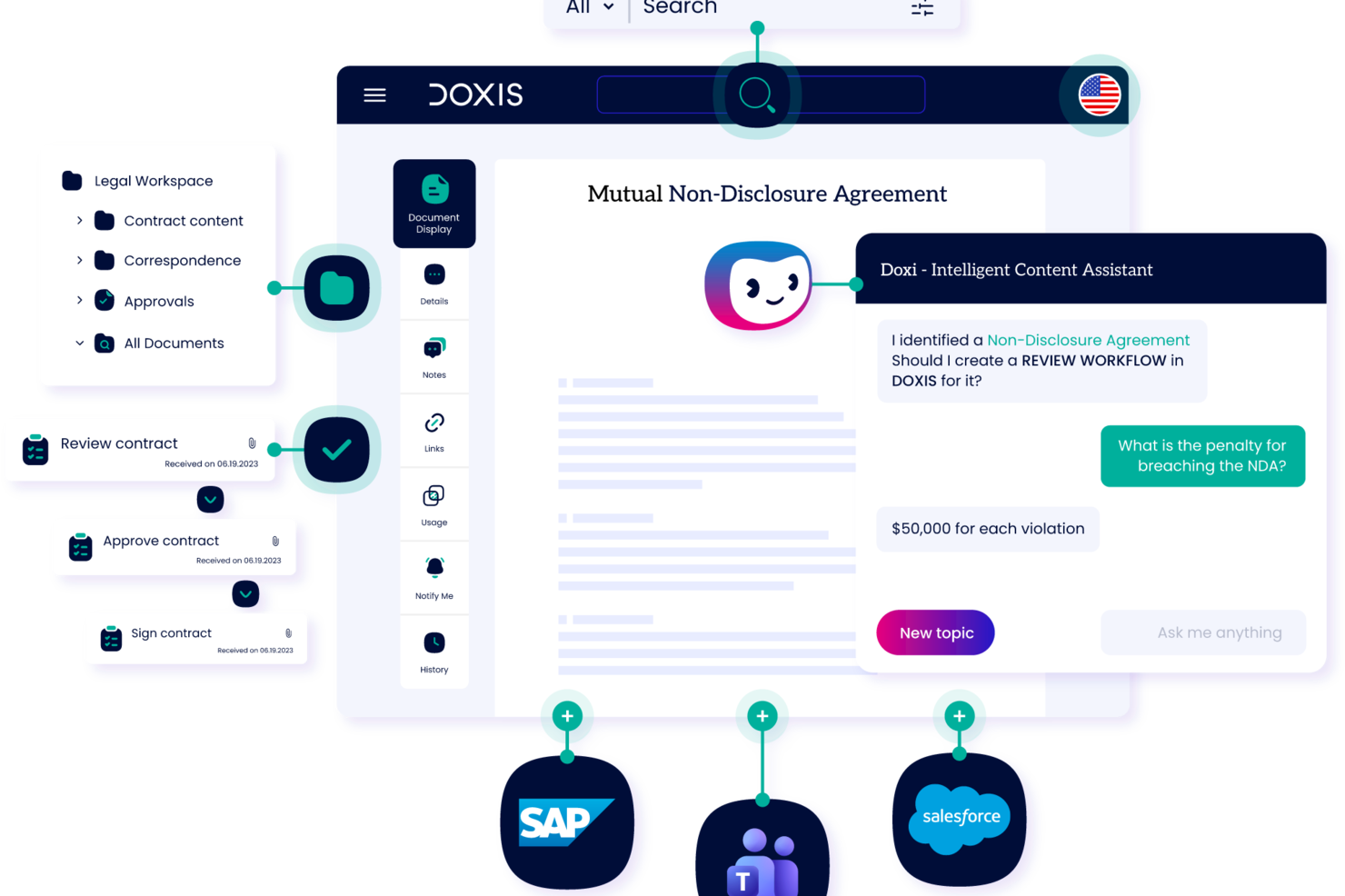
Doxis is an enterprise content management and document intelligence platform that provides document capture, AI-powered classification, digital filing, process automation, and audit-proof archiving throughout the entire document lifecycle.
Who is Doxis Best For?
Doxis suits large enterprises and mid-sized organizations in document-heavy industries like finance, healthcare, and manufacturing that need to manage high volumes of incoming documents across multiple systems.
Why I Picked Doxis
I've included Doxis in my top picks because its multimodal document recognition engine handles documents across languages, formats, and layouts without requiring manual configuration for each. When your team collects documents from international suppliers, customers, or partners, Doxis reads and extracts structured data from those files regardless of the source language. I also like that its AI.dp module uses NLP alongside OCR, which means it understands context inside a document, not just characters on a page. That matters when you're collecting complex, mixed-language documents like customs declarations, freight invoices, or cross-border contracts.
Doxis Key Features
- Inbound mail processing: Captures and routes incoming documents from email, fax, and print channels into the correct filing structure.
- Digital eFiles: Organizes collected documents into structured electronic files by entity type, such as customer, supplier, or case.
- Multi-channel document capture: Ingests documents from scanners, web portals, and connected business systems in a single pipeline.
- Audit-proof archiving: Stores collected documents in a tamper-proof, compliance-ready archive with full version history.
Doxis Integrations
Doxis offers native integrations with SAP, Salesforce, and the Microsoft ecosystem, including Microsoft 365, Microsoft Teams, Microsoft Outlook, Microsoft SharePoint, and Microsoft Dynamics 365. It also integrates with SAP SuccessFactors. The platform uses vendor-independent connectors to connect with ERP, CRM, and HR systems, and an API is available for custom integrations. Zapier support is not clearly documented.
Pros and Cons
Pros:
- Pre-configured content apps serve common departments
- Audit-compliant archiving supports regulated industries
- Natural language search provides contextual answers
Cons:
- Large file handling sometimes triggers bugs
- Suited to enterprises, not smaller teams

Lightico
Best for customer interactions

Lightico is a digital customer interaction platform designed to streamline the processes of collecting documents and signatures from clients. It is primarily used by industries such as finance, insurance, and telecommunications to enhance customer service and operational efficiency.
Why I picked Lightico: It specializes in customer interactions, allowing you to collect e-signatures and documents in real-time while on a call with clients. The platform supports instant document sharing, ensuring a smooth and efficient process. Lightico's secure environment protects sensitive data during transactions. In my experience, these features make it ideal for businesses looking to improve customer engagement and streamline document collection.
Standout Features & Integrations:
Features include the ability to complete transactions in real-time, which keeps your workflow moving smoothly. You can also use the platform to gather customer consent quickly through digital forms. Lightico provides a secure channel for sharing sensitive information, giving you peace of mind during customer interactions.
Integrations include Salesforce, Microsoft Dynamics, SAP, Zendesk, Oracle, Genesys, Twilio, NICE inContact, Avaya, and RingCentral.
Pros and Cons
Pros:
- Quick customer consent via digital forms
- Secure environment for transactions
- Real-time document collection
Cons:
- Learning curve for new users
- May require technical setup

DocuWare
Best for workflow automation

DocuWare is a document management and workflow automation tool designed for businesses looking to digitize and streamline their processes. It serves industries like finance, healthcare, and manufacturing by automating document workflows and improving efficiency.
Why I picked DocuWare: It’s strong in workflow automation, letting you set up digital workflows that cut down manual tasks. You can capture documents from different sources and send them automatically for approval. It also includes tools for document retention and compliance so your team meets regulations. In my experience, these features make it practical for improving efficiency.
Standout Features & Integrations:
Features include intelligent indexing, which quickly organizes your documents for easy retrieval. You can also use mobile access to manage documents on the go, keeping your team connected. The platform provides customizable dashboards that give you insights into workflow performance and document status.
Integrations include Microsoft Office 365, SAP, Salesforce, QuickBooks, Oracle, Outlook, Sage, Microsoft Dynamics, Google Workspace, and SharePoint.
Pros and Cons
Pros:
- Supports compliance and document retention
- Customizable workflow automation
- Effective document capture capabilities
Cons:
- Requires training for full utilization
- Initial setup complexity

Box
Best for cloud storage

Box is a cloud-based content management and file sharing service designed for businesses needing secure and scalable storage solutions. It caters to enterprises across various industries, helping teams collaborate and manage documents efficiently.
Why I picked Box: It gives you cloud storage to keep and access large amounts of data securely. You can set detailed permissions so sensitive information stays protected. Your team can work on documents together in real time with its collaboration tools. In my experience, these features make it dependable for teams that need secure cloud storage.
Standout Features & Integrations:
Features include advanced security controls that help you protect your data with encryption and compliance certifications. You can automate workflows to streamline repetitive tasks, saving time and effort. Box also offers file versioning, allowing you to track changes and revert to previous versions if needed.
Integrations include Microsoft Office 365, Google Workspace, Slack, Salesforce, IBM, Adobe Sign, DocuSign, Okta, ServiceNow, and Zoom.
Pros and Cons
Pros:
- Real-time collaboration tools
- Scalable storage for large enterprises
- Advanced security and compliance features
Cons:
- High learning curve for new users
- Initial setup can be complex

Best for team collaboration

Microsoft SharePoint is a collaboration and document management platform widely used by businesses of all sizes. It helps teams store, organize, and share information securely, enhancing productivity and collaboration across departments.
Why I picked Microsoft SharePoint: It’s built for team collaboration with shared document libraries and real-time co-authoring. You can set up intranet sites to keep your team informed and engaged. Its permission settings let you control who can access sensitive information. In my experience, these features make it dependable for improving communication and collaboration.
Standout Features & Integrations:
Features include the ability to create custom workflows that automate repetitive tasks, saving time and effort. You can also use version history to track changes and restore previous versions if needed. The platform offers advanced search capabilities, making it easy to find documents and information quickly.
Integrations include Microsoft Teams, OneDrive, Outlook, Power BI, Yammer, Dynamics 365, PowerApps, Azure, Salesforce, and Slack.
Pros and Cons
Pros:
- Customizable intranet site creation
- Supports real-time co-authoring
- Rich document management capabilities
Cons:
- Requires ongoing maintenance
- Complex setup for new users
PandaDoc
Best for document signing

PandaDoc is a document automation and management tool primarily used by sales teams, marketing departments, and legal professionals. It simplifies the creation, delivery, and signing of documents, offering a comprehensive solution for handling business paperwork.
Why I picked PandaDoc: It excels in document signing, providing you with features like e-signatures and document tracking. You can create templates to speed up the document creation process, saving time for your team. The platform offers analytics to track document engagement, giving you insights into client interactions. In my experience, these features make PandaDoc a top choice for businesses looking to enhance their document workflow.
Standout Features & Integrations:
Features include the ability to use a content library to store frequently used documents and assets. You can also collaborate on documents in real time, ensuring efficient team communication. PandaDoc provides a drag-and-drop document editor, making it easy to customize documents to your needs.
Integrations include Salesforce, HubSpot, Zoho CRM, Microsoft Dynamics, Pipedrive, Google Drive, Dropbox, Slack, QuickBooks, and Zapier.
Pros and Cons
Pros:
- Detailed document analytics
- Real-time document collaboration
- Extensive template customization
Cons:
- Initial setup requires time
- Limited offline functionality


Dropbox Business is a cloud-based file sharing and storage solution tailored for teams and businesses that need efficient document management. It enables users to store, share, and collaborate on files, making it suitable for a wide range of industries.
Why I picked Dropbox Business: It’s built for file sharing with shared folders and links that make collaboration easy. You can use file requests to gather documents from clients and teammates quickly. It also offers security options like two-factor authentication to protect your data. In my experience, these features make it dependable for secure and efficient file sharing.
Standout Features & Integrations:
Features include smart sync, which lets you access files without taking up space on your device. You can also use the admin console to manage user permissions and monitor activity across your team. The document watermarking feature adds an extra layer of security to your sensitive files.
Integrations include Microsoft Office 365, Slack, Zoom, Adobe Creative Cloud, Salesforce, Trello, Asana, Google Workspace, DocuSign, and Okta.
Pros and Cons
Pros:
- Smart sync for saving device space
- Advanced security with two-factor authentication
- Efficient file request feature
Cons:
- Initial setup can be time-consuming
- Requires constant internet connection


Evernote Business is a note-taking and organization tool designed for teams and businesses that need to manage information efficiently. It helps users capture ideas, organize documents, and collaborate on projects, making it a versatile tool for various industries.
Why I picked Evernote Business: It’s great for organizing notes and documents with notebooks and tags that keep information easy to sort. You can share notes with your team so everyone stays aligned. The search tool is strong and can even find text inside attachments. In my experience, these features make it useful for teams that need organized knowledge management.
Standout Features & Integrations:
Features include the ability to sync across devices, ensuring your notes are accessible anywhere you go. You can use the web clipper to save articles and web pages directly to your notes. The tool also allows you to annotate PDFs, making it easy to add comments and highlights.
Integrations include Google Drive, Slack, Microsoft Teams, Salesforce, Outlook, Gmail, Zapier, Trello, Asana, and Microsoft Office.
Pros and Cons
Pros:
- Web clipper for saving web content
- Syncs across multiple devices
- Effective note categorization options
Cons:
- Requires internet for full features
- Limited offline access


Content Snare is a document collection platform that gives clients a secure, branded portal to upload documents and respond to questions in one place. It's used by accounting firms (tax returns, workpapers, AML/KYC), law firms (client intake, case files), mortgage brokers (loan applications, payslips, ID), and agencies (briefs, brand assets, content). ISO 27001 certified. Auto-saving forms mean clients can complete a request over multiple sessions and automatic reminders that chase clients on your behalf.
Why I picked Content Snare: Automated reminders are a standout feature, ensuring you never miss a deadline. You can create clear checklists for client requests and track progress in a centralized dashboard. The user-friendly interface makes it easy for clients to submit documents without hassle. In my experience, this reduces the back-and-forth emails, saving time for both you and your clients.
Standout Features & Integrations:
Features include creating templates for repetitive requests, ensuring quick and efficient information collection. In-context communication reduces the need for separate email threads, and security is prioritized with military-grade encryption. The platform offers ready-made templates and item-level rejection for better document management.
Integrations include Google Drive, Dropbox, Zapier, Xero, QuickBooks, Slack, Trello, Asana, Monday.com, and Microsoft Teams.
Pros and Cons
Pros:
- Clear checklists for document requests
- User-friendly interface for clients
- Automated reminders reduce manual follow-up
Cons:
- Learning curve for new users
- Limited customization options


Collect is a platform designed to automate client document collection for industries like real estate, mortgage brokerage, and human resources. It provides tools to streamline workflows and enhance efficiency in collecting necessary documents from clients.
Why I picked Collect: It’s built for client submissions with automated document requests and notifications to keep you updated. You can customize forms to fit your needs and brand your client portal. It also protects data with encryption and controlled access. In my experience, these features make it practical for managing client documents efficiently.
Standout Features & Integrations:
Features include workflow automation that reduces manual tasks and enhances productivity. You can set up automatic reminders and SMS notifications to keep clients on track. The platform also supports cloud synchronization, ensuring your data is updated and accessible.
Integrations include API, webhooks, and other popular tools that enhance workflow efficiency.
Pros and Cons
Pros:
- Branding options for client portal
- Customizable client forms
- Automated document requests
Cons:
- Initial setup may be time-consuming
- Requires internet access for full use
Diğer Belge Toplama Yazılımları
Kısa listeme giremeyen ancak yine de göz atmaya değer bazı ek belge toplama yazılımı seçenekleri şunlardır:
- Checkhub
For compliance tracking
- Superdocu
For onboarding processes
- DocuPipe
For structuring incoming documents
- LogicalDOC
For enterprise document control
- Xerox DocuShare
For scalable content management


How I Evaluate Document Collection Software
I split my evaluation into two layers: the baseline every tool must meet—like structured request workflows and status tracking—and the differentiators that set one platform apart.
Core Functionality (Table Stakes For This List)
When I'm selecting tools for my list, I rank each one on a scale from 0 (does not offer the functionality) to 5 (excels in this area) for each core functionality listed below. Then, I calculate the tool's total score into a percentage. Each tool needs to achieve a minimum total score of 65% to be considered for inclusion.
- Document Request Workflows: I look for structured, multi-item request lists you can send to specific recipients—like requesting insurance certificates, signed contracts, and permits from a subcontractor in one go.
- Automated Follow-Up Reminders: Chasing people for missing files is a time sink, so I evaluate whether a tool can send scheduled reminder sequences to recipients with overdue submissions.
- Submission Status Tracking: I check for a dashboard view that shows what's been submitted, what's pending, and what's overdue across all active projects and recipients at a glance.
- Secure File Upload Portal: Recipients should be able to upload files through a secure link or portal without creating an account—especially important when collecting documents from external contractors or clients.
- Centralized Document Storage: Every collected file should land in an organized repository tied to its project or request, not scattered across email threads and chat messages.
- Reusable Request Templates: For recurring project types, I look for saveable checklists or templates—like a standard onboarding packet or a monthly compliance document set—that your team can deploy repeatedly.
Once I have a list of tools that meet this criteria, I consider what sets each platform apart.
Differentiating Factors (What Sets Vendors Apart)
Here's how I compare and contrast different vendors:
Standout Features
Conditional request logic is a big differentiator. I look for tools that adjust required documents based on a recipient's role or project type—like only requesting safety certifications from on-site contractors. Built-in e-signature support also matters because it keeps the entire collect-and-sign cycle in one place. I evaluate whether a platform offers AI-powered document validation to flag incomplete uploads or mismatched file types before your team reviews them manually.
Beyond Features
I check how well a tool integrates with the project management stack you're already using—syncing document statuses with tasks in tools like Asana or Jira keeps everything visible without manual updates. Pricing model matters too, especially whether external recipients can upload files for free. If your team collects documents from dozens of contractors per project, per-recipient fees add up fast. I also evaluate compliance credentials like SOC 2 and GDPR, which become essential when handling sensitive client or vendor files.
Belge Toplama Yazılımı Nasıl Seçilir?
Uzun özellik listeleri ve karmaşık fiyatlandırma yapıları arasında kaybolmak kolaydır. Kendinize özgü yazılım seçim sürecinizi yürütürken odaklanmanıza yardımcı olmak için göz önünde bulundurmanız gereken faktörlerin bir kontrol listesini burada bulabilirsiniz:
| Faktör | Nelere Dikkat Edilmeli? |
|---|---|
| Ölçeklenebilirlik | Yazılım işletmenizle birlikte büyüyebilir mi? Gelecekteki ihtiyaçlarınızı göz önünde bulundurun ve performans sorunları yaşamadan artan veri hacmini ve kullanıcı sayısını yönetebilecek araçları arayın. |
| Entegrasyonlar | Mevcut sistemlerinizle çalışıyor mu? Sorunsuz iş akışları sağlamak için CRM, e-posta ve proje yönetimi yazılımı gibi mevcut araçlarınızla uyumluluğunu kontrol edin. |
| Özelleştirilebilirlik | Yazılımı süreçlerinize göre uyarlayabilir misiniz? Özel iş akışı ihtiyaçlarınıza uyacak esnek şablonlar ve ayarlar sunan çözümleri arayın. |
| Kullanım kolaylığı | Ekibiniz yazılımı kolayca benimser mi? Kullanıcı dostu bir arayüz eğitim süresini azaltır ve verimliliği artırır. Gezinme ve işlevsellik kullanım kolaylığını değerlendirmek için demoyu test edin. |
| Uygulama ve İşe Alıştırma | Ne kadar hızlı çalışmaya başlayabilirsiniz? Kurulum süresini ve gereken kaynakları değerlendirin. Geçişi kolaylaştırmak için yönlendirmeli işe alıştırma ve destek sunan yazılımları arayın. |
| Maliyet | Fiyatlandırma şeffaf mı ve bütçeniz dahilinde mi? Abonelik planlarını, tek seferlik ücretleri ve ek masrafları karşılaştırın. Tasarruf etmek için yıllık faturalandırma indirimlerini göz önünde bulundurun. |
| Güvenlik Önlemleri | Verilerinizi ne kadar iyi koruyor? Şifreleme, erişim denetimleri ve GDPR gibi veri koruma standartlarına uygunluk sunduğundan emin olun. |
Belge Toplama Yazılımı Nedir?
Belge toplama yazılımı, işletmelerin müşterilerden ve paydaşlardan belge toplamasına, belgeleri düzenlemesine ve yönetmesine yardımcı olan bir araçtır. Proje yöneticileri, muhasebeciler ve İK uzmanları gibi profesyoneller, veri toplamayı kolaylaştırmak ve iş akışı verimliliğini artırmak için bu araçları kullanır.
Otomatik hatırlatıcılar, güvenli depolama ve kolay paylaşım özellikleri, verimli belge işlemlerini ve belgelerin zamanında gönderilmesini destekler. Genel olarak bu araçlar, manuel görevleri azaltarak ve düzenli belge yönetimi sağlayarak üretkenliği artırır.
Belge Toplama Yazılımının Özellikleri
Belge toplama yazılımı seçerken aşağıdaki temel özelliklere dikkat edin:
- Otomatik hatırlatıcılar: Müşterilere zamanında bildirimler göndererek belgelerini programa uygun şekilde göndermelerini sağlar ve manuel takip görevlerini azaltır.
- Güvenli depolama: Hassas bilgileri şifreleme ve erişim denetimleriyle koruyarak veri koruma standartlarına uyumluluk sağlar.
- Özelleştirilebilir şablonlar: Kullanıcıların belirli veri toplama ihtiyaçlarına uygun şablonlar oluşturmasına ve değiştirmesine olanak tanıyarak tekrarlanan görevlerde zaman kazandırır.
- Gerçek zamanlı iş birliği: Birden fazla kullanıcının belgeler üzerinde aynı anda çalışmasını sağlayarak ekip iletişimini ve verimliliğini artırır.
- Veri şifreleme: Verileri aktarım ve depolama sırasında koruyarak hem kullanıcılar hem de müşteriler için güven sağlar.
- Entegrasyon özellikleri: İş akışlarını ve veri yönetimini kolaylaştırmak için CRM ve proje yönetim sistemleri gibi mevcut araçlara bağlanır.
- Mobil erişim: Belgeleri hareket hâlindeyken yönetme ve toplama olanağı sunarak ofis dışında esnekliği ve üretkenliği güvence altına alır.
- Belge takibi: Belge gönderimlerinin ve onaylarının durumunu izleyerek kullanıcıların düzenli ve bilgili kalmasına yardımcı olur.
- Kullanıcı dostu arayüz: Gezinmeyi kolaylaştırır ve öğrenme sürecini kısaltarak ekiplerin hızlı bir şekilde benimsemesini teşvik eder.
- İş akışı otomasyonu: Rutin süreçleri otomatikleştirerek kullanıcıların daha stratejik görevlere odaklanması için zaman kazandırır.
Belge Toplama Yazılımının Faydaları
Belge toplama yazılımını uygulamak, ekibiniz ve işletmeniz için çeşitli faydalar sağlar. Yararlanabileceğiniz birkaç fayda şunlardır:
- Zaman tasarrufu: Otomatik hatırlatıcılar ve iş akışı otomasyonu manuel görevleri azaltarak ekibinize yüksek öncelikli projelere odaklanmak için daha fazla zaman kazandırır.
- Gelişmiş düzen: Merkezi belge depolama ve özelleştirilebilir şablonlar, bilgilerin düzenli ve kolayca erişilebilir kalmasına yardımcı olur.
- Gelişmiş güvenlik: Veri şifreleme ve güvenli depolama, hassas belgeleri koruyarak veri koruma düzenlemelerine uyumluluk sağlar.
- Daha iyi iş birliği: Gerçek zamanlı iş birliği özellikleri, ekip üyelerinin verimli bir şekilde birlikte çalışmasına olanak tanıyarak iletişimi ve üretkenliği artırır.
- Artan esneklik: Mobil erişim, belgeleri her yerden yönetmenizi sağlayarak uzaktan çalışmayı ve hareket hâlindeyken üretkenliği destekler.
- Daha yüksek verimlilik: Entegrasyon özellikleri, mevcut sistemlere bağlanarak veri yönetimini kolaylaştırır ve tekrarlanan çabaları azaltır.
- Net görünürlük: Belge takibi, gönderimlerin ve onayların durumu hakkında bilgi sağlayarak ekibinizin bilgili ve proaktif kalmasına yardımcı olur.
Belge Toplama Yazılımının Maliyetleri ve Fiyatlandırması
Belge toplama yazılımı seçmek, mevcut çeşitli fiyatlandırma modellerini ve planları anlamayı gerektirir. Maliyetler özelliklere, ekip büyüklüğüne, eklentilere ve diğer unsurlara göre değişir. Aşağıdaki tablo, belge toplama yazılımı çözümlerinde yaygın planları, ortalama fiyatlarını ve genellikle sunulan özellikleri özetlemektedir:
Belge Toplama Yazılımı İçin Plan Karşılaştırma Tablosu
| Plan Türü | Ortalama Fiyat | Yaygın Özellikler |
|---|---|---|
| Ücretsiz Plan | $0 | Temel belge toplama, sınırlı depolama ve temel güvenlik özellikleri. |
| Kişisel Plan | $5-$15/user/month | Sınırsız belge yükleme, özelleştirilebilir şablonlar ve öncelikli destek. |
| İşletme Planı | $20-$50/user/month | Gelişmiş güvenlik özellikleri, entegrasyon özellikleri ve iş akışı otomasyonu. |
| Kurumsal Plan | $60-$100/user/month | Özelleştirilebilir çözümler, özel hesap yönetimi ve geliştirilmiş uyumluluk ve güvenlik seçenekleri. |
Belge Toplama Yazılımı SSS
Belge toplama yazılımı hakkında sık sorulan soruların bazı yanıtları şunlardır:
Belge toplama yazılımı mevcut sistemlerle nasıl entegre olur?
Belge toplama yazılımı genellikle CRM sistemleri, e-posta platformları ve bulut depolama çözümleri gibi araçlarla entegre olur. Yazılımın API’leri destekleyip desteklemediğini veya mevcut sistemlerinizle önceden oluşturulmuş entegrasyonlara sahip olup olmadığını kontrol etmeniz gerekir. Bu, sorunsuz bir iş akışı sağlar ve veri silolarını önler. Entegrasyon, veri işleme sırasında zamandan tasarruf sağlayabilir ve hataları azaltabilir.
Belge toplama yazılımında hangi güvenlik önlemlerini aramalıyım?
Hassas bilgileri korumak için güvenlik çok önemlidir. Veri şifreleme, güvenli erişim denetimleri ve GDPR gibi veri koruma düzenlemelerine uyumluluk gibi özellikleri arayın. Yazılımın veri erişimini izlemek için denetim izleri sunup sunmadığını kontrol edin. Bu önlemler, verilerinizi yetkisiz erişime karşı korumaya yardımcı olur.
Belge toplama yazılımı büyük miktarda veriyi işleyebilir mi?
Evet, birçok belge toplama aracı işletmenizin ihtiyaçlarına göre ölçeklenmek üzere tasarlanmıştır. Ancak yazılımın beklenen veri hacminizi performans sorunları olmadan yönetip yönetemediğini doğrulamanız önemlidir. Yazılımın depolama sınırlarını ve verimli veri işlemeyi destekleyip desteklemediğini göz önünde bulundurun. Bu, kuruluşunuzla birlikte büyüyebilmesini sağlar.
Belge toplama yazılımında otomatik hatırlatıcılar nasıl çalışır?
Otomatik hatırlatıcılar, müşterilere veya ekip üyelerine bildirimler göndererek belgelerin zamanında teslim edilmesini sağlamaya yardımcı olur. Genellikle bu hatırlatıcıların sıklığını ve zamanlamasını özelleştirebilirsiniz. Bu özellik, takip işlemleri için gereken manuel çabayı azaltır ve son teslim tarihlerinin korunmasına yardımcı olur. Özellikle birden fazla teslimi yönetmek için kullanışlıdır.
Belge toplama yazılımında hangi tür analizler kullanılabilir?
Analiz özellikleri belge durumu, teslim oranları ve kullanıcı etkinliği hakkında içgörüler sağlar. Temel ölçümleri izlemek için panolar ve raporlar sunan araçları arayın. Bu analizleri anlamak, darboğazları belirlemenize ve süreçleri optimize etmenize yardımcı olur. Ayrıca gerçek zamanlı verilere dayalı bilinçli kararlar almanıza katkı sağlar.
Belge toplama yazılımı ne kadar özelleştirilebilir?
Özelleştirme yazılıma göre değişir, ancak çoğu yazılım şablonları, iş akışlarını ve kullanıcı izinlerini ihtiyaçlarınıza göre uyarlamanıza olanak tanır. Ayarları belirli iş ihtiyaçlarınıza uyacak şekilde değiştirip değiştiremeyeceğinizi kontrol edin. Özelleştirilebilirlik, yazılımın süreçlerinizle uyumlu olmasını ve kullanıcı deneyimini geliştirmesini sağlar. Aracın etkinliğini en üst düzeye çıkarmada temel bir faktördür.