

2026’da En İyi 10 Yapay Zekâ İş Listesi Yönetim Yazılımı

En İyi Yapay Zekâ Destekli İş Listesi Yönetimi Yazılımları Kısa Listesi


Yapay zekâ destekli iş listesi yönetimi yazılımları, gerçek değer sunmaya odaklanabilmeniz için proje iş listenizi düzenlemenize, önceliklendirmenize ve iyileştirmenize yardımcı olmak üzere makine öğrenimini kullanır. Değişen önceliklere, biriken görevlere ve karmaşık proje süreçlerine ayak uydurmakta zorlanıyorsanız bu araçlar, baskı arttığında bile netlik ve kontrol sağlar.
Bu liste, en iyi çözümleri karşılaştırmanıza, yapay zekânın en fazla etkiyi nerede sağladığını anlamanıza ve değişimler ne kadar hızlı olursa olsun iş listenizi kontrol altında tutmak için doğru platformu seçmenize yardımcı olacaktır.
Why Trust Our Software Recommendations
Our team has been testing and reviewing software since 2012. As project managers ourselves, we know how difficult—and important—it is to choose the right software.
For this guide, we evaluated tools using hands-on testing and independent research, scoring tools using our selection criteria. We also draw on insights from industry thought leaders and practicing project management experts.
Our reviews reflect our human editorial judgment, not a sales pitch.
Expert reviewers:
Yapay Zekâ Destekli İş Listesi Yönetimi Yazılımları Karşılaştırma Tablosu
Bu karşılaştırma tablosu, yapay zekâ destekli iş listesi yönetimi yazılımı seçimlerimle ilgili fiyatlandırma ayrıntılarını özetlemektedir.
| Tool | Starting Price | Website | |
|---|---|---|---|
| Best for cross-functional collaboration | 4.5 out of 5 | $8.50/user/month Free plan available | Website |
| Best for lightning-fast issue tracking | 4.6 out of 5 | $10/user/month Free plan available | Website |
| Best for visual story mapping | 4.4 out of 5 | $9/user/month 14-day free trial + free demo available | Website |
| Best native GitHub integration | 4.3 out of 5 | $4.99/user/month Free plan + 14-day free trial + free demo available | Website |
| Best for collecting user feedback | 4.2 out of 5 | $24/user/month 7-day free trial + free demo available | Website |
| Best for roadmap visualization | 4.6 out of 5 | $9/user/month 30-day free trial | Website |
| Best for feature prioritization | 4.5 out of 5 | Pricing upon request Free demo available | Website |
| Best built-in AI for task insights | 4.6 out of 5 | $9/user/month Free plan available | Website |
| Best for custom workflow automation | — | $7.91/user/month 7-day free trial + free plan available | Website |
| Best integration with Microsoft ecosystem | — | $6/user/month Free plan available | Website |
En İyi Yapay Zekâ Destekli İş Listesi Yönetimi Yazılımları İncelemeleri
Aşağıda, kısa listeme giren en iyi yapay zekâ destekli iş listesi yönetimi yazılımlarıyla ilgili ayrıntılı özetlerimi bulabilirsiniz. İncelemelerim, size en uygun seçeneği bulmanıza yardımcı olmak için her platformun özelliklerine, yeteneklerine ve entegrasyonlarına ayrıntılı bir bakış sunmaktadır.

Shortcut
Best for cross-functional collaboration
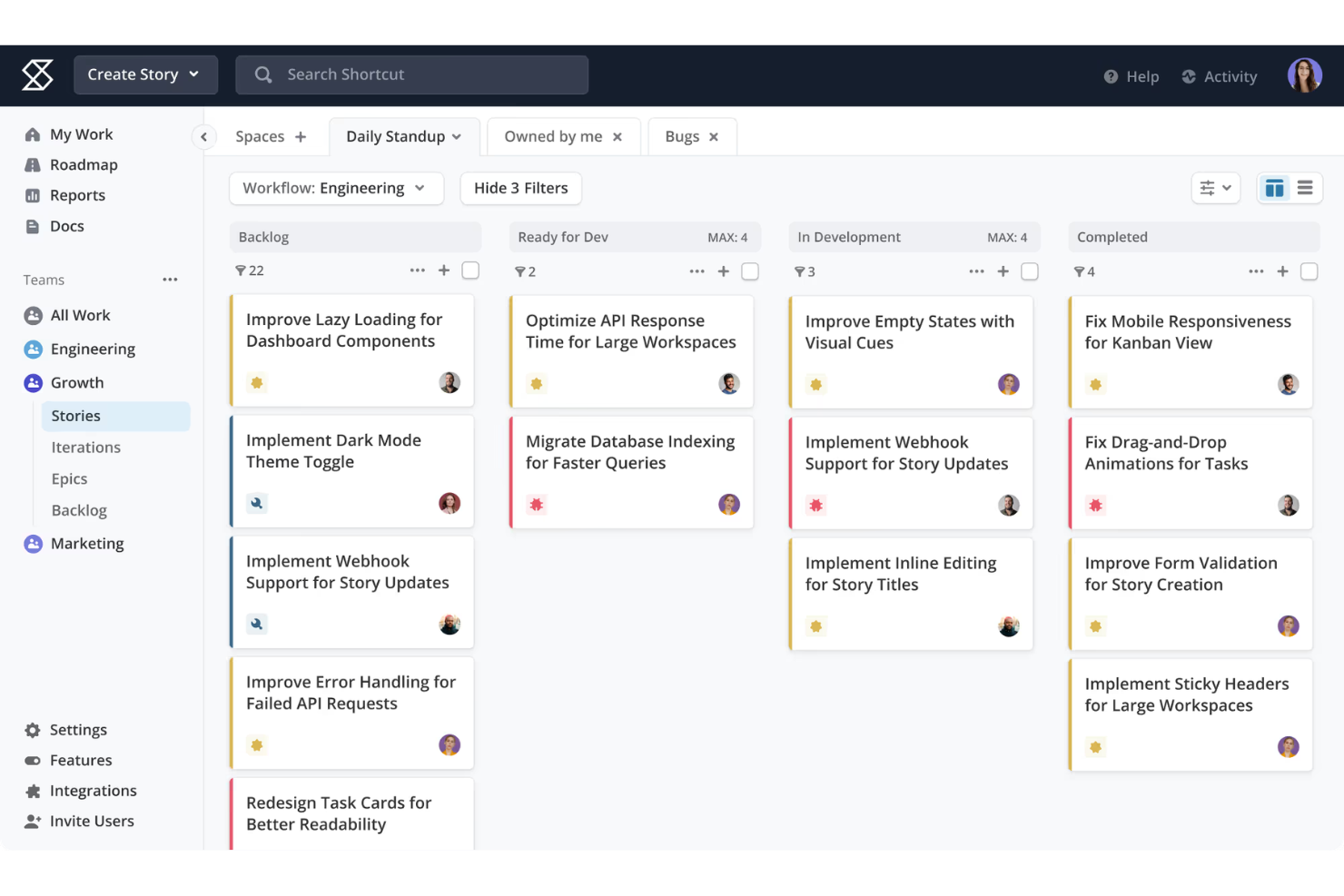
Shortcut is a project management platform that organizes work across stories, epics, and milestones, with shared roadmaps and workflow views designed to keep product, engineering, and design teams aligned.
Who Is Shortcut Best For?
Shortcut is a natural fit for mid-sized product teams where engineers, designers, and product managers share the same backlog and roadmap.
Why I Picked Shortcut
I've included Shortcut in my top picks because it's the only tool where product managers, engineers, and designers genuinely work inside the same system without workarounds. Stories connect directly to epics and milestones, so my team can see how individual backlog items tie to a broader release without switching views.
I also rely on its Objectives feature to link project work to company goals, which keeps cross-functional priorities visible at every level of the backlog.
Shortcut Key Features
- Iterations: Time-box work into weekly sprints to prioritize and track what your team needs to focus on.
- Work in progress limits: Set story limits per workflow state to prevent tasks from stacking up across the backlog.
- Custom fields: Add structured metadata to stories to enforce a consistent intake and triage process.
- Korey AI agent: Scope tasks, generate specs, and create stories directly from a chat interface inside Shortcut.
Shortcut Integrations
Shortcut offers 50+ native integrations, including GitHub, GitLab, Slack, Figma, Sentry, Notion, Miro, Google Drive, Zendesk, and Productboard. It also connects with Zapier and provides an API for custom integrations.
Pros and Cons
Pros:
- Built-in docs connect to tracked stories
- Shared roadmaps span multiple team workspaces
- Stories link directly to epics and milestones
Cons:
- Limited fit for agency-style multi-client work
- Reporting options lack advanced customization

Linear
Best for lightning-fast issue tracking
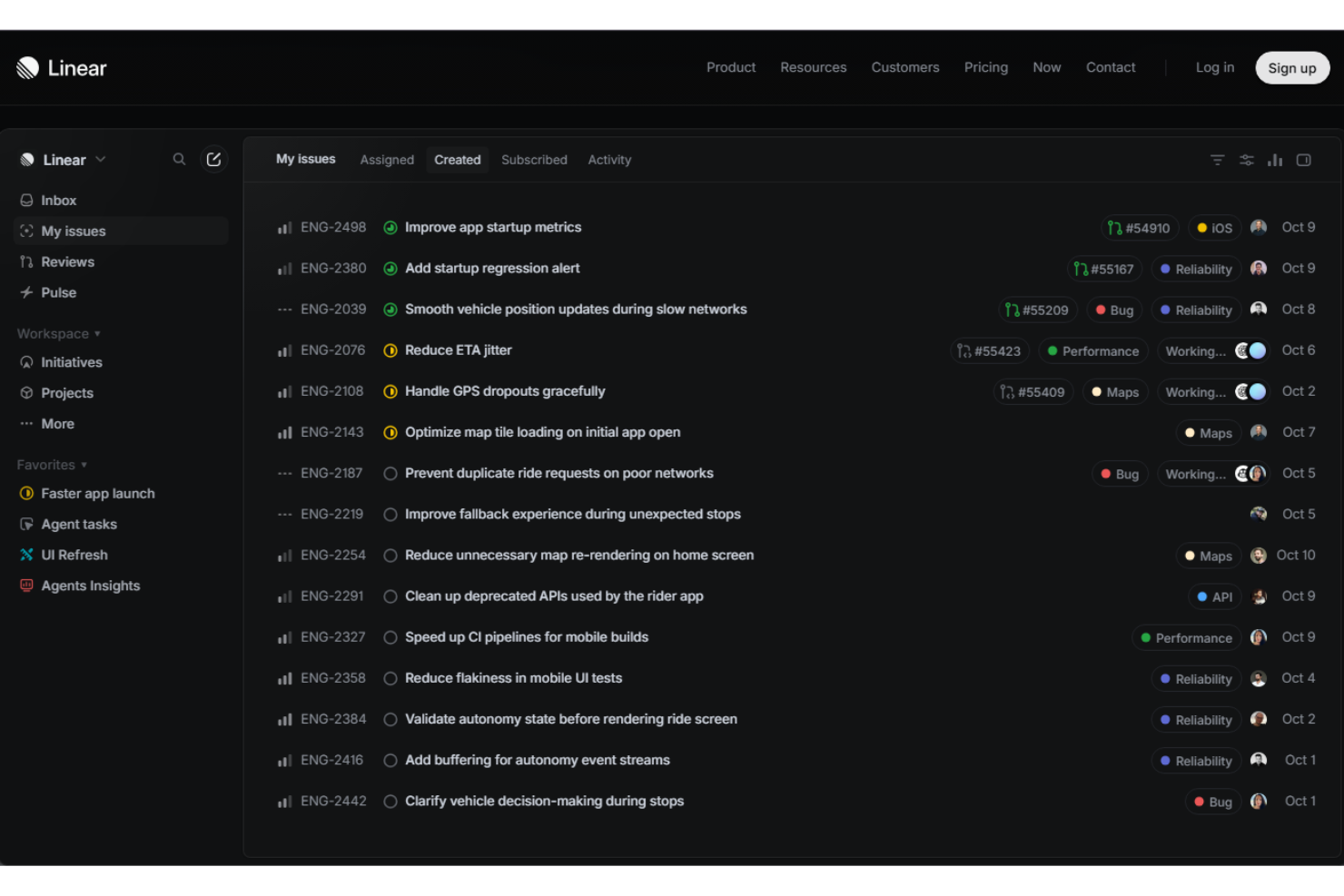
Linear is a project and issue tracking platform built for software teams, combining AI-assisted triage, cycle planning, and backlog prioritization in a minimal, keyboard-first interface.
Who Is Linear Best For?
Linear is a strong fit for fast-moving product and engineering teams at startups and scale-ups that prioritize speed over process overhead.
Why I Picked Linear
I've included Linear in my top picks because no other tool in this space matches its raw speed for creating and triaging issues. The command palette lets me file a detailed issue in under 10 seconds without touching a mouse. Linear's AI also drafts issue descriptions and auto-suggests labels during triage, so my team spends less time writing tickets and more time closing them.
The triage inbox keeps incoming requests separate from active cycles, which keeps the backlog clean without manual effort.
Linear Key Features
- Cycles: Time-box work into fixed iterations with automatic carry-over of incomplete issues to the next cycle.
- Sub-issues: Break parent issues into smaller child tasks, keeping complex backlog items organized within a single thread.
- Project milestones: Group issues under milestone markers to track progress toward a specific release or goal.
- Git automation: Automatically update issue status when a linked pull request is merged, opened, or closed.
Linear Integrations
Linear offers 250+ integrations through its integration directory, including GitHub, GitLab, Slack, Figma, Notion, Intercom, Zendesk, Sentry, Salesforce, and Google Sheets. It also connects with Zapier and provides an API for custom integrations.
Pros and Cons
Pros:
- Code commits automatically close connected tasks
- Fixed column rules block process bikeshedding
- Keyboard-driven navigation speeds up issue triage
Cons:
- No native time tracking for backlog items
- Issues only support a single assignee per task

Best for visual story mapping

StoriesOnBoard is a product management platform built around user story mapping, with AI-assisted backlog building, release planning, prioritization frameworks, and roadmap creation.
Who Is StoriesOnBoard Best For?
StoriesOnBoard is a strong fit for product managers and owners who structure their backlog around user journeys rather than task lists.
Why I Picked StoriesOnBoard
StoriesOnBoard earns its spot on my shortlist because the 2D story map is where your backlog actually lives, not just a visualization layered on top of it. I can map user goals across the horizontal axis and break them into individual stories on the vertical axis, so scope gaps show up visually before any work starts. The AI layer builds on that structure directly, generating user stories and acceptance criteria from the map context rather than a blank prompt.
StoriesOnBoard Key Features
- Prioritization frameworks: Apply MoSCoW or Kano scoring to rank stories by business value and effort.
- Release planning: Schedule stories into releases based on priority, estimation, and team capacity.
- Reusable story map templates: Save maps as templates to give repeating projects a pre-structured starting point.
- Feedback management: Collect user insights from email, Slack, or Intercom and link them directly to backlog items.
StoriesOnBoard Integrations
StoriesOnBoard offers native two-way sync integrations with Jira, Azure DevOps, Trello, GitHub, GitHub Enterprise, and Pivotal Tracker, plus connections with Slack, Figma, Confluence, and Notion. It also connects with Zapier and provides an API for custom integrations.
Pros and Cons
Pros:
- Built-in persona filtering on story maps
- Two-way sync with major issue trackers
- AI generates stories from the map context
Cons:
- Narrower scope than all-in-one platforms
- Limited real-time multi-user editing

Zenhub
Best native GitHub integration
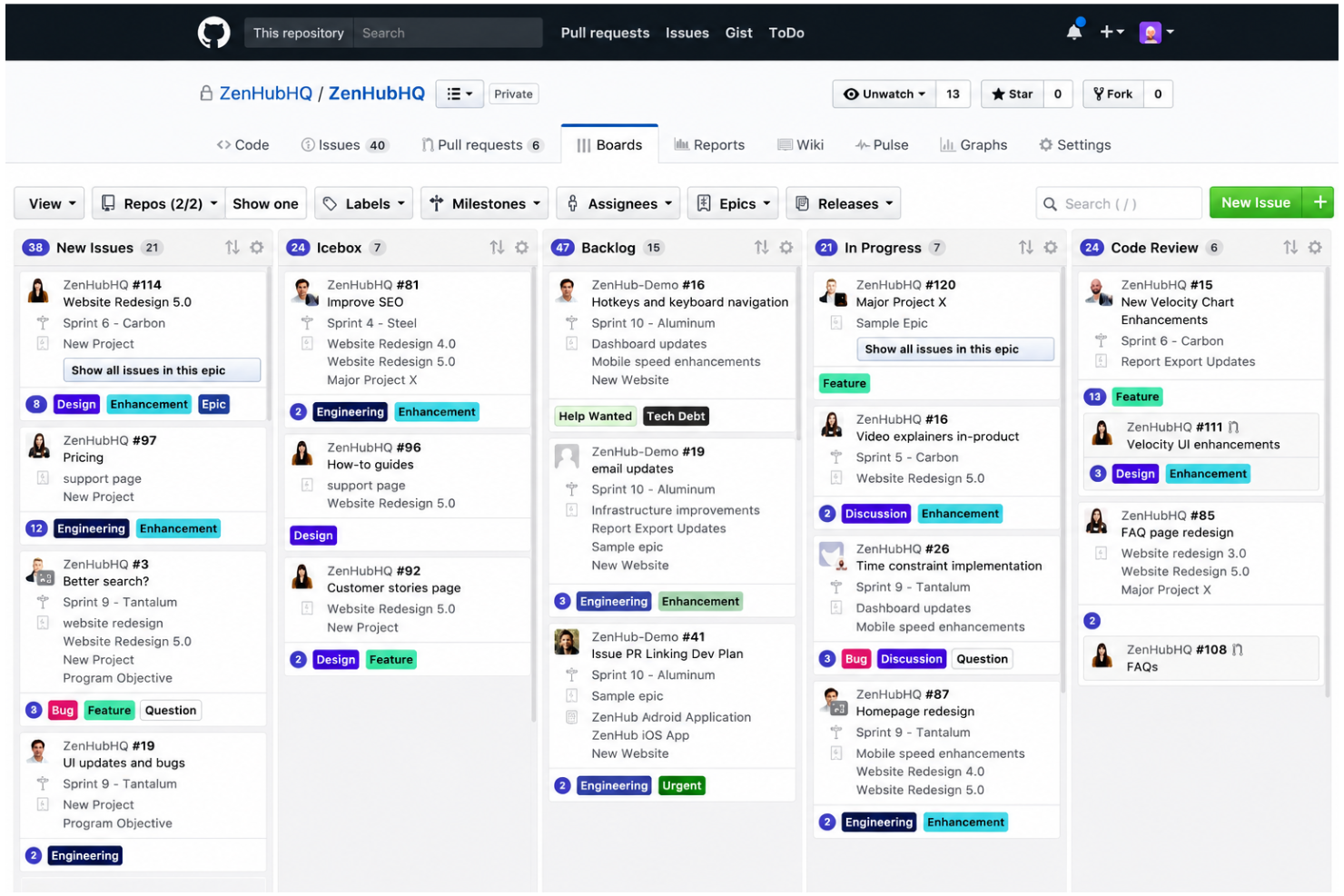
Zenhub is a project management platform built natively inside GitHub, combining sprint planning, backlog management, roadmapping, and AI-powered issue prioritization in a single workspace.
Who Is Zenhub Best For?
Zenhub is a natural fit for engineering-led teams that live in GitHub and want backlog management and sprint planning without switching to a separate tool.
Why I Picked Zenhub
Zenhub earns its spot on my shortlist because it's the only backlog management tool that runs directly inside GitHub, not just alongside it. I like that GitHub issues, pull requests, and sprint boards are all one object, so there's no syncing lag or duplicate data.
The AI-assisted issue labelling and sprint planning mean my team spends less time triaging and more time building. That two-way GitHub connection is something tools like Jira simply can't replicate natively.
Zenhub Key Features
- Multi-repo boards: Combine issues from multiple GitHub repositories into a single unified sprint board.
- Epics: Group related GitHub issues into larger bodies of work to track progress across a release or initiative.
- Roadmaps: Visualize epic timelines and dependencies across teams on a shared, drag-and-drop roadmap.
- Burndown reports: Track sprint progress in real time with automatically generated burndown and velocity charts.
Zenhub Integrations
Zenhub integrates natively with GitHub, Slack, Notion, Figma, Miro, and Loom. It also offers a GraphQL API for custom integrations, webhook support for real-time event notifications, and an MCP server for connecting with AI clients like Claude and Cursor.
Pros and Cons
Pros:
- Built-in planning poker for sprint estimation
- Multi-repo boards consolidate cross-repo work
- AI labels auto-suggest issue categorization
Cons:
- Non-technical work fits poorly in Zenhub
- High cross repository overhead
ProdPad
Best for collecting user feedback
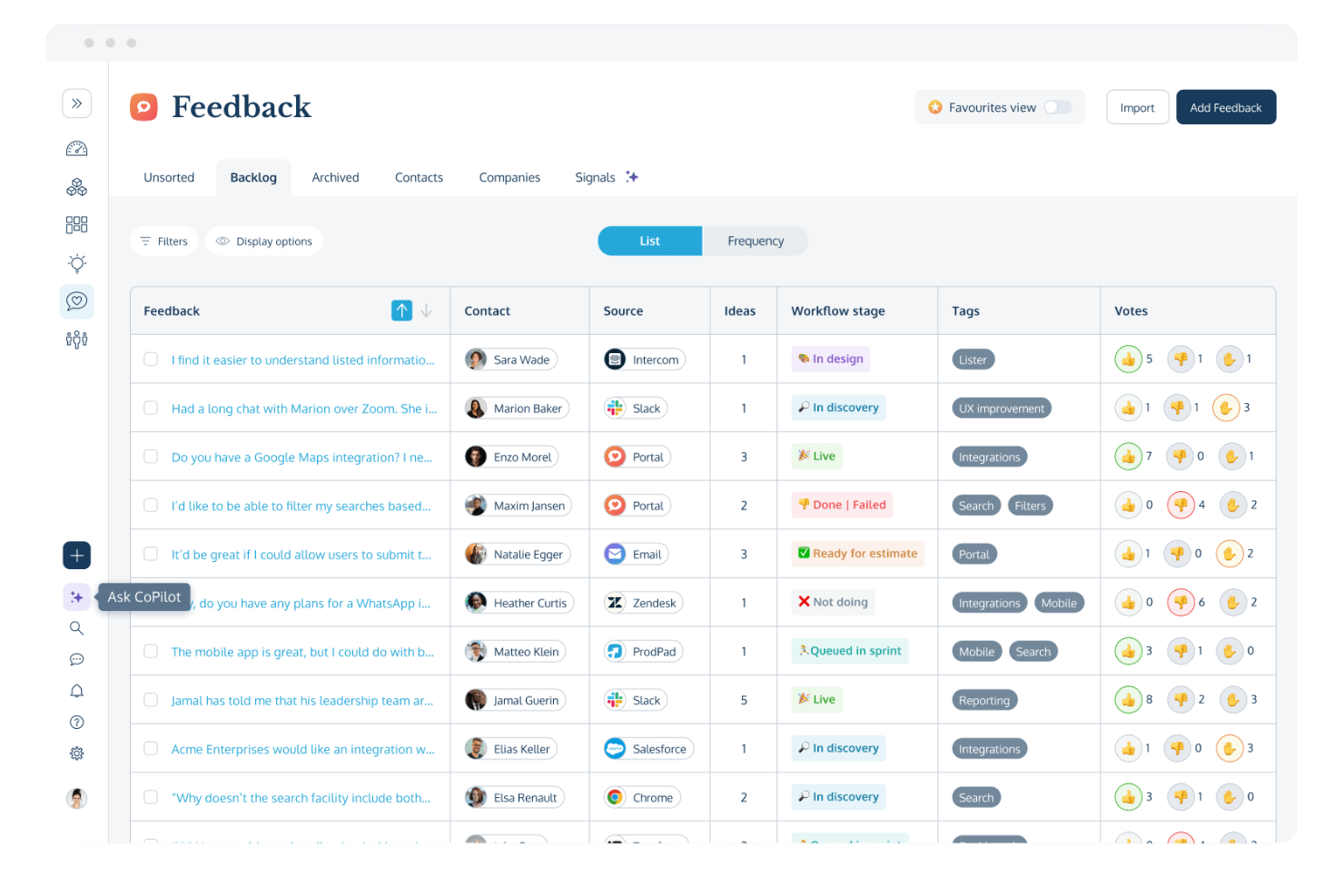
ProdPad is a product management platform built around continuous discovery, combining a feedback inbox, idea management, and a lean roadmap to connect customer insights directly to backlog decisions.
Who Is ProdPad Best For?
ProdPad suits product managers at mid-sized SaaS companies who need a structured way to capture, triage, and act on a continuous stream of customer feedback.
Why I Picked ProdPad
I picked ProdPad as one of the best because its feedback-to-backlog pipeline is the tightest I've seen in this category. Every idea in the backlog links directly to the customer feedback that supports it, so when a stakeholder challenges a priority, the evidence is already attached.
I also like Signals, ProdPad's AI feature that automatically surfaces themes across your feedback inbox, so you can spot patterns in minutes rather than spending hours tagging and sorting manually.
ProdPad Key Features
- CoPilot PM: An AI assistant that drafts specs from linked feedback, summarizes customer requests, and suggests initiatives using your team's actual product data.
- Now-Next-Later roadmap: A date-free roadmap format that lets you publish separate views for different audiences from one source of truth.
- OKRs and objectives: Link backlog initiatives directly to business objectives, set target outcomes before building, and track actuals after shipping.
- Workflow stages: Define custom stages that move ideas from raw to ready, with scoring models that standardize how your team prioritizes across the backlog.
ProdPad Integrations
ProdPad offers native integrations with Jira, Azure DevOps, GitHub, Linear, Trello, Slack, Microsoft Teams, Salesforce, Intercom, and Confluence. It also connects with Zapier and provides an API with custom webhooks for building custom integrations.
Pros and Cons
Pros:
- Lean roadmaps support outcome-focused plans
- Links customer feedback directly to decisions
- Continuous discovery framework utilization
Cons:
- Standard charts lack timeline-style views
- Lacks a native changelog feature

Aha!
Best for roadmap visualization

Aha! is a product management platform that covers the full delivery cycle, from idea management and customer discovery to feature prioritization, visual roadmapping, and prototyping.
Who Is Aha! Best For?
Aha! suits enterprise product teams managing multiple product lines, where different stakeholders need tailored views of the same roadmap.
Why I Picked Aha!
I picked Aha! as one of the best because its roadmap visualization depth is genuinely unmatched. You can build portfolio roadmaps that display plans across multiple products on a single timeline, then publish separate views filtered by team, initiative, or release for different audiences. I also like the strategic roadmap layer, which ties high-level initiatives directly to features on the same visual timeline so nothing floats without context.
Aha! Key Features
- Ideas portal: Collect and centralize feature requests from customers and internal teams in a dedicated submission portal.
- Prioritization scorecards: Score backlog items against custom criteria like business value, effort, and strategic fit.
- Capacity planning: Assign estimates to features and track team workload against scheduled releases.
- Aha! Notebooks: Create shared documents for product specs, meeting notes, and planning briefs directly inside the platform.
Aha! Integrations
Aha! offers 65+ native integrations, including Jira, Azure DevOps, GitHub, GitLab, Salesforce, Slack, Microsoft Teams, Zendesk, Figma, and Confluence. It also connects with Zapier and provides an API for custom integrations.
Pros and Cons
Pros:
- Audience-specific roadmap views per stakeholder group
- Custom scoring formulas for value vs. effort
- Visualized delivery pipeline mapping
Cons:
- Requires manual environment configuration
- Per-maker pricing scales up quickly with larger teams

Best for feature prioritization

Productboard is a product management platform that centralizes customer feedback, prioritizes feature ideas against business objectives, and maps them to roadmaps and delivery-ready specs.
Who Is Productboard Best For?
Productboard is a strong fit for product managers at mid-size to enterprise SaaS companies who own the backlog and need to justify prioritization decisions to stakeholders.
Why I Picked Productboard
Productboard earns its spot on my shortlist because its feature prioritization model is built directly on top of customer signal data, not gut instinct. I like that its AI-powered feedback categorization automatically links incoming insights to related feature ideas in the backlog, so when I'm scoring what to build next, each item already has evidence behind it.
On top of that, custom prioritization formulas let me weight factors like revenue impact, strategic fit, and effort into a single, auditable score.
Productboard Key Features
- Collaborative docs: Write and share product specs directly inside Productboard, with context from linked feature ideas and feedback.
- Dependency tracking: Map relationships between feature ideas to surface blockers before work reaches engineering.
- Product portal: Give stakeholders and customers a dedicated space to submit feature requests and vote on ideas.
- Release planning: Group features into release milestones and track delivery progress against roadmap commitments.
Productboard Integrations
Productboard offers native integrations with Jira, Azure DevOps, GitHub, Trello, Shortcut, Slack, Microsoft Teams, Salesforce, Zendesk, and Intercom, along with design tools like Figma and Miro and analytics platforms like Amplitude and Mixpanel. It also connects with Zapier and provides an API for custom integrations.
Pros and Cons
Pros:
- Supports granular resource allocation
- Strategic initiative dependency mapping
- Links customer feedback directly to feature ideas
Cons:
- Significant administrative infrastructure needed
- Jira sync requires ongoing manual discipline
Best built-in AI for task insights
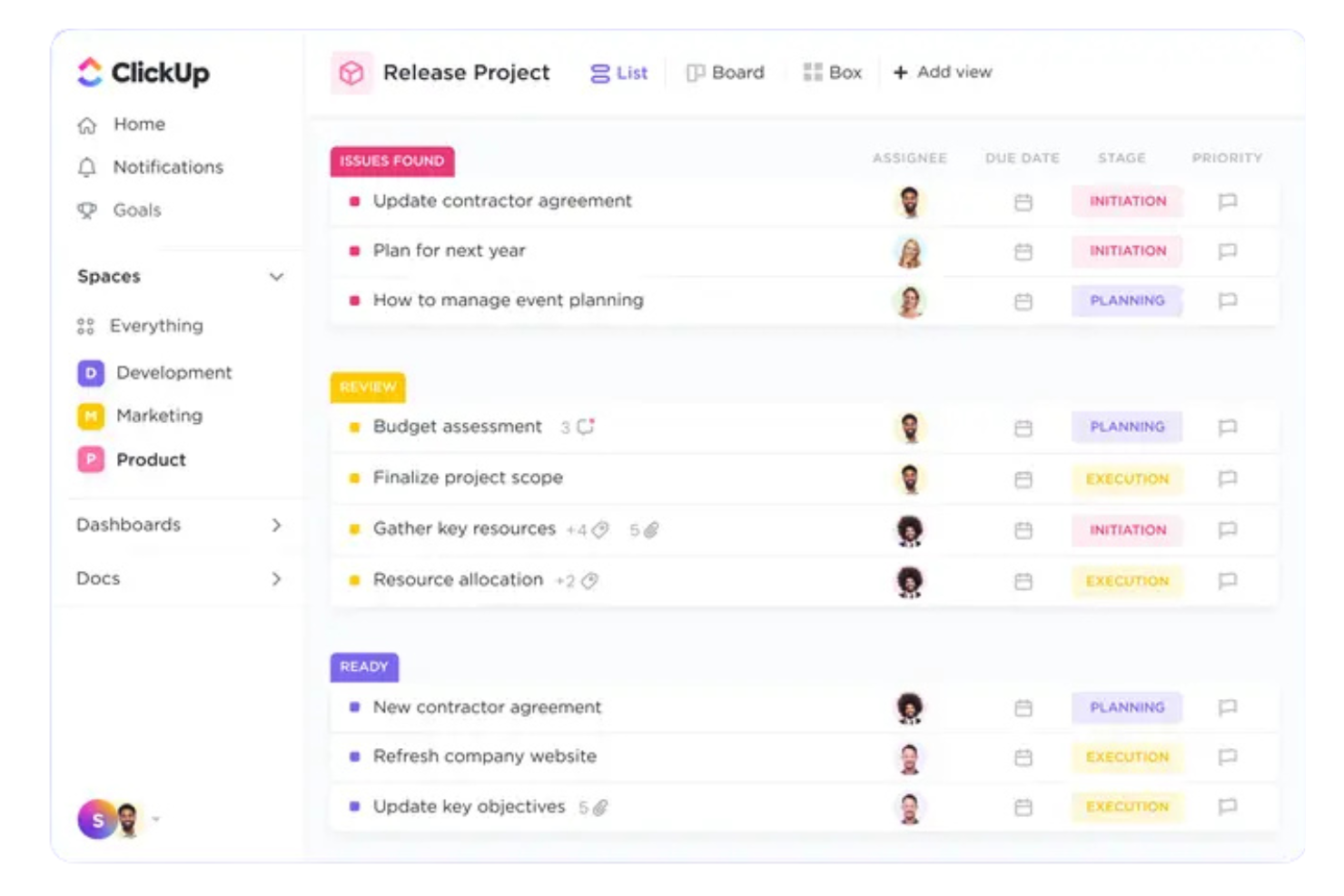
ClickUp Brain is an AI layer built into the ClickUp platform that generates task summaries, surfaces backlog insights, answers questions about project status, and automates updates across tasks and docs.
Who Is ClickUp Brain Best For?
ClickUp Brain is a strong fit for product and engineering teams managing large backlogs inside ClickUp who want AI-driven task context without adopting a separate tool.
Why I Picked ClickUp Brain
I've included ClickUp Brain in my top picks because it genuinely stands out as the best built-in AI for task insights. I like how its ambient intelligence feature surfaces related tasks and context before you ask, which makes backlog prioritization feel proactive rather than reactive.
The deep search capability lets me query across my workspace, connected apps, and the web in one prompt, and I can visualize sprint velocity data as rendered charts without leaving ClickUp.
ClickUp Brain Key Features
- AI tasks: Structured work units with state, owners, and dependencies that carry forward as your backlog evolves.
- Goals: Cascading objectives mapped down to live execution across tasks and sprints.
- AI channels: Topic-scoped streams with retained conversational memory for async backlog discussions.
- Persistent memory: Brain retains your role, workflows, and preferences and applies them automatically across sessions.
ClickUp Brain Integrations
ClickUp offers 1,000+ integrations through its native library and App Center, including Slack, GitHub, GitLab, Bitbucket, Jira, Microsoft Teams, Google Drive, HubSpot, Figma, and Sentry. It also connects with Zapier and provides an API for custom integrations.
Pros and Cons
Pros:
- Auto-generates subtasks from task descriptions
- Switch between multiple LLMs per task
- Natural language queries against real project data
Cons:
- Cannot upload external files for analysis
- AI knowledge limited to ClickUp workspace data

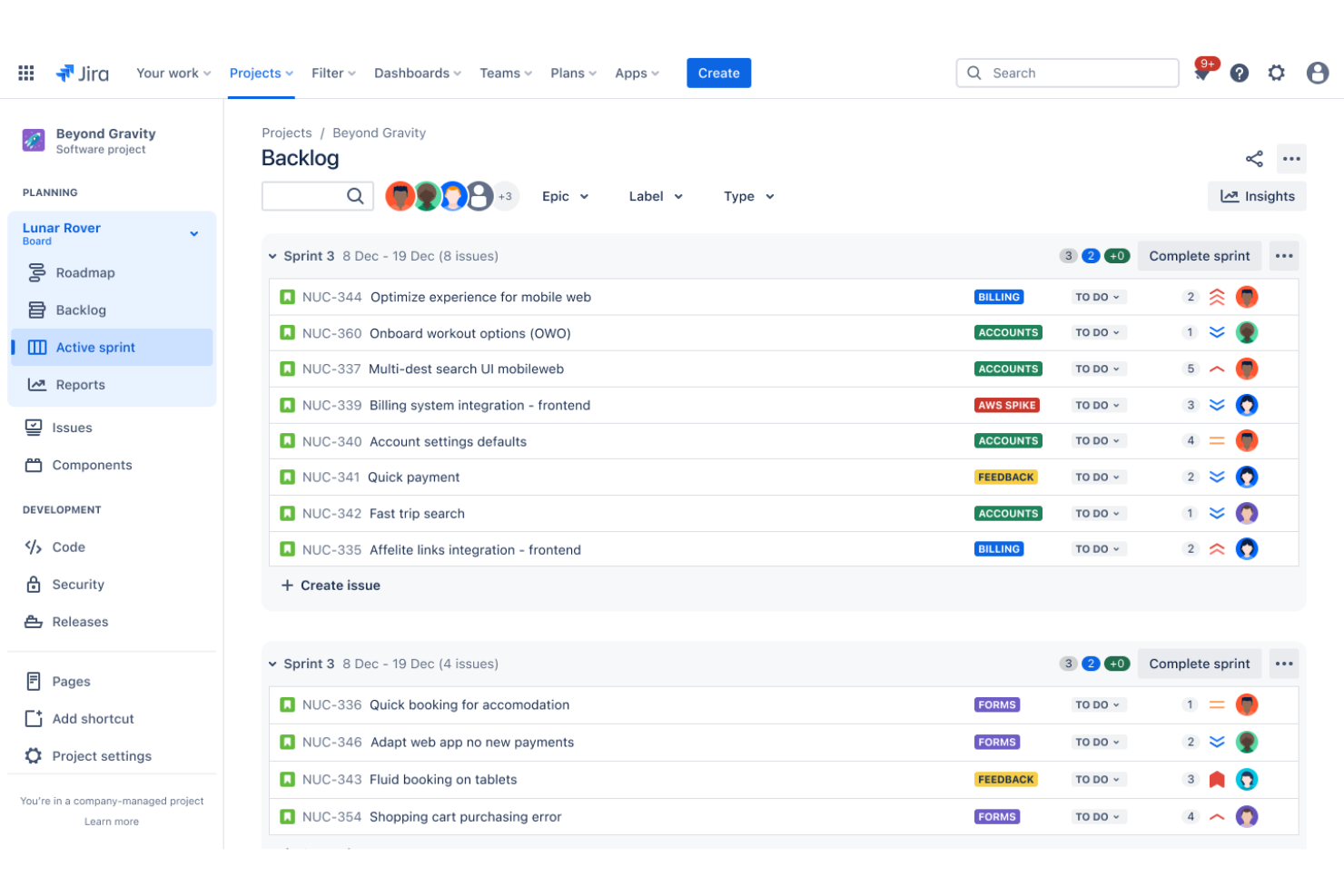
Jira is an agile project management platform built by Atlassian that combines issue tracking, sprint planning, backlog management, and AI-assisted workflow automation across Scrum and Kanban environments.
Who Is JIRA Best For?
Jira is a strong fit for software engineering and product teams at mid-size to enterprise companies that run agile delivery at scale.
Why I Picked JIRA
Jira earns its spot on my shortlist because of how far its workflow automation has come with Rovo AI built in. I like that you can use natural language to create automation rules directly in Jira, so when a sprint item changes status, a reminder fires, or a backlog item gets auto-assigned, it happens without any manual configuration.
Rovo AI also breaks down large work items into assignable tasks automatically, which cuts real time out of backlog grooming sessions.
JIRA Key Features
- Backlog prioritization view: Drag and drop issues directly in the backlog to reorder priorities before sprint planning.
- AI issue summarization: Rovo AI condenses long issue threads and comment histories into a summary you can act on.
- JQL filtering: Use Jira Query Language to build precise backlog filters by assignee, priority, label, or sprint status.
- Dependency tracking: Link related issues to surface blockers and visualize dependencies across the backlog.
JIRA Integrations
Jira offers over 3,000 marketplace integrations through the Atlassian Marketplace, including Slack, Microsoft Teams, GitHub, Confluence, Bitbucket, Google Sheets, Figma, Jenkins, Miro, and Zendesk. It also connects with Zapier and has an API for custom integrations.
Pros and Cons
Pros:
- AI-powered work item decomposition
- Granular backlog filtering with JQL
- Natural language automation rule creation
Cons:
- Complex setup for non-technical teams
- AI features limited to premium plans


Azure Boards is an agile project tracking tool within Azure DevOps that combines Kanban boards, sprint backlogs, scrum planning, and work item tracking across software development teams.
Who Is Azure Boards Best For?
Azure Boards is a natural fit for software engineering teams already running their CI/CD pipelines and repositories inside Azure DevOps.
Why I Picked Azure Boards
I picked Azure Boards because no other backlog tool connects work items to live pipeline runs the way it does inside Azure DevOps. When a build fails, I can trace it directly to the linked backlog item without switching tools.
I also like how Microsoft Copilot surfaces work item suggestions and sprint summaries natively, keeping AI-assisted backlog decisions inside the same environment where my team ships code.
Azure Boards Key Features
- Multi-level backlogs: Manage epics, features, and user stories across separate backlog views within a single project.
- Delivery plans: Visualize sprint schedules and backlog items across multiple teams on a shared timeline.
- Custom process templates: Configure work item types, fields, and workflows using Agile, Scrum, or CMMI templates.
- Velocity charts: Track team output per sprint to inform backlog sizing and future sprint commitments.
Azure Boards Integrations
Azure Boards has native integrations across the Microsoft ecosystem, including GitHub, Microsoft Teams, and Azure Pipelines, and connects to external services like Jenkins, Trello, and Slack through service hooks. It also offers access to 1,000+ extensions through the Visual Studio Marketplace and provides a REST API for custom integrations.
Pros and Cons
Pros:
- Built-in sprint velocity forecasting
- Deeply customizable work item hierarchies
- Direct traceability from backlog to builds
Cons:
- Limited AI unless using MCP server
- No native backlog scope enforcement
Diğer Yapay Zekâ Destekli İş Listesi Yönetimi Yazılımları
Kısa listeme giremeyen ancak yine de göz atmaya değer bazı ek yapay zekâ destekli iş listesi yönetimi yazılımı seçenekleri şunlardır:
- airfocus
Modular prioritization tools
- Craft.io
For structured requirements management
- Dragonboat
Portfolio context visibility at scale
- Zeda.io
For automated customer feedback analysis
- Digital.ai Agility
For enterprise compliance standards
- Copilot4DevOps
Native AI automation for Azure DevOps
- Roadmunk by Tempo
For boardroom-ready roadmap presentations
- ChatPRD
For AI-powered PRD generation
- Backlogify
For turning Figma designs into user stories


How I Evaluate AI Backlog Management Software
To earn a spot on this list, a tool's AI needs to do real work—not just slap a priority label on tickets you'd already triaged yourself. I evaluate each option across two layers: the core functionality it must deliver to qualify, and the differentiating factors that set the strongest contenders apart.
Core Functionality (Table Stakes For This List)
When I'm selecting tools for my list, I rank each one on a scale from 0 (does not offer the functionality) to 5 (excels in this area) for each core functionality listed below. Then, I calculate the tool's total score as a percentage. Each tool needs to achieve a minimum total score of 65% to be considered for inclusion.
- AI backlog prioritization: I look for AI that ranks items using weighted criteria like value, effort, and risk, not just basic sorting rules with an AI label on top.
- AI story generation: The tool should produce full user stories with acceptance criteria from a prompt or existing context, like converting a feature request into sprint-ready tickets.
- Backlog hygiene automation: I evaluate how well the AI catches duplicates, flags stale tickets, and suggests bulk cleanup actions to keep a growing backlog manageable.
- Effort and delivery forecasting: Strong tools predict sprint completion and delivery timelines from historical velocity, not just average story points across a fixed window.
- Backlog item management: This covers the foundation. I check for hierarchy support, custom fields, and multiple views like boards, lists, and timelines for organizing work.
- PM and dev tool integrations: Two-way sync with tools like Jira, Azure DevOps, and GitHub keeps backlog data current across your delivery and planning stack.
Once I have a list of tools that meet these criteria, I consider what sets each platform apart.
Differentiating Factors (What Sets Vendors Apart)
Here's how I compare and contrast different vendors:
Standout Features
Dependency and risk detection are major separators. I look for tools that surface cross-team blockers and capacity conflicts before sprint planning, so you're not scrambling mid-sprint. Voice-of-customer synthesis also carries weight. The best options pull feedback from support tickets and CRM data to auto-suggest backlog items tied to recurring pain points. Natural language story generation rounds things out, where raw inputs like customer interviews become structured stories with acceptance criteria.
Beyond Features
AI transparency is something I evaluate closely. When the AI reprioritizes your backlog or flags items for archival, you need clear reasoning you can present in a sprint review or stakeholder sync. I also check integration depth—bidirectional sync with tools like Jira or Azure DevOps is where backlog data lives, and one-way connections create drift fast. Data privacy policies matter too, especially whether a vendor uses your backlog data to train shared models or keeps it isolated to your tenant.
Yapay Zekâ Destekli İş Listesi Yönetimi Yazılımı Nasıl Seçilir?
Uzun özellik listeleri ve karmaşık fiyatlandırma yapıları içinde kaybolmak kolaydır. Kendinize özgü yazılım seçim sürecinizi yürütürken odağınızı korumanıza yardımcı olmak için göz önünde bulundurmanız gereken faktörlerin kontrol listesi aşağıdadır:
| Faktör | Göz önünde bulundurulması gerekenler |
|---|---|
| Ölçeklenebilirlik | Platform, yavaşlamadan veya idari yük oluşturmadan mevcut ve gelecekteki iş listesi büyüklüğünüzü, ekip sayınızı ve büyüme planlarınızı karşılayabilir mi? |
| Entegrasyonlar | Araç, mevcut proje yönetimi, geliştirme veya geri bildirim platformlarınıza gerçekten çift yönlü olarak bağlanacak mı, yoksa birbirinden yalıtılmış verileri elle bir araya mı getirmeniz gerekecek? |
| Özelleştirilebilirlik | Önceliklendirme modelleri, iş akışları ve raporlama üzerinde ne kadar kontrolünüz var? Sistemi sürecinize uyacak şekilde uyarlayabilir misiniz, yoksa varsayılan ayarlara mı bağlı kalırsınız? |
| Kullanım kolaylığı | Ürün, mühendislik ve tasarım ekiplerindeki kullanıcılar aracı hızlı bir şekilde benimseyebilir mi, yoksa karmaşık arayüzler ve terminoloji çok fazla eğitim ve pekiştirme mi gerektirecek? |
| Uygulama ve işe alıştırma | İş listenizi taşımak, otomasyonları yapılandırmak ve ekiplerin anlamlı düzeyde benimsemesini sağlamak gerçekçi olarak ne kadar sürecek? Öngörülebilir işe alıştırma kaynakları dâhil mi? |
| Maliyet | Kullanıcı başına ücretler, depolama katmanları ve isteğe bağlı destek dâhil olmak üzere toplam maliyeti hesaba kattınız mı? Entegrasyonlar için asgari taahhütler veya ek ücretler var mı? |
| Güvenlik önlemleri | Araç, SSO, denetim izleri ve kullanıma dayalı erişim denetimleri gibi özellikler sunuyor mu? Verilerinizin nasıl yalıtıldığını, yedeklendiğini ve gerektiğinde silindiğini doğrulayabilir misiniz? |
| Tedarikçi şeffaflığı | Tedarikçi, yapay zekâ modellerinin verilerinizi nasıl kullandığını açıkça açıklayabiliyor, yapay zekâ tarafından gerçekleştirilen değişiklikler için denetim günlükleri sağlayabiliyor ve sistemin otomatik eylemlerini ayarlamanıza veya geçersiz kılmanıza izin veriyor mu? |
Yapay Zekâ Destekli İş Listesi Yönetimi Yazılımı Nedir?
Yapay zekâ destekli iş listesi yönetimi yazılımı, ekiplerin ürün iş listelerini önceliklendirmesine, düzenlemesine ve iyileştirmesine yardımcı olmak için yapay zekâ kullanan dijital bir araçtır. Bu platformlar, rutin iş listesi görevlerini otomatikleştirir, kullanıcı hikâyeleri oluşturur, teslimat zaman çizelgelerini tahmin eder ve tüm bunları ekibinizin verilerine ve yapılandırılabilir ölçütlere dayanarak düşük değerli veya yinelenen öğeleri belirler.
Yapay Zekâ Destekli İş Listesi Yönetimi Yazılımının Özellikleri
Yapay zekâ destekli iş listesi yönetimi yazılımı seçerken aşağıdaki temel özelliklere dikkat edin:
- Yapay zekâ ile iş listesi önceliklendirme: İş listesi öğelerini değer, risk ve bağımlılıklar gibi ölçütlere göre otomatik olarak sıralamak ve yeniden düzenlemek için makine öğrenimini kullanır; böylece ekipleri manuel sıralama yükünden kurtarır.
- Ham verilerden kullanıcı hikâyesi oluşturma: Müşteri geri bildirimlerini, destek taleplerini veya konuşmaları yapılandırılmış kullanıcı hikâyelerine ve kabul kriterlerine dönüştürerek uygulanabilir iş listelerinin oluşturulmasını kolaylaştırır.
- İş yükü ve teslimat tahmini: Geçmiş verileri kullanarak hikâye puanlarını, sprint hızlarını veya teslimat tarihlerini tahmin eder; daha güvenilir planlama ve paydaş raporlaması yapılmasını sağlar.
- İş listesi düzeni otomasyonu: Yinelenen, güncelliğini yitirmiş veya düşük kaliteli iş listesi öğelerini tespit edip işaretler ve birleştirme ya da arşivleme önerilerinde bulunur; böylece iş listenizin odaklı ve yönetilebilir kalmasını sağlar.
- Bağımlılık ve risk tespiti: İş listenizdeki ilişkileri ve geçmiş çalışma modellerini analiz ederek gizli karşılıklı bağımlılıkları, engelleri veya kapasite çakışmalarını ortaya çıkarır.
- Proje yönetimi araçlarıyla entegrasyon: İş listesi verilerini daha geniş iş akışınız genelinde güncel tutmak ve veri silolarını önlemek için Jira, Azure DevOps ve GitHub gibi platformlarla yerel olarak senkronize olur.
- Özel önceliklendirme çerçeveleri: RICE, WSJF veya özel puanlama gibi modelleri uygulamanıza ve ayarlamanıza olanak tanıyarak iş listesi sıralamasını benzersiz iş hedefleriniz ve süreçlerinizle uyumlu hâle getirir.
- Müşteri sesi içgörüsü: CRM ve destek araçları gibi kaynaklardan gelen geri bildirimleri bir araya getirip analiz eder ve yinelenen kullanıcı sorunlarına karşılık gelen yeni iş listesi öğeleri önerir.
- Otomatik raporlama ve içgörüler: Büyük veya karmaşık iş listelerindeki eğilimleri, riskleri ve öncelikleri vurgulayan dinamik panolar ve özetler oluşturur.
- Role dayalı erişim denetimleri: Değişiklikleri kimlerin görüntüleyebileceğini, düzenleyebileceğini veya onaylayabileceğini tanımlamanıza olanak tanıyarak süreç bütünlüğünün korunmasına ve uyumluluk gereksinimlerinin karşılanmasına yardımcı olur.
Yapay Zekâ Destekli İş Listesi Yönetimi Yazılımının Faydaları
Yapay zekâ destekli iş listesi yönetimi yazılımını uygulamak ekibiniz ve işletmeniz için çeşitli faydalar sağlar. Yararlanabileceğiniz bazı avantajlar şunlardır:
- Daha yüksek önceliklendirme doğruluğu: Yapay zekâ, iş listesi öğelerini gerçek, ağırlıklandırılmış etki ve bağımlılıklara göre sıralayarak ekiplerin işletmeyi ileriye taşıyan unsurlara odaklanmasına yardımcı olur.
- Daha hızlı kullanıcı hikâyesi oluşturma: Ham girdilerden yapılandırılmış hikâyelerin ve kabul kriterlerinin otomatik olarak oluşturulması, iş listesi düzenleme ve sprint hazırlığını hızlandırır.
- Daha temiz ve sağlıklı iş listeleri: Yapay zekâ destekli düzenleme, iş listenizi yinelenen, güncelliğini yitirmiş veya ilgisiz öğelerden arındırarak bakım yükünü azaltır.
- Geliştirilmiş tahmin: Tahmine dayalı analizler, teslimat zaman çizelgelerini, sprint kapasitesini ve kaynak ihtiyaçlarını daha güvenle tahmin etmenize yardımcı olur.
- Müşteri ihtiyaçlarıyla daha iyi uyum: Ekipler, geri bildirim araçları ve analizlerden yinelenen sorunları ortaya çıkararak gerçek kullanıcı problemlerini daha etkili biçimde ele alabilir.
- İş akışlarıyla sorunsuz entegrasyon: Proje yönetimi, geliştirme ve geri bildirim platformlarına yönelik yerel bağlantılar, iş listenizin en güncel bağlamı ve öncelikleri yansıtmasını sağlar.
- Daha güçlü süreç yönetimi: Role dayalı denetimler ve şeffaf yapay zekâ gerekçelendirmesi, uyumluluğun korunmasını ve kararların paydaşlara açıklanmasını kolaylaştırır.
Yapay Zekâ Destekli İş Listesi Yönetimi Yazılımının Maliyetleri ve Fiyatlandırması
Yapay zekâ destekli iş listesi yönetimi yazılımını seçmek, mevcut çeşitli fiyatlandırma modellerinin ve planların anlaşılmasını gerektirir. Maliyetler özelliklere, ekip büyüklüğüne, eklentilere ve diğer unsurlara göre değişir. Aşağıdaki tablo, yapay zekâ destekli iş listesi yönetimi yazılımı çözümlerindeki yaygın planları, ortalama fiyatlarını ve genellikle dâhil edilen özellikleri özetlemektedir:
Yapay Zekâ Destekli İş Listesi Yönetimi Yazılımı İçin Plan Karşılaştırma Tablosu
| Plan Türü | Ortalama Fiyat | Yaygın Özellikler |
|---|---|---|
| Ücretsiz Plan | $0 | Temel iş listesi yönetimi, sınırlı yapay zekâ ile önceliklendirme, tek entegrasyon ve küçük ekipler için destek. |
| Kişisel Plan | $5–$25/kullanıcı/ay | Yapay zekâ ile hikâye oluşturma, iş yükü tahmini, iki veya daha fazla proje yönetimi aracıyla entegrasyon ve temel raporlama. |
| İşletme Planı | $20–$60/kullanıcı/ay | Gelişmiş önceliklendirme, iş listesi düzeni otomasyonu, özel iş akışları ve orta ila büyük ölçekli ekipler için destek. |
| Kurumsal Plan | $40–$120/kullanıcı/ay | Tam API erişimi, çift yönlü entegrasyonlar, müşteri sesi özellikleri, SSO/SAML, özel destek ve denetim kayıtları. |
Yapay Zekâ Destekli İş Listesi Yönetimi Yazılımı SSS
Yapay zekâ destekli iş listesi yönetimi yazılımı hakkında sık sorulan soruların bazı yanıtları şunlardır: