

2026’da En İyi 10 Ücretsiz İş Süreçleri Yönetimi Yazılımı

En İyi Ücretsiz İş Süreçleri Yönetimi Yazılımları Kısa Listesi


Ücretsiz iş süreçleri yönetimi yazılımı, bir lisans ücreti ödemeden iş akışlarını eşlemenize, otomatikleştirmenize ve optimize etmenize olanak tanır; çoğu araç başlangıç yapabilmeniz için ücretsiz bir plan veya deneme sürümü sunar. Ekip koordinasyonunu iyileştirmenin, manuel çabayı azaltmanın ve bütçenizi zorlamadan projeleri yolunda tutmanın pratik yollarını arıyorsanız doğru yerdesiniz.
En iyi ücretsiz BPM seçeneklerini inceleyecek, her birinin en iyi yaptığı işi açıklayacak ve hangi araçların ekibinizin gereksinimlerine uygun olduğunu hızlıca belirlemenize yardımcı olacağım.
Why Trust Our Software Recommendations
Our team has been testing and reviewing software since 2012. As project managers ourselves, we know how difficult—and important—it is to choose the right software.
For this guide, we evaluated tools using hands-on testing and independent research, scoring tools using our selection criteria. We also draw on insights from industry thought leaders and practicing project management experts.
Our reviews reflect our human editorial judgment, not a sales pitch.
Expert reviewers:
Ücretsiz İş Süreçleri Yönetimi Yazılımları Karşılaştırma Tablosu
Bu karşılaştırma tablosu, en iyi ücretsiz iş süreçleri yönetimi yazılımı seçimlerim için fiyatlandırma ayrıntılarını özetlemektedir:
| Tool | Starting Price | Website | |
|---|---|---|---|
| Best for visual request tracking | 4.6 out of 5 | Pricing upon request Free plan + free demo available | Website |
| Best for low-code simplicity | 4.3 out of 5 | Pricing upon request Free plan available; 15-day free trial | Website |
| Best for collaborative diagram creation online | — | Pricing upon request Free plan + 30-day trial available | Website |
| Best for simulating process outcomes | — | Pricing upon request Free demo available | Website |
| Best for multilingual process documentation | — | Pricing upon request Free plan available | Website |
| Best for regulated industries | — | Pricing upon request Free plan available | Website |
| Best for Java-based developer environments | — | Free forever Free forever | Website |
| Best for open-source human-centric tasks | — | Free forever Free forever | Website |
| Best for advanced automation control | — | Pricing upon request Free plan available | Website |
| Best for complex systems and workflows | — | Pricing upon request Free plan + free demo available | Website |
En İyi Ücretsiz İş Süreçleri Yönetimi Yazılımları İncelemeleri
Kısa listeme giren ücretsiz iş süreçleri yönetimi yazılımlarının ayrıntılı özetlerini aşağıda bulabilirsiniz. İncelemelerim, sizin için en uygun seçeneği bulmanıza yardımcı olmak amacıyla her platformun özelliklerini, en iyi kullanım alanlarını ve entegrasyonlarını ayrıntılı şekilde ele almaktadır.

Pipefy
Best for visual request tracking
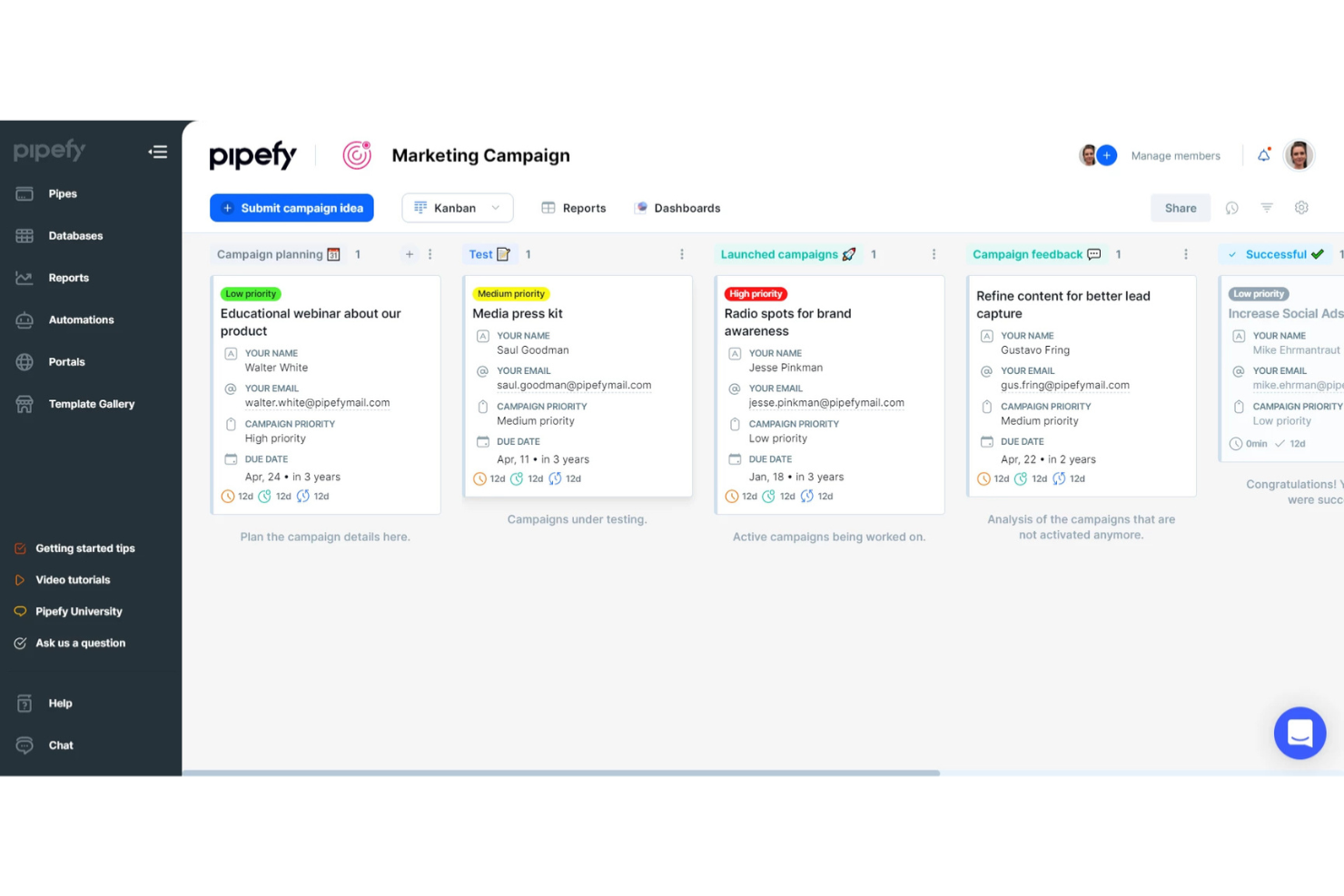
Pipefy is a no-code business process management platform that lets you design workflows, automate repetitive tasks, visualize process stages, and centralize request tracking for teams of all sizes.
Who Is Pipefy Best For?
Pipefy suits operations, finance, and HR teams who want to manage requests and processes visually without relying on IT resources.
Why I Picked Pipefy
I picked Pipefy as one of the best because its Kanban-style boards let my team visually monitor incoming requests at every stage, automate handoffs between teams, and trigger conditional workflows based on form submissions.
Pipefy Key Features
- Form designer: Build custom intake forms with drag-and-drop fields.
- Automated email templates: Send personalized emails triggered by workflow actions.
- Process analytics dashboards: Track process metrics and bottlenecks in real time.
- Role-based permission controls: Limit access to specific workflows and data by user role.
Pipefy Integrations
Pipefy offers native integrations with Slack, GitHub, and Bitbucket. An API is available for custom integrations.
What's Free?
Pipefy offers a free-forever starter plan for up to 10 users and 5 processes. The free plan has limited features, such as restricted integrations and automation options, compared to paid tiers.
Pros and Cons
Pros:
- Custom form designer for intake processes
- Conditional logic for process automation
- Built-in process analytics and dashboards
Cons:
- No built-in document storage repository
- Native integrations available only in paid version

Best for low-code simplicity
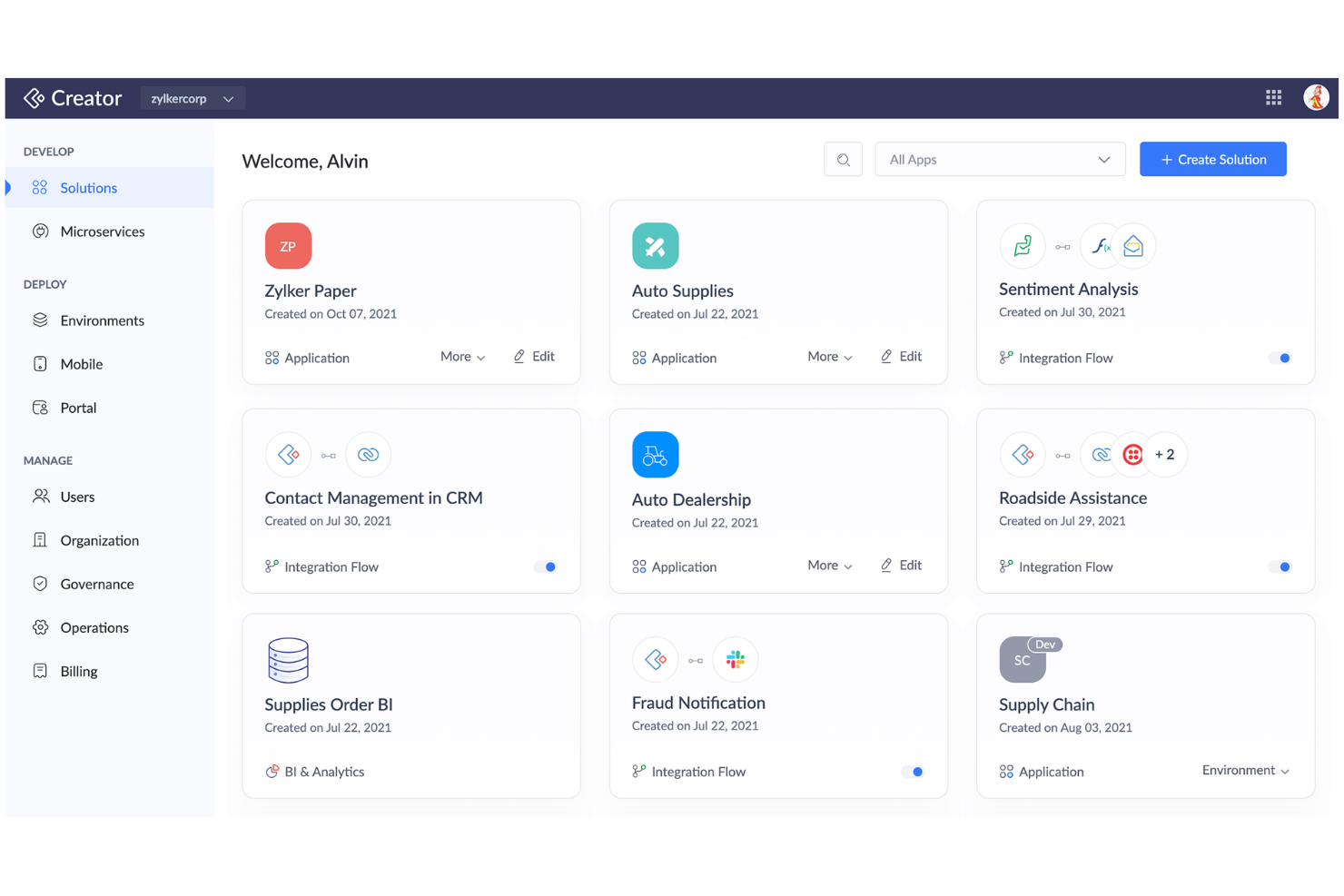
Zoho Creator is a cloud-based business process and workflow management platform where you can design custom workflows, automate routine processes, and build tailored applications using both prebuilt templates and low-code development tools.
Who Is Zoho Creator Best For?
Zoho Creator suits small to mid-sized teams who want to automate processes and quickly build custom business applications without heavy coding.
Why I Picked Zoho Creator
I picked Zoho Creator as one of the best because I can build end-to-end business processes with its drag-and-drop workflow builder, widget-rich app designer, and prebuilt process automation blueprints—making low-code simplicity a reality.
Zoho Creator Key Features
- AI field integration: Add sentiment analysis, OCR, and prediction fields directly into forms.
- Multi-platform app deployment: Launch your apps simultaneously on web, Android, and iOS.
- Role-based access controls: Assign granular permissions to manage users and data securely.
- Custom approval workflows: Configure multi-stage approval processes for tasks and requests.
Zoho Creator Integrations
Zoho Creator offers native integrations with Zoho apps like Zoho CRM, Zoho Books, Zoho Invoice, Google Workspace, Salesforce, QuickBooks, PayPal, Twilio, Razorpay, and connects with Zapier.
What's Free?
Zoho Creator offers a free-forever plan limited to one user and one application with basic features only. Access to advanced integrations, custom branding, and some automation options requires a paid upgrade.
Pros and Cons
Pros:
- Multi-platform deployment with one app build
- AI-driven fields like sentiment analysis
- Includes visual workflow and form builders
Cons:
- No offline app building capabilities
- Free plan limited to one user


Camunda is a cloud-based business process management platform that lets teams design, model, and collaborate on BPMN workflows, decision tables, and process diagrams using web-based tools.
Who Is Camunda Best For?
Camunda suits process analysts and IT teams in midsize to large organizations that need to collaboratively design and model complex business workflows.
Why I Picked Camunda
I picked Camunda because it offers instant, real-time BPMN diagram editing in the browser—my team can co-create, comment, and share process models online. I like using its drag-and-drop modeler with versioning and role-based permissions.
Camunda Key Features
- BPMN standards support: Create and export diagrams using BPMN 2.0 specifications.
- Import/export options: Import existing BPMN diagrams or export completed models as XML or image files.
- Integration with Camunda Platform: Deploy process models directly to process automation engines, including RPA.
- Decision modeling (DMN): Design, edit, and share decision tables alongside process diagrams.
Camunda Integrations
Camunda offers native integrations with the Camunda Platform workflow and decision engines. An API is available for custom integrations.
What's Free?
Camunda offers a free-forever browser-based BPMN and DMN modeler with unlimited diagrams and no user restrictions. You can design, export, and collaborate on diagrams, but automation and advanced features require the paid Camunda Platform.
Pros and Cons
Pros:
- Export diagrams as XML and image files
- Real-time multiuser diagram editing and sharing
- Free browser-based BPMN and DMN modeler
Cons:
- Requires Camunda Platform for process deployment
- No built-in automation or workflow execution


Bizagi is a business process management suite that lets you model, automate, monitor, and optimize processes with tools for process mapping, workflow automation, and process analytics.
Who Is Bizagi Best For?
Process analysts and IT teams in midsize and large organizations needing complex process simulation and automation across departments.
Why I Picked Bizagi
I picked Bizagi as one of the best because I can simulate process outcomes before launching automation and test scenarios with resource changes. It also helps with visualization of bottlenecks with built-in process mapping and analytics.
Bizagi Key Features
- Process modeler: Drag-and-drop interface for building workflow diagrams.
- Form designer: Customize task forms using graphical design tools.
- Collaboration tools: Share process models and gather feedback in real-time.
- Version control: Track changes and manage process model versions.
Bizagi Integrations
Integrations include SAP, Salesforce, SharePoint, Oracle, Microsoft Dynamics, Outlook, Dropbox, Box, and Google Drive.
What's Free?
Bizagi offers a free-forever plan with Bizagi Modeler, allowing unlimited process modeling and export. Automation, collaboration, and integration features are only available on paid plans.
Pros and Cons
Pros:
- Built-in analytics for process improvement
- Advanced workflow automation for large enterprises
- Process simulation with visual modeling tools
Cons:
- Mobile capabilities are limited on free tier
- Cloud automation features require paid plan

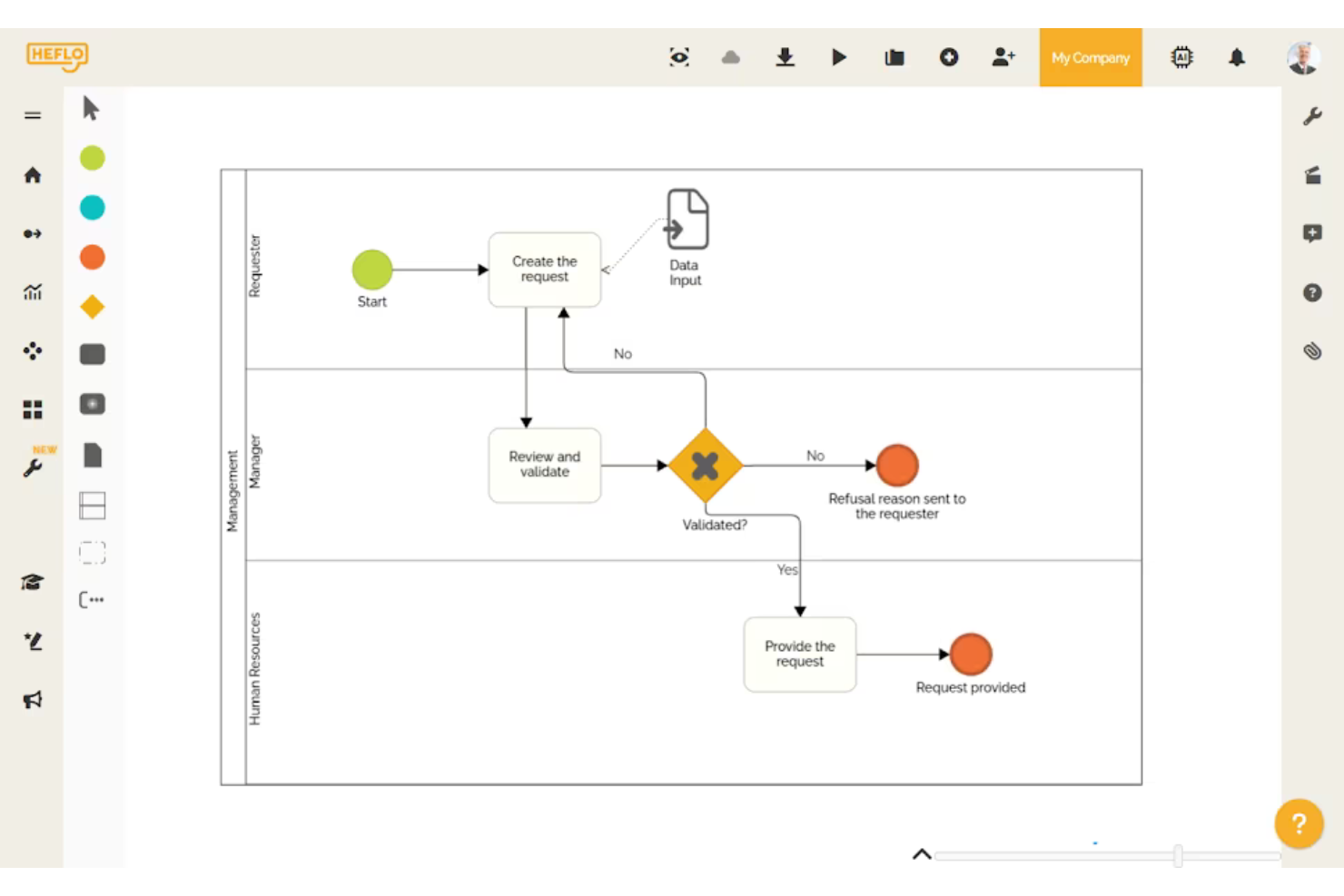
Heflo is a cloud-based business process management software that offers visual BPMN 2.0 process modeling, process documentation, workflow automation, and collaboration tools for teams managing and documenting business processes.
Who Is Heflo Best For?
Heflo is a good fit for process analysts and documentation managers in multinational organizations who need to create, share, and manage standardized process documentation.
Why I Picked Heflo
I picked Heflo as one of the best because I can automatically generate process documentation in multiple languages and publish process maps as interactive web portals. I regularly use its BPMN 2.0 modeling and multi-language documentation features.
Heflo Key Features
- Workflow automation: Design and trigger automated workflows for business processes from within the platform
- Role-based access control: Assign and manage user permissions at each step of a process
- Process version control: Track changes, manage revisions, and restore previous versions of process maps
- Cloud-based collaboration: Work with team members in real time on process modeling and edits
Heflo Integrations
Native integrations are not clearly documented.
What's Free?
Heflo offers a free-forever plan that includes BPMN process modeling, process documentation, and cloud storage. The free plan is limited to two users and does not include workflow automation or advanced automation features.
Pros and Cons
Pros:
- Multi-language interface and documentation
- Auto-generation of process documentation
- Free plan supports basic modeling needs
Cons:
- No built-in task management tools
- Limited process automation on free plan


Flowable is an open-source business process management suite that lets you model, automate, and monitor workflows, case management, and business rules with BPMN, DMN, and CMMN standards.
Who Is Flowable Best For?
Flowable is a strong fit for compliance-driven organizations in banking, insurance, government, and healthcare that require enterprise-grade workflow automation.
Why I Picked Flowable
I picked Flowable as one of the best because I can model BPMN, CMMN, and DMN flows together and leverage audit-ready tools built for regulated sectors. I've used its granular access controls and detailed audit trails to address compliance needs directly.
Flowable Key Features
- REST API support: Connects processes to other applications and services using standard web protocols.
- Embedded task forms: Lets users design and deploy interactive forms within workflow tasks.
- Process versioning: Supports management of multiple iterations of process models.
- Process monitoring dashboard: Visualizes process execution metrics with real-time dashboards and reports.
Flowable Integrations
Flowable offers native integration with Elasticsearch and provides an API for custom integrations.
What's Free?
Flowable offers a free, open-source community edition that is free forever. The free version lacks premium support and some advanced enterprise features like clustering, advanced analytics, and extended connectors.
Pros and Cons
Pros:
- Customizable task forms with UI designer
- Supports case management and advanced workflows
- Strong audit logging and compliance features
Cons:
- No built-in AI or machine learning tools
- Reporting requires paid version of Flowable

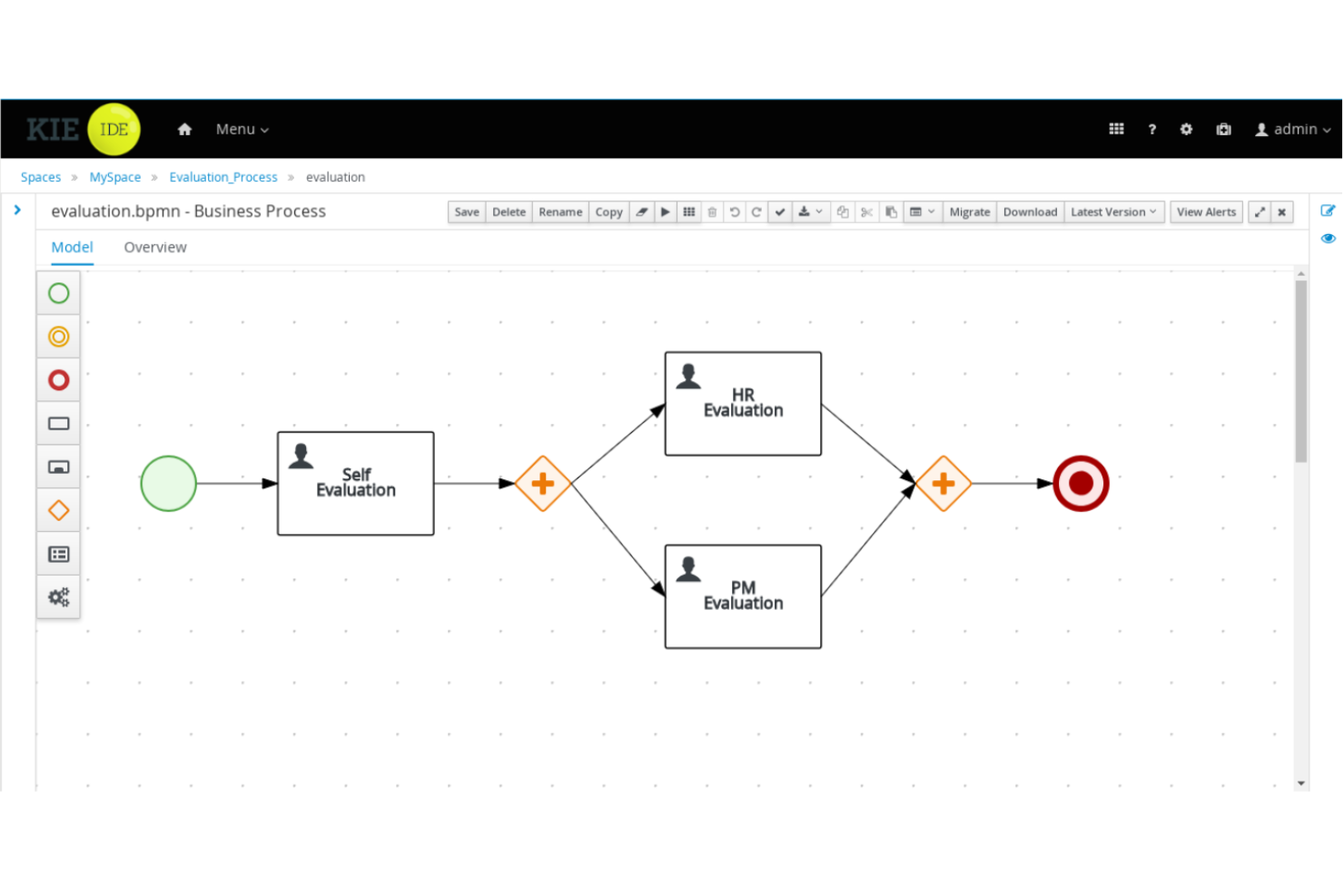
jBPM is an open-source business process management suite distributed under the Apache License 2.0. It’s for Java developers that provides process modeling, workflow automation, rules management, and event processing.
Who Is jBPM Best For?
Java development teams or enterprises that want to embed process management directly into custom software applications.
Why I Picked jBPM
I picked jBPM as one of the best because it lets my developers design, execute, and monitor business processes right inside Java apps. I use its flexible BPMN modeling, workflow automation, and embedded process engine to tightly integrate process logic with code.
jBPM Key Features
- Form modeler: Design and customize user task forms directly within the process workflow.
- Human task management: Delegate tasks to users and track progress using the integrated worklist.
- Advanced rule engine: Incorporate business rules with Drools for complex decision logic.
- REST and Java APIs: Integrate processes with external systems using robust API options.
jBPM Integrations
jBPM supports custom integrations via REST and Java APIs.
What's Free?
jBPM is offered as a free, open-source business process management suite with no user or feature limitations. You can use it indefinitely without subscription costs or trial expiration.
Pros and Cons
Pros:
- Embeddable process engine for Java apps
- Supports BPMN 2.0 and DMN standards
- Open-source and free for developers
Cons:
- Lacks built-in cloud deployment options
- Requires Java expertise to implement

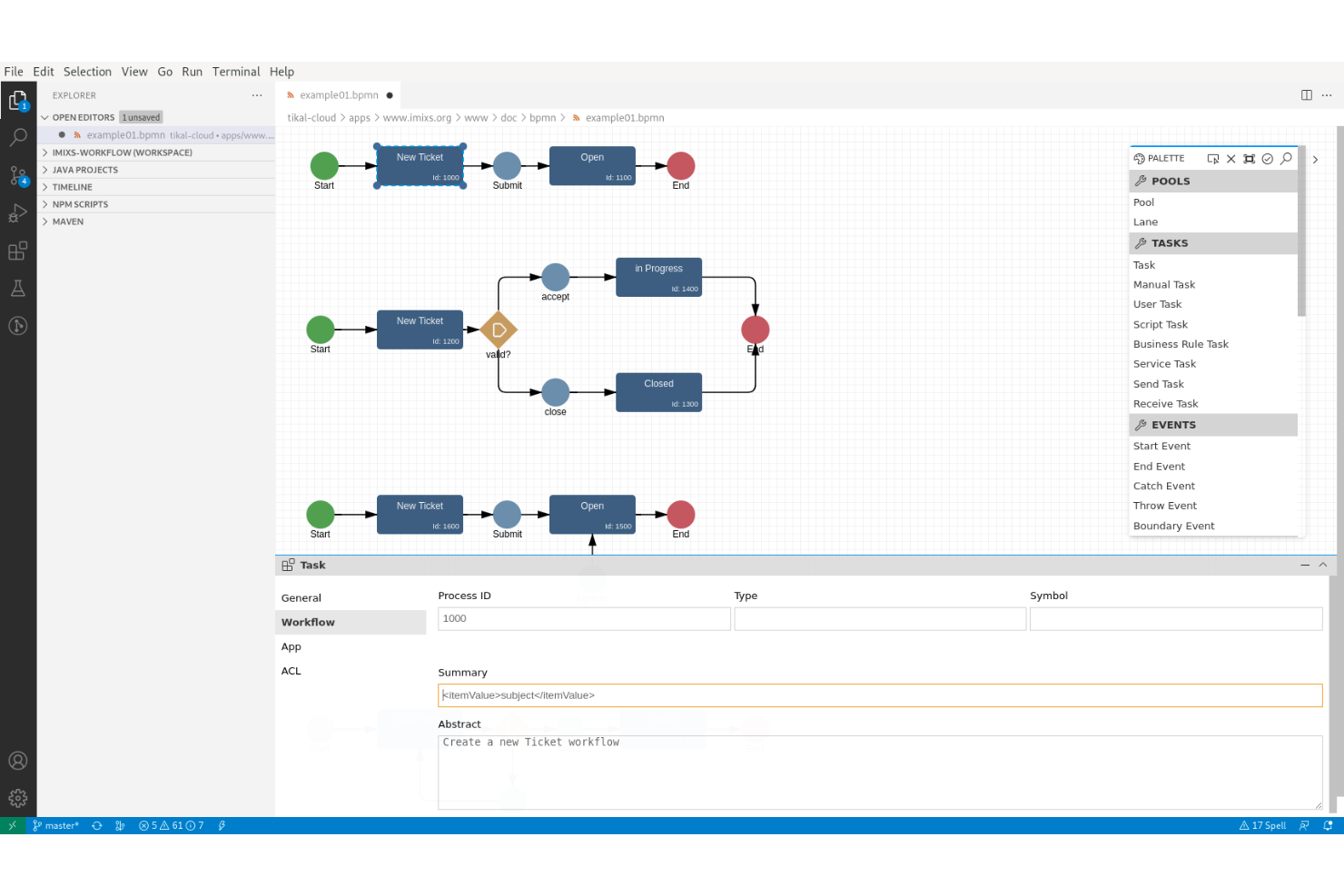
Imixs-Workflow is an open-source business process management suite focused on modeling, automating, and tracking human-centric workflows for organizations and IT teams.
Who Is Imixs-Workflow Best For?
Designed for IT teams and organizations that need to model and automate complex workflows using open-source software.
Why I Picked Imixs-Workflow
I picked Imixs-Workflow as one of the best because it's open-source and puts a clear focus on supporting human-centric task management. I like that I can model workflows, handle approvals, and incorporate complex decision points all within a fully auditable environment.
Imixs-Workflow Key Features
- BPMN 2.0 modeling: Design custom workflows using a standard process modeling language.
- RESTful API support: Integrate workflows with existing systems and applications through APIs.
- Role-based access control: Limit access and actions based on user roles and permissions.
- Document management integration: Attach and manage files directly within workflows.
Imixs-Workflow Integrations
Imixs-Workflow offers an API for custom integrations.
What's Free?
Imixs-Workflow is completely free and open-source, with no feature or user restrictions. All core workflow modeling and management components are included under the open-source license.
Pros and Cons
Pros:
- Human-centric workflow and decision management
- Runs on Java enterprise platforms
- Built-in auditing and workflow tracing
Cons:
- Limited documentation compared to larger projects
- Steeper setup process for non-developers


Activepieces is an open-source workflow automation platform designed for automating business processes with visual flow building, advanced task scheduling, and custom connector support.
Who Is Activepieces Best For?
Workflow builders, system administrators, and developers at startups or small businesses who need broad integration options and customization in business process automation.
Why I Picked Activepieces
I picked Activepieces as one of the best because I can automate advanced multi-step processes using visual workflows, scheduling, and rich variable logic. I like having control over error handling and using custom code or webhooks where needed.
Activepieces Key Features
- Drag-and-drop workflow builder: Build and edit automation flows visually without code.
- Built-in app integrations: Connect to platforms like Slack, Google Sheets, and Notion.
- On-premises deployment option: Install and run Activepieces in your own environment.
- Open-source platform: Access source code and contribute or customize components.
Activepieces Integrations
Activepieces offers native integrations with Google Sheets, Notion, Slack, Discord, Telegram, and Twilio. An API is available for custom integrations.
What's Free?
Activepieces offers a free plan with 10 free active flows and unlimited runs. The platform also has a self-hosted community edition with core features.
Pros and Cons
Pros:
- Custom code step for complex automations
- Built-in native integrations with popular tools
- Drag-and-drop workflow builder
Cons:
- Community support may be inconsistent
- Limited templates compared to competitors

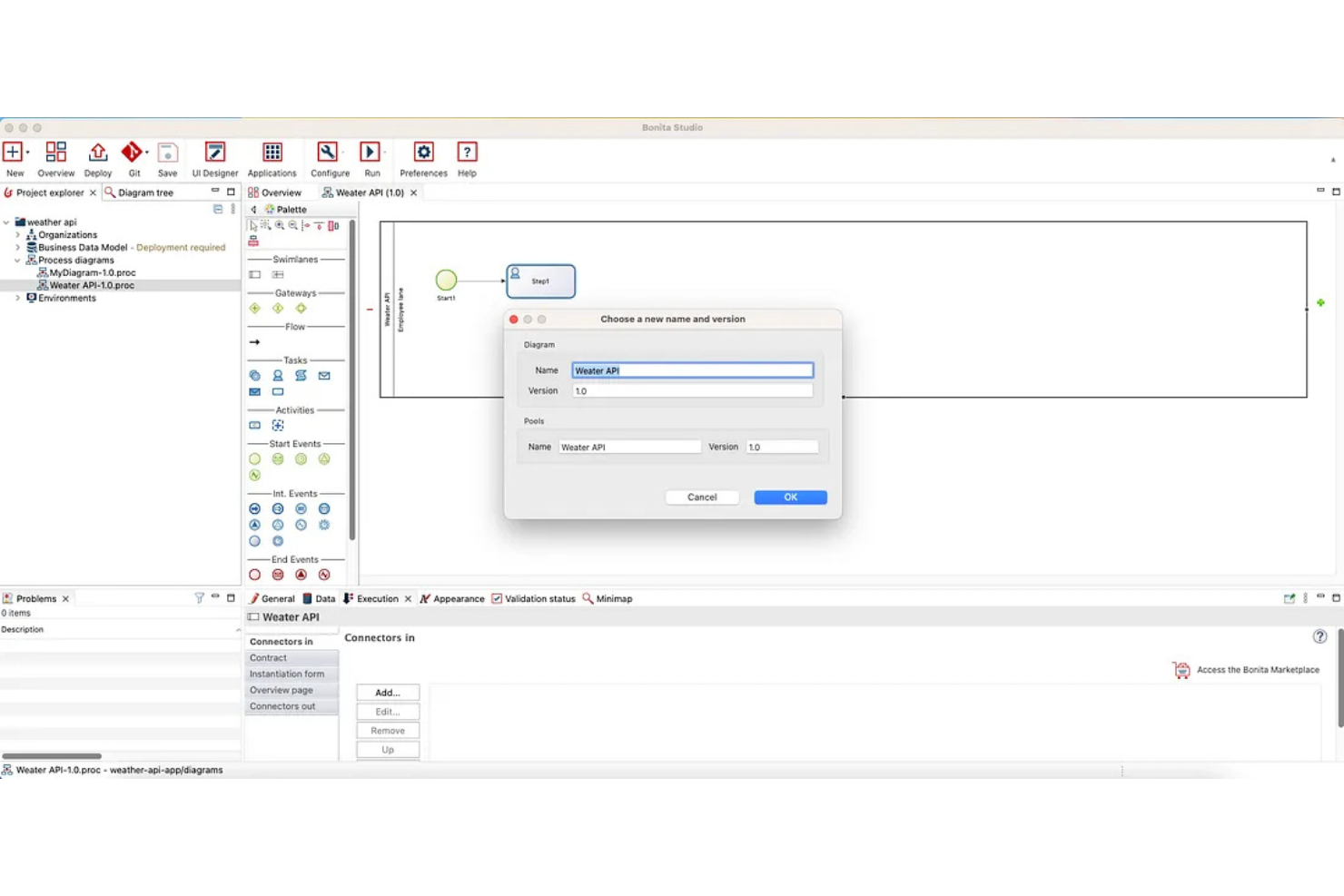
Bonita BPM (formerly Bonitasoft) is a business process management suite with an open-source version. It lets you design, automate, and optimize process workflows, integrate with external systems, and build complex application logic within a flexible development environment.
Who Is Bonita BPM Best For?
Bonita BPM suits midsize and large companies with development teams managing sophisticated, multi-system process automation projects.
Why I Picked Bonita BPM
I picked Bonita BPM as one of the best because I can model, automate, and optimize complex, multi-system workflows with its BPMN engine, extensive API access, and strong support for custom business logic.
Bonita BPM Key Features
- Visual process designer: Drag-and-drop interface for building custom workflows.
- Form builder: Create and customize user task forms within process applications.
- Process monitoring dashboard: View real-time metrics and monitor workflow execution.
- Connector library: Integrate systems out-of-the-box with built-in connectors.
Bonita BPM Integrations
An API is available for custom integrations.
What's Free?
Bonitasoft offers a free community edition with unlimited users. Some advanced features, connectors, and scalability options are only available in paid subscription plans.
Pros and Cons
Pros:
- Extensive automation tools and scripting options
- Custom connectors for external systems possible
- Visual workflow and process modeler included
Cons:
- On-premises installation requires server resources
- Initial setup can require developer support
Diğer Ücretsiz İş Süreçleri Yönetimi Yazılımları
Kısa listeme giremeyen ancak yine de göz atmaya değer bazı ek ücretsiz iş süreçleri yönetimi yazılımı seçenekleri şunlardır:
- Activiti
For embedding lightweight engines
- ADONIS:Community Edition
For AI-based process modeling
- Smartsheet
For enterprise-scale integrations
- Wrike
For visual project tracking with Gantt charts
- monday AI Workspace
For building custom workflow apps without code
- ProcessMaker
For AI-powered process documentation
- Appian
For automating complex, regulated operations
- Bitrix24
For unlimited free users on one account
- Lark Base
For all-in-one collaboration workspaces
- AgilePoint
For cross-platform governance and compliance


How I Evaluate Free Business Process Management Software
I look at free BPM tools in two layers: the baseline a vendor must meet—like mapping a project intake process or automating approval routing—and the differentiators that set strong tools apart.
Core Functionality (Table Stakes For This List)
When I'm selecting tools for my list, I rank each one on a scale from 0 (does not offer the functionality) to 5 (excels in this area) for each core functionality listed below. Then, I calculate the tool's total score into a percentage. Each tool needs to achieve a minimum total score of 65% to be considered for inclusion.
- Free Tier Availability: I check whether the tool offers a genuinely usable free plan—not just a 14-day trial—that supports enough users and processes for a small project team to run real workflows.
- Process Modeling & Mapping: Visual design tools matter here, so I evaluate whether you can map a multi-step process like a project intake flow using flowcharts, swim lanes, or BPMN-style elements.
- Workflow Automation: I look for the ability to automate recurring steps like approval routing, status changes, or deadline-triggered notifications without writing custom code.
- Project Process Templates: Pre-built templates for common project workflows—like change requests, sprint retrospectives, or delivery handoffs—save significant setup time, so I check each tool's library.
- Collaboration & Task Management: Teams need to work inside these processes together, so I evaluate multi-user task assignment, role-based access, and in-context commenting on process steps.
- Process Monitoring & Reporting: Dashboards that surface where work is stuck—like an approval bottleneck delaying a release—help me gauge whether a tool offers actionable visibility into process health.
Once I have a list of tools that meet this criteria, I consider what sets each platform apart.
Differentiating Factors (What Sets Vendors Apart)
Here's how I compare and contrast different vendors:
Standout Features
Low-code form builders are a major differentiator—I look for tools that let you build custom project intake or approval forms without pulling in a developer. Version control and audit trails also carry weight, especially when a PMO needs to trace how a delivery process changed across quarters or project phases. AI-assisted process generation is newer to the space, but tools that can draft a workflow from a plain-language description save real setup time when you're standardizing dozens of processes.
Beyond Features
Free plan limits matter more than most buyers expect. I check whether caps on users, processes, or storage will block a growing team from running real workflows—like when a five-person PMO hits a user ceiling mid-sprint. Integration with project management tools is equally important; a BPM tool that connects to Jira, Asana, or Monday.com keeps process data flowing where your team already works. I also evaluate upgrade paths, because the best free tools make it easy to migrate processes to paid tiers without rebuilding everything from scratch.
Ücretsiz İş Süreçleri Yönetimi Yazılımı Nasıl Seçilir?
Uzun özellik listeleri ve karmaşık fiyatlandırma yapıları içinde kaybolmak kolaydır. Özgün yazılım seçim sürecinizi yürütürken odaklanmanıza yardımcı olmak için göz önünde bulundurmanız gereken faktörlerin bir kontrol listesini burada bulabilirsiniz:
| Faktör | Dikkat Edilmesi Gerekenler |
| Ölçeklenebilirlik | Bu araç, ücretli bir yükseltmeye zorlamadan altı ila on iki ay içinde süreç hacminizi ve kullanıcı sayısındaki büyümeyi destekleyecek mi? |
| Entegrasyonlar | Slack, Google Workspace veya CRM'niz gibi ekibinizin hâlihazırda kullandığı uygulamalarla yerel olarak çalışıyor mu? |
| Özelleştirilebilirlik | Gelişmiş BT desteğine veya kodlama becerilerine ihtiyaç duymadan süreç akışlarını, rolleri, formları ve bildirimleri uyarlayabilir misiniz? |
| Kullanım kolaylığı | Yeni kullanıcılar, özellikle teknik olmayan personel, süreçleri nasıl başlatıp değiştireceklerini hızlı ve güvenli bir şekilde anlayabilecek mi? |
| Uygulama ve başlangıç | Ekibinizin en az kesintiyle çalışmaya başlayabilmesi için eğitim kaynakları, şablonlar veya uygulama içi yönlendirmeler sunuluyor mu? |
| Maliyet | Ücretsiz planın kesin sınırları (kullanıcılar, süreç karmaşıklığı veya otomasyon tetikleyicileri) neler ve bu sınırlara ne zaman ulaşırsınız? |
| Güvenlik önlemleri | Platform süreç verilerinizi gizli tutacak mı? Şifreleme, SSO desteği ve veri saklama ayrıntılarını arayın. |
| Destek erişilebilirliği | Ücretsiz planda ihtiyaç duyduğunuzda yardım alabilir misiniz? Destek saatlerini, destek kanallarını ve kullanıcı topluluğunun etkileşimini kontrol edin. |
Ücretsiz İş Süreçleri Yönetimi Yazılımı Nedir?
Ücretsiz iş süreçleri yönetimi yazılımı (BPM yazılımı), ekiplerin iş akışlarını başlangıç maliyeti olmadan tasarlamasına, otomatikleştirmesine, izlemesine ve optimize etmesine olanak tanıyan dijital bir araçtır. Bu platformlar görevleri, onayları ve veri toplamayı tekrarlanabilir süreçler içinde düzenler. Ücretsiz planlar genellikle temel iş akışı otomasyonu, iş birliği araçları ve kayıt yönetimini içerir; ancak kullanıcı, entegrasyon veya gelişmiş özellikler açısından sınırlamalara sahip olabilir.
Özellikler
İş süreci yönetimi araçlarında yaygın olarak bulunan özellikleri ve bunlardan hangilerinin genellikle ücretsiz ve ücretli planlara dahil edildiğini inceleyelim.
Genellikle Ücretsiz İş Süreci Yönetimi Yazılımı Özellikleri
- İş akışı tasarımcısı: Görevleri, formları ve onayları görsel bir düzenleyicide birbirine bağlayan sürükle ve bırak adımlarını kullanarak akışlar oluşturmanıza ve düzenlemenize olanak tanır.
- Görev atama: Görevleri belirli ekip üyelerine devretmenizi ve her süreçteki ilerlemeyi izlemenizi sağlar.
- Form oluşturma: Kullanıcılardan, çalışanlardan veya müşterilerden yapılandırılmış veriler toplamak için özel veri toplama formları oluşturmanıza olanak tanır.
- Bildirimler: Atanan görevler, yaklaşan son tarihler veya iş akışı durumu güncellemeleri hakkında kullanıcılara otomatik uyarılar gönderir.
- Temel raporlama: Sürecin tamamlanma durumunu, görev sayılarını veya bireysel atama geçmişini gösteren başlangıç düzeyindeki panolar ve özet görünümler sunar.
- Şablon kitaplığı: Ekiplerin standart iş akışlarını çok az kurulumla hızlı bir şekilde başlatmasına yardımcı olan kullanıma hazır süreç şablonları sağlar.
- Mobil erişim: Ekip üyelerine bir mobil uygulama veya web portalı kullanarak görevleri görüntüleme ve güncelleme olanağı sunar.
- Yorum yapma: Kullanıcıların yorum yayınlayarak bireysel görevler veya iş akışı adımları içinde bağlam eklemesine ya da iş birliği yapmasına olanak tanır.
Genellikle Ücretli İş Süreci Yönetimi Yazılımı Özellikleri
- Gelişmiş otomasyon: Süreçleri uçtan uca otomatikleştirmek için çok adımlı koşullu tetikleyicileri, zamanlanmış eylemleri ve karmaşık mantığı destekler.
- Role dayalı erişim denetimleri: Önceden tanımlanmış kullanıcı rollerine veya izinlere göre belirli görevleri ve iş akışlarını kimlerin görüntüleyebileceğini, düzenleyebileceğini veya onaylayabileceğini kısıtlar.
- Entegrasyon bağlayıcıları: Platformlar arası iş akışlarını otomatikleştirmek için yerel veya pazar yeri bağlayıcılarını kullanarak CRM'ler, ERP'ler veya e-posta platformları gibi harici araçlara bağlanır.
- Özel markalama: Kuruluşların iş akışı arayüzlerine, formlarına ve bildirimlerine kendi logolarını, renk şemalarını ve stillerini uygulamasına olanak tanır.
- Belge yönetimi: İş süreçlerinde ihtiyaç duyulan dosyalar için sürüm denetimli depolama, arama ve paylaşım olanağı sunar.
- Süreç analitiği: İş akışındaki darboğazları izlemek, döngü sürelerini ölçmek ve optimizasyon alanlarını belirlemek için ayrıntılı analizler sunar.
- Denetim izleri: Platformdaki tüm etkinliklerin dışa aktarılabilir eksiksiz bir kaydını tutarak uyumluluğu ve süreç izlenebilirliğini destekler.
- API erişimi: Ekiplerin özel entegrasyonlar geliştirmesine veya platformun API'sine doğrudan bağlanarak eylemleri otomatikleştirmesine olanak tanır.
- Tek oturum açma (SSO): Kuruluşunuzun kimlik sağlayıcısıyla entegre olarak kullanıcı kimlik doğrulamasını merkezileştirir ve güvenliği artırır.
- Öncelikli müşteri desteği: Daha hızlı yanıt sürelerine, özel destek ekiplerine veya uygulamalı işe alıştırma yardımına erişim sağlar.
Avantajlar
Ücretsiz iş süreci yönetimi yazılımını uygulamak, ekibiniz ve işletmeniz için çeşitli avantajlar sağlar. Yararlanabileceğiniz avantajlardan bazıları şunlardır:
- Maliyet tasarrufu: Ücretli bir çözüm masrafına katlanmadan görevleri ve iş akışlarını otomatikleştirebilir, böylece sınırlı bütçelerle bile ölçeklendirme yapabilirsiniz.
- Süreç şeffaflığı: Herkes süreç durumunu, atamaları ve son tarihleri görebilir; paylaşılan panolar ve bildirimler sayesinde ekiplerin uyumlu ve sorumlu kalmasına yardımcı olur.
- Daha hızlı işe alıştırma: Çoğu platform, yeni kullanıcıların hızlı bir şekilde başlamasına yardımcı olan şablonlar, rehberli turlar ve basit arayüzler sunarak kurulum süresini azaltır.
- Geliştirilmiş iş birliği: Yerleşik yorum yapma özelliği, paylaşılan formlar ve gerçek zamanlı güncellemeler, ekiplerin talepler ve onaylar üzerinde daha etkili bir şekilde birlikte çalışmasını sağlar.
- Azaltılmış manuel iş: İş akışı otomasyonu ve görev atama özellikleri tekrarlanan e-postaları ve elektronik tabloları ortadan kaldırarak daha yüksek değerli görevler için zaman kazandırır.
- Her yerden erişim: Bulut tabanlı ve mobil uyumlu platformlar, ekibinizin süreçleri herhangi bir konumdan yönetmesine ve güncellemesine olanak tanıyarak esnek çalışmayı destekler.
- Yükseltmeden önce test edin: Ücretsiz planlar, bir taahhütte bulunmadan veya yazılımı daha fazla kullanıcıya sunmadan önce yazılımın ihtiyaçlarınıza uygunluğunu doğrulamanıza olanak tanır.
Maliyetler ve Fiyatlandırma
Bu makaleye, ücretsiz olarak kullanılabilen en iyi iş süreci yönetimi yazılımı seçeneklerini arayarak geldiğinizin farkındayım. Ancak ücretsiz planlar yalnızca sınırlı özellikler sunduğundan, gelecekte planınızı yükseltmeniz gerekme ihtimali oldukça yüksektir.
Aşağıdaki tablo, iş süreçleri yönetimi yazılımlarında yaygın planları, ortalama fiyatlarını ve genellikle sunulan özellikleri özetlemektedir:
İş Süreçleri Yönetimi Yazılımı için Plan Karşılaştırma Tablosu
| Plan Türü | Ortalama Fiyat | Yaygın Özellikler |
| Ücretsiz Plan | $0 | Temel iş akışı tasarımcısı, görev atama, bildirimler, sınırlı sayıda kullanıcı ve küçük bir dizi şablon iş akışı. |
| Kişisel Plan | $5–$15/kullanıcı/ay | Sınırsız kişisel iş akışları, temel otomasyon, form özelleştirme, mobil erişim ve başlangıç düzeyi raporlama. |
| İşletme Planı | $15–$30/kullanıcı/ay | Tam iş akışı otomasyonu, ekip yönetimi, gelişmiş raporlama, entegrasyonlar ve role dayalı erişim denetimleri. |
| Kurumsal Plan | $30–$60/kullanıcı/ay | Özel entegrasyonlar, öncelikli destek, kurumsal güvenlik, süreç analitiği, SSO ve gelişmiş uyumluluk araçları. |
Ücretsiz İş Süreçleri Yönetimi Yazılımı SSS
Ücretsiz iş süreçleri yönetimi yazılımları hakkında sık sorulan bazı soruların yanıtları şunlardır:
Ücretsiz iş süreçleri yönetimi yazılımı araçları güvenli midir?
Evet, çoğu ücretsiz iş süreçleri yönetimi yazılımı aracı, şifrelenmiş veri aktarımı ve düzenli yedeklemeler gibi temel güvenlik özellikleri sunar; ancak SSO veya ayrıntılı denetim günlükleri gibi gelişmiş güvenlik seçenekleri genellikle ücretli planlarla sınırlıdır. Hassas verileri depolamadan önce her aracın gizlilik politikalarını mutlaka kontrol edin.
Ücretsiz planlar, ücretli iş süreçleri yönetimi yazılımlarıyla nasıl karşılaştırılır?
Ücretsiz planlar genellikle süreç tasarımı ve görev atama gibi temel iş akışı araçlarını kapsar; ancak çoğu zaman kullanıcı, otomasyon, entegrasyon veya gelişmiş raporlama özelliklerinin sayısını sınırlar. İhtiyaçlarınız arttıkça ücretli planlar daha fazla özelleştirme, ölçeklenebilirlik, proje yönetimi özellikleri ve destek seçenekleri sunar.
Yükseltme yaparsanız verileri ücretsiz plandan taşıyabilir misiniz?
Evet, çoğu BPM platformu yükseltme yaptığınızda verilerinizi ücretli bir plana taşımanıza olanak tanır. İş akışlarınız, görevleriniz, kullanılan metodolojileriniz ve kayıtlarınız genellikle olduğu gibi kalır; ancak her aracın taşıma sürecini ve veri saklama politikalarını incelemek akıllıca olacaktır.
Ücretsiz iş süreçleri yönetimi yazılımı çözümleri uzaktan çalışan ekipler için işe yarar mı?
Evet, birçok ücretsiz BPM aracı bulut tabanlı ve mobil uyumludur; bu da onları her yerdeki dağınık ekipler için erişilebilir kılar, kullanıcı deneyimini iyileştirir. Verimsizlikleri azaltmak için gerçek zamanlı iş birliğini destekleyen ve mobil uygulamalar sunan platformları tercih edin.
Ücretsiz iş süreçleri yönetimi yazılımlarındaki yaygın sınırlamalar nelerdir?
Ücretsiz BPM çözümlerinin çoğu, oluşturabileceğiniz kullanıcı, iş akışı, otomasyon ve entegrasyon sayısını sınırlar. Ayrıca desteğe, raporlamaya, süreç şablonlarına veya denetim izlerine erişimin kısıtlandığını görebilirsiniz. Bir çözümü benimsemeden önce her sağlayıcının plan sınırlamalarını kontrol edin.