

2026’da 10 Özel Markalı Belge Yönetim Sistemi

Beyaz Etiketli Belge Yönetim Sistemi Kısa Listesi


Beyaz etiketli belge yönetim sistemi, belgeleri müşteriler veya kurum içi ekiplerle güvenli bir şekilde düzenlemek, depolamak ve paylaşmak için kendi markanız olarak yeniden markalandırabileceğiniz ve özelleştirebileceğiniz bir platformdur. En iyi beyaz etiketli belge yönetim sistemini arıyorsanız muhtemelen belge iş akışları ve erişim üzerindeki kontrolü korurken kesintisiz, markalı bir deneyim sunmanın yolunu arıyorsunuz.
Bu kılavuzda, ayrıntılı izinlerden özel iş akışı otomasyonuna kadar her şeyi destekleyen seçenekleri bulacaksınız. Böylece işletmenizin ihtiyaçlarına ve müşteri beklentilerine uygun bir çözüm seçebilirsiniz.
Why Trust Our Software Recommendations
Our team has been testing and reviewing software since 2012. As project managers ourselves, we know how difficult—and important—it is to choose the right software.
For this guide, we evaluated tools using hands-on testing and independent research, scoring tools using our selection criteria. We also draw on insights from industry thought leaders and practicing project management experts.
Our reviews reflect our human editorial judgment, not a sales pitch.
Expert reviewers:
Beyaz Etiketli Belge Yönetim Sistemi Karşılaştırma Tablosu
Bu karşılaştırma tablosu, önde gelen beyaz etiketli belge yönetim sistemlerimin fiyatlandırma ayrıntılarını özetlemektedir:
Score legend (out of 5)
- Excellent 4.5–5
- Good 4–4.4
- Average 3–3.9
- Below average 2–2.9
- Poor 1–1.9
| Tool | Starting Price | Website | |||||||
|---|---|---|---|---|---|---|---|---|---|
| Best for integrated client portals features | 4.3 out of 5 | 5 | 4 | 4 | 4 | 4 | 5 | $19/month 14-day free trial | Website |
| Best for granular workflow automation and role-based access control | 3.7 out of 5 | 3 | 5 | 3 | 4 | 4 | 3 | Pricing upon request Free demo available | Website |
| Best for on-premises deployment flexibility | 4.7 out of 5 | 5 | 5 | 4 | 4 | 5 | 5 | $14/user/month Free demo + 14-day free trial available | Website |
| Best for metadata-driven document search | 3.5 out of 5 | 2 | 5 | 4 | 4 | 5 | 1 | $65/user/month Free demo available | Website |
| Best for granular access permissions | 3.8 out of 5 | 4 | 5 | 3 | 4 | 4 | 3 | $52/month Free plan available | Website |
| Best for advanced workflow automation | 3.8 out of 5 | 2 | 4 | 4 | 5 | 4 | 4 | Pricing upon request Free demo available | Website |
| Best for custom systems with source code ownership | 3.5 out of 5 | 4 | 4 | 2 | 4 | 4 | 3 | Pricing upon request Free demo available | Website |
| Best for custom workflow automation options | 3.7 out of 5 | 4 | 4 | 4 | 4 | 3 | 3 | Pricing upon request Free consultation available | Website |
| Best for multi-format document processing | 3.0 out of 5 | 3 | 4 | 2 | 3 | 3 | 3 | $9/user/month Free plan available | Website |
| Best for building client-facing document portals on top of Airtable or Google Sheets | 3.7 out of 5 | 4 | 4 | 4 | 2 | 4 | 4 | $49/month Free plan + free demo available | Website |
Beyaz Etiketli Belge Yönetim Sistemi İncelemeleri
Aşağıda, kısa listeme giren beyaz etiketli belge yönetim sistemlerinin ayrıntılı özetlerini bulabilirsiniz. İncelemelerim, sizin için en uygun olanı bulmanıza yardımcı olmak amacıyla her platformun özelliklerine, en uygun kullanım alanlarına ve entegrasyonlarına ayrıntılı bir bakış sunmaktadır.

Best for integrated client portals features
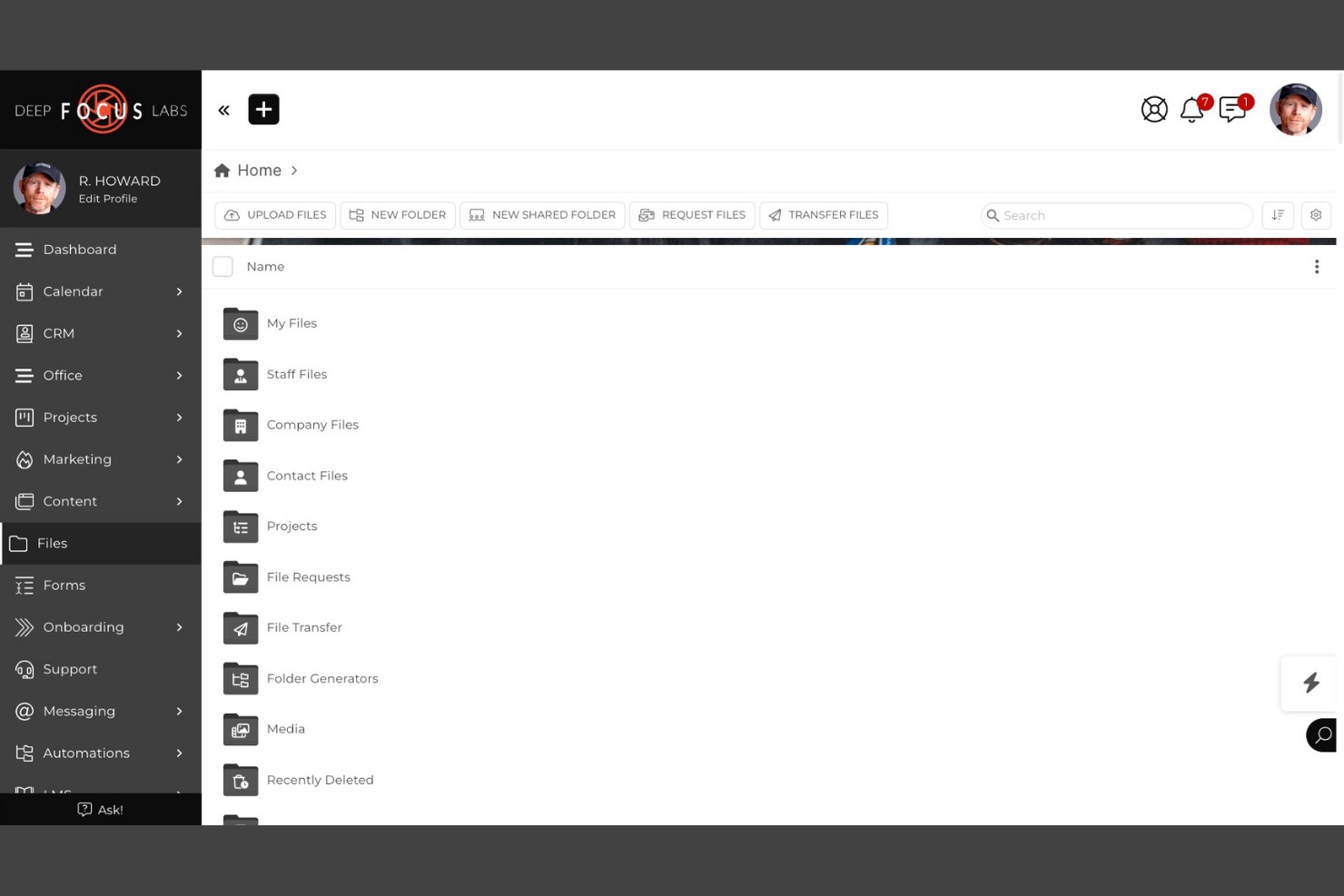
SuiteDash is a white label document management system that combines document sharing, e-signatures, secure file storage, and integrated client portals in one platform.
Who Is SuiteDash Best For?
SuiteDash is a good fit for small businesses and agencies that need to manage client documents and communications in a branded portal.
Why I Picked SuiteDash
I picked SuiteDash as one of the best because I can set up fully branded client portals that let my clients securely access, upload, and sign documents. I like that I can automate document requests and approvals directly inside the portal. My team uses its granular permission controls to manage what each client or team member can see and do.
SuiteDash Key Features
- Document versioning: Track and manage multiple versions of uploaded files.
- Customizable intake forms: Build and embed forms to collect client information and documents.
- Task automation: Set up automated workflows for document-related tasks.
- Granular user roles: Assign detailed permissions to control document access and actions.
SuiteDash Integrations
SuiteDash offers native integrations with Google Workspace, Stripe, PayPal, QuickBooks Online, and Zoom. An API is available for custom integrations.
Pros and Cons
Pros:
- Customizable intake forms for document collection
- Built-in e-signature and document request tools
- Fully white label client and team portals
Cons:
- Limited document editing within the platform
- No native integration with Microsoft 365

Best for granular workflow automation and role-based access control
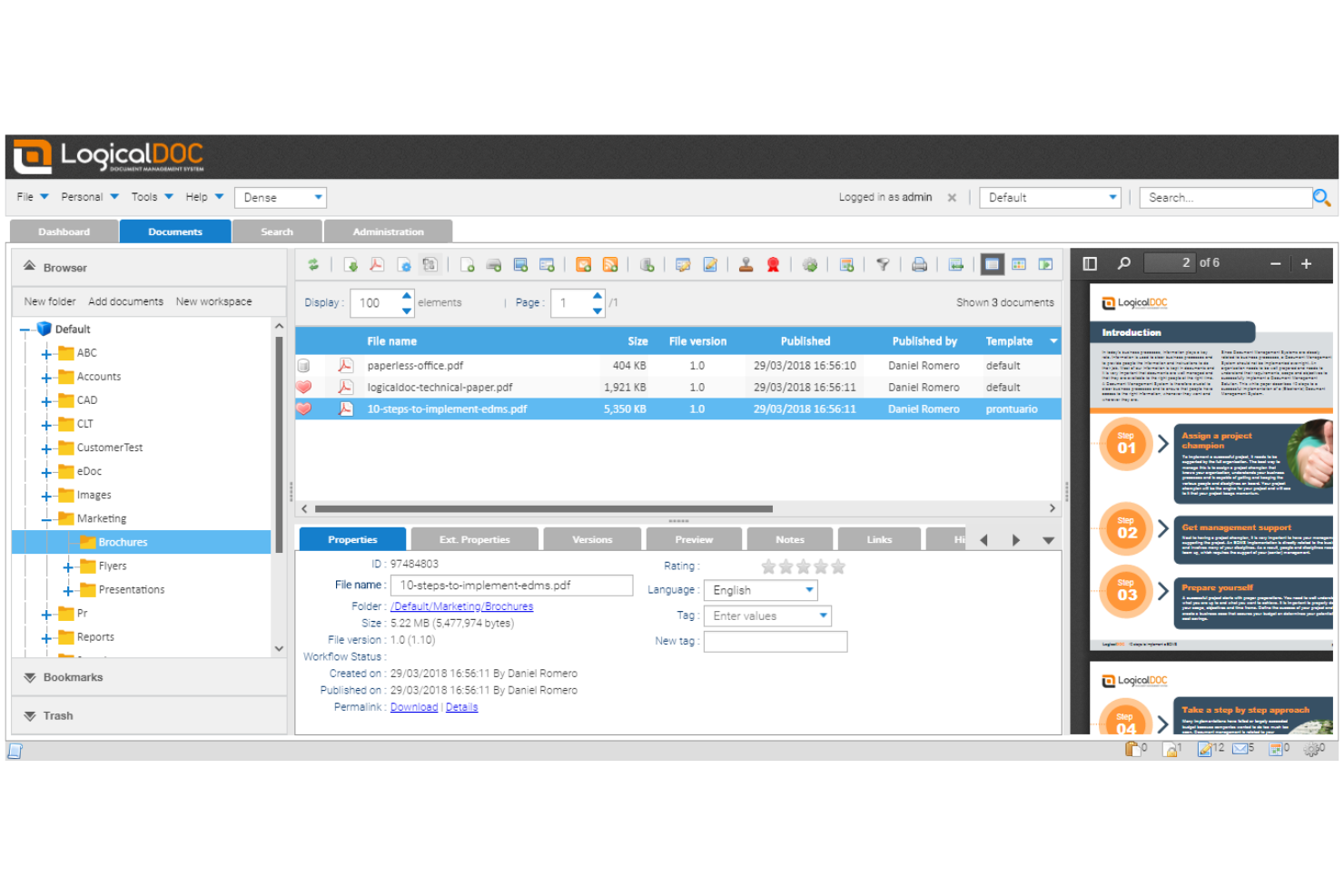
LogicalDOC is a document management system for businesses that need advanced workflow automation, granular role-based access, and customizable document organization features.
Who Is LogicalDOC Best For?
LogicalDOC is a strong choice for mid-sized businesses and enterprises that need strict document control and automated workflows.
Why I Picked LogicalDOC
I picked LogicalDOC as one of the best because I can design multi-step document workflows with granular triggers and actions for each user role. I like that my team can set up detailed access controls, so only specific users or groups can view, edit, or approve documents at each stage. In practice, that means we can automate document routing and approvals while keeping sensitive content tightly controlled.
LogicalDOC Key Features
- Custom branding: Apply your own logo, colors, and interface elements.
- Document versioning: Track, compare, and restore previous document versions.
- Full-text search: Search document content and metadata across repositories.
- Audit trail: Monitor all document actions and user activities.
LogicalDOC Integrations
LogicalDOC Integrations with Microsoft Office, OnlyOffice, ChatGPT and more. It also offers a well-documented API for custom integrations and supports no-code connectivity through automation platforms, allowing teams to send data to other systems.
Pros and Cons
Pros:
- Full-text search across documents
- Role-based permissions for access control
- Highly configurable workflow automation
Cons:
- On-premise setup requires dedicated IT resources
- Limited prebuilt integrations outside core platforms

Best for on-premises deployment flexibility
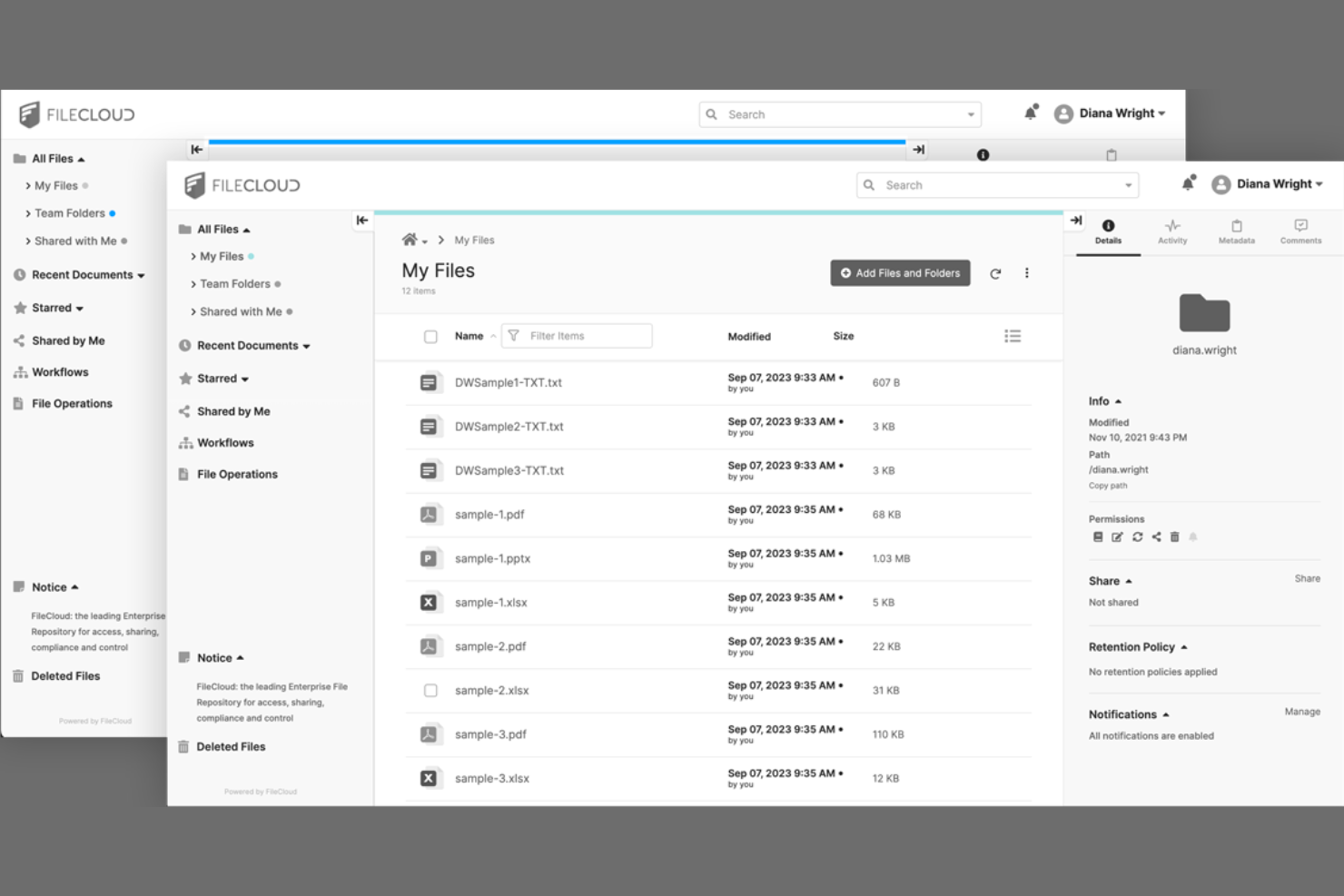
FileCloud is a document management system for teams that need private, branded file sharing, granular access controls, and on-premises or cloud deployment options.
Who Is FileCloud Best For?
FileCloud is a strong choice for IT teams at mid-sized to large organizations that require on-premises or hybrid document management.
Why I Picked FileCloud
I picked FileCloud as one of the best because I can deploy it on-premises or in a private cloud, which is rare among document management systems. I like that the interface is fully white-label, including custom domains and branding. My team uses its granular admin controls to manage user access and compliance across multiple locations.
FileCloud Key Features
- Document versioning: Track, restore, and manage multiple versions of files.
- Granular file sharing controls: Set detailed permissions for file and folder access.
- Automated retention policies: Configure rules for document lifecycle management and compliance.
- Integrated workflow automation: Build custom document approval and review workflows.
FileCloud Integrations
FileCloud offers native integrations with Microsoft 365, Microsoft Teams, Google Workspace, OnlyOffice, and Outlook, and provides an API for custom integrations.
Pros and Cons
Pros:
- Bulk import for large document migrations
- White label branding with custom domain support
- AI auto-tags and organizes uploaded documents
Cons:
- Mobile app lacks advanced document features
- A few prebuilt workflow automation templates

M-Files
Best for metadata-driven document search
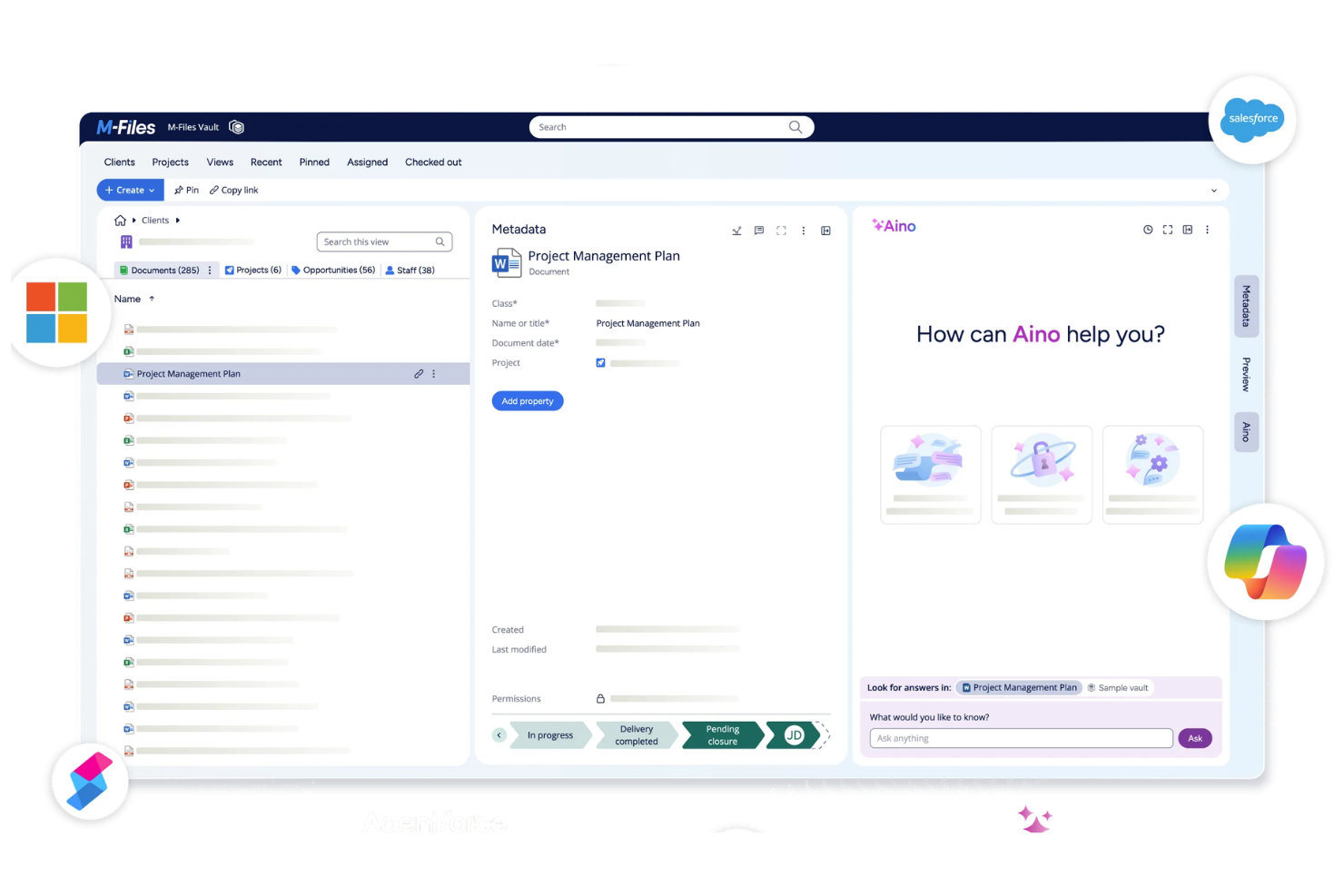
M-Files is a document management platform that organizes, stores, and secures business documents using metadata-driven workflows, version control, and advanced search capabilities.
Who Is M-Files Best For?
M-Files is a strong fit for mid-sized and enterprise organizations that need advanced document search and compliance features.
Why I Picked M-Files
I picked M-Files as one of the best because I can tag, organize, and retrieve documents using metadata fields instead of relying on folder structures. I like that my team can automate document classification and set up custom metadata properties for different document types. In practice, that means we can quickly surface the right files even in large, complex repositories.
M-Files Key Features
- Automated workflow management: Build and manage document approval and review workflows.
- Granular access permissions: Set detailed user and group permissions for document access.
- Version control: Track, compare, and restore previous document versions.
- Audit trail reporting: Monitor document activity and user actions with detailed logs.
M-Files Integrations
M-Files offers native integrations with Microsoft 365, Salesforce, Google Workspace, SharePoint, Docusign, and Adobe Sign, and provides an API for custom integrations.
Pros and Cons
Pros:
- Strong access control for sensitive data
- Advanced workflow configuration options
- Metadata-driven search across repositories
Cons:
- Customization can require setup effort
- Interface may feel outdated

Folderit
Best for granular access permissions
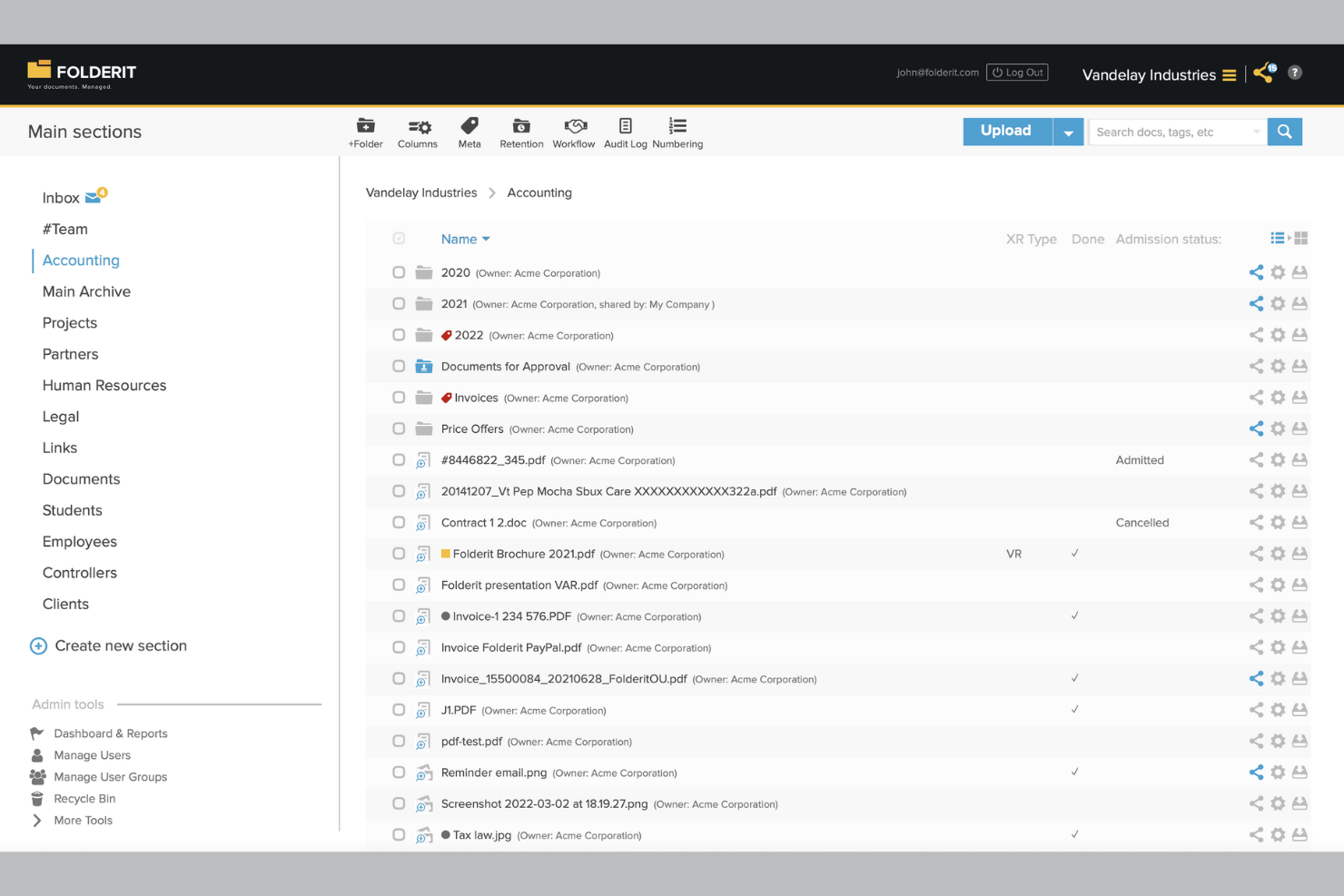
Folderit is a cloud-based document management system designed for teams that need customizable branding, detailed access controls, and secure file storage.
Who Is Folderit Best For?
Folderit is a good fit for small to midsize businesses that need secure, branded document management with detailed user access controls.
Why I Picked Folderit
I picked Folderit as one of the best because I can set up highly detailed access permissions for every folder and document, letting me control exactly who sees or edits what. I like that I can assign user roles and create approval workflows for sensitive files.
My team uses Folderit’s audit trails to track document activity, which is especially useful when managing client-facing portals.
Folderit Key Features
- Custom branding: Add your company logo and colors to the document portal interface.
- Automated document retention: Set rules for automatic archiving or deletion of files based on retention policies.
- Version control: Keep track of document revisions and restore previous versions as needed.
- Metadata tagging: Organize and search documents using custom metadata fields.
Folderit Integrations
Folderit offers native integrations with Microsoft Office 365, Outlook, and DocuSign. An API is available for custom integrations.
Pros and Cons
Pros:
- Automated document retention and archiving rules
- Custom branding for client-facing portals
- Granular user and group permission settings
Cons:
- No built-in e-signature beyond DocuSign
- Limited native integrations with third-party tools

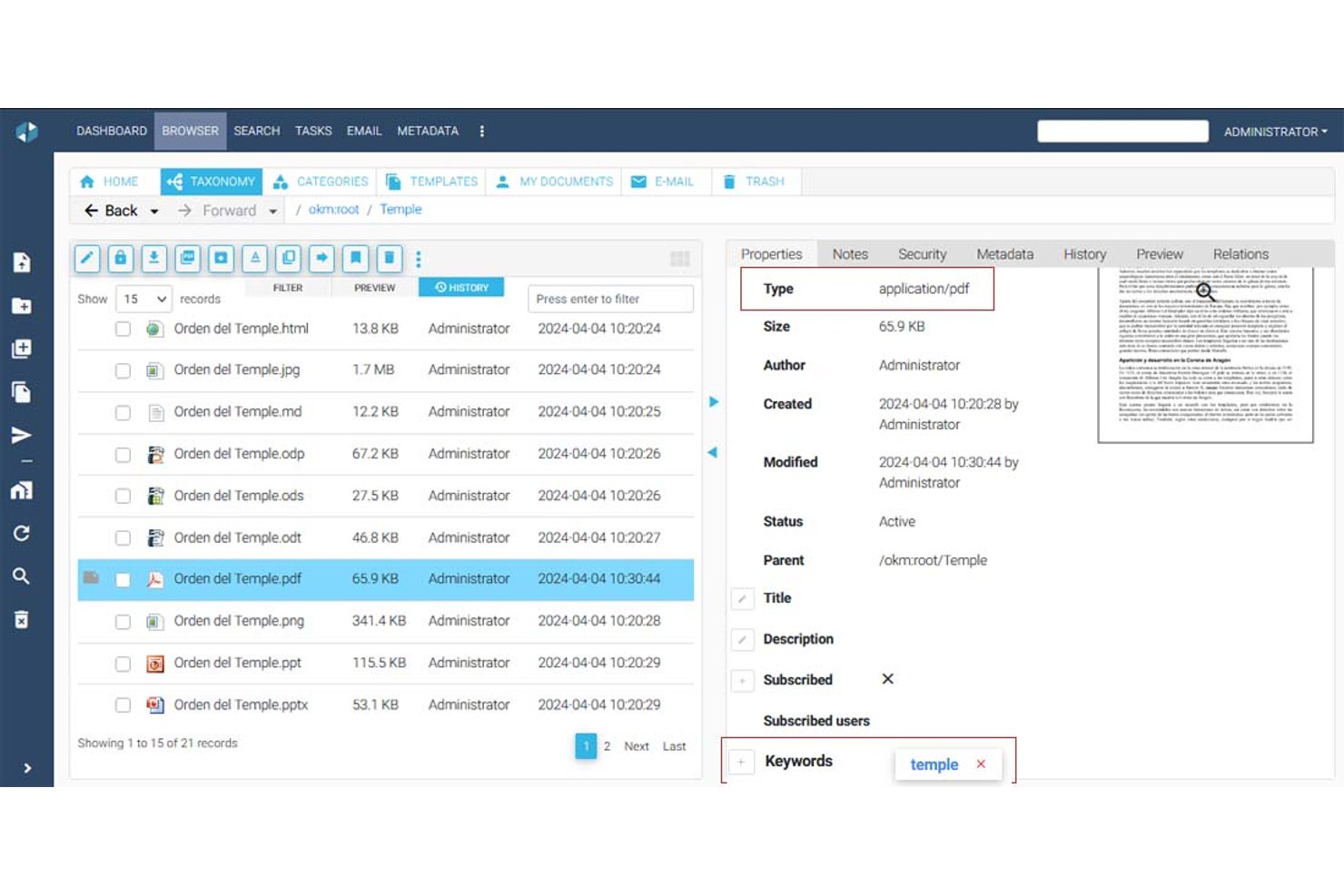
OpenKM is a document management system with a multi-tenant architecture that supports folder hierarchies, metadata management, version control, full-text search, OCR, e-signatures, and a native workflow engine for building approval and review processes.
Who Is OpenKM Best For?
OpenKM suits compliance-focused teams and PMOs that need to automate document approval workflows across multiple departments or client environments.
Why I Picked OpenKM
OpenKM earns its spot on my shortlist because its native workflow engine, OKMFlow, goes well beyond basic approvals. I like that you can build serial and parallel review chains, assign tasks dynamically to users or groups, and edit live workflows without interrupting active processes. Its multi-tenant architecture lets you provision isolated environments per client, each with its own admin, storage root, and UI customization. That combination makes it genuinely well-suited to running document approval processes across multiple client accounts from a single instance.
OpenKM Key Features
- Multi-tenant architecture: Provision isolated environments per client or department, each with its own admin, storage root, and independent configuration.
- Doc-Request module: Send encrypted, secure document requests directly to clients and receive files through a protected delivery channel.
- Full-text search engine: Index and search across PDF, Office, HTML, XML, and other file types using synonyms, stemming, and saved queries.
- Version comparison: Compare two document versions side-by-side, reviewing both metadata changes and text differences within the same interface.
OpenKM Integrations
OpenKM has native integrations across the Microsoft ecosystem, including Outlook, Word, Excel, PowerPoint, Visio, Project, and Access, plus CMIS support. Its REST API connects with SAP and Microsoft Dynamics and supports custom integrations.
Pros and Cons
Pros:
- Version history strengthens client accountability
- Tenant-level workflows support customized approvals
- Multi-tenant environments isolate client workspaces
Cons:
- Dated interface can slow client adoption
- Branding stops short of full white-labeling

Who Is Suffescom Solutions Best For?
Suffescom Solutions is a good fit for enterprises or consultancies that need a fully custom document management system with source code ownership.
Why I Picked Suffescom Solutions
I picked Suffescom Solutions as one of the best because I can work directly with their team to build a fully custom document management system and retain full source code ownership. I like that I can specify unique workflows, branding, and user roles that match my business requirements.
My team can request custom integrations and features during development, which is rare among white-label DMS vendors.
Suffescom Solutions Key Features
- Document version control: Track and manage multiple versions of documents within the system.
- Granular permission settings: Assign detailed access rights to users and groups.
- Audit trail reporting: Monitor document activity and user actions with detailed logs.
- Customizable dashboard: Configure dashboards to display relevant document and workflow metrics.
Suffescom Solutions Integrations
Native integrations are not clearly documented. An API is available for custom integrations.
Pros and Cons
Pros:
- Flexible deployment options
- Highly tailored workflow configuration
- Full source code ownership for customization
Cons:
- Limited self-serve resources
- Requires vendor involvement for changes

Hyperlocal Cloud is a white label document management system platform that offers custom workflow automation, document storage, user management, and branded client portals.
Who Is Hyperlocal Cloud Best For?
Hyperlocal Cloud is a good fit for mid-sized businesses and agencies that need tailored document workflows and branded client portals.
Why I Picked Hyperlocal Cloud
I picked Hyperlocal Cloud as one of the best because I can design custom workflow automations that match my team’s exact document review and approval processes. I like that I can set up branded client portals and tailor user roles for different departments. My team uses its drag-and-drop workflow builder to automate multi-step document routing and notifications.
Hyperlocal Cloud Key Features
- Document version control: Track, manage, and restore previous versions of documents.
- Role-based access permissions: Assign granular access rights to users and groups.
- Custom branding options: Add your logo, colors, and domain to client-facing portals.
- Audit logs: Monitor all document activity and user actions for compliance.
Hyperlocal Cloud Integrations
Native integrations are not clearly documented. The tool supports integrations via API for custom workflows and connections.
Pros and Cons
Pros:
- Role-based access and permissions control
- White label branding for client portals
- Custom workflow builder for document processes
Cons:
- Limited native integrations
- No built-in document editing tools

DocStudio is a document management system for teams who need to process, convert, and organize documents in multiple formats with customizable workflows and branding options.
Who Is DocStudio Best For?
DocStudio is a good fit for mid-sized businesses and service providers who need to manage and process documents in various digital formats.
Why I Picked DocStudio
I picked DocStudio as one of the best because I can process and convert documents across formats like PDF, Word, Excel, and images without leaving the platform. I like that I can set up custom branding and workflows for each client, making it easy to deliver a true white-label experience. My team uses its batch processing and template-driven automation to handle high volumes of multi-format files for different business units.
DocStudio Key Features
- Role-based access controls: Set granular permissions for users and groups.
- Audit logging: Track all document actions and changes for compliance.
- Custom metadata fields: Add and manage searchable metadata for each document.
- Bulk document import: Upload and organize large volumes of files at once.
DocStudio Integrations
Native integrations are not clearly documented. DocStudio provides an API for custom integrations.
Pros and Cons
Pros:
- Audit logs track all document activity
- Custom branding options for client-facing portals
- Supports editing and viewing multiple file types
Cons:
- Limited workflow automation templates available
- No native Google Workspace integration

Best for building client-facing document portals on top of Airtable or Google Sheets

Softr is a no-code document management system builder that lets you create custom client-facing portals using Airtable or Google Sheets as your data source.
Who Is Softr Best For?
Softr is a good fit for small businesses and consultancies that want to build branded client document portals using Airtable or Google Sheets.
Why I Picked Softr
I picked Softr as one of the best because I can quickly build branded document portals that connect directly to Airtable or Google Sheets. I like that I can set up granular user permissions and create custom client dashboards without coding. My team uses its prebuilt blocks to add file upload, search, and document preview features for each client portal.
Softr Key Features
- Custom domain support: Publish document portals under your own branded URL.
- Role-based access controls: Assign different permissions to users and groups.
- Document versioning: Track and manage changes to uploaded files.
- Audit logs: Monitor user activity and document access history.
Softr Integrations
Softr offers native integrations with Airtable, Google Sheets, Stripe, Google Analytics, HubSpot, Mailchimp, Zapier, and more. A REST API is available for custom integrations.
Pros and Cons
Pros:
- Strong user authentication and access control
- Flexible design with drag-and-drop blocks
- No-code builder for client document portals
Cons:
- Limited workflow automation capabilities
- Relies on external data sources for storage


How I Evaluate White Label Document Management Systems
I look at these in two layers: what a team needs to create and manage a custom-branded document portal without any trace of the vendor, and the differentiators that matter depending on how you plan to use it.
Core Functionality (Table Stakes For This List)
When I'm selecting tools for my list, I rank each one on a scale from 0 (does not offer the functionality) to 5 (excels in this area) for each core functionality listed below. Then, I calculate the tool's total score into a percentage. Each tool needs to achieve a minimum total score of 55% to be considered for inclusion.
- White-Label Branding Controls: I check whether you can replace every visible vendor reference with your own logo, color palette, favicon, and login page so clients never see the underlying platform.
- Document Storage & Organization: Folder hierarchies, tagging, and metadata schemas matter here—especially when you're managing SOWs, contracts, and deliverables across dozens of client accounts.
- Version Control & Audit Trails: I evaluate how each tool tracks revisions and logs user activity, since project documentation often goes through multiple review cycles before final approval.
- Access Controls & Permissions: Granular, role-based rules at the folder and file level are what I look for—particularly the ability to set different permission tiers for internal teams vs. external stakeholders.
- Client Portal & Collaboration: The portal experience is where your brand lives for the end client, so I evaluate whether reviewers can comment, approve, and interact with documents inside a branded workspace.
- Custom Domain & Multi-Tenant Support: Each client account should sit behind your own domain with isolated data and independent branding, which is essential when you're reselling across a portfolio of projects.
Once I have a list of tools that meet the criteria, I consider what sets each platform apart.
Differentiating Factors (What Sets Vendors Apart)
Here's how I compare and contrast different vendors:
Standout Features
API and webhook access is a big differentiator—it determines whether you can embed document workflows directly into your own PM tools or client-facing apps. I also evaluate automated approval routing, since manually chasing stakeholders for sign-off on SOWs and change orders doesn't scale across multiple client accounts. Usage analytics round out the picture. Per-tenant reporting on document views, downloads, and storage helps resellers identify upsell opportunities and prove value to clients during QBRs.
Beyond Features
Reseller licensing structure matters a lot here. I look at whether the pricing model supports margin stacking and unlimited sub-accounts, since per-client caps can kill profitability as your portfolio grows. Integrations with the broader PM ecosystem are equally important—tools that connect natively with platforms like Jira, Asana, or Monday keep documents tied to the workstreams they belong to. I also check for compliance certifications like SOC 2 and ISO 27001, especially when onboarding enterprise clients who require proof of security posture before granting access.
Beyaz Etiketli Belge Yönetim Sistemi Nasıl Seçilir?
Uzun özellik listeleri ve karmaşık fiyatlandırma yapıları içinde kaybolmak kolaydır. Kendinize özgü yazılım seçim sürecinizi yürütürken odağınızı korumanıza yardımcı olmak için göz önünde bulundurmanız gereken faktörleri içeren bir kontrol listesi hazırladık:
| Faktör | Dikkate Alınması Gerekenler |
|---|---|
| Ölçeklenebilirlik | Sistem, belge hacminizi ve kullanıcı sayısındaki zaman içindeki artışı kaldırabilecek mi? Depolama sınırlarını ve kullanıcı kotalarını sorun. |
| Entegrasyonlar | Temel araçlarınıza (ör. Microsoft 365, Google Drive) yerel olarak bağlanıyor mu? Özel bağlantılara ihtiyacınız varsa API erişimini kontrol edin. |
| Özelleştirilebilirlik | Arayüzü tamamen markanıza uyarlayabilir ve iş akışlarını süreçlerinize göre düzenleyebilir misiniz? Ayrıntılı markalama ve iş akışı seçeneklerini arayın. |
| Kullanım kolaylığı | Ekibiniz sistemi hızlı bir şekilde benimseyecek mi? Arayüzü anlaşılır olması ve minimum eğitim gerektirmesi açısından test edin. |
| Uygulama ve kullanıma alıştırma | Kurulum ve geçiş ne kadar sürecek? Veri içe aktarma araçlarını, kullanıma alıştırma desteğini ve mevcut eğitim kaynaklarını sorun. |
| Maliyet | Ölçeğinizi büyüttükçe fiyatlandırma kademeleri şeffaf ve öngörülebilir mi? Gizli ücretlere veya zorunlu eklentilere dikkat edin. |
| Güvenlik önlemleri | Şifreleme, denetim kayıtları ve ayrıntılı erişim kontrolleri sunuyor mu? Sektörünüzün standartlarına uygunluğunu doğrulayın. |
| Destek erişilebilirliği | Sorunlar ortaya çıktığında zamanında yardım alabilecek misiniz? Gerekiyorsa canlı sohbet, telefon desteği ve özel hesap yönetimi seçeneklerini kontrol edin. |
Belge Yönetim Sistemleri Nedir?
Beyaz etiketli bir belge yönetim sistemi, ekiplerin belgeleri kendi markaları altında depolamasına, düzenlemesine ve kontrol etmesine olanak tanıyan bir SaaS platformudur. Bu sistemler gerçek zamanlı iş birliğini destekler, kullanıcı deneyimini iyileştirir ve işletmelerin müşterilere veya iç ekiplerine tutarlı, kendi markalarına ait bir arayüz sunmasına yardımcı olur. Özel bir proje yönetimi aracı olmasalar da birçok platform, hepsi bir arada iş birliği araçları içinde dosyaları, onayları ve belgeleri yönetmek üzere proje yönetimi iş akışlarının yanında kullanılabilir.
Özellikler
Beyaz etiketli bir belge yönetim sistemi seçerken aşağıdaki temel özelliklere dikkat edin:
- Özel markalama: Kendi logonuzu, renklerinizi ve alan adınızı uygulamanıza olanak tanır; böylece platform müşteriler veya iç ekipler için kendi ürününüz gibi görünür ve hissettirir.
- Role dayalı erişim denetimi: Kullanıcılar veya gruplar için ayrıntılı izinler belirlemenizi sağlar ve yalnızca yetkili kişilerin belirli belgeleri görüntüleyebilmesini, düzenleyebilmesini veya onaylayabilmesini garanti eder.
- Belge sürümleme: Değişiklikleri izler ve belge düzenlemelerinin geçmişini tutar; böylece önceki sürümlere dönmek veya güncellemeleri kimin yaptığını denetlemek kolaylaşır.
- İş akışı otomasyonu: Belge inceleme, onaylama ve yönlendirme süreçlerini tasarlayıp otomatikleştirmenizi sağlar; manuel adımları azaltır ve iş birliğini hızlandırır.
- Tam metin araması: Kullanıcıların belgelerin içeriğinde ve meta verilerinde arama yapmasını sağlar; böylece büyük depolarda bile dosyaları hızlıca bulabilirsiniz.
- Denetim izleri: Belgeler üzerinde gerçekleştirilen her işlemi kaydeder ve uyumluluk, güvenlik ve sorun giderme için şeffaf bir günlük sunar.
- Entegrasyon özellikleri: Belge paylaşımını ve iş birliğini kolaylaştırmak için e-posta, bulut depolama veya CRM sistemleri gibi diğer iş araçlarına bağlanır.
- Çoklu dil desteği: Arayüzleri ve bildirimleri birden fazla dilde sunarak sistemi küresel ekipler veya müşteriler için erişilebilir hâle getirir.
- Toplu yükleme ve içe aktarma: Çok sayıda belgeyi aynı anda eklemenize olanak tanır; eski sistemlerden geçişi veya yeni müşterilerin sisteme dahil edilmesini kolaylaştırır.
- Mobil erişim: Akıllı telefonlardan veya tabletlerden belgelere ve iş akışlarına güvenli erişim sağlayarak uzaktan ve hareket hâlinde çalışmayı destekler.
Faydalar
Beyaz etiketli bir belge yönetim sistemini uygulamak ekibiniz ve işletmeniz için çeşitli faydalar sağlar. Yararlanabileceğiniz bazı avantajlar şunlardır:
- Tutarlı markalama: Platformu kendi logonuz, renkleriniz ve alan adınızla özelleştirerek müşterilere ve kullanıcılara birleşik, profesyonel bir deneyim sunun.
- Gelişmiş güvenlik: Uyumluluk gereksinimlerini karşılamanıza yardımcı olan role dayalı erişim denetimleri, denetim izleri ve şifreleme özellikleriyle hassas bilgileri koruyun.
- Kolaylaştırılmış iş akışları: Manuel çalışmayı azaltmak ve ekipler arasındaki iş birliğini hızlandırmak için belge inceleme, onaylama ve yönlendirme süreçlerini otomatikleştirin.
- Geliştirilmiş belge denetimi: Açık sürüm geçmişlerini ve izin ayarlarını koruyarak bir belgeye kimin, ne zaman eriştiğini veya belgeyi düzenlediğini her zaman bilin.
- Ölçeklenebilir iş birliği: Toplu yükleme, çoklu dil desteği ve uzaktan çalışma için mobil erişim gibi özelliklerle büyüyen ekipleri ve müşteri tabanlarını destekleyin.
- Sorunsuz entegrasyonlar: Belge yönetimini merkezileştirmek ve ekibinizin bağlam değiştirme ihtiyacını azaltmak için mevcut iş araçlarınıza bağlanın.
- Daha hızlı işe alıştırma: Yeni kullanıcıların hızla alışmasına ve değer katmaya başlamasına yardımcı olmak için şablonlardan, eğitim kaynaklarından ve sezgisel arayüzlerden yararlanın.
Maliyetler ve Fiyatlandırma
Beyaz etiketli bir belge yönetim sistemi seçmek, mevcut çeşitli fiyatlandırma modellerinin ve planların anlaşılmasını gerektirir. Maliyetler özelliklere, ekip büyüklüğüne, eklentilere ve diğer unsurlara göre değişir. Aşağıdaki tablo, beyaz etiketli belge yönetim sistemi çözümlerinde yaygın planları, bunların ortalama fiyatlarını ve genellikle içerdiği özellikleri özetlemektedir:
Beyaz Etiketli Belge Yönetim Sistemi İçin Plan Karşılaştırma Tablosu
| Plan Türü | Ortalama Fiyat | Yaygın Özellikler |
|---|---|---|
| Ücretsiz Plan | $0 | Temel belge depolama, sınırlı kullanıcı sayısı, basit arama ve temel destek. |
| Kişisel Plan | $5-$15/kullanıcı/ay | Tek kullanıcı erişimi, özel markalama, temel iş akışı otomasyonu ve sınırlı entegrasyonlar. |
| İşletme Planı | $15-$40/kullanıcı/ay | Çok kullanıcılı destek, gelişmiş iş akışı otomasyonu, role dayalı izinler, denetim izleri ve entegrasyonlar. |
| Kurumsal Plan | $40-$100/kullanıcı/ay | Sınırsız kullanıcı, tam beyaz etiket özelleştirmesi, gelişmiş güvenlik, özel destek ve uyumluluk araçları. |
Beyaz Etiketli Belge Yönetim Sistemi SSS
Beyaz etiketli belge yönetim sistemi hakkında sık sorulan soruların bazı yanıtlarını burada bulabilirsiniz:
Bir belge yönetim sistemini “beyaz etiketli” yapan nedir?
Beyaz etiketli bir belge yönetim sistemi, platformu kendi logonuz, renkleriniz ve alan adınızla tamamen yeniden markalamanıza olanak tanır. Bu, müşterilerin ve kullanıcıların yazılım sağlayıcısının markası yerine sizin markanızı görmesi anlamına gelir. Bu özellik özellikle ajanslar, yeniden satıcılar veya müşterilere yönelik portallar sunan işletmeler için kullanışlıdır.
Beyaz etiketli bir belge yönetim sistemini mevcut araçlarımla entegre edebilir miyim?
Evet, çoğu beyaz etiketli belge yönetim sistemi Microsoft 365, Google Drive ve CRM platformları gibi popüler iş araçlarıyla entegrasyonlar sunar. Bazıları ayrıca özel entegrasyonlar için API’ler sağlar; böylece sistemi kendinize özgü iş akışlarına bağlayabilirsiniz.
Beyaz etiketli belge yönetim sistemleri ne kadar güvenlidir?
Beyaz etiketli belge yönetim sistemleri genellikle şifreleme, rol tabanlı erişim denetimleri ve denetim günlükleri gibi güvenlik özelliklerini içerir. İşletmenizin belirli mevzuat gereklilikleri varsa uygunluk sertifikalarını mutlaka kontrol edin ve verilerin nerede barındırıldığını sorun.
Belgeleri eski sistemimden taşımak mümkün mü?
Evet, çoğu çözüm belgeleri eski sistemlerden aktarmanıza yardımcı olmak için toplu yükleme veya geçiş araçları sunar. Bazı sağlayıcılar süreci kolaylaştırmak amacıyla işe alıştırma desteği veya geçiş hizmetleri de sağlar.
Beyaz etiketli bir belge yönetim sistemi kullanmayı kimler değerlendirmeli?
Beyaz etiketli belge yönetim sistemleri, müşterilerine markalı bir deneyim sunması gereken işletmeler, birden fazla müşteri hesabını yöneten ajanslar veya katı marka ve özelleştirme gereksinimleri olan kuruluşlar için uygundur.