

2026 İçin Seçilen En İyi 10 Küresel Belge Yönetim Sistemi

Küresel Belge Yönetim Sistemi Kısa Listesi


Küresel bir belge yönetim sistemi, ekibinizin belgeleri dünyanın her yerinden güvenli bir şekilde düzenlemesini, depolamasını ve bunlara erişmesini sağlayan bir yazılımdır. Dağıtık ekipleri destekleyen, uyumluluk gereksinimlerini karşılayan ve iş akışlarının sınırlar arasında kesintisiz ilerlemesini sağlayan bir çözüm arıyorsanız, ne kadar büyük bir sorumluluk taşıdığınızı biliyorsunuz.
Doğru platform, yeni bilgi siloları veya darboğazlar oluşturmadan izinleri yönetmenize, süreçleri otomatikleştirmenize ve mevcut araçlarınızla entegrasyon kurmanıza yardımcı olabilir. Bu listede, 2026 yılı için önde gelen küresel belge yönetim sistemlerinin bir karşılaştırmasını bulacaksınız; böylece kuruluşunuzun ihtiyaçlarına en uygun seçeneği güvenle belirleyebilirsiniz.
Why Trust Our Software Recommendations
Our team has been testing and reviewing software since 2012. As project managers ourselves, we know how difficult—and important—it is to choose the right software.
For this guide, we evaluated tools using hands-on testing and independent research, scoring tools using our selection criteria. We also draw on insights from industry thought leaders and practicing project management experts.
Our reviews reflect our human editorial judgment, not a sales pitch.
Expert reviewers:
Küresel Belge Yönetim Sistemi Karşılaştırma Tablosu
Bu karşılaştırma tablosu, en iyi küresel belge yönetim sistemi seçimlerimin fiyatlandırma ayrıntılarını özetlemektedir:
| Tool | Starting Price | Website | |
|---|---|---|---|
| Best for mobile document workflows | 4.8 out of 5 | $20/user/month 14-day free trial + free demo available | Website |
| Best for multilingual document support | 4.6 out of 5 | Pricing upon request Free demo available | Website |
| Best for regulatory compliance features | 4.7 out of 5 | Pricing upon request Free trial available | Website |
| Best for advanced workflow automation | 4.3 out of 5 | $7/user/month Free plan + trial + demo available | Website |
| Best with accounting software integration | 4.6 out of 5 | $210/month Free demo available | Website |
| Best with Microsoft 365 integration | 4.4 out of 5 | $7.30/user/month 30-day free trial available | Website |
| Best for small team collaboration | 4.5 out of 5 | $52/month Free plan available | Website |
| Best for granular access controls | 4.1 out of 5 | $22/user/month Free demo + 15-day free trial available | Website |
| Best with cross-platform file syncing | — | $9.99/person/month Free plan available | Website |
| Best for open-source customization | — | Pricing upon request Free demo available | Website |
Küresel Belge Yönetim Sistemi İncelemeleri
Aşağıda, kısa listeme giren küresel belge yönetim sistemlerine ilişkin ayrıntılı özetlerimi bulabilirsiniz. İncelemelerim, ekibiniz için en iyi sistemi bulmanıza yardımcı olmak amacıyla her sistemin özelliklerine, entegrasyonlarına ve en uygun kullanım alanlarına yakından bakmaktadır.

Fluix
Best for mobile document workflows
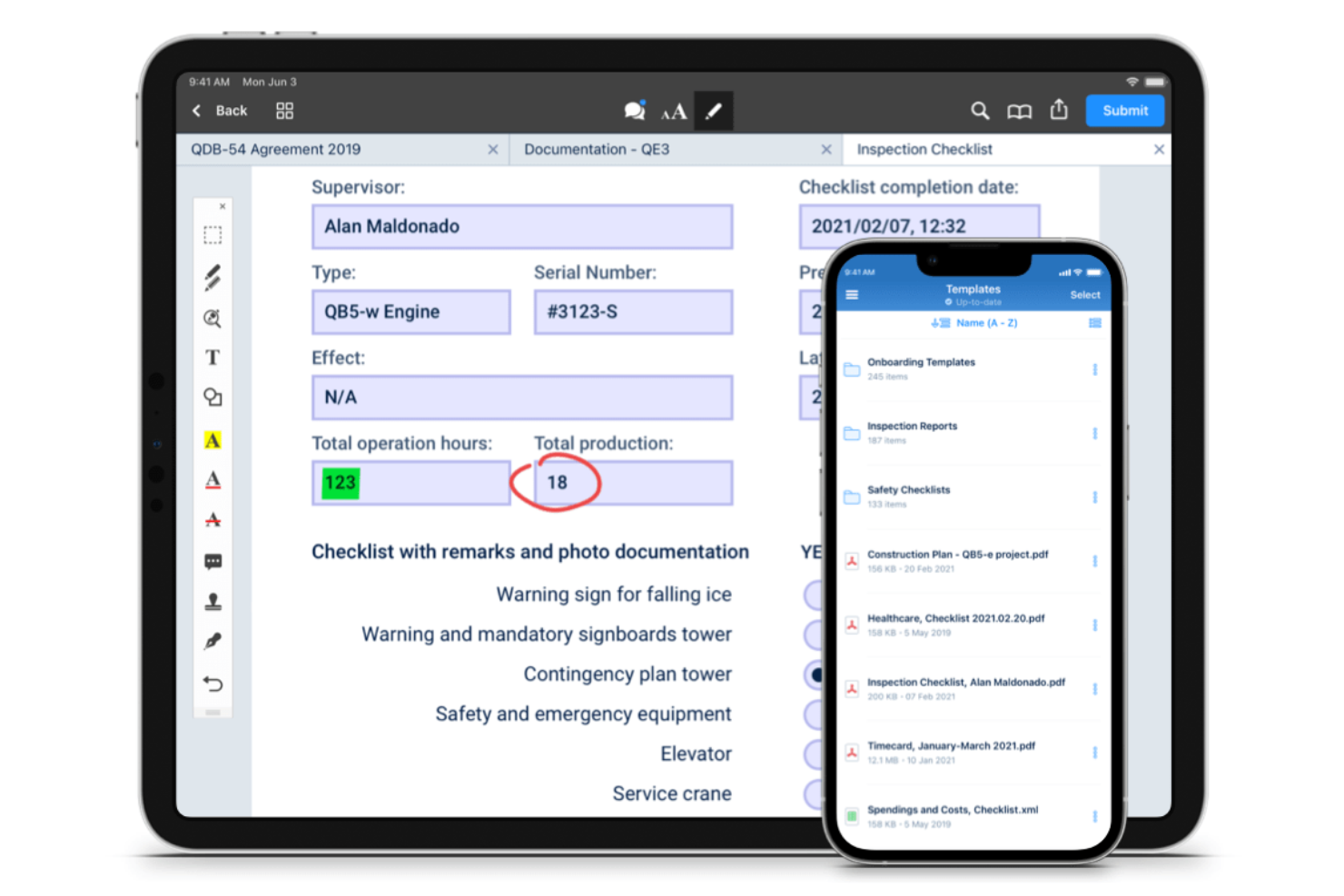
Fluix stands out for teams that need to manage documents and workflows on mobile devices, especially in field service, construction, and energy sectors. It’s built for organizations with distributed or remote teams who need to fill out forms, collect signatures, and route documents while on the move. Fluix helps businesses keep mobile document processes organized, compliant, and connected to back-office systems.
Why I Picked Fluix
For organizations that need to manage documents in the field, Fluix offers a mobile-first approach that’s hard to match. I picked Fluix because it lets teams fill out forms, annotate PDFs, and collect signatures directly on tablets and smartphones, even when offline. The workflow automation tools help route documents for review or approval without requiring a desktop. These features make Fluix a strong choice for businesses that need reliable document management on the go.
Fluix Key Features
Some other features that make Fluix useful for document management teams include:
- Role-Based Access Controls: Assign permissions to users based on their role or project.
- Automated Document Distribution: Distribute updated documents to specific teams or devices automatically.
- Audit Trails: Track document activity and user actions for compliance.
- Integration with Cloud Storage: Connect Fluix to platforms like Box, Dropbox, and Google Drive for file syncing.
Fluix Integrations
Integrations include Airtable, Procore, HubSpot, Salesforce, Power BI, Domo, Qlik, Tableau, Smartsheet, and Dropbox.
Pros and Cons
Pros:
- Real-time document status tracking
- Native PDF form filling and annotation
- Built-in workflow automation for approvals
Cons:
- The bulk document upload process is manual
- Lacks native e-signature integration

Best for multilingual document support
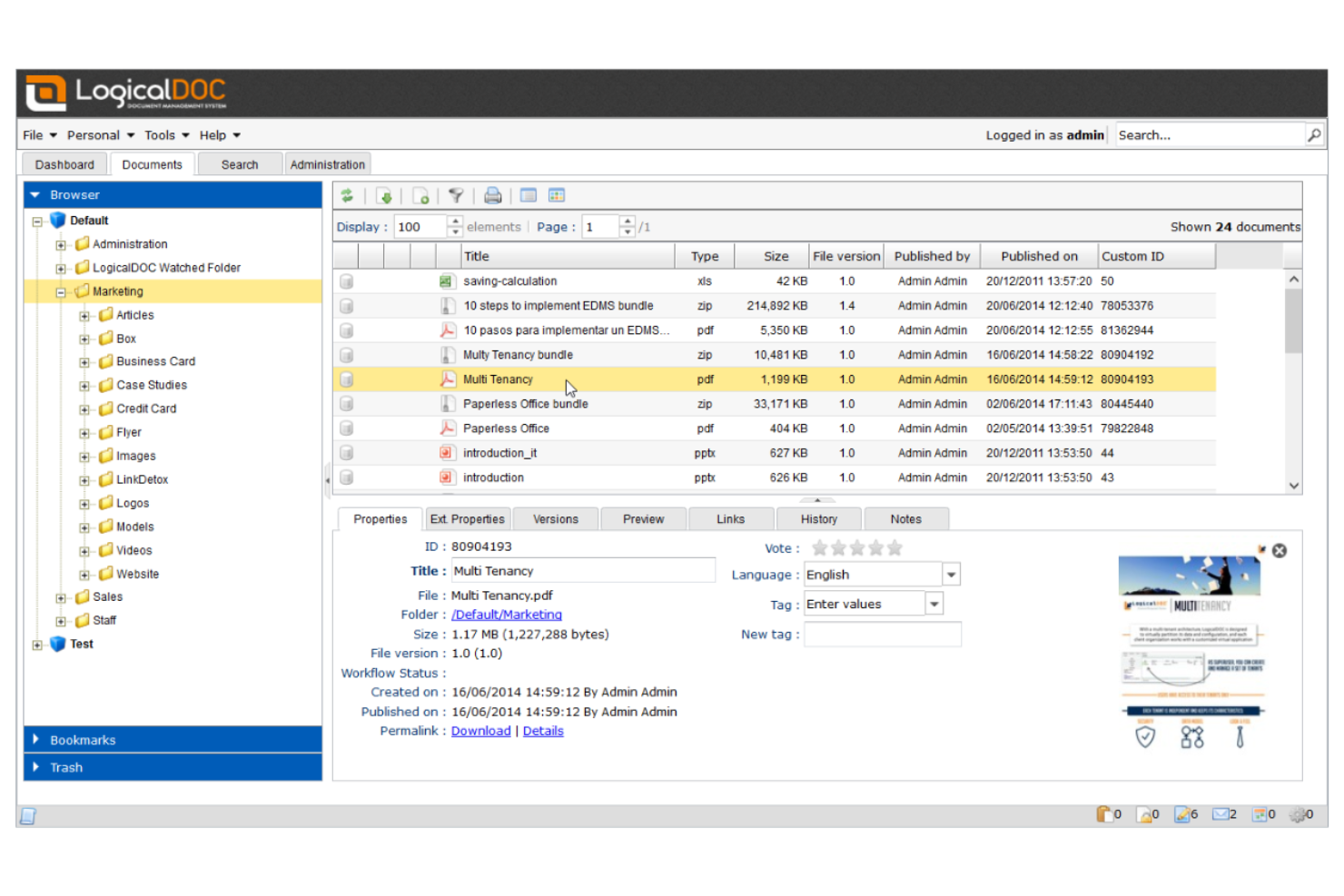
LogicalDOC is designed for organizations that need to manage documents in multiple languages across distributed teams. It’s especially useful for international businesses, legal teams, or any group handling multilingual content and compliance requirements. If your workflows depend on accurate language support and localization, LogicalDOC addresses those needs with its multilingual interface and metadata management.
Why I Picked LogicalDOC
For teams that need to manage documents in several languages, LogicalDOC offers multilingual support that’s hard to match. I picked LogicalDOC because it provides a user interface available in over a dozen languages and supports multilingual metadata, making it easier to organize and retrieve documents regardless of language. The platform also allows you to set language preferences for individual users, which helps global teams work more efficiently. These features make LogicalDOC a strong choice for organizations with international operations or diverse language requirements.
LogicalDOC Key Features
Some other features that make LogicalDOC useful for document management include:
- Version Control: Track document changes and maintain a full revision history for every file.
- Workflow Automation: Design and automate document approval and review processes.
- Full-Text Search: Search for documents using keywords found within the content, not just file names.
- Role-Based Access Control: Assign permissions based on user roles to manage document visibility and actions.
LogicalDOC Integrations
Integrations include WordPress, Joomla, Dropbox, Microsoft Office, Microsoft Outlook, OnlyOffice, Google Drive, Google Calendar, ShareFile, and Docusign.
Pros and Cons
Pros:
- Full-text search indexes multiple file formats
- Workflow automation includes visual process designer
- Multilingual interface supports over 15 languages
Cons:
- Limited collaboration tools for real-time editing
- Mobile app lacks advanced document features

FileHold
Best for regulatory compliance features
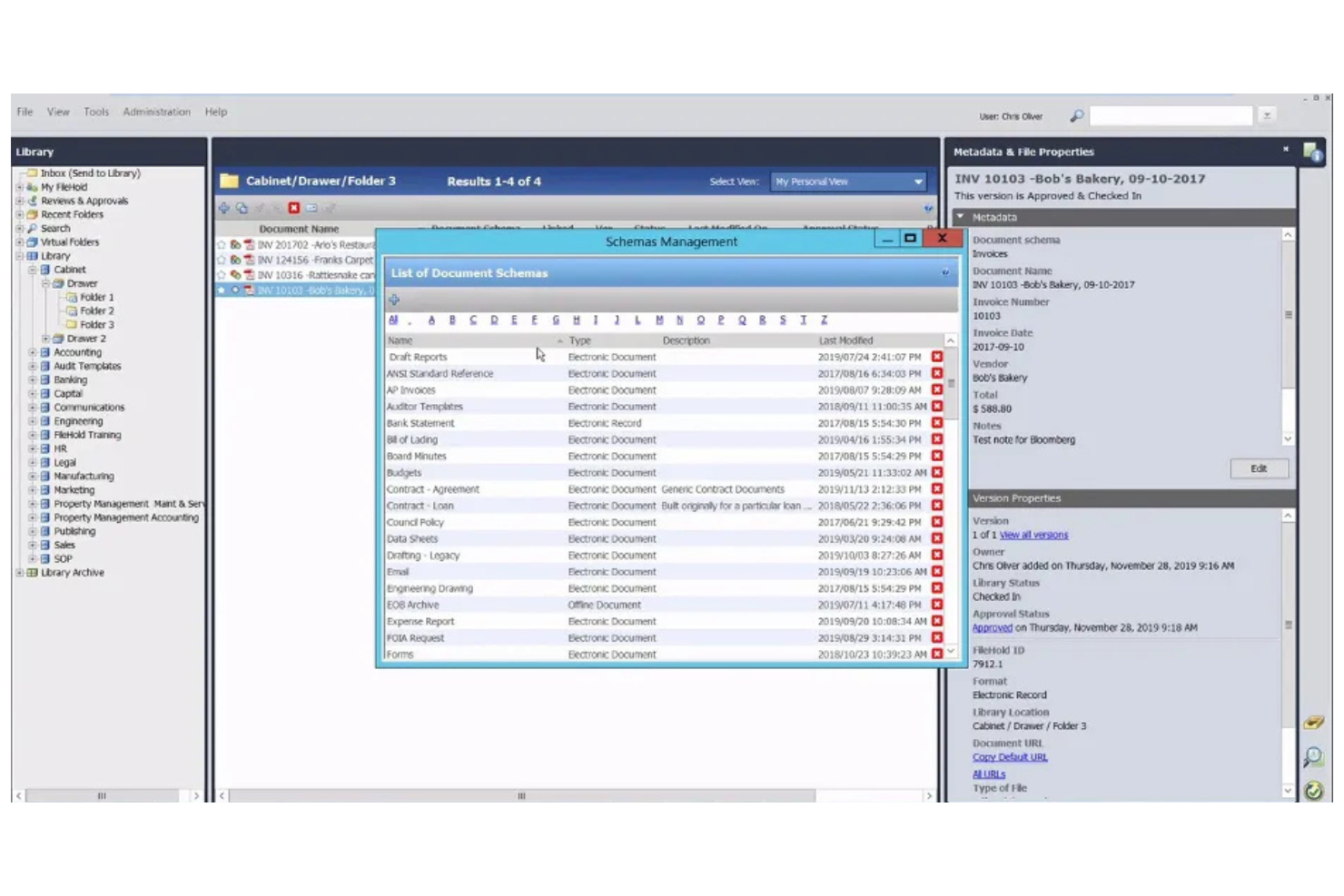
FileHold is purpose-built for organizations that need to meet strict regulatory and compliance requirements in their document management. It’s especially relevant for industries like healthcare, finance, and government, where audit trails and document control are non-negotiable. FileHold helps teams manage sensitive records, enforce retention policies, and maintain compliance with industry standards.
Why I Picked FileHold
When regulatory compliance is a top priority, FileHold stands out for its specialized controls and audit capabilities. I picked FileHold because it offers detailed document lifecycle management, including retention scheduling and automated disposition, which are essential for meeting industry regulations. The system also provides full audit trails and electronic signatures, helping organizations prove compliance during audits. For teams that need to demonstrate strict control over sensitive documents, FileHold’s compliance-focused features make it a strong choice.
FileHold Key Features
In addition to its compliance-focused controls, FileHold offers several other features for document management:
- Document Scanning and Capture: Import paper documents directly into the system using integrated scanning tools.
- Metadata Tagging: Assign custom metadata fields to documents for advanced search and organization.
- Role-Based Access Controls: Set user permissions at multiple levels to manage who can view, edit, or delete documents.
- Mobile Access: Access and manage documents securely from mobile devices through dedicated apps.
FileHold Integrations
Integrations include Microsoft Office, Adobe Acrobat Sign, Docusign, Salesforce, QuickBooks, SAP, Sage 300, Microsoft Dynamics GP, ABBYY FlexiCapture, and Kofax Capture.
Pros and Cons
Pros:
- Detailed audit trails for all document actions
- Automated document retention and disposition
- FDA 21 CFR Part 11 compliance support
Cons:
- Limited web-based editing capabilities
- No built-in document co-authoring tools

Box
Best for advanced workflow automation

Box offers workflow automation and secure document management for teams working across multiple locations. It’s a strong fit for organizations that need to coordinate complex approval processes or manage sensitive files at scale. If your business relies on automating document-centric workflows and maintaining strict access controls, Box is designed to address those needs.
Why I Picked Box
Box stands out for its advanced workflow automation, which is essential for teams managing documents across global offices. I picked Box because its workflow builder lets you automate multi-step approval processes and set up custom triggers for document routing. The platform also supports conditional logic, so you can tailor workflows to match your organization’s unique requirements. These automation features help reduce manual work and keep document processes consistent, even when your team is distributed worldwide.
Box Key Features
Some other features in Box that support global document management include:
- Granular Permission Controls: Set detailed access levels for users and groups to protect sensitive documents.
- Version History: Track and restore previous versions of files to maintain document integrity.
- Document Watermarking: Apply customizable watermarks to files for added security and traceability.
- Global Data Residency Options: Choose where your data is stored to meet regional compliance requirements.
Box Integrations
Integrations include Microsoft 365, Google Workspace, Salesforce, Oracle NetSuite, Okta, Broadcom, Splunk, Palo Alto Networks, Adobe, and Slack.
Pros and Cons
Pros:
- Data residency options for compliance needs
- Granular permissions for global team access
- Workflow automation supports complex, multi-step processes
Cons:
- Advanced features require higher-tier plans
- Workflow automation setup can be time-consuming

Best with accounting software integration
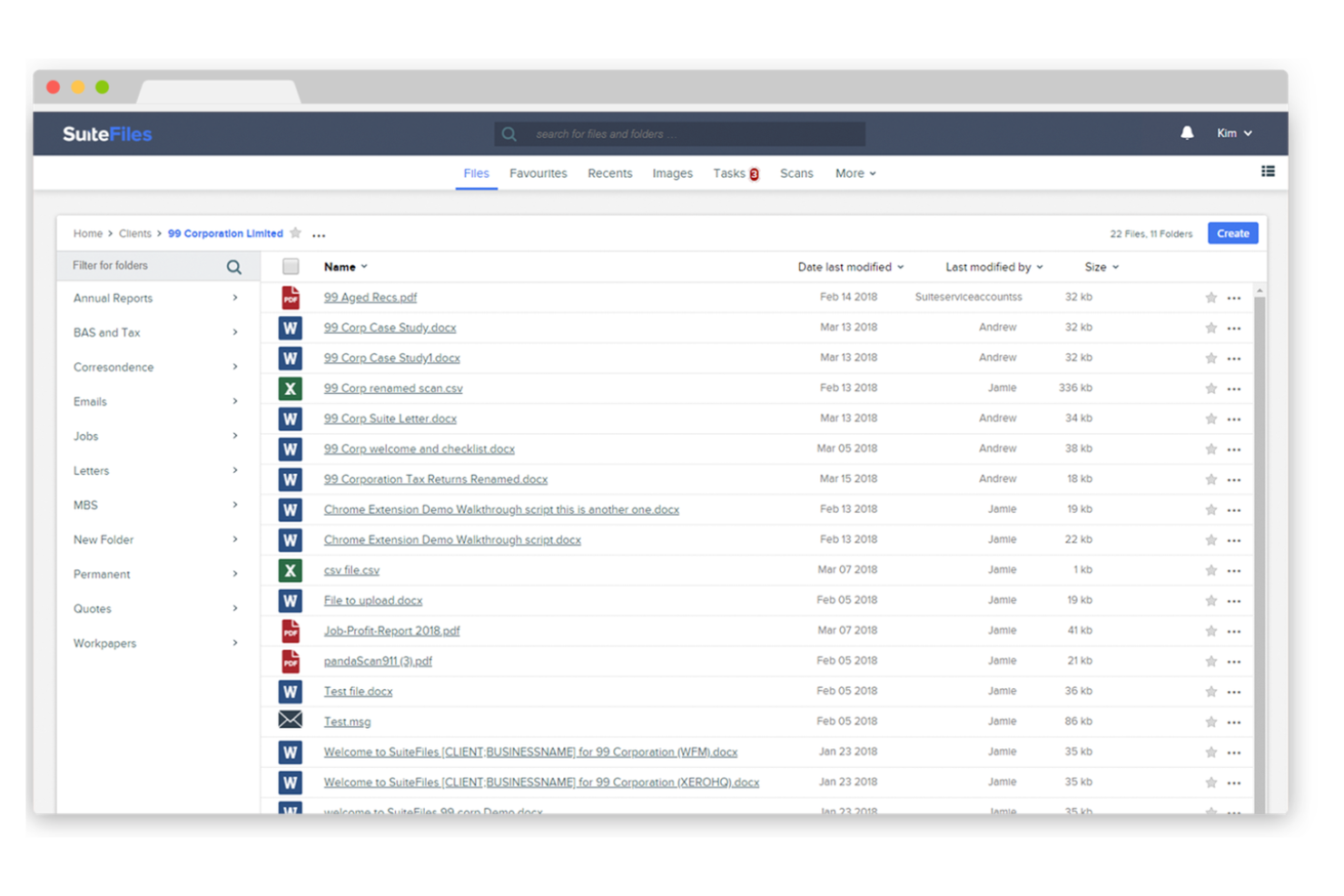
SuiteFiles is designed for firms that need tight integration between document management and accounting workflows. It’s especially useful for accounting practices, financial advisors, and professional services teams that rely on Xero or similar platforms. SuiteFiles helps teams centralize client files, automate document requests, and keep sensitive financial data organized and accessible.
Why I Picked SuiteFiles
When document management needs to work hand-in-hand with accounting software, SuiteFiles offers a purpose-built solution. I picked SuiteFiles because it provides direct integration with Xero Practice Manager, allowing teams to link client files, emails, and documents to accounting records without manual effort. The platform also supports secure client portals for document sharing and e-signatures, which helps accounting and finance teams manage sensitive information efficiently. These features make SuiteFiles a strong fit for firms that want to streamline both document and accounting workflows in one place.
SuiteFiles Key Features
Some other features that make SuiteFiles valuable for document management teams include:
- Document Templates: Create and use standardized templates for recurring documents and client communications.
- Automated Folder Creation: Set up rules to automatically generate folder structures for new clients or projects.
- Outlook Integration: Save emails and attachments directly from Outlook into SuiteFiles.
- PDF Editing: Annotate, merge, and edit PDF documents within the platform.
SuiteFiles Integrations
Integrations include Xero, Karbon, WorkflowMax, HubSpot, Microsoft 365, and QuickBooks Online.
Pros and Cons
Pros:
- Outlook add-in for saving emails to folders
- Secure client portal for document sharing
- Direct integration with Xero Practice Manager
Cons:
- Custom branding options are restricted
- Mobile app lacks advanced document features

Best with Microsoft 365 integration
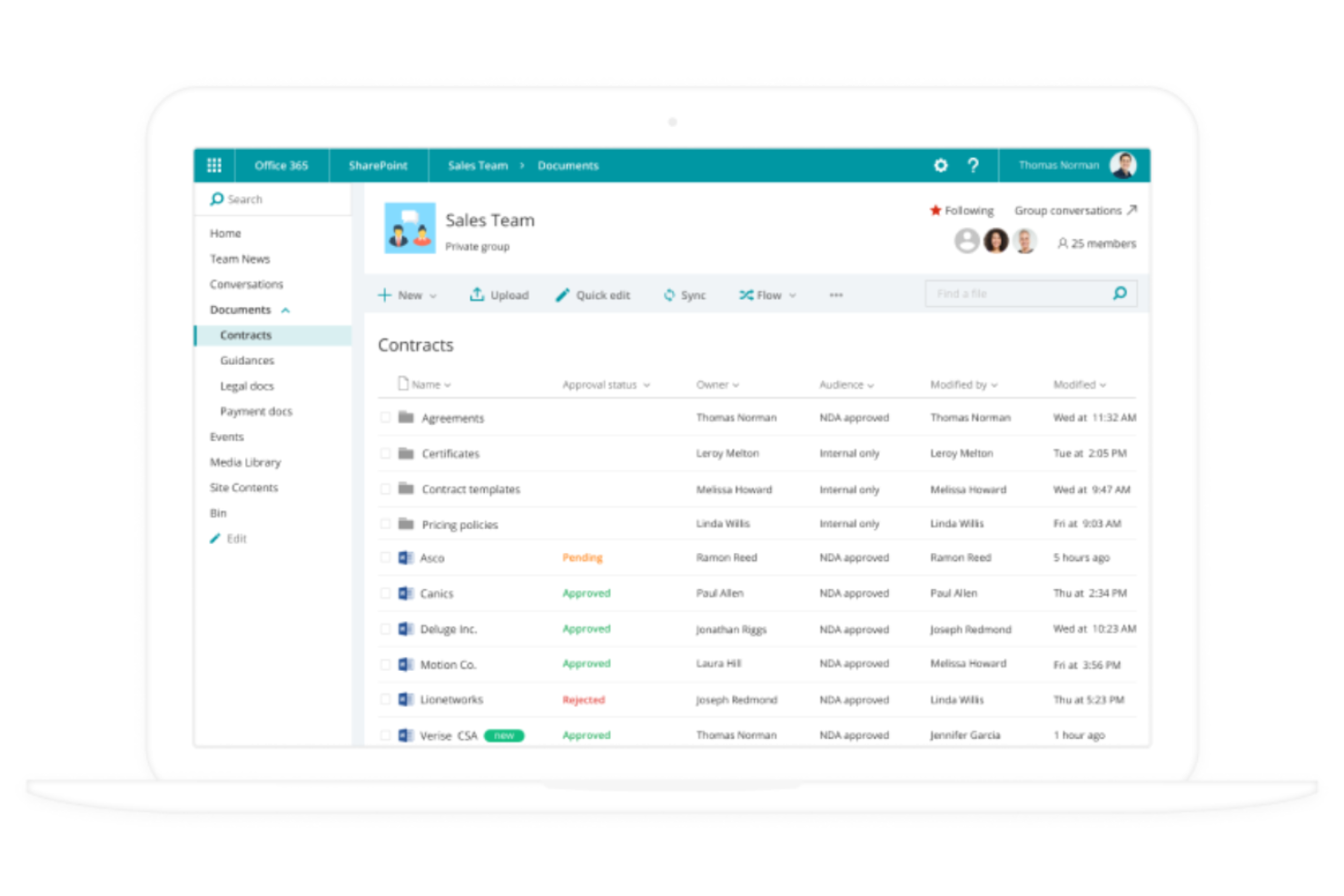
If your organization already relies on Microsoft 365, Microsoft SharePoint offers a familiar way to manage documents and collaborate across teams. It’s especially useful for enterprises and IT departments that need to centralize content, automate workflows, and control access within a secure Microsoft environment. SharePoint’s deep integration with Microsoft 365 apps helps teams connect files, conversations, and processes in one place.
Why I Picked Microsoft SharePoint
For teams already invested in Microsoft 365, SharePoint is a natural extension for managing documents at scale. I picked SharePoint because it lets you create centralized document libraries that sync with OneDrive and Teams, making file access and collaboration seamless across the Microsoft ecosystem. Its granular permission controls help organizations manage sensitive content and ensure compliance with internal policies. SharePoint’s workflow automation tools also support document approvals and versioning, which are essential for global teams handling complex projects.
Microsoft SharePoint Key Features
Some other features that make SharePoint valuable for document management include:
- Customizable Sites: Build internal sites and portals tailored to different teams or projects.
- Document Co-Authoring: Multiple users can edit documents simultaneously in real time.
- Enterprise Search: Search across all connected sites, libraries, and content with advanced filtering.
- Integration With Power Automate: Connect workflows to other Microsoft and third-party apps for process automation.
Microsoft SharePoint Integrations
Integrations include Microsoft Teams, OneDrive, Outlook, Word, Excel, PowerPoint, Microsoft Loop, Microsoft Forms, Microsoft Planner, and Microsoft Power Automate.
Pros and Cons
Pros:
- Granular access permissions for global teams
- Supports advanced document version control
- Deep integration with all Microsoft 365 apps
Cons:
- Storage limits depend on Microsoft 365 plan
- External sharing setup can be complex

Folderit
Best for small team collaboration
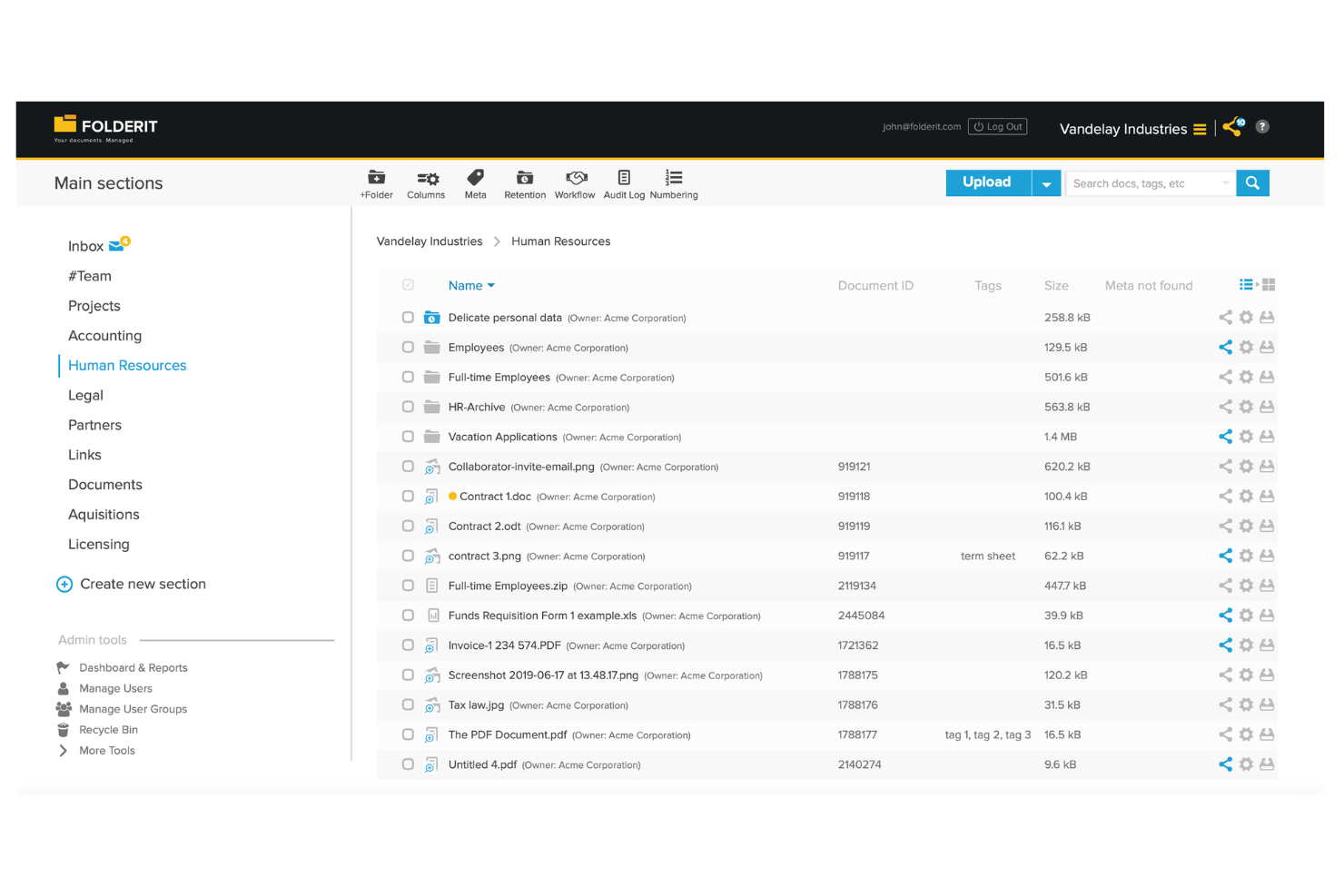
Folderit stands out for small teams that need a straightforward way to organize, share, and approve documents together. It’s a good fit for startups, nonprofits, or departments looking for simple collaboration tools without the complexity of enterprise systems. Folderit’s focus on easy sharing, granular permissions, and approval workflows helps teams keep everyone on the same page, even when working remotely.
Why I Picked Folderit
When small teams need a document management system that doesn’t overwhelm them with unnecessary complexity, Folderit is a strong choice. I picked Folderit because it offers built-in approval workflows and granular permission controls, which help teams collaborate securely and transparently. The platform’s document sharing features let users invite colleagues or external partners to view or edit files, making it easy to keep everyone involved. These collaboration-focused tools make Folderit especially useful for teams that need to manage documents together without the overhead of a large enterprise system.
Folderit Key Features
Some other features that make Folderit appealing for document management include:
- Automated Retention Scheduling: Set rules for how long documents are kept before automatic deletion or archiving.
- Document Linking: Connect related files together for easier cross-referencing and navigation.
- Audit Trail: Track every action taken on a document, including views, edits, and downloads.
- Custom Metadata Fields: Add searchable tags and fields to documents for more precise organization and retrieval.
Folderit Integrations
Native integrations are not currently listed. An API is available for custom integrations.
Pros and Cons
Pros:
- Custom metadata fields support advanced search
- Automated retention scheduling for compliance needs
- Approval workflow is built into document sharing
Cons:
- Bulk upload speed can be inconsistent
- No native integrations with third-party tools

Egnyte
Best for granular access controls

Egnyte is built for organizations that need precise control over document access and sharing. It’s a strong fit for businesses in regulated industries or those managing sensitive data across global teams. If your priorities include setting detailed permissions and monitoring document activity, Egnyte addresses those needs with its granular access controls.
Why I Picked Egnyte
When you need to manage sensitive documents across multiple teams and regions, Egnyte stands out for its granular access controls. I picked Egnyte because it lets you set detailed permissions at the folder, subfolder, and even file level, so you can tailor access for different users and groups. The platform also includes audit trails and real-time activity monitoring, which help you track who accessed or modified documents. These features make Egnyte a strong choice for organizations that need to balance collaboration with strict data security requirements.
Egnyte Key Features
In addition to its detailed permission settings, Egnyte offers several other features for document management:
- Hybrid Cloud Storage: Store and access files both in the cloud and on-premises, supporting flexible deployment needs.
- Document Collaboration Tools: Annotate, comment, and co-edit documents directly within the platform.
- Automated File Classification: Use AI-driven tagging and classification to organize documents based on content and sensitivity.
- Mobile Access App: Access, share, and manage documents securely from iOS and Android devices.
Egnyte Integrations
Integrations include Microsoft 365, Google Workspace, Salesforce, Slack, Procore, Autodesk, Box, Dropbox, AWS, and Azure.
Pros and Cons
Pros:
- Automated file classification uses AI tagging
- Hybrid storage supports both cloud and on-premises
- Permission settings support file-level access control
Cons:
- Limited built-in document editing capabilities
- External sharing requires extra configuration steps

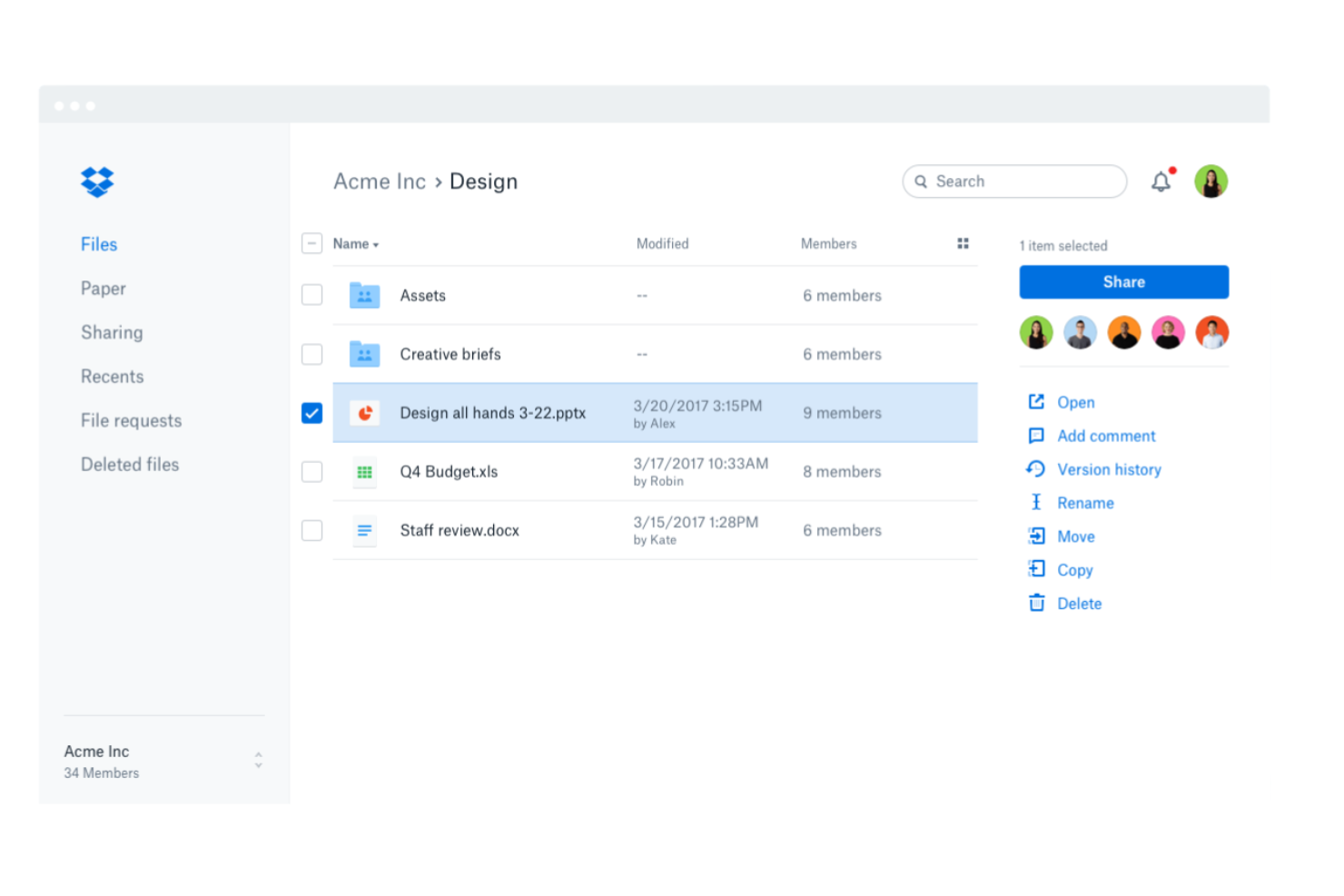
Dropbox Business is designed for teams that need reliable file syncing across devices and operating systems. It’s especially useful for organizations with distributed teams or those working in hybrid environments where seamless access to documents is essential. If your business depends on sharing and updating files from anywhere, Dropbox Business addresses those needs with its cross-platform capabilities.
Why I Picked Dropbox Business
For teams that need to keep files updated and accessible across different devices and operating systems, Dropbox Business delivers reliable cross-platform file syncing. I picked Dropbox Business because it automatically syncs changes in real time, so everyone always has the latest version of a document, no matter where they’re working. The Smart Sync feature lets you access all your files from your desktop without taking up local storage. These syncing capabilities make Dropbox Business a strong choice for organizations managing documents globally and collaborating across locations.
Dropbox Business Key Features
Some other features in Dropbox Business that support global document management include:
- File Request Tool: Collect files from anyone, even if they don’t have a Dropbox account.
- Team Folder Management: Organize and control access to shared folders for different teams or projects.
- Document Scanning: Scan and upload physical documents directly into your Dropbox workspace.
- Advanced Link Sharing Controls: Set passwords, expiration dates, and permissions for shared links.
Dropbox Business Integrations
Integrations include Microsoft 365, Google Workspace, Slack, Zoom, Adobe, HubSpot, Autodesk, Canva, AWS, and Asana.
Pros and Cons
Pros:
- Advanced sharing controls manage link permissions
- File versioning supports recovery of previous edits
- Cross-platform syncing covers Windows, Mac, and Linux
Cons:
- Large file uploads can stall or timeout
- Admin controls lack detailed audit reporting

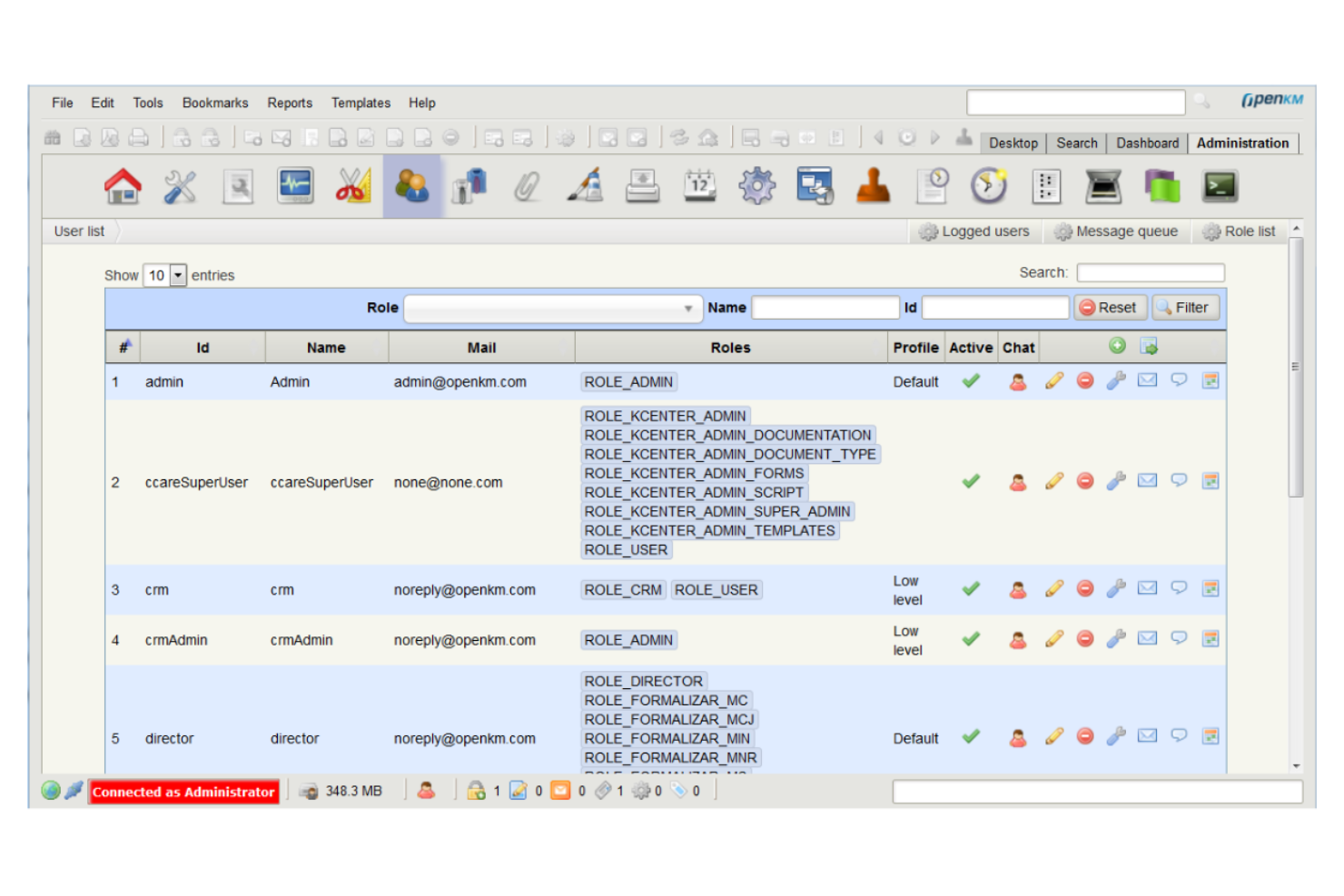
OpenKM gives organizations full control over their document management environment with an open-source platform built for customization. It’s a strong fit for IT teams, developers, and businesses with unique workflow or integration needs that can’t be met by off-the-shelf solutions. OpenKM helps teams design tailored document processes, automate tasks, and connect with other business systems through its flexible architecture.
Why I Picked OpenKM
For teams that need a document management system they can truly make their own, OpenKM’s open-source customization stands out. I picked OpenKM because it lets organizations modify workflows, user roles, and document structures to fit highly specific requirements. The platform supports custom scripting and API access, so you can automate processes or build unique integrations with other business tools. This level of flexibility is especially valuable for global teams with complex or evolving document management needs.
OpenKM Key Features
Some other features that make OpenKM useful for document management teams include:
- Version Control: Track document changes and maintain a full revision history for every file.
- Document Scanning: Capture and digitize paper documents directly into the system.
- Advanced Search: Locate files quickly using metadata, content, and full-text search options.
- Task Management: Assign, monitor, and manage document-related tasks within the platform.
OpenKM Integrations
Integrations include Kofax, ABBYY FlexiCapture, Cognitive Forms, Flexibar, Canon IW DS, Microsoft Office, Active Directory, LDAP, SSO, and CAS.
Pros and Cons
Pros:
- Granular permission controls for document security
- On-premises and cloud deployment options
- Source code access for deep system customization
Cons:
- Limited out-of-the-box third-party integrations
- No built-in e-signature integration
Diğer Küresel Belge Yönetim Sistemleri
İşte kısa listeme giremeyen ancak yine de göz atmaya değer bazı ek küresel belge yönetim sistemi seçenekleri:
- EisenVault
For on-premises deployment options
- Axero
For knowledge base management
- OpenText
For large-scale enterprise deployments
- M-Files
For metadata-driven organization
- Revver
For configurable approval processes
- DocuWare
For workflow automation features
- OpenDocMan
For simple open source document control
- IRIS Document Management
For automated document classification
- ONLYOFFICE Workspace
With integrated document editing tools


How I Evaluate Global Document Management Systems
Global document management systems are the operational backbone for multinational teams that need to control who accesses contracts in Singapore, meet GDPR retention rules in Germany, and keep a single version of a critical policy document across every office. When I evaluate tools in this space, I look at two things: whether a platform clears the baseline requirements every serious DMS has to meet, and what actually makes it a better fit than everything else on the list.
Core Functionality (Table Stakes for This List)
For global document management systems, the core functionality I test and evaluate is:
- Centralized Repository: I check whether teams in different regions can store, organize, and access files from one source of truth without latency or sync issues.
- Access Controls: Role-based permissions matter, especially when external partners or clients need restricted folder access alongside internal users across subsidiaries.
- Version Control: I evaluate how the system tracks revisions when a policy document passes through legal in London, compliance in New York, and operations in Tokyo.
- Enterprise Search: Full-text search across document content is the baseline. I also look for OCR on scanned files and metadata filtering to cut retrieval time.
- Document Security: Encryption at rest and in transit, SSO, and MFA support are non-negotiable. I check for extras like watermarking and expiring share links.
- Audit Trails: Every view, edit, download, and share needs a timestamp and user ID. This is how you prove compliance to auditors across multiple regulatory regimes.
- Workflow Automation: Approval routing, review cycles, and retention enforcement should keep moving across time zones without manual handoffs slowing things down.
- Integration Ecosystem: I look for native connections to Microsoft 365, Google Workspace, Salesforce, ERP platforms, and e-signature tools like DocuSign or Adobe Sign.
A tool has to deliver most of these capabilities to earn a spot on the list. From there, I consider what sets each tool apart.
Standout Features (What Separates the Picks)
I look for multilingual user interfaces and metadata support since global teams expect to navigate and tag documents in their language. AI-powered automation—like intelligent classification, smart search, or content recommendations—can save hours when teams are managing millions of files across regions. I also consider advanced data residency controls that let you select storage jurisdictions, which is critical for compliance when handling cross-border document workflows.
What I Weigh Beyond Features
Deployment flexibility matters here. I evaluate whether a platform offers cloud, on-premise, and hybrid options, since regulated industries like pharma and government often need on-premise control. I also consider multi-regulatory compliance coverage—GDPR, HIPAA, SOX, and FDA 21 CFR Part 11 certifications tell me a lot about who the tool is built for. Finally, I check for 24/7 global support availability and migration tooling, because rolling out a DMS across multiple offices without strong onboarding resources is a project risk I've seen derail adoptions.
Küresel Bir Belge Yönetim Sistemi Nasıl Seçilir?
Uzun özellik listeleri ve karmaşık fiyatlandırma yapıları arasında kaybolmak kolaydır. Kendinize özgü yazılım seçim sürecinizi yürütürken odağınızı korumanıza yardımcı olmak için göz önünde bulundurmanız gereken faktörleri içeren bir kontrol listesi hazırladım:
| Faktör | Göz önünde bulundurulacaklar |
|---|---|
| Ölçeklenebilirlik | Sistem, belge hacminizi ve kullanıcı sayısındaki artışı zaman içinde yönetebilecek mi? Gelecekteki genişlemeyi, birden fazla site gereksinimlerini ve depolama sınırlarını göz önünde bulundurun. |
| Entegrasyonlar | Araç, mevcut platformlarınıza (ör. CRM, ERP, bulut depolama) yerel olarak bağlanabiliyor mu? Teknoloji yığınınızla uyumluluğunu kontrol edin. |
| Özelleştirilebilirlik | İş akışlarını, izinleri ve belge şablonlarını kuruluşunuzun süreçlerine göre uyarlayabiliyor musunuz? Geçici çözümlere zorlayan katı sistemlerden kaçının. |
| Kullanım kolaylığı | Ekibiniz aracı hızlı bir şekilde benimseyecek mi? Kullanıcı dostu gezinme, anlaşılır etiketler ve asgari eğitim gereksinimleri arayın. |
| Uygulama ve kullanıma alıştırma | Sistemi kurup çalışır duruma getirmek ne kadar sürecek? Taşıma desteğini, kullanıma alıştırma kaynaklarını ve tedarikçinin benzer kullanıma alma projelerindeki geçmiş performansını değerlendirin. |
| Maliyet | Fiyatlandırma katmanları şeffaf ve öngörülebilir mi? Bütçenizi etkileyebilecek kullanıcı lisanslarını, depolama alanını ve ek ücretleri hesaba katın. |
| Güvenlik önlemleri | Sistem şifreleme, erişim denetimleri ve denetim izleri sunuyor mu? Kuruluşunuzun veri koruma standartlarını karşıladığından emin olun. |
| Uyumluluk gereksinimleri | Araç, sektörünüzün düzenleyici gereksinimlerini (ör. GDPR, HIPAA) destekliyor mu? Karar vermeden önce sertifikaları ve denetim desteğini doğrulayın. |
Küresel Belge Yönetim Sistemi Nedir?
Küresel bir belge yönetim sistemi (DMS), kuruluşların elektronik belgeleri birden fazla konumda depolamasına, düzenlemesine ve bunlara erişimi kontrol etmesine yardımcı olan bir belge yönetimi çözümüdür. Bu tür bir belge yönetimi yazılımı, içerik yönetimini destekler ve dosyaların dağınık ekipler tarafından güvenli bir şekilde erişilebilir olmasını sağlar.
Modern DMS platformları genellikle belgelerden veri çıkarmak için OCR gibi yapay zekâ destekli özellikler içerir; bu da aranabilirliği artırır ve manuel çalışmayı azaltır. Bu sistemler ayrıca kimlik doğrulamayı destekleyerek işletmelerin verimli iş süreçlerini sürdürürken hassas bilgileri korumasına yardımcı olur.
Küresel Belge Yönetim Sistemlerinin Özellikleri
Belge yönetimi yazılımı seçerken aşağıdaki temel özelliklere dikkat edin:
- Merkezi belge depolama: Kolay erişim ve düzenleme için elektronik belgeleri tek bir belge yönetimi çözümünde depolayın ve yönetin.
- Yapay zekâ destekli OCR: Taranmış dosyalardan veri yakalamak ve dizine eklemek için OCR teknolojisini kullanarak arama ve erişimi iyileştirin.
- Kullanıcı kimlik doğrulama ve erişim kontrolü: Hassas içerikleri korumak ve kullanıcı erişimini kontrol etmek için kimlik doğrulama kuralları ve izinler belirleyin.
- İş akışı otomasyonu: Belgeleri onay ve inceleme iş akışları üzerinden yönlendirerek iş süreçlerini otomatikleştirin.
- Sürüm kontrolü: Belge değişikliklerini izleyin ve güncellemelerin eksiksiz geçmişini koruyun.
- Bildirimler ve uyarılar: İş akışlarının ilerlemesini sağlamak için onaylar, güncellemeler ve gerekli işlemler hakkında bildirimler alın.
- Gelişmiş arama: Üst verileri, anahtar kelimeleri ve tam metin aramasını kullanarak belgeleri hızlıca bulun.
- İçerik yönetimi özellikleri: Dosyaları yapılandırılmış klasörler, etiketler ve üst verilerle düzenleyin ve yönetin.
- Modüler işlevsellik: Her modülü iş gereksinimlerine ve belge iş akışlarına göre ekleyin veya özelleştirin.
- Mobil erişim: Uzaktan çalışan ve küresel ekipleri desteklemek için belgelere herhangi bir cihazdan erişin ve belgeleri yönetin.
Küresel Belge Yönetim Sistemlerinin Faydaları
Küresel bir belge yönetim sisteminin uygulanması, ekibiniz ve işletmeniz için çeşitli faydalar sağlar. Yararlanabileceğiniz birkaç fayda şunlardır:
- Merkezi bilgi erişimi: Ekipler belgeleri tek ve düzenli bir depodan bulup alabilir, böylece dosya aramak için harcanan zaman azalır.
- Geliştirilmiş güvenlik ve uyumluluk: Rollere dayalı izinler, denetim izleri ve saklama politikaları hassas verilerin korunmasına ve düzenleyici gereksinimlerin karşılanmasına yardımcı olur.
- Kolaylaştırılmış iş birliği: Otomatik iş akışı yönlendirmesi ve güvenli dosya paylaşımı, ekiplerin farklı konumlarda olsalar bile belgeleri verimli bir şekilde incelemesine, onaylamasına ve güncellemesine olanak tanır.
- Tutarlı sürüm kontrolü: Sürüm takibi, herkesin en güncel belgeyle çalışmasını sağlayarak eski dosyaların neden olduğu hataları ve karışıklığı en aza indirir.
- Ölçeklenebilir belge yönetimi: Sistem, artan belge hacimlerini ve kullanıcı sayılarını yönetebilir; düzen veya kontrolden ödün vermeden işletmenin büyümesini destekler.
- Geliştirilmiş uzaktan verimlilik: Mobil erişim ve bulut tabanlı özellikler, dağınık ekiplerin ve saha ekiplerinin belgeleri ve onayları her yerden yönetmesine olanak tanır.
- Azaltılmış manuel iş yükü: Belge yönlendirme, saklama ve erişim yönetiminin otomatikleştirilmesi, daha yüksek değerli görevler için zaman kazandırır.
Küresel Belge Yönetim Sisteminin Maliyetleri ve Fiyatlandırması
Küresel bir belge yönetim sistemi seçmek, mevcut çeşitli fiyatlandırma modellerinin ve planların anlaşılmasını gerektirir. Maliyetler özelliklere, ekip büyüklüğüne, eklentilere ve diğer unsurlara göre değişir. Aşağıdaki tablo, küresel belge yönetim sistemi çözümlerinde yaygın planları, ortalama fiyatlarını ve genellikle sunulan özellikleri özetlemektedir:
Küresel Belge Yönetim Sistemi İçin Plan Karşılaştırma Tablosu
| Plan Türü | Ortalama Fiyat | Yaygın Özellikler |
|---|---|---|
| Ücretsiz Plan | $0 | Temel belge depolama, sınırlı kullanıcı erişimi, basit paylaşım ve temel arama işlevi. |
| Kişisel Plan | $5-$15/kullanıcı/ay | Bireysel belge yönetimi, geliştirilmiş arama, mobil erişim ve sınırlı entegrasyonlar. |
| İşletme Planı | $15-$40/kullanıcı/ay | Ekip iş birliği araçları, iş akışı otomasyonu, rollere dayalı izinler, denetim izleri ve raporlama. |
| Kurumsal Plan | $40-$100/kullanıcı/ay | Gelişmiş güvenlik, uyumluluk araçları, özel entegrasyonlar, özel destek ve sınırsız depolama. |
Küresel Belge Yönetim Sistemi SSS
Küresel belge yönetim sistemleri hakkında sık sorulan soruların bazı yanıtları:
Küresel belge yönetim sistemleri uluslararası ekipleri nasıl destekler?
Küresel belge yönetim sistemleri, belgelere merkezi erişim, çok dilli arayüzler ve farklı bölgeler için uyumluluk araçları sağlayarak uluslararası ekipleri destekler. Bu, dağıtık ekiplerin konumdan bağımsız olarak iş birliği yapmasına, sürüm denetimini sürdürmesine ve yerel veri düzenlemelerine uymasına yardımcı olur.
Mevcut belgelerimi küresel bir belge yönetim sistemine taşıyabilir miyim?
Evet, çoğu küresel belge yönetim sistemi mevcut dosyaları ve klasör yapılarını içe aktarmanıza yardımcı olacak taşıma araçları veya hizmetleri sunar. Geçişi kolaylaştırmak için toplu yüklemeleri, meta veri eşlemesini ve mevcut depolama platformlarınızla entegrasyonu destekleyen çözümleri tercih edin.
Küresel bir belge yönetim sisteminden hangi güvenlik önlemlerini beklemeliyim?
Beklemeniz gereken özellikler arasında bekleyen verilerin ve aktarım halindeki verilerin şifrelenmesi, role dayalı erişim denetimleri, denetim günlükleri ve düzenli güvenlik güncellemeleri bulunur. Bu önlemler hassas bilgilerin korunmasına ve sektör standartları ile düzenlemelere uyulmasına yardımcı olur.
Bu sistemler belge sürüm oluşturma ve denetim izlerini nasıl yönetir?
Küresel belge yönetim sistemleri belge değişikliklerini otomatik olarak izler, sürüm geçmişlerini tutar ve kullanıcı işlemlerini günlüğe kaydeder. Bu, önceki sürümleri geri yüklemenize, etkinlikleri izlemenize ve denetimler sırasında uyumluluğu göstermenize olanak tanır.
Sorunlarla karşılaşırsam ne tür destek alabilirim?
Çoğu sağlayıcı canlı sohbet, e-posta ve telefon desteği gibi birden fazla destek kanalı sunar. Bazıları ayrıca sorunları çözmenize ve sisteminizin değerini en üst düzeye çıkarmanıza yardımcı olmak için özel hesap yöneticileri, bilgi bankaları ve işe alım kaynakları sağlar.