


Recension av TrackVia programvara för arbetsflödeshantering 2026



TrackVia is a no-code workflow management software built for operations teams that need to digitize and track manufacturing, logistics, or field service workflows without depending on developers to build or maintain the tooling. I'd consider it over something like Appian if your team needs to spin up custom workflow apps quickly, without the implementation overhead and technical lift that typically comes with enterprise-grade low-code platforms.
TrackVia Evaluation Summary
- Pricing upon request
- Free demo available
Varför du kan lita på våra programvarurekommendationer
Vårt team har testat och recenserat programvara sedan 2012. Som projektledare själva vet vi hur
svårt — och viktigt — det är att välja rätt programvara.
För den här guiden utvärderade vi verktyg genom praktisk testning och oberoende research, och betygsatte verktygen enligt våra urvalskriterier. Vi drar även nytta av insikter från branschens tankeledare och praktiserande projektledningsexperter.
Våra recensioner speglar vårt mänskliga redaktionella omdöme, inte ett säljbudskap.
Expertgranskare:
TrackVia Overview
In my opinion, TrackVia is a strong option for workflow management, especially for industries that need highly customizable solutions. Its standout feature is the ability to tailor workflows to match unique processes, which makes it a great fit for regulated fields like healthcare and manufacturing. Overall, user reviews have praised the platform’s user-friendly interface and its ability to build and modify applications quickly.
While the platform excels in adaptability, it may offer fewer integration options compared to other tools. However, TrackVia is a solid choice for teams prioritizing customization and responsive customer support.

pros
-
Customizable workflows fit your team's specific needs
-
Strong customer support helps navigate any challenges
-
Streamlined tools simplify complex processes for greater efficiency
cons
-
User interface may feel less intuitive compared to some competitors
-
Requires a learning curve to fully leverage customization capabilities
-
Onboarding process could be more streamlined
-

Smartsheet
Visit WebsiteThis rating combines scores from multiple user review sites to reflect overall customer sentiment about the product.4.5 -
Celoxis
Visit WebsiteThis rating combines scores from multiple user review sites to reflect overall customer sentiment about the product.4.5 -
Accelo
Visit WebsiteThis rating combines scores from multiple user review sites to reflect overall customer sentiment about the product.4.4





Our Review Methodology
How We Test & Score Tools
We’ve spent years building, refining, and improving our software testing and scoring system. The rubric is designed to capture the nuances of software selection and what makes a tool effective, focusing on critical aspects of the decision-making process.
Below, you can see exactly how our testing and scoring works across seven criteria. It allows us to provide an unbiased evaluation of the software based on core functionality, standout features, ease of use, onboarding, customer support, integrations, customer reviews, and value for money.
Core Functionality (25% of final scoring)
The starting point of our evaluation is always the core functionality of the tool. Does it have the basic features and functions that a user would expect to see? Are any of those core features locked to higher-tiered pricing plans? At its core, we expect a tool to stand up against the baseline capabilities of its competitors.
Standout Features (25% of final scoring)
Next, we evaluate uncommon standout features that go above and beyond the core functionality typically found in tools of its kind. A high score reflects specialized or unique features that make the product faster, more efficient, or offer additional value to the user.
We also evaluate how easy it is to integrate with other tools typically found in the tech stack to expand the functionality and utility of the software. Tools offering plentiful native integrations, 3rd party connections, and API access to build custom integrations score best.
Ease of Use (10% of final scoring)
We consider how quick and easy it is to execute the tasks defined in the core functionality using the tool. High scoring software is well designed, intuitive to use, offers mobile apps, provides templates, and makes relatively complex tasks seem simple.
Onboarding (10% of final scoring)
We know how important rapid team adoption is for a new platform, so we evaluate how easy it is to learn and use a tool with minimal training. We evaluate how quickly a team member can get set up and start using the tool with no experience. High scoring solutions indicate little or no support is required.
Customer Support (10% of final scoring)
We review how quick and easy it is to get unstuck and find help by phone, live chat, or knowledge base. Tools and companies that provide real-time support score best, while chatbots score worst.
Customer Reviews (10% of final scoring)
Beyond our own testing and evaluation, we consider the net promoter score from current and past customers. We review their likelihood, given the option, to choose the tool again for the core functionality. A high scoring software reflects a high net promoter score from current or past customers.
Value for Money (10% of final scoring)
Lastly, in consideration of all the other criteria, we review the average price of entry level plans against the core features and consider the value of the other evaluation criteria. Software that delivers more, for less, will score higher.
Core Features
Customizable workflows: TrackVia offers a low-code/no-code platform that allows users to design and modify workflows tailored to their business processes. This flexibility helps streamline operations and reduce errors.
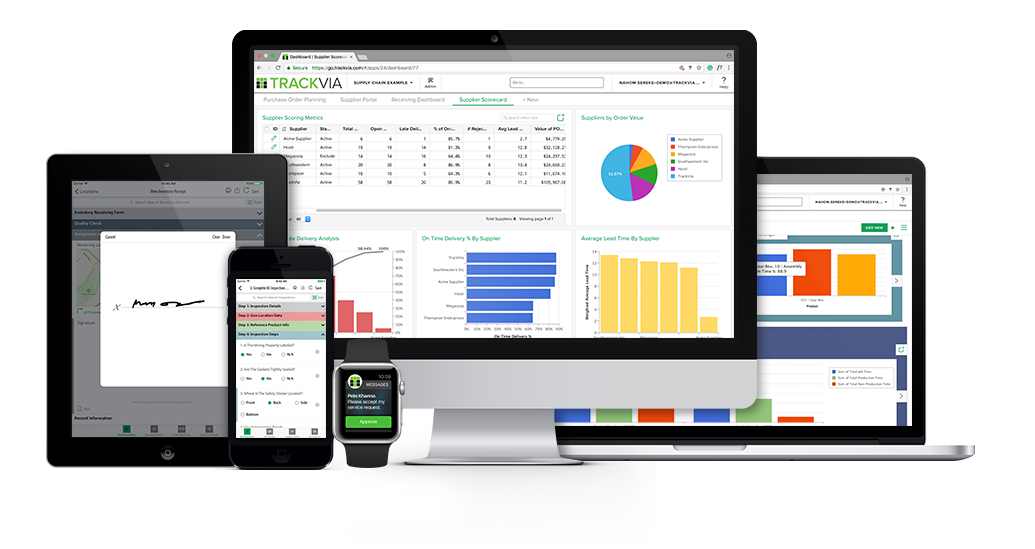
Dashboard views: TrackVia's dashboards display data from multiple linked tables on a single screen to provide a clear picture of projects and key metrics. Users can customize dashboards to help teams stay on track and make informed decisions.
Flow builder: The Flow builder in TrackVia enables users to design and adjust workflows without coding, using drag-and-drop functionality to control task sequences and automate actions. This intuitive tool allows for quick creation of processes that fit team needs.
Real-time reporting: TrackVia provides real-time reporting features that allow users to access up-to-the-minute data and insights. Reports can be customized to focus on the metrics most relevant to specific work, which can help facilitate swift decision-making.
Form builder: TrackVia's form builder allows users to create and customize data capture forms with drag-and-drop tools. Users can tailor fields, apply validation rules, and structure input for accurate and efficient data collection.
Mobile access: TrackVia offers mobile applications for iOS and Android devices that enable users to manage workflows and tasks on-the-go. This flexibility ensures teams remain productive, even when performing work outside of the office, such as field services.

Ease of Use
TrackVia provides an intuitive user experience with a drag-and-drop interface that makes it easy to design and adjust workflows, even without technical expertise. Although there may be a slight learning curve at first, the user-friendly layout helps teams adapt quickly.
Compared to other workflow tools, TrackVia offers flexibility and customization without being overly complex. Its mobile access and real-time reporting also enhance usability and help your team stay connected and informed from anywhere.
TrackVia Specs
- Access Management
- API
- Audit Management
- Batch Permissions & Access
- Calendar Management
- Collaboration Support
- Custom Data Forms
- Customer Management
- Dashboards
- Data Export
- Data Import
- Data Visualization
- Document Management
- External Integrations
- Form Builder
- Inventory Tracking
- Notifications
- Process Modeling
- Process Reporting
- Project Management
- Reports
- Status Notifications
- Supplier Management
- Task Scheduling/Tracking
- Third-Party Plugins/Add-Ons




TrackVia FAQs
How easy is it to customize workflows in TrackVia?
Can TrackVia handle industry-specific compliance needs?
What kind of support does TrackVia offer to new users?
How does TrackVia ensure data security?
Is TrackVia suitable for remote teams?
How scalable is TrackVia for growing businesses?
Can TrackVia integrate with our existing tools?
Vad händer härnäst?
Vill du komma i kontakt med andra digitala projektledare för att dela resurser och bästa praxis? Gå med i vår medlemscommunity och få tillgång till över 100 mallar, prover och exempel samt kom i kontakt med hundratals andra digitala projektledare på Slack.