


Recension av Microsoft To Do för uppgiftshanteringsprogram 2026



Microsoft To Do is a task management software for individuals and small teams who need a simple way to manage tasks, to-do lists, and daily priorities. I'd consider it over Todoist if your team already runs on Microsoft 365, as the native connections to Outlook, Teams, and Planner give you an integrated workflow that Todoist and other task management tools can't replicate without workarounds.
Microsoft To Do Evaluation Summary
- Free to use
- Free-forever plan available
Varför du kan lita på våra programvarurekommendationer
Vårt team har testat och recenserat programvara sedan 2012. Som projektledare själva vet vi hur
svårt — och viktigt — det är att välja rätt programvara.
För den här guiden utvärderade vi verktyg genom praktisk testning och oberoende research, och betygsatte verktygen enligt våra urvalskriterier. Vi drar även nytta av insikter från branschens tankeledare och praktiserande projektledningsexperter.
Våra recensioner speglar vårt mänskliga redaktionella omdöme, inte ett säljbudskap.
Expertgranskare:
Microsoft To Do Overview
In my opinion, Microsoft To Do is a task management tool that works especially well for teams already using Microsoft 365. Its strength lies in its simplicity and smooth integration with other Microsoft apps—such as Outlook, Teams, and Planner—that offers a unified experience across tools.
That said, the platform may not meet the needs of users seeking advanced project management features like Gantt charts, Kanban boards, or complex automations. It’s best suited for small to mid-sized teams looking for a simple, cost-effective option that fits into the Microsoft ecosystem.

pros
-
Intuitive interface for easy task organization
-
Seamless Microsoft 365 integration
-
Cross-device synchronization
cons
-
Limited advanced project management features
-
Basic customization options
-
Not ideal for large teams or detailed tracking
-

Smartsheet
Visit WebsiteThis rating combines scores from multiple user review sites to reflect overall customer sentiment about the product.4.5 -
Celoxis
Visit WebsiteThis rating combines scores from multiple user review sites to reflect overall customer sentiment about the product.4.5 -
Accelo
Visit WebsiteThis rating combines scores from multiple user review sites to reflect overall customer sentiment about the product.4.4





Our Review Methodology
How We Test & Score Tools
We’ve spent years building, refining, and improving our software testing and scoring system. The rubric is designed to capture the nuances of software selection and what makes a tool effective, focusing on critical aspects of the decision-making process.
Below, you can see exactly how our testing and scoring works across seven criteria. It allows us to provide an unbiased evaluation of the software based on core functionality, standout features, ease of use, onboarding, customer support, integrations, customer reviews, and value for money.
Core Functionality (25% of final scoring)
The starting point of our evaluation is always the core functionality of the tool. Does it have the basic features and functions that a user would expect to see? Are any of those core features locked to higher-tiered pricing plans? At its core, we expect a tool to stand up against the baseline capabilities of its competitors.
Standout Features (25% of final scoring)
Next, we evaluate uncommon standout features that go above and beyond the core functionality typically found in tools of its kind. A high score reflects specialized or unique features that make the product faster, more efficient, or offer additional value to the user.
We also evaluate how easy it is to integrate with other tools typically found in the tech stack to expand the functionality and utility of the software. Tools offering plentiful native integrations, 3rd party connections, and API access to build custom integrations score best.
Ease of Use (10% of final scoring)
We consider how quick and easy it is to execute the tasks defined in the core functionality using the tool. High scoring software is well designed, intuitive to use, offers mobile apps, provides templates, and makes relatively complex tasks seem simple.
Onboarding (10% of final scoring)
We know how important rapid team adoption is for a new platform, so we evaluate how easy it is to learn and use a tool with minimal training. We evaluate how quickly a team member can get set up and start using the tool with no experience. High scoring solutions indicate little or no support is required.
Customer Support (10% of final scoring)
We review how quick and easy it is to get unstuck and find help by phone, live chat, or knowledge base. Tools and companies that provide real-time support score best, while chatbots score worst.
Customer Reviews (10% of final scoring)
Beyond our own testing and evaluation, we consider the net promoter score from current and past customers. We review their likelihood, given the option, to choose the tool again for the core functionality. A high scoring software reflects a high net promoter score from current or past customers.
Value for Money (10% of final scoring)
Lastly, in consideration of all the other criteria, we review the average price of entry level plans against the core features and consider the value of the other evaluation criteria. Software that delivers more, for less, will score higher.
Core Features
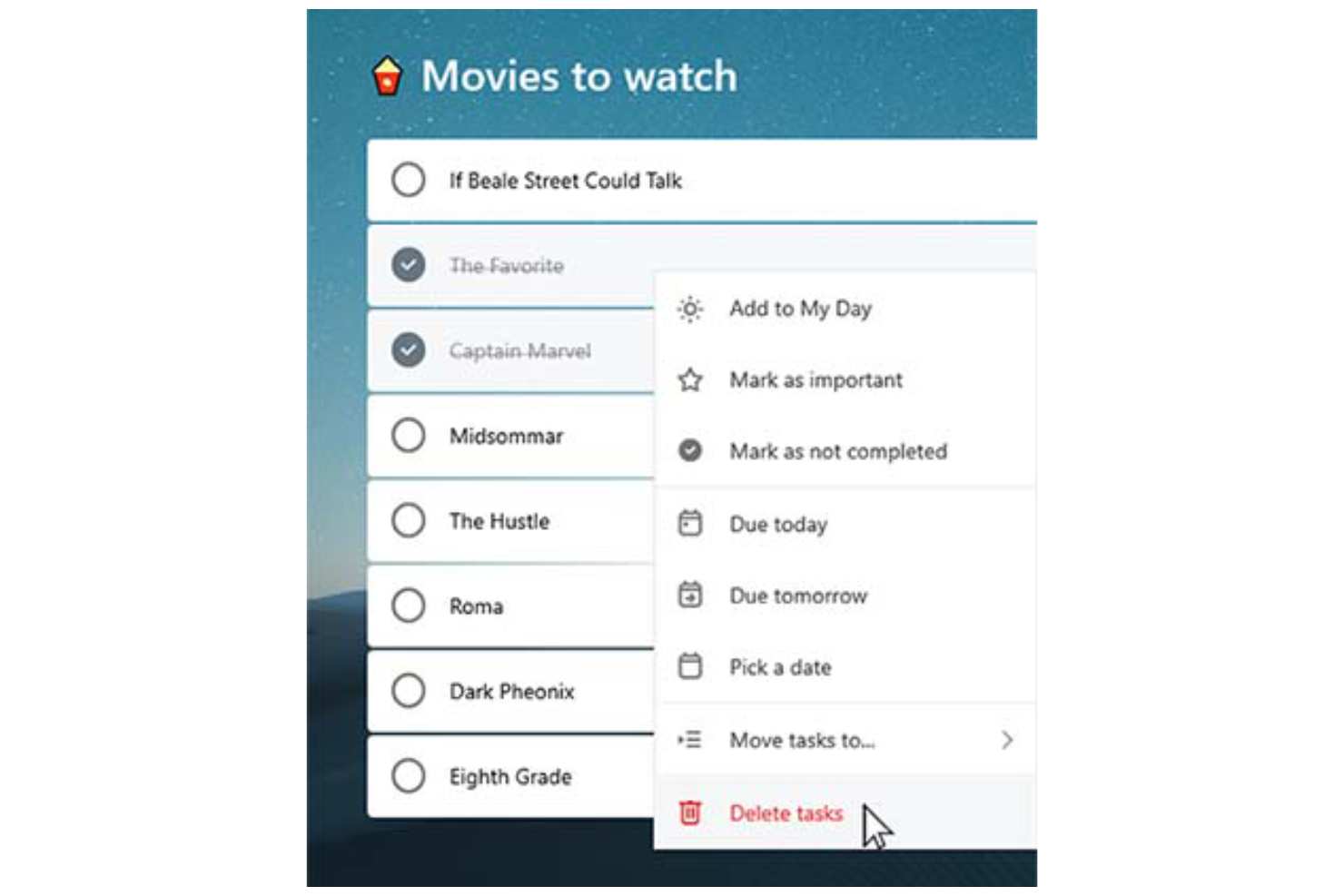
Task lists: You can create tasks, break them into smaller subtasks (called “steps”) and arrange them into organized to-do lists, making it easy to categorize, prioritize, and track various aspects of your professional or personal tasks.
Due dates: Set deadlines for each task to ensure timely completion. Due dates appear across your devices and sync with Outlook, which can help you manage schedules and meet project timelines consistently.
Reminders: You can set time-based reminders for tasks, so you never miss an important deadline. These notifications are designed to keep your team on-track and avoid last-minute rushes.
Recurring tasks: Schedule tasks to repeat at customizable intervals (daily, weekly, monthly, etc.). This is perfect for repetitive work like weekly reports, follow-ups, or administrative tasks.
Custom themes: You can personalize your task lists by applying different background themes and colors, making your workspace more visually appealing and easier to organize.
Priority levels: Assign priority tags (Important or Normal) to tasks. The “Important” tag adds the task to the "Important" smart list, helping you focus on high-priority work and better manage your workload.
Ease of Use
Microsoft To Do stands out with its clean, user-friendly interface that simplifies task management for you and your team. Features like drag-and-drop organization make it easy to rearrange tasks and update priorities on the fly.
The system’s integration with Microsoft 365 also enhances accessibility, allowing you to manage tasks across desktop (Mac or Windows), web, and mobile devices (including Android, iPhone, iPad, and Apple Watch). The mobile to-do list app, available on iOS and Android, ensures you can stay organized and productive wherever you are.
For simple and efficient task management, Microsoft To Do is a reliable choice.

Microsoft To Do Specs
- API
- Batch Permissions & Access
- Budgeting
- Calendar Management
- Collaboration Support
- Contact Management
- Contact Sharing
- Customer Management
- Dashboard
- Dashboards
- Data Export
- Data Import
- Data Visualization
- Dependency Tracking
- Document Sharing
- Expense Tracking
- External Integrations
- File Sharing
- Gantt Charts
- Kanban Boards
- Multi-User
- Notifications
- Project Management
- Resource Management
- Scheduling
- Task Scheduling/Tracking
- Third-Party Plugins/Add-Ons
- Time Management
- Travel Management
- Workflow Management
Alternatives to Microsoft To Do



Vanliga frågor om Microsoft To Do
Hur hanterar Microsoft To Do datasäkerhet?
Microsoft To Do bygger på Microsoft 365:s säkerhetsinfrastruktur, vilket innebär att tjänsten drar nytta av skydd på företagsnivå. Dina data skyddas med branschstandardiserade krypteringsprotokoll, inklusive kryptering i vila och under överföring. Uppgifter och annan användarinformation lagras i Microsofts globalt distribuerade datacenter, som är certifierade enligt internationella efterlevnadsstandarder som ISO/IEC 27001, SOC 1, 2 och 3 samt GDPR.
Dessutom stöder Microsoft To Do multifaktorautentisering (MFA) och rollbaserad åtkomstkontroll som en del av den bredare Microsoft-kontomiljön.
Kan jag använda Microsoft To Do offline?
Du kan använda Microsoft To Do offline för att visa och redigera dina uppgifter. Alla ändringar du gör synkroniseras automatiskt mellan dina enheter när du åter är online, så att allt hålls uppdaterat.
Har Microsoft To Do stöd för teamsamarbete?
Microsoft To Do stöder grundläggande teamsamarbete genom delade uppgiftslistor. Du kan bjuda in andra att ansluta till en lista, så att teammedlemmar kan visa, lägga till, slutföra och redigera uppgifter. Det gör tjänsten användbar för enkel samordning mellan små team eller inom avdelningar vid uppföljning av gemensamma ansvarsområden eller planering av checklistor.
Microsoft To Do innehåller dock inte avancerade samarbetsfunktioner som uppgiftskommentarer, aktivitetsuppföljning, samtidig redigering i realtid eller rollbaserade behörigheter. För mer omfattande projektsamarbete – till exempel sprintplanering, dokumentdelning eller teamchatt – kan team föredra integrerade produktivitetsverktyg som Microsoft Planner, Trello eller Asana.
Hur integreras Microsoft To Do med andra Microsoft-appar?
Microsoft To Do integreras med andra Microsoft-appar som Outlook och Teams. Du kan synkronisera uppgifter från Outlook-e-postmeddelanden och kalenderhändelser, vilket hjälper dig att hålla allt organiserat på ett ställe och förbättrar den övergripande produktiviteten.
Kan jag anpassa uppgiftsvyer i Microsoft To Do?
Microsoft To Do erbjuder begränsade möjligheter att anpassa uppgiftsvyer. Du kan sortera uppgifter efter förfallodatum, betydelse eller tillagt datum, men utöver det är anpassningsalternativen få. Tjänsten är utformad för att hålla saker enkla, så att du kan fokusera på att hantera uppgifter effektivt.
Finns det en mobilapp för Microsoft To Do?
Ja, Microsoft To Do erbjuder en mobilapp för både iOS- och Android-enheter. Appen synkroniseras automatiskt med webb- och datorversionerna via ditt Microsoft-konto, vilket säkerställer att dina uppgiftslistor och uppdateringar är tillgängliga på alla plattformar i realtid.
Med mobilappen kan du skapa, redigera och organisera nya uppgifter, ställa in påminnelser och markera objekt som slutförda när du är på språng, så att du kan hålla dig organiserad och produktiv var du än befinner dig.
Kan jag importera uppgifter från andra appar till Microsoft To Do?
Ja, du kan importera uppgifter till Microsoft To Do, särskilt från Outlook och andra verktyg i Microsofts ekosystem. Uppgifter i Outlook Tasks synkroniseras automatiskt med Microsoft To Do om du använder samma Microsoft-konto. Import av uppgifter från tredjepartsappar, som Todoist eller TickTick, kräver vanligtvis manuell inmatning eller användning av tredjepartsverktyg som Zapier eller Microsoft Power Automate för att automatisera migreringen.
Om du byter från en app med exportfunktion kan du eventuellt exportera dina uppgifter till en CSV-fil och manuellt lägga in dem igen eller skriva ett skript för att föra över dem till To Do, men det finns ingen inbyggd massimportfunktion för CSV- eller JSON-filer.
Microsoft To Do företagsöversikt & historik
Microsoft To Do är en molnbaserad app för aktivitetshantering som utvecklas av Microsoft, med bas i Redmond, Washington. Appen lanserades officiellt i april 2017 som efterföljare till Wunderlist, som Microsoft förvärvade i juni 2015 från den Berlinbaserade startupen 6Wunderkinder.
Som en del av Microsoft 365-paketet integreras den med tjänster som Outlook för att stödja produktiviteten. Appen låter användare hantera aktiviteter på olika enheter och erbjuder en enhetlig och sammanhängande upplevelse.
Viktiga milstolpar för Microsoft To Do
- 2015: Microsoft förvärvar Wunderlist.
- 2017: Microsoft To Do lanseras som efterföljare till Wunderlist.
- 2019: En större redesign gör Microsoft To Dos gränssnitt mer likt Wunderlists.
- 2020: Microsoft avvecklar officiellt Wunderlist för att fokusera på Microsoft To Do.
Vad händer härnäst?
Vill du komma i kontakt med andra digitala projektledare för att dela resurser och bästa praxis? Gå med i vår medlemscommunity och få tillgång till fler än 100 mallar, prover och exempel samt möjlighet att komma i kontakt med hundratals andra digitala projektledare på Slack.