


OneDesk-recension: Fördelar, nackdelar, funktioner & priser



OneDesk is a professional services automation software that combines help desk ticketing and project management in a single platform. It's worth a close look if your team handles both inbound client requests and ongoing project delivery work—and you're done juggling separate tools for each. Compared to something like Accelo, OneDesk is a stronger fit for smaller service teams that need ticket-to-task workflows and built-in client communication without the steeper learning curve or enterprise pricing.
OneDesk Evaluation Summary
- From $10.99/user/month (billed annually)
- Fee trial + free demo available
Varför du kan lita på våra programvarurekommendationer
Vårt team har testat och recenserat programvara sedan 2012. Som projektledare själva vet vi hur
svårt — och viktigt — det är att välja rätt programvara.
För den här guiden utvärderade vi verktyg genom praktisk testning och oberoende research, och betygsatte verktygen enligt våra urvalskriterier. Vi drar även nytta av insikter från branschens tankeledare och praktiserande projektledningsexperter.
Våra recensioner speglar vårt mänskliga redaktionella omdöme, inte ett säljbudskap.
Expertgranskare:
OneDesk Overview
In my opinion, OneDesk is a PSA software that combines project management and helpdesk support in a single platform. It allows teams to manage tasks and customer interactions in one place, offering an advantage over competitors that provide these features separately. However, its interface can be overwhelming for new users, and its customization options are limited, which may not suit those needing a more tailored solution.

pros
-
You can efficiently integrate project management with helpdesk functions.
-
It offers a unified platform for improved team collaboration.
-
Your team gets clear visibility into project progress and customer support activities.
cons
-
Some users find the interface less intuitive than other project management tools.
-
Customization options can be limited for complex workflows.
-
You might encounter occasional performance lags with large data sets.
-

Smartsheet
Visit WebsiteThis rating combines scores from multiple user review sites to reflect overall customer sentiment about the product.4.4 -
Celoxis
Visit WebsiteThis rating combines scores from multiple user review sites to reflect overall customer sentiment about the product.4.5 -
Accelo
Visit WebsiteThis rating combines scores from multiple user review sites to reflect overall customer sentiment about the product.4.4





Core Features
Project Management
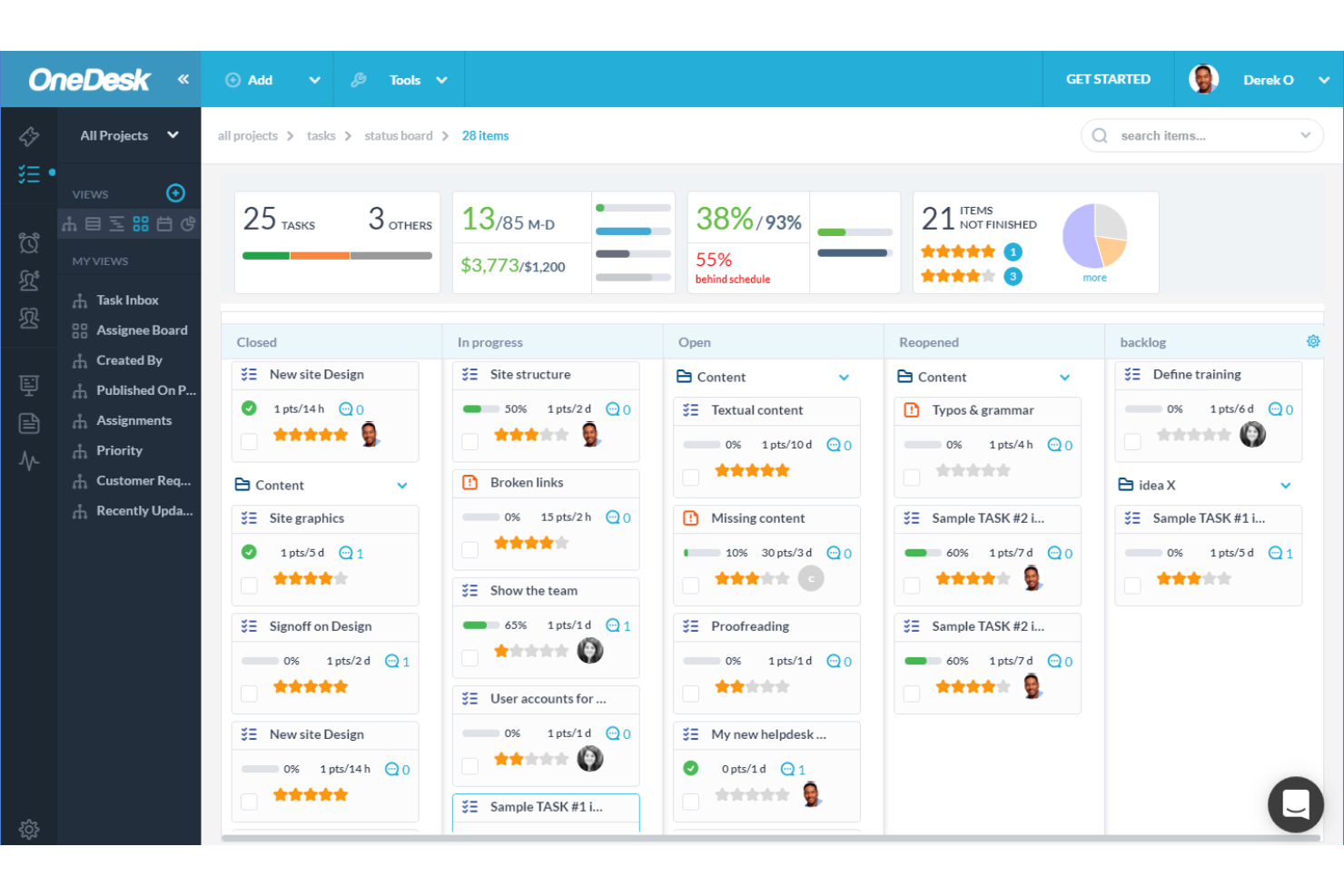
OneDesk lets you organize and track projects from start to finish, giving your team a clear view of tasks and deadlines. You can easily update progress, ensuring everyone stays informed.
Helpdesk Integration
This feature combines customer support with project tasks, letting your team handle client queries without switching tools. You’ll find this integration boosts your response times and client satisfaction.
Task Automation
Automate repetitive tasks to save time and reduce errors. This lets your team focus on more strategic activities and improves overall productivity.
Time Tracking
OneDesk's time tracking helps you monitor how long tasks take, ensuring accurate billing and resource allocation. Your team can log hours directly against projects for better time management.
Collaboration Tools
Facilitate team communication with built-in messaging and file-sharing capabilities. This keeps everyone on the same page and enhances teamwork.
Reporting and Analytics
Generate detailed reports to gain insights into project performance and team productivity. You can make informed decisions with real-time data at your fingertips.

Ease of Use
OneDesk features a straightforward interface that helps teams manage projects and support tasks in one place. While most users find navigation intuitive, some experience a steeper-than-expected learning curve, and the interface can feel cluttered.
However, once users get familiar with the layout, they often appreciate how it brings key functions together, making it easier to manage work and improve productivity.

OneDesk Specs
- Analytics
- API
- Batch Permissions & Access
- Call Integration
- Chat
- Contact Management
- Contact Sharing
- CRM Integration
- Customer Management
- Customer Service
- Dashboard
- Data Export
- Data Import
- Data Visualization
- Email Integration
- Escalation Management
- External Integrations
- Instant Chat Integration
- Knowledge Base
- Lead Management
- Lead Scoring
- Multi-User
- Notifications
- Real-time Alerts
- Scheduling
- Self-service Portal
- Social Media Integration
- Support Forum
- Third-Party Plugins/Add-Ons
- Ticket Management
- Workflow Management



OneDesk FAQs
How does OneDesk handle data security and compliance?
Can OneDesk support remote teams effectively?
Is there a mobile app available for OneDesk?
How customizable is OneDesk for unique workflows?
What kind of reporting capabilities does OneDesk offer?
How does OneDesk facilitate team collaboration?
Can OneDesk handle multiple projects simultaneously?
How does OneDesk support client communication?
Vad händer härnäst?
Vill du komma i kontakt med andra digitala projektledare för att dela resurser och bästa praxis? Gå med i vår medlemscommunity och få tillgång till över 100 mallar, prover och exempel och kom i kontakt med hundratals andra digitala projektledare på Slack.