

10 Melhores Softwares de Gestão de Projetos de AVAC Analisados em 2026

Melhor software de gestão de projetos HVAC — lista restrita


Gerir projetos HVAC pode ser uma dor de cabeça. Tem de coordenar tarefas, prazos e equipas, garantindo simultaneamente a qualidade e a eficiência. É muita coisa para gerir, e é aí que entra o software de gestão de projetos HVAC. Estas ferramentas podem ajudá-lo a manter tudo no bom caminho.
Testei e analisei estas soluções de software de forma independente. O meu objetivo é fornecer-lhe informações imparciais sobre quais as ferramentas que melhor podem responder às suas necessidades.
Neste artigo, partilharei as minhas principais escolhas de software de gestão de projetos HVAC. Ficará com uma ideia dos pontos fortes de cada ferramenta, o que o ajudará a decidir qual se adapta melhor à sua equipa. Vamos tornar a gestão dos seus projetos um pouco mais fácil.
Why Trust Our Software Recommendations
Our team has been testing and reviewing software since 2012. As project managers ourselves, we know how difficult—and important—it is to choose the right software.
For this guide, we evaluated tools using hands-on testing and independent research, scoring tools using our selection criteria. We also draw on insights from industry thought leaders and practicing project management experts.
Our reviews reflect our human editorial judgment, not a sales pitch.
Expert reviewers:
Tabela comparativa de software de gestão de projetos HVAC
\u003cspan style=\u0022font-weight: 400;\u0022\u003eEsta tabela comparativa resume os detalhes de preços das minhas principais escolhas de software de gestão de projetos HVAC:\u003c/span\u003e
| Tool | Best For | Trial Info | Price | ||
|---|---|---|---|---|---|
| 1 | Best for HVAC crew dispatch and GPS tracking | Free demo available | Pricing upon request | Website | |
| 2 | Best for all-in-one contractor job costing | 30-day free trial | From $49/month (billed annually) | Website | |
| 3 | Best for small HVAC shops managing field ops | Free demo available | From $245/month | Website | |
| 4 | Best for mixed service and project scheduling | Free demo available | Pricing upon request | Website | |
| 5 | Best for HVAC maintenance agreement management | Free demo available | Pricing upon request | Website | |
| 6 | Best for scheduling HVAC crews end to end | 14-day free trial | From $49/month | Website | |
| 7 | Best for trades businesses managing field ops | Free demo available | Pricing upon request | Website | |
| 8 | Best for small HVAC service businesses | 14-day free trial + free demo available | From $59/month (billed annually) | Website | |
| 9 | Best for HVAC service dispatch and scheduling | Free demo available | Pricing upon request | Website | |
| 10 | Best for HVAC compliance and contract management | 7-day free trial; Free demo available | From £49/user/month (billed annually) | Website |
Análises do melhor software de gestão de projetos HVAC
\u003cspan style=\u0022font-weight: 400;\u0022\u003eAbaixo encontram-se os meus resumos detalhados do melhor software de gestão de projetos HVAC que integrou a minha lista restrita. As minhas análises oferecem uma visão detalhada das principais funcionalidades, vantagens e desvantagens, integrações e casos de utilização ideais de cada ferramenta, para o ajudar a encontrar a melhor opção para si.\u003c/span\u003e

Zuper
Best for HVAC crew dispatch and GPS tracking
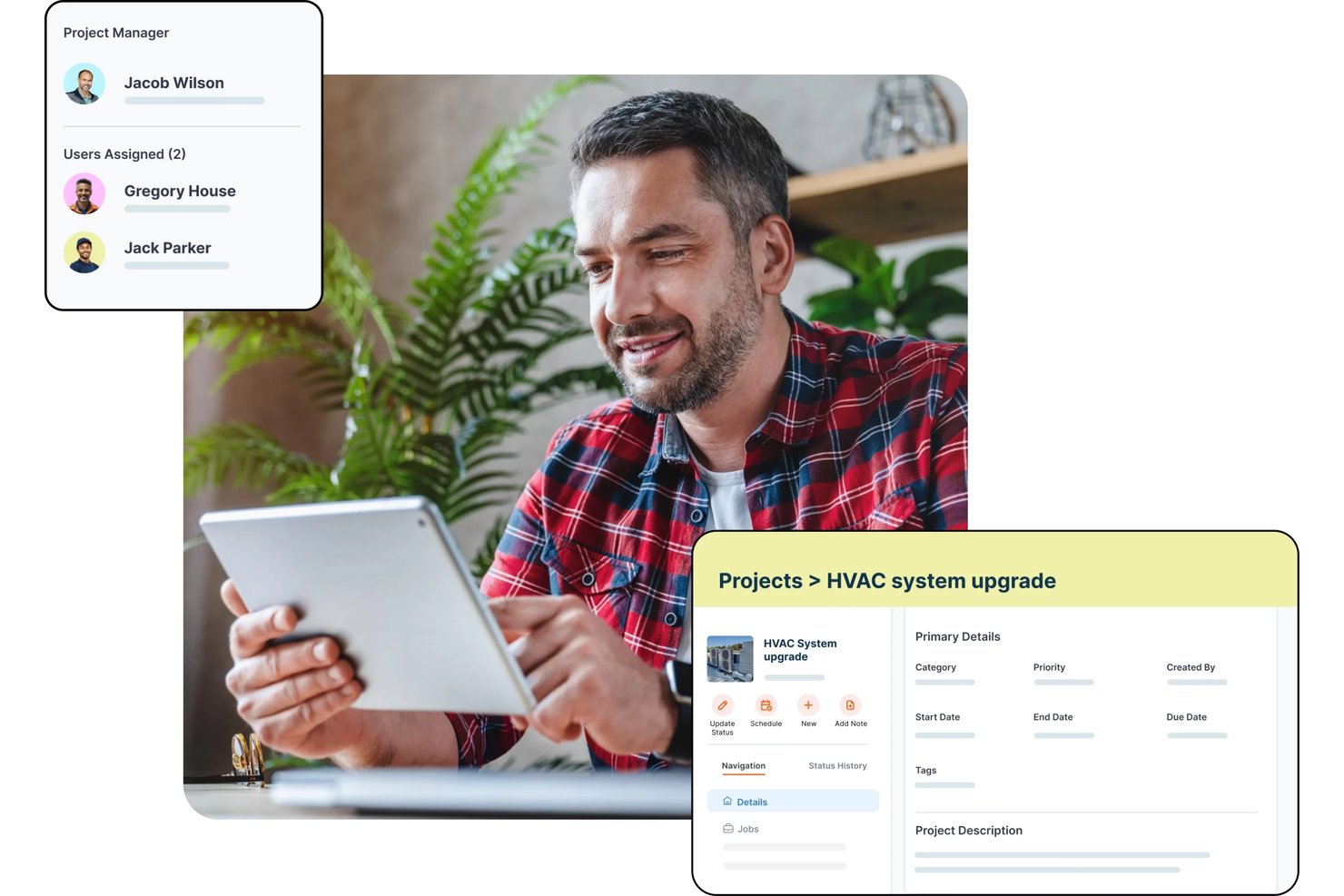
Zuper is a field service management platform for HVAC businesses that covers AI-powered dispatching, crew scheduling, GPS tracking, work order management, job costing, estimating, and preventive maintenance.
Who Is Zuper Best For?
Zuper is a strong fit for HVAC field service managers and dispatchers who need real-time crew visibility and skill-based job assignment across multiple technicians or territories.
Why I Picked Zuper
I picked Zuper as one of the best because its dispatch board and real-time GPS crew tracking are genuinely built for HVAC operations, not bolted on. I like that you can see live technician locations alongside job availability and drag-and-drop rescheduling in one view, so assigning the nearest qualified tech to an emergency call takes seconds. Skill-based and proximity-based assignment means the right person goes to the right job, and customers get automated ETA updates without anyone making a manual call.
Zuper Key Features
- Job costing: Track labor, parts, and expenses against estimated budgets with a live profitability breakdown that updates as time logs and line items change.
- Progressive invoicing: Generate milestone-based or scheduled draft invoices tied to a fixed project amount or time-and-materials totals.
- Asset inspection forms: Configure custom forms with media, barcode-scan, signature, and data-table fields that technicians complete before marking a job done.
- Preventive maintenance scheduling: Set recurring maintenance records to auto-generate jobs daily, weekly, monthly, or on a custom interval ahead of each service date.
Zuper Integrations
Zuper lists 60+ integrations, including ABC Supply, QuickBooks, Salesforce, HubSpot, Xero, Zoho Books, Stripe, and Microsoft Teams. REST API, webhooks, and an MCP server support custom integrations.
Pros and Cons
Pros:
- Drag-and-drop scheduling organizes technician assignments
- Mobile work orders keep office teams informed
- GPS dispatch helps coordinate field crews
Cons:
- Mobile updates can sync slowly
- Estimating tools may feel limited

Best for all-in-one contractor job costing
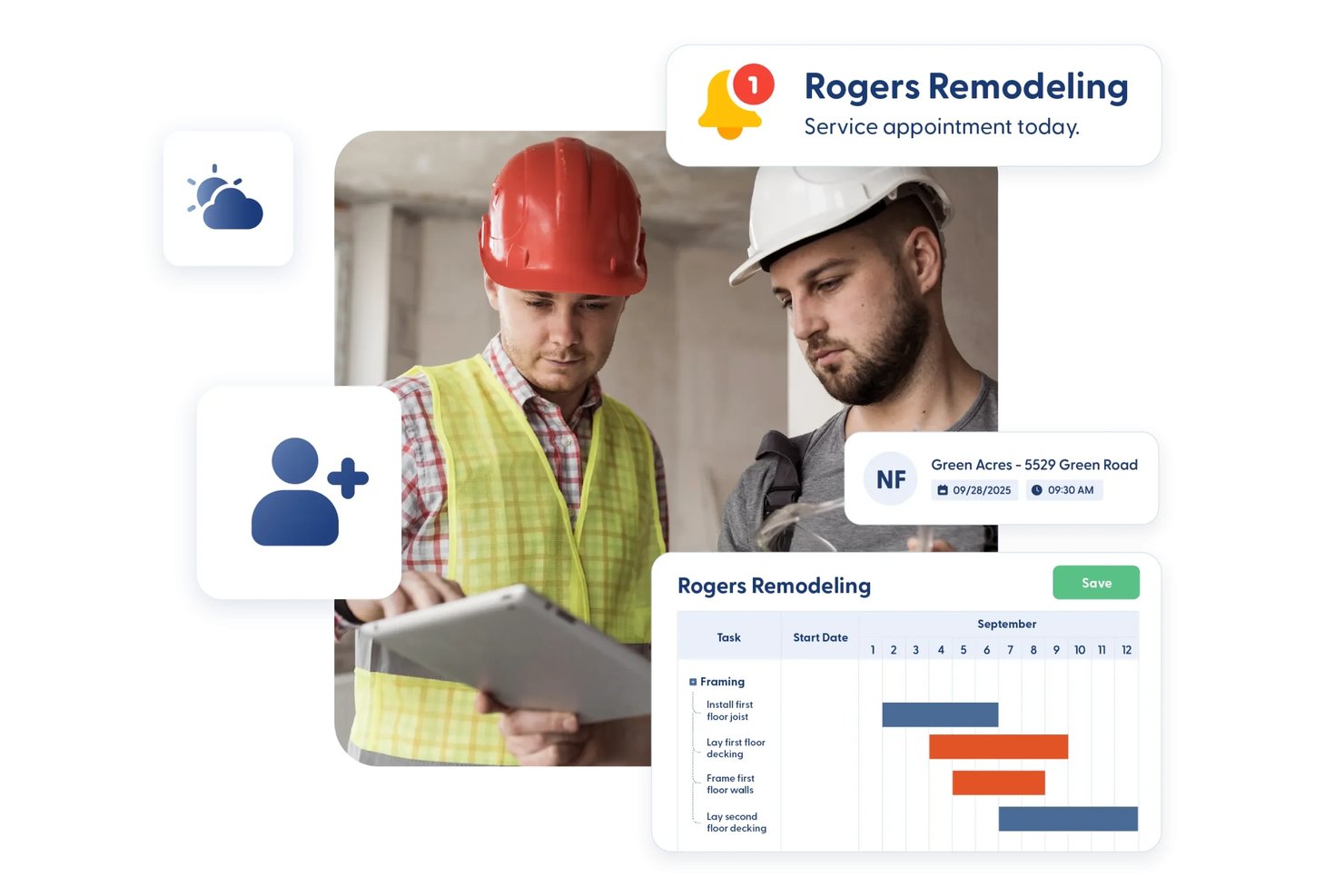
Contractor Foreman is an all-in-one construction management platform for contractors that covers estimating, job costing, scheduling, work orders, service tickets, subcontracts, and field documentation.
Who Is Contractor Foreman Best For?
Contractor Foreman is a strong fit for small to mid-sized trade contractors who need project management, estimating, and job costing in one affordable platform.
Why I Picked Contractor Foreman
I've included Contractor Foreman in my top picks because it pulls job costing, estimating, and project financials into a single platform at a price point that actually makes sense for smaller HVAC operations. I like how job-costing reports track estimated, committed, and actual costs side by side, so you can see exactly where labor or materials are drifting on an active installation job. The crew scheduling and service ticket dispatch map also let you assign techs and sequence nearby calls visually, which I find genuinely useful for day-to-day field coordination.
Contractor Foreman Key Features
- Service ticket dispatch map: A visual map plots open service tickets geographically so you can sequence nearby calls and assign techs without switching tools.
- Change order mobile signing: Clients and owners can sign change orders directly in the iOS or Android app, with the signature included on the generated PDF.
- Permit and inspection tracking: Permits log dates, fees, status, and paperwork, with linked inspection records showing who completed each inspection and when.
- Subcontracts module: Dedicated subcontract records capture scope, terms, retainage, billing, and payments separately from work orders.
Contractor Foreman Integrations
Contractor Foreman lists 50+ integrations, including native connections with QuickBooks Online, QuickBooks Desktop, Google Calendar, Outlook Calendar, Gusto, CompanyCam, and Stripe. Xero is listed for mid-2026, and Zapier is also supported.
Pros and Cons
Pros:
- Dispatch map groups nearby service calls
- Field photos and logs reduce paperwork
- Estimated, committed, and actual cost visibility
Cons:
- Cost reports need more detail
- Mobile app lags on large projects

Best for small HVAC shops managing field ops
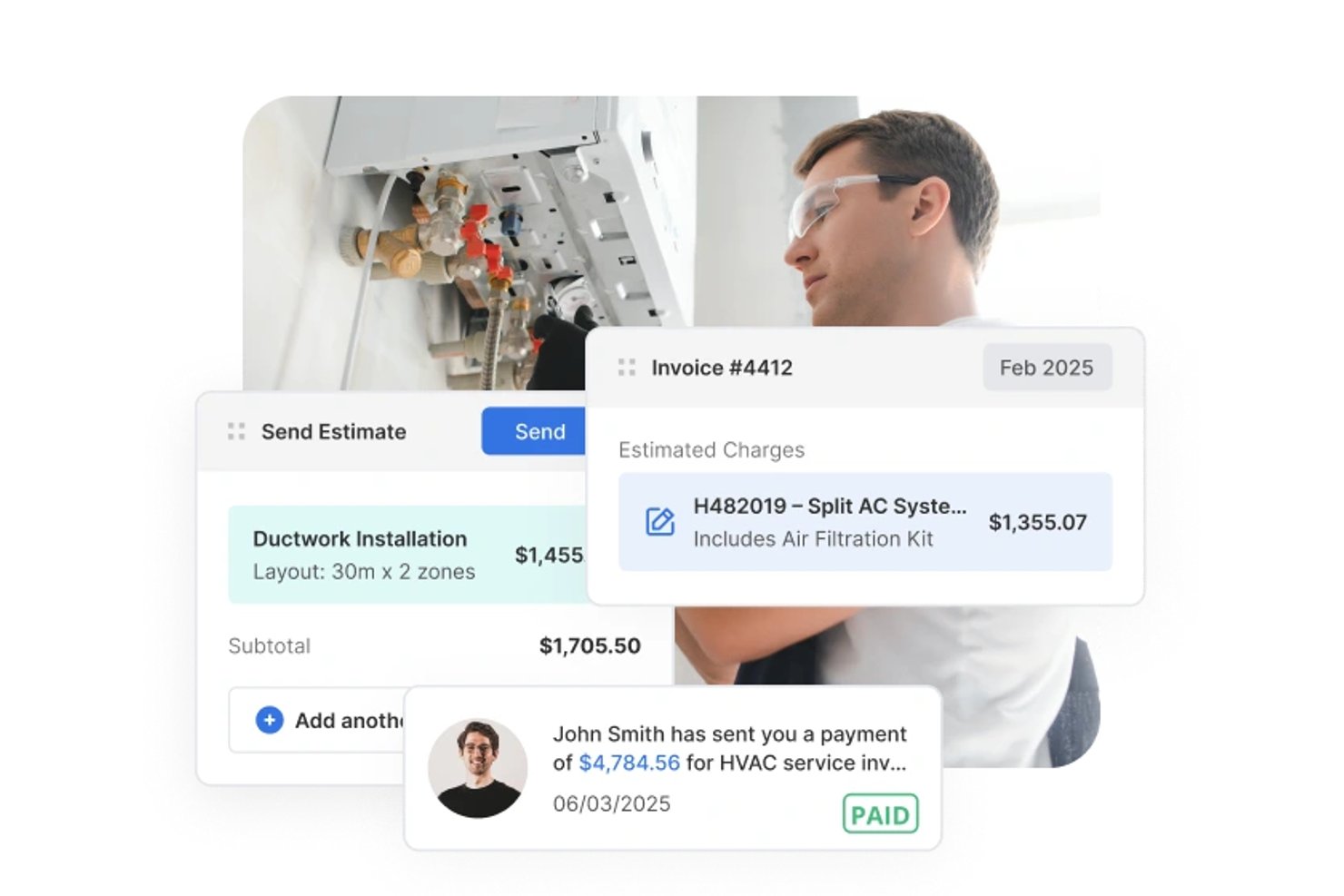
Service Fusion is a field service management platform built for HVAC and other trade contractors, covering scheduling, dispatch, estimating, work order management, invoicing, and mobile field access.
Who Is Service Fusion Best For?
Service Fusion fits small HVAC contractors who need to manage scheduling, dispatch, and field operations without paying per user.
Why I Picked Service Fusion
I picked Service Fusion as one of the best because it handles the full dispatch cycle that small HVAC shops actually live inside every day: the Dispatch Grid lets you assign jobs to technicians, drag and drop as calls come in, and push job details straight to the mobile app. I also like that technicians can capture notes, photos, and signatures in the field and process payment on the spot, keeping the office loop closed without extra back-and-forth. Status rules can require a photo or signature before a job is marked complete, which adds real accountability without a manual checklist.
Service Fusion Key Features
- Estimate options: Build and send a single estimate with up to five named alternatives that customers can review, accept, and sign online.
- Purchase order tracking: Create POs directly from a job, email them to vendors, and track receipt and closure status within the same job record.
- Customer service agreements: Set up agreement records with effective dates and member pricing that automatically applies to products and services on jobs and invoices.
- Offline mobile access: The mobile app switches to offline mode automatically, letting technicians view job details, add notes, photos, and checklists without a connection.
Service Fusion Integrations
Service Fusion offers native integrations with QuickBooks Online and QuickBooks Desktop, plus partner connections including Gusto, Coast, and PaySimple. It also provides an API for custom integrations, although its total integration count isn't documented.
Pros and Cons
Pros:
- Work orders and billing stay together
- Estimate alternatives help customers compare HVAC scopes
- Dispatch board keeps technicians and jobs aligned
Cons:
- Manual cost entry weakens budget tracking
- Mobile app can lag in the field


Fieldpoint is a field service management platform built for commercial contractors, with tools covering work order management, job costing, scheduling and dispatch, preventive maintenance contracts, mobile field access, and quoting.
Who Is Fieldpoint Best For?
Fieldpoint is a strong fit for commercial HVAC contractors who need to manage both project installations and ongoing service work within a single platform.
Why I Picked Fieldpoint
I picked Fieldpoint as one of the best because field service automation is where it genuinely excels—dispatchers can manage a mixed workload of HVAC installs, preventive maintenance calls, and break/fix jobs from a single drag-and-drop scheduling board, with real-time technician GPS locations visible alongside skills and certifications. I also like that preventive maintenance contracts automatically trigger work orders, inspections, and renewal reminders without manual follow-up. That kind of hands-off automation keeps recurring service commitments from slipping through the cracks on busy commercial accounts.
Fieldpoint Key Features
- Quote-to-job conversion: Approved quotes and spend plans convert directly into work orders, contracts, or projects, carrying over tasks, parts, and contract lines.
- Subcontractor management: Assign and dispatch subcontractors based on proximity and satisfaction rating, with vendor quotes, pricing agreements, and invoicing managed in one place.
- Equipment and serial tracking: Equipment records store make, model, serial number, warranty data, and manufacturer, with full history accessible to technicians in the field.
- Job costing with profit forecasting: Track labor, parts, and costs against estimates in real time, and add expected parts and hours to future work orders to forecast profit.
Fieldpoint Integrations
Fieldpoint offers native integrations with Microsoft Dynamics, Microsoft Dynamics 365, Microsoft Dynamics GP, Microsoft Business Central, CMiC, NetSuite, QuickBooks, WorkMarket, and ServiceChannel. Its Open API and Fieldpoint Data Transfer Service support custom integrations.
Pros and Cons
Pros:
- Automates preventive maintenance work orders
- Tracks labor and materials against estimates
- Schedules project crews alongside service calls
Cons:
- Mobile data transfers falter with weak connectivity
- Rollouts can require substantial staff effort

Best for HVAC maintenance agreement management
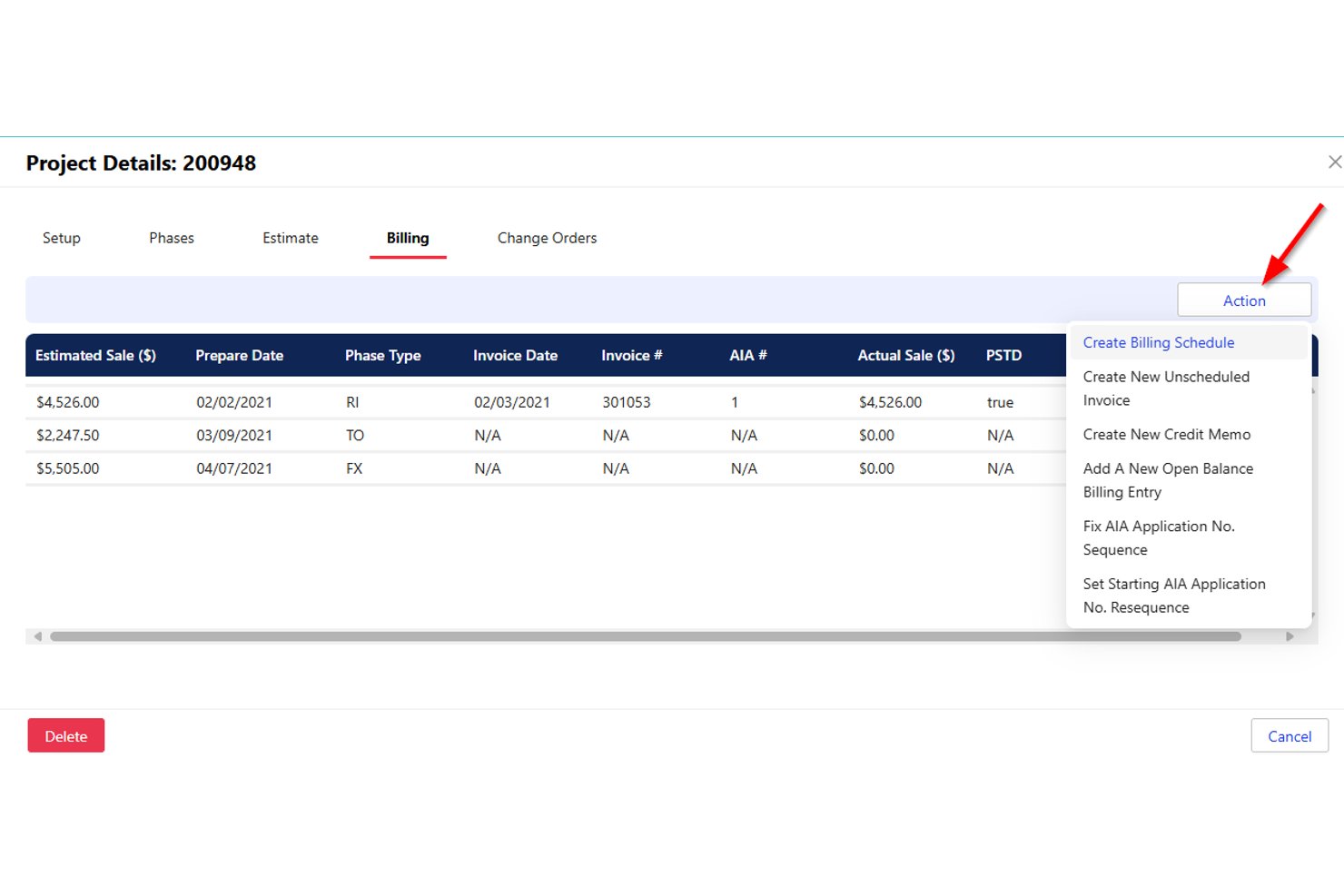
Successware is a cloud-based field service management platform built for home-service contractors, offering scheduling, dispatch, job costing, maintenance agreement management, and integrated accounting tools.
Who Is Successware Best For?
Successware is a strong fit for home-service contractors—particularly HVAC businesses—that need maintenance agreement management, dispatch, and built-in accounting in one platform.
Why I Picked Successware
Successware earns its spot on my shortlist because of how well its Agreement Manager handles the full maintenance agreement lifecycle, from scheduling recurring visits and processing periodic billings to managing renewals automatically. I like that open agreement visits convert directly into dispatchable jobs, so nothing slips through the cracks between your agreement records and your actual schedule. The platform also tracks equipment by serial number, model, and warranty at each service location, which gives technicians the context they need before they arrive on site.
Successware Key Features
- Drag-and-drop dispatch board: Assign and reschedule technicians across daily and weekly views using skill-based filtering and department grouping.
- Integrated accounting: Built-in accounts receivable, accounts payable, income statements, and balance sheets eliminate the need for a separate accounting system.
- Successware Mobile offline access: Technicians can access job data and complete field tasks without a live connection, syncing when connectivity returns.
- Equipment and warranty tracking: Service locations store equipment records by serial number, model, and warranty details for both in-house and manufacturer coverage.
Successware Integrations
Successware offers native integrations with CompanyCam, The New Flat Rate, Profit Rhino, NSPG Price Guide, ADP, QuickBooks Payroll, Ally Lending, GreenSky, PulseM, and Customer Lobby. A public API is not documented.
Pros and Cons
Pros:
- Agreement visits convert into dispatchable jobs
- Field mobile shows customer and job history
- Visual dispatch makes technician assignments clear
Cons:
- Project costing lacks overrun alerts and forecasts
- Unfinished calls require one-at-a-time rescheduling

Jobber
Best for scheduling HVAC crews end to end
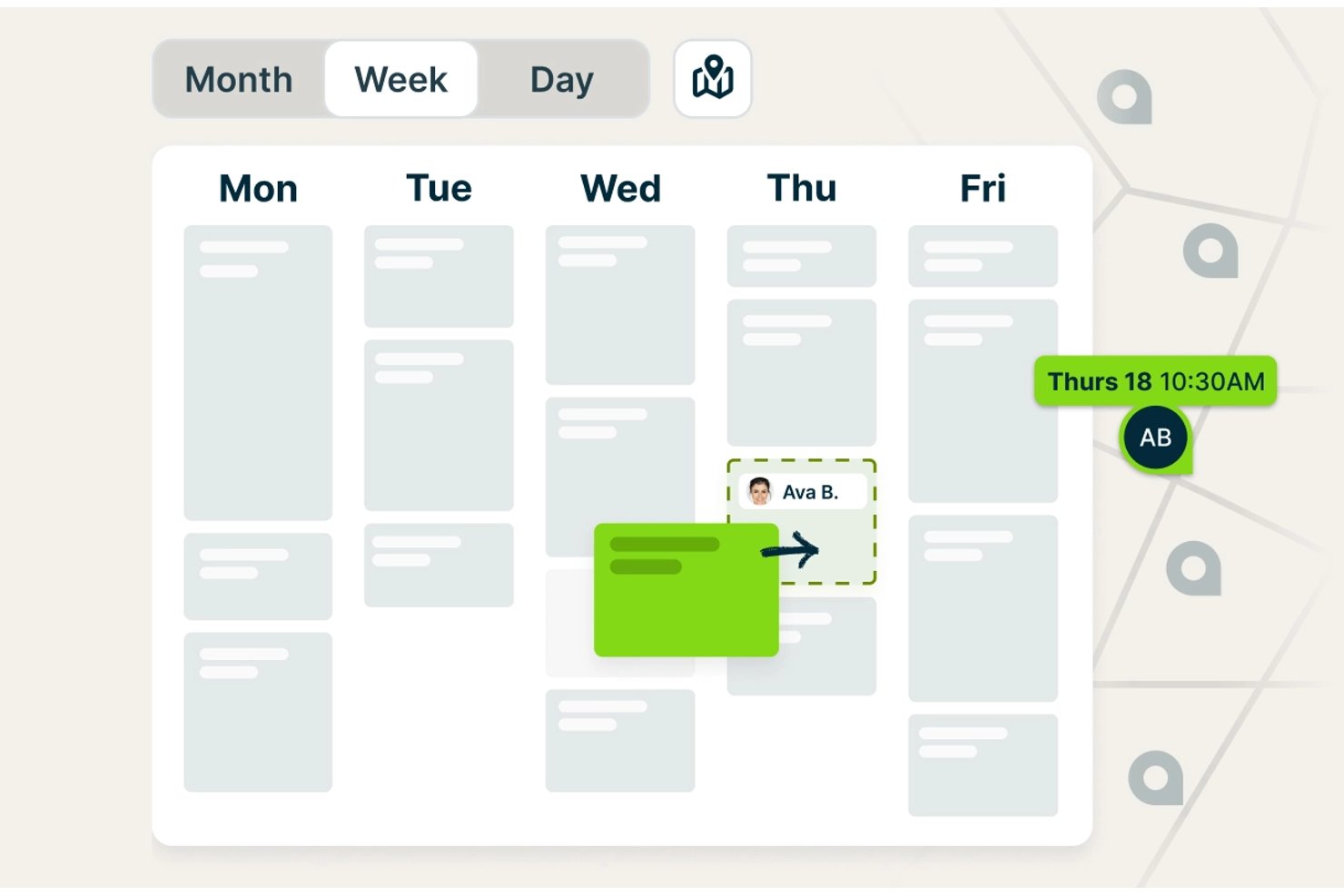
Jobber is a field service management platform built for trades businesses, combining scheduling, dispatching, estimating, job costing, invoicing, and customer communication in a single system.
Who Is Jobber Best For?
Jobber works well for small HVAC contractors and field service managers who need to handle scheduling, dispatching, quoting, and invoicing in one place without a steep learning curve.
Why I Picked Jobber
Jobber earns its spot on my shortlist because of how well it handles the full scheduling loop for HVAC crews, from assigning technicians to flagging travel-time conflicts before the day starts. I particularly like the "Find a Time" tool, which checks each tech's existing workload, working hours, and drive time simultaneously, so you're not manually cross-referencing calendars to avoid double-booking. On the Plus plan, crew scheduling lets you group techs and assign an entire crew to a job in one move.
Jobber Key Features
- Job costing: Tracks labor, materials, and expenses against each job and displays revenue, cost, profit, and margin in one view.
- QuickBooks Online sync: Syncs customer, invoice, and payment data between Jobber and QuickBooks to keep accounting records aligned.
- Online booking: Lets customers request and book appointments based on your configured services and team availability.
- Progress invoicing: Bills clients against project milestones rather than requiring a single invoice at job completion.
Jobber Integrations
Jobber’s marketplace connects 100+ tools, including QuickBooks Online, Xero, The Home Depot, Gusto, and Zapier. Its GraphQL API supports custom integrations with queries, mutations, and webhooks.
Pros and Cons
Pros:
- Mobile app gives technicians access to job details
- Approved quotes convert into jobs without re-entry
- Scheduling keeps HVAC crews and office staff coordinated
Cons:
- Job costing can double-count expenses and line items
- Field notes and photos can fail to sync

Best for trades businesses managing field ops

ServiceTitan is a field service management platform built for trade businesses that covers HVAC scheduling, dispatching, estimating, job costing, work order management, and project tracking across residential and commercial operations.
Who Is ServiceTitan Best For?
ServiceTitan suits HVAC contractors and field service businesses that need scheduling, dispatch, job costing, and project tracking in one platform for residential and commercial work.
Why I Picked ServiceTitan
ServiceTitan earns its spot on my list because it's built specifically for trade businesses, covering the full operational loop from booking through invoicing in one platform. I'm particularly drawn to its Adaptive Capacity scheduling, which automatically assigns technicians to jobs based on configured skills, zones, and shift availability, reducing the manual back-and-forth that slows down dispatch. I also like how its Budget vs. Actual reporting breaks down labor, materials, and subcontractor costs against sold estimates in real time, giving project managers clear visibility into margin before a job closes.
ServiceTitan Key Features
- Pricebook-linked estimates: Create itemized job estimates tied directly to your pricebook, with line items for services, materials, and equipment that feed into project budgets and invoicing.
- Progress billing and AIA pay applications: Bill across project phases and generate payment applications following AIA standards, supporting multi-phase commercial HVAC projects.
- Supplier catalog integration: Connect to supplier catalogs for real-time pricing and availability checks, and send electronic purchase orders directly from a project record.
- Equipment and serial number tracking: Record manufacturer, model, serial number, install date, and warranty details for installed equipment, with warranty status visible to both office staff and technicians.
ServiceTitan Integrations
ServiceTitan offers 70+ pre-built integrations and 149 Marketplace listings, including QuickBooks Online, QuickBooks Desktop, Sage Intacct, Xero, Avalara, and ABC Supply. Its V2 APIs and webhooks support custom integrations.
Pros and Cons
Pros:
- Project records unite jobs, costs, and documents
- Adaptive Capacity assigns technicians by skills
- Budget-versus-actual reporting tracks project margins
Cons:
- Offline project access has notable gaps
- Project setup and workflows take effort
Best for small HVAC service businesses
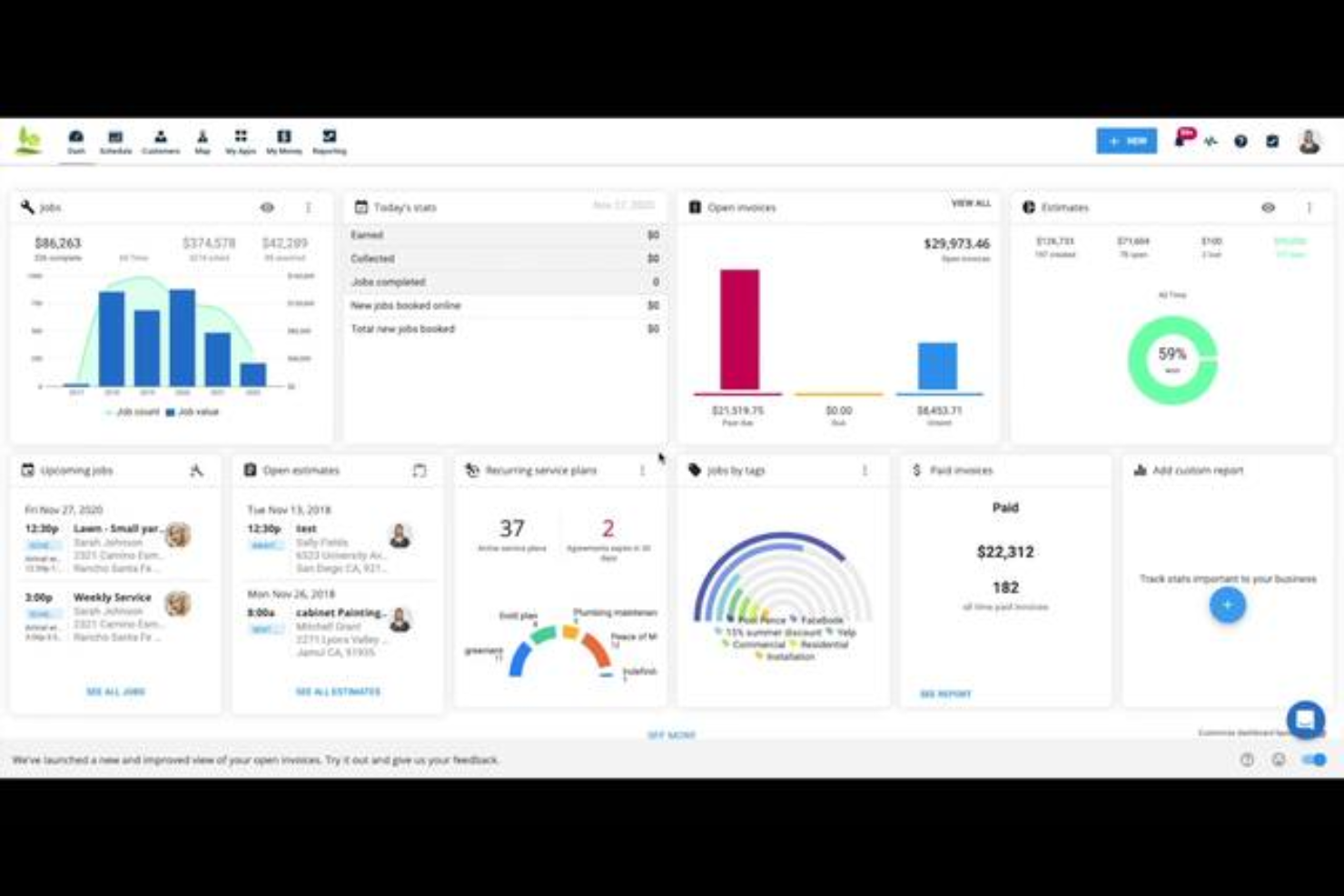
Housecall Pro is a field service management platform for home service businesses, including HVAC contractors, that covers scheduling, dispatching, work order management, job costing, estimating, and recurring maintenance agreements.
Who Is Housecall Pro Best For?
Housecall Pro is a strong fit for small HVAC businesses that need scheduling, dispatching, and invoicing in one place without a steep learning curve.
Why I Picked Housecall Pro
I've included Housecall Pro in my top picks because it gives small HVAC businesses a single place to run the day-to-day without a complicated setup. I particularly like how scheduling works: you drag unscheduled jobs onto the calendar, see your whole team's availability at a glance, and dispatch from the same screen. Job Costing then tracks labor using fully loaded employee rates against actual time logged, so you always know where a job stands on margin.
Housecall Pro Key Features
- Property profile: Records customer equipment details—including make, model, serial number, and install date—and links them directly to jobs.
- Purchase orders: Creates and tracks material orders through statuses like Draft, Issued, Confirmed, and Received, with vendor association and notes.
- Recurring service plans: Schedules maintenance visits and automates recurring billing, with automatic card-on-file charges per plan frequency.
- Employee GPS tracking: Monitors technician locations during business hours and displays routes and estimated travel times on a map view.
Housecall Pro Integrations
Housecall Pro offers documented integrations with QuickBooks Online and Reece, plus marketplace integrations with CompanyCam, MeasureQuick, Profit Rhino, and Zapier. Its public API is available on the Max plan for custom integrations.
Pros and Cons
Pros:
- Reviewers praise estimates-to-payment workflows
- Job costing tracks labor and material margins
- Drag-and-drop dispatch shows crew availability
Cons:
- Change orders lack linked cost tracking
- Long retrofit projects outgrow service-job workflows

Best for HVAC service dispatch and scheduling

FieldEdge is a field service management platform built for HVAC contractors that covers dispatching, scheduling, work order management, quoting, invoicing, and customer records.
Who Is FieldEdge Best For?
FieldEdge suits HVAC service contractors with multiple trucks and technicians who need dispatch, scheduling, and field work order management in one place.
Why I Picked FieldEdge
FieldEdge earns its spot on my list because its dispatch board is genuinely built for service-call operations: I can drag an unassigned work order onto a technician's time slot in seconds, with skill, location, and availability filtering doing the heavy lifting. I also like that technicians can update work orders, attach job photos, and collect payment on-site through the mobile app, keeping the office and field in sync without a separate tool. The real-time status tracking (pending, traveling, working, completed) gives dispatchers a live view of every truck on any given day.
FieldEdge Key Features
- Pricebook and flat-rate pricing: Lets you build quotes using a managed pricing database with standardized rates for consistent job pricing across technicians.
- Service agreements: Supports basic and advanced recurring service agreements with automated alerts and reminders to help manage maintenance contracts.
- QuickBooks synchronization: Syncs customer records, invoices, payments, parts requests, expenses, and time entries between FieldEdge and QuickBooks Online or Desktop.
- Multi-option quoting: Lets technicians or office staff present customers with multiple quote options from the field or office before a job is scheduled.
FieldEdge Integrations
FieldEdge offers native integrations with QuickBooks Online, QuickBooks Desktop, Xplor Pay, and FieldEdge Flat Rate, plus marketplace integrations including FleetSharp. It also provides an API for custom integrations.
Pros and Cons
Pros:
- Field quotes and invoicing support job completion
- Work orders link customer and service histories
- Dispatch board organizes daily service calls
Cons:
- Mobile sync can lag in poor reception
- Reporting offers limited project cost visibility
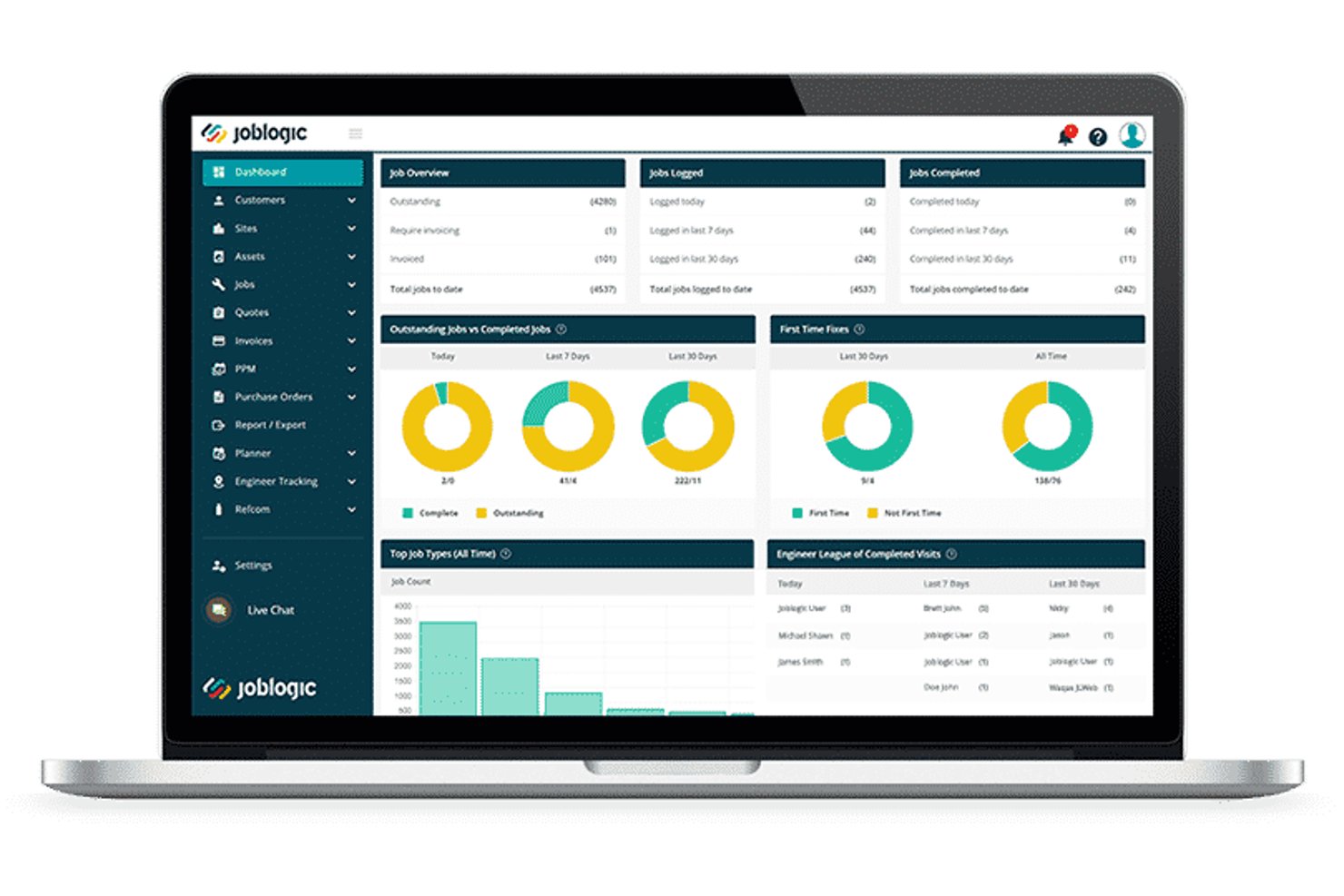
Joblogic is a cloud-based field service management platform built for HVAC and mechanical contractors, covering job scheduling, estimating, PPM contracts, F-Gas compliance, job costing, and field mobile workflows.
Who Is Joblogic Best For?
Joblogic suits growing HVAC and mechanical service contractors who need to manage F-Gas compliance, PPM contracts, and multi-engineer scheduling from a single platform.
Why I Picked Joblogic
Joblogic earns its spot on my shortlist because of how tightly it connects F-Gas compliance, PPM contracts, and project costing in one place. I love that the HVAC Industry Pack gives engineers access to 26 trade-specific forms, including refrigeration maintenance and gas safety records, directly from the mobile app on site. On the project side, I can track estimated versus committed costs, assign subcontractors as named resources, and manage scope changes through formal quote variations without losing the original project quote.
Joblogic Key Features
- Dynamic Scheduler: Automatically recommends engineer routes and assignments based on location, skills, availability, and job priority.
- Asset PPM scheduling: Sets service triggers by frequency or meter readings, with per-asset or per-contract billing options.
- Mobile engineer tracking: Shows live GPS locations and historical journeys for all engineers directly in the back-office Planner.
- Sub-Contractor Portal: Assigns jobs to subcontractors and tracks their progress from a central system.
Joblogic Integrations
Joblogic offers 70+ marketplace apps, modules, and integrations, including native connections to Xero, QuickBooks, Sage, AccountsIQ, FreeAgent, KashFlow, Stripe, and PartsArena. It also supports Microsoft 365, Zapier, and API access for custom integrations.
Pros and Cons
Pros:
- Dispatch views help assign engineers quickly
- PPM tools handle high-volume maintenance contracts
- HVAC compliance forms cover refrigeration and F-Gas
Cons:
- Custom reports can require exports and workarounds
- Mobile photo uploads can lag or fail
Outro software de gestão de projetos HVAC
\u003cspan style=\u0022font-weight: 400;\u0022\u003eEis algumas opções adicionais de software de gestão de projetos HVAC que não integraram a minha lista restrita, mas que ainda vale a pena conhecer:\u003c/span\u003e
- AnyDB
For configurable HVAC field records
- Kickserv
For estimate-to-job workflow on service calls
- ServiceTrade
For commercial HVAC change order tracking
- Simpro
For end-to-end HVAC job costing
- Knowify
For project and service work in one
- FieldPulse
For growing HVAC teams managing field ops
- BuildOps
For end-to-end commercial mechanical jobs
- Buildertrend
For construction project cost tracking
- Commusoft
For HVAC service contract management
- Foundation
For mechanical contractors with job costing


How I Evaluate HVAC Project Management Software
I split my evaluation into three parts: core functionality carries most weight, especially crew dispatch and labor/material job-cost tracking. Next, standout features include GPS crew tracking or maintenance agreements. Finally, beyond features, I consider onboarding, support, and crew-scaled pricing.
Core Functionality (Table Stakes For This List)
When I'm selecting tools for my list, I score each one on a scale from 0 (does not offer the functionality) to 5 (excels in this area) for each core functionality listed below. I then convert the total into a percentage to help assess each tool's overall fit, with extra weight on any functionalities I’ve deemed essential.
- Job Scheduling & Dispatch (Essential): I look for crew and equipment assignment, availability and conflict visibility, and dispatch updates when a site visit or installation schedule changes.
- Job Costing & Budgets (Essential): I evaluate whether teams can compare labor, material, equipment, and subcontractor costs with estimates or budgets as work progresses.
- Estimating & Quoting: I check for itemized HVAC quotes tied to job scopes, and whether approved estimates can carry into active jobs or work orders.
- Work Order Management: I look for clear assignment and status tracking from work order creation through field completion and sign-off.
- Field Mobile Access: I consider whether technicians can view job details and update status, notes, photos, and time from the field.
- Change Orders & Records: I check whether teams can log job changes and attach notes or photos, with cost and schedule impacts visible.
Once I have a list of tools that meet the criteria, I consider what sets each platform apart.
Differentiating Factors (What Sets Vendors Apart)
Here's how I compare and contrast different vendors:
Standout Features
I look for built-in equipment and serial tracking that ties installed units to warranty status and service history—when a customer calls about a failing rooftop unit, dispatchers need that context instantly. Preventive maintenance agreement automation matters just as much, since I evaluate how each tool handles recurring visit scheduling, renewal reminders, and contract billing without manual follow-up. I also check for GPS fleet and crew tracking, because live truck locations directly shape smarter dispatch decisions and more accurate arrival windows for customers.
Beyond Features
I check how each tool syncs with accounting platforms like QuickBooks or Sage, since accurate job costing depends on clean data flowing between the field and back office without duplicate entry. Offline reliability matters just as much—techs working in mechanical rooms or basements need an app that queues updates and syncs automatically once connectivity returns. I also evaluate onboarding support, because a tool only works if field crews actually use it consistently.
Como escolher software de gestão de projetos HVAC
É fácil ficar preso a longas listas de funcionalidades e estruturas de preços complexas. Para o ajudar a manter o foco enquanto conduz o seu processo específico de seleção de software, eis uma lista de verificação dos fatores a ter em conta:
| Fator | O que deve considerar |
| Escalabilidade | O software acompanhará o crescimento da sua empresa? Considere se suporta um número crescente de utilizadores e projetos sem abrandar ou exigir atualizações dispendiosas. |
| Integrações | É compatível com as suas ferramentas atuais? Procure software que se integre com o seu CRM, sistemas de contabilidade e dispositivos IoT para otimizar os fluxos de trabalho e a partilha de dados. |
| Possibilidade de personalização | Pode adaptar o software aos seus processos? Certifique-se de que pode personalizar painéis, relatórios e fluxos de trabalho para corresponder às necessidades específicas da sua equipa. |
| Facilidade de utilização | A interface é intuitiva para todos os utilizadores? Um sistema complexo pode atrasar a adoção. Teste a demonstração para garantir que é fácil de utilizar tanto para funcionários familiarizados com tecnologia como para os que não estão. |
| Implementação e integração inicial | Quão simples é a transição para o novo software? Avalie os materiais de formação, o apoio durante a configuração e o tempo necessário para implementar totalmente o sistema. |
| Custo | Existem taxas ocultas ou preços por escalões? Analise a estrutura de preços para identificar quaisquer custos adicionais relativos a funcionalidades, apoio ou atualizações e evitar despesas inesperadas. |
| Medidas de segurança | Protege os seus dados? Verifique se existem medidas de segurança robustas, como encriptação, atualizações regulares e conformidade com os regulamentos de proteção de dados, para proteger informações sensíveis. |
| Disponibilidade do apoio | É fácil obter ajuda quando necessário? Certifique-se de que o fornecedor disponibiliza canais de apoio fiáveis, incluindo chat em direto, telefone e e-mail, e verifique os respetivos tempos de resposta. |
O que é o software de gestão de projetos HVAC?
O software de gestão de projetos HVAC é uma ferramenta concebida para ajudar a gerir e coordenar projetos HVAC, incluindo o planeamento, a atribuição de recursos e a comunicação. Estas ferramentas são normalmente utilizadas por empreiteiros HVAC, gestores de projetos e técnicos para melhorar a eficiência e a produtividade. As funcionalidades de planeamento, orçamentação e elaboração de relatórios ajudam a organizar tarefas, acompanhar custos e analisar o progresso dos projetos. Em geral, estas ferramentas fornecem uma plataforma centralizada para gerir projetos HVAC de forma mais eficaz.
Funcionalidades do software de gestão de projetos HVAC
Ao selecionar um software de gestão de projetos HVAC, tenha em atenção as seguintes funcionalidades principais:
- Planeamento: Permite planear e organizar tarefas e marcações, assegurando a execução atempada dos projetos.
- Atribuição de recursos: Ajuda a atribuir e gerir recursos de forma eficaz, evitando reservas excessivas e assegurando a eficiência.
- Acompanhamento do orçamento: Monitoriza as despesas dos projetos e mantém as finanças sob controlo para evitar gastos excessivos.
- Relatórios: Fornece informações através de relatórios detalhados, ajudando a analisar o desempenho dos projetos e a tomar decisões fundamentadas.
- Acesso móvel: Permite que os técnicos acedam aos detalhes dos projetos e atualizem os estados em qualquer lugar, melhorando a comunicação no terreno.
- Gestão de clientes: Mantém o registo das interações e do historial dos clientes, promovendo relações sólidas e a repetição de negócios.
- Gestão de inventário: Acompanha peças e materiais, garantindo que dispõe do que necessita para cada projeto.
- Capacidades de integração: Liga-se a ferramentas existentes, como sistemas de CRM e de contabilidade, para simplificar os fluxos de trabalho.
- Gestão de tarefas: Organiza tarefas e responsabilidades, facilitando o acompanhamento do progresso e o cumprimento dos prazos.
- Medidas de segurança: Protege dados sensíveis através de encriptação e do cumprimento dos regulamentos de proteção de dados.
Benefícios do software de gestão de projetos HVAC
A implementação de um software de gestão de projetos HVAC proporciona vários benefícios à sua equipa e à sua empresa. Eis alguns dos benefícios que pode esperar:
- Maior eficiência: Automatiza o planeamento e a gestão de tarefas, ajudando a sua equipa a concluir os projetos mais rapidamente e com menos esforço.
- Controlo de custos: Acompanha orçamentos e despesas, proporcionando uma visão clara das finanças para evitar gastos excessivos.
- Comunicação melhorada: Facilita as atualizações em tempo real e o acesso móvel, mantendo todos informados, quer estejam no escritório ou no terreno.
- Melhor gestão de recursos: Gere a atribuição de recursos para assegurar a utilização ideal de pessoal e materiais, reduzindo desperdícios e atrasos.
- Maior satisfação dos clientes: Mantém os dados dos clientes organizados e acessíveis, permitindo prestar um melhor serviço e criar relações mais sólidas.
- Decisões baseadas em dados: Fornece relatórios e análises detalhados, permitindo-lhe tomar decisões fundamentadas com base no desempenho real dos projetos.
- Garantia de segurança: Protege informações sensíveis através de medidas de segurança robustas, assegurando o cumprimento das normas de proteção de dados.
Custos e preços do software de gestão de projetos HVAC
A seleção de um software de gestão de projetos HVAC exige uma compreensão dos vários modelos de preços e planos disponíveis. Os custos variam consoante as funcionalidades, a dimensão da equipa, os complementos e outros fatores. A tabela abaixo resume os planos mais comuns, os seus preços médios e as funcionalidades habitualmente incluídas nas soluções de software de gestão de projetos HVAC:
Tabela de comparação de planos de software de gestão de projetos HVAC
| Tipo de plano | Preço médio | Funcionalidades comuns |
| Plano gratuito | $0 | Planeamento básico, gestão de tarefas e relatórios limitados. |
| Plano pessoal | $5-$25/utilizador/mês | Planeamento, gestão de tarefas, relatórios e acesso móvel. |
| Plano empresarial | $30-$60/ utilizador/mês | Planeamento avançado, orçamentação, colaboração em equipa e gestão de clientes. |
| Plano empresarial de grande dimensão | $75-$150/ utilizador/mês | Integrações personalizadas, segurança avançada, assistência dedicada e análises abrangentes. |
Perguntas frequentes sobre software de gestão de projetos de AVAC
Aqui encontrará algumas respostas a perguntas comuns sobre software de gestão de projetos de AVAC:
Como pode o software de gestão de projetos de AVAC melhorar a comunicação da equipa?
O software de gestão de projetos de AVAC melhora a comunicação da equipa ao disponibilizar uma plataforma centralizada para partilhar atualizações, documentos e calendários de projetos. A sua equipa pode aceder a informações em tempo real, reduzindo mal-entendidos e garantindo que todos estão alinhados. Também permite uma comunicação e colaboração fáceis, independentemente da localização.
O que deve procurar num software de gestão de projetos de AVAC?
Ao escolher um software de gestão de projetos de AVAC, considere funcionalidades como o planeamento, o acompanhamento do orçamento, o acesso móvel e as ferramentas de estimativa e de apresentação de propostas. Certifique-se de que se integra com as ferramentas que já utiliza e de que oferece um apoio ao cliente sólido. Avalie a facilidade de utilização para a sua equipa e verifique se disponibiliza as salvaguardas de segurança necessárias para os seus dados.
O software de gestão de projetos de AVAC pode ajudar no cumprimento das normas?
Sim, o software de gestão de projetos de AVAC pode ajudar no cumprimento das normas através do acompanhamento dos requisitos regulamentares e dos prazos. Pode armazenar documentos e certificações essenciais, garantindo que estão facilmente acessíveis para auditorias. Isto ajuda a evitar possíveis multas e a manter os padrões do setor.
Como ajuda o software de gestão de projetos de AVAC na alocação de recursos?
O software ajuda na alocação de recursos ao disponibilizar ferramentas para atribuir tarefas e gerir cargas de trabalho de forma eficiente. Pode acompanhar a disponibilidade dos recursos e as necessidades dos projetos, garantindo uma utilização ideal do pessoal e dos materiais. Isto minimiza os períodos de inatividade e evita a sobrecarga de trabalho, mantendo os seus projetos dentro do prazo.
Que papel desempenha o acesso móvel no software de gestão de projetos de AVAC?
O acesso móvel permite que a sua equipa atualize o estado dos trabalhos, aceda aos detalhes dos projetos e comunique com o escritório enquanto está em deslocação. Esta flexibilidade melhora as operações no terreno, uma vez que os técnicos podem resolver rapidamente os problemas e receber atualizações sem regressar ao escritório, aumentando a eficiência global.
Como apoia o software de gestão de projetos de AVAC as decisões baseadas em dados?
O software apoia as decisões baseadas em dados ao disponibilizar ferramentas detalhadas de elaboração de relatórios e análise. Pode monitorizar o desempenho dos projetos, acompanhar os dados financeiros e identificar tendências, ajudando-o a tomar decisões fundamentadas. Esta informação contribui para otimizar os processos e melhorar os resultados globais dos projetos.