

10 Melhores Geradores de Propostas com IA em 2026

Melhor lista restrita de geradores de propostas com IA


Um gerador de propostas com IA é um software que utiliza inteligência artificial para redigir, personalizar e organizar propostas comerciais em menos tempo. Se procura o melhor gerador de propostas com IA, é provável que esteja sob pressão para produzir propostas profissionais rapidamente, sem deixar escapar detalhes essenciais nem andar atrás de comentários entre equipas.
Com os clientes e as partes interessadas internas a exigirem respostas mais rápidas, automatizar tarefas repetitivas relacionadas com propostas pode ser um enorme alívio. Esta lista ajudá-lo-á a comparar os geradores de propostas com IA mais bem avaliados, destacando quais são os melhores para diferentes setores, fluxos de trabalho e estilos de colaboração, para que possa escolher a opção certa para a sua equipa.
Why Trust Our Software Recommendations
Our team has been testing and reviewing software since 2012. As project managers ourselves, we know how difficult—and important—it is to choose the right software.
For this guide, we evaluated tools using hands-on testing and independent research, scoring tools using our selection criteria. We also draw on insights from industry thought leaders and practicing project management experts.
Our reviews reflect our human editorial judgment, not a sales pitch.
Expert reviewers:
Tabela de comparação de geradores de propostas com IA
Esta tabela de comparação resume os detalhes de preços das minhas seleções de software de geradores de propostas com IA.
| Tool | Best For | Trial Info | Price | ||
|---|---|---|---|---|---|
| 1 | Best for custom-branded proposal formatting | Free demo available | Pricing upon request | Website | |
| 2 | Best for end-to-end client sign and pay flows | 14-day free trial | From $19/user/month | Website | |
| 3 | Best for CRM-synced quoting and e-signatures | 14-day free trial + free demo available | From $19/user/month (billed annually) | Website | |
| 4 | Best for buyer-tracked proposals with CRM prefill | 14-day free trial | From $35/user/month (billed annually) | Website | |
| 5 | Best for CRM-connected proposal workflows | Free plan + 14-day free trial + free demo available | From $19/user/month | Website | |
| 6 | Best for CRM-connected quote-to-proposal execution | Free demo available | Pricing upon request | Website | |
| 7 | Best for interactive proposals with built-in analytics | 14-day free trial + free demo available | From $237.60/year (billed annually) | Website | |
| 8 | Best for proposal tracking with built-in e-sign | 14-day free trial + free demo available | From $25/user/month (billed annually) | Website | |
| 9 | Best for CRM-connected proposal-to-contract workflows | Free plan + 14-day free trial + free demo available | From $272/month (billed annually) | Website | |
| 10 | Best for proposal creation on a tight budget | 14-day free trial | From $19/user/month | Website |
Avaliações dos melhores geradores de propostas com IA
Abaixo encontram-se os meus resumos detalhados dos melhores geradores de propostas com IA que chegaram à minha lista restrita. As minhas avaliações apresentam uma análise detalhada das funcionalidades, integrações e melhores casos de utilização de cada plataforma, para o ajudar a encontrar a melhor opção para si.

Best for custom-branded proposal formatting
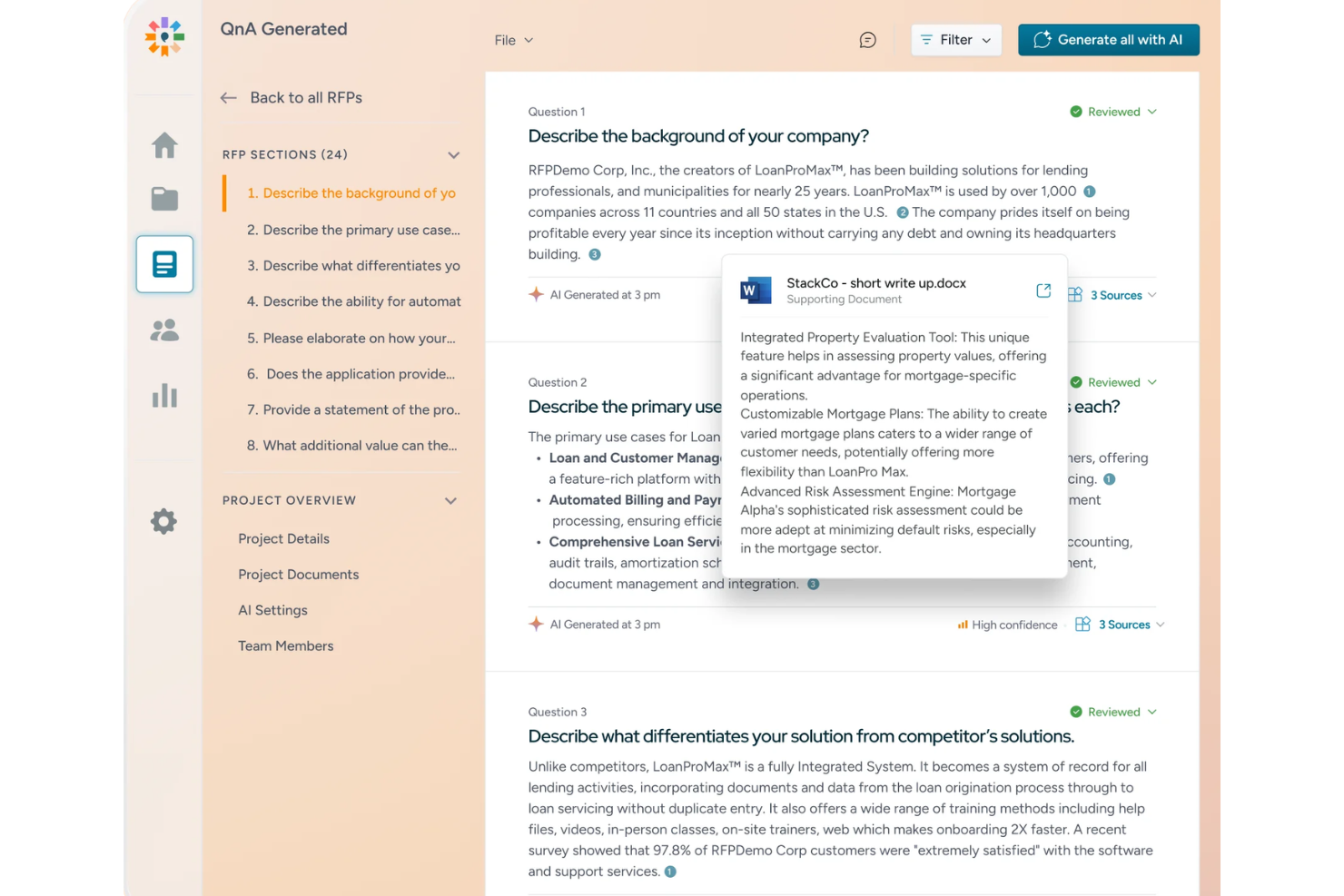
Inventive AI is an AI proposal and RFP response platform that drafts, reviews, and submits responses using RAG-grounded generation, a connected Knowledge Hub, strategic AI agents, and built-in collaboration and approval workflows.
Who Is Inventive AI Best For?
Inventive AI is a strong fit for proposal managers and bid teams that respond to high volumes of incoming RFPs and need AI-grounded drafts tied directly to their company's knowledge sources.
Why I Picked Inventive AI
I picked Inventive AI as one of the best because its narrative-style proposal support lets me start from an existing branded document and have AI suggest an outline, draft section content from approved company sources, and export the finished result in the same format I started with. Every draft cites the Knowledge Hub content it pulled from, with confidence scores attached, so I can see exactly which approved source each section is grounded in. That combination of on-brand formatting and source-traced drafting is where Inventive AI genuinely separates itself.
Inventive AI Key Features
- RAG-grounded response drafts: Generates proposal content pulled directly from your connected Knowledge Hub, with each answer linked to its source and a 0–100% confidence score attached.
- Strategic AI agents: Includes Go/No-Go, Competitive Intelligence, Win Theme, and Compliance agents that run analysis before and during the drafting process.
- Salesforce opportunity sync: Launches RFP responses directly from a Salesforce Opportunity record and keeps response status synced back to that record automatically.
- Internal approval workflow: Lets teams assign sections to SMEs or compliance reviewers, track sign-offs, and log who approved each answer and when.
Inventive AI Integrations
Inventive AI offers native integrations with Salesforce, Google Drive, SharePoint, Confluence, Notion, Slack, HubSpot, Jira, OneDrive, and Okta. It also connects to enterprise knowledge sources and lists Zapier among its service providers.
Pros and Cons
Pros:
- Reviewers report faster response cycles
- Source-cited answers flag unsupported requirements
- Branded narrative drafts preserve document formatting
Cons:
- No recipient-level proposal engagement tracking
- No built-in pricing calculations or quote tables

Best for end-to-end client sign and pay flows

Better Proposals is a proposal platform that combines interactive web-based proposals, e-signatures, built-in pricing tables, and post-signature client onboarding flows with payment collection.
Who Is Better Proposals Best For?
Better Proposals is a strong fit for sales reps and business development leads who need to move clients from proposal to signature and payment in one flow.
Why I Picked Better Proposals
I picked Better Proposals as one of the best because it's the only tool on this list that keeps the entire client journey, from reviewing a proposal to signing and paying, inside a single flow. After a client signs, an automated onboarding sequence kicks off that can collect intake forms, take a deposit through Stripe or PayPal, and book a kickoff call via Calendly, all without leaving the platform. I also like the interactive pricing tables, where clients select their own package and the total recalculates instantly, so the payment amount is always tied directly to what they chose.
Better Proposals Key Features
- AI proposal creation via MCP server: Connect a compatible external AI tool through Better Proposals' CLI and MCP server to generate a new proposal from an existing template, using your account's branding.
- Document Checker: Before sending, this tool flags potential issues in your proposal and offers suggestions, with more targeted feedback if you've specified your industry.
- Proposal tracking and analytics: Track opens, pages viewed, time spent per page, forwarding, and downloads, with a full activity timeline and real-time notifications.
- Multi-signer workflows with signing order: Request signatures from multiple recipients, set the order in which they sign, and let clients sign by typing or drawing.
Better Proposals Integrations
Better Proposals offers six documented native integrations with HubSpot, Salesforce, Calendly, Stripe, GoCardless, and PayPal. It also supports Zapier, an API, and MCP connectivity for compatible AI tools.
Pros and Cons
Pros:
- Interactive pricing connects choices with payment
- Client engagement tracking informs follow-up timing
- Reusable templates speed proposal drafting
Cons:
- Some reviewers find layout editing clunky
- AI requires external tools and setup

Best for CRM-synced quoting and e-signatures

Proposify is a proposal platform that combines AI-assisted writing, customizable templates, interactive quoting, e-signatures, and CRM-synced document workflows.
Who Is Proposify Best For?
Proposify is a strong fit for sales teams that send high volumes of proposals and need CRM-synced pricing, built-in e-signatures, and per-section engagement tracking in one place.
Why I Picked Proposify
I picked Proposify as one of the best because it genuinely closes the gap between your CRM and your proposals. When a deal updates in Salesforce or HubSpot, line items and pricing tables in the linked document update on the next sync automatically. I also rely on its per-section view timeline, which shows exactly how long a prospect spent on each section, so I know whether to follow up on scope or pricing before the call.
Proposify Key Features
- AI writing assistant: Drafts and refines proposal sections—including executive summaries, scopes of work, and cover letters—from call notes, transcripts, or rough ideas you supply.
- Interactive pricing tables: Buyers can adjust quantities and options directly in the proposal, with totals updating in real time based on your product catalog.
- Approval workflows: Assigned approvers must review and sign off on a document before it can be sent, with email notifications and commenting built into the process.
- Content Library: Stores reusable sections, case studies, images, and approved copy that any team member can pull into a new document without rebuilding from scratch.
Proposify Integrations
Proposify offers native integrations with Salesforce and HubSpot for syncing deal data, line items, document activity, and status. It also integrates with Stripe and Zapier and provides an API for custom integrations.
Pros and Cons
Pros:
- Interactive quotes pair pricing choices with signatures
- Section-level reading data guides timely follow-ups
- Reusable library keeps approved proposal content handy
Cons:
- Template layout edits can feel clunky
- AI needs supplied material and human review

Qwilr
Best for buyer-tracked proposals with CRM prefill

Qwilr is a proposal creation platform that combines an interactive page editor, AI-assisted content generation, CRM-prefilled templates, quoting, e-signatures, payments, and buyer engagement analytics into a single shareable link.
Who Is Qwilr Best For?
Qwilr is a strong fit for sales reps who need to send polished, CRM-prefilled proposals quickly and track how buyers engage with them before following up.
Why I Picked Qwilr
I've included Qwilr in my top picks because it's the tool I reach for when speed-to-send matters and buyer behavior needs to be tracked after the proposal goes out. Its CRM prefill pulls deal data directly into a branded template, so a rep can send a polished proposal the same day as a discovery call. I also rely on the Engagement Algorithm, which lets me define custom thresholds to flag when a buyer has spent meaningful time reviewing the pricing section, giving my team a concrete signal for when to follow up.
Qwilr Key Features
- Interactive quote builder: Create line-item tables or pricing cards with selectable packages, add-ons, and discounts that recalculate totals as buyers make choices.
- Saved block library: Save, organize, and reuse branded content blocks across proposals, with admin-controlled locking to prevent unauthorized edits.
- Multi-signer e-signature: Collect legally binding signatures from multiple buyers within the same Qwilr page, with a certified audit trail automatically generated on completion.
- AI Prefill from call transcripts: Pull deal context from meeting notes and call transcripts directly into proposal variables using AI-assisted prefill on the Scale plan.
Qwilr Integrations
Qwilr offers native integrations with HubSpot, Salesforce, Microsoft Dynamics 365, Zoho CRM, Pipedrive, Claude, and ChatGPT through MCP. It also supports REST API and webhooks, plus Zapier marketplace integrations.
Pros and Cons
Pros:
- Saved blocks keep repeat proposals consistent
- Interactive quotes recalculate buyer selections
- Buyer engagement reveals pricing-section attention
Cons:
- PDF exports can lose page formatting
- AI generation scans one supplied website
PandaDoc
Best for CRM-connected proposal workflows
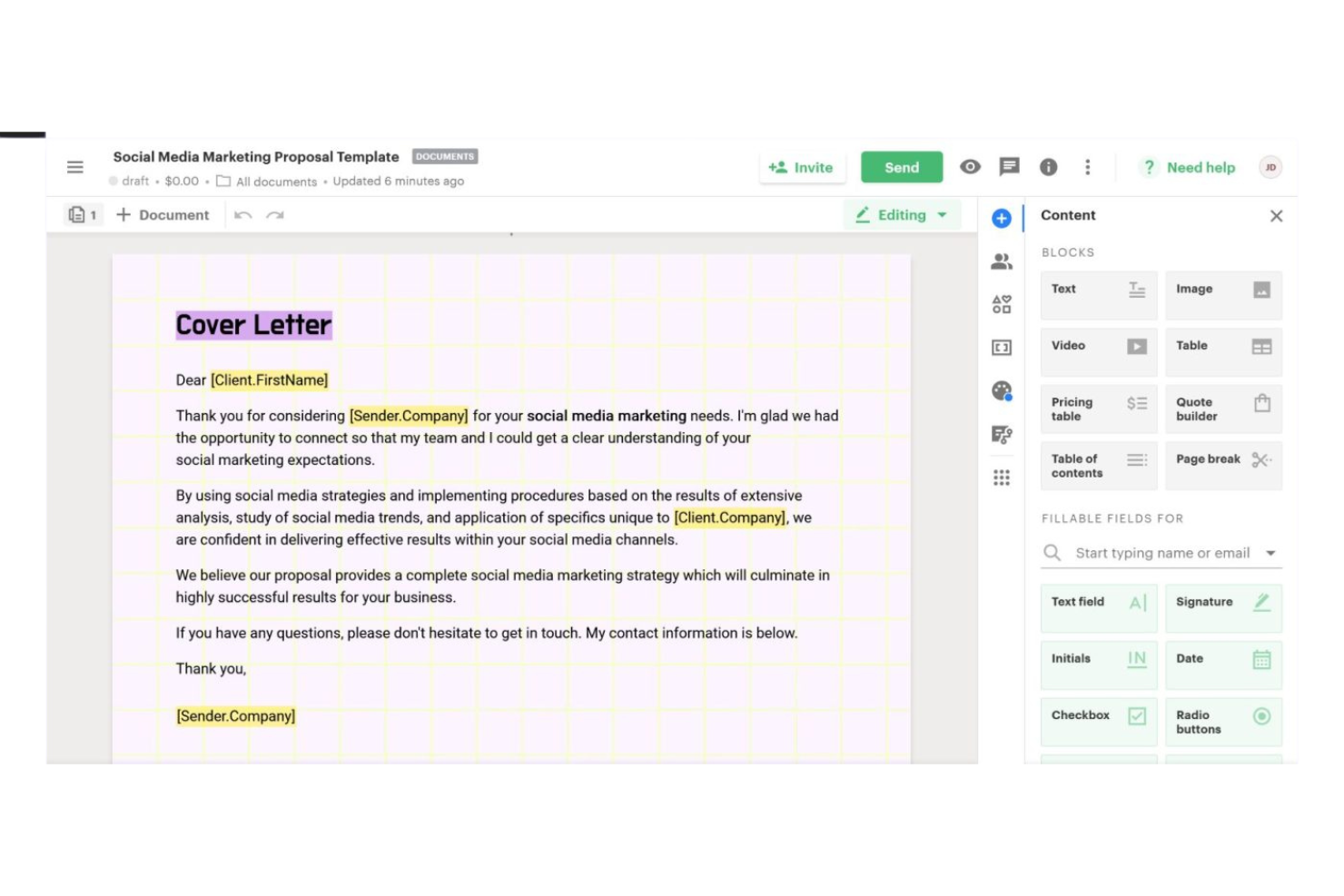
PandaDoc is a document workflow and e-signature platform that lets you build proposals, contracts, and quotes using a drag-and-drop editor, reusable content library, dynamic pricing tables, and native CRM integrations.
Who Is PandaDoc Best For?
Sales teams that rely heavily on CRM data—especially in Salesforce or HubSpot—to drive proposal creation and need e-signature built into the same workflow.
Why I Picked PandaDoc
I picked PandaDoc as one of the best because it's where CRM data and proposal creation genuinely meet in one workflow. When I'm working from a Salesforce opportunity or a HubSpot deal, PandaDoc pulls that data directly into a proposal, including line items, product details, and contact fields, without manual copying. The two-way sync also pushes document status and pricing updates back into the CRM, so the deal record stays current without extra steps.
PandaDoc Key Features
- Approval workflows: Route proposals through ordered internal reviewers before they reach recipients, with approval events logged in the audit trail.
- Document analytics: Track recipient-level engagement including view count, time spent per page, PDF downloads, and link clicks.
- Bulk send: Use templates, variables, and CSV files to send customized documents to multiple recipients at once.
- Conditional smart content: Insert Content Library items into a proposal automatically based on variable values or pricing-table data using if/then rules.
PandaDoc Integrations
PandaDoc lists 30+ integrations, including native Salesforce, HubSpot CRM, Pipedrive, Microsoft Dynamics CRM, and Zoho connections. It also offers a REST API, webhooks, SDKs, a JavaScript SDK, and Zapier connectors.
Pros and Cons
Pros:
- Engagement analytics inform recipient follow-up
- Pricing tables keep quotes in proposals
- Reusable templates reduce proposal rework
Cons:
- AI proposal generation remains in limited beta
- No autonomous prospect research or web crawling

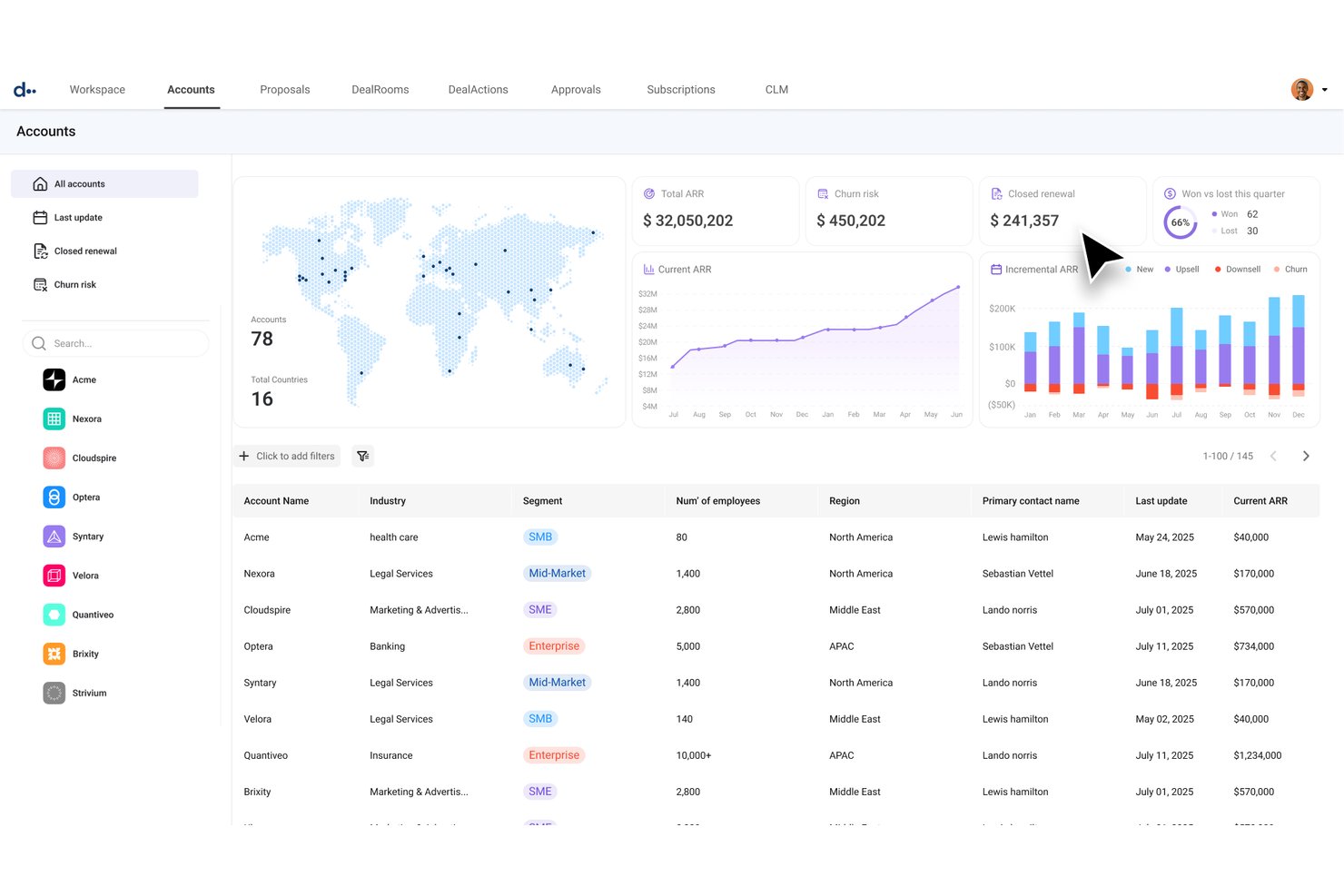
DealHub is a quote-to-revenue platform that combines CPQ, AI-assisted quoting, digital sales rooms, e-signatures, and contract generation in a single connected workflow.
Who Is DealHub Best For?
DealHub fits sales teams running complex, high-volume quote-to-close cycles where CRM data needs to drive every proposal, quote, and contract automatically.
Why I Picked DealHub
I picked DealHub as one of the best because it's the only tool on this list where CRM data doesn't just inform a proposal—it actively builds one. When a rep opens a Salesforce or HubSpot opportunity, DealHub pulls product configuration, pricing rules, and discount guardrails directly into a guided quote, then packages everything into a branded DealRoom with e-signature ready to go. I especially like the governed approval layer, which routes pricing exceptions automatically so deals don't stall waiting on a manager.
DealHub Key Features
- AI conversational quoting: Turns natural-language deal requests into fully configured quotes, pulling pricing rules and product data automatically.
- Buyer engagement tracking: Monitors how buyers interact with shared DealRoom content, including views, downloads, and document activity.
- Automated approval workflows: Routes pricing exceptions and discount approvals to the right stakeholders using parallel, one-click approval flows.
- Contract generation: Builds NDAs, MSAs, and other contracts dynamically from a pre-approved clause library and CRM-integrated data.
DealHub Integrations
DealHub offers native integrations with Salesforce, Microsoft Dynamics 365, HubSpot, and DocuSign eSignature. It also supports API and MCP connectivity for custom integrations and external AI agents.
Pros and Cons
Pros:
- Buyer activity alerts reveal document engagement
- Approval workflows route pricing exceptions
- Templates keep proposals and quote terms consistent
Cons:
- Complex pricing formulas need careful configuration
- AI doesn't research prospects or crawl web

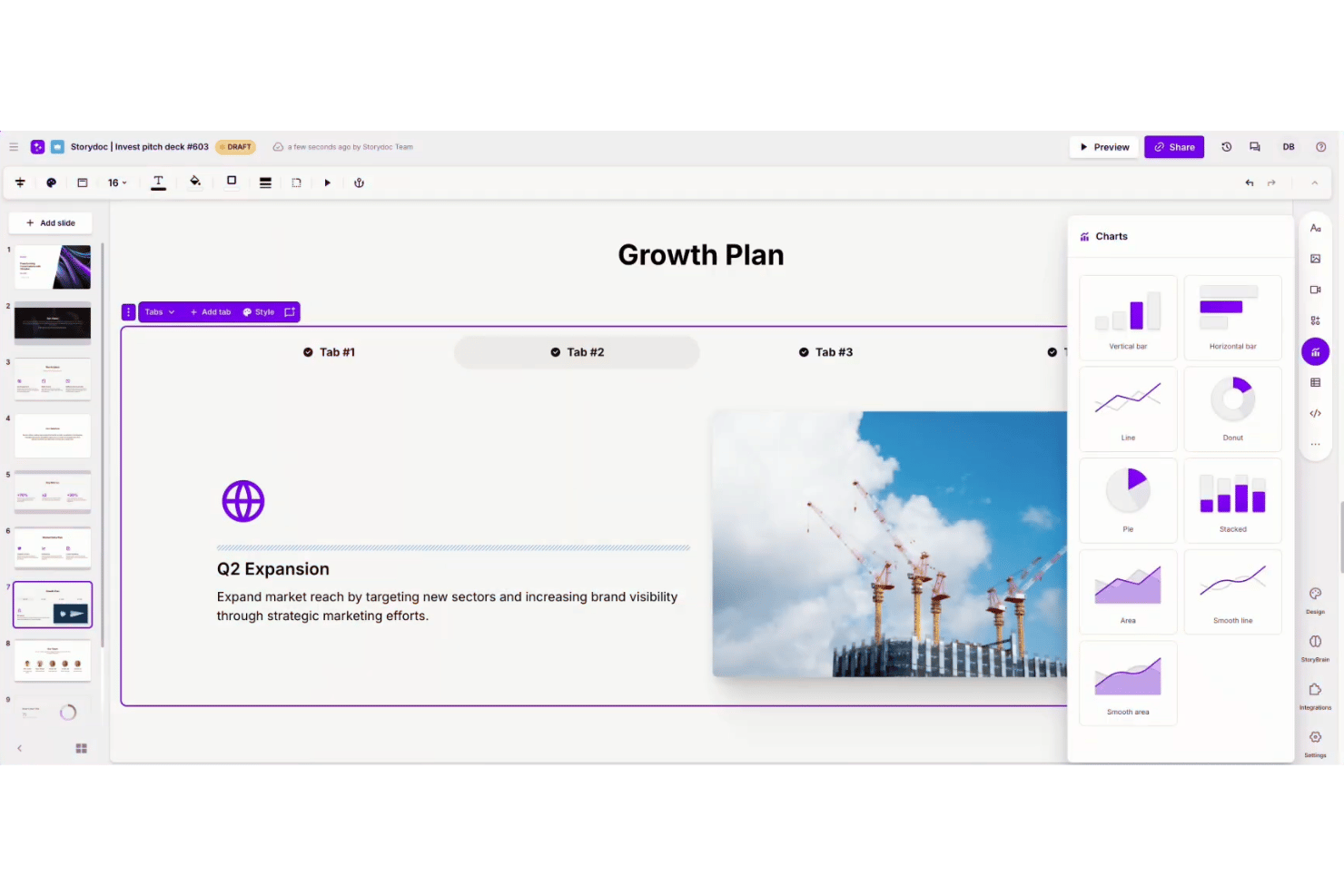
Storydoc is an AI proposal generator that creates interactive, scroll-based proposals with embedded media, pricing calculators, e-signatures, and built-in engagement analytics.
Who Is Storydoc Best For?
Storydoc is a strong fit for sales representatives and business development leads who need to send proposals that look polished and tell them exactly how prospects engage with the content.
Why I Picked Storydoc
I picked Storydoc as one of the best because its built-in engagement analytics tell you exactly how a prospect moved through your proposal: which slides they lingered on, where they dropped off, and whether they shared it internally. That visibility feeds directly into smarter follow-up. Pair that with embedded pricing calculators and one-click e-signatures, and a single Storydoc link can take a prospect from reading to signed without ever leaving the document.
Storydoc Key Features
- StoryBrain AI training: Train the AI on your brand voice, past proposals, and internal materials so generated documents reflect your existing content and style.
- Live-link updates: Edit a proposal after sending it so recipients always see the most current version without needing a new link.
- Team Slides library: Save and share reusable slides across your organization, including case studies, pricing tables, and cover slides.
- Calendar booking embed: Let prospects schedule a meeting directly from within the proposal using integrated calendar tools.
Storydoc Integrations
Storydoc offers native integrations with HubSpot and Salesforce, plus an API for custom integrations and Zapier support.
Pros and Cons
Pros:
- Reusable team slides support consistent proposals
- Tracks slide engagement to guide follow-up
- Polished templates help proposals look professional
Cons:
- PDF exports lose interactive elements and analytics
- AI doesn’t research prospects autonomously

GetAccept is an AI-powered proposal and digital sales room platform that combines proposal creation, interactive pricing tables, buyer engagement tracking, e-signatures, and CRM integrations in one deal-execution workflow.
Who Is GetAccept Best For?
GetAccept fits sales reps and revenue teams who need to send, track, and close proposals fast—without juggling separate tools for quoting, e-signatures, and follow-up.
Why I Picked GetAccept
I picked GetAccept as one of the best because it treats proposal tracking and e-signatures as a single, connected workflow rather than two separate steps. I love that you can see exactly which pages a buyer spent time on, then trigger a targeted follow-up video or reminder without ever leaving the platform. Native, legally binding e-signatures are built directly into that same flow, so there's no handoff to a separate signing tool once a prospect is ready to commit.
GetAccept Key Features
- AI knowledge base: Lets admins train the AI on company content—websites, uploaded PDFs, or manually entered items—so it generates contextually relevant proposal copy.
- Deal room templates: Reusable rooms with lockable sections, placeholders, and variables that keep brand-approved content protected while allowing rep-level personalization.
- Mutual action plans: Shared buyer-seller task lists with owners and due dates that map out every step needed to close a deal.
- Deal score: A machine-learning model that scores each send-out by its likelihood of getting signed, helping reps prioritize follow-up.
GetAccept Integrations
GetAccept offers native integrations with HubSpot, Salesforce, Pipedrive, Lime CRM, Microsoft Teams, Zoom, and Gong. It also supports REST API, webhooks, and Zapier for custom integrations.
Pros and Cons
Pros:
- Native signing and reminders simplify approvals
- Reusable templates reduce repetitive proposal drafting
- Page-level tracking guides timely proposal follow-up
Cons:
- No autonomous prospect research for tailored proposals
- AI drafts can need manual rewriting

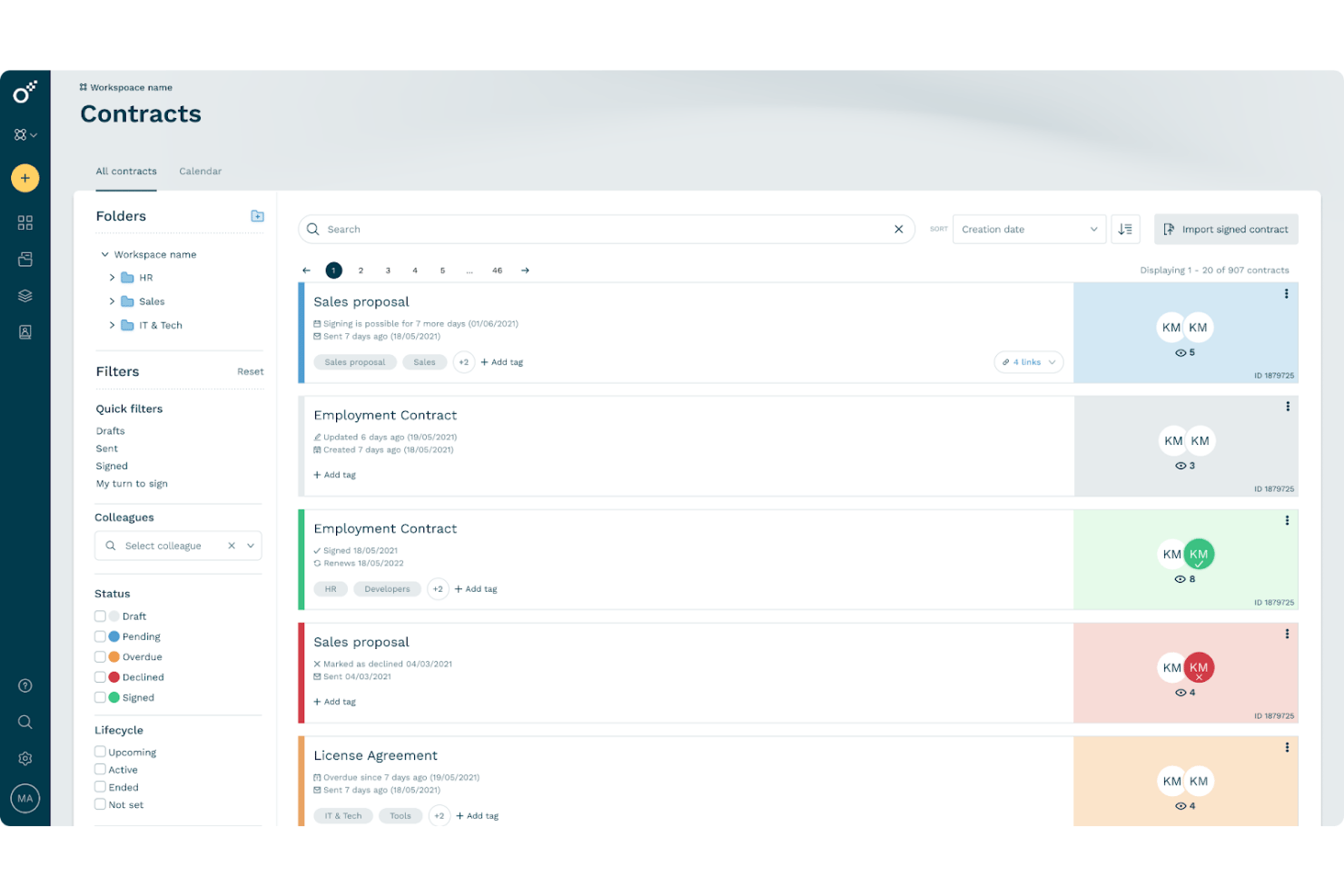
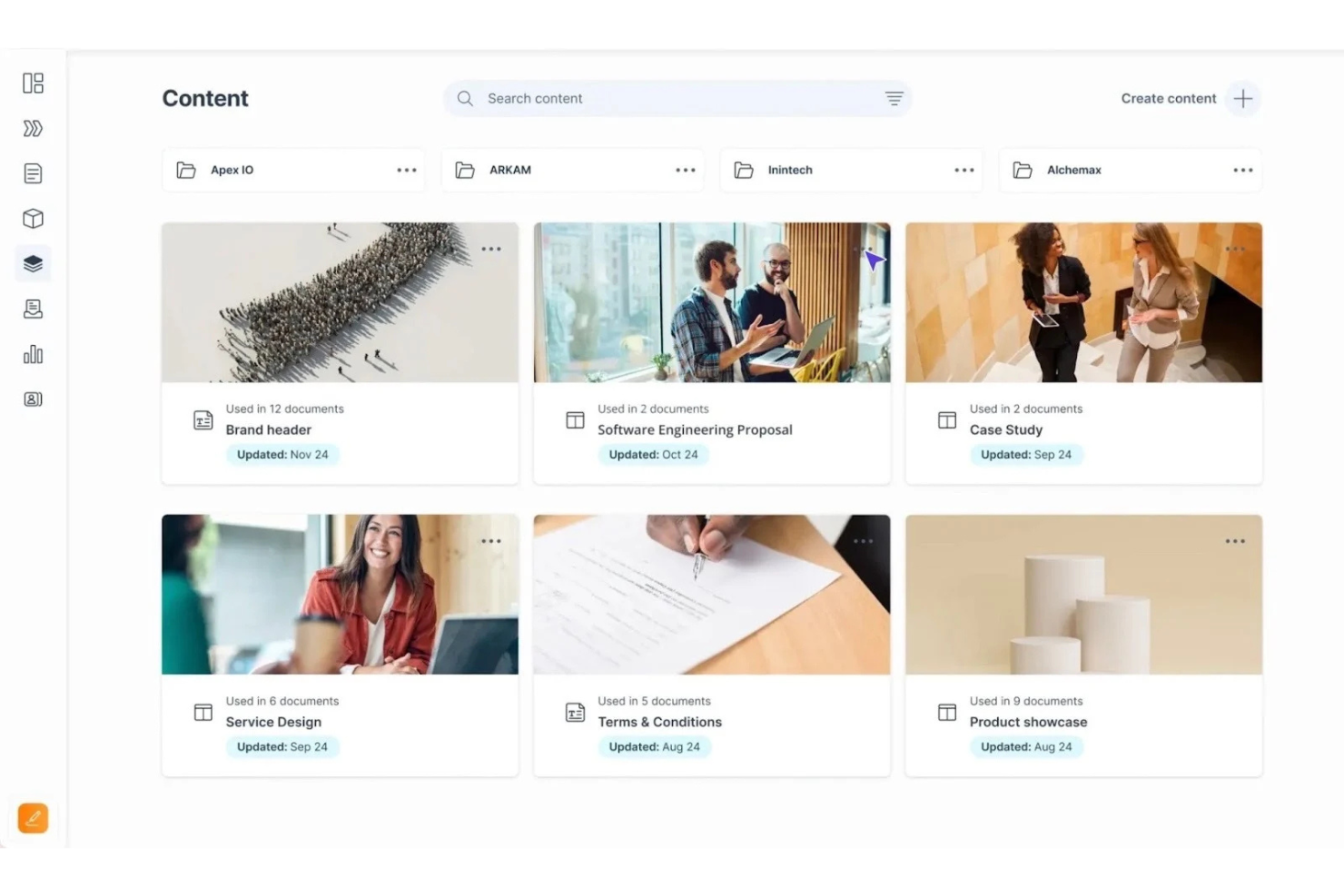
Oneflow is a contract lifecycle management platform that combines AI writing assistance, interactive proposal creation, e-signature, and CRM-connected workflows to take deals from proposal to signed contract.
Who Is Oneflow Best For?
Oneflow is a strong fit for sales teams that need proposals and contracts to live in the same workflow, connected directly to their CRM.
Why I Picked Oneflow
I've included Oneflow in my top picks because it's the only tool on this list that keeps proposals and contracts inside a single, CRM-connected workflow. I love how deal data from Salesforce, HubSpot, or Dynamics 365 populates directly into live, interactive proposals, so there's no manual re-entry when a deal moves forward. The built-in e-signature and internal approval routing mean a proposal can become a signed contract without ever leaving the platform.
Oneflow Key Features
- AI writing assistance: Write with AI helps you draft, refine, and review contract and proposal content directly inside the document editor.
- Content Library: Store and reuse approved text sections across multiple templates, with published updates syncing to connected templates.
- Interactive pricing tables: Product-table sections let recipients view prices, apply discounts, and select quantities, with totals calculated automatically.
- Contract insights dashboard: Track proposal and contract engagement, including visit counts and open activity, from a centralized dashboard.
Oneflow Integrations
Oneflow offers native integrations with Salesforce, HubSpot, and Microsoft Dynamics 365. It also provides API and webhook access for custom integrations and supports Zapier.
Pros and Cons
Pros:
- Live proposals reduce email version churn
- Interactive pricing tables support tailored packages
- Reusable templates speed proposal preparation
Cons:
- Template formatting can require extra fixes
- AI doesn't research prospects autonomously

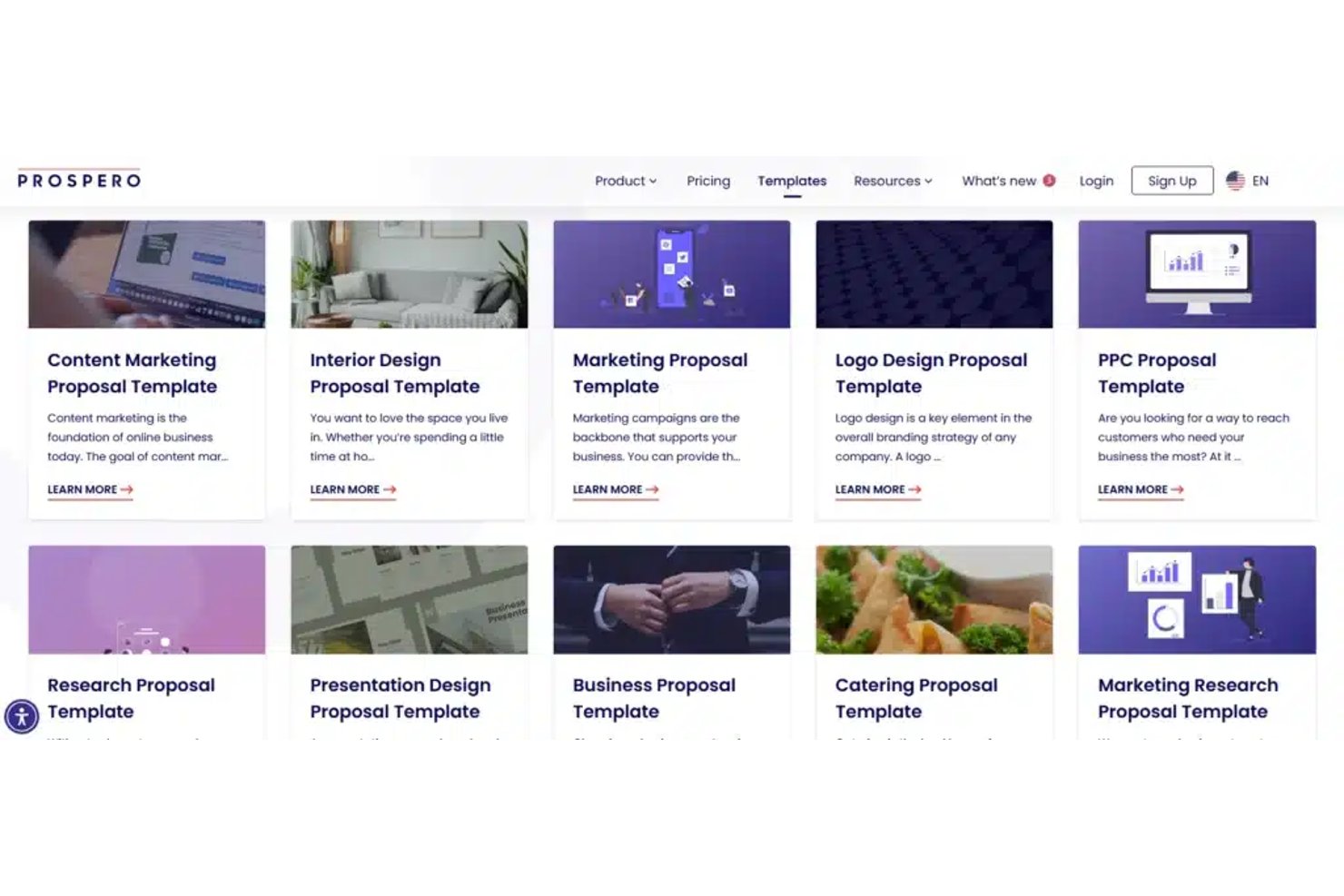
Prospero is an AI proposal generator that pairs an AI writing and image assistant with customizable templates, interactive pricing tables, e-signatures, and proposal tracking.
Who Is Prospero Best For?
Prospero is a strong fit for freelancers and small agencies who need a polished, all-in-one proposal tool without paying enterprise-level prices.
Why I Picked Prospero
I've included Prospero in my top picks because it delivers the core proposal toolkit—customizable templates, interactive pricing tables, e-signatures, and proposal tracking—at a price point that doesn't require an enterprise budget. I like that the pricing tables support quantity, duration, taxes, and discounts, so you can build a genuinely dynamic quote inside the proposal itself. The content library with 113-plus templates also means you're not starting from scratch every time.
Prospero Key Features
- AI text and image assistant: Generate and edit proposal copy or visuals directly inside the editor using a single prompt.
- E-signature with audit trail: Collect typed, drawn, or uploaded signatures from up to two signers, with timestamp, IP, and device recorded for each.
- Proposal engagement tracking: Monitor open counts, viewing duration, and device details for each sent proposal, plus get email notifications when a client opens one.
- HubSpot and Pipedrive integration: Pull contact and deal data from your CRM to auto-populate proposals, and sync proposal status back to the connected record.
Prospero Integrations
Prospero offers native integrations with HubSpot, Pipedrive, QuickBooks, FreshBooks, Stripe, Square, Monday, Wix, and Slack. It also supports Zapier and Make, but no public API is documented.
Pros and Cons
Pros:
- Proposal views help guide client follow-ups
- Interactive quotes combine pricing and signatures
- Reusable templates speed polished proposal drafts
Cons:
- Reviewers want deeper engagement reporting
- AI doesn’t research prospects autonomously
Outro gerador de propostas com IA
Eis algumas opções adicionais de geradores de propostas com IA que não chegaram à minha lista restrita, mas que ainda vale a pena consultar:
- Nusii
For freelancers sending tracked proposals
- Taskip
For agency proposals with built-in quoting
- Responsive
For structured RFP and questionnaire responses
- Venngage
For accessible proposal PDFs
- Bonsai
For freelance proposals with built-in billing
- Gamma
For proposals reused as sales collateral
- Zoho Sign
For AI checks on proposal contract terms
- QorusDocs
For proposal work inside Microsoft 365
- GovDash
For government RFP proposals end-to-end
- Manus
For AI-agent-led prospect research


How I Evaluate AI Proposal Generators
To make this list, a tool's AI needs to handle real proposal work, like drafting context-aware content and populating templates from deal data. From there, I evaluate three things. Core functionality carries the most weight, like customizing branded templates and tracking proposal engagement. Then I look at content library reuse and how clearly vendors explain client data retention and AI training.
Core Functionality (Table Stakes For This List)
When I'm selecting tools for my list, I score each one on a scale from 0 (does not offer the functionality) to 5 (excels in this area) for each core functionality listed below. I then convert the total into a percentage to help assess each tool's overall fit, with extra weight on any functionalities I’ve deemed essential.
- AI Capabilities (Essential): I look for context-aware drafting or deal-data mapping that turns discovery notes and CRM details into a useful first draft, not just generic text.
- Customizable Templates (Essential): Can teams adapt branded layouts and reusable scope, deliverable, and timeline blocks for different clients while preserving approved language?
- Pricing Tools: I check whether teams can build clear line-item estimates, calculate totals, and present package options within the proposal.
- E-Signature & Approval: I look for client signing and internal sign-off steps that fit the proposal workflow, rather than requiring a separate manual handoff.
- Proposal Tracking: Can teams see when a client views a proposal and which sections they review, so they can time follow-up to real engagement?
- CRM Integration: I evaluate how deal details populate proposals and whether proposal status syncs back to sales tools for a clear handoff.
Once I have a list of tools that meet the criteria, I consider what sets each platform apart.
Differentiating Factors (What Sets Vendors Apart)
Here's how I compare and contrast different vendors:
Standout Features
Content library reuse is the first thing I check. Teams that run dozens of proposals a month need pre-approved scope blocks, case studies, and pricing snippets they can drop in without rewriting from scratch. I also look at brand compliance controls, since locked sections and admin-level permissions keep legal language and pricing intact even when reps customize the rest. Deal win analytics round out the picture—tools like Proposify surface patterns from closed-won proposals so teams can adjust structure and messaging based on what actually converts.
Beyond Features
I check whether vendors clearly disclose how client data is handled—especially whether uploaded pricing or scope details train their AI models. Agencies sending sensitive client information need that transparency before onboarding. I also evaluate pricing model clarity, since per-seat and per-proposal tiers scale very differently depending on team size and proposal volume. Hidden AI usage caps can quietly inflate costs for high-volume teams.
Como escolher um gerador de propostas com IA
É fácil ficar perdido entre longas listas de funcionalidades e estruturas de preços complexas. Para o ajudar a manter o foco enquanto conduz o seu processo específico de seleção de software, eis uma lista de verificação dos fatores a ter em conta:
| Fator | O que deve considerar |
|---|---|
| Escalabilidade | A ferramenta consegue suportar o volume de propostas previsto para a sua equipa e o crescimento futuro? A adição de novos utilizadores ou a gestão de vários projetos em simultâneo serão processos simples? |
| Integrações | Estabelece ligação direta aos seus repositórios de conteúdos, CRM ou conjuntos de aplicações de escritório, como o Microsoft 365 ou o Google Workspace? As lacunas podem significar trabalho manual ou atrasos no fluxo de trabalho. |
| Personalização | Pode adaptar modelos, fluxos de trabalho de aprovação e bibliotecas de conteúdos aos seus processos exatos de elaboração de propostas sem assistência de um programador? |
| Facilidade de utilização | A interface é intuitiva tanto para utilizadores ocasionais como frequentes? A sua equipa conseguiria preparar uma proposta de forma realista com formação ou documentação mínimas? |
| Implementação e integração inicial | Que passos de configuração e migração de dados são necessários? Avalie a curva de aprendizagem e a integração inicial orientada pelo fornecedor, as visitas guiadas ao produto ou a documentação disponíveis. |
| Custo | Os níveis de subscrição correspondem ao seu orçamento e oferecem valor adequado à dimensão da sua equipa e aos requisitos de funcionalidades? Esteja atento a custos adicionais de armazenamento, utilizadores ou complementos. |
| Medidas de segurança | Existem controlos de acesso a dados, registos de auditoria e conformidade com as normas de privacidade ou do setor da sua organização, especialmente no caso de propostas RFP sensíveis? |
| Disponibilidade do apoio | Que canais e níveis de serviço oferece o fornecedor? Pode contactar rapidamente o apoio se algo bloquear o envio de uma proposta ativa? |
O que é um gerador de propostas com IA?
Os geradores de propostas com IA são ferramentas de software que utilizam inteligência artificial para automatizar a criação, edição e gestão de propostas comerciais e respostas a RFP.
Estas ferramentas ajudam as equipas a produzir documentos personalizados e sem erros, recorrendo a bibliotecas de conteúdos, processamento de linguagem natural e automatização de fluxos de trabalho, reduzindo o esforço manual e acelerando os prazos de resposta para propostas de grande importância.
Funcionalidades
Ao selecionar um gerador de propostas com IA, procure as seguintes funcionalidades essenciais:
- Sugestões de conteúdos baseadas em IA: Utiliza inteligência artificial para recomendar textos, respostas ou secções relevantes com base nos seus documentos históricos e nos requisitos dos pedidos de propostas.
- Gestão de modelos: Permite criar, armazenar e reutilizar modelos com a imagem da marca, mantendo a consistência e acelerando a criação de propostas.
- Ferramentas de colaboração: Permite que vários utilizadores editem, comentem ou aprovem propostas em tempo real, garantindo o controlo de versões e os contributos das várias equipas.
- Biblioteca de conteúdos: Armazena respostas aprovadas, elementos gráficos e secções padrão relativas aos resultados do projeto, para um acesso rápido e uma reutilização consistente em todas as propostas.
- Automatização de fluxos de trabalho: Automatiza tarefas como o encaminhamento para aprovação, os alertas de notificação e os lembretes de prazos, ajudando a entregar as propostas atempadamente.
- Opções de formatação e exportação de documentos: Permite personalizar a formatação utilizando ferramentas como o Canva e exportar facilmente para vários tipos de ficheiro, como PDF, Word ou PowerPoint.
- Análise de propostas: Regista quando e como as propostas são consultadas, fornecendo dados de interação que podem orientar as estratégias de vendas e os acompanhamentos.
- Permissões e funções de utilizador: Permite um controlo detalhado sobre quem pode criar, editar, rever ou enviar propostas, protegendo informações e fluxos de trabalho sensíveis.
- Conformidade e registos de auditoria: Monitoriza as alterações e mantém registos para garantir a conformidade regulamentar e a responsabilização durante o processo de proposta.
Vantagens
A implementação de um gerador de propostas com IA proporciona várias vantagens à sua equipa e à sua empresa. Eis algumas das que pode esperar:
- Criação mais rápida de propostas: As sugestões de conteúdos automatizadas e os modelos reutilizáveis ajudam as equipas a criar, rever e enviar propostas muito mais rapidamente.
- Maior consistência das propostas: As bibliotecas de conteúdos centralizadas e a gestão de modelos facilitam a manutenção de uma imagem e de uma comunicação consistentes.
- Colaboração melhorada: As ferramentas de edição, comentários e fluxos de trabalho em tempo real permitem que as equipas trabalhem em conjunto sem problemas, mesmo quando estão distribuídas.
- Maior precisão das propostas: O preenchimento automático baseado em IA e as ferramentas de conformidade ajudam a detetar erros e a garantir respostas completas e relevantes.
- Maior visibilidade e acompanhamento: A análise integrada e o acompanhamento da interação fornecem informações sobre a forma como os destinatários interagem com as propostas.
- Redução do esforço manual: A automatização dos fluxos de trabalho e as recomendações de respostas baseadas em IA reduzem significativamente o trabalho repetitivo necessário para cada proposta.
- Maior segurança dos dados: As permissões robustas e as funcionalidades de auditoria protegem as informações empresariais sensíveis ao longo de todo o processo de proposta.
Custos e preços
Selecionar um gerador de propostas com IA requer uma compreensão dos vários modelos de preços e planos disponíveis. Os custos variam consoante as funcionalidades, o tamanho da equipa, os complementos e outros fatores. A tabela abaixo resume os planos comuns, os respetivos preços médios e as funcionalidades normalmente incluídas nas soluções de geradores de propostas com IA:
Tabela de comparação de planos para geradores de propostas com IA
| Tipo de plano | Preço médio | Funcionalidades comuns |
|---|---|---|
| Plano gratuito | $0 | Criação básica de propostas, modelos limitados, acesso de um único utilizador e opções de exportação restritas. |
| Plano pessoal | $10-$25/utilizador/mês | Gestão melhorada de modelos, ferramentas de colaboração simples, acesso à biblioteca de conteúdos e análise básica. |
| Plano empresarial | $30-$65/utilizador/mês | Colaboração em equipa, automatização de fluxos de trabalho, análise avançada, acompanhamento de propostas e opções de personalização da marca. |
| Plano empresarial avançado | $75-$150/utilizador/mês | Permissões avançadas, acesso à API, funcionalidades de conformidade, suporte premium, serviços de integração e registos de auditoria. |
Perguntas frequentes sobre geradores de propostas com IA
Aqui estão algumas respostas a perguntas comuns sobre o gerador de propostas com IA:
Como é que um gerador de propostas com IA acelera o processo de elaboração de propostas?
Os geradores de propostas com IA sugerem rapidamente conteúdos relevantes, retiram secções reutilizáveis de uma biblioteca e automatizam os fluxos de trabalho de aprovação. Isto significa que as equipas passam menos tempo a procurar respostas anteriores ou a reformular documentos, permitindo cumprir prazos apertados sem sacrificar a qualidade.
Os geradores de propostas com IA podem integrar-se com outras ferramentas empresariais?
Sim, a maioria dos geradores de propostas com IA liga-se a ferramentas como sistemas de CRM, plataformas de armazenamento de documentos e conjuntos de ferramentas de produtividade. As integrações ajudam a obter dados dos clientes, sincronizar documentos e manter os fluxos de trabalho a funcionar sem problemas em toda a sua infraestrutura tecnológica existente.
Quão seguros estão os dados armazenados num gerador de propostas com IA?
A maioria dos fornecedores utiliza práticas de segurança padrão, como encriptação, permissões de utilizador e registos de auditoria. Procure soluções que disponibilizem certificados de conformidade e opções para controlar quem acede a ficheiros sensíveis, especialmente ao lidar com dados confidenciais de clientes ou da empresa.
É difícil integrar a minha equipa num novo gerador de propostas com IA?
Não, a maioria das plataformas disponibiliza modelos, demonstrações guiadas do produto e vídeos de formação para ajudar as equipas a começar rapidamente. Uma boa integração deve incluir apoio em direto e documentação clara para ajudar os novos utilizadores a obter resultados logo na primeira semana.
Que tipos de análise posso esperar de um gerador de propostas com IA?
Pode esperar informações como o envolvimento dos destinatários, as taxas de abertura dos documentos e o acompanhamento do estado das aprovações. Estas análises ajudam a perceber quais as propostas que estão a avançar e a identificar formas de melhorar o seu processo e as taxas de resposta.