



Zoho Projects vs. monday.com: Confronto Esperto per il 2026



Zoho Projects offre una piattaforma solida per gestire in modo efficiente i compiti e le tempistiche del tuo team. monday.com propone un'interfaccia visivamente intuitiva per organizzare il lavoro e collaborare efficacemente. Sebbene entrambi gli strumenti aiutino a semplificare i flussi di lavoro dei progetti, Zoho Projects è noto per le sue capacità di reportistica completa rispetto alle dashboard personalizzabili di monday.com. In questo articolo trovi un confronto dettagliato di questi software di project management, incluse le loro caratteristiche, i pro e i contro e le tariffe.
Zoho Projects vs. monday AI Workspace: An Overview
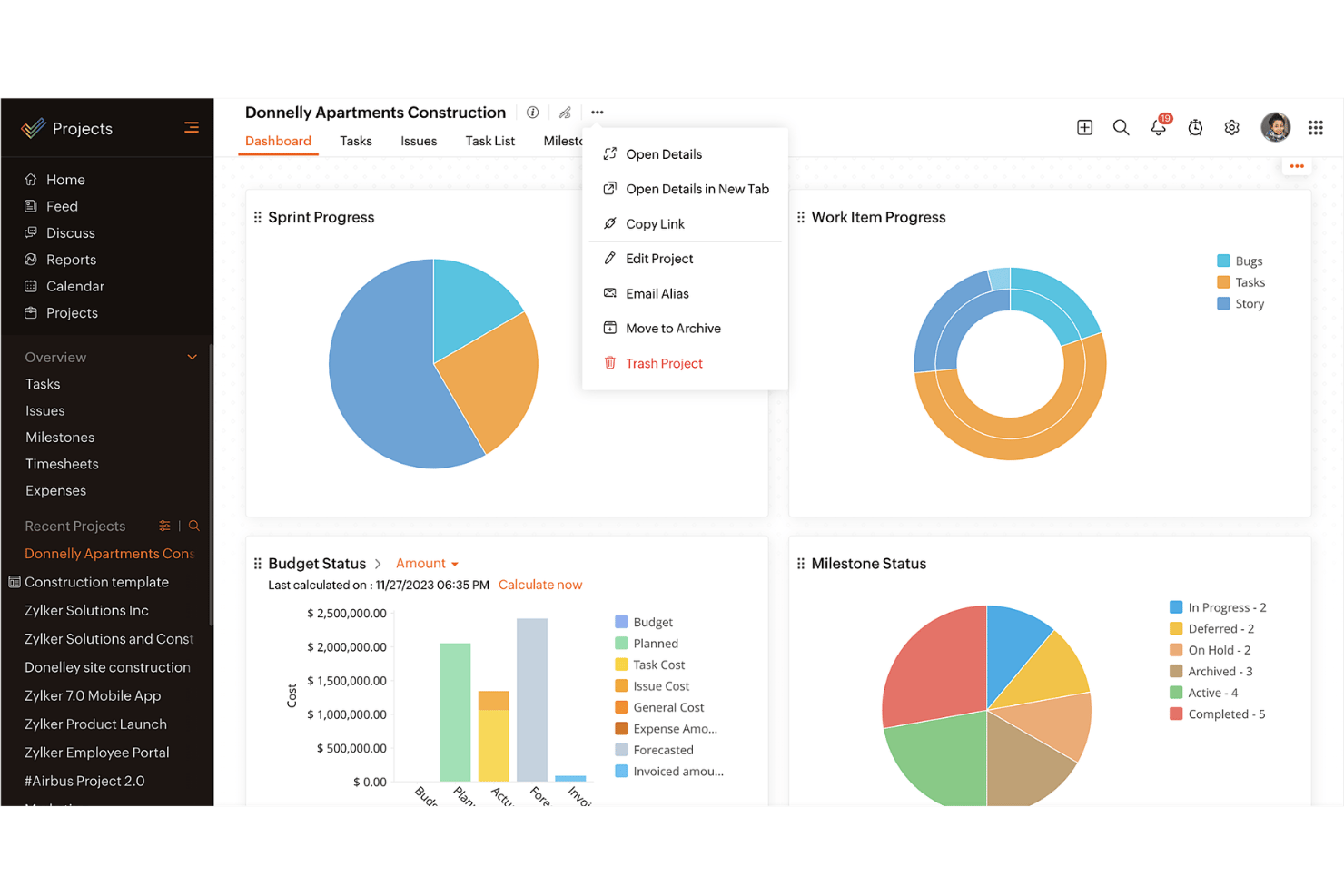
Zoho Projects
monday AI Workspace

Perché fidarsi dei nostri consigli sui software
Il nostro team testa e recensisce software dal 2012. In quanto project manager noi stessi, sappiamo quanto sia difficile — e importante — scegliere il software giusto.
Per questa guida, abbiamo valutato gli strumenti attraverso test pratici e ricerche indipendenti, assegnando un punteggio agli strumenti in base ai nostri criteri di selezione. Ci basiamo inoltre sulle competenze di leader di pensiero del settore e di professionisti attivi nella gestione dei progetti.
Le nostre recensioni riflettono il nostro giudizio editoriale umano, non un discorso di vendita.
Revisori esperti:
Zoho Projects vs. monday AI Workspace Pricing Comparison
| Zoho Projects | monday AI Workspace | |
|---|---|---|
| Free Trial | Free plan available | Free plan available |
| Pricing | From $4/user/month (billed annually) | From $9/user/month (billed annually) |
Prezzi e costi nascosti di Zoho Projects vs. monday.com
I prezzi di Zoho Projects si basano su un modello di abbonamento a livelli, offrendo diversi piani con funzionalità variabili; l'utente può dover affrontare costi extra per utenti aggiuntivi o per l'assistenza premium. I prezzi di monday.com seguono un approccio a livelli simile ma puntano sulla flessibilità con i componenti aggiuntivi e le integrazioni, che potrebbero comportare spese aggiuntive. Per scegliere lo strumento giusto per le tue esigenze, valuta non solo il costo dell'abbonamento di base ma anche le funzionalità e il supporto di cui il tuo team avrà bisogno. Considera la scalabilità del modello di prezzi per assicurarti che sia in linea con la crescita e la complessità del tuo progetto.
Zoho Projects vs. monday AI Workspace Feature Comparison
Con le funzionalità complete di gestione delle attività di Zoho Projects puoi monitorare facilmente l’avanzamento e fissare traguardi, rendendo il software prezioso per gestire progetti complessi con scadenze ravvicinate. Le potenti automazioni di monday.com sono ideali per semplificare attività ripetitive e integrare senza problemi altri strumenti, il che è particolarmente utile in ambienti dinamici che richiedono aggiornamenti frequenti. Mentre Zoho Projects eccelle nella gestione strutturata delle tempistiche, monday.com offre flessibilità grazie alle sue automazioni personalizzate, offrendo così supporto a diversi aspetti della gestione progetti.
| Zoho Projects | monday AI Workspace | |
|---|---|---|
| API | ||
| Batch Permissions & Access | ||
| Budgeting | ||
| Calendar Management | ||
| Collaboration Support | ||
| Contact Management | ||
| Contact Sharing | ||
| Customer Management | ||
| Dashboard | ||
| Dashboards | ||
| Data Export | ||
| Data Import | ||
| Data Visualization | ||
| Dependency Tracking | ||
| Document Sharing | ||
| Expense Tracking | ||
| External Integrations | ||
| File Sharing | ||
| Gantt Charts | ||
| Kanban Boards | ||
| Multi-User | ||
| Notifications | ||
| Project Management | ||
| Resource Management | ||
| Scheduling | ||
| Task Scheduling/Tracking | ||
| Third-Party Plugins/Add-Ons | ||
| Time Management | ||
| Travel Management | ||
| Workflow Management |
Integrazioni di Zoho Projects vs. monday.com
| Integrazione | Zoho Projects | monday.com |
|---|---|---|
| Slack | ✅ | ✅ |
| Microsoft Teams | ✅ | ✅ |
| Google Drive | ✅ | ✅ |
| Dropbox | ✅ | ✅ |
| Salesforce | ❌ | ✅ |
| HubSpot | ❌ | ✅ |
| Zendesk | ✅ | ❌ |
| QuickBooks | ❌ | ✅ |
| API | ✅ | ✅ |
| Zapier | ✅ | ✅ |
Con l'integrazione di Zoho Projects con Slack, è possibile rendere la comunicazione più fluida ricevendo aggiornamenti istantanei direttamente nella chat, ideale per i team che si affidano molto ai messaggi in tempo reale. L'integrazione di HubSpot con monday.com è perfetta per progetti orientati alle vendite, consentendo una sincronizzazione senza interruzioni di offerte e contatti e migliorando la visibilità sui progetti e la gestione delle relazioni con i clienti. Entrambi gli strumenti propongono integrazioni che rispondono a esigenze diverse, sia sulla comunicazione potenziata che sul tracciamento efficace delle vendite.
Zoho Projects vs. monday.com Sicurezza, Conformità & Affidabilità
| Fattore | Zoho Projects | monday.com |
|---|---|---|
| Crittografia dei dati | Zoho Projects cripta i dati in transito e a riposo utilizzando la crittografia avanzata AES-256. | monday.com utilizza anch'esso la crittografia AES-256 per proteggere i dati sia in transito che a riposo. |
| Conformità normativa | Zoho Projects è conforme al GDPR, garantendo la privacy e la protezione dei dati per gli utenti europei. | monday.com aderisce al GDPR e ad altre regolamentazioni internazionali sulla protezione dei dati. |
| Affidabilità del servizio | Zoho Projects garantisce una disponibilità del 99,9%, assicurando interruzioni minime per il tuo team. | monday.com offre un SLA di uptime del 99,9%, garantendo un accesso affidabile ai tuoi progetti. |
| Controlli di accesso | Zoho Projects fornisce controlli di accesso basati sui ruoli, permettendo di definire i permessi utente. | monday.com offre controlli di accesso personalizzabili per gestire chi può visualizzare o modificare le informazioni. |
Zoho Projects e monday.com danno entrambi priorità alla sicurezza e alla conformità, offrendo una crittografia robusta e il rispetto delle normative. Per scegliere il fornitore giusto, valuta le funzionalità di sicurezza specifiche che si allineano ai requisiti di conformità del tuo settore e considera le garanzie di affidabilità che assicurano un accesso costante ai dati dei tuoi progetti.
Zoho Projects vs. monday.com Facilità d'Uso
| Fattore | Zoho Projects | monday.com |
|---|---|---|
| Interfaccia utente | Zoho Projects ha un'interfaccia strutturata che si concentra su timeline dettagliate dei progetti e liste di attività. | monday.com offre un'interfaccia visivamente accattivante e colorata con bacheche personalizzabili. |
| Esperienza di onboarding | Zoho Projects fornisce tutorial guidati e documentazione di supporto per facilitare i nuovi utenti nell'utilizzo del sistema. | monday.com presenta un processo di onboarding intuitivo con tutorial interattivi e modelli. |
| Processo di configurazione | Zoho Projects richiede una configurazione più dettagliata, con molte opzioni disponibili. | monday.com consente una configurazione rapida grazie al drag-and-drop e ai modelli predefiniti. |
| Assistenza clienti | Zoho Projects offre un supporto esteso tramite risorse online e chat dal vivo. | monday.com fornisce assistenza 24/7 con un'ampia libreria di video tutorial e webinar. |
Zoho Projects è ideale per chi predilige un approccio dettagliato e strutturato, ma la configurazione può essere più complessa. monday.com eccelle nell'aspetto visivo e offre un'esperienza più intuitiva e user-friendly, permettendo di iniziare subito a gestire i progetti senza difficoltà.
Zoho Projects vs monday AI Workspace: Pros & Cons
Zoho Projects
- Task dependencies are highly visual and easy to set up.
- Built-in time tracking integrates smoothly with billing features.
- Customizable project templates support repeatable workflows.
- Reporting customization can be limited for advanced needs.
- Mobile app notifications do not always sync in real time.
- Gantt chart drag-and-drop can feel sluggish with large projects.
monday AI Workspace
- The interface is easy to use, with simple drag and drop timeline and charting mechanics.
- You can create forms that live within your project as a view.
- There is a long list of supported integrations
- The Gantt view isn't useful for building a project.
- Recurring tasks are considered automations and limited to higher tier plans.
- There is a steep learning curve for beginners.
Best Use Cases for Zoho Projects and monday AI Workspace
Zoho Projects
- Small Agencies Kanban boards, time tracking, and client billing streamline project delivery and reporting for agency teams.
- IT Departments Issue tracking, blueprint automations, and strong permission controls provide what IT teams need for complex internal projects.
- Consulting Firms Time sheets, detailed reports, and project-level billing help consultants keep track of client hours and invoicing.
- Remote Teams Robust collaboration tools, document sharing, and project forums help distributed users stay connected.
- Marketing Teams Reusable templates, task dependencies, and timeline tracking make repeated campaigns run smoothly and transparently.
- Construction Projects Gantt charts, milestones, and resource allocation features support the scheduling needs of construction and field project managers.
monday AI Workspace
- Creative departments With features like collaborative docs and a proofing screen, creative teams can improve feedback loops and increase delivery speeds.
- Marketing teams Its customizable dashboards and automation features let you track campaigns and workflows efficiently.
- Content creation monday.com's file management and commenting capabilities let teams manage media files and improve collaboration.
- Event planners The platform’s timeline views and easy collaboration features make managing multiple events straightforward.
- Product development You can track progress and updates across teams to maintain alignment and meet deadlines.
- Remote teams With collaborative features and real-time updates, remote teams can maintain productivity and communication effortlessly.
Chi dovrebbe usare Zoho Projects e chi dovrebbe usare monday.com?
A mio parere, Zoho Projects è ideale per i team che necessitano di una pianificazione dettagliata dei progetti e di solide funzionalità di reportistica, rendendolo perfetto per settori come l'ingegneria e l'informatica. Se il tuo lavoro richiede un approccio strutturato con una forte attenzione alle scadenze e alla gestione delle attività, Zoho Projects è la scelta giusta. D'altra parte, ritengo che monday.com sia perfetto per team creativi e startup che cercano flessibilità e un monitoraggio visivo dei progetti. Le sue bacheche personalizzabili e le integrazioni semplici lo rendono adatto ad ambienti dinamici dove la collaborazione e l'adattabilità sono fondamentali.
Differences Between Zoho Projects and monday AI Workspace
| Zoho Projects | monday AI Workspace | |
|---|---|---|
| Automation | Zoho Projects includes basic automation for task management. | monday.com offers advanced automation and seamless integrations with other tools. |
| Onboarding | Zoho Projects has guided onboarding with tutorials and documentation. | monday.com features an interactive onboarding process with templates and tutorials. |
| Pricing | Zoho Projects offers tiered plans with additional costs for premium features. | monday.com provides flexible plans with options for add-ons and integrations. |
| Reporting | Zoho Projects provides detailed reporting and analytics for project tracking. | monday.com offers customizable dashboards for visual project insights. |
| User Interface | Zoho Projects features a structured, timeline-focused interface. | monday.com has a colorful, board-based interface that's highly customizable. |
| Read Zoho Projects ReviewOpens new window | Visit monday AI WorkspaceOpens new window |
Similarities Between Zoho Projects and monday AI Workspace
| Collaboration | Each platform offers communication features, ensuring your team stays connected on project updates. |
|---|---|
| Customization | Zoho Projects and monday.com allow you to customize project views and workflows to suit your needs. |
| Integrations | Both tools integrate with popular apps like Slack and Google Drive, enhancing your team's workflow. |
| Security | Both provide strong encryption and compliance with regulations like GDPR to protect your data. |
| User Support | Zoho Projects and monday.com offer extensive support resources, including tutorials and live help. |
| Read Zoho Projects ReviewOpens new window Visit monday AI WorkspaceOpens new window | |