

Recensione di Monday CRM: Pro, Contro, Funzionalità e Prezzi



Monday CRM is a customer relationship management product from monday.com’s project management software solutions that helps you speed up sales efficiently. It's ideal for marketing teams, sales departments, and creative agencies looking to streamline their workflows with tools like customizable dashboards and real-time collaboration. Monday CRM delivers value by enhancing your team's productivity and aligning your projects with your business goals.
In this article, you'll learn about Monday CRM's features, pros and cons, best and worst use cases, and pricing. Whether you're juggling multiple projects or striving for better team alignment, this review will help you decide if Monday CRM meets your needs.
monday CRM Evaluation Summary

- From $12/seat/month (billed annually)
- 14-day free trial + free demo available
Perché fidarsi dei nostri consigli sui software
Il nostro team testa e recensisce software dal 2012. In quanto project manager noi stessi, sappiamo quanto sia difficile — e importante — scegliere il software giusto.
Per questa guida, abbiamo valutato gli strumenti attraverso test pratici e ricerche indipendenti, assegnando un punteggio agli strumenti in base ai nostri criteri di selezione. Ci basiamo inoltre sulle competenze di leader di pensiero del settore e di professionisti attivi nella gestione dei progetti.
Le nostre recensioni riflettono il nostro giudizio editoriale umano, non un discorso di vendita.
Revisori esperti:
monday CRM Overview
In my opinion, Monday CRM is a solid choice for teams needing a flexible project management tool. It excels with its customizable workflows and integrations, making it suitable for creative teams and agencies that value adaptability. Compared to competitors, Monday CRM offers robust features with a user-friendly interface, though it might feel overwhelming for smaller teams due to its extensive capabilities. It's a top contender if you're looking for a platform that grows with your needs.
pros
-
You can easily customize workflows to fit your team's specific needs.
-
It enhances team collaboration with real-time updates and dashboards.
-
The onboarding process is smooth and user-friendly, helping your team get started quickly.
cons
-
The interface can be overwhelming for smaller teams with its extensive capabilities.
-
Some users find the navigation less intuitive compared to other tools.
-
It might not be the best fit for teams needing advanced financial features.
Is monday CRM Right For Your Needs?
Who Would be a Good Fit for monday CRM?
Marketing teams, creative agencies, and sales departments are a great fit for Monday CRM. You’ll benefit from its customizable workflows, which help you tailor project management to your specific needs. If your team values real-time collaboration, Monday CRM’s dashboards and updates keep everyone aligned and informed. For teams managing multiple projects, the platform’s visual interface helps you track progress and prioritize tasks efficiently.
-
Marketing Teams
Monday CRM lets you track campaigns and collaborate on content with its visual boards and real-time updates.
-
Creative Agencies
You can manage client projects and deadlines with customizable workflows that adapt to your needs.
-
Sales Departments
Track leads and sales pipelines with ease using Monday CRM’s intuitive dashboard and reporting features.
-
Product Development
Organize product roadmaps and collaborate with your team through Monday CRM’s task management and file-sharing capabilities.
-
Event Planning
Coordinate logistics and schedules seamlessly with Monday CRM’s timeline views and task assignments.
-
Remote Teams
Stay connected and on track with Monday CRM’s real-time collaboration tools and integration options.
Who Would be a Bad Fit for monday CRM?
Small businesses or solo entrepreneurs might find Monday CRM overwhelming due to its extensive features and complexity. If you’re in finance or accounting, you might struggle with the lack of advanced financial tools. Teams looking for a straightforward, minimalistic project management tool might find Monday CRM’s interface too cluttered and complex for their needs.
-
Small Startups
The extensive features can be overwhelming and unnecessary for small teams with limited project complexity.
-
Financial Services
Monday CRM lacks advanced financial tracking and reporting features needed for detailed financial management.
-
Solo Entrepreneurs
You might find Monday CRM too complex and feature-rich for managing simple, individual projects.
-
Manufacturing
The platform doesn’t cater to specialized manufacturing requirements like production scheduling and resource management.
-
Non-Tech Savvy Teams
Teams with little tech experience might find the interface and setup too complex to navigate effectively.
-
Legal Firms
Monday CRM doesn’t offer specific legal practice management features like case management or billing.
La nostra metodologia di recensione
Come testiamo e valutiamo gli strumenti
Abbiamo passato anni a costruire, perfezionare e migliorare il nostro sistema di test e valutazione dei software. Il nostro schema è progettato per cogliere tutte le sfumature della scelta di un software e ciò che rende uno strumento efficace, ponendo l’accento sugli aspetti critici del processo decisionale. Qui sotto puoi vedere esattamente come funziona il nostro test e la nostra valutazione su sette criteri. Questo ci consente di offrire una valutazione imparziale del software basata su funzionalità fondamentali, caratteristiche distintive, facilità d’uso, onboarding, assistenza clienti, integrazioni, recensioni dei clienti e rapporto qualità-prezzo.
Funzionalità principali (25% della valutazione finale)
Il punto di partenza della nostra valutazione è sempre la funzionalità principale dello strumento. Ha le funzioni e le caratteristiche di base che un utente si aspetterebbe di trovare? Alcune di queste funzionalità sono limitate ai piani premium? In sostanza, ci aspettiamo che uno strumento sia all’altezza delle capacità di base dei suoi concorrenti.
Caratteristiche distintive (25% della valutazione finale)
Successivamente valutiamo le funzioni distintive, non comuni, che vanno oltre la semplice funzionalità di base normalmente presente in strumenti simili. Un punteggio elevato riflette funzionalità specializzate o uniche che rendono il prodotto più rapido, efficiente o che offrono un valore aggiunto all’utente. Valutiamo anche la facilità d’integrazione con altri strumenti comunemente presenti nel tech stack per ampliare la funzionalità e l’utilità del software. Gli strumenti che offrono molte integrazioni native, connessioni di terze parti e accesso API per creare integrazioni personalizzate ottengono il punteggio più alto.
Facilità d’uso (10% della valutazione finale)
Consideriamo quanto sia semplice e rapido eseguire le attività definite dalla funzionalità principale tramite lo strumento. Gli strumenti con un punteggio elevato sono ben progettati, intuitivi, offrono app mobili, propongono modelli e rendono semplici anche le attività più complesse.
Onboarding (10% della valutazione finale)
Sappiamo quanto sia importante che il team adotti rapidamente una nuova piattaforma, quindi valutiamo quanto sia facile imparare e utilizzare uno strumento con poca formazione. Valutiamo quanto velocemente un membro del team possa iniziare a utilizzare lo strumento senza esperienza. Le soluzioni con un punteggio alto indicano che è richiesto poco o nessun supporto.
Supporto clienti (10% della valutazione finale)
Recensiamo la rapidità e semplicità nel trovare aiuto tramite telefono, chat live o knowledge base. Gli strumenti e le aziende che forniscono supporto in tempo reale ottengono i punteggi migliori, mentre i chatbot i più bassi.
Recensioni dei clienti (10% della valutazione finale)
Oltre ai nostri test e valutazioni, consideriamo il net promoter score dei clienti attuali e passati. Valutiamo la loro probabilità, qualora fosse possibile, di scegliere nuovamente lo strumento per le sue funzionalità di base. Un software con un punteggio elevato riflette un alto net promoter score da clienti attuali o passati.
Rapporto qualità-prezzo (10% della valutazione finale)
Infine, prendendo in considerazione tutti gli altri criteri, analizziamo il prezzo medio dei piani base confrontandolo con le funzionalità principali e valutando il valore degli altri criteri. I software che offrono di più, spendendo meno, ottengono punteggi più alti.
Core Features
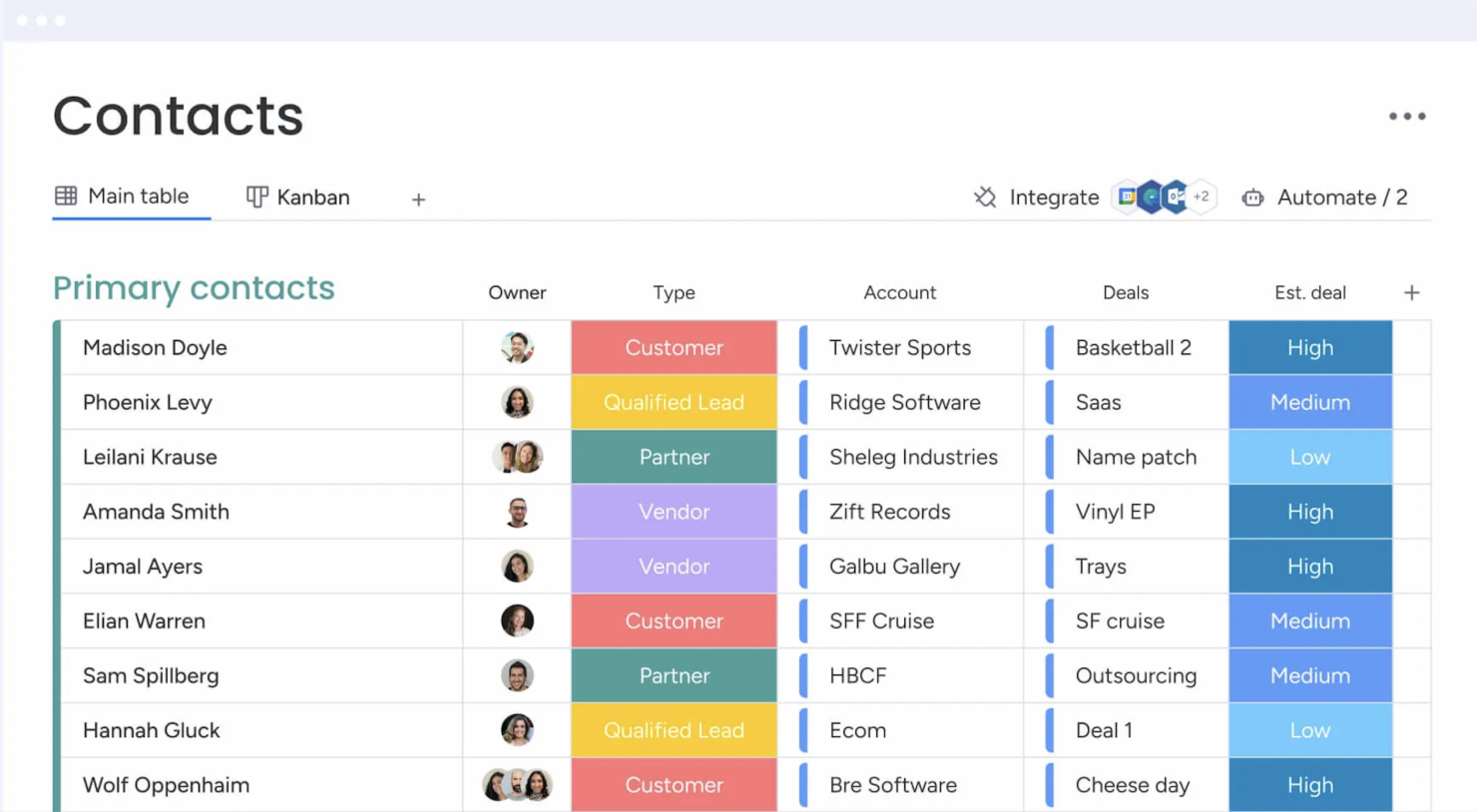
Contact Management: You get a central place to store all your contacts with details, communication histories, and linked deals. You can import them from Excel or auto-create contacts from your emails, so your team always has a clean, up-to-date list.
Lead Capturing and Pipeline Tracking: You can collect leads via forms or imports, track them through custom stages, and move deals with drag‑and‑drop. You see your entire sales funnel and can quickly spot where deals stall.
Email Sync and Tracking: You sync Gmail or Outlook to centralize email conversations, send bulk or templated emails, and get alerts when leads open or click. That way, you reach out at the right time and don’t miss follow‑up chances.
Automations: You set up no‑code rules that automate manual tasks like updating deal stages, sending reminders, or logging emails. It saves hours and keeps work consistent without extra effort.
Dashboards and Sales Forecasting: You get customizable dashboards that show pipeline status, team performance, and revenue forecasts by month or rep. These visuals help you spot trends and hit targets more reliably.
Activity Tracking And Team Goals: You track calls, meetings, and emails in one feed and monitor reps’ activity and quota progress. It gives you a clear picture of who’s doing what and where coaching might help.
Standout Features
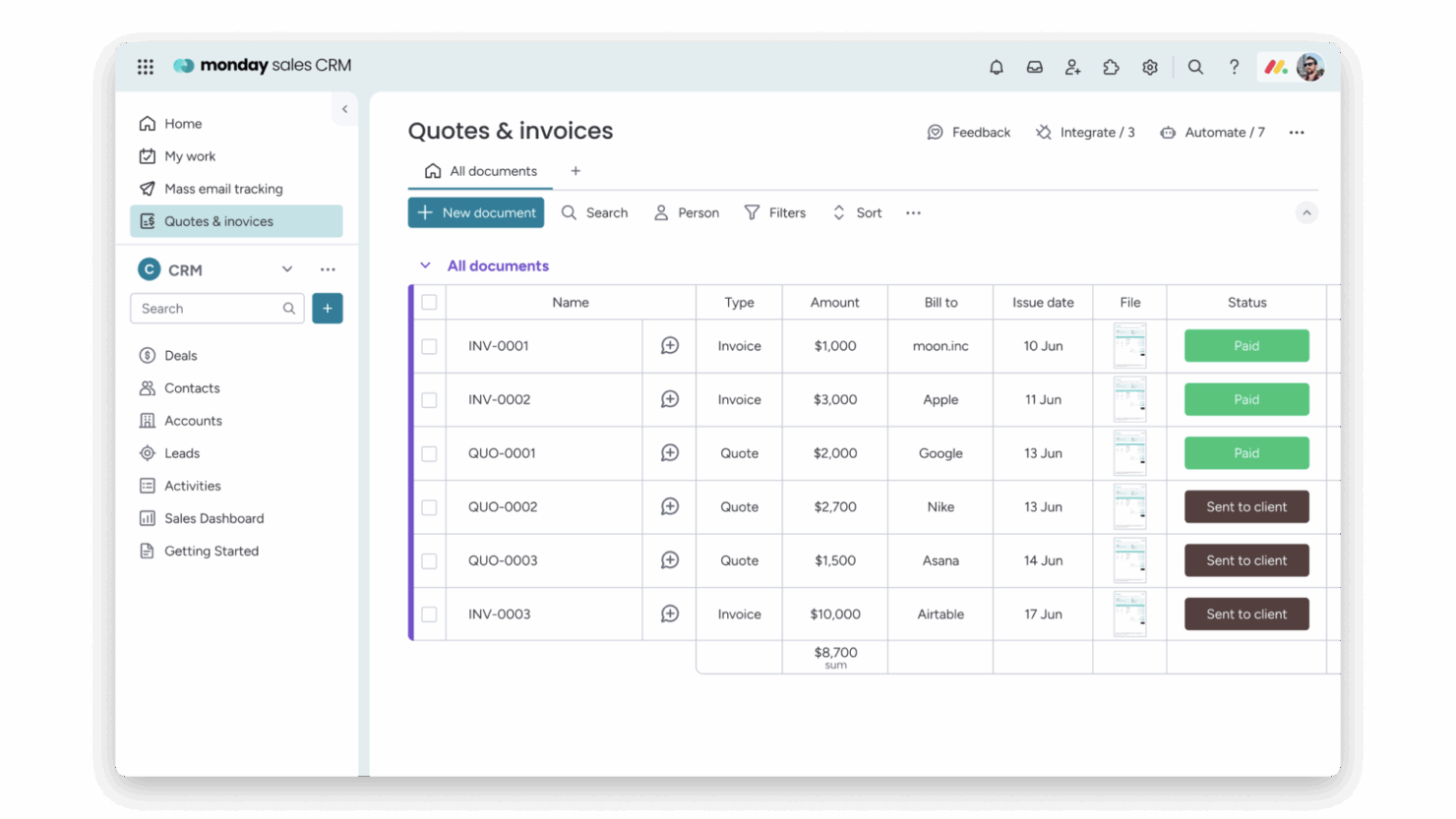
Quotes & Invoices: You can create, customize, send, and track quotes and invoices right within your CRM, pulling data from your contacts and deals. That means you skip back and forth between apps and speed up getting paid.
Sequences: You build multi‑step engagement flows (like email campaigns, reminders, task updates) that guide leads through your funnel automatically. You keep prospects moving without missing a beat or manually nudging them.
Ease of Use
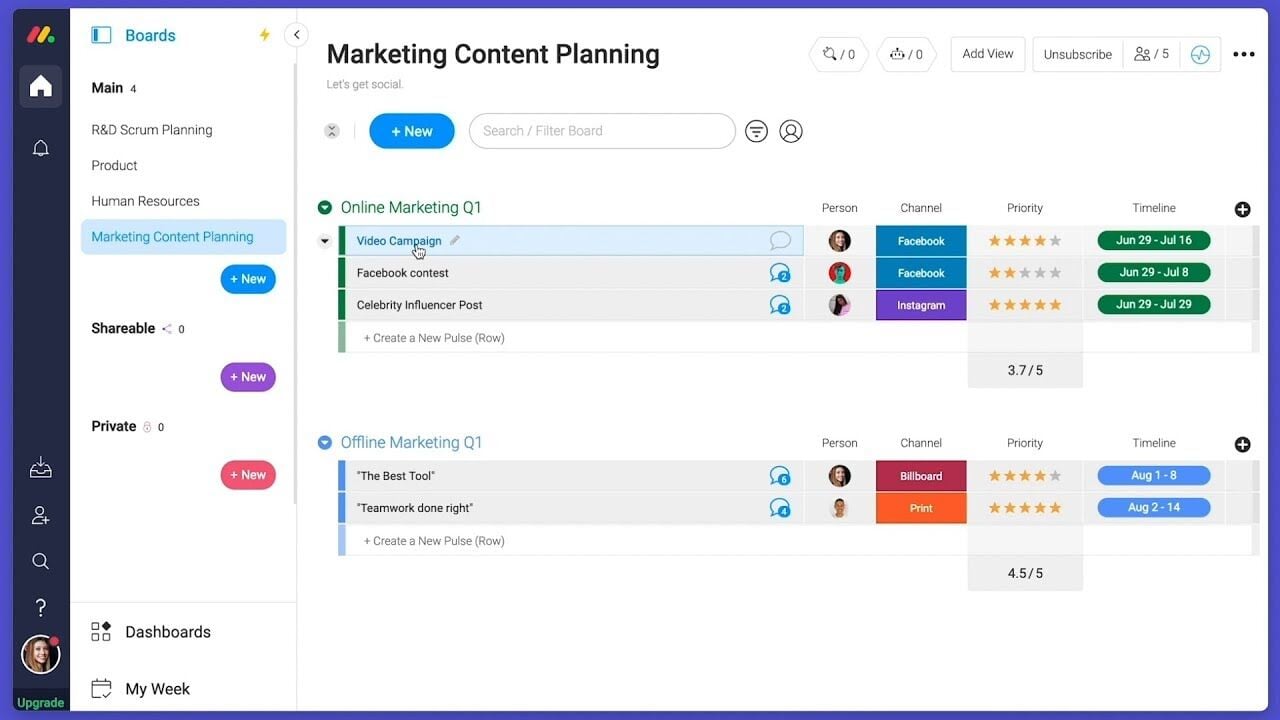
Monday CRM offers a user-friendly interface that helps your team get up to speed quickly, though some users find the multitude of features a bit overwhelming. Its drag-and-drop functionality and visual dashboards make task management intuitive. However, if your team prefers simplicity, the extensive capabilities might require a learning curve. The platform's customization options provide flexibility, but you might need time to explore and configure them to best suit your workflow.
Onboarding
Monday CRM provides a smooth onboarding experience with clear tutorials and a user-friendly setup process that helps your team get started quickly. The platform offers a range of resources, including webinars and a knowledge base, to support new users. Its step-by-step guides and personalized onboarding sessions ensure you find value quickly. However, the depth of features might require some exploration to fully utilize, but the available support makes this manageable.

Customer Support
Monday CRM offers robust customer support with multiple channels like live chat, email, and an extensive help center to assist your team. Users appreciate the prompt and knowledgeable responses they receive from the support team. The availability of 24/7 support ensures you get help whenever needed. Additionally, the platform's comprehensive documentation and community forums provide valuable insights and solutions, helping you resolve issues efficiently and keep your projects on track. Monday CRM integrates natively with Slack, Google Drive, Microsoft Teams, Zoom, Trello, Dropbox, HubSpot, Shopify, LinkedIn, and Outlook.
Monday CRM also offers an API and connects with third-party integration tools like Zapier.
Value for Money
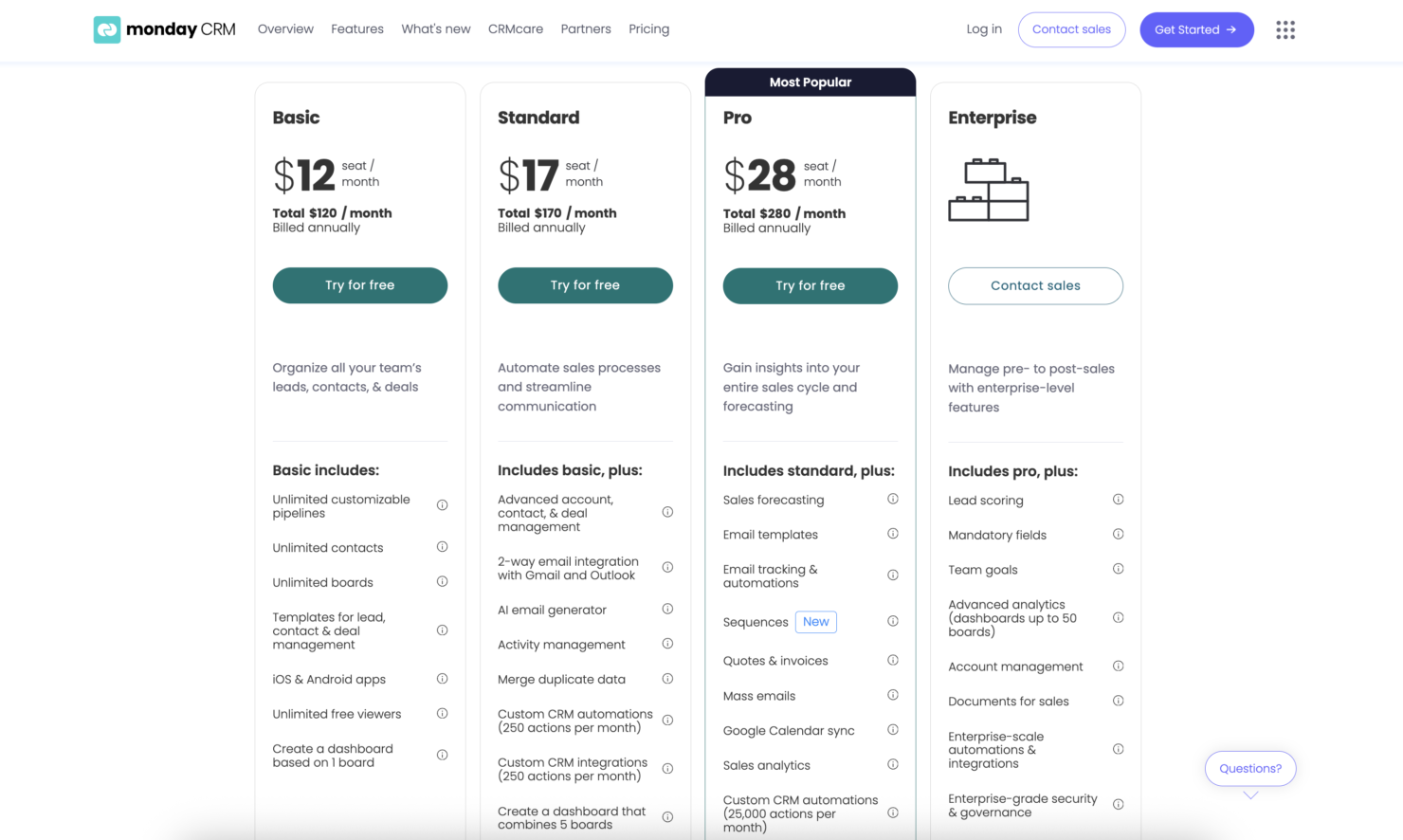
monday CRM pricing offers strong value, especially if your team wants something easy to use without sacrificing flexibility. Although there is no free plan, monday CRM does offer a 14-day free trial.
You get a lot at the lower tiers, including automation and reporting tools that work well for small to midsize teams. Higher plans add more control, but smaller teams won’t need Enterprise to get full use out of it.
- Basic Plan: Contact management, boards, and limited automations
- Standard Plan: Activity tracking, custom pipelines, and calendar view
- Pro Plan: Sales forecasting, advanced reporting, and higher automation limits
- Enterprise Plan: Admin controls, multi-level permissions, and enterprise-grade security features
New Product Updates from monday CRM

monday CRM Adds Meta Conversions API Integration
monday CRM has added an easier way to connect Meta Conversions API so you can sync lead status back to Meta. This helps you improve targeting and conversion performance with minimal setup effort. Highlights include:
- Meta Conversions API Integration: Connect monday CRM with Meta to share lead status updates automatically.
- Lead Status Sync: Send CRM lead status changes back to Meta to improve campaign targeting and conversion tracking.
- Automation Recipe: Configure the integration quickly using the new built-in Meta automation recipe.
Visit monday CRM's official site for more details.
 for more details.
monday CRM Specs
- 2-Factor Authentication
- API
- Calendar Management
- Call Tracking
- Campaign Management
- Click-to-Dial
- Contact Management
- Contact Sharing
- Custom Data Forms
- Customer Management
- Dashboard
- Data Export
- Data Import
- Data Visualization
- Email Integration
- External Integrations
- File Sharing
- File Transfer
- Google Apps Integration
- Lead Management
- Lead Scoring
- Marketing Automation
- Mobile App
- Multi-User
- Notifications
- Pipeline Management
- Sales Automation
- Scheduling
- Social-Media Integration
- Task Scheduling/Tracking
- Third-Party Plugins/Add-Ons
Che cos’è monday CRM?

monday CRM FAQs
How easy is it to customize Monday CRM for my team's workflow?
Does Monday CRM support mobile access?
How does Monday CRM handle team collaboration?
Can I track project progress with Monday CRM?
What kind of customer support does Monday CRM offer?
Is Monday CRM compliant with data security standards?
How does Monday CRM integrate with other tools?
Can I use Monday CRM for remote team management?
monday CRM Company Overview & History
monday.com, founded in 2012 by Roy Mann and Eran Zinman, is a collaborative work operating system designed to improve communication and automate workflows. Headquartered in Tel Aviv, Israel, the company became publicly traded on Nasdaq in June 2021. Known for its innovative products, monday.com serves over 152,000 customers worldwide and is recognized for its strong work culture and commitment to sustainability. The company continues to expand, opening new offices and launching groundbreaking features like AI-driven solutions.
Monday CRM Major Milestones
- 2012: Founded by Roy Mann and Eran Zinman.
- 2014: Launched its platform to the public.
- 2018: Opened its first global office in New York City.
- 2019: Reached unicorn status.
- 2021: Became publicly traded on Nasdaq.
- 2023: Achieved over 152,000 global customers.
- 2024: Crossed $1 billion in annual recurring revenue.
- 2025: Expanded offices in Munich and Paris to enhance the European presence.
Cosa succede adesso?
Vuoi entrare in contatto con altri digital project manager per condividere risorse e best practice? Unisciti alla nostra community di membri e ottieni accesso a oltre 100 modelli, esempi e template, oltre a connetterti con centinaia di altri digital project manager su Slack.