

10 migliori software per il monitoraggio del tempo e delle spese scelti per il 2026

10 Elenco ristretto di software per il monitoraggio di tempi & spese


Il software per il monitoraggio di tempi e spese aiuta il tuo team a registrare le ore lavorate, monitorare i costi dei progetti e gestire le spese in un unico posto. Se stai cercando lo strumento giusto, probabilmente devi bilanciare la necessità di una fatturazione accurata, di una visibilità in tempo reale e di report semplici, mantenendo al contempo il tuo team concentrato sulla realizzazione dei progetti.
Con così tante opzioni disponibili, è difficile capire quale piattaforma si adatti al tuo flusso di lavoro, si integri con i tuoi sistemi e supporti le tue esigenze di conformità. Questa guida analizza le principali soluzioni per il 2026, così potrai confrontare le funzionalità, individuare le differenze principali e scegliere quella più adatta alla tua azienda.
Perché fidarsi dei nostri consigli sui software
Il nostro team testa e recensisce software dal 2012. In quanto project manager noi stessi, sappiamo quanto sia difficile — e importante — scegliere il software giusto.
Per questa guida, abbiamo valutato gli strumenti attraverso test pratici e ricerche indipendenti, assegnando un punteggio agli strumenti in base ai nostri criteri di selezione. Ci basiamo inoltre sulle competenze di leader di pensiero del settore e di professionisti attivi nella gestione dei progetti.
Le nostre recensioni riflettono il nostro giudizio editoriale umano, non un discorso di vendita.
Revisori esperti:
Tabella comparativa dei software per il monitoraggio di tempi e spese
Questa tabella comparativa riassume i dettagli dei prezzi delle mie migliori selezioni di software per il monitoraggio di tempi e spese:
| Tool | Best For | Trial Info | Price | ||
|---|---|---|---|---|---|
| 1 | Ideale come IA per le aziende | Prova gratuita + demo gratuita disponibili | A partire da $8/utente/mese | Website | |
| 2 | Ideale per l’integrazione avanzata delle buste paga | Prova gratuita di 30 giorni + demo gratuita disponibile | Da $50/mese | Website | |
| 3 | Ideale per l'allineamento delle risorse di progetto | Piano gratuito + prova gratuita di 7 giorni disponibile | Da $3.99/utente/mese (fatturato annualmente) | Website | |
| 4 | Ideale per il monitoraggio flessibile basato su attività | Prova gratuita di 14 giorni + piano gratuito + demo gratuita disponibile | Da $8/utente/mese (fatturato annualmente) | Website | |
| 5 | Ideale per analisi dettagliate della produttività | Prova gratuita di 14 giorni + piano gratuito + demo gratuita disponibile | Da $3.99/utente/mese (fatturazione annuale) | Website | |
| 6 | Ideale per il monitoraggio visivo dei budget di progetto | Prova gratuita di 30 giorni + piano gratuito + demo gratuita disponibile | Da $9/utente/mese (fatturato annualmente) | Website | |
| 7 | Ideale per l'automazione della scansione delle ricevute | Non disponibile | Da $5/utente/mese | Website | |
| 8 | Ideale per studi di architettura e design | Prova gratuita + demo gratuita disponibile | Prezzi su richiesta | Website | |
| 9 | Ideale per organizzazioni guidate dalla conformità | Demo gratuita disponibile | Da $400/mese | Website | |
| 10 | Ideale per la creazione automatizzata dei report spese | Demo gratuita disponibile | Prezzo su richiesta | Website |
Recensioni dei software per il monitoraggio di tempi e spese
Di seguito trovi le mie sintesi dettagliate dei software per il monitoraggio di tempi e spese inclusi nel mio elenco ristretto. Le mie recensioni offrono una panoramica approfondita delle funzionalità, delle integrazioni e dei casi d’uso migliori di ogni piattaforma, per aiutarti a trovare quella più adatta alle tue esigenze.

Ideale come IA per le aziende
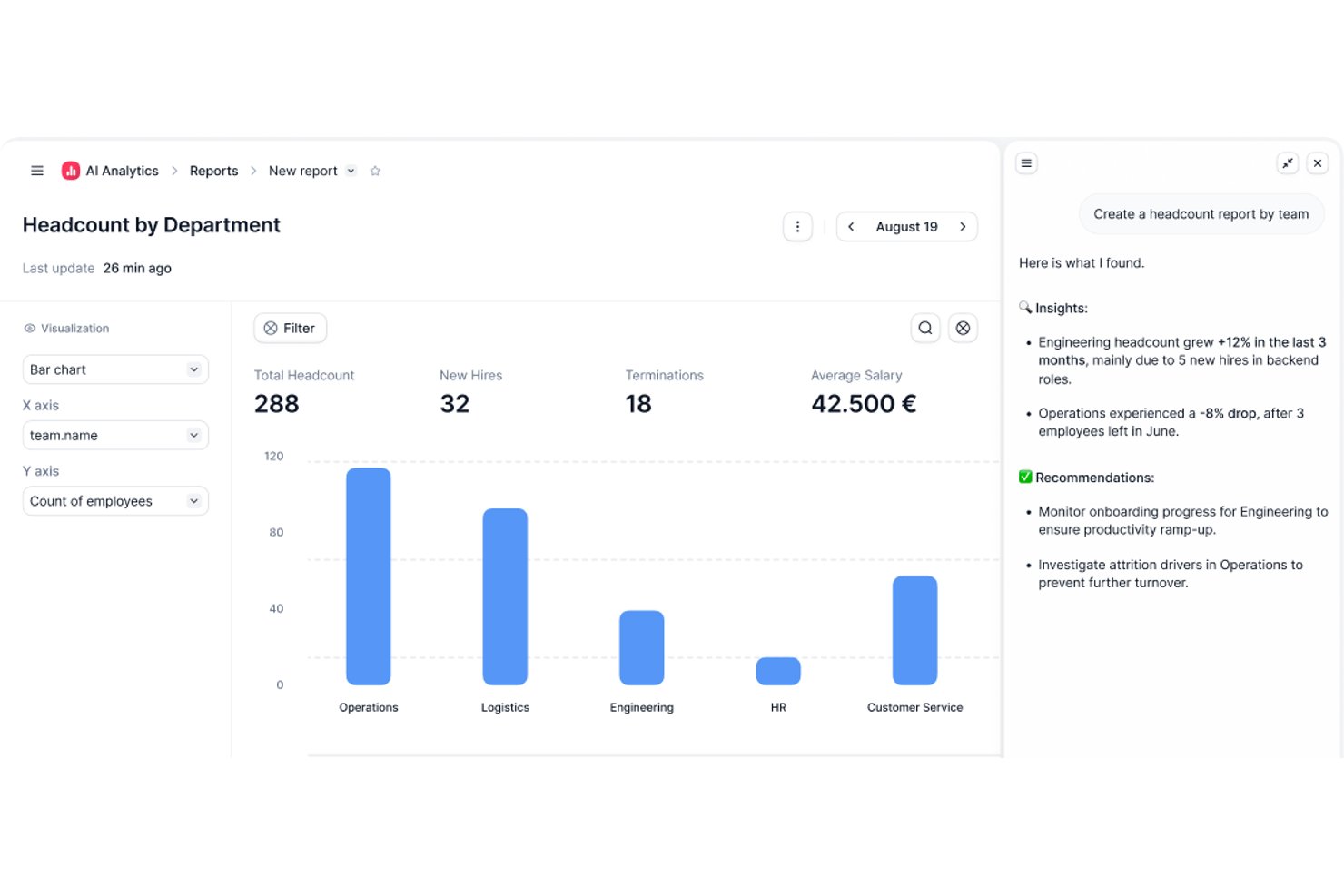
Factorial è una piattaforma per le risorse umane e la finanza basata sull'IA che gestisce il monitoraggio delle ore, la gestione delle spese e la supervisione dei progetti, oltre ad attività operative più ampie come la pianificazione dei turni, la reportistica e le domande e risposte sulle policy aziendali.
Per chi è più adatto Factorial?
Factorial è adatto ai team delle risorse umane e delle operazioni di aziende in crescita che desiderano strumenti assistiti dall'IA per gestire la pianificazione, la reportistica e le domande dei dipendenti sulle policy aziendali, oltre al monitoraggio delle ore e delle spese.
Perché ho scelto Factorial
Ho incluso Factorial tra le mie scelte migliori perché integra l'IA direttamente nelle operazioni quotidiane che rallentano maggiormente i team delle risorse umane e della finanza. Il suo assistente IA, One, può rispondere alle domande dei dipendenti sulle policy aziendali e compilare report delle spese su richiesta, riducendo notevolmente gli scambi necessari. Apprezzo anche il fatto che l'IA gestisca la scansione delle ricevute tramite OCR, così registrare una spesa a partire da una foto scattata con il cellulare richiede pochi secondi invece dell'inserimento manuale dei dati.
Funzionalità principali di Factorial
- Pianificazione dei turni: I responsabili possono configurare per i propri team turni automatizzati, collettivi e a rotazione.
- Monitoraggio della geolocalizzazione: Le registrazioni delle ore indicano dove lavorano i dipendenti quando timbrano l'entrata o l'uscita.
- Controlli sulle policy delle spese: Le regole automatizzate possono bloccare l'invio di spese che non rispettano le policy di spesa definite dall'azienda.
- Carte Factorial: Le aziende possono emettere carte fisiche e virtuali con limiti e categorie di spesa personalizzabili, visualizzando le transazioni in tempo reale.
Integrazioni di Factorial
Factorial elenca integrazioni disponibili nel marketplace con Microsoft Business Central, SAP Business One, Sage 100, Microsoft Power BI, Slack, Google Workspace e Zapier. La sua API supporta chiavi API, OAuth 2.0, webhook e SDK per integrazioni personalizzate.
Pros and Cons
Pros:
- Le timbrature da dispositivo mobile aiutano i team distribuiti a registrare le ore
- L'OCR riduce l'inserimento manuale delle ricevute
- Le ore e le spese associate ai progetti centralizzano il monitoraggio dei costi
Cons:
- I revisori segnalano una profondità limitata nella reportistica personalizzata
- Le approvazioni dei fogli presenze non dispongono di uno storico di audit documentato

TimeTrex
Ideale per l’integrazione avanzata delle buste paga

TimeTrex è una piattaforma di gestione della forza lavoro che combina rilevamento di presenze e assenze, pianificazione dei turni, gestione delle spese e elaborazione delle buste paga in un unico sistema.
Per chi è più adatto TimeTrex?
TimeTrex è particolarmente indicato per aziende di medie e grandi dimensioni con personale orario, più sedi e requisiti complessi in materia di buste paga o conformità.
Perché ho scelto TimeTrex
Ho scelto TimeTrex tra i migliori per l’integrazione avanzata delle buste paga poiché il tracciamento delle presenze e l’elaborazione dei salari convivono nello stesso sistema. Quando il team timbra entrata e uscita, quei dati confluiscono direttamente nei calcoli salariali senza bisogno di esportazioni manuali o trasferimenti di file. Mi piace anche che TimeTrex gestisca i bonifici multi-sorgente, permettendo di prelevare da diversi conti bancari e inviare i pagamenti a più conti dei dipendenti in un’unica operazione. Inoltre, il motore fiscale integrato calcola automaticamente le imposte federali, statali e provinciali, generando moduli di conformità come W-2, 940, T4 e ROE.
Caratteristiche principali di TimeTrex
- Monitoraggio delle spese: Registra le spese allegando la foto della ricevuta, applica categorie di spesa e invia le richieste tramite un workflow approvativo configurabile.
- Job costing: Attribuisci i costi del lavoro a più centri di costo, dipartimenti, filiali e progetti all’interno di un’unica registrazione di orario.
- Regole per straordinari e premi: Configura regole personalizzate per straordinari, festività e differenziali di turno, che vengono calcolate automaticamente nelle buste paga.
- Portale self-service per i dipendenti: Consenti ai dipendenti di visualizzare i cedolini, verificare i saldi di maturazione e aggiornare i dettagli del bonifico diretto senza necessità di coinvolgere le risorse umane.
Integrazioni di TimeTrex
TimeTrex offre integrazioni con piattaforme di buste paga e contabilità, tra cui ADP, QuickBooks, Sage, Paychex, SurePay e Ceridian, oltre a strumenti HR e per la forza lavoro come Meditech, Insync, CompuPay, Tyler Technologies, Vensure Employer Services, Accero e Chris21. È disponibile una API per integrazioni personalizzate.
Pros and Cons
Pros:
- Il job costing traccia i costi del lavoro per progetto
- Acquisizione delle ricevute tramite cellulare ovunque ti trovi
- Rimborso automatico tramite busta paga integrata
Cons:
- Configurazione iniziale complessa per le funzionalità avanzate
- La dashboard di amministrazione può sembrare complessa
New Product Updates from TimeTrex
TimeTrex Adds Quick Punch App With Offline and QR Support
TimeTrex adds a new Quick Punch app, offline punching, QR code scanning, punch images, configurable messages, and punch warnings or lockouts to improve employee clock-ins across browsers and local computers. For more information, visit TimeTrex’s official site.
 .
.
Clockify
Ideale per l'allineamento delle risorse di progetto

Clockify offre ai team di qualsiasi dimensione un modo per monitorare il tempo e le spese senza preoccuparsi dei limiti sul numero di utenti o dei costi nascosti. È particolarmente utile per agenzie, società di consulenza e team distribuiti che devono gestire più progetti e clienti con un budget limitato. Se cerchi uno strumento che cresca insieme al tuo team e offra utenti illimitati nel piano gratuito, Clockify è progettato per questa esigenza.
Perché ho scelto Clockify
Ho scelto Clockify perché consente ai responsabili digitali di progetto di confrontare in tempo reale la spesa effettiva per le attività con le stime di base del progetto. I responsabili di progetto possono assegnare tariffe personalizzate fatturabili e di costo ai singoli membri del team o alle attività per monitorare i margini lordi e individuare gli sforamenti di budget prima della consegna. Questo lo rende ideale per i responsabili di progetto che devono allineare le risorse del progetto a rigidi limiti di budget evitando al contempo costi eccessivi della piattaforma.
Caratteristiche principali di Clockify
Altre funzionalità di Clockify che possono essere utili ai team che gestiscono tempo e spese includono:
- Tariffe fatturabili: Assegna tariffe orarie personalizzate a utenti, progetti o attività per una fatturazione accurata dei clienti.
- Monitoraggio delle spese: Registra e categorizza le spese insieme al tempo monitorato per ogni progetto.
- Approvazione dei fogli ore: Configura flussi di lavoro per consentire ai responsabili di esaminare e approvare i fogli ore inviati.
- Report dettagliati: Genera report esportabili sull'utilizzo del tempo, sulle spese e sull'avanzamento dei progetti.
Integrazioni di Clockify
Le integrazioni includono QuickBooks, Jira, Google Calendar, Outlook, Asana, Trello, GitHub, GitLab, Salesforce e monday.com.
Pros and Cons
Pros:
- 5 utenti inclusi nel piano gratuito
- Sono disponibili flussi di lavoro integrati per l'approvazione dei fogli ore
- L'app mobile include il monitoraggio del tempo offline
Cons:
- Il monitoraggio delle spese non include una funzione per caricare ricevute
- Nessuno strumento integrato per l'elaborazione delle buste paga

My Hours
Ideale per il monitoraggio flessibile basato su attività

My Hours è progettato per team e liberi professionisti che necessitano di un controllo flessibile e dettagliato del monitoraggio del tempo a livello di attività. La piattaforma consente di organizzare il lavoro per progetti e compiti, assegnare tariffe fatturabili e tracciare il tempo nello specifico per ogni attività. Se il tuo lavoro comporta la gestione di più clienti o la necessità di adattarsi rapidamente alle priorità che cambiano, My Hours offre il monitoraggio granulare necessario per mantenere tutto organizzato e fatturabile.
Perché ho scelto My Hours
Ciò che distingue My Hours è il suo focus su un monitoraggio flessibile e basato su attività, in grado di adattarsi ai diversi stili di lavoro. Puoi suddividere i progetti in singole attività, assegnare tariffe personalizzate e tracciare separatamente il tempo dedicato a ciascuna. Ho scelto My Hours perché consente di aggiungere note dettagliate a ogni registrazione tempo, facilitando la giustificazione delle ore fatturabili e la documentazione del lavoro svolto per i clienti. Per team o freelance che devono gestire priorità in continuo mutamento e molti clienti, questo livello di controllo a livello di attività è l'ideale.
Funzionalità principali di My Hours
Altre funzionalità utili per team e freelance includono:
- Report automatici sul tempo: Genera report dettagliati per progetto, cliente o membro del team, facili da consultare ed esportare.
- Monitoraggio delle spese: Registra e categorizza le spese insieme alle ore lavorate per una contabilità di progetto integrata.
- Flussi di approvazione: Invia le schede orarie per l'approvazione del responsabile prima di confermare le ore fatturabili.
- App mobile: Tieni traccia del tempo e gestisci le attività da dispositivi iOS e Android.
Integrazioni di My Hours
Le integrazioni includono Atlassian Jira, Microsoft Teams, Microsoft Power BI, Asana, Basecamp, monday.com, ClickUp, Microsoft Project, QuickBooks e Xero.
Pros and Cons
Pros:
- Il monitoraggio a livello di attività permette una fatturazione precisa
- Tariffe personalizzate per progetto o cliente
- Note dettagliate possono essere aggiunte alle registrazioni del tempo
Cons:
- Nessuna funzionalità integrata per la fatturazione o la gestione dei pagamenti
- Manca il monitoraggio automatico del tempo

TimeCamp
Ideale per analisi dettagliate della produttività
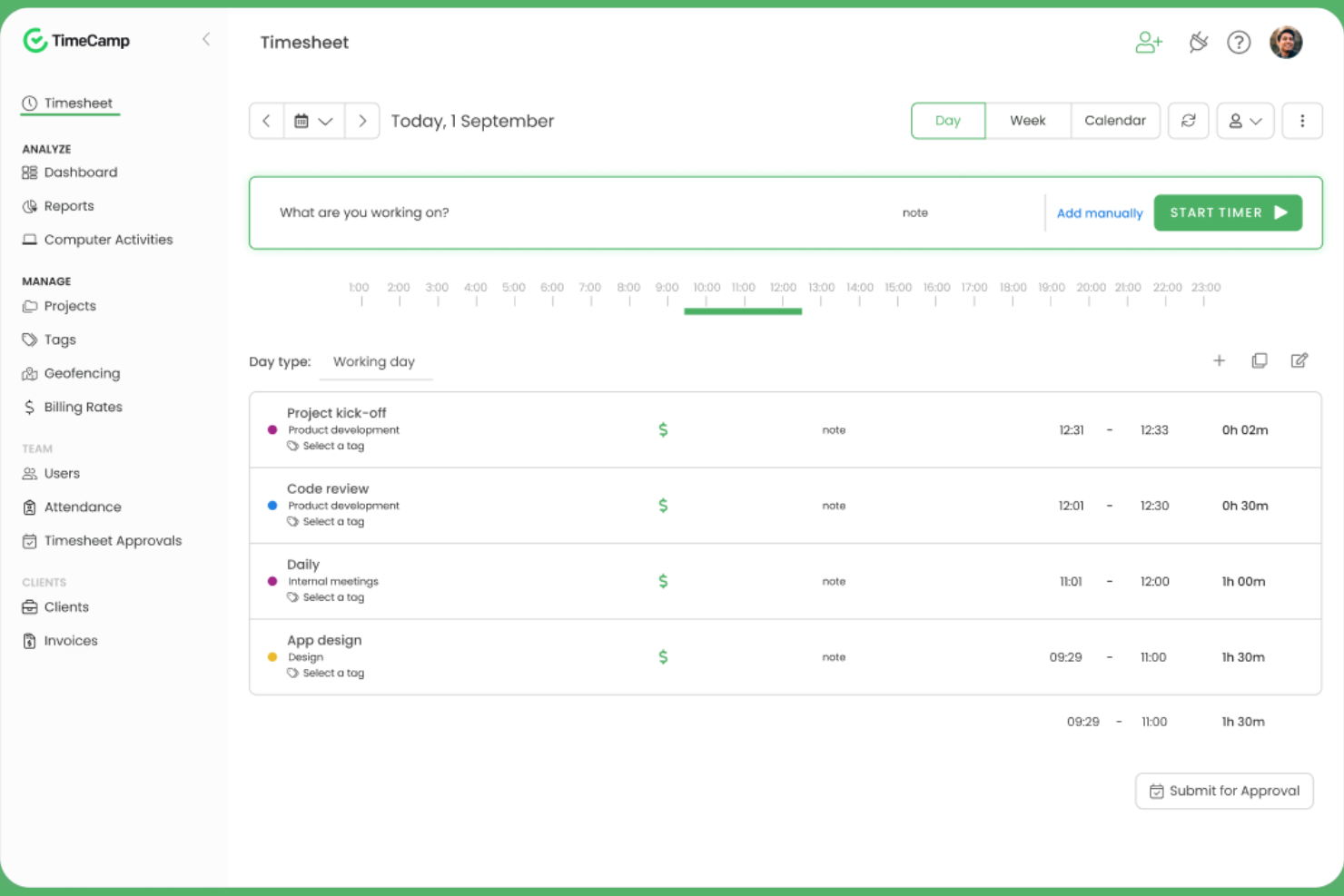
TimeCamp si distingue per team e manager che desiderano analizzare a fondo come vengono spese le ore di lavoro tra progetti e attività. Il suo monitoraggio automatico del tempo e le analisi dettagliate della produttività aiutano agenzie digitali, società di consulenza e team remoti a individuare dove va a finire il tempo e a identificare colli di bottiglia nei flussi di lavoro. Se hai bisogno di report dettagliati per supportare fatturazione, paghe o valutazioni delle prestazioni, l’approccio basato sulle analisi di TimeCamp offre un vantaggio chiaro.
Perché ho scelto TimeCamp
Quando hai la necessità di capire esattamente come il tuo team trascorre il tempo, le analisi dettagliate della produttività di TimeCamp lo distinguono dagli altri strumenti per il monitoraggio del tempo. La piattaforma monitora automaticamente il tempo trascorso su app, siti web e attività, quindi compila questi dati in report visivi che evidenziano tendenze e inefficienze. Ho scelto TimeCamp perché le sue funzionalità di reporting consentono di suddividere l’utilizzo del tempo per progetto, cliente o membro del team, facilitando l’individuazione dei colli di bottiglia e l’ottimizzazione dei flussi di lavoro. Per i team che desiderano ottenere informazioni utili dai dati di monitoraggio del tempo, l’approccio analitico di TimeCamp è la scelta giusta.
Funzionalità principali di TimeCamp
Altre funzionalità utili per i team che gestiscono tempi e spese includono:
- Monitoraggio automatico della presenza: Controlla la presenza dei dipendenti e le assenze direttamente sulla piattaforma.
- Calcolo delle ore fatturabili: Segna il tempo tracciato come fatturabile o non fatturabile per una fatturazione clienti accurata.
- Modulo di monitoraggio delle spese: Registra e classifica le spese insieme al tempo tracciato per un reporting unificato.
- App mobile: Monitora il tempo e gestisci le attività da dispositivi iOS e Android.
Integrazioni di TimeCamp
Le integrazioni includono Asana, Trello, monday.com, ClickUp, Jira, GitHub, Xero, QuickBooks, Google Calendar e Slack.
Pros and Cons
Pros:
- Il monitoraggio automatico del tempo funziona in background
- L’analisi della produttività include l’utilizzo di siti web e app
- Monitoraggio integrato di presenze e assenze
Cons:
- Nessun monitoraggio chilometrico per i team sul campo
- Il modulo spese non dispone della scansione delle ricevute

Harvest
Ideale per il monitoraggio visivo dei budget di progetto
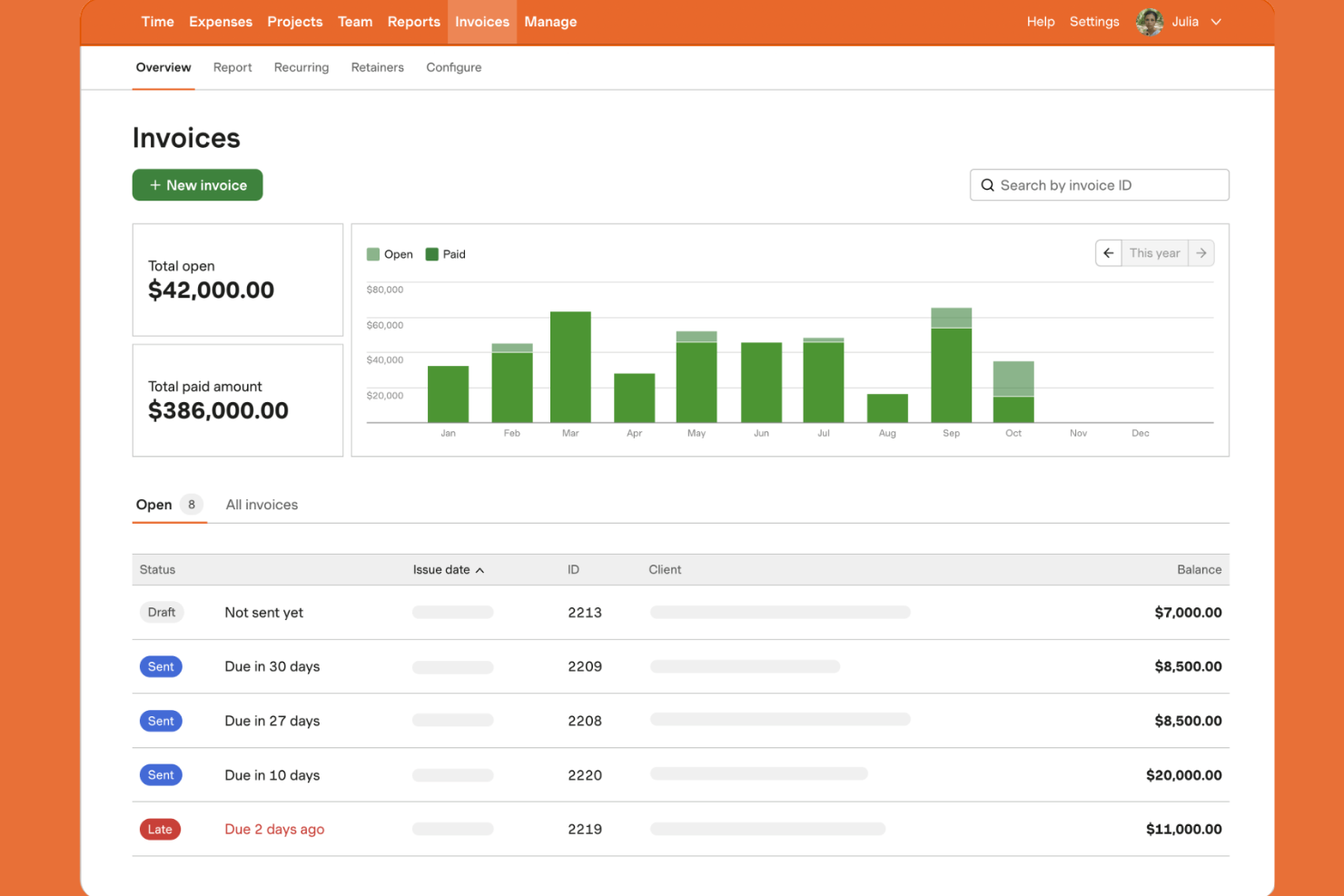
Harvest si distingue per i team che hanno bisogno di monitorare da vicino i budget di progetto con informazioni chiare e visive. È una soluzione ideale per agenzie, società di consulenza e aziende orientate ai progetti che vogliono tracciare tempi, spese e avanzamento del budget in un unico posto. Se cerchi uno strumento che renda semplice individuare i rischi di sforamento del budget prima che diventino problemi, Harvest è progettato proprio per questa esigenza.
Perché ho scelto Harvest
Harvest ha attirato la mia attenzione grazie al suo forte focus sul monitoraggio visivo del budget di progetto, una necessità fondamentale per molti team che lavorano per progetti. Lo strumento mostra l’avanzamento del budget in tempo reale con indicatori visivi chiari, così puoi vedere rapidamente se un progetto rischia di sforare il budget. Mi piace la possibilità di impostare limiti di budget in base alle ore o alle tariffe e monitorarli mentre il team registra tempo e spese. Per chi deve mantenere lo stato del budget sempre sotto controllo, l’approccio visivo di Harvest semplifica la gestione delle finanze di progetto.
Funzionalità principali di Harvest
Altre funzionalità utili di Harvest per i team che gestiscono tempi e spese includono:
- Caricamento delle ricevute di spesa: allega le ricevute digitali direttamente alle registrazioni di spesa per una rendicontazione accurata.
- Promemoria automatici: invia promemoria automatici ai membri del team per inviare i fogli ore puntualmente.
- Strumenti di fatturazione: genera e invia fatture ai clienti in base al tempo e alle spese registrate.
- Monitoraggio del tempo da mobile: registra il tempo e inserisci le spese da dispositivi iOS e Android.
Integrazioni di Harvest
Le integrazioni includono Asana, Jira, Slack, Google Calendar, GitHub, Stripe, Trello, QuickBooks Online, Xero e Basecamp.
Pros and Cons
Pros:
- Monitoraggio visivo del budget con avvisi a colori
- Caricamento delle ricevute di spesa per monitorare i rimborsi
- Fatturazione diretta dal tempo e dalle spese registrate
Cons:
- Nessun monitoraggio chilometrico per le spese
- Funzionalità offline limitate sull'app mobile

Ideale per l'automazione della scansione delle ricevute
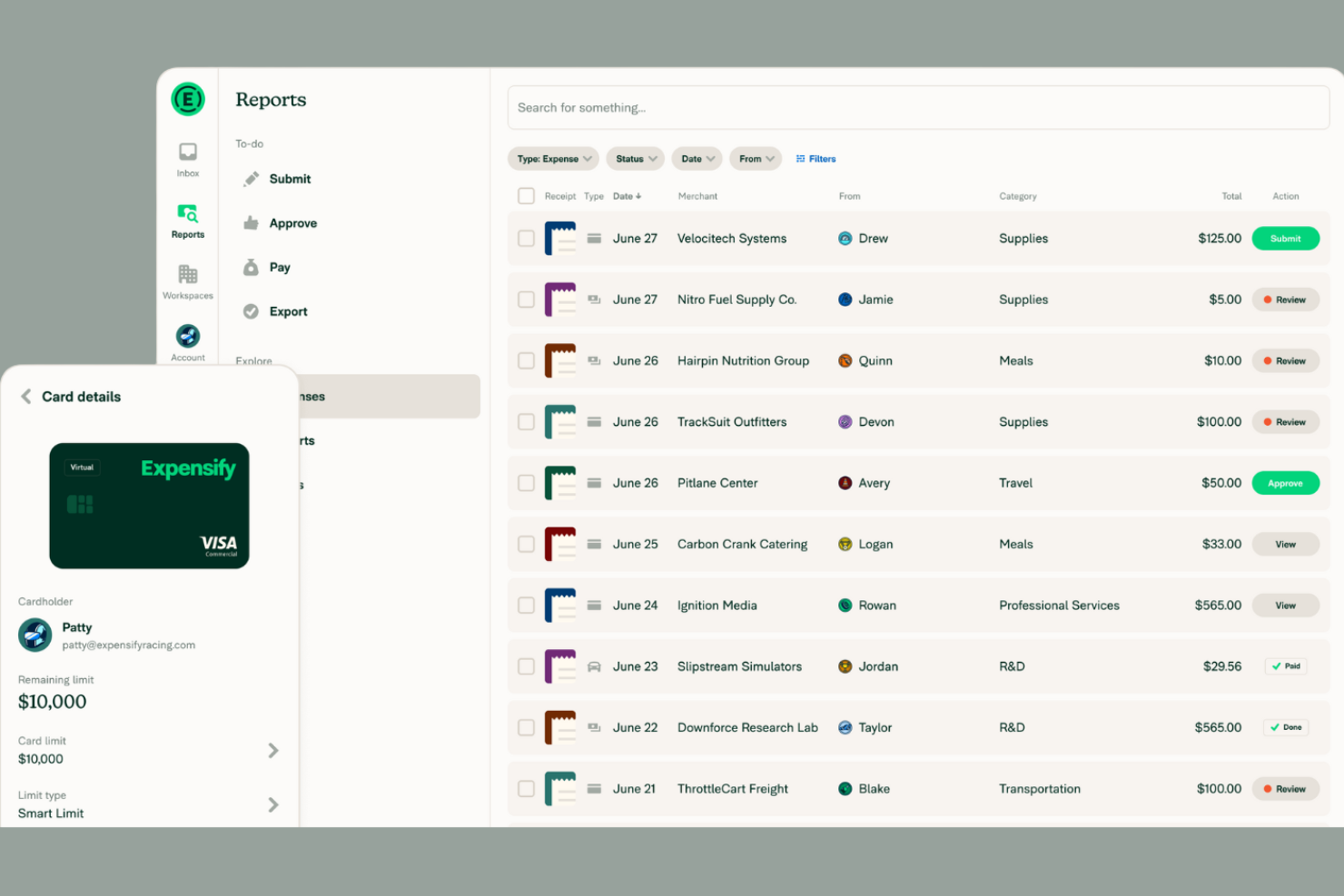
Se il tuo team trascorre troppo tempo inserendo manualmente le ricevute, Expensify offre un modo per automatizzare questo processo grazie alla sua tecnologia avanzata di scansione delle ricevute. È una soluzione adatta ad aziende di qualsiasi dimensione che desiderano acquisire, categorizzare e rendicontare le spese con il minimo sforzo manuale. La funzione SmartScan di Expensify trasforma rapidamente le ricevute cartacee in voci di spesa digitali, aiutando i team finanziari e i viaggiatori frequenti a rimanere organizzati e pronti per eventuali controlli.
Perché ho scelto Expensify
L’automazione della scansione delle ricevute è un grande vantaggio per i team che gestiscono un elevato volume di spese. La funzione SmartScan legge e estrae i dati dalle ricevute, abbinandole automaticamente alle transazioni sulla carta di credito e categorizzando le spese. Apprezzo il fatto che Expensify possa anche generare automaticamente report spese a partire dalle ricevute scansionate, riducendo l’inserimento manuale e gli errori. Per le aziende che desiderano velocizzare i rimborsi e migliorare la precisione, gli strumenti di automazione di Expensify rappresentano una scelta solida.
Funzionalità Principali di Expensify
Altre funzionalità che possono essere utili ai team che gestiscono le spese includono:
- Gestione delle Carte Aziendali: Emissione e gestione delle Expensify Card per i dipendenti con monitoraggio delle transazioni in tempo reale.
- Flussi di Approvazione a Più Livelli: Configura catene di approvazione personalizzate per i report spese in base alle politiche della tua azienda.
- Monitoraggio del Chilometraggio: Registra e rimborsa i chilometri di viaggio aziendale direttamente nell’app.
- Regole di Applicazione delle Politiche: Segnala automaticamente le spese che violano le politiche aziendali di spesa.
Integrazioni di Expensify
Le integrazioni includono QuickBooks, Xero, NetSuite, Sage Intacct, Gusto, Workday, ADP, Uber, Lyft e Oracle.
Pros and Cons
Pros:
- SmartScan estrae automaticamente i dati dalle ricevute
- Le transazioni con carte aziendali vengono sincronizzate in tempo reale
- Supporto multivaluta per team globali
Cons:
- Nessun monitoraggio del tempo sui progetti integrato
- La configurazione dei flussi di approvazione può essere complessa


Houzz Pro è pensato per studi di architettura e design che devono monitorare le ore e le spese di progetto insieme alle comunicazioni e alle proposte per i clienti. È particolarmente utile per i professionisti che gestiscono più progetti, budget e approvazioni in un unico luogo. Se il tuo team si occupa contemporaneamente di progettazione, fatturazione e registrazione dei tempi, Houzz Pro riunisce queste funzioni in un'unica piattaforma.
Perché ho scelto Houzz Pro
Houzz Pro si distingue per gli studi di architettura e design che necessitano di gestire tempi e spese nel contesto di un lavoro basato su progetti. La piattaforma permette di registrare le ore fatturabili direttamente su specifici progetti e collegare le spese alle fatture destinate ai clienti, particolarmente utile per chi gestisce più clienti e fasi di lavoro. Mi piace il fatto che sia possibile generare proposte e fatture personalizzate a partire da ore e spese monitorate, mantenendo tutto ciò che è rivolto al cliente professionale e ben curato. Per i team che hanno bisogno di unire in modo efficiente la gestione finanziaria dei progetti alle comunicazioni con i clienti, Houzz Pro offre una soluzione mirata.
Funzionalità principali di Houzz Pro
Altre funzionalità utili per team di architettura e design includono:
- Rilevamento del tempo da mobile: Tieni traccia di ore e spese da qualsiasi luogo tramite l'app mobile.
- Modelli di progetto personalizzabili: Crea strutture di progetto ripetibili per diversi tipi di lavori.
- Area clienti: Offri ai clienti l'accesso per visualizzare l'avanzamento dei progetti, fatture e documenti condivisi.
- Assegnazione dei compiti: Assegna attività ai membri del team e monitora il loro completamento in ogni progetto.
Integrazioni di Houzz Pro
Le integrazioni includono QuickBooks Online, Google Calendar, iCloud, Office 365, Exchange, Outlook, Gmail e Google Drive.
Pros and Cons
Pros:
- Sincronizzazione delle ore direttamente con QuickBooks Online
- App mobile che consente la registrazione delle spese in loco
- Rilevamento del tempo basato su progetti per lavori multipli
Cons:
- Nessuna funzionalità integrata per il rilevamento dei chilometri
- Opzioni di reportistica limitate per l'analisi dei tempi


DATABASICS è pensato per le organizzazioni che devono rispettare rigorosi requisiti di conformità e audit nel monitoraggio di tempi e spese. È particolarmente adatto per appaltatori governativi, organizzazioni non profit e aziende con esigenze regolamentari complesse. Se il tuo team si trova ad affrontare sfide relative all'applicazione delle policy, alle tracce di controllo o alle approvazioni multi-livello, DATABASICS è stato progettato proprio per rispondere a queste priorità.
Perché ho scelto DATABASICS
Ciò che distingue DATABASICS è la sua attenzione verso le organizzazioni guidate dalla conformità che devono rispettare standard regolamentari e di audit stringenti. La piattaforma offre un'applicazione delle policy configurabile, così da poter impostare regole che corrispondano alle esigenze della tua organizzazione e garantire che ogni inserimento sia conforme. Apprezzo il fatto che DATABASICS offra tracce di controllo dettagliate e workflow di approvazione multi-livello, fondamentali per i team che devono documentare ogni passaggio per audit o revisioni interne. Se la tua azienda opera in un ambiente altamente regolamentato, queste funzionalità rendono DATABASICS particolarmente adatto alle tue necessità di monitoraggio di tempi e spese.
Caratteristiche principali di DATABASICS
Altre funzionalità di DATABASICS che possono risultare utili per i team focalizzati sulla conformità includono:
- Gestione delle indennità giornaliere: Imposta e gestisci le tariffe delle indennità giornaliere per le spese di viaggio in base a località e policy.
- Supporto multivaluta: Monitora e converti le spese in più valute per i team globali.
- Inserimento tramite app mobile: Invia direttamente da dispositivi iOS e Android le registrazioni di tempi e spese.
- Monitoraggio per progetto: Assegna tempo e spese a specifici progetti o finanziamenti per report dettagliati.
Integrazioni DATABASICS
Le integrazioni includono Sage Intacct, Microsoft Dynamics, Oracle NetSuite, SAP, ADP, Paychex, QuickBooks, Ceridian, UKG e American Express.
Pros and Cons
Pros:
- Tracce di audit per ogni registrazione di tempi e spese
- Gestione delle indennità giornaliere per la conformità nei viaggi
- Supporto multivaluta per team internazionali
Cons:
- Nessuna funzionalità di tracciamento chilometrico integrata
- L'interfaccia dell'app mobile può risultare datata


Certify si distingue per i team che desiderano automatizzare la creazione dei report spese e i flussi di lavoro di approvazione. È particolarmente utile per i team finanziari e per le organizzazioni con frequenti trasferte dei dipendenti o spese ricorrenti. Con funzionalità come la scansione delle ricevute e l'applicazione delle policy aziendali, Certify aiuta a ridurre l'inserimento manuale e mantiene coerente la gestione delle spese.
Perché ho scelto Certify
L'automazione della creazione dei report spese è il punto di forza di Certify per i team finanziari e i viaggiatori frequenti. La piattaforma utilizza la scansione delle ricevute e l'estrazione automatica dei dati per generare report spese con un minimo contributo manuale. Mi piace anche che Certify applichi controlli sulle policy aziendali durante la creazione del report, aiutando i team a evitare problemi di conformità prima dell'invio. Se vuoi ridurre il tempo dedicato alla documentazione delle spese e migliorare l'accuratezza, le funzionalità di automazione di Certify sono un'ottima scelta.
Caratteristiche principali di Certify
Altre funzionalità utili per i team finanziari includono:
- Elaborazione automatica dei rimborsi: Certify può avviare i rimborsi direttamente dopo l'approvazione del report spese.
- Importazione delle transazioni della carta di credito: Sincronizza le transazioni della carta aziendale per un abbinamento e riconciliazione delle spese più veloci.
- Instradamento delle approvazioni multi-livello: Supporta catene di approvazione personalizzate in base alla struttura della tua organizzazione.
- App mobile per l'invio delle spese: Permette agli utenti di acquisire e inviare le spese dai loro smartphone.
Integrazioni Certify
Le integrazioni includono Sage Intacct, Amazon Business, Amtrav, Atriis, AWS, CTM, CWT, Direct Travel, Emburse Book ed Egencia.
Pros and Cons
Pros:
- La scansione automatica delle ricevute riduce l'inserimento manuale
- L'instradamento delle approvazioni multi-livello supporta policy complesse
- È disponibile l'importazione diretta delle transazioni della carta aziendale
Cons:
- Nessuna funzionalità di rilevamento presenze integrata
- Personalizzazione limitata dei report per analisi avanzate
Altri software per il monitoraggio di tempi e spese
Ecco alcune altre opzioni di software per il monitoraggio di tempi e spese che non sono entrate nel mio elenco ristretto, ma che vale comunque la pena valutare:
- Replicon
Ideale per la gestione della forza lavoro globale
- Minute7
Ideale per la sincronizzazione con QuickBooks
- BigTime
Ideale per aziende di servizi professionali
- Zoho Projects
Migliore per la collaborazione sui progetti integrata


Come Valuto i Software di Monitoraggio di Tempo e Spese
Valuto questi strumenti su due livelli: i requisiti fondamentali come la registrazione del tempo basata su progetto e l'approvazione delle spese, e i fattori differenzianti che contano per i team di consulenza, le agenzie e i PMO che fatturano ai clienti.
Funzionalità Principali (Requisiti Minimi per Questa Lista)
Quando seleziono gli strumenti per la mia lista, assegno a ciascuno un punteggio da 0 (non offre la funzionalità) a 5 (eccelle in quest'area) per ogni funzionalità principale elencata qui sotto. Poi calcolo il punteggio totale dello strumento in percentuale. Ogni strumento deve raggiungere un punteggio totale minimo del 65% per essere preso in considerazione.
- Monitoraggio del Tempo su Base Progetto: Controllo se è possibile registrare le ore su progetti, attività e clienti specifici, con chiari indicatori di fatturabile/non fatturabile—ad esempio dividendo una settimana su tre contratti in abbonamento.
- Registrazione e Gestione delle Spese: Ogni strumento dovrebbe permettere agli utenti di registrare le spese, caricare ricevute e assegnare i costi a un progetto o cliente così che nulla si perda tra una visita in sede e la fine del mese.
- Approvazione di Timesheet & Spese: Cerco flussi di lavoro di approvazione configurabili in cui i manager possano revisionare, approvare o rifiutare le registrazioni—specialmente regole di instradamento in base al progetto o alla struttura del team.
- Tariffe Fatturabili & Supporto alla Fatturazione: Strumenti come Harvest e Toggl Track gestiscono le tariffe di fatturazione in modo diverso, quindi valuto se una piattaforma supporta tariffe a livello di utente, ruolo o progetto e se può generare o esportare fatture.
- Monitoraggio di Budget & Costi di Progetto: Valuto quanto bene uno strumento collega il tempo e le spese registrate ai budget di progetto, mostrando burn rate e dati reali rispetto alle stime prima che un progetto sfori il preventivo.
- Reporting & Analisi: Lo strumento dovrebbe generare report su utilizzo, redditività del progetto e suddivisione delle spese a livello di progetto, cliente e team—non solo semplici esportazioni di ore lavorate.
Una volta creata la lista degli strumenti che soddisfano i criteri, considero ciò che rende unica ogni piattaforma.
Fattori Differenzianti (Cosa Distingue i Fornitori)
Ecco come confronto e metto a confronto i diversi fornitori:
Funzionalità Distintive
L'acquisizione automatica del tempo è un vero fattore distintivo. Strumenti come Harvest e Clockify offrono integrazioni con il calendario che pre-compilano i timesheet, risparmiando ai consulenti la ricostruzione della settimana ogni venerdì. Valuto anche la pianificazione della capacità delle risorse. Sapere chi è sovraccarico prima che inizi uno sprint è molto più utile che scoprirlo dopo. I portali rivolti ai clienti meritano attenzione, soprattutto per le agenzie i cui clienti vogliono vedere il saldo del retainer senza dover scrivere al loro account manager.
Oltre le Funzionalità
La profondità delle integrazioni conta molto. Controllo se uno strumento si collega nativamente con piattaforme di gestione dei progetti come Jira o Asana e sistemi contabili come QuickBooks o Xero, poiché una sincronizzazione difettosa tra timesheet e fatturazione può generare veri problemi di fatturazione. Anche la trasparenza dei prezzi è un fattore che considero—alcuni fornitori inseriscono la gestione delle spese o la fatturazione solo nei piani superiori, cambiando rapidamente la situazione dei costi totali. Considero poi l'adattabilità al tipo di azienda, specialmente se uno strumento supporta modelli di fatturazione come T&M, retainer e tariffa fissa che i team di servizi professionali utilizzano realmente.
Come scegliere un software per il monitoraggio di tempi e spese
È facile perdersi in lunghi elenchi di funzionalità e strutture tariffarie complesse. Per aiutarti a rimanere concentrato mentre porti avanti il tuo particolare processo di selezione del software, ecco una lista di fattori da tenere presenti:
| Fattore | Cosa considerare |
| Scalabilità | Il software sarà in grado di gestire le dimensioni del tuo team e la crescita prevista? Verifica i limiti di utenti e la flessibilità dei piani man mano che la tua organizzazione cresce. |
| Integrazioni | Si collega nativamente agli strumenti per paghe, contabilità o gestione dei progetti? Conferma la compatibilità con il tuo stack tecnologico esistente. |
| Personalizzazione | Puoi adattare categorie, flussi di approvazione e report ai tuoi flussi di lavoro? Evita i sistemi rigidi che ti costringono ad adattare il tuo processo. |
| Semplicità d’uso | Il tuo team lo adotterà rapidamente? Cerca una navigazione chiara, un inserimento minimo dei dati e un’interfaccia intuitiva che rispecchi le abitudini del tuo team. |
| Implementazione e avviamento | Quanto tempo occorrerà per essere operativi? Valuta la disponibilità di assistenza per la migrazione, risorse formative e supporto durante l’avviamento. |
| Costo | I livelli di prezzo sono trasparenti e prevedibili? Considera tutti gli utenti, i componenti aggiuntivi e i potenziali costi per eccedenza per evitare sorprese sul budget. |
| Misure di sicurezza | Il fornitore offre crittografia, accesso basato sui ruoli e registri di controllo? Assicurati che siano rispettati gli standard di protezione dei dati della tua organizzazione. |
| Disponibilità dell’assistenza | Quali canali di assistenza sono disponibili e in quali orari? Valuta se hai bisogno di supporto 24 ore su 24, 7 giorni su 7 o di una gestione dedicata dell’account per il tuo team. |
Che cos’è un software per il monitoraggio di tempi e spese?
Il software per il monitoraggio di tempi e spese è una soluzione completa che aiuta le aziende a monitorare il tempo dei dipendenti, gestire le spese e supportare una fatturazione accurata in un’unica piattaforma. Questi strumenti vengono spesso utilizzati insieme ai software di contabilità per fatturare i clienti, monitorare i costi dei progetti e mantenere l’accuratezza finanziaria.
Combinando il software per il monitoraggio del tempo con il software per la gestione delle spese, i team possono ottenere una visibilità migliore sulle ore lavorate, sui costi e sulle prestazioni complessive. Molte piattaforme supportano anche la gestione delle risorse e le previsioni, aiutando le aziende a pianificare i carichi di lavoro, allocare le risorse e risparmiare tempo nei vari progetti.
Funzionalità del software per il monitoraggio di tempi e spese
Quando scegli un software per il monitoraggio di tempi e spese, presta attenzione alle seguenti funzionalità chiave:
- Inserimento del tempo: consente agli utenti di registrare le ore lavorate su progetti, attività o clienti specifici, manualmente o tramite timer, per garantire registrazioni accurate ai fini delle paghe o della fatturazione.
- Registrazione delle spese: consente agli utenti di registrare e categorizzare le spese relative ai progetti, allegare ricevute e monitorare la spesa rispetto ai budget.
- Tariffe fatturabili: supporta l'assegnazione di diverse tariffe orarie a progetti, clienti o ruoli, facilitando il calcolo delle fatture e l'analisi della redditività.
- Flussi di approvazione: consentono ai responsabili di esaminare e approvare i fogli presenze e i rapporti spese prima che vengano finalizzati o fatturati.
- Report e analisi: genera report dettagliati sull'utilizzo del tempo, sulle spese e sulle ore fatturabili, aiutando i team a monitorare i costi e la produttività dei progetti.
- Esportazione dei dati: offre opzioni per esportare i fogli presenze e i dati sulle spese in formati come CSV e PDF oppure direttamente nei sistemi contabili o paghe.
- Accesso da dispositivi mobili: offre app mobili o interfacce web adattive, consentendo agli utenti di monitorare tempi e spese anche in mobilità.
- Funzionalità di integrazione: si connette ad altri strumenti aziendali, come piattaforme contabili, per le paghe o di gestione dei progetti, per semplificare i flussi di lavoro.
- Autorizzazioni basate sui ruoli: consentono agli amministratori di controllare chi può visualizzare, modificare o approvare le registrazioni di tempi e spese, supportando la sicurezza dei dati e la conformità.
- Notifiche e promemoria: inviano avvisi automatici per ricordare agli utenti di inviare i fogli presenze o segnalare le registrazioni mancanti, riducendo ritardi ed errori.
Vantaggi del software per il monitoraggio di tempi e spese
L'implementazione di un software per il monitoraggio di tempi e spese offre diversi vantaggi al tuo team e alla tua azienda. Eccone alcuni:
- Fatturazione accurata: le registrazioni automatizzate di tempi e spese garantiscono che le fatture riflettano il lavoro e i costi effettivi, riducendo contestazioni e mancati ricavi.
- Maggiore visibilità sui progetti: le funzionalità di monitoraggio e reportistica in tempo reale aiutano i team a controllare budget, tempistiche e allocazione delle risorse nei diversi progetti.
- Conformità semplificata: i flussi di approvazione e le tracce di controllo favoriscono il rispetto delle politiche interne e delle normative esterne.
- Paghe e fatturazione ottimizzate: le funzionalità di esportazione e integrazione dei dati facilitano il trasferimento delle informazioni ai sistemi per le paghe e la contabilità.
- Maggiore responsabilizzazione: le autorizzazioni basate sui ruoli e i registri dettagliati chiariscono chi ha inserito, approvato o modificato le registrazioni, favorendo la trasparenza.
- Approvazioni più rapide: le notifiche automatiche e i flussi centralizzati accelerano la revisione dei fogli presenze e dei rapporti spese.
- Migliore pianificazione delle risorse: gli strumenti di analisi e reportistica forniscono informazioni sulla capacità del team e sulla redditività dei progetti, supportando la pianificazione futura.
Costi e prezzi del software per il monitoraggio di tempi e spese
La scelta di un software per il monitoraggio di tempi e spese richiede la comprensione dei vari modelli e piani tariffari disponibili. I costi variano in base alle funzionalità, alle dimensioni del team, ai componenti aggiuntivi e ad altri fattori. La tabella seguente riassume i piani comuni, i relativi prezzi medi e le funzionalità tipicamente incluse nelle soluzioni software per il monitoraggio di tempi e spese:
Tabella comparativa dei piani per il software di monitoraggio di tempi e spese
| Tipo di piano | Prezzo medio | Funzionalità comuni |
| Piano gratuito | $0 | Monitoraggio di base del tempo, inserimento manuale delle spese, reportistica limitata e accesso per un singolo utente. |
| Piano personale | $5-$10/utente/mese | Monitoraggio di tempi e spese, reportistica di base, accesso da dispositivi mobili e integrazioni limitate. |
| Piano aziendale | $10-$25/utente/mese | Supporto per più utenti, flussi di approvazione, reportistica avanzata, integrazioni e autorizzazioni basate sui ruoli. |
| Piano aziendale avanzato | $25-$50/utente/mese | Integrazioni personalizzate, supporto dedicato, sicurezza avanzata, tracce di controllo e funzionalità di conformità. |
Domande frequenti sul software per il monitoraggio di tempi e spese
Ecco alcune risposte alle domande frequenti sul software per il monitoraggio di tempi e spese:
Il software per il monitoraggio di tempi e spese può gestire più valute?
Sì, molte soluzioni software per il monitoraggio di tempi e spese supportano più valute. Questa funzionalità è particolarmente utile per i team che lavorano con clienti internazionali o dipendenti da remoto. Verifica sempre se il software consente di impostare valute predefinite per progetto e se converte automaticamente le spese ai fini della reportistica.
Come funzionano i flussi di approvazione nel software per il monitoraggio di tempi e spese?
I flussi di approvazione consentono ai responsabili di esaminare e approvare i fogli presenze o le note spese prima che vengano finalizzati. Di solito è possibile configurare approvazioni multilivello, assegnare gli approvatori per progetto o reparto e ricevere notifiche quando gli invii richiedono attenzione. Questo aiuta a prevenire gli errori e garantisce la conformità alle politiche aziendali.
Quali tipi di report posso generare con il software per il monitoraggio di tempi e spese?
La maggior parte delle piattaforme consente di generare report sulle ore fatturabili, sui costi di progetto, sulle categorie di spesa e sull’utilizzo dei dipendenti. Spesso è possibile filtrare per intervallo di date, cliente o progetto ed esportare i report in formati come CSV o PDF. Questi report aiutano nella fatturazione, nell’elaborazione delle buste paga e nell’analisi dei progetti.
È possibile integrare il software per il monitoraggio di tempi e spese con i sistemi paghe o contabili?
Sì, molte soluzioni offrono integrazioni dirette con le piattaforme paghe e contabili più diffuse. Ciò consente di sincronizzare automaticamente i fogli presenze e le spese approvati, riducendo l’inserimento manuale dei dati e minimizzando gli errori. Verifica sempre la compatibilità dell’integrazione con i sistemi esistenti prima di scegliere uno strumento.
Quali misure di sicurezza devo cercare in un software per il monitoraggio di tempi e spese?
Cerca funzionalità come la crittografia dei dati, i controlli degli accessi basati sui ruoli e i registri di controllo. Queste misure di sicurezza aiutano a proteggere i dati sensibili dei dipendenti e quelli finanziari. Se la tua organizzazione ha requisiti specifici di conformità, verifica la presenza di certificazioni o di audit di sicurezza eseguiti da terze parti.