

15 scelte di software open source per la collaborazione nel 2026

Elenco ristretto dei software di collaborazione open source


Con software di collaborazione open source si intendono strumenti digitali orientati ai team, il cui codice sorgente è disponibile pubblicamente e può essere modificato, ospitato e integrato secondo le necessità. Se stai cercando opzioni open source, probabilmente desideri avere un maggiore controllo sui dati, sui flussi di lavoro e sulle integrazioni del tuo team rispetto a quanto consentito dalle piattaforme chiuse.
Con così tante possibilità tra cui scegliere, è difficile capire quali strumenti supportino effettivamente comunicazioni sicure, gestione dei progetti e condivisione dei documenti per i team distribuiti. Questo elenco ti aiuterà a confrontare i migliori software di collaborazione open source per il 2026, così potrai trovare quello più adatto alle esigenze e ai requisiti tecnici del tuo team.
Perché fidarsi dei nostri consigli sui software
Il nostro team testa e recensisce software dal 2012. In quanto project manager noi stessi, sappiamo quanto sia difficile — e importante — scegliere il software giusto.
Per questa guida, abbiamo valutato gli strumenti attraverso test pratici e ricerche indipendenti, assegnando un punteggio agli strumenti in base ai nostri criteri di selezione. Ci basiamo inoltre sulle competenze di leader di pensiero del settore e di professionisti attivi nella gestione dei progetti.
Le nostre recensioni riflettono il nostro giudizio editoriale umano, non un discorso di vendita.
Revisori esperti:
Tabella comparativa dei software di collaborazione open source
Questa tabella comparativa riassume i dettagli sui prezzi delle mie migliori selezioni di software di collaborazione open source:
| Tool | Best For | Trial Info | Price | ||
|---|---|---|---|---|---|
| 1 | Ideale per la collaborazione sul codice e il controllo delle versioni | Prova gratuita di 30 giorni | A partire da $21/user/month | Website | |
| 2 | Ideale per la gestione di tempistiche di progetto complesse | Piano gratuito disponibile | Da $7.25/utente/mese (fatturato annualmente) | Website | |
| 3 | Ideale per la creazione di digital workspace personalizzati | Prova gratuita di 14 giorni + demo gratuita disponibile | A partire da €4/utente/mese (fatturato annualmente) | Website | |
| 4 | Ideale per condivisione privata di file e modifica collaborativa del team | Prova gratuita + demo gratuita disponibili | Da €42/utente (fatturazione annuale) | Website | |
| 5 | Ideale per la comunicazione di squadra decentralizzata | Disponibile piano gratuito | Prezzo su richiesta | Website | |
| 6 | Il migliore per integrazione di messaggistica di team sicura | Demo gratuita disponibile | Prezzi su richiesta | Website | |
| 7 | Ideale per integrare la suite per ufficio con i flussi di lavoro | Piano gratuito + prova gratuita di 30 giorni disponibile | Da $20/amministratore/mese | Website | |
| 8 | Ideale per tracciare le interazioni con i clienti legate ai progetti | Prova gratuita di 30 giorni + demo gratuita disponibile | Download gratuito | Website | |
| 9 | Ideale per organizzare e condividere le conoscenze del team | Piano gratuito + prova gratuita di 30 giorni disponibile | A partire da $10/mese | Website | |
| 10 | Ideale per la modifica collaborativa dei documenti | Versione demo gratuita disponibile | Prezzi su richiesta | Website |
Recensioni dei software di collaborazione open source
Di seguito trovi le mie analisi dettagliate dei software di collaborazione open source inclusi nel mio elenco ristretto. Le mie recensioni offrono uno sguardo approfondito sulle funzionalità, sui migliori casi d’uso e sulle integrazioni di ciascuna piattaforma, per aiutarti a trovare quella più adatta al tuo team.

GitHub
Ideale per la collaborazione sul codice e il controllo delle versioni

GitHub è una scelta eccellente se il tuo team ha bisogno di una piattaforma progettata per la collaborazione sul codice e il controllo delle versioni. È particolarmente utile per i team di sviluppo software e i project manager tecnici che devono coordinare le modifiche al codice, gestire le richieste di integrazione e monitorare i problemi in un unico luogo. Gli strumenti di branching, merging e revisione di GitHub aiutano i team distribuiti a lavorare insieme su basi di codice complesse senza perdere traccia delle modifiche o del contesto.
Perché ho scelto GitHub
Per i team che devono gestire la collaborazione sul codice e il controllo delle versioni, GitHub è progettato specificamente per questo flusso di lavoro. Ho scelto GitHub perché il suo sistema di richieste di integrazione e gli strumenti di gestione dei branch consentono a più collaboratori di lavorare sulla stessa base di codice senza conflitti.
Le funzionalità di monitoraggio dei problemi e revisione del codice della piattaforma aiutano i team a discutere le modifiche, individuare i bug e documentare le decisioni direttamente accanto al codice. Queste funzionalità rendono GitHub particolarmente adatto alla collaborazione open source, dove trasparenza e tracciabilità sono essenziali.
Funzionalità principali di GitHub
Alcune altre funzionalità che rendono GitHub prezioso per la collaborazione open source includono:
- Azioni per CI/CD: Automatizza i flussi di lavoro di compilazione, test e distribuzione direttamente dai tuoi repository.
- Pagine wiki: Crea e gestisci la documentazione del progetto all'interno di ogni repository.
- Bacheche del progetto: Organizza le attività e monitora i progressi utilizzando bacheche in stile Kanban.
- Avvisi di sicurezza: Ricevi notifiche automatiche sulle vulnerabilità nelle dipendenze del progetto.
Integrazioni GitHub
Al momento non sono elencate integrazioni native.
Pros and Cons
Pros:
- Il sistema di richieste di integrazione supporta revisioni del codice strutturate
- Le regole di protezione dei branch impongono standard di flusso di lavoro
- Le Azioni integrate automatizzano le pipeline CI/CD
Cons:
- Per i file binari di grandi dimensioni è necessaria la configurazione di Git LFS
- La funzionalità wiki non offre opzioni avanzate di formattazione

Ideale per la gestione di tempistiche di progetto complesse
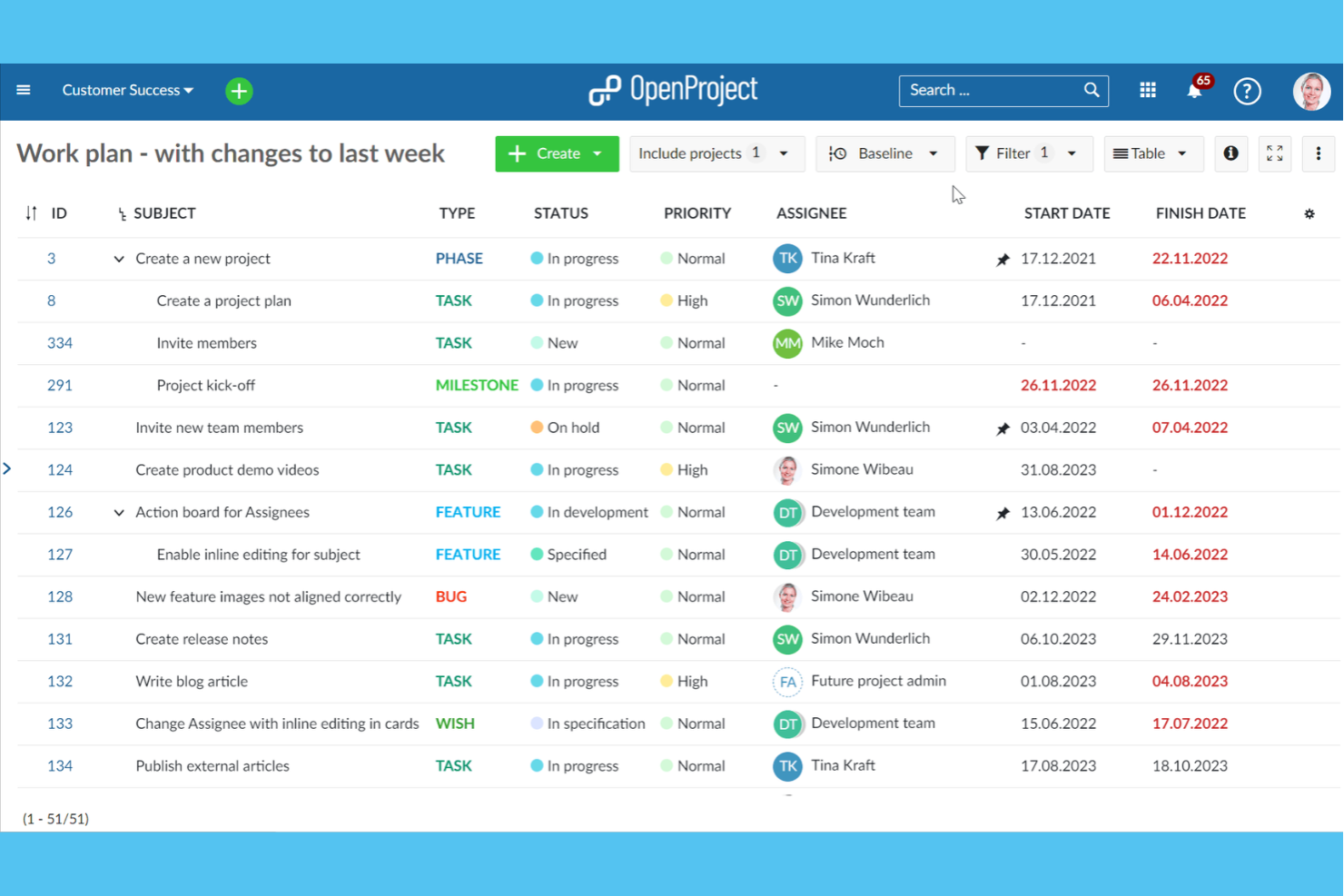
OpenProject offre una piattaforma specializzata per la gestione delle tempistiche e delle attività per team che gestiscono progetti con dipendenze complesse e scadenze variabili. È particolarmente utile per i project manager nei settori dell'ingegneria, delle costruzioni o dell'IT che necessitano di pianificazione avanzata, diagrammi di Gantt e gestione delle risorse. OpenProject ti aiuta a visualizzare, coordinare e modificare piani di progetto complessi in un ambiente collaborativo e open-source.
Perché ho scelto OpenProject
Gestire le tempistiche di progetti complessi richiede spesso più di semplici elenchi di attività, ed è per questo che OpenProject ha attirato la mia attenzione nella collaborazione open source. I suoi diagrammi di Gantt interattivi ti permettono di mappare visivamente dipendenze, traguardi e scadenze, rendendo più semplice il coordinamento tra grandi team.
Apprezzo come il sistema dei pacchetti di lavoro colleghi attività, problemi e deliverable direttamente al piano di progetto, così che niente venga trascurato. Queste funzionalità rendono OpenProject particolarmente adatto alle organizzazioni che devono mantenere più flussi di lavoro allineati e nei tempi previsti.
Funzionalità principali di OpenProject
Altre funzionalità che rendono OpenProject uno strumento di collaborazione versatile includono:
- Bacheche Agile: Crea e gestisci bacheche Scrum e Kanban per flussi di lavoro iterativi.
- Monitoraggio del tempo: Registra le ore direttamente sulle attività e genera report di tempo per i progetti.
- Gestione documentale: Archivia, versiona e condividi file relativi al progetto all'interno della piattaforma.
- Controllo accessi basato sui ruoli: Assegna permessi e ruoli agli utenti per una collaborazione sicura sui progetti.
Integrazioni di OpenProject
Le integrazioni includono Nextcloud, OneDrive, SharePoint, GitHub, GitLab e altri.
Pros and Cons
Pros:
- I diagrammi di Gantt supportano la mappatura di dipendenze complesse
- Bacheche agili per flussi di lavoro Scrum e Kanban
- Monitoraggio del tempo integrato per le attività di progetto
Cons:
- Le integrazioni richiedono configurazione manuale o plugin
- Gli strumenti di reportistica sono meno flessibili rispetto ad alternative

Ideale per la creazione di digital workspace personalizzati
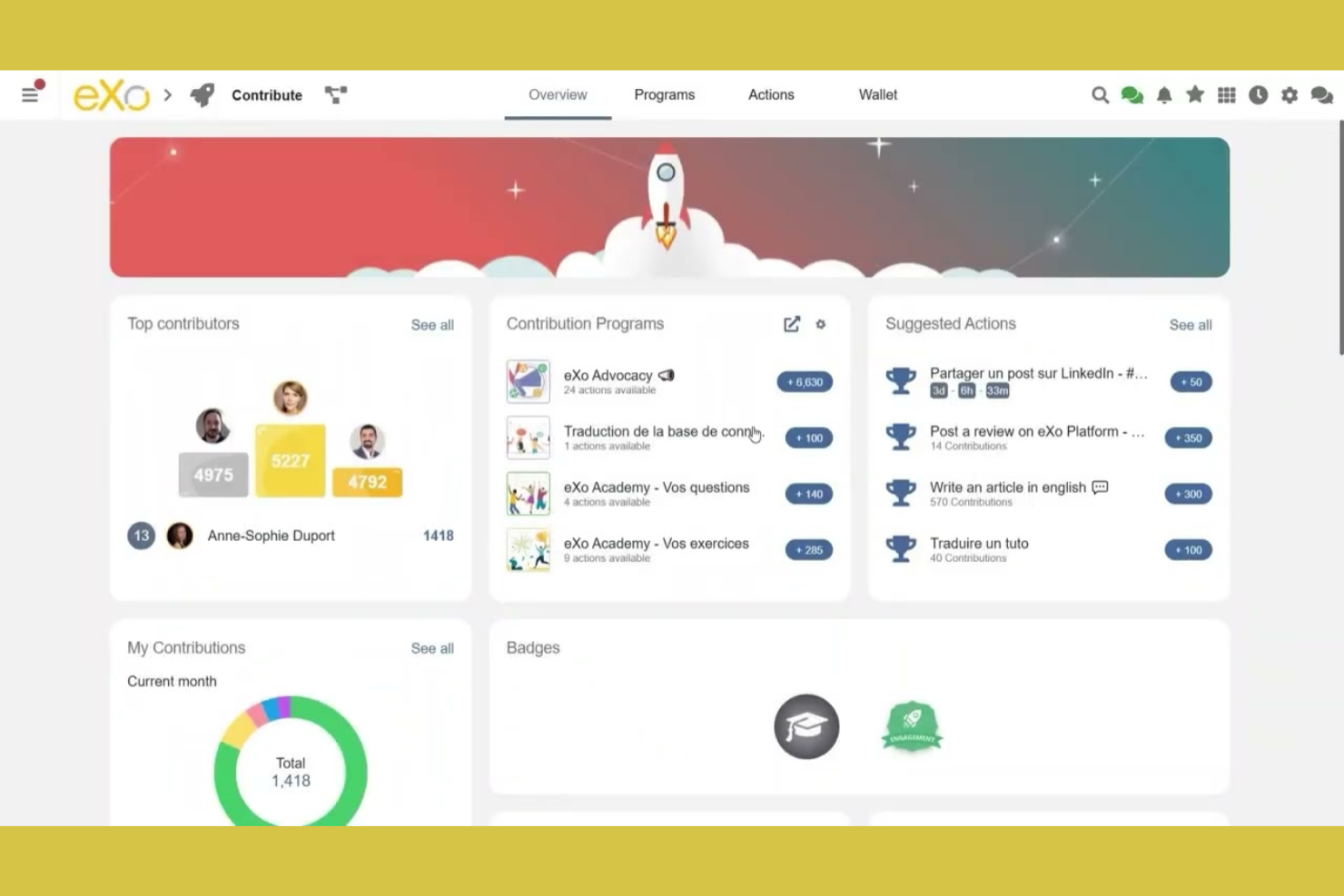
eXo Platform offre una solida base open source e flessibile per le organizzazioni che desiderano progettare uno spazio di lavoro digitale su misura per i propri processi unici. È particolarmente utile per aziende, team del settore pubblico o dipartimenti IT che vogliono centralizzare comunicazione, condivisione della conoscenza e collaborazione in un unico hub personalizzabile. Grazie a componenti modulari e API estese, eXo Platform ti aiuta a costruire uno spazio di lavoro che si adatta alla struttura e alle esigenze di flusso di lavoro del tuo team.
Perché ho scelto eXo Platform
Ciò che distingue eXo Platform è la capacità di fungere da base per la creazione di spazi di lavoro digitali altamente personalizzati. L'ho scelto perché offre componenti modulari—come stream di attività, gestione documentale e wiki—che puoi adattare alla struttura della tua organizzazione.
L'essenza open source della piattaforma significa che puoi estendere o adattare le sue funzionalità per soddisfare esigenze di collaborazione specifiche. Questa flessibilità rende eXo Platform una scelta solida per i team che desiderano creare uno spazio di lavoro in linea con i loro processi e il loro branding.
Caratteristiche principali di eXo Platform
Oltre alle capacità di personalizzazione dello spazio di lavoro, eXo Platform offre molte altre funzionalità degne di nota:
- Calendario integrato: Pianifica eventi, gestisci i calendari del team e sincronizza con strumenti di calendario esterni.
- Gestione delle attività: Assegna, traccia e organizza le attività all'interno di progetti o spazi di lavoro.
- Integrazione videoconferenze: Connettiti con strumenti di videoconferenza direttamente dalla piattaforma per collaborare in tempo reale.
- App mobili: Accedi al tuo spazio di lavoro digitale e collabora con il team da dispositivi iOS e Android.
Integrazioni di eXo Platform
Le integrazioni includono Zoom, Microsoft Teams, Webex, Jisti Meet, ChatGPT, Gemini e altro.
Pros and Cons
Pros:
- Base di conoscenza integrata con funzionalità wiki
- Funzionalità di intranet sociale per il coinvolgimento dei dipendenti
- Permessi granulari per il controllo dello spazio di lavoro e dei contenuti
Cons:
- Gli aggiornamenti possono richiedere interventi manuali e pianificazione
- La documentazione per sviluppatori talvolta è obsoleta

Ideale per condivisione privata di file e modifica collaborativa del team
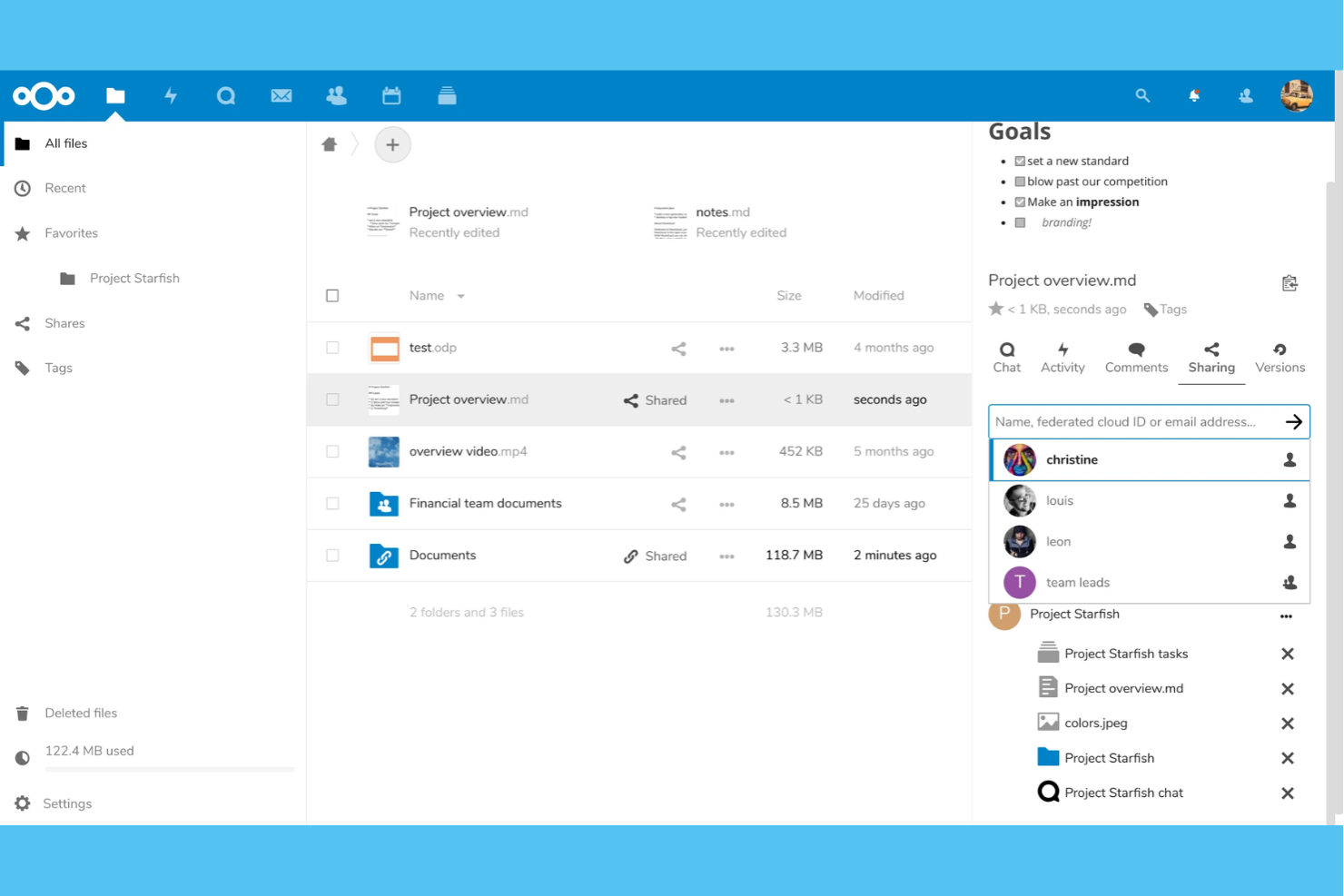
Nextcloud offre una piattaforma auto-ospitata progettata per garantire privacy e flessibilità se il tuo team ha bisogno di un controllo totale sulla condivisione dei file e sulla collaborazione sui documenti. È una soluzione ideale per le organizzazioni con requisiti di sicurezza dei dati rigorosi o che operano in settori regolamentati. Nextcloud si distingue per il suo approccio cloud privato, permettendoti di personalizzare accessi, integrazioni e strumenti di modifica secondo il tuo flusso di lavoro.
Perché ho scelto Nextcloud
Nextcloud si distingue per i team che necessitano di condivisione privata dei file e modifica collaborativa senza dipendere da fornitori di cloud di terze parti. L'ho scelto perché ti consente di ospitare il tuo server, così puoi controllare dove risiedono i tuoi dati e chi può accedervi.
La suite di editing documenti integrata supporta la collaborazione in tempo reale e le impostazioni granulari dei permessi ti aiutano a gestire file sensibili tra i reparti. Queste funzionalità rendono Nextcloud una scelta eccellente per le organizzazioni che danno priorità alla privacy e desiderano personalizzare il proprio ambiente di collaborazione.
Caratteristiche principali di Nextcloud
Altre funzionalità che rendono Nextcloud una piattaforma di collaborazione flessibile includono:
- Integrazione calendario e contatti: Sincronizza calendari e contatti tra dispositivi per coordinare riunioni e gestire la pianificazione del team.
- Nextcloud Talk: Utilizza strumenti integrati di audio, video e chat per comunicazioni sicure tra team senza uscire dalla piattaforma.
- Automazione dei workflow: Crea regole personalizzate per automatizzare la gestione dei file, le approvazioni e le notifiche in base ai trigger definiti da te.
- App Marketplace: Estendi le funzionalità con una vasta gamma di app open source per gestione progetti, note, moduli e altro ancora.
Integrazioni di Nextcloud
Le integrazioni includono Microsoft Outlook, Microsoft SharePoint, Microsoft Teams, Roundcube, Collabora Online, ONLYOFFICE, Nextcloud Talk, Nextcloud Office e altro ancora.
Pros and Cons
Pros:
- L'auto-ospitalità mantiene i dati sensibili in azienda
- Modifica documenti in tempo reale con più utenti
- Strumenti integrati per video, audio e chat
Cons:
- Funzionalità di gestione progetti limitate di default
- Le prestazioni dipendono dalle risorse del tuo server

Element
Ideale per la comunicazione di squadra decentralizzata

Element offre un approccio decentralizzato alla comunicazione di squadra per le organizzazioni che necessitano del controllo sui propri dati e sulla propria infrastruttura. È particolarmente utile per i team IT, le aziende orientate alla privacy e le organizzazioni distribuite che desiderano ospitare la propria piattaforma di messaggistica. Con la crittografia end-to-end e la federazione tra server, Element consente ai team di collaborare in modo sicuro senza dipendere da un unico provider.
Perché ho scelto Element
Element si distingue per i team che necessitano di una comunicazione decentralizzata e del pieno controllo sul proprio ambiente di collaborazione. L'ho scelto perché si basa sul protocollo Matrix, che permette alle organizzazioni di ospitare i propri server e federarsi con altri, mantenendo private le conversazioni e flessibile l'infrastruttura.
La crittografia end-to-end è abilitata di default, quindi le discussioni sensibili rimangono protette su dispositivi e ubicazioni diversi. Per i team che danno priorità alla privacy e all'autonomia, l'architettura decentralizzata e le funzionalità di messaggistica sicura di Element lo rendono una forte proposta open source.
Funzionalità principali di Element
Altre funzionalità che rendono Element interessante per la collaborazione open source sono:
- Integrazione con altre piattaforme: Si collega con Slack, Microsoft Teams e IRC per la messaggistica multipiattaforma.
- Conversazioni organizzate in thread: Organizza le discussioni con i thread di messaggi nelle stanze più attive.
- Chiamate vocali e video: Supporta chiamate singole e di gruppo direttamente dall'app.
- Notifiche personalizzabili: Consente agli utenti di impostare preferenze di notifica per stanze e menzioni.
Integrazioni di Element
Integrazioni con Grafana, Etherpad, Jira, GitLab, Webhook, GitHub e altro ancora.
Pros and Cons
Pros:
- Hosting decentralizzato per distribuzioni private
- La crittografia end-to-end è attivata di default
- Le integrazioni collegano Slack e Microsoft Teams
Cons:
- La qualità delle videochiamate varia a seconda delle piattaforme
- Funzionalità di gestione file interne limitate

Il migliore per integrazione di messaggistica di team sicura

Rocket.Chat merita attenzione se il tuo team necessita di messaggistica sicura e personalizzabile che rispetti rigorosi requisiti di conformità o privacy. È progettato per organizzazioni in settori regolamentati, IT o pubblica amministrazione che desiderano il pieno controllo sulla propria piattaforma di comunicazione. Con codice open source e opzioni di distribuzione flessibili, Rocket.Chat ti permette di integrare chat, condivisione di file e automazione nei tuoi flussi di lavoro esistenti senza sacrificare la proprietà dei dati.
Perché ho scelto Rocket.Chat
Quando la messaggistica sicura per il team è la massima priorità, Rocket.Chat si distingue per il suo approccio open source e i solidi controlli sulla privacy. L'ho scelto perché permette di effettuare il deploy in locale o in cloud privato, così puoi mantenere il completo controllo dei tuoi dati.
La crittografia end-to-end e i permessi utente granulari aiutano le organizzazioni a soddisfare i più severi requisiti di conformità. Queste caratteristiche rendono Rocket.Chat una scelta affidabile per i team che necessitano di comunicazione sicura e integrata all'interno della loro piattaforma di collaborazione open source.
Funzionalità principali di Rocket.Chat
- Messaggistica omnicanale: Gestisci conversazioni da email, SMS, WhatsApp e altri canali in un unico posto.
- Messaggistica con thread: Organizza le discussioni con thread di messaggi per conversazioni mirate.
- Crittografia end-to-end: Proteggi i messaggi con crittografia per chat private e di gruppo.
- Marketplace per le app: Estendi le funzionalità grazie a un marketplace integrato per integrazioni e componenti aggiuntivi.
Integrazioni di Rocket.Chat
Le integrazioni includono HubSpot, Salesforce, Telegram, Zoom, Zapier e molto altro.
Pros and Cons
Pros:
- Deploy in locale supporta rigorosi requisiti di residenza dei dati
- Messaggistica crittografata end-to-end per conversazioni private
- Integrazione LDAP e SSO per la gestione degli utenti
Cons:
- Le chiamate vocali e video richiedono configurazione aggiuntiva
- Le notifiche push possono essere inaffidabili su larga scala

Ideale per integrare la suite per ufficio con i flussi di lavoro

ONLYOFFICE merita di essere preso in considerazione se cerchi una suite per ufficio open source che si integri perfettamente con i flussi di lavoro del tuo team. È progettato per aziende e team IT che desiderano combinare la modifica dei documenti, la gestione dei progetti e la comunicazione in un'unica piattaforma. OnlyOffice si distingue per la capacità di integrare la collaborazione sui documenti con strumenti come CRM, posta e calendario, aiutando i team a gestire contenuti e processi in un unico luogo.
Perché ho scelto ONLYOFFICE
Ciò che distingue ONLYOFFICE è il modo in cui riunisce la modifica dei documenti e la gestione dei flussi di lavoro in un'unica piattaforma open source. L'ho scelto perché consente ai team di creare, modificare e redigere documenti in collaborazione, gestendo al contempo progetti, attività e calendari senza dover passare da uno strumento all'altro. I moduli integrati per CRM, posta e monitoraggio dei progetti aiutano i team a mantenere tutto il lavoro connesso e accessibile. Per le organizzazioni che desiderano unificare la produttività d'ufficio con l'automazione dei flussi di lavoro, ONLYOFFICE offre un approccio flessibile e integrato.
Caratteristiche principali di ONLYOFFICE
Alcune altre caratteristiche che rendono ONLYOFFICE una scelta eccellente per la collaborazione open source includono:
- Crittografia dei documenti: Proteggi i file con opzioni di crittografia avanzate per una collaborazione sicura.
- Mercato dei plugin: Estendi le funzionalità con plugin per la traduzione, le firme digitali e altro ancora.
- Autorizzazioni di accesso personalizzabili: Imposta autorizzazioni dettagliate per utenti e gruppi per documenti e cartelle.
- Chat integrata: Comunica direttamente con i membri del team all'interno dell'interfaccia di modifica dei documenti.
Integrazioni di ONLYOFFICE
Le integrazioni includono Trello, Odoo, Moodle, monday.com, Pipedrive e altro ancora.
Pros and Cons
Pros:
- Moduli integrati per CRM e gestione dei progetti
- Supporta la modifica collaborativa con cronologia delle versioni
- Mercato dei plugin per estendere le funzionalità principali
Cons:
- Le formule dei fogli di calcolo a volte vengono visualizzate in modo non coerente
- Le traduzioni dell'interfaccia sono incomplete in alcune lingue

SuiteCRM
Ideale per tracciare le interazioni con i clienti legate ai progetti
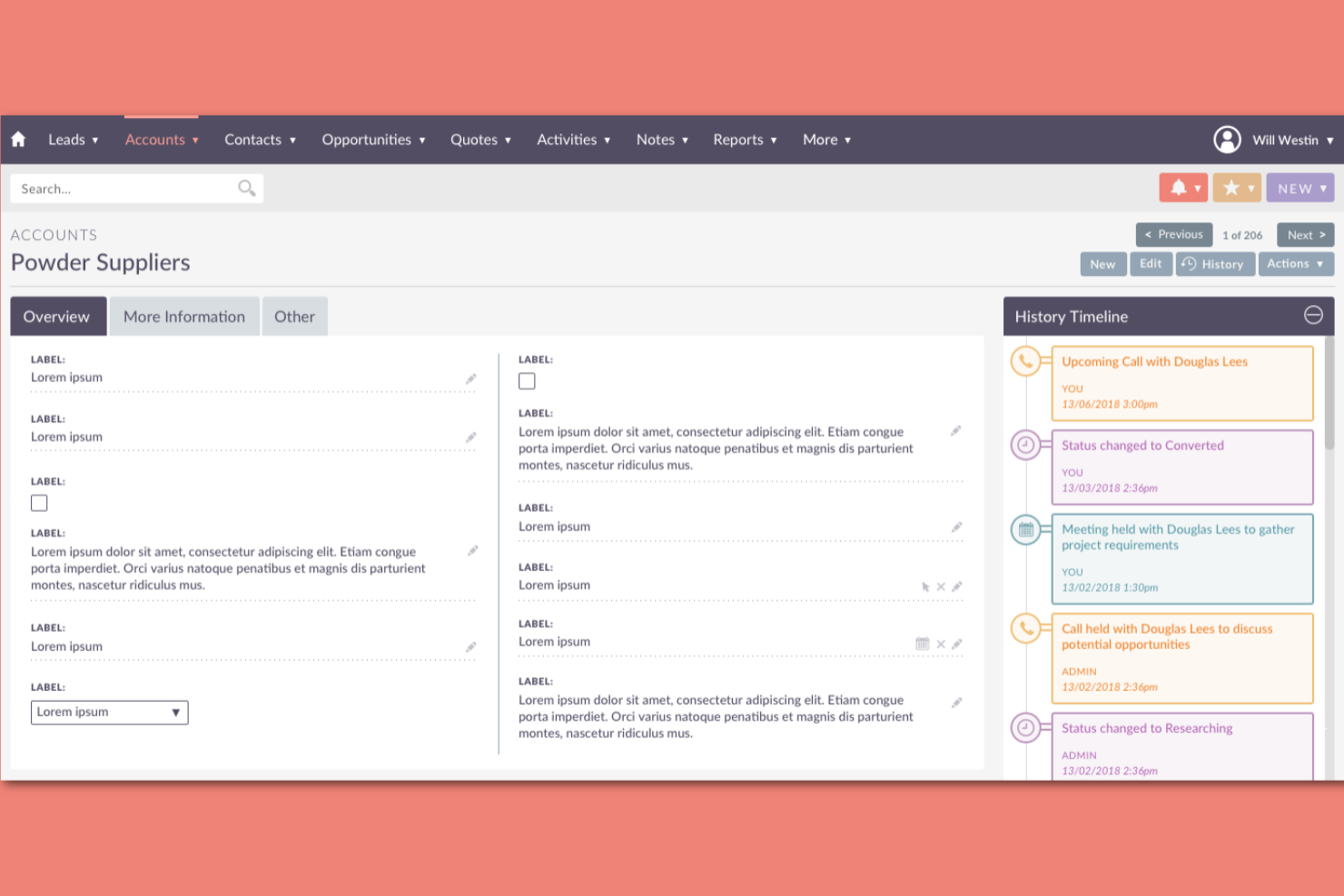
SuiteCRM si distingue per i team che hanno bisogno di tracciare ogni interazione con i clienti legata ai loro progetti. È particolarmente utile per i project manager e i team a contatto con i clienti che desiderano una visione unificata di comunicazioni, compiti e traguardi di progetto. Grazie alla sua base open source, SuiteCRM ti permette di personalizzare i flussi di lavoro e i campi dati in base alle esigenze di gestione di progetti e clienti.
Perché ho scelto SuiteCRM
Ciò che rende SuiteCRM una scelta vincente per la collaborazione open source è la sua attenzione a tracciare in modo dettagliato ogni interazione clientela-correlata al progetto. L'ho scelto perché riunisce in un unico posto la gestione dei contatti, il tracciamento dei progetti e la cronologia delle comunicazioni, così i team non perdono mai il contesto del cliente.
I flussi di attività e le funzionalità di gestione dei casi di SuiteCRM aiutano a registrare chiamate, email e riunioni direttamente sui progetti o sugli account. Per i project manager che necessitano di una traccia chiara delle attività con il cliente, queste caratteristiche rendono SuiteCRM particolarmente prezioso.
Funzionalità principali di SuiteCRM
Altre funzionalità che rendono SuiteCRM utile per la collaborazione open source includono:
- Automazione dei flussi di lavoro: Configura azioni e notifiche automatiche basate su trigger o condizioni.
- Costruttore di moduli personalizzati: Progetta e distribuisci moduli personalizzati per adattarsi a processi aziendali unici.
- Reportistica e dashboard: Crea report visivi e dashboard per monitorare metriche di progetti e clienti.
- Controllo degli accessi basato sui ruoli: Gestisci permessi e visibilità dei dati per diversi gruppi di utenti.
Integrazioni SuiteCRM
Le integrazioni includono Facebook, Xero, Outlook, WhatsApp, DocuSign, LinkedIn, Zoom, QuickBooks, Mailchimp e altro ancora.
Pros and Cons
Pros:
- Il costruttore di moduli personalizzati supporta flussi di lavoro unici
- L'automazione dei flussi di lavoro riduce le attività manuali ripetitive
- Il controllo degli accessi basato sui ruoli gestisce la visibilità dei dati
Cons:
- Gli aggiornamenti possono richiedere interventi manuali o supporto
- La documentazione è poco approfondita per configurazioni avanzate

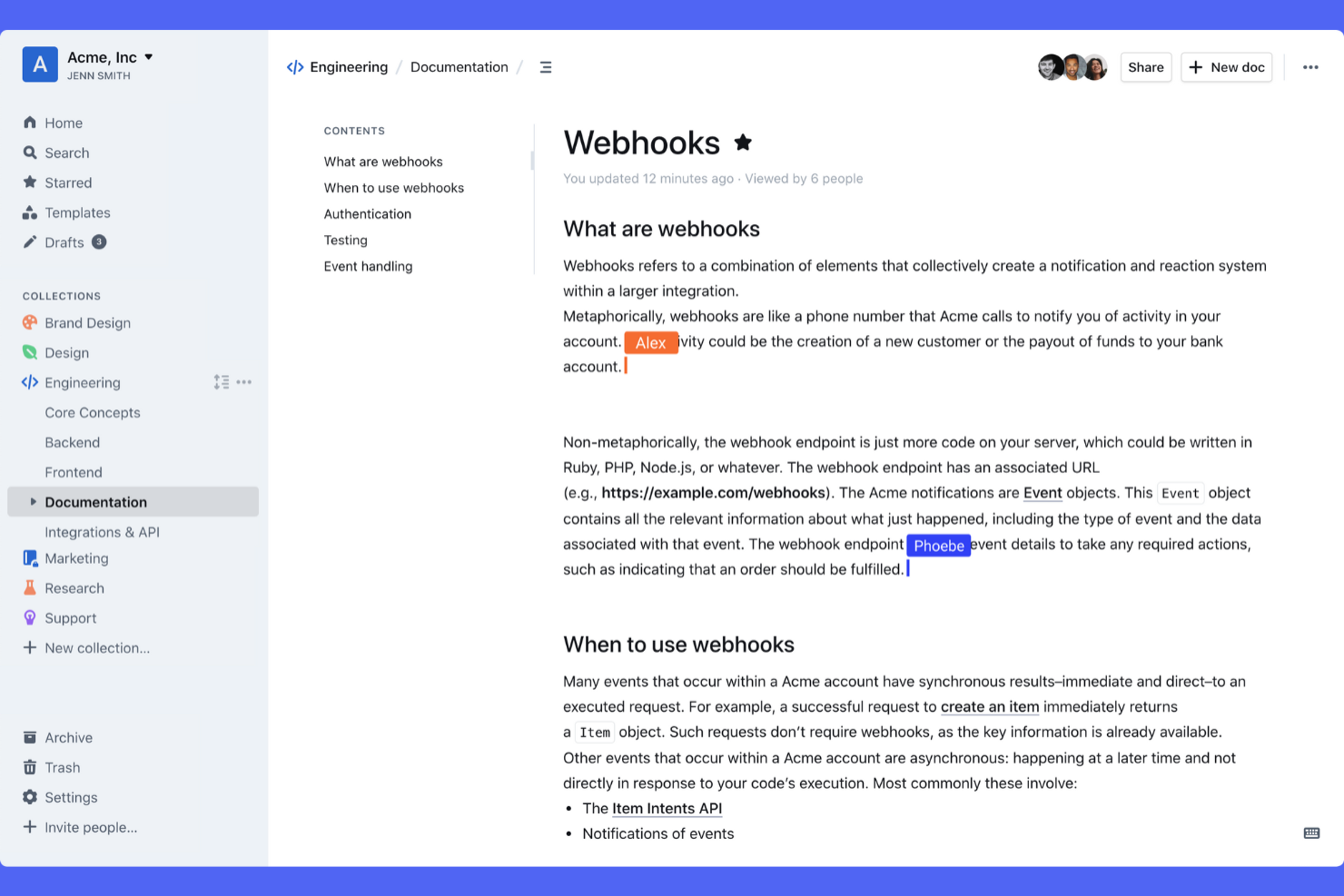
Outline è progettato per i team che hanno bisogno di un modo strutturato per organizzare e condividere le conoscenze interne. È particolarmente utile per le aziende tecnologiche in rapida crescita, i team distribuiti e le organizzazioni con esigenze di documentazione complesse. Le raccolte nidificate e la potente ricerca di Outline aiutano i team a mantenere politiche, processi e note di progetto accessibili e facili da aggiornare.
Perché ho scelto Outline
Per i team che devono organizzare e condividere le conoscenze su larga scala, Outline offre una struttura difficile da trovare in altri strumenti open source per la collaborazione. Ho scelto Outline perché le sue raccolte nidificate consentono di creare una gerarchia chiara per i documenti, facilitando il raggruppamento dei contenuti correlati e mantenendo le informazioni organizzate man mano che il team cresce.
Le funzioni di ricerca a testo completo e collegamento tra documenti della piattaforma aiutano gli utenti a trovare e collegare rapidamente le conoscenze pertinenti in tutto lo spazio di lavoro. Queste funzionalità rendono Outline una scelta efficace per i team che desiderano centralizzare la documentazione e mantenere tutti allineati.
Funzionalità principali di Outline
Altre funzionalità che rendono Outline prezioso per la collaborazione open source includono:
- Supporto Markdown: Scrivi e formatta i documenti utilizzando la sintassi Markdown per garantire uniformità e rapidità.
- Autorizzazioni granulari: Controlla l'accesso a livello di documento o raccolta per i diversi membri del team.
- Cronologia delle revisioni: Tieni traccia delle modifiche e ripristina le versioni precedenti di qualsiasi documento.
- Integrazione con Slack: Condividi aggiornamenti e notifiche direttamente nei canali Slack.
Integrazioni di Outline
Le integrazioni includono Slack, Google Docs, Figma, Airtable, Trello, Miro, Lucidchart, InVision, Typeform e altro.
Pros and Cons
Pros:
- La ricerca a testo completo trova rapidamente i contenuti pertinenti
- Le autorizzazioni granulari gestiscono l'accesso a ogni livello
- Il supporto Markdown consente una formattazione rapida e uniforme
Cons:
- Nessuna modifica collaborativa in tempo reale integrata
- L'importazione da altre piattaforme può essere incoerente

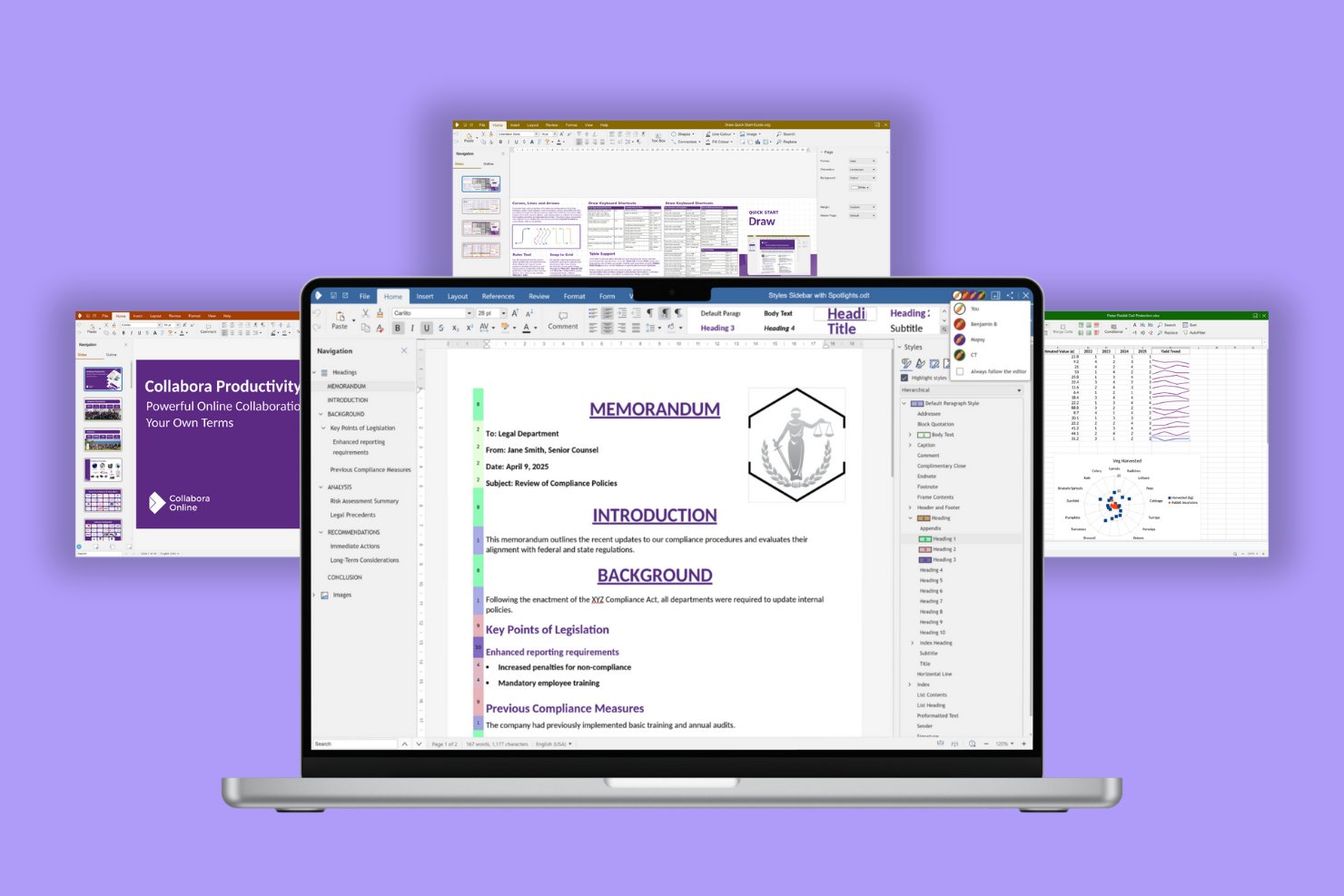
Collabora Online offre la modifica collaborativa in tempo reale ai team che necessitano di uno strumento open source per la creazione e la gestione dei documenti. È una soluzione ideale per le organizzazioni che desiderano ospitare la propria suite per ufficio in modo sicuro, consentendo a più utenti di modificare simultaneamente documenti di testo, fogli di calcolo e presentazioni.
Perché ho scelto Collabora Online
Collabora Online si distingue per i team che necessitano di una reale collaborazione sui documenti in ambiente open source. L’ho scelto perché supporta la co-redazione in tempo reale, permettendo a più utenti di lavorare contemporaneamente su documenti di testo, fogli di calcolo e presentazioni. La sua compatibilità con i formati dei file di Microsoft Office consente di modificare e condividere documenti senza doversi preoccupare di problemi di conversione.
Per le organizzazioni che desiderano mantenere il controllo sui propri dati facilitando al contempo la collaborazione sui documenti, Collabora Online rappresenta una soluzione affidabile e mirata.
Funzionalità principali di Collabora Online
Altre caratteristiche che rendono Collabora Online interessante per la collaborazione open source includono:
- Cronologia delle versioni: Tieni traccia delle modifiche e ripristina versioni precedenti dei documenti direttamente dall'editor.
- Commenti e annotazioni: Aggiungi commenti e contrassegna i documenti per feedback e discussioni tra i membri del team.
- Personalizzazione del brand: Applica il logo e i colori della tua organizzazione all’interfaccia per un’esperienza su misura.
- Accessibilità: Usa funzionalità progettate nel rispetto degli standard di accessibilità, inclusa la compatibilità con gli screen reader.
Integrazioni Collabora Online
Le integrazioni comprendono Nextcloud, openDesk, WordPress, Moodle, OpenText, Seafile e altri.
Pros and Cons
Pros:
- Co-redazione in tempo reale per documenti e fogli di calcolo
- Supporta la compatibilità con i formati di file Microsoft Office
- Opzioni di self-hosting per il controllo della privacy dei dati
Cons:
- La formattazione avanzata talvolta viene visualizzata in modo non coerente
- Gli strumenti di gestione utenti non offrono impostazioni granulari dei permessi
Altri software di collaborazione open source
Ecco alcune ulteriori opzioni di software di collaborazione open source che non sono state incluse nel mio elenco ristretto, ma che vale comunque la pena valutare:
- Etherpad
Ideale per prendere appunti collaborativi in tempo reale
- HumHub
Ideale per creare intranet sociali personalizzate
- EGroupware
Ideale per coordinare team distribuiti


Come Valuto il Software di Collaborazione Open Source
Per i team di ingegneria che hanno bisogno di gestire internamente il proprio stack, suddivido la valutazione in due livelli: requisiti di base che uno strumento deve soddisfare e i fattori che distinguono le migliori opzioni.
Funzionalità di Base (Requisiti Minimi per Questa Lista)
Quando seleziono gli strumenti per la mia lista, valuto ciascuno su una scala da 0 (non offre la funzionalità) a 5 (eccelle in quest'area) per ogni funzionalità di base elencata di seguito. Poi calcolo il punteggio totale dello strumento in percentuale. Ogni strumento deve raggiungere un punteggio totale minimo del 65% per essere preso in considerazione.
- Licenza Open Source: Controllo che ogni strumento sia distribuito con una licenza approvata dall'OSI e abbia un repository pubblico accessibile, e non solo codice "source-available" nascosto da termini restrittivi.
- Capacità di Self-Hosting: Che si tratti di Docker, Kubernetes o installazione su bare-metal, cerco percorsi di deployment ben documentati che il team possa gestire sulla propria infrastruttura.
- Gestione di Progetti e Attività: Ogni strumento deve coprire assegnazione attività, scadenze e almeno una visualizzazione grafica come Kanban o Gantt per monitorare sprint o obiettivi di rilascio.
- Strumenti di Collaborazione del Team: Valuto spazi di lavoro condivisi, commenti in thread, menzioni e notifiche, ovvero le funzionalità su cui i team distribuiti fanno affidamento per rimanere allineati tra fusi orari diversi.
- Condivisione di Documenti e Conoscenze: Qui contano wiki integrati, allegati o knowledge base. Strumenti come Taiga e OpenProject gestiscono questi aspetti in modo differente, quindi confronto la profondità delle funzionalità.
- Estendibilità e Integrazioni: Cerco REST API, webhook e supporto ai plugin che permettano di collegare la piattaforma a repository Git, pipeline CI/CD e strumenti di chat che il team già utilizza.
Dopo aver individuato gli strumenti che soddisfano i criteri, considero ciò che rende ogni piattaforma unica.
Fattori Distintivi (Cosa Distingue i Fornitori)
Ecco come confronto diversi fornitori:
Funzionalità Distintive
Il supporto nativo alle metodologie Agile è importante quando il team di ingegneria lavora a sprint. Cerco backlog integrati, story point e diagrammi di burndown invece di soluzioni di ripiego approssimative su una normale bacheca attività. L'integrazione con Git e CI/CD è un altro elemento che fa la differenza: collegare i commit direttamente alle attività evita il cambio di contesto tra strumenti come GitLab e la piattaforma di project management. Valuto anche i builder di workflow personalizzati, poiché i team con revisioni multistadio o processi di approvazione necessitano di stati attività e trigger di automazione configurabili che riflettano davvero il loro processo di rilascio.
Oltre le Funzionalità
La salute della community dice molto sul futuro di un progetto. Controllo la frequenza dei commit, i tempi di risposta alle issue e la struttura di governance per capire se lo strumento sarà ancora mantenuto tra due anni. La sicurezza pesa molto: cerco supporto SSO/SAML, audit log e una procedura documentata di segnalazione delle vulnerabilità, poiché i team che gestiscono dati sensibili sui progetti necessitano di questi controlli fin dal primo giorno. Il costo totale di proprietà completa la mia valutazione. Una community edition gratuita conta poco se l'overhead di hosting e manutenzione richiede un DevOps dedicato che il tuo team non ha.
Come scegliere un software di collaborazione open source
È facile perdersi in lunghi elenchi di funzionalità e strutture tariffarie complesse. Per aiutarti a rimanere concentrato mentre affronti il tuo specifico processo di selezione del software, ecco un elenco dei fattori da tenere presenti:
| Fattore | Cosa considerare |
|---|---|
| Scalabilità | Il software sarà in grado di gestire le dimensioni attuali del tuo team e la sua crescita futura? Verifica i limiti di utenti, lo spazio di archiviazione e le prestazioni con grandi quantità di dati. |
| Integrazioni | Si collega nativamente ai tuoi strumenti principali, ad esempio Slack, Google Workspace e GitHub? Considera come le lacune nelle integrazioni potrebbero influire sui flussi di lavoro. |
| Personalizzazione | Puoi adattare la piattaforma ai processi del tuo team? Cerca opzioni per modificare autorizzazioni, modelli e flussi di lavoro. |
| Facilità d'uso | Il tuo team la adotterà rapidamente? Valuta l'interfaccia, la navigazione e la quantità di formazione necessaria per gli utenti non tecnici. |
| Implementazione e avvio | Quanto tempo richiederanno la configurazione e la migrazione? Valuta le risorse, la documentazione e il supporto disponibili per importare i dati esistenti. |
| Costo | Esistono costi nascosti per componenti aggiuntivi, supporto o scalabilità? Confronta i termini della licenza open source, i costi di hosting e le possibilità di aggiornamento. |
| Misure di sicurezza | Lo strumento offre crittografia, controlli degli accessi e registri di audit? Assicurati che soddisfi gli standard di protezione dei dati della tua organizzazione. |
| Disponibilità del supporto | Quali canali di supporto sono disponibili, come community, e-mail e chat dal vivo? Considera i tempi di risposta e l'affidabilità dell'assistenza quando si verificano problemi. |
Che cos'è un software di collaborazione open source?
Il software di collaborazione open source è una categoria di strumenti digitali che consentono la collaborazione tra team su progetti, documenti e comunicazioni condivisi, con codice sorgente accessibile pubblicamente e modificabile. Questi strumenti open source supportano la collaborazione online attraverso funzionalità come la messaggistica istantanea, il coordinamento dei progetti e la condivisione delle conoscenze.
Offrono inoltre flessibilità per la personalizzazione, l'autenticazione e l'allineamento alle politiche di sicurezza e alle normative come il GDPR. Che siano implementate come soluzioni autogestite o combinate con opzioni SaaS, le organizzazioni spesso le valutano attraverso casi di studio per assicurarsi che soddisfino le esigenze di sicurezza, conformità e flusso di lavoro.
Funzionalità
Quando selezioni un software di collaborazione open source, presta attenzione alle seguenti funzionalità chiave:
- Modifica dei documenti: consente a più utenti di creare, modificare e aggiornare documenti all'interno di uno spazio di lavoro condiviso, supportando la collaborazione sia in tempo reale sia asincrona.
- Registro delle versioni: tiene traccia delle modifiche apportate a documenti o file, consentendo agli utenti di esaminare, confrontare e ripristinare le versioni precedenti secondo necessità.
- Controlli degli accessi: consente agli amministratori di impostare le autorizzazioni per utenti o gruppi, assicurando che le persone corrette possano visualizzare, modificare o gestire contenuti specifici.
- Funzionalità di ricerca: fornisce strumenti di ricerca per individuare rapidamente documenti, discussioni o file sull'intera piattaforma.
- Gestione delle attività: offre strumenti per assegnare, monitorare e aggiornare attività o azioni da intraprendere all'interno di progetti o team.
- Discussioni a thread: supporta conversazioni o commenti organizzati in thread all'interno di documenti o progetti, mantenendo le comunicazioni organizzate e specifiche per il contesto.
- Supporto alle integrazioni: si collega ad altri strumenti di uso comune, come sistemi di archiviazione dei file, piattaforme di messaggistica o calendari, per centralizzare i flussi di lavoro.
- Personalizzazione: consente ai team di adattare l'interfaccia, i flussi di lavoro o i modelli alle proprie procedure e al proprio marchio.
- Opzioni di autogestione: consentono alle organizzazioni di implementare il software sui propri server per ottenere un maggiore controllo sulla privacy dei dati e sulla conformità.
- Notifiche e avvisi: inviano agli utenti aggiornamenti su modifiche, commenti o scadenze, aiutando i team a rimanere informati e reattivi.
Vantaggi
L'implementazione di un software di collaborazione open source offre diversi vantaggi al tuo team e alla tua azienda. Eccone alcuni:
- Maggiore trasparenza: l'accesso aperto al codice sorgente e alla documentazione aiuta i team a comprendere il funzionamento del software e favorisce la fiducia nella piattaforma.
- Personalizzazione: i team possono modificare flussi di lavoro, autorizzazioni e modelli per adattarli alle proprie procedure e ai requisiti del proprio marchio.
- Controllo dei costi: molte soluzioni open source offrono licenze gratuite o a basso costo, con la flessibilità di utilizzare l'autogestione ed evitare la dipendenza dal fornitore.
- Maggiore sicurezza: le opzioni di autogestione e i codici sorgente aperti consentono alle organizzazioni di verificare, controllare e rafforzare le proprie misure di protezione dei dati.
- Miglioramenti guidati dalla comunità: le comunità attive di utenti e sviluppatori contribuiscono con aggiornamenti, componenti aggiuntivi e correzioni degli errori, mantenendo il software aggiornato e adattabile.
- Maggiore condivisione delle conoscenze: le funzionalità centralizzate di modifica dei documenti, ricerca e discussione facilitano la collaborazione tra team distribuiti e la conservazione delle conoscenze istituzionali.
- Flessibilità delle integrazioni: le piattaforme open source spesso supportano un'ampia gamma di integrazioni, consentendo ai team di collegare gli strumenti preferiti e semplificare i flussi di lavoro.
Costi e prezzi
La selezione di un software di collaborazione open source richiede la comprensione dei vari modelli e piani tariffari disponibili. I costi variano in base alle funzionalità, alle dimensioni del team, ai componenti aggiuntivi e ad altri fattori. La tabella seguente riassume i piani comuni, i relativi prezzi medi e le funzionalità tipicamente incluse nelle soluzioni di software di collaborazione open source:
Tabella comparativa dei piani per il software di collaborazione open source
| Tipo di piano | Prezzo medio | Funzionalità comuni |
|---|---|---|
| Piano gratuito | $0 | Modifica di base dei documenti, integrazioni limitate, supporto della comunità e opzioni di autogestione. |
| Piano personale | $5–$10/utente/mese | Tutte le funzionalità gratuite, maggiore spazio di archiviazione, controlli di base degli accessi e supporto via e-mail. |
| Piano aziendale | $10–$25/utente/mese | Autorizzazioni avanzate, gestione dei team, integrazione con strumenti di terze parti e supporto prioritario. |
| Piano per grandi aziende | $25–$50/utente/mese | Flussi di lavoro personalizzati, maggiore sicurezza, strumenti di conformità, onboarding dedicato e supporto coperto da SLA. |
Domande frequenti sul software collaborativo a codice sorgente aperto
Ecco alcune risposte alle domande comuni sul software collaborativo a codice sorgente aperto:
Il software collaborativo a codice sorgente aperto può essere ospitato autonomamente?
Sì, la maggior parte dei software collaborativi a codice sorgente aperto può essere ospitata autonomamente. Questo offre alla tua organizzazione il pieno controllo sui dati, sulla sicurezza e sulla conformità, ma richiede anche risorse interne per la configurazione, la manutenzione e gli aggiornamenti.
In che modo il software collaborativo a codice sorgente aperto gestisce la sicurezza?
Il software collaborativo a codice sorgente aperto offre in genere funzionalità come crittografia, controlli degli accessi e registri di controllo. Poiché il codice sorgente è pubblico, il tuo team può esaminare e rafforzare le misure di sicurezza, ma dovrai mantenerti proattivo con aggiornamenti e patch.
Quali opzioni di supporto sono disponibili per il software collaborativo a codice sorgente aperto?
Le opzioni di supporto variano a seconda del fornitore e della comunità. Molti strumenti offrono forum della comunità, documentazione e guide per gli utenti, mentre i piani a pagamento possono includere supporto via e-mail, chat dal vivo o canali di supporto dedicati per tempi di risposta più rapidi.
È difficile migrare i dati esistenti al software collaborativo a codice sorgente aperto?
La complessità della migrazione dipende dai sistemi attuali e dal software scelto. Molte piattaforme forniscono strumenti di importazione o API, ma potrebbe essere necessaria competenza tecnica per garantire una transizione fluida e preservare l’integrità dei dati.
Il software collaborativo a codice sorgente aperto può integrarsi con altri strumenti aziendali?
Sì, molte piattaforme collaborative a codice sorgente aperto supportano integrazioni con strumenti come Slack, Google Workspace e GitHub. Verifica la disponibilità di plugin, API o connettori nativi per assicurarti della compatibilità con i flussi di lavoro esistenti.