

10 sistemi di gestione documentale a marchio bianco nel 2026

Selezione di sistemi di gestione documentale a marchio bianco


Un sistema di gestione documentale a marchio bianco è una piattaforma che puoi rinominare e personalizzare come se fosse tua, per organizzare, archiviare e condividere in modo sicuro i documenti con i clienti o con i team interni. Se stai cercando il miglior sistema di gestione documentale a marchio bianco, probabilmente vuoi offrire un'esperienza fluida e personalizzata mantenendo al contempo il controllo sui flussi di lavoro e sugli accessi ai documenti.
In questa guida troverai opzioni che supportano tutto, dalle autorizzazioni dettagliate all'automazione personalizzata dei flussi di lavoro, così potrai scegliere una soluzione adatta alle esigenze della tua azienda e alle aspettative dei clienti.
Perché fidarsi dei nostri consigli sui software
Il nostro team testa e recensisce software dal 2012. In quanto project manager noi stessi, sappiamo quanto sia difficile — e importante — scegliere il software giusto.
Per questa guida, abbiamo valutato gli strumenti attraverso test pratici e ricerche indipendenti, assegnando un punteggio agli strumenti in base ai nostri criteri di selezione. Ci basiamo inoltre sulle competenze di leader di pensiero del settore e di professionisti attivi nella gestione dei progetti.
Le nostre recensioni riflettono il nostro giudizio editoriale umano, non un discorso di vendita.
Revisori esperti:
Tabella comparativa dei sistemi di gestione documentale a marchio bianco
Questa tabella comparativa riassume i dettagli sui prezzi dei migliori sistemi di gestione documentale a marchio bianco da me selezionati:
Recensioni dei sistemi di gestione documentale a marchio bianco
Di seguito sono riportate le mie analisi dettagliate dei sistemi di gestione documentale a marchio bianco inclusi nella mia selezione. Le mie recensioni offrono una panoramica dettagliata delle funzionalità, dei casi d’uso ideali e delle integrazioni di ciascuna piattaforma, per aiutarti a trovare quella più adatta a te.

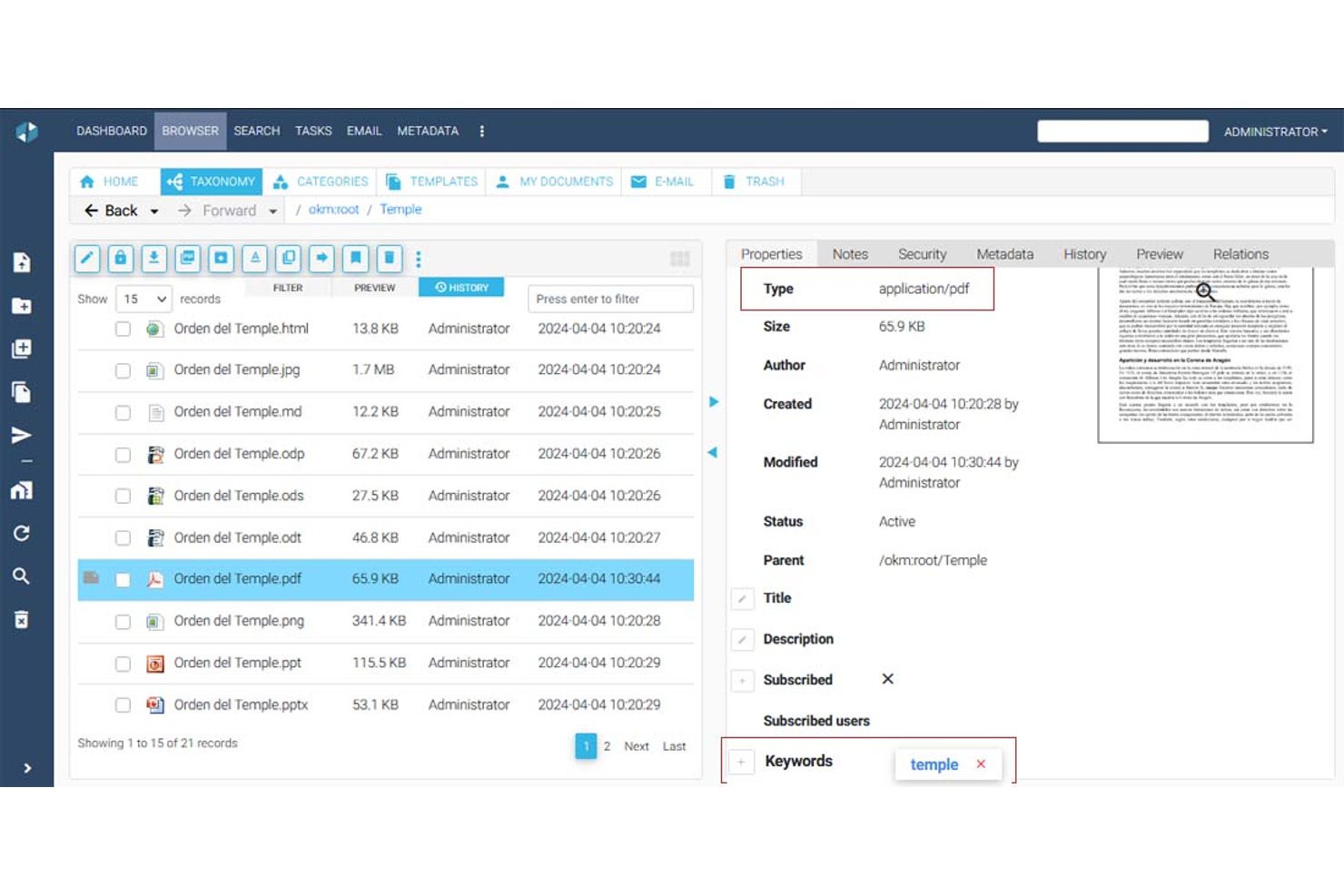

OpenKM è un sistema di gestione documentale con un'architettura multi-tenant che supporta gerarchie di cartelle, gestione dei metadati, controllo delle versioni, ricerca full-text, OCR, firme elettroniche e un motore nativo dei flussi di lavoro per creare processi di approvazione e revisione.
A chi è più adatto OpenKM?
OpenKM è adatto ai team orientati alla conformità e agli uffici di gestione dei progetti (PMO) che devono automatizzare i flussi di lavoro per l'approvazione dei documenti tra più reparti o ambienti dei clienti.
Perché ho scelto OpenKM
OpenKM si è guadagnato un posto nella mia lista ristretta perché il suo motore nativo dei flussi di lavoro, OKMFlow, va ben oltre le approvazioni di base. Mi piace il fatto che sia possibile creare catene di revisione sequenziali e parallele, assegnare dinamicamente le attività a utenti o gruppi e modificare i flussi di lavoro attivi senza interrompere i processi in corso. La sua architettura multi-tenant consente di predisporre ambienti isolati per ogni cliente, ciascuno con il proprio amministratore, la propria radice di archiviazione e la propria personalizzazione dell'interfaccia. Questa combinazione lo rende realmente adatto a gestire i processi di approvazione dei documenti per più account cliente da una singola istanza.
Funzionalità principali di OpenKM
- Architettura multi-tenant: Predisponi ambienti isolati per cliente o reparto, ciascuno con il proprio amministratore, la propria radice di archiviazione e una configurazione indipendente.
- Modulo Doc-Request: Invia richieste di documenti crittografate e sicure direttamente ai clienti e ricevi i file tramite un canale di distribuzione protetto.
- Motore di ricerca full-text: Indicizza ed esegui ricerche in PDF, Office, HTML, XML e altri tipi di file utilizzando sinonimi, stemming e query salvate.
- Confronto delle versioni: Confronta due versioni di un documento affiancate, esaminando sia le modifiche ai metadati sia le differenze nel testo nella stessa interfaccia.
Integrazioni di OpenKM
OpenKM dispone di integrazioni native nell'ecosistema Microsoft, tra cui Outlook, Word, Excel, PowerPoint, Visio, Project e Access, oltre al supporto CMIS. La sua API REST si collega a SAP e Microsoft Dynamics e supporta integrazioni personalizzate.
Pros and Cons
Pros:
- Gli ambienti multi-tenant isolano gli spazi di lavoro dei clienti
- I flussi di lavoro a livello di tenant supportano approvazioni personalizzate
- La cronologia delle versioni rafforza la responsabilità dei clienti
Cons:
- Il branding non arriva alla completa personalizzazione white-label
- L'interfaccia datata può rallentare l'adozione da parte dei clienti
Come Valuto i Sistemi di Gestione Documentale White Label
Li valuto su due livelli: cosa serve a un team per creare e gestire un portale documentale personalizzato senza alcuna traccia del fornitore, e i fattori differenzianti rilevanti a seconda di come si intende utilizzarlo.
Funzionalità di Base (Requisiti Minimi per Questa Lista)
Quando seleziono gli strumenti per la mia lista, ne valuto ciascuno su una scala da 0 (non offre la funzionalità) a 5 (eccelle in quest'area) per ognuna delle funzionalità di base elencate di seguito. Poi calcolo il punteggio totale dello strumento come percentuale. Ogni strumento deve raggiungere un punteggio totale minimo del 55% per essere considerato.
- Controlli di Branding White Label: Verifico se si può sostituire ogni riferimento visibile al fornitore con il proprio logo, palette di colori, favicon e pagina di login, così che i clienti non vedano mai la piattaforma sottostante.
- Archiviazione e Organizzazione dei Documenti: Gerarchie di cartelle, tag e schemi di metadati sono fondamentali qui, soprattutto quando si gestiscono SOW, contratti e deliverable su decine di account clienti.
- Controllo delle Versioni e Audit Trail: Valuto come ogni strumento traccia le revisioni e registra l’attività degli utenti, dato che la documentazione di progetto passa spesso attraverso diversi cicli di revisione prima dell’approvazione finale.
- Controlli di Accesso e Permessi: Cerco regole granulari basate sui ruoli a livello di cartella e file—in particolare la possibilità di impostare diversi livelli di permessi per i team interni rispetto alle parti esterne.
- Portale Clienti e Collaborazione: L’esperienza del portale è dove vive il tuo brand agli occhi del cliente finale; perciò valuto se i revisori possano commentare, approvare e interagire con i documenti all’interno di uno spazio di lavoro personalizzato.
- Dominio Personalizzato e Supporto Multi-Tenant: Ogni account cliente dovrebbe essere protetto dietro il tuo dominio, con dati isolati e branding indipendente, cosa essenziale quando rivendi su un portafoglio di progetti.
Una volta che ho una lista di strumenti che rispettano i criteri, considero cosa distingue ogni piattaforma dalle altre.
Fattori Differenzianti (Cosa Distingue i Fornitori)
Ecco come confronto e metto a paragone i diversi fornitori:
Caratteristiche Distintive
L’accesso ad API e webhook è un grande elemento di differenziazione: determina se puoi integrare i workflow documentali direttamente nei tuoi tool di project management o nelle app per i clienti. Valuto anche l’automazione dell’iter di approvazione, perché inseguire manualmente stakeholder per approvare SOW e change order non è scalabile su più account. Le analytics di utilizzo completano il quadro: reportistica per tenant su visualizzazioni, download e storage aiuta i reseller a identificare opportunità di upsell e a dimostrare valore ai clienti durante le QBR.
Oltre le Funzionalità
La struttura di licensing per rivenditori è fondamentale. Analizzo se il modello di prezzo supporta il margine e account illimitati, dato che i limiti per cliente possono ridurre la redditività man mano che il portafoglio cresce. L’integrazione con l’ecosistema più ampio di PM è altrettanto importante: gli strumenti che si connettono nativamente con piattaforme come Jira, Asana o Monday tengono i documenti legati ai relativi flussi di lavoro. Controllo anche per certificazioni di conformità come SOC 2 e ISO 27001, soprattutto quando si attivano clienti enterprise che richiedono prova della sicurezza prima di concedere accessi.
Come scegliere un sistema di gestione documentale a marchio bianco
È facile perdersi in lunghi elenchi di funzionalità e strutture tariffarie complesse. Per aiutarti a rimanere concentrato mentre affronti il tuo specifico processo di selezione del software, ecco una lista di fattori da tenere a mente:
| Fattore | Cosa considerare |
|---|---|
| Scalabilità | Il sistema sarà in grado di gestire il volume dei tuoi documenti e la crescita degli utenti nel tempo? Informati sui limiti di archiviazione e sul numero massimo di utenti. |
| Integrazioni | Si connette nativamente ai tuoi strumenti principali (ad esempio, Microsoft 365, Google Drive)? Verifica la disponibilità dell'accesso API se hai bisogno di connessioni personalizzate. |
| Personalizzazione | Puoi personalizzare completamente il marchio dell'interfaccia e adattare i flussi di lavoro ai tuoi processi? Cerca opzioni dettagliate per il branding e i flussi di lavoro. |
| Semplicità d'uso | Il tuo team lo adotterà rapidamente? Testa l'interfaccia per verificarne la chiarezza e i requisiti minimi di formazione. |
| Implementazione e configurazione iniziale | Quanto tempo richiederanno la configurazione e la migrazione? Informati sugli strumenti di importazione dei dati, sul supporto per la configurazione iniziale e sulle risorse di formazione disponibili. |
| Costo | I livelli tariffari sono trasparenti e prevedibili man mano che cresci? Fai attenzione ai costi nascosti o ai componenti aggiuntivi obbligatori. |
| Misure di sicurezza | Offre crittografia, registri di controllo e controlli granulari degli accessi? Verifica la conformità agli standard del tuo settore. |
| Disponibilità dell'assistenza | Riceverai aiuto tempestivo quando si verificano problemi? Verifica la disponibilità di chat dal vivo, supporto telefonico e gestione dedicata dell'account, se necessario. |
Cosa sono i sistemi di gestione documentale?
Un sistema di gestione documentale a marchio bianco è una piattaforma SaaS che consente ai team di archiviare, organizzare e controllare i documenti con il proprio marchio. Questi sistemi supportano la collaborazione in tempo reale, migliorano l'esperienza utente e aiutano le aziende a offrire un'interfaccia coerente e personalizzata ai clienti o ai team interni. Sebbene non siano strumenti dedicati alla gestione dei progetti, molte piattaforme possono essere utilizzate insieme ai flussi di lavoro di gestione dei progetti per gestire file, approvazioni e documentazione all'interno di strumenti di collaborazione tutto-in-uno.
Funzionalità
Quando selezioni un sistema di gestione documentale a marchio bianco, presta attenzione alle seguenti funzionalità chiave:
- Personalizzazione del marchio: Consente di applicare il proprio logo, i propri colori e il proprio dominio, in modo che la piattaforma appaia e funzioni come un prodotto proprio per i clienti o i team interni.
- Controllo degli accessi basato sui ruoli: Consente di impostare autorizzazioni dettagliate per utenti o gruppi, garantendo che solo le persone autorizzate possano visualizzare, modificare o approvare documenti specifici.
- Gestione delle versioni dei documenti: Tiene traccia delle modifiche e conserva una cronologia degli interventi sui documenti, rendendo semplice ripristinare versioni precedenti o verificare chi ha apportato gli aggiornamenti.
- Automazione dei flussi di lavoro: Consente di progettare e automatizzare i processi di revisione, approvazione e instradamento dei documenti, riducendo i passaggi manuali e accelerando la collaborazione.
- Ricerca nel testo completo: Consente agli utenti di cercare nel contenuto e nei metadati dei documenti, permettendo di trovare rapidamente i file anche in archivi di grandi dimensioni.
- Registri di controllo: Registra ogni azione eseguita sui documenti, fornendo un registro trasparente per la conformità, la sicurezza e la risoluzione dei problemi.
- Capacità di integrazione: Si collega ad altri strumenti aziendali come sistemi di posta elettronica, archiviazione cloud o CRM, per semplificare la condivisione dei documenti e la collaborazione.
- Supporto multilingue: Offre interfacce e notifiche in più lingue, rendendo il sistema accessibile ai team o ai clienti internazionali.
- Caricamento e importazione in blocco: Consente di aggiungere contemporaneamente grandi quantità di documenti, semplificando la migrazione dai sistemi precedenti o l'introduzione di nuovi clienti.
- Accesso da dispositivi mobili: Fornisce un accesso sicuro a documenti e flussi di lavoro da smartphone o tablet, supportando il lavoro da remoto e in mobilità.
Vantaggi
L'implementazione di un sistema di gestione documentale a marchio bianco offre diversi vantaggi al team e all'azienda. Ecco alcuni dei benefici che puoi aspettarti:
- Coerenza del marchio: Offri un'esperienza unificata e professionale a clienti e utenti personalizzando la piattaforma con il tuo logo, i tuoi colori e il tuo dominio.
- Maggiore sicurezza: Proteggi le informazioni sensibili con controlli degli accessi basati sui ruoli, registri di controllo e funzionalità di crittografia che aiutano a soddisfare i requisiti di conformità.
- Flussi di lavoro semplificati: Automatizza i processi di revisione, approvazione e instradamento dei documenti per ridurre il lavoro manuale e accelerare la collaborazione tra i team.
- Maggiore controllo sui documenti: Mantieni cronologie delle versioni e impostazioni delle autorizzazioni chiare, così saprai sempre chi ha avuto accesso o ha modificato un documento e quando.
- Collaborazione scalabile: Supporta team e basi clienti in crescita con funzionalità come il caricamento in blocco, il supporto multilingue e l'accesso da dispositivi mobili per il lavoro da remoto.
- Integrazioni senza interruzioni: Collegati agli strumenti aziendali già in uso per centralizzare la gestione documentale e ridurre i cambi di contesto per il team.
- Inserimento più rapido: Utilizza modelli, risorse formative e interfacce intuitive per aiutare i nuovi utenti a diventare rapidamente operativi e a iniziare a offrire valore.
Costi e prezzi
La scelta di un sistema di gestione documentale a marchio bianco richiede la conoscenza dei vari modelli e piani tariffari disponibili. I costi variano in base alle funzionalità, alle dimensioni del team, agli extra e ad altri fattori. La tabella seguente riepiloga i piani più comuni, i relativi prezzi medi e le funzionalità tipicamente incluse nelle soluzioni di gestione documentale a marchio bianco:
Tabella comparativa dei piani per il sistema di gestione documentale a marchio bianco
| Tipo di piano | Prezzo medio | Funzionalità comuni |
|---|---|---|
| Piano gratuito | $0 | Archiviazione documentale di base, utenti limitati, ricerca semplice e supporto di base. |
| Piano personale | $5-$15/utente/mese | Accesso per un singolo utente, personalizzazione del marchio, automazione di base dei flussi di lavoro e integrazioni limitate. |
| Piano aziendale | $15-$40/utente/mese | Supporto per più utenti, automazione avanzata dei flussi di lavoro, autorizzazioni basate sui ruoli, registri di controllo e integrazioni. |
| Piano per grandi aziende | $40-$100/utente/mese | Utenti illimitati, personalizzazione completa a marchio bianco, sicurezza avanzata, supporto dedicato e strumenti per la conformità. |
Domande frequenti sul sistema di gestione documentale con etichetta bianca
Ecco alcune risposte alle domande comuni sui sistemi di gestione documentale con etichetta bianca:
Cosa rende un sistema di gestione documentale un sistema con etichetta bianca?
Un sistema di gestione documentale con etichetta bianca consente di personalizzare completamente la piattaforma con il proprio logo, i propri colori e il proprio dominio. Ciò significa che clienti e utenti vedono il vostro marchio invece di quello del fornitore del software, una soluzione particolarmente utile per agenzie, rivenditori o aziende che offrono portali rivolti ai clienti.
Posso integrare un sistema di gestione documentale con etichetta bianca con gli strumenti che già utilizzo?
Sì, la maggior parte dei sistemi di gestione documentale con etichetta bianca offre integrazioni con strumenti aziendali diffusi come Microsoft 365, Google Drive e piattaforme CRM. Alcuni forniscono anche API per integrazioni personalizzate, consentendo di collegare il sistema ai propri flussi di lavoro specifici.
Quanto sono sicuri i sistemi di gestione documentale con etichetta bianca?
I sistemi di gestione documentale con etichetta bianca includono generalmente funzionalità di sicurezza come crittografia, controlli degli accessi basati sui ruoli e registri di controllo. Verificate sempre la presenza di certificazioni di conformità e chiedete informazioni sulla localizzazione dei dati se la vostra azienda è soggetta a requisiti normativi specifici.
È possibile migrare i documenti dal vecchio sistema?
Sì, la maggior parte delle soluzioni offre strumenti per il caricamento in blocco o la migrazione, per aiutarvi a trasferire i documenti dai sistemi precedenti. Alcuni fornitori offrono anche supporto all’avvio o servizi di migrazione per rendere il processo più semplice.
Chi dovrebbe prendere in considerazione l'utilizzo di un sistema di gestione documentale con etichetta bianca?
I sistemi di gestione documentale con etichetta bianca sono adatti alle aziende che devono offrire ai clienti un’esperienza contraddistinta dal proprio marchio, alle agenzie che gestiscono più account di clienti o alle organizzazioni con rigorosi requisiti di personalizzazione e identità del marchio.