

10 alternative a Templafy per l’automazione dei documenti nel 2026

Selezione di alternative a Templafy


Una valida alternativa a Templafy offre al tuo team un'automazione flessibile dei contenuti, un'integrazione affidabile dei flussi di lavoro e il supporto per la distribuzione dei contenuti su più canali. Se stai cercando alternative a Templafy, probabilmente stai affrontando difficoltà nella gestione dei contenuti, nell'automazione o nell'espansione dei processi su diverse piattaforme. Molti team danno la priorità a soluzioni SaaS intuitive e complete, con un'elevata facilità d'uso, modelli personalizzabili e supporto per componenti aggiuntivi che ne ampliano le funzionalità. Questo elenco ti aiuterà a confrontare le principali opzioni per il 2026, così potrai trovare la soluzione di gestione più adatta alle esigenze di automazione dei contenuti del tuo team, che tu sia concentrato sulla conformità dei documenti, sulla gestione delle campagne o sulla creazione di contenuti basata sull'intelligenza artificiale.
Che cos'è Templafy?
Templafy è una piattaforma per l'automazione dei contenuti che aiuta le organizzazioni a gestire, creare e distribuire documenti aziendali e risorse digitali. Centralizza modelli, risorse del marchio e strumenti di conformità, facilitando la produzione di contenuti aggiornati e coerenti con il brand. Templafy viene utilizzato dai team di marketing, legali e di conformità per ridurre il lavoro manuale, mantenere la coerenza e garantire il rispetto degli standard normativi in tutte le comunicazioni aziendali. I team valutano spesso la piattaforma attraverso le recensioni degli utenti e la integrano in flussi di lavoro più ampi per la gestione dei progetti, così da mantenere la produzione dei contenuti allineata ai processi organizzativi.
Tabella di confronto delle alternative a Templafy
Questa tabella di confronto riepiloga i dettagli sui prezzi delle mie principali alternative a Templafy.
| Tool | Best For | Trial Info | Price | ||
|---|---|---|---|---|---|
| 1 | Ideale per la gestione di calendari dei contenuti multi-canale | Prova gratuita disponibile | Da $24/utente/mese (fatturazione annuale) | Website | |
| 2 | Ideale per la generazione di contenuti tramite IA | Prova gratuita di 7 giorni + demo gratuita disponibile | Da $59/utente/mese (fatturazione annuale) | Website | |
| 3 | Ideale per integrare CRM con strumenti di gestione dei contenuti | Piano gratuito + demo gratuita disponibile | Da $7/utente/mese (fatturazione annuale) | Website | |
| 4 | Ideale per la distribuzione di contenuti di sales enablement | Demo gratuita disponibile | Prezzo su richiesta | Website | |
| 5 | Ideale per l'automazione delle campagne email | Piano gratuito + demo gratuita disponibile | Da $8,08/mese (fatturazione annuale) | Website | |
| 6 | Ideale per automatizzare flussi di lavoro multipiattaforma | Piano gratuito disponibile | Da $19.99/mese (fatturazione annuale) | Website | |
| 7 | Ideale per compiti rapidi di copywriting | Piano gratuito disponibile | Da $7.50/mese (fatturato annualmente) | Website | |
| 8 | Ideale per la conformità ai regolamenti sui documenti | Demo gratuita disponibile | Prezzo su richiesta | Website | |
| 9 | Ideale per l’ideazione di contenuti guidata dall’IA | Non disponibile | Da $9/mese | Website | |
| 10 | Ideale per l'automazione dei flussi di lavoro open source | Piano gratuito disponibile | Prezzo su richiesta | Website |
Perché fidarsi dei nostri consigli sui software
Il nostro team testa e recensisce software dal 2012. In quanto project manager noi stessi, sappiamo quanto sia difficile — e importante — scegliere il software giusto.
Per questa guida, abbiamo valutato gli strumenti attraverso test pratici e ricerche indipendenti, assegnando un punteggio agli strumenti in base ai nostri criteri di selezione. Ci basiamo inoltre sulle competenze di leader di pensiero del settore e di professionisti attivi nella gestione dei progetti.
Le nostre recensioni riflettono il nostro giudizio editoriale umano, non un discorso di vendita.
Revisori esperti:
Recensioni delle alternative a Templafy
Di seguito trovi i miei riepiloghi dettagliati delle alternative a Templafy incluse nella mia selezione. Le mie recensioni offrono una panoramica dettagliata delle funzionalità, dei casi d’uso più adatti e delle integrazioni di ciascuna piattaforma, per aiutarti a trovare quella migliore per il tuo team.

Ideale per la gestione di calendari dei contenuti multi-canale
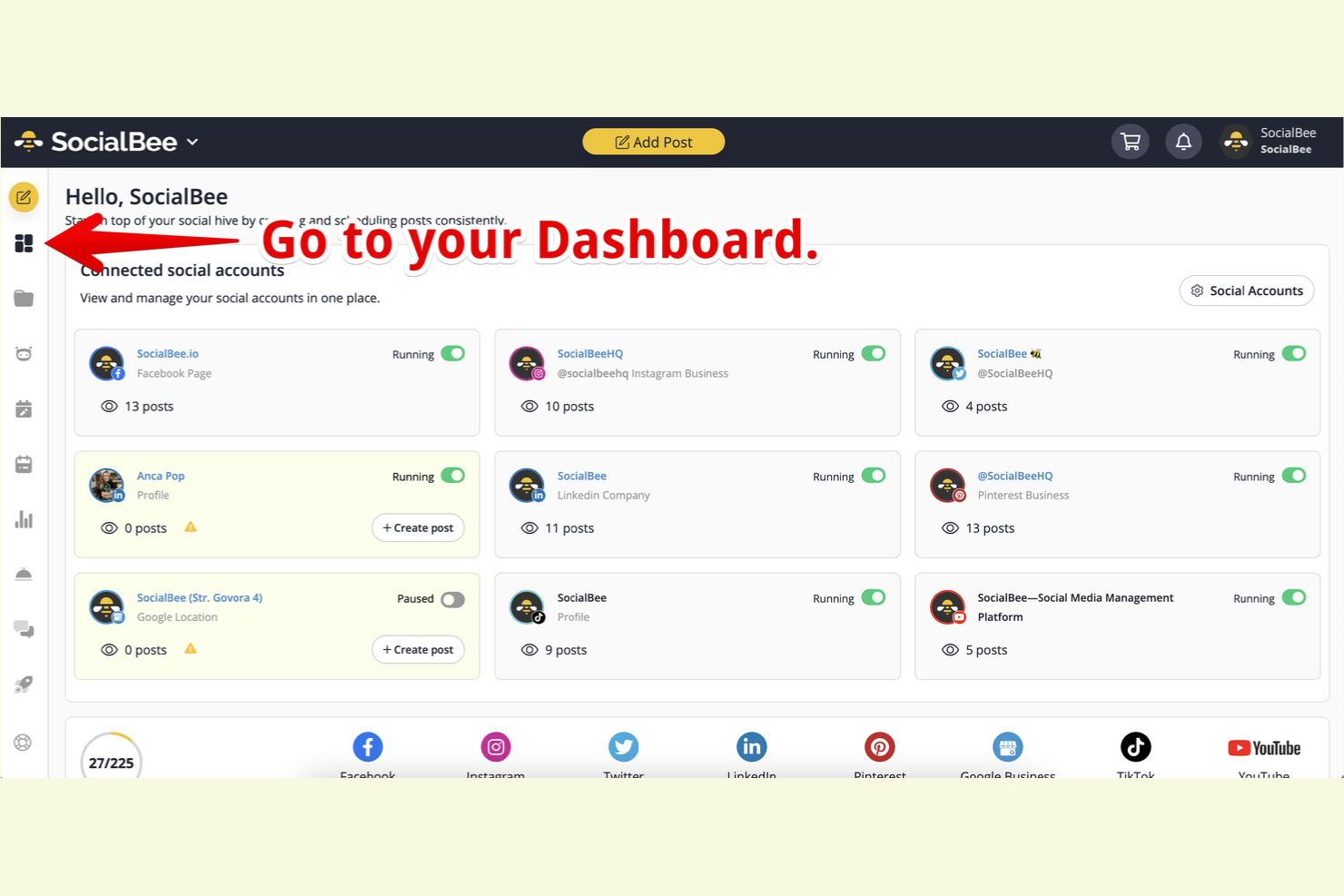
Se il tuo team ha bisogno di coordinare i contenuti su diversi canali social, SocialBee offre una soluzione mirata. Questa piattaforma è pensata per team di marketing e agenzie che vogliono centralizzare la pianificazione, la programmazione e la pubblicazione dei contenuti. SocialBee si distingue da Templafy perché offre un calendario dei contenuti visivo e strumenti specializzati per gestire i post su piattaforme come Facebook, LinkedIn e Instagram.
Perché SocialBee è una buona alternativa a Templafy
Per i team che si concentrano sulla gestione dei calendari dei contenuti su più canali, SocialBee offre un'automazione mirata che Templafy non affronta. Ho scelto SocialBee perché il suo calendario visivo ti permette di organizzare, programmare e visualizzare in anteprima i post di tutte le tue piattaforme social in un unico luogo. La piattaforma include anche la programmazione basata su categorie, così puoi automatizzare i tipi di contenuti ricorrenti senza intervento manuale. Queste caratteristiche rendono SocialBee una scelta solida per i team di marketing che vogliono ottimizzare la distribuzione di contenuti su più canali.
Funzionalità principali di SocialBee
Altre funzionalità di SocialBee aiutano i team ad automatizzare e gestire i contenuti in modo più efficiente:
- Riciclo dei contenuti: Riutilizza automaticamente i post evergreen per mantenere attivi i tuoi canali senza riprogrammare manualmente.
- Flussi di lavoro per approvazione: Permette ai membri del team di revisionare e approvare i contenuti prima della pubblicazione, favorendo la collaborazione e la coerenza del brand.
- Importazione massiva: Carica più post contemporaneamente da file CSV, risparmiando tempo nell'inserimento dei contenuti per campagne di grandi dimensioni.
- Dashboard di analisi: Monitora il coinvolgimento e le metriche di performance per ciascun canale, dandoti informazioni su quali contenuti funzionano meglio.
Integrazioni SocialBee
Le integrazioni includono Zapier, Pabbly, Make, Buffer, Hootsuite, Bitly, Switchy, Canva, Unsplash, GIPHY e altre ancora.
Pros and Cons
Pros:
- Importazione massiva di post tramite file CSV
- Riciclo dei contenuti integrato per post evergreen
- Flussi di lavoro di approvazione per la collaborazione del team
Cons:
- Supporto limitato per tipi di contenuti non social
- Analisi focalizzata solo sulle metriche social

Jasper
Ideale per la generazione di contenuti tramite IA

Jasper utilizza l'IA per aiutare i team di marketing e contenuti a generare testi di alta qualità su larga scala. È particolarmente utile per le aziende che devono produrre rapidamente articoli per blog, testi pubblicitari e messaggi brandizzati mantenendo una voce coerente. A differenza di Templafy, Jasper si concentra sull'automatizzazione del processo creativo grazie a modelli IA avanzati e linee guida personalizzabili per il brand.
Perché Jasper è una valida alternativa a Templafy
Per i team che vogliono automatizzare la creazione di contenuti con l'IA, Jasper offre un approccio unico rispetto a Templafy. Ho scelto Jasper perché utilizza un'IA generativa avanzata per produrre articoli per blog, testi di marketing e asset brandizzati in pochi minuti. La piattaforma consente di impostare linee guida per la voce del brand e di creare modelli per diversi tipi di contenuti, così il tuo messaggio rimane coerente su tutti i canali. Se la tua priorità è scalare la produzione di contenuti con strumenti basati sull'IA, Jasper offre funzionalità che le tradizionali piattaforme di gestione dei template non hanno.
Funzionalità principali di Jasper
Altre funzionalità di Jasper aiutano i team ad automatizzare e perfezionare i loro flussi di lavoro per i contenuti:
- Generazione di immagini con IA: Crea immagini e grafiche originali utilizzando prompt IA direttamente nella piattaforma.
- Strumento di riscrittura dei contenuti: Riscrivi o riformula istantaneamente i contenuti esistenti per adattarli a diversi toni o formati.
- Spazi di lavoro collaborativi: Invita i membri del team in spazi di lavoro condivisi per la modifica dei contenuti e il feedback in tempo reale.
- Verificatore di plagio: Controlla i contenuti generati per garantirne l'originalità ed evitare problemi di duplicazione.
Integrazioni di Jasper
Le integrazioni includono Webflow, Google BigQuery, Google Sheets, Make, Zapier e altro.
Pros and Cons
Pros:
- Verificatore di plagio integrato per i testi generati
- Gli spazi di lavoro collaborativi facilitano la modifica in team
- Lo strumento di riscrittura adatta i contenuti esistenti
Cons:
- Non dispone di strumenti avanzati per l'organizzazione degli asset digitali
- Mancano flussi di approvazione per la governance dei contenuti

HubSpot
Ideale per integrare CRM con strumenti di gestione dei contenuti

Quando hai bisogno di collegare i dati del tuo CRM direttamente ai flussi di lavoro dei contenuti, HubSpot offre una piattaforma unificata che riunisce queste funzioni. È una soluzione solida per i team di marketing, vendita e customer success che desiderano automatizzare la distribuzione dei contenuti in base alle informazioni aggiornate sui clienti. A differenza di Templafy, HubSpot si distingue per la sua profonda integrazione tra CRM, creazione di contenuti e strumenti di gestione delle campagne.
Perché HubSpot è una valida alternativa a Templafy
Se vuoi automatizzare i contenuti in base ai dati CRM in tempo reale, HubSpot è stato progettato proprio per questo tipo di workflow. Ho scelto HubSpot perché permette di attivare la distribuzione dei contenuti, le campagne email e la generazione di documenti direttamente dai record cliente e dalle fasi di trattativa. Il sistema di gestione dei contenuti della piattaforma è strettamente collegato al CRM, così puoi personalizzare i materiali e automatizzare l’invio sfruttando informazioni aggiornate sui clienti. Per i team che necessitano di un’automazione dei contenuti integrata con i dati di vendita e marketing, HubSpot offre un livello di integrazione che Templafy non raggiunge.
Funzionalità principali di HubSpot
Altre funzionalità in HubSpot aiutano i team ad automatizzare e gestire i contenuti attraverso diversi canali:
- Editor drag-and-drop per landing page: Crea e pubblica landing page senza programmare utilizzando un editor visuale.
- Piattaforma di pubblicazione blog: Redigi, programma e ottimizza post del blog direttamente all’interno della piattaforma.
- Programmazione dei social media: Pianifica e automatizza la pubblicazione di post su più account social da un’unica dashboard.
- Gestore di file: Organizza, archivia e condividi asset digitali con controllo di versione integrato.
Integrazioni di HubSpot
Le integrazioni includono Salesforce, Shopify, WordPress, Slack, Zoom, Mailchimp, Microsoft Dynamics 365, Eventbrite, SurveyMonkey e Google Workspace.
Pros and Cons
Pros:
- CRM e strumenti di gestione dei contenuti sono completamente integrati
- Blog integrato e pubblicazione di landing page
- Gestore centralizzato di file per asset digitali
Cons:
- Gestione degli asset più basilare rispetto a Templafy
- Meno controlli sui permessi di contenuto per le aziende

Highspot
Ideale per la distribuzione di contenuti di sales enablement

I team di vendita e marketing che vogliono fornire il contenuto giusto al momento giusto possono trovare Highspot particolarmente utile. La piattaforma si specializza nell'organizzazione, distribuzione e monitoraggio dei materiali di sales enablement, così i venditori possono accedere a risorse aggiornate in ogni fase del processo di vendita. A differenza di Templafy, Highspot pone l'accento sulle analisi di coinvolgimento del contenuto e sulle informazioni sull'interazione dei potenziali clienti, aiutando i team a perfezionare le proprie strategie di vendita.
Perché Highspot è una valida alternativa a Templafy
Quando il tuo team deve consegnare contenuti di vendita direttamente ai team a contatto con i clienti, Highspot offre una soluzione mirata che va oltre la tradizionale gestione dei template. Ho scelto Highspot perché centralizza i materiali di sales enablement e utilizza una ricerca avanzata che consente ai venditori di trovare rapidamente il contenuto giusto. La piattaforma traccia anche come i potenziali clienti interagiscono con i materiali condivisi, fornendo informazioni utili per perfezionare la tua strategia di contenuto. Per le organizzazioni che danno priorità alla distribuzione dei contenuti di vendita e alle analisi di coinvolgimento, Highspot offre funzionalità che Templafy non copre.
Funzionalità principali di Highspot
Altre funzionalità di Highspot aiutano i team a gestire e ottimizzare i loro flussi di lavoro sui contenuti di vendita:
- Controlli di governance dei contenuti: Imposta permessi e date di scadenza per i materiali di vendita, assicurandoti che venga utilizzato solo il contenuto aggiornato.
- Template di presentazione: Crea e condividi presentazioni standard e template di email per una comunicazione coerente.
- Playbook di vendita guidata: Crea playbook interattivi che guidano i venditori attraverso i contenuti e le azioni raccomandati per ogni fase di vendita.
- Integrazione con sistemi CRM: Collega Highspot a piattaforme come Salesforce per sincronizzare i dati sull'utilizzo dei contenuti e monitorare il coinvolgimento all'interno del tuo processo di vendita.
Integrazioni Highspot
Le integrazioni includono Salesforce, Microsoft Dynamics 365, Slack, Outlook, Gmail, Zoom, Microsoft Teams, LinkedIn Sales Navigator, Adobe Sign e altre.
Pros and Cons
Pros:
- Monitora il coinvolgimento dei potenziali clienti con i contenuti condivisi
- Offre playbook di vendita guidata per i venditori
- Fornisce template di presentazione per una comunicazione coerente
Cons:
- Manca di funzionalità di assemblaggio automatico dei documenti
- Supporto limitato per flussi di lavoro di contenuti non legati alle vendite
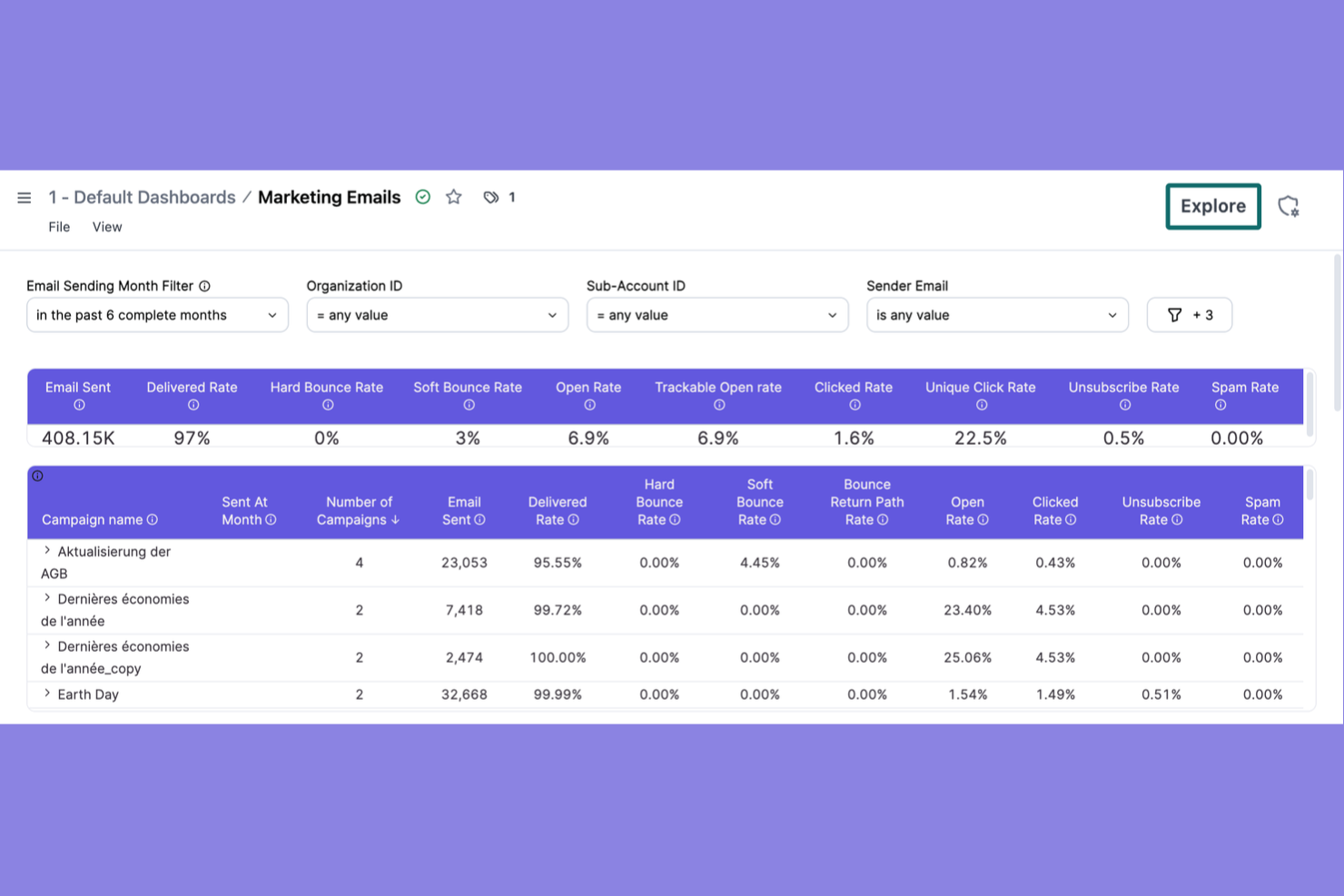
Se il tuo team ha bisogno di automatizzare e personalizzare campagne email su larga scala, Brevo fa al caso tuo. È particolarmente utile per team di marketing e responsabili dei contenuti che desiderano automazione avanzata, segmentazione e analisi in tempo reale per le comunicazioni email. A differenza di Templafy, Brevo si concentra sulla creazione di campagne, ottimizzazione della consegna e tracciamento, risultando perfetto per le aziende che danno priorità all'automazione dei contenuti via email.
Perché Brevo è una buona alternativa a Templafy
Per i team che si concentrano sull'automazione delle campagne email, Brevo offre un approccio specializzato che Templafy non copre. Ho scelto Brevo perché consente di creare flussi di lavoro email dinamici con trigger avanzati, segmentazione del pubblico e blocchi di contenuti personalizzati. Il costruttore di automazioni visuali rende facile mappare la logica delle campagne e automatizzare i follow-up in base al comportamento del destinatario. Se le tue esigenze di automazione dei contenuti si concentrano sull'email marketing, Brevo offre funzionalità mirate che aiutano a gestire e ottimizzare le campagne su larga scala.
Funzionalità principali di Brevo
Altre funzionalità di Brevo aiutano i team a gestire e automatizzare i contenuti email in modo più efficiente:
- Editor email drag-and-drop: Progetta modelli email personalizzati senza codice usando un'interfaccia visuale.
- A/B Testing: Testa diverse linee oggetto o blocchi di contenuto per ottimizzare le prestazioni delle campagne.
- Gestione email transazionali: Invia conferme ordine automatiche, ripristini password e notifiche direttamente dalla piattaforma.
- Automazione campagne SMS: Crea e programma messaggi SMS insieme alle campagne email per una comunicazione multicanale.
Integrazioni di Brevo
Le integrazioni includono Shopify, WordPress, WooCommerce, Salesforce, Zapier, Magento, PrestaShop, Google Analytics, Facebook Ads, Microsoft Dynamics e altro ancora.
Pros and Cons
Pros:
- Editor drag-and-drop per modelli email personalizzati
- A/B testing per oggetto e contenuto
- Supporto per email transazionali e notifiche d'ordine
Cons:
- Nessuna gestione o governance dei modelli di documenti
- Nessun controllo centralizzato sulla conformità del brand


Zapier è progettato per i team che hanno bisogno di automatizzare i flussi di lavoro tra una vasta gamma di app e piattaforme aziendali. Se gestisci contenuti e processi che coinvolgono più strumenti, Zapier li collega senza richiedere codice personalizzato o supporto IT. Diversamente da Templafy, Zapier si distingue perché consente di automatizzare azioni tra centinaia di app, rendendolo ideale per i team con operazioni sui contenuti complesse e multipiattaforma.
Perché Zapier è una valida alternativa a Templafy
Quando occorre automatizzare i flussi di lavoro relativi ai contenuti su più piattaforme, Zapier offre una flessibilità che Templafy non può offrire. Ho scelto Zapier perché consente di impostare trigger e azioni automatici—chiamati Zaps—tra centinaia di app aziendali, così puoi spostare contenuti, file e dati senza intervento manuale. I flussi di lavoro multistep e la logica condizionale aiutano a costruire automazioni complesse, adattate ai processi unici della tua squadra. Questo rende Zapier una scelta efficace per i team che vogliono collegare le operazioni sui contenuti tra strumenti e ambienti diversi.
Funzionalità principali di Zapier
Altre funzionalità di Zapier aiutano i team ad automatizzare e gestire i contenuti su più piattaforme:
- Cartelle condivise: Organizza e condividi Zaps con il tuo team per una gestione collaborativa dei flussi di lavoro.
- Cronologia delle versioni: Tieni traccia delle modifiche e ripristina versioni precedenti delle automazioni se necessario.
- Monitoraggio utilizzo delle attività: Consulta report e analisi dettagliate su quante attività vengono eseguite dalle tue automazioni.
- Schedule by Zapier: Imposta trigger basati sull’orario per automatizzare azioni ricorrenti sui contenuti senza dover dipendere da strumenti di calendario esterni.
Integrazioni di Zapier
Le integrazioni includono Google Sheets, Slack, Gmail, Trello, Asana, Salesforce, Mailchimp, Dropbox, HubSpot, Twitter e molte altre.
Pros and Cons
Pros:
- Builder di automazioni senza codice per utenti non tecnici
- Monitoraggio dell’uso delle attività e registri dettagliati
- Pianificazione integrata per azioni ricorrenti sui contenuti
Cons:
- Mancanza di flussi di lavoro avanzati per l’approvazione dei contenuti
- Limitato all’automazione di azioni già esistenti nelle app

Quando hai bisogno di generare contenuti brevi rapidamente, Rytr offre una soluzione mirata per marketer impegnati, copywriter e team di piccole aziende. Lo strumento è specializzato nella produzione di testi pubblicitari, email e post per i social in pochi secondi, rappresentando una soluzione ideale per ambienti dal ritmo frenetico. A differenza di Templafy, Rytr è pensato per l’ideazione veloce e la scrittura su richiesta più che per la gestione dei documenti o dei template.
Perché Rytr è una valida alternativa a Templafy
Se il tuo team deve produrre contenuti brevi su richiesta, Rytr è stato creato specificatamente per i compiti di copywriting rapido. Ho scelto Rytr perché utilizza l’AI per generare testi pubblicitari, email e post per i social media in pochi secondi, il che è ideale per team di marketing o vendite con ritmi sostenuti. Lo strumento offre una varietà di toni di scrittura e template, così puoi adattare rapidamente i contenuti per diversi canali o pubblici. Per chi cerca di automatizzare lavori di copywriting ripetitivi piuttosto che gestire template di documenti, Rytr rappresenta un’alternativa mirata a Templafy.
Funzionalità chiave di Rytr
Altre funzionalità che rendono Rytr utile per automatizzare la creazione di contenuti includono:
- Controllo antiplagio: Analizza i contenuti generati per garantirne l’originalità prima di pubblicare.
- Strumenti di collaborazione di squadra: Invita membri del team e gestisci progetti condivisi direttamente sulla piattaforma.
- Creazione di casi d’uso personalizzati: Crea e salva template di scrittura personali per esigenze di contenuti ricorrenti.
- Editor di testo avanzato: Formatta, modifica e organizza i contenuti direttamente nell’editor basato su browser.
Integrazioni Rytr
Le integrazioni native non sono attualmente indicate.
Pros and Cons
Pros:
- Genera contenuti in oltre 30 lingue
- Permette la creazione di template per casi d’uso personalizzati
- Include un editor di testo avanzato basato su browser
Cons:
- Nessuna funzionalità di gestione dei template di documenti
- Nessuna gestione centralizzata delle risorse di brand

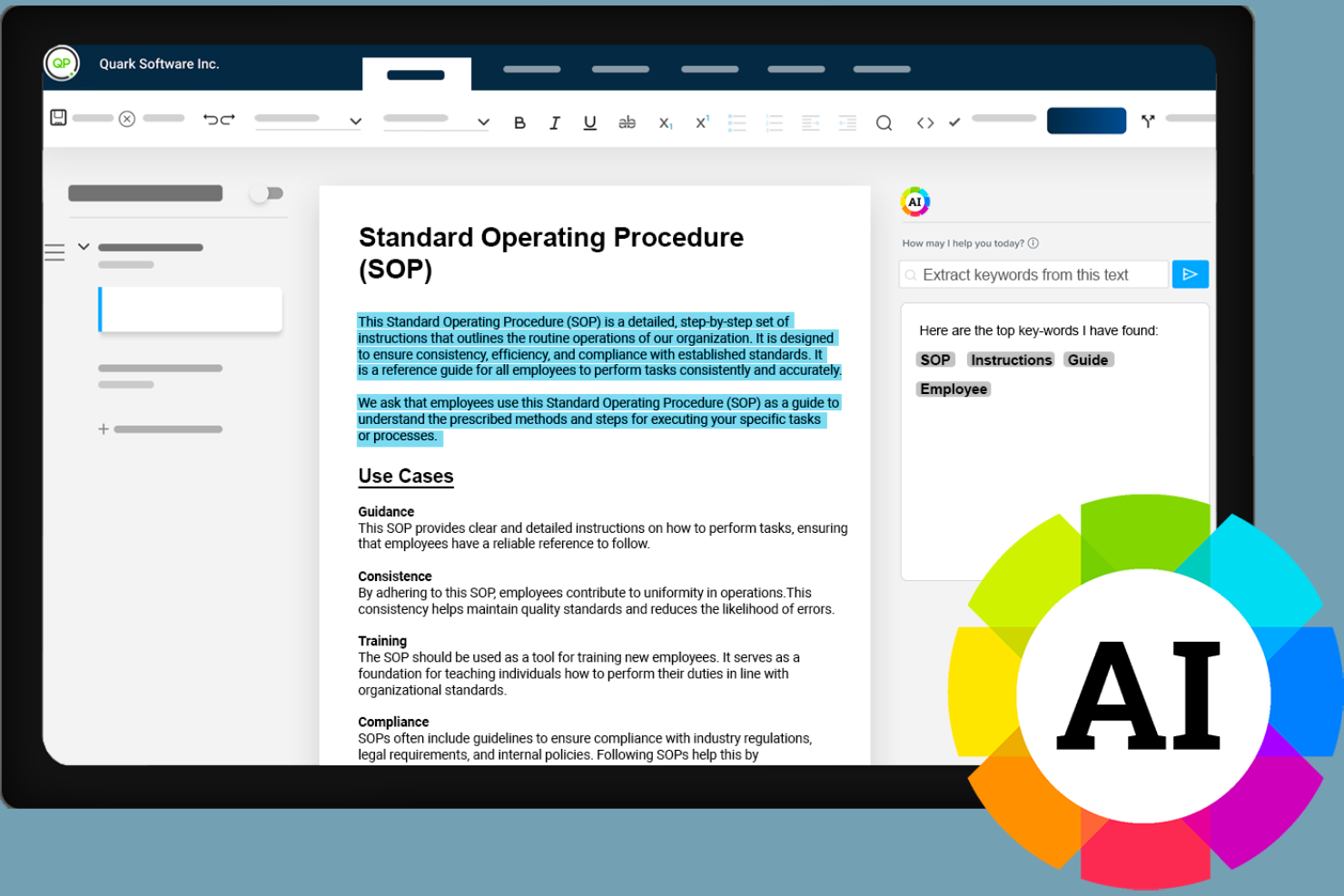
Se la tua organizzazione ha bisogno di automatizzare i contenuti rispettando rigorosi requisiti normativi, Quark è progettato con un'attenzione particolare alla conformità. La piattaforma è rivolta a team che operano in settori altamente regolamentati come finanza, sanità e pubblica amministrazione, che devono gestire cicli di vita documentali complessi. A differenza di Templafy, Quark pone l'accento sul controllo dettagliato delle versioni dei documenti, sulle tracce di audit e sui flussi di lavoro guidati da policy per aiutarti a mantenere la conformità in ogni fase.
Perché Quark è una valida alternativa a Templafy
Per i team che necessitano di automatizzare la creazione di contenuti rispettando severi standard regolatori, Quark offre funzionalità di conformità specializzate che lo distinguono da Templafy. Ho scelto Quark perché fornisce dettagliate tracce di audit e flussi di lavoro guidati da policy, che aiutano le organizzazioni a documentare ogni modifica e ogni passaggio di approvazione. La piattaforma supporta inoltre un controllo versione dettagliato, consentendoti di tracciare la cronologia dei documenti e assicurarti che solo i contenuti approvati vengano distribuiti. Se la tua azienda opera in un settore regolamentato, gli strumenti di automazione orientati alla conformità di Quark rispondono a esigenze che molte altre piattaforme di automazione dei contenuti trascurano.
Funzionalità principali di Quark
Oltre alle sue capacità dedicate alla conformità, Quark offre numerose altre funzionalità per la gestione di flussi di lavoro complessi sui contenuti:
- Gestione dei contenuti a componenti: Suddividi i documenti in componenti di contenuto riutilizzabili per aggiornamenti più rapidi e maggiore coerenza.
- Pubblicazione automatizzata: Pianifica e distribuisci automaticamente i contenuti su più canali e formati.
- Workspace collaborativi: Consenti ai team di lavorare insieme sui documenti con commenti in tempo reale e assegnazione di compiti.
- Dashboard di analisi dei contenuti: Monitora l'utilizzo, il coinvolgimento e le prestazioni dei contenuti con strumenti di analisi integrati.
Integrazioni di Quark
Le integrazioni includono Adobe InDesign, Microsoft Word, Salesforce, SharePoint, Dropbox, Google Drive, Box, SAP, Oracle e IBM.
Pros and Cons
Pros:
- Supporta il controllo versione dettagliato dei documenti
- Consente il riutilizzo dei contenuti basato su componenti
- Offre pubblicazione automatica su più canali
Cons:
- Opzioni limitate di personalizzazione dei template
- Processo di configurazione complesso per flussi di lavoro articolati


Se stai cercando un software di automazione dei contenuti che mette l’ideazione guidata dall’IA al centro, ContentBot merita attenzione. Questa piattaforma è pensata per team di marketing, content strategist e agenzie che hanno bisogno di un flusso costante di nuove idee e spunti creativi. A differenza di Templafy, ContentBot si specializza nella generazione di concetti originali, scalette e bozze di contenuti attraverso modelli di IA avanzati per aiutarti a superare i blocchi creativi e accelerare la pianificazione dei contenuti.
Perché ContentBot è una valida alternativa a Templafy
Quando hai bisogno di uno strumento di automazione dei contenuti che eccelle nella generazione di nuove idee, ContentBot si distingue per il suo approccio guidato dall’IA. Ho scelto ContentBot perché offre funzionalità come suggerimenti di argomenti tramite IA e scalette di contenuti automatiche, che aiutano i team a superare i blocchi creativi. La piattaforma include anche strumenti per generare bozze di articoli per blog e testi di marketing, risultando particolarmente utile per marketer dei contenuti e agenzie. Se la tua principale sfida è trovare idee nuove e rilevanti per i contenuti, ContentBot offre capacità che Templafy non mette in primo piano.
Funzionalità principali di ContentBot
Altre funzionalità che rendono ContentBot interessante per l’automazione dei contenuti includono:
- Scrittore automatico di email: Genera bozze di email per campagne, contatti e follow-up utilizzando modelli basati su IA.
- Strumento di parafrasi dei contenuti: Riscrivi istantaneamente testi esistenti per creare varianti uniche per diversi canali.
- Generatore di contenuti lunghi: Crea articoli o report completi con un input minimo.
- Verifica antiplagio: Analizza i contenuti generati per garantirne l’originalità ed evitare problemi di duplicazione.
Integrazioni ContentBot
Al momento non sono elencate integrazioni nativamente disponibili.
Pros and Cons
Pros:
- Offre strumenti per la generazione di contenuti lunghi
- Supporta la scrittura automatica di email e testi pubblicitari
- Include funzionalità di parafrasi e riscrittura
Cons:
- Mancano funzioni avanzate per la gestione documentale
- Nessun controllo sui template o strumenti per la conformità al brand

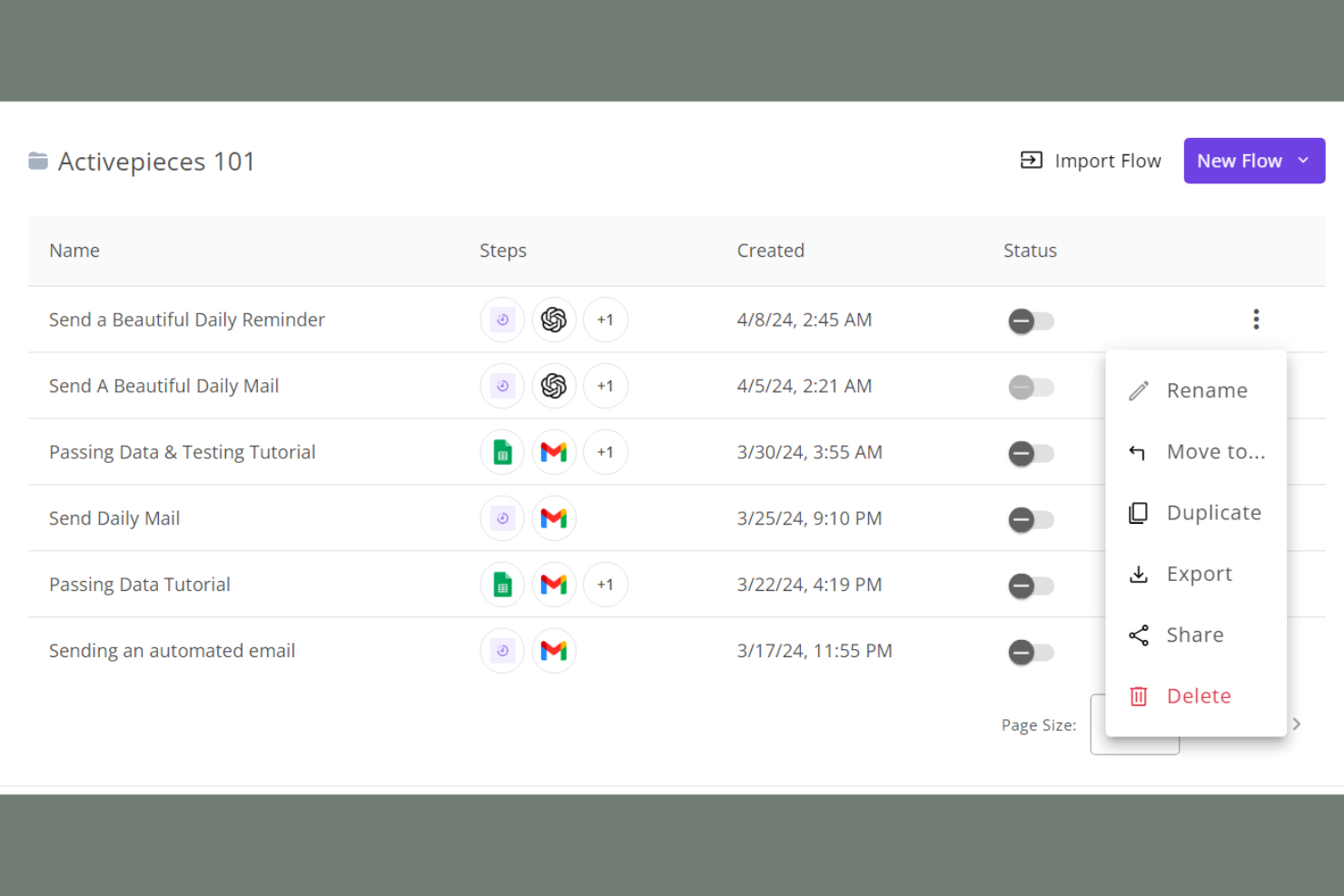
Se cerchi un approccio open source all'automazione dei flussi di lavoro, Activepieces si distingue come un'opzione flessibile. Questo strumento è ideale per team IT, sviluppatori e aziende che desiderano creare, personalizzare e autogestire le proprie pipeline di automazione. A differenza di Templafy, Activepieces offre il pieno controllo sulla logica di automazione e sulla privacy dei dati, rendendolo particolarmente adatto a organizzazioni con esigenze di integrazione o conformità specifiche.
Perché Activepieces è una valida alternativa a Templafy
Per i team che vogliono automatizzare i flussi di lavoro dei contenuti con totale trasparenza e controllo, Activepieces offre una soluzione open source difficilmente eguagliabile. Ho scelto Activepieces perché consente di progettare e personalizzare i flussi di automazione tramite un editor visuale, per poi gestirli in autonomia così da soddisfare rigorosi requisiti di privacy dei dati o conformità. La piattaforma supporta passaggi di codice personalizzati e componenti di workflow riutilizzabili, particolarmente utili per organizzazioni con necessità di automazione complesse o uniche. Se hai bisogno di un'automazione dei contenuti completamente adattabile e di cui avere piena proprietà, Activepieces offre una flessibilità che le piattaforme chiuse come Templafy non possono fornire.
Funzionalità principali di Activepieces
Altre caratteristiche che rendono Activepieces interessante per l'automazione dei contenuti includono:
- Libreria di connettori predefiniti: Accedi a una libreria in espansione di connettori per app e servizi popolari.
- Automazione basata su trigger: Imposta automazioni che si attivano in base a specifici eventi o trigger.
- Controlli di accesso basati sui ruoli: Assegna permessi agli utenti in base ai loro ruoli all'interno dell'organizzazione.
- Versionamento dei workflow: Tieni traccia e gestisci le diverse versioni dei tuoi flussi di lavoro automatizzati.
Integrazioni di Activepieces
Le integrazioni includono Slack, Google Workspace, Microsoft Teams, Salesforce, Dropbox, Box, HubSpot, Shopify, Trello, Asana e altre ancora.
Pros and Cons
Pros:
- Codice open source che consente l'hosting autonomo completo
- Builder visivo di workflow che supporta automazioni personalizzate
- Controlli di accesso basati sui ruoli per la gestione del team
Cons:
- Nessun modello predefinito per l'automazione dei contenuti
- Documentazione limitata sulle funzionalità avanzate di workflow
Altre alternative a Templafy
Ecco alcune alternative aggiuntive a Templafy che non sono entrate nella mia selezione, ma che vale comunque la pena valutare:
- Pallyy
Ideale per la programmazione dei contenuti sui social media
- Brandfolder
Ideale per l'organizzazione delle risorse digitali
- ContentStudio
Ideale per l'analisi dei flussi di lavoro dei contenuti


Come valuto le alternative a Templafy
Prima verifico che uno strumento soddisfi i requisiti di base di Templafy—librerie di template, enforcement del brand e accesso in-app a Office. Poi analizzo i fattori differenzianti come redazione assistita da AI e analytics sull'utilizzo che determinano l'adattabilità a team specifici.
Funzionalità core (requisiti minimi per questa lista)
Quando seleziono gli strumenti per la mia lista, valuto ognuno su una scala da 0 (non offre la funzionalità) a 5 (eccelle in quest'area) per ogni funzionalità core riportata qui sotto. Poi converto il punteggio totale in percentuale. Ogni strumento deve raggiungere un punteggio minimo totale del 65% per essere incluso.
- Libreria di gestione template: Cerco un hub centralizzato dove gli amministratori possono organizzare, taggare e distribuire template—come inviare presentazioni aggiornate a un team di consulenza senza passare via email i file.
- Controlli di governance del brand: Verifico se il tool blocca font, colori e loghi così che un project manager di qualsiasi ufficio produca report per il cliente che rispettano automaticamente gli standard di brand.
- Integrazione suite Office: Un buon candidato mostra i template direttamente dentro Word, PowerPoint o Google Docs. Valuto quante app copre l'integrazione e se funziona in tempo reale.
- Automazione contenuti dinamici: Analizzo come uno strumento elabora dati in tempo reale—ad esempio nomi di clienti da Salesforce o date di progetto da Smartsheet—nei template mediante campi intelligenti o blocchi condizionali di contenuto.
- Gestione digitale degli asset: Le soluzioni migliori offrono agli utenti una libreria ricercabile e protetta di loghi approvati, immagini e blocchi di contenuto direttamente nell'editor di documenti, durante la creazione.
- Permessi & controllo versioni: Valuto se la piattaforma supporta accesso basato sui ruoli e cronologia delle versioni, così che circolino solo template approvati e non riemergano versioni obsolete nei team.
Una volta che ho una lista di tool che soddisfano i criteri, considero cosa distingue ciascuna piattaforma dalle altre.
Fattori differenzianti (cosa distingue i fornitori)
Ecco come confronto tra loro i diversi fornitori:
Caratteristiche distintive
La generazione di contenuti con AI è un grande elemento distintivo—cerco strumenti che aiutino i team a redigere proposte o personalizzare riassunti esecutivi senza partire da zero. Una libreria di slide ricercabile aggiunge reale valore quando i consulenti devono comporre presentazioni per i clienti velocemente partendo da contenuti pre-approvati. Per i direttori PMO, valuto se la piattaforma offre analytics sull'utilizzo che mostrano quali template vengono effettivamente adottati e dove esistono lacune di compliance al brand.
Oltre le funzionalità
La profondità dell'integrazione qui è molto importante. Verifico se una piattaforma si collega nativamente a strumenti PM come Jira o Smartsheet e a CRM come Salesforce, poiché queste connessioni alimentano davvero l'automazione dei contenuti dinamici. La struttura dei prezzi è un altro parametro che considero: alcuni fornitori richiedono alti minimi di licenze che escludono i team di medie dimensioni, mentre altri propongono piani modulari. Valuto inoltre la sicurezza, in particolare il supporto SSO e le certificazioni di compliance, che diventano temi cruciali quando l'IT di grandi aziende interviene nella fase di acquisto.
Perché cercare un'alternativa a Templafy?
Sebbene Templafy sia una buona scelta per l'automazione dei contenuti, esistono diversi motivi per cui alcuni utenti cercano soluzioni alternative. Potresti cercare un'alternativa a Templafy perché…
- Hai bisogno di funzionalità più avanzate per la pianificazione dei social media
- Vuoi uno strumento più semplice per i piccoli team
- Richiedi integrazioni con piattaforme aziendali di nicchia
- Devi affrontare vincoli di budget dovuti ai prezzi per aziende
- Cerchi un supporto migliore per i flussi di lavoro dei contenuti creativi
- Operi in regioni in cui Templafy non è disponibile
Se ti riconosci in una di queste situazioni, sei nel posto giusto. Il mio elenco include diverse opzioni software per l'automazione dei contenuti più adatte ai team che affrontano queste difficoltà con Templafy e cercano soluzioni alternative.
Funzionalità principali di Templafy
Ecco alcune delle principali funzionalità di Templafy, per aiutarti a confrontare le caratteristiche offerte dalle soluzioni alternative:
- Gestione centralizzata dei modelli per documenti e presentazioni
- Flussi di lavoro automatizzati per la creazione di documenti
- Applicazione della conformità al marchio in tutti i contenuti
- Gestione e distribuzione delle risorse digitali
- Collaborazione in tempo reale alla modifica dei documenti
- Integrazione con Microsoft Office e Google Workspace
- Controlli degli accessi degli utenti e autorizzazioni
- Aggiornamenti automatizzati dei contenuti e controllo delle versioni
- Monitoraggio e reportistica della conformità
- Archiviazione sicura basata sul cloud per tutte le risorse