

10 migliori alternative ad Adobe Experience Manager nel 2026

Elenco delle migliori alternative ad Adobe Experience Manager


Adobe Experience Manager combina la gestione dei contenuti web, la distribuzione delle esperienze digitali e la gestione delle risorse digitali, il che può rendere complicata la sua sostituzione. Alcuni team hanno bisogno di un’alternativa ad AEM Sites, altri necessitano del supporto per flussi di lavoro in stile AEM Assets e molti cercano una piattaforma in grado di gestire sia le operazioni sui contenuti sia la governance delle risorse.
Le migliori alternative ad Adobe Experience Manager aiutano i team a gestire i contenuti, distribuire esperienze digitali e governare le risorse digitali senza introdurre una complessità di piattaforma non necessaria. Alcune offrono la flessibilità di un CMS headless, altre si concentrano sulla pubblicazione multisito e sulla personalizzazione, mentre altre ancora aiutano i team a organizzare, governare e distribuire le risorse digitali. In questa guida confronterò le migliori opzioni, così potrai trovare quella più adatta al modello di pubblicazione, alla configurazione tecnica e alle operazioni sui contenuti del tuo team nel 2026.
Che cos’è Adobe Experience Manager?
Adobe Experience Manager è una piattaforma aziendale per la gestione dei contenuti e delle esperienze digitali, utilizzata per gestire siti web, risorse digitali ed esperienze cliente personalizzate. Rispetto a molti sistemi di gestione dei contenuti e piattaforme CMS, AEM combina la gestione dei contenuti web, la gestione delle risorse digitali, le approvazioni dei flussi di lavoro, la localizzazione, la personalizzazione e la distribuzione omnicanale in un unico ambiente.
Le grandi organizzazioni utilizzano Adobe Experience Manager per mantenere la coerenza del marchio tra siti web, aree geografiche, campagne e canali digitali. Poiché svolge funzioni che vanno oltre quelle di un CMS tradizionale, la scelta della migliore alternativa dipende dal fatto che il tuo team abbia bisogno di una pubblicazione dei contenuti più semplice, di flussi di lavoro per le risorse digitali più solidi, di una distribuzione headless più flessibile, di una maggiore facilità d’uso o di una piattaforma che si integri meglio con lo stack tecnologico esistente.
Tabella di confronto delle alternative ad Adobe Experience Manager
Questa tabella di confronto riassume i dettagli sui prezzi delle mie principali alternative ad Adobe Experience Manager:
| Tool | Best For | Trial Info | Price | ||
|---|---|---|---|---|---|
| 1 | Ottimale per integrazioni headless | Prova gratuita + demo gratuita disponibile | Prezzo su richiesta | Website | |
| 2 | Ideale per l'integrazione della gestione delle informazioni di prodotto | Demo gratuita disponibile | Prezzi su richiesta | Website | |
| 3 | Ideale per flussi di lavoro basati su Drupal | Demo gratuita disponibile | Prezzo su richiesta | Website | |
| 4 | Ideale con controlli estesi di conformità | Demo gratuita disponibile | Prezzi su richiesta | Website | |
| 5 | Ideale per la strutturazione modulare dei contenuti | Piano gratuito disponibile | A partire da $300/mese | Website | |
| 6 | Ideale per esperienze digitali a basso codice | Versione di prova gratuita disponibile | Prezzi su richiesta | Website | |
| 7 | Ideale per la gestione multisito dei marchi | Dimostrazione gratuita disponibile | Prezzi su richiesta | Website | |
| 8 | Ideale con la scansione integrata dell'accessibilità | Demo gratuita disponibile | Prezzo su richiesta | Website | |
| 9 | Ideale per l'approvazione personalizzabile dei contenuti | Prova gratuita di 30 giorni | A partire da £4.000/mese | Website | |
| 10 | Ideale per l'estensibilità open source | Demo gratuita disponibile | Prezzi su richiesta | Website |
Perché fidarsi dei nostri consigli sui software
Il nostro team testa e recensisce software dal 2012. In quanto project manager noi stessi, sappiamo quanto sia difficile — e importante — scegliere il software giusto.
Per questa guida, abbiamo valutato gli strumenti attraverso test pratici e ricerche indipendenti, assegnando un punteggio agli strumenti in base ai nostri criteri di selezione. Ci basiamo inoltre sulle competenze di leader di pensiero del settore e di professionisti attivi nella gestione dei progetti.
Le nostre recensioni riflettono il nostro giudizio editoriale umano, non un discorso di vendita.
Revisori esperti:
Recensioni delle migliori alternative ad Adobe Experience Manager
Di seguito trovi i miei riepiloghi dettagliati delle migliori alternative ad Adobe Experience Manager incluse nella mia selezione. Queste recensioni esaminano strumenti per la gestione dei contenuti, la gestione delle esperienze digitali, la pubblicazione headless e i flussi di lavoro delle risorse digitali, così puoi confrontare le opzioni in base all’aspetto di AEM che il tuo team deve sostituire.
Ottimale per integrazioni headless

Contentstack è una piattaforma di gestione dei contenuti aziendale progettata per team che necessitano di agilità in ecosistemi digitali complessi. Offre controllo granulare sugli asset, distribuzione dinamica dei contenuti e gestione flessibile senza una infrastruttura monolitica.
Per chi è ideale Contentstack?
Per grandi team di contenuti, web e marketing di aziende che richiedono una gestione scalabile degli asset e distribuzione dei contenuti su più canali.
Perché Contentstack è una valida alternativa ad Adobe Experience Manager
Ho scelto Contentstack per la gestione pratica delle integrazioni headless. Il suo Automation Hub consente al mio team di connettere Contentstack direttamente a framework front-end, piattaforme di commercio elettronico e servizi di terze parti senza middleware personalizzati.
Apprezzo anche la funzione Live Preview, che permette agli editor di vedere in tempo reale le modifiche ai contenuti sui canali connessi prima della pubblicazione, riducendo così errori costosi di deployment. Per i team che gestiscono contenuti su più touchpoint digitali, la combinazione tra architettura di integrazione flessibile e visibilità editoriale è difficile da replicare.
Funzionalità principali di Contentstack
- Blocchi modulari: Componenti di pagina e app drag-and-drop senza dipendenza dagli sviluppatori.
- Tassonomia: Organizza e gestisci strutture di contenuti complesse su larga scala con classificazione personalizzata.
- Rami: Crea workspace indipendenti per sviluppare e testare cambiamenti ai modelli di contenuto senza impattare la produzione.
- Condivisione dell'anteprima: Genera link sicuri affinché le parti interessate possano rivedere i contenuti in lavorazione senza bisogno di accesso alla piattaforma.
Integrazioni Contentstack
Contentstack offre integrazioni native con Salesforce, Brightcove, Bynder, AWS Translate, Cloudinary, Shopify, Marketo, Optimizely, Uniform e Gatsby. È disponibile una API per integrazioni personalizzate.
Pros and Cons
Pros:
- L'architettura headless supporta la distribuzione di esperienze digitali complesse
- Live Preview offre agli editor visibilità prima della pubblicazione
- Automation Hub aiuta a connettere i flussi di lavoro dei contenuti tra sistemi
Cons:
- Non sostituisce completamente una soluzione di digital asset management
- La maggior parte della configurazione avanzata richiede il supporto di sviluppatori

Pimcore
Ideale per l'integrazione della gestione delle informazioni di prodotto

Pimcore è una piattaforma open source progettata per le organizzazioni che necessitano di una gestione unificata delle risorse digitali, dei dati di prodotto e dei dati master sui diversi canali. Le aziende con cataloghi di prodotti complessi o più marchi possono utilizzare Pimcore per centralizzare, arricchire e gestire contenuti e media, garantendo una distribuzione omnicanale coerente.
Per chi è più adatto Pimcore?
Team di prodotto globali e reparti IT nel settore della vendita al dettaglio, della produzione e della distribuzione che necessitano di una gestione di livello enterprise delle risorse digitali e dei dati di prodotto.
Perché Pimcore è una buona alternativa ad Adobe Experience Manager
Ho scelto Pimcore perché combina nativamente un DAM con un sistema PIM completo in un'unica piattaforma, una caratteristica che la maggior parte delle alternative ad AEM non offre immediatamente. Il mio team può gestire insieme attributi di prodotto, risorse digitali e relazioni, così l'immagine di un prodotto e le relative specifiche, varianti e traduzioni risiedono tutte nello stesso luogo.
Apprezzo il fatto che il modello dati di Pimcore permetta di definire strutture di oggetti personalizzate per cataloghi di prodotti complessi senza ricorrere a soluzioni alternative. Per i team che gestiscono migliaia di SKU su più canali di vendita, questo livello dati unificato rende la pubblicazione multicanale molto più coerente.
Funzionalità principali di Pimcore
- Gestione dei metadati delle risorse: Applica tag, classifica e arricchisci le risorse digitali con schemi di metadati personalizzati direttamente all'interno della piattaforma.
- Controllo degli accessi basato sui ruoli: Assegna autorizzazioni granulari a utenti e team per controllare chi può visualizzare, modificare o pubblicare i contenuti.
- Distribuzione dei contenuti su più siti: Gestisci e pubblica contenuti su più siti web e vetrine online da un unico backend.
- Controllo delle versioni e registro di controllo: Tieni traccia di ogni modifica alle risorse e ai contenuti con una cronologia completa delle revisioni e il supporto per il ripristino.
Integrazioni di Pimcore
Pimcore offre integrazioni native con Adobe Creative Cloud, Salesforce, SAP, Akeneo, Adobe Commerce, Shopify e l'ecosistema Microsoft, inclusi Microsoft 365 e Azure. È disponibile un'API per le integrazioni personalizzate.
Pros and Cons
Pros:
- PIM e DAM unificati supportano operazioni sui contenuti ricchi di informazioni di prodotto
- Il modello dati flessibile gestisce strutture di catalogo complesse
- Le relazioni tra risorse aiutano a collegare i media ai dati di prodotto
Cons:
- La configurazione richiede competenze tecniche avanzate
- L'esperienza CMS può risultare meno adatta ai professionisti del marketing rispetto agli strumenti DXP

Acquia
Ideale per flussi di lavoro basati su Drupal

Acquia è una piattaforma basata sul cloud pensata per i team fortemente impegnati nell'utilizzo di Drupal che necessitano di funzionalità avanzate di gestione dei contenuti, organizzazione delle risorse digitali e automazione del marketing. La troverai particolarmente utile se gestisci flussi di lavoro editoriali complessi e collabori su più canali digitali.
Per chi è più indicata Acquia?
Acquia è un'ottima scelta per i team digitali di organizzazioni di medie e grandi dimensioni che devono gestire, governare e scalare operazioni sui contenuti basate su Drupal.
Perché Acquia è una buona alternativa ad Adobe Experience Manager
Ho scelto Acquia perché è costruita interamente attorno a Drupal, il che significa che i flussi di lavoro dei contenuti, i modelli di governance e le pipeline di pubblicazione funzionano tutti nativamente su un CMS open source già sotto il controllo del tuo team. Apprezzo il fatto che Site Factory di Acquia permetta al mio team di creare e gestire più siti Drupal da un'unica dashboard, applicando contemporaneamente configurazioni e aggiornamenti condivisi a tutti.
Campaign Studio di Acquia aggiunge l'automazione del marketing integrata direttamente in questi flussi di lavoro dei contenuti, così il mio team può attivare campagne personalizzate in base alle interazioni con i contenuti senza dover cambiare piattaforma.
Funzionalità principali di Acquia
- Assegnazione automatica di tag basata sull'IA: genera automaticamente parole chiave, profili colore e testo estratto dai file per rendere le risorse ricercabili senza inserimento manuale dei dati.
- Portali personalizzati con il marchio: crea micrositi selezionati e personalizzati con il marchio, che offrono ai team esterni un accesso autonomo alle risorse approvate e alle linee guida del marchio.
- Controllo delle versioni: tiene traccia delle iterazioni dei file conservando i metadati associati, mentre i conflitti tra nomi di file duplicati vengono segnalati e registrati come nuove versioni.
- Scadenza delle risorse e gestione dei diritti: imposta date di pubblicazione e scadenza sulle risorse, applica filigrane e limita l'accesso in base al ruolo dell'utente per impedire l'utilizzo di contenuti privi di licenza o obsoleti.
Integrazioni di Acquia
Acquia offre integrazioni native con Drupal, Salesforce, Marketo, Google Analytics, Amazon S3, Acquia Lift e Brightcove. È disponibile un'API per le integrazioni personalizzate.
Pros and Cons
Pros:
- I flussi di lavoro nativi di Drupal supportano la gestione strutturata dei contenuti
- Site Factory aiuta a governare centralmente più siti Drupal
- Acquia DAM può supportare l'organizzazione delle risorse quando incluso
Cons:
- Richiede competenze in Drupal per essere gestito efficacemente
- È necessario chiarire l'ambito del prodotto tra i casi d'uso DXP e DAM

OpenText
Ideale con controlli estesi di conformità
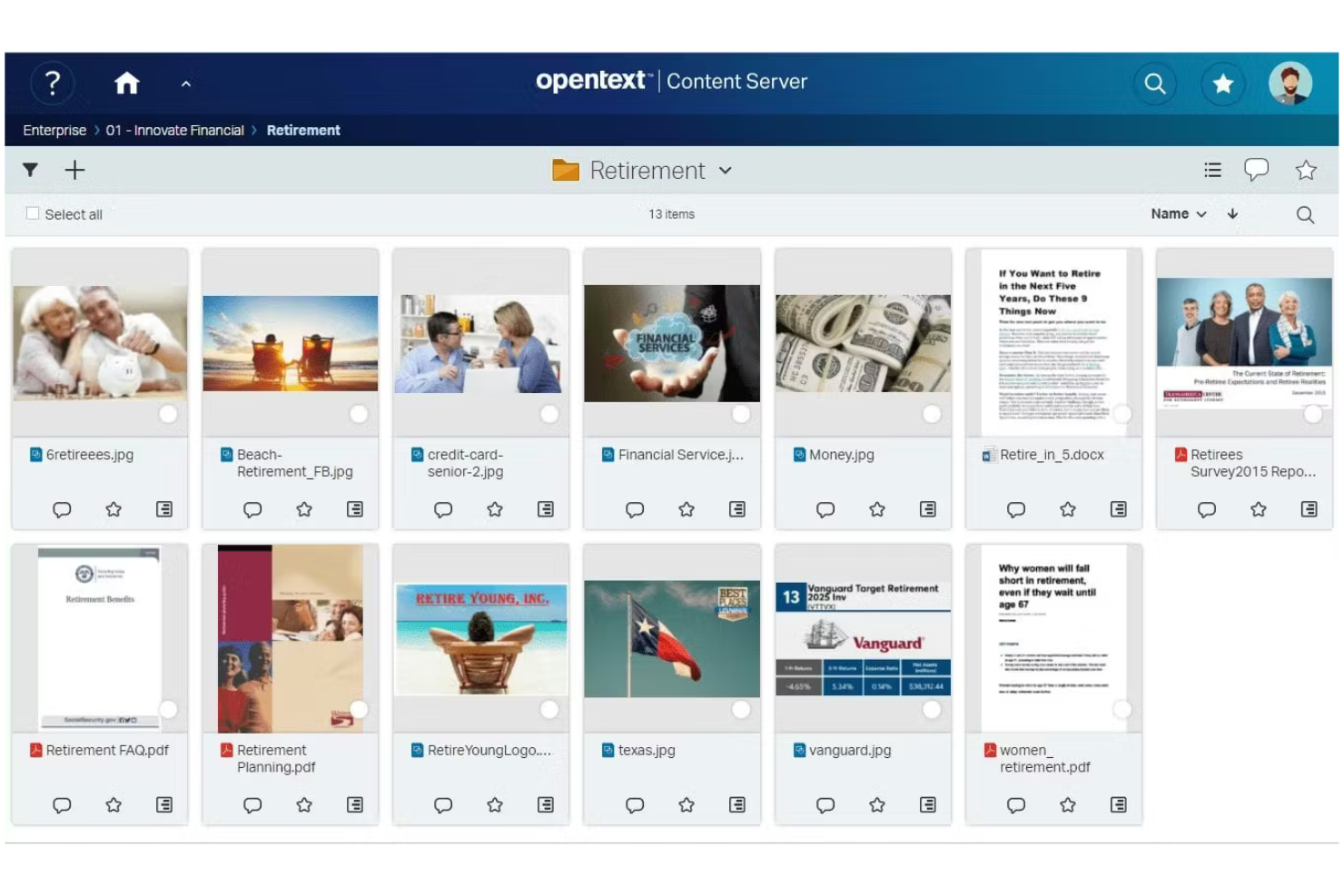
OpenText è una piattaforma di livello aziendale progettata per le organizzazioni con esigenze complesse di gestione dei documenti e delle risorse digitali. Ritengo che sia particolarmente adatta ai settori regolamentati e ai team che necessitano di un controllo avanzato sul ciclo di vita dei contenuti e sulla governance delle informazioni.
Per chi è più indicato OpenText?
I team aziendali che si occupano di conformità, archiviazione e IT nei settori finanziario, sanitario o legale e che devono gestire contenuti sensibili nel rispetto di rigorosi requisiti normativi.
Perché OpenText è una buona alternativa ad Adobe Experience Manager
Ho scelto OpenText perché i suoi prodotti per la gestione delle risorse digitali e dei contenuti sono progettati fin dall'inizio intorno alla conformità e alla governance delle informazioni, invece di aggiungere questi aspetti in un secondo momento. Per le organizzazioni del settore sanitario, finanziario o governativo che devono dimostrare la propria preparazione in materia normativa, questa differenza è importante.
Gli strumenti di gestione dei diritti digitali e di cancellazione giustificabile di OpenText offrono ai team legali e di conformità un controllo diretto sulla conservazione, classificazione e cancellazione delle risorse in linea con i requisiti di GDPR, HIPAA e SOX.
Apprezzo inoltre il supporto della piattaforma per implementazioni in sede, in cloud privato e in cloud pubblico, una vera caratteristica distintiva per i team le cui policy di sicurezza impediscono di eseguire l'infrastruttura dei contenuti in un ambiente condiviso.
Funzionalità principali di OpenText
- Etichettatura delle risorse basata sull'intelligenza artificiale: Etichetta automaticamente immagini e video utilizzando l'intelligenza artificiale, rendendo le risorse ricercabili senza dover inserire manualmente i metadati.
- Motore di distribuzione omnicanale: Genera e distribuisce versioni adattive delle risorse su siti web, app mobili, social media e segnaletica digitale.
- Strumenti di collaborazione creativa: I flussi di revisione, annotazione e approvazione integrati consentono ai team interni ed esterni di annotare e approvare le risorse senza uscire dalla piattaforma.
- Gestione della libreria delle risorse: Organizza le risorse utilizzando metadati strutturati, controllo delle versioni e autorizzazioni granulari per mantenere coerente l'utilizzo del marchio tra i team.
Integrazioni di OpenText
OpenText offre integrazioni native con SAP, Salesforce, Oracle e Google Workspace, oltre a integrazioni native nell'intero ecosistema Microsoft, tra cui Microsoft 365 e Azure. È disponibile un'API per le integrazioni personalizzate.
Pros and Cons
Pros:
- I controlli di governance supportano i flussi di lavoro per contenuti e risorse regolamentati
- Il controllo delle versioni aiuta a preservare la cronologia delle risorse e la responsabilità
- Le autorizzazioni consentono una gestione sicura dei contenuti sensibili
Cons:
- L'adeguatezza del prodotto dipende dalla soluzione OpenText specifica selezionata
- L'esperienza utente può risultare pesante per i team orientati alle attività di marketing
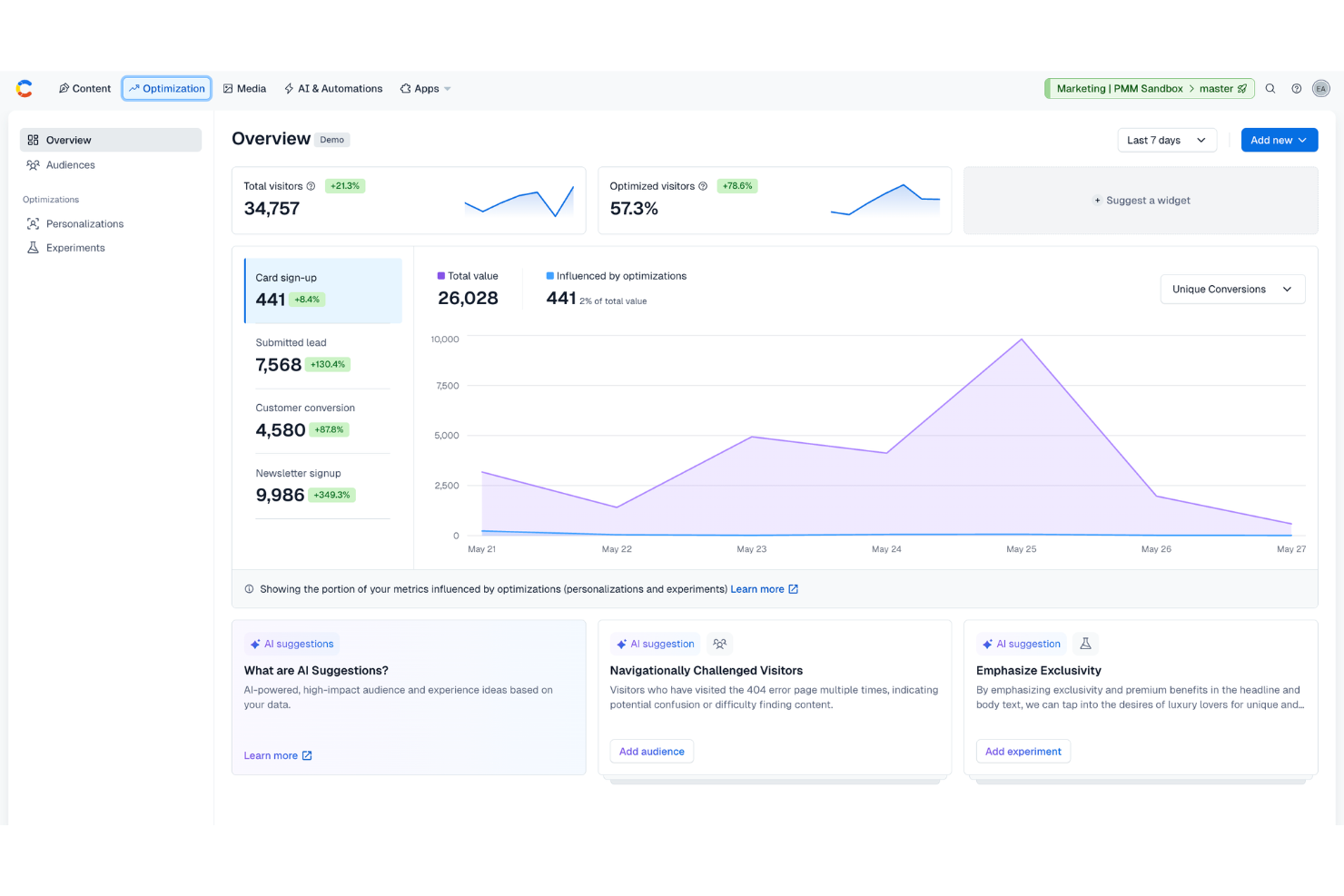
Contentful offre ai team digitali un modo flessibile per creare, gestire e distribuire contenuti su più canali. Se la tua organizzazione vuole allontanarsi dai sistemi monolitici, offre un approccio basato sulle API che semplifica la gestione delle risorse e velocizza gli aggiornamenti del sito.
A chi è più adatto Contentful?
Contentful è adatto ai team di prodotto, marketing o web di aziende in crescita che devono distribuire contenuti su più canali digitali su larga scala.
Perché Contentful è una buona alternativa ad Adobe Experience Manager
Ho scelto Contentful per questo elenco per la sua capacità di gestire efficacemente una strutturazione modulare dei contenuti. Puoi suddividere i contenuti in componenti riutilizzabili—come singole descrizioni di prodotto, risorse multimediali avanzate o blocchi CTA—e assemblarli su pagine e canali diversi senza duplicare il lavoro.
Apprezzo anche l'editor di contenuti strutturati di Contentful, che consente al mio team di definire i tipi di contenuto con campi personalizzati, così le risorse rimangono organizzate e coerenti indipendentemente dal luogo in cui vengono pubblicate. Per i team che gestiscono grandi volumi di risorse digitali sul web, dispositivi mobili e altri punti di contatto, è difficile trovare altrove un livello simile di controllo strutturale.
Funzionalità principali di Contentful
- Libreria centralizzata delle risorse: Archivia e gestisci ogni immagine, video e file in un unico posto, mantenendo le risorse accessibili e riutilizzabili in tutte le campagne.
- Flussi di lavoro integrati per la localizzazione: Gestisci le traduzioni e la distribuzione di contenuti specifici per ogni regione direttamente all'interno della piattaforma, senza strumenti esterni.
- Cronologia dei contenuti: Pianifica, visualizza in anteprima e pubblica gli aggiornamenti dei contenuti da un'unica vista di pianificazione, così il tuo team rimane coordinato.
- Controlli degli accessi basati sui ruoli: Imposta ruoli e autorizzazioni utente personalizzati per applicare la governance dei contenuti e i processi di approvazione tra i team.
Integrazioni di Contentful
Contentful offre integrazioni native con Salesforce, Netlify, Gatsby, Optimizely, Cloudinary, Shopify, Algolia, Bynder, Marketo e Google Analytics. Offre inoltre un'API per le integrazioni personalizzate.
Pros and Cons
Pros:
- I modelli di contenuto modulari favoriscono il riutilizzo su siti web e app
- La distribuzione basata sulle API offre agli sviluppatori una notevole flessibilità per l'interfaccia
- I campi dei contenuti strutturati aiutano i team a mantenere coerenti le voci
Cons:
- Non è progettato per una governance avanzata delle risorse digitali
- La modifica visiva delle pagine è limitata rispetto agli strumenti CMS tradizionali

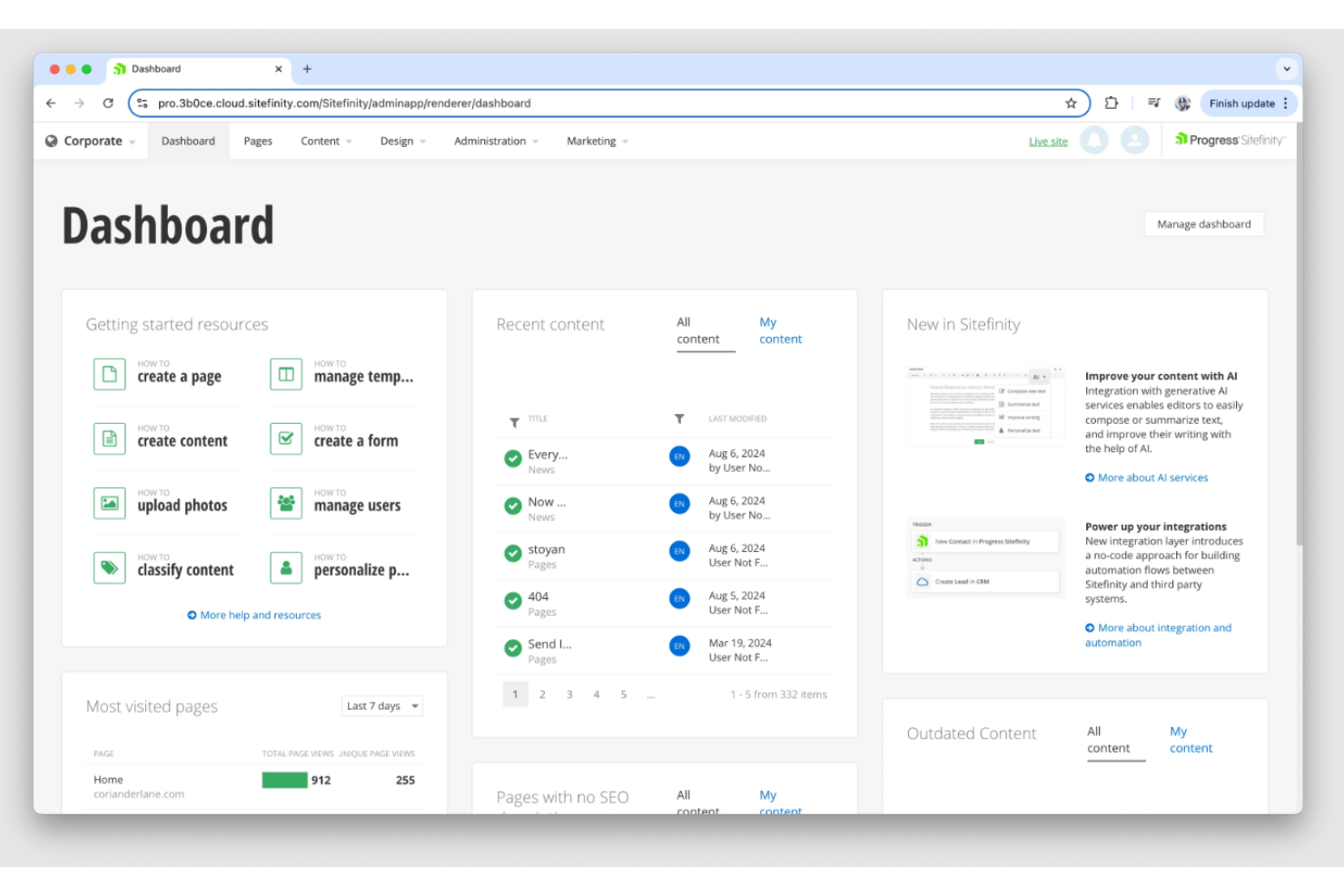
Sitefinity è una piattaforma per l'esperienza digitale destinata alle organizzazioni che desiderano distribuire contenuti su più canali con una dipendenza minima dall'IT. Ritengo che sia una scelta valida per i team di marketing e web che cercano una gestione centralizzata e aggiornamenti rapidi dei siti.
Per chi è più adatto Sitefinity?
Team di marketing e digitali di organizzazioni di medie e grandi dimensioni che desiderano lanciare e gestire più siti senza dover ricorrere in modo intensivo a risorse di sviluppo.
Perché Sitefinity è una buona alternativa ad Adobe Experience Manager
Ho scelto Sitefinity perché il suo generatore di pagine con funzionalità di trascinamento e rilascio e gli strumenti di modifica visuale consentono ai team di marketing di creare e aggiornare le pagine senza scrivere una sola riga di codice. Apprezzo il fatto che il generatore di moduli a basso codice e il framework per widget offrano agli utenti non tecnici un controllo concreto sul layout e sui contenuti.
In pratica, questo significa che il mio team può creare rapidamente pagine di destinazione, micrositi o contenuti per campagne senza attendere gli sprint di sviluppo. Per le organizzazioni che desiderano un controllo multisito a livello di AEM senza una dipendenza dagli sviluppatori altrettanto elevata, Sitefinity raggiunge bene questo equilibrio.
Funzionalità principali di Sitefinity
- Gestione delle risorse digitali: archivia e organizza immagini, documenti e video in librerie multimediali gerarchiche con modifica integrata delle immagini e generazione di miniature.
- Pianificazione dei contenuti: imposta le date di pubblicazione e di scadenza degli elementi di contenuto per automatizzare il momento in cui le pagine e gli aggiornamenti vengono pubblicati.
- Test A/B: esegui test comparativi su pagine e varianti di contenuto utilizzando la CDP Sitefinity Insight integrata per orientare le decisioni di ottimizzazione.
- Automazione dei flussi di lavoro: configura flussi di approvazione multilivello con notifiche via e-mail e commenti per gestire la governance dei contenuti tra i team.
Integrazioni di Sitefinity
Sitefinity offre integrazioni native con HubSpot, Salesforce, Marketo, Eloqua, Microsoft Dynamics 365, Azure AD, SharePoint e Google Analytics. È disponibile un'API per le integrazioni personalizzate.
Pros and Cons
Pros:
- La modifica visuale consente ai responsabili marketing di aggiornare le pagine in autonomia
- Gli strumenti a basso codice favoriscono una creazione più rapida delle esperienze digitali
- Le funzionalità multisito aiutano a gestire diverse proprietà web
Cons:
- Il generatore di pagine può rallentare con layout complessi
- Le funzionalità di gestione delle risorse digitali sono più basilari rispetto alle piattaforme specializzate nella gestione delle risorse

Sitecore Experience Platform è una soluzione per l'esperienza digitale e la gestione dei contenuti progettata per i gruppi di marketing e IT che gestiscono siti complessi. La troverai particolarmente utile se hai bisogno di unificare contenuti, personalizzazione e distribuzione delle risorse su larga scala tra più domini.
Per chi è più adatta Sitecore Experience Platform?
Gruppi di marketing globali e reparti IT di grandi aziende che devono gestire più siti di marchi e distribuire contenuti su larga scala.
Perché Sitecore Experience Platform è una buona alternativa ad Adobe Experience Manager
La gestione di più siti è l'ambito in cui Sitecore Experience Platform dimostra davvero di meritare un posto in questo elenco. L'ho scelta perché i suoi strumenti di gestione multisito consentono ai grandi gruppi aziendali di gestire decine di siti regionali o specifici per marchio da una singola istanza della piattaforma, con modelli di contenuto condivisi e controlli di pubblicazione centralizzati.
Questo è particolarmente importante quando devi garantire la coerenza del marchio tra diversi mercati: il supporto multilingue integrato di Sitecore consente di localizzare i contenuti a livello di sito senza duplicare la struttura sottostante. Se a questo aggiungi il suo livello di personalizzazione basato sull'intelligenza artificiale, il tuo gruppo può offrire esperienze mirate a pubblici diversi su tutti questi siti senza creare flussi di lavoro separati per ciascuno.
Funzionalità principali di Sitecore Experience Platform
- Editor dell'esperienza: modifica e visualizza in anteprima i contenuti delle pagine in tempo reale direttamente nel browser.
- Connettore dell'hub dei contenuti: centralizza e sincronizza le risorse digitali tra i siti da un unico archivio di contenuti.
- xDB (database delle esperienze): monitora e archivia le interazioni dei singoli visitatori tra i diversi canali per creare profili dei contatti.
- Distribuzione disaccoppiata tramite Sitecore JSS: crea esperienze per l'interfaccia utente con strumenti JavaScript recuperando i contenuti tramite API.
Integrazioni di Sitecore Experience Platform
Sitecore Experience Platform offre integrazioni native con Salesforce, Microsoft Dynamics 365, Marketo, SAP Commerce Cloud, Sitecore Content Hub, Coveo, Brightcove, Adobe Creative Cloud e Oracle Eloqua. È disponibile un'API per le integrazioni personalizzate.
Pros and Cons
Pros:
- I controlli multisito supportano una gestione complessa dei marchi e delle realtà regionali
- Gli strumenti di personalizzazione aiutano ad adattare le esperienze digitali in base al pubblico
- I dati dei visitatori supportano una segmentazione e un'analisi più approfondite dei contenuti
Cons:
- La manutenzione continuativa richiede spesso competenze tecniche
- L'implementazione può essere impegnativa per i gruppi interni

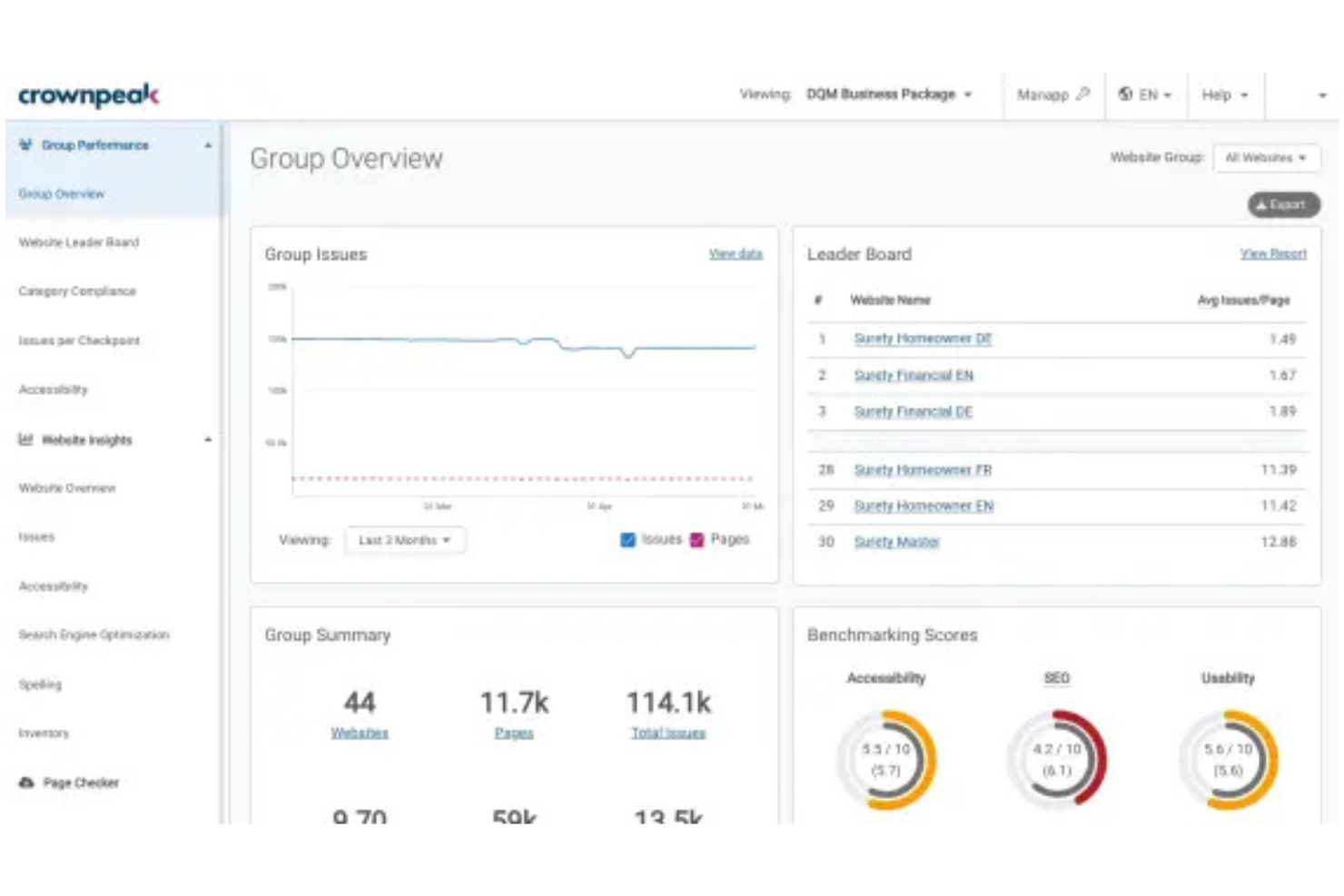
Crownpeak offre ai team di marketing e digitali una piattaforma nativa del cloud per contenuti unificati, gestione delle risorse e governance dell'esperienza web. Ritengo che sia particolarmente adatta ai settori regolamentati che necessitano di una supervisione centralizzata su tutti i canali digitali.
Per chi è più adatto Crownpeak?
Marchi globali e team addetti alla conformità nei settori finanziario, farmaceutico o pubblico che necessitano di un controllo centralizzato e di un'ampia accessibilità su tutte le proprietà web.
Perché Crownpeak è una buona alternativa ad Adobe Experience Manager
Ho scelto Crownpeak nello specifico perché la scansione integrata dell'accessibilità viene eseguita automaticamente durante il processo di creazione dei contenuti, segnalando le violazioni delle WCAG prima ancora che le pagine vengano pubblicate. Si tratta di una differenza significativa rispetto agli strumenti in cui l'accessibilità è un aspetto secondario o un componente aggiuntivo di terze parti.
Apprezzo inoltre il modo in cui il livello di gestione della qualità digitale di Crownpeak monitora continuamente le pagine pubblicate, evitando che i problemi di accessibilità e governance sfuggano ai controlli dopo la pubblicazione. Per i team che gestiscono contenuti in decine di aree geografiche o mercati regolamentati, è difficile trovare un livello di supervisione in tempo reale paragonabile.
Funzionalità principali di Crownpeak
- Suite di contenuti basata sull'IA: Genera, traduci e ottimizza i contenuti direttamente nell'ambiente di creazione FirstSpirit.
- Architettura CMS disaccoppiata: Distribuisci i contenuti su qualsiasi canale o struttura dell'interfaccia tramite una configurazione senza interfaccia basata innanzitutto sulle API.
- Orchestrazione dei contenuti multilingue: Gestisci i flussi di lavoro di traduzione e le varianti localizzate dei contenuti da un unico centro unificato.
- Estensioni del catalogo: Estendi le funzionalità della piattaforma tramite componenti aggiuntivi e connettori preconfigurati disponibili nel catalogo FirstSpirit.
Integrazioni di Crownpeak
Crownpeak offre integrazioni native con Salesforce, Marketo, Brightcove, SAP, SharePoint e Microsoft 365. Fornisce un'API per le integrazioni personalizzate e supporta le estensioni del catalogo per una connettività aggiuntiva.
Pros and Cons
Pros:
- I controlli di accessibilità supportano flussi di lavoro governati per la pubblicazione sul web
- Il monitoraggio della qualità aiuta i team a gestire le proprietà digitali attive
- L'architettura disaccoppiata supporta una distribuzione flessibile dei contenuti
Cons:
- La funzionalità DAM non rappresenta il caso d'uso più forte della piattaforma
- L'interfaccia può sembrare datata rispetto agli strumenti CMS più recenti

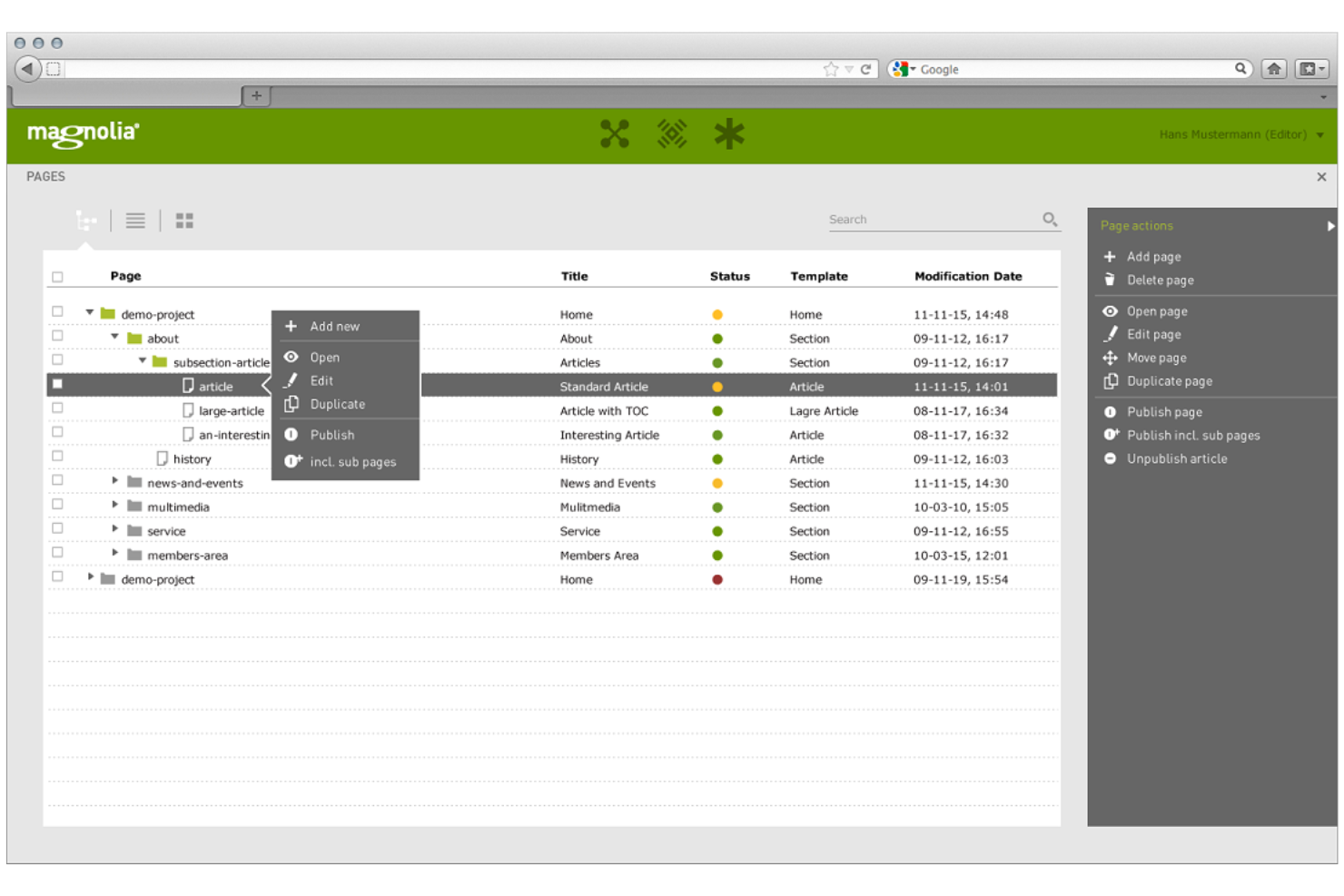
Magnolia CMS è una piattaforma modulare per le esperienze digitali che offre ai team di marketing e IT un controllo flessibile sui contenuti e sugli asset aziendali. Vale la pena prenderla in considerazione se hai bisogno di integrazioni avanzate e flussi di lavoro personalizzati per gestire esperienze web e omnicanale.
Per chi è più adatto Magnolia CMS?
I team digitali aziendali che necessitano di flussi di lavoro altamente configurabili per l'approvazione e la pubblicazione dei contenuti in ambienti web o mobili complessi.
Perché Magnolia CMS è una buona alternativa ad Adobe Experience Manager
Ho scelto Magnolia CMS perché i suoi flussi di lavoro per i contenuti sono realmente configurabili a livello strutturale, non solo tramite opzioni di impostazione. Il mio team può creare catene di approvazione in più fasi che rispecchiano il modo in cui esaminiamo, localizziamo e pubblichiamo effettivamente i contenuti nelle diverse regioni. Apprezzo il fatto che l'editor Stories di Magnolia consenta agli autori dei contenuti di lavorare visivamente, rispettando al contempo i passaggi di approvazione che abbiamo definito.
Questa combinazione di flessibilità editoriale e controllo della governance è ciò che lo rende un'alternativa credibile per i team che necessitano di un livello di supervisione paragonabile a quello di AEM, senza impegnarsi completamente nell'infrastruttura AEM.
Caratteristiche principali di Magnolia CMS
- Editor SPA visivo: Modifica i frontend disaccoppiati realizzati con React, Angular o Vue direttamente nell'interfaccia WYSIWYG di Magnolia, senza dover cambiare strumento.
- Anteprima omnicanale: Visualizza un'anteprima dei contenuti così come appariranno su canali e dispositivi diversi prima della pubblicazione.
- Gestione multisito: Gestisci più marchi, regioni e lingue da un'unica interfaccia unificata.
- Supporto GraphQL: Interroga i contenuti strutturati utilizzando GraphQL per ridurre le chiamate API e fornire esattamente ciò di cui ogni canale ha bisogno.
Integrazioni di Magnolia CMS
Magnolia CMS offre integrazioni native con Salesforce, SAP Commerce Cloud, Adobe Experience Manager, Bynder, Google Analytics e AWS S3. È disponibile un'API per le integrazioni personalizzate.
Pros and Cons
Pros:
- I flussi di lavoro configurabili supportano processi dettagliati di approvazione dei contenuti
- La modifica visiva delle SPA aiuta i team a gestire esperienze disaccoppiate
- Gli strumenti multisito supportano le operazioni sui contenuti regionali e dei diversi marchi
Cons:
- Non è un DAM dedicato alla gestione di cicli di vita complessi degli asset
- La configurazione di flussi di lavoro personalizzati può richiedere supporto tecnico

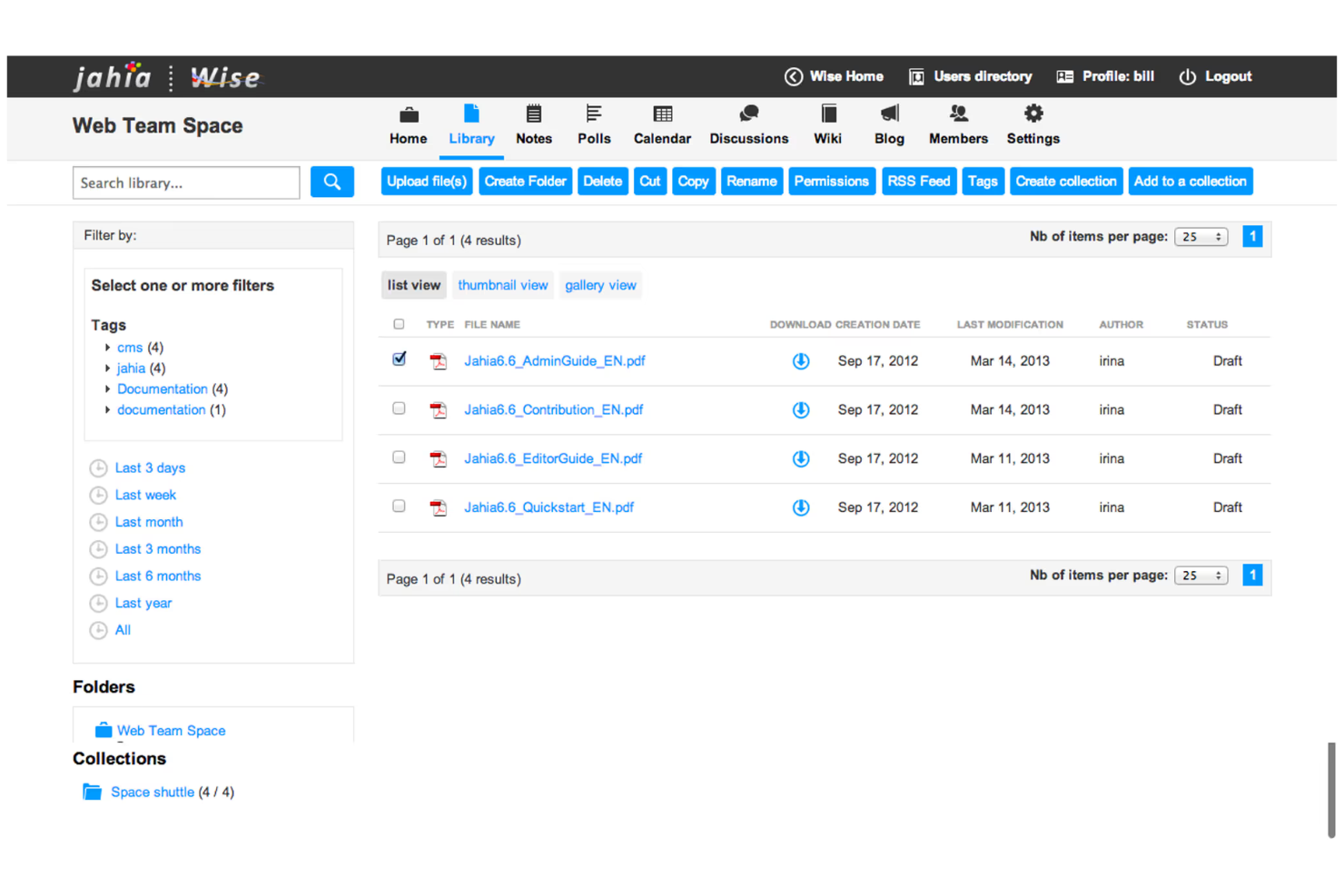
Jahia offre una piattaforma modulare per la gestione dei contenuti e delle risorse progettata per le organizzazioni con esigenze web e digitali avanzate. Si rivolge ai team IT e ai responsabili digitali che desiderano il controllo completo delle esperienze rivolte ai clienti e delle risorse digitali.
Per chi è più adatta Jahia?
I team IT aziendali e le agenzie digitali gestiscono esperienze digitali complesse e distribuite su più siti.
Perché Jahia è una buona alternativa ad Adobe Experience Manager
Ho scelto Jahia perché il suo nucleo open source offre ai team di sviluppo la libertà effettiva di estendere la piattaforma senza scontrarsi con i limiti di licenza o architetturali associati ad AEM. L'architettura modulare di Jahia consente al team di aggiungere, rimuovere o personalizzare le funzionalità tramite componenti distribuibili in modo indipendente, permettendo di creare esattamente i flussi di lavoro per la gestione dei contenuti e delle risorse di cui il progetto ha bisogno.
Apprezzo anche il fatto che Jahia supporti la distribuzione dei contenuti sia headless sia tradizionale da un'unica piattaforma, così i team che gestiscono risorse su siti web, app e portali non hanno bisogno di strumenti separati. Per le organizzazioni che desiderano ospitare autonomamente la soluzione e mantenere il pieno controllo sui propri dati, l'opzione di distribuzione on-premise di Jahia rende tutto semplice.
Funzionalità principali di Jahia
- Piattaforma integrata per i dati dei clienti: Raccoglie i segnali comportamentali da siti web e app, quindi crea profili unificati dei visitatori e segmenti di pubblico in tempo reale per la personalizzazione dei contenuti.
- Gestione dei contenuti su più siti: Gestisci e pubblica contenuti su più siti e portali da un'unica interfaccia, con librerie di risorse condivise e supporto alla localizzazione.
- API dei contenuti GraphQL: Espone contenuti e risorse tramite un'API GraphQL, consentendo la distribuzione headless a qualsiasi framework front-end o canale digitale.
- Motore di personalizzazione del pubblico: Adatta i contenuti ai singoli visitatori in base al comportamento di navigazione, ai dati CRM e alla cronologia delle interazioni, con gruppi di controllo nativi per misurare l'impatto delle campagne.
Integrazioni di Jahia
Jahia offre integrazioni native con Google Analytics, Salesforce, Marketo, Microsoft Power BI e Apache Unomi, oltre a un'API per le integrazioni personalizzate.
Pros and Cons
Pros:
- L'architettura open source consente una personalizzazione approfondita della piattaforma
- Il CMS ibrido supporta la distribuzione headless e tradizionale
- La progettazione basata su moduli consente flussi di lavoro dei contenuti personalizzati
Cons:
- Un ecosistema più ridotto limita le risorse pronte all'uso per l'implementazione
- Non è un sostituto completo di un DAM per i team che gestiscono grandi quantità di risorse
Altre alternative ad Adobe Experience Manager
Ecco alcune alternative aggiuntive ad Adobe Experience Manager e strumenti correlati che non sono entrati nella mia selezione, ma che potrebbero comunque essere presi in considerazione a seconda del tuo caso d’uso:
- Liferay Digital Experience Platform
Ideale per la collaborazione su scala aziendale
- Kentico Content
Ideale per le funzionalità di pubblicazione omnicanale
- Sanity
Ideale per flussi di lavoro di modifica di contenuti strutturati


Come valuto le alternative ad Adobe Experience Manager
Valuto ogni piattaforma in base alle funzionalità fondamentali di cui un team addetto alle operazioni sui contenuti ha effettivamente bisogno—gestione delle risorse digitali, pubblicazione strutturata, flussi di lavoro di approvazione—e poi considero i fattori distintivi che separano le migliori dalle altre.
Funzionalità principali (requisiti fondamentali per questo elenco)
Quando seleziono gli strumenti per il mio elenco, assegno a ciascuno un punteggio su una scala da 0 (non offre la funzionalità) a 5 (eccelle in quest'area) per ogni funzionalità principale elencata di seguito. Quindi calcolo il punteggio totale dello strumento come percentuale. Ogni strumento deve raggiungere un punteggio totale minimo del 65% per essere preso in considerazione.
- Creazione e gestione dei contenuti: cerco funzionalità di modifica strutturata, cronologia delle versioni e controlli di pubblicazione che consentano ai team di portare i contenuti dalla bozza alla pubblicazione senza dover gestire strumenti separati.
- Gestione delle risorse digitali: una libreria centralizzata delle risorse con funzioni di assegnazione dei tag, ricerca e controllo delle versioni è importante, soprattutto quando i team riutilizzano immagini e video in più campagne.
- Flussi di lavoro e processi di approvazione: ogni strumento dovrebbe supportare fasi di revisione e approvazioni configurabili, in modo che un responsabile delle operazioni sui contenuti web possa indirizzare una pagina di destinazione attraverso l'approvazione dell'ufficio legale, del design e del marketing.
- Collaborazione del team: verifico la presenza di commenti contestuali, @menzioni e visualizzazioni condivise che mantengano i feedback associati a specifici contenuti invece di lasciarli dispersi nelle conversazioni via email.
- Modelli e componenti riutilizzabili: piattaforme come Sitecore e Contentful gestiscono la riutilizzabilità in modo diverso, quindi valuto se i team possono creare e mantenere blocchi di contenuto o layout di pagina standardizzati.
- Pubblicazione multicanale: valuto se una piattaforma è in grado di distribuire contenuti a siti web, app mobili, email e altri canali tramite pubblicazione nativa o distribuzione basata su API.
Dopo aver creato un elenco di strumenti che soddisfano questi criteri, considero ciò che distingue ogni piattaforma.
Fattori distintivi (ciò che differenzia i fornitori)
Ecco come confronto i diversi fornitori:
Funzionalità distintive
L'assistenza basata sull'intelligenza artificiale per i contenuti è un importante elemento distintivo: cerco strumenti che aiutino i team a redigere, assegnare tag o tradurre le risorse senza uscire dalla piattaforma. Anche gli strumenti di revisione e annotazione sono importanti quando le revisioni creative coinvolgono più parti interessate che apportano modifiche a design o layout di pagina in tempo reale. Valuto se una piattaforma offre un'architettura disaccoppiata o componibile, poiché i team che gestiscono campagne omnicanale hanno bisogno di una distribuzione basata innanzitutto sulle API che non li vincoli a un'unica interfaccia.
Oltre le funzionalità
Il costo totale di proprietà è uno dei primi aspetti che valuto, poiché il modello di licenza aziendale di AEM è spesso il principale motivo alla base della ricerca di alternative. Verifico inoltre quanto bene ogni piattaforma si integri con strumenti come Jira, HubSpot o Salesforce: le lacune nell'ecosistema delle integrazioni creano soluzioni manuali alternative che rallentano le operazioni sui contenuti. Anche i tempi di implementazione sono importanti. Alcune piattaforme offrono onboarding guidato e reti di partner, mentre altre presuppongono che ci si rivolga a un'agenzia per iniziare.
Perché cercare un’alternativa ad Adobe Experience Manager?
Adobe Experience Manager è una piattaforma potente, ma non è adatta a tutte le organizzazioni. Alcuni team hanno bisogno di un CMS più leggero, altri desiderano un’architettura headless più flessibile, mentre altri ancora necessitano di uno strumento che si concentri maggiormente sulla governance delle risorse, sui contenuti dei prodotti o sulla pubblicazione multisito.
Potresti cercare un’alternativa ad Adobe Experience Manager perché:
- Il tuo team desidera un'esperienza di modifica dei contenuti più semplice
- Hai bisogno di una distribuzione dei contenuti senza interfaccia più flessibile
- La tua organizzazione desidera ridurre la complessità dell'implementazione
- I tuoi esperti di marketing hanno bisogno di un controllo più rapido sugli aggiornamenti del sito
- I tuoi sviluppatori desiderano un'architettura più modulare
- I tuoi flussi di lavoro per le risorse richiedono una ricerca, metadati o una governance migliori
- La tua azienda ha bisogno di un supporto più solido per gli ambienti open source o componibili
- La configurazione attuale sembra troppo complessa per le esigenze di pubblicazione del tuo team
Se qualcuna di queste situazioni ti è familiare, sei nel posto giusto. Questo elenco include opzioni incentrate su CMS, DXP, CMS senza interfaccia e DAM che possono sostituire diverse parti di Adobe Experience Manager, a seconda degli obiettivi del tuo team.
Funzionalità principali di Adobe Experience Manager
Ecco alcune delle principali funzionalità di Adobe Experience Manager da confrontare con le soluzioni alternative:
- Gestione dei contenuti: Consente ai team di creare, modificare, organizzare e pubblicare contenuti web su più proprietà digitali da una piattaforma centralizzata.
- Gestione delle risorse digitali: Archivia e gestisce immagini, video, documenti e file creativi, consentendo ai team di trovare, riutilizzare e distribuire le risorse approvate.
- Etichettatura dei metadati: Aggiunge informazioni descrittive alle risorse e ai contenuti per migliorare la ricerca, il filtraggio, la classificazione e la governance.
- Controllo delle versioni: tiene traccia delle modifiche apportate ai contenuti e alle risorse, consentendo ai team di esaminare le versioni precedenti, ripristinare gli aggiornamenti passati e mantenere la cronologia dei contenuti.
- Controlli degli accessi basati sui ruoli: Limita l'accesso in base ai ruoli degli utenti, ai team o alle autorizzazioni, per supportare una gestione sicura dei contenuti e delle risorse.
- Gestione dei flussi di lavoro: Supporta i processi di revisione, approvazione e pubblicazione per i team che necessitano di una governance strutturata dei contenuti.
- Distribuzione dinamica dei contenuti multimediali: Adatta formati, dimensioni e versioni di immagini e video per diversi canali, dispositivi ed esperienze utente.
- Connessione a Creative Cloud: Collega gli strumenti creativi di Adobe ai flussi di lavoro dei contenuti e delle risorse, consentendo ai team di progettazione e marketing di lavorare con file approvati.
- Personalizzazione dei contenuti: Distribuisce contenuti mirati in base ai segmenti di pubblico, al comportamento o ai dati contestuali.
- Reportistica e analisi: Offre visibilità sulle prestazioni dei contenuti, sull'utilizzo delle risorse e sul coinvolgimento dei clienti.
- Gestione multisito: Aiuta i team a gestire contenuti, risorse, lingue ed esperienze del brand su più siti web o aree geografiche da un unico ambiente.
- Distribuzione senza interfaccia: Supporta la distribuzione dei contenuti basata su API verso siti web, app, portali e altri canali digitali.