

Le 10 migliori alternative a Zoom per le riunioni video nel 2026

Elenco delle migliori alternative a Zoom


In qualità di project manager, affronti ogni giorno la sfida di coordinare i team, gestire le pianificazioni e garantire una comunicazione efficace. I software per videoconferenze e riunioni online possono contribuire ad alleviare queste difficoltà, ma è importante trovare gli strumenti di collaborazione più adatti alle tue esigenze. Potresti essere alla ricerca di un'alternativa alle riunioni Zoom che soddisfi meglio i requisiti specifici del tuo team, che si tratti di una maggiore sicurezza, dell'integrazione con gli strumenti esistenti o di una migliore esperienza utente.
In base alla mia esperienza, comprendere queste esigenze è fondamentale per scegliere la soluzione giusta. In questo articolo fornirò una valutazione imparziale delle migliori alternative gratuite a Zoom, concentrandomi su ciò che rende ciascuna di esse particolarmente adatta a diverse sfide aziendali. Troverai informazioni utili per scegliere lo strumento migliore per il tuo team.
Che cos'è Zoom?
Zoom è una piattaforma per videoconferenze e un software per riunioni online che consente a te e al tuo team di connettervi virtualmente. Dopo aver acquisito popolarità durante la pandemia, è comunemente utilizzato da professionisti di diversi settori, tra cui istruzione, sanità e aziende, offrendo una piattaforma affidabile per la comunicazione e la collaborazione. Funzionalità come la condivisione dello schermo, le stanze per gruppi di lavoro e la registrazione delle riunioni aiutano a coordinare le riunioni, facilitare le discussioni e acquisire informazioni importanti. Nel complesso, Zoom offre una soluzione preziosa per mantenere la comunicazione e la produttività negli ambienti di lavoro da remoto o ibridi.
Tabella comparativa delle alternative a Zoom
Questa tabella comparativa riassume i dettagli dei prezzi delle migliori alternative a Zoom che ho selezionato:
| Tool | Best For | Trial Info | Price | ||
|---|---|---|---|---|---|
| 1 | Ideale per l'integrazione con Google Workspace | Versione di prova gratuita disponibile | A partire da $9.20/utente/mese (fatturato annualmente) | Website | |
| 2 | Ideale per l'integrazione con Microsoft 365 | Prova gratuita disponibile | A partire da $4.00/utente/mese (con fatturazione annuale) | Website | |
| 3 | Ideale per la privacy degli utenti e la proprietà dei dati | Prova gratuita di 14 giorni | Da $1/organizzatore/mese (fatturato annualmente) | Website | |
| 4 | Ideale per le conversazioni con i clienti assistite dall'IA | Prova gratuita di 14 giorni | Da $15/utente/mese (fatturato annualmente) | Website | |
| 5 | Ideale per comunicazioni unificate basate sull'AI per i dipendenti | Prova gratuita di 14 giorni + demo gratuita | A partire da $30/utente/mese (con fatturazione annuale) | Website | |
| 6 | Ideale per riunioni esterne con sicurezza controllata | Prova gratuita + demo gratuita disponibili | A partire da 12 $/organizzatore/mese (con fatturazione annuale) | Website | |
| 7 | Ideale per webinar e coinvolgimento durante le riunioni nelle piccole imprese | Demo gratuita disponibile | A partire da $27.99/utente/mese (come parte di Intermedia Unite) | Website | |
| 8 | Ideale per i videogiochi e le interazioni sociali | Piano gratuito disponibile | A partire da $2.99/utente/mese | Website | |
| 9 | Ideale per la programmazione in coppia e il debug | Piano gratuito disponibile | A partire da $20/utente/mese | Website | |
| 10 | Ideale per videoconferenze a codice aperto | Gratis per sempre | Gratis per sempre | Website |
Perché fidarsi dei nostri consigli sui software
Il nostro team testa e recensisce software dal 2012. In quanto project manager noi stessi, sappiamo quanto sia difficile — e importante — scegliere il software giusto.
Per questa guida, abbiamo valutato gli strumenti attraverso test pratici e ricerche indipendenti, assegnando un punteggio agli strumenti in base ai nostri criteri di selezione. Ci basiamo inoltre sulle competenze di leader di pensiero del settore e di professionisti attivi nella gestione dei progetti.
Le nostre recensioni riflettono il nostro giudizio editoriale umano, non un discorso di vendita.
Revisori esperti:
Recensioni delle migliori alternative a Zoom
Di seguito trovi le mie sintesi dettagliate delle migliori alternative a Zoom incluse nel mio elenco. Le mie recensioni offrono uno sguardo approfondito sulle funzionalità principali, sui pro e contro, sulle integrazioni, sui limiti di tempo e sui casi d’uso ideali di ogni strumento, per aiutarti a trovare quello più adatto a te.

Ideale per l'integrazione con Google Workspace
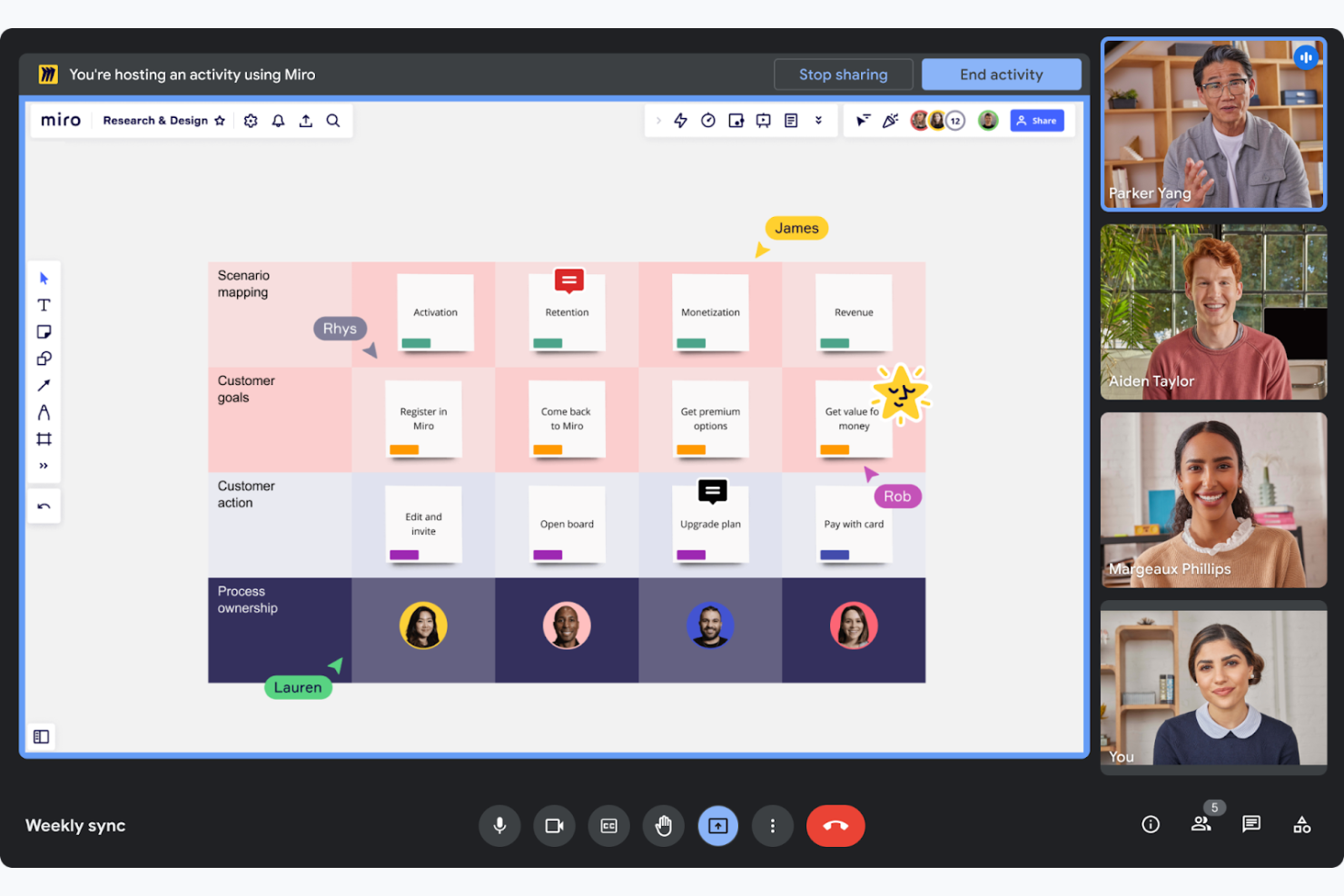
Google Meet è uno strumento per videoconferenze progettato per facilitare le riunioni virtuali e la collaborazione per aziende e istituti scolastici. Consente al tuo team di condurre riunioni facilmente, direttamente dai browser web o dai dispositivi mobili.
Perché è una valida alternativa a Zoom: Google Meet fa parte di Google Workspace e consente di pianificare riunioni individuali o di gruppo direttamente da Google Calendar e di collaborare su Google Documenti durante le chiamate. Questa stretta integrazione coordina i flussi di lavoro dei team che già utilizzano la suite di strumenti per la produttività di Google. Inoltre, il funzionamento basato sul browser significa che non è necessario installare software aggiuntivo, rendendolo accessibile e pratico.
Funzionalità e integrazioni principali:
Le funzionalità includono sottotitoli in tempo reale basati sulla tecnologia di riconoscimento vocale di Google, che migliorano l'accessibilità. La piattaforma supporta fino a 250 partecipanti per chiamata, risultando adatta a riunioni numerose. È inoltre possibile registrare le riunioni e salvarle direttamente su Google Drive, garantendo un accesso e una condivisione semplici.
Le integrazioni includono Google Calendar, Google Drive, Gmail, Google Documenti, Google Fogli, Google Presentazioni, Miro e altro ancora.
Pros and Cons
Pros:
- Supporta riunioni numerose
- Sottotitoli in tempo reale disponibili
- Pianificazione semplice delle riunioni
Cons:
- Design dell'interfaccia essenziale
- Problemi di connettività occasionali

Ideale per l'integrazione con Microsoft 365
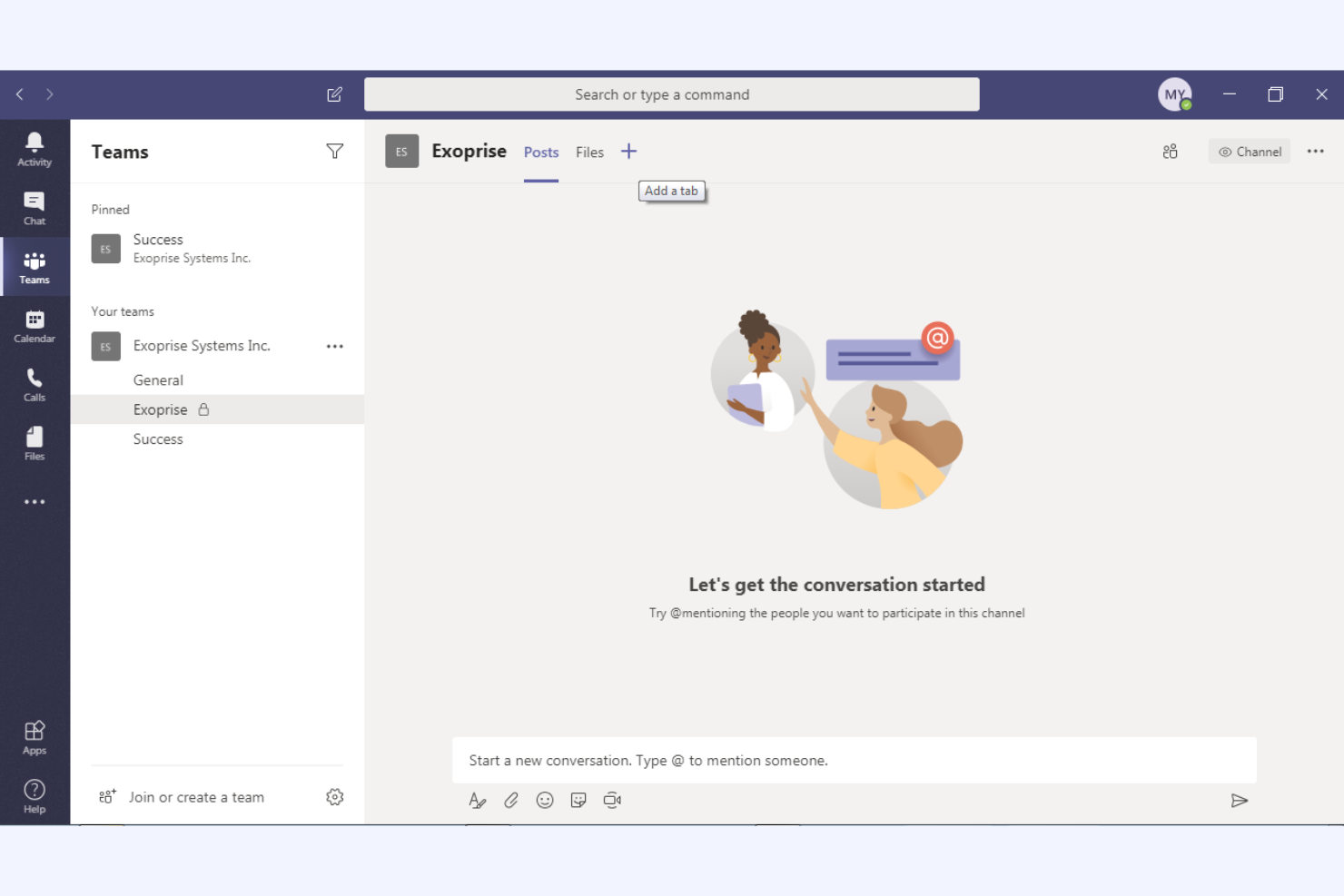
Microsoft Teams è una piattaforma di collaborazione che integra chat, videoconferenze e condivisione di file, progettata principalmente per utenti aziendali e del settore dell'istruzione. Aiuta il tuo team a comunicare in modo efficiente e a gestire i progetti all'interno di uno spazio di lavoro unificato.
Perché è una buona alternativa a Zoom: Microsoft Teams offre un'integrazione profonda con l'ecosistema Microsoft 365, migliorando la produttività grazie alle funzionalità di collaborazione sui documenti in tempo reale e alla sincronizzazione del calendario. Queste funzionalità lo rendono ideale se la tua organizzazione utilizza già i prodotti Microsoft. Inoltre, le sue ampie funzionalità di chat e canali supportano la comunicazione continua del team e la gestione dei progetti, offrendo una soluzione più completa rispetto alla piattaforma di Zoom, incentrata sulle videoconferenze.
Funzionalità e integrazioni principali:
Le funzionalità includono strumenti di gestione delle attività che consentono di assegnare e monitorare le attività all'interno del team. La piattaforma include un wiki integrato per documentare e condividere le conoscenze e supporta eventi dal vivo per un pubblico più ampio, risultando versatile per diverse esigenze di comunicazione.
Le integrazioni includono Microsoft Outlook, SharePoint, OneDrive, Power BI, Trello, Asana, GitHub, Salesforce e altro ancora.
Pros and Cons
Pros:
- Integrazione profonda con Microsoft 365
- Supporta grandi eventi virtuali
- Collaborazione sui documenti in tempo reale
Cons:
- Opzioni di personalizzazione limitate
- Può richiedere molte risorse

Ideale per la privacy degli utenti e la proprietà dei dati

Zoho Meeting è una soluzione di conferenza basata sul web progettata per le aziende che necessitano di strumenti per riunioni online sicuri e affidabili. È pensata per professionisti e team che desiderano organizzare webinar e riunioni virtuali in modo efficiente.
Perché è una buona alternativa a Zoom: Zoho Meeting dà priorità alla privacy degli utenti e alla proprietà dei dati, risultando una scelta preferibile per chi è preoccupato della sicurezza dei dati. Offre funzionalità come la crittografia delle riunioni e moduli di registrazione personalizzabili, contribuendo a garantire la protezione delle informazioni del tuo team. La piattaforma fornisce inoltre analisi e report dettagliati per i webinar, così puoi monitorare il coinvolgimento e perfezionare le tue presentazioni.
Funzionalità e integrazioni principali:
Le funzionalità includono la condivisione dello schermo, che consente di presentare visivamente le proprie idee ai partecipanti. La piattaforma supporta sondaggi durante i webinar e sessioni di domande e risposte, permettendoti di coinvolgere efficacemente il pubblico. Puoi anche registrare riunioni e webinar, creando una risorsa preziosa per consultazioni future e formazione.
Le integrazioni includono Zoho CRM, Zoho Projects, Zoho Connect, Google Calendar, Microsoft Outlook, Slack e altro ancora.
Pros and Cons
Pros:
- Attenzione alla privacy e alla sicurezza dei dati
- Analisi dettagliate per i webinar
- Crittografia delle riunioni disponibile
Cons:
- Funzionalità avanzate limitate
- Scalabilità limitata per eventi di grandi dimensioni

Dialpad
Ideale per le conversazioni con i clienti assistite dall'IA
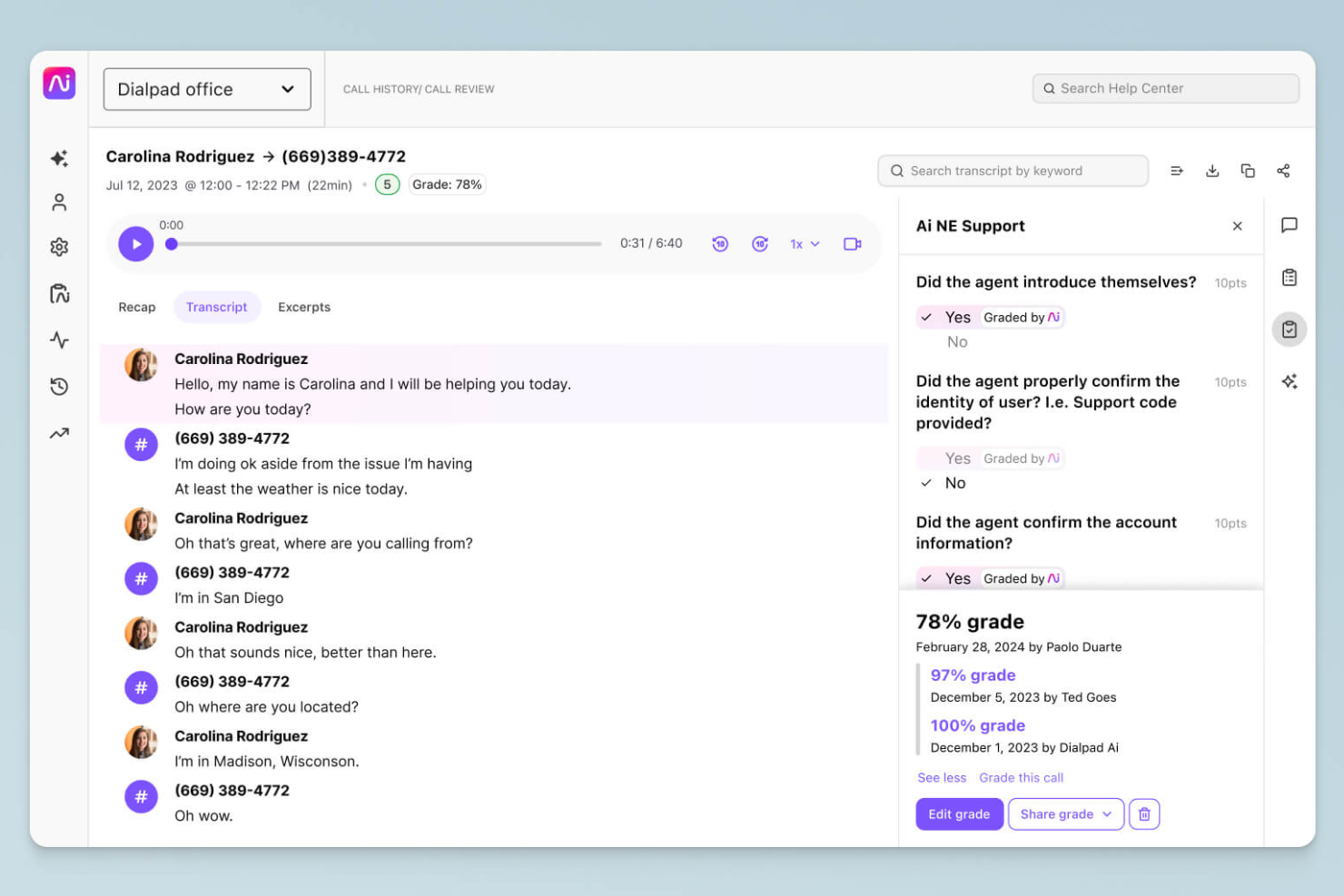
Dialpad è una piattaforma di comunicazione basata sul cloud che migliora la comunicazione grazie a informazioni basate sull'intelligenza artificiale. Si rivolge alle aziende che cercano soluzioni efficienti per voce, video e messaggistica a supporto delle interazioni con i clienti e con il team.
Perché è una buona alternativa a Zoom: le funzionalità di Dialpad basate sull'intelligenza artificiale forniscono trascrizioni in tempo reale e analisi vocali, offrendo informazioni preziose durante le chiamate. Questo consente al tuo team di prendere decisioni informate e migliorare le interazioni con i clienti. Grazie all'instradamento integrato delle chiamate e ai flussi di lavoro personalizzabili, Dialpad supporta processi di comunicazione efficienti, diventando un'alternativa versatile all'approccio incentrato sui video di Zoom.
Funzionalità e integrazioni principali:
Le funzionalità includono l'intelligenza vocale, che offre assistenza durante le chiamate e analisi del sentimento in tempo reale, aiutando il tuo team a migliorare le conversazioni. La piattaforma supporta la registrazione, l'archiviazione e la riproduzione delle chiamate nel cloud, aspetti utili per la formazione e il controllo della qualità. Inoltre, Dialpad offre un'esperienza di comunicazione unificata con voce, video e messaggistica in un'unica app.
Le integrazioni includono Salesforce, Microsoft 365, Google Workspace, Slack, HubSpot, Zendesk, ServiceNow, Okta e altro.
Pros and Cons
Pros:
- Informazioni sulle chiamate basate sull'IA
- Trascrizione in tempo reale
- Instradamento efficiente delle chiamate
Cons:
- Compatibilità con l'hardware
- Interruzioni occasionali del sistema
Ideale per comunicazioni unificate basate sull'AI per i dipendenti
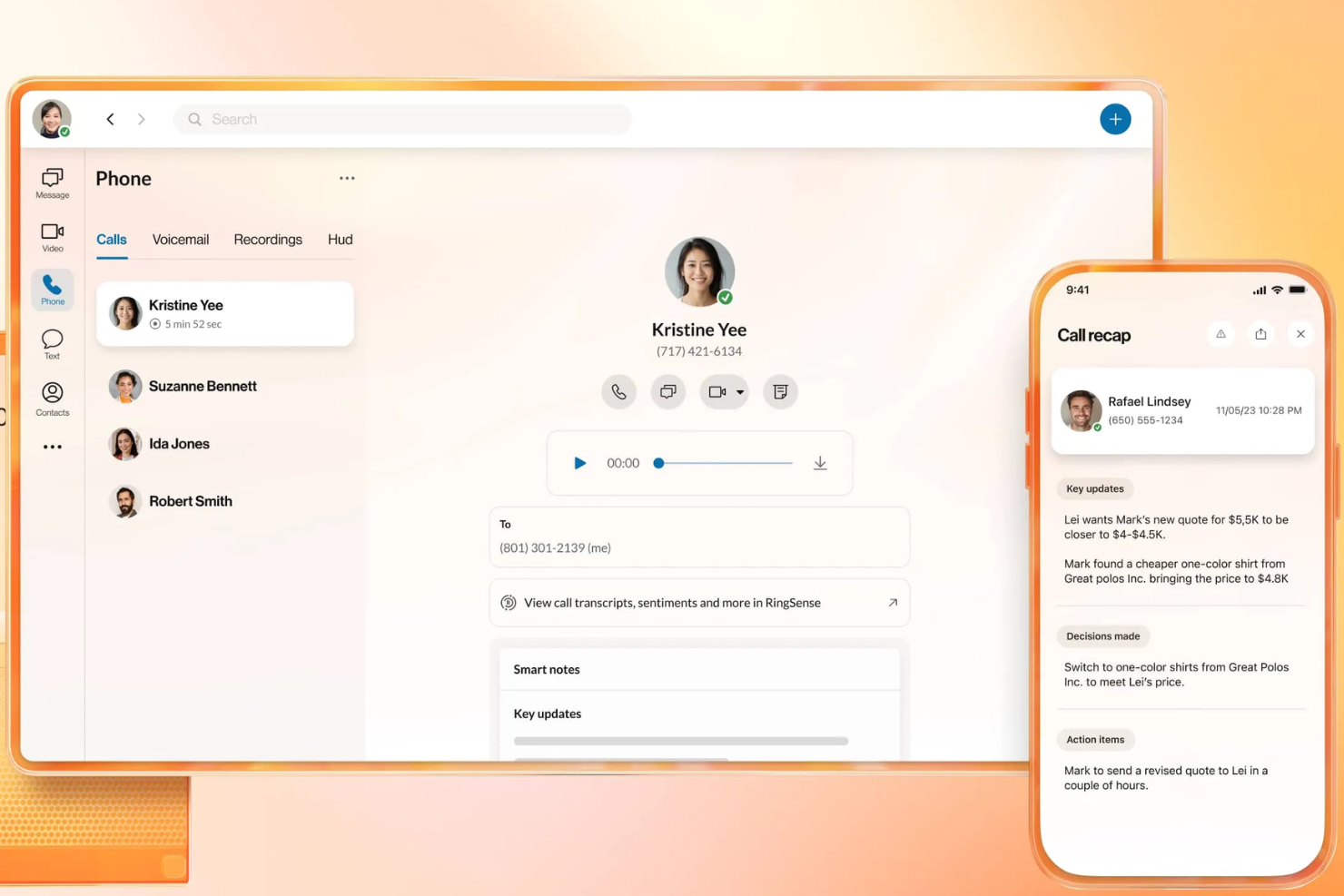
RingEX è una piattaforma di comunicazione basata sul cloud progettata per migliorare le capacità di comunicazione aziendale con funzionalità avanzate. Offre soluzioni affidabili per voce, video e messaggistica per la collaborazione tra team.
Perché è una valida alternativa a Zoom: RingEX offre approfondimenti e analisi basati sull'AI, consentendo al tuo team di prendere decisioni informate durante le chiamate. La piattaforma supporta funzionalità come la registrazione delle chiamate e la trascrizione in tempo reale, fornendo risorse utili per la formazione e il controllo della qualità. Inoltre, i flussi di lavoro personalizzabili e i solidi strumenti di gestione delle chiamate di RingEX la rendono una scelta versatile per aziende di tutte le dimensioni.
Funzionalità e integrazioni principali:
Le funzionalità includono l'instradamento avanzato delle chiamate, che garantisce che le chiamate vengano indirizzate ai membri del team appropriati. La piattaforma fornisce analisi delle chiamate, offrendo informazioni sui modelli di comunicazione del tuo team. Puoi anche utilizzare le videoconferenze con funzionalità di condivisione dello schermo, migliorando la collaborazione durante le riunioni virtuali.
Le integrazioni includono Microsoft 365, Google Workspace, Salesforce, Slack, Zendesk, HubSpot, Zapier, Microsoft Teams, Okta e altro.
Pros and Cons
Pros:
- Analisi delle chiamate basate sull'AI
- Gestione delle chiamate personalizzabile
- Adatto alle grandi aziende
Cons:
- Configurazione e interfaccia utente complesse
- Affidabilità delle chiamate incostante
Ideale per riunioni esterne con sicurezza controllata

GoTo Meeting è uno strumento di conferenza web progettato per le aziende che necessitano di una piattaforma affidabile per organizzare riunioni virtuali. È pensato per professionisti di diversi settori e offre funzionalità a supporto di una comunicazione e collaborazione efficienti.
Perché è una valida alternativa a Zoom: GoTo Meeting si concentra sulla fornitura di opzioni per riunioni sicure e flessibili, con funzionalità di sicurezza come la crittografia delle riunioni e i controlli per gli amministratori, oltre a impostazioni personalizzabili per le riunioni. Queste funzionalità aiutano a mantenere private le riunioni e ad adattarle alle proprie esigenze. La piattaforma supporta le videoconferenze in HD e offre app per dispositivi mobili, rendendola comoda per i team in movimento.
Funzionalità e integrazioni principali:
Le funzionalità includono un'opzione 'Chiamami' che semplifica l'accesso alle riunioni chiamando direttamente i partecipanti e strumenti di disegno che consentono di annotare gli schermi condivisi per una collaborazione migliore. È inoltre possibile usufruire delle sale riunioni personalizzate, che offrono uno spazio stabile in cui il team può riunirsi.
Le integrazioni includono Salesforce, Google Calendar, Zapier, Zoho CRM, Zendesk, Outlook, Trello e altro ancora.
Pros and Cons
Pros:
- Crittografia sicura delle riunioni
- Impostazioni flessibili per le riunioni
- Videoconferenze con qualità video HD
Cons:
- Interfaccia datata rispetto ad alcuni concorrenti
- Sono necessari diversi passaggi per partecipare a un flusso di lavoro

Ideale per webinar e coinvolgimento durante le riunioni nelle piccole imprese
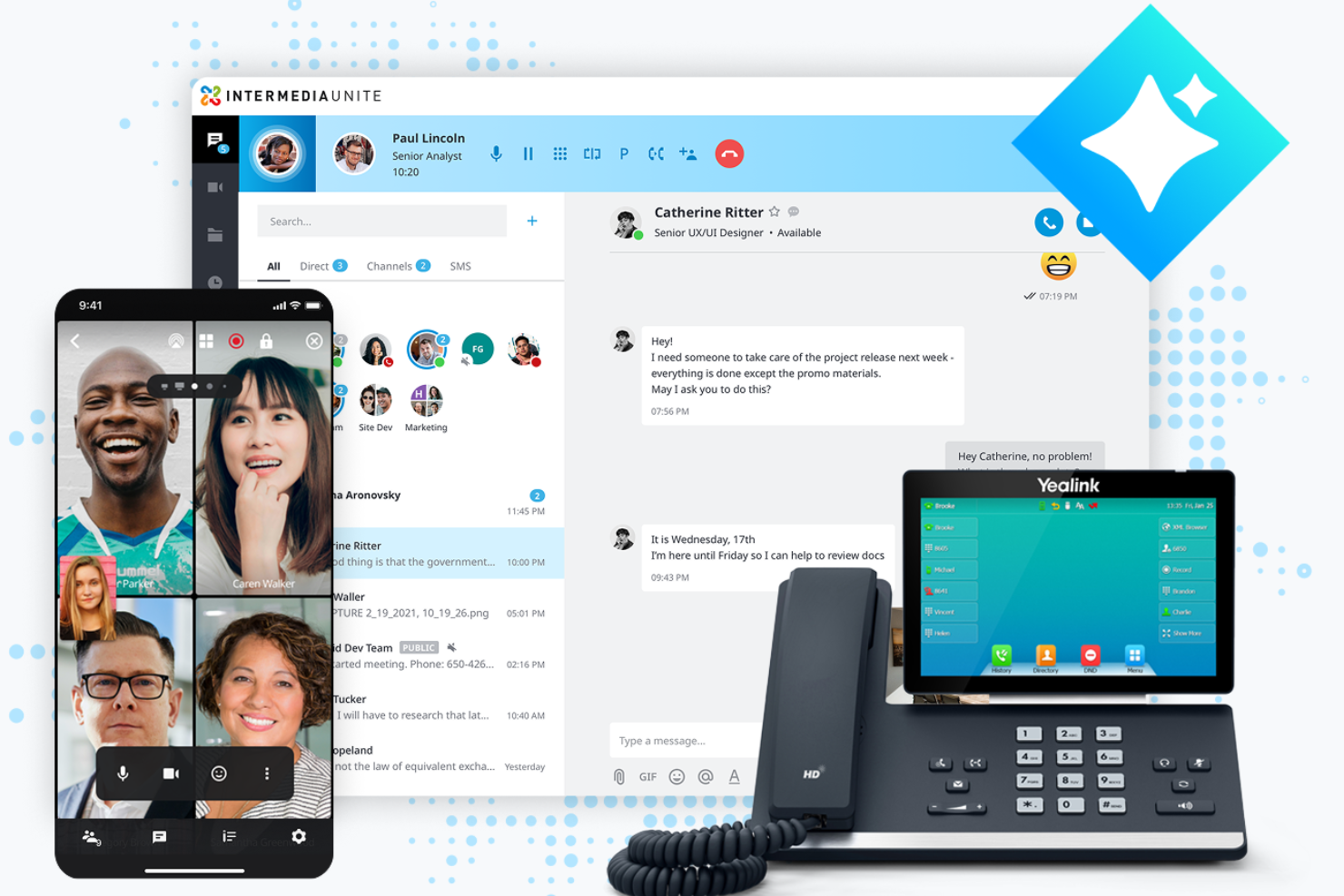
AnyMeeting è una piattaforma per videoconferenze progettata per le piccole e medie imprese alla ricerca di una soluzione di comunicazione completa. Parte della piattaforma basata sul cloud Intermedia Unite, offre strumenti per organizzare riunioni virtuali, webinar e chiamate in conferenza, favorendo la collaborazione e la connettività.
Perché è una buona alternativa a Zoom: AnyMeeting offre una suite di comunicazione tutto-in-uno con funzionalità come l'organizzazione di webinar e la trascrizione delle riunioni. Queste funzionalità la rendono adatta alle aziende che necessitano di qualcosa di più delle semplici riunioni video. AnyMeeting offre la condivisione dello schermo e layout personalizzabili per le riunioni, consentendo al tuo team di adattarle alle proprie esigenze specifiche.
Funzionalità distintive e integrazioni:
Le funzionalità includono la trascrizione delle riunioni, che registra e trascrive automaticamente le riunioni per facilitarne la consultazione. La piattaforma offre funzionalità per l'organizzazione di webinar, fornendo strumenti per coinvolgere un vasto pubblico, oltre a layout personalizzati per migliorare l'esperienza complessiva della riunione.
Le integrazioni includono Microsoft Office 365, Google Calendar, Slack, Salesforce, Zendesk e altre ancora.
Pros and Cons
Pros:
- Supporta l'organizzazione di webinar
- Trascrizione delle riunioni disponibile
- Layout personalizzabili per le riunioni
Cons:
- Funzionalità avanzate limitate
- Scalabilità limitata per le aziende più grandi

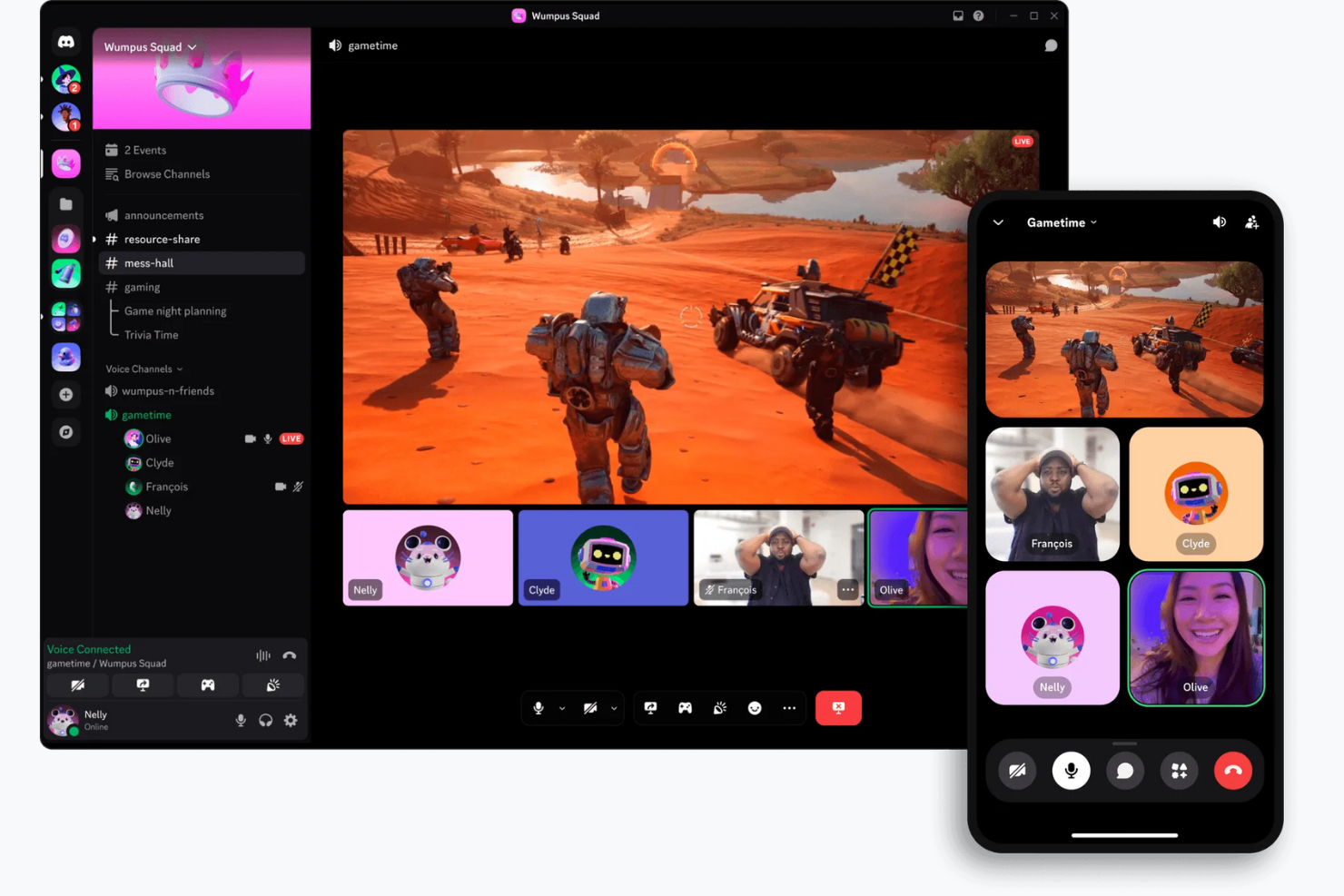
Discord è una piattaforma di comunicazione progettata principalmente per i videogiocatori e le comunità sociali. Offrendo funzionalità di chat vocale, video e testuale, è ampiamente utilizzata dagli appassionati di videogiochi e dalle comunità online per l'interazione e la collaborazione in tempo reale.
Perché è una buona alternativa a Zoom: Discord offre canali vocali permanenti, consentendo al tuo team di partecipare alle conversazioni e abbandonarle liberamente, a differenza delle riunioni programmate di Zoom. La piattaforma offre impostazioni del server e ruoli personalizzabili per gestire le autorizzazioni degli utenti e creare spazi di discussione organizzati. Inoltre, la versione gratuita di Discord e le funzionalità incentrate sulla comunità, come i server pubblici e le interfacce intuitive, lo rendono ideale per incontri informali e interazioni sociali.
Funzionalità e integrazioni principali:
Le funzionalità includono la condivisione dello schermo, che consente di condividere lo schermo con altri per giocare o lavorare in modo collaborativo, oltre alle chiamate video e vocali. Puoi anche utilizzare la funzione di messaggistica diretta di Discord per comunicare privatamente con singole persone o tramite piccole chiamate.
Le integrazioni includono Spotify, Twitch, YouTube, Reddit, Patreon, Steam, GitHub e altri.
Pros and Cons
Pros:
- Canali vocali permanenti
- Impostazioni del server personalizzabili
- Funzionalità incentrate sulla comunità
Cons:
- Conformità e controllo aziendali limitati
- Limiti ridotti alle dimensioni dei file caricati

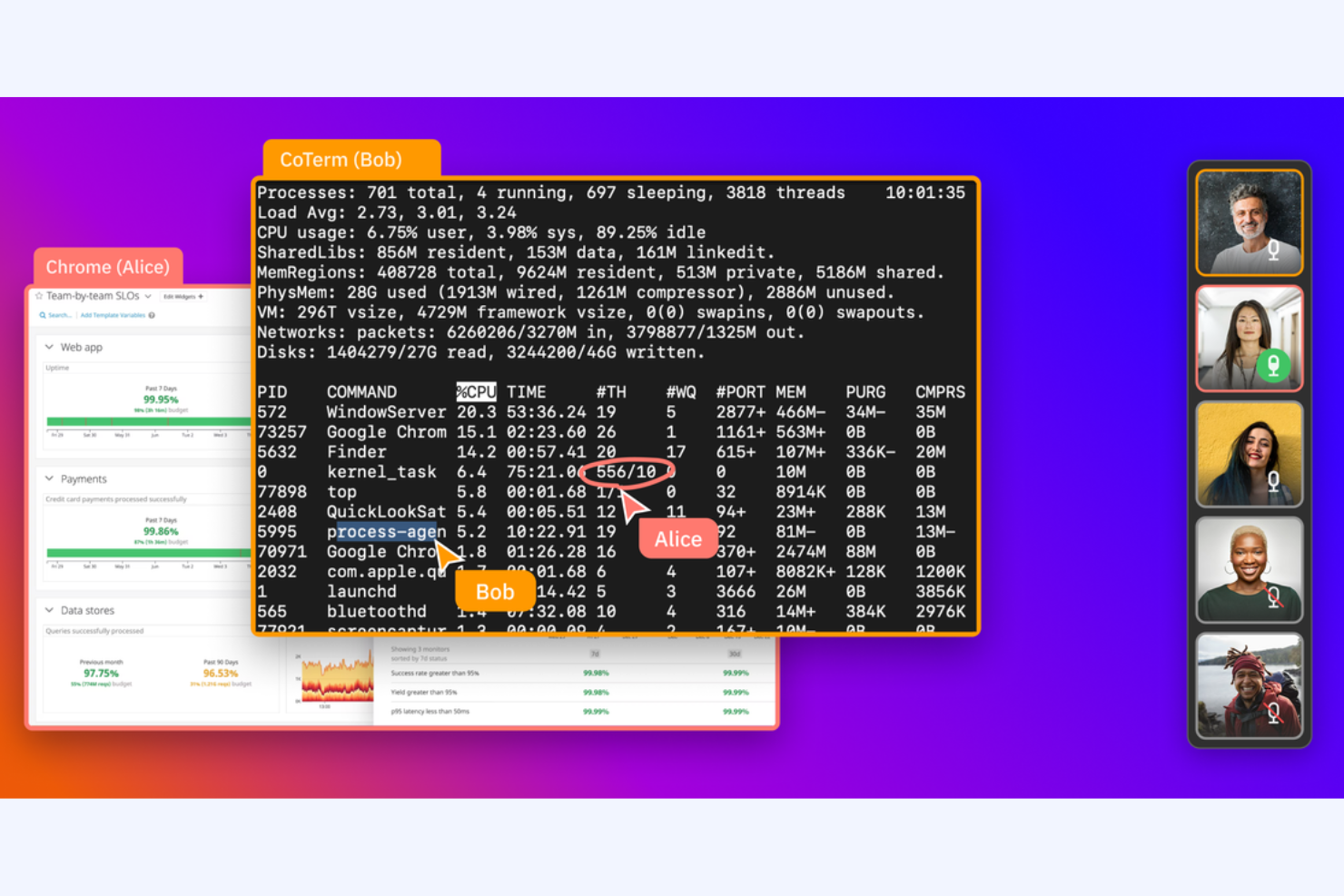
CoScreen è uno strumento di condivisione dello schermo per sviluppatori e team che necessitano di collaborazione in tempo reale. Viene utilizzato da ingegneri del software e team tecnologici per facilitare le sessioni di programmazione in coppia e di debug.
Perché è una buona alternativa a Zoom: CoScreen consente a più utenti di condividere contemporaneamente i propri schermi, rendendolo ideale per la collaborazione tecnica. A differenza di Zoom, che si concentra sulle riunioni video, CoScreen pone l'accento sulla modifica del codice e sulla risoluzione dei problemi in tempo reale. Le sue prestazioni a bassa latenza garantiscono interazioni fluide ed efficienti all'interno del team, consentendo una collaborazione efficace negli ambienti di programmazione.
Funzionalità e integrazioni principali:
Le funzionalità includono la condivisione simultanea dello schermo, che consente a tutti i membri del team di condividere il proprio schermo contemporaneamente. È inoltre possibile utilizzare videochiamate a bassa latenza per garantire una comunicazione fluida durante le sessioni. CoScreen supporta la modifica del codice in tempo reale, rendendolo uno strumento prezioso per gli sviluppatori che lavorano insieme ai progetti.
Le integrazioni includono Slack, GitHub, Jira, Asana, Google Calendar, Zoom, Visual Studio Code, IntelliJ IDEA e altro.
Pros and Cons
Pros:
- Ideale per la programmazione in coppia
- Prestazioni a bassa latenza
- Modifica del codice in tempo reale
Cons:
- Pensato per gli sviluppatori
- Funzionalità non tecniche limitate
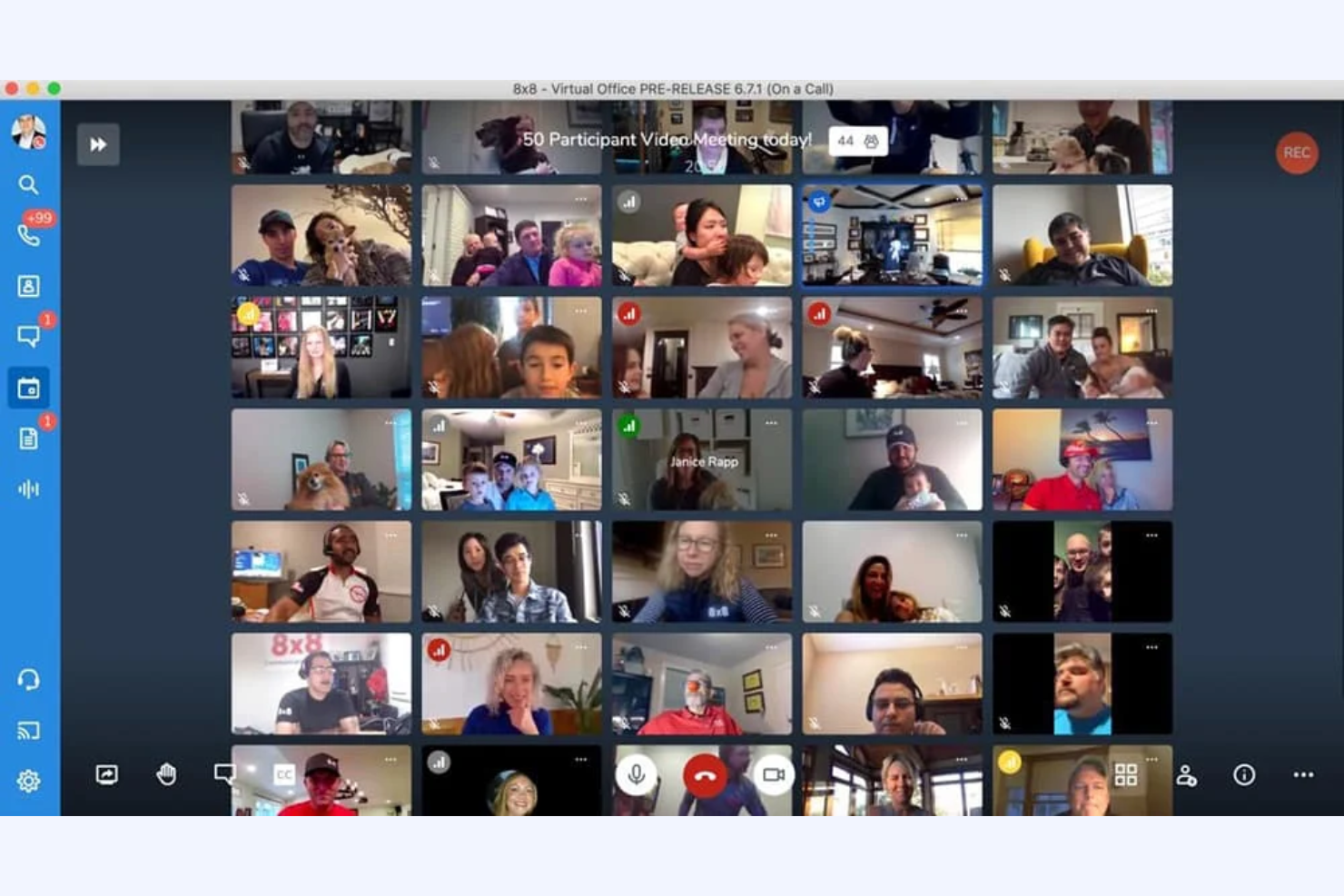
Jitsi è uno strumento a codice aperto per le videoconferenze destinato a individui e team alla ricerca di soluzioni di comunicazione flessibili e sicure. Offre una piattaforma per ospitare riunioni virtuali senza richiedere account utente, download o un piano a pagamento.
Perché è una buona alternativa a Zoom: le riunioni Jitsi offrono il controllo sui propri dati e sulla privacy, l'ideale se la sicurezza è una preoccupazione. È possibile personalizzare e ospitare il proprio server, garantendo una maggiore sicurezza per le riunioni di videoconferenza gratuite; inoltre, la sua natura a codice aperto consente di modificare ed estendere la piattaforma per adattarla alle proprie esigenze specifiche, a differenza di Zoom, che è un sistema chiuso.
Funzionalità e integrazioni principali:
Le funzionalità includono video e audio di alta qualità, garantendo una comunicazione chiara durante le riunioni più lunghe. È inoltre possibile utilizzare la funzione chat della piattaforma per comunicare tramite testo insieme alle videochiamate. Jitsi supporta la condivisione dello schermo, consentendo di presentare informazioni e collaborare efficacemente con il proprio team.
Le integrazioni variano in base all'hosting e alla configurazione; possono essere estese tramite estensioni e API a codice aperto.
Pros and Cons
Pros:
- Flessibilità del codice aperto
- Elevata privacy dei dati
- Opzione di hosting autonomo
Cons:
- Può richiedere competenze tecniche
- Supporto limitato per riunioni di grandi dimensioni
Altre alternative a Zoom
Ecco alcune alternative aggiuntive a Zoom per i software di videoconferenza che non sono state incluse nel mio elenco, ma che vale comunque la pena prendere in considerazione:
- ON24
Ideale per webinar basati sui dati
- TeamViewer
Ideale per l'assistenza remota
- Miro
Ideale per la collaborazione visiva dedicata


Come valuto le alternative a Zoom
Divido la mia valutazione in due livelli: requisiti fondamentali (come video HD, registrazione e integrazioni con gli strumenti di gestione dei progetti) e fattori distintivi che separano gli strumenti migliori per i team di progetto.
Funzionalità fondamentali (requisiti essenziali per questo elenco)
Quando seleziono gli strumenti per il mio elenco, assegno a ciascuno un punteggio su una scala da 0 (non offre la funzionalità) a 5 (eccelle in quest'area) per ogni funzionalità fondamentale riportata di seguito. Quindi, calcolo il punteggio totale dello strumento sotto forma di percentuale. Ogni strumento deve raggiungere un punteggio totale minimo del 65% per essere preso in considerazione.
- Qualità video e audio HD: valuto se la piattaforma offre video stabile e ad alta definizione per chiamate che vanno da un rapido confronto individuale a una revisione dello sprint o a una dimostrazione per il cliente con più di 50 persone.
- Condivisione dello schermo e collaborazione: i team di progetto lavorano quotidianamente con bacheche, sequenze temporali e documenti, quindi cerco una condivisione dello schermo fluida, con annotazioni, controllo remoto e supporto per più presentatori durante le sessioni di lavoro.
- Registrazione e trascrizione delle riunioni: acquisire le decisioni della pianificazione dello sprint e i feedback degli stakeholder è importante, quindi ogni strumento viene valutato in base alla registrazione nel cloud, all'accuratezza della trascrizione automatica e alla possibilità di effettuare ricerche nelle sessioni passate.
- Chat e messaggistica: oltre alla chat durante le riunioni, verifico la presenza di canali persistenti e conversazioni organizzate in thread che mantengano ordinate le discussioni sui progetti tra una riunione e l'altra.
- Integrazioni con calendari e strumenti di gestione dei progetti: cerco connessioni native con Google Calendar, Outlook e strumenti di gestione dei progetti come Jira, Asana o Monday, in modo che le riunioni siano collegate direttamente ai flussi di lavoro che supportano.
- Pianificazione e gestione delle riunioni: gli appuntamenti ricorrenti, come gli stand-up e le retrospettive, richiedono una pianificazione semplice, quindi valuto i controlli dell'organizzatore, i link univoci per le riunioni, le sale d'attesa e gli inviti automatici.
Una volta ottenuto un elenco di strumenti che soddisfano questi criteri, considero ciò che distingue ciascuna piattaforma.
Fattori distintivi (ciò che differenzia i fornitori)
Ecco come confronto i diversi fornitori:
Funzionalità distintive
I riepiloghi delle riunioni basati sull'IA sono un importante fattore distintivo. Cerco strumenti che generino automaticamente elementi d'azione e decisioni chiave, così i responsabili dei progetti possono evitare di prendere appunti manualmente dopo ogni stand-up o retrospettiva. Anche le stanze separate sono importanti quando si organizzano workshop o sessioni di pianificazione dello sprint con più sottoteam che necessitano di tempo di lavoro in parallelo. Per i team distribuiti su più fusi orari, vale la pena valutare anche la messaggistica video asincrona, poiché consente agli stakeholder di registrare rapidi aggiornamenti sullo stato del progetto invece di programmare un'altra chiamata dal vivo.
Oltre le funzionalità
La struttura dei prezzi è molto importante quando si passa da Zoom. Valuto se le licenze per organizzatore siano adatte ai team in cui solo pochi responsabili di progetto gestiscono le riunioni, rispetto ai modelli per utente che coprono tutti. La sicurezza è un altro fattore chiave: verifico la presenza di E2EE, SSO e certificazioni di conformità come SOC 2 e GDPR, soprattutto per i team che gestiscono dati sensibili relativi ai progetti dei clienti. Anche la profondità delle integrazioni va oltre la semplice disponibilità di un connettore. Analizzo quanto strettamente uno strumento si colleghi al proprio insieme di strumenti per la gestione dei progetti, ad esempio verificando se una riunione viene allegata automaticamente a un ticket Jira o se le note vengono sincronizzate in Confluence.
Perché cercare un'alternativa a Zoom?
Sebbene Zoom sia una buona scelta tra i software per videoconferenze e riunioni online, esistono diversi motivi per cui alcuni utenti cercano soluzioni alternative. Potresti essere alla ricerca di un'alternativa a Zoom perché…
- Hai bisogno di funzionalità di sicurezza più avanzate
- Il tuo team richiede una migliore integrazione con gli strumenti
- Stai affrontando limitazioni con le riunioni numerose
- Desideri più opzioni di personalizzazione
- Il tuo team riscontra frequenti problemi di connettività
Se ti riconosci in una di queste situazioni, sei nel posto giusto. Il mio elenco include diverse opzioni di software per videoconferenze e riunioni online più adatte ai team che affrontano queste difficoltà con Zoom e cercano soluzioni alternative.
Funzionalità principali di Zoom
Ecco alcune delle principali funzionalità di Zoom, utili per confrontare le soluzioni alternative e valutarne l'offerta:
- Sfondi virtuali: Cambia lo sfondo della riunione con qualsiasi immagine o video, contribuendo a mantenere la privacy e a ridurre le distrazioni.
- Sale riunioni separate: Dividi la riunione in chiamate di gruppo più piccole per discussioni mirate durante workshop o attività di squadra.
- Condivisione dello schermo: Condividi il desktop o applicazioni specifiche con il tuo team per presentare le informazioni in modo efficace durante le riunioni.
- Registrazioni e trascrizioni: Registra le riunioni e genera automaticamente le trascrizioni, offrendo una risorsa a chi non ha potuto partecipare.
- Chat della riunione: Usa la funzione di chat per inviare messaggi ai partecipanti, condividere file e migliorare la comunicazione durante le riunioni.
- Sondaggi e questionari: Raccogli feedback o prendi decisioni rapidamente con sondaggi e questionari durante la riunione, coinvolgendo attivamente i partecipanti.
- Crittografia end-to-end: Garantisci la sicurezza delle riunioni con la crittografia, proteggendo i dati e le comunicazioni.
- Sala d'attesa: Controlla quando i partecipanti accedono alla riunione inserendoli in una sala d'attesa prima dell'inizio della sessione.
- Strumenti di annotazione: Usa gli strumenti di annotazione per evidenziare o modificare i contenuti condivisi, migliorando la collaborazione e la comprensione.
- Alzata di mano virtuale: Consenti ai partecipanti di alzare virtualmente la mano quando desiderano parlare, facilitando la gestione efficiente delle riunioni più numerose.