

I 10 migliori software per calendari dei dipendenti recensiti nel 2026

Miglior software per calendari dei dipendenti


Gestire il calendario di un team può sembrare come cercare di destreggiarsi tra troppe cose contemporaneamente. La difficoltà di coordinare i turni, evitare conflitti e mantenere tutti sulla stessa lunghezza d’onda può mettere a dura prova il tuo tempo e la tua pazienza.
È qui che entra in gioco il software per calendari dei dipendenti, che ti permette di dire addio ai fogli presenze cartacei e alla gestione di fogli di calcolo Excel. Grazie a questi strumenti efficienti, puoi ridurre le difficoltà legate alla pianificazione, mantenere il tuo team organizzato e migliorare il flusso di lavoro complessivo.
Nella mia esperienza di valutazione dei software, ho visto come lo strumento giusto possa fare una grande differenza. Questo articolo ti guiderà attraverso le mie scelte migliori tra i software per calendari dei dipendenti, mostrandone caratteristiche e vantaggi distintivi, così potrai trovare la soluzione perfetta per le esigenze del tuo team.
Perché fidarsi dei nostri consigli sui software
Il nostro team testa e recensisce software dal 2012. In quanto project manager noi stessi, sappiamo quanto sia difficile — e importante — scegliere il software giusto.
Per questa guida, abbiamo valutato gli strumenti attraverso test pratici e ricerche indipendenti, assegnando un punteggio agli strumenti in base ai nostri criteri di selezione. Ci basiamo inoltre sulle competenze di leader di pensiero del settore e di professionisti attivi nella gestione dei progetti.
Le nostre recensioni riflettono il nostro giudizio editoriale umano, non un discorso di vendita.
Revisori esperti:
Tabella comparativa dei software per calendari dei dipendenti
La tabella seguente confronta i dettagli dei prezzi delle mie migliori selezioni di software per calendari dei dipendenti.
| Tool | Best For | Trial Info | Price | ||
|---|---|---|---|---|---|
| 1 | Ideale per il rilevamento delle presenze in tempo reale | Prova gratuita di 30 giorni + demo gratuita disponibile | Da $50/mese | Website | |
| 2 | Ideale per i team dei ristoranti | Prova gratuita di 14 giorni + piano gratuito disponibile | Da CAD$39.99/località/mese | Website | |
| 3 | Ideale per la pianificazione delle piccole imprese | Prova gratuita disponibile | A partire da $2.50/utente/mese | Website | |
| 4 | Ideale per chi utilizza l'ecosistema Microsoft | Disponibile un piano gratuito | Da $4/utente/mese (fatturazione annuale) | Website | |
| 5 | Ideale per le esigenze delle grandi aziende | Demo gratuita disponibile | Prezzo su richiesta | Website | |
| 6 | Ideale per la pianificazione automatica | Prova gratuita di 30 giorni disponibile | Da $28/mese | Website | |
| 7 | Ideale per modelli di turni complessi | Demo gratuita disponibile | Prezzo su richiesta | Website | |
| 8 | Ideale per forza lavoro stagionale | Prova gratuita di 14 giorni + piano gratuito + demo gratuita disponibili | A partire da $2/membro attivo/mese (fatturato annualmente) | Website | |
| 9 | Ideale per le esigenze di pianificazione dei turni nel retail | Prova gratuita + piano gratuito disponibile | Da $1.70/utente/mese (fatturato annualmente) | Website | |
| 10 | Ideale per strumenti di feedback dei dipendenti | Prova gratuita di 21 giorni + demo gratuita disponibile | A partire da $2,93/utente/mese (fatturazione annuale) | Website |
Recensioni dei migliori software per calendari dei dipendenti
Di seguito trovi i miei riepiloghi dettagliati dei migliori software per calendari dei dipendenti inclusi nella mia selezione. Le mie recensioni offrono un’analisi approfondita delle caratteristiche principali, dei pro e dei contro, delle integrazioni e dei casi d’uso ideali di ogni strumento, per aiutarti a trovare quello più adatto a te.

TimeTrex
Ideale per il rilevamento delle presenze in tempo reale

TimeTrex è una piattaforma di gestione della forza lavoro che collega la programmazione dei dipendenti e i calendari dei turni direttamente al rilevamento delle presenze, alla gestione delle assenze e all'elaborazione delle paghe.
Per chi è più adatto TimeTrex?
TimeTrex è una soluzione adatta ai team operativi e HR di settori basati su turni come manifatturiero, vendita al dettaglio e sanità che necessitano di una programmazione integrata al rilevamento delle presenze.
Perché ho scelto TimeTrex
Ho incluso TimeTrex tra le mie scelte principali perché il rilevamento delle presenze in tempo reale è davvero centrale nel funzionamento della piattaforma, non una funzionalità aggiunta. Quando un dipendente timbra tramite browser, app mobile o un orologio fisico, quei dati di presenza vengono visualizzati immediatamente rispetto al turno programmato nel calendario. Mi piace anche il fatto che la geolocalizzazione e il controllo GEO ti permettano di definire esattamente dove siano valide le timbrature, quindi la vista delle presenze live riflette realmente chi è presente in sede. Unito al calcolo automatico delle maturazioni che si aggiorna in tempo reale, i responsabili hanno sempre una visione precisa della copertura senza dover rincorrere le HR.
Funzionalità principali di TimeTrex
- Programmazione turni drag-and-drop: Crea e modifica i turni dei dipendenti in modo visivo, con strumenti per rilevare e risolvere i conflitti prima che incidano sulla copertura.
- Gestione ferie e assenze: I dipendenti inviano richieste di permesso tramite un portale self-service e le approvazioni aggiornano automaticamente sia il calendario che il libro paga.
- Gestione del calendario: Un calendario centralizzato consente di visualizzare turni, assenze e disponibilità del personale in un unico posto per tutti i team.
- Ottimizzazione dei turni tramite AI: TimeTrex utilizza un assistente AI per aiutare ad automatizzare la creazione dei turni in base a disponibilità, competenze e domanda dell'azienda.
Integrazioni TimeTrex
TimeTrex offre una gamma ridotta di integrazioni native, limitate a fornitori di buste paga come ADP, Paychex, Sage, Ceridian e QuickBooks. La piattaforma supporta inoltre integrazioni bidirezionali e tramite file tramite la sua API, oltre a mettere a disposizione un'API aperta per esigenze personalizzate.
Pros and Cons
Pros:
- Libro paga integrato con calcolo automatico delle tasse
- Il riconoscimento facciale biometrico previene il buddy punching
- Edizione open-source gratuita disponibile per self-hosting
Cons:
- La configurazione iniziale richiede un notevole tempo di impostazione
- I cruscotti di reportistica mancano di personalizzazione ad hoc
New Product Updates from TimeTrex
TimeTrex Adds Quick Punch App With Offline and QR Support
TimeTrex adds a new Quick Punch app, offline punching, QR code scanning, punch images, configurable messages, and punch warnings or lockouts to improve employee clock-ins across browsers and local computers. For more information, visit TimeTrex’s official site.
 .
.
7shifts
Ideale per i team dei ristoranti

7shifts è uno strumento di gestione degli orari e della forza lavoro progettato specificamente per l'industria della ristorazione. Aiuta a gestire i turni del personale, monitorare i costi del lavoro e migliorare la comunicazione all'interno del team.
Perché ho scelto 7shifts: È pensato per i team dei ristoranti, offrendo funzionalità che rispondono alle esigenze particolari del settore della ristorazione. La funzione di cambio turno facilita la gestione dei cambiamenti all'ultimo minuto da parte del team, mentre il software personalizzabile per la gestione delle mance garantisce calcoli precisi e una distribuzione corretta al personale.
Funzionalità e integrazioni principali:
Le funzionalità includono la previsione del costo del lavoro per aiutarti a mantenere il budget, strumenti per l'ingaggio dei dipendenti per aumentare il morale e la gestione della conformità per assicurarti di rispettare le normative del settore. Tutte queste funzionalità lavorano insieme per rafforzare l'efficienza della pianificazione nel tuo ristorante.
Le integrazioni includono Toast, Square, Clover, ADP Workforce Now, Gusto, Paychex, TouchBistro, MarginEdge e altre ancora.
Pros and Cons
Pros:
- Adattato alle esigenze della ristorazione
- Gestione efficace dei costi del lavoro
- Strumenti per la gestione della conformità
Cons:
- Nessun promemoria per le pause dei dipendenti
- Discrepanze nei dati dei POS

Ideale per la pianificazione delle piccole imprese

When I Work è una soluzione di pianificazione e uno strumento di gestione della forza lavoro progettato per aiutare le piccole imprese di vari settori a mantenere tutto il necessario in un unico posto. Aiuta a gestire gli orari dei dipendenti e garantisce che i team siano ben comunicati.
Perché ho scelto When I Work: È pensato per le piccole imprese, offrendo strumenti che semplificano la gestione dei turni. La piattaforma consente al tuo team di scambiarsi i turni in modo fluido, e la sua interfaccia intuitiva permette al personale di adattarsi rapidamente senza bisogno di una formazione approfondita. Offre inoltre funzionalità di timbratura che assicurano un monitoraggio accurato delle ore per l'elaborazione delle buste paga.
Funzionalità salienti e integrazioni:
Le funzionalità includono un intuitivo programma drag-and-drop che semplifica la pianificazione dei turni, la gestione delle richieste di permessi, il monitoraggio della presenza per aumentare la responsabilità dei dipendenti e la messaggistica di squadra per comunicazioni istantanee. Tutte queste caratteristiche aiutano a mantenere il team organizzato e connesso.
Le integrazioni comprendono QuickBooks, Gusto, ADP, Square, Rippling, OnPay, Zapier, GoCo, Paychex e altre ancora.
Pros and Cons
Pros:
- Interfaccia facile da usare
- Procedura di onboarding semplice
- Template turni personalizzabili
Cons:
- Nessuna notifica automatica delle pause dipendenti
- Visibilità del personale limitata

Ideale per chi utilizza l'ecosistema Microsoft

Microsoft Teams è una piattaforma di comunicazione e collaborazione che include funzionalità di pianificazione del personale, rivolta principalmente alle aziende che utilizzano già prodotti Microsoft. Facilita la comunicazione tra i team, la pianificazione e la gestione delle attività, diventando così uno strumento versatile per diversi settori.
Perché ho scelto Microsoft Teams: Si integra perfettamente con l'ecosistema Microsoft, permettendo di sfruttare gli strumenti Microsoft già in uso per un flusso di lavoro coeso. Puoi gestire i turni direttamente all'interno di Teams, riducendo la necessità di software aggiuntivi, e le sue funzionalità, come la sostituzione dei turni e le richieste di tempo libero, sono facili da gestire. L'integrazione con Microsoft 365 aumenta la produttività consentendo un accesso rapido a documenti e altre risorse.
Funzionalità e integrazioni principali:
Le funzionalità includono videoconferenze integrate per facilitare le riunioni da remoto, condivisione di file per rafforzare la collaborazione e notifiche personalizzabili per tenere il team sempre informato. Queste caratteristiche aiutano a mantenere una comunicazione e coordinazione efficace all'interno del team.
Le integrazioni includono Microsoft 365, Outlook, OneDrive, SharePoint, Power BI, Trello, Asana, Salesforce, Dropbox e altre ancora.
Pros and Cons
Pros:
- Blocca l'accesso alle chat fuori turno
- Notifiche personalizzabili
- Videoconferenze integrate
Cons:
- Richiede la configurazione di un account Microsoft
- Nessun supporto per turni consecutivi

Workday
Ideale per le esigenze delle grandi aziende

Workday è uno strumento completo per la gestione della forza lavoro, progettato per le grandi aziende di diversi settori. Facilita la pianificazione dei turni, il monitoraggio delle presenze e l’ottimizzazione del lavoro, garantendo una gestione efficiente del personale.
Perché ho scelto Workday: Risponde alle esigenze complesse delle grandi aziende con funzionalità come la generazione di orari basata su intelligenza artificiale e la previsione della domanda. Workday offre una pianificazione centralizzata, consentendo a manager e dipendenti di gestire i propri orari da dispositivi mobili, mentre la bacheca dei turni disponibili e lo scambio dei turni assicurano flessibilità e adattabilità nella gestione di grandi team.
Funzionalità principali e integrazioni:
Le funzionalità includono l’assegnazione automatica dei turni per semplificare i processi di pianificazione, strumenti di ottimizzazione della forza lavoro per massimizzare l’efficienza del personale e previsioni della domanda per anticipare le necessità di organico. Queste caratteristiche rispondono alle esigenze dinamiche delle grandi imprese.
Le integrazioni comprendono Workday Human Capital Management, Workday Payroll e altro ancora.
Pros and Cons
Pros:
- Pianificazione supportata da intelligenza artificiale
- Scalabile per grandi team
- Previsioni della domanda in tempo reale
Cons:
- Ritardi frequenti nel caricamento
- Opzioni di filtro dei report limitate

Ideale per la pianificazione automatica

WhenToWork è un software di pianificazione dei turni progettato per le aziende che necessitano di una gestione efficiente delle presenze. Si rivolge a una varietà di settori, aiutando a gestire i calendari e a garantire una comunicazione efficace con i dipendenti.
Perché ho scelto WhenToWork: Eccelle nella pianificazione automatizzata, così da farti risparmiare tempo nella creazione e regolazione dei turni. La funzione di assegnazione automatica dei turni consente di personalizzare le regole di pianificazione in base alle specifiche esigenze aziendali, assicurando una distribuzione equa del lavoro all'interno del team. Il sistema di notifiche di WhenToWork mantiene il team aggiornato su qualsiasi modifica, così che tutti restino sempre informati.
Caratteristiche e integrazioni principali:
Le funzionalità includono lo scambio turni e la gestione della disponibilità attraverso un servizio self-service e la compilazione automatica con un clic per i dipendenti, aiutandoti ad assecondare le preferenze del personale. Lo strumento offre inoltre report per analizzare i modelli di pianificazione e migliorare l'efficienza.
Le integrazioni non sono elencate pubblicamente.
Pros and Cons
Pros:
- Regole di pianificazione personalizzabili
- Sistema di notifiche efficiente
- Assegnazione automatica dei turni
Cons:
- Manca di GPS/geofencing integrato
- Assegnazioni di massa manuali

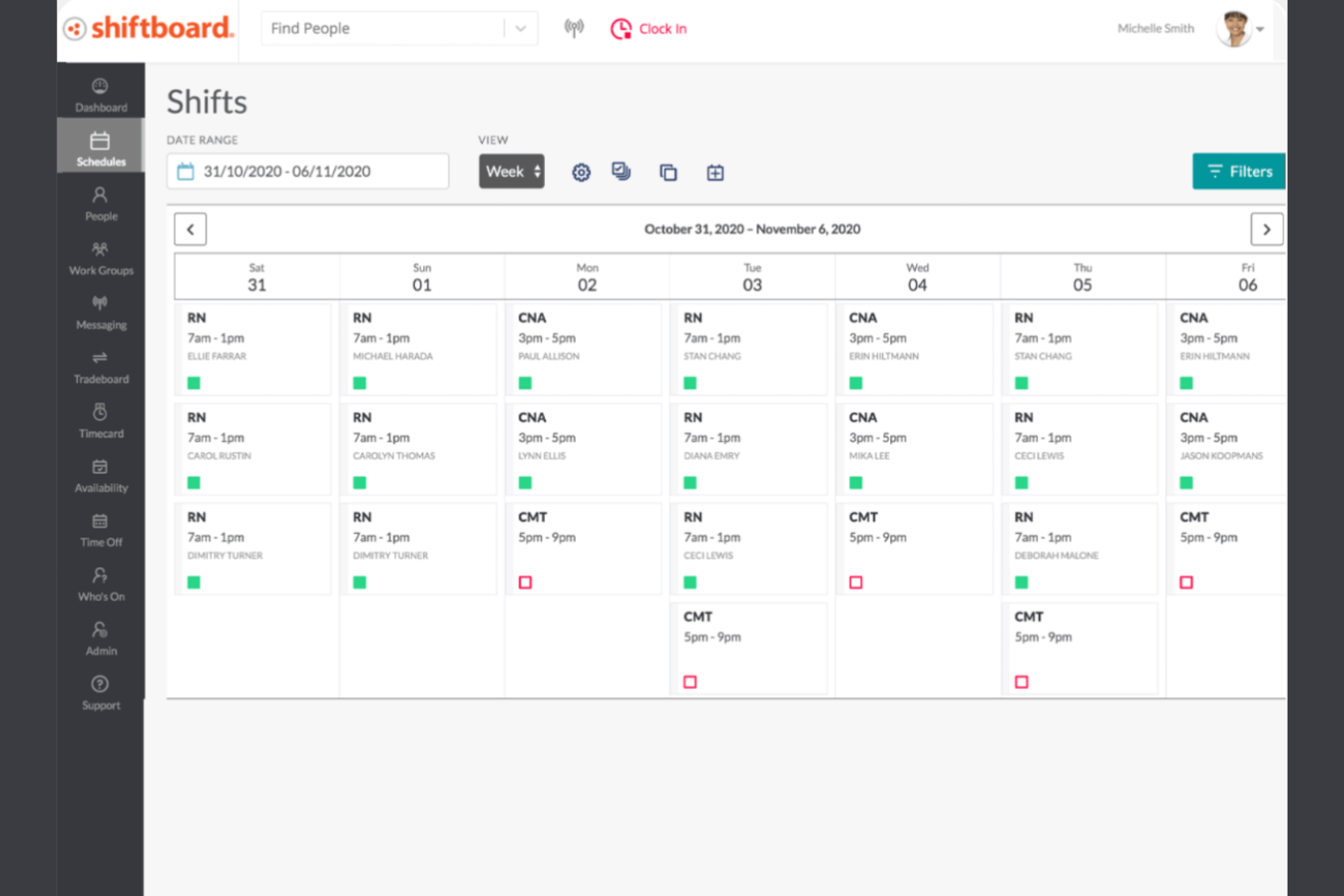
Shiftboard è uno strumento di programmazione e gestione della forza lavoro progettato per settori con esigenze di pianificazione complesse, come l'assistenza sanitaria e la produzione. Ti aiuta a gestire i turni, tracciare le ore di lavoro e garantire la conformità alle normative sul lavoro.
Perché ho scelto Shiftboard: È ideale per gestire modelli di turni complessi, rendendolo adatto per settori con requisiti di pianificazione intricati. La funzione di pianificazione automatizzata permette al tuo team di ridurre gli errori manuali e risparmiare tempo, mentre le capacità di reporting di Shiftboard offrono approfondimenti sulle operazioni della forza lavoro.
Funzionalità principali e integrazioni:
Le funzionalità includono la gestione della conformità per garantire l'adesione alle leggi sul lavoro, la pianificazione della domanda di personale per scalare la richiesta di personale e soddisfare le esigenze di servizio, e la gestione semplice dei fogli presenze che riduce gli errori in busta paga. Tutte queste funzionalità ti aiutano a gestire il team in modo efficiente ed efficace.
Le integrazioni includono ADP, Workday, Salesforce, Microsoft Dynamics, Oracle, Circadian, UKG e altri.
Pros and Cons
Pros:
- Gestisce turni complessi
- Pianificazione automatizzata
- Opzioni di report personalizzabili
Cons:
- Funzionalità mobili limitate
- Interfaccia utente di base

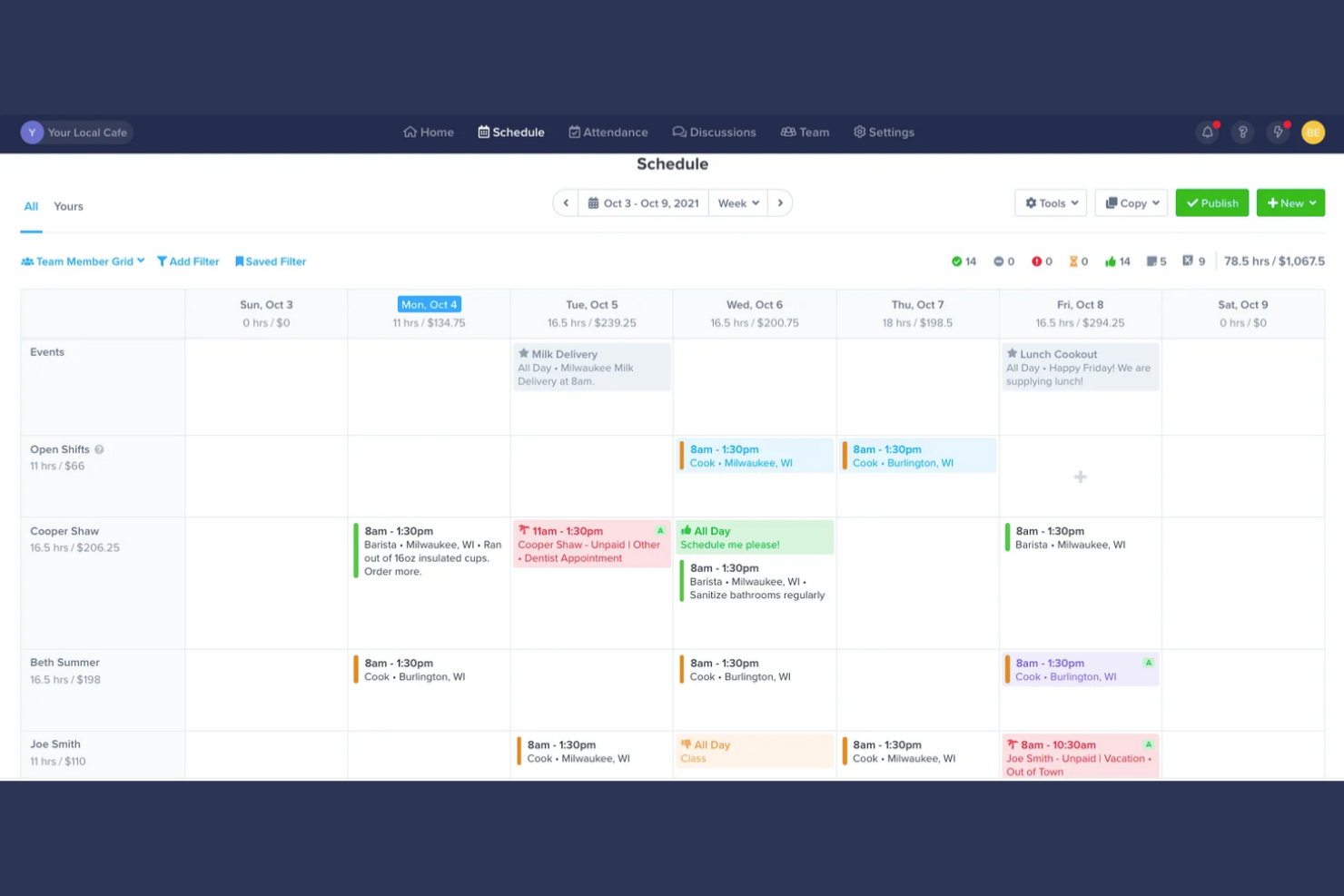
ZoomShift è un software di pianificazione pensato per le aziende con una forza lavoro stagionale, come quelle che operano nell'organizzazione di eventi e nel retail. Aiuta a gestire i turni dei dipendenti, tracciare le ore di lavoro e migliorare la comunicazione del team.
Perché ho scelto ZoomShift: È ideale per la gestione di una forza lavoro stagionale, offrendo funzionalità che permettono di affrontare le esigenze variabili di personale. Grazie a strumenti come lo scambio dei turni, il tuo team può adattare facilmente i propri orari, mentre il monitoraggio del tempo garantisce un'elaborazione delle paghe sempre precisa. Gli strumenti di comunicazione di ZoomShift mantengono il team informato su eventuali modifiche ai turni, un aspetto fondamentale durante le stagioni più intense.
Funzionalità e integrazioni di rilievo:
Funzionalità includono un generatore di turni drag-and-drop che semplifica la creazione degli orari, la gestione della disponibilità per soddisfare le preferenze dei dipendenti e l'esportazione paghe per una gestione facile degli stipendi. Queste funzionalità aiutano a rendere più efficienti le attività di pianificazione e gestione paghe.
Le integrazioni includono Google Calendar, iCalendar e altro ancora.
Pros and Cons
Pros:
- Supporta esigenze di personale stagionale
- Strumenti efficaci per lo scambio turni
- Esportazione paghe semplice
Cons:
- Nessuna importazione dati dipendenti in blocco
- Nessun tracciamento dei singoli compiti

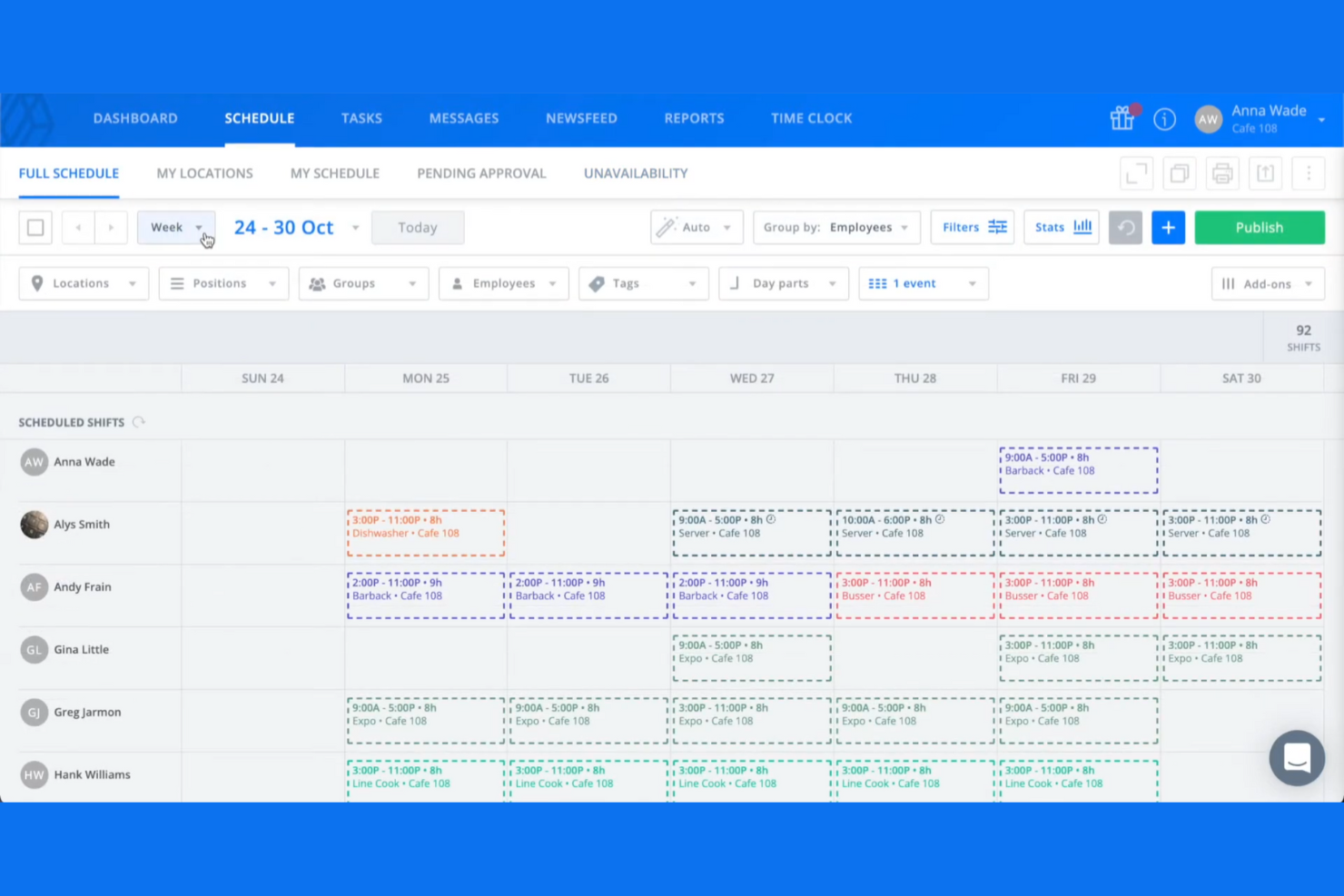
Sling è un'applicazione per la pianificazione dei turni dei dipendenti e uno strumento di gestione dei turni progettato principalmente per settori come il retail, la ristorazione e la sanità. Si concentra sulla semplificazione della gestione del personale offrendo funzionalità come il monitoraggio delle presenze, il geofencing, la gestione delle attività e la comunicazione tra team, tutto su un'unica piattaforma.
Perché ho scelto Sling: È pensata appositamente per le esigenze di pianificazione dei turni nel retail, offrendo strumenti che aiutano a gestire i turni in modo efficiente. La piattaforma consente anche di gestire ferie, scambi di turni e disponibilità dei dipendenti, facilitando la gestione della natura dinamica delle operazioni retail. Gli strumenti di comunicazione di Sling garantiscono che il tuo team resti sempre informato e connesso, aspetto fondamentale nell'ambiente frenetico del retail.
Funzionalità e integrazioni principali:
Le funzionalità includono l'ottimizzazione dei costi del lavoro per aiutarti a gestire il budget della pianificazione, la rilevazione delle presenze per garantire calcoli accurati dei salari e la gestione delle attività per facilitare l'assegnazione e il monitoraggio dei compiti. Queste caratteristiche lavorano insieme per migliorare l'efficienza e la produttività del team.
Le integrazioni includono Harbortouch, POSitouch, Gusto, Square, Toast e altri.
Pros and Cons
Pros:
- Rilevazione accurata delle presenze
- Avvisi di budget per i turni
- Piano gratuito con dipendenti e sedi illimitati
Cons:
- Funzionalità avanzate limitate
- Opzioni di personalizzazione limitate

Agendrix
Ideale per strumenti di feedback dei dipendenti

Agendrix è uno strumento di gestione degli orari e della forza lavoro progettato per piccole e medie imprese di diversi settori. Aiuta a gestire i turni dei dipendenti, il monitoraggio delle ore lavorate e migliora la comunicazione all'interno dei team.
Perché ho scelto Agendrix: Offre strumenti unici per il feedback dei dipendenti che ti permettono di raccogliere opinioni direttamente dal tuo team. Funzionalità come sondaggi e moduli di feedback consentono di comprendere la soddisfazione dei dipendenti e prendere decisioni basate sui dati raccolti. La piattaforma supporta la comunicazione bidirezionale, assicurando che il team si senta ascoltato e valorizzato, favorendo così una forza lavoro più coinvolta e produttiva.
Caratteristiche e integrazioni principali:
Caratteristiche includono un'app mobile compatibile con iPad, tablet Android, computer o telefono cellulare per mantenere il team connesso anche in movimento. I membri del team ricevono promemoria sui turni per ridurre le assenze e sono disponibili funzionalità di timbratura per una gestione accurata delle paghe. Tutte le funzionalità di Agendrix lavorano insieme per ottimizzare il processo di pianificazione dei turni e migliorare la coordinazione del team.
Integrazioni includono QuickBooks, Lightspeed, EasyPay, ADP Workforce Now, PayWorks, Sage 50, Acomba e molti altri.
Pros and Cons
Pros:
- Strumenti efficaci per il feedback dei dipendenti
- Funzionalità di comunicazione bidirezionale
- Conferme automatiche di presa visione dei turni
Cons:
- Nessuna visualizzazione trasversale dei dipartimenti per i responsabili
- Codifica colori permissive limitata
Altri software per calendari dei dipendenti
Ecco alcune ulteriori opzioni di software per calendari dei dipendenti che non sono entrate nella mia selezione, ma che vale comunque la pena prendere in considerazione:
- Connecteam
Ideale per team mobile-first
- Zoho Shifts
Ideale per l'integrazione con le app Zoho
- Homebase
Ideale per la pianificazione dei turni su più sedi


Come Valuto i Software di Calendario per Dipendenti
Divido la mia valutazione in due livelli: le funzionalità di base che ogni strumento deve offrire—calendari condivisi, visibilità delle assenze e pianificazione delle risorse—e i fattori differenzianti che distinguono uno strumento dall'altro.
Funzionalità di Base (Requisiti Fondamentali per questa Lista)
Quando seleziono gli strumenti per la mia lista, valuto ciascuno su una scala da 0 (non offre la funzionalità) a 5 (eccelle in quest'area) per ogni funzionalità di base elencata di seguito. Poi calcolo il punteggio totale dello strumento in percentuale. Ogni strumento deve raggiungere un punteggio totale minimo del 65% per essere considerato per l'inclusione.
- Calendario di Team Condiviso: Cerco un calendario centralizzato dove i manager possano visualizzare le pianificazioni tra dipartimenti, filtrare per team o ruolo, e impostare permessi affinché i collaboratori esterni vedano dettagli diversi rispetto al personale interno.
- Disponibilità & Monitoraggio delle Assenze (PTO): Ogni strumento dovrebbe mostrare le ore lavorative degli impiegati, le assenze approvate e le festività direttamente sul calendario, così da evitare di pianificare attività durante le ferie di qualcuno.
- Pianificazione e Assegnazione delle Risorse: Valuto quanto sia semplice assegnare compiti o turni direttamente dal calendario—strumenti come Float e Resource Guru gestiscono questo tramite drag-and-drop, mentre altri richiedono flussi separati.
- Integrazione e Sincronizzazione del Calendario: La sincronizzazione bidirezionale con Google Calendar, Outlook e iCal è importante, ma verifico anche le connessioni con strumenti di project management come Jira o Asana che tengano allineate le tempistiche dei progetti con i calendari dei dipendenti.
- Rilevamento di Conflitti e Sovrapposizioni: Lo strumento dovrebbe segnalare automaticamente prenotazioni doppie o sovrallocazioni, soprattutto quando viene assegnato lo stesso sviluppatore a fasi di progetto sovrapposte o a incarichi con clienti contemporanei.
- Viste Multiple del Calendario: Le viste giornaliere, settimanali e mensili sono indispensabili. Cerco anche viste tipo timeline o Gantt che permettano di avere una panoramica su un trimestre per individuare lacune di risorse prima che diventino rischi di consegna.
Una volta che ho una lista di strumenti che soddisfano questi criteri, considero ciò che distingue ciascuna piattaforma.
Fattori Differenzianti (Cosa Distingue i Fornitori)
Ecco come confronto e metto a confronto i diversi fornitori:
Funzionalità Distintive
Le heatmap del carico di lavoro sono un grande elemento di differenziazione. Cerco visualizzazioni con codifica a colori che mostrino a colpo d'occhio chi è vicino al massimo carico e chi invece ha spazio per nuovi compiti. L'intelligenza dei fusi orari è fondamentale quando il team è distribuito in più regioni: strumenti che regolano automaticamente gli orari prevengono riunioni fissate a mezzanotte per qualcuno. Valuto anche il monitoraggio del tempo integrato nel calendario, che permette ai membri del team di registrare le ore sulle attività pianificate senza cambiare applicazione, offrendo una visione in tempo reale tra le ore pianificate e quelle effettivamente lavorate.
Oltre le Funzionalità
Valuto quanto bene ogni strumento si connetta all'ecosistema di project management più ampio: le integrazioni native con Jira, Asana o Monday mantengono allineati le scadenze di progetto e i calendari del personale senza necessità di aggiornamenti manuali. La scalabilità è un altro fattore che considero, poiché uno strumento che funziona per un team di 15 persone può non reggere quando si devono gestire i calendari di 200 dipendenti e diversi portafogli di progetti. Controllo inoltre la disponibilità di app mobili con reale parità di funzionalità, perché i team ibridi hanno bisogno che i manager possano approvare ferie o riassegnare incarichi direttamente dal loro telefono tra una riunione e l'altra.
Come scegliere il software per calendari dei dipendenti
È facile perdersi in lunghi elenchi di funzionalità e strutture tariffarie complesse. Per aiutarti a rimanere concentrato mentre affronti il tuo processo di selezione del software, ecco una lista di fattori da tenere a mente:
| Fattore | Elementi da considerare |
|---|---|
| Scalabilità | Il software può crescere insieme al tuo team? Verifica se lo strumento è in grado di gestire un numero maggiore di utenti o funzionalità man mano che la tua attività si espande, senza aumenti significativi dei costi o della complessità. |
| Integrazioni | Si connette agli strumenti che già utilizzi? Verifica la compatibilità con i sistemi attuali, come i software per le buste paga o per le risorse umane, per evitare silos di dati e semplificare i flussi di lavoro. |
| Personalizzazione | Puoi adattarlo alle tue esigenze? Assicurati che il software consenta modifiche per adattarsi alle tue specifiche politiche di pianificazione e alla struttura del tuo team. |
| Semplicità d'uso | L'interfaccia è intuitiva? Cerca un design facile da usare che riduca al minimo i tempi di formazione e aiuti il tuo team ad adottare rapidamente lo strumento. |
| Implementazione e onboarding | Quanto tempo occorrerà per configurarlo? Valuta il tempo e le risorse necessari per una transizione fluida, comprese le sessioni di formazione e la migrazione dei dati. |
| Costo | Rientra nel tuo budget? Confronta i piani tariffari e considera eventuali costi nascosti. Verifica se è disponibile una prova gratuita da effettuare prima di impegnarti. |
| Misure di sicurezza | Quanto sono sicuri i tuoi dati? Assicurati che il software disponga di solide misure di sicurezza, come la crittografia e aggiornamenti regolari, per proteggere le informazioni sensibili. |
| Disponibilità dell'assistenza | Puoi ricevere aiuto quando ne hai bisogno? Considera la disponibilità dell'assistenza clienti e i canali offerti, come chat dal vivo, telefono o posta elettronica. |
Che cos'è il software per il calendario dei dipendenti?
Il software per il calendario dei dipendenti è uno strumento che aiuta le aziende a pianificare e gestire i turni e la disponibilità dei dipendenti. Questi strumenti vengono comunemente utilizzati da manager, professionisti delle risorse umane e responsabili dei team per organizzare in modo efficiente gli orari di lavoro. Il monitoraggio del tempo, lo scambio dei turni e i promemoria automatici aiutano a ridurre i conflitti di pianificazione, migliorando la comunicazione e la conformità alle leggi sul lavoro. Nel complesso, questi strumenti fanno risparmiare tempo e aumentano la produttività del team, mantenendo tutti aggiornati.
Funzionalità del software per il calendario dei dipendenti
Quando scegli il software per il calendario dei dipendenti, presta attenzione alle seguenti funzionalità chiave:
- Pianificazione dei turni: consente ai manager di creare e gestire gli orari di lavoro dei dipendenti, garantendo la copertura e riducendo al minimo i conflitti.
- Monitoraggio del tempo: monitora le ore di lavoro dei dipendenti per elaborare correttamente le buste paga e garantire la conformità alle normative sul lavoro.
- Scambio dei turni: consente ai dipendenti di scambiarsi i turni con i colleghi, offrendo flessibilità e riducendo il carico di lavoro manageriale.
- Gestione della disponibilità: consente ai dipendenti di inserire la propria disponibilità, aiutando i manager a pianificare i turni in base alle preferenze del team.
- Promemoria automatici: invia notifiche ai dipendenti sui turni imminenti o sulle modifiche, riducendo le assenze ingiustificate e le incomprensioni.
- Monitoraggio dei costi del lavoro: offre informazioni sui costi della pianificazione, consentendo alle aziende di ottimizzare i budget e ridurre le spese per gli straordinari.
- Accesso da dispositivi mobili: offre un'app mobile per accedere agli orari e alle notifiche ovunque ci si trovi, aumentando l'accessibilità per tutti i membri del team.
- Report personalizzabili: genera report su misura per analizzare i modelli di pianificazione, contribuendo a migliorare l'efficienza e il processo decisionale.
- Gestione della conformità: garantisce che gli orari rispettino le leggi e le normative sul lavoro, riducendo i rischi legali per le aziende.
- Funzionalità di integrazione: collega il sistema agli strumenti esistenti, come i sistemi per le buste paga e le risorse umane, per creare un flusso di lavoro coerente ed evitare silos di dati.
Vantaggi del software per il calendario dei dipendenti
L'implementazione del software per il calendario dei dipendenti offre diversi vantaggi al tuo team e alla tua azienda. Ecco alcuni dei benefici che puoi aspettarti:
- Maggiore precisione nella pianificazione: la pianificazione automatica e il monitoraggio del tempo riducono gli errori e garantiscono che i turni siano assegnati correttamente.
- Comunicazione rafforzata: funzionalità come promemoria e notifiche automatiche mantengono tutti informati sulle modifiche agli orari e sui turni imminenti.
- Maggiore flessibilità: lo scambio dei turni e la gestione della disponibilità consentono ai dipendenti di modificare i propri orari e di gestire le esigenze personali.
- Efficienza dei costi: il monitoraggio dei costi del lavoro aiuta le aziende a controllare le spese e ottimizzare la pianificazione, riducendo gli straordinari non necessari.
- Garanzia di conformità: le funzionalità di gestione della conformità assicurano che gli orari rispettino le leggi sul lavoro, riducendo al minimo i rischi legali.
- Migliore processo decisionale: i report personalizzabili offrono informazioni sui modelli di pianificazione, aiutando i manager ad apportare modifiche consapevoli.
- Accessibilità: l'accesso da dispositivi mobili consente ai dipendenti di visualizzare e gestire i propri orari ovunque si trovino, aumentando la comodità e il coinvolgimento.
Costi e prezzi del software per il calendario dei dipendenti
La scelta di un software per il calendario dei dipendenti richiede la comprensione dei vari piani e modelli di prezzo disponibili. I costi variano in base alle funzionalità, alle dimensioni del team, ai componenti aggiuntivi e ad altro ancora. La tabella seguente riassume i piani più comuni, i relativi prezzi medi e le funzionalità tipicamente incluse nelle soluzioni software per il calendario dei dipendenti:
Tabella comparativa dei piani per il software del calendario dei dipendenti
| Tipo di piano | Prezzo medio | Funzionalità comuni |
|---|---|---|
| Piano gratuito | $0 | Pianificazione di base, monitoraggio del tempo e assistenza limitata. |
| Piano personale | $5-$15/utente/mese | Pianificazione avanzata, accesso da dispositivi mobili e scambio dei turni. |
| Piano aziendale | $15-$30/utente/mese | Reportistica completa, funzionalità di integrazione e gestione della conformità. |
| Piano per grandi aziende | $30-$50/utente/mese | Soluzioni personalizzabili, assistenza prioritaria e funzionalità di sicurezza avanzate. |
Domande frequenti sul software per il calendario dei dipendenti
Ecco alcune risposte alle domande comuni sul software per il calendario dei dipendenti:
Quanto è sicuro il software per il calendario dei dipendenti?
La maggior parte dei software per il calendario dei dipendenti dà priorità alla sicurezza per proteggere i dati, utilizzando la crittografia e aggiornamenti regolari per salvaguardare le informazioni. Verifica sempre la presenza di certificazioni di sicurezza e la conformità a standard come il GDPR e chiedi ai fornitori informazioni sulle loro misure di sicurezza. Considera soluzioni con autenticazione a più fattori per rafforzare la protezione.
In che modo il software per il calendario dei dipendenti può aiutare il mio team a gestire le scadenze dei progetti?
Il software per il calendario dei dipendenti consente di assegnare, visualizzare e monitorare le scadenze dei progetti in uno spazio condiviso. Avere tutto sotto controllo aiuta a evitare le attività non completate e facilita il coordinamento delle consegne da parte del team, consentendo di individuare rapidamente i colli di bottiglia.
Posso automatizzare le attività di pianificazione ripetitive con le app calendario per i dipendenti?
Sì, molte piattaforme calendario consentono di automatizzare le riunioni ricorrenti, inviare promemoria e persino pianificare automaticamente in base alla disponibilità dei membri del team. Ciò riduce il lavoro manuale e aiuta il team a concentrarsi sulle attività a maggior valore aggiunto.
Quanto tempo richiede l'implementazione del software per il calendario dei dipendenti?
I tempi di implementazione variano. Uno strumento semplice potrebbe richiedere alcuni giorni per essere implementato, mentre i sistemi più complessi potrebbero richiedere settimane, ma molte soluzioni offrono configurazioni rapide e semplici. Alcuni fornitori offrono anche assistenza per l’avvio, come video di formazione e presentazioni guidate del prodotto. Considera la familiarità del tuo team con la tecnologia e la complessità delle tue esigenze di pianificazione.
È necessaria una formazione per utilizzare il software per il calendario dei dipendenti?
Sì, di solito è necessaria una certa formazione, ma spesso è minima. Molti strumenti sono facili da usare e dispongono di interfacce intuitive che contribuiscono a ridurre la curva di apprendimento. Cerca soluzioni che offrano risorse formative come tutorial, webinar e assistenza tramite chat. Questo può aiutare il team a diventare rapidamente operativo e a iniziare a trarre vantaggio dal software.