

I 10 migliori software di gestione dei progetti ERP recensiti nel 2026

Elenco dei migliori software ERP per la gestione dei progetti


La gestione dei progetti avviene raramente in modo isolato. Devi coordinare persone, tempistiche, budget e dipendenze, spesso tra più team e sistemi. Quando questi elementi risiedono in strumenti separati, le attività rallentano rapidamente. Il software ERP per la gestione dei progetti riunisce pianificazione, esecuzione e reportistica in un unico sistema, facilitando il mantenimento del ritmo dei progetti senza un coordinamento manuale costante.
In base alla mia esperienza nel testare queste piattaforme, la soluzione ERP giusta può migliorare significativamente la visibilità, ridurre il lavoro da rifare e aiutare i team a rimanere allineati man mano che i progetti crescono. Ho esaminato diverse opzioni per evidenziare quali strumenti supportano realmente i flussi di lavoro dei progetti e quali aggiungono complessità inutile.
In questo articolo esaminerò le mie scelte principali di software ERP per la gestione dei progetti, concentrandomi sul modo in cui ogni strumento supporta la collaborazione, il monitoraggio e la chiarezza operativa. Che tu stia gestendo iniziative complesse o semplicemente cercando di ridurre gli ostacoli tra i team, qui troverai un'opzione che vale la pena prendere in considerazione.
Perché fidarsi dei nostri consigli sui software
Il nostro team testa e recensisce software dal 2012. In quanto project manager noi stessi, sappiamo quanto sia difficile — e importante — scegliere il software giusto.
Per questa guida, abbiamo valutato gli strumenti attraverso test pratici e ricerche indipendenti, assegnando un punteggio agli strumenti in base ai nostri criteri di selezione. Ci basiamo inoltre sulle competenze di leader di pensiero del settore e di professionisti attivi nella gestione dei progetti.
Le nostre recensioni riflettono il nostro giudizio editoriale umano, non un discorso di vendita.
Revisori esperti:
Tabella comparativa dei software ERP per la gestione dei progetti
Questa tabella comparativa riassume i dettagli sui prezzi delle mie migliori selezioni di software ERP per la gestione dei progetti.
| Tool | Best For | Trial Info | Price | ||
|---|---|---|---|---|---|
| 1 | Ideale per connettere la gestione dei progetti con la gestione finanziaria | Prova gratuita + demo gratuita disponibili | Da $10/utente/mese (fatturazione annuale) | Website | |
| 2 | Ideale per grandi aziende | Demo gratuita disponibile | Prezzo su richiesta | Website | |
| 3 | Ideale per la collaborazione sui progetti | Piano gratuito disponibile | Da $7.25/utente/mese (fatturazione annuale) | Website | |
| 4 | Ideale per soluzioni focalizzate sulle risorse umane | Demo gratuita disponibile | Prezzi su richiesta | Website | |
| 5 | Ideale per piccoli produttori | Demo gratuita disponibile | Prezzo su richiesta | Website | |
| 6 | Ideale per gli appaltatori pubblici | Demo gratuita disponibile | Prezzo su richiesta | Website | |
| 7 | Ideale per i produttori | Demo gratuita disponibile | Prezzo su richiesta | Website | |
| 8 | Ideale per la flessibilità open-source | Prova gratuita disponibile | A partire da $5/mese (fatturato annualmente) | Website | |
| 9 | Ideale per la scalabilità globale | Demo gratuita disponibile | Prezzo su richiesta | Website | |
| 10 | Ideale per team da remoto | Prova gratuita disponibile | Da $15/utente/mese (fatturazione annuale) | Website |
Recensione dei migliori software ERP per la gestione dei progetti
Di seguito trovi i miei riepiloghi dettagliati dei migliori software ERP per la gestione dei progetti inclusi nel mio elenco. Le mie recensioni offrono una panoramica dettagliata delle funzionalità principali, dei vantaggi e degli svantaggi, delle integrazioni e dei casi d’uso ideali di ogni strumento, per aiutarti a trovare quello più adatto a te.

Celoxis
Ideale per connettere la gestione dei progetti con la gestione finanziaria
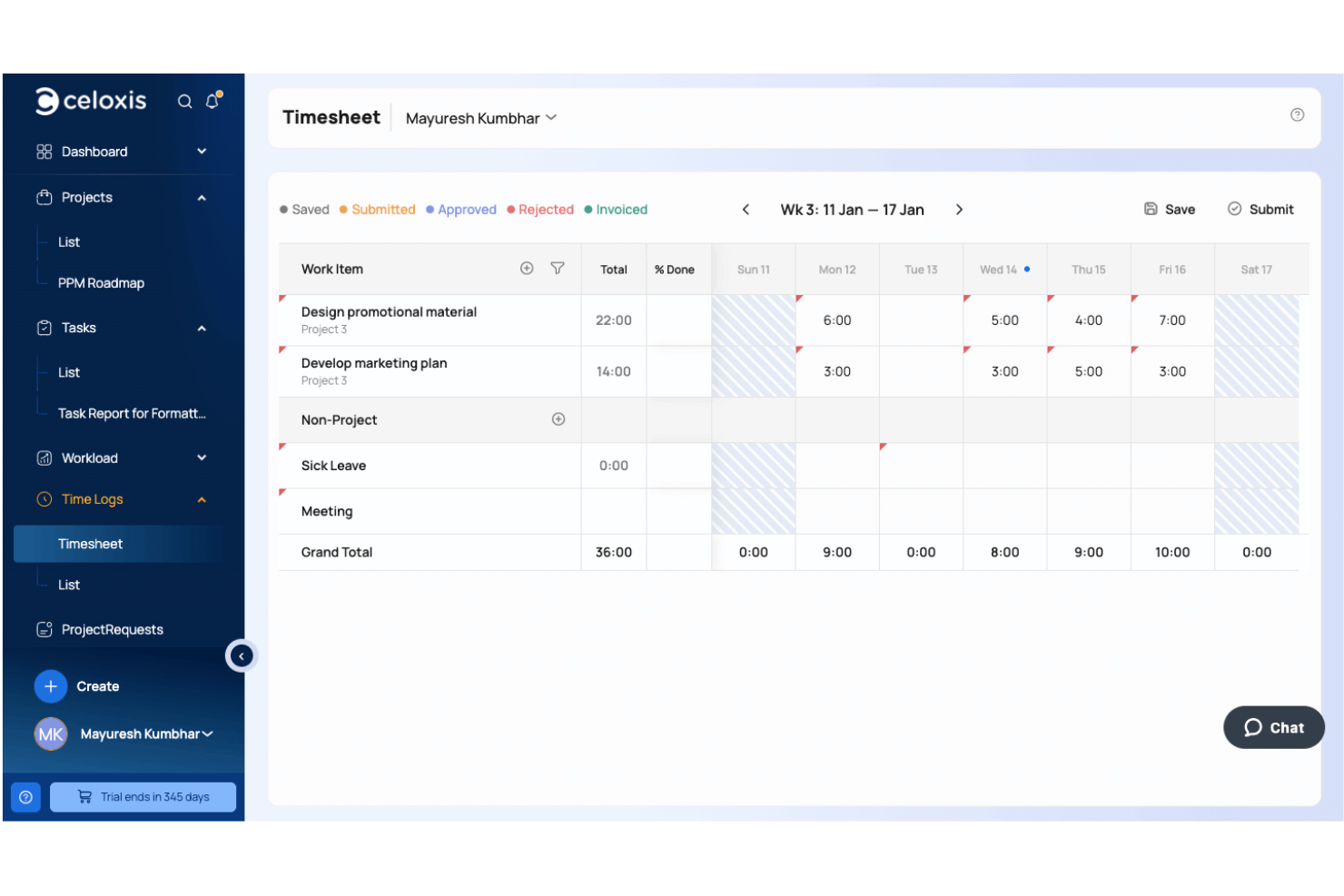
Celoxis è una piattaforma di gestione del portafoglio progetti che unisce pianificazione dei progetti, gestione delle risorse, budgeting, fatturazione, rilevazione delle ore lavorate, gestione delle spese e reportistica finanziaria per aiutare le organizzazioni a gestire la consegna dei progetti insieme alla performance aziendale.
Per chi è ideale Celoxis?
Celoxis è particolarmente adatto per organizzazioni di medie e grandi dimensioni, società di servizi professionali e aziende orientate ai progetti che necessitano di un maggiore controllo sull'esecuzione dei progetti, sui budget e sulle performance finanziarie attraverso diverse iniziative.
Perché ho scelto Celoxis
Ho scelto Celoxis perché riunisce esecuzione dei progetti e gestione finanziaria in un'unica piattaforma. I team possono gestire i budget, monitorare i costi, approvare tempi e spese e tracciare la redditività senza dover trasferire dati tra sistemi separati. Mi piace anche che le informazioni finanziarie sui progetti vengano aggiornate automaticamente man mano che il lavoro avanza, offrendo a project manager e team finanziari una visione più accurata di costi, utilizzo e stato generale dei progetti.
Funzionalità principali di Celoxis
- Pianificazione della capacità delle risorse: Monitora disponibilità, utilizzo e carico di lavoro del team attraverso diversi progetti attivi.
- Dashboard di portafoglio: Tieni sotto controllo budget, scadenze, rischi e performance del portafoglio tramite dashboard dirigenziali personalizzabili.
- App workflow personalizzate: Crea flussi di lavoro configurabili per rischi, problemi, approvazioni, richieste di modifica e altri processi di progetto.
- Gantt interattivi: Pianifica le tempistiche dei progetti con dipendenze, baseline, analisi del percorso critico e programmazione tramite drag-and-drop.
Integrazioni di Celoxis
Celoxis si integra con Google Drive, Microsoft Excel, Microsoft Project, Jira, Azure DevOps, QuickBooks Online, Salesforce e iCal. Supporta inoltre Zapier e fornisce una REST API per integrazioni personalizzate.
Pros and Cons
Pros:
- Previsioni avanzate per il portafoglio
- Ottimi strumenti per il budgeting dei progetti
- Supporta fatturazione a ore e a prezzo fisso
Cons:
- L'app mobile ha meno funzionalità
- I template complessi richiedono tempo per essere configurati

Oracle
Ideale per grandi aziende
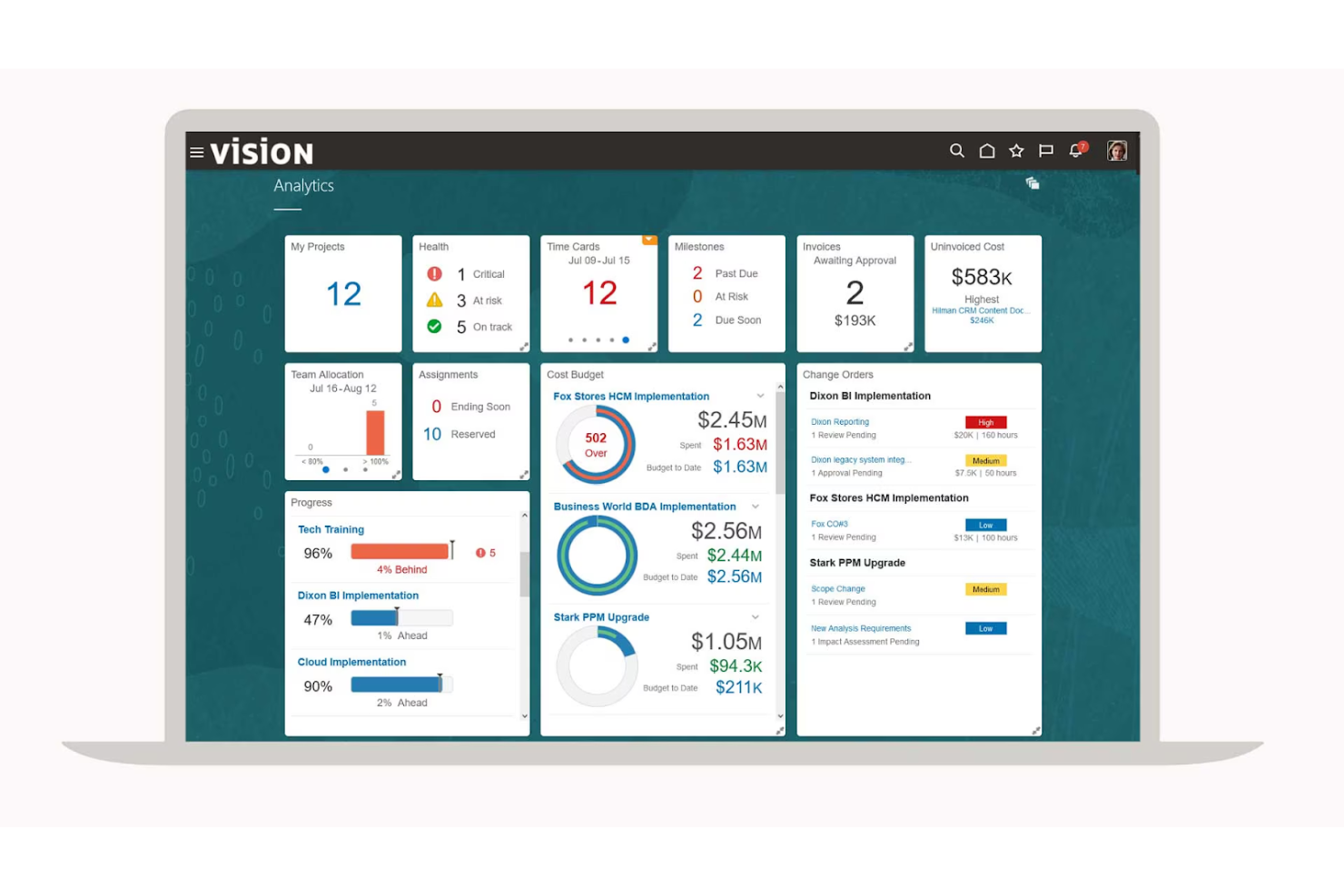
Oracle offre una suite di soluzioni di gestione progetti ERP pensate per le grandi aziende. Mette a disposizione strumenti per la gestione dei database, l'ottimizzazione delle prestazioni e l'analisi dei dati. Queste soluzioni rispondono alle esigenze di dati complessi e forniscono opzioni scalabili per le operazioni a livello aziendale.
Perché ho scelto Oracle: La sua attenzione alle grandi aziende lo rende unico. L'Autonomous AI Database di Oracle offre funzionalità avanzate di intelligenza artificiale e caratteristiche di sicurezza di alto livello, fondamentali per gestire enormi quantità di dati. La piattaforma supporta ambienti multicloud, offrendo ai membri del team flessibilità durante il lancio di nuovi prodotti. I team possono creare flussi di lavoro automatizzati che posizionano i dati nella posizione corretta, riducendo la necessità di inserimento manuale dei dati.
Caratteristiche e integrazioni principali:
Le funzionalità includono gestione autonoma, supporto per ambienti multicloud e avanzate capacità AI. Il tuo team può beneficiare delle ampie caratteristiche di sicurezza e della possibilità di gestire diversi tipi di dati. Oracle offre anche tecnologie low-code per semplificare lo sviluppo applicativo.
Le integrazioni includono AWS, Microsoft Azure, Google Cloud, SAP, Salesforce, Slack, IBM, Docker, Kubernetes, VMware e altro ancora.
Pros and Cons
Pros:
- Avanzate capacità di intelligenza artificiale
- Opzioni di supporto multicloud
- Solide funzionalità di sicurezza
Cons:
- Requisiti di sistema complessi
- Strumenti di gestione progetti poco efficienti

Ideale per la collaborazione sui progetti

OpenProject è uno strumento di gestione progetti rivolto ai team che desiderano migliorare la collaborazione. Offre funzionalità per la gestione delle attività, la pianificazione delle tempistiche di progetto e la gestione dei documenti, rendendolo ideale per contesti orientati ai progetti che cercano un lavoro di squadra efficace.
Perché ho scelto OpenProject: Il suo focus sulla collaborazione progettuale lo distingue da altri strumenti. Il software offre funzionalità come cronologie condivise e bacheche di attività che mantengono il team allineato. È possibile gestire i documenti di progetto in modo centralizzato, garantendo a tutti l'accesso alle informazioni più recenti. Secondo la mia esperienza, OpenProject aiuta i team che danno priorità a collaborazione e comunicazione a eccellere.
Caratteristiche principali e integrazioni:
Le funzionalità includono monitoraggio del tempo, pianificazione dei rilasci e un modulo di gestione delle riunioni. Il tuo team può personalizzare i flussi di lavoro in base alle esigenze del progetto. Il software offre anche un solido supporto per le metodologie di gestione progetti Agile.
Le integrazioni includono GitHub, GitLab, OneDrive, Slack, Toggl, Jira, Microsoft Excel, Trello e altro ancora.
Pros and Cons
Pros:
- Gestione documentale centralizzata
- Supporta metodologie Agile
- Gestione efficace delle riunioni
Cons:
- La suite completa di strumenti può richiedere tempo per essere padroneggiata
- Ospitato on-premises

Workday
Ideale per soluzioni focalizzate sulle risorse umane
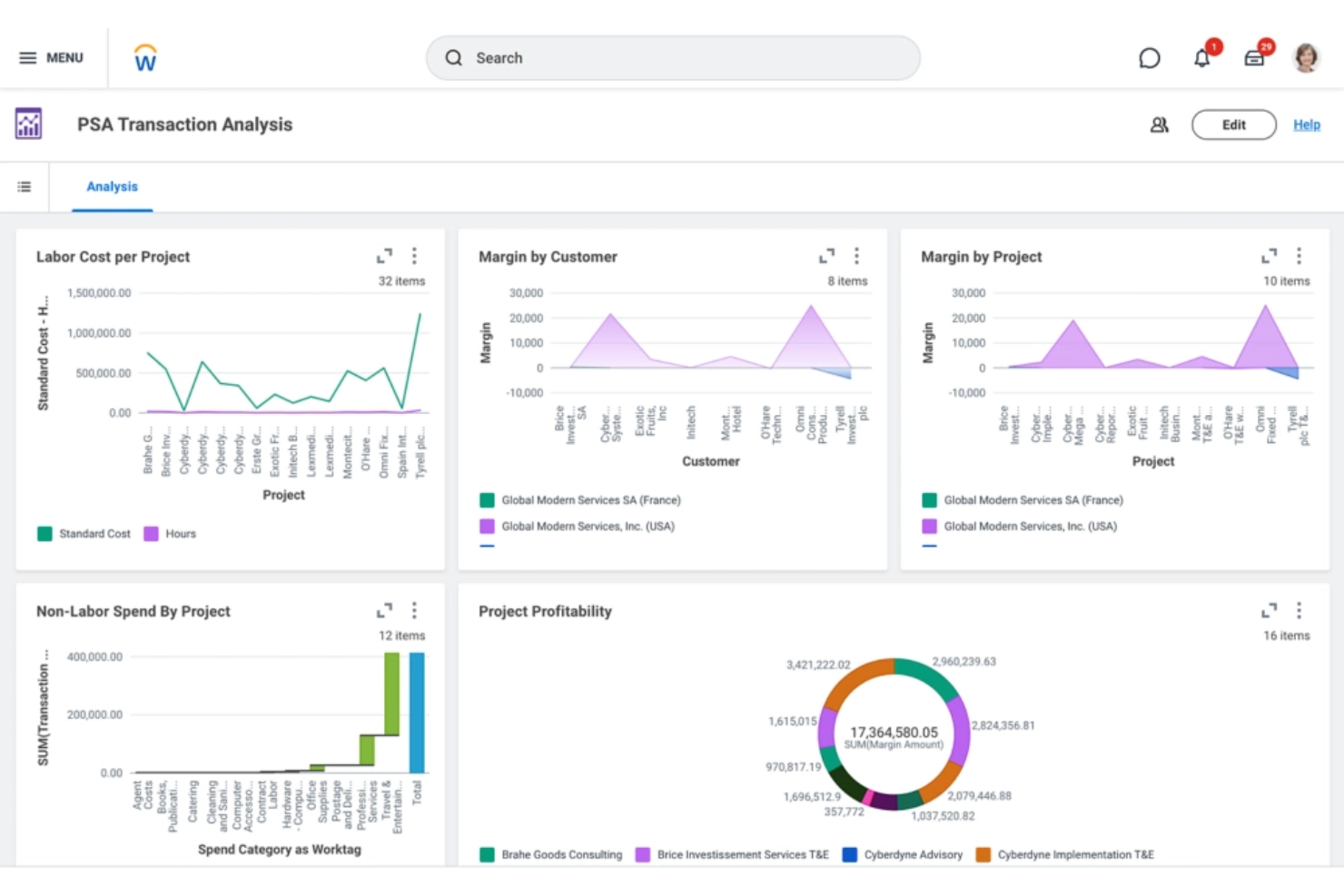
Workday è una soluzione ERP basata su cloud che serve principalmente i team delle risorse umane e della finanza. Offre strumenti per la pianificazione della forza lavoro, la gestione dei talenti e le paghe, rendendolo ideale per le organizzazioni che desiderano migliorare le proprie operazioni HR.
Perché ho scelto Workday: La sua focalizzazione sulle soluzioni HR lo rende unico tra gli strumenti ERP. Workday offre analisi avanzate della forza lavoro per aiutare il tuo team a prendere decisioni informate. Le funzioni di gestione dei talenti e delle spese supportano l'approvvigionamento, il reclutamento e lo sviluppo dei dipendenti. Secondo la mia esperienza, le capacità di gestione delle paghe di Workday assicurano pagamenti accurati e puntuali.
Funzionalità e integrazioni principali:
Funzionalità includono la gestione delle prestazioni, l'amministrazione dei benefit per i dipendenti e la pianificazione finanziaria. Il tuo team può accedere a informazioni sui dati in tempo reale per migliorare il processo decisionale. Il software supporta anche l'accesso da mobile, permettendo ai team di lavorare ovunque.
Integrazioni includono Salesforce, Microsoft Office, Slack, Adobe, Google Workspace, IBM, Jira, ServiceNow e altro ancora.
Pros and Cons
Pros:
- Potenti strumenti per la gestione HR
- Supporta l'accesso da dispositivi mobili
- Varie funzionalità per la gestione delle buste paga
Cons:
- Impostazioni dei permessi utente complesse
- Richiede il supporto dedicato dell'IT

SYSPRO
Ideale per piccoli produttori
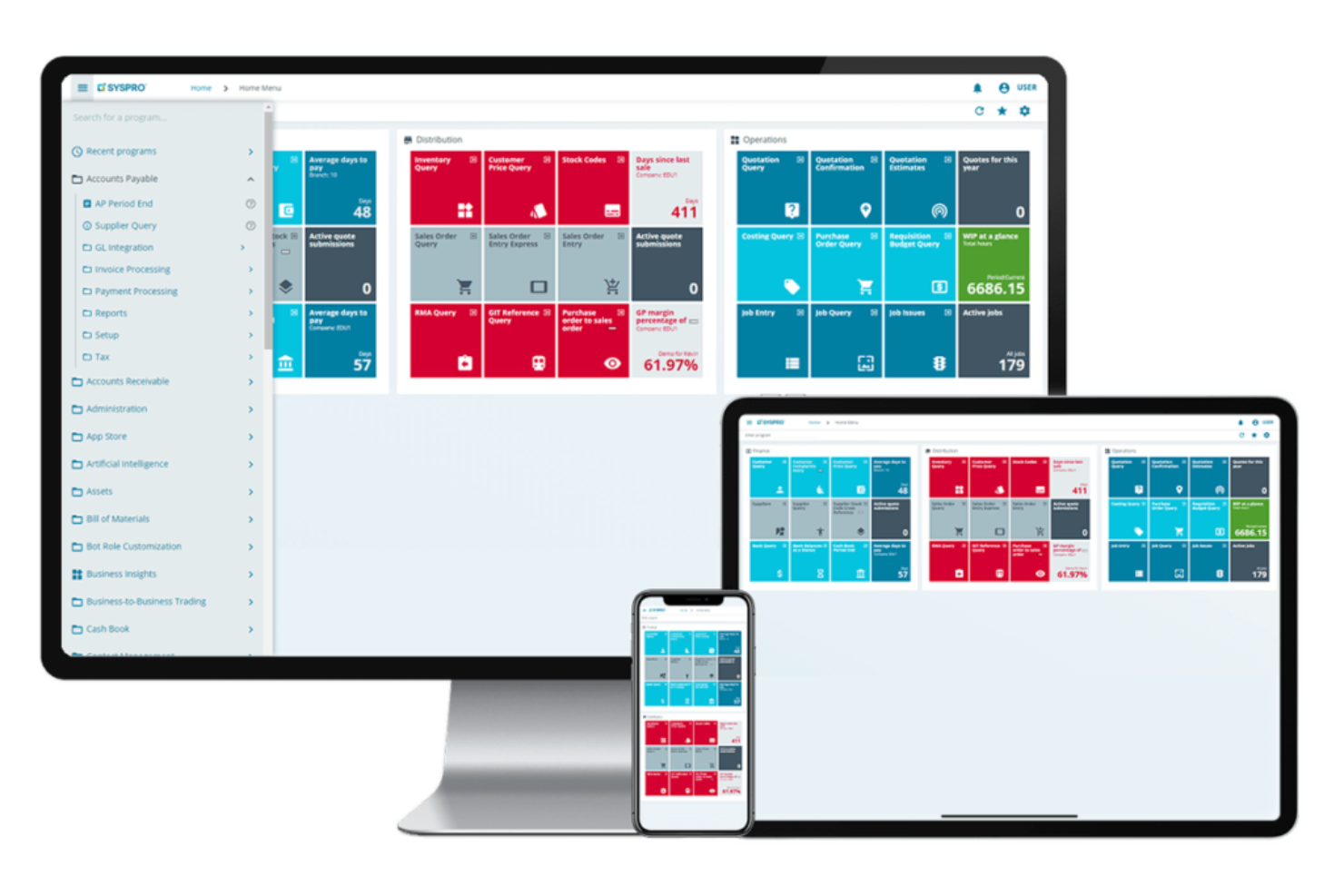
SYSPRO è una soluzione software ERP pensata per le piccole e medie imprese, come quelle dei settori sanitario, elettronico e manifatturiero. Offre strumenti per la gestione dell'inventario, la pianificazione della produzione e la gestione finanziaria, risultando particolarmente adatta agli ambienti produttivi che cercano efficienza e controllo.
Perché ho scelto SYSPRO: È progettato appositamente per i piccoli produttori, con funzionalità che supportano la produzione e la gestione dell'inventario. Il software fornisce metriche dettagliate sulla catena di approvvigionamento e sui processi produttivi. Permette di gestire le risorse e ottimizzare la produzione grazie a una interfaccia intuitiva. Secondo la mia esperienza, la focalizzazione di SYSPRO sulle realtà produttive di piccole dimensioni lo rende una scelta pratica per le aziende che desiderano aumentare l'efficienza operativa.
Funzionalità e integrazioni principali:
Le funzionalità includono controllo dell'inventario, analisi dei dati in tempo reale e strumenti di reportistica personalizzabili. Il tuo team può monitorare i programmi di produzione e gestire il flusso di cassa. Il software offre inoltre un forte focus sulla gestione della catena di approvvigionamento per garantire cicli di progetto senza intoppi.
Le integrazioni comprendono Microsoft Office, Microsoft Outlook, Microsoft Dynamics, Salesforce, Sage e altri.
Pros and Cons
Pros:
- Gestione solida della catena di approvvigionamento
- Controllo dettagliato dell'inventario
- Comunità di sviluppatori
Cons:
- Affidamento a strumenti o soluzioni di terze parti
- Le visualizzazioni predefinite richiedono molta personalizzazione

Deltek
Ideale per gli appaltatori pubblici
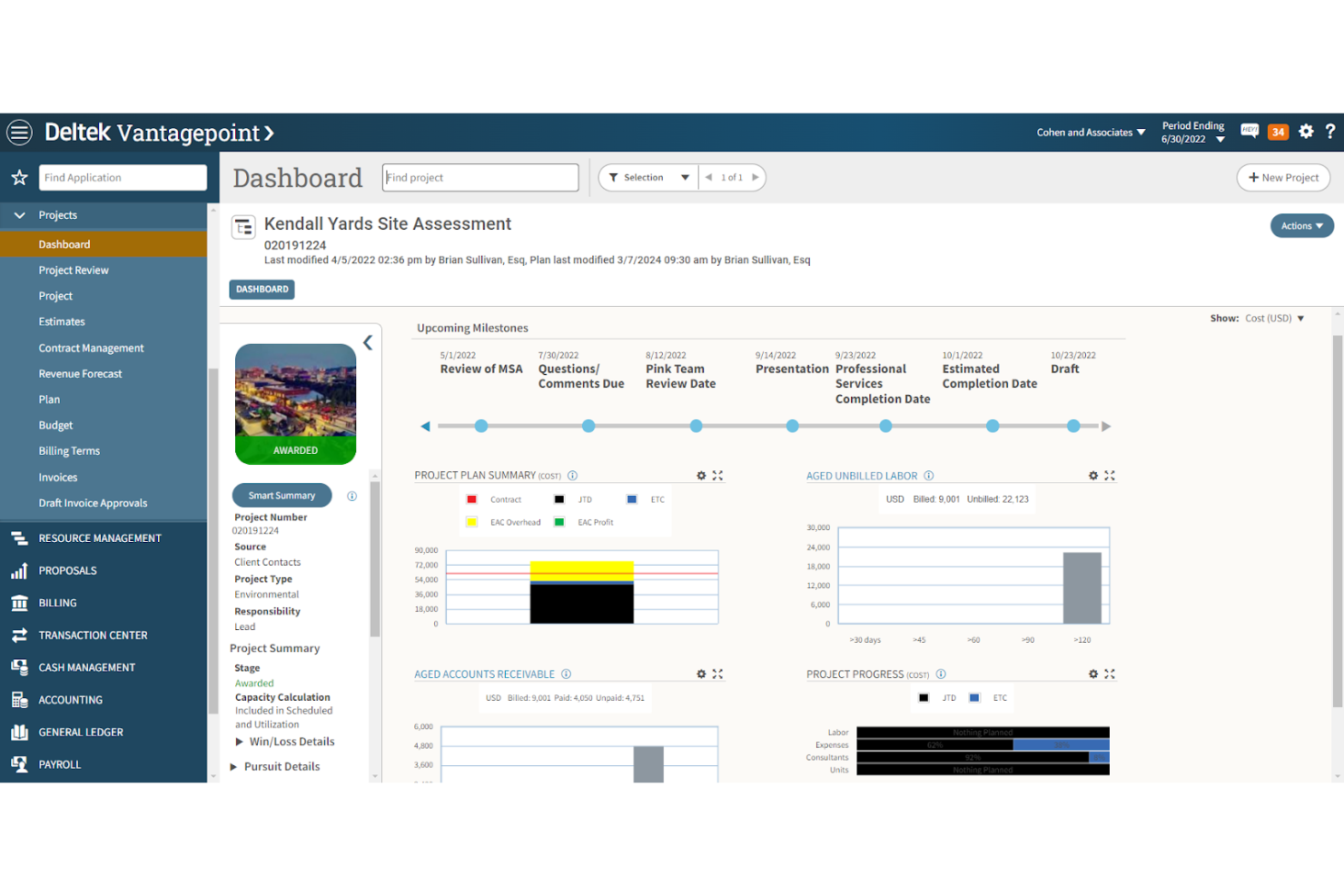
Deltek offre un software di gestione progetti ERP pensato per settori orientati ai progetti, come l'appalto pubblico. Fornisce strumenti per la gestione del portafoglio progetti, pianificazione, controllo dei costi e gestione dei rischi. I principali prodotti includono Deltek Vantagepoint e Costpoint, progettati per migliorare la visibilità e l'efficienza dei progetti.
Perché ho scelto Deltek: La sua specializzazione negli appalti pubblici lo distingue dagli altri. Costpoint di Deltek offre funzionalità specifiche per la conformità e la gestione finanziaria, fondamentali per progetti governativi. Vantagepoint ottimizza la gestione di progetti e risorse. Le capacità di integrazione del software garantiscono un'esperienza utente unificata su diverse funzioni.
Funzionalità principali e integrazioni:
Le funzionalità comprendono gestione del portafoglio progetti, controllo dei costi e strumenti per la valutazione dei rischi. Il tuo team può gestire le risorse e assicurare il rispetto degli standard di settore. L'interfaccia utente di Deltek supporta un'esperienza coerente tra le diverse funzioni di progetto.
Le integrazioni includono Microsoft Project, QuickBooks, Salesforce, SAP, Oracle, IBM Cognos, Amazon Web Services, Google Workspace, Slack, Jira e altri ancora.
Pros and Cons
Pros:
- Personalizzato per progetti governativi
- Gestione eccellente delle risorse
- Strumenti integrati per la gestione del portafoglio progetti
Cons:
- Curva di apprendimento ripida
- Richiede competenze tecniche


Global Shop Solutions è un software ERP progettato specificamente per i produttori. Offre soluzioni per la produzione, la gestione dell'inventario e la gestione della qualità, aiutando le aziende manifatturiere a ottimizzare le loro operazioni e migliorare l'efficienza.
Perché ho scelto Global Shop Solutions: È pensato per l'industria manifatturiera, fornendo strumenti che soddisfano le esigenze produttive. Le sue funzionalità di gestione dello shop offrono una visione in tempo reale delle operazioni. Il software include moduli per il controllo qualità per garantire che i prodotti rispettino gli standard del settore. Offre soluzioni sia cloud che on-premise, permettendo al tuo team di lavorare con flessibilità.
Funzionalità distintive e integrazioni:
Le funzionalità includono avanzate capacità di programmazione, controllo dell'inventario e calcolo dei costi in tempo reale. Il tuo team può monitorare i cicli di vita produttivi e gestire le risorse. Il software offre anche un sistema di gestione della qualità per mantenere gli standard dei prodotti.
Le integrazioni includono Salesforce, Sage, SolidWorks, Inventor, HubSpot, Shopify e altro ancora.
Pros and Cons
Pros:
- Progettato per i processi manifatturieri
- Informazioni sulla produzione in tempo reale
- Funzionalità di controllo qualità incluse
Cons:
- Sono necessari più passaggi per completare le attività
- Richiede conoscenze di produzione

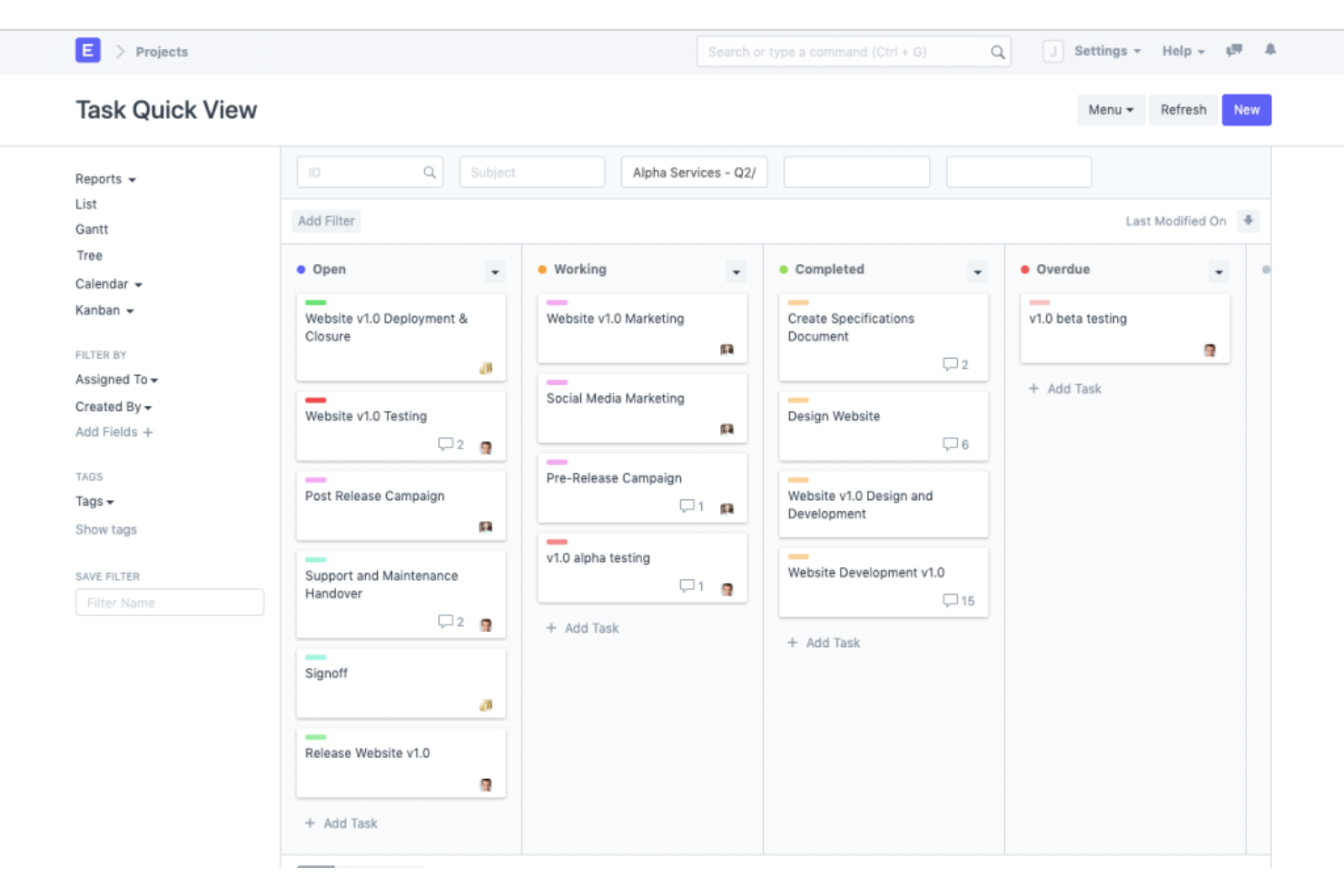
ERPNext è uno strumento di project management ERP open-source progettato per le piccole e medie imprese. Offre soluzioni per la gestione della contabilità, dell’inventario, delle vendite e degli acquisti, rispondendo a un’ampia gamma di esigenze aziendali, come quelle dei settori sanitario, educativo e manifatturiero.
Perché ho scelto ERPNext: La flessibilità open-source di ERPNext permette di personalizzare il software in base alle proprie esigenze specifiche. I suoi diversi strumenti, come il software di contabilità e la gestione dell’inventario, aiutano a mantenere una rendicontazione finanziaria accurata. Puoi modificare i workflow e aggiungere moduli man mano che la tua azienda cresce, garantendo così che si adatti ai requisiti in evoluzione. Secondo la mia esperienza, questa adattabilità è un grande vantaggio per le aziende che cercano soluzioni su misura.
Funzionalità e integrazioni principali:
Funzionalità includono un builder di siti web integrato, supporto multivaluta e un’interfaccia di reportistica intuitiva. Il tuo team può beneficiare del calcolo automatico delle imposte e degli strumenti di gestione dei documenti. ERPNext offre anche un modulo CRM per gestire le relazioni con i clienti.
Le integrazioni includono Shopify, WooCommerce, Adobe Commerce, Dropbox, Google Drive, PayPal, Stripe, Amazon S3 e altre ancora.
Pros and Cons
Pros:
- Adatto a diversi settori
- Documentazione dettagliata disponibile
- Supporto multivaluta
Cons:
- Richiede competenze tecniche per hosting e personalizzazione su Linux
- Documentazione poco organizzata
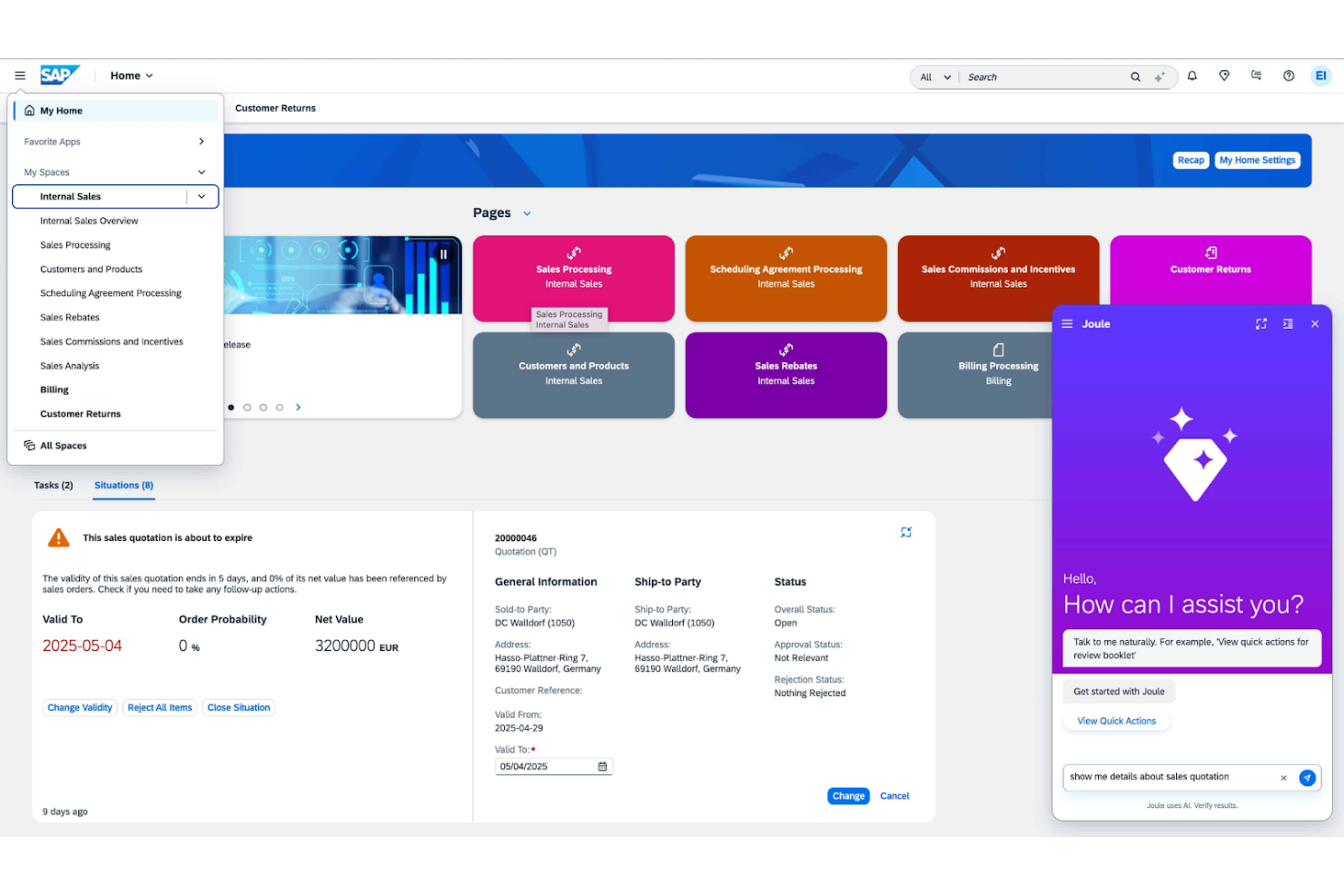
SAP ERP è una soluzione di pianificazione delle risorse d'impresa progettata per grandi aziende. Supporta varie funzioni aziendali come finanza, gestione della catena di fornitura e risorse umane, offrendo una piattaforma unificata per le operazioni a livello globale.
Perché ho scelto SAP ERP: La sua capacità di scalare a livello globale è impareggiabile, il che lo rende ideale per le grandi imprese. SAP ERP offre strumenti di gestione finanziaria avanzati che supportano esigenze contabili complesse, inclusi il monitoraggio e la previsione dei flussi di cassa. Nella mia esperienza, la sua ampia funzionalità garantisce copertura per tutte le necessità aziendali.
Caratteristiche distintive e integrazioni:
Caratteristiche includono analisi avanzate, elaborazione dati in tempo reale e una piattaforma centralizzata per la gestione di molteplici processi aziendali. Il tuo team può sfruttare dashboard personalizzabili per monitorare gli indicatori chiave di prestazione e le consegne. Il software offre anche strumenti potenti di gestione della conformità per soddisfare gli standard globali.
Integrazioni includono Microsoft Office, Salesforce, Adobe, Oracle, Google Cloud, Amazon Web Services, Dropbox, Slack, Jira e altri ancora.
Pros and Cons
Pros:
- Supporta esigenze contabili complesse
- Solida gestione della conformità
- API personalizzabile
Cons:
- Struttura di licenze complessa
- Flessibilità limitata per le piccole imprese

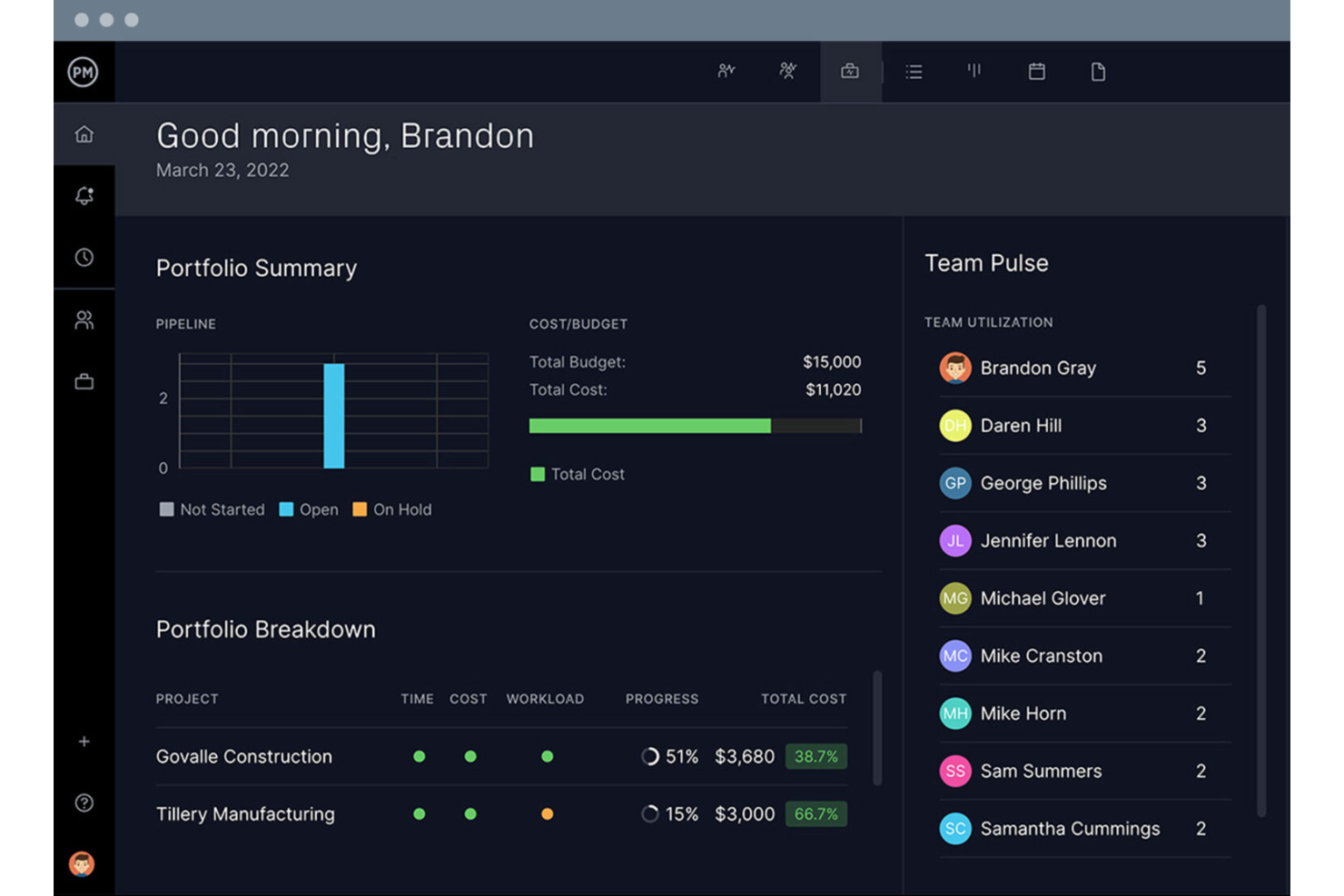
Project Manager è uno strumento di gestione progetti basato su cloud, progettato per team che lavorano da remoto. Offre strumenti per la gestione delle attività, la programmazione e la collaborazione in tempo reale, rendendolo ideale per i team distribuiti che desiderano restare connessi e produttivi.
Perché ho scelto Project Manager: Project Manager offre dashboard in tempo reale che forniscono al tuo team una visibilità immediata sull'avanzamento dei progetti. I diagrammi di Gantt e le bacheche Kanban aiutano a organizzare attività e flussi di lavoro. Le funzionalità di monitoraggio del tempo mantengono i membri del team responsabili, supportando la produttività in diversi fusi orari.
Funzionalità e integrazioni principali:
Le funzionalità includono dashboard personalizzabili, diagrammi di Gantt dettagliati e strumenti di monitoraggio del tempo. Il tuo team può passare dalle bacheche Kanban alle liste di attività per gestire il ciclo di vita del progetto. Il software offre anche capacità di archiviazione e condivisione file, migliorando così la collaborazione.
Le integrazioni includono Slack, Zapier, Microsoft Office, Dropbox, Salesforce, Jira, Trello, QuickBooks, Evernote e altri ancora.
Pros and Cons
Pros:
- Organizzazione efficiente delle attività
- Supporta diverse visualizzazioni di progetto
- Condivisione file semplice
Cons:
- Potrebbe richiedere tempo di formazione
- Può essere lento con progetti di grandi dimensioni
Altri software ERP per la gestione dei progetti
Ecco alcune ulteriori opzioni di software ERP per la gestione dei progetti che non sono entrate nel mio elenco, ma che vale comunque la pena esaminare:
- PMAlliance
Ideale per la formazione nella gestione dei progetti
- Acumatica
Ideale per aziende in crescita
- Priority
Ideale per aziende di medie dimensioni


Come valuto i software di gestione progetti ERP
Scompongo la mia valutazione in requisiti di base che ogni strumento deve soddisfare—come la connettività ERP nativa e il monitoraggio dei costi di progetto—e fattori differenzianti che rivelano quale soluzione si adatta meglio al tuo specifico modello di delivery.
Funzionalità core (requisiti indispensabili per questa lista)
Quando seleziono gli strumenti per la mia lista, valuto ciascuno su una scala da 0 (non offre la funzionalità) a 5 (eccelle in quest'area) per ogni funzionalità core elencata sotto. Successivamente, calcolo il punteggio totale dello strumento in percentuale. Ogni tool deve raggiungere un punteggio totale minimo del 65% per essere preso in considerazione.
- Moduli ERP integrati: Verifico se i dati di progetto condividono un unico modello dati con finanza, acquisti, magazzino e HR—non solo una sincronizzazione tra sistemi separati.
- Pianificazione e programmazione progetto: Diagrammi di Gantt, dipendenze, milestone e baseline sono tutti elementi fondamentali qui, soprattutto per i team che gestiscono progetti suddivisi in più fasi o servizi.
- Controllo dei costi e del budget di progetto: Cerco monitoraggio in tempo reale del budget vs. reale, visibilità sui costi impegnati e report delle variazioni presi direttamente dal libro mastro generale.
- Gestione risorse e capacità: Valuto ogni tool sulla capacità di assegnare persone, attrezzature e materiali ai progetti con viste chiare su utilizzo e disponibilità.
- Monitoraggio tempi, spese e fatturazione: I team sul campo e i consulenti hanno bisogno che le ore e le spese confluiscano in payroll e fatturazione, quindi verifico che esista questo percorso end-to-end.
- Reportistica e analisi di progetto: Dashboard multiprogetto che mostrano redditività, avanzamento e KPI dai dati ERP sottostanti sono ciò che distingue veri strumenti PM ERP da semplici tracker.
Una volta ottenuta una lista di strumenti che soddisfano questi criteri, considero ciò che distingue ciascuna piattaforma.
Fattori differenzianti (cosa distingue i fornitori)
Ecco come confronto e metto a confronto i diversi fornitori:
Funzionalità distintive
La gestione di portafoglio e programmi è una delle più importanti—cerco strumenti che permettano ai direttori PMO di aggregare dati finanziari e rischi su decine di progetti in un'unica vista per i dirigenti. L'accesso mobile da cantiere è altrettanto importante per i team di costruzione e ingegneria che devono registrare tempi o segnalare problemi direttamente dal sito senza dover tornare in ufficio. Valuto anche come la piattaforma gestisce i flussi di lavoro con subappaltatori come ordini di acquisto e RFI, poiché proprio lì spesso si nascondono le perdite di costo nei progetti complessi.
Oltre le funzionalità
L'aderenza al settore è la prima cosa che valuto oltre le funzionalità. Uno strumento pensato per aziende di servizi professionali struttura fatturazione e riconoscimento dei ricavi in modo diverso rispetto a uno progettato per l'edilizia—codici di costo e flussi di compliance preconfigurati fanno risparmiare mesi di personalizzazione. L'ecosistema delle integrazioni è cruciale, soprattutto quanto bene una piattaforma si connette con CRM, BI e tool CAD/BIM già utilizzati dai tuoi team. Considero anche i tempi di implementazione e il costo totale di proprietà, dato che i rollout ERP possono superare l'anno se la rete di partner del fornitore o i pacchetti acceleratori non sono abbastanza maturi.
Come scegliere il software ERP per la gestione dei progetti
È facile perdersi in lunghi elenchi di funzionalità e strutture tariffarie complesse. Per aiutarti a rimanere concentrato mentre affronti il tuo specifico processo di selezione del software, ecco un elenco dei fattori da tenere presenti:
| Fattore | Cosa considerare |
|---|---|
| Scalabilità | Il software crescerà insieme alla tua azienda? Assicurati che possa gestire una maggiore quantità di dati, utenti e complessità senza problemi di prestazioni. |
| Integrazioni | Si collega agli strumenti che già utilizzi? Verifica la compatibilità con i sistemi attuali, come quelli per CRM, contabilità e marketing. |
| Personalizzazione | Puoi adattare il software ai tuoi flussi di lavoro? Cerca opzioni per modificare dashboard, report e ruoli degli utenti in base alle esigenze del tuo team. |
| Facilità d'uso | L'interfaccia è intuitiva per il tuo team? Evita curve di apprendimento ripide scegliendo uno strumento facile da navigare e che richieda una formazione minima. |
| Implementazione e onboarding | Quanto tempo servirà per essere operativi? Considera il tempo e le risorse necessari per la configurazione e verifica se il fornitore offre assistenza durante questa fase. |
| Costo | Il modello di prezzo è trasparente e conveniente? Confronta il costo con il tuo budget e cerca eventuali costi nascosti o contratti a lungo termine. |
| Misure di sicurezza | Protegge i tuoi dati? Verifica le funzionalità di sicurezza del software, come la crittografia, i controlli degli accessi e la conformità alle normative sulla protezione dei dati. |
| Disponibilità dell'assistenza | Puoi ricevere aiuto quando ne hai bisogno? Assicurati che il fornitore offra un'assistenza clienti affidabile attraverso vari canali, come chat, e-mail o telefono. |
Che cos'è il software ERP per la gestione dei progetti?
Il software ERP per la gestione dei progetti è uno strumento progettato per aiutare le aziende a integrare e gestire i propri processi principali. Professionisti come responsabili di progetto, responsabili operativi e leader dei team utilizzano questi strumenti per migliorare l'efficienza e il coordinamento. Le funzionalità di pianificazione, allocazione delle risorse e reportistica supportano un processo decisionale e un controllo operativo migliori. In definitiva, questi strumenti aiutano le organizzazioni a migliorare la produttività e a gestire i progetti in modo più efficace.
Funzionalità
Quando selezioni un software ERP per la gestione dei progetti, presta attenzione alle seguenti funzionalità chiave:
- Pianificazione dei progetti: aiuta a programmare le attività e ad allocare le risorse per rispettare le scadenze.
- Gestione delle risorse: consente di monitorare e gestire le risorse, garantendone l'utilizzo e la disponibilità ottimali.
- Gestione finanziaria: supporta la definizione del budget e il monitoraggio finanziario per mantenere i progetti entro il budget previsto.
- Reportistica e analisi: forniscono informazioni e analisi dei dati per supportare decisioni consapevoli.
- Strumenti di collaborazione: facilitano la comunicazione e il lavoro di squadra tra i membri del progetto per migliorare l'efficienza.
- Opzioni di personalizzazione: consentono di adattare il software ai flussi di lavoro e alle esigenze aziendali specifiche.
- Funzionalità di integrazione: si collegano ai sistemi esistenti, come gli strumenti CRM e di contabilità, per creare un flusso di lavoro unificato.
- Funzionalità di sicurezza: proteggono i dati tramite la crittografia e la conformità alle normative sulla protezione dei dati.
Vantaggi
L'implementazione di un software ERP per la gestione dei progetti offre diversi vantaggi al tuo team e alla tua azienda. Ecco alcuni dei vantaggi che puoi aspettarti:
- Maggiore efficienza: automatizzare le attività di routine e integrare i processi aiuta il tuo team a lavorare più velocemente e in modo più efficace.
- Collaborazione potenziata: gli strumenti di comunicazione e le piattaforme condivise mantengono il tuo team connesso e allineato agli obiettivi del progetto.
- Migliore processo decisionale: l'accesso a dati e analisi in tempo reale supporta decisioni consapevoli e la pianificazione strategica.
- Controllo dei costi: le funzionalità di gestione finanziaria aiutano a monitorare le spese e a rispettare il budget, riducendo i rischi finanziari.
- Ottimizzazione delle risorse: una gestione efficace delle risorse garantisce che il tuo team e i materiali non vengano sprecati.
- Scalabilità: la possibilità di crescere insieme alla tua azienda significa che il software può adattarsi al cambiamento delle tue esigenze.
- Sicurezza dei dati: le funzionalità di sicurezza integrate proteggono le tue informazioni sensibili e garantiscono la conformità alle normative.
Costi e prezzi
La scelta di un software ERP per la gestione dei progetti richiede la comprensione dei vari modelli e piani tariffari disponibili. I costi variano in base alle funzionalità, alle dimensioni del team, ai componenti aggiuntivi e ad altri fattori. La tabella seguente riassume i piani più comuni, i relativi prezzi medi e le funzionalità tipicamente incluse nelle soluzioni software ERP per la gestione dei progetti:
Tabella comparativa dei piani per il software ERP per la gestione dei progetti
| Tipo di piano | Prezzo medio | Funzionalità comuni |
|---|---|---|
| Piano gratuito | $0/user/month | Gestione di base delle attività, spazio di archiviazione limitato e reportistica di base. |
| Piano personale | $5-$54/user/month | Gestione avanzata delle attività, integrazioni e analisi di base. |
| Piano aziendale | $60+/user/month (Personalizzato) | Gestione delle risorse, analisi avanzate e modelli di progetto. |
| Piano per grandi aziende | $200+/user/month (Personalizzato) | Opzioni di personalizzazione, assistenza dedicata e funzionalità di sicurezza avanzate. |
Domande frequenti sul software ERP per la gestione dei progetti
Ecco alcune risposte alle domande frequenti sul software ERP per la gestione dei progetti:
Qual è la differenza tra ERP e software per la gestione dei progetti?
\u003cspan style=\u0022font-weight: 400\u0022\u003eIl software ERP integra diversi processi aziendali in un unico sistema, mentre il software per la gestione dei progetti si concentra sulla gestione di progetti specifici. L’ERP gestisce funzioni più ampie come finanza, risorse umane e catena di approvvigionamento, offrendo una visione completa dell’azienda. Se il tuo team ha bisogno di uno strumento per attività specifiche di un progetto, il software per la gestione dei progetti potrebbe essere più adatto. Tuttavia, se desideri una soluzione che copra diverse aree aziendali, il software ERP è più indicato.\u003c/span\u003e
Il software ERP può essere personalizzato per la mia azienda?
\u003cspan style=\u0022font-weight: 400\u0022\u003eSì, la maggior parte delle soluzioni ERP offre opzioni di personalizzazione per adattarsi alle tue esigenze specifiche. Puoi configurare moduli, dashboard e report in base ai tuoi flussi di lavoro. La personalizzazione ti aiuta a ottenere il massimo dal software, concentrandoti sulle aree più importanti per la tua azienda. Collabora con il tuo fornitore per comprendere le possibilità di personalizzazione e gli eventuali costi associati.\u003c/span\u003e
Quanto tempo occorre per implementare il software ERP?
\u003cspan style=\u0022font-weight: 400\u0022\u003eI tempi di implementazione del software ERP variano in base alla complessità e alle dimensioni dell’azienda. Per le piccole imprese possono essere necessarie alcune settimane, mentre le aziende più grandi potrebbero aver bisogno di diversi mesi. Una pianificazione accurata e una comunicazione chiara con il fornitore possono accelerare il processo. Assicurati che il tuo team sia preparato e assegna le risorse necessarie per gestire la transizione senza difficoltà.\u003c/span\u003e
Sono necessarie competenze tecniche per utilizzare il software ERP?
\u003cspan style=\u0022font-weight: 400\u0022\u003eNo, non sono necessarie competenze tecniche avanzate per utilizzare il software ERP, ma è utile possedere conoscenze informatiche di base. Molti sistemi ERP offrono interfacce intuitive e risorse formative. Il fornitore potrebbe offrire supporto durante l’avvio per aiutare il tuo team a iniziare. Se temi di incontrare difficoltà tecniche, scegli un fornitore con un’assistenza clienti efficace.\u003c/span\u003e