

2026’da İncelenen En İyi 10 Müşteri Portalı Yazılımı

En İyi Müşteri Portalı Yazılımları Kısa Listesi


Projeleri ve müşteri ilişkilerini yönetmek zor olabilir; son teslim tarihlerini, iletişimi ve veri güvenliğini aynı anda takip etmeniz gerekebilir. Müşteri portalı yazılımları tam da bu noktada devreye girer; iletişimi kolaylaştırmaya, iş birliğini geliştirmeye ve her şeyi düzenli tutmaya yardımcı olur.
İşletmeniz için en uygun seçeneği bulmanıza yardımcı olmak amacıyla çeşitli müşteri portalı çözümlerini test edip inceledim. Proje yönetimi dünyasını iyi biliyor ve tarafsız, kapsamlı araştırmalara dayanan incelemelere odaklanıyorum.
Bu makalede, müşteri portalı yazılımları için en iyi seçimlerimi keşfedeceksiniz. Bilinçli bir karar vermenize yardımcı olmak için özelliklerini, avantajlarını ve olası dezavantajlarını vurgulayacağım. Ekibiniz için en iyi çözümü birlikte bulalım.
Why Trust Our Software Recommendations
Our team has been testing and reviewing software since 2012. As project managers ourselves, we know how difficult—and important—it is to choose the right software.
For this guide, we evaluated tools using hands-on testing and independent research, scoring tools using our selection criteria. We also draw on insights from industry thought leaders and practicing project management experts.
Our reviews reflect our human editorial judgment, not a sales pitch.
Expert reviewers:
Karşılaştırma Tablosu: Müşteri Portalı Yazılımları
Bu karşılaştırma tablosu, en iyi müşteri portalı yazılımı seçimlerim için fiyatlandırma ayrıntılarını özetlemektedir.
| Tool | Starting Price | Website | |
|---|---|---|---|
| Best for milestone-driven client approvals | 4.2 out of 5 | €5.50/active project/month 14-day free trial | Website |
| Best for secure file sharing | 4.8 out of 5 | $11/user/month 10-day free trial | Website |
| Best for customer onboarding | 4.9 out of 5 | $350/month Free plan + free demo available | Website |
| Best for all-in-one service business tools | 4.8 out of 5 | $19/month 14-day free trial | Website |
| Best for no-code solutions | 4.7 out of 5 | $25/month Free forever plan + 7-day free trial + free demo available | Website |
| Best for database management | 4.7 out of 5 | $32/month Free 14-day trial + free demo available | Website |
| Best for finance professionals | 4.4 out of 5 | $55/user/month Free demo + free trial available | Website |
| Best for WordPress integration | — | $25 Free demo available | Website |
| Best for team collaboration | — | $37/month Free plan + free demo + free trial available | Website |
| Best for creative agencies | — | $29/user/month Free plan + free demo + free 14-day trial available | Website |
En İyi Müşteri Portalı Yazılımları İncelemesi
Aşağıda, kısa listeme giren en iyi müşteri portalı yazılımlarının ayrıntılı özetlerini bulabilirsiniz. İncelemelerim, size en uygun seçeneği bulmanıza yardımcı olmak için her aracın temel özelliklerine, artılarına ve eksilerine, entegrasyonlarına ve ideal kullanım alanlarına ayrıntılı bir bakış sunuyor.

Ziggu
Best for milestone-driven client approvals
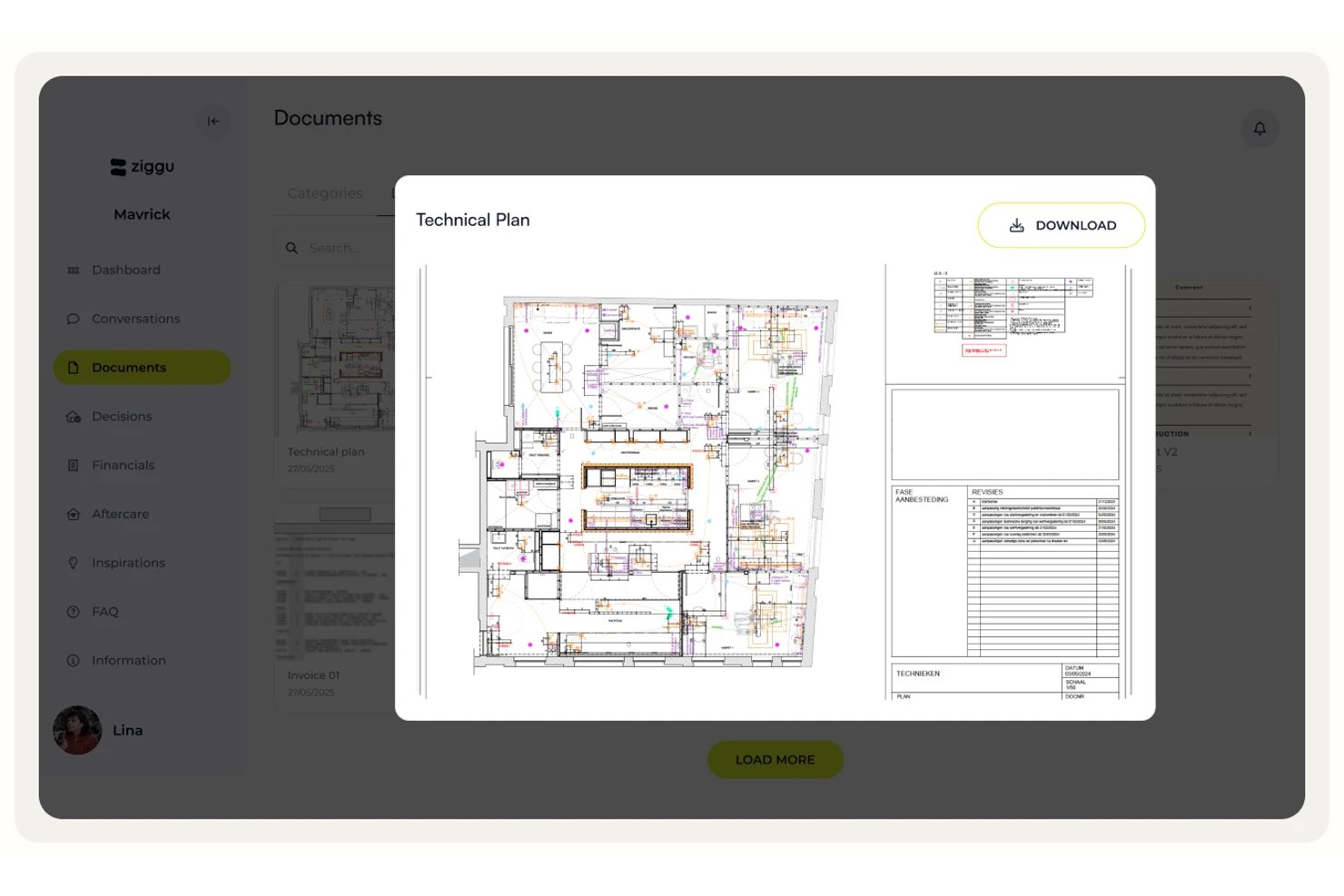
Ziggu is a client portal platform built around milestone-based project delivery, offering white-labeled client portals, structured approval workflows, centralized document sharing, and client-facing communication tools.
Who Is Ziggu Best For?
Ziggu is a strong fit for project-based businesses in construction, property development, and creative agencies that need structured milestone approvals and a branded client experience.
Why I Picked Ziggu
Ziggu earns its spot on my shortlist because of how seriously it treats client approvals as a formal, traceable process rather than an afterthought. The Decisions & Approvals feature lets clients digitally sign off on proposals directly in the portal, with every approval logged by name, date, and timestamp. That audit trail matters when a client disputes a finish choice three months into a build. Automated reminders for outstanding decisions mean my team isn't chasing sign-offs over email.
Ziggu Key Features
- White-label portal branding: Apply your logo, colors, and brand name across the client portal, notification emails, and mobile PWA app.
- Client intake forms: Collect client input, run intake questionnaires, and track satisfaction scores with automated reminders at set project stages.
- Centralized project inbox: Organize all client, partner, and team conversations by project and topic in one place, with assignable threads and internal notes.
- Self-serve FAQ library: Give clients a searchable knowledge base within the portal so they can find answers without contacting your team.
Ziggu Integrations
Ziggu offers integrations with SharePoint, Google Drive, Dropbox, Salesforce, HubSpot, Microsoft Dynamics 365, Exact Online, Power BI, and Archisnapper. Its public REST API supports custom integrations.
Pros and Cons
Pros:
- ISO 27001/27017/27018 certified data security
- White-label branding for portals and emails
- Built-in milestone approvals with audit trail
Cons:
- No Zapier or Make automation integration
- No native time tracking or billable hours

Clinked
Best for secure file sharing
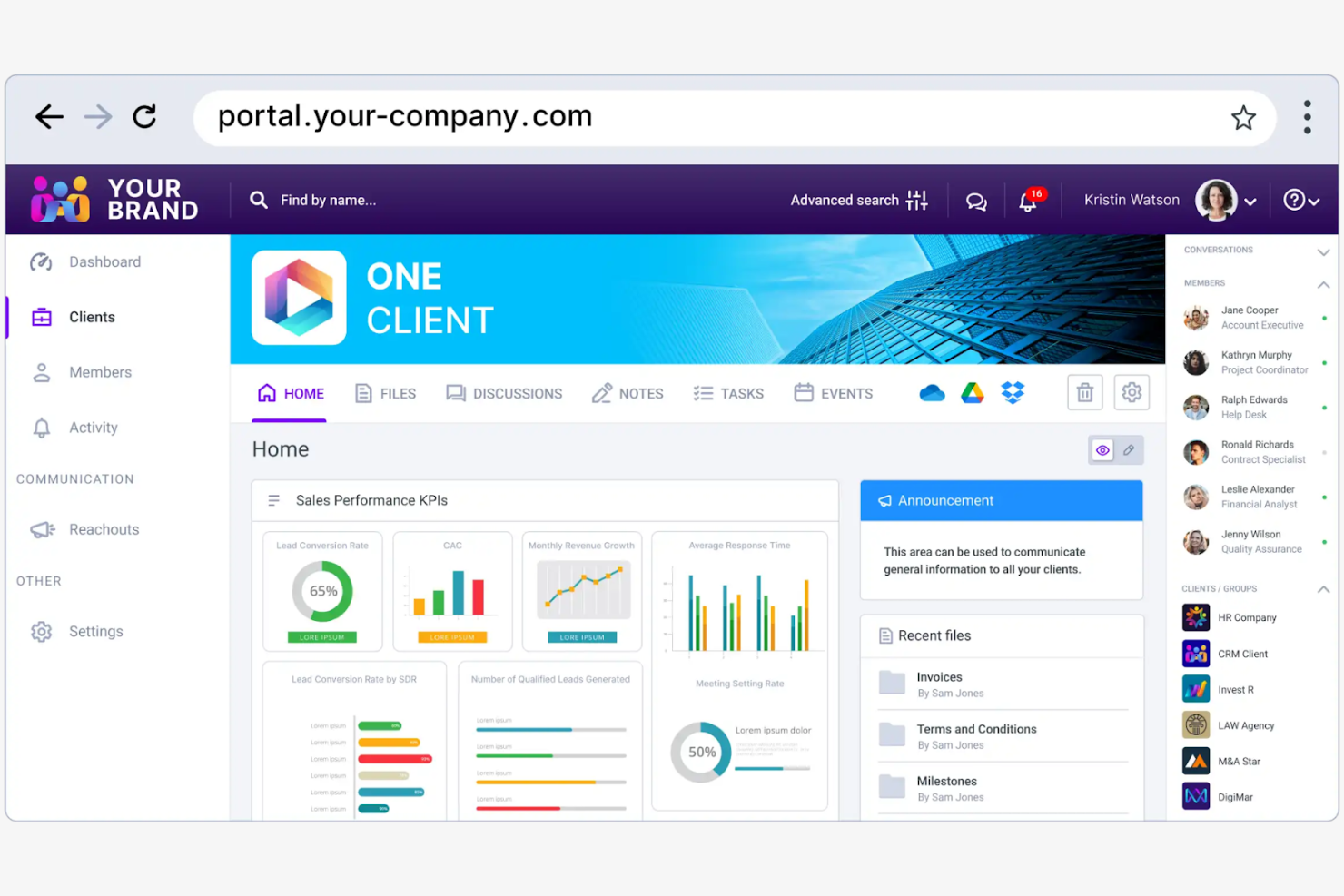
Clinked is a client portal software designed for businesses that need secure collaboration and file sharing. Its main users include teams in the finance, legal, and consulting industries who require secure communication channels and document management.
Why I picked Clinked: It provides a secure client portal environment for file sharing. You can create custom client portals to improve collaboration and maintain brand consistency. The platform's focus on security helps protect sensitive information. Clinked's ability to integrate with your existing systems makes it a flexible choice for teams with specific needs.
Standout Features and Integrations:
Features include encrypted data storage that keeps your files secure and protected. You can also use its task management features to keep your projects organized and on track.
Integrations include Google Workspace, Microsoft OneDrive, Power BI, DocuSign, and more.
Pros and Cons
Pros:
- Provides structured workspaces for each client
- Supports granular permission controls
- Offers encrypted data storage
Cons:
- Limited advanced project management features
- Limited search functionality

Dock
Best for customer onboarding
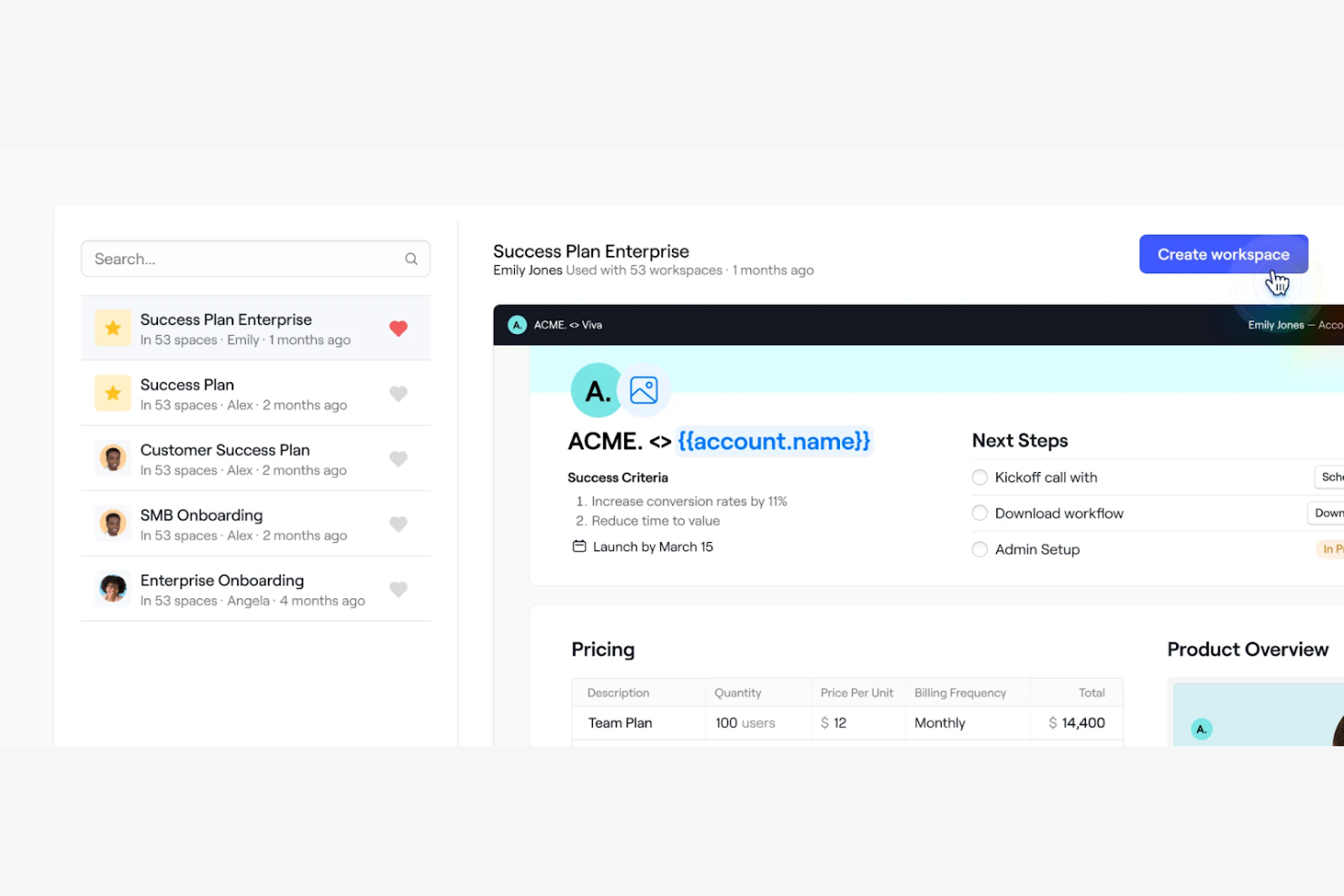
Dock is a client portal software designed for teams focused on improving customer onboarding and engagement. It offers tools for project management, client collaboration, and document sharing.
Why I picked Dock: Its focus on customer onboarding simplifies the process of bringing new clients on board. You can create personalized onboarding experiences with features such as custom client portals and automated task lists. Dock's document sharing and feedback tools support clear communication between your team and clients. The ability to tailor the onboarding process to fit specific client needs makes it a valuable tool for creating positive customer experiences.
Standout Features and Integrations:
Features include customization tools that allow you to create a unique experience for each client. The platform offers workflow automation tools that help you keep projects on track and prevent anything from falling through the cracks. You can also embed feedback systems into your workspace to gather client input and make necessary adjustments in one location.
Integrations include Slack, Google Drive, Dropbox, HubSpot, Salesforce, and more.
Pros and Cons
Pros:
- Rich content embedding support
- Customizable portal layouts
- Strong engagement analytics
Cons:
- Advanced modules may require technical expertise
- Some features are limited to higher-tier plans

Best for all-in-one service business tools

SuiteDash is an all-in-one business software designed for small to medium-sized businesses that offers tools for managing client relationships, automating workflows, and refining operations. It serves various business functions, such as CRM, project management, billing, and client communications.
Why I picked SuiteDash: It provides a unique unlimited pricing model, allowing you to add unlimited team members, clients, or projects without increasing costs. Features such as a customizable customer portal and automated CRM set it apart, offering flexibility and efficiency. SuiteDash's white-label options mean your team can maintain brand consistency while using its tool suite. The platform also includes a learning management platform, making it versatile for different industries.
Standout Features and Integrations:
Features include automated client onboarding, secure file storage and sharing, and dynamic document generation. You can also access appointment booking tools integrated with Google Calendar and project management features to organize tasks. SuiteDash's email marketing capabilities help track campaign performance, which can improve your marketing efforts.
Integrations include QuickBooks, Stripe, PayPal, Google Calendar, Zoom, and more.
Pros and Cons
Pros:
- Integrates multiple business functions
- Wide range of white-label options
- Unlimited team members and clients
Cons:
- Initial setup can be complex
- Users may feel limited to SuiteDash's ecosystem

Softr
Best for no-code solutions
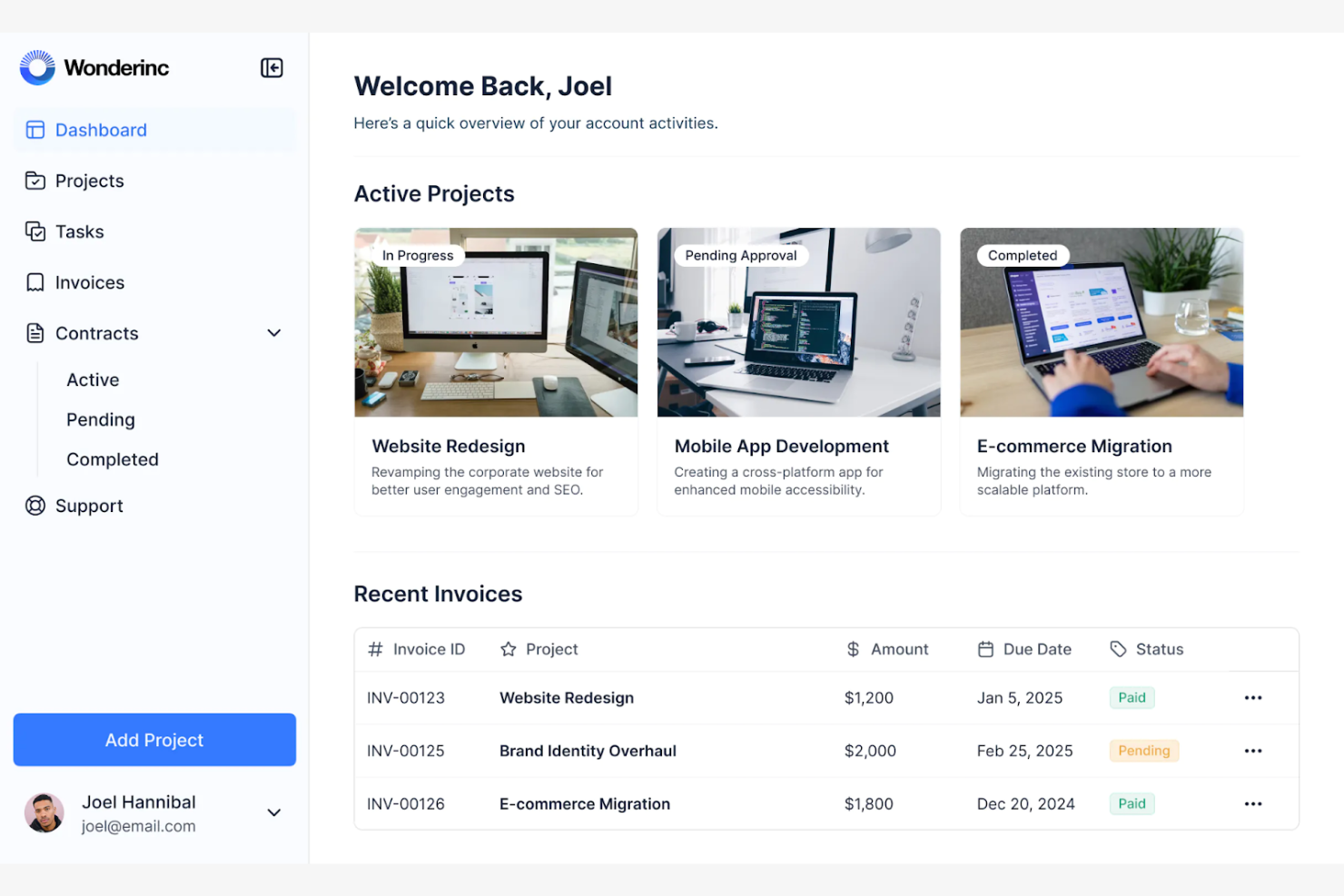
Softr is a no-code platform designed for businesses looking to create custom client portals and web applications without coding expertise. It primarily serves small to midsize companies and entrepreneurs wanting to build tailored solutions for their clients.
Why I picked Softr: It offers an intuitive drag-and-drop interface, making it simple for your team to create client portals without technical skills. You can customize layouts and features to fit your business needs, which can improve the client experience. Softr's ability to integrate with Airtable for data management adds flexibility to your projects. The platform's focus on no-code development allows you to quickly adapt to changing business requirements.
Standout Features and Integrations:
Features include pre-built templates that help you get started quickly, saving you time in the design process. You can also utilize the membership management features to control access and permissions for your clients.
Integrations include PayPal, Google Analytics, Mailchimp, and more.
Pros and Cons
Pros:
- Supports mobile-friendly portals
- Connects to multiple data sources
- Allows dynamic, personalized client views
Cons:
- Template-driven design
- Heavy reliance on external data tools

FuseBase
Best for database management
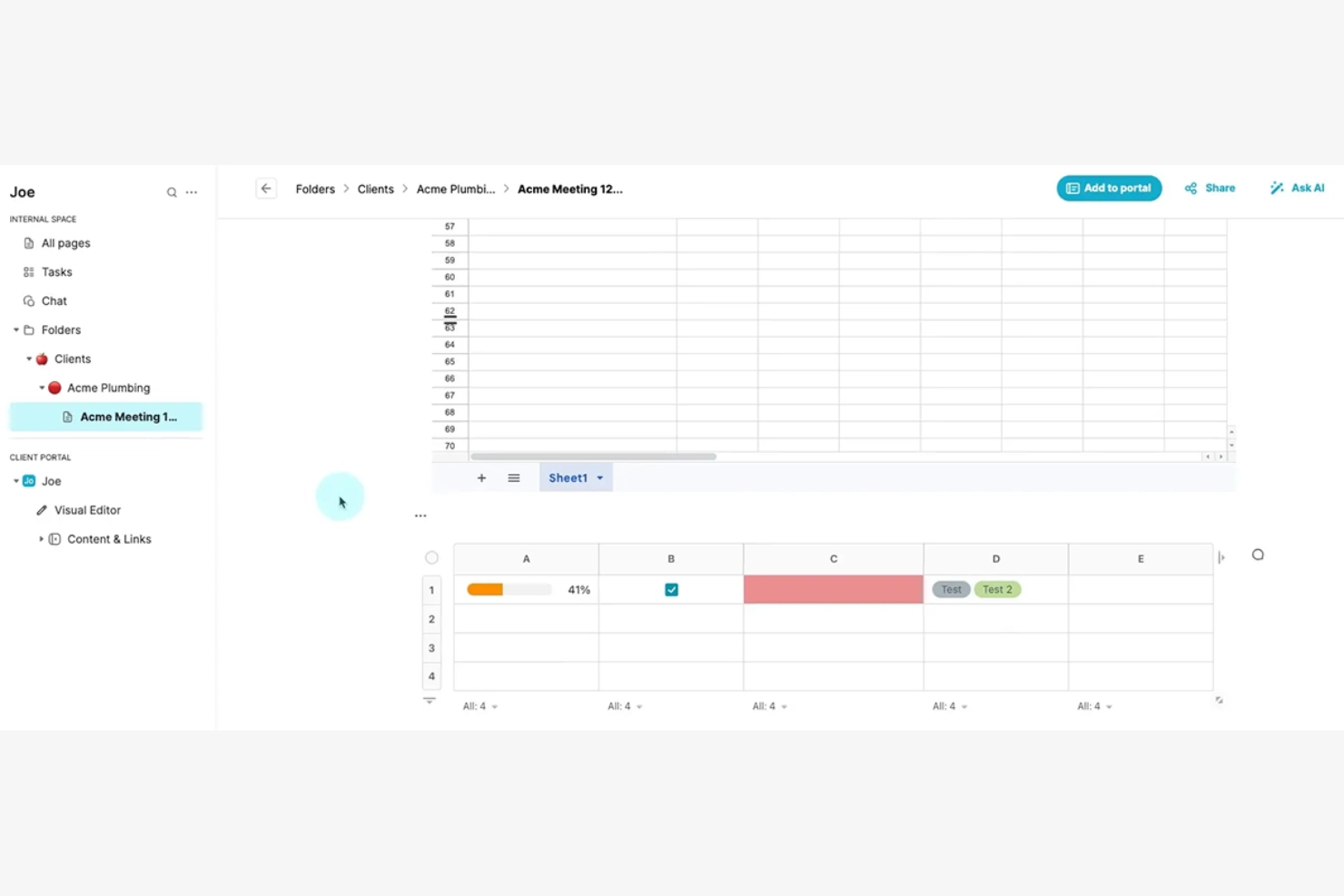
FuseBase is a client portal software designed for businesses that require efficient database management and secure data handling. It targets industries that need advanced data organization and client access control, such as finance and health care.
Why I picked FuseBase: It excels in database management, allowing you to manage large datasets and maintain data integrity with ease. The platform's focus on security and compliance makes it suitable for handling sensitive information. FuseBase also offers tools for real-time data collaboration, which can help facilitate strong teamwork and increase productivity.
Standout Features and Integrations:
Features include customizable data schemas that allow you to structure your data according to your business needs. You can also use the platform's secure access controls to protect sensitive information and maintain compliance with industry standards.
Integrations include Slack, Google Drive, Calendly, Airtable, and more.
Pros and Cons
Pros:
- Structured knowledge bases inside the portal
- Built-in CRM, eSignatures, and surveys
- Advanced database management
Cons:
- Limited for non-database tasks
- Performance may vary with larger workspaces

Best for finance professionals
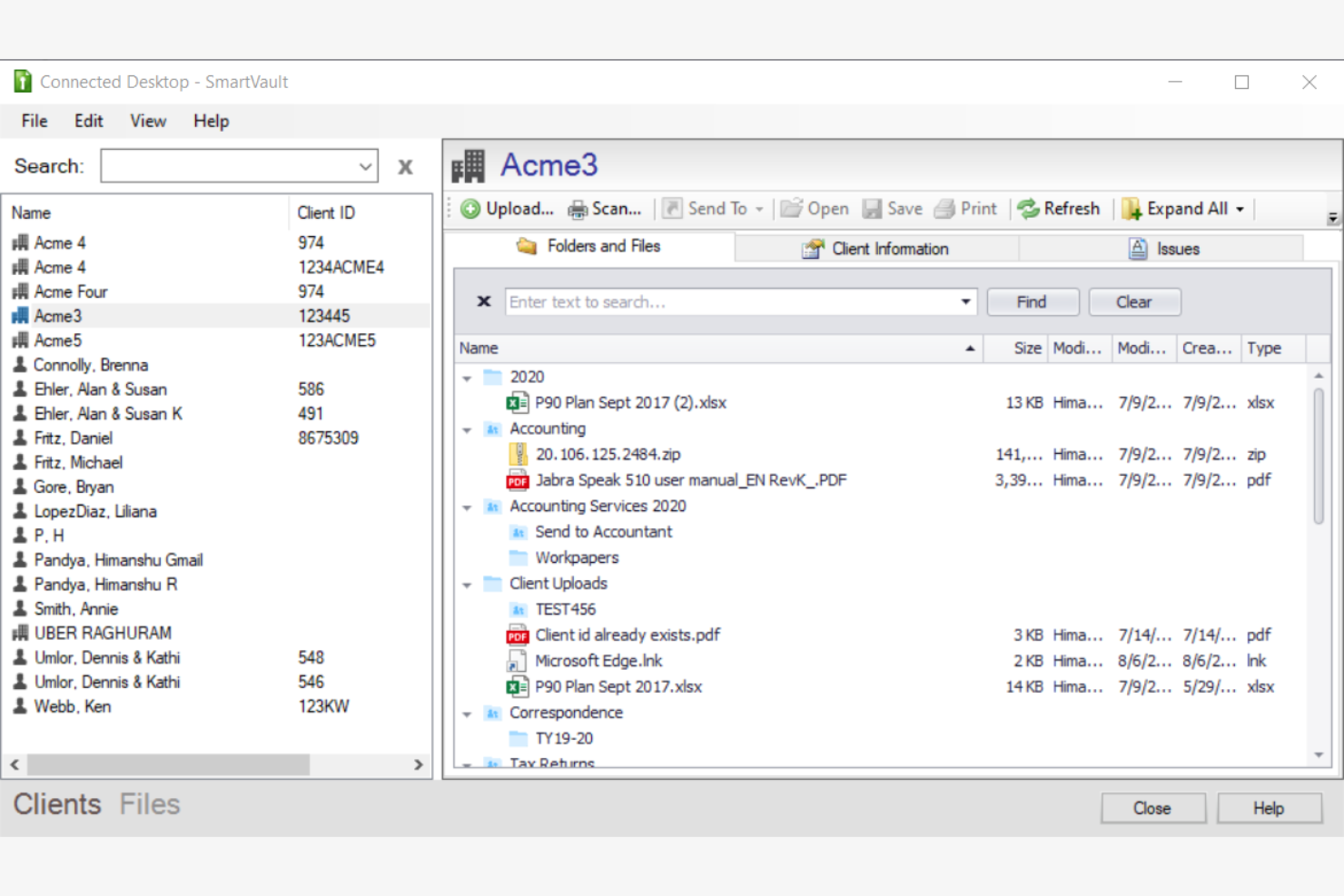
SmartVault is a client portal software focused on secure document storage and management, primarily serving accounting professionals and small businesses. It offers tools for file sharing, secure access, and compliance management.
Why I picked SmartVault: Its emphasis on document management helps keep your files organized and accessible. With bank-level encryption and audit logs, your team can maintain compliance with industry regulations. SmartVault's secure file sharing and access controls are designed to provide peace of mind when handling sensitive information. Its integration with popular accounting software makes it a valuable asset for professionals in finance.
Standout Features and Integrations:
Features include audit logs for tracking document access and maintaining compliance.
Integrations include QuickBooks, Xero, FreshBooks, Intuit ProSeries, DocuSign, and more.
Pros and Cons
Pros:
- Purpose-built for accounting and compliance-heavy firms
- Deep integrations with accounting ecosystems
- Advanced document collection tools
Cons:
- Less suitable for non-financial industries
- Document-centric design may feel restrictive
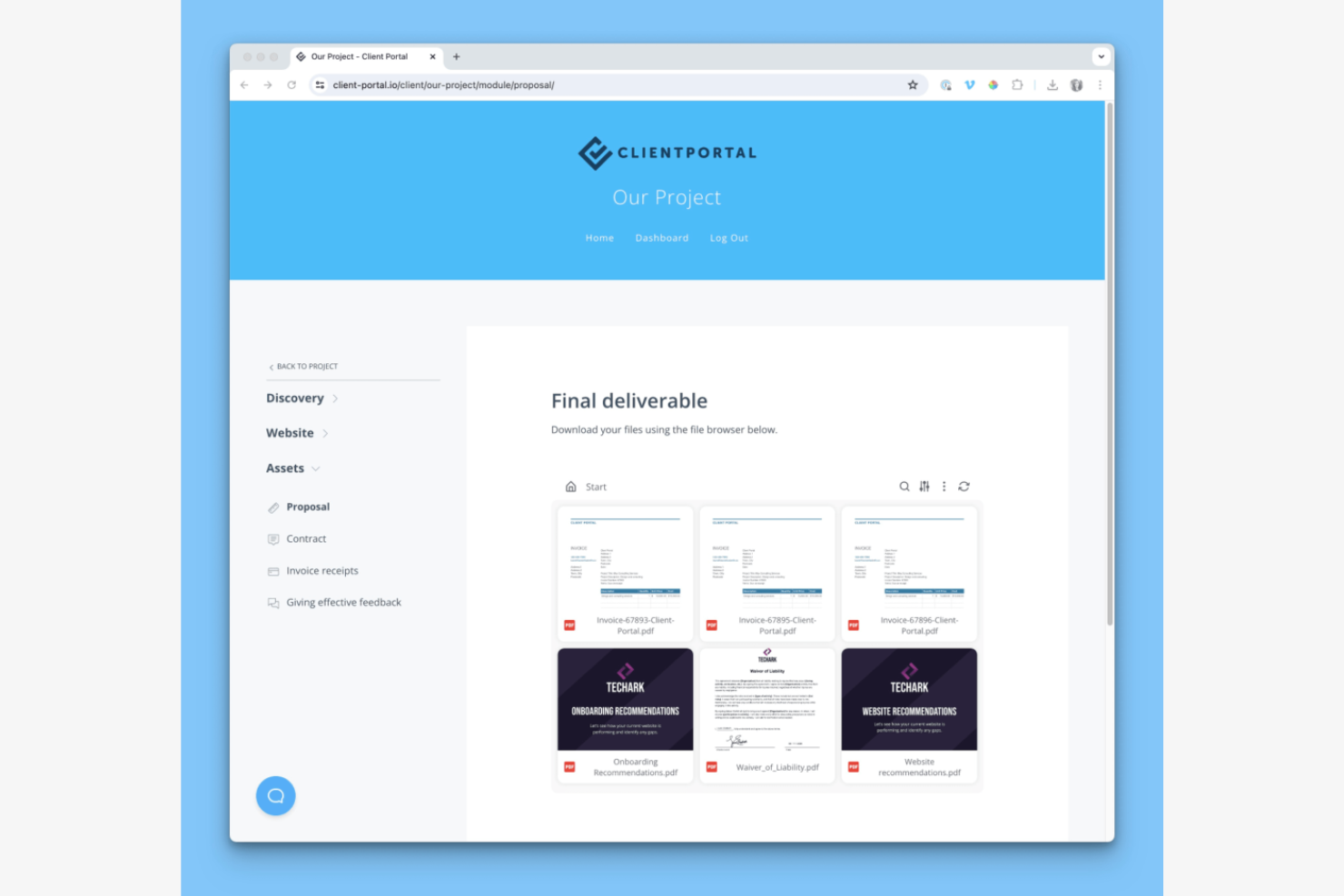
Client Portal is a WordPress plugin designed for freelancers and small agencies. It provides tools for project management and client collaboration and helps users manage projects, share files, and communicate with clients directly through their WordPress sites.
Why I picked Client Portal: It's a strong fit for WordPress users seeking a simple way to manage client interactions. The plugin integrates with existing WordPress themes and allows you to create branded client portals. Features such as project tracking and file sharing help improve the user experience, as you do not have to leave the WordPress environment. The ability to customize the portal to match your brand makes it especially appealing for small teams.
Standout Features and Integrations:
Features include project templates that help you organize tasks and deadlines. You can use its drag-and-drop interface to arrange project components and client information. The built-in file-sharing system allows your team to exchange documents and updates.
Integrations include QuickBooks, Zoho, Zapier, and more.
Pros and Cons
Pros:
- Drag-and-drop interface
- Transparent one-time pricing
- Strong WordPress integration
Cons:
- Lacks advanced project management features
- Limited to WordPress users

Zendo is an all-in-one client portal software aimed at agencies, providing tools for service selling, invoicing, and client communication. Its main users include web designers, developers, and marketers who need to manage client interactions and simplify business processes.
Why I picked Zendo: It supports team collaboration by offering real-time chat and automated payment collection, which are important for project coordination. You can create customizable service catalogs and workflows, making it flexible for various business needs. The platform's ability to impersonate clients for requests can help you improve your understanding of client needs and service delivery. With support for multiple payment methods, Zendo provides smooth transactions for your clients.
Standout Features and Integrations:
Features include real-time chat for direct communication and quick issue resolution. You can also automate payment collection, simplifying financial transactions for your team.
Integrations are not publicly listed.
Pros and Cons
Pros:
- Detailed client profiles with history and files
- Automated quoting, invoicing, and payment collection
- Real-time chat for quick communication
Cons:
- Limited enterprise-grade support
- Some features may require configuration and initial setup


Kitchen.co is a client portal software tailored for web designers and creative agencies, helping them manage client projects and communications. It offers tools for project management, invoicing, and client collaboration.
Why I picked Kitchen.co: It's designed specifically for creative professionals, with features such as customizable templates. The platform can help simplify project workflows and improve brand representation. Kitchen.co's resources are designed to empower users to create engaging online experiences, making it a good fit for those in the creative industry.
Standout Features and Integrations:
Features include project folder automation upon contract signing, a content collection system, and customizable client portals. You can also benefit from its educational resources and community support. Kitchen.co's focus on brand representation can help your internal teams manage their projects.
Integrations include Squarespace, Stripe, PayPal, Google Drive, Dropbox, and more.
Pros and Cons
Pros:
- Intuitive, low-friction interface
- Supports project folder automation
- Tailored for creative professionals
Cons:
- Its folder-based structure may feel restrictive
- Mainly focused on web design
Diğer Müşteri Portalı Yazılımları
Kısa listeme giremeyen, ancak yine de göz atmaya değer bazı ek müşteri portalı yazılımı seçenekleri şunlardır:


How I Evaluate Client Portal Software
I evaluate these tools in two layers—what's required to give clients a real external workspace with secure access, and what separates a basic portal from one project managers actually trust.
Core Functionality (Table Stakes For This List)
When I'm selecting tools for my list, I rank each one on a scale from 0 (does not offer the functionality) to 5 (excels in this area) for each core functionality listed below. Then, I calculate the tool's total score into a percentage. Each tool needs to achieve a minimum total score of 65% to be considered for inclusion.
- Client-Facing Portal Access: I check whether clients get a dedicated login environment rather than just a shared link, and whether the portal can be branded to match your agency or firm's identity.
- Secure Document Sharing: The tool should support permission-based file exchange with version control, so clients can upload contracts or review SOWs without resorting to email attachments.
- Project Visibility & Tracking: I look for client-friendly views of milestones, timelines, and deliverable status that give clients enough context to track progress without exposing internal task-level detail.
- Client Communication Tools: Centralized messaging or threaded comments tied to specific tasks and deliverables matter here, replacing scattered email chains with in-context conversations.
- Approvals & Feedback Workflows: I evaluate whether clients can formally approve deliverables, request revisions, or sign off on milestones directly within the portal instead of through ad hoc messages.
- Granular Permissions & Access Control: Role-based permissions should let you control exactly what each client contact sees per project, folder, or document, especially when managing multiple client accounts.
Once I have a list of tools that meet this criteria, I consider what sets each platform apart.
Differentiating Factors (What Sets Vendors Apart)
Here's how I compare and contrast different vendors:
Standout Features
White-label branding matters when your clients log into a portal carrying your logo and custom domain—it builds trust and keeps your firm front and center. I also look for integrated billing and invoicing, which lets you tie payments to project milestones instead of bouncing between the portal and a separate accounting tool. Client intake forms are another separator, letting you collect project briefs and onboarding details before work begins to cut down on the back-and-forth that delays kickoff.
Beyond Features
I evaluate how well each portal connects to your existing stack—native integrations with tools like Jira, Asana, or HubSpot mean less manual syncing between your internal workflows and what clients see. Security also weighs heavily, especially when clients share contracts or sensitive deliverables; I check for SOC 2 compliance, encryption standards, and SSO support. Pricing structure matters too, since some tools charge per client portal while others charge per internal user, and the right model depends on whether you manage five clients or fifty.
Müşteri Portalı Yazılımı Nasıl Seçilir?
Uzun özellik listeleri ve karmaşık fiyatlandırma yapıları içinde kaybolmak kolaydır. Kendinize özgü yazılım seçim sürecinizi yürütürken odağınızı korumanıza yardımcı olmak için göz önünde bulundurmanız gereken faktörleri aşağıdaki kontrol listesinde derledim:
| Faktör | Dikkat Edilmesi Gerekenler |
|---|---|
| Ölçeklenebilirlik | Araç ekibinizle birlikte büyüyecek mi? Kullanıcı sınırlarını, veri depolamayı ve özellik ekleme olanağını değerlendirin. Ek maliyet olmadan gelecekteki büyümeye uyum sağlayacak esneklik belirtilerini arayın. |
| Entegrasyonlar | Mevcut araçlarınıza bağlanabiliyor mu? CRM, e-posta ve proje yönetimi yazılımlarınızla uyumluluğunu kontrol edin. Sistemler arasında manuel veri girişi gerektiren araçlardan kaçının. |
| Özelleştirilebilirlik | Aracı süreçlerinize uyarlayabilir misiniz? Markalama, iş akışı düzenlemeleri ve kişiselleştirilmiş kullanıcı deneyimlerine izin verdiğini doğrulayın. Tasarım ve kullanıcı ayarlarında esneklik arayın. |
| Kullanım kolaylığı | Araç tüm kullanıcılar için sezgisel mi? Açık gezinme seçeneklerine sahip, anlaşılır bir arayüz arayın. Kapsamlı eğitim gerektiren karmaşık sistemlerden kaçının. |
| Uygulama ve kullanıma alma | Ne kadar hızlı başlayabilirsiniz? Eğitim kaynaklarının bulunabilirliğini, kurulum kolaylığını ve tam kullanıma geçiş süresini değerlendirin. Kullanıma alma sırasında sağlayıcı desteğinin mevcut olup olmadığını göz önünde bulundurun. |
| Maliyet | Fiyatlandırma bütçenizle uyumlu mu? Gizli ücretler veya ek özellikler için ilave masraflar dâhil olmak üzere toplam maliyeti karşılaştırın. Mali planınıza uygun fiyatlandırma modelleri arayın. |
| Güvenlik önlemleri | Araç verilerinizi nasıl koruyor? Şifreleme standartlarını, erişim denetimlerini ve GDPR veya HIPAA gibi düzenlemelere uyumluluğu doğrulayın. Güçlü güvenlik önlemlerine sahip araçlara öncelik verin. |
Müşteri Portalı Yazılımı Nedir?
Müşteri portalı yazılımı, işletmelerin bilgileri güvenli bir şekilde paylaşmasına ve müşterileriyle çevrim içi iş birliği yapmasına olanak tanıyan dijital bir platformdur. Proje yöneticileri, muhasebeciler ve danışmanlar gibi profesyoneller, iletişimi geliştirmek ve müşteri ilişkilerini yönetmek için bu araçları kullanır. Güvenli dosya paylaşımı, müşteri iletişimi ve görev yönetimi özellikleri, projeleri düzenlemeye ve şeffaflığı korumaya yardımcı olur. Bu araçlar, tüm etkileşimler için merkezi ve erişilebilir bir merkez sunarak müşteri memnuniyetini artırabilir.
Özellikler
Müşteri portalı yazılımı seçerken aşağıdaki temel özelliklere dikkat edin:
- Güvenli dosya paylaşımı: Kullanıcıların belgeleri güvenli bir şekilde paylaşmasını sağlayarak veri korumasını ve gizliliğini sürdürür.
- Müşteri iletişimi: Doğrudan mesajlaşmayı ve güncellemeleri kolaylaştırarak etkileşimi ve yanıt sürelerini iyileştirir.
- Görev yönetimi: Proje görevlerini düzenlemeye ve takip etmeye yardımcı olarak teslim tarihlerinin aksamasını önler ve sorumlulukları netleştirir.
- Özelleştirilebilir müşteri portalları: İşletmelerin portalın görünümünü ve işlevlerini markalarına ve iş akışlarına uyacak şekilde düzenlemesine olanak tanır.
- Otomatik raporlama: Raporları otomatik olarak oluşturarak zaman kazandırır ve müşterilere zamanında güncellemeler sunar.
- Entegrasyon özellikleri: Sorunsuz veri akışı için CRM ve muhasebe yazılımları gibi diğer araçlara bağlanır.
- Erişim denetimi: Kullanıcılara farklı erişim düzeyleri sağlayarak hassas bilgileri korur ve gizliliği sürdürür.
- Gerçek zamanlı iş birliği: Ekiplerin ve müşterilerin aynı anda birlikte çalışmasını sağlayarak üretkenliği ve karar alma süreçlerini geliştirir.
- İş akışı otomasyonu: Tekrarlayan görevleri gerçekleştirerek ekiplerin daha stratejik faaliyetlere odaklanmasını sağlar.
- Analizler ve içgörüler: Performansı izlemek ve bilinçli kararlar almak için veri analizi sunar.
Faydalar
Müşteri portalı yazılımını uygulamak ekibiniz ve işletmeniz için çeşitli faydalar sağlar. Yararlanabileceğiniz birkaç fayda şunlardır:
- Geliştirilmiş iletişim: Doğrudan mesajlaşma ve güncellemeler, ekibiniz ile müşterileriniz arasındaki etkileşimleri destekleyerek yanlış anlaşılmaları azaltır.
- Zaman tasarrufu: Otomatik raporlama ve iş akışı otomasyonu, manuel görevleri azaltarak daha önemli işler için zaman kazandırır.
- Gelişmiş güvenlik: Güvenli dosya paylaşımı ve erişim denetimi, hassas bilgileri koruyarak gizliliği ve uyumluluğu sürdürür.
- Artan şeffaflık: Müşteriler gerçek zamanlı güncellemelere ve raporlara erişerek güven oluşturabilir ve bilgi sahibi olabilir.
- Daha iyi organizasyon: Görev yönetimi özellikleri, projelerin plana uygun ilerlemesine yardımcı olur ve herkesin sorumluluklarını bilmesini sağlar.
- Özelleştirme: Özelleştirilebilir portallar, müşteri deneyimini markanıza ve iş süreçlerinize uyacak şekilde düzenlemenize olanak tanır.
- Veriye dayalı içgörüler: Analizler ve içgörüler, bilinçli kararlar almanıza ve performansı geliştirmenize yardımcı olacak değerli veriler sunar.
Maliyetler & Fiyatlandırma
İstemci portalı yazılımını seçmek, mevcut çeşitli fiyatlandırma modellerini ve planları anlamayı gerektirir. Maliyetler özelliklere, ekip büyüklüğüne, eklentilere ve daha fazlasına göre değişir. Aşağıdaki tablo, istemci portalı yazılımı çözümlerindeki yaygın planları, ortalama fiyatlarını ve genellikle sunulan özellikleri özetlemektedir:
İstemci Portalı Yazılımı İçin Plan Karşılaştırma Tablosu
| Plan Türü | Ortalama Fiyat | Yaygın Özellikler |
|---|---|---|
| Ücretsiz Plan | $0 | Temel dosya paylaşımı, sınırlı depolama ve temel iletişim araçları. |
| Kişisel Plan | $6-$35/kullanıcı/ay | Güvenli dosya paylaşımı, temel görev yönetimi ve istemci iletişimi. |
| İşletme Planı | $30-$200/kullanıcı/ay | Gelişmiş dosya paylaşımı, özelleştirilebilir portallar ve iş akışı otomasyonu. |
| Kurumsal Plan | $300-$2000/kullanıcı/ay | Güçlü güvenlik, özel entegrasyonlar ve gelişmiş analizler. |
İstemci Portalı Yazılımı Hakkında SSS
\u003cspan style=\u0022font-weight: 400\u0022\u003eİstemci portalı yazılımı hakkında sık sorulan bazı soruların yanıtları aşağıdadır:\u003c/span\u003e
İstemci portalı yazılımının temel amacı nedir?
\u003cspan style=\u0022font-weight: 400\u0022\u003eİstemci portalı yazılımının temel amacı, işletmelerin istemcileriyle etkileşim kurması ve iş birliği yapması için güvenli bir platform sağlamaktır. Dosya paylaşımını, iletişimi, proje ve istemci yönetimini merkezi bir konumda mümkün kılar. Ekibiniz bu yazılımı istemci iletişimini, proje takibini ve veri güvenliğini geliştirmek için kullanabilir. Bir istemci portalı kullanarak istemcilere kişiselleştirilmiş bir deneyim sunabilir, süreçleri basitleştirebilir ve daha güçlü ilişkiler kurabilirsiniz.\u003c/span\u003e
İstemci portalı yazılımı diğer araçlarla entegre olabilir mi?
\u003cspan style=\u0022font-weight: 400\u0022\u003eEvet, çoğu istemci portalı yazılımı diğer araçlarla entegre olabilir. Entegrasyon olanakları değişiklik gösterse de CRM’lere, proje yönetimi araçlarına ve muhasebe yazılımlarına bağlanmanıza olanak tanır. Bu, sorunsuz veri akışını destekler ve manuel veri girişini azaltır. Mevcut sistemlerinize bağlandığını doğrulamak için yazılımın entegrasyon seçeneklerini kontrol edin. Entegrasyonlar zamandan tasarruf sağlayabilir ve üretkenliği artırarak ekibinizin iş akışını daha verimli hâle getirebilir.\u003c/span\u003e
İstemci portalı yazılımı ne kadar güvenlidir?
\u003cspan style=\u0022font-weight: 400\u0022\u003eİstemci portalı yazılımı, şifreleme ve erişim kontrolleri gibi özelliklerle güvenli olacak şekilde tasarlanmıştır. Güvenlik önlemleri değişiklik gösterir; bu nedenle, geçerliyse GDPR veya HIPAA gibi sektör standartlarına uyan bir yazılım seçmek önemlidir. İşletmenizi ve istemci verilerinizi güvende tutmak için iki faktörlü kimlik doğrulama ve denetim günlükleri gibi özellikleri arayın. Güvenliği doğrulamak, istemcilerinizin hassas bilgilerini korumaya ve güveni sürdürmeye yardımcı olur.\u003c/span\u003e
İstemci portalı yazılımı küçük işletmeler için uygun mudur?
\u003cspan style=\u0022font-weight: 400\u0022\u003eEvet, istemci portalı yazılımı küçük işletmeler için uygundur. Birçok sağlayıcı, her büyüklükteki işletmenin ihtiyaçlarını karşılayan ölçeklenebilir planlar sunar. Küçük işletmeler gelişmiş istemci iletişiminden, organizasyondan ve veri yönetiminden yararlanabilir. Yazılım seçerken bütçenizi, ihtiyaç duyduğunuz özellikleri ve mevcut araçlarınızla ne kadar iyi entegre olduğunu göz önünde bulundurun. İstemci portalı yazılımına yatırım yapmak, işletme operasyonlarınızı ve istemci ilişkilerinizi geliştirebilir.\u003c/span\u003e