

2026’da İncelenen En İyi 10 Müşteri İş Birliği Yazılımı

En İyi Müşteri İş Birliği Yazılımları Kısa Listesi


Projeleri yönetmek ve müşterilerle iş birliği yapmak karmaşık görevler olabilir. Muhtemelen birden fazla teslim tarihini takip ediyor, farklı ekiplerle koordinasyon sağlıyor ve herkesin aynı anlayışta olmasını sağlamaya çalışıyorsunuz. Bu durum bunaltıcı gelebilir.
Müşteri iş birliği yazılımı hayatınızı kolaylaştırmak için tasarlanmıştır. Daha iyi iletişim kurmanıza, görevleri verimli bir şekilde düzenlemenize ve proje ilerlemesini takip etmenize yardımcı olur. Deneyimlerime göre doğru araçlara sahip olmak stresi önemli ölçüde azaltabilir ve ekip verimliliğini artırabilir.
Bu makalede, müşteri iş birliği yazılımları için en iyi seçimlerimi paylaşacağım. Kapsamlı araştırma ve testlere dayanan tarafsız bir değerlendirme sunacağım. Özellikler, kullanılabilirlik ve her aracı benzersiz kılan unsurlar hakkında bilgiler bulacaksınız. Haydi başlayalım ve ekibiniz için mükemmel çözümü bulalım.
Why Trust Our Software Recommendations
Our team has been testing and reviewing software since 2012. As project managers ourselves, we know how difficult—and important—it is to choose the right software.
For this guide, we evaluated tools using hands-on testing and independent research, scoring tools using our selection criteria. We also draw on insights from industry thought leaders and practicing project management experts.
Our reviews reflect our human editorial judgment, not a sales pitch.
Expert reviewers:
Müşteri İş Birliği Yazılımları Karşılaştırma Tablosu
Bu karşılaştırma tablosu, en iyi müşteri iş birliği yazılımı seçimlerimin fiyatlandırma ayrıntılarını özetlemektedir:
| Tool | Starting Price | Website | |
|---|---|---|---|
| Best for milestone-driven client sign-off workflows | 4.2 out of 5 | €5.50/active project/month 14-day free trial | Website |
| Best for creative reviews | 4.9 out of 5 | $249/month Free demo + 10-day free trial available | Website |
| Best for client portals | 4.8 out of 5 | $11/user/month 10-day free trial | Website |
| Best for workflow automation | 5.0 out of 5 | $49/seat/month Free plan + free demo available | Website |
| Best for team collaboration | 4.5 out of 5 | $45/month 14-day free trial + free demo available | Website |
| Best for AI-powered project management | 4.4 out of 5 | $9.99/user/month Free plan + 14-day free trial + free demo available | Website |
| Best for AI-driven revenue enablement | 4.9 out of 5 | $350/month Free plan + free demo available | Website |
| Best for visual collaboration | — | $9.99/user/month Free plan available | Website |
| Best for time tracking | — | $3.5/user/month 14-day free trial + free demo available | Website |
| Best for gathering content | — | $35/month 14-day free trial + free demo available | Website |
En İyi Müşteri İş Birliği Yazılımları İncelemesi
Aşağıda, kısa listeme giren en iyi müşteri iş birliği yazılımlarının ayrıntılı özetlerini bulabilirsiniz. İncelemelerim, her aracın temel özelliklerine, artılarına ve eksilerine, entegrasyonlarına ve ideal kullanım alanlarına ayrıntılı bir bakış sunarak sizin için en iyisini bulmanıza yardımcı olur.

Ziggu
Best for milestone-driven client sign-off workflows
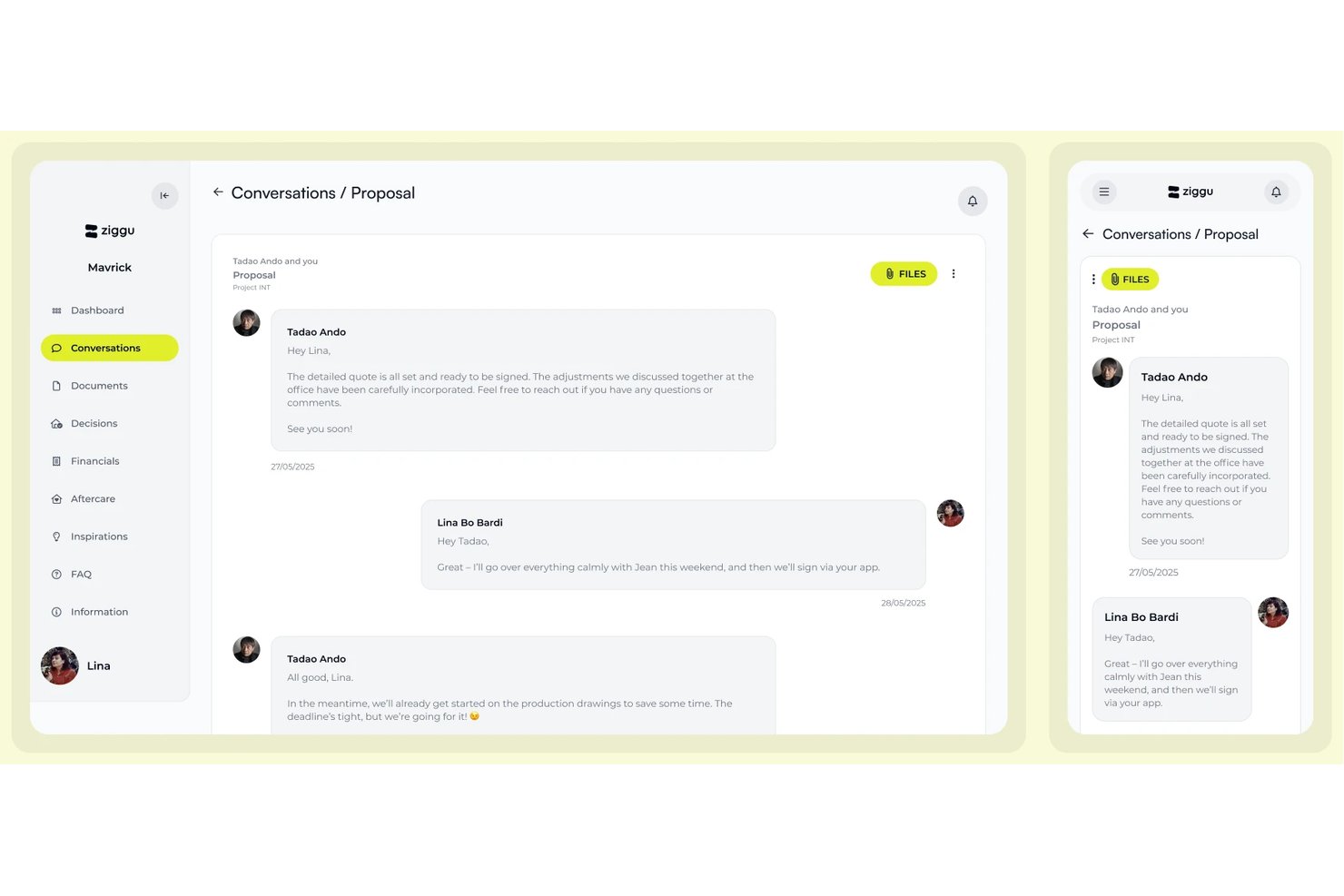
Ziggu is a client collaboration platform built around milestone-driven project delivery, offering branded client portals, structured decision and approval workflows, centralized communication, document sharing, and client-facing feedback tools.
Who Is Ziggu Best For?
Ziggu is a strong fit for project teams in property development, construction, or creative agencies managing structured, milestone-based client delivery across multiple concurrent projects.
Why I Picked Ziggu
I've included Ziggu in my top picks because its milestone-driven approval workflow is genuinely built around how client sign-off actually works in practice. When a milestone activates, Ziggu simultaneously triggers linked decisions, sends automated reminders, and captures electronic sign-off with a full audit log—so nothing slips through without a paper trail. I also like that each client gets a branded portal tied directly to their project timeline, giving them real-time visibility into where things stand without a single email chain.
Ziggu Key Features
- Branded client portal: Each client gets a dedicated, login-secured portal customized with your logo, colors, and style across all plans.
- Conversations hub: A centralized inbox organizes all client messages by project context, with read receipts, internal notes, and conversation assignment.
- Snagging and aftercare reports: Clients submit defect reports with photos directly in the portal, and teams track, assign, and resolve each issue with client confirmation.
- Project templates: Reusable templates let you build a standard client journey once and replicate it across every new project instantly.
Ziggu Integrations
Ziggu offers integrations via add-ons with Salesforce, HubSpot, Microsoft Dynamics 365, SharePoint, Dropbox, Nextcloud, Exact Online, and Power BI. A documented public REST API supports custom integrations and workflow automation.
Pros and Cons
Pros:
- Unlimited client invites on all plans
- Branded portals for each client included
- Milestone-driven client sign-off workflow built in
Cons:
- Lacks native real-time chat functionality
- No built-in visual proofing or annotation

Best for creative reviews
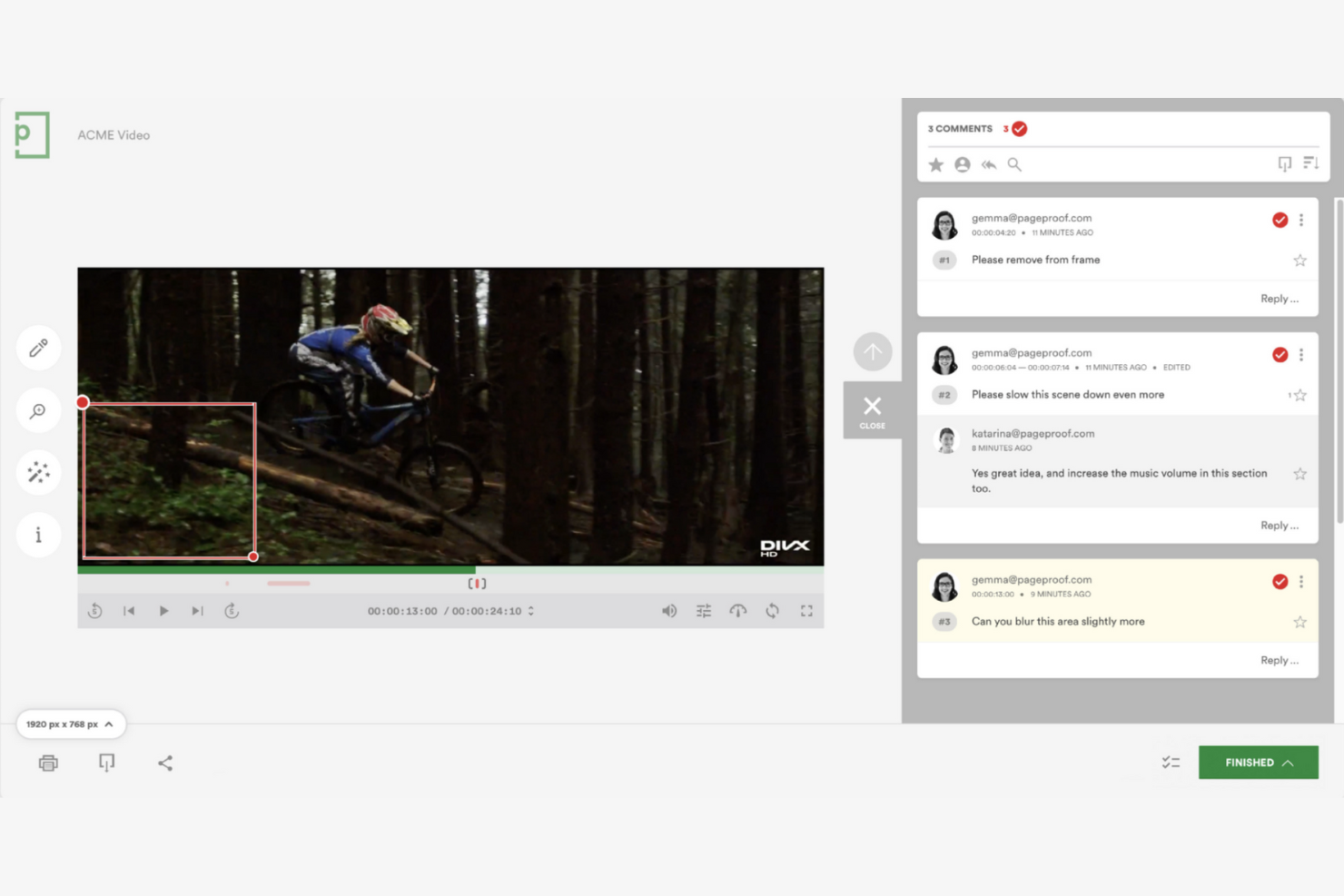
PageProof is a client collaboration software tailored for creative content approval, catering mainly to marketing and creative agencies. It facilitates the review and approval process for various file types, improving workflow efficiency and minimizing errors.
Why I picked PageProof: The platform excels in handling creative reviews with features such as smart workflows and markup tools that streamline feedback. PageProof's centralized feedback system helps reduce rework by keeping everyone on the same page. It also provides unlimited users for a fixed monthly fee, making it cost-effective for creative teams.
Standout Features and Integrations:
Features include support for all file types, allowing your team to review PDFs, images, videos, and more. Real-time commenting and markup tools make it easy to provide feedback directly on the files. Automated workflows help you track progress and approvals efficiently.
Integrations include Adobe Creative Cloud, Asana, Trello, Google Drive, Dropbox, Microsoft OneDrive, Slack, monday.com, and more.
Pros and Cons
Pros:
- Contextual on-file markup tools
- Centralized feedback
- Supports all file types
Cons:
- No in-app video conferencing
- Lack of built-in proof-versioning comparison

Clinked
Best for client portals
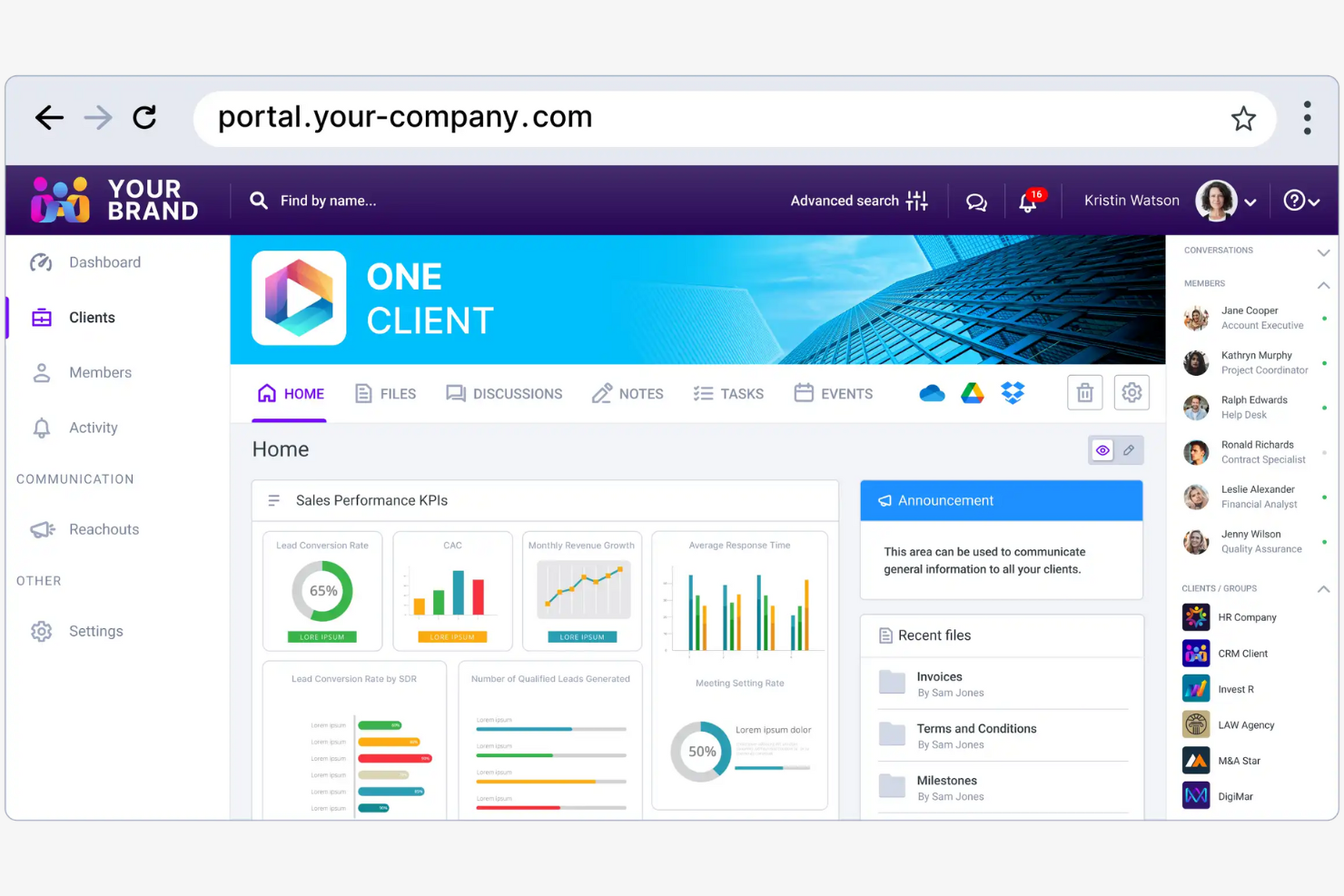
Clinked is a secure collaboration platform designed for businesses needing customizable client portals and document management. It's popular among industries such as finance, legal, and healthcare for managing client relationships and projects efficiently.
Why I picked Clinked: This platform offers a strong collaboration experience with real-time updates, file-sharing, and group chat. Clinked's mobile app ensures you can access files and communicate in real time. It integrates with a wide range of applications, making it versatile for various business needs.
Standout Features and Integrations:
Features include customizable client portals that let you brand your workspace to match your company's identity. You can manage documents securely with bank-grade encryption and track projects efficiently with task organization tools. Clinked also offers virtual data rooms for secure file sharing and e-signatures.
Integrations include Google Workspace, Adobe Acrobat Sign, Power BI, Voiceflow, Zapier, JotForm, DocuSign, and more.
Pros and Cons
Pros:
- Centralized group chat updates
- Secure file storage
- Branded white-label client environments
Cons:
- Complex initial setup
- Limited third-party software connectivity
Flowla
Best for workflow automation
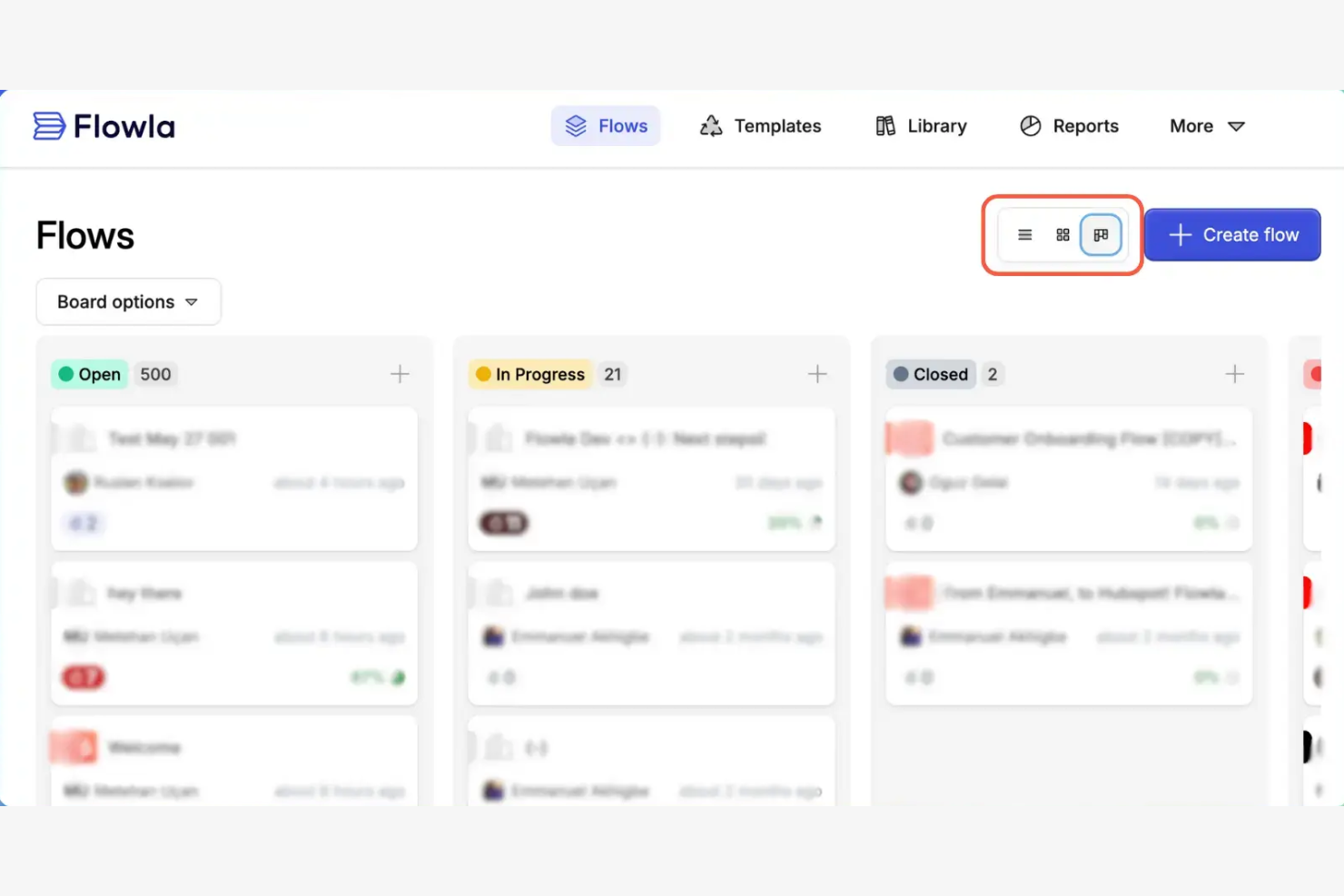
Flowla is a workflow automation tool designed for teams needing to simplify processes and improve efficiency. It primarily serves businesses looking to automate repetitive tasks and improve collaboration across departments.
Why I picked Flowla: The platform excels at automating workflows, making it a great choice for teams aiming to improve productivity. You can create custom workflows to automate routine tasks, reducing manual effort. Flowla's project management tools allow you to collaborate with clients in a single workspace.
Standout Features and Integrations:
Features include a drag-and-drop builder that helps you design workflows without coding. The platform offers triggers and actions to automate complex processes effectively. You can also use its reporting tools to gain insights into workflow efficiency and identify areas for improvement.
Integrations include Slack, Salesforce, HubSpot, Zapier, Attio, Calendly, and more.
Pros and Cons
Pros:
- Detailed performance analytics
- Effective automation tools
- Custom workflow creation
Cons:
- Occasional performance lags
- Resource-intensive interface transitions

ProofHub
Best for team collaboration
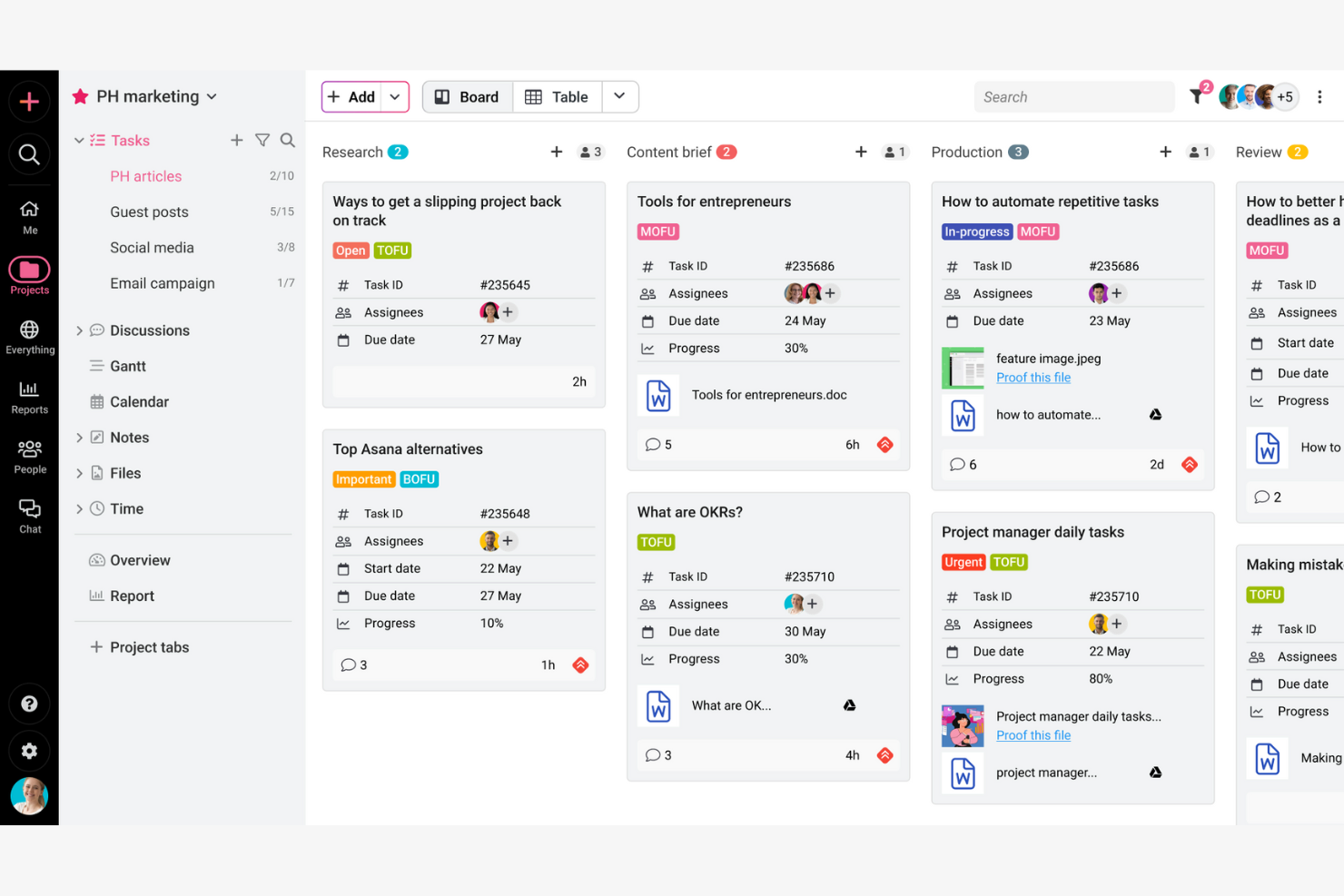
ProofHub is a project management and team collaboration software designed for businesses and teams needing to organize projects, collaborate, and track progress. It provides tools for planning, collaboration, and task management, catering to a wide range of industries.
Why I picked ProofHub: It offers extensive team collaboration features that allow your team to communicate and manage tasks efficiently. You can use its discussion boards and chat features to facilitate team communication. ProofHub also includes task management tools that help you assign tasks, set deadlines, and track progress. The platform's flexibility in project views ensures it fits different team needs and workflows.
Standout Features and Integrations:
Features include custom roles, allowing you to define access levels and responsibilities for team members. The platform offers time tracking tools that help your team monitor time spent on tasks. You can also use its file-sharing capabilities to keep all project documents organized and accessible.
Integrations include Google Calendar, Dropbox, OneDrive, Box, iCal, FreshBooks, QuickBooks, Slack, and more.
Pros and Cons
Pros:
- All-in-one workspace
- Flexible project views
- Custom roles and access levels
Cons:
- No dedicated offline mode
- Fixed native tool selection

Best for AI-powered project management
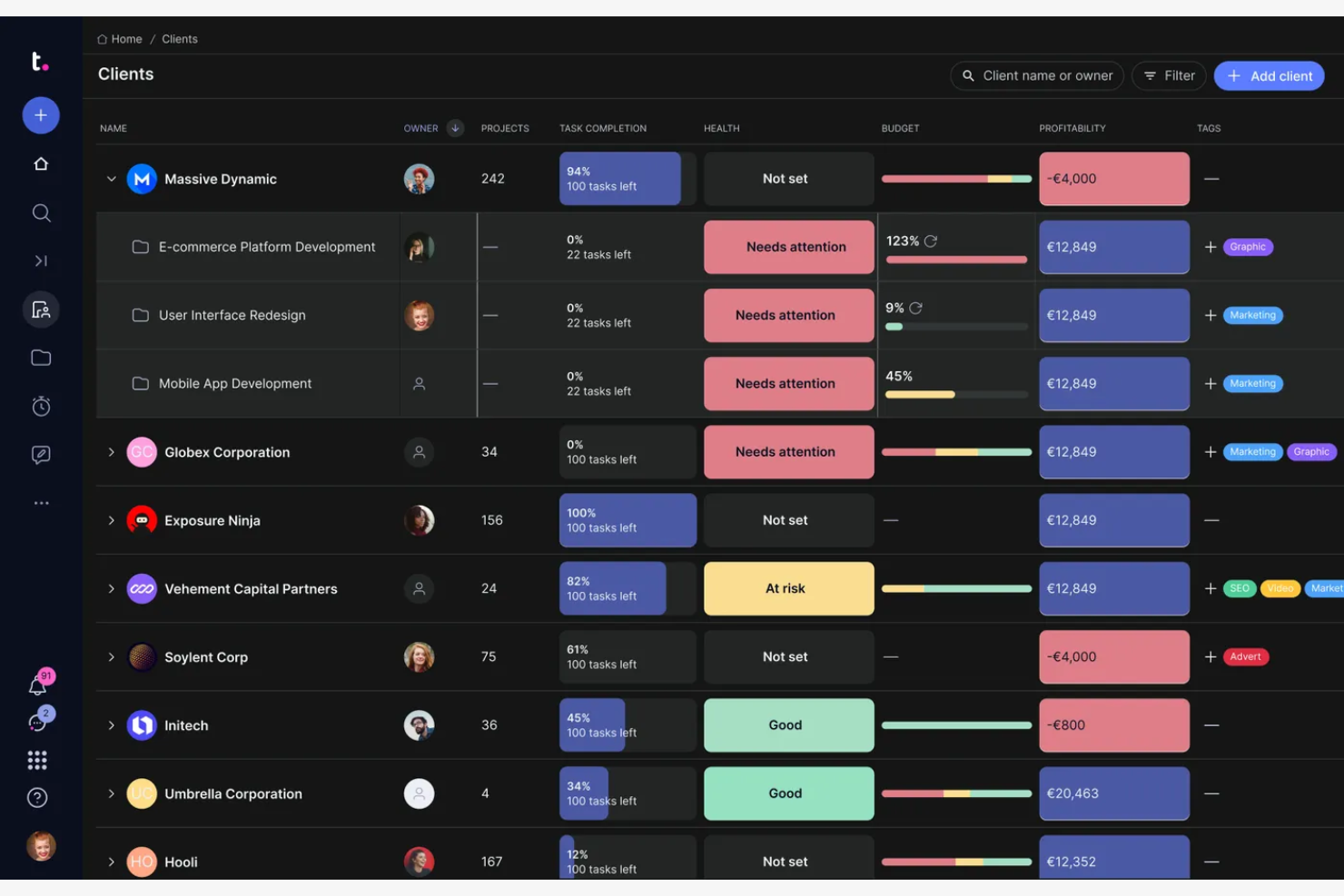
Teamwork.com is a project management software designed for teams needing detailed task management and collaboration tools. It's widely used by agencies and businesses to manage projects, track time, and communicate effectively.
Why I picked Teamwork.com: It offers extensive project management features that cater to both small and large teams. Templates help your team stay organized and support project planning. Teamwork.com also provides client access, enabling customer collaboration.
Standout Features and Integrations:
Features include the ability to create detailed task lists, which help you break down projects into manageable parts. You can also track time spent on tasks, providing clear insights into productivity. The platform offers Gantt charts and board views that provide visual project management options.
Integrations include Slack, QuickBooks, Mailchimp, Google Drive, Xero, Stripe, and more.
Pros and Cons
Pros:
- Custom project templates
- Interactive Gantt and board views
- Detailed task management
Cons:
- Extensive initial configuration requirements
- Limited mobile functionality

Dock
Best for AI-driven revenue enablement
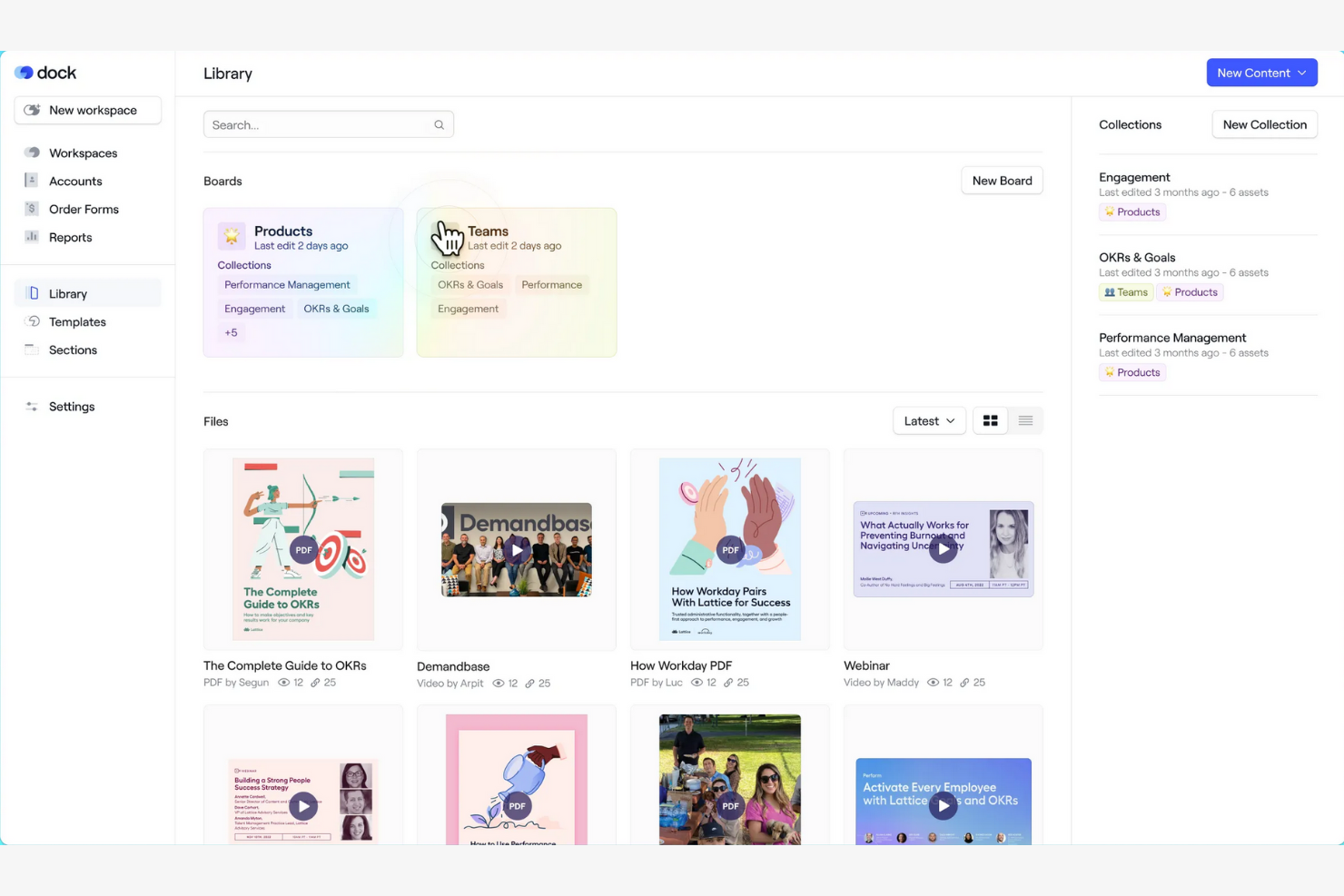
Dock is an AI revenue enablement and client collaboration platform designed for businesses that need efficient document sharing and client engagement. It serves teams by providing a centralized space to manage client interactions and share essential documents securely.
Why I picked Dock: The platform excels in document sharing, offering features that facilitate secure and organized file management. Dock allows for real-time collaboration, keeping your team and clients aligned. Customizable client portals eliminate the need for back-and-forth email threads and messy shared folders, keeping communication in one place.
Standout Features and Integrations:
Features include customizable client portals that let you tailor the user experience for each client. The platform provides analytics to help you understand how clients interact with shared documents. You can also manage permissions to control who accesses specific files, ensuring security and privacy.
Integrations include Slack, Google Drive, Microsoft SharePoint, Zoom, Gong, Chorus, Asana, and more.
Pros and Cons
Pros:
- Easy permissions management
- Real-time engagement insights
- Secure document management
Cons:
- Nuanced feature discovery process
- Limited workspace customization

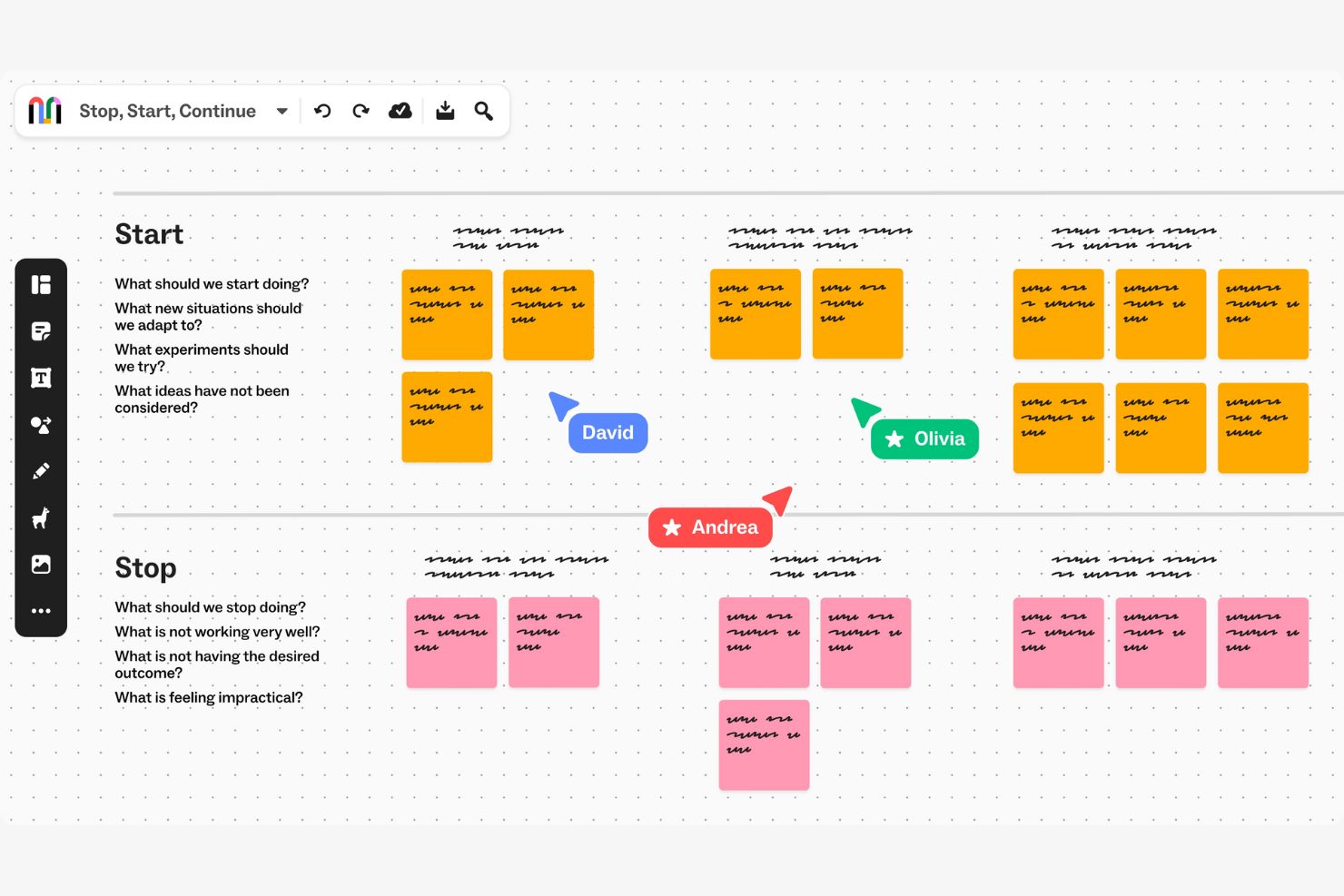
Mural is a digital workspace for visual collaboration, primarily used by creative teams and educators to brainstorm and design collaboratively. It helps in creating visual maps and diagrams that improve team alignment and creativity.
Why I picked Mural: The platform excels in supporting visual collaboration with various diagramming tools. You can facilitate remote workshops and brainstorming sessions with its interactive canvas. Mural's features allow your team to collaborate in real time, making it ideal for creative workflows. It also includes voting and timer functions to keep sessions organized and productive.
Standout Features and Integrations:
Features include an infinite canvas that lets your team map out ideas without constraints. The platform provides a library of templates to jumpstart your projects. You can also use sticky notes and drawing tools to turn abstract ideas into structured plans.
Integrations include Asana, Butter, Figma, Dropbox, GitHub, Google Calendar, Notion, Jira, and more.
Pros and Cons
Pros:
- Real-time collaboration
- Voting and timer functions
- Supports remote workshops
Cons:
- Bandwidth and performance sensitivity
- Limited linking and navigation clarity
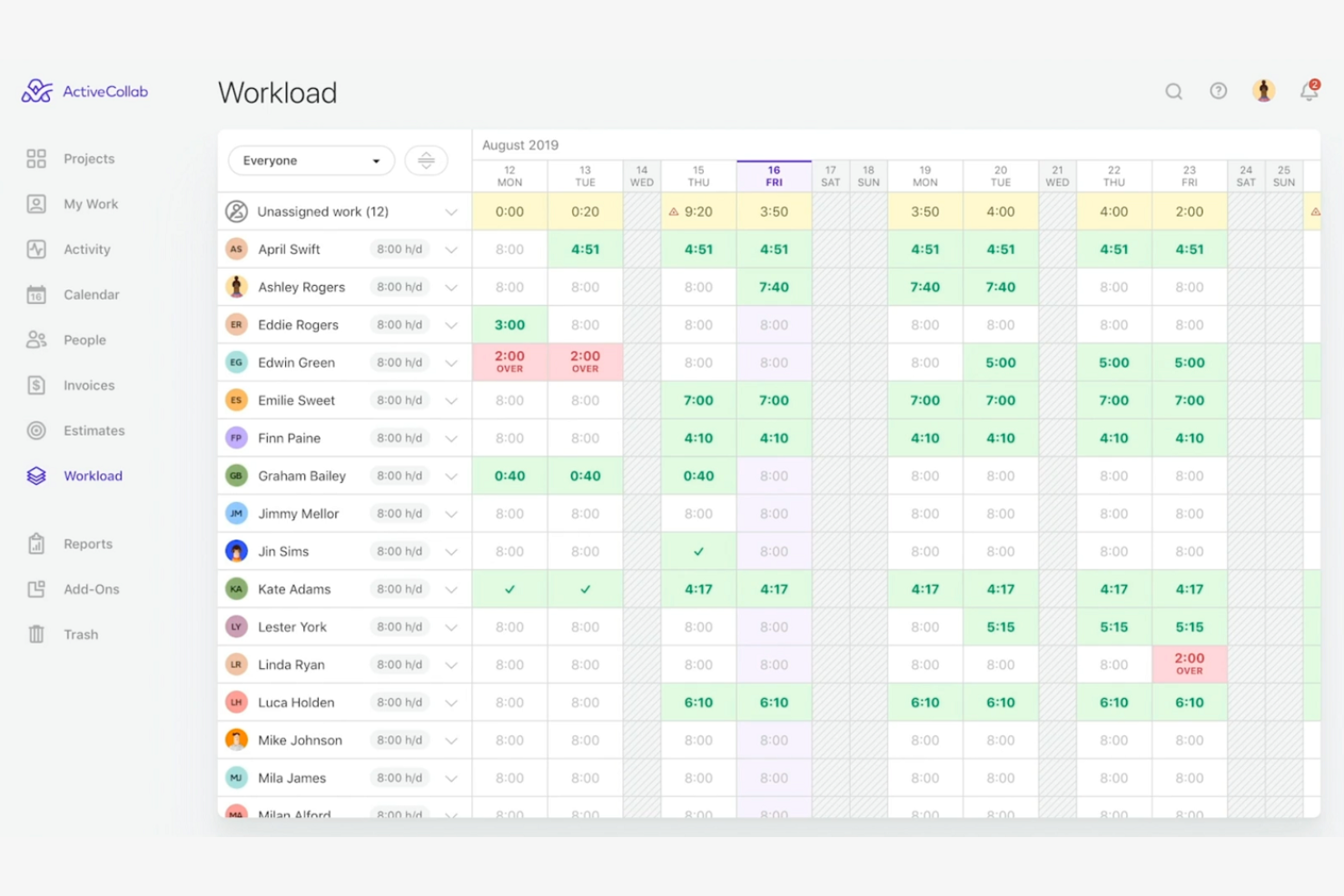
ActiveCollab is a project management tool tailored for creative teams and small businesses, providing features that support task management, collaboration, and time tracking. It helps teams organize their work, track project progress, and maintain productivity.
Why I picked ActiveCollab: The platform excels in time tracking, making it ideal for teams needing to monitor billable hours and project timelines. You can manage tasks and set deadlines, ensuring everyone stays on track. With real-time collaboration features, your team can communicate and share updates efficiently. ActiveCollab also offers invoicing tools that integrate with time tracking, simplifying billing processes.
Standout Features and Integrations:
Features include a task management system that lets your team create and assign tasks with due dates. The platform offers project templates to standardize your workflows and save time. You can also use its reporting tools to gain insights into project performance and team productivity.
Integrations include Slack, QuickBooks, Zapier, Dropbox, Google Drive, and more.
Pros and Cons
Pros:
- Integrated workspace
- Supports invoicing integration
- Effective time tracking tools
Cons:
- No native social media scheduling
- Restricted external tool ecosystem

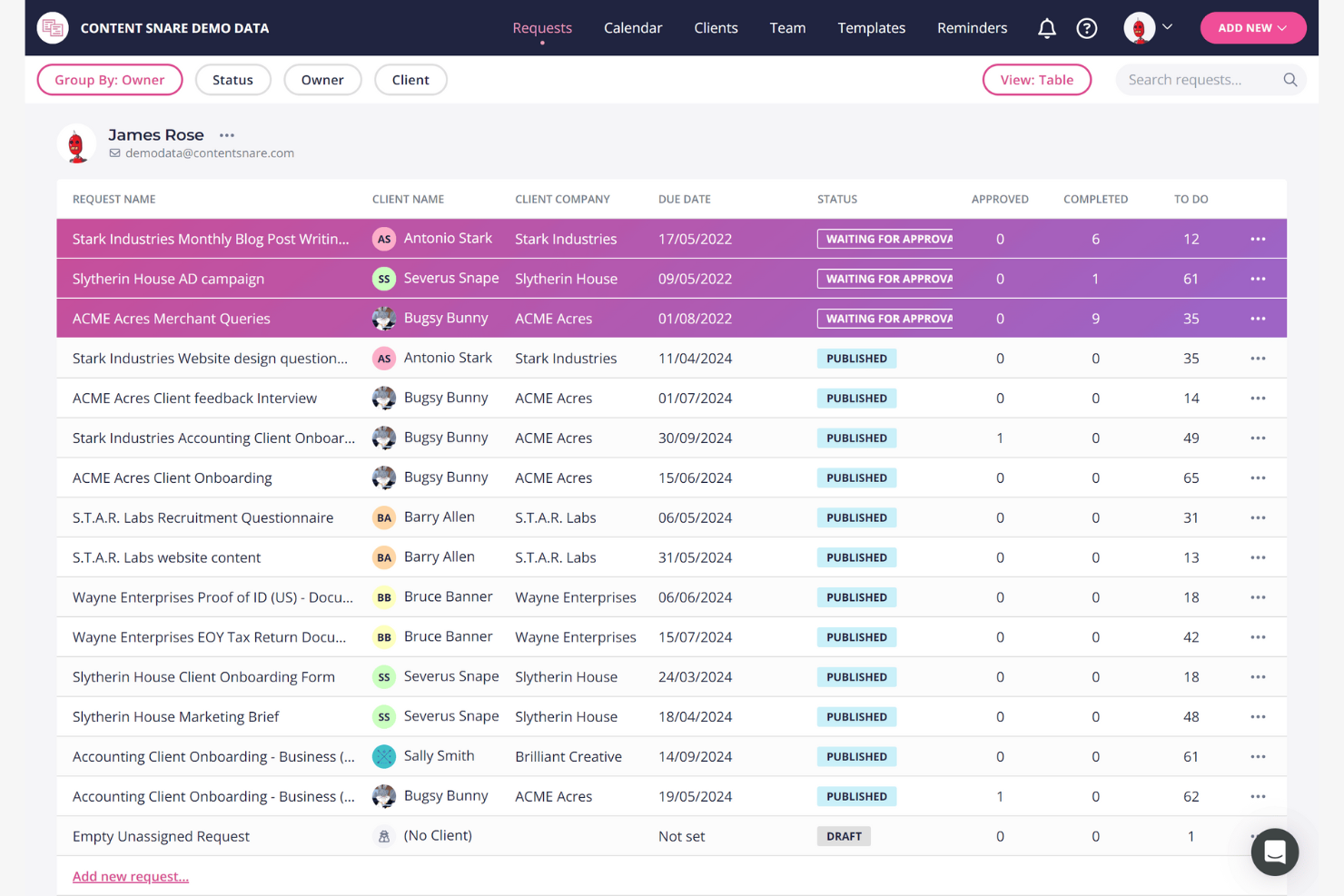
Content Snare is a client information collection platform that replaces email, Google Drive, and spreadsheets for the back-and-forth of collecting documents and answers from clients. Originally built for agencies (briefs, brand assets, content), it's now used across professional services too: accounting firms collecting tax workpapers, law firms running client intake, and mortgage brokers gathering loan documents. The branded portal, structured request templates, and approve/reject workflow keep submissions reviewable in one place.
Why I picked Content Snare: The platform simplifies content gathering with features like automated reminders and structured request templates. You can set up requests with clear instructions, ensuring clients know exactly what to provide. Automated follow-ups reduce the need for manual chasing, saving your team time. Content Snare also allows you to organize submissions in one place, making it easy to track progress and stay on schedule.
Standout Features and Integrations:
Features include a drag-and-drop builder that lets you create custom request forms tailored to your needs. The platform offers a centralized dashboard where you can manage all content requests and track their status. You can also use its file upload feature to receive large files directly from clients.
Integrations include Zapier, Google Drive, Dropbox, Microsoft OneDrive, Make, Xero Practice Manager, FYI, and more.
Pros and Cons
Pros:
- Custom request forms
- Centralized content management
- Automated follow-ups for efficiency
Cons:
- Lengthy configuration process
- Focus on core intake functionality
Diğer Müşteri İş Birliği Yazılımları
Kısa listeme giremeyen ancak yine de göz atmaya değer bazı ek müşteri iş birliği yazılımı seçenekleri şunlardır:
- Aligned
For AI-assisted strategic alignment
- CCH Axcess
For accounting firms
- Client Portal
For simplicity
- SmartVault
For secure document storage
- Workzone
For project visibility
- SuiteDash
For client portal customization
- Zendesk
For customer support integration
- ClickUp
For all-in-one task management
- Zendo
For service-based businesses
- SmartTask
For task prioritization
- Thomson Reuters Client Collaboration
For legal industry compliance


How I Evaluate Client Collaboration Software
I evaluate these tools in two layers: the baseline every tool must meet—client portals, file approvals, guest access—and the differentiators that reveal the right fit.
Core Functionality (Table Stakes For This List)
When I'm selecting tools for my list, I rank each one on a scale from 0 (does not offer the functionality) to 5 (excels in this area) for each core functionality listed below. Then, I calculate the tool's total score into a percentage. Each tool needs to achieve a minimum total score of 65% to be considered for inclusion.
- Client-Facing Portals: I look for dedicated external workspaces where clients log in to view their projects—not just a shared link, but a portal you can brand per client.
- Granular Permissions & Guest Access: Each tool should let you control exactly what a client sees, down to specific projects, tasks, or fields, so internal notes stay internal.
- Shared Project Visibility: I check whether clients can view real-time timelines, milestones, and task progress on their own rather than waiting on a status email from your team.
- File Sharing & Approval Workflows: I evaluate how deliverables move from draft to sign-off—whether the tool supports structured approval chains or just basic file attachments with no review step.
- Client Communication Hub: Contextual messaging matters here. I look for comments and threads tied directly to tasks or files, not a disconnected chat window.
- Feedback & Request Management: The tool should give clients a clear way to submit revision requests or new asks that automatically land in your project workflow as trackable, assignable items.
Once I have a list of tools that meet this criteria, I consider what sets each platform apart.
Differentiating Factors (What Sets Vendors Apart)
Here's how I compare and contrast different vendors:
Standout Features
White-label branding is a major differentiator. Agencies that present client portals under their own logo and domain deliver a more polished experience. I also look for built-in time tracking tied to client projects, so teams can log hours and generate invoices in one place. Proofing and annotation capabilities matter for creative teams too—especially when clients need to mark up specific design frames or video sequences during review cycles.
Beyond Features
Pricing structure is one of the first things I check. Some platforms charge per guest seat, which adds up fast when you're managing 20+ active clients. Security also carries weight—I evaluate whether a tool offers SOC 2 compliance, SSO, and audit logs, since you're granting external users access to project data. Finally, I consider how well a platform scales across client portfolios, including cross-client reporting and template reuse for teams onboarding new accounts regularly.
Müşteri İş Birliği Yazılımı Nasıl Seçilir
Uzun özellik listeleri ve karmaşık fiyatlandırma yapılarına kendinizi kaptırmanız kolaydır. Benzersiz yazılım seçimi süreciniz üzerinde çalışırken odaklanmanızı korumanıza yardımcı olmak için göz önünde bulundurmanız gereken faktörleri içeren bir kontrol listesi hazırladım:
| Faktör | Dikkat Edilmesi Gerekenler |
|---|---|
| Ölçeklenebilirlik | Yazılım ekibinizle birlikte büyüyebilir mi? Gelecekteki genişlemeyi ve aracın kullanıcı ve proje sayısındaki artışı sorunsuz bir şekilde yönetip yönetemeyeceğini değerlendirin. |
| Entegrasyonlar | Mevcut araçlarınızla çalışıyor mu? CRM, e-posta veya proje yönetimi platformları gibi mevcut sistemlerinizle uyumluluğunu kontrol edin. |
| Özelleştirilebilirlik | Yazılımı ihtiyaçlarınıza göre uyarlayabilir misiniz? Panoları, iş akışlarını ve kullanıcı izinlerini ekibinizin çalışma biçimine uyacak şekilde ayarlama seçeneklerini arayın. |
| Kullanım kolaylığı | Kullanımı ne kadar kolay? Arayüzü sezgisellik açısından test edin. Ekip üyelerinin kapsamlı bir eğitime ihtiyaç duyup duymayacağını veya hızlı bir şekilde kullanmaya başlayıp başlayamayacağını değerlendirin. |
| Uygulama ve işe alışma | Kurulum süreci nasıl? Sorunsuz bir geçiş için gereken zamanı ve kaynakları değerlendirin. Bu dönemde sunulan destek veya eğitimleri araştırın. |
| Maliyet | Bütçeniz dahilinde mi? Her türlü gizli ücret de dahil olmak üzere fiyatlandırma planlarını karşılaştırın. Farklı fiyat kademelerinde sunulan değeri ve mali planınıza hangisinin uygun olduğunu değerlendirin. |
| Güvenlik önlemleri | Verileriniz ne kadar güvende? Bilgilerinizin korunmasını sağlamak için şifreleme, veri yedekleme ve kullanıcı erişim kontrollerini kontrol edin. |
| Destek bulunabilirliği | Ne zaman yardım alabilirsiniz? Müşteri desteğinin bulunabilirliğini ve özellikle kritik zamanlarda ekibinizin ihtiyaçlarını karşılayıp karşılamadığını değerlendirin. |
Müşteri İş Birliği Yazılımı Nedir?
Müşteri iş birliği yazılımı; iletişim, belge paylaşımı ve proje yönetimi için bir platform sağlayarak ekiplerin etkili bir şekilde birlikte çalışmasına yardımcı olan bir araçtır. Bu araçlar; üretkenliği artırmak ve herkesin aynı bilgilerden haberdar olmasını sağlamak için proje yöneticileri, pazarlama uzmanları ve yaratıcı ekipler tarafından yaygın olarak kullanılır. Görev yönetimi, dosya paylaşımı ve iletişim özellikleri; projeleri düzenlemeye, ekip koordinasyonunu geliştirmeye ve müşterileri bilgilendirmeye yardımcı olur. Genel olarak bu araçlar, müşteri etkileşimlerini ve proje iş akışlarını yönetmek için merkezi bir alan sunarak daha verimli ve başarılı sonuçlara ulaşılmasını sağlar.
Özellikler
Müşteri iş birliği yazılımı seçerken aşağıdaki temel özelliklere dikkat edin:
- Dosya paylaşımı: Ekiplerin belgeleri güvenli bir şekilde yükleyip paylaşmasını sağlayarak herkesin en güncel dosyalara erişebilmesini mümkün kılar.
- Görev yönetimi: Projelerin programa uygun ilerlemesini sağlamak için görevler oluşturup atayarak ve izleyerek çalışmaları düzenlemeye yardımcı olur.
- İletişim araçları: Gerçek zamanlı görüşmeleri ve hızlı karar almayı kolaylaştırmak için sohbet ve mesajlaşma seçenekleri sunar.
- Özelleştirilebilir panolar: Kullanıcıların çalışma alanlarını, ilgili bilgi ve ölçümleri kolayca erişilebilecek şekilde görüntüleyecek biçimde uyarlamasına olanak tanır.
- Zaman takibi: Görevler ve projeler için harcanan zamanı izleyerek üretkenlik analizine ve faturalandırma doğruluğuna katkıda bulunur.
- Müşteri portalları: Müşterilerin proje güncellemelerini görüntüleyebileceği, belgelere erişebileceği ve ekiple iletişim kurabileceği özel bir alan sunar.
- Entegrasyon olanakları: İş akışlarını ve platformlar arasındaki veri paylaşımını kolaylaştırmak için diğer yazılım araçlarına bağlanır.
- Raporlama araçları: Stratejik kararlara yardımcı olmak için proje ilerlemesi ve ekip performansı hakkında içgörüler ve raporlar oluşturur.
- Güvenlik önlemleri: Veri gizliliğini sağlamak için hassas bilgileri şifreleme ve erişim kontrolleriyle korur.
- İş akışı otomasyonu: Zaman kazanmak ve manuel çabayı azaltmak için tekrarlayan görevleri otomatikleştirerek ekip verimliliğini artırır.
Faydalar
Müşteri iş birliği yazılımını uygulamak, ekibiniz ve işletmeniz için çeşitli faydalar sağlar. Yararlanabileceğiniz birkaç fayda şunlardır:
- Gelişmiş iletişim: Gerçek zamanlı mesajlaşma ve sohbet araçları ekip etkileşimlerini geliştirir ve daha hızlı kararlar alınmasına yardımcı olur.
- Artan üretkenlik: Görev yönetimi ve iş akışı otomasyonu manuel çalışmayı azaltarak ekibinizin daha önemli görevlere odaklanmasını sağlar.
- Daha fazla müşteri etkileşimi: Müşteri portalları, müşterilere proje güncellemelerine ve belgelere doğrudan erişim sağlayarak şeffaflığı ve güveni teşvik eder.
- Daha iyi organizasyon: Belge paylaşımı ve özelleştirilebilir panolar, gerekli tüm bilgileri tek bir yerde tutarak bunları bulmayı ve yönetmeyi kolaylaştırır.
- Doğru faturalandırma: Zaman takibi özellikleri, faturalandırılabilir saatlerin doğru şekilde kaydedilmesini sağlayarak faturalandırma ve finansal planlamaya yardımcı olur.
- Veri güvenliği: Güvenlik önlemleri hassas bilgileri koruyarak uyumluluğun ve iç huzurunun sağlanmasına yardımcı olur.
- Bilgiye dayalı karar alma: Raporlama araçları proje performansı ve ekip verimliliği hakkında içgörüler sunarak stratejik planlamaya yardımcı olur.
Maliyetler ve Fiyatlandırma
Müşteri iş birliği yazılımını seçmek, mevcut çeşitli fiyatlandırma modellerinin ve planların anlaşılmasını gerektirir. Maliyetler özelliklere, ekip büyüklüğüne, eklentilere ve daha fazlasına göre değişir. Aşağıdaki tablo, müşteri iş birliği yazılımı çözümlerinde yaygın planları, ortalama fiyatlarını ve genellikle sunulan özellikleri özetlemektedir:
Müşteri İş Birliği Yazılımı İçin Plan Karşılaştırma Tablosu
| Plan Türü | Ortalama Fiyat | Yaygın Özellikler |
|---|---|---|
| Ücretsiz Plan | $0/kullanıcı/ay | Temel görev yönetimi, sınırlı dosya paylaşımı ve temel iletişim araçları. |
| Kişisel Plan | $10-$30/kullanıcı/ay | Gelişmiş görev yönetimi, dosya paylaşımı, iletişim araçları ve temel raporlama. |
| İşletme Planı | $30-$75/kullanıcı/ay | Özelleştirilebilir panolar, güçlendirilmiş güvenlik, gelişmiş raporlama ve entegrasyonlar. |
| Kurumsal Plan | $75-$750+/kullanıcı/ay | Kapsamlı güvenlik, iş akışı otomasyonu, özel destek ve analiz. |
Müşteri İş Birliği Yazılımı Hakkında Sıkça Sorulan Sorular
Müşteri iş birliği yazılımı hakkında sık sorulan bazı soruların yanıtları: