

2026’da İncelenen En İyi 10 Müşteri Adaptasyon Yazılımı

En İyi Müşteri Başlangıç Süreci Yazılımı Kısa Listesi


En iyi müşteri başlangıç süreci yazılımı, başlangıç süreci görevlerini otomatikleştirmenize, son tarihleri takip etmenize ve her müşterinin sorunsuz bir başlangıç yapmasını sağlamanıza olanak tanır. Doğru araç olmadan düzenli kalmakta, başlangıç sürecini verimli bir şekilde yönetmekte ve müşterilerinizi memnun etmekte zorlanırsınız. Bu durum, müşterilerinizle iyi bir iş ilişkisi kurmanızı ve iş birliğiniz boyunca onların beklentilerini karşılamanızı zorlaştırır.
Bir ajans yönetme deneyimimi ve yazılımları test ettiğim 3 yılı aşkın süreyi kullanarak düzinelerce aracı inceledim ve en iyi müşteri başlangıç süreci yazılımı seçenekleri listemi oluşturdum. Aşağıdaki önerilerimin her biri, üzerinizdeki başlangıç süreci görevlerinin miktarını azaltarak müşterileriniz için öncelikli işlere odaklanmanızı sağlar. Her aracın temel özelliklerini ve bunların nasıl yardımcı olduğunu, ayrıca artılarını, eksilerini ve yaygın kullanım alanlarını ele alıyorum.
Why Trust Our Software Recommendations
Our team has been testing and reviewing software since 2012. As project managers ourselves, we know how difficult—and important—it is to choose the right software.
For this guide, we evaluated tools using hands-on testing and independent research, scoring tools using our selection criteria. We also draw on insights from industry thought leaders and practicing project management experts.
Our reviews reflect our human editorial judgment, not a sales pitch.
Expert reviewers:
Müşteri Başlangıç Süreci Yazılımı Karşılaştırma Tablosu
Aşağıdaki tablo, en iyi müşteri başlangıç süreci yazılımı seçimlerimin fiyatlandırma ayrıntılarını karşılaştırmaktadır.
| Tool | Starting Price | Website | |
|---|---|---|---|
| Best for personalized video creation | — | $40/month 10-day free trial + free demo available | Website |
| Best for CRM-triggered onboarding automation | 4.9 out of 5 | €59/user/month 14-day free trial | Website |
| Best for interactive training and automation | 4.7 out of 5 | Pricing upon request 14-day free trial + demo available | Website |
| Best for client communication management | 4.4 out of 5 | $5,000/year Free trial + free demo available | Book Demo |
| Best for mobile-friendly client training | 4.6 out of 5 | $3.97/user/month Free trial available | Book Demo |
| Best with 1,000+ prebuilt app connectors | — | Pricing upon request 30-day free trial available | Website |
| Best for agentic AI capabilities | 4.8 out of 5 | $49/user/month 14-day free trial | Website |
| Best for custom onboarding portals | 4.9 out of 5 | $350/month Free plan + free demo available | Website |
| Best for customer retention | 4.7 out of 5 | Pricing upon request Free demo available | Website |
| Best for custom in-app experiences | 4.7 out of 5 | $299/month 14-day free trial | Website |
En İyi Müşteri Başlangıç Süreci Yazılımı İncelemesi
Kısa listeme giren en iyi müşteri başlangıç süreci yazılımı seçeneklerinin ayrıntılı özetlerini aşağıda bulabilirsiniz. İncelemelerim, her aracın temel özelliklerine, artılarına ve eksilerine, entegrasyonlarına ve ideal kullanım alanlarına ayrıntılı bir bakış sunarak sizin için en iyi seçeneği bulmanıza yardımcı olur.


TruPeer offers AI-powered solutions to elevate your client onboarding process by automating and personalizing each step. Whether you're in consulting, SaaS, or another client-facing industry, TruPeer provides customizable onboarding journeys that reflect your brand's identity, reducing manual tasks and enhancing client satisfaction. By integrating seamlessly with popular CRM tools like Salesforce and HubSpot, TruPeer addresses the need for streamlined operations and consistent client engagement.
Why I Picked TruPeer
I picked TruPeer because of its unique ability to automate client onboarding flows while allowing for deep customization. The software's automated onboarding flows replace manual steps, ensuring consistency and efficiency across all client interactions. Additionally, TruPeer's customizable welcome guides allow you to tailor the onboarding experience to each client, reflecting your brand identity and professionalism. These features are particularly beneficial for businesses looking to reduce administrative workload and improve client satisfaction.
TruPeer Key Features
In addition to its automation and customization capabilities, TruPeer offers several other noteworthy features:
- Progress Tracking and Engagement Analytics: This feature lets you monitor client engagement during the onboarding process, offering insights to optimize future interactions.
- Instant Sharing of Onboarding Materials: You can quickly distribute onboarding content to clients or team members, ensuring everyone has the information they need.
- Multilingual Translation: TruPeer supports multiple languages, making it ideal for businesses with a diverse client base.
- Mobile Access: This feature provides flexibility, allowing you to manage onboarding processes on-the-go.
TruPeer Integrations
Integrations include Salesforce, HubSpot, and other popular CRM platforms. Native integrations are not currently listed by TruPeer, but an API is available for custom integrations.
Pros and Cons
Pros:
- Salesforce HubSpot CRM integrations supported
- Custom onboarding guides and sequences
- AI video onboarding creation tools
Cons:
- Limited advanced editing controls available
- Chrome extension only deployment model

Best for CRM-triggered onboarding automation
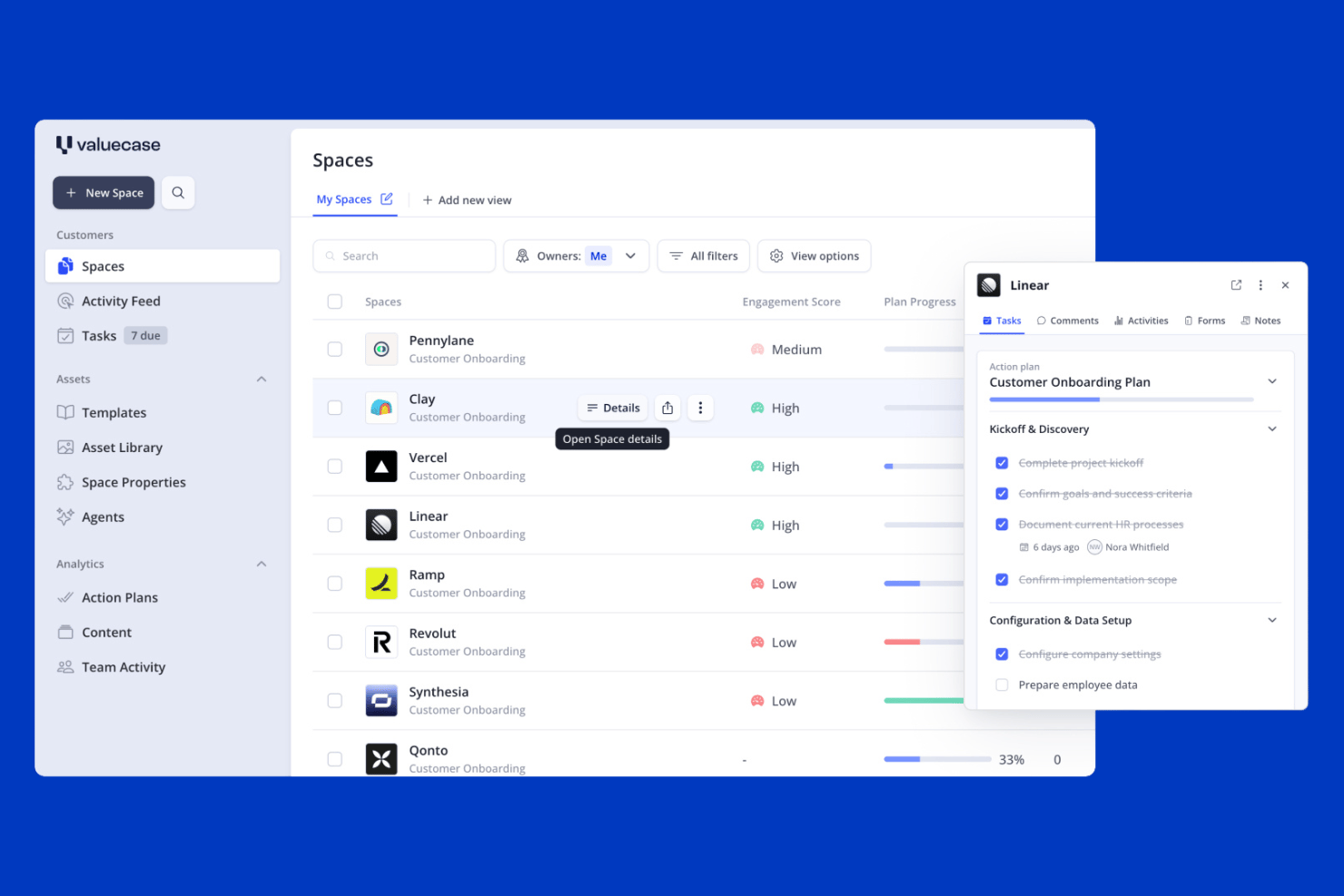
Valuecase is a client onboarding platform that combines branded client Spaces, CRM-triggered workflow automation, intake forms, and built-in live chat into a single workspace.
Who Is Valuecase Best For?
Valuecase is a strong fit for B2B SaaS teams that want to automate the handoff from sales to onboarding using CRM data from HubSpot or Salesforce.
Why I Picked Valuecase
Valuecase earns its spot on my shortlist because of how well it handles the sales-to-onboarding handoff using live CRM data. When a deal closes in HubSpot or Salesforce, Valuecase can automatically spin up a personalized client Space, pre-populated with the right tasks, forms, and milestones, without anyone touching it manually. I also like the built-in live chat inside each Space, which keeps client questions tied to the onboarding record instead of scattered across inboxes.
Valuecase Key Features
- No-login client access: Clients open their onboarding Space via a shared link without creating an account, with optional password protection available.
- Multilingual support: Spaces automatically detect and display content in the client's language across 7+ supported languages using AI-powered translation.
- Reusable Space templates: Build and save unlimited onboarding templates with tasks, milestones, forms, and embedded content to deploy across new accounts instantly.
- Engagement analytics: Track client activity, content usage, and time-to-completion across all active Spaces from a central dashboard to spot at-risk accounts early.
Valuecase Integrations
Valuecase offers native integrations with HubSpot, Salesforce, and Calendly, plus connections to Google Drive, Google Docs, Google Slides, Slack, and Microsoft Teams. It also supports Make, Albato, Zapier, and a REST API for custom integrations.
Pros and Cons
Pros:
- Built-in multilingual and AI-powered features
- CRM-triggered onboarding automates sales handoff
- Branded client portals with no-login access
Cons:
- E-signature features lack compliance depth
- No native project management tool integration

SkyPrep
Best for interactive training and automation
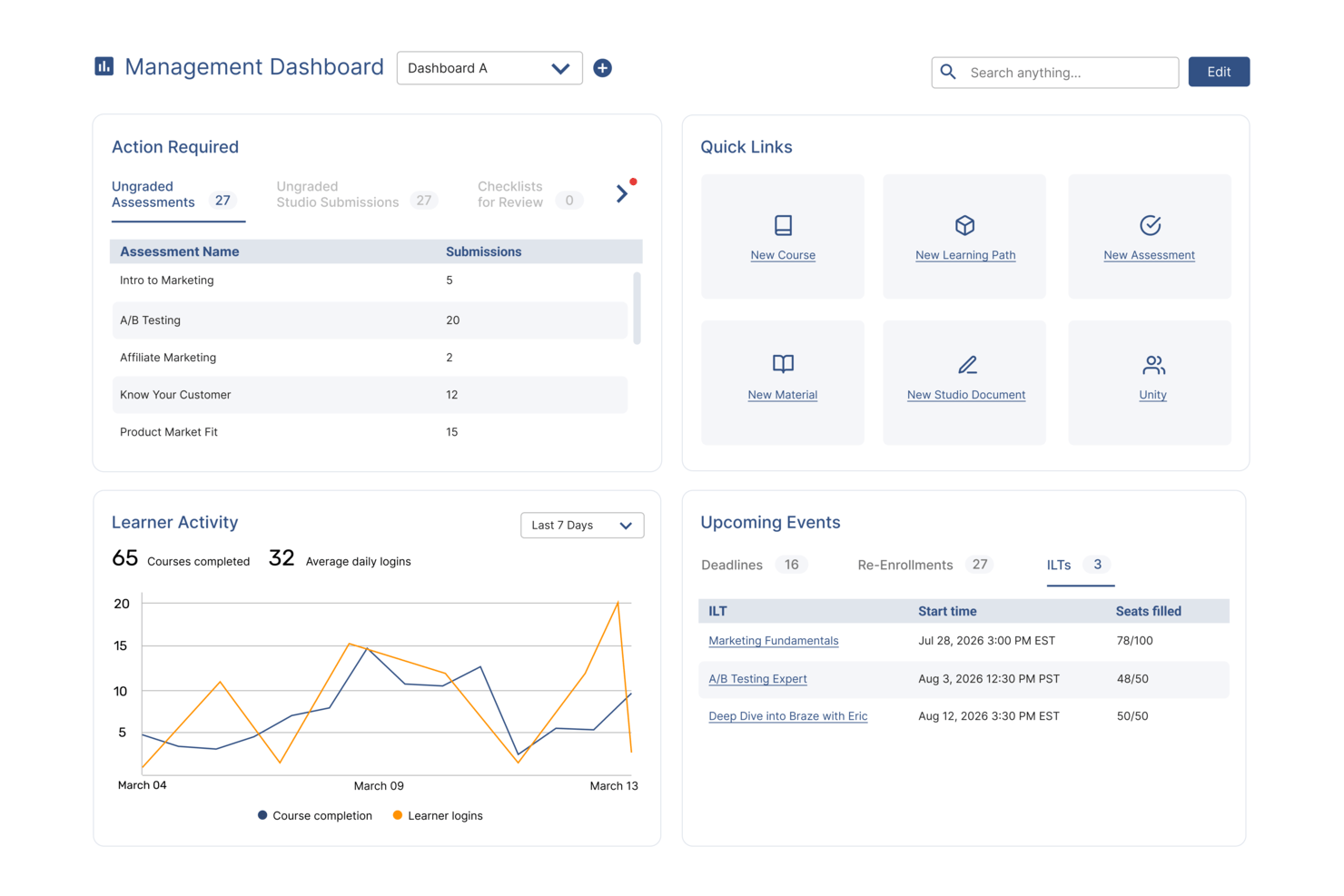
For teams looking to support client onboarding through structured training, SkyPrep offers a flexible learning platform used across industries such as corporate training, compliance, and customer education. Your team can leverage its dynamic course creation and user management capabilities to address the common challenge of engaging new clients effectively. By focusing on improving the onboarding experience, SkyPrep empowers businesses to foster stronger relationships with clients from the start.
Why I Picked SkyPrep
I picked SkyPrep for its exceptional ability to simplify client onboarding through its interactive training and automated notifications. The platform's interactive training allows you to customize and gamify content, keeping your clients engaged and motivated throughout the onboarding process. Additionally, automated notifications ensure clients receive timely reminders about their training requirements, helping them stay on track and reducing the manual effort on your team.
SkyPrep Key Features
In addition to its interactive training and automated notifications, SkyPrep offers:
- Course Auto-Enrollment: Automatically assigns new users to relevant training based on their profiles, ensuring they receive appropriate onboarding without manual intervention.
- Learning Paths: Organizes courses into structured sequences, allowing learners to progress through prerequisite training systematically.
- Resource Center: Centralizes training materials like videos and PDFs, providing easy access for new clients to support their learning.
- White Labeling: Customizes the LMS with branding options, enhancing the onboarding experience and fostering engagement.
SkyPrep Integrations
Integrations include PayPal, Stripe, Cisco Webex Meetings, ClickMeeting, GoToMeeting, Microsoft Teams, Zoom, Active Directory Connector, ADP, and BambooHR.
Pros and Cons
Pros:
- Offers robust data protection for secure client information handling
- Automated notifications keep clients informed about training progress
- Interactive training customizes content for engaging client onboarding
Cons:
- Some users find the reporting features lacking depth
- Users report occasional glitches with video uploads

Moxo
Best for client communication management

Moxo is a client collaboration and workflow automation platform aimed at businesses looking to enhance client communication and streamline processes. It serves industries like real estate and banking, focusing on client onboarding, document management, and task coordination.
Why I Picked Moxo
Moxo helps you manage client communication through role-based portals, so everyone knows where to go and what to do. Its AI handles the repetitive stuff, so your team can focus on real decisions. It also connects with your systems to keep everything running smoothly and organized.
Moxo Key Features
In addition to communication management, Moxo offers several other features for client onboarding.
- Workflow Automation: You can automate complex processes and eliminate manual tasks by creating customizable workflows that integrate forms, approvals, and e-signatures.
- Document Management: This includes document uploads, e-signature capabilities, version control, audit trails, and compliance tracking to help you manage documents efficiently and securely.
- Analytics and Reporting: You can track key metrics to identify bottlenecks and improve processes. This feature helps you optimize the onboarding workflow and improve overall efficiency.
- Zero-Login Access: This provide clients with easy access to portals and lets them engage without creating accounts, which increases completion rates.
Moxo Integrations
Integrations include Salesforce, Slack, Gmail, Box, Stripe, HubSpot, Jira, QuickBooks, Jotform, and Docusign.
Pros and Cons
Pros:
- Supports multiple industries
- Integrates AI effectively
- Boosts client communication
Cons:
- Requires technical setup
- Integration challenges

Best for mobile-friendly client training

iSpring LMS is a cloud-based learning management system (LMS) designed to make client onboarding efficient and engaging. It provides businesses with tools to deliver personalized learning paths, track progress, and keep clients engaged through interactive content.
Why I Picked iSpring LMS
I picked iSpring LMS for its strong mobile and offline learning capabilities, which make it easy for clients to complete training anytime, anywhere. It also supports development plans and compliance training, which can help businesses tailor onboarding experiences to different client needs. Additionally, iSpring LMS stands out for its robust reporting features that give you insights into client progress and training effectiveness.
iSpring LMS Key Features
In addition to being mobile-friendly, iSpring LMS offers a range of other features that can help with client onboarding.
- Launch and Engage: You can create and assign digital onboarding programs with interactive training paths that keep clients engaged from the start.
- Automation: This lets you automatically enroll clients, assign relevant training, and send notifications to reduce manual workload and ensure timely progress.
- Tracking: You can monitor client progress in real-time and adjust the training approach to better meet their needs.
- Newsfeed: This lets you keep clients informed and connected throughout their onboarding journey by sharing updates and important information.
iSpring LMS Integrations
Integrations include BambooHR, Tilda, Shopify, Zoom, Microsoft Teams, Google Meet, and Salesforce.
Pros and Cons
Pros:
- Robust reporting and analytics
- Strong mobile and offline learning support
- AI-assisted course creation tools
Cons:
- Fewer gamification features compared to competitors
- Limited customization for course layouts
New Product Updates from iSpring LMS

iSpring LMS Adds Multiple Observations to OJT Sessions
iSpring LMS now lets managers log multiple observations within one OJT session, grouping visits and auto-generating summary stats like averages, criterion results, and comparisons. For more information, visit iSpring LMS's official site.
 .
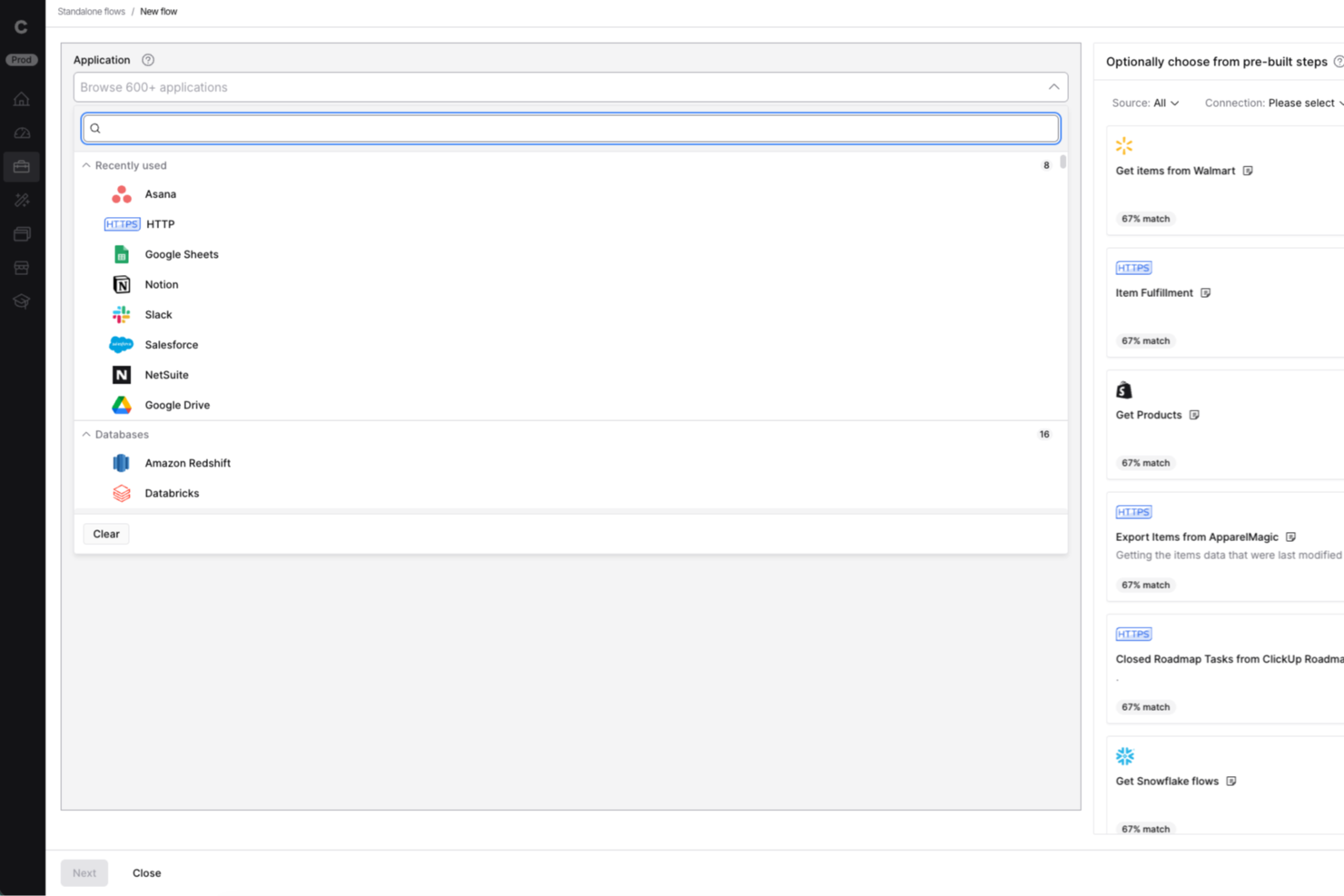
Celigo is an integration and automation platform for businesses that need to connect multiple apps and automate onboarding workflows, helping teams in IT, operations, and client services eliminate manual data entry and streamline client onboarding across systems.
Who Is Celigo Best For?
Celigo suits IT and operations teams at mid-sized to large businesses that need to automate onboarding across multiple apps and platforms.
Why I Picked Celigo
I picked Celigo as one of the best because I can connect over 1,000 apps right out of the box, which is a huge advantage when onboarding clients who use a mix of systems. My team uses the prebuilt connectors to automate data flows between CRMs, billing, and support tools without custom development. In practice, that means we can quickly set up onboarding workflows that sync client data across platforms like Salesforce, NetSuite, and Zendesk.
Celigo Key Features
- Visual flow builder: Design onboarding workflows using a drag-and-drop interface.
- Error management dashboard: Monitor and resolve integration errors from a single dashboard.
- Role-based access controls: Set permissions for team members managing onboarding processes.
- API management tools: Configure and manage custom API integrations for unique onboarding needs.
Celigo Integrations
Integrations include Salesforce, Microsoft Dynamics 365 Business Central, Oracle NetSuite, Walmart, SAP, Snowflake, Acumatica, Adobe, ADP, and 3PL Central.
Pros and Cons
Pros:
- Enables granular field-level data mapping
- Provides real-time error monitoring and alerts
- Offers protocol compatibility for legacy systems
Cons:
- Limited onboarding templates for niche industries
- Requires technical setup for advanced workflows
New Product Updates from Celigo
Celigo Expands Storage, Data Imports, and Connection Management
Celigo adds a standalone storage connector, optimized Azure Synapse imports, NetSuite OAuth 2.0, flexible file templates, and expanded MCP access controls. These updates help teams manage files, process data, and secure integrations. For more information, visit Celigo’s official site.
 .

Best for agentic AI capabilities

Rocketlane is a professional services automation (PSA) and customer onboarding tool built for project managers and service delivery teams. It combines project management, financial tracking, and resource planning to enhance team collaboration and drive better service delivery.
Adam Bushell, owner and director of AB Electrical and Communications, found the shared dashboards especially impactful: “Clients could log in at any point to see exactly where their project stood. That transparency reduced misunderstandings, minimized disputes, and made handovers seamless.”
Why I Picked Rocketlane
Rocketlane lets you and your team collaborate closely with clients using shared workspaces. You can use project templates and automations to stay efficient and on schedule. Its agentic AI updates help you keep clients in the loop without extra effort. It's built to make remote work and communication easier.
Rocketlane Key Features
In addition to remote collaboration, Rocketlane offers several other features that cater to effective client onboarding.
- SmartFill: This simplifies the process of filling out project information and creating updates and minimizes manual data entry.
- Customer Portals: This helps facilitate communication and accountability through shared portals and automated reminders for a seamless client experience.
- Unified Project Management: This combines various project management tasks into one platform, reduces the need for multiple tools, and increases efficiency.
- Performance Insights: This provides analytics on project performance, team utilization, and customer satisfaction to help you make informed decisions.
Rocketlane Integrations
Integrations include Salesforce, HubSpot, Slack, Google Calendar, Zapier, and Jira.
Pros and Cons
Pros:
- Automated task management
- Real-time client interaction
- AI-driven updates
Cons:
- Initial setup complexity
- Limited offline access

Dock
Best for custom onboarding portals

Dock is a client onboarding and collaboration platform designed for businesses that need personalized client interactions. It serves teams in sales, customer success, and project management, helping them create custom onboarding portals and manage client communication.
Why I Picked Dock
It allows you to create custom onboarding portals tailored to your clients' needs. These portals can include personalized content, making client interactions more meaningful. The platform supports document sharing and tracking, ensuring your clients have everything they need in one place. Its focus on customization makes it ideal for businesses that value personalized client experiences.
Dock Key Features
Dock also offers several other features that make it a compelling choice for client onboarding software.
- Templated Workspaces: This lets you quickly set up onboarding workspaces, which saves time and helps maintain consistency across different clients.
- Survey Forms: You can create and distribute survey forms to collect valuable client feedback during the onboarding process, which helps with continuous improvement and client satisfaction.
- File Upload Buttons: This lets clients easily upload necessary documents without needing to navigate away from the onboarding portal, which streamlines the data collection process.
- Analytics and Reporting: You can track customer engagement and onboarding progress and get insights that can help refine and improve the onboarding experience.
Dock Integrations
Integrations include Salesforce, HubSpot, Slack, Google Drive, Microsoft Teams, Asana, Jira, ClickUp, and Zoom.
Pros and Cons
Pros:
- Tracks document engagement
- Supports collaborative editing
- Customizable client portals
Cons:
- Limited offline functionality
- Learning curve for new users

Best for customer retention
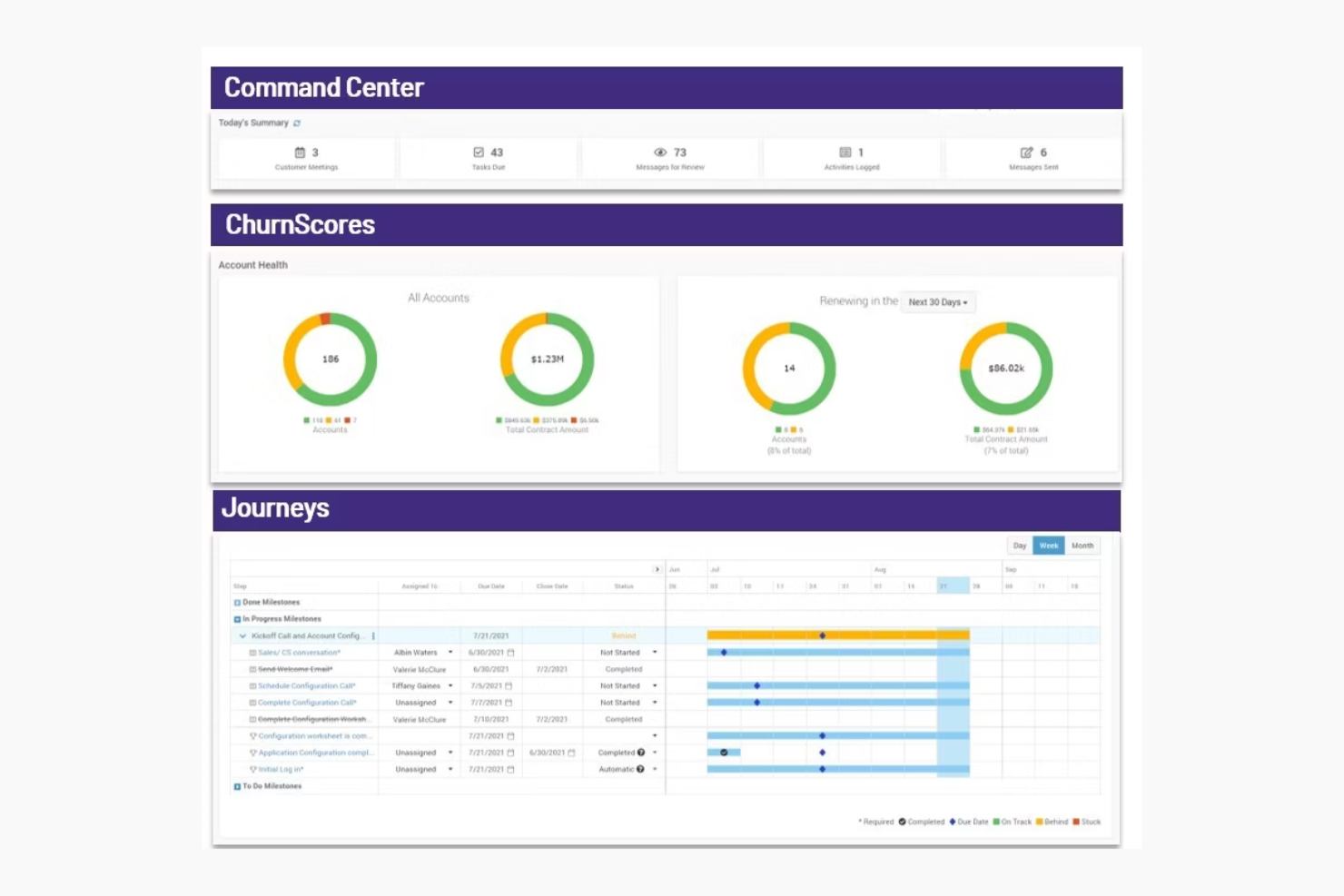
ChurnZero is a customer success platform designed for SaaS companies and customer success teams. It focuses on improving customer retention and engagement by providing insights, analytics, and communication tools.
Why I Picked ChurnZero
ChurnZero helps you keep customers by showing real-time health scores, so your team can spot at-risk accounts early. You can use automated playbooks to reach out before issues grow. Its in-app messaging lets you talk to users right where they are. It's built for SaaS teams focused on retention.
ChurnZero Key Features
ChurnZero also offers a variety of other features that can help you with client onboarding.
- Comprehensive Customer View: You get real-time insights into customer health and sentiment by integrating data from product usage, CRM, and support systems.
- AI-Powered Tools: You can automate administrative tasks to free up your team for more strategic customer interactions.
- Collaboration and Automation: This lets you use chatbots, customer playbooks, and real-time alerts to boost team efficiency.
- Advanced Analytics: You can monitor customer relationships and predict churn risk with tools like health scores and detailed reporting.
ChurnZero Integrations
Integrations include Salesforce, HubSpot, Zendesk, Slack, Intercom, Mailchimp, Microsoft Dynamics, and Pipedrive.
Pros and Cons
Pros:
- Ideal for SaaS companies
- Customizable success dashboards
- Automated engagement playbooks
Cons:
- Costly for smaller teams
- Complex setup process

Userpilot
Best for custom in-app experiences

Userpilot is a product growth platform that can improve client onboarding. It offers tailored in-app experiences that guide new users and make sure they're getting the most out of your product or services.
Why I Picked Userpilot
One of the reasons I picked Userpilot is its ability to create customized in-app experiences without the need for coding. This lets you guide users through your product in a way that feels natural and intuitive to them. Another feature is its in-app feedback collection, which lets you gather user insights directly from within the app so you can understand user needs and improve your product accordingly.
Userpilot also offers session replay capabilities, which lets you visualize user journeys and identify areas for improvement. This feature is invaluable for refining your onboarding process and making sure users can navigate your product with ease. Additionally, Userpilot provides mobile support so you can create mobile-first onboarding experiences that cater to users on the go.
Userpilot Key Features
Userpilot also offers a wealth of other features that can help you improve client onboarding and user engagement.
- Onboarding Checklists: This helps users learn about the product and reduce time-to-value. You can create them with a no-code builder that triggers specific actions and tracks progress through analytics.
- Resource Centers: This provides self-service support and lets users find answers without leaving the product. It's also built with a no-code editor for targeted modules.
- User Segmentation: You can set up personalized onboarding by segmenting users based on demographics and product usage, which allows for targeted flows and detailed analytics.
- NPS Surveys: You can create and analyze net promoter score surveys using a no-code builder, with options for audience targeting and AI-powered localization for translations.
Userpilot Integrations
Integrations include HubSpot, Salesforce, Segment, Google Tag Manager, Zendesk, Google Analytics, Intercom, Amplitude, Mixpanel, and Heap.
Pros and Cons
Pros:
- Track product growth goals and analyze feedback
- Fast implementation and deployment of features
- Offers customizable options
Cons:
- Integrations with other tools can be difficult
- Content creation plugin can be cumbersome to use
Diğer Müşteri Başlangıç Süreci Yazılımları
Kısa listeme giremeyen ancak yine de göz atmaya değer bazı ek müşteri başlangıç süreci yazılımı seçenekleri şunlardır:
- Whatfix
For in-app guidance
- Appcues
For user onboarding flows
- GUIDEcx
For project transparency
- Process Street
For centralized policy management
- Intercom
For in-app messaging
- Userlane
For custom onboarding content
- Clustdoc
For document collection
- ShareFile
For secure file sharing
- Content Snare
For automated client reminders
- Fenergo
For regulatory compliance
- Leadsie
For managing multi-platform access
- Motion.io
For task automation
- Chameleon
For product tours
- ClickUp
For managing onboarding projects
- Travitor
For blended learning programs


How I Evaluate Client Onboarding Software
I evaluate every tool in two layers: the baseline capabilities—intake forms, client portals, workflow automation—and the differentiators that separate strong options for agencies and PMOs.
Core Functionality (Table Stakes For This List)
When I'm selecting tools for my list, I rank each one on a scale from 0 (does not offer the functionality) to 5 (excels in this area) for each core functionality listed below. Then, I calculate the tool's total score into a percentage. Each tool needs to achieve a minimum total score of 65% to be considered for inclusion.
- Client Intake Forms: I check whether a tool lets you build branded questionnaires with conditional logic—like surfacing different fields for a retainer client vs. a one-off project.
- Document & File Collection: The ability to send structured file requests, track what's missing, and nudge clients with reminders matters more than a simple upload button.
- Onboarding Workflow Automation: I look for trigger-based task sequences that move a client through stages automatically, such as assigning a PM after intake is submitted.
- Client-Facing Portal: I evaluate whether clients get a branded space to view their progress, complete tasks, and communicate—without needing a product login or seat.
- E-Signature & Approvals: Tools like HoneyBook and Dubsado handle signatures natively, while others rely on DocuSign or PandaDoc integrations—I check for both paths.
- Project Management Integration: I look at how onboarding data flows into your PM stack, whether that's syncing tasks to Asana, creating projects in ClickUp, or mapping fields into Monday.
Once I have a list of tools that meet the criteria, I consider what sets each platform apart.
Differentiating Factors (What Sets Vendors Apart)
Here's how I compare and contrast different vendors:
Standout Features
Onboarding analytics give you visibility into where clients stall—whether it's a delayed file upload or an unsigned SOW sitting in someone's inbox for days. I look for dashboards that track time-to-onboard and completion rates across accounts. Reusable playbook templates also matter. Being able to clone a proven onboarding sequence for a specific service line saves PMs from rebuilding workflows for every new engagement. I also check whether a tool handles payments within the onboarding flow, letting you collect deposits or retainers before kickoff.
Beyond Features
Integration ecosystem matters here. If your onboarding data doesn't flow into your CRM or PM tool—say, from HubSpot into Asana—you're stuck re-entering client details manually. I also evaluate pricing structures, especially how vendors handle client-facing seats. Some tools charge per external collaborator, which gets expensive fast when you're onboarding dozens of clients per quarter. Time-to-value is another factor I check—whether a platform ships with pre-built templates so your team isn't building everything from scratch during setup.
Müşteri Başlangıç Süreci Yazılımı Nasıl Seçilir?
Uzun özellik listeleri ve karmaşık fiyatlandırma yapılarına kapılmak kolaydır. Kendinize özgü yazılım seçim sürecinizde ilerlerken odaklanmanızı korumanıza yardımcı olmak için aklınızda bulundurmanız gereken faktörlerin bir kontrol listesi aşağıda yer alıyor:
| Etken | Dikkate Alınması Gerekenler |
|---|---|
| Ölçeklenebilirlik | Yazılım işletmenizle birlikte büyüyebilir mi? Büyüyen bir müşteri tabanını veya genişleyen bir ekibi destekleyip destekleyemeyeceğini değerlendirin. Gelecekteki ihtiyaçlara uyum sağlayan esnek planlar veya özellikler arayın. |
| Entegrasyonlar | Mevcut araçlarınızla çalışıyor mu? CRM'niz, e-postanız ve diğer temel platformlarınızla bağlantı kurduğundan emin olun. Ek maliyetlerden ve karmaşıklıktan kaçınmak için yerel entegrasyonları veya API desteğini kontrol edin. |
| Özelleştirilebilirlik | Yazılımı süreçlerinize uyacak şekilde uyarlayabilir misiniz? İş akışlarını, markalamayı ve kullanıcı rollerini değiştirme seçenekleri arayın. Sizi katı şablonlara mahkûm eden ve ihtiyaçlarınıza uymayan araçlardan kaçının. |
| Kullanım Kolaylığı | Kullanıcı dostu mu? Arayüzü ve gezinmeyi değerlendirin. Eğitim süresini ve hataları azaltmak için yazılım tüm ekip üyeleri açısından sezgisel olmalıdır. |
| Uygulama ve İşe Alıştırma | Ne kadar hızlı kullanmaya başlayabilirsiniz? Gerekli kurulum süresini ve kaynakları değerlendirin. Geçişi kolaylaştırmak için yönlendirmeli işe alıştırma, eğitim materyalleri ve destek sunan araçları arayın. |
| Maliyet | Toplam giderler nelerdir? Yalnızca abonelik ücretini değil, eklentiler veya entegrasyon ücretleri gibi gizli maliyetleri de inceleyin. Bütçeniz için en iyi değeri bulmak üzere fiyatlandırma kademelerini karşılaştırın. |
| Güvenlik Önlemleri | Verilerinizi nasıl koruyor? Şifreleme yöntemlerini, erişim kontrollerini ve veri koruma standartlarına uyumluluğu değerlendirin. Kuruluşunuzun güvenlik politikalarıyla uyumlu olduğundan emin olun. |
| Destek Hizmetlerinin Kullanılabilirliği | Hangi destek seçenekleri mevcut? 7/24 destek, canlı sohbet veya özel müşteri yöneticileri sunup sunmadıklarını kontrol edin. Güvenilir destek, kritik anlarda veya teknik sorunlarda çok önemli olabilir. |
Müşteri İşe Alıştırma Yazılımı Nedir?
Müşteri işe alıştırma yazılımı; formlar, görevler, mesajlar ve belge paylaşımı da dâhil olmak üzere yeni bir müşteriyi işletmenize kazandırmak için gereken her şeyi düzenlemenizi ve otomatikleştirmenizi sağlayan bir araçtır.
Bu yazılım; işe alıştırma süresini azaltmak, tutarlılığı korumak ve müşterilerinizle güven ve yakınlık kurabilmeniz için yapılandırılmış bir deneyim oluşturmak amacıyla çeşitli sektörlerde (ör. pazarlama, finans, operasyonlar) müşterilere hizmet veren ajanslar, danışmanlar ve hizmet ekipleri tarafından kullanılır. Bu araçlar, karmaşık devir teslim süreçlerinden kaçınmanıza yardımcı olarak müşterilerin sizinle çalışırken kendilerini güvende hissetmelerini sağlar.
Müşteri İşe Alıştırma Yazılımının Özellikleri
Müşteri işe alıştırma yazılımı seçerken aşağıdaki temel özelliklere dikkat edin:
- Özelleştirilebilir iş akışları: Benzersiz sürecinize uygun işe alıştırma adımları oluşturabilirsiniz; bu da farklı müşteri ihtiyaçlarına ve sektör gereksinimlerine uyum sağlamanıza olanak tanır.
- Otomatik görev yönetimi: Bu özellik, her görevi kullanıcılara otomatik olarak atamanıza, izlemenize ve kullanıcılara hatırlatmanıza olanak tanır; böylece kaçırılan son tarihleri önler ve işlerin gözden kaçmasını engeller.
- Elektronik imza entegrasyonu: Dijital imzaları platform içinde güvenli bir şekilde toplayabilirsiniz; bu da evrakların, sözleşmelerin ve anlaşmaların darboğaz oluşturmasını önler.
- Müşteri portalları: Müşterilere belge yükleyebilecekleri, ilerlemeyi takip edebilecekleri ve iletişim kurabilecekleri kişiselleştirilmiş bir kontrol paneli sunmanızı sağlar; böylece daha az karşılıklı e-postayla herkesin uyum içinde çalışmasına yardımcı olur.
- Belge yönetimi: Önemli dosyaları güvenli bir şekilde düzenleyip saklayabilir ve uzun süre arama yapmadan ihtiyaç duyduğunuz şeyi kolayca bulabilirsiniz.
- Uyumluluk takibi: Veri toplama, onaylar ve belgelendirme süreçlerini otomatikleştirerek düzenleyici gereksinimleri takip etmenize yardımcı olur.
- Otomatik iletişim araçları: Otomatik olarak gönderilecek hoş geldiniz e-postaları, hatırlatıcılar veya takip mesajları ayarlayabilirsiniz.
- Raporlama ve analiz: İlerlemeyi takip etmenize, darboğazları belirlemenize, süreciniz hakkında içgörüler elde etmenize ve fark yaratan iyileştirmeler yapmanıza olanak tanır.
Müşteri İşe Alıştırma Yazılımında Aranacak AI Özellikleri
AI destekli müşteri işe alıştırma yazılımı kullanan ekipler, aşağıdaki gibi özelliklerle verimliliği ve kişiselleştirmeyi bir üst seviyeye taşıyabilir:
- Yapay zekâ destekli belge işleme: Yapay zekâ, manuel veri girişini ve hataları azaltmak için yüklenen belgelerdeki bilgileri otomatik olarak çıkarabilir, doğrulayabilir ve düzenleyebilir.
- Akıllı görev otomasyonu: Sorunsuz bir işe alım deneyimini sürdürmek için yapay zekânın proje karmaşıklığına ve müşteri profillerine göre görevler ve son tarihler atamasını sağlayabilirsiniz.
- Öngörücü analiz: Yapay zekâ olası gecikmeleri öngörebilir, risk altındaki müşterileri belirleyebilir ve işe alım sürecini planlandığı şekilde sürdürmek için proaktif adımlar önerebilir.
- Sohbet robotları ve sanal asistanlar: Müşterilere anında destek sunan, yaygın soruları yanıtlayan, kullanıcıları formlar boyunca yönlendiren ve gerektiğinde sorunları ilgili birimlere ileten yapay zekâ sohbet robotları kurabilirsiniz.
- Kişiselleştirilmiş işe alım süreçleri: Yapay zekâ, her müşterinin değer gördüğünü ve anlaşıldığını hissetmesini sağlamak için müşteri verilerini analiz edebilir ve özel işe alım adımları, kaynaklar ve iletişim önerebilir.
- Doğal dil işleme (NLP): Yapay zekâ, ekibinizin daha etkili yanıt vermesine yardımcı olmak için müşteri iletişimlerini otomatik olarak analiz ederek duyarlılığı, aciliyeti veya uyumluluk sorunlarını tespit edebilir.
Müşteri İşe Alım Yazılımının Faydaları
Müşteri işe alım yazılımını uygulamak, ekibiniz ve işletmeniz için çeşitli faydalar sağlar. Yararlanabileceğiniz birkaç fayda şunlardır:
- Gelişmiş organizasyon: Tüm müşteri bilgilerini ve belgelerini tek bir yerde tutarak ekibinizin bunlara erişmesini ve bunları yönetmesini kolaylaştırır.
- Geliştirilmiş müşteri iletişimi: Müşterilerle açık ve verimli iletişimi sürdürmek için uygulama içi mesajlaşma ve müşteri portalları gibi araçlar sunar.
- Zaman tasarrufu: Tekrarlayan görevleri ve iş akışlarını otomatikleştirerek ekibinizin daha önemli faaliyetlere odaklanmasını sağlar.
- Artan müşteri memnuniyeti: Etkileşimli ürün tanıtımları ve kişiselleştirilmiş portallar aracılığıyla müşterilere sorunsuz bir işe alım deneyimi sunar.
- Veri güvenliği: Müşteri verilerini güvenli bir şekilde saklar ve hassas bilgileri yetkisiz erişime karşı korur.
- Daha iyi karar alma: İşe alım süreci ve müşteri etkileşimi hakkında içgörüler sağlayan analiz ve raporlama özellikleri sunar.
- Marka tutarlılığı: Özel markalandırmaya olanak tanır ve müşteri yolculuğu boyunca şirketinizin kimliğini korur.
Müşteri İşe Alım Yazılımının Maliyetleri ve Fiyatlandırması
Müşteri işe alım yazılımını seçmek, mevcut çeşitli fiyatlandırma modellerinin ve planların anlaşılmasını gerektirir. Maliyetler özelliklere, ekip büyüklüğüne, eklentilere ve daha fazlasına göre değişir. Aşağıdaki tablo, müşteri işe alım yazılımı çözümlerinde yaygın planları, ortalama fiyatları ve genellikle sunulan özellikleri özetlemektedir:
Müşteri İşe Alım Yazılımı İçin Plan Karşılaştırma Tablosu
| Plan Türü | Ortalama Fiyat | Yaygın Özellikler |
|---|---|---|
| Ücretsiz Plan | $0 | Temel belge yönetimi, sınırlı kullanıcı erişimi ve temel destek |
| Kişisel Plan | $5 - $25 /kullanıcı/ay | Belge yönetimi, görev otomasyonu, temel analiz ve e-posta desteği |
| İşletme Planı | $30 - $60 /kullanıcı/ay | Gelişmiş belge yönetimi, özelleştirilebilir iş akışları, uygulama içi mesajlaşma, müşteri portalları ve öncelikli destek |
| Kurumsal Plan | $70 - $100 /kullanıcı/ay | Kapsamlı analiz, tam özelleştirme seçenekleri, özel hesap yöneticisi, gelişmiş güvenlik özellikleri ve 7/24 üst düzey destek |
Müşteri Oryantasyon Yazılımı SSS
Müşteri oryantasyon yazılımı hakkında sık sorulan soruların bazı yanıtları:
Müşteri oryantasyon yazılımı iletişimi nasıl geliştirebilir?
Müşteri oryantasyon yazılımı, tüm müşteri bilgilerini, görevleri ve güncellemeleri tek bir platformda merkezileştirerek iletişimi kolaylaştırır. Proje yöneticisi olarak otomatik hatırlatıcılar ayarlayabilir, mesajları takip edebilir ve müşterilere tek bir iletişim noktası sunabilirsiniz. Bu, karşılıklı e-posta trafiğini azaltır ve oryantasyon sırasında herkesin aynı bilgiye sahip olmasına yardımcı olur.
Müşteri oryantasyon yazılımı müşteri memnuniyetini nasıl artırır?
Doğru oryantasyon yazılımı, müşterilere ilerleme, zaman çizelgeleri ve sırada ne olduğunu görme olanağı sunar. Müşterileri bilgilendirmek ve beklentileri yönetmek için yazılım kullandığınızda belirsizliği ve gecikmeleri azaltırsınız. Ayrıca otomatik kontrol listeleri ve zamanında yapılan güncellemeler, müşterilerin oryantasyon süreci boyunca desteklendiğini hissetmesine yardımcı olur.
Otomatik görev atamaları, kişiselleştirilmiş müşteri portalları ve etkileşimli ürün tanıtım turları gibi özellikler, müşterilerin desteklendiğini ve bilgilendirildiğini hissetmesine yardımcı olur.
Proje yöneticileri yazılımla müşteri oryantasyonu görevlerini nasıl otomatikleştirir?
Oryantasyon yazılımınızda şablonlar, tetikleyiciler ve iş akışları oluşturarak tekrarlanan oryantasyon adımlarını otomatikleştirebilirsiniz. Örneğin, yeni bir müşteri kaydolur kaydolmaz hoş geldiniz e-postalarını otomatik olarak gönderebilir, başlangıç görevlerini atayabilir ve takip görüşmeleri planlayabilirsiniz.
Bu otomasyonlar manuel işi azaltır ve her müşterinin tutarlı bir oryantasyon deneyimi yaşamasını sağlar. Müşteri oryantasyon yazılımı; formlar, görevler, mesajlar ve belge paylaşımı da dâhil olmak üzere yeni bir müşteri kazanırken ihtiyaç duyduğunuz her şeyi düzenlemenize ve otomatikleştirmenize olanak tanıyan bir araçtır.
Yazılım gösterge panellerini veya raporlarını kullanarak oryantasyon başarısını nasıl ölçerim?
Görev tamamlama oranları, müşteri geri bildirimleri ve oryantasyon süresi gibi temel ölçümleri takip etmek için oryantasyon platformunuzun yerleşik gösterge panellerini ve raporlarını kullanın.
- Görev tamamlama oranları, müşterilerinizin oryantasyon adımlarının kaçını zamanında tamamladığını gösterir. Yüksek bir tamamlama oranı görüyorsanız sürecinizin açık ve yönetilebilir olduğunu bilirsiniz; düşük bir oran, müşterilerin takılıyor veya kafası karışıyor olabileceği anlamına gelir.
- Anketler veya puanlamalar gibi müşteri geri bildirimlerini toplamak, müşterilerinizin oryantasyon sırasındaki deneyimini anlamanıza yardımcı olur. Olumlu geri bildirim, oryantasyonunuzun sorunsuz ilerlediğini gösterirken olumsuz geri bildirim, geliştirilmesi gereken alanları ortaya çıkarır.
- Oryantasyon süresini, yani yeni bir müşterinin süreci tamamlamasının ne kadar sürdüğünü takip etmek, darboğazları belirlemenize yardımcı olur. Daha kısa oryantasyon süreleri genellikle sürecinizin verimli olduğu anlamına gelirken uzun gecikmeler gereksiz adımlara işaret edebilir.