

2026’da En İyi 10 Faturalandırma Yazılımı

En İyi Faturalandırma Yazılımları Kısa Listesi


Faturalandırma yazılımı, daha hızlı ödeme alabilmeniz ve faturalandırma işlemlerinizi düzenli tutabilmeniz için faturalar oluşturmanıza, göndermenize ve takip etmenize olanak tanır. En iyi faturalandırma yazılımını arıyorsanız muhtemelen ödemelerin peşinden koşmaktan, elektronik tablolar arasında gidip gelmekten veya kullanışsız manuel süreçlerle uğraşmaktan bıkmışsınızdır.
Doğru araç; müşterilerinizi yönetmenize, hatırlatıcıları otomatikleştirmenize ve ödemeleri yönetmenize yardımcı olurken nakit akışınızı da net bir şekilde görmenizi sağlayabilir. Bu kılavuzda, 2026 yılı için en iyi faturalandırma platformlarını bulabilir ve iş akışınıza en uygun olanı seçerek faturalandırma işlemlerinizin kontrolünü nihayet elinize alabilirsiniz.
Why Trust Our Software Recommendations
Our team has been testing and reviewing software since 2012. As project managers ourselves, we know how difficult—and important—it is to choose the right software.
For this guide, we evaluated tools using hands-on testing and independent research, scoring tools using our selection criteria. We also draw on insights from industry thought leaders and practicing project management experts.
Our reviews reflect our human editorial judgment, not a sales pitch.
Expert reviewers:
Faturalandırma Yazılımları Karşılaştırma Tablosu
Bu karşılaştırma tablosu, en iyi faturalandırma yazılımı seçimlerimdeki fiyatlandırma ayrıntılarını özetlemektedir:
| Tool | Starting Price | Website | |
|---|---|---|---|
| Best for customizable invoice templates | 4.7 out of 5 | $11.67/month Free plan available | Website |
| Best for flexible payment options for clients | 4.6 out of 5 | Pricing upon request Free plan + demo available | Website |
| Best for tracking time and expenses | 4.6 out of 5 | $9.99/month Free plan available | Website |
| Best for automating recurring billing | 4.6 out of 5 | $9/user/month 7-day free trial | Website |
| Best for billable time integration | 4.4 out of 5 | $9/user/month Free trial + free plan available | Website |
| Best for mobile invoicing on iOS and Android | 4.4 out of 5 | $19/month Free plan + 30-day trial available | Website |
| Best for client self-service portals | 4.3 out of 5 | Free forever plan Not available | Website |
| Best for global payment method support | — | From 2.9% + 30¢ per transaction Not available | Website |
| Best for WhatsApp invoice sharing | — | $8/month Free plan + free demo available | Website |
| Best for instant invoice status notifications | — | $7.60/month Free plan available | Website |
En İyi Faturalandırma Yazılımları İncelemeleri
Aşağıda, kısa listeme giren faturalandırma yazılımları hakkındaki ayrıntılı özetlerimi bulabilirsiniz. İncelemelerim, size en uygun olanı bulmanıza yardımcı olmak için her platformun özelliklerine, en iyi kullanım alanlarına ve entegrasyonlarına ayrıntılı bir bakış sunuyor.

Best for customizable invoice templates
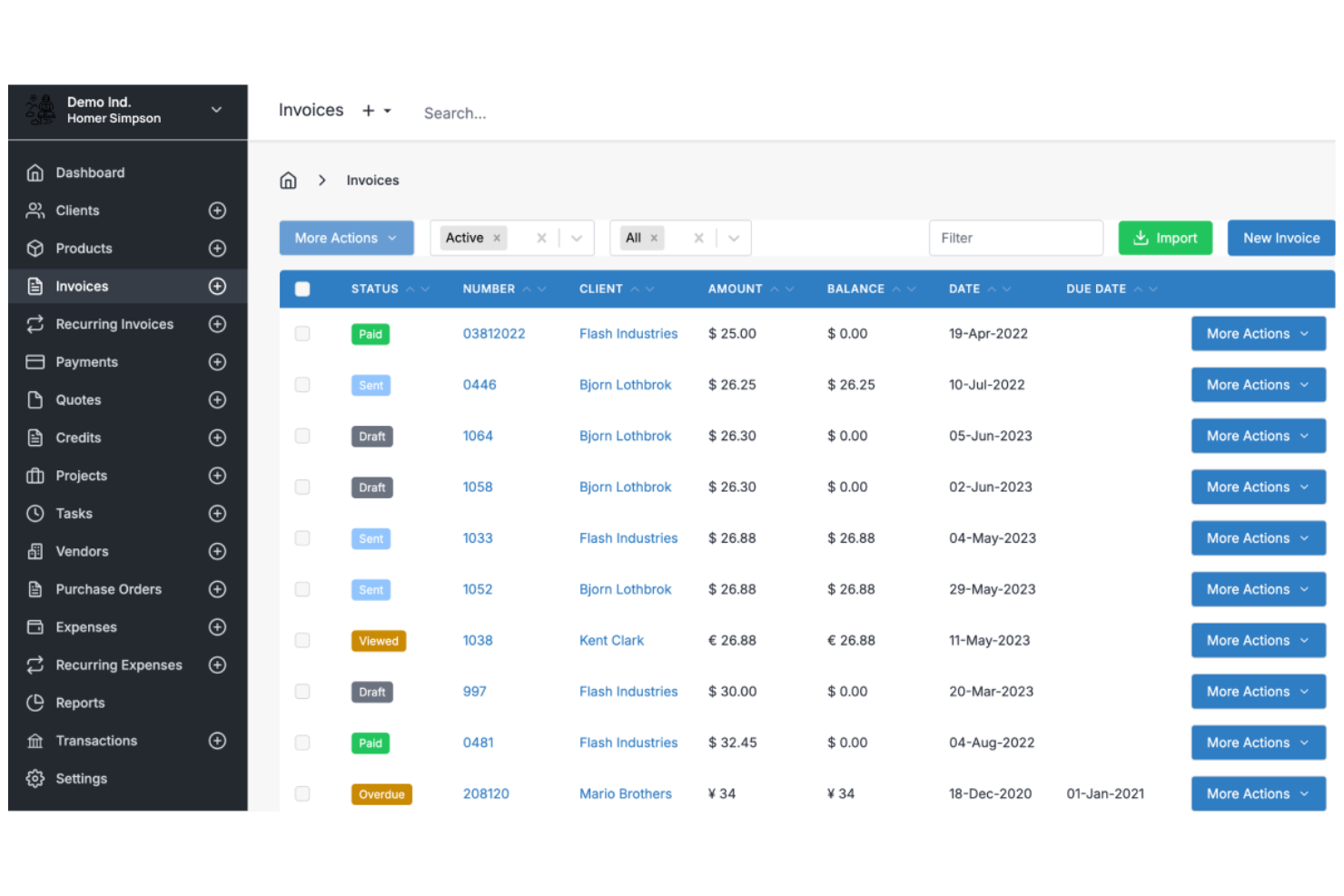
Invoice Ninja is a cloud-based invoicing software platform for freelancers and small businesses that offers invoice creation, time tracking, expense management, and client management features.
Who Is Invoice Ninja Best For?
Freelancers, agencies, and small businesses that want flexible invoice design and client billing tools.
Why I Picked Invoice Ninja
I picked Invoice Ninja as one of the best because I can fully customize invoice templates using its drag-and-drop editor and custom fields. I like that my team can add company branding, adjust layouts, and include dynamic variables for each client. In practice, that means we can create invoices that match our brand and client requirements without workarounds.
Invoice Ninja Key Features
- Time tracking: Track billable hours directly within the platform.
- Expense management: Record and categorize expenses for each client or project.
- Client portal: Give clients access to view invoices, quotes, and payment history.
- Multi-currency support: Send invoices and accept payments in multiple currencies.
Invoice Ninja Integrations
Invoice Ninja offers native integrations with PayPal, Stripe, WePay, and GoCardless for payment processing, and connects with Zapier. An API is available for custom integrations.
Pros and Cons
Pros:
- Live PDF preview during editing
- Extensive custom CSS styling options
- Open source for self-hosted control
Cons:
- Quote-to-invoice conversion requires paid plan
- Technical setup for self-hosted users

PayPal
Best for flexible payment options for clients

PayPal is an online invoicing software that lets you create, send, and manage invoices while offering built-in payment processing for credit cards, debit cards, PayPal, and Venmo.
Who Is PayPal Best For?
Freelancers and small businesses who want to offer clients a wide range of payment options.
Why I Picked PayPal
I picked PayPal as one of the best because I can let clients pay invoices using credit cards, debit cards, PayPal, or even Venmo. I like that I can add partial payments or tips directly to invoices, which is something my clients often request. My team uses PayPal to send invoices to clients in different countries and get paid in multiple currencies without extra setup.
PayPal Key Features
- Invoice tracking dashboard: Monitor sent, viewed, and paid invoices in real time.
- Customizable invoice templates: Add your logo, business details, and itemized charges.
- Automated payment reminders: Schedule reminders to prompt clients for outstanding payments.
- Multi-currency invoicing: Create and send invoices in over 25 currencies.
PayPal Integrations
PayPal offers native integrations with QuickBooks, Xero, WooCommerce, Shopify, BigCommerce, Salesforce, and FreshBooks. An API is available for custom integrations.
Pros and Cons
Pros:
- Offers partial payments and tipping options
- Instant brand recognition for client trust
- Accepts payments via PayPal, Venmo, and cards
Cons:
- Frequent account holds for high amounts
- Transaction fees are higher than competitors
Best for tracking time and expenses
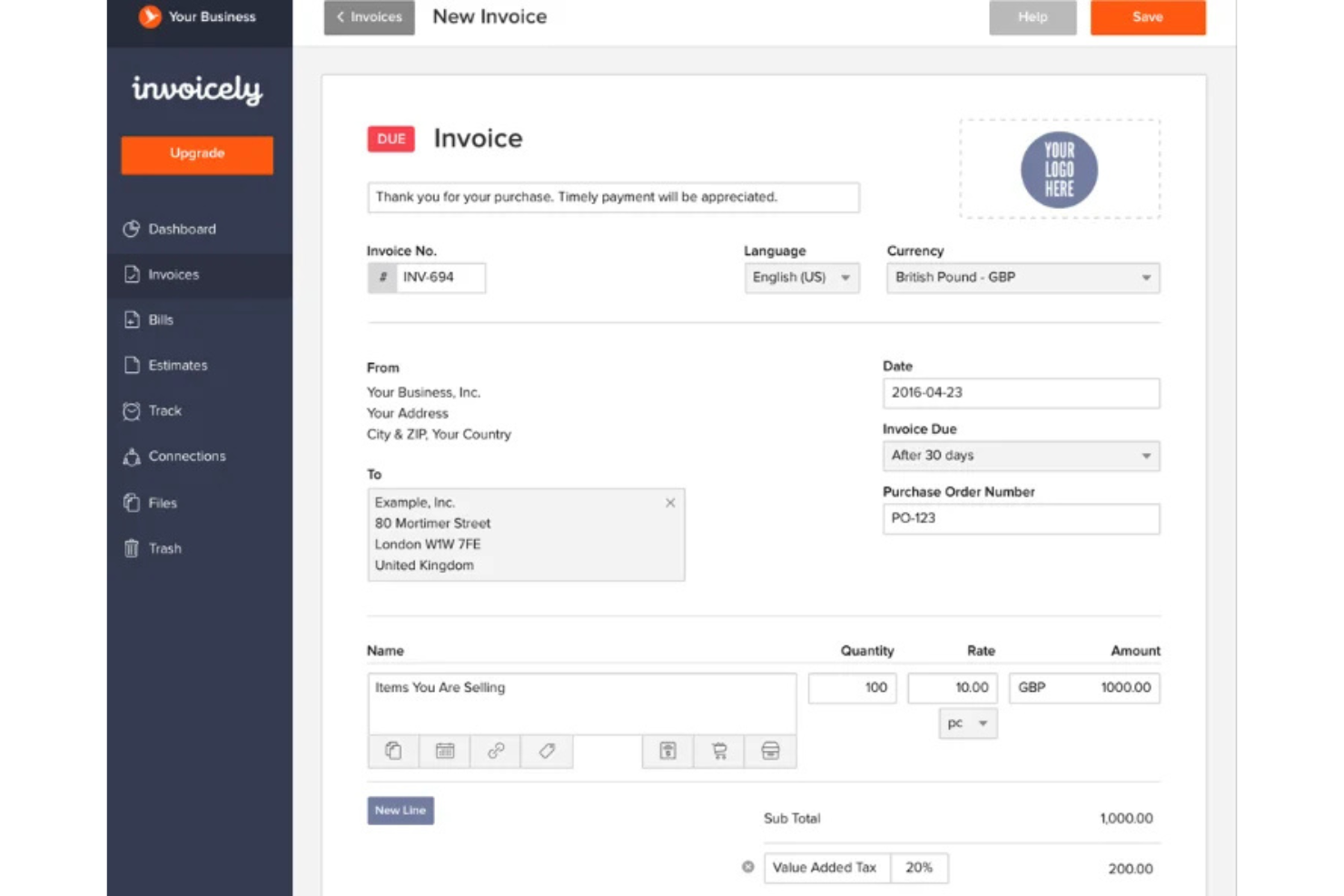
invoicely is a cloud-based invoicing software platform that lets you create invoices, track billable hours, manage expenses, and handle multiple currencies for small businesses and freelancers.
Who Is invoicely Best For?
Freelancers and small businesses that need to track time and expenses alongside invoicing.
Why I Picked invoicely
I picked invoicely as one of the best because it lets me track billable hours and expenses directly within each invoice. I like that I can log time for multiple projects and automatically convert those hours into line items. My team is able to manage mileage, expenses, and recurring invoices all in one place.
invoicely Key Features
- Multi-currency support: Create and send invoices in over 160 currencies.
- Custom branding: Add your logo, colors, and business details to every invoice.
- Online payment integration: Accept payments via PayPal, Stripe, and other gateways.
- Client management: Store client contact details and view invoice history for each client.
invoicely Integrations
invoicely offers native integrations with PayPal and Stripe for payment processing. An API is available for custom integrations.
Pros and Cons
Pros:
- Automated tax and discount calculations
- Log billable hours per project
- Track expenses in multiple currencies
Cons:
- Five client limit on entry plan
- Limited branding on free tier

Bonsai
Best for automating recurring billing
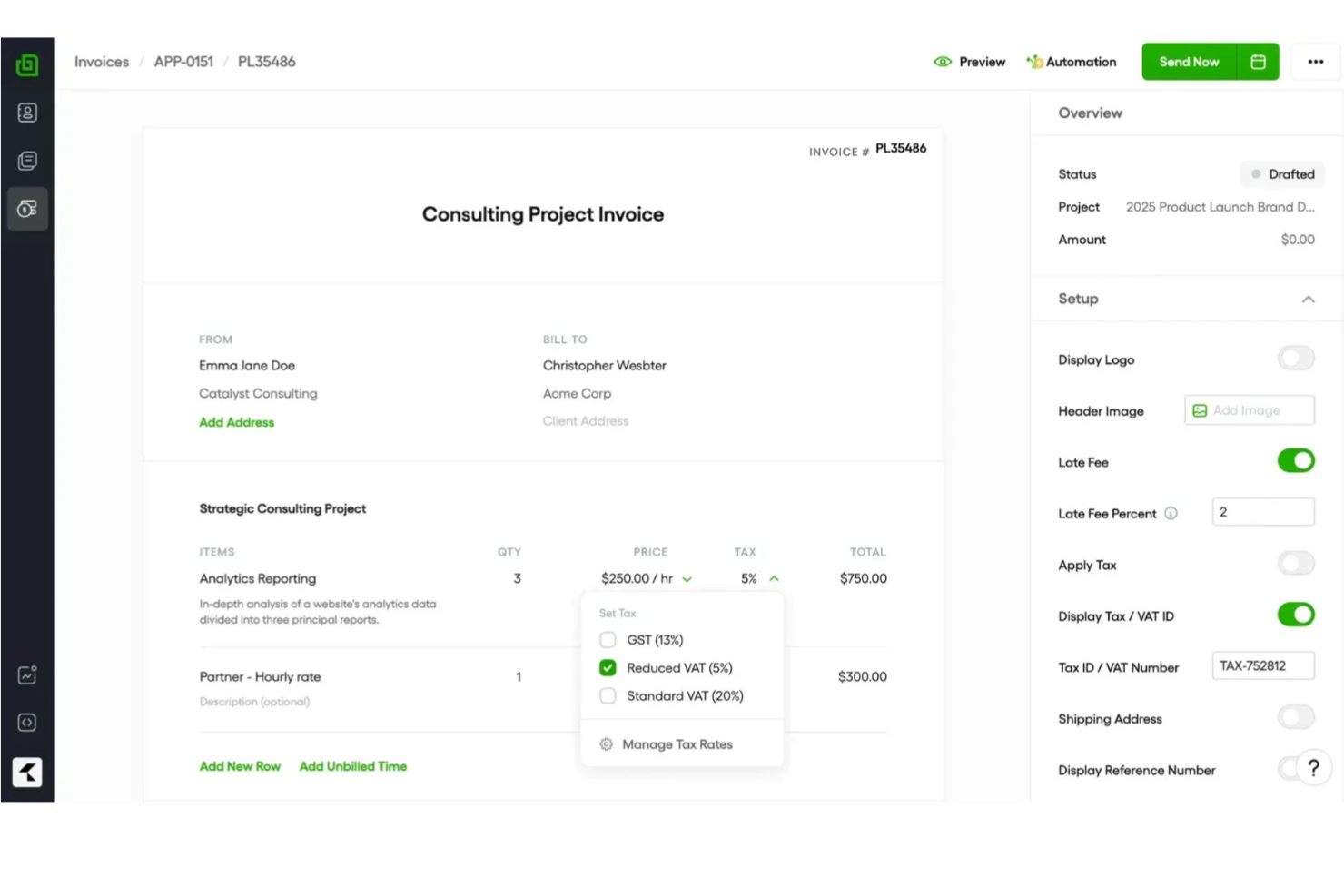
Bonsai is an invoicing software platform for freelancers and small businesses that offers invoicing, contract management, client CRM, time tracking, and automated payment collection in one system.
Who Is Bonsai Best For?
Freelancers and small business owners who need to automate recurring invoices and manage client billing in one place.
Why I Picked Bonsai
I picked Bonsai as one of the best because I can set up automated recurring invoices for clients, so billing happens on schedule without manual work. I like that Bonsai lets me link contracts and proposals directly to invoices, keeping everything organized in one place. My team uses its payment scheduling and auto-reminders to reduce missed payments and keep cash flow predictable.
Bonsai Key Features
- Client portal: Clients can view and pay invoices online.
- Multi-currency support: Issue invoices in different currencies for global clients.
- Expense tracking: Track and categorize expenses alongside invoices.
- Tax calculation tools: Automatically calculate and add taxes to invoices.
Bonsai Integrations
Bonsai offers native integrations with QuickBooks, Zapier, and Calendly, and provides an API for custom integrations.
Pros and Cons
Pros:
- Automated late fee application settings
- Auto-generated invoices from signed proposals
- Smart contracts with integrated e-signatures
Cons:
- Manual project creation from proposals
- No white-labeling on basic plans

Harvest
Best for billable time integration
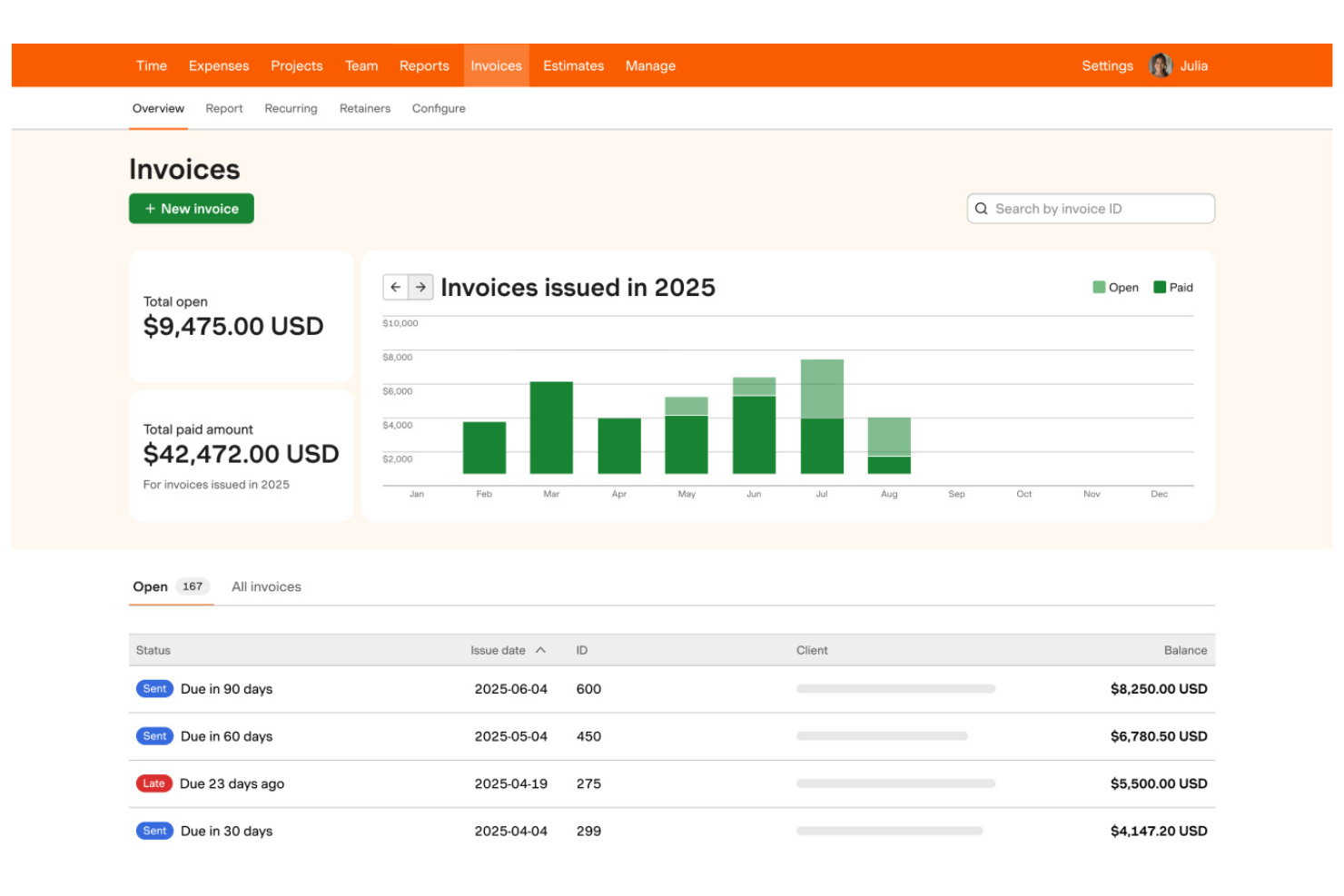
Harvest is a time tracking and invoicing software that lets teams track billable hours, generate invoices from timesheets, manage expenses, and monitor project budgets in one platform.
Who Is Harvest Best For?
Freelancers and small agencies who need to track billable hours and invoice clients based on time worked.
Why I Picked Harvest
I picked Harvest as one of the best because I can turn tracked billable hours into invoices with just a few clicks, making it easy to bill clients accurately. My team uses its built-in expense tracking to add reimbursable costs directly to invoices. I also like that Harvest lets me monitor project budgets alongside invoicing, so I always know where we stand financially.
Harvest Key Features
- Automated payment reminders: Send scheduled reminders to clients for unpaid invoices.
- Multi-currency invoicing: Create and send invoices in different currencies.
- Custom invoice branding: Add your logo and adjust invoice colors and layout.
- Detailed invoice history: View a timeline of invoice creation, edits, and payments.
Harvest Integrations
Harvest offers native integrations with QuickBooks Online, Xero, Stripe, PayPal, Asana, Trello, Basecamp, Slack, and Google Workspace. It also connects with Zapier and provides an API for custom integrations.
Pros and Cons
Pros:
- Direct integration with major project tools
- One-click time entry to invoice conversion
- Visual project budget progress bars
Cons:
- No built-in client portal for payments
- No native payment processing system

Wave
Best for mobile invoicing on iOS and Android
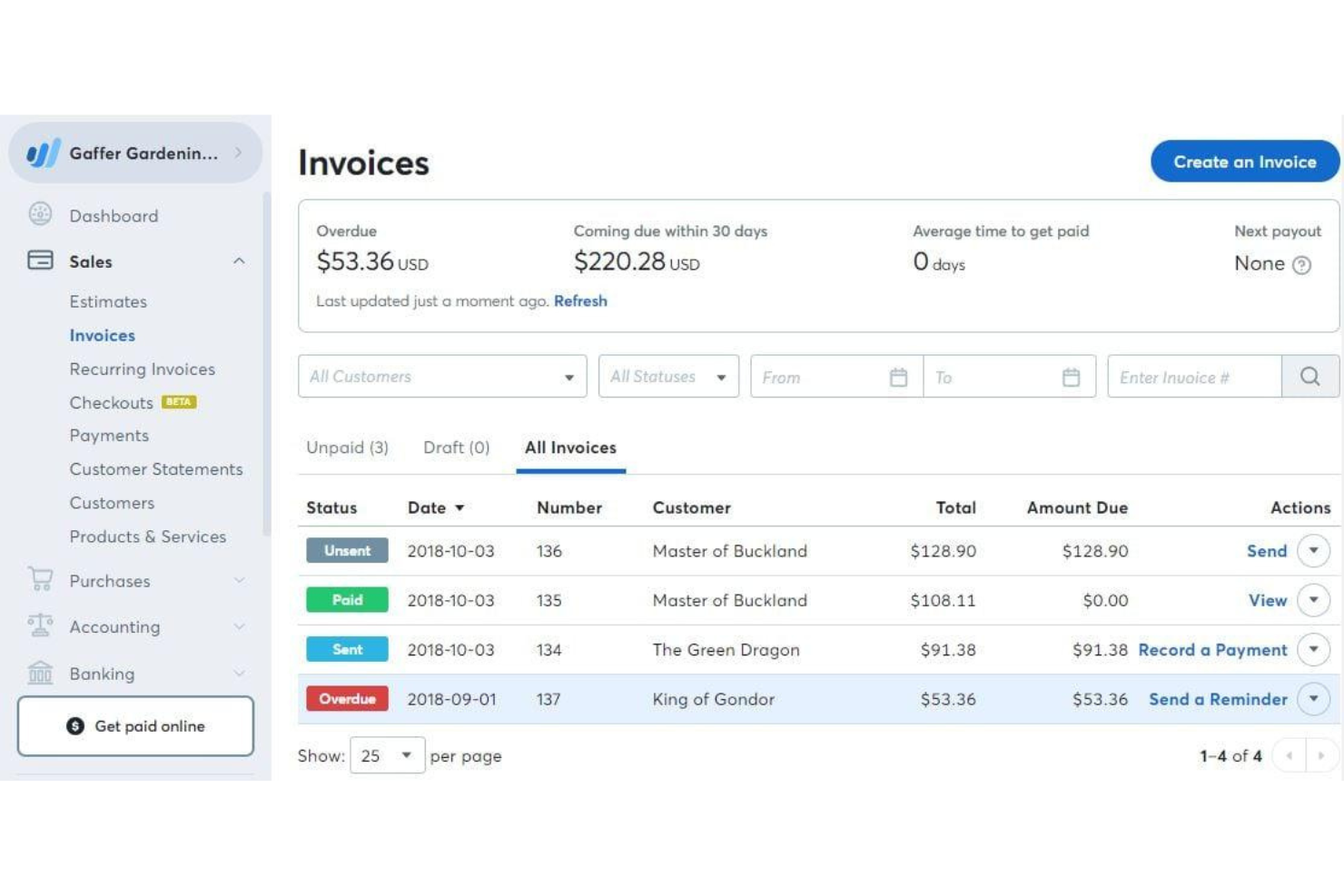
Wave is a cloud-based invoicing software that lets you create, customize, and send invoices, manage client contacts, accept online payments, and track income from a web dashboard or mobile app.
Who Is Wave Best For?
Freelancers and small business owners who want to manage invoicing and payments from their mobile devices.
Why I Picked Wave
I picked Wave as one of the best because I can invoice clients, send payment reminders, and accept payments right from my phone—whether I’m on iOS or Android. I like that the mobile app lets me create and send invoices on the go, track payment status, and even scan receipts for expense tracking. My team uses Wave’s mobile notifications to stay updated on invoice activity without needing to log in on a desktop.
Wave Key Features
- Customizable invoice templates: Choose and personalize invoice designs to match your brand.
- Automatic tax calculations: Apply and track sales tax on invoices automatically.
- Multi-currency invoicing: Send invoices and accept payments in different currencies.
- Customer management: Store and organize client contact details within the platform.
Wave Integrations
Native integrations are not publicly listed.
Pros and Cons
Pros:
- Built-in payment processing for credit cards
- Mobile app supports invoicing and payments
- Unlimited invoicing with no monthly fee
Cons:
- No automated time tracking features
- High fees for instant payouts

Best for client self-service portals
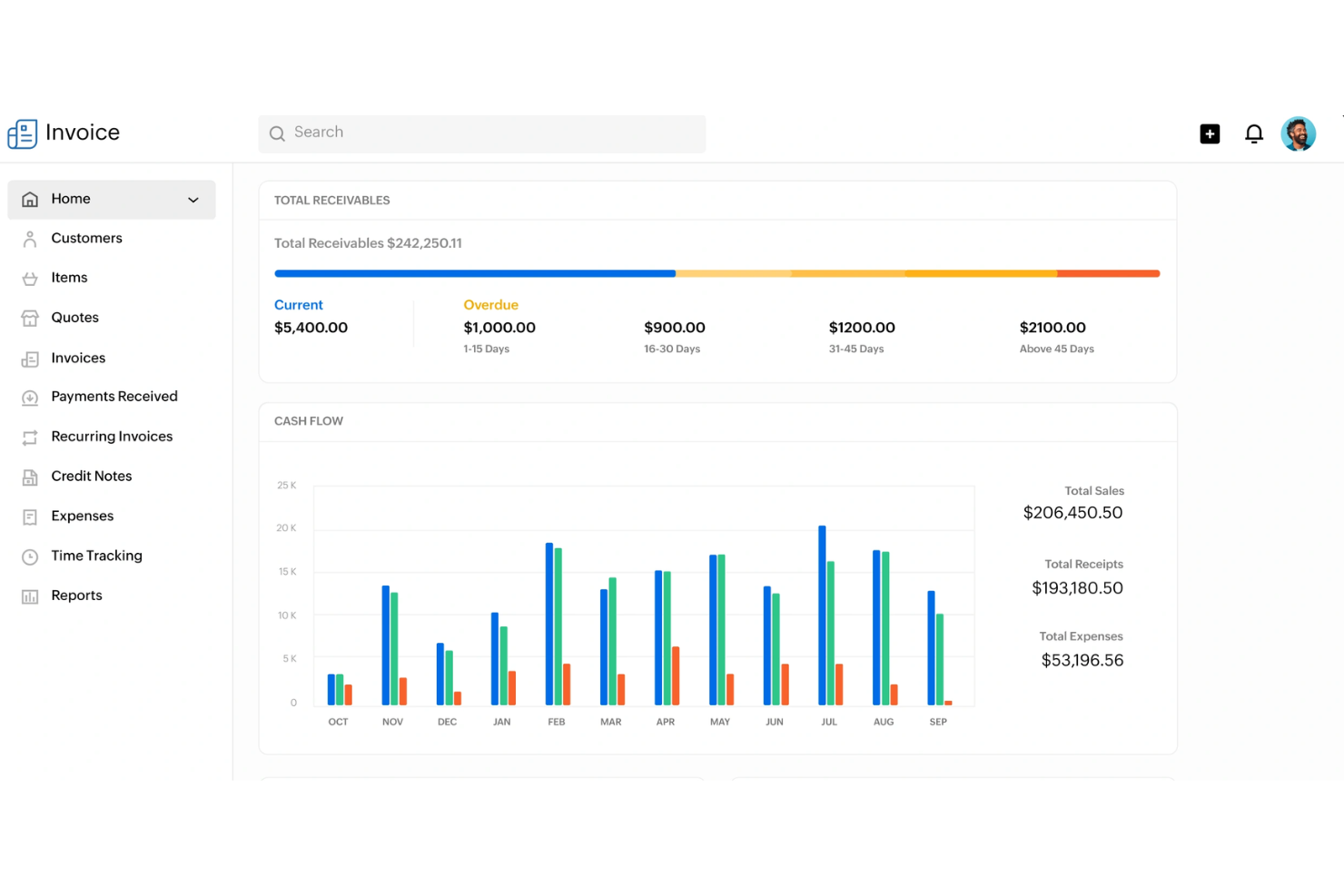
Zoho Invoice is a cloud-based invoicing software that lets you create and send invoices, automate payment reminders, manage expenses, and offer client-facing portals for self-service account management.
Who Is Zoho Invoice Best For?
Freelancers and small businesses that want to offer clients a self-service portal for managing invoices and payments.
Why I Picked Zoho Invoice
I picked Zoho Invoice as one of the best because I can give clients their own portal to view, download, and pay invoices directly. I like that my team can automate payment reminders and let clients track their payment history without emailing us. The portal also lets clients update their contact details and view past transactions, which saves us time on back-and-forth communication.
Zoho Invoice Key Features
- Time tracking: Track billable hours and convert them into invoices.
- Expense management: Record, categorize, and attach receipts to expenses.
- Multi-currency invoicing: Create and send invoices in multiple currencies.
- Custom invoice templates: Design and personalize invoice layouts to match your brand.
Zoho Invoice Integrations
Zoho Invoice offers native integrations with Zoho Books, Zoho CRM, Stripe, PayPal, Square, Razorpay, and Slack. An API is available for custom integrations.
Pros and Cons
Pros:
- Deep integration with Zoho ecosystem apps
- Automated snail mail invoice delivery option
- Complete client self-service payment portal
Cons:
- Limited custom domain mapping options
- Yearly revenue cap on free plan


Stripe Invoicing is an online invoicing platform that lets you create, send, and manage invoices while supporting a wide range of payment methods and automated billing workflows.
Who Is Stripe Invoicing Best For?
Global businesses and online sellers who need to accept payments in multiple currencies and payment methods.
Why I Picked Stripe Invoicing
I picked Stripe Invoicing as one of the best because I can send invoices that support dozens of global payment methods, including cards, bank transfers, and local wallets. My team uses its built-in tax calculation and automatic currency conversion to invoice clients in different countries. I also like that we can automate payment reminders and reconciliation for international transactions.
Stripe Invoicing Key Features
- Custom invoice templates: Create and personalize invoice layouts to match your brand.
- One-click payment links: Add secure payment links directly to invoices for fast online payments.
- Invoice status tracking: Monitor when invoices are viewed, paid, or overdue in real time.
- Bulk invoice creation: Generate and send multiple invoices at once using CSV uploads or the API.
Stripe Invoicing Integrations
Stripe Invoicing offers native integrations with QuickBooks, Xero, NetSuite, FreshBooks, and Salesforce. An API is available for custom integrations.
Pros and Cons
Pros:
- Smart retries for failed card payments
- Accepts ACH, SEPA, cards, and local wallets
- Supports over 135 currencies for invoicing
Cons:
- Limited invoice template customization options
- Higher transaction fees than bank transfers


Refrens is an invoicing software platform that lets you create, customize, and send invoices, manage client records, track payments, and handle quotations and purchase orders.
Who Is Refrens Best For?
Freelancers and small businesses in India who need to send invoices and payment reminders directly through WhatsApp.
Why I Picked Refrens
I picked Refrens as one of the best because I can send invoices directly to clients on WhatsApp, which speeds up communication and payment cycles. I like that Refrens lets me track invoice delivery and read status right from the dashboard. My team uses its built-in payment links and GST-ready invoice templates to handle compliance and collections for clients in India.
Refrens Key Features
- Quotation management: Create, send, and track quotations alongside invoices.
- Purchase order creation: Generate and manage purchase orders for clients and vendors.
- Multi-currency support: Issue invoices in different currencies for international clients.
- Expense tracking: Record and categorize business expenses within the platform.
Refrens Integrations
Native integrations are not publicly listed.
Pros and Cons
Pros:
- Free plan includes unlimited invoices
- Built-in quotation and purchase order tools
- Send invoices directly via WhatsApp
Cons:
- Fewer third-party app ecosystem connections
- Basic reporting compared to accounting suites


Bookipi is a mobile-first invoicing software that lets you create, send, and manage invoices, quotes, and receipts while tracking payments and client activity in real time.
Who Is Bookipi Best For?
Freelancers and small business owners who need mobile invoicing and real-time payment tracking.
Why I Picked Bookipi
I picked Bookipi as one of the best because I get instant push notifications when clients view, pay, or interact with my invoices. I like being able to track invoice status changes in real time from my phone, which helps me stay on top of payments. My team uses Bookipi to send invoices and receive immediate updates, so we never miss a payment event.
Bookipi Key Features
- Multi-currency support: Create and send invoices in multiple currencies.
- Quote to invoice conversion: Turn approved quotes directly into invoices.
- Payment tracking dashboard: Monitor outstanding, paid, and overdue invoices in one place.
- PDF invoice generation: Download and share invoices as professional PDF documents.
Bookipi Integrations
Native integrations are not clearly documented. Bookipi offers an API for custom integrations.
Pros and Cons
Pros:
- Signature capture on mobile device screen
- Mobile-first interface for on-site billing
- Instant read receipts for sent invoices
Cons:
- Limited data export for tax software
- Rolling 30-day document limit free plan
Diğer Faturalandırma Yazılımları
Kısa listeme girmeyen ancak yine de göz atmaya değer bazı ek faturalandırma yazılımı seçenekleri şunlardır:
- Paymo
For multi-language invoicing
- Scoro
For billing across multiple project types
- Wrike
For invoice sign-off automation
- FreshBooks
For client retainer tracking
- Xero
For accountant collaboration
- Productive
For agency profitability tracking
- QuickBooks
For automated payment reminders
- Sage
With built-in tax calculation
- Hiveage
With multi-business account management
- Square
For instant payment links


How I Evaluate DPM Invoicing Software
I split my evaluation into two layers: the baseline criteria every tool must clear—like project-tied billing and time-to-invoice tracking—and the differentiators that determine the best fit.
Core Functionality (Table Stakes For This List)
When I'm selecting tools for my list, I rank each one on a scale from 0 (does not offer the functionality) to 5 (excels in this area) for each core functionality listed below. Then, I calculate the tool's total score into a percentage. Each tool needs to achieve a minimum total score of 65% to be considered for inclusion.
- Project-Based Invoicing: I check whether invoices can be tied to specific projects, milestones, or deliverables—not just generated as standalone documents disconnected from the work.
- Time & Expense Billing: Tracked hours and project expenses should flow into invoice line items, ideally with configurable billable rates per team member or role.
- Project Management Integration: Whether native or through connectors to tools like Asana or Jira, I evaluate how tightly PM data links to billing workflows.
- Retainers & Recurring Billing: Agencies running monthly retainers need drawdown tracking and auto-generated invoices, so I look for flexible recurring billing setups.
- Client & Payment Management: I look at how clients receive and pay invoices—portal access, supported payment gateways, automated reminders, and multi-currency support all factor in.
- Financial Reporting & Accounting Sync: Project profitability reports and two-way sync with platforms like QuickBooks or Xero help keep invoicing and bookkeeping aligned.
Once I have a list of tools that meet the criteria, I consider what sets each platform apart.
Differentiating Factors (What Sets Vendors Apart)
Here's how I compare and contrast different vendors:
Standout Features
Budget burn alerts matter when you're running multiple client projects at once—I look for tools that flag when a project trends toward a write-off before it's too late. Resource utilization analytics add another layer, showing billable vs. non-billable hours per team member so you can adjust staffing mid-sprint. I also evaluate approval workflows for timesheets and draft invoices, since agencies with multiple PMs need a review step before anything reaches the client.
Beyond Features
Integration ecosystem is one of the first things I check—tools like Harvest and Scoro connect differently with QuickBooks, Xero, and PM platforms, and gaps here create manual data entry that defeats the purpose. Pricing structure also matters a lot for agencies, especially whether contractor seats are available at a lower cost than full-user licenses. I evaluate onboarding support too, since migrating from spreadsheets or a legacy tool mid-project cycle can stall billing if the transition isn't well-supported.
Faturalandırma Yazılımı Nasıl Seçilir?
Uzun özellik listeleri ve karmaşık fiyatlandırma yapıları arasında kaybolmak kolaydır. Kendinize özgü yazılım seçim sürecinizi yürütürken odaklanmayı sürdürmenize yardımcı olmak için göz önünde bulundurmanız gereken faktörleri aşağıda bir kontrol listesi halinde bulabilirsiniz:
| Faktör | Göz önünde bulundurulması gerekenler |
|---|---|
| Ölçeklenebilirlik | İşletmeniz büyüdükçe yazılım daha fazla müşteriyi, faturayı ve kullanıcıyı yönetebilecek mi? Kullanıcı veya fatura sınırlarını kontrol edin. |
| Entegrasyonlar | Muhasebe, CRM veya ödeme araçlarınıza yerel olarak bağlanabiliyor mu? Mevcut teknoloji yığınınızla uyumluluğunu kontrol edin. |
| Özelleştirilebilirlik | Fatura şablonlarını, iş akışlarını ve markalama unsurlarını işletmenizin ihtiyaçlarına uyacak şekilde özelleştirebilir misiniz? Katı formatlara sahip araçlardan kaçının. |
| Kullanım kolaylığı | Ekibiniz ve müşterileriniz arayüzü sezgisel bulacak mı? Karar vermeden önce gerçek kullanıcılarla test edin. |
| Uygulama ve kullanıma alma | Çalışmaya başlamanız ne kadar sürecek? Veri aktarımını, eğitimi ve sunulan kullanıma alma kaynaklarını göz önünde bulundurun. |
| Maliyet | Ölçek büyüttükçe fiyatlandırma kademeleri açık ve öngörülebilir mi? Gizli ücretlere veya ek kullanıcılar ya da faturalar için alınan bedellere dikkat edin. |
| Güvenlik önlemleri | Yazılım şifreleme, erişim denetimleri ve veri gizliliği standartlarına uygunluk sunuyor mu? Denetim kayıtlarını ve sertifikaları sorun. |
| Destek bulunabilirliği | Hangi destek kanalları sunuluyor ve hangi saatlerde hizmet veriliyor? 7/24 yardıma veya özel hesap yönetimine ihtiyacınız olup olmadığını değerlendirin. |
Faturalandırma Yazılımı Nedir?
Faturalandırma yazılımı, işletmelerin mal veya hizmetler için fatura oluşturmasına, göndermesine ve yönetmesine yardımcı olan dijital bir araçtır. Faturalandırma süreçlerini otomatikleştirir, ödemeleri takip eder ve müşteri bilgilerini tek bir yerde düzenler.
Ekipler, manuel işleri azaltmak, doğruluğu artırmak ve muhasebe ile uyumluluk amaçları doğrultusunda kayıtları düzenli tutmak için faturalandırma yazılımı kullanır.
Özellikler
Faturalama yazılımı seçerken aşağıdaki temel özelliklere dikkat edin:
- Fatura oluşturma: Markanız, kalem bazında ücretleriniz ve ödeme koşullarınızla faturalar oluşturup özelleştirin, ardından bunları doğrudan müşterilere gönderin.
- Yinelenen faturalama: Tekrarlayan müşteriler veya abonelik hizmetleri için otomatik faturalar oluşturun; böylece manuel veri girişini ve kaçırılan ödemeleri azaltın.
- Ödeme takibi: Hangi faturaların ödendiğini, vadesinin geçtiğini veya beklemede olduğunu izleyin ve ödeme durumu hakkında gerçek zamanlı güncellemeler alın.
- Çevrim içi ödeme işleme: Müşterilerin kredi kartları veya banka transferleri gibi entegre ödeme ağ geçitleri üzerinden fatura ödemesine olanak tanıyın.
- Müşteri yönetimi: Müşteri iletişim bilgilerini, fatura geçmişini ve iletişim kayıtlarını tek bir yerde saklayıp düzenleyin.
- Gider takibi: İşletme giderlerini kaydedip kategorilere ayırın, ardından doğru faturalama için bunları faturalara veya projelere bağlayın.
- Çoklu para birimi desteği: Uluslararası müşterilere hizmet vermek için farklı para birimlerinde fatura düzenleyin ve ödeme kabul edin.
- Vergi hesaplama: Konuma veya ürün türüne göre doğru vergi oranlarını faturalara otomatik olarak uygulayın.
- Özelleştirilebilir şablonlar: Marka kimliğinizle uyumlu olması için fatura düzenlerini, renklerini ve logolarını kişiselleştirin.
- Raporlama ve analiz: İş kararlarını desteklemek için gelir, bekleyen faturalar ve ödeme eğilimleri hakkında finansal raporlar oluşturun.
Yaygın Faturalama Yazılımı Yapay Zekâ Özellikleri
Yukarıda listelenen standart faturalama yazılımı özelliklerinin yanı sıra, bu çözümlerin çoğu aşağıdaki gibi özelliklerle yapay zekâyı kullanmaya başlıyor:
- Otomatik veri çıkarma: Yapay zekâ, ilgili fatura ayrıntılarını almak için makbuzları, faturaları veya e-postaları tarayarak manuel veri girişini ve hataları azaltır.
- Akıllı ödeme tahmini: Yapay zekâ, faturaların ne zaman ödenmesinin muhtemel olduğunu tahmin etmek için müşteri ödeme geçmişlerini analiz ederek nakit akışı planlamasına yardımcı olur.
- Anomali tespiti: Yapay zekâ, tutarsızlıkları veya aykırı değerleri tespit etmek amacıyla fatura verilerini izleyerek olağandışı faturalama kalıplarını veya olası sahtekârlıkları işaretler.
- Sorgular için doğal dil işleme: Yapay zekâ destekli sohbet veya arama, kullanıcıların faturalar ya da ödemeler hakkında günlük dille soru sormasına ve anında yanıt almasına olanak tanır.
- Otomatik fatura kategorilendirme: Yapay zekâ, faturalama düzenini ve raporlamayı yönetmek için faturaları türüne, müşterisine veya projesine göre sınıflandırır.
- Kişiselleştirilmiş hatırlatıcı zamanlaması: Yapay zekâ, müşteri davranışına ve geçmiş yanıtlarına göre ödeme hatırlatıcılarının gönderilmesi için en uygun zamanı ve sıklığı belirler.
Avantajlar
Faturalama yazılımını uygulamak ekibiniz ve işletmeniz için çeşitli avantajlar sağlar. Yararlanmayı bekleyebileceğiniz avantajlardan bazıları şunlardır:
- Daha hızlı faturalama döngüleri: Otomatik fatura oluşturma ve teslimi, manuel adımları azaltarak daha erken ödeme almanıza yardımcı olur.
- Geliştirilmiş ödeme takibi: Gerçek zamanlı durum güncellemeleri ve hatırlatıcılar, bekleyen ve vadesi geçmiş faturaları izlemeyi kolaylaştırır.
- Azaltılmış manuel hatalar: Yerleşik hesaplamalar, şablonlar ve yapay zekâ destekli veri çıkarma, faturalama ve raporlamadaki hataları en aza indirir.
- Daha iyi müşteri deneyimi: Müşteri portalları ve çevrim içi ödeme seçenekleri, müşterilere daha fazla esneklik ve şeffaflık sunar.
- Basitleştirilmiş uyumluluk: Otomatik vergi hesaplamaları ve denetim izleri, düzenli kalmanıza ve yasal gereklilikleri karşılamanıza yardımcı olur.
- Ölçeklenebilir süreçler: Çok kullanıcılı erişim ve iş akışı otomasyonu, idari yükü artırmadan işletmeniz büyürken sizi destekler.
- Eyleme geçirilebilir finansal içgörüler: Raporlama ve analiz özellikleri gelir, nakit akışı ve ödeme eğilimleri hakkında net bir görünüm sunar.
Maliyetler ve Fiyatlandırma
Faturalama yazılımı seçmek, mevcut çeşitli fiyatlandırma modellerinin ve planların anlaşılmasını gerektirir. Maliyetler özelliklere, ekip büyüklüğüne, eklentilere ve diğer unsurlara göre değişir. Aşağıdaki tablo, faturalama yazılımı çözümlerinde yaygın planları, bunların ortalama fiyatlarını ve genellikle sunulan özellikleri özetlemektedir:
Faturalama Yazılımı Plan Karşılaştırma Tablosu
| Plan Türü | Ortalama Fiyat | Yaygın Özellikler |
|---|---|---|
| Ücretsiz Plan | $0 | Temel fatura oluşturma, sınırlı müşteri yönetimi, basit raporlama ve e-posta desteği. |
| Kişisel Plan | $5-$15/kullanıcı/ay | Sınırsız fatura, ödeme takibi, temel şablonlar, çevrim içi ödemeler ve temel gider takibi. |
| İşletme Planı | $20-$40/kullanıcı/ay | Çok kullanıcılı erişim, gelişmiş raporlama, yinelenen faturalandırma, entegrasyonlar ve özelleştirilebilir şablonlar. |
| Kurumsal Plan | $50-$100/kullanıcı/ay | Gelişmiş güvenlik, özel destek, iş akışı otomasyonu, özel entegrasyonlar ve API erişimi. |
Faturalandırma Yazılımı SSS
Faturalandırma yazılımı hakkında sık sorulan bazı soruların yanıtları aşağıda yer almaktadır:
Faturalandırma yazılımı birden fazla para birimini ve dili destekleyebilir mi?
Evet, birçok faturalandırma çözümü çoklu para birimi ve çoklu dil özelliklerini destekler. Bu özellik, uluslararası müşterilerle çalışan veya farklı bölgelerde faaliyet gösteren girişimciler için özellikle yararlıdır; profesyonel faturaların doğru olmasını ve müşterilerin bunları kolayca anlamasını sağlar.
Finansal verileri depolamak için faturalandırma yazılımı ne kadar güvenlidir?
Çoğu faturalandırma yazılımı, finansal verilerinizi ve banka hesabı bilgilerinizi korumak için şifreleme, erişim denetimleri ve düzenli güvenlik denetimleri kullanır. Hassas bilgileri güvende tutmak için her zaman GDPR veya SOC 2 gibi standartlara uygunluğu kontrol edin ve denetim izleri ile kullanıcı izinleri gibi özellikleri sorun.
Yinelenen faturaları ve ödeme hatırlatıcılarını otomatikleştirmek mümkün mü?
Evet, modern fatura uygulaması platformlarının çoğu yinelenen faturaları planlamanıza ve vadesi geçmiş ödemeler için otomatik ödeme hatırlatıcıları ayarlamanıza olanak tanır. Bu, manuel takip çalışmalarını azaltır, kaçırılan ödemelerden kaçınmanıza yardımcı olur ve nakit akışınızı öngörülebilir tutar.
Faturalandırma yazılımında hangi entegrasyonları aramalıyım?
Muhasebe yazılımınız, CRM’niz ve proje yönetimi araçlarınızla entegrasyonları arayın. Ayrıca Apple Pay ve Google Pay gibi ödeme ağ geçitlerine veya işlemleri yüz yüze gerçekleştiriyorsanız bir POS sistemine bağlandığından emin olmalısınız. Bu bağlantılar, yinelenen veri girişinden kaçınmanıza ve işletmenizdeki finansal süreçleri birbirine bağlı tutmanıza yardımcı olur.
Hesap tablolarından veya başka bir faturalandırma aracından geçiş yapmak ne kadar kolaydır?
Çoğu sağlayıcı, verilerinizi taşımanıza yardımcı olmak için içe aktarma araçları, şablonlar veya işe alıştırma desteği aracılığıyla kullanıcı dostu bir geçiş sunar. Manuel bir hesap tablosundan ya da ücretsiz bir faturalandırma aracından geçiş yapıyor olsanız da süreci kolaylaştırmak ve tüm faturalandırma sürecinizi yönetmek için adım adım kılavuzları veya geçiş hizmetlerini kontrol edin.