

2026 İçin En İyi 10 Mühendislik Belge Yönetimi Yazılımı

Mühendislik Belge Yönetimi Yazılımı Kısa Listesi


Mühendislik belge yönetimi yazılımı, ekibinizin proje yaşam döngüsü boyunca teknik belgeleri düzenlemesine, kontrol etmesine ve izlemesine yardımcı olur. Çizimleri, revizyonları ve uyumluluk kayıtlarını yönetmek için en iyi mühendislik belge yönetim sistemini arıyorsanız, dosyaların ne kadar hızlı çoğalabildiğini ve ekip üyelerinin uyum içinde çalışmasını sağlamanın ne kadar kritik olduğunu bilirsiniz. Bu platformlar değişiklik yönetimini destekler, veri yönetimini iyileştirir ve mühendislik projelerinde iş süreçlerini standartlaştırmaya yardımcı olur.
Bu liste, önde gelen çözümleri karşılaştırmanıza ve mühendislik iş akışlarınızda iş birliğini, uyumluluğu ve dijital dönüşümü destekleyen yazılımı seçmenize yardımcı olacaktır.
Why Trust Our Software Recommendations
Our team has been testing and reviewing software since 2012. As project managers ourselves, we know how difficult—and important—it is to choose the right software.
For this guide, we evaluated tools using hands-on testing and independent research, scoring tools using our selection criteria. We also draw on insights from industry thought leaders and practicing project management experts.
Our reviews reflect our human editorial judgment, not a sales pitch.
Expert reviewers:
Mühendislik Belge Yönetimi Yazılımı Karşılaştırma Tablosu
Bu karşılaştırma tablosu, en iyi mühendislik belge yönetimi yazılımı seçimlerimin fiyatlandırma ayrıntılarını özetlemektedir
| Tool | Starting Price | Website | |
|---|---|---|---|
| Best with multilingual document handling | 4.8 out of 5 | Pricing upon request Free demo available | Website |
| Best for metadata-based organization | 4.4 out of 5 | $65/user/month Free demo available | Website |
| Best for large-scale enterprise deployments | 4.2 out of 5 | Pricing upon request Free demo available | Website |
| Best for infrastructure project coordination | 3.8 out of 5 | $312/year Free trial available | Website |
| Best for compliance-driven industries | — | $58/user/month Free demo available | Website |
| Best for Microsoft Office integration | — | Pricing upon request Free demo available | Website |
| Best for controlled revision management | — | Pricing upon request Free demo available | Website |
| Best with CAD integration workflows | — | $14/user/month Not available | Website |
| Best for rapid cloud implementation | — | $399/month Free demo available | Website |
| Best for capital project documentation | — | Pricing upon request Free demo available | Website |
Mühendislik Belge Yönetimi Yazılımı İncelemeleri
Aşağıda, kısa listeme giren mühendislik belge yönetimi yazılımlarına ilişkin ayrıntılı özetlerimi bulabilirsiniz. İncelemelerim, ekibiniz için en iyi seçeneği bulmanıza yardımcı olmak amacıyla her platformun özelliklerini, en uygun kullanım alanlarını ve entegrasyonlarını ayrıntılı şekilde ele almaktadır.
Doxis
Best with multilingual document handling

Doxis is an enterprise content management platform that manages document lifecycle, version control, CAD file archiving, AI-powered classification, and workflow automation for engineering and technical environments.
Who is Doxis Best For?
Doxis is a strong fit for large enterprises in manufacturing, engineering, or regulated industries managing high volumes of technical documents across multiple departments.
Why I Picked Doxis
I've included Doxis in my top picks because of how well it handles document management across international engineering teams. The enterprise search lets you filter by language, so teams working across regions can locate the right version of a technical document without digging through mixed-language repositories. On top of that, Doxis AI.dp uses NLP to classify and extract data from documents regardless of language, which means incoming specs, supplier records, or compliance files in different languages get processed and routed correctly without manual sorting.
Doxis Key Features
- CAD Manager: Archive and view CAD drawings and technical models without needing native CAD software installed.
- Version management: Track document revisions, see complete change histories, and control which version is active at any time.
- Multi-stage approval workflows: Route documents through customizable review and release processes, each with specific sign-off steps.
- Audit-proof archiving: Store records in compliance with ISO 16175-2 standards, using automated retention and deletion policies.
Doxis Integrations
Doxis offers native integrations with SAP, Salesforce, and the Microsoft ecosystem, including Microsoft 365, Microsoft Teams, Microsoft Outlook, Microsoft SharePoint, and Microsoft Dynamics 365. There is also native integration with SAP SuccessFactors and Google Workspace. Doxis provides a REST API for custom integrations, and its vendor-independent connectors support connections to ERP, CRM, and HR systems. Zapier support is not clearly documented.
Pros and Cons
Pros:
- Handles large engineering document files natively
- Tamper-proof archiving with retention automation
- AI-driven classification and metadata extraction
Cons:
- Complex customizations require coordination with vendor support
- Limited support for 3D model file storage

M-Files
Best for metadata-based organization
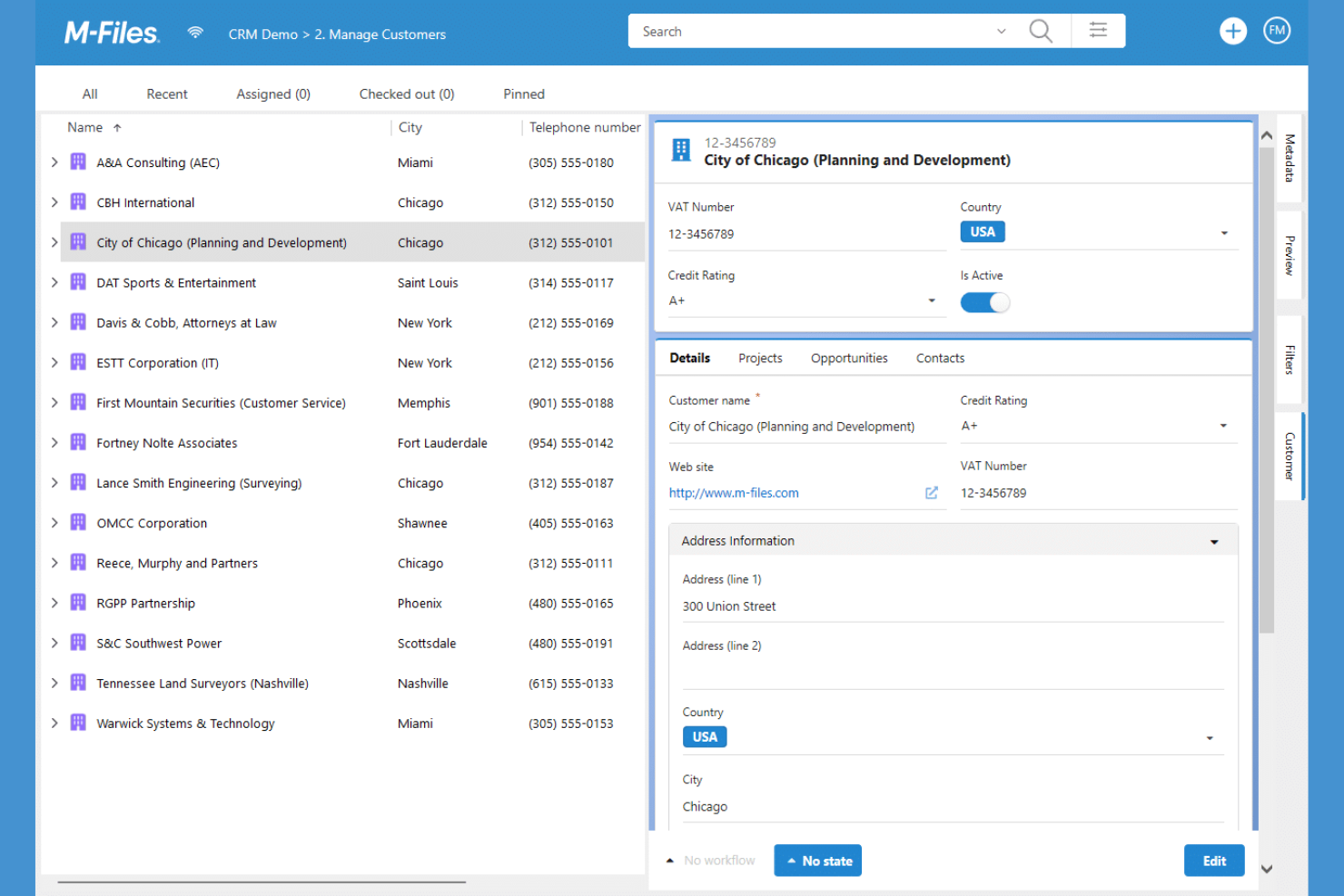
M-Files takes a metadata-driven approach to engineering document management, making it easier for teams to organize and retrieve files based on context rather than folder location. This platform is a strong fit for organizations that handle complex projects and need to track documents by project, asset, or compliance requirement. Its unique structure helps reduce time spent searching for information and supports strict version control across distributed teams.
Why I Picked M-Files
Unlike traditional document management systems that rely on rigid folder structures, M-Files organizes engineering documents using metadata, which means you can find files based on project, asset, or document type. This approach is especially useful for engineering teams that need to manage large volumes of technical documents and drawings across multiple projects. I like that M-Files automatically tags and categorizes documents, making retrieval and compliance tracking much more efficient. Its metadata-based search and dynamic views help ensure everyone is always working with the right version of every file.
M-Files Key Features
Some other features that engineering teams might find useful include:
- Automated Workflow Management: Lets you design and automate document approval and review processes.
- Mobile Access: Provides a mobile app for accessing and managing documents from anywhere.
- Microsoft 365 Integration: Connects with Microsoft Teams, SharePoint, and Outlook for document collaboration.
- Audit Trail Logging: Tracks every action taken on a document for compliance and accountability.
M-Files Integrations
Integrations include Microsoft Teams, Microsoft SharePoint, Microsoft Outlook, Microsoft Word, Microsoft Excel, Microsoft PowerPoint, Adobe Acrobat Sign, Google Workspace, and more.
Pros and Cons
Pros:
- Automated workflows support engineering approvals
- Version control prevents accidental overwrites
- Metadata search finds documents by project context
Cons:
- Limited CAD file preview within the platform
- Initial metadata setup requires significant planning

OpenText
Best for large-scale enterprise deployments
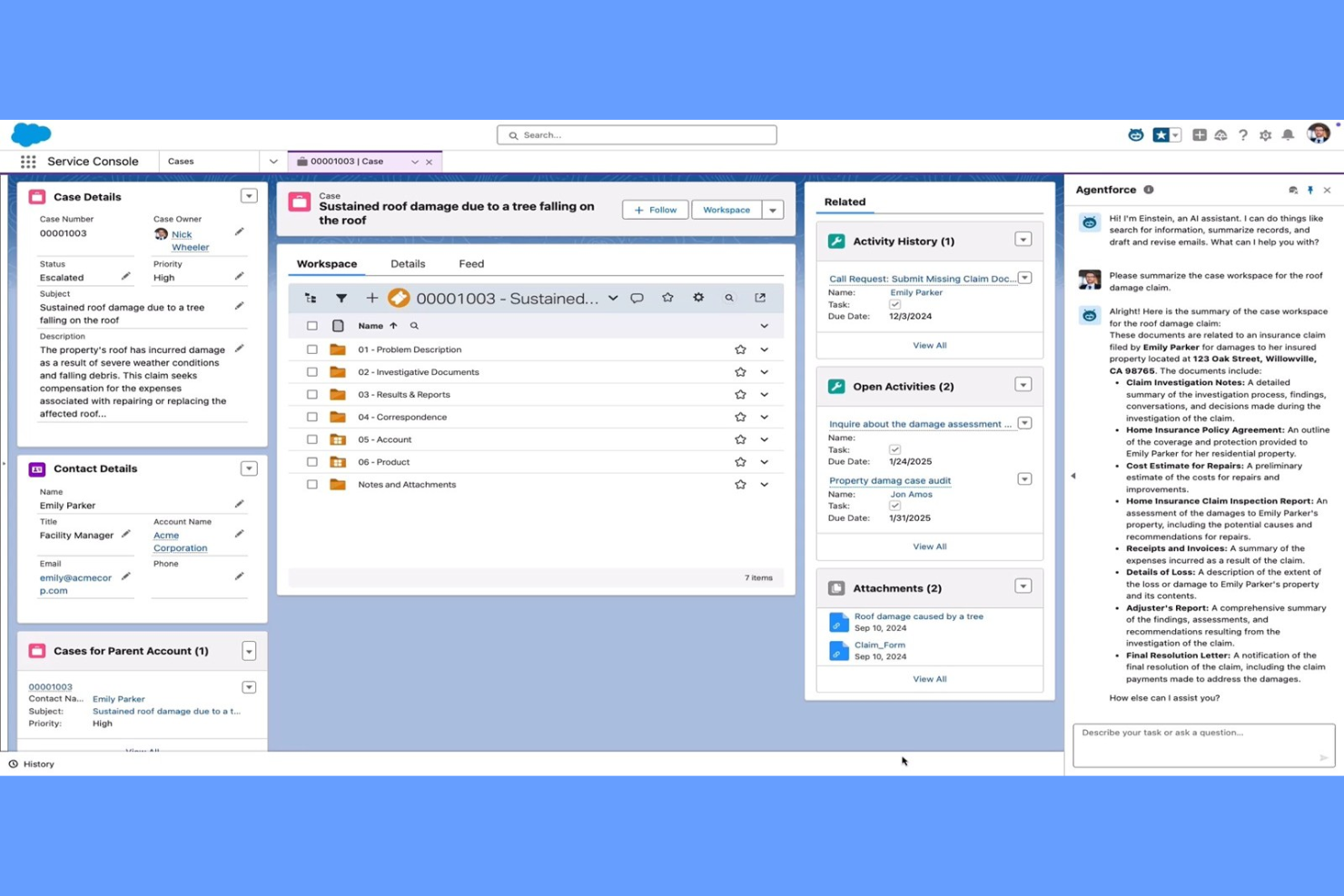
OpenText offers a document management platform designed for organizations handling complex engineering projects at scale. It’s a strong fit for enterprises that need to manage high volumes of technical documents, strict compliance requirements, and global collaboration. Teams in industries like energy, utilities, and manufacturing use OpenText to centralize control over drawings, revisions, and project records, helping team members find the right document quickly through a more user-friendly interface.
Why I Picked OpenText
I chose OpenText for this list because it’s purpose-built to handle the demands of large-scale enterprise deployments. The platform supports advanced document control, including automated versioning and audit trails, which are essential for organizations managing thousands of engineering files across multiple projects. I also appreciate its granular permissions system, which lets teams set access levels for different departments, contractors, or regions. These capabilities make OpenText a strong choice for enterprises that need centralized oversight and compliance across complex engineering environments.
OpenText Key Features
Some other features that engineering teams may find useful include:
- Document Workflow Automation: Set up custom workflows to route documents for review, approval, and distribution.
- Integrated Search Tools: Use advanced search capabilities to quickly locate drawings, specifications, or correspondence by metadata or content.
- Mobile Access: Access, review, and annotate engineering documents from mobile devices in the field or on-site.
- Records Management: Apply retention policies and manage the lifecycle of engineering documents to support compliance and audit readiness.
OpenText Integrations
Integrations include SAP, SAP SuccessFactors, Microsoft 365, Guidewire, Salesforce, and more.
Pros and Cons
Pros:
- Scales for global, multi-site deployments
- Integrates with major enterprise platforms
- Offers granular user and group permissions
Cons:
- Search performance slows with very large archives
- Advanced features may require extra licensing

Best for infrastructure project coordination
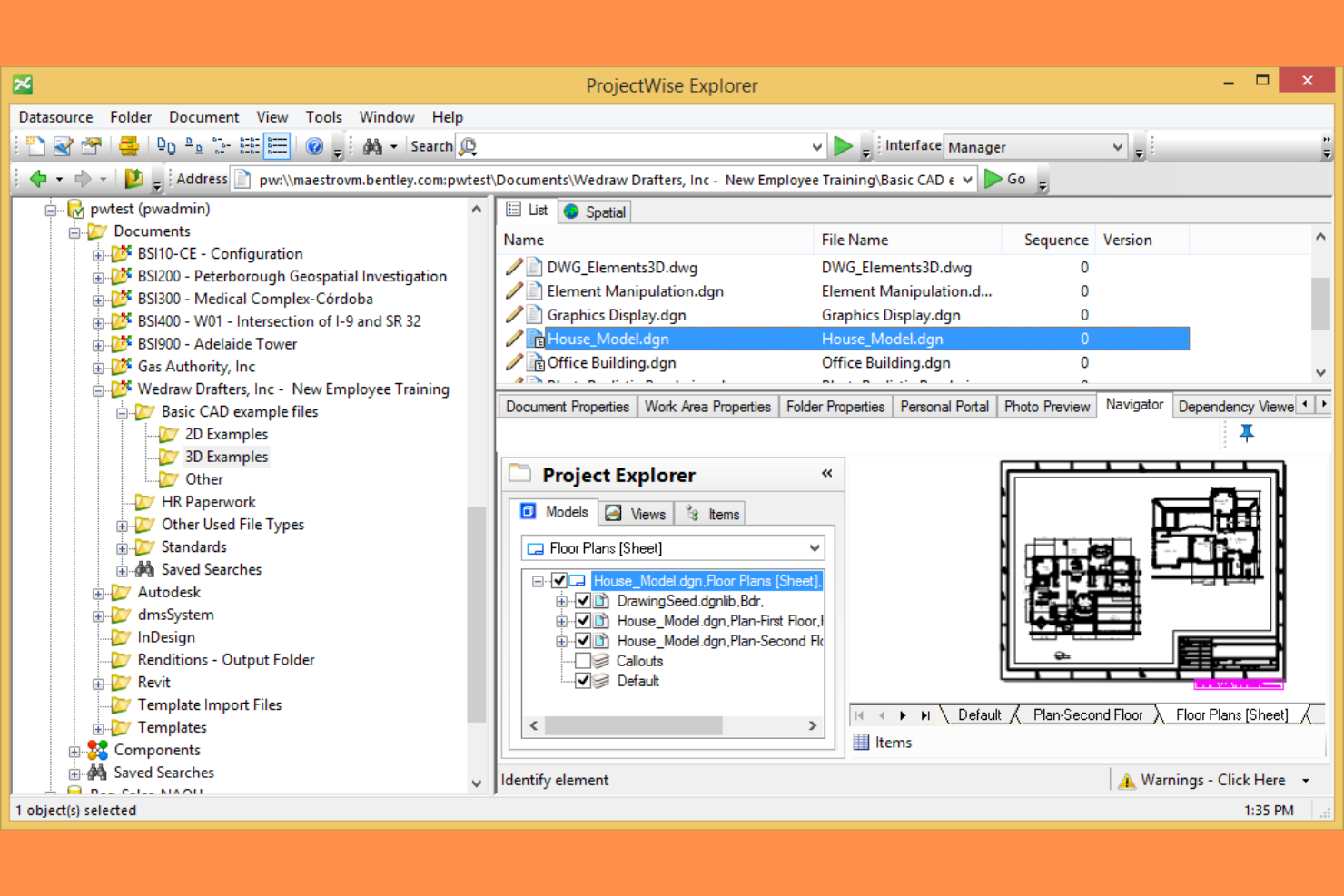
Bentley ProjectWise is purpose-built for infrastructure teams that need to coordinate complex engineering projects across organizations and disciplines. It connects civil, structural, and utility engineers with a shared environment for managing models, drawings, and project data. This makes it especially useful for firms handling large-scale transportation, energy, or public works projects where collaboration and control are critical.
Why I Picked Bentley ProjectWise
For infrastructure project coordination, Bentley ProjectWise stands out by offering a connected data environment that supports multi-disciplinary teams working on large-scale projects. Its federated model management lets civil, structural, and utility engineers collaborate on shared models and drawings without overwriting each other’s work. I appreciate how ProjectWise automates document versioning and approval workflows, which helps maintain control over complex project deliverables. These features make it a strong choice for organizations that need to coordinate infrastructure projects across multiple stakeholders and locations.
Bentley ProjectWise Key Features
Some other features that infrastructure teams may find valuable include:
- Geospatial Data Integration: Connects project documents with GIS and mapping data for location-based context.
- Automated Metadata Tagging: Applies standardized tags to documents for easier search and organization.
- Mobile Field Access: Lets users view and update project files from mobile devices on site.
- Audit Trail Reporting: Tracks all document actions and changes for compliance and accountability.
Bentley ProjectWise Integrations
Native integrations are not currently listed.
Pros and Cons
Pros:
- Handles large infrastructure project file sizes
- Provides detailed audit trails for compliance
- Supports federated models for multi-disciplinary teams
Cons:
- Cloud hosting options are not globally available
- Limited support for non-Bentley file formats
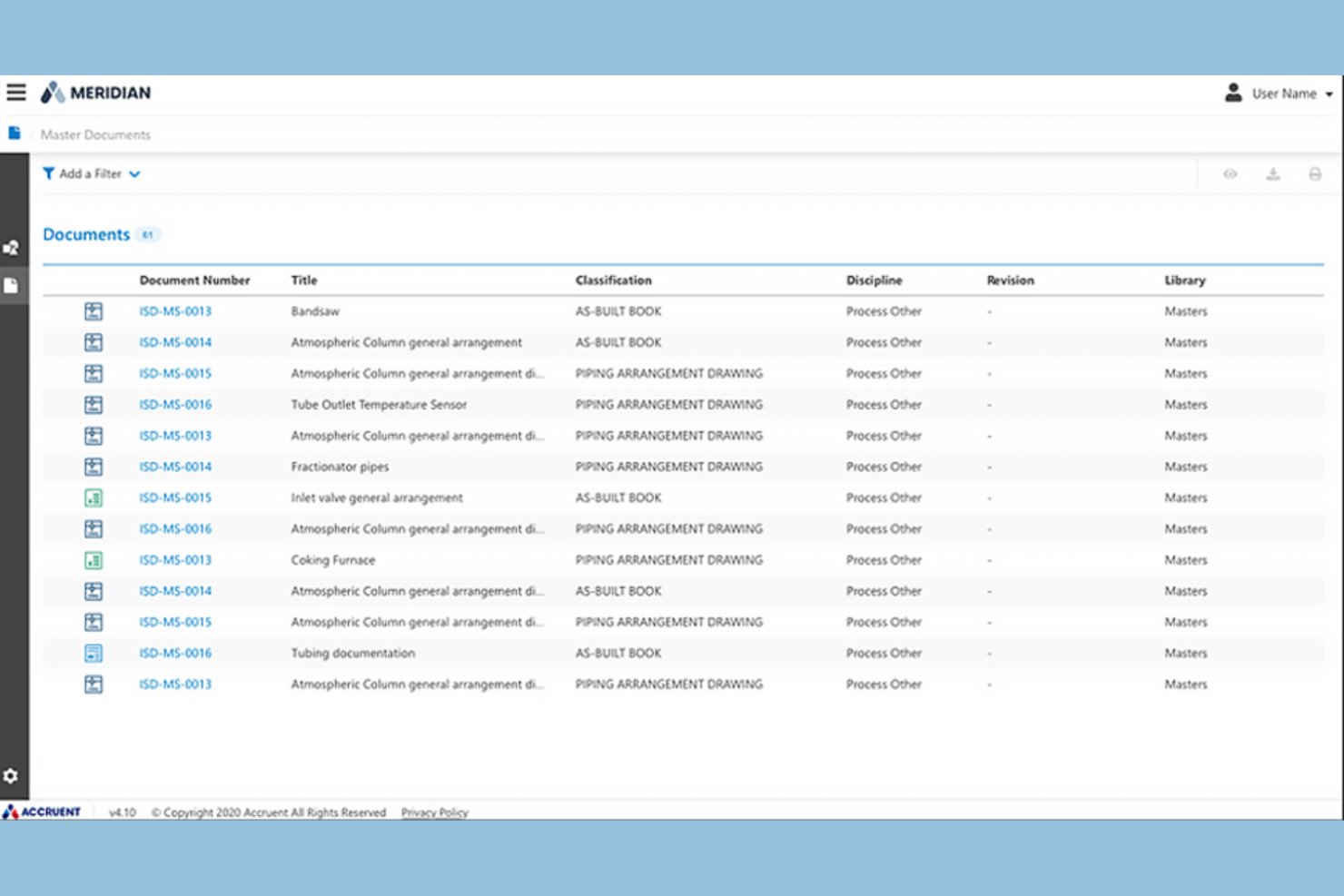
Accruent is designed for organizations in highly regulated industries that need to manage engineering documents with strict compliance requirements. It’s especially relevant for teams in sectors like pharmaceuticals, energy, and healthcare, where audit trails and regulatory alignment are non-negotiable. The platform helps address challenges around document versioning, controlled access, and maintaining up-to-date compliance documentation.
Why I Picked Accruent
For teams working in compliance-driven industries, Accruent offers specialized tools that help meet strict regulatory standards for engineering documentation. The platform provides detailed audit trails and electronic signatures, which are essential for industries where traceability and accountability are required by law. I appreciate that Accruent also supports document control processes, including version management and automated approval workflows, to help ensure every file meets compliance requirements. These features make it a strong fit for organizations that can’t afford to compromise on regulatory alignment.
Accruent Key Features
Some other features in Accruent that you might find useful for managing engineering documents include:
- Version Control: Track document revisions and maintain a complete history of changes for audit and reference purposes.
- Automated Workflow Routing: Set up rule-based workflows to route documents for review, approval, or distribution based on project requirements.
- CAD Integration: Connect directly with CAD applications to manage and update engineering drawings without leaving the platform.
- Role-Based Access Controls: Assign granular permissions to users and groups, ensuring only authorized personnel can view or edit sensitive documents.
Accruent Integrations
Native integrations are not currently listed. However, Accruent does offer an API for custom integrations.
Pros and Cons
Pros:
- Detailed reporting for compliance and usage metrics
- Automated document retention and disposition rules
- Built-in audit trails for regulatory compliance
Cons:
- Customization requires vendor involvement and time
- Limited offline access for remote field teams

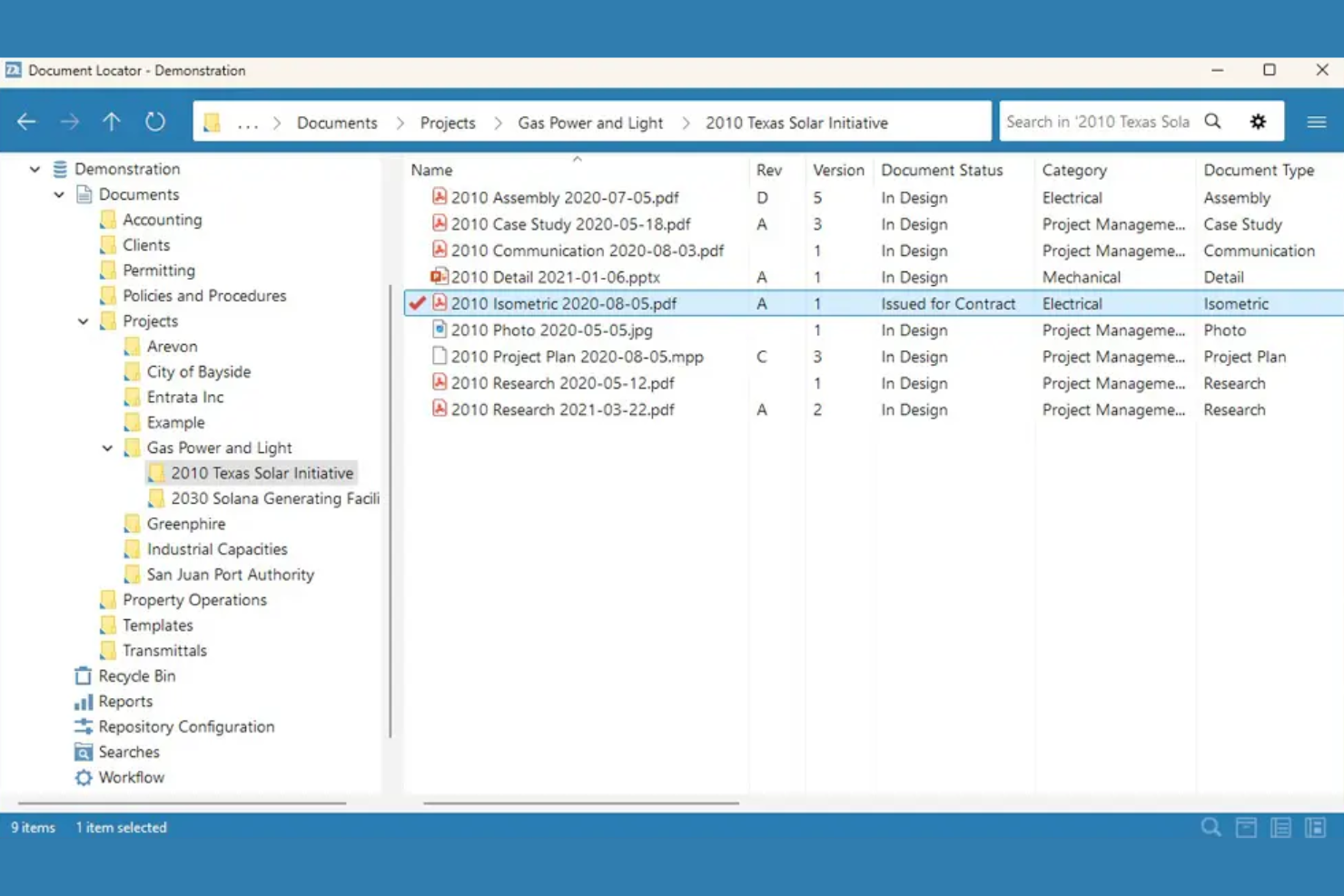
Document Locator is designed for engineering teams that rely heavily on Microsoft Office for their daily workflows. It integrates document management directly into familiar Office applications, making it easier to manage, search, and control engineering files without leaving Word, Excel, or Outlook. This approach helps organizations maintain strict version control and compliance while working within the tools they already use.
Why I Picked Document Locator
For engineering teams that work extensively in Microsoft Office, Document Locator stands out by embedding document management directly into Word, Excel, and Outlook. This tight integration allows users to check documents in and out, track revisions, and apply document controls without leaving their familiar Office environment. I appreciate how this setup supports engineering workflows that depend on Office-based specifications, drawings, and correspondence. Document Locator also enables automated document routing and approval processes, which help maintain compliance and project oversight.
Document Locator Key Features
Some other features that engineering teams might find valuable include:
- Automated Retention Policies: Lets you set rules for document retention and disposal based on project or compliance needs.
- Full-Text Search: Allows you to search the entire content of documents, not just file names or metadata.
- Audit Trail Reporting: Tracks every action taken on documents for accountability and compliance.
- CAD File Support: Supports storage and management of engineering drawings and CAD files alongside Office documents.
Document Locator Integrations
Integrations include Microsoft Office, DocuSign, AutoCAD, Adobe Acrobat, and more.
Pros and Cons
Pros:
- Supports electronic signatures with DocuSign
- CAD file storage and version management
- Full audit trail for compliance tracking
Cons:
- Limited collaboration features for external partners
- Windows-only client limits cross-platform access

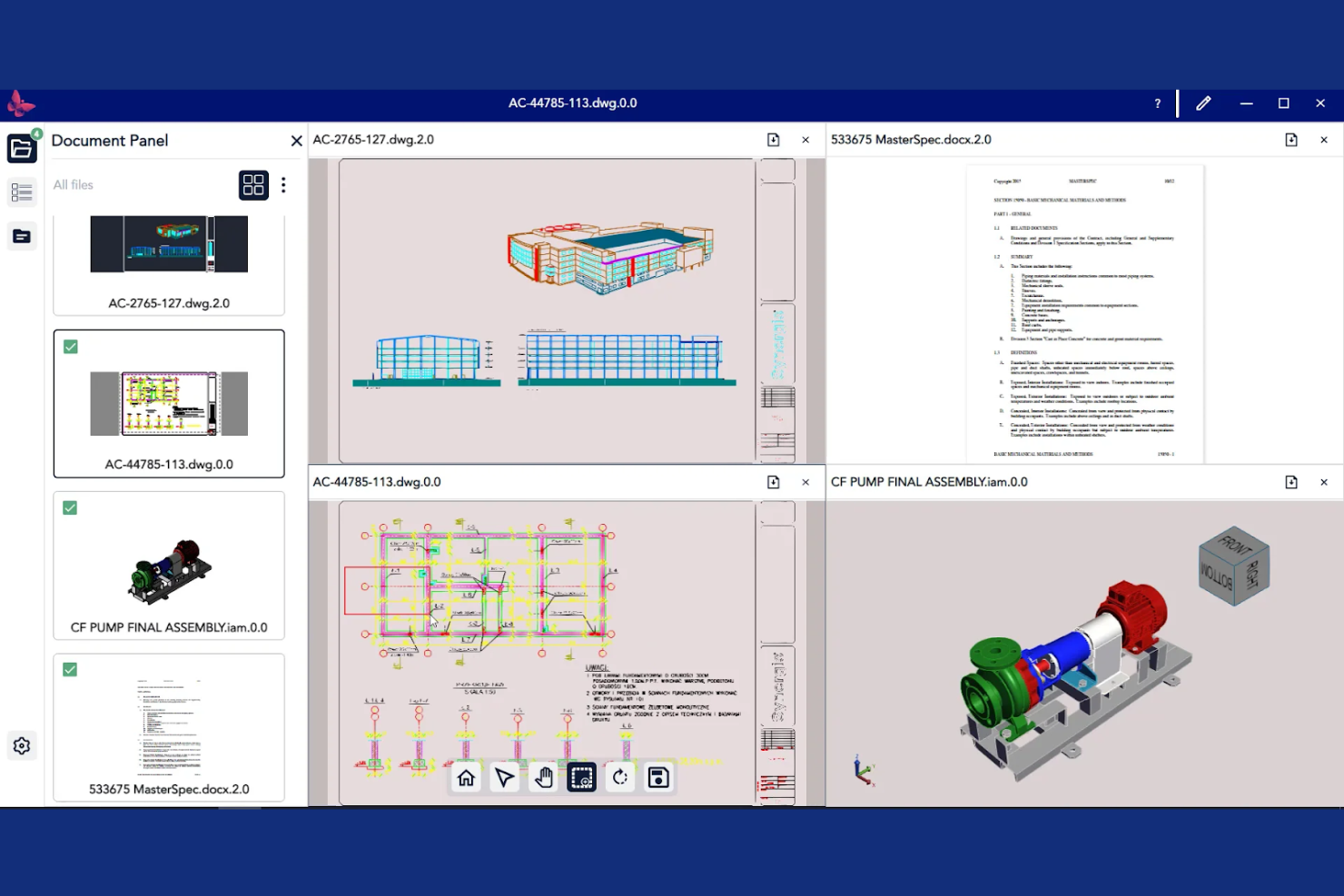
Synergis Software is built for teams that need strict control over engineering document revisions and approvals. It’s especially useful for manufacturers, utilities, and engineering firms that manage frequent design changes and need to maintain a clear audit trail. The platform helps users reduce errors and confusion by automating revision management and ensuring everyone works from the latest version.
Why I Picked Synergis Software
What sets Synergis Software apart is its focus on controlled revision management, which is a top priority for engineering teams handling frequent design updates. The platform offers automated revision tracking, so every change is logged and traceable, reducing the risk of working from outdated files. I like that it includes configurable approval workflows, allowing teams to enforce review steps before documents are released or updated. These features make Synergis Software a strong choice for organizations that need to maintain strict version control and compliance throughout the engineering document lifecycle.
Synergis Software Key Features
In addition to its revision management strengths, Synergis Software offers several other features that support engineering teams:
- CAD Application Integration: Connect directly with popular CAD tools to manage drawings and related files without leaving your design environment.
- Automated Notifications: Set up alerts for document status changes, approvals, or required actions to keep projects moving.
- Document Check-In/Check-Out: Lock files for editing to prevent conflicts and ensure only one person makes changes at a time.
- Audit Trail Reporting: Generate detailed reports on document access, edits, and workflow activity for compliance and oversight.
Synergis Software Integrations
Native integrations are not currently listed.
Pros and Cons
Pros:
- Provides automated notifications for document events
- Offers granular access control for sensitive files
- Supports multi-level document approval workflows
Cons:
- Bulk upload process can be slow
- Interface updates lag behind industry trends
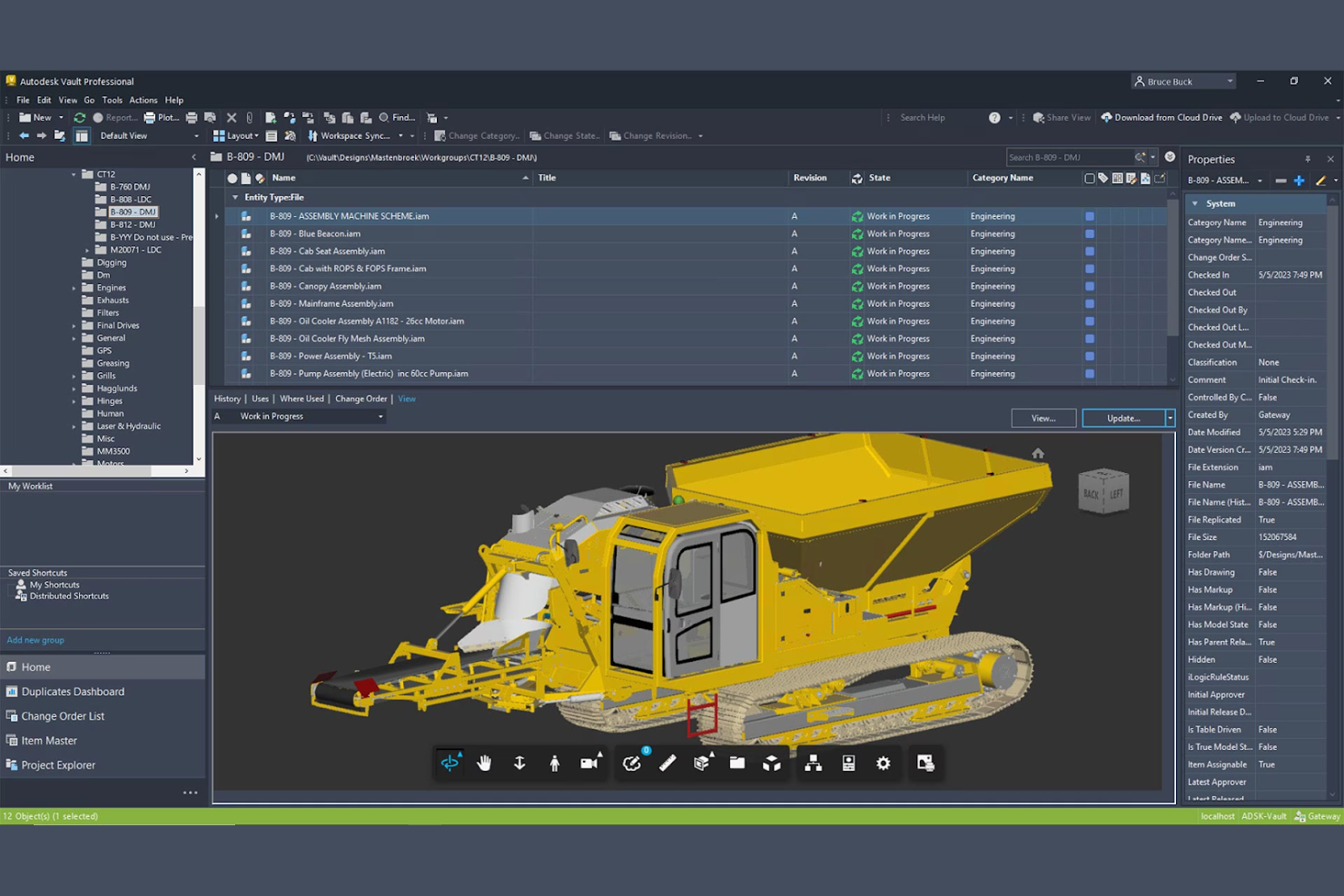
Autodesk Vault is designed for engineering teams that rely heavily on CAD data and need tight integration with Autodesk design tools. It’s a strong fit for manufacturers, product designers, and engineering firms looking to manage complex design files and automate version control. The platform helps teams keep track of design iterations, collaborate on assemblies, and ensure everyone is working from the correct file versions.
Why I Picked Autodesk Vault
For teams that need deep CAD integration, Autodesk Vault stands out as a purpose-built solution. The platform connects directly with Autodesk design tools, allowing users to manage, track, and update CAD files without leaving their familiar environment. I appreciate how Vault automates version control and assembly management, which helps prevent errors and lost work during design changes. These capabilities make it a strong choice for engineering teams that need to coordinate complex design workflows and maintain tight control over file versions.
Autodesk Vault Key Features
Some other features that make Autodesk Vault useful for engineering teams include:
- Automated Lifecycle Management: Define and enforce document states, such as work-in-progress, review, and released, to match your team’s processes.
- Role-Based Permissions: Assign granular access rights to users and groups to control who can view, edit, or approve documents.
- Batch Plotting: Generate and print multiple drawings or documents at once to speed up documentation workflows.
- File Relationship Visualization: View and manage dependencies between files, such as assemblies, parts, and drawings, in a visual interface.
Autodesk Vault Integrations
Integrations include Autodesk Fusion Manage, AutoCAD, Inventor, Revit, Civil 3D, Microsoft Office, Microsoft SharePoint, Power BI, Autodesk Platform Services, and Navisworks.
Pros and Cons
Pros:
- Enforces document lifecycle states and approvals
- Supports batch plotting of multiple drawings
- Visualizes file dependencies and relationships
Cons:
- Requires dedicated server infrastructure
- Limited support for non-Autodesk file formats

DMI WebDocs offers a cloud-based document management system built for organizations that need to get up and running quickly. It’s a practical choice for engineering teams or firms looking to digitize paper-heavy processes without a lengthy deployment. The platform helps users centralize documents, automate retention policies, and enable secure remote access with minimal IT overhead.
Why I Picked DMI WebDocs
When rapid deployment is a top priority, DMI WebDocs offers a straightforward path to cloud-based document management. The platform is designed so engineering teams can digitize, organize, and secure documents without waiting for lengthy IT projects or custom development. I like that WebDocs includes built-in document retention scheduling and automated workflow routing, which help teams quickly establish compliance and approval processes. These features make it a strong fit for organizations that need to modernize document handling with minimal disruption.
DMI WebDocs Key Features
Some other features that make DMI WebDocs practical for engineering teams include:
- Browser-Based Document Access: Users can view, upload, and manage documents from any device with internet access.
- Full-Text Search: Quickly locate documents using keyword searches across all stored files.
- Audit Trail Reporting: Track document activity and user actions for compliance and accountability.
- Barcode Scanning Support: Capture and index documents using barcode technology for faster retrieval.
DMI WebDocs Integrations
Native integrations are not currently listed.
Pros and Cons
Pros:
- Automated document retention scheduling
- Audit trail reporting for compliance tracking
- Barcode scanning for document indexing
Cons:
- No public information on API availability
- Limited support for CAD file preview

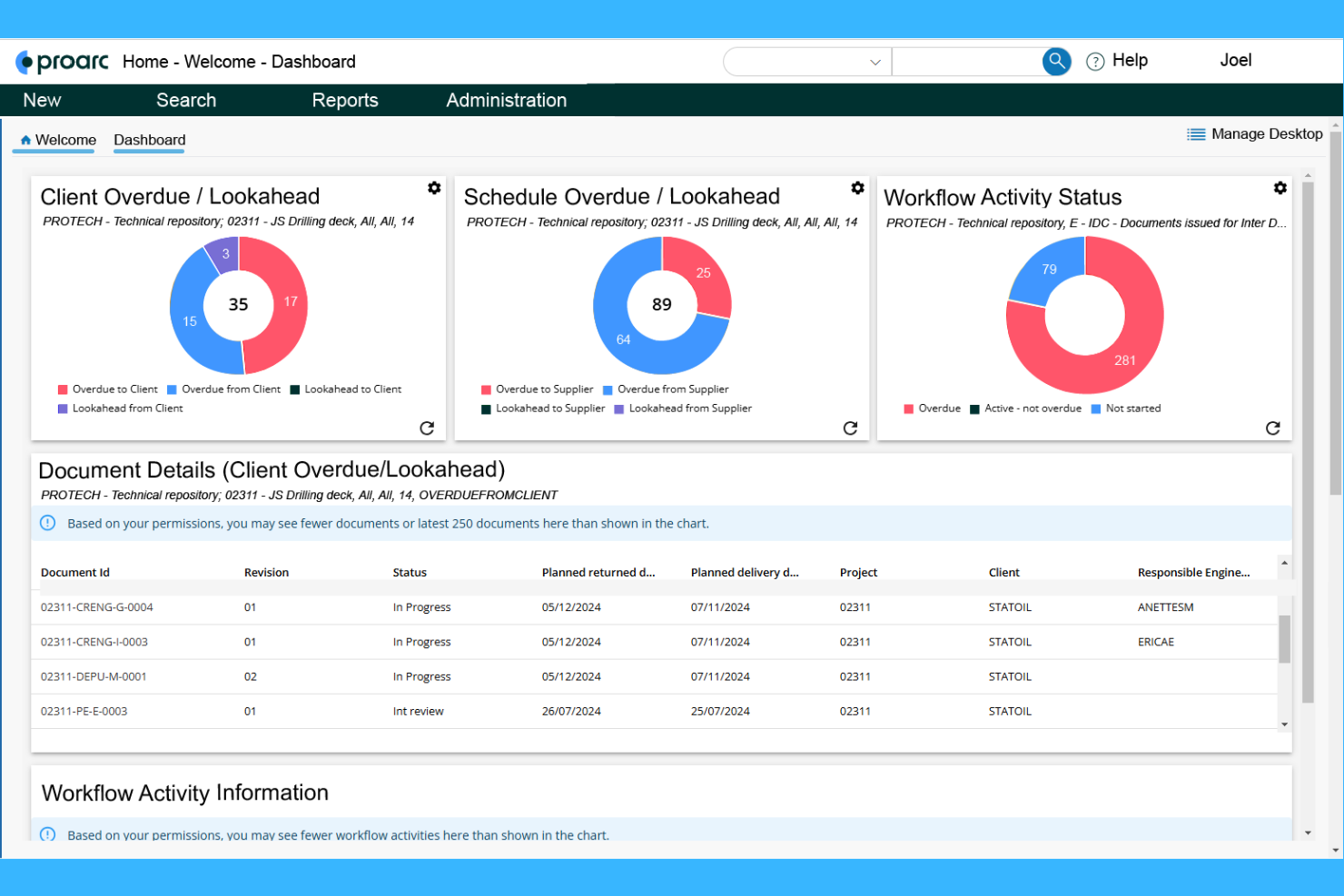
Ascertra Proarc is purpose-built for managing documentation on large-scale capital projects. It’s well-suited for engineering, procurement, and construction teams that need to coordinate complex document workflows across multiple contractors and stakeholders. The platform helps users control revisions, track transmittals, and maintain compliance throughout the project lifecycle.
Why I Picked Ascertra Proarc
For capital project documentation, Ascertra Proarc stands out because it’s designed to handle the scale and complexity of major engineering initiatives. The platform supports advanced document control, including revision management and transmittal tracking, which are essential for projects with multiple contractors and regulatory requirements. I appreciate that Proarc also offers configurable workflows, allowing teams to automate review and approval processes specific to capital projects. These capabilities make it a strong choice for organizations that need to maintain strict oversight and compliance throughout the project lifecycle.
Ascertra Proarc Key Features
Some other features that make Proarc valuable for engineering teams include:
- Document Metadata Management: Capture and organize detailed metadata for every document to support advanced search and reporting.
- Bulk Document Import: Upload and register large volumes of documents at once to accelerate project onboarding.
- Role-Based Access Control: Set granular permissions for users and groups to protect sensitive project information.
- Automated Notifications: Trigger email alerts for document status changes, deadlines, or required actions.
Ascertra Proarc Integrations
Integrations include Microsoft Office 365, AutoCAD, and more.
Pros and Cons
Pros:
- Provides audit trails for compliance needs
- Tracks document transmittals and revisions
- Offers configurable document metadata fields
Cons:
- CAD file viewing capabilities are not specified
- Interface design appears dated in demos
Diğer Mühendislik Belge Yönetimi Yazılımları
Kısa listeme giremeyen ancak yine de göz atmaya değer bazı ek mühendislik belge yönetimi yazılımı seçenekleri şunlardır:
- eQuorum
For secure on-premises installations
- SmartProject EDMS
For multi-site collaboration
- Siemens Teamcenter
For customizable workflow templates


How I Evaluate Engineering Document Management Software
I split my evaluation into two layers: the core criteria every platform must meet—version control, CAD/BIM support, and approval workflows—and the differentiators that set the best tools apart.
Core Functionality (Table Stakes For This List)
When I'm selecting tools for my list, I rank each one on a scale from 0 (does not offer the functionality) to 5 (excels in this area) for each core functionality listed below. Then, I calculate the tool's total score into a percentage. Each tool needs to achieve a minimum total score of 65% to be considered for inclusion.
- Version Control & Revisions: I check whether a platform tracks every document iteration with automated revision history, rollback, and superseded-file lockdown so teams never build from outdated drawings.
- CAD/BIM File Support: Viewing and marking up DWG, RVT, or IFC files without launching native authoring software matters a lot—I evaluate format coverage, in-browser rendering, and metadata extraction.
- Controlled Workflows & Approvals: I look for configurable multi-step workflows that mirror real engineering processes like transmittal sign-offs, contractor submittals, and multi-discipline review cycles.
- Access Control & Permissions: Engineering projects involve owners, designers, and subcontractors who each need different visibility—I evaluate how granularly a tool restricts access by project, discipline, or role.
- Audit Trail & Compliance: I look at whether the platform logs every document action in a way that supports ISO 19650, ISO 9001, or FDA 21 CFR Part 11 requirements with exportable records.
- Project-Centric Organization: A flat file dump won't work for capital projects with thousands of deliverables—I evaluate structured metadata, custom numbering schemes, and faceted search capabilities.
Once I have a list of tools that meet the criteria, I consider what sets each platform apart.
Differentiating Factors (What Sets Vendors Apart)
Here's how I compare and contrast different vendors:
Standout Features
Drawing comparison tools save reviewers real time—overlay and side-by-side views make it easy to spot what changed between revisions without flipping between files. I also evaluate CDE functionality aligned with ISO 19650, which structures how owner, design, and contractor teams exchange information across project phases. Transmittal and submittal automation is another area I look at closely, especially platforms that auto-generate packages, track delivery status, and tie deadlines to contractual milestones.
Beyond Features
Integration depth matters—I check whether a platform connects natively to CAD tools like AutoCAD or Revit and syncs bidirectionally with PM systems like Procore or Primavera P6. Licensing models also deserve scrutiny, especially how vendors handle external collaborators like contractors and consultants who need access but shouldn't drive up per-seat costs. I also evaluate deployment flexibility, since many engineering firms need on-premise or hybrid options to meet data residency and IT security policies.
Mühendislik Belge Yönetimi Yazılımı Nasıl Seçilir?
Uzun özellik listeleri ve karmaşık fiyatlandırma yapıları içinde kaybolmak kolaydır. Kendinize özgü yazılım seçim sürecinizde ilerlerken odağınızı korumanıza yardımcı olmak için göz önünde bulundurmanız gereken faktörleri içeren bir kontrol listesi hazırladık:
| Faktör | Dikkat Edilmesi Gerekenler |
|---|---|
| Ölçeklenebilirlik | Sistem, önümüzdeki 3-5 yıl içinde belge hacminizi ve kullanıcı sayısındaki artışı karşılayabilecek mi? Depolama sınırlarını, kullanıcı kotalarını ve yükseltme seçeneklerini sorun. |
| Entegrasyonlar | Yazılım, CAD, BIM veya proje yönetimi araçlarınıza yerel olarak bağlanabiliyor mu? Yalnızca API erişimini değil, doğrudan entegrasyonları da kontrol edin. |
| Özelleştirilebilirlik | İş akışlarını, meta veri alanlarını ve izinleri ekibinizin süreçlerine uyacak şekilde düzenleyebilir misiniz? Sizi uyum sağlamaya zorlayan katı sistemlerden kaçının. |
| Kullanım kolaylığı | Mühendisleriniz ve proje ekipleriniz aracı hızlı bir şekilde benimseyecek mi? Açık bir gezinme yapısı, minimum eğitim gereksinimi ve mantıklı düzenler arayın. |
| Uygulama ve işe alıştırma | Belgeleri taşımak ve kullanıcıları eğitmek ne kadar sürecek? Taşıma desteği, işe alıştırma kaynakları ve tipik kullanıma alma takvimleri hakkında bilgi alın. |
| Maliyet | İhtiyaçlarınız büyüdükçe fiyatlandırma katmanları şeffaf ve öngörülebilir mi? Gizli ücretlere, depolama aşım bedellerine veya maliyetli eklentilere dikkat edin. |
| Güvenlik önlemleri | Platform şifreleme, ayrıntılı erişim denetimleri ve denetim izleri sunuyor mu? Sektörünüzün güvenlik standartlarına uyumluluğu doğrulayın. |
| Destek erişilebilirliği | Kritik proje aşamalarında hızlı yanıt veren desteğe erişebilecek misiniz? 7/24 kapsam, canlı sohbet ve özel müşteri temsilcilerinin olup olmadığını kontrol edin. |
Mühendislik Belge Yönetimi Yazılımı Nedir?
Mühendislik belge yönetimi yazılımı; teknik belgeleri, çizimleri ve proje dosyalarını depolamak, düzenlemek ve bunlara erişimi kontrol etmek için tasarlanmış dijital bir sistemdir. Mühendislik ekiplerinin sürüm denetimini yönetmesine, değişiklikleri izlemesine ve sektörel standartlara uygunluğu sürdürmesine yardımcı olur. Bu platformlar, disiplinler ve konumlar arasındaki iş birliğini destekleyerek proje yaşam döngüsü boyunca herkesin en güncel ve doğru bilgilerle çalışmasını sağlar.
Özellikler
Mühendislik belge yönetimi yazılımı seçerken aşağıdaki temel özelliklere dikkat edin:
- Sürüm denetimi: Belge revizyonlarını izler ve kullanıcıların her zaman onaylanmış en güncel dosyalara erişmesini sağlayarak eski bilgilerden kaynaklanan hataları azaltır.
- Erişim izinleri: Yöneticilerin ayrıntılı kullanıcı rolleri belirlemesine ve belirli belgeleri kimlerin görüntüleyebileceğini, düzenleyebileceğini veya onaylayabileceğini kontrol etmesine olanak tanır.
- Denetim izleri: Bir belge üzerinde gerçekleştirilen her işlemi kaydederek uygunluk ve hesap verebilirlik için şeffaf bir geçmiş sağlar.
- İş akışı otomasyonu: Projelerin ilerlemesini sağlamak ve manuel görevleri azaltmak için belge inceleme, onay ve dağıtım süreçlerini otomatikleştirir.
- Üst veri etiketleme: Belgelerin daha hızlı bulunması ve düzenlenmesi için kullanıcıların aranabilir etiketler ve öznitelikler atamasına olanak tanır.
- CAD/BIM araçlarıyla entegrasyon: Tasarım yazılımlarına doğrudan bağlanarak ekiplerin birincil araçlarından ayrılmadan çizimleri ve modelleri yönetmesini sağlar.
- Belge arama: Dosyaların hızlı bir şekilde bulunması için tam metin ve öznitelik tabanlı sorgular da dâhil olmak üzere gelişmiş arama özellikleri sunar.
- Mobil erişim: Kullanıcıların akıllı telefon veya tablet kullanarak saha konumlarından belgeleri görüntülemesine, yüklemesine veya bunlara yorum yapmasına olanak tanır.
- Belge alma/teslim etme: Kullanıcıların değişiklik yaparken belgeleri kilitlemesine ve ardından ekip erişimine açmasına olanak tanıyarak çakışan düzenlemeleri önler.
- Güvenli dosya depolama: İş sürekliliğini sağlamak için şifreleme, yedekleme ve olağanüstü durum kurtarma özellikleriyle hassas mühendislik verilerini korur.
Faydalar
Mühendislik belge yönetimi yazılımını uygulamak ekibiniz ve işletmeniz için çeşitli faydalar sağlar. Yararlanabileceğiniz bazı faydalar şunlardır:
- Daha doğru sürüm yönetimi: Sürüm denetimi ve denetim izleri, herkesin en güncel ve onaylanmış belgelerle çalışmasını sağlar.
- Geliştirilmiş güvenlik: Erişim izinleri ve güvenli dosya depolama, hassas mühendislik verilerini yetkisiz erişime veya kayba karşı korur.
- Daha hızlı belge bulma: Üst veri etiketleme ve gelişmiş arama özellikleri, ekiplerin ihtiyaç duydukları dosyaları hızlıca bulmasına yardımcı olur.
- Sadeleştirilmiş iş birliği: CAD/BIM araçlarıyla entegrasyon ve iş akışı otomasyonu, farklı disiplinler ve konumlar arasında verimli ekip çalışmasını destekler.
- Mevzuata uygunluk: Denetim izleri ve izin denetimleri, sektörel standartlara ve proje gerekliliklerine uygunluğun sürdürülmesine yardımcı olur.
- Azalan proje gecikmeleri: Otomatik iş akışları ve mobil erişim, ekipler farklı konumlara dağılmış olsa bile belge incelemelerinin ve onaylarının ilerlemesini sağlar.
- Daha düşük hata riski: Belge alma/teslim etme özelliği ve açık revizyon geçmişleri, çakışan düzenlemelerin yapılması veya eski bilgilerin kullanılması olasılığını en aza indirir.
Maliyetler ve Fiyatlandırma
Mühendislik belge yönetimi yazılımı seçimi, mevcut çeşitli fiyatlandırma modellerinin ve planların anlaşılmasını gerektirir. Maliyetler özelliklere, ekip büyüklüğüne, eklentilere ve daha fazlasına göre değişir. Aşağıdaki tabloda mühendislik belge yönetimi yazılımı çözümlerinde yaygın olarak sunulan planlar, bunların ortalama fiyatları ve tipik özellikleri özetlenmektedir:
Mühendislik Belge Yönetimi Yazılımı İçin Plan Karşılaştırma Tablosu
| Plan Türü | Ortalama Fiyat | Yaygın Özellikler |
|---|---|---|
| Ücretsiz Plan | $0 | Temel belge depolama, sınırlı sürüm denetimi, basit arama ve kısıtlı kullanıcı erişimi. |
| Kişisel Plan | $10–$25/kullanıcı/ay | Bireysel belge yönetimi, temel izinler, standart destek ve sınırlı entegrasyonlar. |
| İşletme Planı | $30–$60/kullanıcı/ay | Ekip iş birliği araçları, gelişmiş sürüm denetimi, iş akışı otomasyonu, entegrasyonlar ve denetim izleri. |
| Kurumsal Plan | $70–$150/kullanıcı/ay | Özel iş akışları, geliştirilmiş güvenlik, uygunluk araçları, özel destek ve sınırsız depolama. |
Mühendislik Belge Yönetimi Yazılımı SSS
Mühendislik belge yönetimi yazılımı hakkında sık sorulan bazı soruların yanıtlarını burada bulabilirsiniz:
Mühendislik belge yönetimi yazılımı sürüm denetimini nasıl destekler?
Mühendislik belge yönetimi yazılımı, bir dosyada yapılan her değişikliği izler; önceki sürümleri depolar ve kullanıcıların revizyonları geri almasına veya karşılaştırmasına olanak tanır. Bu, ekiplerin karışıklığı önlemesine, güncel olmayan belgeleri kullanma riskini azaltmasına ve uyumluluk ile hesap verebilirlik için net bir denetim izi oluşturmasına yardımcı olur.
Mühendislik belge yönetimi yazılımı CAD ve BIM araçlarıyla entegre olabilir mi?
Evet, çoğu mühendislik belge yönetimi yazılımı popüler CAD ve BIM platformlarıyla entegrasyonlar sunar. Bu entegrasyonlar, kullanıcıların çizimleri ve modelleri doğrudan tasarım ortamlarında yönetmesine olanak tanır; manuel yüklemeleri azaltır ve proje dosyalarının düzenli ve güncel kalmasını sağlar.
Mühendislik belge yönetimi yazılımında hangi güvenlik özelliklerini aramalıyım?
Şifreleme, ayrıntılı erişim denetimleri, denetim izleri ve uyumluluk sertifikaları arayın. Bu özellikler, hassas mühendislik verilerinin korunmasına, yalnızca yetkili kullanıcıların belgelere erişebilmesine veya belgeleri değiştirebilmesine ve düzenleyici kurumların ya da müşterilerin denetimleri için şeffaflık sağlanmasına yardımcı olur.
Mühendislik belge yönetimi yazılımının uygulanması ne kadar sürer?
Uygulama süreleri değişiklik gösterir, ancak çoğu ekip birkaç haftadan birkaç aya kadar sürebilen bir süreç bekleyebilir. Süreyi etkileyen faktörler arasında belge kitaplığınızın boyutu, iş akışlarınızın karmaşıklığı ve geçiş ile kullanıma alma sırasında sağlayıcının sunduğu destek düzeyi yer alır.
Mühendislik belge yönetimi için bulut tabanlı dağıtım mı yoksa şirket içi dağıtım mı daha iyidir?
Doğru seçim, kuruluşunuzun BT politikalarına, güvenlik gereksinimlerine ve bütçesine bağlıdır. Bulut tabanlı çözümler daha kolay erişim ve daha düşük başlangıç maliyetleri sunarken, şirket içi dağıtımlar veriler üzerinde daha fazla denetim sağlar ve katı uyumluluk gereksinimleri için tercih edilebilir.