

20 bästa programvarorna för konsultverksamhet 2026

Kortlista över bästa konsultprogramvaran


Konsultprogramvara ger dig verktygen du behöver för att hantera projekt, registrera tid, fakturera kunder och analysera resultat – allt på ett och samma ställe. Om du letar efter den bästa konsultprogramvaran för företag söker du förmodligen efter sätt att hålla ordning på teamet, få bättre insikt i lönsamheten för olika uppdrag och minska tidskrävande manuellt arbete.
Den här guiden omfattar alternativ som hanterar allt från projektleverans till resursfördelning och hjälper alla moderna företagskonsulter att sålla bort bruset och hitta lösningar som faktiskt passar dagens verklighet inom konsultarbete. Du får se vad varje verktyg är bäst på, så att du kan fokusera på det som för verksamheten framåt.
Varför du kan lita på våra programvarurekommendationer
Vårt team har testat och recenserat programvara sedan 2012. Som projektledare själva vet vi hur
svårt — och viktigt — det är att välja rätt programvara.
För den här guiden utvärderade vi verktyg genom praktisk testning och oberoende research, och betygsatte verktygen enligt våra urvalskriterier. Vi drar även nytta av insikter från branschens tankeledare och praktiserande projektledningsexperter.
Våra recensioner speglar vårt mänskliga redaktionella omdöme, inte ett säljbudskap.
Expertgranskare:
Jämförelsetabell för konsultprogramvara
Den här jämförelsetabellen sammanfattar prisuppgifter för de utvalda konsultprogramvarorna:
| Tool | Best For | Trial Info | Price | ||
|---|---|---|---|---|---|
| 1 | Best for tailored workflows for A&E firms | Free demo available | Pricing upon request | Website | |
| 2 | Best for built-in client relationship management | Free demo available | Pricing upon request | Website | |
| 3 | Best for ERP integration for services businesses | Free demo available | Pricing upon request | Website | |
| 4 | Best for connecting sales and delivery data | 14-day free trial | From $17/user/month | Website | |
| 5 | Best for real-time margin tracking | Free demo available | From $20/user/month | Website | |
| 6 | Best for extensive third-party integrations | Free plan + 14-day free trial + free demo available | From $9.99/user/month (billed annually) | Website | |
| 7 | Best for AI-driven workflows for project delivery | Free demo available | Pricing upon request | Website | |
| 8 | Best for mobile time tracking for teams | 30-day free trial available | From $14/user/month (billed annually) | Website | |
| 9 | Best for Salesforce-native platform integration | Free demo available | Pricing upon request | Website | |
| 10 | Best for agile project staffing | Free demo available | Pricing upon request | Website |

Omdömen om bästa konsultprogramvaran
Nedan hittar du mina detaljerade sammanfattningar av den bästa konsultprogramvaran som kom med på min kortlista. I mina omdömen får du en detaljerad genomgång av funktionerna, de bästa användningsområdena och integrationerna för varje plattform, så att du kan hitta den som passar dig bäst.

BQE Core
Best for tailored workflows for A&E firms
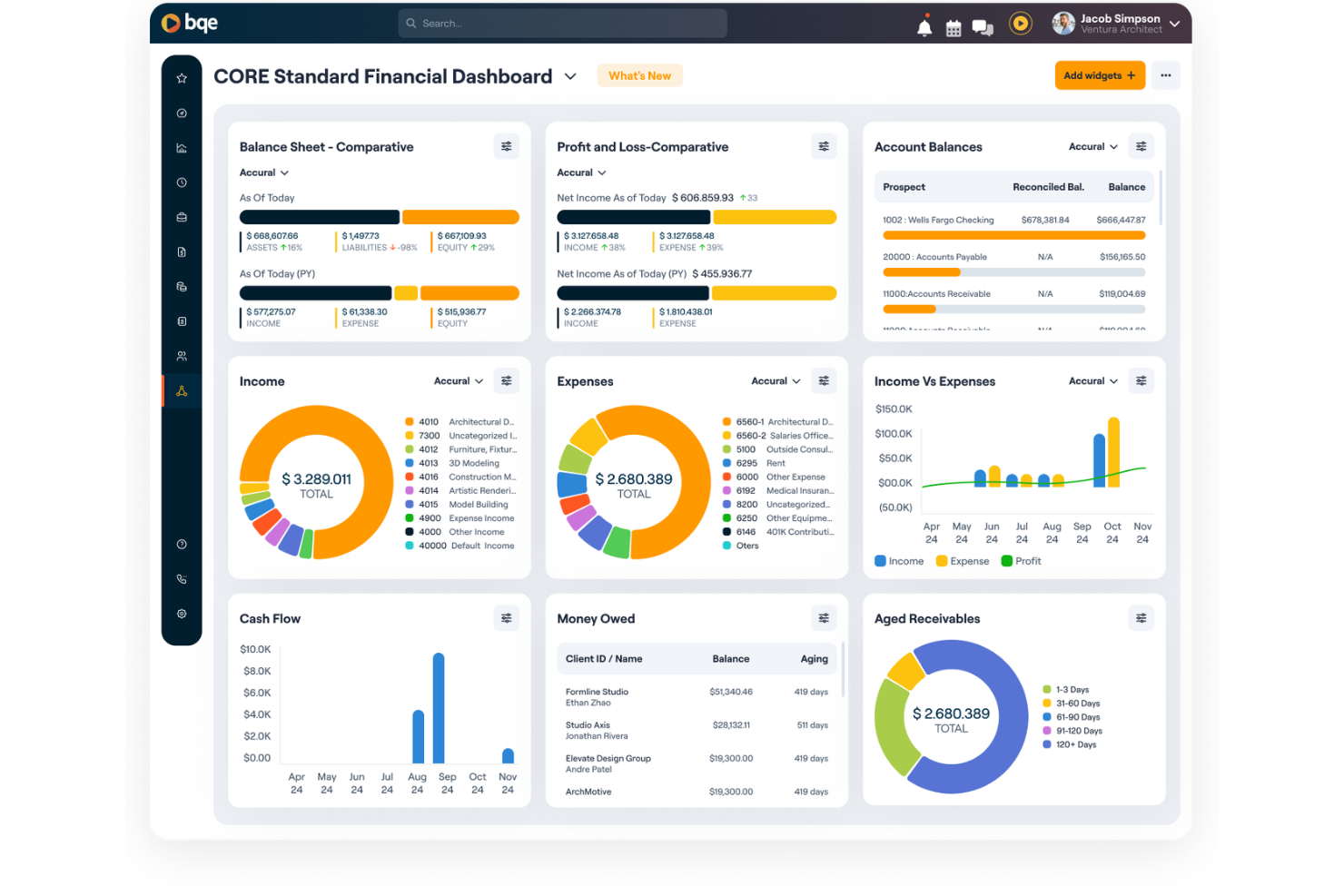
BQE Core is an all-in-one firm management platform built specifically for architecture and engineering firms, covering project management, time and expense tracking, billing, and financial reporting.
Who Is BQE Core Best For?
BQE Core is purpose-built for architecture, engineering, and consulting firms that need project accounting and billing tools designed around their specific delivery models.
Why I Picked BQE Core
I've included BQE Core in my top picks because it's one of the few consulting tools built from the ground up for A&E firms, not adapted from a generic project management platform. I like how it structures projects around fee types like fixed fee, hourly, and unit-based billing, which mirrors how A&E firms actually contract work.
The phase and task-level budget tracking lets my team monitor spend against each project phase in real time, so budget overruns surface before they compound.
BQE Core Key Features
- Resource planning: View team capacity and utilization across all projects using Gantt charts, then adjust allocations against project timelines and budgets.
- Time and expense tracking: Log hours with pause-and-play timers, set automatic timesheet reminders, and attach receipts directly to project expense records.
- Built-in CRM: Manage client relationships and business development activity from within the same platform used for project delivery and billing.
- Integrated accounting: Access profit and loss statements, balance sheets, and general ledger data alongside project financials in one unified view.
BQE Core Integrations
BQE Core offers 100+ native integrations, including QuickBooks, DocuSign, Power BI, Xero, Google, and Microsoft. It also connects with Zapier and provides public APIs for custom integrations.
Pros and Cons
Pros:
- Handles mixed project and retainer work
- AI flags project risks before escalation
- Unified quote-to-cash workflow tracking
Cons:
- Reporting customization options are limited
- Mobile app needs significant improvement
Best for built-in client relationship management

Deltek Vantagepoint is an ERP platform built for professional services firms, functioning as a robust time tracking software while covering project management, resource planning, financials, and client relationship management in one place.
Who Is Deltek Vantagepoint Best For?
Deltek Vantagepoint is a strong fit for architecture, engineering, and consulting firms that run project-based business models and need a single system for finance, projects, and client management.
Why I Picked Deltek Vantagepoint
I picked Deltek Vantagepoint as one of the best because its CRM module is purpose-built for project-based firms, not bolted on from a generic sales tool. Contact records connect directly to project history, pipeline stages, and pursuit tracking, so you can see the full client relationship in one place.
I also like the Dela AI layer, which surfaces client intel and flags relationship gaps based on activity data. That's a level of business development context most ERP platforms don't offer.
Deltek Vantagepoint Key Features
- Resource management: Assign staff to projects based on availability and role fit, then monitor workloads and adjust as project demands shift.
- Project financial tracking: Monitor project costs, budgets, and KPIs from a single dashboard with real-time alerts when metrics fall out of range.
- Time and expense automation: Use AI to simplify timesheet entry and expense reporting, reducing manual input across billable and non-billable work.
- Automated billing and invoicing: Configure billing rules per project and automate invoice generation to reduce the time between work delivered and payment received.
Deltek Vantagepoint Integrations
Deltek Vantagepoint offers native integrations with other Deltek products like GovWin IQ, Deltek PIM, Deltek ArchiSnapper, Microsoft Outlook, and UKG Pro. It also supports pre-built connectors on iPaaS platforms and a RESTful API for custom integrations.
Pros and Cons
Pros:
- Supports complex multi-method billing setups
- Tracks project budgets and margins in real time
- CRM and project data share one database
Cons:
- Interface fields can feel cluttered and dense
- Complex reporting setup slows initial adoption
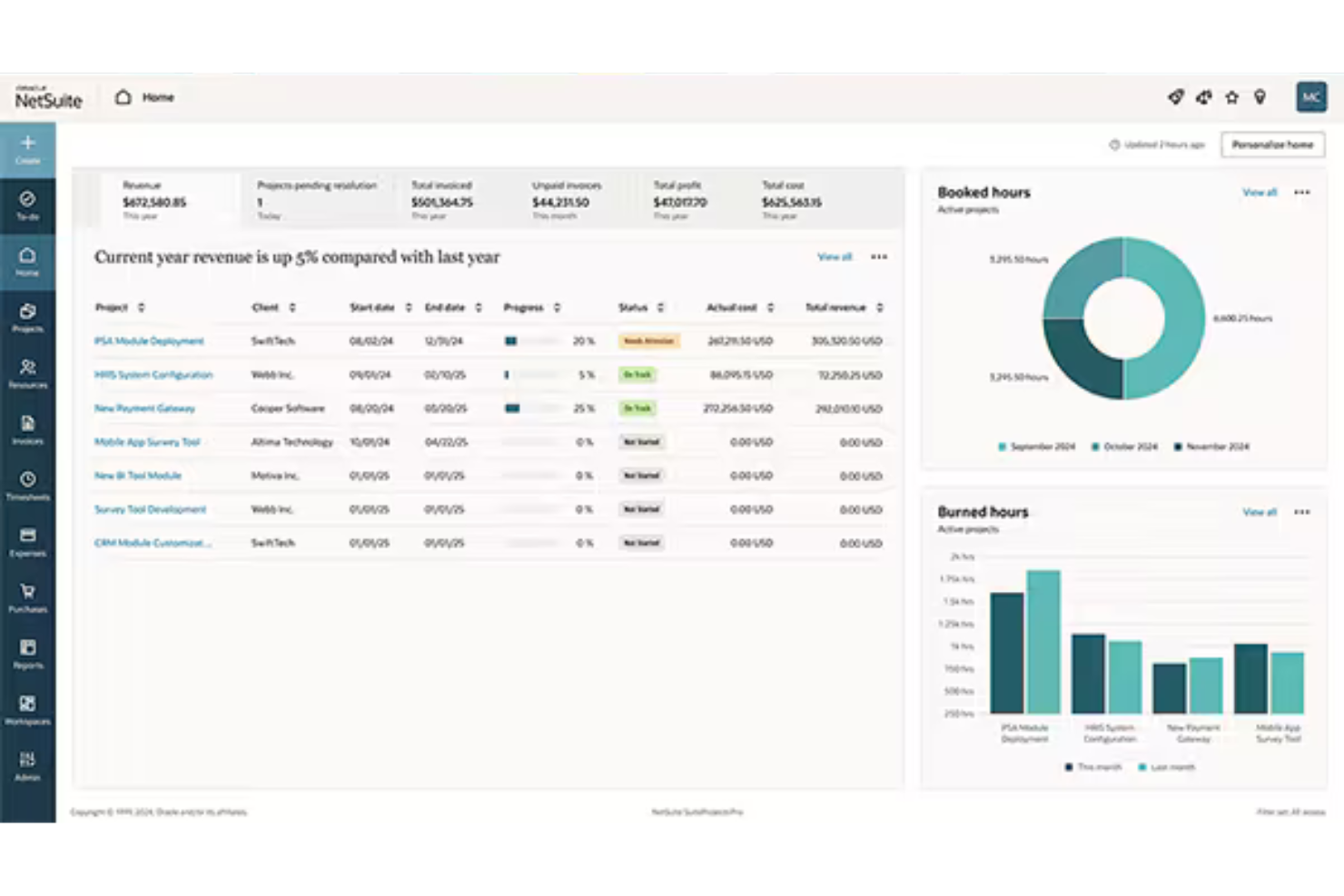
NetSuite SuiteProjects Pro is a cloud-based PSA platform that covers the full project delivery lifecycle for services businesses, including project management, resource planning, time and expense tracking, billing, and ERP-connected financials.
Who Is NetSuite SuiteProjects Pro Best For?
NetSuite SuiteProjects Pro is a natural fit for mid-size to enterprise services firms that run on NetSuite ERP and need project financials tightly connected to their broader business operations.
Why I Picked NetSuite SuiteProjects Pro
I've included NetSuite SuiteProjects Pro in my top picks because its ERP connection is genuinely bidirectional. Project costs, revenue recognition, and invoices flow directly into NetSuite Financials without manual exports or reconciliation. I also like that company executives can view all project metrics alongside sales, financials, and other KPIs from within NetSuite.
For consulting firms that already run on NetSuite, that unified visibility across delivery and finance is something you won't replicate by stitching two separate platforms together.
NetSuite SuiteProjects Pro Key Features
- Project Center: View project status, resource demand, risks, and budgets vs. actuals across all active projects in one place.
- Capacity planning: Allocate resources to projects based on skill set, experience, availability, and planned PTO.
- AI-generated project summaries: Monitor project changes and auto-generate up-to-date status summaries without manual drafting.
- Project template automation: Create new projects from preconfigured templates with built-in budgets, approval workflows, and billing rules.
NetSuite SuiteProjects Pro Integrations
NetSuite SuiteProjects Pro offers native integrations across the Oracle NetSuite ecosystem, including NetSuite ERP and NetSuite CRM. An API is available for custom integrations.
Pros and Cons
Pros:
- Unified time, expenses, and project accounting
- Skills-based resource search across global teams
- Built-in project billing and revenue recognition
Cons:
- Page load speeds lag during peak usage
- Reporting requires workarounds for deeper analysis

Scoro
Best for connecting sales and delivery data
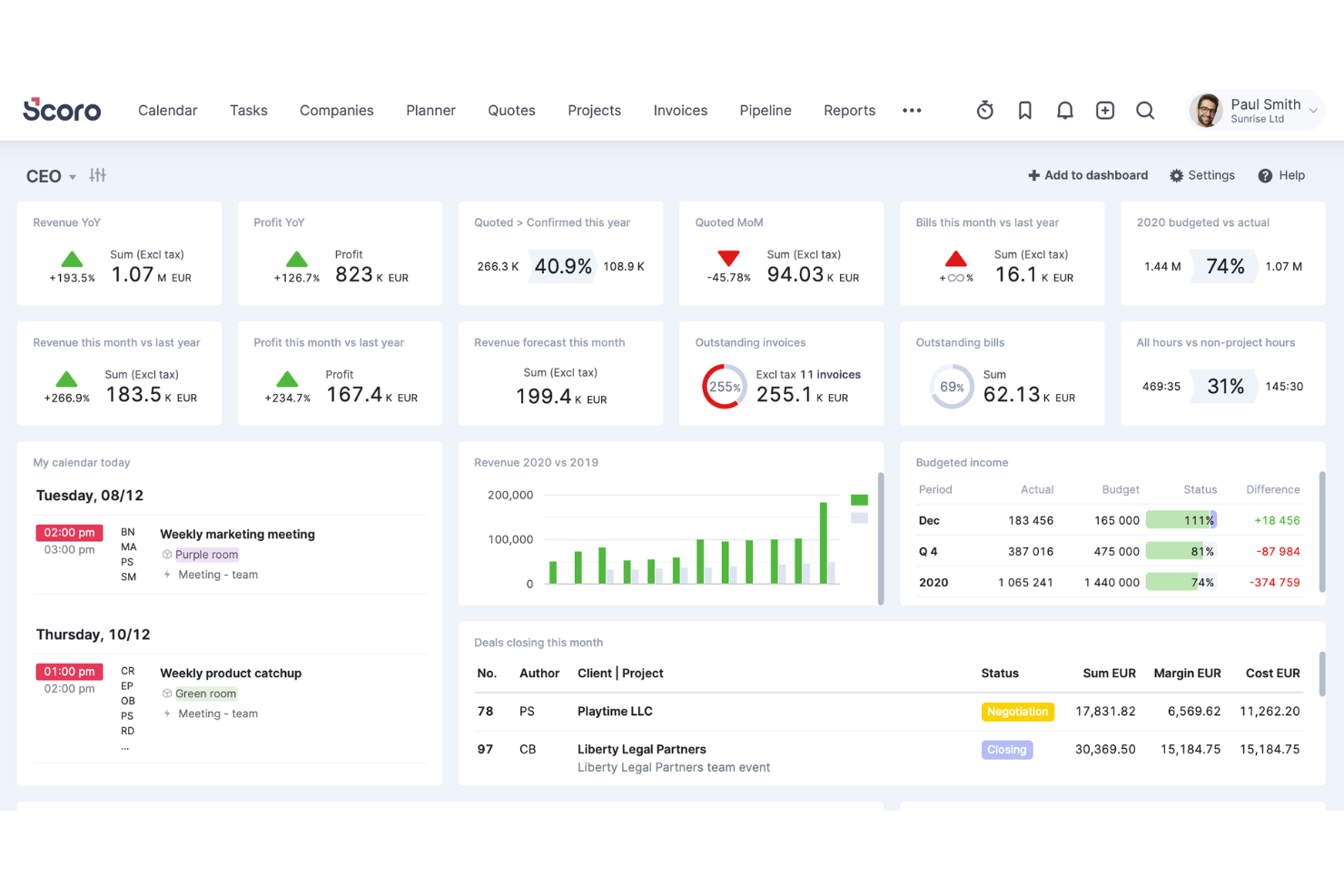
Scoro is an all-in-one business management platform for professional services firms that covers CRM, project management, time tracking, billing, and financial reporting in a single workspace.
Who Is Scoro Best For?
Scoro is a strong fit for growing professional services firms that need one system to manage the full client lifecycle, from first contact through invoicing.
Why I Picked Scoro
I've included Scoro in my top picks because it's one of the few consulting tools that keeps sales and delivery data in the same system rather than forcing you to stitch them together manually. I like that a won deal in the CRM flows directly into a scoped project with budgets, roles, and resource plans already attached. From there, time tracked against delivery feeds back into live profitability views at the project, service, and role level. That's a level of operational continuity I don't see in most competing PSA tools.
Scoro Key Features
- Quote and proposal builder: Create detailed quotes with line items, pricing tiers, and markup directly inside the platform before a project begins.
- Workload planner: View scheduled vs. available hours across your team in a drag-and-drop calendar to manage capacity across multiple active projects.
- Automated invoicing: Generate invoices based on tracked time, fixed fees, or project milestones without manually pulling data from separate systems.
- Customizable dashboards: Build dashboards tracking KPIs like billable ratio, revenue pipeline, and project status across your entire portfolio.
Scoro Integrations
Scoro offers native integrations with Xero, QuickBooks, Avalara, Stripe, Jira, Envoice, Google Calendar, Outlook, Slack, Mailchimp, and Dropbox. Zapier and an API are available for custom integrations.
Pros and Cons
Pros:
- Detailed quoting with role-based estimates
- CRM and billing in one workspace
- Real-time profitability views per project
Cons:
- Steeper onboarding than lighter PM tools
- Report customization can be difficult
New Product Updates from Scoro

Scoro Adds Time Mobile App and ELI Improvements
Scoro adds the Scoro Time mobile app for iOS/Android to track time anywhere and expands ELI with attachments, smarter filtering, and trigger-based actions. For more information, visit Scoro's official site.

BigTime
Best for real-time margin tracking
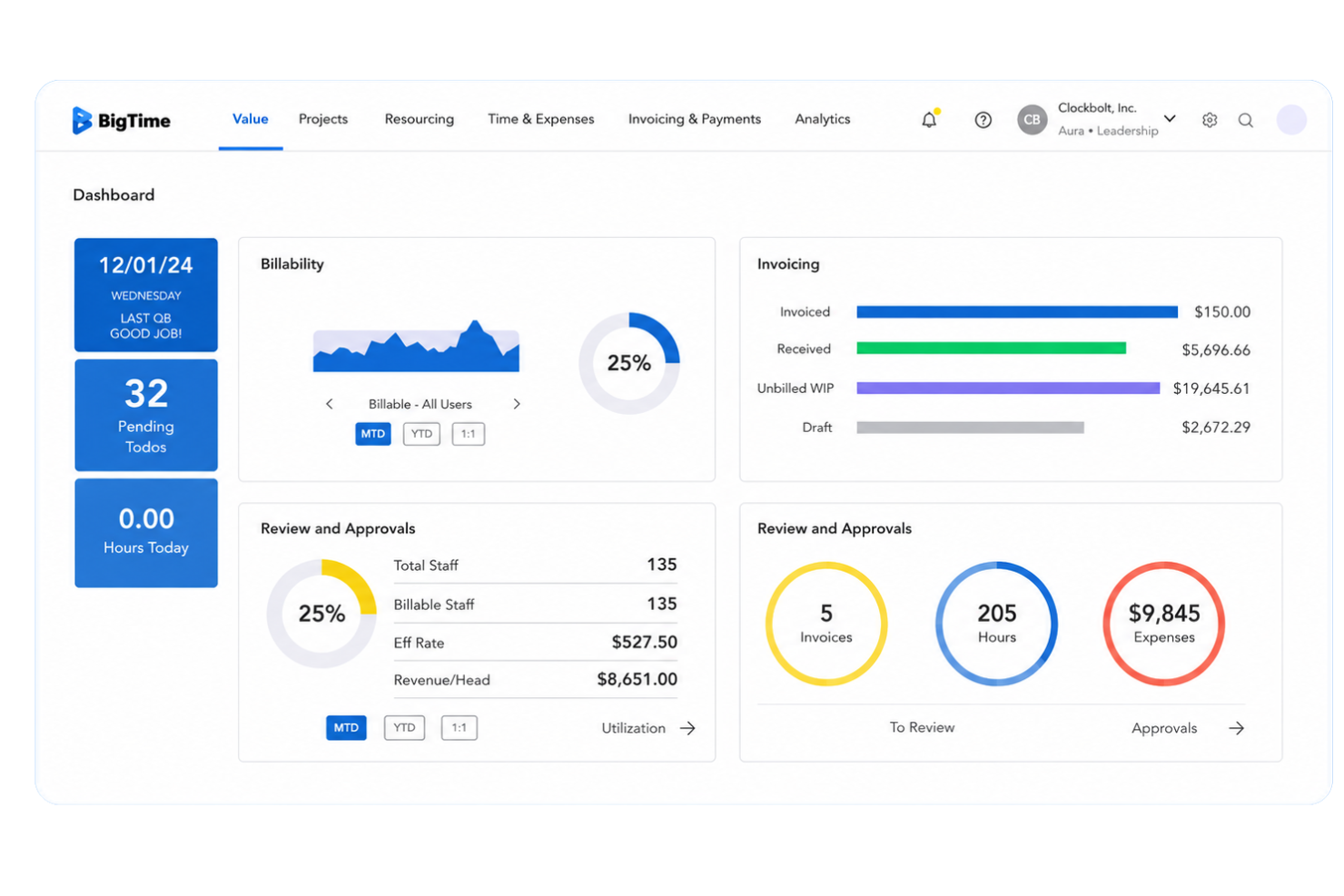
BigTime is a professional services automation (PSA) platform built for consulting, engineering, and IT services firms that need project management, time and expense tracking, resource scheduling, quoting, and billing in one place.
Who Is BigTime Best For?
BigTime is a strong fit for mid-sized professional services firms in consulting, accounting, and engineering that bill by the hour and need tighter control over project margins.
Why I Picked BigTime
BigTime earns its spot on my shortlist because of how it handles margin visibility in real time, not just at month-end. I like that the margin-informed Quote Builder shows live rate card data as you scope work, so you're not guessing at profitability before a project kicks off.
The budget vs. actuals tracking updates continuously throughout delivery, and the Resourcing Agent factors margin impact into every staffing decision before you confirm it. That combination means margin isn't something I'm reconciling after the fact.
BigTime Key Features
- Time and expense tracking: Log billable hours and expenses directly against projects, with that data feeding automatically into budgeting, invoicing, and performance reporting.
- Flexible invoicing and billing automation: Generate invoices based on tracked time, budget status, and billing models, including time-and-materials, fixed fee, and retainer arrangements.
- Real-time dashboards and custom reporting: Monitor KPIs like revenue, utilization, and project status at the project level or rolled up across your entire portfolio.
- Drag-and-drop resource scheduling: Visualize team availability, adjust workloads, and prevent overbooking directly from the resource management view.
BigTime Integrations
BigTime offers native integrations with QuickBooks, Xero, Sage Intacct, Hubspot, Jira, Smartsheet, Zendesk, Okta, Salesforce, Lacerte, Slack, and more, and provides an API for custom integrations.
Pros and Cons
Pros:
- Fast quote-to-project conversion with templates
- AI-assisted resource matching saves staffing time
- Built-in margin tracking during project scoping
Cons:
- Interface feels dated compared to newer competitors
- The mobile app has limited functionality

Best for extensive third-party integrations
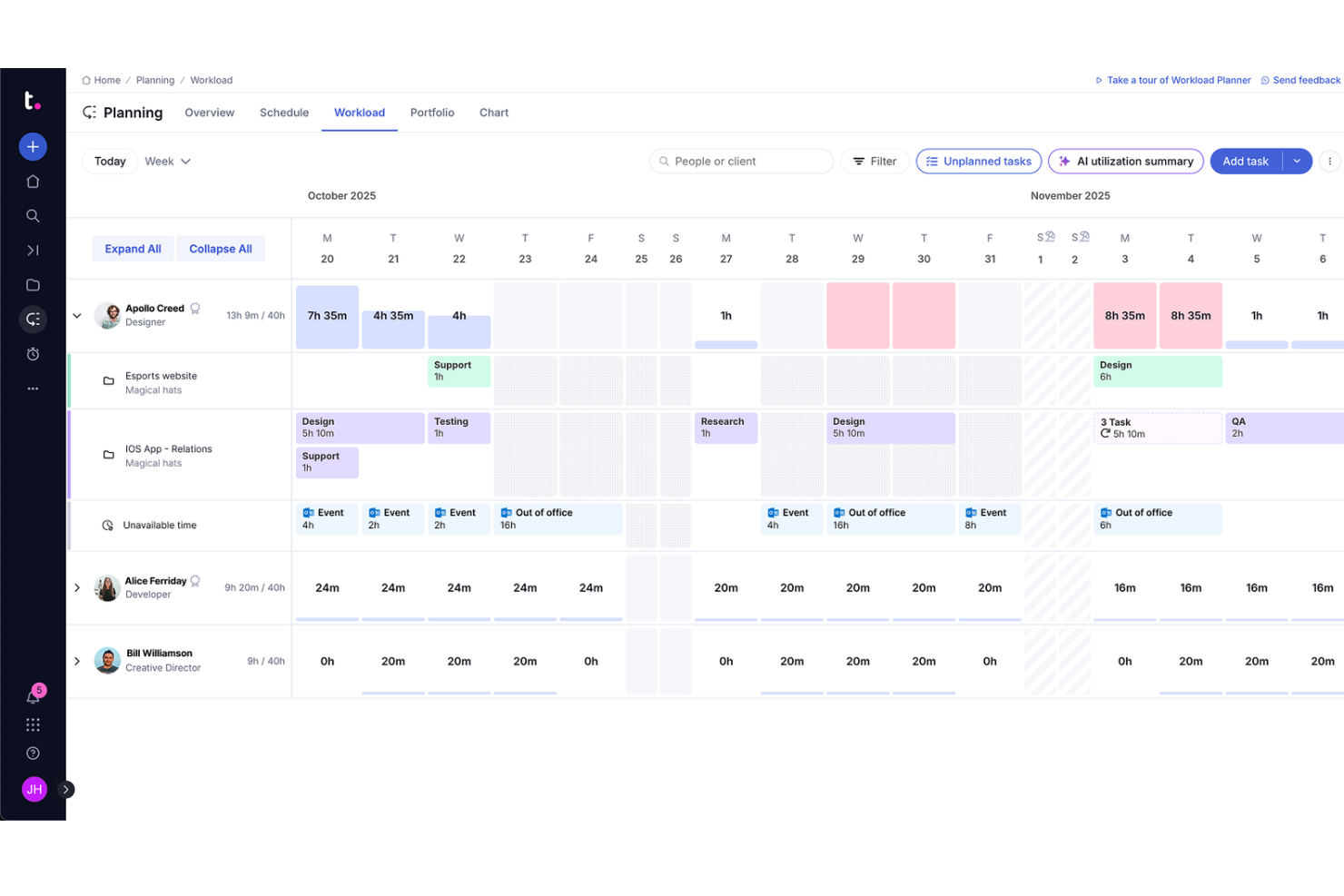
Teamwork.com is a project management and client operations platform built for professional services teams, combining task management, time tracking, resource planning, budgeting, and profitability reporting in one place.
Who Is Teamwork.com Best For?
Teamwork.com is a strong fit for small to mid-sized consulting agencies and client services teams that manage multiple projects and billable work simultaneously.
Why I Picked Teamwork.com
I've included Teamwork.com in my top picks because of how well it connects with the tools consulting teams already use daily. With 150+ integrations spanning CRM, accounting, file storage, time tracking, and reporting, you can pull Xero invoices, sync HubSpot deals, or manage files from Google Drive and Dropbox without leaving the platform.
I especially like the Microsoft Office Add-in, which lets you log time and create tasks directly from Word or Excel—something client-facing teams will use constantly.
Teamwork.com Key Features
- Client portal: A dedicated space where clients can log in to view project progress, files, and updates without needing a full account.
- Budget tracking: Set project budgets and monitor spend against estimates in real time at the task or project level.
- Workload management: View team capacity across all active projects and reassign tasks when someone is over-allocated.
- Retainer management: Track recurring client retainers, log hours against them, and monitor remaining budget per billing period.
Teamwork.com Integrations
Teamwork.com offers 150+ integrations, including native integrations with Slack, HubSpot, Salesforce, QuickBooks, Microsoft Teams, Xero, Harvest, Dropbox, Google Workspace, and NetSuite. It also connects with Zapier and Make, and provides an API for custom integrations.
Pros and Cons
Pros:
- Granular time tracking at the task level
- Client portal for external project visibility
- Built-in retainer tracking for recurring clients
Cons:
- Mobile app lacks full desktop functionality
- Reporting customization options feel limited

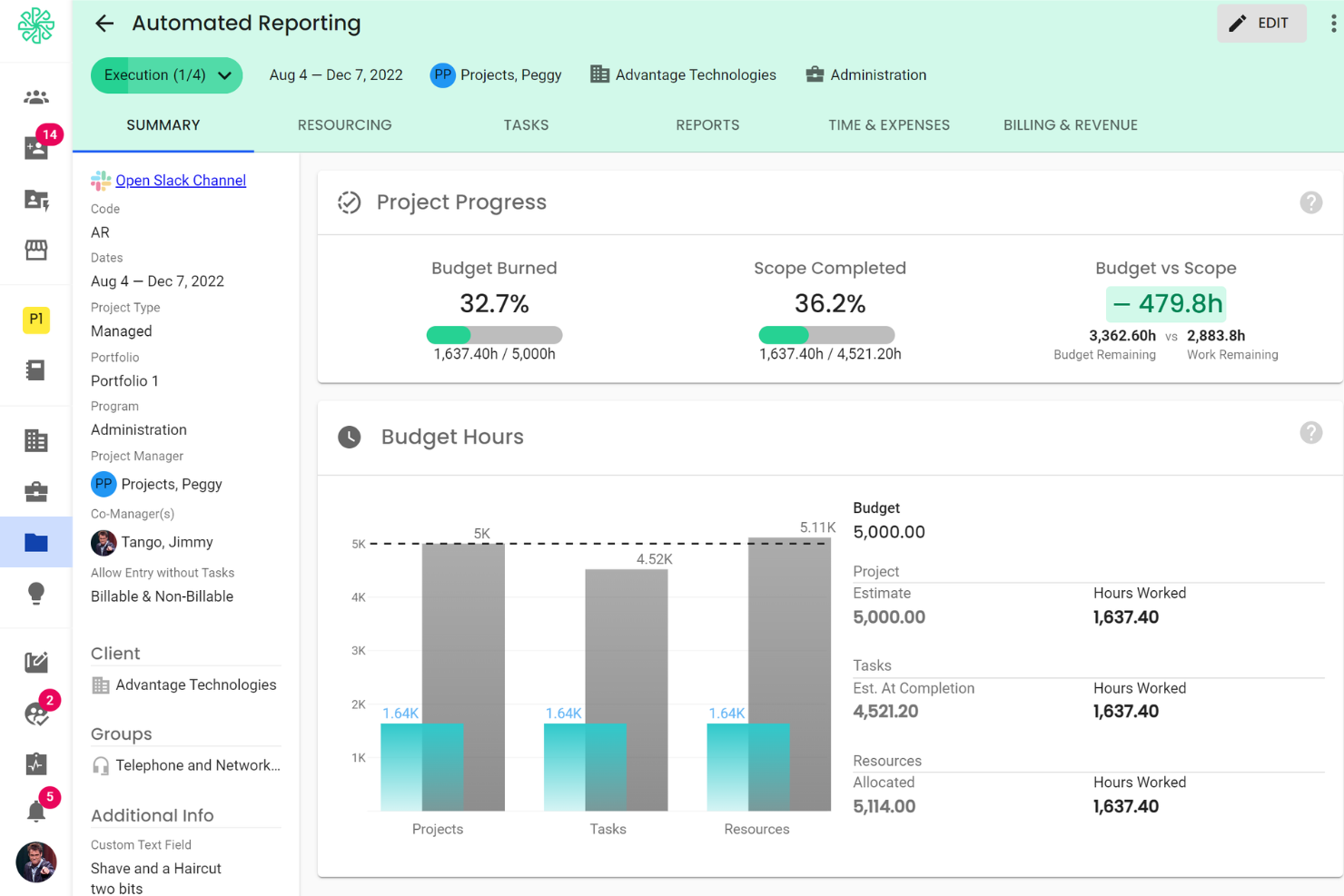
Polaris PSA is a professional services automation (PSA) platform built by Deltek for IT and consulting firms, covering project management, resource planning, time tracking, expense management, and project financials in a single solution.
Who Is Polaris PSA Best For?
Polaris PSA is purpose-built for IT and technology consulting firms that manage complex, multi-phase client engagements with distributed delivery teams.
Why I Picked Polaris PSA
Polaris PSA earns its spot on my shortlist because of how its AI, Dela, actively participates in project delivery rather than just reporting on it. I can ask Dela to flag at-risk projects before they slip, or surface billing gaps my team might miss mid-engagement.
I also like that project health scoring runs continuously in the background, so I'm not waiting on a weekly status call to know something's off. That level of real-time visibility across active engagements is what sets it apart.
Polaris PSA Key Features
- Expense management: Log, categorize, and submit project expenses directly against client engagements for accurate cost tracking.
- Opportunity pipeline tracking: Manage pre-sales opportunities and connect won deals directly to project setup without re-entering data.
- Utilization reporting: Track billable vs. non-billable hours across your team to monitor consultant utilization rates over time.
- Timesheet approval workflows: Route submitted timesheets through configurable approval chains before hours are posted to projects.
Polaris PSA Integrations
Polaris PSA offers native integrations with Deltek ERP systems, Salesforce, QuickBooks, Xero, Jira, and Microsoft 365. An API is available for custom integrations.
Pros and Cons
Pros:
- Real-time revenue recognition across project types
- Skill-based resource matching via Dela AI
- ZeroTime captures hours from 100+ work apps
Cons:
- Reporting lacks advanced calculated fields
- Occasional lag with large project datasets

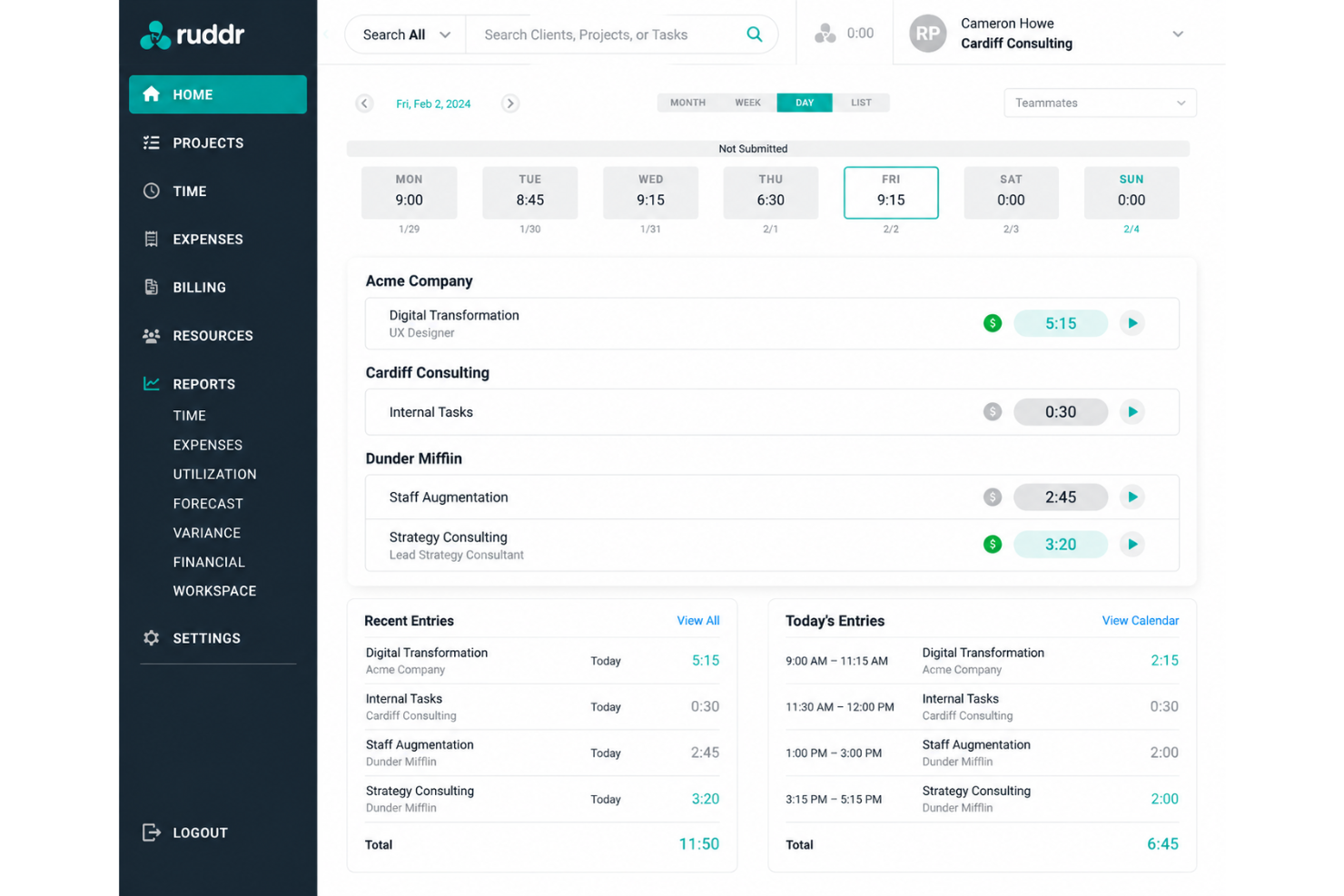
Ruddr is an AI-native PSA platform for professional services firms that covers time tracking, expense tracking, resource management, project management, invoicing, sales pipeline, and financial forecasting.
Who Is Ruddr Best For?
Ruddr is a strong fit for small to mid-sized professional services firms, particularly consulting and digital agencies, that need a full PSA without the complexity of enterprise-grade tools.
Why I Picked Ruddr
I picked Ruddr as one of the best because its mobile time tracking works the way consulting teams actually operate. Consultants log time from their phones right after a client meeting, rather than reconstructing their week every Friday.
I also like that Ruddr surfaces real-time budget performance as hours are entered, so project managers catch overruns before they compound. The configurable, multistep approval workflows, including optional client approval before invoicing, keep billing clean without adding admin overhead.
Ruddr Key Features
- Resource allocation: Allocate work to team members or placeholder roles by day, week, or month, with a click-and-drag interface and split or clone options.
- Sales pipeline tracking: Capture opportunities, associate them to tentative projects, and track weighted pipeline value, average deal size, and full activity history.
- Project health reporting: Project managers score budget, schedule, client satisfaction, and team satisfaction in periodic health reports, with actual-to-budget metrics stamped automatically at each entry.
- Multicurrency support: Run projects and invoices across multiple currencies, which is useful for consulting firms working with international clients.
Ruddr Integrations
Ruddr offers a smaller set of native integrations, including QuickBooks Desktop, QuickBooks Online, Xero, Rippling, BambooHR, Expensify, Slack, HubSpot, Salesforce, and more. An open API is also available for custom integrations.
Pros and Cons
Pros:
- Fast onboarding with minimal setup time
- Built-in invoicing tied to tracked hours
- Copy-forward time entries speed up logging
Cons:
- Fewer advanced features than enterprise PSAs
- Limited branding and white-label options

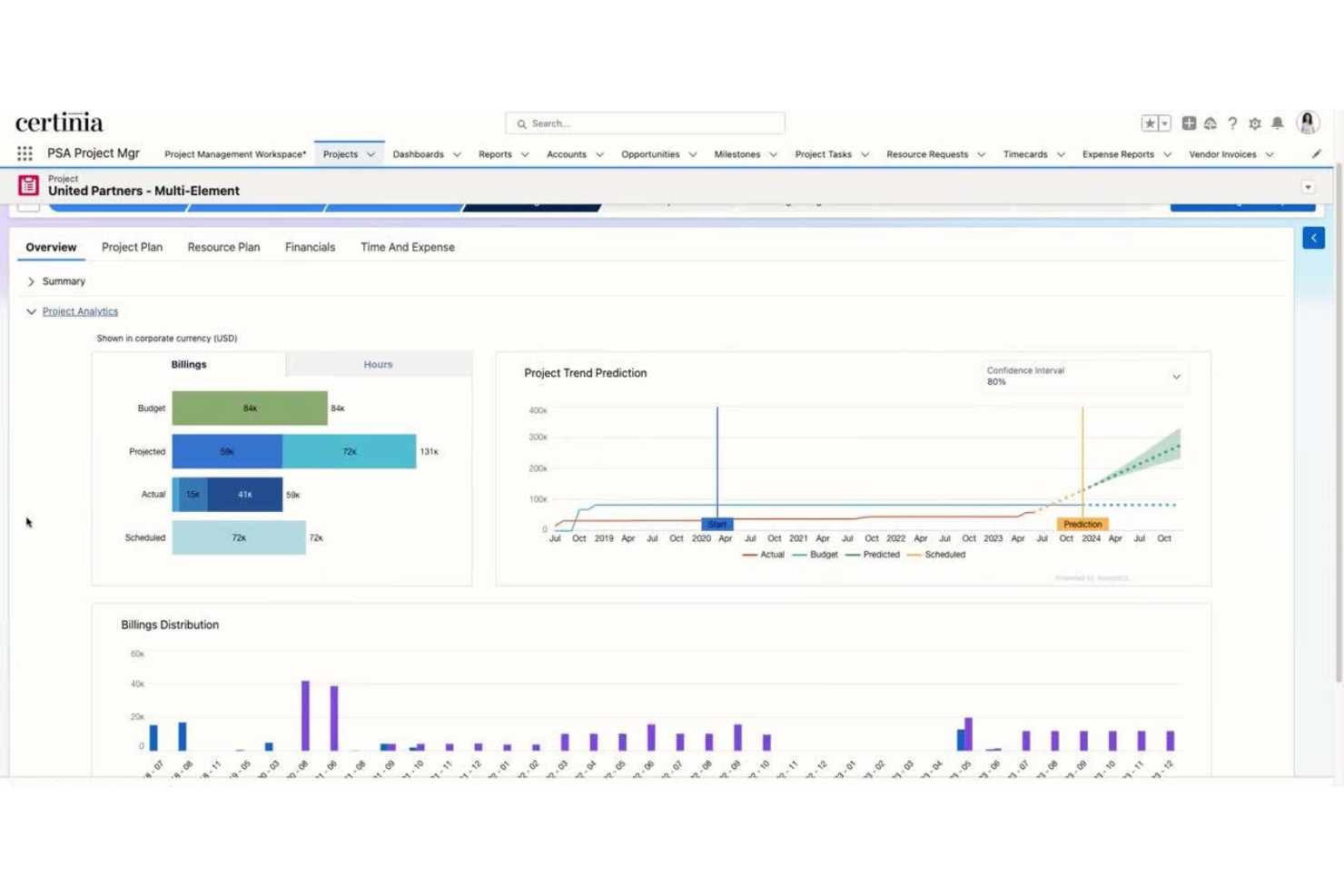
Certinia PS Cloud is a professional services automation (PSA) platform built natively on Salesforce, covering resource planning, project delivery, billing, and financial management for consulting and services organizations.
Who Is Certinia PS Cloud Best For?
Certinia PS Cloud is a natural fit for mid-to-large consulting and professional services firms that are already running Salesforce as their CRM.
Why I Picked Certinia PS Cloud
I've included Certinia PS Cloud in my top picks because it's one of the only PSA platforms that lives entirely inside Salesforce, not just connected to it. That means opportunity data, project records, resource assignments, and billing all share the same customer record.
I also like the Veda AI layer, which uses your own historical project data to generate estimates and match resources to open roles without manual intervention.
Certinia PS Cloud Key Features
- Services estimation: Build project quotes using historical delivery data, then refine scope and pricing before a contract is signed.
- Project management: Track milestones, risks, and delivery status across active engagements directly within the Salesforce platform.
- Services billing: Manage complex billing scenarios, including time-and-materials, fixed-fee, and milestone-based billing, tied directly to project records.
- Services financials: Access real-time financial visibility across projects, including margin tracking and revenue recognition, without leaving the platform.
Certinia PS Cloud Integrations
Certinia PS Cloud offers native integrations with Salesforce, Jitterbit, Expensify, SAP Concur, Avalara, Celigo, Zankraft, Conga, and DocuSign, and provides an API for custom integrations.
Pros and Cons
Pros:
- Skills-based resource matching with AI
- Built-in revenue recognition automation
- Real-time consultant utilization visibility org-wide
Cons:
- Requires deep onboarding to avoid errors
- Page loading times can be slow
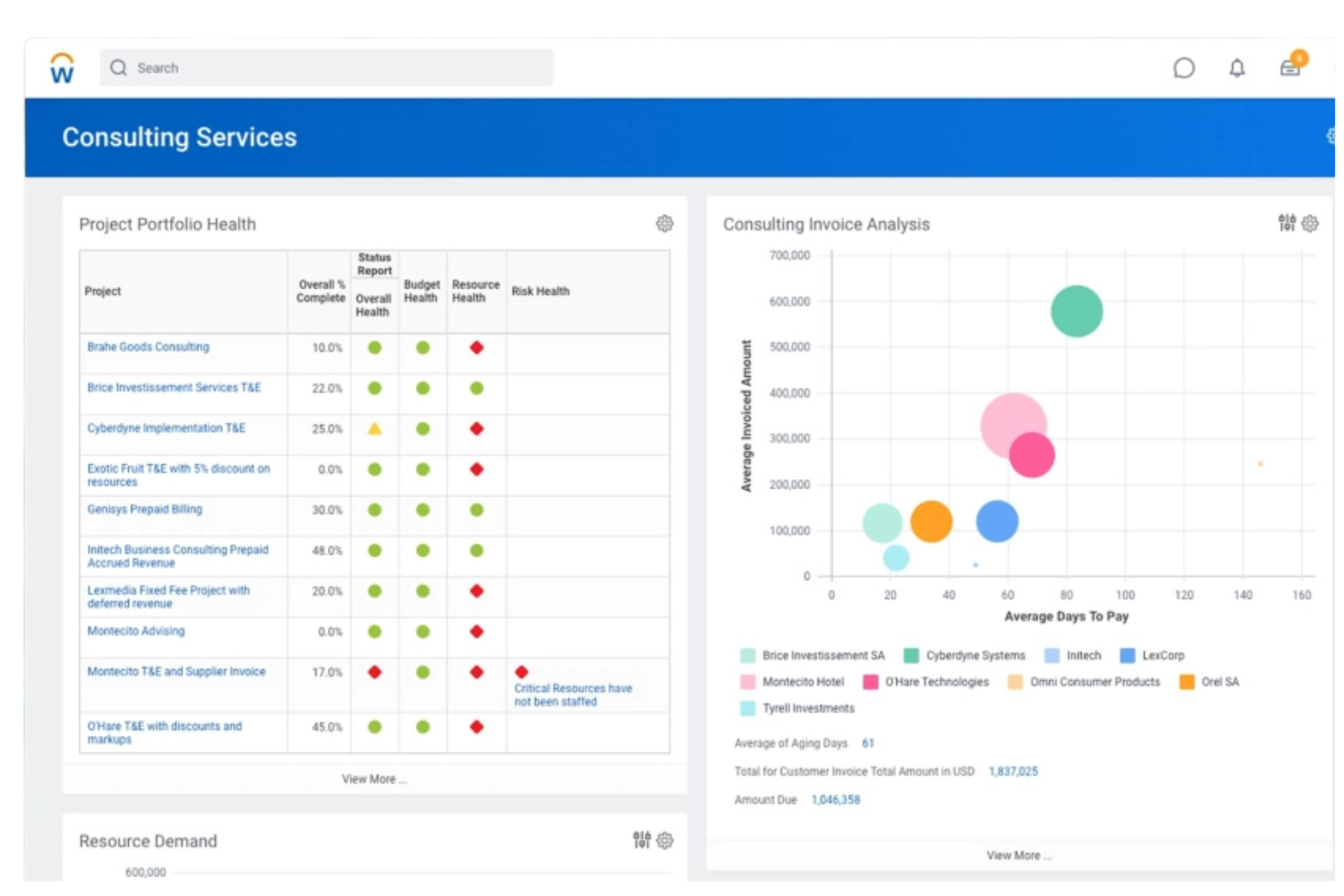
Workday PSA is a professional services automation platform that covers project planning, resource management, time tracking, expense management, project billing, and financial management alongside built-in HCM, Services CPQ, and planning capabilities.
Who Is Workday PSA Best For?
Workday PSA suits enterprise-level IT and management consulting firms that need to manage rapid staff changes across multiple concurrent client engagements.
Why I Picked Workday PSA
Workday PSA earns its spot on my shortlist because of how it handles dynamic resource allocation across fast-moving engagements. I use the staffing pool feature to predefine groups of qualified resources by skill set, so when a new project opens, I can fill roles in hours rather than days.
The real-time capacity visibility also lets me see who's available before I commit to a client delivery timeline.
Workday PSA Key Features
- Project time tracking: Log billable and non-billable hours against specific projects and tasks directly within the platform, with mobile submission support.
- Budget-to-actuals monitoring: Track live project spend against approved budgets, with cost variances surfaced at the project or task level.
- Skills catalog: Maintain a centralized record of worker certifications, skills, and experience levels to support role-based project assignments.
- Project health dashboards: View milestone status, margin, and delivery risk across your entire project portfolio from a single reporting view.
Workday PSA Integrations
Native integrations are not publicly listed. Workday PSA offers an API for custom integrations.
Pros and Cons
Pros:
- Real-time project profitability tracking
- Talent-to-project matching with skills intelligence
- Unified finance, HR, and project data
Cons:
- Third-party integrations require extensive setup
- Complex implementation for smaller firms
Annan konsultprogramvara
Här är några ytterligare alternativ för konsultprogramvara som inte kom med på min kortlista, men som ändå är värda att undersöka:
- Accelo
For risk detection with predictive analytics
- Kantata
For expertise-driven resource matching
- Avaza
For integrated expense and invoicing tools
- Productive
For profit forecasting by project
- HoneyBook
For managing client communications
- Rocketlane
For client onboarding collaboration
- Projectworks
For workforce planning for consultancies
- Bonsai
For automated contract and proposal building
- Moxie
For solo consultant business operations
- Agiled
For white-label client portals


How I Evaluate Consulting Software
I evaluate consulting software in two layers: the baseline must-haves—like billable time tracking and engagement structure—and the differentiators that separate the best tools from the rest.
Core Functionality (Table Stakes For This List)
When I'm selecting tools for my list, I rank each one on a scale from 0 (does not offer the functionality) to 5 (excels in this area) for each core functionality listed below. Then, I calculate the tool's total score into a percentage. Each tool needs to achieve a minimum total score of 65% to be considered for inclusion.
- Client Engagement Management: I look for structured engagement workspaces with phases, milestones, and deliverable tracking—so a firm running parallel discovery and implementation projects can manage each one distinctly.
- Time & Billing Tracking: Consultants bill in different ways, so I evaluate whether tools support multiple rate types tied to roles, clients, or projects and connect tracked time directly to invoices.
- Resource & Capacity Planning: Staffing the right consultant to the right engagement matters. I check for utilization views, availability forecasting, and the ability to plan headcount across overlapping projects.
- Project Financials & Profitability: I look at how each tool tracks budgets, costs, and margins at the engagement level—especially whether you can spot an over-budget project before it erodes the client relationship.
- Client Collaboration Portal: A shared space where clients can review deliverables, approve milestones, and exchange files keeps work moving. I evaluate whether the portal is branded and access-controlled or just a basic file link.
- Proposals & SOW Management: The handoff from proposal to active engagement is where details get lost. I check whether tools let you draft proposals, capture e-signatures, and convert accepted SOWs into projects automatically.
Once I have a list of tools that meet this criteria, I consider what sets each platform apart.
Differentiating Factors (What Sets Vendors Apart)
Here's how I compare and contrast different vendors:
Standout Features
Knowledge and IP management is a major differentiator. Firms that store reusable templates, methodologies, and past deliverables in a central library save hours when spinning up new engagements. I also evaluate project profitability analytics depth—the strongest tools track realization rates and margins per engagement, client, and practice area in real time. That visibility helps firm owners catch margin erosion mid-project rather than in a post-mortem. Resource planning goes a step further when tools offer skills-based matching, so you staff consultants based on expertise rather than just availability.
Beyond Features
Firm size shapes everything about tool fit. A solo consultant juggling five clients has different needs than a 200-person firm with multiple practice areas—I evaluate whether each platform scales without forcing enterprise complexity too early. Integration coverage matters just as much. Consulting firms run on a mix of accounting, CRM, and collaboration tools, so I check for native connections to platforms like QuickBooks, Salesforce, and Slack. Security rounds out my evaluation—consultants handling sensitive client data need SOC 2 compliance, role-based access, and data segregation between engagements.
Så väljer du konsultprogramvara
Det är lätt att fastna i långa funktionslistor och komplexa prisstrukturer. För att hjälpa dig att hålla fokus när du arbetar dig igenom din unika process för att välja programvara kommer här en checklista över faktorer att tänka på:
| Faktor | Vad du bör tänka på |
|---|---|
| Skalbarhet | Kommer verktyget att kunna hantera fler kunder, användare eller komplexa projekt när du växer? Tänk på hur besvärlig en migrering kan bli om du behöver uppgradera senare. |
| Integrationer | Ansluter det direkt till ditt CRM-, ekonomi- och kommunikationsverktyg? Leta efter API-åtkomst om din verktygsuppsättning är unik eller förväntas förändras. |
| Anpassningsmöjligheter | Kan du anpassa arbetsflöden, datafält och mallar så att de matchar företagets processer, snarare än bara generiska konsultaktiviteter? |
| Användarvänlighet | Kommer dina konsulter och kunder faktiskt att börja använda det? Testa demonstrationer med verkliga scenarier för att bedöma hur snabbt nya användare kommer igång eller blir frustrerade. |
| Implementering och introduktion | Hur mycket tid, vägledning eller intern expertis kommer implementeringen att kräva? Be leverantörerna om tidsplaner för installationen och resurser för kundutbildning. |
| Kostnad | Är alla kostnader tydliga från början – prenumerationer, introduktion och eventuella premiumtillägg? Granska prisnivåerna och villkoren för förnyelse innan du bestämmer dig. |
| Säkerhetsåtgärder | Uppfyller programvaran dina kunders förväntningar på datasäkerhet? Bekräfta efterlevnadscertifieringar och stöd för rollbaserade åtkomstbehörigheter. |
| Supporttillgänglighet | Finns livesupport tillgänglig under dina arbetstider? Kontrollera att du får tillgång till kunniga representanter som förstår konsultspecifika frågor eller problem. |
Vad är konsultprogramvara?
Konsultprogramvara är en specialiserad plattform som hjälper konsultföretag och fristående konsulter att hantera kundprojekt, registrera debiterbara timmar, övervaka resurser samt hantera offerter, fakturering och lönsamhetsanalyser.
Dessa verktyg samlar centrala arbetsflöden på ett ställe, effektiviserar kundsamarbetet och främjar bättre beslutsfattande i flera parallella uppdrag.
Funktioner
Här är de viktigaste funktionerna som all bra konsultprogramvara bör ha:
- Projektledning: Strukturera kunduppdrag som projekt med faser, milstolpar och leveranser för att hålla arbetet organiserat och enligt plan.
- Tids- och faktureringsuppföljning: Registrera debiterbara timmar kopplade till specifika kunder eller uppgifter, tillämpa olika faktureringssatser och skapa fakturor baserat på faktiskt utfört arbete.
- Resursplanering: Tilldela konsulter till projekt, följ upp resursutnyttjandet och prognostisera framtida kapacitet för att förhindra överbelastning eller underutnyttjande.
- Dokumenthantering: Lagra, dela och organisera kundleveranser, offerter och projektfiler på en central plats för enkel åtkomst och versionshantering.
- Portal för kundsamarbete: Ge kunderna ett säkert utrymme där de kan se projektets framsteg, lämna feedback, godkänna milstolpar och kommunicera med ditt team.
- Skapande av offerter och SOW: Skapa, skicka och följ upp offerter eller arbetsbeskrivningar och omvandla dem sedan till aktiva projekt utan att behöva ange informationen igen.
- Utgiftsuppföljning: Registrera och fördela projektrelaterade utgifter för korrekt budgethantering och ersättning från kunden.
- Lönsamhetsanalys: Följ upp projektintäkter, marginaler och realiseringsgrad för att utvärdera den ekonomiska hälsan i varje uppdrag.
- Arbetsflödesautomatisering: Automatisera återkommande uppgifter, aviseringar, godkännanden eller statusuppdateringar för att minska manuellt arbete och upprätthålla enhetlighet.
- Integrationsmöjligheter: Anslut din konsultplattform till befintliga verktyg som bokföringsprogram, CRM-system eller kommunikationsappar för att samla arbetsflödet.
Vanliga AI-funktioner i konsultprogramvara
Utöver de vanliga funktionerna i konsultprogramvara som listas ovan inför många av dessa lösningar AI-funktioner som:
- Automatiserad projektprognostisering: Använder AI för att analysera historiska projektdata och förutsäga tidsplaner, resursbehov och möjliga flaskhalsar för kommande uppdrag.
- Smart resursfördelning: AI matchar konsulter med projekt baserat på kompetens, tillgänglighet och tidigare resultat, vilket bidrar till att optimera teamtilldelning och resursutnyttjande.
- AI-driven offertgenerering: Skapar automatiskt utkast till offerter eller arbetsbeskrivningar genom att analysera kundkrav och hänvisa till tidigare framgångsrika dokument.
- Prediktiv lönsamhetsanalys: Använder AI för att prognostisera projektmarginaler och flagga uppdrag som riskerar att överskrida budgeten eller inte nå intäktsmålen.
- Insikter på naturligt språk: AI genomsöker projektkommunikation och dokument för att identifiera risker, åtgärdspunkter eller trender i kundernas inställning för proaktiv hantering.
Fördelar
Att införa konsultprogramvara ger flera fördelar för ditt team och din verksamhet. Här är några av de fördelar du kan se fram emot:
- Centraliserad projektledning: Hantera alla kunduppdrag, milstolpar och leveranser på ett och samma ställe för bättre överblick och ansvarsskyldighet.
- Korrekt fakturering och fakturahantering: Följ automatiskt upp debiterbara timmar, utgifter och faktureringssatser för att säkerställa att du registrerar och fakturerar allt kundarbete.
- Bättre resursutnyttjande: Tilldela konsulter baserat på tillgänglighet och kompetens, maximera det debiterbara resursutnyttjandet och förhindra samtidigt överbelastning eller tomtid i teamet.
- Effektivare kundsamarbete: Ge kunder enkel åtkomst till projektuppdateringar, delade dokument och godkännanden via en säker kundportal.
- Förbättrad lönsamhetsuppföljning: Följ upp budgetar, marginaler och realiseringsgrad i realtid för att upptäcka problem tidigt och hålla uppdragen ekonomiskt på rätt spår.
- Snabbare hantering av offerter: Skapa och skicka offerter eller arbetsbeskrivningar snabbt och omvandla dem sedan direkt till nya projekt utan överflödig datainmatning.
- Minskad administrativ arbetsbörda: Automatisera återkommande uppgifter, godkännanden och påminnelser så att teamet kan fokusera på kundarbete i stället för manuella processer.
Kostnader och priser
För att välja konsultprogramvara behöver du förstå de olika prismodellerna och abonnemangen som finns tillgängliga. Kostnaderna varierar beroende på funktioner, teamstorlek, tillägg och annat. Tabellen nedan sammanfattar vanliga abonnemang, deras genomsnittliga priser och typiska funktioner som ingår i konsultprogramvarulösningar:
Jämförelsetabell för abonnemang i konsultprogramvara
| Plantyp | Genomsnittligt pris | Vanliga funktioner |
|---|---|---|
| Gratisplan | $0 | Grundläggande projektuppföljning, begränsad användaråtkomst, enkel tidsregistrering och grundläggande rapportering. |
| Personlig plan | $10-$25/användare/månad | Hantering av enskilda användare, tids- och kostnadsuppföljning, grundläggande dokumentlagring och e-postsupport. |
| Företagsplan | $30-$60/användare/månad | Teambaserad uppföljning med moderna samarbetsverktyg, avancerad resursplanering, klientportaler med företagets varumärke, automatisering av arbetsflöden och integrationer. |
| Plan för stora företag | $70-$120/användare/månad | Stöd för flera juridiska enheter, avancerade säkerhetskontroller, anpassad introduktion, API-åtkomst och premiumsupport. |
Vanliga frågor
Här är några svar på vanliga frågor om programvara för konsultverksamhet:
Vilka typer av konsultföretag har störst nytta av programvara för konsultverksamhet?
Programvara för konsultverksamhet stöder företag av alla storlekar, från enmansföretagare till globala konsultföretag. Den är särskilt användbar för team som hanterar flera projekt, komplexa klientuppdrag eller utspridda konsulter som behöver centraliserade verktyg för samarbete, resursplanering och fakturering.
Kan programvara för konsultverksamhet integreras med mina nuvarande redovisnings- och CRM-system?
Ja, de flesta programvaror för konsultverksamhet erbjuder integrationer med populära redovisningslösningar som QuickBooks och CRM-system som Salesforce. Kontrollera alltid om plattformen erbjuder de specifika anslutningarna eller den API-åtkomst som ditt företag behöver för ett smidigt dataflöde.
Hur lång tid tar det vanligtvis att implementera en ny plattform för konsultverksamhet?
Implementeringstiden varierar. Enklare verktyg kan konfigureras på några dagar, medan större och mer konfigurerbara plattformar kan kräva flera veckor. En lyckad introduktion beror på hur komplexa era arbetsflöden är och hur mycket anpassning eller datamigrering som krävs.
Vilka säkerhetsfunktioner bör jag leta efter i programvara för konsultverksamhet?
Leta efter rollbaserade åtkomstkontroller, SOC 2- eller ISO 27001-efterlevnad, datakryptering och separering av klientdata. Dessa funktioner säkerställer att känslig klientinformation förblir säker och hjälper till att uppfylla lagstadgade eller avtalsenliga skyldigheter.
Hur förbättrar klientportaler konsultprocessen?
Klientportaler ger era klienter kontrollerad åtkomst till projektuppdateringar, delade dokument och arbetsflöden för godkännande. Detta ökar transparensen, minskar e-postväxlingen och gör det enklare för klienterna att vara engagerade under hela uppdraget.