

10 alternativas ao TapClicks para relatórios de marketing em 2026

Lista restrita de alternativas ao TapClicks


As melhores alternativas ao TapClicks oferecem à sua agência relatórios flexíveis, integrações robustas e painéis que fazem realmente sentido para os clientes. Se está à procura de opções, provavelmente procura uma plataforma de software de relatórios para agências que combine relatórios com gestão de dados, apoie uma melhor tomada de decisões e melhore a facilidade de utilização geral.
Muitas ferramentas vão além dos relatórios básicos, disponibilizando funcionalidades de inteligência empresarial, integrações com CRM e até soluções completas que centralizam os seus dados de marketing. Neste guia, encontrará plataformas de software de relatórios para agências com avaliações elevadas que ajudam a automatizar os relatórios, ligar todos os seus dados de marketing e fornecer informações relevantes para os seus clientes — para que possa passar menos tempo a lidar com folhas de cálculo e mais tempo a impulsionar resultados.
O que é o TapClicks?
O TapClicks é uma plataforma de análise e relatórios de marketing concebida para agências e equipas de marketing. Liga dados de várias fontes, automatiza os relatórios para clientes e disponibiliza painéis personalizáveis. Com o TapClicks, pode centralizar o desempenho das campanhas, visualizar métricas importantes e simplificar a forma como partilha os resultados com os clientes. As agências utilizam o TapClicks para poupar tempo em relatórios manuais e fornecer informações claras e acionáveis em todos os seus canais de marketing.
Tabela comparativa de alternativas ao TapClicks
Esta tabela comparativa resume os detalhes de preços das minhas principais alternativas ao TapClicks:
| Tool | Best For | Trial Info | Price | ||
|---|---|---|---|---|---|
| 1 | Best for real-time business dashboards | 14-day free trial | From $120/month (billed annually) | Website | |
| 2 | Best for client marketing reports | Free demo + 14-day free trial | From $20/client/month (billed annually) | Website | |
| 3 | Best for visual marketing reporting | Free demo available | From $812/month (billed annually) | Website | |
| 4 | Best for custom marketing data pipelines | Free plan + free demo available | From $100/month | Website | |
| 5 | Best for real-time performance tracking | Free plan + 14-day free trial + free demo available | From $71/month (billed annually) | Website | |
| 6 | Best for automated marketing reporting | 14-day free trial | From €69/month (billed annually) | Website | |
| 7 | Best for marketing data automation | Free trial available | From $39/user/month (billed annually) | Website | |
| 8 | Best for agency analytics and reporting | Free demo available | Pricing upon request | Website | |
| 9 | Best for centralized marketing data | Free demo available | From $200/month (billed annually) | Website | |
| 10 | Best for marketing data integration | Free demo available | Pricing upon request | Website |
Why Trust Our Software Recommendations
Our team has been testing and reviewing software since 2012. As project managers ourselves, we know how difficult—and important—it is to choose the right software.
For this guide, we evaluated tools using hands-on testing and independent research, scoring tools using our selection criteria. We also draw on insights from industry thought leaders and practicing project management experts.
Our reviews reflect our human editorial judgment, not a sales pitch.
Expert reviewers:
Avaliações das alternativas ao TapClicks
Seguem-se os meus resumos detalhados das melhores alternativas ao TapClicks que entraram na minha lista restrita. As minhas avaliações apresentam uma análise detalhada das funcionalidades, integrações e melhores casos de utilização de cada plataforma, para o ajudar a encontrar a melhor opção para si.

Best for real-time business dashboards

Klipfolio is a dashboard and reporting platform built for agencies and teams who need to visualize real-time marketing and business data from multiple sources. If you want to create highly customizable dashboards and automate client reporting, this tool is designed for you.
Who Is Klipfolio Best For?
Agencies and marketing teams who need to monitor and report on real-time data from multiple sources.
Why Klipfolio Is a Good TapClicks alternatives
I picked Klipfolio because of how much control it gives you over dashboard design. The Klip Editor lets me build custom data visualizations from scratch using formulas and data transformations—something most reporting tools don't offer at this level. I also appreciate PowerMetrics, Klipfolio's metrics layer, which lets my team define and standardize KPIs once and reuse them across multiple dashboards. In practice, that means every client report is pulling from the same consistent data definitions, which cuts down on discrepancies and manual corrections.
Klipfolio Key Features
- Extensive chart library: Choose from 30+ chart types, including gauges, pictographs, maps, and funnels.
- HTML, CSS, and JS customization: Modify dashboard visuals using custom themes, JavaScript, and inline CSS for fully branded client reports.
- Automated reporting: Schedule dashboards and reports to render as PDFs or images and deliver them via automated email.
- Published links: Share dashboards with clients inside or outside your organization using public or password-protected links.
Klipfolio Integrations
Klipfolio offers 100+ native integrations, including Google Analytics, Facebook Ads, HubSpot, Salesforce, Google Sheets, Xero, QuickBooks, Shopify, Snowflake, and Zapier. An API is available for custom integrations.
Pros and Cons
Pros:
- Prebuilt templates for rapid dashboard setup
- Deep custom metrics calculations using formulas
- Real-time KPI tracking with instant refresh
Cons:
- Email report scheduling requires paid plans
- Initial data connections can be complex

Best for client marketing reports

AgencyAnalytics is a reporting platform built for marketing agencies that want to automate client reporting and monitor campaign performance in one place. If you manage multiple clients and need to connect dozens of marketing channels, this tool helps you centralize analytics and streamline updates.
Who Is AgencyAnalytics Best For?
Marketing agencies and consultants who need automated, multi-channel client reporting.
Why AgencyAnalytics Is a Good TapClicks Alternative
I picked AgencyAnalytics because the automated report scheduling feature genuinely removes the manual work of client reporting at scale. I like that you can flip a live dashboard into a polished, scheduled report in minutes, with data from 85+ integrations already populated. The report approval workflow is a feature I find especially useful—it lets me review and add commentary before anything goes out to clients. In practice, that means every report reflects my agency's voice, not just raw data.
AgencyAnalytics Key Features
- Drag-and-drop report builder: Build and customize client reports using a visual editor with adjustable widgets, fonts, colors, and background images.
- Slide deck report creation: Convert marketing performance data into presentation-ready slide decks directly within the report builder.
- Goal tracking widget: Set targets against any metric and display real-time progress toward client goals inside dashboards and reports.
- Roll-up reports and dashboards: Aggregate key metrics across multiple clients or locations into a single consolidated view.
AgencyAnalytics Integrations
AgencyAnalytics offers 85+ native integrations, including Google Analytics, Google Ads, Facebook Ads, LinkedIn Ads, Mailchimp, and more, with an API available for custom integrations.
Pros and Cons
Pros:
- Built-in approval workflow for report review
- Custom goal tracking and KPI widgets
- White-labeled dashboards for client branding
Cons:
- Lacks advanced cross-channel attribution modeling
- No built-in data warehouse or ETL tools

Best for visual marketing reporting
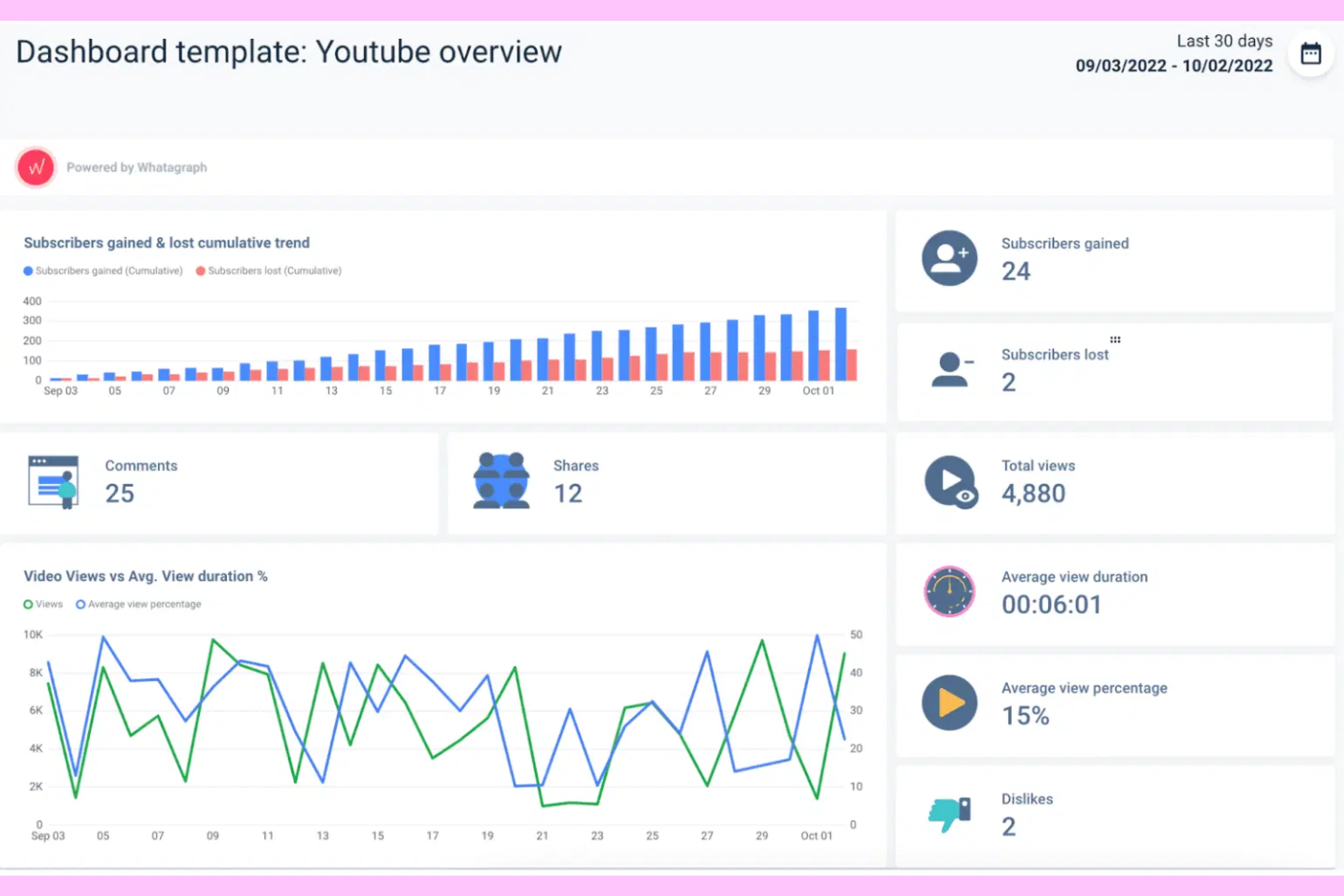
Whatagraph is a cross-channel reporting platform designed for marketing agencies that need to unify data from multiple sources. If you want to automate client reporting and deliver visually engaging, real-time analytics, this tool is built for you.
Who Is Whatagraph Best For?
Marketing agencies and in-house teams managing multi-channel digital campaigns.
Why Whatagraph Is a Good TapClicks Alternative
I picked Whatagraph because its built-in data pipeline handles cross-channel data unification without any middleware or manual ETL work. I like the Source Blends feature, which lets me combine data from platforms like Google Ads and Facebook Ads into a single cross-channel view. The no-code transformation engine is also genuinely useful—I can standardize naming conventions and build calculated metrics like blended ROAS across accounts. In practice, that means I'm spending less time wrangling data and more time delivering insights clients can act on.
Whatagraph Key Features
- AI report creation: Use natural language prompts to generate full marketing reports without building them manually from scratch.
- Client-facing AI chat: Let clients query their own data directly through a chat interface embedded in their live report.
- Multi-client workspaces: Manage hundreds of clients in isolated, branded workspaces with version history and linked templates.
- Role-based access control: Assign permissions across four tiers to control who can connect data, edit transformations, or view dashboards.
Whatagraph Integrations
Whatagraph offers native integrations with Google Analytics, Google Ads, Facebook Ads, LinkedIn Ads, HubSpot, Mailchimp, Shopify, Klaviyo, TikTok Ads, and more, with an API available for custom integrations.
Pros and Cons
Pros:
- Built-in approval workflow for report review
- Custom goal tracking and KPI widgets
- Automated scheduled reporting for multiple clients
Cons:
- Bulk editing data sources is not available
- Lacks in-depth granular permission settings

Best for custom marketing data pipelines
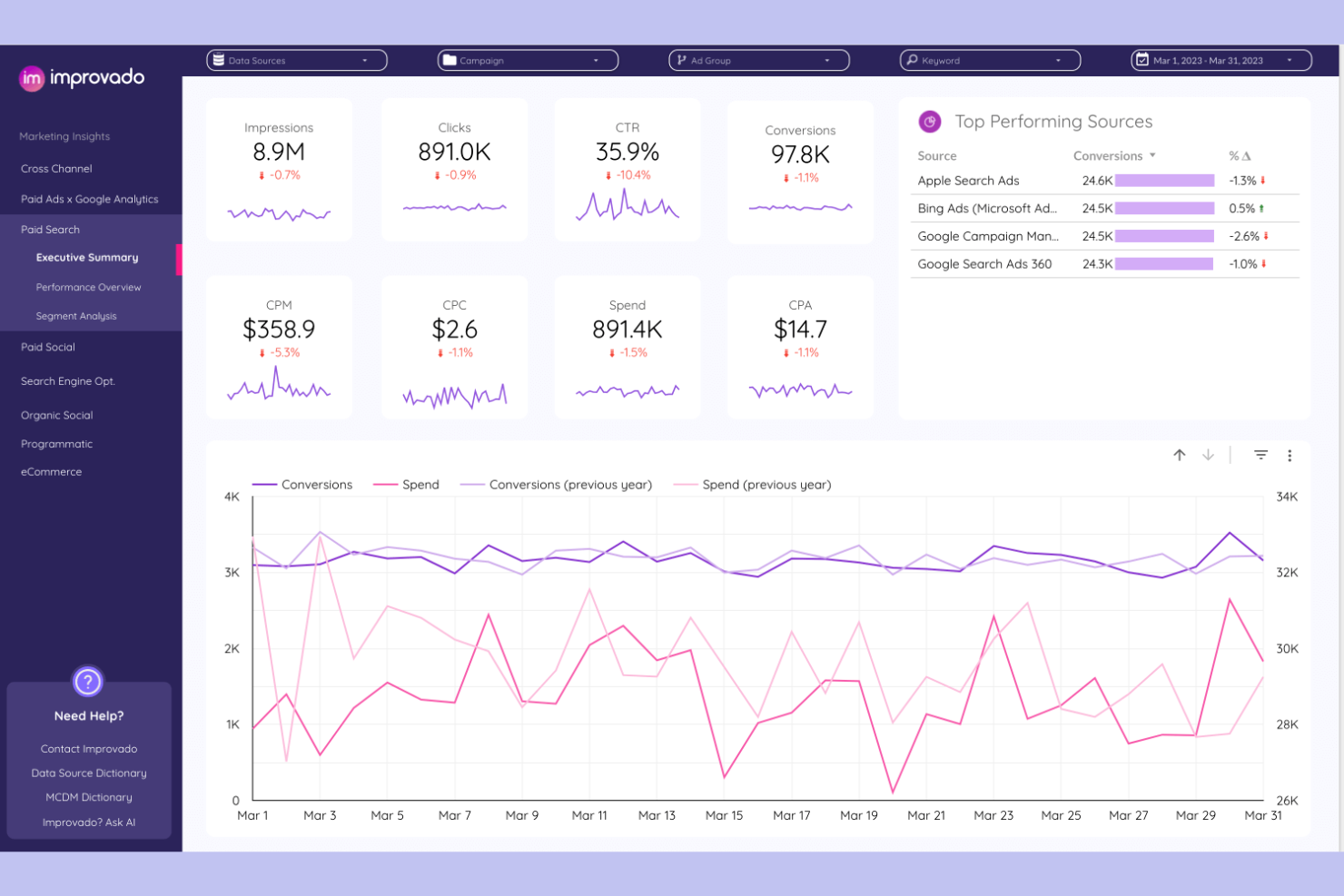
Improvado is a marketing analytics platform built for agencies and enterprise teams who need to centralize, transform, and visualize data from dozens of ad and analytics sources. If you want to automate complex reporting workflows and surface actionable insights across channels, this tool is designed for you.
Who Is Improvado Best For?
Marketing analytics teams at large agencies or enterprise brands managing high-volume, multi-channel campaigns.
Why Improvado Is a Good TapClicks alternatives
I picked Improvado because its AI-powered discovery layer surfaces anomalies and performance shifts across channels without me having to manually dig through dashboards. I really like the Insights feature, which automatically flags significant changes in metrics like ROAS or CPC and explains the likely cause. In practice, that means my team can catch underperforming campaigns before they drain budget, rather than finding out after the fact. For agencies managing large, complex ad portfolios, that kind of automated discovery is hard to find elsewhere.
Improvado Key Features
- Pre-built BI dashboards: Access ready-made dashboard templates compatible with Power BI, Looker Studio, and Tableau for common marketing use cases.
- Automated period-over-period reports: Schedule and automate recurring reports that compare performance across custom time periods without manual setup.
- Marketing data governance: Apply rules from a built-in guidelines library to monitor campaign data quality and flag compliance issues across your pipeline.
- AI analytics co-pilot: Query your marketing data in natural language and get answers presented as graphs, charts, or tables in seconds.
Improvado Integrations
Improvado offers 500+ native integrations, including Google Ads, Facebook Ads, LinkedIn Ads, Google Analytics, HubSpot, Salesforce, Shopify, Amazon Ads, TikTok Ads, and Google Sheets, with an API available for custom integrations.
Pros and Cons
Pros:
- Natural language analytics co-pilot
- Automated period-over-period reporting
- Pre-built dashboards for Power BI and Tableau
Cons:
- Lacks advanced cross-channel attribution modeling
- Limited visualization customization options

Databox
Best for real-time performance tracking
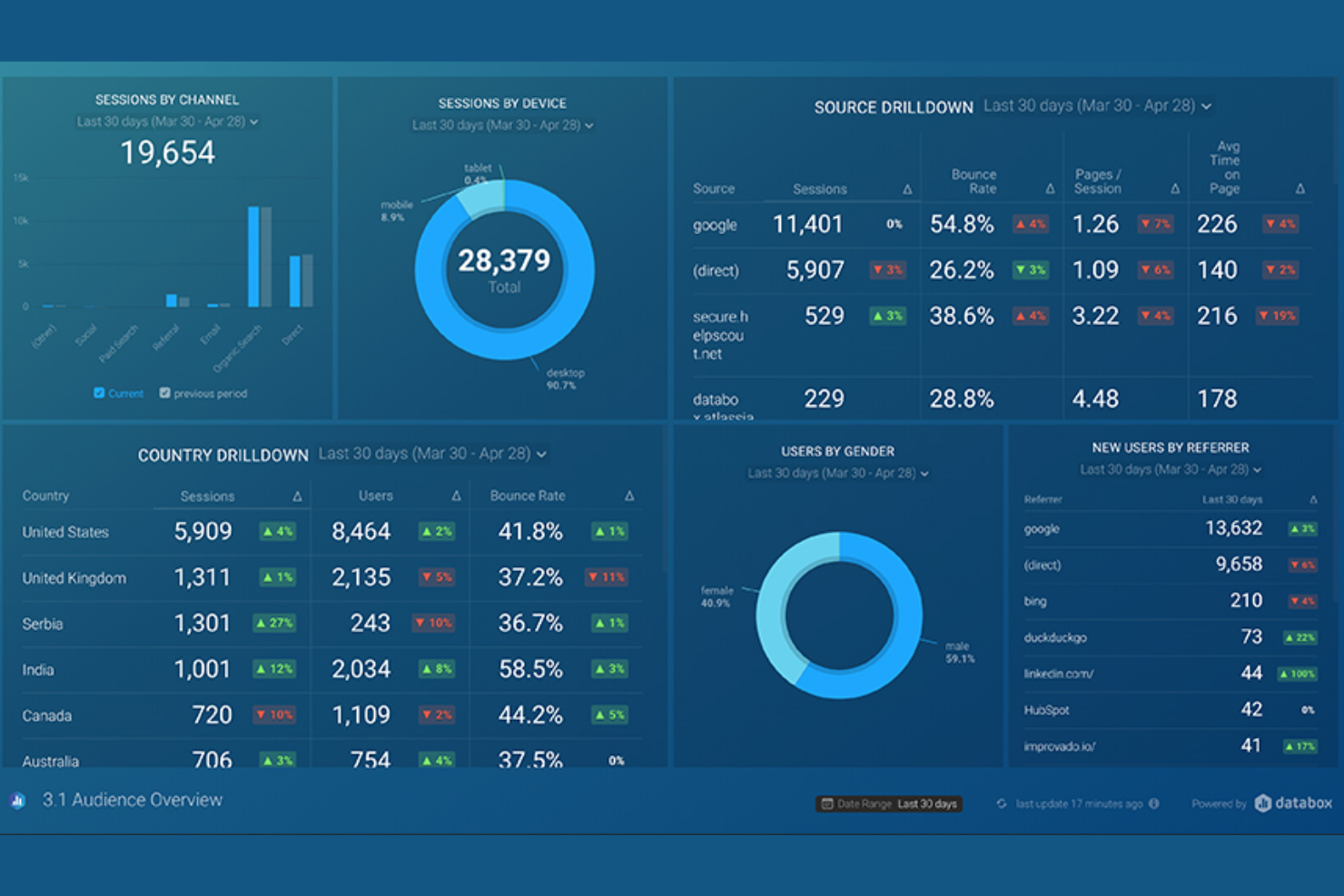
Databox is a business analytics platform built for agencies and marketing teams who need to consolidate data from multiple sources into real-time dashboards. It’s a strong fit for teams who want to track KPIs, visualize campaign performance, and automate client reporting without heavy setup.
Who Is Databox Best For?
Marketing agencies and in-house teams who need to centralize analytics and automate real-time reporting across multiple data sources.
Why Databox Is a Good TapClicks Alternative
I picked Databox because of its Data Stories feature, which lets me embed dynamic metric values directly into report text. When I send a monthly client report, the narrative updates automatically with the latest numbers—no manual edits needed. I also rely on Databox's presentation mode, which formats reports into full-screen slides with speaker notes for live client meetings. That combination of automated narrative reporting and live presentation formatting is something most agency reporting tools don't offer together.
Databox Key Features
- AI performance summaries: Databox's Genie AI analyst generates written summaries of key metrics directly inside reports.
- Report scheduling: Automatically send PDF reports to email or Slack on a daily, weekly, monthly, or quarterly cadence.
- Pre-built report templates: Access ready-made templates for channels like Google Ads, Facebook Ads, HubSpot, and Google Analytics 4.
- Custom branding: Adjust fonts, logos, images, and colors to match your company or client branding within reports.
Databox Integrations
Databox offers 130+ native integrations, including Google Analytics, Google Ads, Facebook Ads, HubSpot, Salesforce, Shopify, LinkedIn Ads, Mailchimp, Stripe, and Google Sheets. An API is available for custom integrations.
Pros and Cons
Pros:
- Automated data alerts for KPI changes
- Extensive gallery of one-click report templates
- Mobile app for data access anywhere
Cons:
- Limited historical data retention on lower tiers
- Manual data refreshes on free plans

Swydo
Best for automated marketing reporting
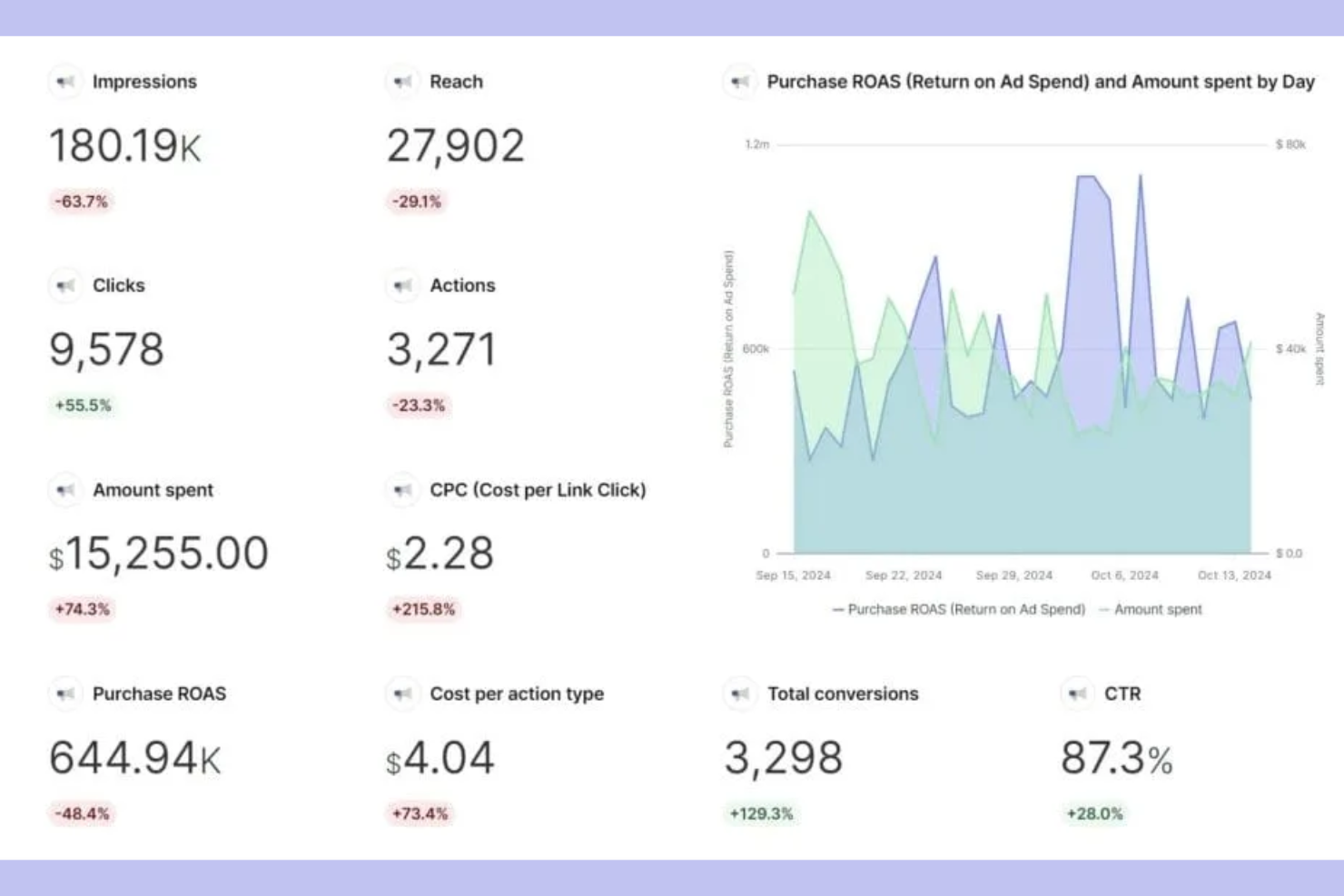
Swydo is a reporting and monitoring platform built for agencies and digital marketers who need to automate client reporting across multiple channels. It stands out for its workflow-driven approach, making it easy to schedule, customize, and manage recurring reports for clients.
Who Is Swydo Best For?
Agencies and digital marketing teams who need to automate and manage recurring client reports across multiple advertising and analytics platforms.
Why Swydo Is a Good TapClicks Alternative
I picked Swydo because of how it handles automated client reporting at scale. The dynamic report templates let my team build one master template and push it across every client account instantly—any update to a widget or metric rolls out everywhere at once, which removes a lot of repetitive maintenance work. I also rely on Swydo's monitoring boards to keep tabs on client KPIs across all accounts in a single view, with threshold-based alerts that flag issues before clients notice them. For agencies managing a high volume of recurring reports, that combination of automated scheduling and proactive monitoring is hard to match.
Swydo Key Features
- Pre-built report templates: Access a library of ready-made templates with predefined widgets and KPIs for channels like Google Ads, Meta, and LinkedIn.
- Goal tracking: Set custom targets for conversions, ROAS, or leads and track progress automatically against those targets within reports.
- Client boards: Build custom monitoring boards per client with KPI tables, target thresholds, and filtering by account manager or KPI status.
- PDF and online dashboard sharing: Deliver reports as downloadable PDFs or shareable online dashboards, depending on client preference.
Swydo Integrations
Swydo offers 32+ native integrations, including Google Ads, Facebook Ads, Google Analytics, LinkedIn Ads, Microsoft Advertising, Google Sheets, Mailchimp, HubSpot, Instagram Insights, and YouTube. An API is available for custom integrations.
Pros and Cons
Pros:
- Duplicate reports across client accounts instantly
- Built-in goal tracking for clients
- Automated reminders for report delivery
Cons:
- Scheduled reporting only on higher plans
- No built-in data warehousing features

Best for marketing data automation

Supermetrics is a data pipeline platform built for marketing and analytics teams who need to move data from dozens of sources into their preferred reporting tools. If you’re looking to automate data collection and centralize marketing analytics for client reporting, Supermetrics is worth a look.
Who Is Supermetrics Best For?
Marketing agencies and analytics teams who need to automate multi-channel data collection for client reporting.
Why Supermetrics Is a Good TapClicks Alternative
I picked Supermetrics because it does one thing exceptionally well: pulling marketing data from dozens of sources and routing it directly into the tools my team already uses for reporting. I like that it connects to Google Sheets, Looker Studio, and Power BI natively, so I'm not forced into a proprietary dashboard environment. Supermetrics' automated data refresh scheduling means client reports stay current without manual exports. For teams that want to own their reporting layer rather than rely on a bundled platform, that flexibility is a real advantage.
Supermetrics Key Features
- Pre-built reporting templates: Start with ready-made templates for Looker Studio, Google Sheets, and Power BI instead of building reports from scratch.
- No-code data blending: Combine data from multiple marketing channels in a visual editor without writing any code.
- UTM and naming convention monitoring: Track UTM parameters and tag changes, with alerts triggered the moment something breaks.
- Data storage and replay: Store raw and modeled data directly in Supermetrics for back-fill and replay without setting up a separate data warehouse.
Supermetrics Integrations
Supermetrics offers native integrations with marketing and analytics platforms, including Google Analytics, Facebook Ads, Google Ads, HubSpot, LinkedIn Ads, Twitter Ads, Bing Ads, Mailchimp, Shopify, and Google Search Console. An API is available for custom integrations.
Pros and Cons
Pros:
- Monitors UTM and naming convention consistency
- Enables direct data delivery to BI tools
- Automates multi-source marketing data aggregation
Cons:
- Limited support for non-marketing data sources
- No built-in dashboard or visualization studio

NinjaCat
Best for agency analytics and reporting
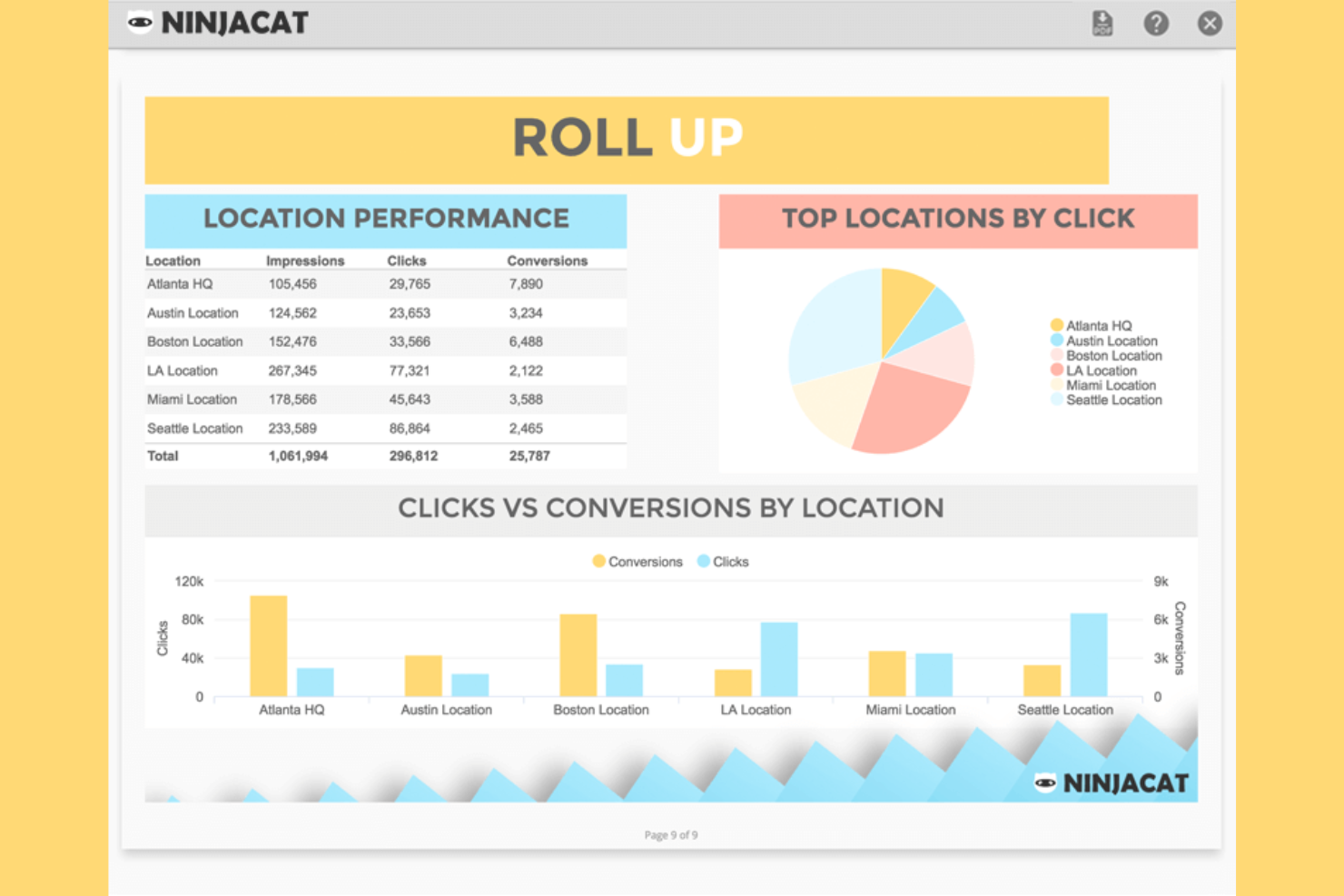
NinjaCat is a marketing reporting platform built for agencies and media companies that need to unify campaigns, call, and spend data in one place. If you want to automate client reporting across multiple ad channels and track performance down to the call level, NinjaCat is worth a look.
Who Is NinjaCat Best For?
Marketing agencies and media teams managing multi-channel campaigns and client reporting at scale.
Why NinjaCat Is a Good TapClicks Alternative
I picked NinjaCat because it handles the full reporting workflow for agencies managing multiple clients across channels, including ecommerce campaigns. I like that it combines call tracking and paid media data into one view, helping me present a complete performance story. Its roll-up reporting makes it easy to aggregate data across accounts while still drilling into details, and features like unlimited users support growing teams. Despite its advanced capabilities, the platform keeps the learning curve manageable, making it easier to scale reporting without added complexity.
NinjaCat Key Features
- AI Insights Widget: Generate plain-English data summaries and narratives directly alongside dashboard widgets or in reports.
- Report Template Gallery: Start from pre-built templates or save your own master layout to reuse across clients and campaigns.
- Agency markup calculations: Incorporate agency fees directly into calculated metrics like CPC or CPM within reports.
- Interactive client dashboards: Share permissioned, real-time dashboards with clients so they can filter and explore data on their own schedule.
NinjaCat Integrations
NinjaCat offers native integrations with Google Ads, Facebook, Google Analytics 4, Google Sheets, LinkedIn, Facebook Insights, and more. Custom connectors are available for additional data sources.
Pros and Cons
Pros:
- Offers white-labeled, client-facing dashboards
- Supports multi-location and franchise reporting
- Integrates call tracking with ad reporting
Cons:
- Report template editor can feel restrictive
- No built-in SEO or web analytics tools

Funnel
Best for centralized marketing data
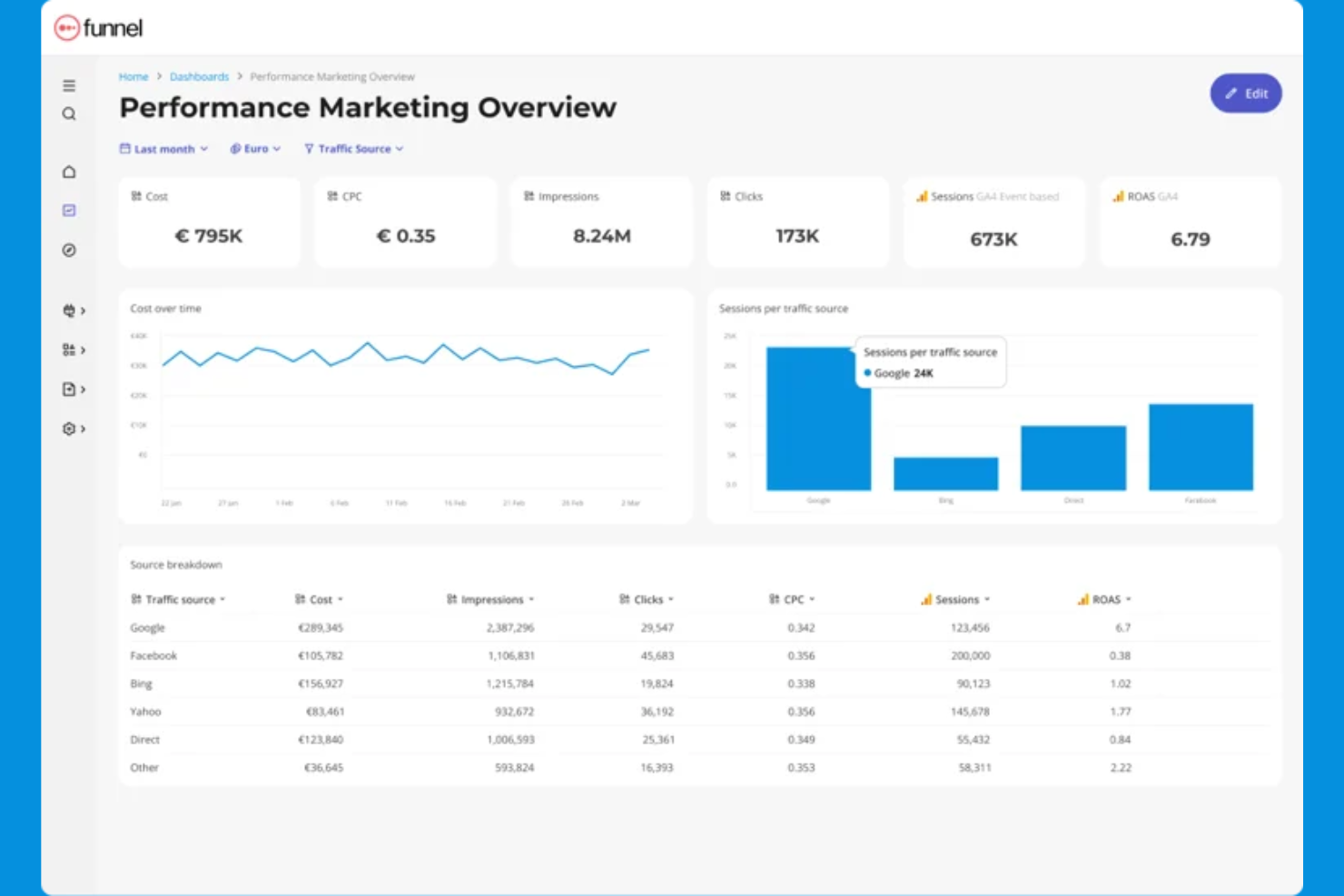
Funnel is a marketing data platform built for agencies and in-house teams who need to centralize, clean, and report on campaign data from hundreds of sources. If you want to automate data collection and deliver up-to-date, client-ready reports without manual wrangling, this tool is designed for you.
Who Is Funnel Best For?
Marketing agencies and in-house teams managing multi-channel digital campaigns across multiple clients or brands.
Why Funnel Is a Good TapClicks alternatives
I picked Funnel because it removes the manual work of pulling data from dozens of ad platforms and consolidating it into a single, clean reporting layer. What I really like is the automated data collection pipeline—Funnel connects to your sources, normalizes the data, and keeps it updated without anyone touching a spreadsheet. I also appreciate the Report feature, which lets my team build shareable, client-ready reports directly on top of live data. In practice, that means we're not rebuilding reports every week—they update automatically as new campaign data flows in.
Funnel Key Features
- Funnel Portals: Create secure, client-specific portals that give each client access to their own customized dashboard without sharing unrelated data.
- Drag-and-drop dashboard builder: Build reports from scratch or customize pre-built templates without writing any code.
- Multi-BI destination support: Send the same dataset to Looker Studio, Power BI, Tableau, Google Sheets, and Excel simultaneously.
- Pre-built dashboard templates: Start from ready-made templates for use cases like paid ads, Google Analytics, Shopify, and cross-channel performance marketing.
Funnel Integrations
Funnel offers native integrations with Google Ads, Facebook Ads, LinkedIn Ads, Google Analytics, HubSpot, Shopify, Amazon Ads, TikTok Ads, and Google Sheets, with an API available for custom integrations.
Pros and Cons
Pros:
- Custom data mapping for complex reporting needs
- Exports to Power BI, Tableau, and Google Sheets
- Live dashboards update with new campaign data
Cons:
- No direct white-label dashboard for clients
- No built-in visualization beyond dashboards

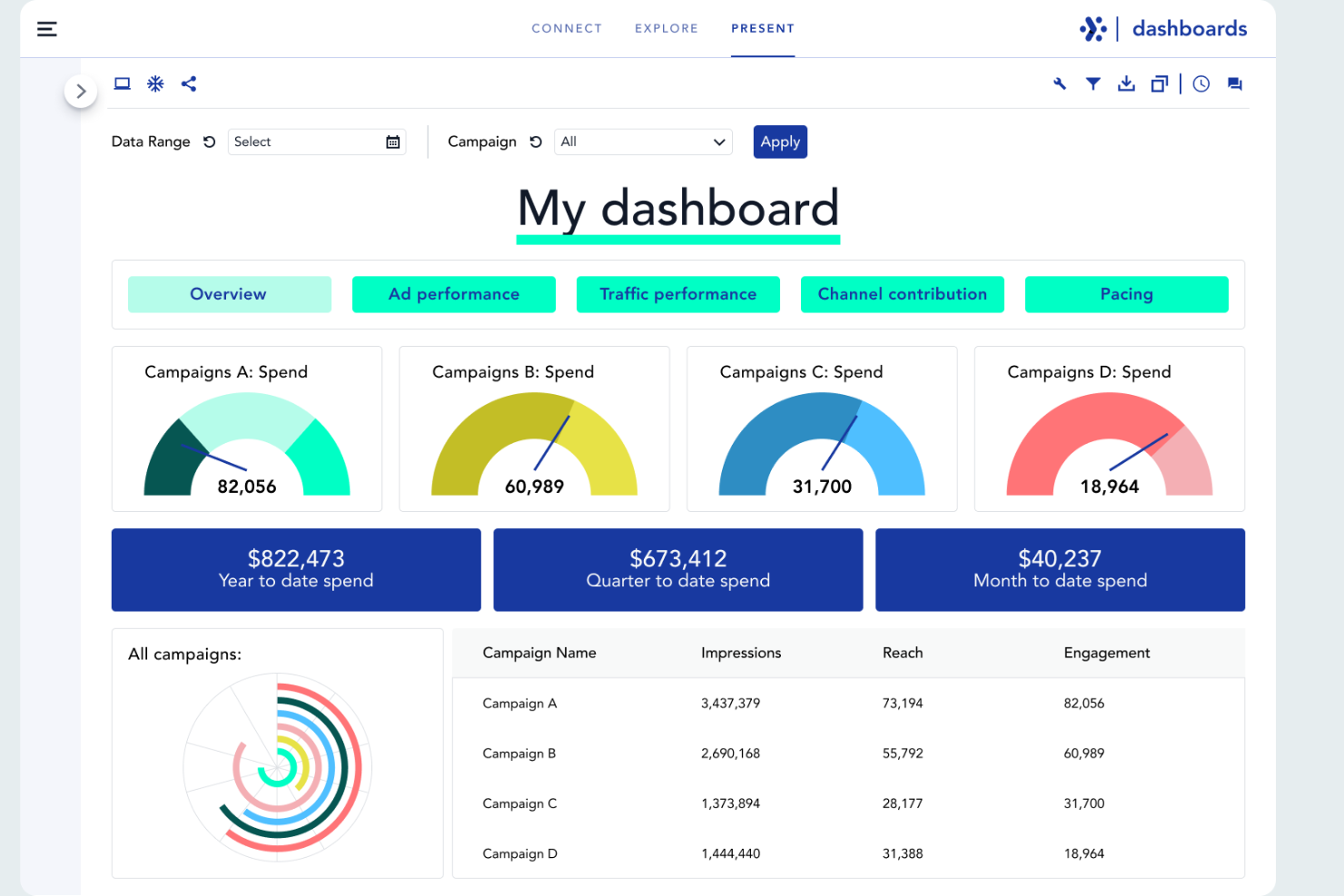
Adverity is a data integration and analytics platform built for marketing and agency teams that need to unify, clean, and analyze data from multiple sources. If you’re looking to automate complex data workflows and deliver actionable insights to clients, Adverity is worth considering.
Who Is Adverity Best For?
Marketing analysts and data teams at mid-sized to large agencies needing automated data integration and analytics.
Why Adverity Is a Good TapClicks Alternative
I picked Adverity because its automated data integration goes deeper than most reporting tools. I like that it handles data harmonization automatically, mapping inconsistent naming conventions across platforms so my team doesn't spend hours cleaning data before building reports. Adverity's DataStream feature lets me pull from hundreds of sources and schedule automated data refreshes, keeping dashboards current without manual intervention. For agencies managing large volumes of cross-channel data, that level of automation is hard to match.
Adverity Key Features
- Data quality monitoring: Automatically detect anomalies and inconsistencies across your data warehouse before they reach reports.
- Granular user access controls: Set role-based permissions to manage who can view, edit, or export data across teams and clients.
- Conversational AI querying: Ask natural-language questions directly against your data to surface insights without writing SQL.
- Data destination routing: Push harmonized data to BI tools and platforms like Tableau, Power BI, Snowflake, and Google BigQuery.
Adverity Integrations
Adverity offers 600+ native integrations with marketing, analytics, and cloud platforms, including Google Analytics, Facebook Ads, Amazon Advertising, Salesforce, HubSpot, and Snowflake. An API is available for custom integrations.
Pros and Cons
Pros:
- Enables automated, scheduled data refreshes
- Offers advanced data quality monitoring tools
- Handles complex data harmonization automatically
Cons:
- Lacks direct white-label reporting features
- Requires technical setup for advanced workflows
Outras alternativas ao TapClicks
Eis algumas alternativas adicionais ao TapClicks que não entraram na minha lista restrita, mas que continuam a merecer atenção:
- Scoro
For business reporting and dashboards
- DashThis
For automated agency reporting
- Domo
For real-time business dashboards
- ReportGarden
For PPC reporting for agencies
- Tableau
For advanced data visualization
- Looker
For cloud-based data exploration
- Oviond
For unified marketing dashboards
- Raven Tools
For SEO reporting
- Octoboard
For automated client reporting
- Power BI
For Microsoft-based analytics
- Sprout Social
For social media analytics
- Reporting Ninja
For white-label reporting


How I Evaluate TapClicks Alternatives
I split my evaluation into two layers: the baseline every tool must clear—like multi-source data pulls and automated client reporting—and the differentiators that separate good from great.
Core Functionality (Table Stakes For This List)
When I'm selecting tools for my list, I rank each one on a scale from 0 (does not offer the functionality) to 5 (excels in this area) for each core functionality listed below. Then, I calculate the tool's total score into a percentage. Each tool needs to achieve a minimum total score of 65% to be considered for inclusion.
- Unified Data Integrations: I check how many native connectors each tool offers across ad platforms, analytics, and CRMs—pulling from sources like Google Ads, Meta, and HubSpot in one place.
- Custom Dashboards & Reporting: Each tool should let you build visual dashboards from scratch, not just pick from rigid templates—drag-and-drop editors and calculated metrics matter here.
- Project & Workflow Management: I look for task assignments, milestone tracking, and workflow automation that tie campaign execution to reporting deadlines across teams.
- Multi-Client Account Management: Agencies juggling dozens of accounts need segmented workspaces with role-based permissions, so I evaluate how cleanly each tool separates client data.
- Automated Scheduling & Alerts: I check whether you can schedule recurring report deliveries and set performance-based alerts—like notifications when ad spend pacing falls behind target.
- Collaboration & White-Labeling: Tools should support team comments and branded outputs, so your clients see your logo and colors on every dashboard or PDF report you share.
Once I have a list of tools that meet this criteria, I consider what sets each platform apart.
Differentiating Factors (What Sets Vendors Apart)
Here's how I compare and contrast different vendors:
Standout Features
Client self-serve portals make a real difference for agencies. When clients can log in and view live dashboards or project statuses on their own, it reduces back-and-forth status requests. I also look for AI-powered insights that flag performance anomalies or generate report summaries automatically. Budget and pacing tracking is another feature I evaluate closely, especially for teams managing multiple campaigns where spotting spend overruns before they spiral matters.
Beyond Features
Pricing structure matters a lot in this space. I evaluate whether a vendor charges per seat, per client, or per data source, since the wrong model can get expensive fast as your agency scales. Integration ecosystem depth is another factor I weigh. A tool might check every feature box, but if it can't sync with your existing PM stack or CRM, you're stuck with manual workarounds. I also look at security certifications like SOC 2 and GDPR compliance, especially for agencies handling sensitive client ad spend data.
Por que procurar uma alternativa ao TapClicks?
Embora o TapClicks seja uma boa escolha de software de relatórios para agências, existem vários motivos pelos quais alguns utilizadores procuram soluções alternativas. Pode estar à procura de uma alternativa ao TapClicks porque…
- Precisa de opções mais flexíveis de identidade de marca branca
- Pretende integrações mais aprofundadas com ferramentas de marketing de nicho
- Necessita de funcionalidades mais avançadas de visualização de dados
- Precisa de um melhor suporte para a gestão de várias contas
- Pretende um processo de integração inicial mais simples para novos utilizadores
Se alguma destas situações lhe parece familiar, veio ao sítio certo. A minha lista inclui várias opções de software de relatórios para agências mais adequadas a equipas que enfrentam estes desafios com o TapClicks e procuram soluções alternativas.
Principais funcionalidades do TapClicks
Eis algumas das principais funcionalidades do TapClicks, para o ajudar a comparar as soluções alternativas e perceber o que oferecem:
- Painel de marketing unificado: O TapClicks reúne dados de vários canais de marketing num único painel personalizável, facilitando a monitorização do desempenho das campanhas de relance.
- Relatórios automatizados: Agende e automatize relatórios recorrentes para clientes, permitindo à sua equipa fornecer informações atualizadas sem esforço manual.
- Conectores de dados: O TapClicks disponibiliza uma vasta gama de conectores integrados para plataformas como o Google Ads, o Facebook Ads, o LinkedIn e muitas outras, permitindo importar dados de dezenas de fontes de marketing.
- Marca branca: As agências podem personalizar totalmente os painéis e relatórios com os seus próprios logótipos, cores e domínio, proporcionando uma experiência fluida aos clientes.
- Controlos de acesso baseados em funções: Atribua diferentes níveis de permissões aos membros da equipa e aos clientes, garantindo que as pessoas certas têm acesso aos dados certos.
- Ferramentas de transformação de dados: Limpe, mapeie e combine dados de diferentes fontes utilizando as funcionalidades de transformação integradas do TapClicks, para poder criar relatórios unificados mesmo a partir de conjuntos de dados distintos.
- Gestão de campanhas: Acompanhe, gira e otimize campanhas de marketing diretamente na plataforma, incluindo o ritmo de utilização do orçamento e os alertas de desempenho.
- Portal do cliente: Permita que os clientes tenham acesso seguro e em tempo real aos seus próprios painéis e relatórios através de um portal dedicado.
- Biblioteca de visualizações: Escolha entre vários tipos de gráficos, diagramas e widgets para apresentar os dados da forma mais impactante para o seu público.
- Acesso à API: Integre o TapClicks com os seus próprios sistemas ou fluxos de trabalho personalizados utilizando a respetiva API, com suporte para necessidades avançadas de automatização e sincronização de dados.