

10 documentbeheersystemen met eigen merknaam in 2026

Shortlist van white-labeldocumentbeheersystemen


Een white-labeldocumentbeheersysteem is een platform dat je kunt voorzien van je eigen merk en kunt aanpassen, zodat je documenten veilig kunt organiseren, opslaan en delen met klanten of interne teams. Als je op zoek bent naar het beste white-labeldocumentbeheersysteem, zoek je waarschijnlijk naar een manier om een naadloze ervaring in je eigen huisstijl te bieden en tegelijkertijd controle te houden over documentworkflows en toegangsrechten.
In deze gids vind je opties die alles ondersteunen, van gedetailleerde toegangsrechten tot aangepaste workflowautomatisering. Zo kun je een oplossing kiezen die aansluit bij de behoeften van je bedrijf en de verwachtingen van je klanten.
Waarom u onze softwareaanbevelingen kunt vertrouwen
Ons team test en beoordeelt software sinds 2012. Als projectmanagers weten we zelf hoe moeilijk — en belangrijk — het is om de juiste software te kiezen.
Voor deze gids hebben we tools geëvalueerd met behulp van praktijktests en onafhankelijk onderzoek, waarbij we tools beoordeelden aan de hand van onze selectiecriteria. We putten ook uit inzichten van vooraanstaande experts uit de branche en praktiserende projectmanagementprofessionals.
Onze reviews weerspiegelen ons menselijke redactionele oordeel, geen verkooppraatje.
Deskundige beoordelaars:
Vergelijkingstabel van white-labeldocumentbeheersystemen
Deze vergelijkingstabel geeft een overzicht van de prijsgegevens van mijn beste white-labeldocumentbeheersystemen:
Beoordelingen van white-labeldocumentbeheersystemen
Hieronder vind je mijn uitgebreide samenvattingen van de white-labeldocumentbeheersystemen die op mijn shortlist zijn beland. In mijn beoordelingen bespreek ik de functies, beste toepassingen en integraties van elk platform in detail, zodat je het beste systeem voor jou kunt vinden.

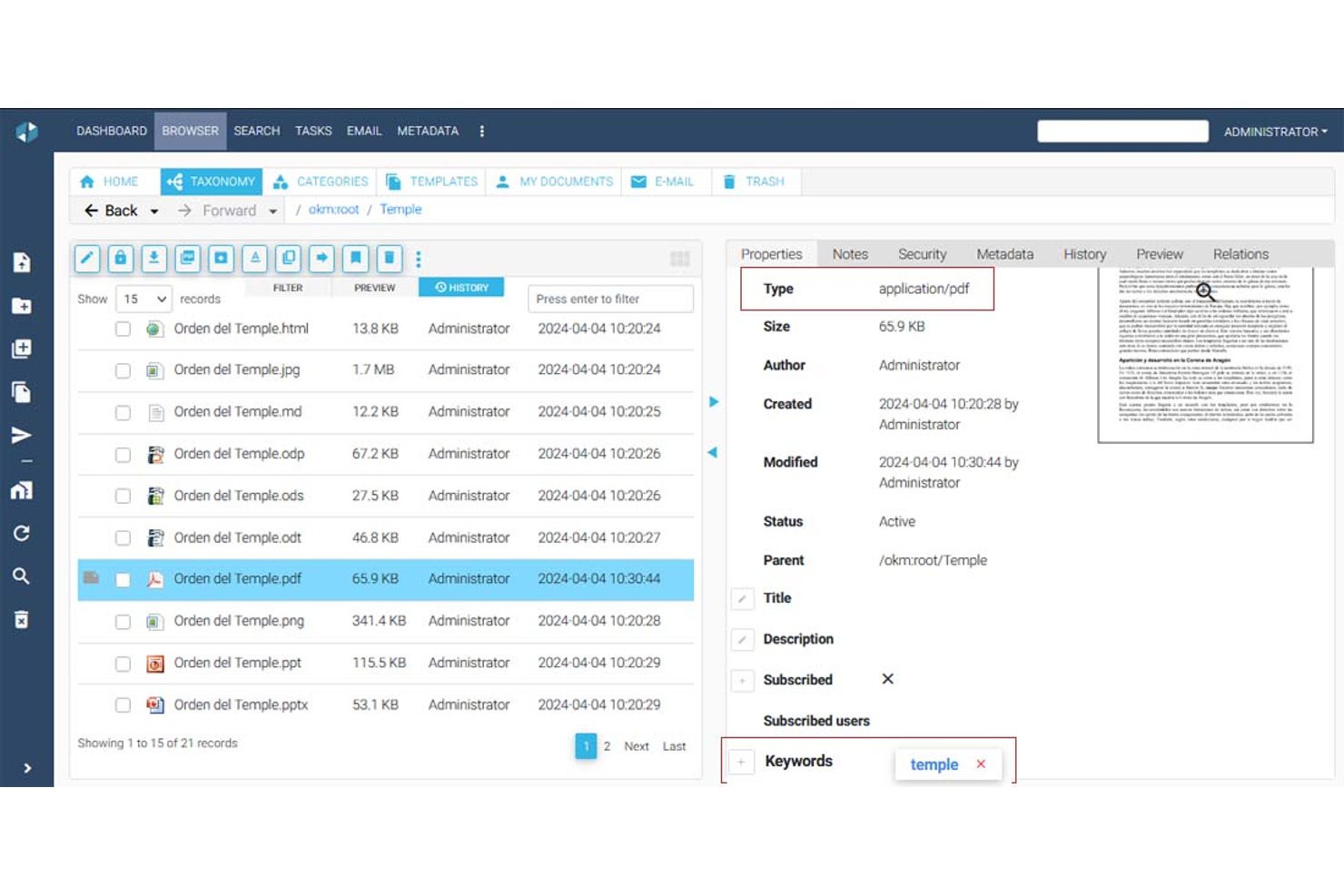

OpenKM is een documentbeheersysteem met een multitenantarchitectuur die maphiërarchieën, metadatabeheer, versiebeheer, zoeken in volledige tekst, OCR, elektronische handtekeningen en een ingebouwde workflow-engine ondersteunt voor het opbouwen van goedkeurings- en beoordelingsprocessen.
Voor wie is OpenKM het meest geschikt?
OpenKM is geschikt voor compliancegerichte teams en PMO's die goedkeuringsworkflows voor documenten over meerdere afdelingen of klantomgevingen heen moeten automatiseren.
Waarom ik voor OpenKM heb gekozen
OpenKM staat op mijn shortlist omdat de ingebouwde workflow-engine, OKMFlow, veel verder gaat dan eenvoudige goedkeuringen. Ik vind het prettig dat je seriële en parallelle beoordelingsketens kunt opbouwen, taken dynamisch aan gebruikers of groepen kunt toewijzen en actieve workflows kunt bewerken zonder lopende processen te onderbreken. Dankzij de multitenantarchitectuur kun je geïsoleerde omgevingen per klant inrichten, elk met een eigen beheerder, opslagbasis en aanpasbare gebruikersinterface. Die combinatie maakt het systeem bijzonder geschikt voor het uitvoeren van goedkeuringsprocessen voor documenten over meerdere klantaccounts vanuit één enkele instantie.
Belangrijkste functies van OpenKM
- Multitenantarchitectuur: Richt geïsoleerde omgevingen per klant of afdeling in, elk met een eigen beheerder, opslagbasis en onafhankelijke configuratie.
- Module voor documentverzoeken: Stuur versleutelde, veilige documentverzoeken rechtstreeks naar klanten en ontvang bestanden via een beveiligd leveringskanaal.
- Zoekmachine voor volledige tekst: Indexeer en doorzoek PDF-, Office-, HTML-, XML- en andere bestandstypen met behulp van synoniemen, stamvorming en opgeslagen zoekopdrachten.
- Versievergelijking: Vergelijk twee documentversies naast elkaar en bekijk zowel wijzigingen in metadata als tekstverschillen binnen dezelfde interface.
Integraties van OpenKM
OpenKM beschikt over native integraties binnen het Microsoft-ecosysteem, waaronder Outlook, Word, Excel, PowerPoint, Visio, Project en Access, plus ondersteuning voor CMIS. De REST API maakt verbinding met SAP en Microsoft Dynamics en ondersteunt aangepaste integraties.
Pros and Cons
Pros:
- Multitenantomgevingen zorgen voor gescheiden werkruimten van klanten
- Workflows op tenantniveau ondersteunen aangepaste goedkeuringen
- Versiegeschiedenis versterkt de verantwoordingsplicht van klanten
Cons:
- De branding gaat niet zo ver als volledig whitelabelen
- De verouderde interface kan de acceptatie door klanten vertragen
Hoe ik documentbeheersystemen met eigen merk beoordeel
Ik bekijk deze systemen in twee lagen: wat een team nodig heeft om een documentportaal met een aangepaste huisstijl te creëren en te beheren zonder enig spoor van de leverancier, en de onderscheidende factoren die van belang zijn afhankelijk van hoe je het systeem wilt gebruiken.
Kernfunctionaliteit (basisvereisten voor deze lijst)
Wanneer ik tools voor mijn lijst selecteer, beoordeel ik elke tool op een schaal van 0 (biedt de functionaliteit niet) tot 5 (blink uit op dit gebied) voor elke hieronder vermelde kernfunctionaliteit. Vervolgens zet ik de totaalscore van de tool om in een percentage. Elke tool moet een minimale totaalscore van 55% behalen om in aanmerking te komen voor opname.
- Mogelijkheden voor eigen merkvoering: Ik controleer of je elke zichtbare verwijzing naar de leverancier kunt vervangen door je eigen logo, kleurenpalet, favicon en inlogpagina, zodat klanten nooit het onderliggende platform zien.
- Documentopslag & -organisatie: Mappenstructuren, tags en metadataschema's zijn hierbij belangrijk—vooral wanneer je SOW's, contracten en opleveringen beheert voor tientallen klantaccounts.
- Versiebeheer & audittrail: Ik beoordeel hoe elke tool revisies bijhoudt en gebruikersactiviteiten registreert, omdat projectdocumentatie vaak meerdere beoordelingsrondes doorloopt voordat deze definitief wordt goedgekeurd.
- Toegangsbeheer & machtigingen: Ik zoek naar gedetailleerde, op rollen gebaseerde regels op map- en bestandsniveau—met name de mogelijkheid om verschillende machtigingsniveaus in te stellen voor interne teams en externe belanghebbenden.
- Klantenportaal & samenwerking: De portaalervaring is waar je merk zichtbaar wordt voor de eindklant. Daarom beoordeel ik of beoordelaars binnen een werkruimte met jouw huisstijl opmerkingen kunnen plaatsen, documenten kunnen goedkeuren en ermee kunnen werken.
- Aangepast domein & ondersteuning voor meerdere tenants: Elk klantaccount moet achter je eigen domein staan, met geïsoleerde gegevens en onafhankelijke branding. Dit is essentieel wanneer je de oplossing doorverkoopt voor een portfolio aan projecten.
Zodra ik een lijst heb met tools die aan de criteria voldoen, kijk ik naar wat elk platform onderscheidt.
Onderscheidende factoren (waarmee leveranciers zich onderscheiden)
Zo vergelijk ik verschillende leveranciers:
Opvallende functies
Toegang tot API's en webhooks is een belangrijke onderscheidende factor—dit bepaalt of je documentworkflows rechtstreeks in je eigen projectmanagementtools of klantgerichte apps kunt integreren. Ik beoordeel ook geautomatiseerde goedkeuringsroutering, omdat het handmatig achter belanghebbenden aan gaan voor goedkeuring van SOW's en wijzigingsopdrachten niet schaalbaar is voor meerdere klantaccounts. Gebruiksanalyses maken het geheel compleet. Rapportage per klantomgeving over documentweergaven, downloads en opslag helpt wederverkopers mogelijkheden voor aanvullende verkoop te identificeren en tijdens QBR's de waarde voor klanten aan te tonen.
Meer dan functies alleen
De licentiestructuur voor wederverkopers is hier erg belangrijk. Ik kijk of het prijsmodel ruimte biedt voor het stapelen van marges en onbeperkte subaccounts, omdat limieten per klant de winstgevendheid kunnen aantasten naarmate je portfolio groeit. Integraties met het bredere ecosysteem voor projectmanagement zijn eveneens belangrijk—tools die rechtstreeks verbinding maken met platforms zoals Jira, Asana of Monday houden documenten gekoppeld aan de werkstromen waartoe ze behoren. Ik controleer ook op nalevingscertificeringen zoals SOC 2 en ISO 27001, vooral bij het opnemen van zakelijke klanten die bewijs van een adequate beveiligingspositie vereisen voordat ze toegang verlenen.
Een white-labeldocumentbeheersysteem kiezen
Het is eenvoudig om te verdwalen in lange lijsten met functies en ingewikkelde prijsstructuren. Om je te helpen gefocust te blijven terwijl je jouw unieke softwareselectieproces doorloopt, vind je hier een checklist met factoren om rekening mee te houden:
| Factor | Waar je op moet letten |
|---|---|
| Schaalbaarheid | Kan het systeem je documentvolume en groei van het aantal gebruikers in de loop van de tijd aan? Vraag naar opslaglimieten en gebruikerslimieten. |
| Integraties | Kan het systeem rechtstreeks worden gekoppeld aan je belangrijkste tools (bijv. Microsoft 365, Google Drive)? Controleer of er API-toegang is als je aangepaste verbindingen nodig hebt. |
| Aanpasbaarheid | Kun je de interface volledig voorzien van je eigen huisstijl en workflows afstemmen op je processen? Let op uitgebreide opties voor huisstijl en workflows. |
| Gebruiksgemak | Gaat je team het systeem snel gebruiken? Test de interface op duidelijkheid en minimale trainingsvereisten. |
| Implementatie en introductie | Hoe lang duren de installatie en migratie? Vraag naar hulpmiddelen voor gegevensimport, ondersteuning bij de introductie en beschikbare trainingsmaterialen. |
| Kosten | Zijn de prijsniveaus transparant en voorspelbaar wanneer je opschaalt? Let op verborgen kosten of verplichte uitbreidingen. |
| Beveiligingsmaatregelen | Biedt het systeem versleuteling, auditlogboeken en gedetailleerde toegangscontroles? Controleer of het voldoet aan de normen binnen jouw sector. |
| Beschikbaarheid van ondersteuning | Krijg je snel hulp wanneer er problemen ontstaan? Controleer of er livechat, telefonische ondersteuning en speciaal accountbeheer beschikbaar zijn als dat nodig is. |
Wat zijn documentbeheersystemen?
Een documentbeheersysteem onder eigen merk is een SaaS-platform waarmee teams documenten onder hun eigen merk kunnen opslaan, ordenen en beheren. Deze systemen ondersteunen realtime samenwerking, verbeteren de gebruikerservaring en helpen bedrijven een consistente interface onder eigen merk te bieden aan klanten of interne teams. Hoewel het geen speciaal projectmanagementhulpmiddel is, kunnen veel platforms worden gebruikt naast projectmanagementworkflows om bestanden, goedkeuringen en documentatie te beheren binnen alles-in-één samenwerkingstools.
Functies
Let bij het selecteren van een documentbeheersysteem onder eigen merk op de volgende belangrijke functies:
- Aangepaste branding: Hiermee kunt u uw eigen logo, kleuren en domein toepassen, zodat het platform voor klanten of interne teams eruitziet en aanvoelt als uw eigen product.
- Op rollen gebaseerd toegangsbeheer: Hiermee kunt u gedetailleerde machtigingen instellen voor gebruikers of groepen, zodat alleen bevoegde personen specifieke documenten kunnen bekijken, bewerken of goedkeuren.
- Documentversiebeheer: Houdt wijzigingen bij en bewaart een geschiedenis van documentbewerkingen, zodat u eenvoudig kunt terugkeren naar eerdere versies of kunt controleren wie updates heeft uitgevoerd.
- Workflowautomatisering: Hiermee kunt u processen voor documentbeoordeling, goedkeuring en routering ontwerpen en automatiseren, waardoor handmatige stappen worden verminderd en de samenwerking sneller verloopt.
- Zoeken in volledige tekst: Hiermee kunnen gebruikers zoeken in de inhoud en metagegevens van documenten, zodat u snel bestanden kunt vinden, zelfs in grote opslagplaatsen.
- Audittrail: Legt elke actie op documenten vast en biedt een transparant logboek voor naleving, beveiliging en probleemoplossing.
- Integratiemogelijkheden: Maakt verbinding met andere bedrijfstools, zoals e-mail, cloudopslag of CRM-systemen, om het delen van documenten en de samenwerking te stroomlijnen.
- Ondersteuning voor meerdere talen: Biedt interfaces en meldingen in meerdere talen, waardoor het systeem toegankelijk is voor wereldwijde teams of klanten.
- Bulk uploaden en importeren: Hiermee kunt u grote aantallen documenten tegelijk toevoegen, waardoor de migratie vanuit oudere systemen of het onboarden van nieuwe klanten eenvoudiger wordt.
- Mobiele toegang: Biedt veilige toegang tot documenten en workflows vanaf smartphones of tablets en ondersteunt werken op afstand en onderweg.
Voordelen
Het implementeren van een documentbeheersysteem onder eigen merk biedt verschillende voordelen voor uw team en uw bedrijf. Hier zijn enkele voordelen waar u naar kunt uitkijken:
- Consistente branding: Bied klanten en gebruikers een uniforme, professionele ervaring door het platform aan te passen met uw eigen logo, kleuren en domein.
- Verbeterde beveiliging: Bescherm gevoelige informatie met op rollen gebaseerde toegangscontroles, audittrails en versleutelingsfuncties die u helpen aan nalevingsvereisten te voldoen.
- Gestroomlijnde workflows: Automatiseer processen voor documentbeoordeling, goedkeuring en routering om handmatig werk te verminderen en de samenwerking tussen teams te versnellen.
- Verbeterd documentbeheer: Houd duidelijke versiegeschiedenissen en machtigingsinstellingen bij, zodat u altijd weet wie een document heeft geopend of bewerkt en wanneer.
- Schaalbare samenwerking: Ondersteun groeiende teams en klantenbestanden met functies zoals bulk uploaden, ondersteuning voor meerdere talen en mobiele toegang voor werken op afstand.
- Naadloze integraties: Maak verbinding met uw bestaande bedrijfstools om documentbeheer te centraliseren en contextwisselingen voor uw team te verminderen.
- Sneller onboarden: Gebruik sjablonen, trainingsbronnen en intuïtieve interfaces om nieuwe gebruikers snel op weg te helpen en hen in staat te stellen waarde bij te dragen.
Kosten en prijzen
Bij het selecteren van een documentbeheersysteem onder eigen merk is inzicht in de verschillende beschikbare prijsmodellen en abonnementen vereist. De kosten variëren op basis van functies, teamgrootte, uitbreidingen en meer. De onderstaande tabel geeft een overzicht van veelvoorkomende abonnementen, hun gemiddelde prijzen en de typische functies die zijn inbegrepen in oplossingen voor documentbeheer onder eigen merk:
Vergelijkingstabel voor abonnementen van een documentbeheersysteem onder eigen merk
| Type abonnement | Gemiddelde prijs | Veelvoorkomende functies |
|---|---|---|
| Gratis abonnement | $0 | Basisdocumentopslag, beperkt aantal gebruikers, eenvoudig zoeken en basisondersteuning. |
| Persoonlijk abonnement | $5-$15/gebruiker/maand | Toegang voor één gebruiker, aangepaste branding, basisworkflowautomatisering en beperkte integraties. |
| Bedrijfsabonnement | $15-$40/gebruiker/maand | Ondersteuning voor meerdere gebruikers, geavanceerde workflowautomatisering, op rollen gebaseerde machtigingen, audittrails en integraties. |
| Ondernemingsabonnement | $40-$100/gebruiker/maand | Onbeperkt aantal gebruikers, volledige aanpassing onder eigen merk, geavanceerde beveiliging, speciale ondersteuning en nalevingstools. |
Veelgestelde vragen over white-label documentbeheersystemen
Hier vindt u antwoorden op veelgestelde vragen over white-label documentbeheersystemen:
Wat maakt een documentbeheersysteem white-label?
Met een white-label documentbeheersysteem kunt u het platform volledig voorzien van uw eigen huisstijl, met uw eigen logo, kleuren en domein. Dit betekent dat klanten en gebruikers uw huisstijl zien in plaats van die van de softwareleverancier. Dit is vooral handig voor bureaus, wederverkopers of bedrijven die klantportalen aanbieden.
Kan ik een white-label documentbeheersysteem integreren met mijn bestaande tools?
Ja, de meeste white-label documentbeheersystemen bieden integraties met populaire bedrijfstools zoals Microsoft 365, Google Drive en CRM-platforms. Sommige bieden ook API’s voor aangepaste integraties, zodat u het systeem kunt koppelen aan uw unieke werkprocessen.
Hoe veilig zijn white-label documentbeheersystemen?
White-label documentbeheersystemen bevatten doorgaans beveiligingsfuncties zoals versleuteling, op rollen gebaseerde toegangscontroles en audittrails. Controleer altijd op nalevingscertificeringen en vraag naar de locatie van gegevensopslag als uw bedrijf specifieke wettelijke vereisten heeft.
Is het mogelijk om documenten uit mijn oude systeem te migreren?
Ja, de meeste oplossingen bieden tools voor bulkuploads of migratie om u te helpen documenten uit oudere systemen over te zetten. Sommige leveranciers bieden ook ondersteuning bij de ingebruikname of migratiediensten om het proces soepeler te laten verlopen.
Wie zou een white-label documentbeheersysteem moeten overwegen?
White-label documentbeheersystemen zijn geschikt voor bedrijven die klanten een ervaring in hun eigen huisstijl willen bieden, bureaus die meerdere klantaccounts beheren of organisaties met strenge eisen op het gebied van huisstijl en aanpassingsmogelijkheden.