

10 beste software voor productieplanning beoordeeld in 2026

10 Shortlist van de beste software voor productieplanning


Het beheren van productieschema's kan een echte hoofdpijn zijn. Je moet deadlines, middelen en onverwachte problemen tegelijk in de gaten houden, waardoor alles uit balans kan raken. Daar komt software voor productieplanning om de hoek kijken. Deze helpt je georganiseerd te blijven, stress te verminderen en het werk vooruit te laten gaan.
Ik heb de beste oplossingen voor productieplanning getest en beoordeeld om je te helpen de beste keuze voor je team te vinden. Naar mijn ervaring kan het kiezen van de juiste tool een aanzienlijk verschil maken.
In dit artikel krijg je een onbevooroordeeld overzicht van de functies, het gebruiksgemak en de aspecten waarin elke optie zich onderscheidt. Lees verder om te zien hoe deze tools kunnen helpen bij het oplossen van planningsproblemen en ervoor kunnen zorgen dat je projecten soepel blijven verlopen.
Waarom u onze softwareaanbevelingen kunt vertrouwen
Ons team test en beoordeelt software sinds 2012. Als projectmanagers weten we zelf hoe moeilijk — en belangrijk — het is om de juiste software te kiezen.
Voor deze gids hebben we tools geëvalueerd met behulp van praktijktests en onafhankelijk onderzoek, waarbij we tools beoordeelden aan de hand van onze selectiecriteria. We putten ook uit inzichten van vooraanstaande experts uit de branche en praktiserende projectmanagementprofessionals.
Onze reviews weerspiegelen ons menselijke redactionele oordeel, geen verkooppraatje.
Deskundige beoordelaars:
Vergelijkingstabel voor software voor productieplanning
Deze vergelijkingstabel geeft een overzicht van de prijsgegevens van mijn beste keuzes voor software voor productieplanning:
| Tool | Best For | Trial Info | Price | ||
|---|---|---|---|---|---|
| 1 | Best for mobile shop-floor data capture | Free demo available | Pricing upon request | Website | |
| 2 | Best for e-commerce production synchronization | Free plan available | From $299/month | Website | |
| 3 | Best for preconfigured industry templates | Free demo available | Pricing upon request | Website | |
| 4 | Best for custom workflows | Free demo available | From $15/user/month | Website | |
| 5 | Best for single-database ERP | Free demo available | Pricing upon request | Website | |
| 6 | Best for complex supply chains | Free demo available | Pricing upon request | Website | |
| 7 | Best for cloud-native automotive manufacturing | Free demo available | Pricing upon request | Website | |
| 8 | Best for multi-plant MES standardization | Free demo available | Pricing upon request | Website | |
| 9 | Best for integrated finance and manufacturing | Free demo available | Pricing upon request | Website | |
| 10 | Best for global financial consolidation | Free trial + free demo available | Pricing upon request | Website |
Beoordelingen van de beste software voor productieplanning
Hieronder vind je mijn gedetailleerde samenvattingen van de beste opties voor software voor productieplanning. Mijn beoordelingen geven een uitgebreid overzicht van de belangrijkste functies, voor- en nadelen, integraties en ideale gebruikssituaties van elke tool, zodat je de beste keuze voor jou kunt vinden.

Fulcrum
Best for mobile shop-floor data capture

Fulcrum is a production scheduling software designed for manufacturers who need real-time data to manage their operations. It helps optimize production schedules, inventory, and workflow management.
Why I picked Fulcrum: It excels in providing real-time data, allowing you to make quick decisions based on the latest information. Live tracking of production activities keeps you continuously informed, while the intuitive dashboard gives you a clear view of operations. You can also adapt to changing demands by efficiently scheduling resources with its flexible scheduling features.
Standout Features and Integrations:
Features include advanced analytics for tracking production efficiency, built-in job costing to monitor production expenses, and a drag-and-drop scheduling tool for quick workflow adjustments.
Integrations include QuickBooks Online, Xero, Shopify, Slack, Microsoft Teams, HubSpot, Zapier, and more.
Pros and Cons
Pros:
- Detailed job costing
- Flexible scheduling options
- Visual schedule management
Cons:
- Limited reporting filters
- No native financials

Katana
Best for e-commerce production synchronization
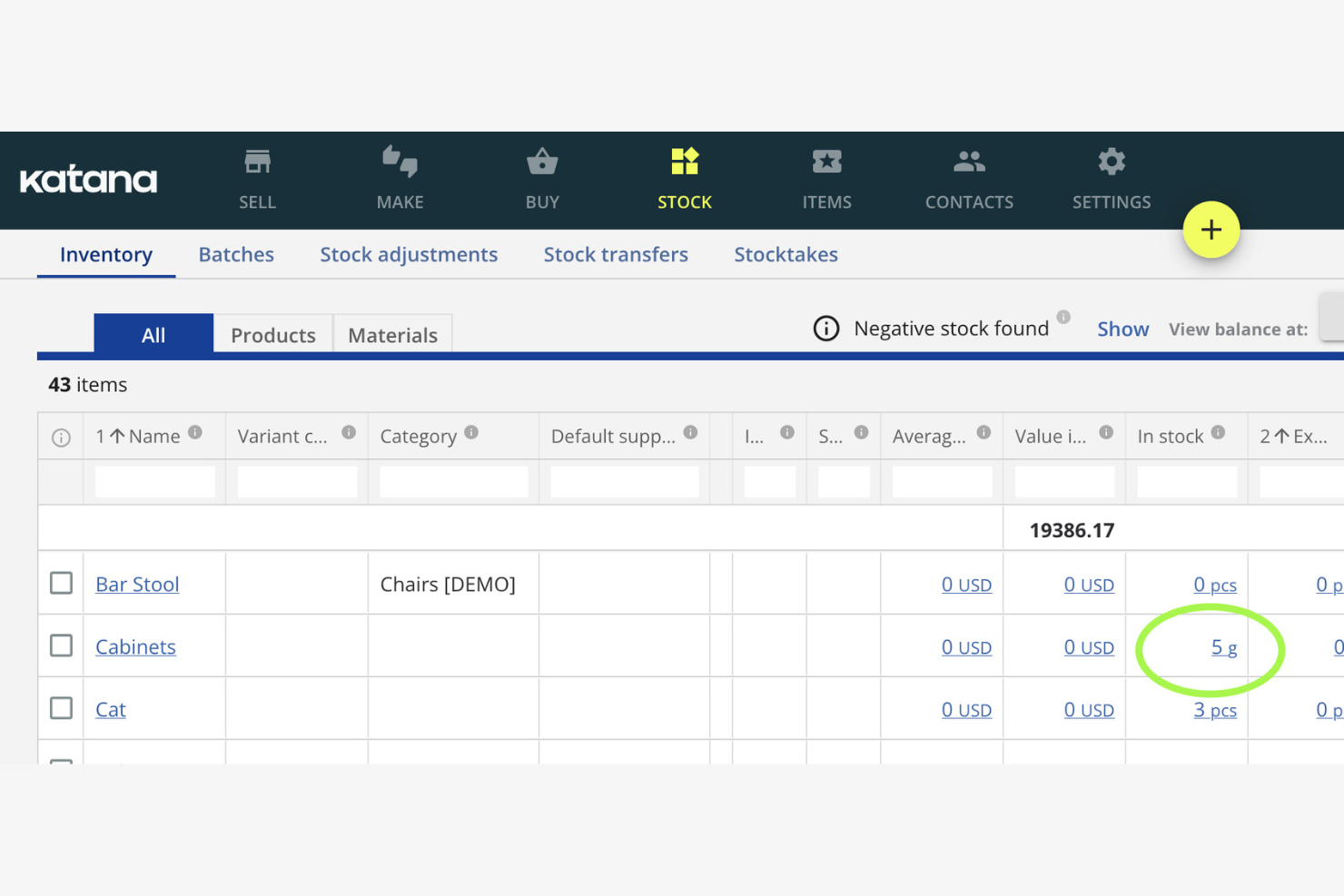
Katana is a production scheduling software tailored for small manufacturers. It helps you manage inventory, orders, and production tasks efficiently.
Why I picked Katana: It's designed for small manufacturers, focusing on ease of use and simplicity as a modern manufacturing software platform. The real-time inventory management keeps you updated on stock levels, helping you avoid production delays and reduce lead times. Its visual dashboard makes it easy to see your production schedule, including active work orders. The integration with e-commerce platforms keeps your sales and production in sync.
Standout Features and Integrations:
Features include batch tracking to trace goods movement, purchasing tools to make sure raw materials are available on time, and sales order management to support efficient fulfillment.
Integrations include Shopify, WooCommerce, QuickBooks Online, Xero, Zapier, BigCommerce, Amazon, Etsy, and more.
Pros and Cons
Pros:
- Syncs with e-commerce platforms
- Visual scheduling board
- Real-time updates
Cons:
- Basic reporting tools
- Not ideal for large operations

Infor is a production scheduling software aimed at various industries, including manufacturing and distribution. It helps manage production schedules, inventory, and supply chain processes efficiently.
Why I picked Infor: It's known for providing industry-specific solutions, offering tailored features for different sectors. The software includes advanced scheduling tools and resource planning capabilities that adapt to your industry's needs and support day-to-day operations. Its analytics provide insights to improve decision-making. The demand planning capabilities help you meet customer needs without overstocking.
Standout Features and Integrations:
Features include capacity planning to optimize resources, inventory management tools to maintain optimal stock levels, and real-time visibility into your production processes.
Integrations include Salesforce, Microsoft Dynamics, AutoCAD, Ariba, and more.
Pros and Cons
Pros:
- Real-time process visibility
- Strong demand planning tools
- Tailored for specific industries
Cons:
- Manual data entry hurdles
- High dependency on technical resources

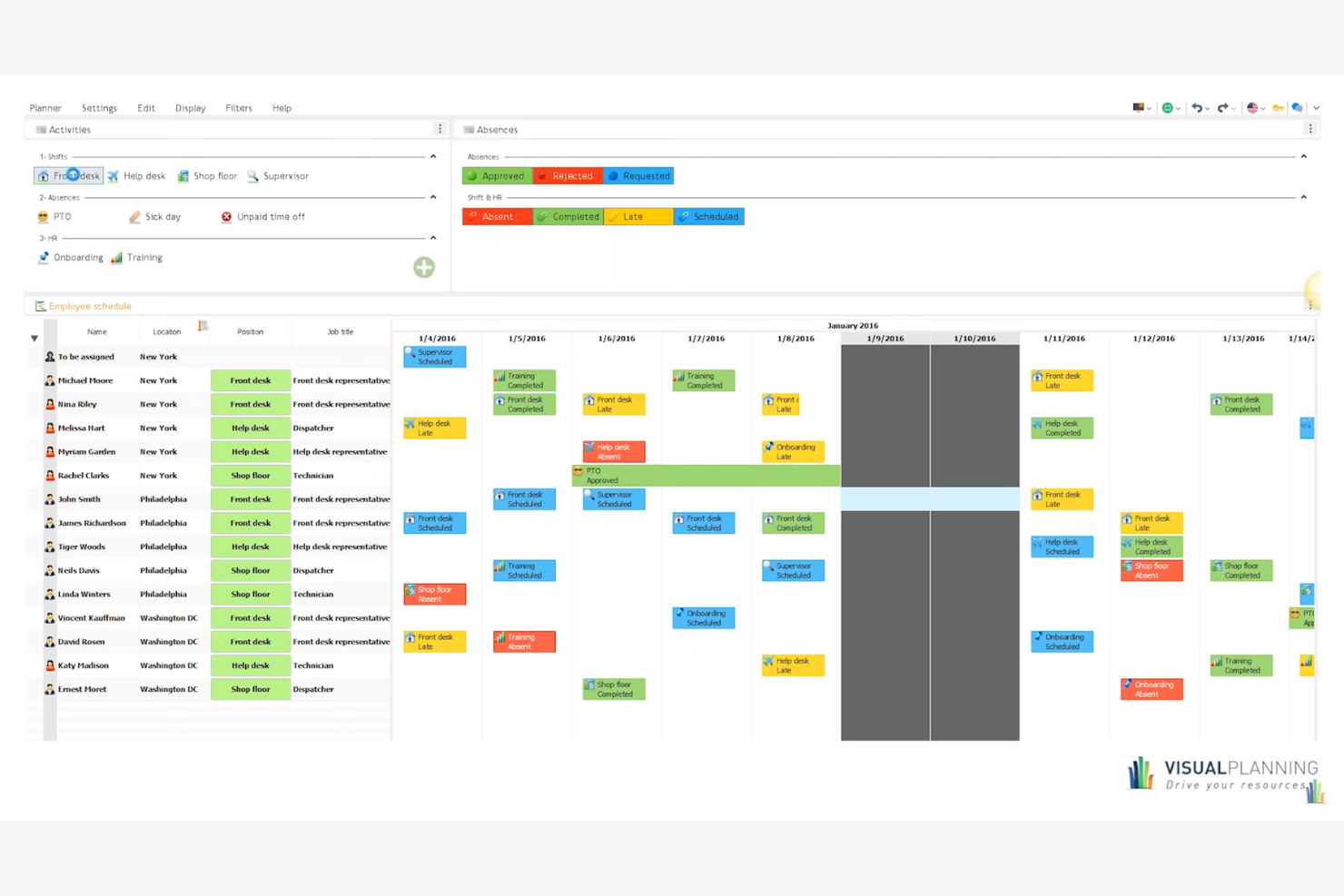
Visual Planning is a versatile production scheduling software designed for various industries, including manufacturing and construction. It helps you manage resources, schedules, and tasks efficiently, providing a tailored experience for different business needs.
Why I picked Visual Planning: It's known for its custom workflows, allowing you to adapt the tool to your specific processes, including manufacturing production and manufacturing scheduling. The drag-and-drop scheduling feature makes it easy to adjust plans and support on-time delivery. Its mobile app lets you access schedules and make updates from anywhere.
Standout Features and Integrations:
Features include customizable dashboards for clear project visibility, resource management tools to allocate tasks effectively, built-in automation to reduce manual scheduling, and real-time collaboration features to keep teams aligned.
Integrations include Microsoft Excel, Google Calendar, Outlook, Salesforce, SAP, Dropbox, and more.
Pros and Cons
Pros:
- Mobile app access
- Multi-resource scheduling
- Highly customizable workflows
Cons:
- Rigid license management
- Slow performance with large datasets

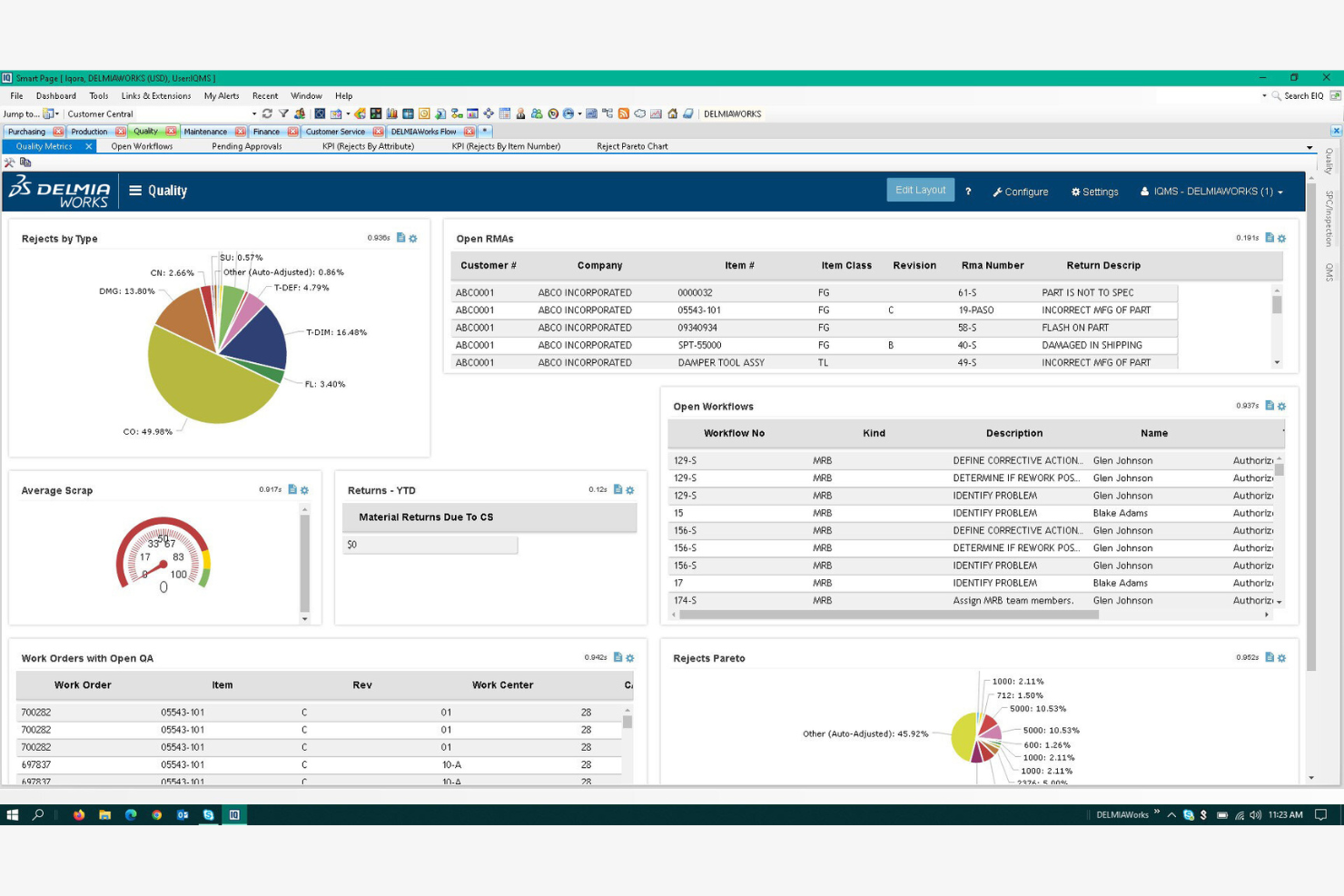
DELMIAWorks is a production scheduling software designed for manufacturers looking to integrate ERP functionalities. It helps manage production schedules, inventory, and operations efficiently.
Why I picked DELMIAWorks: It's ideal for manufacturers needing ERP integration, offering a unified solution for managing production and business processes. The software provides real-time data visibility, helping you make informed decisions quickly and run what-if scenarios to evaluate operational changes. Its scheduling tools are tailored to maximize manufacturing efficiency and balance production capacity. The quality management features are built to maintain high production standards.
Standout Features and Integrations:
Features include adaptive advanced planning and scheduling, real-time shop floor monitoring, and built-in material requirements planning to make sure you have the right materials at the right time.
Integrations include SOLIDWORKS, QuickBooks, Salesforce, AutoCAD, and more.
Pros and Cons
Pros:
- Integrates with major ERP systems
- Real-time data access
- Supports complex manufacturing processes
Cons:
- High implementation barrier
- Lack of a native web interface
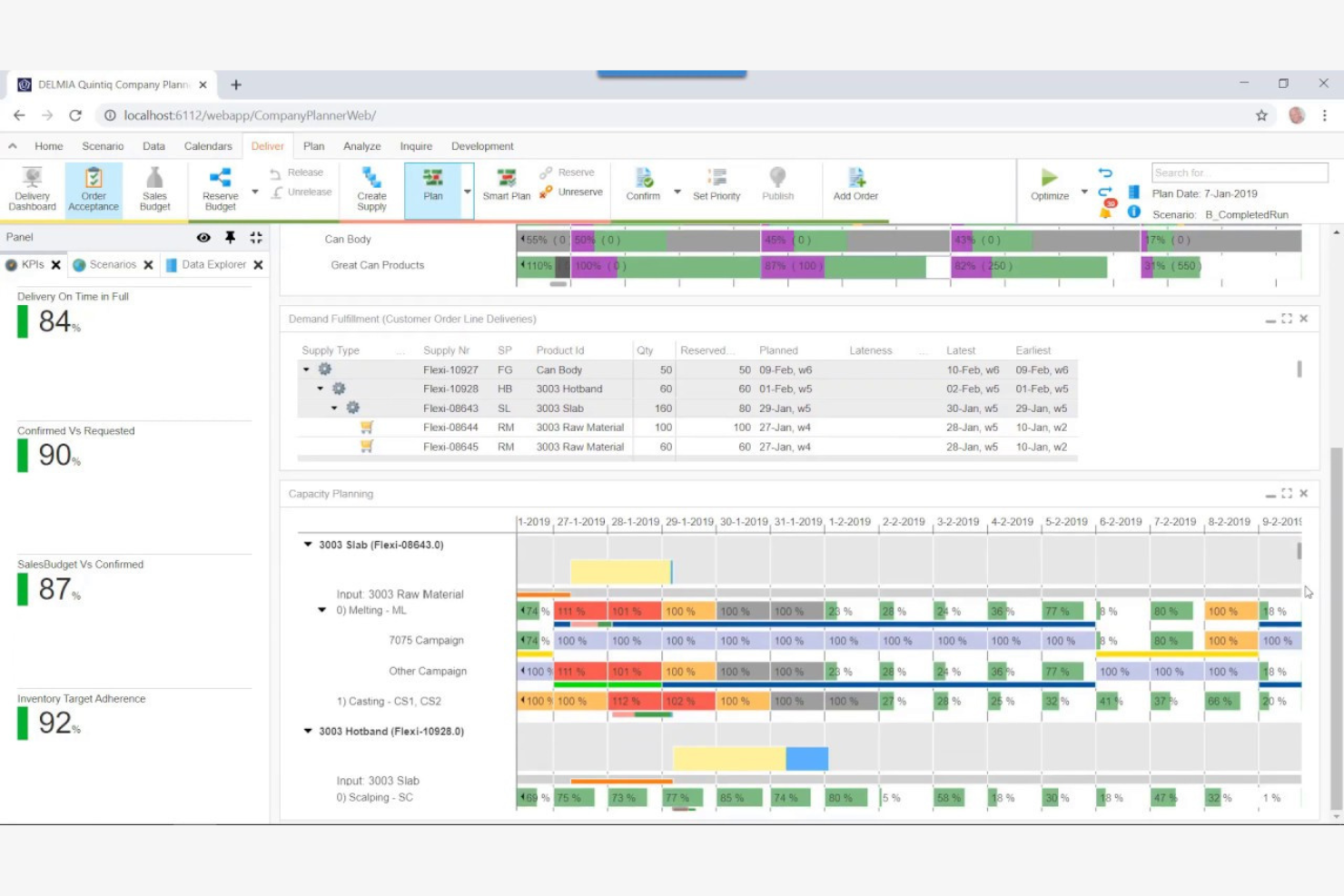
DELMIA Quintiq is a production planning software designed for businesses with complex supply chains. It helps manage planning, scheduling, and optimization of resources across various industries.
Why I picked DELMIA Quintiq: It's tailored for complex supply chains, providing advanced planning capabilities powered by optimization algorithms. The software offers optimization tools that help you improve resource utilization across operations. Its scenario planning feature allows you to test different strategies before implementation. You can also benefit from its real-time data analytics and performance metrics to make informed decisions.
Standout Features and Integrations:
Features include multi-site scheduling for coordinated resource allocation, demand forecasting to anticipate market needs, and capacity planning to meet production goals without overextending resources.
Integrations include SAP, Oracle, Microsoft Dynamics, JD Edwards, IBM Maximo, Salesforce, Infor, Manhattan Associates, Blue Yonder, Ariba, and more.
Pros and Cons
Pros:
- Supports multi-site operations
- Strong optimization capabilities
- Handles complex scheduling scenarios
Cons:
- Limited out-of-the-box solutions
- Requires significant customization
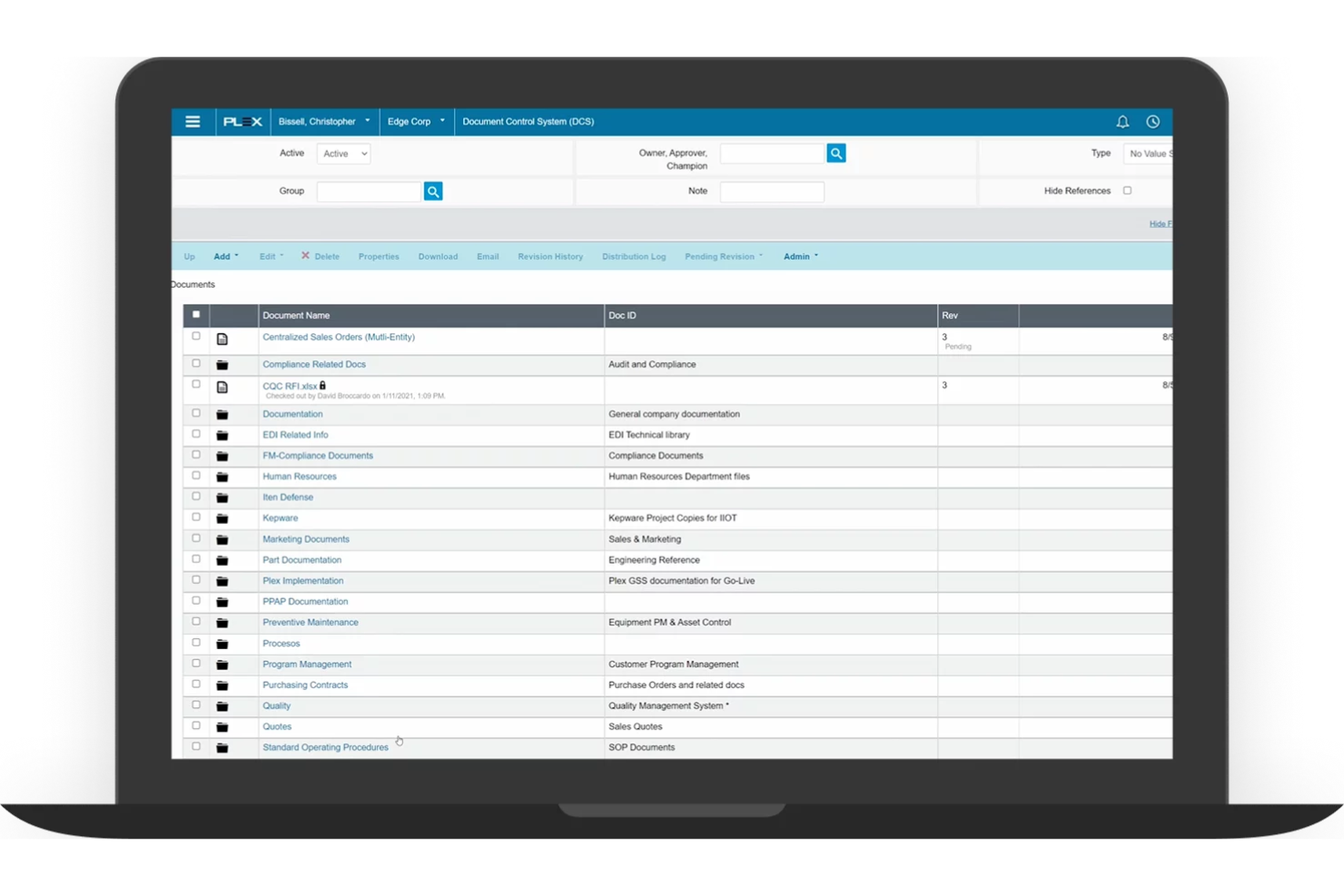
Plex is a cloud-based production scheduling software designed for manufacturers. It helps manage production processes, inventory, and quality control efficiently.
Why I picked Plex: It's known for its cloud-based planning, supporting your production planning process with easy access to real-time data from anywhere. The software's real-time monitoring helps you track production activities as they happen and optimize throughput. Its quality management features help your products meet the necessary standards. You can also leverage its detailed reporting tools to gain insights into your operations.
Standout Features and Integrations:
Features include precise shop floor management, real-time production tracking, and built-in compliance management tools that help you adhere to industry regulations.
Integrations include Salesforce, Microsoft Dynamics, QuickBooks, and more.
Pros and Cons
Pros:
- Cloud-based accessibility
- Strong compliance management
- Real-time production tracking
Cons:
- New interface lacks working versions of key tools
- Designed to replace your entire business software

Siemens Opcenter is a production scheduling software designed for large-scale manufacturers. It helps optimize production processes, manage resources, and improve overall efficiency.
Why I picked Siemens Opcenter: It offers scalability, making it suitable for growing operations. The software provides advanced planning capabilities that adapt to changing production demands and support a flexible scheduling process. Its real-time data access allows you to monitor and adjust schedules as needed. The simulation tools help you test different scenarios to find the best solutions.
Standout Features and Integrations:
Features include detailed production tracking for end-to-end visibility, built-in quality management to meet industry standards, and capacity planning to allocate resources effectively across operations.
Integrations include Teamcenter, MindSphere, TIA Portal, Infor, and more.
Pros and Cons
Pros:
- Flexible capacity planning
- Advanced simulation tools
- Supports large-scale operations
Cons:
- Windows-only limitation
- Poor documentation examples
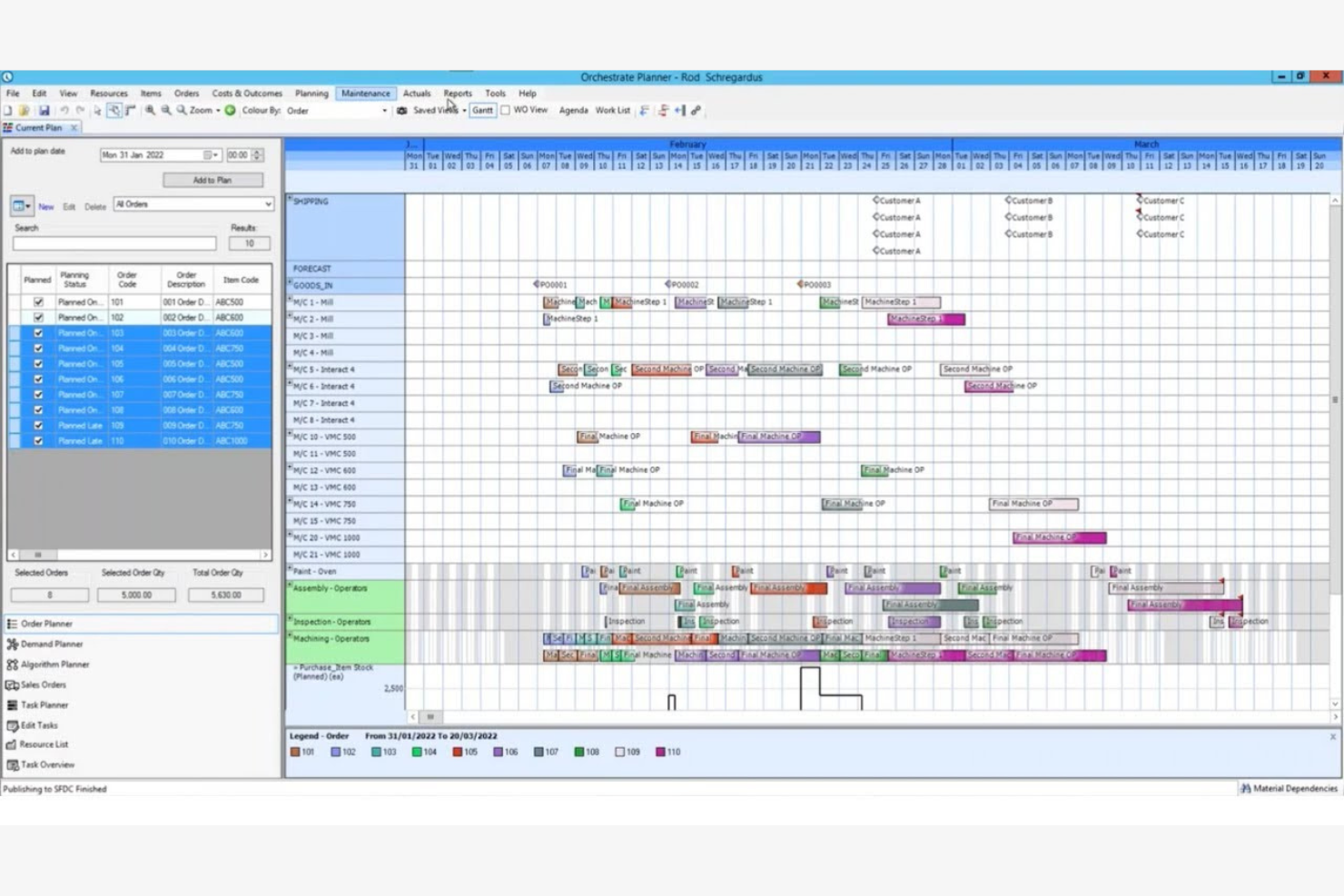
Access Orchestrate offers production scheduling software tailored for midsize businesses. It helps manage production planning, inventory, and workflow processes efficiently.
Why I picked Access Orchestrate: It provides solutions specifically for midsize businesses with tools that can scale with your operation and improve long-term profitability. The software's intuitive interface makes it easy for your team to adopt and utilize. It includes planning features that help optimize your production schedules. You can also track inventory levels to make sure you have the necessary materials on hand.
Standout Features and Integrations:
Features include real-time visibility into production processes to make informed decisions quickly. Built-in reporting highlights performance gaps and cost drivers, helping improve operational efficiency and profitability. Resource management tools to allocate tasks efficiently.
Integrations include Salesforce, QuickBooks, Xero, Sage, HubSpot, and more.
Pros and Cons
Pros:
- Strong reporting tools
- Live production status tracking
- Integrated planning features
Cons:
- No built-in API
- Heavy internet reliance
Best for global financial consolidation
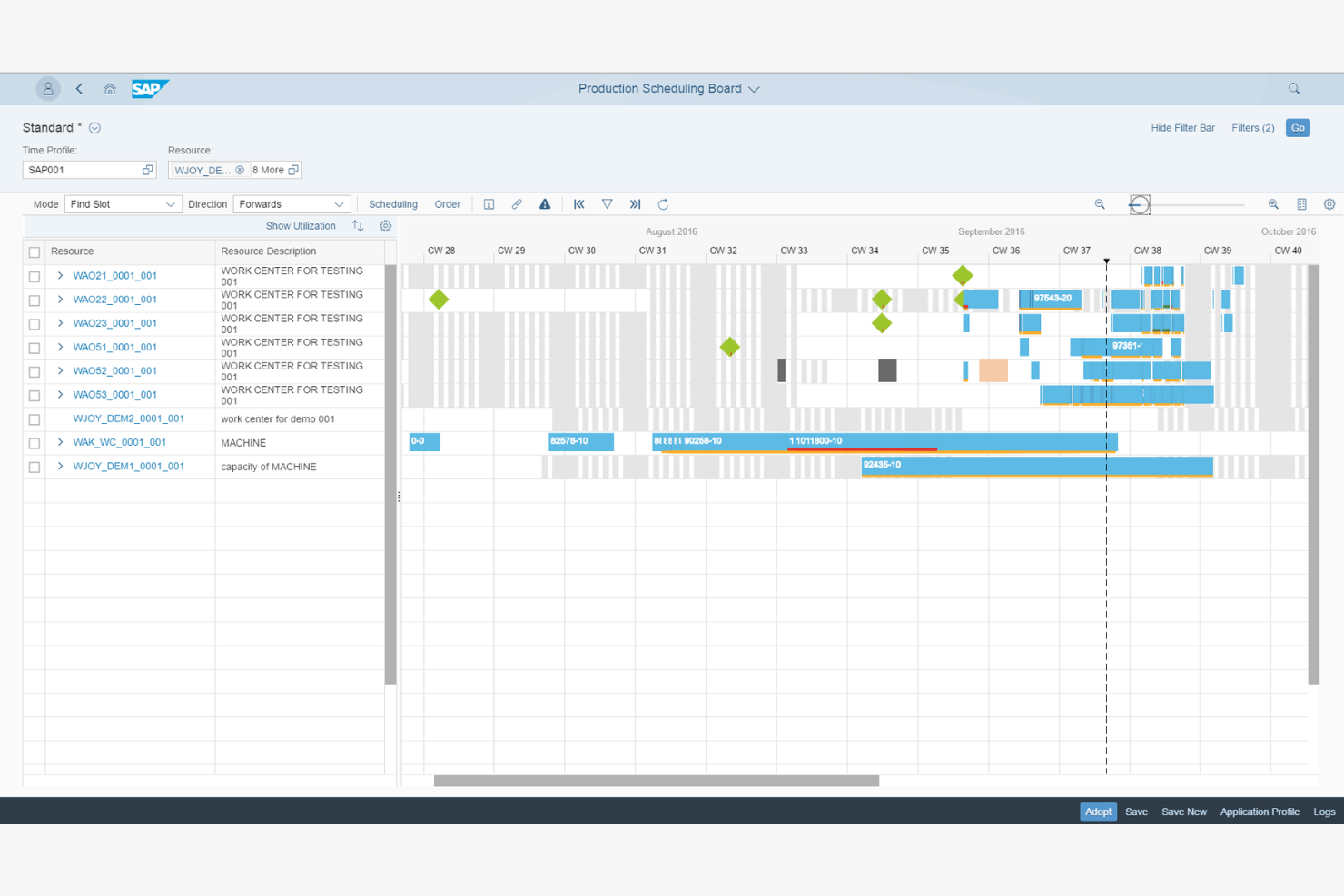
SAP S/4HANA Manufacturing for planning and scheduling offers production scheduling software for large global enterprises. It helps manage complex manufacturing processes, optimize supply chains, and improve efficiency across operations.
Why I picked SAP S/4HANA Manufacturing for planning and scheduling: It's designed for global enterprises, providing extensive features to manage large-scale operations. The software's advanced analytics help you make data-driven decisions. Its integration with supply chain processes keeps operations running smoothly across different regions. The real-time visibility feature keeps you updated on all production activities.
Standout Features and Integrations:
Features include demand-driven replenishment to maintain optimal inventory levels, predictive analytics for forecasting, and production planning with detailed scheduling features to meet output targets.
Integrations include Microsoft Azure, Amazon Web Services, Google Cloud, IBM Cloud, Salesforce, Microsoft Dynamics, SAP HANA, Ariba, and more.
Pros and Cons
Pros:
- Flexible production planning
- Live visibility into orders and capacity
- Built for complex, multi-site production
Cons:
- No built-in supply network planning
- Consultant-dependent implementation
Andere software voor productieplanning
Hier zijn enkele aanvullende opties voor software voor productieplanning die mijn shortlist niet hebben gehaald, maar die toch de moeite waard zijn om te bekijken:
- Eyelit APS
For compliance needs
- MRPeasy
For fast MRP setup for small factories
- Fishbowl Inventory
For inventory management
- Microsoft Dynamics 365 Business Central
For small to medium businesses


How I Evaluate Production Scheduling Software
When a planner needs to resequence 50 jobs after a machine goes down, I look for two things: baseline scheduling capabilities and the differentiators that separate a good tool from the right one.
Core Functionality (Table Stakes For This List)
When I'm selecting tools for my list, I rank each one on a scale from 0 (does not offer the functionality) to 5 (excels in this area) for each core functionality listed below. Then, I calculate the tool's total score into a percentage. Each tool needs to achieve a minimum total score of 65% to be considered for inclusion.
- Production Gantt Scheduling: I check whether the Gantt view covers multiple resources or lines and lets planners filter by work center, job status, or due date at a glance.
- Finite Capacity Planning: Every schedule is useless if it ignores real constraints, so I evaluate how well a tool models machine capacity, labor shifts, and tooling limits together.
- Drag-and-Drop Rescheduling: When a rush order lands or a machine goes offline, I look for rescheduling that recalculates downstream dependencies automatically after a single drag action.
- Material & Inventory Sync: I evaluate whether the scheduler pulls live inventory and BOM data so planners can spot a resin shortage or missing component before it stalls a production run.
- ERP/MES Integration: Pre-built connectors to systems like SAP, Oracle, Epicor, or Microsoft Dynamics matter here, along with open APIs for linking to MES and shop-floor data sources.
- Schedule Optimization & KPIs: I look for rule-based or algorithmic logic that minimizes changeovers or prioritizes on-time delivery, paired with dashboards tracking utilization and throughput.
Once I have a list of tools that meet this criteria, I consider what sets each platform apart.
Differentiating Factors (What Sets Vendors Apart)
Here's how I compare and contrast different vendors:
Standout Features
What-if scenario simulation is a major differentiator. I want planners to model a machine breakdown or surprise rush order and compare schedule impacts before committing changes. AI-powered optimization builds on this by auto-generating sequences that cut changeovers or prioritize at-risk due dates. For teams managing multiple facilities, I also evaluate multi-plant coordination to confirm a tool can balance workloads across sites from one centralized view.
Beyond Features
Industry fit matters a lot here. A tool built for discrete manufacturing may fall flat for a process or batch-mode environment, so I check whether a vendor supports the buyer's specific production mode. Implementation and time-to-value are other factors I weigh heavily because schedulers often need shop-floor buy-in to succeed. I also evaluate deployment options, since some plants require on-premise or hybrid hosting to meet OT security policies or data residency requirements that cloud-only platforms can't satisfy.
Hoe kies je software voor productieplanning?
Het is gemakkelijk om verstrikt te raken in lange lijsten met functies en ingewikkelde prijsstructuren. Om je te helpen gefocust te blijven tijdens je unieke selectieproces voor software, vind je hier een checklist met factoren om rekening mee te houden:
| Factor | Waar u op moet letten |
| Schaalbaarheid | Kan de software meegroeien met uw bedrijf? Ga na of de software een groter productievolume of extra locaties probleemloos aankan. Zorg ervoor dat toekomstige groei wordt ondersteund zonder dat een volledige herziening nodig is. |
| Integraties | Kan de software verbinding maken met uw huidige hulpmiddelen? Controleer de compatibiliteit met uw bestaande ERP-, CRM- of boekhoudsystemen. Vermijd oplossingen waarvoor handmatige gegevensinvoer of ingewikkelde omwegen nodig zijn om met uw technische omgeving te integreren. |
| Aanpasbaarheid | Kunt u de software aanpassen aan uw processen? Zoek naar opties waarmee u werkstromen, dashboards en rapporten kunt aanpassen. Vermijd starre oplossingen die u dwingen uw bestaande processen te veranderen. |
| Gebruiksgemak | Is de software intuïtief voor uw team? Test de gebruikersinterface en navigatie. Een steile leercurve kan de ingebruikname vertragen en de productiviteit verminderen. Kies een hulpmiddel dat uw team snel kan leren gebruiken met minimale training. |
| Implementatie en ingebruikname | Hoe lang duurt het voordat u aan de slag kunt? Houd rekening met de tijd en middelen die nodig zijn voor de installatie. Zoek naar oplossingen die ondersteuning bij de ingebruikname bieden, inclusief trainingsmateriaal, voor een soepele overgang. |
| Kosten | Past de prijs binnen uw budget? Beoordeel de totale eigendomskosten, inclusief abonnementskosten, installatiekosten en mogelijke uitbreidingen. Let op verborgen kosten en zorg ervoor dat de prijs in verhouding staat tot de geboden waarde. |
| Beveiligingsmaatregelen | Zijn uw gegevens en activiteiten beschermd? Controleer op gegevensversleuteling, regelmatige back-ups en naleving van branchenormen. Zorg ervoor dat de leverancier maatregelen heeft getroffen om datalekken te voorkomen en gevoelige informatie te beschermen. |
Wat is software voor productieplanning?
Software voor productieplanning is een hulpmiddel dat bedrijven helpt hun productieprocessen te plannen, beheren en optimaliseren. Deze software wordt doorgaans gebruikt door productiemanagers, planners en operationele professionals en biedt waarde door de efficiëntie te verbeteren en stilstand te verminderen. Functies zoals toewijzing van middelen, voorraadbeheer en realtime volgen helpen bij het coördineren van productieactiviteiten en het halen van deadlines. Over het algemeen verbeteren deze hulpmiddelen de productiviteit en ondersteunen ze betere besluitvorming binnen productieactiviteiten.
Functies
Let bij het selecteren van software voor productieplanning op de volgende belangrijke functies:
- Toewijzing van middelen: Helpt u taken en middelen efficiënt toe te wijzen om productieschema's te optimaliseren en knelpunten te verminderen.
- Voorraadbeheer: Houdt voorraadniveaus bij.
- Realtime volgen: Biedt live-updates over productieprocessen, zodat u snel kunt bijsturen en weloverwogen beslissingen kunt nemen.
- Vraagvoorspelling: Voorspelt toekomstige productiebehoeften op basis van historische gegevens.
- Aanpasbare dashboards: Hiermee kunt u weergaven en rapporten aanpassen.
- Kwaliteitsbeheer: Zorgt ervoor dat producten aan branchenormen voldoen.
- Integratiemogelijkheden: Maakt verbinding met bestaande systemen zoals ERP of CRM.
- Geavanceerde analyses: Bieden inzicht in productieprestaties en trends.
- Toezicht op naleving: Controleert en documenteert de naleving van branchenormen.
Voordelen
De implementatie van software voor productieplanning biedt verschillende voordelen voor uw team en uw bedrijf. Hier zijn enkele voordelen waar u naar kunt uitkijken:
- Verbeterde efficiëntie: Toewijzing van middelen en realtime volgen helpen werkstromen te optimaliseren, stilstand te verminderen en de productiviteit te verhogen.
- Beter voorraadbeheer: Functies voor voorraadbeheer helpen u optimale voorraadniveaus te handhaven en tekorten en overbevoorrading te voorkomen.
- Geoptimaliseerde besluitvorming: Geavanceerde analyses en vraagvoorspellingen bieden inzichten die datagestuurde beslissingen en strategische planning ondersteunen.
- Kwaliteitsborging: Hulpmiddelen voor kwaliteitsbeheer bewaken productienormen en helpen u consistente producten van hoge kwaliteit te leveren.
- Naleving van regelgeving: Functies voor toezicht op naleving zorgen ervoor dat u in lijn blijft met branchenormen, risico's beperkt en boetes voorkomt.
- Geïntegreerde activiteiten: Maak verbinding met bestaande systemen om de gegevensstroom in stand te houden en de algehele operationele efficiëntie te verbeteren.
Kosten en prijzen
Bij het selecteren van software voor productieplanning is inzicht in de verschillende beschikbare prijsmodellen en abonnementen nodig. De kosten variëren op basis van functies, teamgrootte, uitbreidingen en meer. In de onderstaande tabel worden veelvoorkomende abonnementen, hun gemiddelde prijzen en de typische inbegrepen functies van oplossingen voor productieplanning samengevat:
Vergelijkingstabel van abonnementen voor software voor productieplanning
| Plantype | Gemiddelde prijs | Veelvoorkomende functies |
| Gratis abonnement | $0 | Basisplanning, beperkte rapportage en basisvoorraadbeheer. |
| Persoonlijk abonnement | $15-$60/gebruiker/maand | Geavanceerde planning, basisanalyses en ondersteuning per e-mail. |
| Zakelijk abonnement | $50-$500/gebruiker/maand | Realtime volgen, integratiemogelijkheden en gedetailleerde rapportage. |
| Bedrijfsabonnement | $800+/maand | Aanpasbare overzichten, geavanceerde analyses en gespecialiseerde klantenondersteuning. |
Veelgestelde vragen over software voor productieplanning
Hier vindt u antwoorden op enkele veelgestelde vragen over software voor productieplanning:
Welke sectoren hebben het meeste baat bij software voor productieplanning?
Sectoren zoals productie, de auto-industrie, lucht- en ruimtevaart en voedingsmiddelenproductie hebben veel baat bij software voor productieplanning. Deze hulpmiddelen helpen bij het beheren van complexe productieprocessen, het verbeteren van de efficiëntie en het handhaven van de kwaliteit. Als u actief bent in een sector met ingewikkelde planningsbehoeften of strikte deadlines, overweeg dan deze software te implementeren om activiteiten en productiviteit te verbeteren.
Hoe helpt software voor productieplanning de workflow van mijn team te verbeteren?
Software voor productieplanning vereenvoudigt taaktoewijzingen, deadlines en de toewijzing van middelen op één platform. Zo kunt u knelpunten signaleren, overplanning voorkomen en prioriteiten snel aanpassen.
Kan software voor productieplanning worden geïntegreerd met bestaande systemen?
Ja, de meeste software voor productieplanning kan worden geïntegreerd met bestaande systemen zoals ERP-, CRM- en boekhoudsoftware. Integratie zorgt ervoor dat gegevens tussen platforms worden uitgewisseld, waardoor handmatige gegevensinvoer en fouten worden verminderd. Controleer vóór de aankoop of de software compatibel is met uw huidige hulpmiddelen om mogelijke integratieproblemen te voorkomen.
Hoe bepaal ik welke software geschikt is voor de omvang van mijn bedrijf?
Houd rekening met de omvang van uw team, het productievolume en uw specifieke behoeften. Kleine bedrijven kiezen mogelijk voor eenvoudigere, betaalbaardere opties met basisfuncties. Grotere ondernemingen hebben wellicht geavanceerde mogelijkheden nodig, zoals realtime volgen en analyses. Evalueer uw huidige en toekomstige behoeften om een schaalbare oplossing te kiezen.
Wat kan ik verwachten tijdens het implementatieproces?
Houd rekening met een periode van installatie, training en aanpassing. Het implementatieproces verschilt per softwarepakket, maar omvat doorgaans gegevensmigratie, systeemconfiguratie en gebruikerstraining. Kies een leverancier die ondersteuning bij de ingebruikname biedt, zoals handleidingen en klantenservice, zodat uw team soepel kan overstappen.
Is er technische ondersteuning beschikbaar voor software voor productieplanning?
Ja, de meeste leveranciers bieden technische ondersteuning, maar het serviceniveau verschilt. Zoek naar aanbieders met meerdere ondersteuningskanalen, zoals telefoon, e-mail en chat. Sommige bieden 24/7 ondersteuning, terwijl andere beperkte openingstijden hebben.